If you’ve searched “Surfer SEO pricing” recently, you’ve probably seen conflicting numbers. Some articles still quote Essential and Scale plans. Others list add-on prices that no longer exist as standalone purchases.
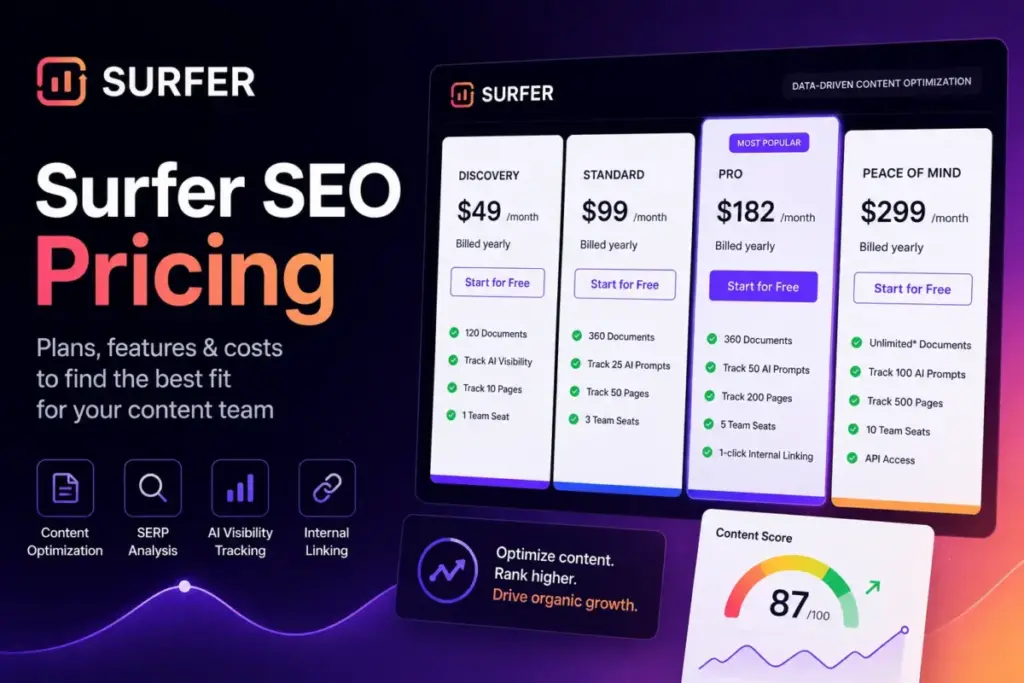
Here is what Surfer’s official pricing page shows as of June 2026: five plans, Discovery, Standard, Pro, Peace of Mind, and Enterprise, with annual billing discounts up to about 17%.
The entry price looks friendly at $49/month billed annually. But the real pricing story begins the moment you need more than one seat, AI visibility tracking, or API access.
I have tracked Surfer’s pricing changes monthly for over a year. This guide uses verified official pricing to break down every plan, calculate annual savings, flag hidden costs, and show you which Surfer SEO plan to budget for whether you’re a solo creator, a five-person content team, or a 50-seat agency.
If you’re still exploring which best AI writing tools match your content workflow, start there, then come back here for the Surfer-specific math.
Surfer SEO Pricing at a Glance (June 2026)
Before diving into limits and feature gates, here’s the current pricing snapshot with both billing options calculated side by side.
| Plan | Monthly Billing | Annual Billing (per month) | Annual Total | Annual Savings | Seats |
|---|---|---|---|---|---|
| Discovery | $59/mo | $49/mo | $588/yr | $120/yr | 1 |
| Standard | $119/mo | $99/mo | $1,188/yr | $240/yr | 3 |
| Pro | $219/mo | $182/mo | $2,184/yr | $444/yr | 5 |
| Peace of Mind | $359/mo | $299/mo | $3,588/yr | $720/yr | 10 |
| Enterprise | Not available monthly | From $999/mo (tailored) | Custom | Custom | Custom |
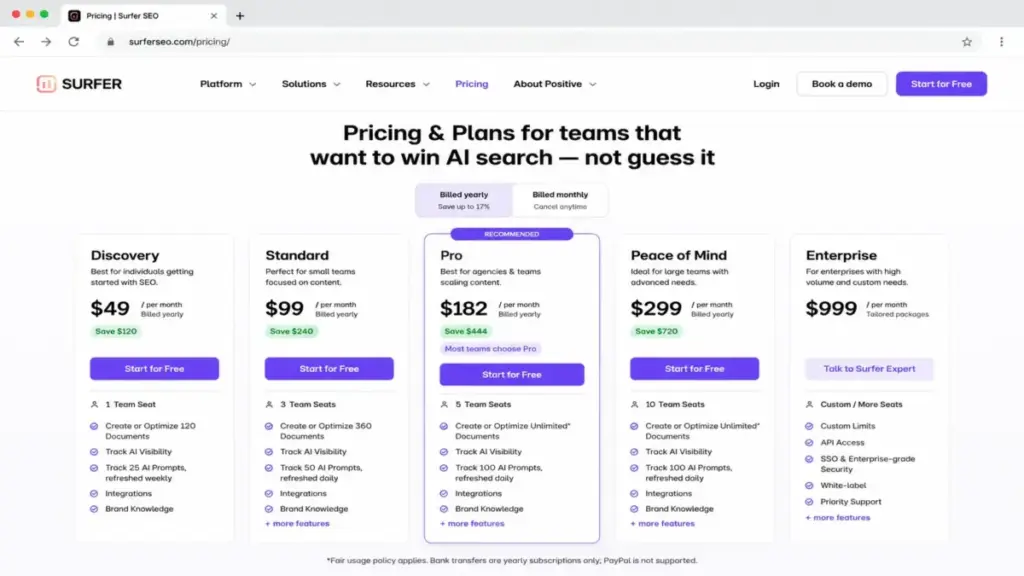
A note on monthly prices: Surfer’s pricing page displays annual-billing equivalents as the primary numbers. The monthly billing amounts above are derived from official annual savings data disclosed on the pricing page (for example, Standard saves $240/year on annual billing, which implies $119/month when billed monthly versus $99/month equivalent on annual billing).
Enterprise billing: According to official Surfer help documentation, Enterprise subscriptions do not offer standard monthly billing. The starting reference of $999/month is for tailored annual packages arranged through sales.
Source: Official Surfer SEO pricing page, verified June 18, 2026.
Quick Pricing Verdict
- Starting price: $49/month billed annually (Discovery)
- Practical plan for most teams: Pro at $182/month annual, $219/month monthly
- Free plan: No. 7-day Pro trial requires a credit card and auto-charges on day 8.
- Plan to avoid: Discovery (1 seat, no AI tracking, 120 docs/year)
- Biggest hidden cost: “Unlimited” documents on Peace of Mind are capped at 500/month under the Fair Usage Policy
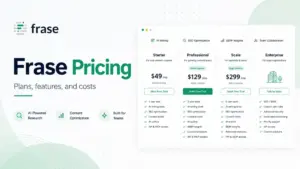
- If Surfer is too expensive: NeuronWriter starts at $19/month for basic content scoring; Frase starts at $39/month annual with no-card trial
What Changed in 2026: The Plan Reset You Need to Know
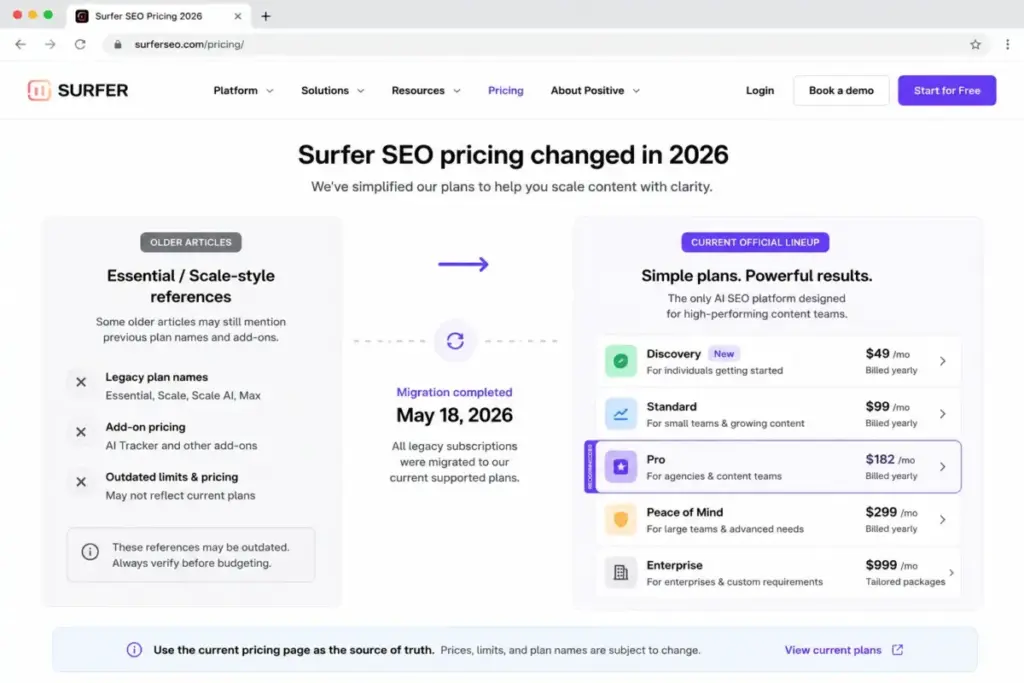
If you’re comparing Surfer pricing articles from early 2025 or before, you’ll notice many still reference “Essential,” “Scale,” “Scale AI,” or “Max” plan names. Those are gone from the current public pricing page.
Surfer migrated existing subscribers to the new plan structure. According to the official migration FAQ:
- Former add-ons absorbed into plans. Features like AI Tracker, which used to be a separate purchase, are now included in Standard and higher plans as AI visibility tracking with plan-specific prompt limits.
- Rank Tracker remains a standalone add-on, but its standalone price was not publicly disclosed on the official pages reviewed for this article.
- Legacy plan holders were moved to the closest equivalent in the new lineup, with adjustments to limits and pricing.
Why this matters for your budget: If you’re reading a competitor article that quotes “$49/month Essential with 30 articles and $99/month Scale with 100 articles,” that’s not the current pricing. Discovery at $49/month annual includes 120 documents per year (not per month), and Standard at $99/month annual includes 360 documents per year with AI prompt tracking.
What Each Plan Gets You
Discovery — $49/mo Annual | $59/mo Monthly
Discovery is Surfer’s entry point, designed for solo creators who want basic content optimization without team features.
What’s included:
- 120 documents per year (on annual billing)
- 10 tracked pages
- 1 team seat
- 1 brand workspace
- AI SEO optimization guidelines
- Surfy AI assistant and Humanizer
What’s missing:
- No AI prompt tracking or AI visibility monitoring
- No prompt refresh capability
- No multi-brand workspace support
- No team collaboration features beyond the single seat
Who it’s for: A solo blogger or freelance writer publishing roughly 10 optimized pieces per month who doesn’t need AI visibility tracking. If you need to share the account with even one teammate, Discovery is already too small.
Standard — $99/mo Annual | $119/mo Monthly
Standard is where Surfer becomes a team-capable tool. This is the first plan with AI visibility tracking.
What’s included:
- 360 documents per year (on annual billing)
- 50 tracked pages
- 3 team seats
- 1 brand workspace
- 25 AI prompts refreshed weekly
- AI visibility tracking (monitors how content appears in Google AI Overview, AI Mode, ChatGPT, Perplexity, Gemini)
- Integrations, Brand Knowledge, 1-click content optimization
- Team collaboration, plagiarism checker, rank drop detection
What’s missing:
- AI prompts refresh weekly, not daily
- Still limited to 1 brand workspace
- No 1-click internal linking, content ideas and coverage gap tools
- No custom templates, cannibalization report
- No API access or Peace of Mind onboarding
Who it’s for: A small content team (2–3 people) managing one brand who wants AI visibility monitoring and collaborative optimization. The weekly AI prompt refresh is adequate if you check AI search positions on a sprint cadence rather than daily.
Pro — $182/mo Annual | $219/mo Monthly
Pro is where Surfer unlocks its strategic content planning tools and is the best-value plan for most serious content teams.
What’s included:
- 360 documents per year (on annual billing)
- 200 tracked pages
- 5 team seats
- 5 brand workspaces
- 50 AI prompts refreshed daily
- Topical Map for content planning
- Content Audit for existing page analysis
- Cannibalization report
- 10 custom templates
- 1-click internal linking
- Content ideas and coverage gap analysis
What’s missing:
- Not unlimited documents (still 360/year, same as Standard)
- No unlimited brand workspaces
- No 100-prompt daily AI tracker
- No API access
- No personalized onboarding or dedicated success manager
Who it’s for: A content team of 3–5 people managing multiple brands who need daily AI tracking, topical mapping, content auditing, and internal linking automation. This plan delivers the most strategic value per dollar for teams actively publishing and refreshing content.
Peace of Mind — $299/mo Annual | $359/mo Monthly
Peace of Mind is Surfer’s premium tier for larger teams that need unlimited-style document creation, API access, and personalized onboarding support.
What’s included:
- Unlimited documents for typical usage (subject to Fair Usage Policy — see hidden costs below)
- 500 tracked pages
- 10 team seats
- Unlimited brand workspaces
- 100 AI prompts refreshed daily
- API access
- Advanced SERP Analysis
- Personalized onboarding
- Dedicated success manager
What’s missing:
- Still subject to Fair Usage Policy (not truly unlimited — capped at 500 documents/month under typical usage)
- Not the same as Enterprise legal onboarding, SSO, custom limits, white-label, or priority support
Who it’s for: Agencies and in-house SEO teams with 6–10 members who need API integrations, unlimited brand workspaces for client accounts, and a dedicated success manager to guide onboarding.
Enterprise — From $999/mo (Tailored Annual Package)
Enterprise is for organizations that need custom limits, security, and governance beyond what public plans offer.
What’s included:
- Custom usage limits
- SSO and enterprise-grade security
- Full advisory program
- Legal onboarding assistance
- Early access to new features
- Tailored team onboarding
- White-label options
- Priority support
What you need to know:
- Standard monthly billing is not available for Enterprise
- Annual billing terms and final pricing are custom, negotiated through sales
- The $999/month starting reference is for tailored packages — your actual quote will depend on seat count, usage requirements, and security needs
Who it’s for: Organizations with 10+ seats that require SSO, legal onboarding, custom API limits, or white-label capabilities. If you’re at this stage, you’re requesting a custom quote anyway.
Feature-to-Plan Map: What Each Tier Unlocks
Not every Surfer feature is available on every plan. This matrix shows exactly where the gates sit.
| Feature | Discovery | Standard | Pro | Peace of Mind | Enterprise |
|---|---|---|---|---|---|
| Documents | 120/yr | 360/yr | 360/yr | Unlimited (FUP) | Custom |
| AI Visibility Tracking | ❌ | ✅ | ✅ | ✅ | ✅ |
| AI Prompts | 0 | 25 weekly | 50 daily | 100 daily | Custom |
| Tracked Pages | 10 | 50 | 200 | 500 | Custom |
| Brand Workspaces | 1 | 1 | 5 | Unlimited | Custom |
| Team Seats | 1 | 3 | 5 | 10 | Custom |
| 1-Click Internal Linking | ❌ | ❌ | ✅ | ✅ | ✅ |
| Topical Map | ❌ | ❌ | ✅ | ✅ | ✅ |
| Content Audit | ❌ | ❌ | ✅ | ✅ | ✅ |
| Cannibalization Report | ❌ | ❌ | ✅ | ✅ | ✅ |
| Content Ideas & Coverage Gap | ❌ | ❌ | ✅ | ✅ | ✅ |
| Custom Templates | Limited | Limited | 10 | ✅ | Custom |
| API Access | ❌ | ❌ | ❌ | ✅ | ✅ |
| SSO | ❌ | ❌ | ❌ | ❌ | ✅ |
| Dedicated Success Manager | ❌ | ❌ | ❌ | ✅ | Priority |
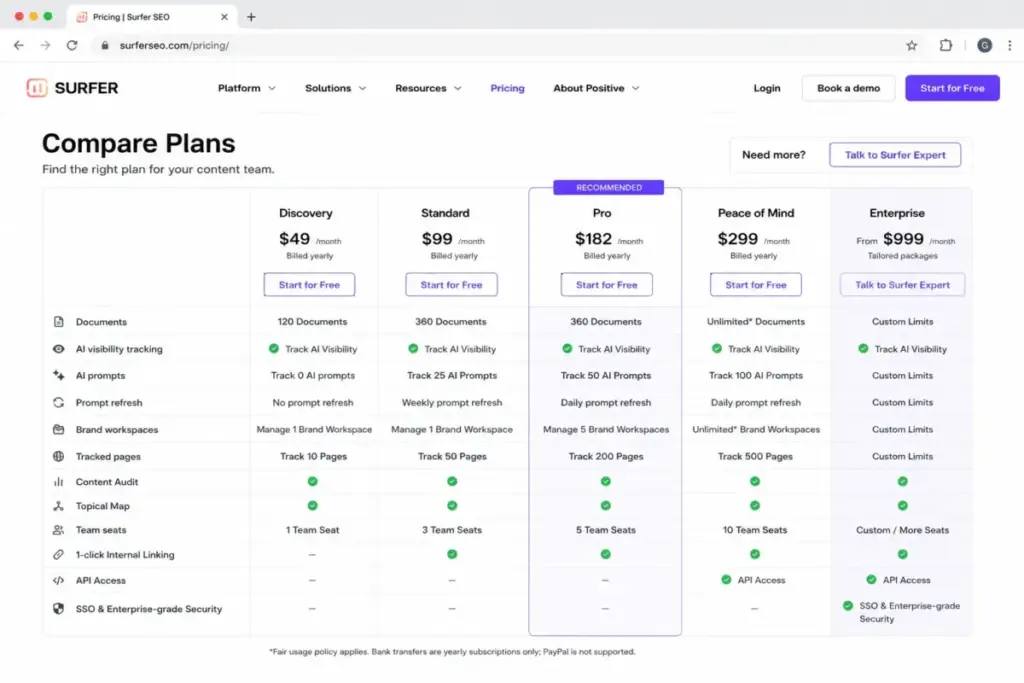
Key takeaway: The biggest jump in value happens between Standard and Pro, where you gain daily AI prompt refreshes, Topical Map, Content Audit, cannibalization reporting, internal linking, and 5 brand workspaces. API access and SSO are gated to Peace of Mind and Enterprise respectively.
Hidden Costs and Fine Print
Surfer doesn’t charge usage overages or surprise per-article fees, but there are real cost considerations that most pricing guides skip.
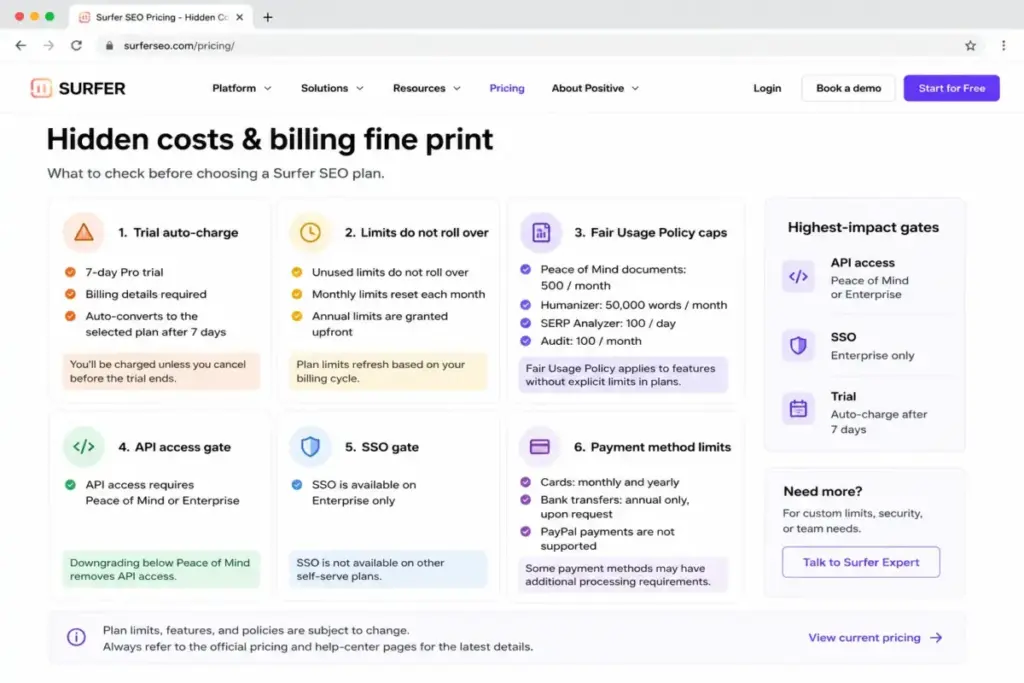
1. Trial Auto-Charge: What Happens on Day 8
Surfer offers a 7-day free trial with full Pro plan access. But here’s the catch:
- You must select a subscription plan and enter billing details at checkout to start the trial
- Your card is charged for the selected plan amount when the 7-day period ends
- If you don’t cancel before day 8, you’re subscribed
Action item: Set a calendar reminder for day 6. Cancel through your account settings if you’re not ready to commit.
2. Limits Don’t Roll Over
Unused monthly or annual limits do not carry over. If your Standard plan includes 360 documents per year and you only use 200 by renewal, you lose 160.
- Monthly-allotted features (like AI prompts) reset at the start of each billing month
- Annual document limits are granted upfront for the subscription year and do not roll over to the next year
3. Fair Usage Policy on “Unlimited” Features
Peace of Mind is marketed with unlimited documents, but the Fair Usage Policy sets practical caps:
| Feature | Fair Usage Cap |
|---|---|
| Documents (Peace of Mind) | 500/month |
| Humanizer | 50,000 words/month |
| Auto-optimize | 100/day |
| Auto Internal Linking | 100/day |
| Keyword Research | 100/day |
| SERP Analyzer | 100/day |
| Audit | 100/month |
These caps are generous for most teams, but they mean “unlimited” does not mean “uncapped for industrial-scale scraping or generation.”
4. API Access Starts at Peace of Mind
If your workflow requires API integration (for CMS pipelines, custom dashboards, or third-party tools), you need at minimum a Peace of Mind subscription at $299/month annual. Legacy users who had API access on older plans are being migrated to Peace of Mind or higher.
5. SSO Requires Enterprise
Single Sign-On is not available on any public plan. You need an Enterprise custom package for SSO.
6. Payment Method Limitations
- Card payments (credit/debit) are accepted for monthly and annual billing
- Bank transfers are available only for annual subscriptions and only upon request
- PayPal is not supported
If your procurement team requires PayPal or needs to pay monthly by bank transfer, Surfer cannot accommodate that.
What Happened to Add-Ons?
If you’re coming from older Surfer articles, you may remember standalone add-ons for AI Tracker, SERP Analyzer, and other tools. Most of these have been absorbed into the current plan structure.
Still available as a standalone add-on: Rank Tracker remains offered separately, though its standalone price was not publicly disclosed on the official Surfer pages found during research for this article.
Absorbed into plans: AI Tracker (now AI visibility tracking in Standard+), SERP Analyzer (included in higher tiers), and other legacy add-ons are now part of plan feature sets rather than separate purchases.
If a competitor article quotes you a specific add-on price for AI Tracker or SERP Analyzer, verify whether that price is still current — most of those tools are now bundled.
Cost at Scale: What Your Team Will Pay
The plan you need depends less on price preference and more on seat count. Here is a team-size routing table.
| Team Size | Recommended Plan | Monthly Billing | Annual Billing | Annual Total | Notes |
|---|---|---|---|---|---|
| 1 user | Discovery or Standard | $59–$119/mo | $49–$99/mo | $588–$1,188/yr | Discovery if no AI tracking needed; Standard if you need AI visibility |
| 2–3 users | Standard | $119/mo | $99/mo | $1,188/yr | Includes 3 seats; cheapest multi-user option |
| 4–5 users | Pro | $219/mo | $182/mo | $2,184/yr | First plan with 5 seats; adds Content Audit, Topical Map, daily AI prompts |
| 6–10 users | Peace of Mind | $359/mo | $299/mo | $3,588/yr | 10 seats, API access, dedicated success manager; saves $720/yr on annual |
| 11–24 users | Enterprise | N/A | Custom from $999/mo | Custom | Public plans cap at 10 seats |
| 20 users | Enterprise | N/A | Custom from $999/mo | Custom | No public plan includes 20 seats; requires Enterprise custom quote |
| 25–100 users | Enterprise | N/A | Custom from $999/mo | Custom | Requires custom seat, security, SSO, and governance terms |
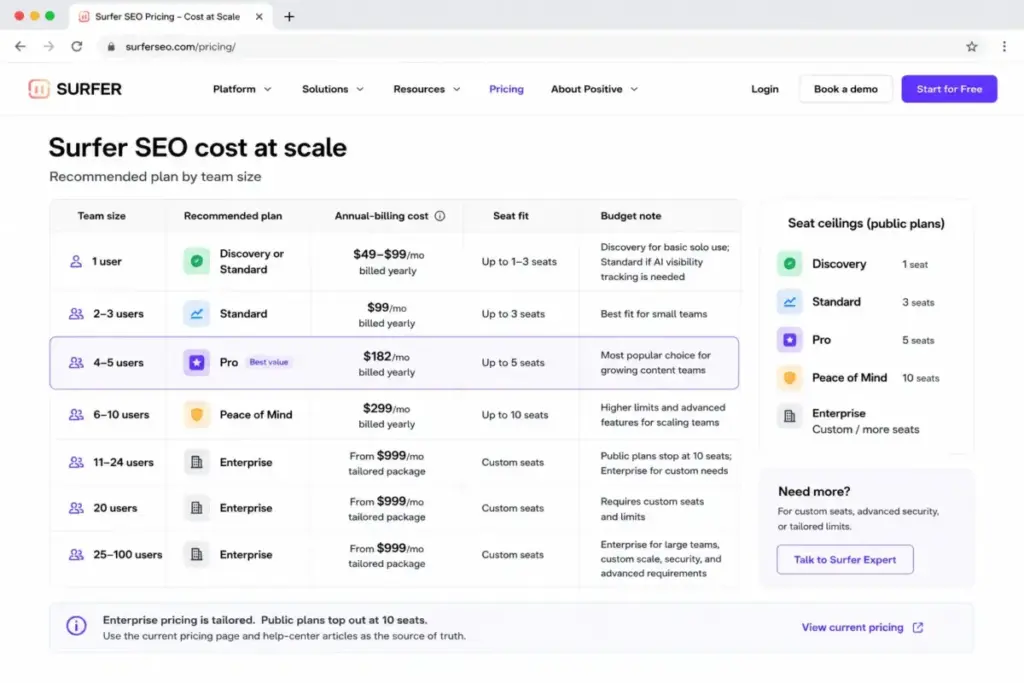
The critical seat ceilings: Discovery has 1 seat. Standard has 3. Pro has 5. Peace of Mind has 10. Any team larger than 10 must go Enterprise. There is no “add extra seats for $X” option on public plans.
How Surfer SEO Pricing Compares to Alternatives
Surfer is not the only content optimization platform, and the right comparison depends on what you need from the tool.
| Tool | Starting Price (Monthly) | Starting Price (Annual Equiv.) | Free Plan | Unlimited Users? | 10-User Cost |
|---|---|---|---|---|---|
| Surfer SEO | $59/mo | $49/mo | No (7-day Pro trial) | No | $359/mo (Peace of Mind) |
| Frase | $49/mo | $39/mo | No (7-day trial, no card) | No | ~$299/mo+ (Scale + extra seats) |
| Clearscope | $129/mo | $129/mo | No | Yes (unlimited users) | $129–$399/mo |
| MarketMuse | Free tier available | ~$99/mo (third-party refs) | Yes | Not confirmed | Custom |
| Dashword | $99/mo | $99/mo | First report free | No | $349/mo (Business, 10 seats) |
| NeuronWriter | $23/mo | $19/mo | Trial only | Not seat-priced | ~$69/mo (Gold, collaboration) |
When competitors cost less
- Budget-conscious solo creators: NeuronWriter at $19–$23/month delivers content scoring at a fraction of Surfer’s Discovery price. If you don’t need AI visibility tracking, it’s hard to justify the price gap.
- Teams that need unlimited seats: Clearscope starts higher at $129/month but includes unlimited users. For a 10-person team, Clearscope at $129–$399/month could be cheaper than Surfer’s Peace of Mind at $299–$359/month while removing seat-based friction entirely.
- No-card trial: Frase lets you trial without a credit card. Surfer requires card details upfront.
When Surfer is worth the premium
- AI visibility tracking: Surfer’s AI visibility monitoring across Google AI Overview, AI Mode, ChatGPT, Perplexity, and Gemini is a feature most competitors don’t match at any price point. If tracking AI search presence is core to your content strategy, Surfer is the specialist.
- Content operations depth: Topical Map, Content Audit, cannibalization reporting, and 1-click internal linking (Pro and above) create a content operations workflow that goes beyond basic content scoring.
- Integrated workflow: If your team uses Surfer for optimization, AI tracking, content planning, and auditing in one platform, the combined value can exceed buying separate tools for each function.
If your primary need is content-level SEO scoring and you don’t need AI visibility tracking, tools like NeuronWriter or Frase offer considerably better value. If you’re comparing broader best AI content creation tools across writing, optimization, and research, the decision often comes down to whether AI visibility monitoring justifies the price gap.
How to Avoid Overpaying for Surfer SEO
- Start with annual billing. The savings range from $120/year on Discovery to $720/year on Peace of Mind. Monthly billing is never cheaper.
- Match your plan to your seat count, not your ambition. A 3-person team does not need Pro’s 5 seats. Standard covers you and saves $83/month versus Pro on annual billing.
- Audit your document usage before renewal. If your team used 150 of 360 annual documents, you overbought. Consider whether Discovery’s 120 documents would cover your output next year.
- Do not pay for API access unless you use it. API access starts at Peace of Mind ($299/month annual). If you do not have a CMS pipeline or custom integration that requires the API, Pro gives you every other feature for $117/month less.
- Cancel the trial by day 6, not day 7. Your card auto-charges when the 7-day Pro trial ends. Set a reminder two days early to give yourself time to evaluate.
- Ignore add-on prices from old articles. Most former add-ons (AI Tracker, SERP Analyzer) are now included in Standard and above. Do not budget extra for features your plan already covers.
- Request a bank transfer for annual subscriptions if your finance team needs it. Bank transfers are available on request for annual billing only. This avoids credit card limits on larger team purchases.
Surfer SEO Free Trial: What to Expect
Surfer does not offer a permanent free plan. Here’s exactly what the trial looks like:
| Detail | What You Get |
|---|---|
| Trial duration | 7 days |
| Plan access | Full Pro plan features |
| Credit card required | Yes — you select a plan and enter billing details at checkout |
| What happens after 7 days | Automatic conversion to the plan you selected at checkout |
| Cancellation | Cancel anytime before day 8 through account settings |
| Refund | No public refund policy detailed on official pricing page |
Bottom line: The trial is generous in access (full Pro features) but aggressive in conversion (auto-charges if you forget). Treat day 6 as your decision deadline.
The Verdict: Is Surfer SEO Worth It?
Surfer SEO is expensive on the surface, but reasonable for what it delivers, if your team uses the full workflow.
Best value plan: Pro ($182/month annual)
Pro delivers the strongest cost-to-capability ratio for content teams. You get daily AI prompt refreshes, 5 brand workspaces, Content Audit, Topical Map, cannibalization reporting, internal linking, and 5 seats — all for $37/month less than Peace of Mind’s per-seat cost at scale.
Plans to avoid
- Discovery is poor value for teams: 1 seat, no AI tracking, and 120 documents per year make it a solo trial extension at best.
- Peace of Mind is overkill unless you specifically need API access, 10 seats, unlimited-style documents, advanced SERP analysis, or personalized onboarding. Do not pay $299/month for features you will not use.
Who should pay for Surfer
Agencies, in-house SEO teams, and content operations publishing or refreshing content weekly who need a shared optimization workflow and AI visibility monitoring in one platform.
Who should skip it
Solo bloggers publishing occasionally, buyers who mainly need inexpensive semantic scoring (consider NeuronWriter or Frase), or teams looking for a broad all-in-one SEO suite with backlinks and technical audits (consider Semrush or Ahrefs instead, those serve different workflows).
Frequently Asked Questions
How much does Surfer SEO cost in 2026?
Surfer SEO costs $49/month to $299/month on annual billing, or $59/month to $359/month on monthly billing. Enterprise starts at $999/month for tailored annual packages. All prices are per-account (not per-user), with included seat counts varying by plan.
Does Surfer SEO have a free plan?
No. Surfer does not offer a permanent free plan. New accounts get a 7-day free trial with full Pro plan access, but a credit card and plan selection are required at checkout. Some free tools exist outside the paid subscription (like Surfer’s free SEO Chrome extension), but the core platform requires a paid subscription.
Which Surfer SEO plan is best for most teams?
Pro is the best value for most content teams. It includes 5 seats, daily AI prompt tracking, Topical Map, Content Audit, cannibalization reports, internal linking, and 5 brand workspaces — covering the needs of a typical 3–5 person content team without the jump to Peace of Mind pricing.
Does Surfer SEO charge automatically after the trial?
Yes. When you start the 7-day trial, you select a plan and enter billing details. Your card is charged for the selected plan amount when the trial period ends unless you cancel before day 8.
Are Surfer SEO's annual limits monthly or yearly?
Document limits (120 for Discovery, 360 for Standard and Pro) are annual totals, granted upfront for the subscription year. AI prompts, tracked pages, and fair-usage-capped features operate on monthly or daily cycles. Unused limits of any type do not roll over.
Does Surfer SEO include API access?
API access is available only on Peace of Mind ($299/month annual) and Enterprise plans. It is not available on Discovery, Standard, or Pro. Legacy users who previously had API access on older plans are being migrated to Peace of Mind or higher.
Which Surfer plan includes SSO?
SSO is available exclusively on Enterprise plans. No public-facing plan (Discovery through Peace of Mind) includes SSO.
Can I pay for Surfer with PayPal?
No. Surfer accepts credit and debit card payments for monthly and annual billing. Bank transfers are available only for annual subscriptions upon request. PayPal is not supported.
Is Surfer SEO cheaper than Clearscope?
It depends on team size. Surfer’s entry point ($49/month) is lower than Clearscope’s ($129/month), but Clearscope includes unlimited users on all plans. For a 10-person team, Clearscope Essentials at $129/month could be cheaper than Surfer’s Peace of Mind at $299/month — if Clearscope’s usage limits fit your content volume.
What happens to unused Surfer documents?
Unused documents do not roll over. Annual document allowances expire at the end of the subscription year, and monthly feature limits reset each billing cycle. There is no overage charge — you simply lose unused capacity.
Pricing data in this article was verified against Surfer SEO’s official pricing page on June 18, 2026. Monthly billing amounts are derived from official annual savings disclosures. Enterprise pricing is a starting reference for tailored packages. Prices, plan names, and limits are subject to change — always verify current pricing at surferseo.com/pricing before purchasing. SaaSZap may earn an affiliate commission if you subscribe through links in this article, at no extra cost to you.