A single ChatGPT Plus subscription costs $20/month. A full Jasper Pro plan costs $69/month. A Writesonic Starter plan that tracks your AI search visibility costs $79/month billed annually. The price gap between the cheapest and most expensive AI writing tools on this list is nearly 4x, and yet the most expensive option is not the best fit for most creators.
I researched 32 products, verified pricing against official pages, and ranked the 10 that solve a specific content workflow bottleneck: drafting, design, SEO, editing, video, brand-safe assets, or GTM automation. The best AI tools for content creation in 2026 are not the ones with the longest feature lists. They are the ones that match the exact job your content operation needs done.
This ranking uses official pricing research, public product evidence, and editorial analysis verified as of May 2026. I did not fabricate hands-on claims. Where pricing comes from third-party sources, I note it clearly.
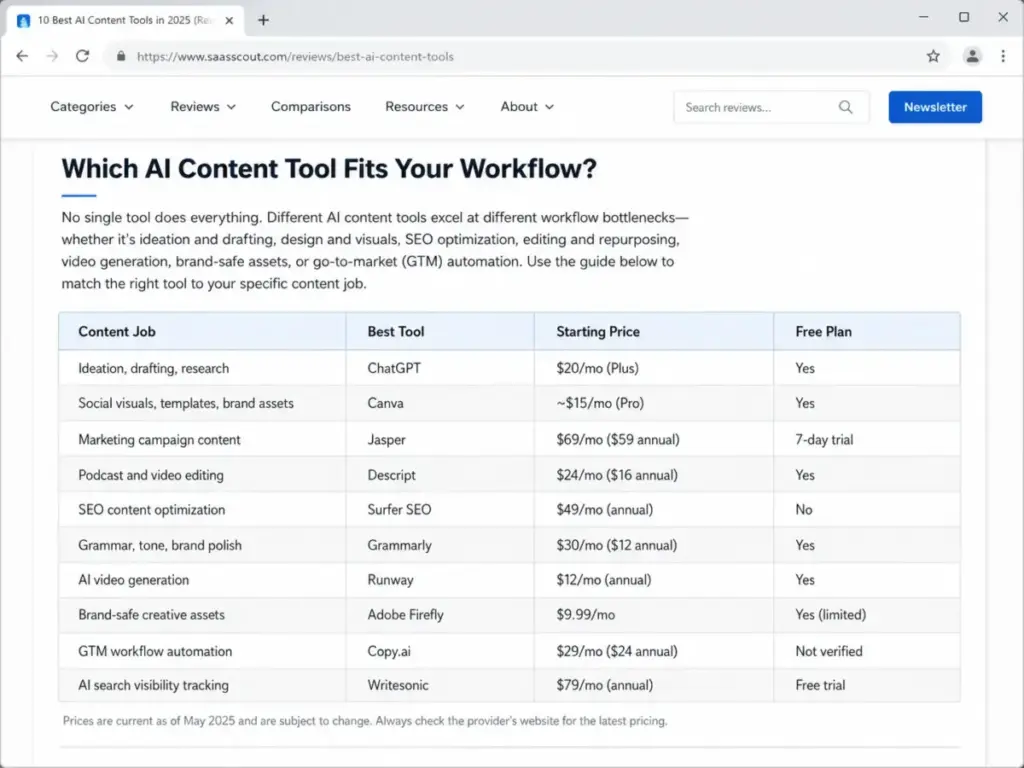
Which AI Content Tool Fits Your Workflow?
Most ranking pages treat AI content creation as a single category. It is not. A solo blogger drafting articles has different needs than a marketing team producing campaign assets, an SEO writer optimizing for AI search visibility, or a video creator editing podcasts. The table below maps each tool to the content job it solves best.
| Content Job | Best Tool | Starting Price | Free Plan |
|---|---|---|---|
| Ideation, drafting, research | ChatGPT | $20/mo (Plus) | Yes |
| Social visuals, templates, brand assets | Canva | ~$15/mo (Pro) | Yes |
| Marketing campaign content | Jasper | $69/mo ($59 annual) | 7-day trial |
| Podcast and video editing | Descript | $24/mo ($16 annual) | Yes |
| SEO content optimization | Surfer SEO | $49/mo (annual) | No |
| Grammar, tone, brand polish | Grammarly | $30/mo ($12 annual) | Yes |
| AI video generation | Runway | $12/mo (annual) | Yes |
| Brand-safe creative assets | Adobe Firefly | $9.99/mo | Yes (limited) |
| GTM workflow automation | Copy.ai | $29/mo ($24 annual) | Not verified |
| AI search visibility tracking | Writesonic | $79/mo (annual) | Free trial |
Before choosing a tool, identify your bottleneck. If you spend most of your time writing first drafts, ChatGPT at $20/month solves that faster than Jasper at $69/month. If your bottleneck is turning drafts into search-ready pages, Surfer SEO adds value that a general assistant cannot. The right tool depends on where your workflow breaks, not which product has the most features.
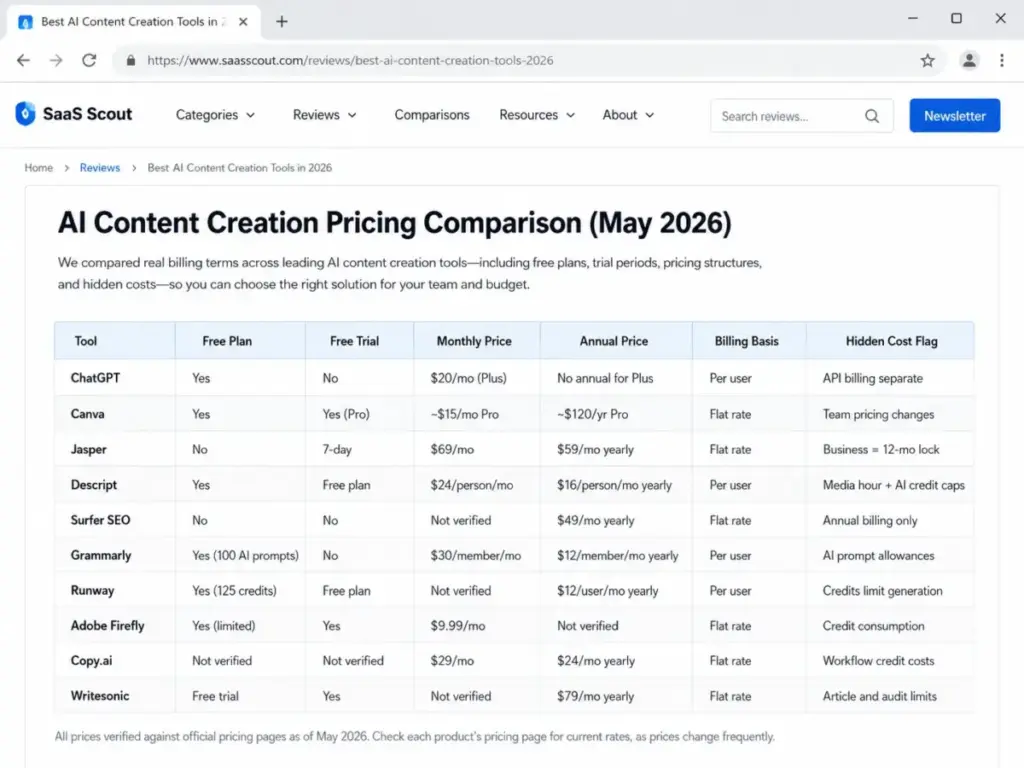
AI Content Creation Pricing Comparison (May 2026)
The pricing table below shows what each tool costs in real billing terms, not just the marketing page headline. I verified pricing against official sources as of May 2026. Canva Pro pricing comes from a third-party source because the official pricing page did not expose full price data during research.
| Tool | Free Plan | Free Trial | Monthly Price | Annual Price | Billing Basis | Hidden Cost Flag |
|---|---|---|---|---|---|---|
| ChatGPT | Yes | No | $20/mo (Plus) | No annual for Plus | Per user | API billing separate |
| Canva | Yes | Yes (Pro) | ~$15/mo* | ~$120/yr* | Flat rate | Team pricing changes |
| Jasper | No | 7-day | $69/mo | $59/mo yearly | Flat rate | Business = 12-mo lock |
| Descript | Yes | Free plan | $24/person/mo | $16/person/mo yearly | Per user | Media hour + AI credit caps |
| Surfer SEO | No | No | Not verified | $49/mo yearly | Flat rate | Annual billing only |
| Grammarly | Yes (100 AI prompts) | No | $30/member/mo | $12/member/mo yearly | Per user | AI prompt allowances |
| Runway | Yes (125 credits) | Free plan | Not verified | $12/user/mo yearly | Per user | Credits limit generation |
| Adobe Firefly | Yes (limited) | Yes | $9.99/mo | Not verified | Flat rate | Credit consumption |
| Copy.ai | Not verified | Not verified | $29/mo | $24/mo yearly | Flat rate | Workflow credit costs |
| Writesonic | Free trial | Yes | ~$99/mo (inferred) | $79/mo yearly | Flat rate | Article and audit limits |
Canva Pro pricing is third-party validated, not from official pricing page crawl.
All prices verified against official pricing pages as of May 2026. Check each product’s pricing page for current rates, as prices change frequently.
Where the Real Costs Hide
The subscription price is rarely the full story. Several tools on this list use credit systems, media hour limits, or AI prompt allowances that cap what you can produce before hitting paid friction.
Descript limits media hours and AI credits by plan. The Hobbyist plan includes 10 media hours and 400 AI credits (Descript pricing page, as of May 2026). Heavy podcast editors burn through those hours fast.
Runway charges by credits. The free plan includes 125 one-time credits and does not include Gen-4 Video (Runway pricing page, as of May 2026). Credits determine how many videos you generate, not just whether you have access.
Grammarly caps AI prompts: 100 on Free, 2,000 on Pro (Grammarly Pro page, as of May 2026). If you rely on Grammarly for rewrites and tone adjustments, the prompt cap matters more than the monthly fee.
Writesonic Starter limits you to 15 AI articles per month, 10 site audits, 1 user, and 1 project (Writesonic pricing page, as of May 2026). The $79/month annual price looks reasonable until you hit those ceilings.
Copy.ai uses workflow credits whose value depends on task complexity (Copy.ai pricing page, as of May 2026). Growth plans start at $1,000/month billed yearly with 75 seats.
Free Tier: Tools That Cost Nothing to Start
Six of the ten tools on this list offer a genuine free plan. That does not mean all free plans are equal. Some are starter paths with real limits. Others are conversion traps designed to push you to paid plans within weeks.
#1. ChatGPT: Best Overall
Badge: Best Overall | Score: 8.6/10 | Starting price: $20/month (Plus)
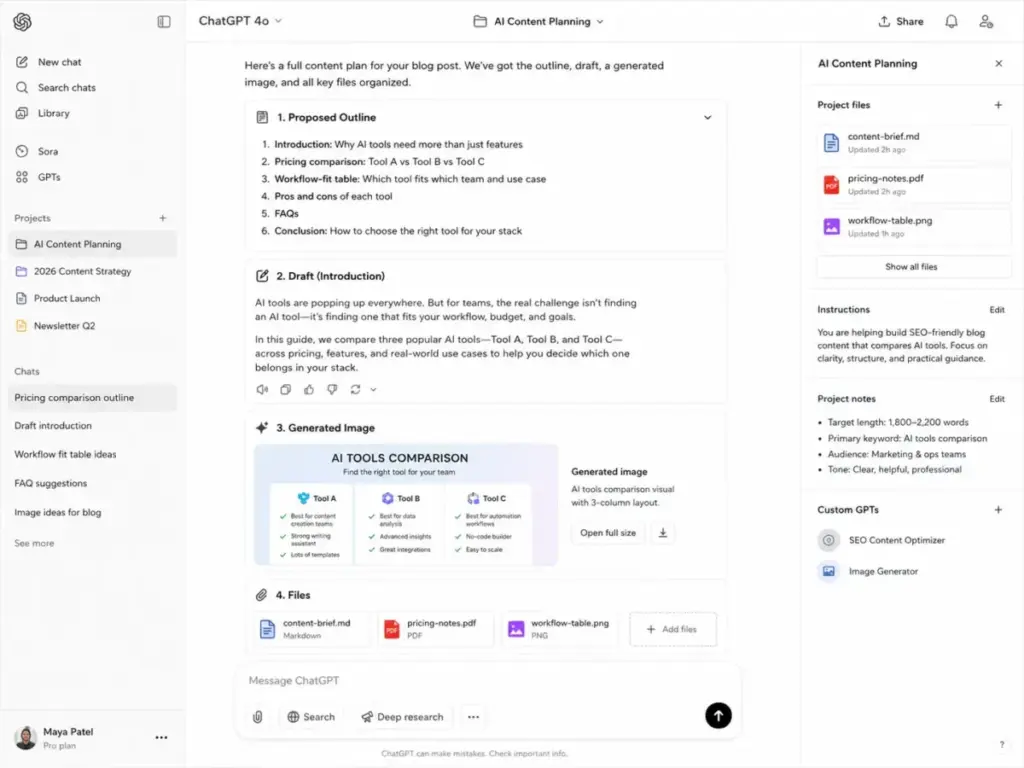
ChatGPT earns the top rank because it solves the widest range of content jobs at the lowest starting price. According to OpenAI’s pricing page (as of May 2026), the Free plan includes limited messages, uploads, image generation, deep research, memory, context, and Codex access. The Plus plan at $20/month adds enhanced model access, higher limits, file uploads and analysis, Deep Research where available, and Custom GPTs.
Best for: Creators and marketers who need one flexible assistant for ideation, outlining, drafting, editing, images, research support, files, and reusable custom workflows.
Not best for: Teams that need built-in editorial workflow, approval queues, SERP scoring, or brand governance without prompt engineering.
Key features: Ideation and drafting across formats. Image generation. File upload and analysis. Deep research where available. Custom GPTs and projects on paid plans.
Integrations: ChatGPT apps and app directory. Business plan includes app connections such as Slack, Google Drive, SharePoint, GitHub, Atlassian, and more according to the OpenAI business pricing page (as of May 2026).
Limitations you should know: ChatGPT is not a dedicated SEO scoring or CMS workflow tool. API usage is billed separately from ChatGPT Plus. The Business plan requires 2+ users. Plus does not support annual billing per the official help article.
Why it ranks #1: ChatGPT offers the broadest content creation utility at a low starting price, making it the default first tool before you add specialized SEO, design, or video layers. For a deeper look at OpenAI’s assistant, see our ChatGPT review.
Is ChatGPT enough on its own? For solo creators producing blog posts and social captions, yes. For teams needing brand controls, SEO optimization, or video editing, you need to pair it with specialized tools. That is the core tension of this entire list: convenience versus depth.
#2. Canva: Best for Visual Content
Badge: Best for Visual Content | Score: 8.6/10 | Starting price: ~$15/month (Pro, third-party validated)
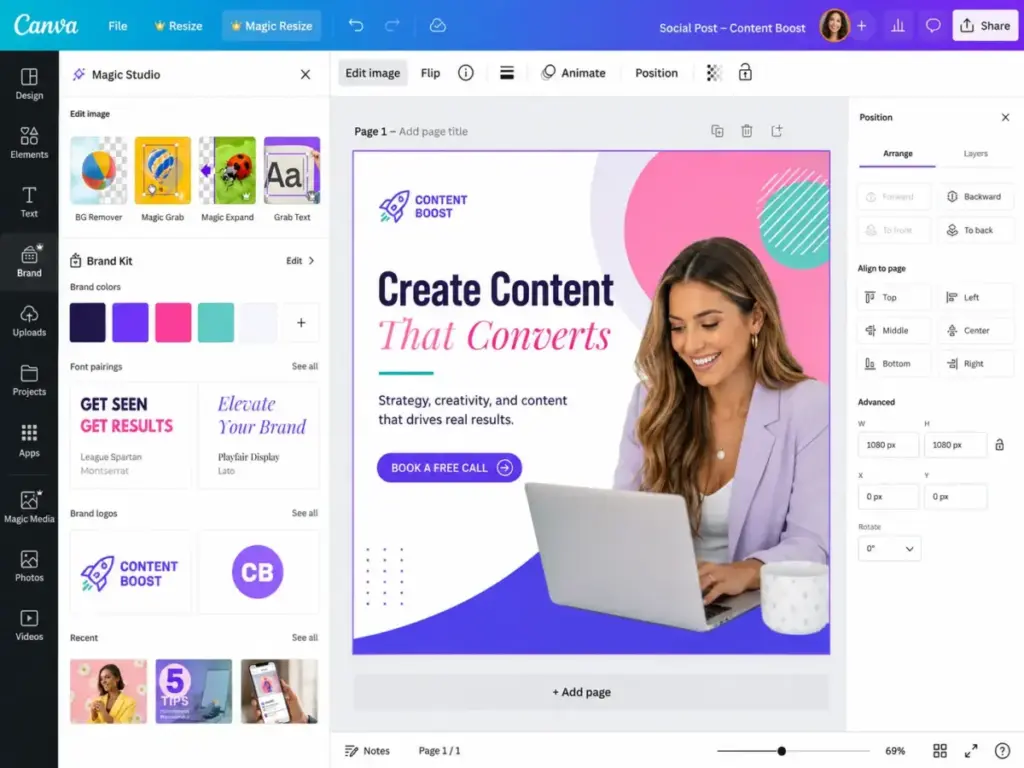
Canva’s free plan gives every individual access to basic design tools. Canva Pro adds premium content, design tools, AI-powered features through Magic Studio, Magic Resize, Brand Kit, and Background Remover, according to Canva’s official Pro page (as of May 2026). Pro pricing is approximately $15/month or $120/year based on third-party sources, as the official pricing page did not expose full price data during research.
Best for: Solo creators, social media managers, marketers, and small businesses that need AI-assisted visuals, social assets, presentations, short videos, and brand templates.
Not best for: Advanced video generation, professional motion graphics, or teams needing strict enterprise creative governance.
Key features: Magic Studio AI tools. Brand Kits. Magic Resize. Background remover. Templates and premium creative assets.
Integrations: Canva apps marketplace. Social publishing and design export workflows. ChatGPT integration surfaced in OpenAI navigation.
Hidden cost alert: Canva Teams pricing has changed, and minimum-seat concerns have been reported publicly. If you are evaluating Canva for a team of 5+, verify current team pricing directly with Canva. Solo Pro pricing is straightforward, but team pricing complexity is a real consideration.
Why it ranks #2: Canva is the strongest visual production layer for creators who do not want to jump between design tools, stock libraries, and AI image utilities. For our full evaluation, read the Canva AI review.
#3. Grammarly: Best for Editing and Brand Polish
Badge: Best for Editing and Brand Polish | Score: 8.4/10 | Starting price: $30/member/month ($12 annual)
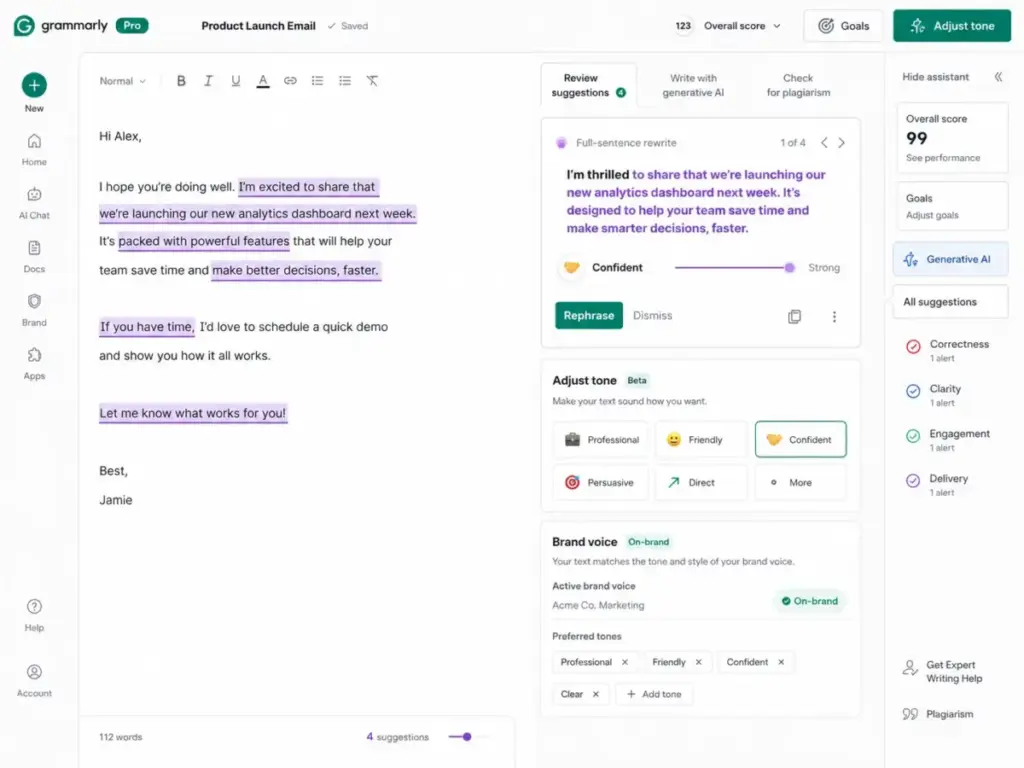
Grammarly Free costs $0 and includes mistake-free writing, tone detection, and 100 AI prompts. Grammarly Pro costs $12/member/month billed annually or $30 when billed monthly and includes full-sentence rewrites, tone adjustment, brand support, and 2,000 AI prompts, according to the Grammarly Pro page (as of May 2026).
Best for: Writers, marketers, students, founders, and teams that need grammar, rewriting, tone adjustment, and brand-consistent editing across everyday writing.
Not best for: Long-form article generation, SEO scoring, or media creation workflows.
Key features: Grammar correction. Full-sentence rewrites. Tone adjustment. Brand voice support. AI prompt allowance that scales by plan.
Integrations: Works across writing surfaces through Grammarly apps and browser extensions. Enterprise page references Superhuman Go.
The editing layer every AI stack needs: Every AI-generated draft needs human editing. Grammarly reduces that editing burden for tone, grammar, and brand consistency. It does not replace a human editor for fact-checking or strategic rewrites, but it catches the 80% of polish issues that slow teams down. If Grammarly is the editing layer in your stack, the Grammarly Pro review explains how its prompt caps, rewrite tools, tone controls, and plagiarism checks change the buying decision.
Why it ranks here, not lower: Grammarly’s per-unit economics are strong. At $12/month annual, it costs less than a single ChatGPT Plus subscription and serves a different, complementary function. I rank it above Runway and Firefly because more creators need daily editing support than need daily AI video generation.
Best Under $25/Month: Affordable AI Content Tools
#4. Descript: Best for Video Editing
Badge: Best for Video Editing | Score: 8.3/10 | Starting price: $24/person/month ($16 annual)
Descript’s Free plan costs $0 with no credit card required, according to the Descript pricing page (as of May 2026). The Hobbyist plan starts at $16/person/month billed annually and includes 10 media hours and 400 AI credits. Creator jumps to $24/person/month annual with 30 media hours and 800 AI credits. Business reaches $50/person/month annual with 40 media hours and 1,500 AI credits.
Best for: Podcast creators, YouTubers, course creators, and marketing teams that want text-based editing for audio and video.
Not best for: Pure AI video generation from prompts or cinematic model experimentation. Runway is stronger for that use case.
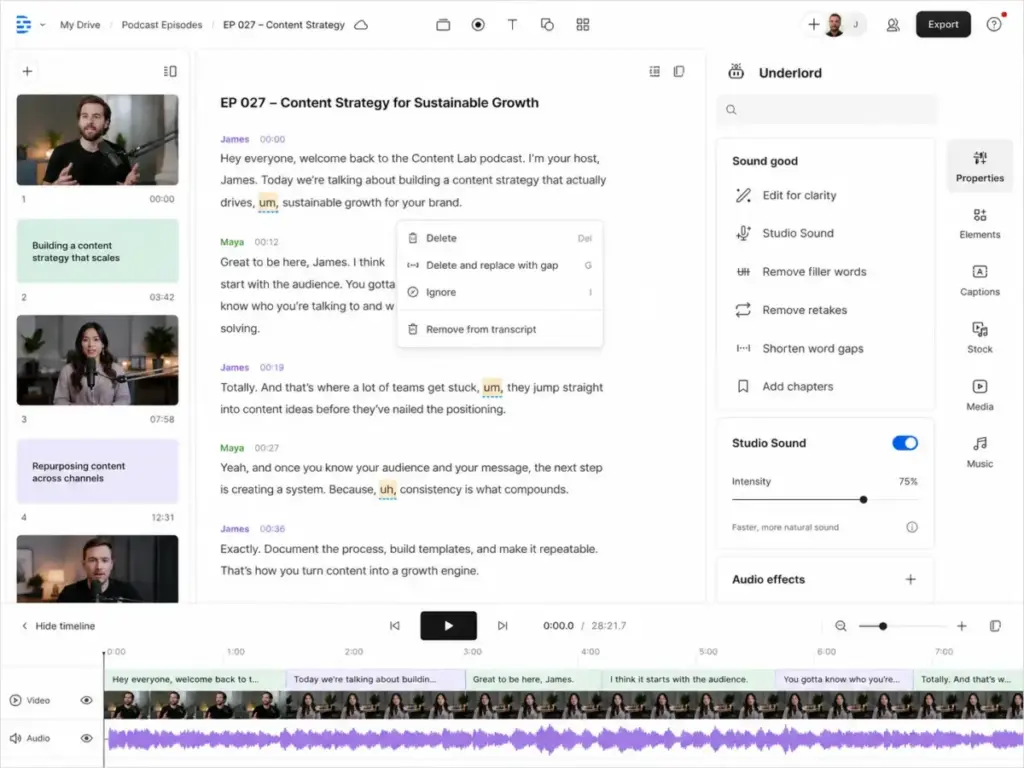
Key features: Text-based audio and video editing. Underlord AI video co-editor. Studio Sound. Filler word removal. Clips. Custom voice clones on paid plans.
Integrations: Exports to video and audio workflows. Adobe Premiere, Final Cut Pro, Pro Tools, and other export workflows appear in the feature comparison.
The credit math that matters: On Hobbyist, each of the 400 AI credits supports one AI action (filler word removal, Studio Sound processing, etc.). A 30-minute podcast episode with heavy editing can consume 15-25 credits per edit pass. At that rate, the Hobbyist plan supports roughly 16-26 editing sessions per month before you need top-ups.
Why it ranks #4: Descript earns the highest video editing rank because it solves the real creator pain of editing spoken content faster. Text-based editing is genuinely different from timeline-based tools, and for spoken-word content, it is faster.
#5. Surfer SEO: Best for SEO Content
Badge: Best for SEO Content | Score: 8.2/10 | Starting price: $49/month billed yearly
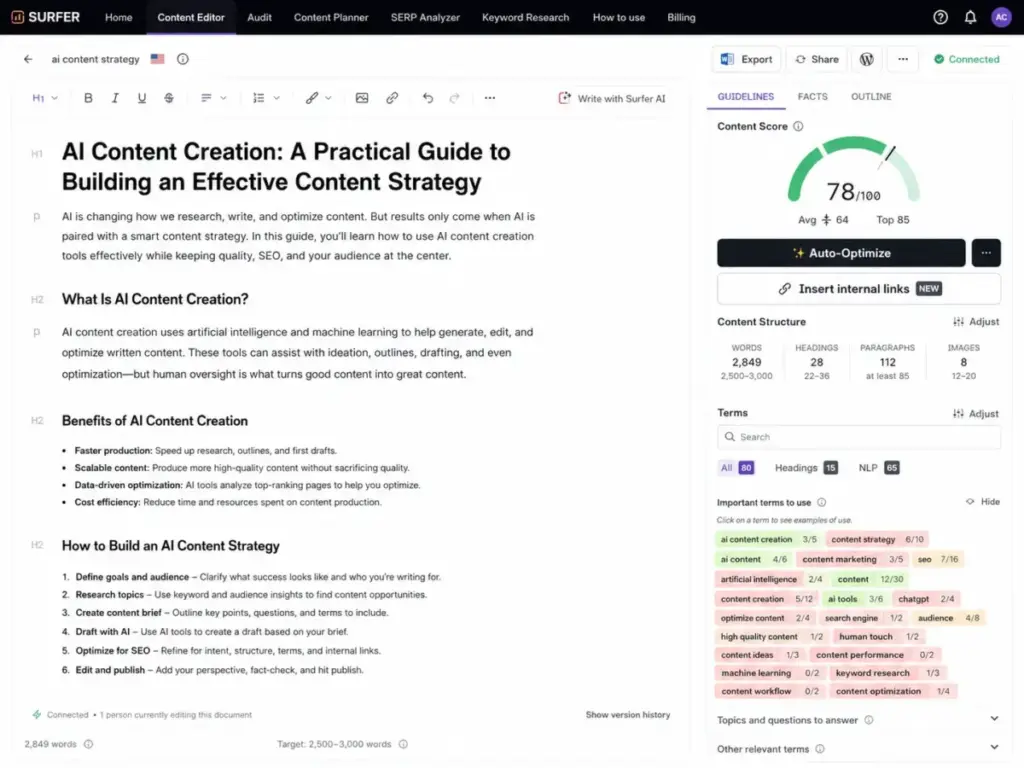
Surfer Discovery costs $49/month billed yearly and includes 120 documents, 10 tracked pages, AI SEO Optimization Guidelines, and Surfy AI SEO Assistant and Humanizer, according to the Surfer SEO pricing page (as of May 2026). No free plan or free trial was verified from the official page. Standard jumps to $99/month billed yearly, Pro reaches $182/month, and Enterprise starts at $999/month with tailored packages.
Best for: SEO writers, agencies, and in-house content teams that need content scoring, optimization, topical maps, audits, and AI search visibility tracking.
Not best for: Creators who only need quick first drafts, social captions, or visual assets.
Key features: Content optimization and content scoring. Surfy AI writing assistant and humanizer. Topical map generation. AI visibility tracking across ChatGPT, Perplexity, Google AI Mode, Google AI Overview, and Google Gemini on relevant plans.
Integrations: WordPress, Google Docs, Contentful, and Zapier are listed in the plan comparison on Surfer’s pricing page.
SEO optimization versus AI search visibility: This distinction matters in 2026. Traditional SEO content optimization means scoring your page against SERP competitors for keyword coverage, structure, and NLP terms. AI search visibility tracking means monitoring whether your content appears in ChatGPT answers, Gemini responses, and Google AI Overviews. Surfer now offers both, but AI visibility tracking is limited on lower plans. If AI search visibility is your primary concern, compare Surfer against Writesonic (#10 on this list) carefully. For a comparison of AI writing tools in this space, see our Jasper vs Copy.ai breakdown.
Why it ranks #5: Surfer is the best specialized layer for turning AI drafts into search-ready pages and closing gaps competitors miss. It does not replace your writing tool. It makes your writing tool’s output rank.
Best for Mid-Market: $25 to $100/Month
#6. Jasper: Best for Marketing Teams
Badge: Best for Marketing Teams | Score: 8.3/10 | Starting price: $69/month ($59 annual)
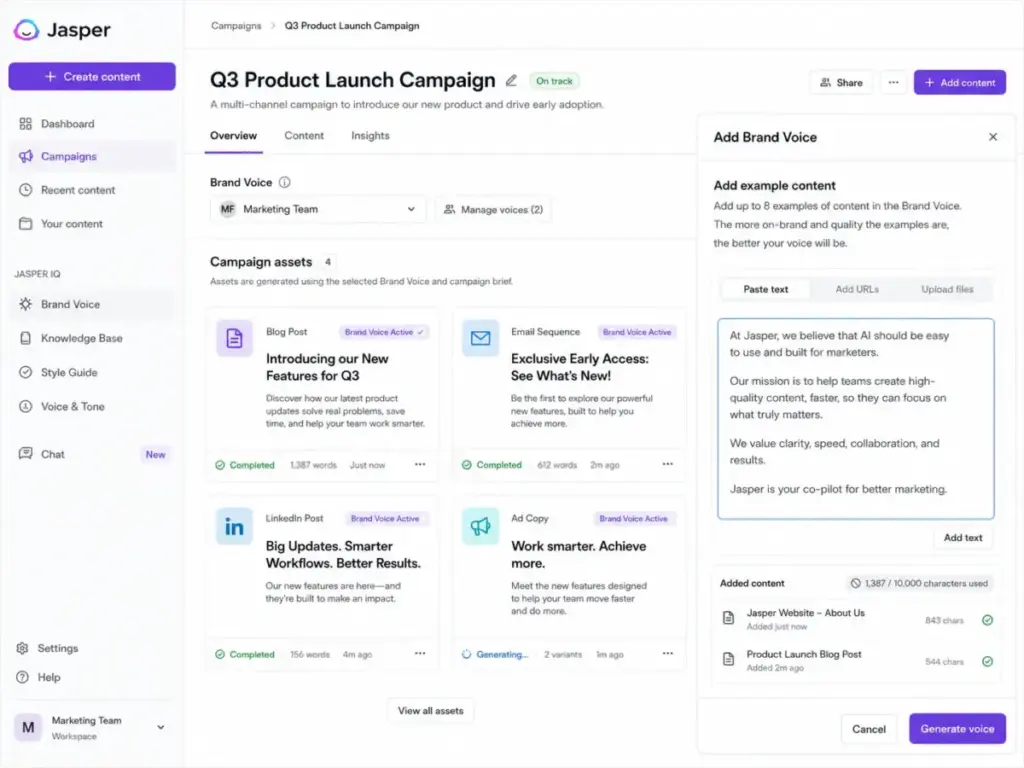
Jasper Pro costs $69/month monthly or $59/month billed yearly, with a 7-day free trial, according to the Jasper pricing page (as of May 2026). No permanent free plan was verified. The Business plan is custom priced and includes personalized AI features, additional control, security, team training, and technical support, with a 12-month commitment.
Best for: Marketing teams that need campaign content, brand voice control, multiple brands, reusable workflows, and team collaboration around AI content.
Not best for: Hobby creators or low-volume writers who only need basic drafting. ChatGPT at $20/month covers that job.
Key features: Marketing-focused AI workflows. Multi-brand content creation. Advanced AI features. Collaboration on campaigns. Business plan with custom controls and support.
Integrations: Marketing workflow integrations and business implementation support are available on higher plans.
The brand voice question: Jasper, Grammarly, ChatGPT Business, Canva, and Copy.ai all offer some form of brand voice or brand governance. The difference: Jasper builds brand voice into the generation step. Grammarly applies it at the editing step. ChatGPT lets you configure it through Custom GPTs and projects. For teams managing multiple brands with repeatable campaign workflows, Jasper’s approach reduces the prompt engineering burden. For teams with one brand and occasional content needs, ChatGPT Plus is sufficient.
Why it ranks #6: Jasper is less flexible than ChatGPT but better positioned for marketing teams that need repeatable brand-controlled output rather than one-off prompts. The $59-69/month price point only makes sense when you produce enough campaign content to justify the premium over a $20 general assistant. Read our full Jasper AI review for a detailed breakdown.
#7. Runway: Best for AI Video Generation
Badge: Best for AI Video Generation | Score: 8.0/10 | Starting price: $12/user/month billed annually
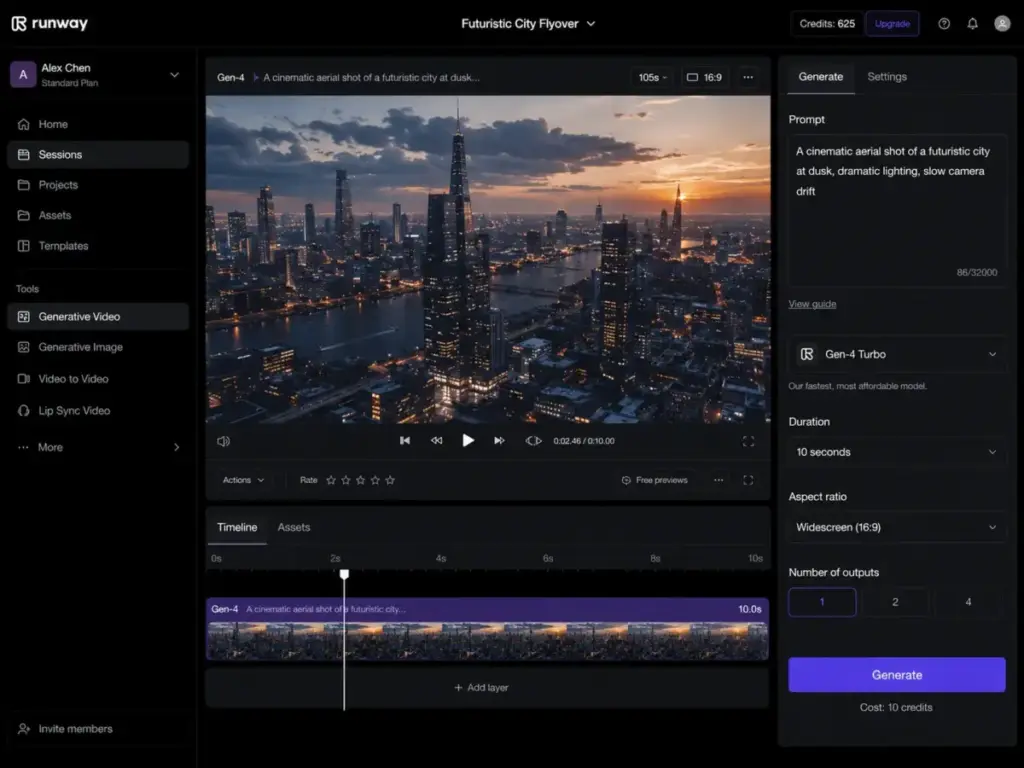
Runway Free costs $0 and includes 125 one-time credits, 5GB asset storage, Gen-4 Turbo and Gen-4 image tools, but does not include Gen-4 Video. Runway Standard costs $12/user/month billed annually as $144 and includes 625 monthly credits, all apps, workflows, Gen-4.5, Gen-4, third-party video and image models, upscale, watermark removal, and 100GB storage, according to the Runway pricing page (as of May 2026).
Best for: Creators, video producers, and agencies experimenting with generative video, image-to-video, text-to-video, upscale, watermark removal, and AI model access.
Not best for: Beginner creators who mainly need simple talking-head editing or podcast editing. Descript is easier for that workflow.
Key features: Gen-4 Turbo and Gen-4 image tools on Free. Gen-4.5 and Gen-4 video on Standard. Third-party video and image models. Workflows. Upscale and watermark removal on paid plans.
Credit economics: At $12/month annual, Runway Standard gives you 625 monthly credits. A 5-second Gen-4 video clip consumes roughly 50-100 credits depending on resolution and model. That means approximately 6-12 short video clips per month on the entry paid plan. For teams producing daily video content, credit top-ups become the real cost driver. For pricing details, see our Runway ML pricing guide.
Why it ranks #7: Runway is the strongest fit for AI-native video generation, but it ranks below Descript because fewer creators need cinematic generation every day compared to spoken-content editing. Read our RunwayML review for more detail.
#8. Adobe Firefly: Best for Brand-Safe Creative Assets
Badge: Best for Brand-Safe Creative Assets | Score: 8.1/10 | Starting price: $9.99/month
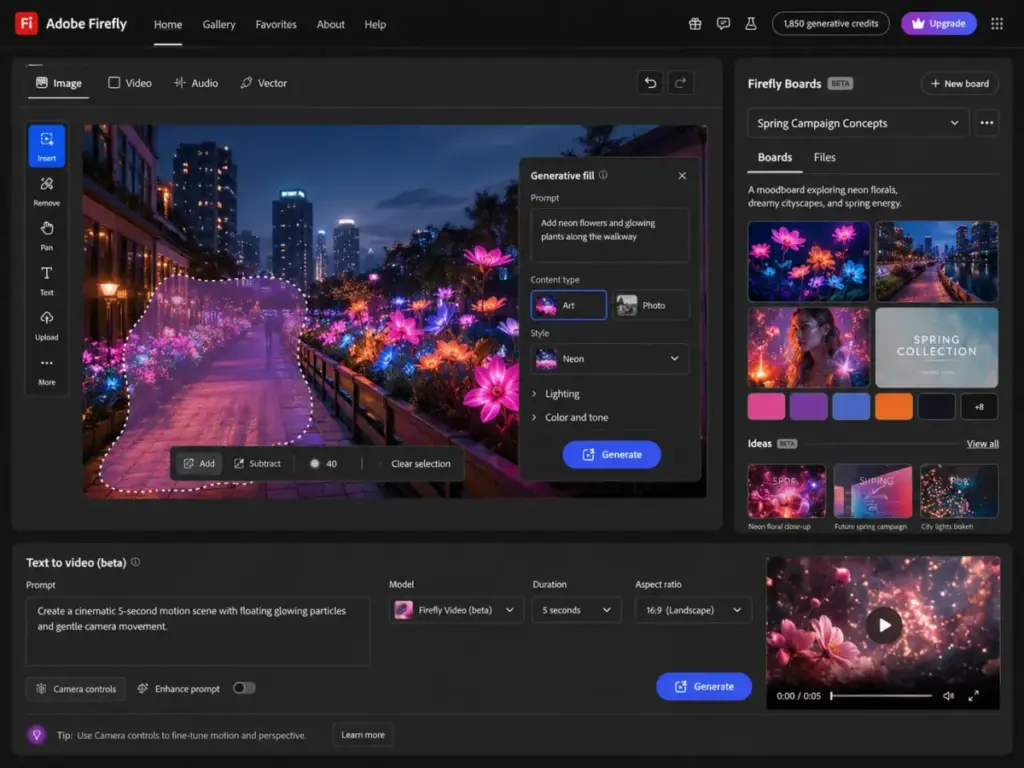
Adobe Firefly Standard costs $9.99/month and includes 2,000 generative credits per month. Firefly Pro costs $19.99/month. Free limited access is available, and paid plans include free trial buttons, according to the Adobe Firefly plans page (as of May 2026).
Best for: Designers, marketers, and content teams that want AI-generated images, video, audio, Firefly Boards, Adobe app integration, and commercially safer creative workflows.
Not best for: Creators who want the cheapest possible AI image tool or one-click social design templates. Canva is easier for that. For a comparison, see our Adobe Firefly review.
Key features: Generative credits. Generative Fill. Text-to-video with credits. Leading AI model access from Adobe, Google, and more. Firefly Boards. Adobe Express Premium, Photoshop web and mobile access on listed plans.
Integrations: Adobe Express Premium, Photoshop web and mobile, Adobe Fonts, Firefly web and mobile.
Credit consumption caveat: Adobe’s credit system determines how many images, videos, and audio clips you generate per month. Promotional terms like “unlimited generation” have specific conditions and expiration dates. At the time of research, some discounted prices were limited-time offers ending May 20. Verify current terms on the Adobe Firefly plans page before purchasing.
Why it ranks #8: Firefly is not the easiest all-purpose creator tool, but it is the strongest option when brand safety, Adobe workflow integration, and commercial creative use matter more than ease.
Best for Enterprise and Teams: $100+/Month
#9. Copy.ai: Best for GTM Teams
Badge: Best for GTM Teams | Score: 7.9/10 | Starting price: $29/month ($24 annual)
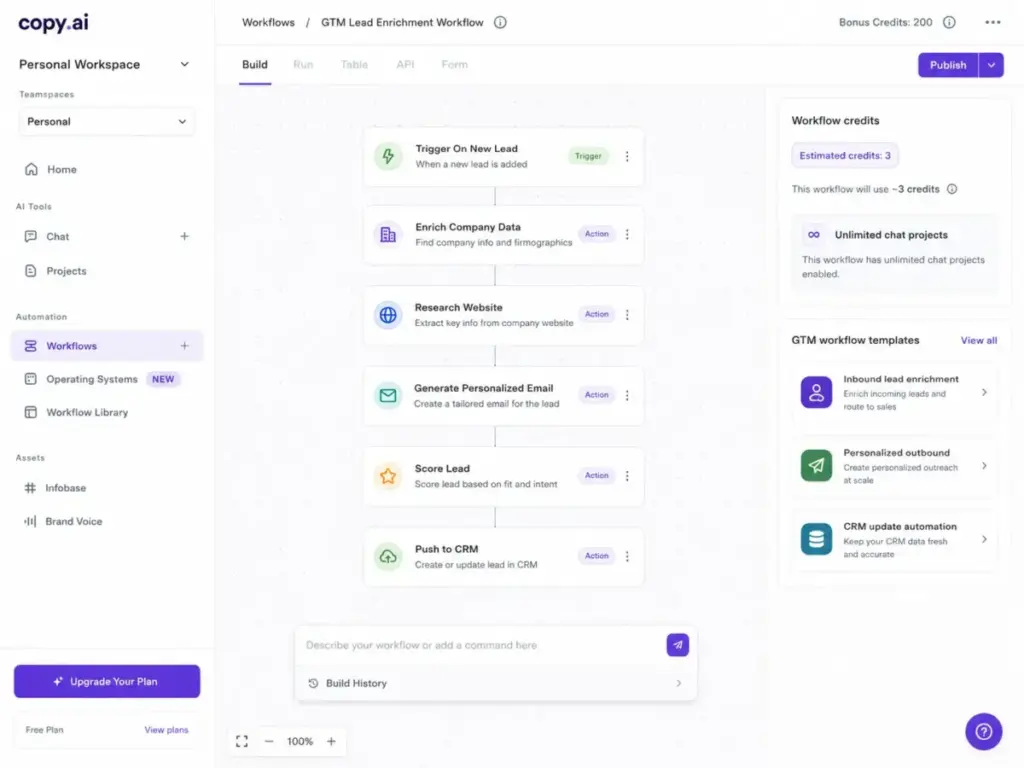
Copy.ai Chat costs $29/month billed monthly or $24/month billed annually at $288/year, according to the Copy.ai pricing page (as of May 2026). Chat includes unlimited words in chat, unlimited chat projects, and access to OpenAI, Anthropic, and Gemini models. Growth jumps to $1,000/month billed yearly with 75 seats. Expansion reaches $2,000/month. Scale hits $3,000/month with 200 seats.
Best for: Sales and marketing teams that want AI workflows for GTM processes such as account plans, SEO articles, sales collateral, localization, and CRM-related automations.
Not best for: Solo bloggers who only need low-cost drafts. Copy.ai’s team workflow value appears strongest above casual creator use.
Key features: Unlimited words in Chat. Unlimited Chat projects. Access to OpenAI, Anthropic, and Gemini models. Workflow credits. Customizable GTM workflows.
Integrations: 20+ tech integrations and API access are listed for Enterprise.
The workflow credit question: Copy.ai workflow credits represent computational power for workflow tasks. Their value depends on the complexity of the tasks performed. This makes it difficult to predict monthly costs without running real workflows first. For a detailed evaluation, see our Copy.ai review.
Why it ranks #9: Copy.ai is built for GTM operations, not simple content drafting. If your team runs sales sequences, account-based marketing, and localized content at scale, it delivers. If you write blog posts and social captions, ChatGPT at $20/month is the better starting point.
#10. Writesonic: Best for AI Search Visibility
Badge: Best for AI Search Visibility | Score: 7.6/10 | Starting price: $79/month billed annually
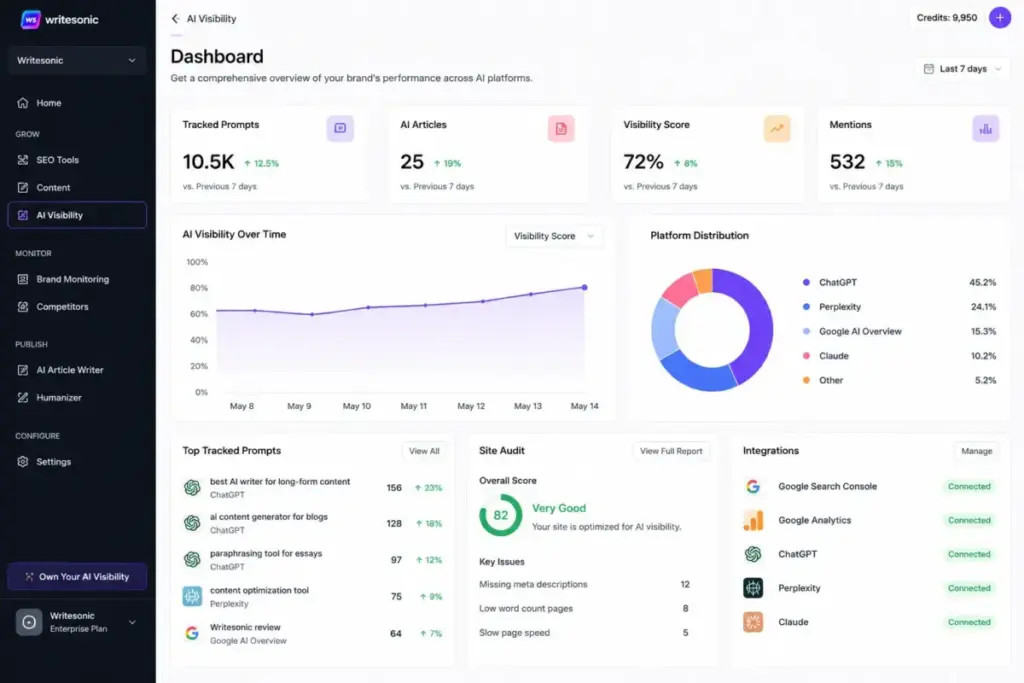
Writesonic Starter costs $79/month billed annually and includes 15 AI articles per month, 10 site audits, 1 user, 1 project, and ChatGPT-only tracking. Basic jumps to $199/month annual. Growth reaches $399/month annual and tracks ChatGPT, Gemini, and Google AI Overviews, according to the Writesonic pricing page (as of May 2026). The official page says “start free, no credit card needed.”
Best for: Marketing teams and SEO teams that want AI articles plus AI search visibility tracking across ChatGPT, Gemini, Google AI Overviews, and other AI search surfaces on higher plans.
Not best for: Low-budget individual writers looking for inexpensive drafting only.
Key features: AI articles. AI search visibility tracking. Site audits. Prompt tracking. Agentic workflows. Sentiment analysis on higher plans.
Integrations: Google Search Console, WordPress, Google Keyword Planner, Google SERPs, and Reddit are shown as data sources or integrations in the plan comparison.
AI search visibility vs SEO optimization: The category is shifting. Traditional SEO tools optimize your content for Google’s organic search results. AI search visibility tools track whether your brand appears in ChatGPT answers, Gemini responses, and Google AI Overviews. Writesonic and Surfer SEO (#5) both address this shift, but from different angles. Surfer is stronger on content optimization with AI visibility added on higher plans. Writesonic leads with AI visibility tracking as a primary feature. For teams already using Surfer for SEO, Writesonic adds a complementary visibility layer. For comparison between AI writing platforms, see our Copy.ai vs Writesonic analysis. For our standalone evaluation, read the Writesonic review.
Why it ranks #10: Writesonic is included because AI search visibility tracking represents the future direction of content optimization. Its current pricing and orientation make it a specialist choice rather than a general-purpose content creation tool.
Which AI Content Stack Should You Choose?
No single tool covers every content workflow. The practical question is not “which tool is best?” but “which 2-3 tools solve my specific bottleneck at a price I can sustain?” Here are stack recommendations by creator type and budget.
The Free Starter Stack ($0/month)
| Tool | Role in Stack |
|---|---|
| ChatGPT Free | Ideation, drafting, research support |
| Canva Free | Social graphics, presentations, basic design |
| Grammarly Free | Grammar checking, tone detection, 100 AI prompts |
This stack costs nothing and covers 80% of a solo creator’s content needs. The ceiling: ChatGPT Free has message limits, Canva Free lacks Brand Kit and Magic Resize, and Grammarly Free caps AI prompts at 100. You hit these walls within weeks of consistent publishing.
The Solo Creator Stack (Under $50/month)
| Tool | Monthly Cost | Role |
|---|---|---|
| ChatGPT Plus | $20/mo | Drafting, ideation, research, images |
| Grammarly Pro (annual) | $12/mo | Editing, tone, brand polish |
| Total | $32/mo |
Add Canva Pro at ~$15/month if you produce visual content regularly, bringing the total to approximately $47/month. This stack gives you AI drafting, editing, and visual production without paying for marketing-team features you do not need.
The SEO Content Stack ($70-$160/month)
| Tool | Monthly Cost | Role |
|---|---|---|
| ChatGPT Plus | $20/mo | First drafts, outlines, research |
| Surfer SEO Discovery (annual) | $49/mo | Content scoring, optimization, topical maps |
| Grammarly Pro (annual) | $12/mo | Final editing pass |
| Total | $81/mo |
For teams that also need AI search visibility tracking, add Writesonic Starter at $79/month annual, bringing the total to $160/month. This is the stack for SEO teams publishing 10+ optimized articles per month.
The Video Creator Stack ($32-$52/month)
| Tool | Monthly Cost | Role |
|---|---|---|
| ChatGPT Plus | $20/mo | Scripts, show notes, repurposing |
| Descript Hobbyist (annual) | $16/mo | Text-based podcast and video editing |
| Total | $36/mo |
Add Runway Standard at $12/month annual for AI-generated video clips, bringing total to $48/month. This stack covers script writing, editing, and generative video. For creators who only edit spoken content, Descript alone may be sufficient.
The Marketing Team Stack ($90-$160/month)
| Tool | Monthly Cost | Role |
|---|---|---|
| Jasper Pro (annual) | $59/mo | Campaign content, brand voice, workflows |
| Canva Pro | ~$15/mo | Visual assets, social graphics |
| Grammarly Pro (annual) | $12/mo | Editing and tone consistency |
| Total | ~$86/mo |
Larger teams needing GTM automation should evaluate Copy.ai Chat at $24-29/month instead of or alongside Jasper, depending on whether the bottleneck is campaign content (Jasper) or sales process automation (Copy.ai).
What We Did Not Include and Why
I evaluated 32 products and cut 22. Eight products came close enough to deserve explanation:
Synthesia is strong for AI avatar videos but overlaps with Descript and Runway. Better fit for a dedicated AI video generator list. Writer.com excels at enterprise AI writing governance but skews toward larger organizations. Anyword overlaps with Jasper and Copy.ai for performance copy. Frase is a relevant SEO tool, but Surfer had stronger evidence for AI visibility tracking. Pictory turns text into videos but Descript and Runway cover broader workflows. Claude is a strong general assistant, but ChatGPT had clearer official pricing evidence and stronger US mainstream adoption for this research pass. Midjourney produces striking images but Adobe Firefly and Canva better match brand-safe, publishing-ready workflows. OpusClip excels at short-form video repurposing but is too narrow for a general content creation list.
The full candidate pipeline started with 32 products sourced from official pages, SERP competitors, G2 snippets, TrustRadius snippets, and Reddit query patterns.
Team and Brand Governance: Who Controls the AI?
For solo creators, brand consistency means using the same tone and style across posts. ChatGPT Custom GPTs handle this well enough. For teams, brand governance means role-based permissions, approved templates, multi-brand management, and audit trails.
Jasper offers the deepest marketing-team governance with multi-brand content creation and Business plan controls. Grammarly Enterprise includes unlimited members, dedicated support, confidential mode, granular roles and permissions, DLP, and unlimited generative AI prompts. Canva Business and Enterprise add advanced brand controls and team governance. Copy.ai Growth and above include team seats and workflow controls. ChatGPT Business includes admin and security features with 60+ app connections and a 2+ user requirement.
If brand governance is your primary buying criterion, Jasper and Grammarly Enterprise are the strongest options. If you need visual brand governance, Canva Business fills that gap. The right choice depends on whether your governance bottleneck is in content generation, editing, or visual production.
The Risks of Using AI for Content Creation
Every AI tool on this list generates content that requires human review. The editing burden varies by tool and use case, but zero-edit AI publishing is not a responsible workflow in 2026.
Fact-checking is your job. AI tools generate plausible-sounding content that may contain factual errors. Grammarly catches grammar and tone issues. Surfer catches SEO gaps. Neither catches factual inaccuracies. Human review remains the only reliable fact-checking layer.
AI prompt limits are real costs. Grammarly, Descript, Runway, Adobe Firefly, Copy.ai, and Writesonic all use credit, prompt, or usage-based systems that cap what you produce. Factor these limits into your budget alongside subscription prices.
Brand voice requires setup. Jasper, Grammarly, and ChatGPT all offer brand voice features, but none work out of the box. You invest time configuring voice guidelines, testing outputs, and iterating. Budget 2-4 hours of initial setup per tool.
For a broader view of AI tools and chatbot capabilities, our AI chatbot ranking covers the general-purpose assistants behind many of these content tools.
FAQ: AI Tools for Content Creation
What are the best AI tools for content creation in 2026?
The best AI content creation tools in 2026 are ChatGPT for general drafting and ideation, Canva for visual content, Jasper for marketing teams, Descript for video editing, and Surfer SEO for search optimization. The right choice depends on your specific workflow bottleneck, not which tool has the most features.
Which AI tool is best for writing blog content?
ChatGPT Plus at $20/month is the best starting point for blog drafting. For SEO-optimized blog content, pair it with Surfer SEO at $49/month annual. For marketing teams needing brand-controlled blog content at scale, Jasper Pro at $59/month annual adds workflow and brand voice features that ChatGPT lacks natively.
What is the best free AI tool for content creators?
ChatGPT Free combined with Canva Free and Grammarly Free creates a $0 starter stack covering drafting, design, and editing. The free stack has limits: ChatGPT caps messages, Canva Free lacks Brand Kit, and Grammarly Free allows only 100 AI prompts per month. Most creators outgrow the free stack within 4-6 weeks of consistent publishing.
Is Jasper better than ChatGPT for content marketing?
Jasper is better for marketing teams producing repeatable campaign content with brand voice controls across multiple brands. ChatGPT is better for flexible, general-purpose drafting at a lower price point ($20/month vs $59-69/month). Solo marketers should start with ChatGPT. Teams producing 20+ pieces of branded content per month get more value from Jasper.
Which AI tool is best for YouTube and video content?
Descript is best for editing spoken video and podcast content using text-based editing. Runway is best for generating AI video clips from prompts and images. For YouTube creators, Descript solves the daily editing workflow. Runway adds creative AI-generated B-roll and visual effects. Most YouTubers need Descript first and Runway second.
Can AI tools replace content creators?
AI tools reduce the time spent on first drafts, visual design, and repetitive editing tasks. They do not replace strategic thinking, fact-checking, audience understanding, or editorial judgment. The creators who benefit most from AI tools use them to accelerate production, not to eliminate the human editorial layer. For an understanding of what generative AI actually does, our knowledge hub explains the technology behind these tools.
Which AI content tools help with SEO in 2026?
Surfer SEO is the strongest dedicated SEO content optimization tool, offering content scoring, topical maps, and AI visibility tracking. Writesonic adds AI search visibility tracking across ChatGPT, Gemini, and Google AI Overviews. ChatGPT assists with keyword research and content structuring but does not score content against SERP competitors natively.
What should I look for in an AI content creation tool?
Look for pricing transparency (monthly vs annual, credit limits, seat minimums), workflow fit (does the tool solve your specific bottleneck?), integration with your existing stack (CMS, Google Docs, social platforms), and honest limitation documentation. The best tool for you is the one that saves measurable time on your most frequent content task, not the one with the longest feature list. For our evaluation methodology, see the SaaS Zap review methodology.
Are AI-generated blog posts good for SEO?
AI-generated first drafts need optimization before publishing. Raw AI output lacks the specificity, evidence density, and factual accuracy that search engines prioritize. Tools like Surfer SEO close the optimization gap. Tools like Grammarly close the editing gap. The combination of AI drafting plus human editing plus SEO optimization produces content that ranks. AI drafting alone does not.
What is the cheapest AI content stack that works?
ChatGPT Plus ($20/month) plus Grammarly Pro annual ($12/month) costs $32/month and covers drafting, editing, and brand polish. Add Canva Pro at ~$15/month for visuals, totaling approximately $47/month. This stack handles blog posts, social content, email copy, and basic visual assets for solo creators and small teams.