Most CRM comparison articles list starting prices and generic badges. They rarely tell you what happens after you sign up: the plan you actually need, the add-ons that inflate the bill, the AI credits that run out in week two, or the migration risk when you realize the tool does not fit how your team sells.
I evaluated 50 CRM platforms and narrowed the list to 20 based on pricing transparency, feature-gate depth, integration ecosystem, automation limits, and buyer-fit evidence. For most US sales teams, Salesforce Sales Cloud remains the strongest overall CRM for organizations that can invest in administration and customization. HubSpot is the better pick if you want a free starting point with fast onboarding, and Zoho CRM offers the deepest feature-to-price ratio for teams that are comfortable with configuration.
The best CRM software in 2026 is not the one with the longest feature checklist. It is the one whose real cost, workflow design, and scaling path match how your team actually operates. If you need a deep dive into what CRM software actually does before comparing tools, start there.
This article ranks all 20 tools by team size, breaks down the pricing traps each vendor hides behind starting prices, and maps every product to a specific buyer scenario.
Quick Verdict: Best CRM Software by Use Case
| Use case | Best pick | Why it fits |
|---|---|---|
| Best overall CRM | Salesforce Sales Cloud | Deepest feature set, largest ecosystem, strongest scalability |
| Best free CRM to start | HubSpot Smart CRM | Free tier with no time limit, clean onboarding, grows with you |
| Best value for growing teams | Zoho CRM | Enterprise-grade features from $14/user/month annual |
| Best for visual pipelines | Pipedrive | Fastest pipeline setup, clean deal tracking, strong for reps |
| Best for custom workflows | monday CRM | Board-based CRM that adapts to non-standard sales processes |
| Best for Microsoft teams | Dynamics 365 Sales | Native Outlook, Teams, Power BI, and Azure integration |
| Best for SMB with phone and AI | Freshsales | Built-in calling, chat, AI sessions, and free plan for 3 users |
| Best CRM plus work management | ClickUp CRM | CRM templates inside a full project management platform |
| Best for email-first automation | ActiveCampaign | Strongest email journey builder with CRM pipeline add-on |
| Best for outbound sales teams | Close | Built-in dialer, SMS, email sequences, and calling workflows |
No single CRM wins every scenario. Salesforce gives the most depth but demands admin resources. HubSpot gives the smoothest start but costs rise fast at Professional tier. Zoho gives the most features per dollar but requires setup patience. The table above maps each scenario to the tool with the strongest evidence for that specific buying situation.
That same rule applies at the industry level: a real estate brokerage does not evaluate CRM the same way as a SaaS sales team or a local service business. If your workflow depends on buyers, sellers, listings, referrals, and long-cycle follow-up, compare the best real estate CRM tools before choosing from a general CRM shortlist.
Our Top 3 CRM Recommendations
- If you want the safest choice: HubSpot Smart CRM. Free to start, fastest onboarding, and a clear upgrade path. Most teams can log their first deal within 30 minutes.
- If you want the most scalable CRM: Salesforce Sales Cloud. The deepest customization, largest integration ecosystem, and strongest enterprise governance. Requires admin investment.
- If you want the best value: Zoho CRM. Enterprise-grade features from approximately $14/user/month annually. Zia AI included on higher tiers without a separate per-seat charge. Needs configuration patience.
Best CRM by Team Size
| Team size | Best CRM | Why |
|---|---|---|
| 1 to 3 users | HubSpot / Capsule CRM | Free plans with no time limit; zero admin overhead |
| 4 to 10 users | Less Annoying CRM / Zoho CRM | Predictable low cost ($15/user flat) or deep features (~$14/user annual) |
| 10 to 50 users | Pipedrive / Freshsales | Sales execution focus; fast pipeline setup; built-in phone and AI at SMB pricing |
| 50+ users | Salesforce / Dynamics 365 | Enterprise governance, permissions, territories, sandbox, and mature ecosystems |
What this means: Team size is the single strongest filter for CRM fit. A 3-person team on Salesforce will overpay for governance features they will never touch. A 50-person team on Less Annoying CRM will outgrow it within a quarter. Start with your headcount, then narrow by sales motion and ecosystem.
How We Evaluated and Ranked These 20 CRMs
We assessed 50 CRM candidates using official pricing pages, product documentation, verified customer feedback from G2 and Capterra, and structured feature-gate analysis. Pricing was verified on May 22, 2026. We did not rank tools by brand popularity or affiliate payout.
Each product was scored across six weighted criteria:
| Criterion | Weight | What we checked |
|---|---|---|
| Pricing value | 20% | Starting price, practical tier, hidden costs, add-ons, seat models |
| Core feature depth | 20% | Contacts, deals, pipelines, automation, reporting, forecasting |
| Ease of use | 15% | Setup speed, admin burden, rep adoption, mobile usability |
| Integrations | 15% | Native integrations, API, email/calendar sync, marketplace depth |
| Scalability | 15% | Permissions, territories, sandbox, workflow scale, AI readiness |
| User fit | 15% | Sales motion match, company stage, ecosystem, industry nuance |
Review limitation: This evaluation is based on official pricing, public product documentation, third-party feature analysis, and verified user sentiment. I did not run a live multi-week team deployment of all 20 products, so workflow credit consumption, onboarding timelines, and enterprise quote ranges should be confirmed directly with each vendor.
Best CRM Software for Small Teams (1 to 10 Users)
Small teams need a CRM that is fast to set up, affordable per seat, and does not require a dedicated administrator. The tools below work best when you have fewer than 10 people touching the CRM daily.
Salesforce Sales Cloud: Best Overall CRM

Salesforce Sales Cloud is the most complete CRM on the market. It covers contact and account management, opportunity tracking, pipeline management, forecasting, workflow automation, analytics, and a marketplace of thousands of apps through AppExchange.
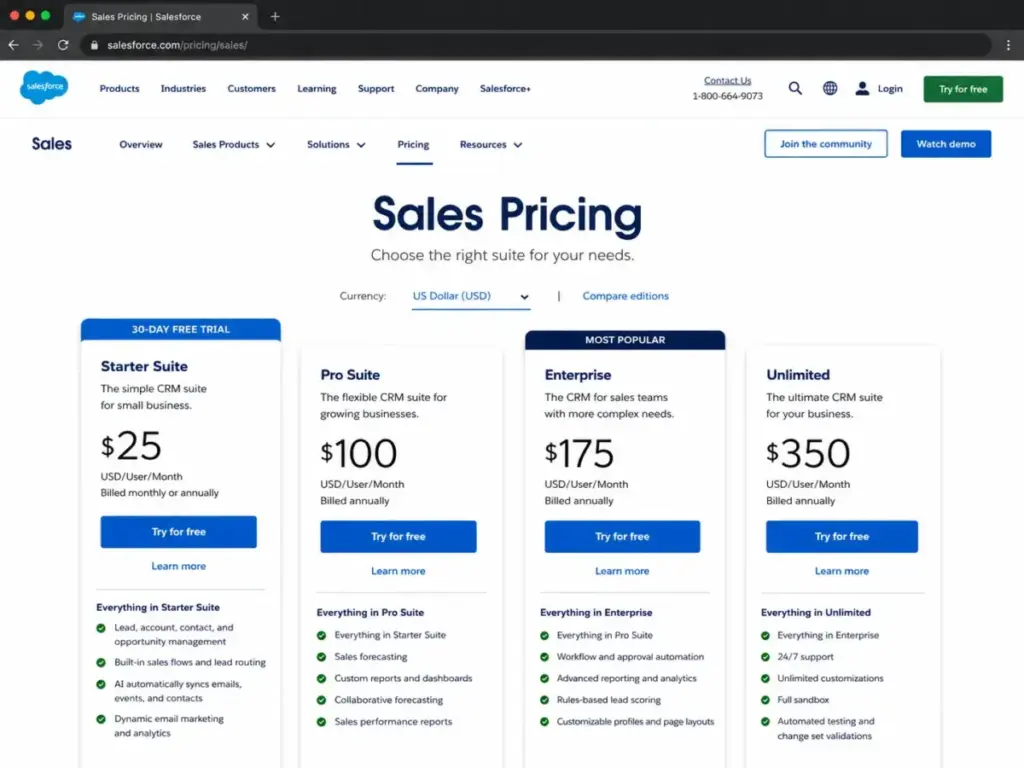
Pricing starts at $25/user/month for Starter Suite with a 30-day trial. The practical tier for most teams is Pro Suite or Enterprise, which means the real cost is significantly higher. Advanced AI features through Agentforce, premium support, Data Cloud, and CPQ are all add-on costs that can push the total well beyond the advertised entry price.
What it does well: Deepest customization. Strongest reporting. Largest integration ecosystem. AI expansion through Agentforce for teams ready to invest. No other CRM matches the breadth of Salesforce’s platform.
Where it falls short: Setup is not self-serve for most teams. You need admin capacity, and often a consultant, to build workflows, configure permissions, and maintain the system. Small teams under five users may find the admin overhead disproportionate to the value.
Avoid if: You have no dedicated CRM administrator and need something working in under a day.
Setup difficulty: High
Verdict: Choose Salesforce if your team will grow past 20 users and needs deep customization, enterprise reporting, and a mature integration ecosystem.
HubSpot Smart CRM and Sales Hub: Best Free CRM to Start

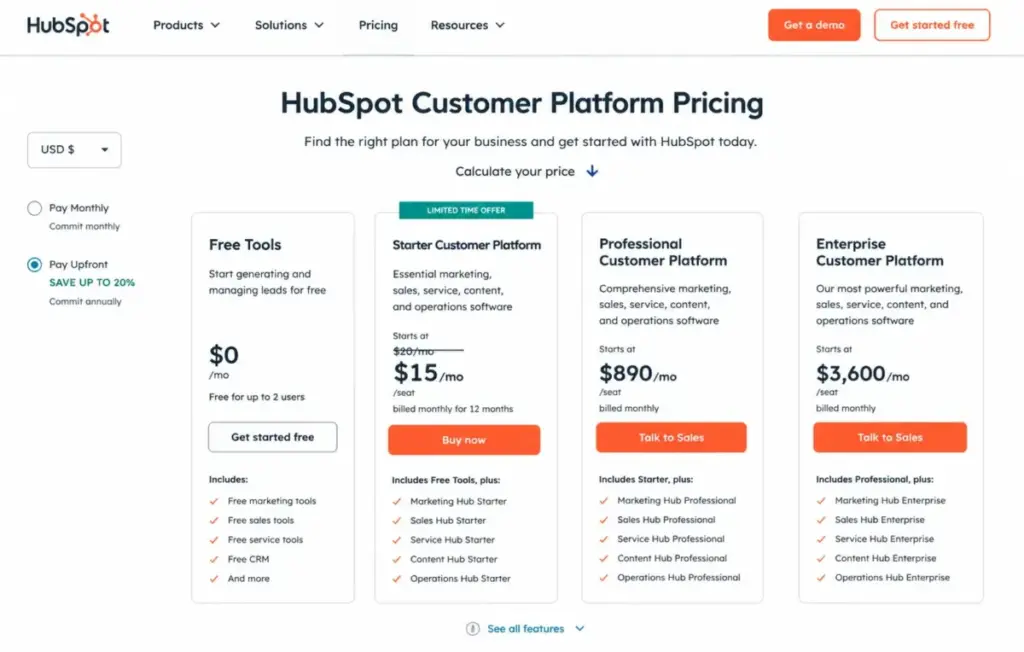
HubSpot Smart CRM starts at $0/month with no time limit on the free tier. The free plan includes contact management, deal pipelines, email tracking, meetings scheduling, live chat, and basic reporting. Starter regular pricing is $20/seat/month, with a promotional rate of $10/seat/month for new customers (limited time, end date not visible as of May 2026). Professional is $100/seat/month and Enterprise is $150/seat/month.
The practical tier for teams that need automation, custom reporting, and sequences is Professional, which means a 5-person team would pay $500/month before marketing contacts or additional hub costs.
What it does well: The free tier is genuinely usable, not just a trial. Onboarding is the fastest of any CRM on this list. The interface is clean, and most reps can start logging deals within 30 minutes. For teams exploring CRM solutions for small businesses, HubSpot is the safest first step.
Where it falls short: Costs can rise sharply once you add marketing contacts, extra hubs, onboarding fees for Professional, and Commerce Hub seats. The free-to-Professional jump is one of the steepest in the CRM market.
Avoid if: Your budget is under $50/user/month and you need automation, custom reporting, or sequences. The free plan will not cover those needs, and Starter does not unlock them either.
Setup difficulty: Low
Verdict: Choose HubSpot if you want the lowest barrier to entry and plan to grow into paid tiers as your team scales.
Zoho CRM: Best Value for Growing Teams

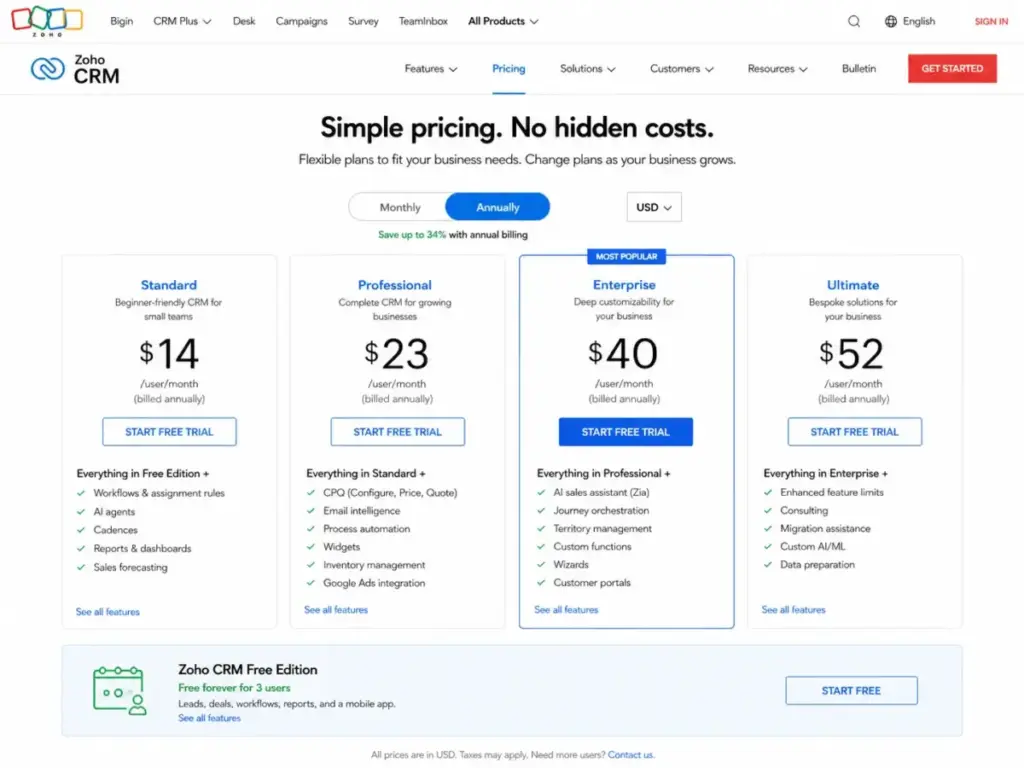
Zoho CRM offers a free edition for up to 3 users. Paid plans start at approximately $14/user/month annually for Standard (third-party validated USD pricing; official page is region-sensitive). Professional is approximately $23/user/month annually, Enterprise $40, and Ultimate $52. Zoho CRM includes lead and deal management, workflow automation, Zia AI assistant, forecasting, analytics, customization, portals, and territory management.
The practical tier for most growing teams is Professional or Enterprise, where you unlock advanced automation, custom modules, and Zia AI predictions. For teams that want the full Zoho ecosystem including email, projects, desk, and analytics, the value density is hard to beat.
What it does well: The deepest feature set per dollar of any CRM on this list. Zia AI is included on higher tiers without a separate per-seat AI charge. The Zoho ecosystem gives you 40+ apps under one vendor.
Where it falls short: Configuration takes longer than simpler CRMs. The interface can feel dense for reps who just want to log calls and move deals. Zia AI, advanced customization, and territory management are gated to Enterprise and above.
Avoid if: You need a CRM that works out of the box in under an hour with zero configuration. Zoho rewards teams that invest setup time, but penalizes those who skip it.
Setup difficulty: Medium
Verdict: Choose Zoho if you want enterprise-grade features at SMB pricing and your team has the patience to configure it properly.
Less Annoying CRM: Best Simple CRM for Small Teams

Less Annoying CRM charges $15/user/month plus tax. One plan. No tiers, no contracts, no hidden fees. It includes unlimited contacts and companies, unlimited pipelines, 25GB file storage per user, email logging, tasks, calendar, mobile access, permissions, and free email and phone support. The 30-day free trial does not require a credit card.
What it does well: The most transparent pricing of any CRM on this list. There is no upgrade pressure because there is nothing to upgrade to. For a 5-person team, the cost is $75/month with no surprises.
Where it falls short: No automation engine. No AI features. No advanced reporting. No API marketplace. The simplicity that makes it easy to adopt is also the ceiling that limits what you can do as your team grows past 10 users.
Avoid if: You need workflow automation, lead scoring, forecasting, or any feature that requires more than contact and pipeline management.
Setup difficulty: Low
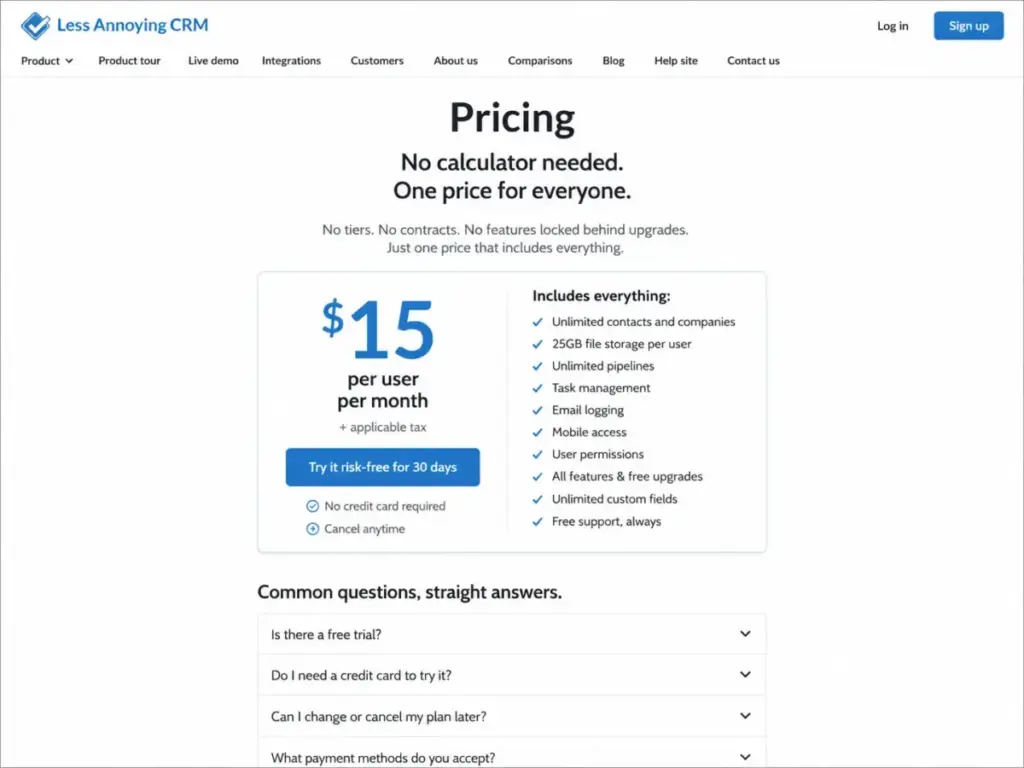
Verdict: Choose Less Annoying CRM if you want a CRM that does exactly what it promises, costs exactly what it says, and will never surprise you with an upsell. It is the cleanest option for teams under 10 who just need contacts, deals, and tasks. Teams that like the flat $15 pricing but need stronger automation or analytics should evaluate Less Annoying CRM alternatives before treating simplicity as the only requirement.
Capsule CRM: Best Lightweight CRM with a Real Free Plan

Capsule CRM offers a free-forever plan (limits should be verified; secondary sources indicate approximately 250 contacts and 1 pipeline). Paid plans start at approximately $18/user/month billed annually for Starter, with Growth at $36 and Advanced at $54 (medium confidence; verify directly).
A 14-day trial of paid features is available. Teams attracted by Capsule’s low-friction setup should still compare Capsule CRM alternatives when Growth pricing, automation gates, reporting depth, or project workflow limits become the real buying constraint.
What it does well: Clean, lightweight CRM with project tracking built in. The free plan is a genuine entry point for solopreneurs or very small teams testing CRM without commitment.
Where it falls short: Contact limits on the free plan push users to paid tiers quickly. Automation, advanced reporting, and integrations require higher plans. This is a CRM designed for simplicity, not depth.
Avoid if: You have more than 250 contacts or need automation from day one. The free plan’s limits will force an upgrade faster than expected.
Setup difficulty: Low
Verdict: Choose Capsule if you want a lightweight, no-pressure CRM with a real free plan and project tracking. Recognize that the simplicity comes with feature ceilings.
Best CRM Software for Growing Teams (10 to 50 Users)
Teams in the 10 to 50 user range face different problems. You need role-based permissions, pipeline segmentation, reliable reporting, and automation that scales without breaking. The CRM must handle more complexity without requiring a full-time admin.
Pipedrive: Best CRM for Visual Sales Pipelines

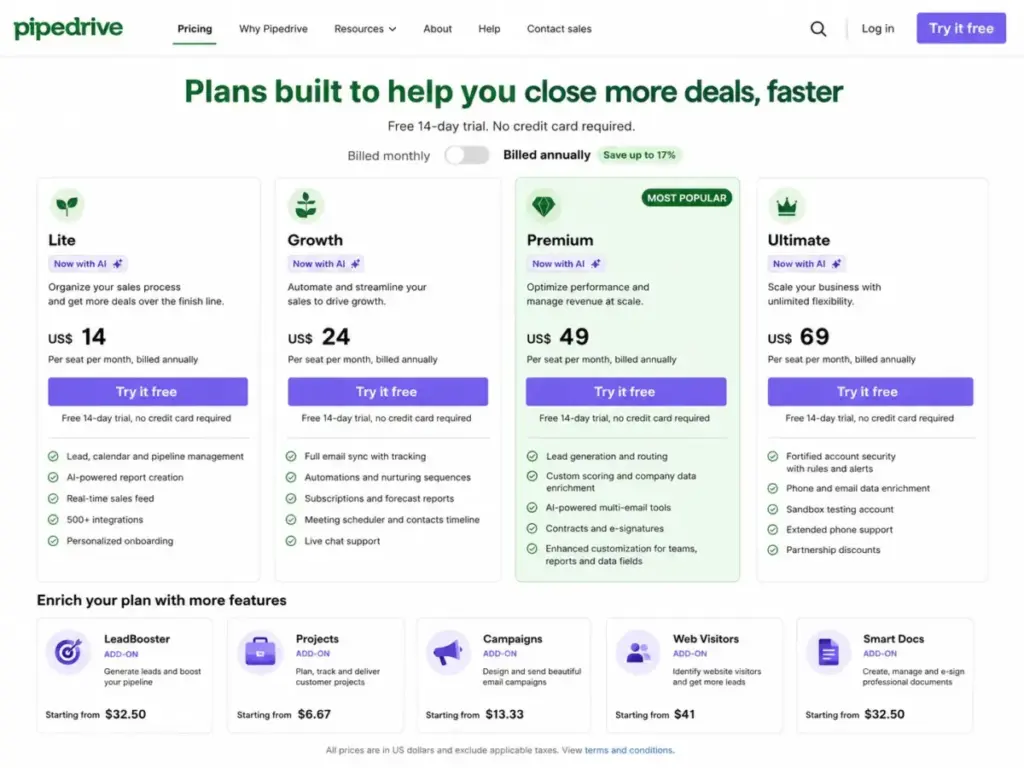
Pipedrive starts at $14/seat/month billed annually for the Lite plan. Growth is $39, Premium $59, and Ultimate $79. A 14-day trial is available. The core CRM includes visual pipelines, deal tracking, email sync, activity reminders, automation, and reporting.
The catch is add-ons. LeadBooster costs $32.50/company/month. Projects adds $6.67. Campaigns is $13.33. Web Visitors tracking is $41. Smart Docs is $32.50. A team using Pipedrive with LeadBooster, Campaigns, and Smart Docs could pay more in add-ons than in base CRM seats.
What it does well: The fastest pipeline setup of any CRM on this list. Reps can start tracking deals in minutes. The visual pipeline view is intuitive, and the mobile app keeps field reps productive. For a deeper look, see our Pipedrive CRM analysis.
Where it falls short: No native marketing automation. Enterprise governance features are limited compared to Salesforce or Dynamics. The add-on model means the advertised price is rarely the final price.
Avoid if: You need marketing automation, complex reporting, or enterprise-grade permissions without add-on costs.
Setup difficulty: Low
monday CRM: Best CRM for Custom Sales Workflows

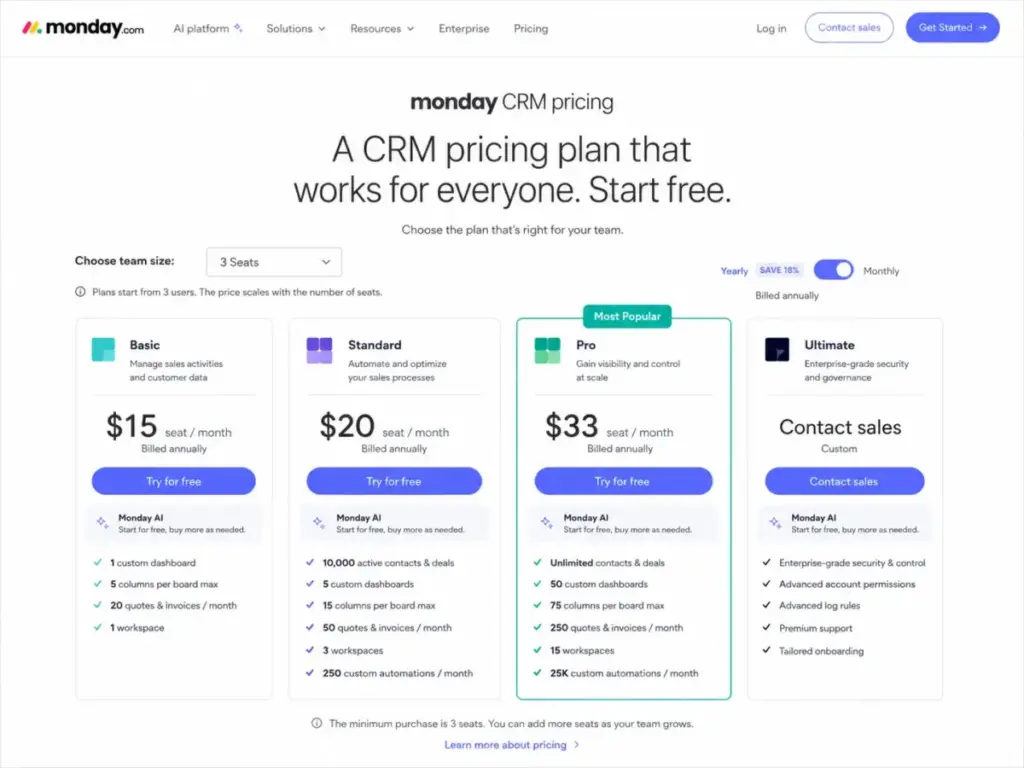
monday CRM starts at $12/seat/month billed annually for Basic, with Standard at $17, Pro at $28, and Ultimate on custom pricing. All plans require a minimum of 3 seats, which means the actual starting cost is $36/month, not $12. A 14-day trial is available. Teams that like the visual workspace but dislike the 3-seat minimum should compare monday.com CRM alternatives against this pricing baseline before committing to a full CRM rollout.
The CRM is built on monday.com’s work management platform, which means contacts, deals, dashboards, automations, quotes, invoices, and email sync all live inside the same board-based interface. AI credits, automation volumes, and advanced dashboards are plan-gated.
What it does well: The most flexible CRM structure for teams that do not follow traditional sales-stage pipelines. If your sales process involves custom statuses, cross-functional handoffs, or operational visibility beyond the sales team, monday CRM adapts better than most traditional CRMs. Teams evaluating operational CRM tools can find more detail in our monday.com CRM evaluation.
Where it falls short: Not built on a traditional CRM object model (contacts, companies, deals, activities). Sales teams that expect Salesforce-style records and relationships may find the board metaphor limiting.
Avoid if: You want a CRM with native forecasting, territory management, or traditional CRM reporting. monday CRM is a work management tool with CRM capabilities, not a CRM with work management features.
Setup difficulty: Medium
Freshsales: Best CRM for SMB Sales Teams Needing Built-In AI and Phone

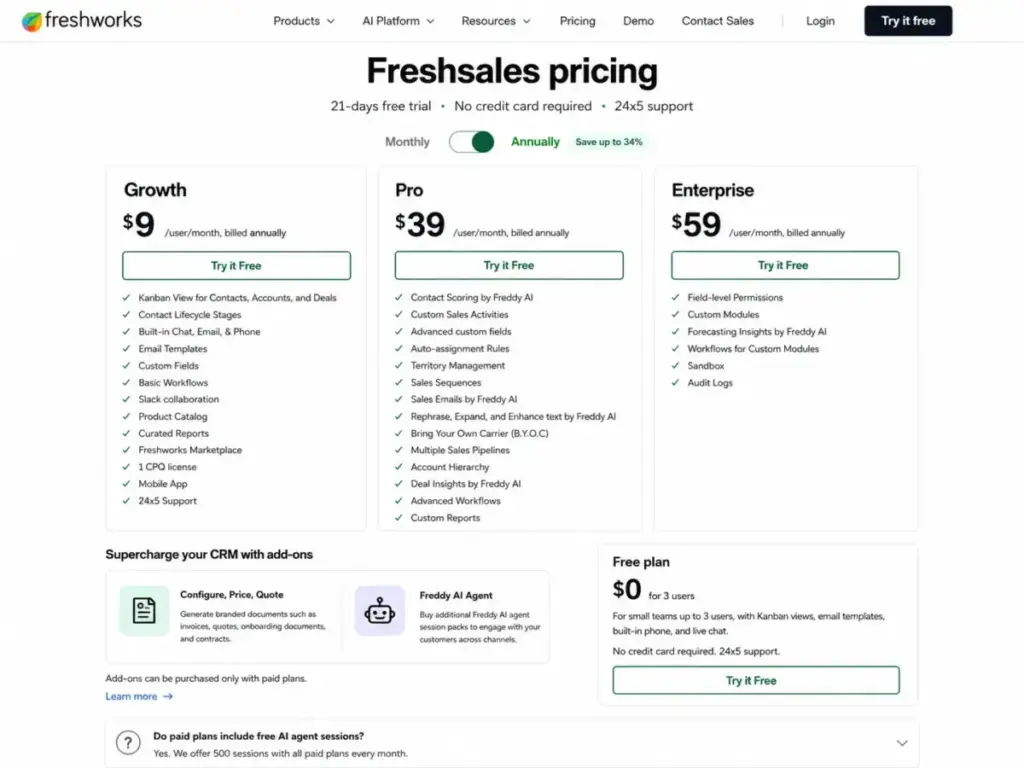
Freshsales offers a free plan for up to 3 users. Growth starts at approximately $9/user/month billed annually. Pro is $39/user/month and Enterprise is $59/user/month. A 21-day trial is available.
The CRM includes contact and account management, Kanban pipeline views, built-in phone, live chat, email templates, automation, and 500 Freddy AI Agent sessions per account on paid plans. CPQ is available as an add-on.
What it does well: One of the few CRMs with built-in phone, chat, and AI in a single platform at SMB pricing. For a 10-person sales team that needs calling, email, and basic AI without buying separate tools, Freshsales bundles those capabilities more affordably than competitors. Our Freshsales review covers the feature gates in detail.
Where it falls short: The 500 AI sessions are account-wide, not per user. A 10-person team will burn through those quickly. CPQ, additional AI sessions, and phone usage are all additional costs.
Avoid if: Your team processes more than 50 AI-assisted interactions per week. The included session cap will force an add-on purchase within the first quarter.
Setup difficulty: Low to Medium
Close: Best CRM for Outbound Sales Teams

Close starts at $9/month annually for Solo (limited to 1 user, 10,000 leads, no workflows). Essentials is $35/month annually, Growth is $99, and Scale is $139. Solo at $19/month if billed monthly.
The CRM includes built-in calling, SMS, email, lead management, pipelines, tasks, workflows, and reporting. AI Chloe is free in beta on Growth and Scale plans.
What it does well: The strongest built-in dialer and communication stack of any CRM. SDR teams running high-volume outbound calling and email sequences can work entirely inside Close without adding a separate sales engagement tool.
Where it falls short: Solo is a single-user plan with no workflows, making it a demo, not a team CRM. The real team CRM starts at Essentials ($35/month annually per user). Calling and SMS usage are metered beyond included amounts.
Avoid if: You need marketing automation, inbound lead nurturing, or a CRM that connects deeply to a marketing stack. Close is built for outbound motion, not inbound lifecycle.
Setup difficulty: Low
Copper: Best CRM for Google Workspace Teams

Copper is the only CRM built natively for Google Workspace. Starter is approximately $9/user/month annually (third-party validated). Professional, the first plan with leads and opportunities, is $59/user/month annually. Business is $99/user/month annually.
Contact limits matter: Starter allows 1,000 contacts, Basic 2,500, Professional 15,000, and Business unlimited. Leads and opportunities are gated to Professional and above. For teams assessing Google-native CRM options, our Copper CRM review covers the feature gate structure.
What it does well: Lives inside Gmail. Contacts, deals, and activities sync automatically from Google Workspace without manual data entry. If your team already works in Gmail and Google Calendar, the adoption friction is the lowest on this list.
Where it falls short: Outside of Google Workspace, Copper offers limited value. The Starter plan is a contact manager, not a CRM. Meaningful sales features start at Professional, which is $59/user/month. Teams that like Copper’s Google-native workflow but reject the Professional price point should review Copper alternatives that preserve pipeline visibility without making Gmail the entire CRM operating system.
Avoid if: You use Microsoft 365 or need a CRM that works independently of any email provider.
Setup difficulty: Low
Insightly: Best CRM for Sales Teams That Also Need Project Handoff

Insightly starts at $29/user/month billed annually for Plus. Professional is $49 and Enterprise is $99. A 14-day trial is available. If that pricing structure feels high for a team that mainly needs pipeline tracking or lighter post-sale workflows, compare Insightly CRM alternatives by project handoff depth, automation access, and practical 10-user cost.
The unique angle is CRM-to-project handoff. When a deal closes, it can automatically trigger a project in the same platform. This eliminates the gap between sales and delivery that most CRMs ignore. Workflow automation, lead assignment, relationship linking, and AI Copilot are included on higher tiers.
What it does well: The smoothest deal-to-project transition of any CRM. Service businesses, agencies, and consulting firms that need to hand off won deals to delivery teams get a workflow that does not exist in standalone CRMs. Read our Insightly CRM review for the full breakdown.
Where it falls short: AppConnect integration costs can surprise buyers: additional 25,000 tasks at $249 with a required $3,000 setup fee. AI Copilot has query limits, and Plus plan has zero AI Copilot queries.
Avoid if: You only need sales pipeline management without project delivery features. The project handoff capability is the reason to choose Insightly, not the CRM depth alone.
Setup difficulty: Medium
Best CRM Software for Enterprise Teams (50+ Users)
Enterprise teams need permissions, territories, audit trails, sandbox environments, and integrations that can handle complex data flows. The CRM must also justify its cost at scale, where per-seat pricing multiplied by 50 or more users turns small price differences into significant budget decisions.
Microsoft Dynamics 365 Sales: Best CRM for Microsoft 365 Teams

Dynamics 365 Sales starts at $65/user/month paid yearly for Sales Professional. Sales Enterprise is $105 and Sales Premium is $150. No free plan. Trial is available.
For organizations already running Microsoft 365, Outlook, Teams, Power BI, Power Automate, and Azure, Dynamics 365 provides native integration that no third-party CRM can fully replicate. Lead and opportunity management, forecasting, sales insights, AI assistance, and enterprise reporting are all built into the Microsoft ecosystem. For a deeper comparison of enterprise CRM choices, see our Dynamics 365 Sales review.
What it does well: The deepest Microsoft ecosystem integration of any CRM. Outlook email and calendar sync is native, not through a connector. Power BI reporting and Power Automate workflows extend the CRM without third-party tools.
Where it falls short: Licensing complexity is the main risk. Between base licenses, Copilot add-ons, Power Platform capacity, storage, and implementation consultants, the total cost can be difficult to predict before deployment.
Avoid if: Your team does not use Microsoft 365 as its primary productivity stack. The value proposition of Dynamics 365 is ecosystem depth, not standalone CRM features. Teams that need enterprise CRM power but not the full Microsoft ecosystem should compare Dynamics 365 alternatives by licensing complexity, implementation effort, reporting depth, and seller adoption risk.
Setup difficulty: High
ActiveCampaign: Best CRM for Email-First Customer Automation

ActiveCampaign pricing uses contact-band and package selection, so stable USD prices are not visible in a static snapshot. A 14-day trial is available with no setup costs. The platform includes email automation, customer journeys, CRM pipelines, lead scoring, segmentation, ecommerce automation, and sales engagement add-ons. Over 1,000 integrations are supported.
What it does well: The most powerful email journey builder of any tool on this list. If your sales motion is driven by inbound content, nurture sequences, and lifecycle automation, ActiveCampaign connects marketing and sales in ways that standalone CRMs cannot.
Where it falls short: CRM functionality may require add-on packages. Pricing is harder to compare because it scales with contacts, not just users. Teams that want flat per-user CRM pricing will find the contact-based model unpredictable.
Avoid if: You want a CRM with transparent, flat per-user pricing. ActiveCampaign’s value is in automation depth, not pricing simplicity.
Setup difficulty: Medium
Keap: Best CRM for Small Business Automation and Follow-Up

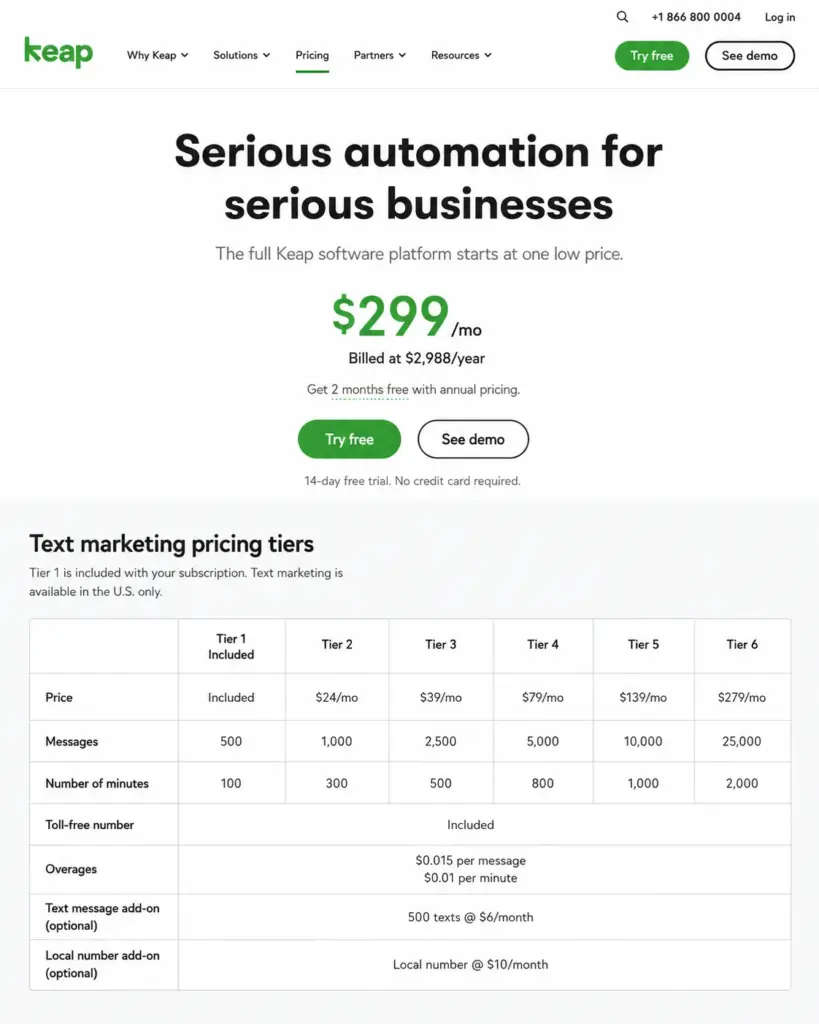
Keap starts at $299/month or $2,988/year ($249/month equivalent billed annually). This is a flat-rate platform, not per-user pricing. The platform includes CRM, email automation, forms, landing pages, payments, appointments, text marketing, and sales automation.
The hidden cost is in text marketing tiers: $24 to $279/month depending on volume, with overages at $0.015/text and $0.01/voice minute. A local number costs $10/month extra.
What it does well: The strongest small-business automation engine for teams that need CRM, email, forms, payments, and text marketing in one platform. If your workflow involves appointment booking, automated follow-up sequences, and payment collection, Keap bundles all of those.
Where it falls short: The $299/month starting price is the highest on this list. For teams that just need contact and deal management, the automation features may not justify the cost. Teams that like Keap’s automation concept but reject the entry price should evaluate Keap alternatives by CRM depth, payment workflow coverage, and total first-year cost.
Avoid if: Your budget is under $200/month or your team only needs basic CRM without marketing automation. Keap is built for automation-heavy small businesses, not simple contact management.
Setup difficulty: Medium
Zendesk Sell: Best CRM for Teams Already Using Zendesk Service

Zendesk Sell starts at $19/month for the Sell Team plan. Growth is $55, Professional is $115, and Enterprise is $169. Billing is commonly per agent/user; verify final terms at checkout.
What it does well: If your organization already uses Zendesk for customer support, Sell connects sales and service data in ways that standalone CRMs cannot replicate. Lead and deal management, pipeline tracking, forecasting, and activity tracking integrate directly with Zendesk’s support ticket system. Our Zendesk Sell analysis covers the integration depth.
Where it falls short: As a standalone sales CRM for teams that do not use Zendesk service, the feature depth does not match Salesforce, HubSpot, or Zoho at comparable price points. Advanced forecasting, permissions, and analytics are tier-gated.
Avoid if: You do not already use or plan to adopt Zendesk’s service platform. The CRM’s value is in the ecosystem connection, not in standalone sales capabilities. If that ecosystem connection no longer offsets the retirement risk, compare Zendesk Sell replacement options by migration difficulty, service-data continuity, pipeline usability, and long-term vendor roadmap.
Setup difficulty: Low to Medium
Creatio: Best No-Code CRM for Complex Workflows

Creatio starts at $40/user/month for Growth edition. Enterprise is $75/user/month. AI packages are priced separately: AI Start at $5,000/year for 25,000 actions, AI Grow at $25,000/year for 125,000 actions.
What it does well: The most powerful no-code process automation engine of any CRM on this list. For midmarket and enterprise teams that need to design, execute, and iterate on complex sales and service workflows without writing code, Creatio offers a level of process control that most CRMs gate behind developer resources.
Where it falls short: Overkill for small teams. The no-code platform requires process design thinking that most 5-person sales teams do not need. AI pricing is significant and separate from CRM seat pricing.
Avoid if: Your team has fewer than 15 users or does not have complex, multi-step workflows that justify the platform’s depth.
Setup difficulty: High
SugarCRM / SugarAI: Best CRM for Midmarket Teams That Need Built-In Sales and Service

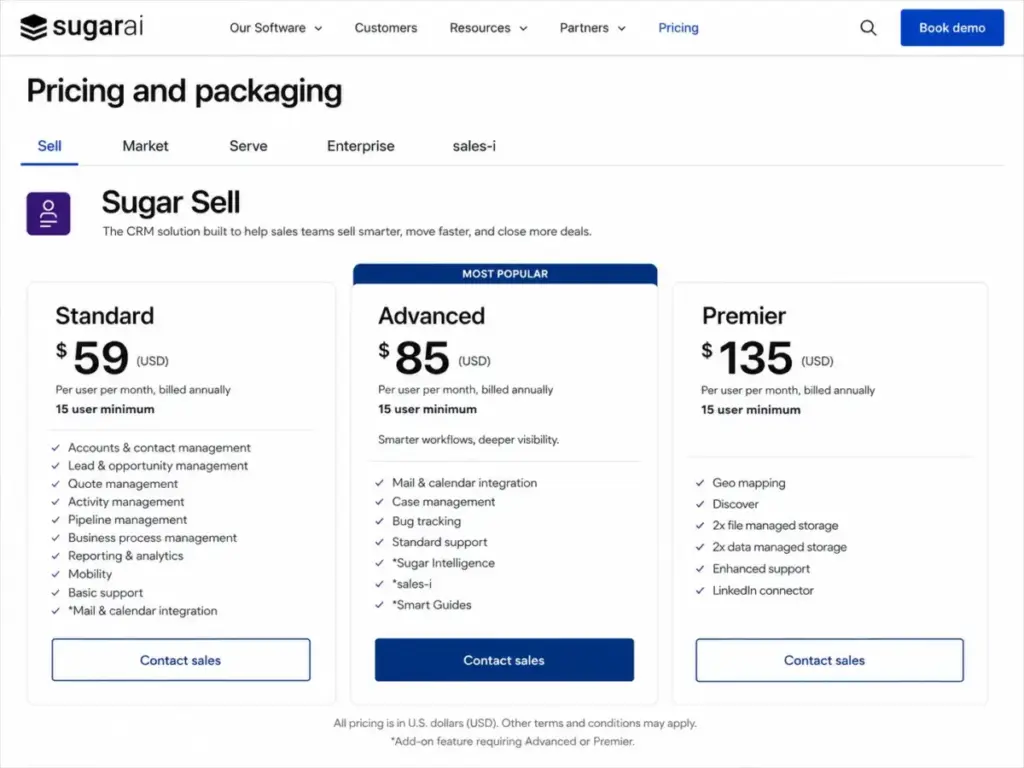
SugarCRM starts at $59/user/month billed annually with a 15-user minimum. Advanced is $85/user/month and Premier is $135/user/month, both with the same 15-user minimum. This means the minimum annual commitment is $10,620 on Standard before taxes or add-ons. Teams that like SugarCRM’s B2B depth but reject the 15-user floor should evaluate SugarCRM alternatives against the same cost baseline before treating the listed per-user price as comparable.
What it does well: Deep sales and service CRM for midmarket teams that meet the 15-user floor. Sales automation, account management, pipeline, forecasting, and service expansion modules provide a unified platform without needing to stitch together separate tools.
Where it falls short: The 15-user minimum eliminates SugarCRM from consideration for teams under 15 users. Mail and calendar integration on higher tiers adds friction for smaller organizations.
Avoid if: Your team has fewer than 15 users. The minimum seat requirement makes SugarCRM structurally inaccessible for small teams, regardless of feature fit.
Setup difficulty: High
NetSuite CRM: Best CRM for Companies Already Running NetSuite ERP

NetSuite CRM does not publish a public price list. Pricing depends on suite configuration, modules, users, and implementation scope. It is custom quote-based. No public self-serve trial has been verified.
The CRM includes Customer 360, sales force automation, opportunity management, partner relationship management (PRM), customer service, marketing automation, and native ERP connection.
What it does well: For companies already running or evaluating NetSuite ERP, the CRM module connects sales, finance, and operations data in a single platform. No standalone CRM can replicate the depth of ERP-connected customer data.
Where it falls short: Pricing is not self-serve or transparent. Implementation, customization, and consultant costs make NetSuite CRM one of the most expensive options on this list when total cost of ownership is included.
Avoid if: You are not already in the NetSuite ecosystem or planning a NetSuite ERP deployment. The CRM’s value is inseparable from the ERP platform.
Setup difficulty: High
Pipeliner CRM: Best CRM for Visual Sales Management

Pipeliner CRM starts at approximately $65/user/month billed annually for Starter (medium-confidence pricing; verify directly). Business is approximately $85, Enterprise $115, and Unlimited $150. Billing is annual-only.
What it does well: Visual pipeline management, sales process tools, account management, forecasting, reporting, sales intelligence, and relationship maps. Pipeliner is built for sales managers who want to see the entire pipeline, not just read about it.
Where it falls short: The starting price is higher than most SMB CRMs. Annual-only billing removes flexibility. Pricing requires final official verification as the pricing page was not fully captured in our static research.
Avoid if: Your budget is under $50/user/month or you need monthly billing flexibility. Pipeliner’s pricing puts it in the mid-to-upper range of CRM costs.
Setup difficulty: Medium
ClickUp CRM: Best CRM Alternative for Work Management Teams

ClickUp offers a Free Forever plan. Unlimited is $7/user/month billed annually. Business is $12/user/month. Enterprise is custom. AI add-ons are separate: Brain AI at $9/user/month, Everything AI at $28, and Super Credits at $10 per 10,000 credits.
What it does well: The most affordable entry point for teams that want CRM capability alongside task management, document collaboration, and project tracking. ClickUp CRM templates, custom fields, forms, dashboards, and automations let you build a CRM inside a tool your team may already use for project work.
Where it falls short: ClickUp is not a native CRM. It lacks dedicated sales objects like opportunities, forecasting models, and quote/CPQ functionality. Sales teams that need CRM-specific depth will feel the gap compared to purpose-built tools.
Avoid if: Your team needs native sales forecasting, opportunity stages, or CRM reporting. ClickUp is a work management tool with CRM templates, not a CRM with work management features.
Setup difficulty: Medium
Full Pricing and Feature Matrix
Pricing was verified on May 22, 2026 from official pricing pages and third-party validated sources where noted. Prices shown are annual billing unless otherwise stated.
| CRM | Starting price | Practical tier | Free plan | Trial | Billing | Hidden cost flag |
|---|---|---|---|---|---|---|
| Salesforce | $25/user/mo | Pro Suite+ | No | 30 days | Per user | Add-ons, Agentforce, implementation |
| HubSpot | Free; Starter $20/seat/mo | Professional $100 | Yes | 14 days | Per seat | Marketing contacts, hubs, onboarding |
| Zoho CRM | Free; Standard ~$14/user/mo | Enterprise ~$40 | Yes (3 users) | Yes | Per user | Zoho apps, storage, analytics |
| Pipedrive | $14/seat/mo annual | Growth $39 | No | 14 days | Per seat | LeadBooster, Campaigns, Docs |
| monday CRM | $12/seat/mo annual (3 min) | Pro $28 | No | 14 days | Per seat (3 min) | AI credits, automation limits |
| Dynamics 365 | $65/user/mo annual | Enterprise $105 | No | Yes | Per user | Copilot, Power Platform, consultants |
| Freshsales | Free; Growth ~$9/user/mo | Pro $39 | Yes (3 users) | 21 days | Per user | CPQ, AI sessions, phone usage |
| ClickUp CRM | Free; Unlimited $7/user/mo | Business $12 | Yes | Free plan | Per user | Brain AI $9, Everything AI $28 |
| ActiveCampaign | Contact-based | Contact-based | No | 14 days | Usage-based | Contact growth, CRM add-ons |
| Close | Solo $9/mo annual | Growth $99 | No | Yes | Per user | Calling/SMS, data enrichment |
| Copper | Starter ~$9/user/mo annual | Professional $59 | No | Yes | Per user | Contact limits, feature gates |
| Insightly | Plus $29/user/mo annual | Professional $49 | No | 14 days | Per user | AppConnect $3K setup, AI limits |
| Keap | $299/month flat | $299/month | No | Yes | Flat rate | Text tiers $24-$279, overages |
| Zendesk Sell | $19/user/mo | Growth $55 | No | Not verified | Per user | Suite expansion, analytics |
| Creatio | $40/user/mo | Enterprise $75 | No | Verify | Per user | AI packages $5K-$25K/year |
| SugarCRM | $59/user/mo (15 min) | Advanced $85 | No | Not verified | Per user (15 min) | $10,620/yr minimum, modules |
| NetSuite CRM | Custom quote | Custom quote | No | No | Custom | Implementation, ERP modules |
| Pipeliner CRM | ~$65/user/mo annual | Business $85 | No | Yes | Per user | Annual-only, training |
| Less Annoying | $15/user/mo | $15/user/mo | No | 30 days | Per user | No hidden fees (taxes only) |
| Capsule CRM | Free; Starter ~$18/user/mo | Growth ~$36 | Yes | 14 days | Per user | Contact limits, automation gates |
What this means: The starting price is never the full story. Salesforce at $25/user/month becomes $200+/user/month at Enterprise with add-ons. HubSpot at $0 becomes $100/seat/month when you need automation. Pipedrive at $14/seat/month can cost more in add-ons than in seats. The “practical tier” column shows what most teams actually pay when they unlock the features they need.
Feature Gate Comparison: What Plan Unlocks What
| CRM | Automation starts at | Reporting starts at | AI starts at | API starts at |
|---|---|---|---|---|
| Salesforce | Pro Suite | Pro Suite | Agentforce add-on | Starter Suite |
| HubSpot | Professional | Professional | Breeze (varies) | Starter |
| Zoho CRM | Professional | Standard | Enterprise (Zia) | Standard |
| Pipedrive | Growth | Lite | Growth | Lite |
| monday CRM | Standard | Basic | Standard (credits) | Standard |
| Dynamics 365 | Professional | Professional | Sales Premium (Copilot) | Professional |
| Freshsales | Growth | Growth | Growth (500 sessions) | Growth |
| ClickUp CRM | Unlimited | Unlimited | Brain AI add-on | Unlimited |
| Close | Essentials | Essentials | Growth (Chloe beta) | Essentials |
| Copper | Professional | Basic | Not available | Professional |
What this means: “This CRM has automation” is meaningless without knowing which plan unlocks it. Zoho gives you automation at Professional ($23/user/month). HubSpot gates it behind Professional ($100/seat/month). That is a 4x price difference for the same capability category.
Setup and Migration Difficulty
| CRM | Setup difficulty | Why |
|---|---|---|
| Salesforce | High | Requires admin, consultant for most implementations |
| HubSpot | Low | Clean onboarding, guided setup, fastest time to first deal |
| Zoho CRM | Medium | Powerful but needs configuration time for full value |
| Pipedrive | Low | Visual pipeline setup in minutes, minimal admin needed |
| monday CRM | Medium | Board customization needed; not traditional CRM setup |
| Dynamics 365 | High | Microsoft licensing, Power Platform configuration |
| Freshsales | Low-Medium | Free plan quick; paid features need configuration |
| ClickUp CRM | Medium | CRM templates need customization, not plug-and-play |
| ActiveCampaign | Medium | Journey builder is powerful but requires mapping |
| Close | Low | Built for reps, minimal admin overhead |
| Copper | Low | Auto-syncs with Google Workspace |
| Insightly | Medium | CRM-to-project setup needs planning |
| Keap | Medium | Automation builder requires sequence design |
| Zendesk Sell | Low-Medium | Simple CRM, complex if adding service integration |
| Creatio | High | No-code platform requires process design expertise |
| SugarCRM | High | 15-user minimum, enterprise configuration |
| NetSuite CRM | High | ERP integration, consultant-driven implementation |
| Pipeliner CRM | Medium | Sales process configuration needed |
| Less Annoying CRM | Low | Simplest setup on this list |
| Capsule CRM | Low | Lightweight, minimal configuration |
Which CRM Software Should You Avoid?
Not every CRM on this list is right for every team. Here are the specific mismatches to watch for.
Avoid Salesforce if you have no admin capacity and fewer than 5 users. The platform’s power comes with proportional complexity that small teams cannot absorb.
Avoid HubSpot Professional if your budget cannot handle the $100/seat/month jump from free. The free-to-paid cliff is one of the steepest on this list.
Avoid Keap if you do not need marketing automation. Paying $299/month for contact management alone is overspending when Less Annoying CRM does the same job for $15/user/month.
Avoid NetSuite CRM as a standalone purchase. It only makes sense as part of a NetSuite ERP deployment, not as an independent CRM decision.
Avoid SugarCRM if your team is under 15 users. The minimum seat requirement is a hard structural barrier, not a preference.
How to Choose the Right CRM Software
Start with these questions before evaluating any tool:
- How many users need CRM access today and in 12 months? This determines whether you need a tool that scales (Salesforce, HubSpot, Zoho) or one that stays simple (Less Annoying, Capsule).
- What is your sales motion? Outbound calling teams need Close or Freshsales. Inbound marketing teams need HubSpot or ActiveCampaign. Visual pipeline teams need Pipedrive. Complex workflow teams need monday CRM or Creatio. If those two motions overlap, use the HubSpot vs Close CRM comparison.
- What is your email and calendar ecosystem? Google Workspace teams should evaluate Copper. Microsoft 365 teams should evaluate Dynamics 365. Ecosystem fit reduces friction more than any individual feature.
- What features do you need today versus in 12 months? Do not buy for future needs. Buy for current workflows and verify that the upgrade path exists when you need it. Understanding what defines CRM software at a foundational level helps anchor these decisions.
- What is the total cost at 10 users on the plan you actually need? Starting prices are marketing. Calculate the practical tier cost at your real team size, including add-ons, AI credits, and support tiers.
- Can your team handle the setup complexity? High-setup CRMs (Salesforce, Dynamics, Creatio, SugarCRM) deliver more power but demand more resources. Low-setup CRMs (Pipedrive, Close, Less Annoying) deliver less depth but work faster.
- What happens when you need to leave? Check data export options, API access, and workflow portability before committing. Switching CRMs is one of the most disruptive operational changes a sales team can make. Our CRM migration guide covers the full process.
Common Mistakes When Choosing CRM Software
Choosing by starting price. The cheapest advertised plan is rarely the plan you need. Pipedrive at $14/month requires add-ons. HubSpot at $0 requires Professional for automation. Always calculate the practical tier cost.
Over-buying complexity. A 5-person team on Salesforce Enterprise is paying for governance tools nobody will use. Match the CRM’s depth to your team’s actual operational maturity.
Ignoring integration depth. A CRM that lists “1,000+ integrations” may only sync contact names with half of them. Test whether the integrations you need are native, bidirectional, and real-time or just logo-deep.
Skipping the migration assessment. Moving from one CRM to another means remapping fields, rebuilding workflows, retraining reps, and accepting 2 to 8 weeks of reduced productivity. Factor this cost into every CRM switch decision.
Assuming AI is included. Most CRMs now advertise AI features. Few include meaningful AI in their base plans. Salesforce Agentforce, ClickUp Brain AI, and Creatio AI packages are all separate costs that can add $5 to $50 per user per month.
Final Verdict: Best CRM Software for Most Teams
For most US sales teams in 2026, Salesforce Sales Cloud is the best overall CRM if you have the admin resources and budget to support it. It offers the deepest feature set, largest integration ecosystem, and strongest scalability path.
If you want the lowest-friction starting point, HubSpot Smart CRM is the safest choice. The free plan is genuinely usable, onboarding is fast, and the growth path to Professional and Enterprise is well-documented. Just budget for the cost increase when you need automation.
If you want the best value, Zoho CRM delivers enterprise-grade features at prices that undercut most competitors by 40 to 60 percent. The trade-off is configuration time and a denser interface.
For outbound sales teams, Close is the strongest fit. For Google Workspace teams, Copper. For Microsoft teams, Dynamics 365. For teams that need CRM and project handoff, Insightly. For teams that just want simple, predictable, no-surprise CRM, Less Annoying CRM at $15/user/month is hard to beat.
Choose by workflow fit, total cost at your real team size, and ecosystem alignment. Those three factors matter more than any badge, review score, or feature checklist.
FAQ
Is Salesforce too expensive for a small sales team?
Yes, if your team has fewer than 5 users and no admin capacity. The base $25/user/month looks affordable, but real deployments typically need Pro Suite or higher plus implementation support. For teams under 10, HubSpot or Zoho CRM provide similar core functionality at lower total cost with less admin overhead.
What CRM has the best free plan without hidden limits?
HubSpot offers the most usable free CRM with no time limit, unlimited users on free, and core pipeline features. The limitation is that automation, custom reporting, and sequences require Professional at $100/seat/month. Zoho CRM’s free plan supports up to 3 users with basic features. ClickUp’s Free Forever plan includes CRM templates but lacks native sales depth.
Is it worth paying for AI in a CRM right now?
No, unless your team processes high volumes of leads, deals, or customer interactions daily. Most CRM AI features in 2026 are in early stages: lead scoring predictions, email draft suggestions, and conversation summaries. The value is real for teams running 100+ deals per rep per month, but marginal for teams managing 20 deals each.
Which CRM is easiest for sales reps to actually use?
Pipedrive and Close consistently score highest on rep adoption because both prioritize the sales workflow over admin configuration. HubSpot free tier is also fast to adopt. Salesforce and Dynamics 365 offer more power but require training before reps feel productive.
Can I run a CRM on Google Workspace without extra tools?
Yes, if you use Copper. It is the only CRM built natively inside Gmail and Google Workspace, meaning contacts, deals, and activities sync automatically. The trade-off is that meaningful sales features start at Professional ($59/user/month annually), not at the Starter entry point.
How much does CRM software actually cost for a 10-person team?
It depends on the plan you actually need, not the starting price. At 10 users on practical tiers: Salesforce Pro Suite runs roughly $800 to $1,000+/month. HubSpot Professional is $1,000/month. Zoho Enterprise is approximately $400/month. Pipedrive Growth is $390/month plus add-ons. Less Annoying CRM is $150/month flat. Always calculate at your real team size on the tier that unlocks your required features.
Should I switch from spreadsheets to a CRM right now?
Yes, if you have more than 3 people tracking leads or deals and you are losing visibility into pipeline status, follow-up timing, or deal history. The right time to switch is before you lose a deal because someone forgot to follow up, not after. Freshsales, HubSpot free, or Capsule CRM offer the lowest-friction transition paths from spreadsheet-based tracking.
Which CRM should I avoid entirely?
No CRM on this list should be avoided entirely because each serves a specific buyer scenario. But you should avoid buying a CRM that does not match your sales motion. An outbound team on ActiveCampaign will waste budget on email automation they do not need. An inbound team on Close will lack the journey builder they require. Mismatch, not product quality, is the real risk.