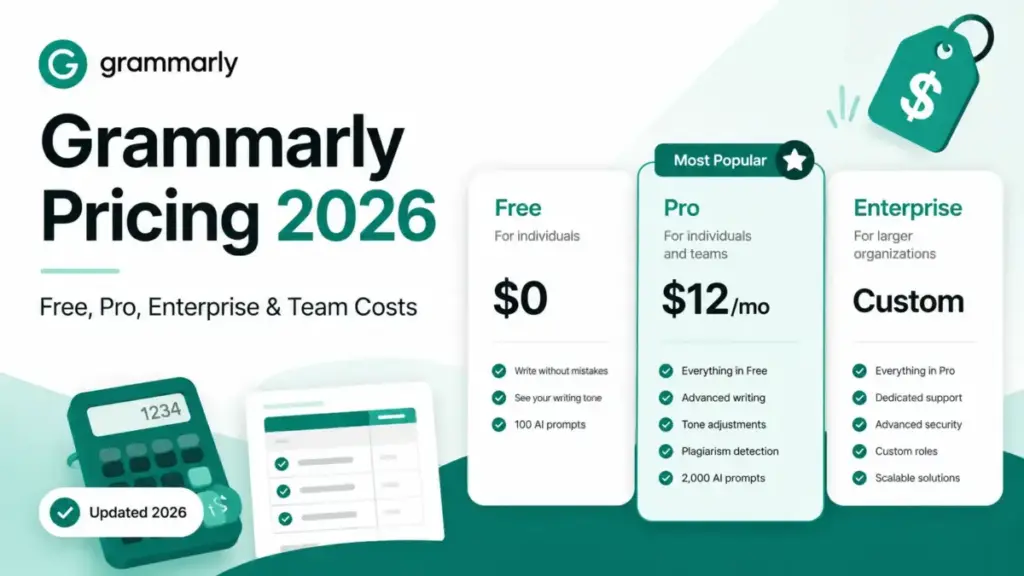
Grammarly lists $12/month on annual billing for its Pro plan. That is the number every pricing page and review article repeats. What they skip: the same plan costs $30/month if you pay monthly. That makes monthly billing dramatically more expensive than annual billing, and it is one of the biggest cost levers to understand before subscribing.
The free plan covers basic grammar and spelling, but it caps AI prompts at 100 per month and locks plagiarism detection, full-sentence rewrites, and style guides behind Pro. For most professional writers, the free tier stops being useful the moment you need to check a client draft for originality or rewrite a paragraph that sounds off.
This guide breaks down every Grammarly plan, maps features to the tier that actually unlocks them, calculates team costs at 5 to 100 users, and compares Grammarly’s per-seat pricing against five competitors. Pricing verified on the official Grammarly pricing page on June 6, 2026.
Quick Pricing Verdict
| Category | Details |
|---|---|
| Starting price | $0 (Free), $12/mo (Pro annual) |
| Free plan | Yes, basic grammar/spelling, 100 AI prompts/mo |
| Free trial | 7 days of Pro (verify checkout terms on pricing page) |
| Best plan for most users | Pro Annual ($144/year per member) |
| Plan to avoid | Pro Monthly ($30/mo) |
| Biggest hidden cost | Monthly billing premium: 2.5x more than annual |
| Best alternative if too expensive | LanguageTool Premium ($4.99/mo annual) |
| Pricing verified | June 6, 2026 |
Based on official pricing pages and support documentation reviewed for this guide, Grammarly’s public Pro pricing is straightforward, but the monthly-vs-annual gap is unusually important for buyers comparing options in the best AI writing tools category.
Grammarly Pricing Plans Compared
| Plan | Monthly | Quarterly | Annual | Billing basis | Best for | Key limits |
|---|---|---|---|---|---|---|
| Free | $0 | $0 | $0 | N/A | Casual writers, basic grammar checks | 100 AI prompts/mo, no plagiarism, no rewrites |
| Pro | $30/member | $20/member/mo | $12/member/mo ($144/yr) | Per member | Professional writers, content teams | 2,000 AI prompts/member/mo, all core writing features; no SAML SSO, SCIM, DLP, BYOK, or advanced enterprise controls |
| Enterprise | Custom | Custom | Custom | Per member | Organizations 25+ needing SSO and admin | Unlimited AI prompts, SAML SSO, SCIM, dedicated CSM |
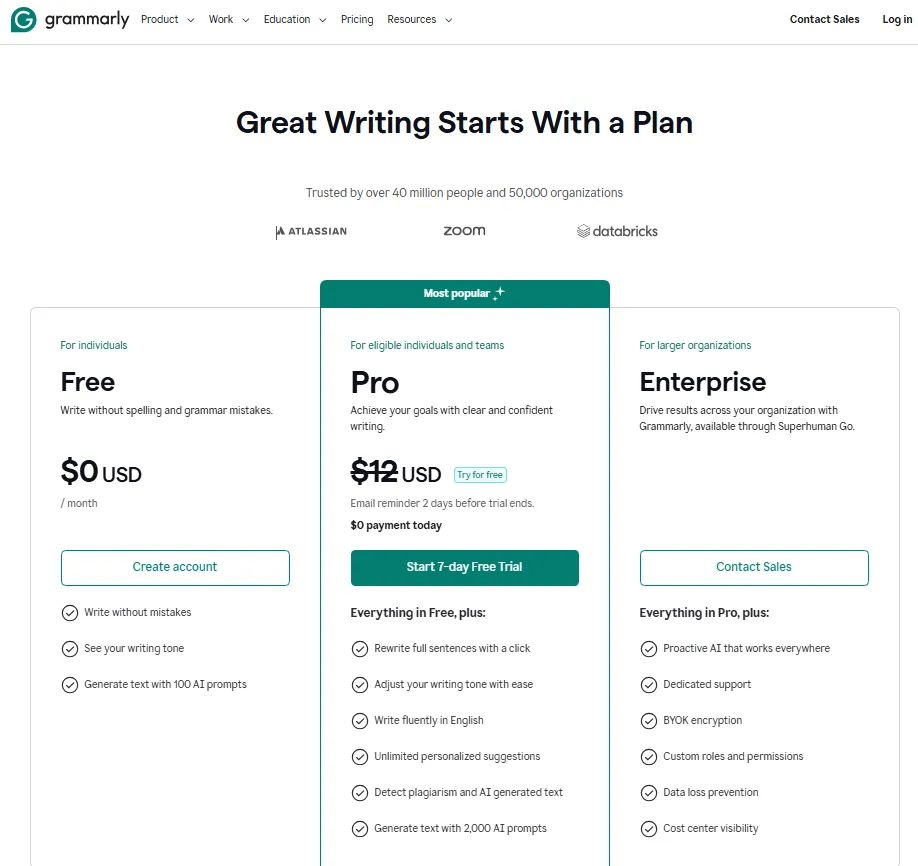
What this means: The Pro plan is where most paying users land. The $12/month annual rate is the price to benchmark, not the $30 monthly rate that Grammarly also lists. Enterprise pricing requires contacting the sales team for a custom quote based on team size and requirements.
What Each Grammarly Plan Includes
Free: Good Enough for Light Editing
Grammarly Free covers grammar, spelling, and punctuation corrections. It also includes limited tone detection and 100 AI prompts per month.
What is missing: plagiarism detection, full-sentence rewrites, style guide, brand tones, snippets, and the analytics dashboard. The 100 AI prompt cap sounds generous until you realize a single editing session on a long document can consume 10 to 15 prompts.
Mini verdict: Fine for students and casual emailers. Not sufficient for anyone who writes professionally.
Avoid if: You need plagiarism checks, brand voice consistency, or run through more than a few documents per week.
Pro: The Plan Most Writers Need
Pro unlocks everything gated on Free: plagiarism detection, full-sentence rewrites, tone adjustments, style guide, brand tones, snippets, and a writing analytics dashboard. AI prompts jump to 2,000 per month.
The feature set is identical whether you pay monthly or annually. The only difference is price: $30/month vs. $12/month on annual billing. That pricing gap makes the annual plan the obvious choice for anyone committed to using Grammarly beyond a trial period.
Mini verdict: Best value on annual billing at $144/year. Covers every feature a solo writer or small team needs.
Avoid if: Your team exceeds 25 members and you need SSO, SCIM, DLP, BYOK, or centralized admin controls. Grammarly does not publish Enterprise pricing or volume discount thresholds.
Enterprise: For Organizations That Need Admin Control
Enterprise adds SAML SSO, SCIM user provisioning, advanced admin analytics, a designated customer success manager, priority support, and unlimited AI prompts. All Pro features are included.
Minimum seat requirements for Enterprise are not publicly listed. Pricing is custom and requires contacting Grammarly sales. Grammarly does not publicly disclose volume discount thresholds.
Mini verdict: Required for organizations that need centralized user management, compliance controls, and a dedicated support contact.
Avoid if: Your team is under 25 members. Pro Annual at $144/year per member covers all the writing features without the enterprise overhead.
Feature-to-Plan Map: What Each Tier Gets You
This is the table that matters. Before upgrading, check which features you actually need and where they unlock.
| Feature | Free | Pro | Enterprise |
|---|---|---|---|
| Grammar, Spelling, Punctuation | Yes | Yes | Yes |
| Tone Detection | Limited | Yes | Yes |
| Full-sentence Rewrites | No | Yes | Yes |
| Plagiarism Detection | No | Yes | Yes |
| AI Writing Prompts | 100/mo | 2,000/mo | Unlimited |
| Style Guide | No | Yes | Yes |
| Brand Tones | No | Yes | Yes |
| Snippets | No | Yes | Yes |
| Analytics Dashboard | No | Yes | Yes (advanced) |
| SAML SSO | No | No | Yes |
| SCIM Provisioning | No | No | Yes |
| Dedicated CSM | No | No | Yes |
What this means: The biggest plan gate sits between Free and Pro. Six core features, including plagiarism detection and full-sentence rewrites, are completely locked on Free. The gate between Pro and Enterprise is narrower: SSO, SCIM, and admin-level analytics. If your organization does not require centralized identity management, Pro covers everything.
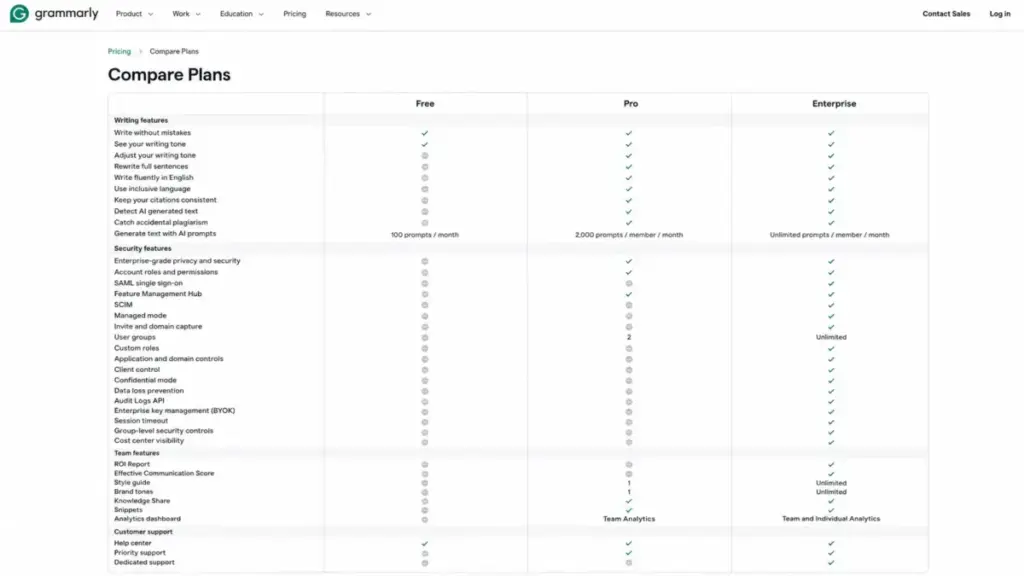
Caption:
Screenshot-style mockup of Grammarly’s Compare Plans table comparing Free, Pro, and Enterprise features.
If you are evaluating whether Grammarly’s full feature set justifies the cost, the plan-gate map above is the fastest way to decide.
Hidden Costs and Add-ons
Grammarly’s pricing page is cleaner than most SaaS tools. There are no mandatory onboarding fees, no per-document charges, and no API overage surprises for individual users. But three billing traps catch buyers off guard.
| Hidden cost | Amount | When it hits |
|---|---|---|
| Monthly billing premium | $30/mo vs $12/mo on annual | Choosing monthly instead of annual billing |
| Quarterly billing premium | $20/mo vs $12/mo on annual | Choosing quarterly instead of annual billing |
| Auto-renewal | Full plan price | Annual plan renews automatically unless cancelled before renewal date |
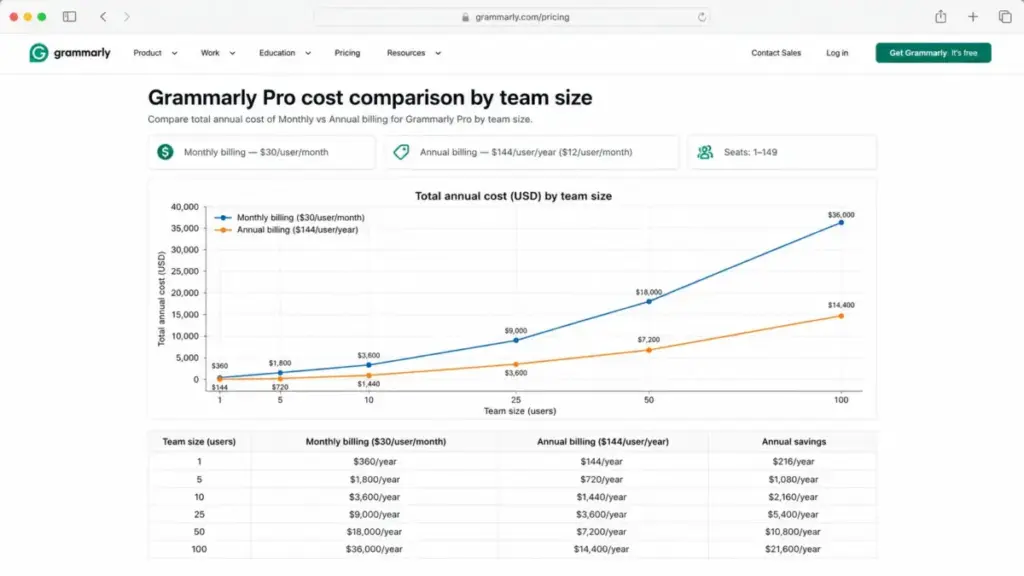
What this means: The monthly billing premium is the largest hidden cost. A solo user paying monthly spends $360/year instead of $144/year on annual. That is $216 in avoidable cost per user per year. At 10 users, that gap widens to $2,160/year.
Grammarly for Education provides institutional licensing for universities with campus-wide access. Pricing is negotiated on a per-institution basis.
Real Cost Scenarios: 1, 5, 10, 25, 50, and 100 Users
Many Grammarly pricing summaries stop at the listed plan price. The table below shows what the public Pro price means at 1, 5, 10, 25, 50, and 100 users.
| Team size | Monthly billing | Annual billing | Recommended plan | Notes |
|---|---|---|---|---|
| 1 user | $30/mo | $144/yr ($12/mo) | Pro Annual | Solo writer. Annual billing saves $216/yr |
| 5 users | $150/mo | $720/yr ($60/mo) | Pro Annual | Small team. Annual saves $1,080/yr vs monthly |
| 10 users | $300/mo | $1,440/yr ($120/mo) | Pro Annual | Mid-size team. Annual saves $2,160/yr vs monthly |
| 25 users | $750/mo | $3,600/yr ($300/mo) | Pro or Enterprise | At 25+ seats, contact Enterprise sales if you need SSO, SCIM, DLP, BYOK, or centralized admin controls |
| 50 users | $1,500/mo | $7,200/yr ($600/mo) | Enterprise | Enterprise required for SSO, SCIM, DLP, BYOK, admin controls. Pricing is custom, contact sales |
| 100 users | $3,000/mo | $14,400/yr ($1,200/mo) | Enterprise | At 100 seats, Enterprise with SAML SSO, SCIM, dedicated CSM is the only practical option |
What this means: Grammarly’s per-seat model scales linearly. There are no volume discounts on the public Pro plan. A 10-person team saves $2,160 per year by choosing annual over monthly billing. At 25+ users, Enterprise is worth exploring if you need SSO, SCIM, DLP, BYOK, or centralized admin controls. Grammarly does not publish Enterprise pricing.
Monthly vs Annual Billing
Grammarly offers three billing cycles for Pro: monthly, quarterly, and annual.
| Billing cycle | Price per member | Effective monthly rate | Annual cost (1 user) | vs Annual savings |
|---|---|---|---|---|
| Monthly | $30/mo | $30/mo | $360/yr | None (baseline) |
| Quarterly | $60/quarter | $20/mo | $240/yr | Save $120/yr (33%) |
| Annual | $144/year | $12/mo | $144/yr | Save $216/yr (60%) |
The 60% discount on annual billing is one of the steepest in the AI writing tool category. My recommendation: unless you are testing Grammarly for less than 3 months, annual billing is the only financially sensible choice. The quarterly option splits the difference but still costs 67% more than annual.
One caveat: Grammarly subscriptions auto-renew at the listed price. Set a calendar reminder before your renewal date if you want to reassess.
Which Grammarly Plan Should You Choose?
Solo freelance writer: Pro Annual at $144/year. You get plagiarism detection, full rewrites, and 2,000 AI prompts. The free plan’s 100-prompt cap runs out fast on busy weeks.
Small content team (5 to 10 people): Pro Annual. At $720 to $1,440/year, it is cheaper than most AI writing platforms on a per-seat basis. Annual billing is non-negotiable at this scale because the monthly premium adds up fast.
Growing team (25+ people): Contact Enterprise sales if you need SSO, SCIM, DLP, BYOK, or centralized admin controls. Grammarly does not publish Enterprise pricing or volume discount thresholds, so request a custom quote.
Enterprise organization (50 to 100+ people): Enterprise is the only realistic option. SAML SSO, SCIM provisioning, and a dedicated customer success manager are operational necessities at this scale, not luxury features.
Understanding what generative AI tools can and cannot do helps set realistic expectations for any writing assistant pricing decision.
Which Grammarly Plan Should You Avoid?
Avoid Pro Monthly at $30/month.
The features are identical to Pro Annual. The only difference is the billing cycle. Paying monthly costs $360/year vs $144/year, a $216 penalty for not committing to annual billing. That is a 150% markup for the same product.
The one exception: If you need Grammarly for a short project lasting 1 to 2 months, monthly billing makes sense. For anything longer than 3 months, annual billing breaks even and saves money from month 4 onward.
Also avoid the quarterly plan unless annual commitment genuinely does not fit your budget. Quarterly costs $240/year, which is $96 more than annual for zero additional features.
Grammarly Pricing vs Competitors
| Tool | Starting price | Annual rate | Free plan | 10-user annual cost | Best for |
|---|---|---|---|---|---|
| Grammarly Pro | $12/mo (annual) | $144/yr | Yes (limited) | $1,440/yr | All-around grammar + AI writing |
| ProWritingAid | $30/mo | $120/yr (or $399 lifetime) | Yes (limited) | $1,200/yr | Long-form writers who want a one-time purchase |
| QuillBot | $19.95/mo | $99.95/yr | Yes (limited) | $999.50/yr | Budget paraphrasing + grammar |
| LanguageTool | $4.99/mo (annual) | ~$60/yr | Yes (basic) | $2,388/yr (Team at $19.90/user/mo) | Multilingual writers, cheapest individual premium |
| Wordtune | $9.99/mo (Unlimited) | $83.88/yr ($6.99/mo annual) | Yes (limited) | $838.80/yr | AI sentence rewriting |
| Hemingway Editor | $8.33/mo (annual) | $99.96/yr | Free web version | $999.60/yr | Readability-focused editing |
What this means: Grammarly Pro at $144/year sits in the mid-range for individual plans. Wordtune Unlimited at $83.88/year and QuillBot at $99.95/year are both cheaper, though neither matches Grammarly’s breadth of grammar, plagiarism, and style features. LanguageTool Premium at roughly $60/year is the cheapest full grammar checker for individual users, costing less than half of Grammarly annual.
ProWritingAid’s $399 lifetime deal is the elephant in the room. If you plan to use a grammar tool for more than 3 years, ProWritingAid pays for itself compared to Grammarly’s recurring $144/year. Note that ProWritingAid’s monthly rate is also $30/month, matching Grammarly’s, but its annual plan at $120/year undercuts Grammarly by $24/year.
At team scale, the comparison shifts. LanguageTool’s Team plan at $19.90/user/month makes it more expensive than Grammarly Pro at $12/user/month for teams of 10+. QuillBot and Hemingway do not offer dedicated team plans.
Competitor prices were verified on each product’s official pricing page on June 6, 2026. Pricing pages for SaaS tools can update at any time, so confirm current rates before making a final decision.
For writers comparing AI chatbot capabilities alongside writing tools, it is worth noting that ChatGPT and Claude also offer grammar and rewriting features within their general-purpose interfaces, though without the browser extension and real-time editing integration that Grammarly provides.
Is Grammarly Worth the Price?
Worth it if:
- You write professionally and need plagiarism detection, full-sentence rewrites, and brand voice consistency across platforms
- Your team needs a shared style guide and writing analytics
- You use multiple writing platforms (Google Docs, Word, email, Slack) and want a single grammar tool across all of them
- You commit to annual billing at $12/month, where the value-per-feature ratio is competitive
Not worth it if:
- You only need basic grammar and spell checking. The free plan or LanguageTool’s free tier covers this adequately
- You are budget-constrained and $144/year feels steep. LanguageTool at roughly $60/year or Wordtune at $83.88/year deliver core writing features at a lower price
- You want a one-time purchase. ProWritingAid’s $399 lifetime deal eliminates recurring costs entirely
- Your writing is primarily in languages other than English. LanguageTool supports 30+ languages natively, while Grammarly is English-focused
Daniel Rivera’s assessment: Grammarly Pro Annual is the strongest all-around pick for English-language writers who need a browser extension that works everywhere. But the per-seat cost at team scale makes it expensive compared to flat-rate or lifetime alternatives. The plan-gate between Free and Pro is where Grammarly makes its money, and for good reason: the features behind that gate (plagiarism, rewrites, style guide) are the features that actually matter for professional work.
How to Avoid Overpaying for Grammarly
- Always choose annual billing. The $12/month annual rate saves 60% compared to the $30/month monthly rate. This is the single biggest cost lever.
- Start with the free plan. Use Free for 2 to 4 weeks to see if the 100 AI prompt cap and missing features actually limit your workflow. Many casual writers never hit those limits.
- Use the 7-day Pro trial strategically. As of the pricing page checked, Grammarly showed a 7-day Pro trial. Trial availability and checkout requirements can change, so verify the final terms at checkout. Test plagiarism detection and full-sentence rewrites on your actual documents during the trial. Cancel before day 7 if they do not add value.
- Do not pay quarterly. The quarterly plan at $20/month costs $96 more per year than annual with zero extra features. If annual commitment is an option, take it.
- Audit team seats regularly. Per-seat pricing means every inactive user costs $144/year. Remove team members who no longer use Grammarly actively.
- Compare against ChatGPT’s pricing tiers before upgrading. ChatGPT Plus includes grammar correction and rewriting within its general AI capabilities. If you already pay for ChatGPT, you may not need a separate grammar tool for basic editing tasks.
- Request an Enterprise quote at 25+ seats. Grammarly does not publish Enterprise pricing or volume discount thresholds. Contact sales with your team size and requirements to get a custom quote.
Grammarly Pricing FAQ
How much does Grammarly cost per month in 2026?
Grammarly Pro costs $30/month on monthly billing, $20/month on quarterly billing, or $12/month on annual billing ($144/year). The free plan costs $0.
Is Grammarly free?
Yes, Grammarly offers a permanent free plan with basic grammar, spelling, and punctuation checks. It includes 100 AI prompts per month but does not include plagiarism detection, full-sentence rewrites, style guides, or brand tones.
Is Grammarly Pro worth it?
For professional writers who need plagiarism detection, AI-powered rewrites, and a consistent writing style guide, Pro at $12/month (annual) delivers clear value. For casual writers who only need basic grammar checks, the free plan is sufficient.
Does Grammarly have a student discount?
Grammarly does not offer a direct student discount on individual plans. However, Grammarly for Education provides institutional licensing for universities. Students should check if their institution has a campus-wide Grammarly license.
What is the cheapest Grammarly plan?
The cheapest paid plan is Pro Annual at $144/year ($12/month). The free plan is $0 but lacks plagiarism detection and advanced AI features.
Is there a Grammarly lifetime deal?
No, Grammarly does not offer a lifetime deal. All paid plans are subscription-based. ProWritingAid is the closest alternative offering a lifetime purchase at $399.
How much does Grammarly cost for a team of 10?
On Pro Annual billing, 10 users cost $1,440/year ($120/month). On monthly billing, the same team pays $3,600/year ($300/month). Annual billing saves $2,160/year at this scale.
Is Grammarly cheaper than ProWritingAid?
Grammarly Pro Annual costs $144/year. ProWritingAid costs $120/year or $399 for a lifetime license. For annual subscribers, ProWritingAid is $24/year cheaper. For long-term users, the ProWritingAid lifetime deal eliminates recurring costs entirely.
What happens when the Grammarly free trial ends?
After the 7-day Pro trial ends, your account reverts to the free plan unless you subscribe. You lose access to plagiarism detection, full-sentence rewrites, style guide, brand tones, and the higher AI prompt limit. Your documents and account remain intact.
Does Grammarly offer a money-back guarantee?
Grammarly’s refund policy varies. Subscriptions auto-renew at the listed price unless cancelled before the renewal date. Check Grammarly’s support documentation for current refund terms before purchasing.