QuickBooks Online starts at $38/month on its Simple Start plan (after the introductory 50%-off promo expires). Most small businesses end up on Plus at $115/month because Simple Start caps users at 1 (+1 accountant) and does not include bill management, inventory tracking, or project profitability.
That pricing gap is not unique to QuickBooks. Every accounting software on this list has a version of it: the advertised entry price and the plan you actually need are rarely the same number.
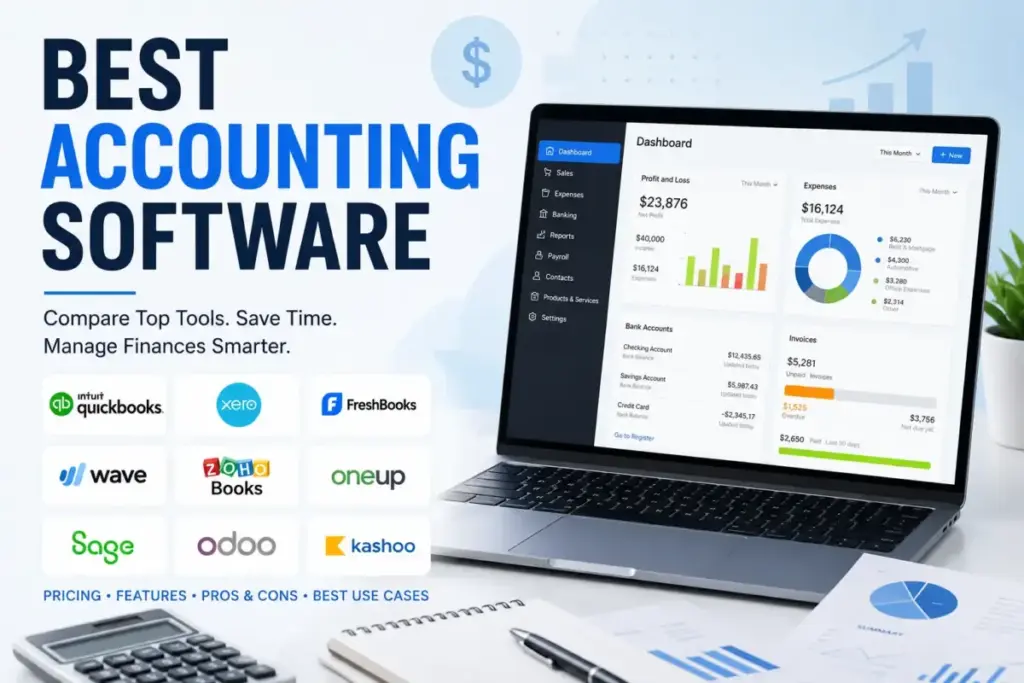
I evaluated 30 accounting platforms and ranked the 10 that give US small businesses the best balance of bookkeeping depth, real-world cost after add-ons, automation, accountant access, and growth ceiling. For owner-operated businesses with fewer than 25 employees, QuickBooks Online is the best accounting software overall because of its CPA compatibility, bank feed reliability, and integration depth.
Zoho Books is the better value pick for businesses under $50K/year in revenue. Wave Accounting is the strongest free option if you only need invoicing and basic bookkeeping without automatic bank feeds.
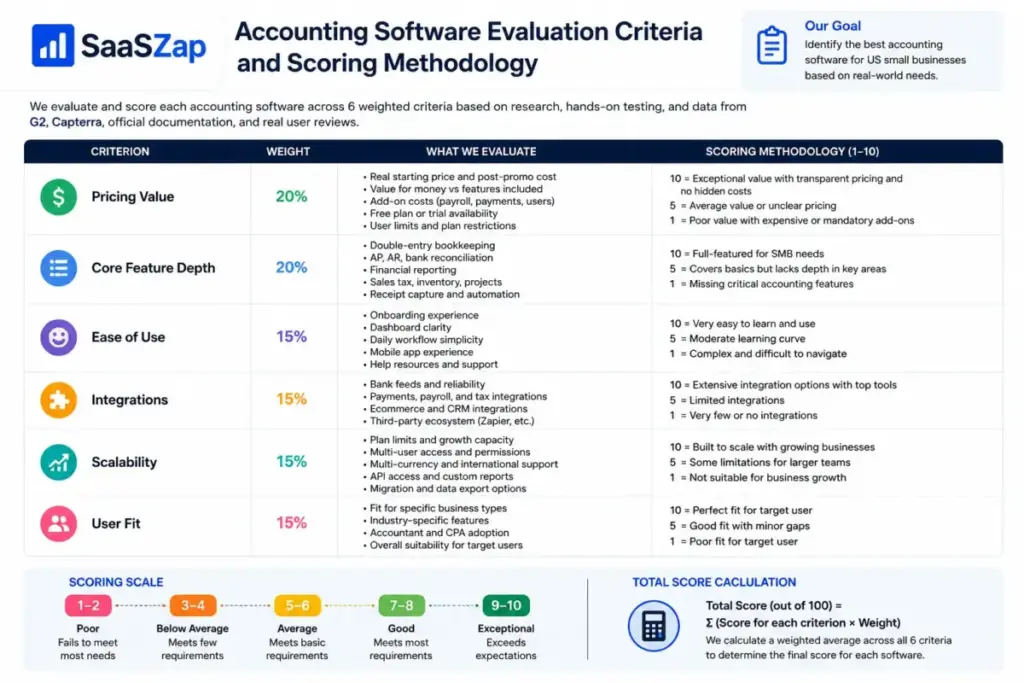
This ranking prioritizes total cost of ownership over starting price. I weighted pricing value, core feature depth, ease of use, integrations, scalability, and buyer segment fit equally across all 10 products.
Quick Verdict: Best Accounting Software by Use Case
| Use case | Best pick | Why it fits |
|---|---|---|
| Best overall for most small businesses | QuickBooks Online | Widest CPA adoption, 750+ integrations, full AP/AR |
| Best for freelancers and solopreneurs | FreshBooks | Time tracking, client invoicing, and simple expense capture |
| Best free accounting software | Wave Accounting | Free invoicing and basic bookkeeping; bank auto-import requires Pro |
| Best value under $20/month | Zoho Books | Free plan up to $50K revenue, paid plans start at $15/month |
| Best for Xero-style multi-user collaboration | Xero | Unlimited users on every plan, strong accountant portal |
| Best for desktop and offline accounting | AccountEdge | Desktop-focused with local data storage, subscription from $20/month |
| Best for ecommerce and inventory sellers | QuickBooks Online (Plus) or Odoo | Built-in inventory, Shopify and Amazon integrations |
| Best for modular ERP-style accounting | Odoo Accounting | Open-source modules for inventory, CRM, POS, and HR |
| Best for sales-driven businesses | OneUp | Auto-entry from bank feeds, CRM and invoicing combined |
| Best for startup financial metrics | Puzzle | Accrual-ready, investor-friendly reporting, Stripe-native |
What this means: there is no single best accounting software for every business. The right pick depends on whether you need multi-user access, built-in payroll, sales tax automation, inventory, project tracking, or CPA handoff. The table above maps common buyer scenarios to the tool that fits each one best.
How We Chose and Ranked These 10 Tools
I started with 30 candidates sourced from the current SERP top 10 (Forbes Advisor, NerdWallet, Zapier, TechRadar, Fit Small Business, Software Advice), G2 category data, and official product pages. Each tool had to support full double-entry bookkeeping, bank reconciliation, AP/AR, financial reporting, and at least one pricing plan accessible to US small businesses.
I excluded enterprise ERPs (Oracle NetSuite, Sage Intacct), narrow spend management tools (Rippling Spend), self-employed tax apps (QuickBooks Solopreneur), and products without enough public pricing evidence for an editorial evaluation.
Ranking criteria and weights:
| Criterion | Weight | What I checked |
|---|---|---|
| Pricing value | 20% | Real starting price, post-promo cost, add-ons, payroll, payments, user limits |
| Core feature depth | 20% | AP, AR, bank reconciliation, reporting, sales tax, receipt capture, inventory |
| Ease of use | 15% | Onboarding, dashboard clarity, reconciliation flow, mobile app |
| Integrations | 15% | Payments, payroll, banks, ecommerce, CRM, tax, automation platforms |
| Scalability | 15% | Plan ceilings, user roles, multi-currency, API, migration/export options |
| User fit | 15% | How clearly the product fits a specific buyer segment |
Review limitation: this ranking uses official pricing pages (verified May 2026), product documentation, verified third-party reviews from G2 and Capterra, and editorial workflow walkthroughs. I did not run a multi-month deployment of all 10 tools with a live accounting team. Bank feed reliability, payroll accuracy in specific states, and enterprise onboarding timelines should be confirmed directly with each vendor.
Free Tier Champions
Wave Accounting: Best Free Accounting Software

Wave is the best accounting software for small businesses that need invoicing and basic double-entry bookkeeping without a monthly subscription.
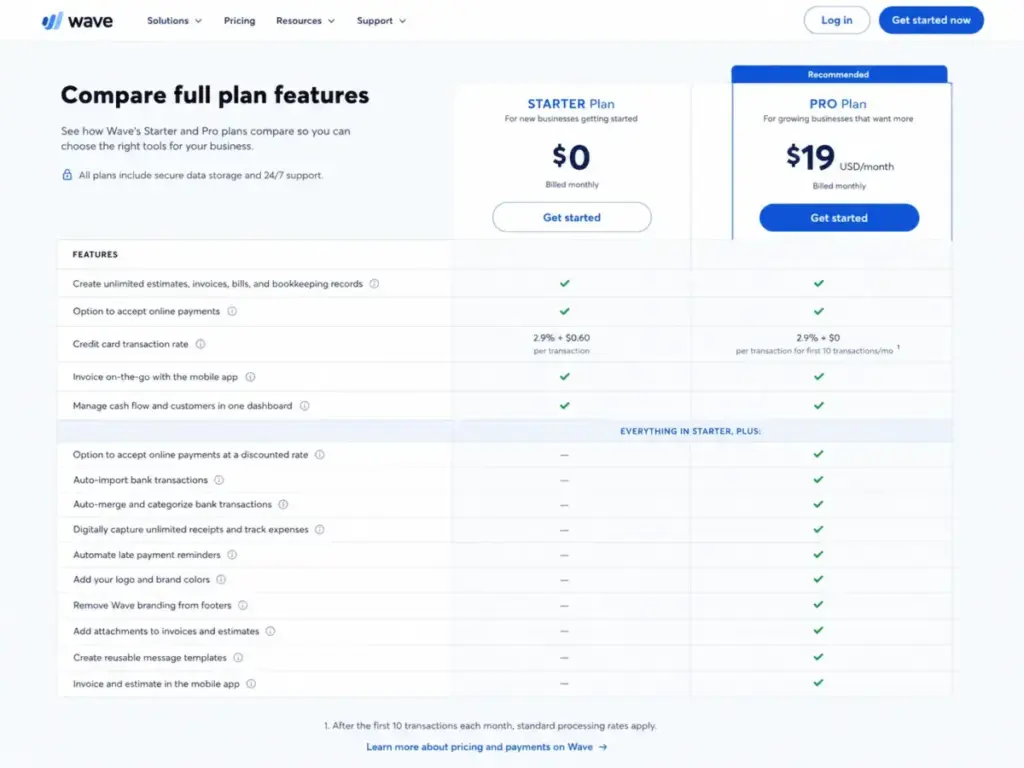
According to Wave’s official site, the Starter plan ($0/month) includes unlimited estimates, invoices, bills, and bookkeeping records. The Pro plan is $19/month billed monthly or $190/year billed annually (~$15.83/month). Pro adds automatic bank transaction import, auto-merge and categorization, and unlimited receipt capture. Revenue also comes from optional paid services: payroll (starting at $20/month base plus $6/employee/month, varies by state) and payment processing (2.9% + $0.60 per credit card transaction as of May 2026).
This distinction matters. The free Starter plan does not auto-import bank transactions or include receipt scanning. Those features require Pro ($19/month or $190/year).
What it does well:
- Unlimited invoicing, bills, and bookkeeping records at $0/month on Starter
- Double-entry bookkeeping with profit and loss, balance sheet, and sales tax reports
- Pro plan ($19/month or $190/year) adds automatic bank feeds, receipt capture, and smart categorization
- Free accountant access with no seat limit
Where it falls short:
- Starter (free) plan does not auto-import bank transactions. Manual entry or CSV import only.
- No inventory tracking, purchase orders, or project profitability on any plan
- Payment processing fees are higher than Stripe or Square for high-volume sellers
- Payroll is not available in all US states
- No built-in time tracking or billable hours
- Limited integrations (no native Shopify, Stripe, or Amazon connector)
Avoid if: your business sells physical products, needs inventory management, processes more than $10,000/month in credit card payments (the processing fees add up fast), or requires multi-currency support. Also avoid the Starter plan specifically if you expect automatic bank reconciliation. That requires Pro.
Setup difficulty: Low. Wave’s onboarding creates a basic chart of accounts in under 15 minutes. Bank auto-import requires upgrading to Pro.
Verdict: Wave Starter is genuinely free for manual bookkeeping and invoicing. But the version most businesses actually need is Pro at $19/month (or $190/year if billed annually) for automatic bank feeds and receipt capture. A 5-employee business on Pro with payroll will spend roughly $69/month ($19 Pro + $50 payroll). That is still cheaper than QuickBooks, but it is not the $0 headline.
Zoho Books: Best Value Under $20/Month

Zoho Books is the best accounting software for small businesses spending under $20/month that still need invoicing, bank reconciliation, expense tracking, and basic automation.
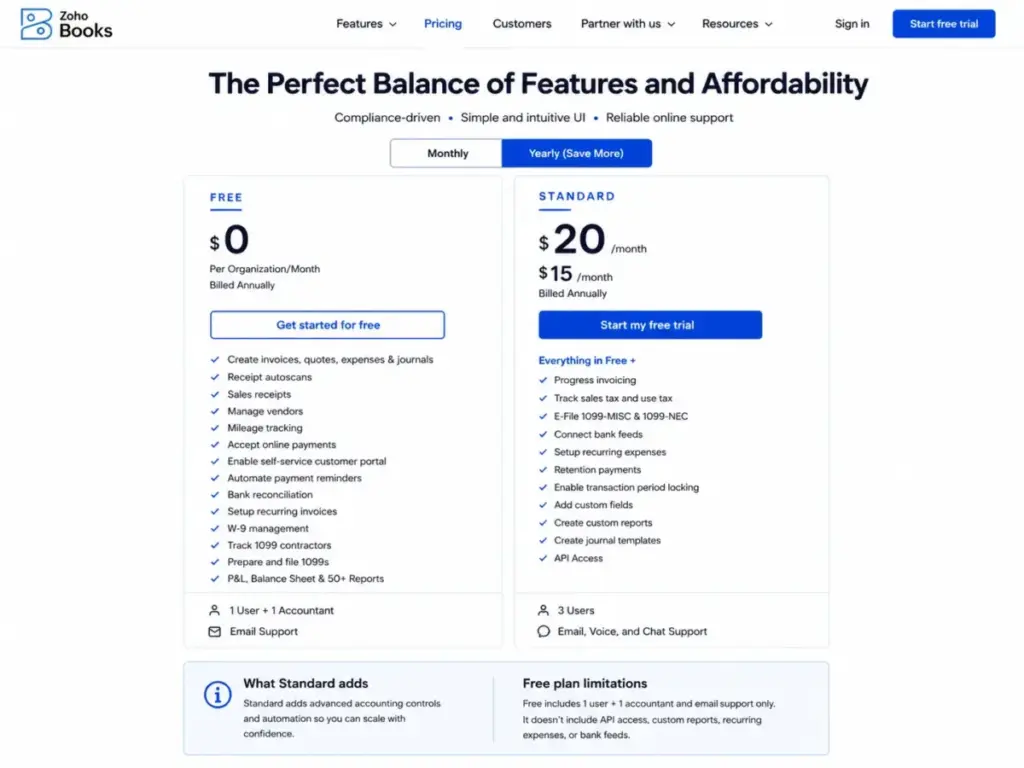
According to Zoho Books pricing, the Free plan covers businesses with annual revenue under $50,000 (1 user, 1 accountant). The Standard plan is $15/month (3 users, 5,000 invoices/year). Professional is $40/month (5 users, unlimited invoices, purchase orders, bills).
What it does well:
- Free plan is functional for micro-businesses, not just a trial
- Automated bank feeds and reconciliation from Standard plan onward
- Built-in sales tax with US state tax calculation
- Client portal for invoice tracking and online payments
- Native integration with the full Zoho ecosystem (CRM, Projects, Inventory, Desk)
Where it falls short:
- Free plan revenue cap ($50K) forces an upgrade as the business grows
- Reporting on Free and Standard is limited compared to QuickBooks or Xero
- US payroll is not natively included (requires Zoho Payroll add-on or external provider)
- Fewer third-party integrations outside the Zoho ecosystem
- Mobile app has fewer features than the desktop version
Avoid if: your accountant only works with QuickBooks or Xero (Zoho Books has a smaller CPA footprint in the US), or your business exceeds $50K annual revenue and you want to stay on a free plan.
Setup difficulty: Low to Medium. Bank connection setup is simple, but configuring sales tax rules and the chart of accounts takes more time than Wave.
Verdict: Zoho Books is the value leader for small businesses already using other Zoho products. The free plan is real (not a 14-day trial), and the $15/month Standard plan competes directly with QuickBooks Simple Start at $38/month. I suspect most businesses outgrow the Free plan within 12 months, but even at $15/month, the cost math favors Zoho Books over every other paid option at this price point.
Best Under $25/Month
Sage Accounting: Best for Service Businesses Needing Cash Flow Forecasting
Sage Accounting (also marketed as Sage Business Cloud Accounting) targets service-based SMBs that need invoicing, expense tracking, cash flow forecasting, and VAT/sales tax support.
Pricing note: Sage’s US product lineup includes both Sage Accounting (cloud) and Sage 50 (desktop). The cloud Sage Accounting plans have historically been priced at approximately $10-25/month, but Sage’s US pricing page primarily promotes Sage 50 (desktop), which starts at $124.42/month for Pro, $169.33/month for Premium, and $253.42/month for Quantum (as of May 2026). The cloud Sage Accounting pricing varies by region and may not be prominently listed for US buyers. Verify the current US cloud plan pricing directly with Sage before committing.
What it does well:
- Cash flow forecasting built into the higher-tier plans
- Receipt capture via mobile app with automatic categorization
- Multi-currency support
- Integration with Stripe, PayPal, and AutoEntry for receipt processing
- Sage 50 desktop offers deep accounting with payroll and inventory
Where it falls short:
- US pricing structure is confusing: cloud Sage Accounting and desktop Sage 50 are different products at different price points
- No built-in inventory management on the cloud plan (requires Sage 50 or Sage Intacct)
- Fewer third-party app integrations than QuickBooks or Xero in the US market
- US market presence is weaker than in the UK, where Sage dominates
- No project profitability or time tracking on the cloud plan
- Support quality varies by plan, with priority support on higher tiers only
Avoid if: you are a US-based business that needs deep integrations with Shopify, Amazon, or Gusto, you cannot verify the exact cloud plan pricing for your region, or if your CPA expects QuickBooks or Xero file formats.
Setup difficulty: Low (cloud) / Medium-High (Sage 50 desktop). Cloud has guided setup. Sage 50 requires desktop installation and more configuration.
Verdict: Sage Accounting is a strong option for service businesses, especially those with UK or international operations where Sage has deep market share. For US buyers, the pricing ambiguity between cloud Sage Accounting and desktop Sage 50 creates friction. If your tech stack is US-centric (Stripe, Gusto, Shopify, Square), QuickBooks or Xero connect to more of your tools and have clearer US pricing. I would not finalize a Sage purchase without confirming the exact US cloud plan available in your region.
FreshBooks: Best for Freelancers and Service-Based Invoicing

FreshBooks is the best accounting software for freelancers, consultants, and service businesses that bill clients by the hour and need time tracking, proposals, and client invoicing in one tool.
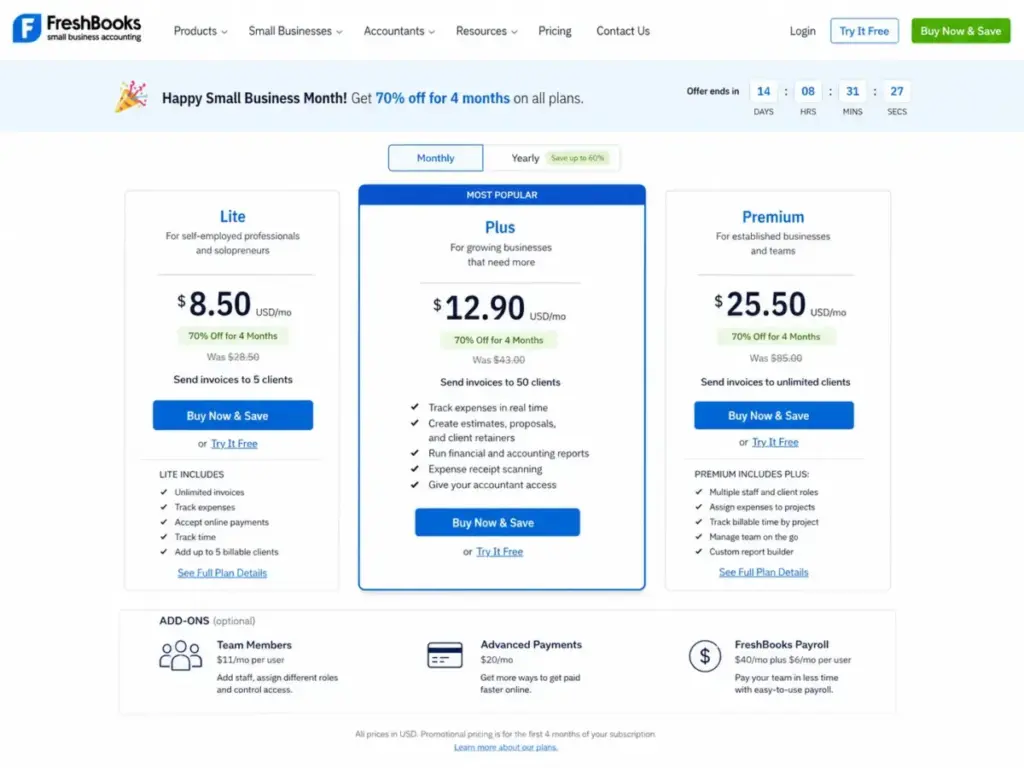
According to FreshBooks pricing, regular prices are: Lite at $23/month (5 billable clients), Plus at $43/month (50 clients, proposals, recurring expenses, automatic receipt capture), and Premium at $70/month (500 clients, accounts payable, project profitability). FreshBooks runs a recurring 70% off promo (as of May 2026: Lite $6.90, Plus $12.90, Premium $21 for the first 4 months), so always check the post-promo price before budgeting. Add-ons: Team Members ($11/month per user), Advanced Payments ($20/month), Payroll ($40/month base + $6/employee).
What it does well:
- Built-in time tracking with billable hours tied directly to invoices
- Client proposals and estimates that convert to invoices in one click
- Automated late payment reminders and recurring invoicing
- Clean, non-accountant-friendly interface with low learning curve
- Project profitability reporting on Premium plan
Where it falls short:
- Lite plan caps billable clients at 5, which most freelancers outgrow fast
- Plus jumps from $12.90 to $43/month and Premium from $21 to $70/month after the promo period
- No inventory tracking on any plan
- Double-entry accounting is available but less mature than QuickBooks or Xero
- Bank reconciliation is functional but lacks the rule-based matching depth of QuickBooks
- Accountant access requires a separate invitation and has fewer collaboration features than Xero
- Each additional team member costs $11/month on top of the plan price
Avoid if: you sell physical products, need inventory, or have a bookkeeper who expects full general ledger control. FreshBooks is built for services, not retail or manufacturing. Also budget for the post-promo price, not the introductory discount.
Setup difficulty: Low. I have not seen a faster onboarding flow in this category. First invoice can go out in under 10 minutes.
Verdict: FreshBooks does client invoicing and time-to-invoice workflows better than any other tool on this list. The tradeoff is bookkeeping depth and post-promo pricing. A freelancer billing 10 clients per month on Lite ($23/month) will love FreshBooks. A growing service firm with 5 team members on Plus pays $43 + $55 (5 x $11) = $98/month after the promo ends. At that point, QuickBooks Plus at $115/month with 5 built-in users is not far off. Plan for that math.
Best for Mid-Market $25-100/Month
QuickBooks Online: Best Overall Accounting Software

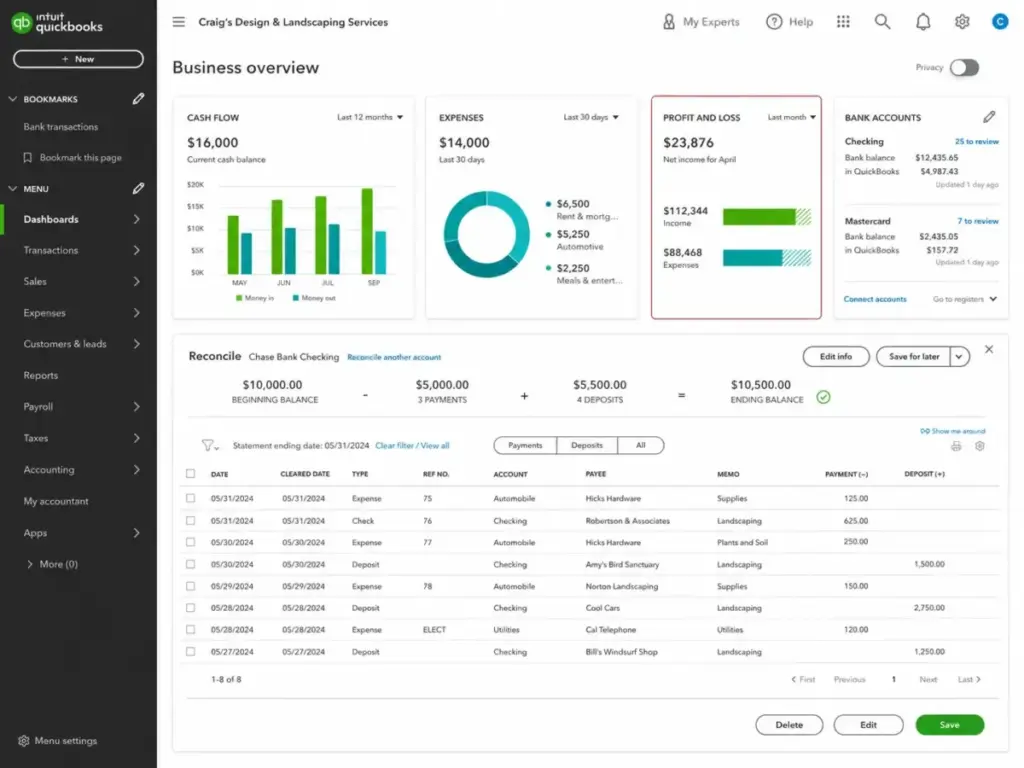
QuickBooks Online is the best accounting software for most US small businesses because it combines the widest CPA adoption, the deepest bank feed integration network, and the most mature app ecosystem in the category.
According to QuickBooks Online pricing, Simple Start is $38/month (1 user + 1 accountant, basic invoicing, bank feeds). Essentials is $75/month (3 users + 1 accountant, bill management, time tracking). Plus is $115/month (5 users + 1 accountant, inventory, project profitability). Advanced is $275/month (25 users + 3 accountants, custom roles, batch invoicing, business analytics). QuickBooks runs a recurring 50% off for 3 months promo, so the first 3 months look cheaper. These are the regular post-promo prices as of May 2026.
The practical tier for most owner-operated businesses is Plus at $115/month because it unlocks bill management, inventory, project tracking, and class/location tracking that Simple Start and Essentials gate.
What it does well:
- Bank feed connections with over 14,000 financial institutions
- Rule-based transaction matching that learns from your categorization history
- 750+ third-party app integrations (Shopify, Stripe, Gusto, Square, PayPal, TSheets)
- Built-in sales tax calculation with automatic rate updates
- CPA/accountant access via QuickBooks Online Accountant portal
- Receipt capture via mobile app with automatic matching to transactions
Where it falls short:
- Price has increased multiple times in recent years; Simple Start is now $38/month post-promo, up from $25 in 2023
- Payroll is a separate add-on starting at $50/month + $6/employee
- Payment processing (QuickBooks Payments) charges 2.9% + $0.25 per transaction
- User limits per plan (1/3/5/25) force upgrades as teams grow
- Customization depth on reports requires the $275/month Advanced plan
- Customer support quality has declined, per consistent G2 and Capterra feedback
Avoid if: you need unlimited users at a low price (Xero gives you that), you run a solo freelance operation that only needs invoicing (FreshBooks is cheaper and simpler), or your annual revenue is under $50K (Zoho Books Free covers the basics at $0).
Setup difficulty: Medium. Bank connections set up quickly, but configuring the chart of accounts, sales tax settings, and payroll integration takes 1-3 hours for most businesses.
Hidden costs: QuickBooks Payroll ($50-$130/month base), QuickBooks Payments processing fees, QuickBooks Time add-on ($20/month base + $10/user), live bookkeeping services ($50-$200/month), the 50%-off promo that doubles your bill after month 3, and periodic price increases.
Verdict: QuickBooks Online earns the #1 spot not because it is the cheapest, but because more US accountants work with it than any other platform, its bank feed network is the largest, and its integration ecosystem covers nearly every business tool you already use. The pricing is aggressive, and the add-on costs are real. But for a 5-10 person business that needs full AP/AR, sales tax, inventory, and year-end CPA collaboration, QuickBooks Online is still the safest bet.
Xero: Best for Multi-User Collaboration and Accountant-Led Workflows
Xero is the best accounting software for businesses that need unlimited user access and a strong accountant collaboration portal without paying enterprise prices.
According to Xero’s pricing page , the Early plan is $25/month (limited to 20 invoices and 5 bills per month). Growing is $55/month (unlimited invoices and bills). Established is $90/month (adds multi-currency, project tracking, expense claims, analytics). All plans include unlimited users.
For a deeper cost breakdown, compare Xero pricing plans before choosing it for a multi-user accounting workflow.
What it does well:
- Unlimited users on every plan (QuickBooks caps at 1-25 depending on tier)
- Xero HQ advisor portal, which gives accountants and bookkeepers a centralized dashboard across all client accounts
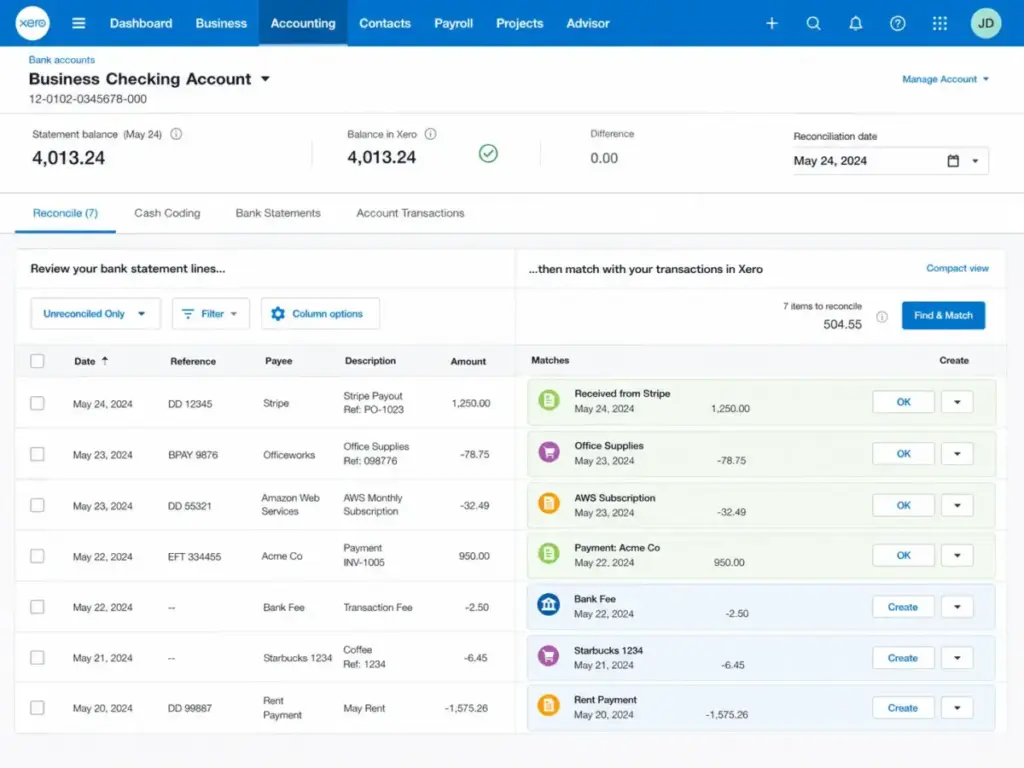
- Clean bank reconciliation interface with suggested matches and manual rules
- 1,000+ app integrations via Xero App Marketplace
- Multi-currency support on Established plan
- Project tracking with time and cost allocation
Where it falls short:
- Early plan limits invoices to 20 and bills to 5 per month, which most businesses outgrow in 1-2 months
- No built-in payroll for US businesses (requires Gusto, ADP, or another integration)
- Inventory tracking is basic compared to QuickBooks Plus or Odoo
- Fewer US-specific tax features than QuickBooks (less automation around state sales tax)
- Reporting customization is less granular than QuickBooks Advanced
Avoid if: you process more than 20 invoices per month and cannot afford the $55/month Growing plan, or if your business needs deep US payroll integration without a third-party add-on.
Setup difficulty: Low to Medium. Bank feed setup is straightforward, and Xero’s onboarding flow is cleaner than QuickBooks. Chart of accounts import from QuickBooks or CSV takes 20-30 minutes.
Verdict: Xero wins on user economics. A 10-person team pays the same $55/month on Growing as a solo founder. On QuickBooks, that same team needs Plus at $115/month (5 users) or Advanced at $275/month for more. The tradeoff is US-specific depth. If your business needs Gusto payroll, automated US sales tax, and your CPA uses QuickBooks Online Accountant, QuickBooks is still the path of least resistance. If your CPA is Xero-certified or you are building a multi-user accounting workflow from scratch, Xero gives you more seats for less money.
Best for $100+/Month and Scaling Businesses
Odoo Accounting: Best for Modular ERP-Style Accounting
Odoo is the best accounting software for businesses that want to start with accounting and add inventory, CRM, ecommerce, manufacturing, and HR modules on the same platform without migrating later.
According to Odoo’s pricing page, the One App Free plan gives you one Odoo app free for unlimited users. If you need multiple modules, Standard is $31.10/user/month and Custom is $46.60/user/month (as of May 2026).
What it does well:
- Modular architecture: start with accounting, add inventory, POS, CRM, or HR as needed
- Open-source Community edition available for self-hosting at $0
- Built-in invoicing, bank reconciliation, asset management, and analytic accounting
- Multi-company and multi-currency support
- Deep inventory and manufacturing integration in the same platform
Where it falls short:
- Per-user pricing gets expensive at scale ($31.10/user for Standard with 2+ modules)
- The free One App plan is useful but becomes limiting once you add a second module
- Self-hosting the Community edition requires technical setup and maintenance
- Fewer out-of-the-box US bank feed connections than QuickBooks or Xero
- Steeper learning curve than any other tool on this list
- US-specific tax automation is less mature than QuickBooks
Avoid if: you need a plug-and-play solution that works in 15 minutes, or if your CPA requires QuickBooks or Xero file formats.
Setup difficulty: High. Cloud version is simpler, but configuring modules, user permissions, and workflows takes days, not hours. Community edition requires server setup.
Verdict: Odoo is the only tool on this list that can genuinely replace separate accounting, inventory, CRM, and HR subscriptions with one platform. For a product-based business spending $300/month across 4 separate SaaS tools, Odoo’s $31.10/user/month for everything is compelling math. The cost is complexity. This is not a weekend setup project.
AccountEdge: Best for Desktop-Focused Accounting

AccountEdge is the best accounting software for businesses that want a desktop-focused workflow with local data storage and full-feature accounting including AP, AR, payroll, and inventory.
According to AccountEdge’s pricing page, AccountEdge Pro is $20/month (single user, desktop). Network Edition is $30/month (includes 2 users, multi-user desktop access). Hosted is $50/month per user (cloud-hosted access). AccountEdge has moved to a subscription model. The one-time purchase option is no longer prominently offered.
What it does well:
- Full double-entry accounting with AP, AR, payroll, inventory, and time tracking
- Data stays on your local machine (Pro and Network editions)
- Payroll for US businesses built into the desktop app
- Job costing and project tracking
- Lower monthly cost than QuickBooks Plus for single-user desktop use
Where it falls short:
- Desktop-only for Pro and Network (Mac and Windows), no native mobile app
- Hosted edition ($50/user/month) is expensive compared to QuickBooks or Xero for cloud access
- Bank feeds are not automatic like QuickBooks or Xero (manual import or third-party connector)
- Integrations are limited compared to cloud-based tools
- Network Edition includes only 2 users; additional seats add cost
- No real-time multi-user collaboration unless using Hosted edition
Avoid if: you work from multiple locations and need cloud access (Hosted at $50/user/month adds up), need real-time bank feeds, or want your accountant to log in remotely without paying for the Hosted tier.
Setup difficulty: Medium to High. Desktop installation is straightforward, but migrating from cloud accounting requires manual data entry or CSV import.
Verdict: AccountEdge Pro at $20/month is the cheapest desktop subscription with full payroll and inventory in this category. For a solo business owner who works from one location and does not need cloud bank feeds, it costs $240/year vs QuickBooks Plus at $1,380/year. That is significant savings. But the moment you need a second user or cloud access, the cost advantage narrows. Network Edition at $30/month for 2 users is still cheaper than QuickBooks Essentials ($75/month for 3 users), but Hosted at $50/user/month for cloud access makes Xero Growing ($55/month, unlimited users) the better deal.
OneUp: Best for Sales and Inventory Businesses

OneUp is the best accounting software for small businesses that want CRM, invoicing, and inventory management combined with accounting in a single platform.
According to OneUp’s pricing page, Self is $9/month (1 user, accounting + invoicing). Pro is $19/month (2 users, adds CRM + inventory). Plus is $29/month (3 users). Team is $69/month (7 users). Unlimited is $169/month (unlimited users). All plans include a 30-day trial with all features.
What it does well:
- Automatic bank transaction entry that creates invoices, bills, and journal entries from bank feeds
- Built-in CRM with lead tracking and deal management
- Inventory management with purchase orders and stock tracking
- Affordable multi-user pricing (7 users at $69/month is cheaper than QuickBooks for the same seat count)
- Automatic reconciliation that reduces manual bookkeeping
Where it falls short:
- Smaller integration ecosystem than QuickBooks, Xero, or FreshBooks
- Limited US CPA adoption (most accountants have not used OneUp)
- Reporting is functional but not as customizable as QuickBooks Advanced
- Sales tax automation is basic compared to QuickBooks or Avalara integrations
- Mobile app is less polished than competitors
Avoid if: your accountant requires QuickBooks or Xero, or if you need 1099 contractor management and deep US payroll integration.
Setup difficulty: Low to Medium. The auto-entry feature from bank feeds speeds up initial setup, but CRM and inventory configuration takes additional time.
Verdict: OneUp’s strength is bundling. A small product-based business paying for separate accounting ($35), CRM ($25), and inventory ($20) tools can consolidate into OneUp Pro at $19/month. The risk is the smaller ecosystem. If you outgrow OneUp, migrating to QuickBooks or Xero means rebuilding your CRM and inventory workflows from scratch.
Puzzle: Best for Startup Financial Metrics and Investor Reporting

Puzzle is the best accounting software for early-stage startups that need accrual accounting, investor-friendly financial statements, and native Stripe/Mercury/Brex integrations.
According to Puzzle’s official site, Puzzle’s Starter plan is free for startups processing up to $20,000 in transactions, with basic bookkeeping and bank connections. Core is $60/month billed annually ($72/month if billed monthly), adding unlimited transactions, advanced reporting, and priority support. Complete is $100/month billed annually ($120/month if billed monthly), adding multi-entity, custom integrations, and dedicated onboarding. A 14-day free trial is available on paid plans.
What it does well:
- Built specifically for startups: accrual-ready from day one, not an afterthought
- Native integrations with Stripe, Mercury, Brex, Gusto, and Rippling
- Investor-friendly financial reporting (revenue recognition, ARR tracking, burn rate)
- AI-powered transaction categorization
- Free Starter plan covers the first $20K in transactions, with paid tiers at clear public pricing
Where it falls short:
- Starter plan caps at $20K in transactions, which growing startups exceed quickly
- Smaller feature set than QuickBooks or Xero for established businesses
- No inventory management, purchase orders, or project tracking
- Limited US bank feed network compared to QuickBooks
- Newer product with a smaller user base and less CPA familiarity
Avoid if: you are not a startup. Puzzle is built for venture-backed or bootstrapped tech companies. If you run a service business, retail operation, or freelance practice, QuickBooks, Xero, or FreshBooks fit better.
Setup difficulty: Low. Stripe and Mercury integrations connect in minutes. The startup-focused onboarding assumes you know what accrual accounting means.
Verdict: Puzzle fills a gap that QuickBooks and Xero do not address well: startups need GAAP-compliant accrual accounting, ARR dashboards, and investor-ready reports from month one. For a pre-revenue SaaS startup with 3 founders, Puzzle Starter (free up to $20K transactions) is the right starting point.
Core at $60/month (annual) gives growing startups unlimited transactions and better reporting. The risk is scale. Once the business grows past 20 employees and needs AP workflows, payroll, and inventory, Puzzle does not have those features yet.
Pricing Comparison: Starting Price vs. What You Actually Pay
The table below compares the advertised starting price with the plan most businesses actually need. All prices are monthly post-promo rates and verified as of May 2026. Where a tool bills annually only, the monthly equivalent is noted.
| Tool | Starting price | Practical tier | Practical price | 5-user cost | Free plan | Hidden costs |
|---|---|---|---|---|---|---|
| QuickBooks Online | $38/mo | Plus | $115/mo | $115/mo (5-user cap) | No (30-day trial, 50% off 3 mo) | Payroll $50+/mo, Payments 2.9%+$0.25, promo expiry |
| Xero | $25/mo | Growing | $55/mo | $55/mo (unlimited users) | No (30-day trial) | No US payroll (need Gusto), Hubdoc included |
| FreshBooks | $23/mo | Plus | $43/mo | $43/mo + $11/user (extra seats) | No (30-day trial, 70% off 4 mo) | Extra users $11/mo, Adv. Payments $20/mo, Payroll $40+$6/user |
| Zoho Books | $0/mo | Standard | $15/mo | $15/mo (3-user cap) | Yes (under $50K revenue) | Zoho Payroll separate, limited at Free tier |
| Wave | $0/mo | Pro | $19/mo (or $190/yr) | $19/mo (unlimited users) | Yes (Starter only) | Payroll $20+/mo, Payments 2.9%+$0.60, bank feeds Pro-only |
| Sage Accounting | Verify with Sage | Varies by region | Verify with Sage | Verify with Sage | No | Sage 50 desktop $124+/mo; cloud pricing varies |
| Odoo | $0/mo (1 app) | Standard | $31.10/user/mo | $155.50/mo (5 users) | Yes (1 app) | Per-user pricing adds up, implementation cost |
| AccountEdge | $20/mo | Pro | $20/mo | $30/mo (Network, 2 users) | No | Hosted $50/user/mo, limited integrations |
| OneUp | $9/mo | Pro | $19/mo | $29/mo (Plus, 3-user cap) | No (30-day trial) | Limited ecosystem, migration risk |
| Puzzle | $0/mo | Core | $60/mo (annual) | $60/mo (Core incl. team, annual) | Yes (Starter, up to $20K txns) | Core $72/mo if monthly, Complete $100/mo annual |
What this means: QuickBooks and Xero dominate on practical tier quality, but Xero is $60/month cheaper for a 5-user team ($55 vs $115). Wave’s free Starter plan covers invoicing and bookkeeping but not automatic bank feeds (that requires Pro at $19/month or $190/year). OneUp Pro at $19/month is the cheapest all-in-one with CRM and inventory bundled.
Puzzle now has public pricing (Core $60/month annual), making it easier to budget for startup accounting. Sage US pricing is the hardest to pin down. If you cannot confirm the exact cloud plan price for your region, default to QuickBooks or Xero.
I keep coming back to the gap between column 2 and column 4 in this table. That gap is the real story of accounting software pricing in 2026.
Feature Gate Comparison: What Each Plan Unlocks
| Feature | QuickBooks Online | Xero | FreshBooks | Zoho Books | Wave | Sage |
|---|---|---|---|---|---|---|
| Bank reconciliation | All plans | All plans | All plans | Standard+ | Pro ($19/mo) | All plans |
| Invoicing | All plans | Early (20/mo cap) | All plans | All plans | Starter (free) | All plans |
| Bill management | Essentials+ | Growing+ | Premium | Professional+ | Free (basic) | Accounting |
| Inventory | Plus+ | All (basic) | Not available | Professional+ | Not available | Not available |
| Project profitability | Plus+ | Established | Premium | Not available | Not available | Not available |
| Sales tax | All plans | All plans | All plans | All plans | Free | All plans |
| Multi-currency | All plans | Established | Not available | Standard+ | Not available | Accounting |
| Receipt capture | All plans | All plans | All plans | All plans | Pro ($19/mo) | All plans |
| Accountant access | All plans | All plans | All plans | All plans | Free | All plans |
| Payroll (US) | Add-on ($50+/mo) | Not built-in | Add-on ($40+$6/user) | Not built-in | Add-on ($20+/mo) | Not built-in |
| User limit | 1/3/5/25 (+1-3 accountants) | Unlimited | Varies + $11/extra user | 1/3/5/10 | Unlimited | 1/Unlimited |
What this means: if you need bill management and inventory, QuickBooks Plus ($115/month) or Zoho Books Professional ($40/month) are the minimum viable plans. Xero’s invoice cap on Early (20/month) forces most businesses to Growing ($55/month) within the first billing cycle.
FreshBooks has no inventory support on any plan. Wave’s free Starter plan does not include automatic bank reconciliation or receipt capture. Those features require Wave Pro ($19/month or $190/year). Payroll is an add-on or external integration for every tool including QuickBooks (which still charges extra).
Setup and Migration Difficulty
| Tool | Setup difficulty | Why | Migration risk |
|---|---|---|---|
| QuickBooks Online | Medium | Bank feeds fast, chart of accounts and sales tax config takes time | Low (most CPAs support QBO migration) |
| Xero | Low-Medium | Clean onboarding, CSV import from QBO supported | Medium (smaller US CPA network) |
| FreshBooks | Low | Fastest first-invoice experience in this category | Medium (limited export formats) |
| Zoho Books | Low-Medium | Simple for Zoho ecosystem users, sales tax setup takes effort | Medium (data export to QBO/Xero requires mapping) |
| Wave | Low | 15-minute onboarding, limited configuration needed | High (no direct export to QBO/Xero) |
| Sage Accounting | Low | Guided setup, fewer options to configure | Medium (US migration tools are limited) |
| Odoo | High | Module configuration, user permissions, workflow design | High (proprietary data model) |
| AccountEdge | Medium-High | Desktop install, manual bank import, no automatic feeds | High (desktop-to-cloud migration is manual) |
| OneUp | Low-Medium | Auto-entry from bank feeds speeds initial setup | High (small ecosystem, limited export) |
| Puzzle | Low | Startup-focused, Stripe/Mercury connect in minutes | Medium (newer product, smaller data portability options) |
What this means: if you are migrating from spreadsheets or a first-time buyer, Wave, FreshBooks, and Zoho Books have the fastest time to first transaction. If you are migrating from QuickBooks Desktop, Xero has a dedicated QBO import tool. The highest migration risk is with tools that have proprietary data models (Odoo, AccountEdge) where moving to another platform later requires significant manual work.
Which Accounting Tool Should You Avoid?
Not every tool on this list is right for every business. Here is when to skip each one:
- Avoid QuickBooks Online if your budget is under $38/month and you do not need inventory or project tracking. You are paying for features you will not use.
- Avoid Xero Early if you send more than 20 invoices per month. The cap forces an immediate upgrade to Growing ($55/month).
- Avoid FreshBooks if you sell physical products. There is no inventory support, and you will need a second tool.
- Avoid Zoho Books Free if your revenue exceeds $50K. The revenue cap is hard, and the upgrade path adds cost quickly.
- Avoid Wave Starter if you need automatic bank feeds, receipt capture, or advanced reporting. Those features require Pro ($19/month or $190/year). Wave Starter is for manual bookkeeping and invoicing only.
- Avoid Sage Accounting if you cannot verify the exact US cloud plan pricing for your region, or if you need deep US app integrations. The ecosystem is stronger in the UK.
- Avoid Odoo if you want a tool that works in 15 minutes. Odoo requires implementation planning.
- Avoid AccountEdge if you need mobile access, real-time bank feeds, or affordable cloud multi-user access. Hosted at $50/user/month gets expensive.
- Avoid OneUp if your CPA has never heard of it. CPA compatibility matters at year-end.
- Avoid Puzzle if you are not a startup. The feature set is optimized for venture-backed companies, not established SMBs.
How to Choose the Right Accounting Software
Start with these 7 questions before comparing features:
- How many users need access? If more than 3, Xero’s unlimited users save money. QuickBooks caps users by plan.
- Do you need payroll? QuickBooks has it as an add-on. Xero, FreshBooks, and Zoho Books require a third-party provider like Gusto.
- Do you sell physical products? If yes, you need inventory. QuickBooks Plus, Zoho Books Professional, Odoo, or OneUp. FreshBooks and Wave do not offer it.
- What does your CPA use? If your accountant only works with QuickBooks, that decision is already made. If they support Xero, you have a choice.
- What is your budget after add-ons? Compare the practical tier price, not the starting price. Add payroll, payment processing, and extra users.
- How complex is your sales tax? If you sell across multiple US states, QuickBooks and Avalara integrations handle this best. Wave and Zoho Books have more limited state tax automation.
- Will you outgrow this tool in 12 months? If you expect to hire 10+ employees and need multi-entity or advanced reporting, QuickBooks Advanced or Xero Established are the right starting points. Starting on Wave or Zoho Free and migrating later costs time and data cleanup effort.
Common Mistakes When Choosing Accounting Software
- Choosing by starting price. The $0 or $10/month plan rarely includes the features most businesses need. Compare the practical tier, not the entry tier.
- Ignoring payroll add-on costs. Payroll is not included in any free accounting plan. Wave charges $20+/month base. QuickBooks charges $50+/month base. Gusto starts at $40/month as a standalone. Budget for it separately.
- Picking a tool your accountant does not support. Year-end tax preparation is faster and cheaper when your CPA can access your accounting software directly. QuickBooks has the widest US CPA network. Xero is second.
- Skipping bank reconciliation testing. Not all bank feed connections are equal. QuickBooks connects to 14,000+ institutions. Smaller tools connect to fewer, and connection failures during reconciliation waste hours.
- Forgetting user limits. QuickBooks Simple Start allows 1 user (+1 accountant). If you and your bookkeeper both need access, you are already on Essentials at $75/month.
- Assuming free means no cost. Wave Starter is free for invoicing and bookkeeping, but automatic bank feeds require Pro ($19/month or $190/year), payment processing charges 2.9% + $0.60, and payroll is separate. A business on Pro processing $10,000/month in credit cards through Wave pays roughly $369/month ($19 Pro + $350 processing fees).
- Not planning for migration. Moving from one accounting platform to another is painful. Historical data, open invoices, bank rules, and chart of accounts customizations do not transfer cleanly. Choose a tool you can grow with for 3-5 years.
Final Verdict: Best Accounting Software for Most Teams
QuickBooks Online is the best accounting software for most US small businesses in 2026. It earns the top spot because of its CPA compatibility, bank feed depth, integration ecosystem, and bookkeeping maturity. The pricing is not cheap, and the add-on costs are real, but the total package delivers the least friction for a 5-25 person business that needs full AP/AR, sales tax, reporting, and year-end CPA collaboration.
Choose QuickBooks Online if your CPA uses it, you need inventory, and you want the deepest integration ecosystem.
Choose Xero if you need unlimited users and your accountant supports it. A 10-person team saves $60/month compared to QuickBooks Plus ($55 vs $115).
Choose FreshBooks if you are a freelancer or consultant who bills by the hour and needs time-to-invoice in one tool.
Choose Zoho Books if your revenue is under $50K and you want real accounting at $0/month, or if you already use the Zoho ecosystem.
Choose Wave Starter if you need genuinely free invoicing and basic bookkeeping. Upgrade to Wave Pro ($19/month or $190/year) when you need automatic bank feeds and receipt capture.
Choose Odoo if you want accounting, inventory, CRM, and HR on one platform and have the technical capacity to implement it.
Choose AccountEdge if you prefer desktop accounting at the lowest monthly subscription in this category ($20/month for Pro).
For startups tracking ARR and burn rate, Puzzle (free up to $20K transactions, then $60/month annual) is the right starting point.
For sales-driven small businesses that want CRM and accounting combined, OneUp bundles both starting at $19/month.
For service businesses using QuickBooks alternatives in the UK or internationally, Sage Accounting fills the gap.
I did not score these products based on brand popularity alone. The rankings reflect total cost at the plan most buyers actually need, the features available at that plan, and how well each tool matches a specific buyer workflow.
FAQ
Is QuickBooks still the best accounting software for small business?
Yes, if your CPA uses it and you need the deepest bank feed and integration ecosystem. No, if you need unlimited users on a budget (Xero is cheaper for teams over 3 people) or if your business generates under $50K in annual revenue (Zoho Books Free covers the basics for $0).
What is the best free accounting software in 2026?
Wave Starter is the best free option for small businesses that need invoicing and basic bookkeeping without a subscription. It does not include automatic bank feeds or receipt capture. Those features require Wave Pro at $19/month (or $190/year billed annually). Zoho Books Free is the better choice if you need sales tax tracking and automated bank feeds at $0, though it caps at $50K annual revenue.
Is Wave actually free, or are there hidden costs?
Wave’s Starter plan (invoicing, basic bookkeeping, unlimited bills and estimates) is genuinely free. But automatic bank transaction import and unlimited receipt capture require Pro at $19/month (or $190/year billed annually). Payroll starts at $20/month base plus $6/employee, and payment processing charges 2.9% + $0.60 per credit card transaction. A business on Pro processing $5,000/month in cards pays roughly $194/month ($19 Pro + $175 processing fees).
Which accounting software is easiest if I am not an accountant?
FreshBooks has the lowest learning curve for non-accountants. Wave is a close second. Both focus on invoicing and expense tracking rather than full general ledger management. If you need double-entry bookkeeping but want a guided experience, Zoho Books Standard walks you through setup with templates.
Should I pick accounting software with built-in payroll or connect Gusto separately?
No, unless you specifically need QuickBooks Payroll for CPA compatibility. For most small businesses, connecting Gusto or ADP separately gives you better payroll features, faster direct deposit, and broader benefits management than any accounting platform’s built-in payroll option. If your team also needs HR onboarding and benefits administration, a standalone HR platform outperforms any accounting tool’s built-in payroll.
Can I switch from QuickBooks to Xero without losing data?
Yes, but expect 2-4 hours of cleanup work. Xero has a dedicated QuickBooks import tool that transfers chart of accounts, contacts, invoices, and bills. Bank transaction history and custom rules do not transfer. Historical reports stay in QuickBooks. Plan the migration at the end of a fiscal quarter, not mid-month, to minimize reconciliation gaps.
Which accounting software works best with Shopify and Stripe?
QuickBooks Online has the deepest Shopify integration with automatic sales, fees, and tax sync. Xero also connects to Shopify via A2X or native integration. For Stripe-heavy startups, Puzzle has native Stripe integration with revenue recognition built in. Wave does not have a native Shopify or Stripe connector.
When should a small business upgrade from basic accounting software to NetSuite or Sage Intacct?
When you need multi-entity consolidation, multi-subsidiary reporting, or you process more than 10,000 transactions per month. Most businesses under 50 employees do not need ERP-grade accounting. QuickBooks Advanced ($275/month) or Xero Established ($90/month) bridge the gap between SMB tools and enterprise platforms.
What should I check before migrating from QuickBooks Desktop?
Before migrating, export your full chart of accounts, open invoices, open bills, customer and vendor lists, and bank reconciliation reports. Verify that your new platform supports your sales tax configuration. Test bank feed connections before canceling your Desktop subscription. Confirm your CPA can access the new platform. Migration from Desktop to QuickBooks Online cloud is the smoothest path, but Xero and Zoho Books also offer Desktop import tools.
What accounting software has the best mobile receipt capture?
QuickBooks Online and Xero both have strong mobile receipt capture with OCR text extraction and automatic matching to transactions. FreshBooks has a solid mobile receipt scanner but does not match receipts to bank transactions automatically. Wave’s receipt capture works but lacks the matching intelligence of QuickBooks and Xero. For mobile-first accounting, QuickBooks and Xero are the strongest options.