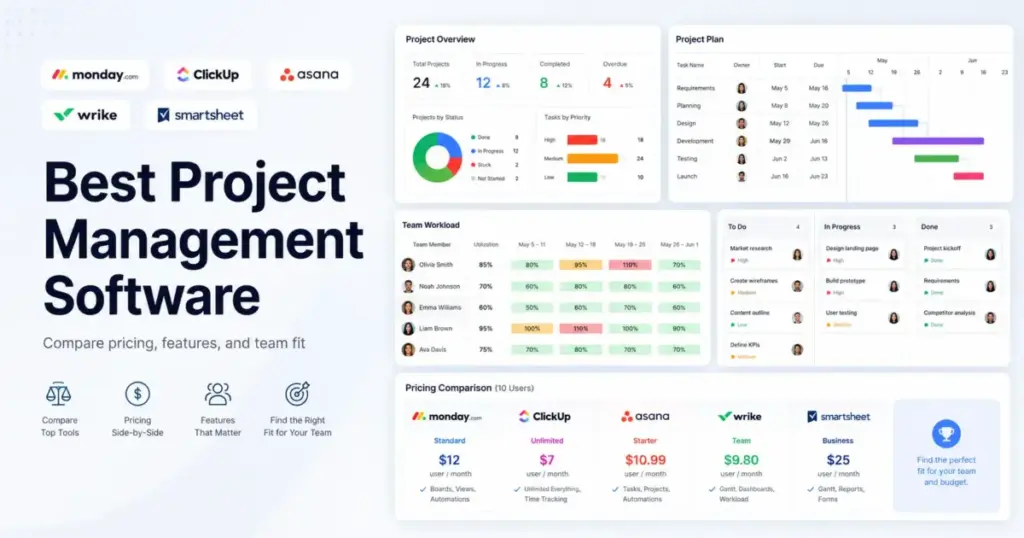
monday Work Management starts at $9/seat/month on paper. A four-person team pays for five seats because of bucket pricing. That is not $36/month. That is $45/month minimum before a single automation runs. Every best project management software list shows starting prices. Almost none show what your team actually pays after seat minimums, automation caps, and AI add-ons stack up.
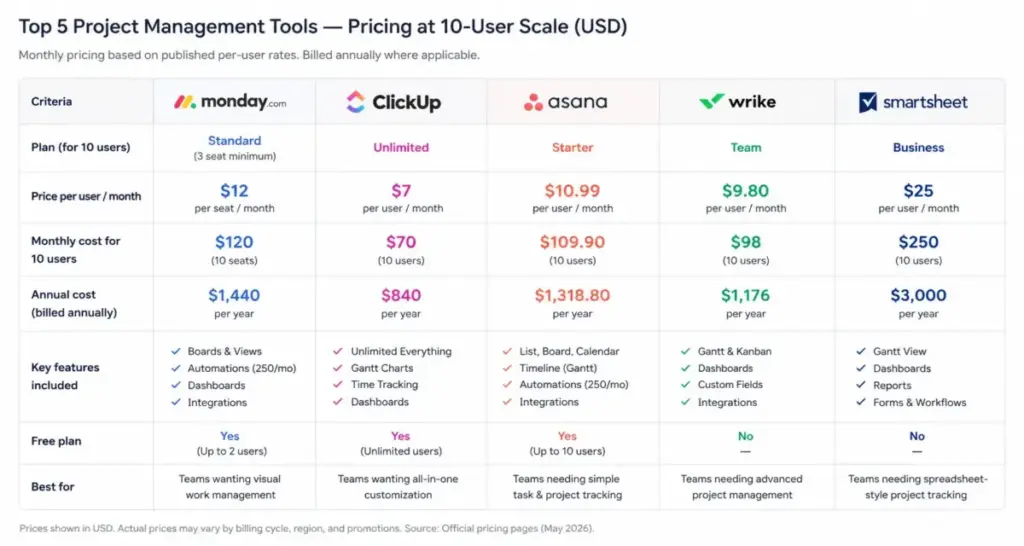
We ran the pricing math across 15 platforms (as of May 2026) and grouped them by what a real team spends, not what the marketing page advertises. The practical tier, the 10-user monthly cost, and the feature gates that force upgrades are what determine whether a tool fits your budget or bleeds it.
For most cross-functional teams, monday Work Management offers the best balance of usability, dashboards, and automation at a price that scales predictably. If budget is the deciding factor, ClickUp at $7/user/month delivers more features per dollar than anything else on this list. If your team runs agile sprints, Jira is still the strongest fit. And if you need flat-rate billing with zero per-seat math, Basecamp charges $299/month for unlimited users.
Here is how all 15 tools stack up when you sort by what they actually cost and what they actually do at each price point. Understanding what project management software does is the starting point, but choosing the right one requires digging into plan economics.
Quick Verdict: Best Project Management Software by Use Case
| Use case | Best pick | Why it fits |
|---|---|---|
| Best overall for most teams | monday Work Management | Strongest balance of visual boards, dashboards, automations, and public pricing |
| Best value for all-in-one workspace | ClickUp | $7/user/month gets Gantt, docs, time tracking, goals, and dashboards |
| Best for operations and marketing teams | Asana | Cleanest task-to-portfolio system for non-technical workflows |
| Best for enterprise PMO | Wrike | Explicit resource planning, budgeting, reporting, and governance |
| Best spreadsheet-style PM | Smartsheet | Grid-based tracking with automation, forms, and enterprise controls |
| Best for agencies and client work | Teamwork.com | Time tracking, budgets, retainers, and utilization built in |
| Best for software and agile teams | Jira | Backlog, sprint, board, timeline, and Atlassian ecosystem depth |
| Best for custom database workflows | Airtable | Flexible bases, interfaces, records, and API for operational PM |
| Best free Kanban board | Trello | Generous free tier, simple cards, and easy upgrades |
| Best docs-plus-projects workspace | Notion | Project databases inside a wiki, docs, and AI workspace |
| Best flat-rate option | Basecamp | $299/month flat for unlimited users, no per-seat math |
| Best for Microsoft ecosystem | Microsoft Planner and Project | Included with Microsoft 365, tight Teams integration |
| Best budget pick under $5/user | Zoho Projects | Starts at $4/user/month with Gantt, automation, and Zoho ecosystem |
| Best for product engineering teams | Linear | Built for issue tracking, cycles, and fast keyboard-driven workflows |
| Best for flat-rate small teams | ProofHub | $89/month flat for unlimited users, no per-user billing |
What this means: No single tool wins every category. The best pick depends on whether your team prioritizes budget, feature depth, agile workflows, client billing, or workspace simplicity. The table above maps each buying scenario to the tool that fits best.
How We Chose and Ranked These Tools
This evaluation covers 15 project management platforms selected from a pool of 42 candidates. We ranked them using six weighted criteria (as of May 2026):
| Criterion | Weight | What we checked |
|---|---|---|
| Pricing value | 20% | Starting price, free plan, seat minimums, add-ons, scaling cost |
| Core feature depth | 20% | Tasks, views, dependencies, dashboards, automation, reporting |
| Ease of use | 15% | Onboarding, UI clarity, learning curve, non-technical team fit |
| Integrations | 15% | Native connectors, API, ecosystem breadth, Slack/Google/Microsoft |
| Scalability | 15% | Permissions, SSO/SCIM, enterprise plans, portfolio controls |
| User fit | 15% | How clearly the tool maps to a specific buyer and limitation severity |
This evaluation is based on independent editorial research, analyzing official product documentation, feature specifications, pricing pages, and verified customer feedback. Pricing was verified in May 2026. We did not rank tools by brand popularity or affiliate payout.
Review limitation: We did not conduct hands-on testing for this roundup. All feature claims, pricing figures, and plan gates are based on official documentation and public pricing pages. We recommend trialing your top 2-3 picks before committing.
Free Tier Champions
Three tools on this list offer genuinely usable free plans, not just 14-day trials that expire.
Trello: Best Free Kanban

Trello gives you up to 10 collaborators per Workspace on the free plan with unlimited cards, checklists, and Power-Ups. Storage caps at 10MB per file and you get 250 automation command runs per month.
The free plan works for small teams that need Kanban boards without complexity. You lose timeline, dashboard, table, and calendar views until you upgrade to Premium at $10/user/month billed annually. Teams that like Trello’s speed but need those gated views should compare Trello alternatives by timeline access, dashboard depth, automation limits, and how quickly each tool becomes useful for non-technical users.
Starting price: $5/user/month (Standard, billed annually)
Free plan: Yes, up to 10 collaborators per Workspace
Best for: Small teams and lightweight task tracking with simple Kanban boards
Avoid if: You need advanced portfolio management, resource planning, or reporting without add-ons
Setup difficulty: Low
Hidden costs: Advanced views, AI, admin controls, data export, and unlimited automation require Premium ($10/user/month) or Enterprise ($17.50/user/month)
Read our full Trello project management review for a deeper breakdown of plan limits.
Notion: Best Docs-Plus-Projects Workspace
Notion offers a free plan at $0/seat/month with unlimited pages and blocks for individual users. For teams of 2+ members, block limits apply on the free tier and file uploads cap at 5MB.
Notion is not a dedicated PM system. It is a workspace where you can build project databases, wikis, and docs in one place. The project management capability comes from database templates, not from native Gantt or resource tools. Teams that want PM inside their knowledge base will find this useful. Teams that need reporting, workload views, or time tracking will not.
Starting price: $10/seat/month (Plus)
Free plan: Yes, $0/seat/month
Best for: Teams that want project tracking, docs, wiki, and AI in a single workspace
Avoid if: You need dedicated resource management, project financials, or PM governance out of the box
Setup difficulty: Medium (requires template and database configuration)
Hidden costs: Full AI and enterprise search features require Business ($20/seat/month) or Enterprise (contact sales)
Check our detailed Notion workspace review for docs-plus-projects use cases.
Microsoft Planner and Project: Best for Microsoft Ecosystem
Microsoft Planner is included with most Microsoft 365 Business and Enterprise subscriptions. If your organization already pays for Microsoft 365, Planner costs $0 extra. Microsoft Project starts at $10/user/month for Plan 1 (web only) and $30/user/month for Plan 3 with desktop app.
The value here is bundled access. Teams already inside Teams, Outlook, and SharePoint get task boards and project timelines without adding a new vendor. The catch: Planner is lightweight. For resource management, portfolio dashboards, and advanced scheduling, you need Project Plan 3 or Plan 5.
Starting price: Included with Microsoft 365 (Planner); $10/user/month for Project Plan 1
Free plan: Planner included with qualifying Microsoft 365 plans
Best for: Organizations already using Microsoft 365 that want PM inside Teams
Avoid if: You do not use Microsoft 365 or you need cross-platform PM with non-Microsoft integrations
Setup difficulty: Low (if already on Microsoft 365), Medium (new deployment)
Hidden costs: Advanced project features require Project Plan 3 ($30/user/month) or Plan 5 ($55/user/month)
Zoho Projects: Best Budget Pick Under $5/User
Zoho Projects starts at $4/user/month billed annually on the Premium plan, making it the cheapest paid option on this list. The free plan supports up to 3 users and 2 projects.
At $4/user/month, you get Gantt charts, task dependencies, time tracking, automation, and blueprints. For teams already using the Zoho ecosystem (Zoho CRM, Zoho Desk, Zoho Analytics), the integrations are native and tight. The tradeoff: Zoho Projects is less polished visually than monday or Asana, and the learning curve increases if you need advanced custom fields or automation logic.
Starting price: $4/user/month billed annually (Premium)
Free plan: Yes, up to 3 users and 2 projects
Best for: Budget-conscious SMBs, especially those already in the Zoho ecosystem
Avoid if: You need a highly visual, modern UI or you rely heavily on non-Zoho integrations
Setup difficulty: Low to Medium
Hidden costs: Enterprise plan at $9/user/month adds custom roles, advanced analytics, and priority support
Best Under $15/User/Month
monday Work Management: Best Overall
monday Work Management starts at $9/seat/month billed annually on the Basic plan, but paid plans require a 3-seat minimum. After 3 seats, pricing jumps in buckets (5, 10, 15, 25, etc.), so a team of 4 users must purchase a 5-seat bucket. Teams affected by that bucket-pricing model should compare monday.com alternatives by real checkout cost, seat packaging, automation allowances, dashboard access, and whether the platform scales cleanly from four users to larger departments.
The Standard plan at $12/seat/month unlocks 250 automation and integration actions per month. The Pro plan at $19/seat/month pushes that to 25,000 actions per month and adds time tracking, formula columns, and private boards. Enterprise pricing requires contacting sales.
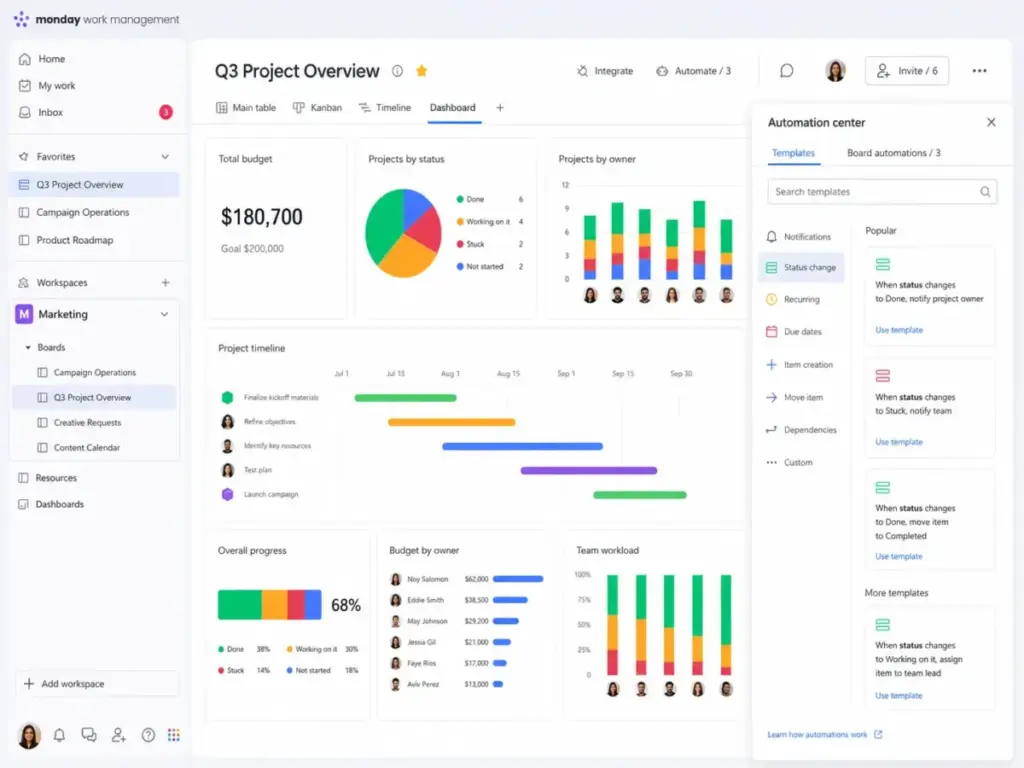
What makes monday the top pick: the combination of visual boards, customizable dashboards, automation recipes, and a template library that works for marketing, operations, HR, and product teams without requiring technical setup. The free plan supports 2 seats and 500MB storage, enough for individual use but not for teams.
10-user monthly cost (Standard, annual): $120/month
10-user monthly cost (Pro, annual): $190/month
Best for: Cross-functional business teams that want visual work management, dashboards, automation, and broad template flexibility
Avoid if: You are a solo user or two-person team that does not want to pay for a 3-seat minimum
Setup difficulty: Low
Hidden costs: Seat buckets mean 4 users pay for 5; Enterprise requires sales contact
Check the latest details in our monday.com project management review.
ClickUp: Best Value

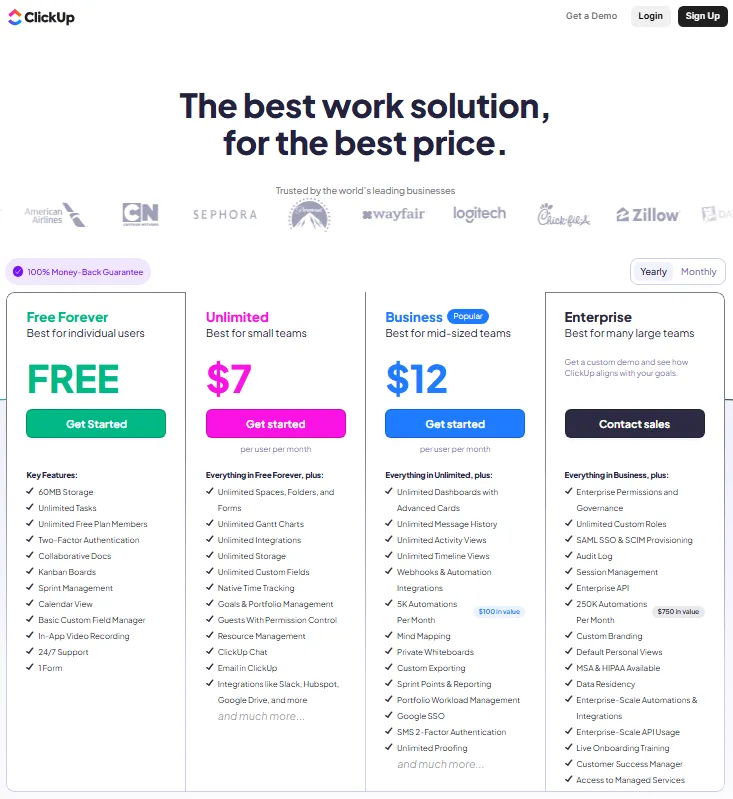
ClickUp starts at $7/user/month billed yearly on Unlimited, and the Free Forever plan is genuinely usable: unlimited tasks, unlimited free plan members, Kanban boards, calendar view, docs, and 1 form. Storage caps at 60MB on Free. Teams attracted to ClickUp’s value but constrained by storage, setup discipline, or automation gates should compare ClickUp alternatives by free-plan survivability, paid-tier pressure, view depth, and governance overhead.
The Business plan at $12/user/month adds 5,000 automations per month, advanced dashboards, timelines, workload views, and mind maps. Enterprise bumps automations to 250,000/month and adds SSO, API, and custom roles.
The feature density per dollar is unmatched. ClickUp includes Gantt charts, docs, time tracking, goals, portfolios, and resource management across all paid plans. The tradeoff: high configurability creates setup complexity. Teams that want a simpler interface will find ClickUp overwhelming.
10-user monthly cost (Unlimited, annual): $70/month
10-user monthly cost (Business, annual): $120/month
Best for: Teams that want the widest feature set at the lowest per-user price
Avoid if: You prefer a simpler, less configurable project tracker with fewer menus
Setup difficulty: Medium to High
Hidden costs: AI is priced separately at $9/user/month (Brain AI) and $28/user/month (Everything AI)
Read the full ClickUp feature-by-feature analysis for workspace setup tips.
Asana: Best for Operations Teams

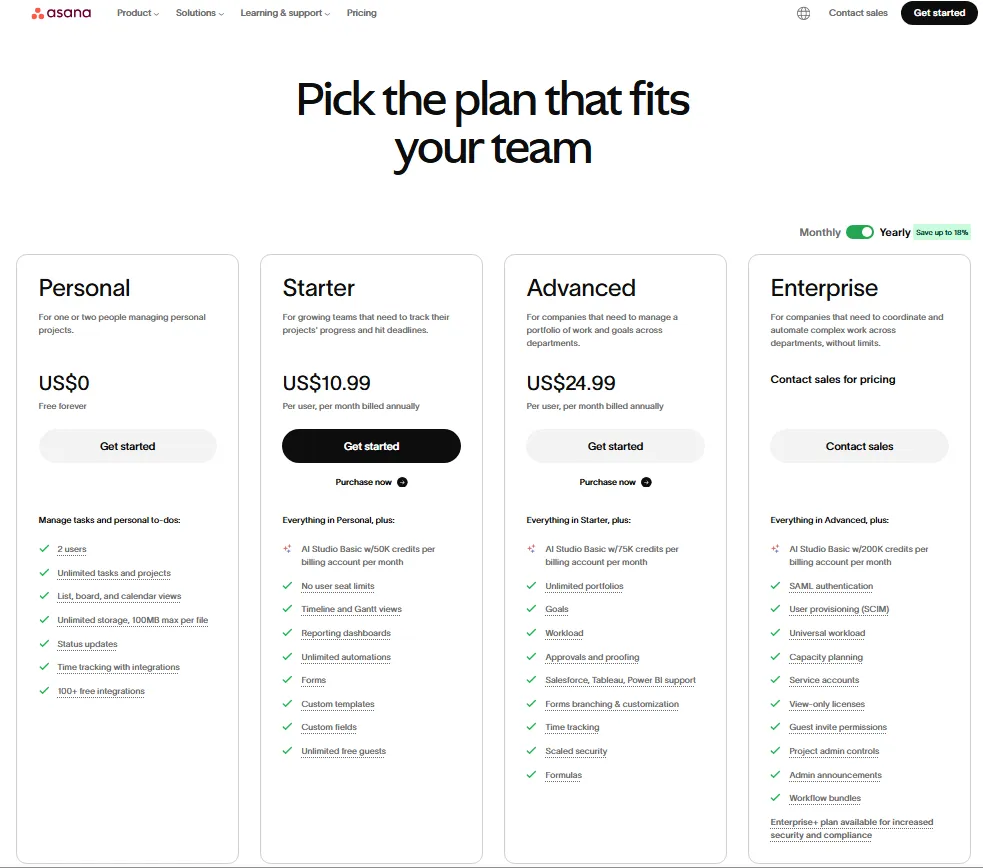
Asana starts at $10.99/user/month billed annually for Starter. The Personal plan is free for up to 2 users with unlimited tasks, list/board/calendar views, and 100MB max file size.
Advanced features like portfolios, workload, approvals, proofing, and Salesforce/Tableau/Power BI integration require the Advanced plan at $24.99/user/month billed annually. Monthly billing runs Starter at $13.49/user/month and Advanced at $30.49/user/month.
Asana’s strength is task clarity. For operations, marketing, and cross-functional teams, the path from individual tasks to portfolio-level visibility is cleaner than most competitors. The limitation: free plan is capped at 2 users, and BI integrations sit on higher tiers. Teams that like Asana’s task clarity but hit those limits should compare Asana alternatives by free-plan ceiling, BI access, portfolio reporting, automation volume, and onboarding speed.
10-user monthly cost (Starter, annual): $109.90/month
10-user monthly cost (Advanced, annual): $249.90/month
Best for: Operations, marketing, and cross-functional teams that need clean task management and portfolio visibility
Avoid if: You need project financials, invoicing, or deeply technical agile development workflows
Setup difficulty: Low
Hidden costs: Workload, approvals, proofing, and BI integrations require Advanced or higher
See our Asana project management review for a detailed plan comparison.
Jira: Best for Software Teams

Jira is free for up to 10 users with 100 automation rule runs/month and 2GB storage. Standard starts at $7.91/user/month with 1,700 automation runs/month and 250GB storage. Premium at $14.54/user/month adds unlimited storage, advanced roadmaps, and cross-team planning.
The free plan is generous for small dev teams. Backlog, board, timeline, calendar, reports, and dashboards are all included. Enterprise billing is annual and requires contacting Atlassian sales.
For agile and product teams, Jira remains the category standard. Sprint planning, issue workflows, velocity reporting, and the Atlassian ecosystem (Confluence, Bitrix, Rovo) create depth no general PM tool matches. The downside: non-technical teams find the structure heavy. Teams that need Agile depth but cannot absorb Jira’s terminology, configuration, or Atlassian stack weight should compare Jira alternatives by engineering fit, cross-functional visibility, reporting depth, and setup burden.
10-user monthly cost (Standard): $79.10/month
10-user monthly cost (Premium): $145.40/month
Best for: Software, product, and agile teams that need backlog, sprint, board, and cross-team planning
Avoid if: Non-technical teams that want a simple visual project board without agile terminology
Setup difficulty: Medium
Hidden costs: Enterprise is annual/contact-sales; Atlassian ecosystem products can raise total stack cost
For detailed plan limits, read our Jira issue tracking and PM review.
Smartsheet: Best Spreadsheet-Style PM
Smartsheet starts at $9/member/month billed yearly for Pro (1-10 members only, new customers). Business starts at $19/member/month billed yearly and requires 3+ members. Enterprise requires 10+ members and is custom-priced.
Monthly billing runs Pro at $12/member/month and Business at $24/member/month. There is no permanent free plan; a free trial is available.
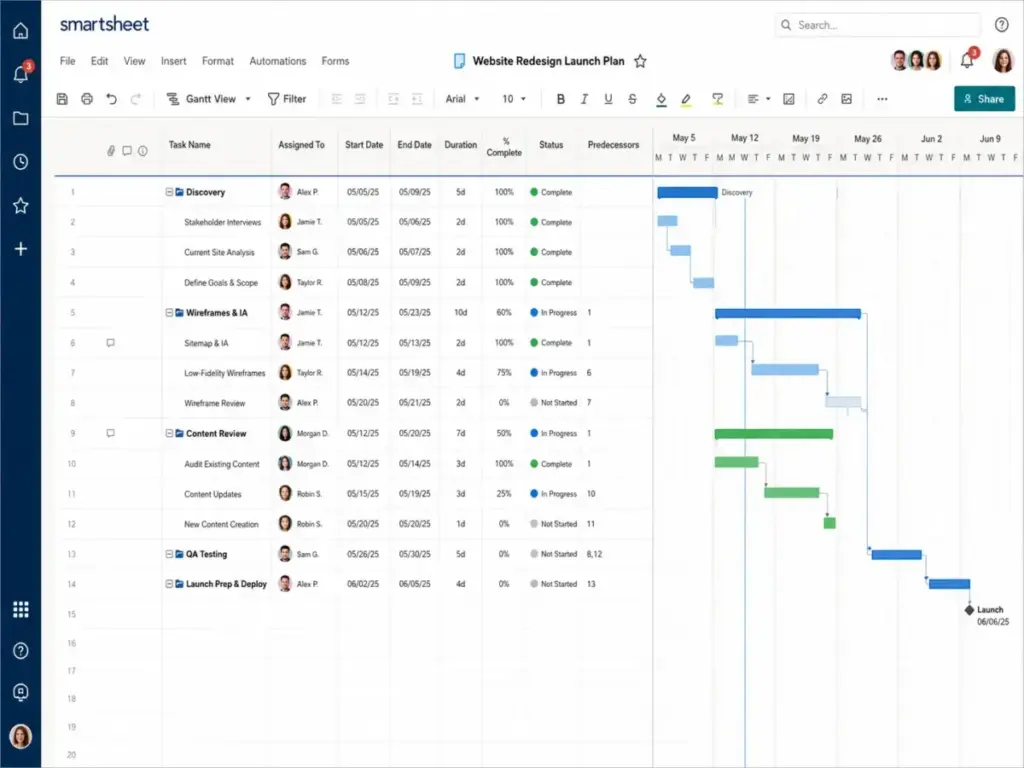
Smartsheet is the pick for teams that think in spreadsheets but need project workflows. Grid-style tracking, forms, dashboards, reports, automation, and Enterprise Plan Manager create an operations layer that sits between Excel and full PM suites. The limitation: Pro is only available to new customers and has a member-range cap.
If that Pro cap changes the buying decision, compare Smartsheet alternatives before committing to a spreadsheet-first PM setup.
10-user monthly cost (Business, annual): $190/month
Best for: Teams that like spreadsheet-based project tracking with added automation, dashboards, and enterprise controls
Avoid if: You want a modern card-first UI or a simple personal task manager
Setup difficulty: Medium
Hidden costs: Enterprise and Advanced Work Management are custom; premium modules (Connectors, Data Shuttle, DataMesh) require Advanced Work Management bundle
See our full Smartsheet grid-based PM review.
Best for Mid-Market $15-50/User/Month
Wrike: Best for Enterprise PMO

Wrike starts at $10/user/month for Team (2-15 users) and $25/user/month for Business (5-200 users, annual only). Free plan includes project/task management, board view, and table view at $0/user/month. A 14-day free trial is available with no credit card required.
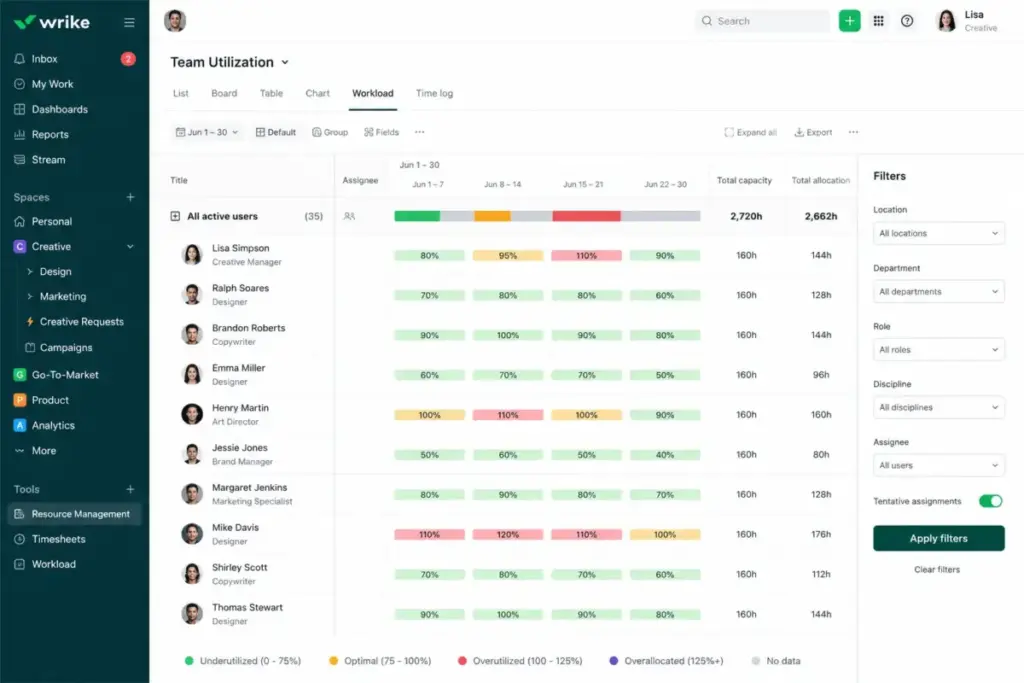
Wrike earns the enterprise PMO badge because resource planning, capacity planning, budgeting, and BI reporting are explicit product capabilities, not afterthoughts. Pinnacle and Apex tiers are contact-sales and add advanced analytics, job roles, and locked spaces.
The catch: seat-group purchasing and annual-only Business+ subscriptions reduce billing flexibility. Teams under 10 that want lightweight boards will find Wrike overbuilt.
10-user monthly cost (Business, annual): $250/month
Best for: PMOs, operations teams, and complex cross-functional teams that need Gantt, dashboards, resource/capacity planning, budgeting, and reporting
Avoid if: Small teams that want lightweight Kanban with minimal admin setup
Setup difficulty: High
Hidden costs: Business plans and above are annual only; larger capability sets require sales contact
Read the Wrike enterprise project management review for governance feature details.
Teamwork.com: Best for Agencies

Teamwork.com starts at $9.99/user/month billed yearly for Basics. The free plan covers up to 5 projects and 5 users with 100 automation runs. Basics adds 5,000 automations and Accelerate at $24.99/user/month pushes it to 20,000 automations with HubSpot and QuickBooks integration.
Teamwork connects project delivery to agency economics. Time logging, planned vs actuals, capacity and utilization tracking, retainers, and budgets are native, not add-ons. Optimize (contact sales) adds Salesforce and NetSuite integration. Teams that do not bill client work should compare Teamwork alternatives alongside general PM tools.
The limitation: the most valuable financial and utilization features sit above the entry plan. Non-client internal teams will not use half the features.
10-user monthly cost (Basics, annual): $99.90/month
10-user monthly cost (Accelerate, annual): $249.90/month
Best for: Client-service teams and agencies that need project delivery, time tracking, utilization, budgets, and retainers
Avoid if: Internal teams that do not need client work, budgets, or professional-services workflows
Setup difficulty: Medium
Hidden costs: Optimize and Enterprise require sales; premium support, onboarding, SSO may add cost
Our Teamwork agency PM review covers client billing and utilization features.
Airtable: Best for Custom Workflows

Airtable has a free plan for users getting started. Team starts at $20/user/month billed annually and Business at $45/user/month billed annually ($54/collaborator/month monthly). Enterprise Scale is custom.
Airtable is not a traditional PM tool. It is a database-backed platform where you build custom project trackers, interfaces, records, and automations. Business plan includes 125,000 records per base and unlimited API calls per workspace per month.
The tradeoff: Airtable requires workflow design effort. Users with edit permissions become billable on Team/Business plans. Teams wanting out-of-the-box PM structure will spend weeks building what monday or Asana provide in templates.
10-user monthly cost (Team, annual): $200/month
10-user monthly cost (Business, annual): $450/month
Best for: Teams that need flexible, database-backed project trackers and custom operational workflows
Avoid if: You want traditional PM structure out of the box without designing tables, views, and permissions
Setup difficulty: High
Hidden costs: Edit-permission users are billable; Enterprise Scale is custom priced
Read our Airtable custom workflow review for database-to-PM use cases.
Linear: Best for Product Engineering Teams

Linear offers a free plan for small teams. Standard is $8/user/month and Plus is $14/user/month (annual billing). Enterprise pricing is not publicly disclosed.
Linear is purpose-built for product and engineering teams. Keyboard-driven UI, cycles (sprints), roadmaps, triage workflows, and GitHub/GitLab integration make it the fastest issue tracker for dev teams. The limitation: Linear does not try to be a general PM tool. Marketing, operations, or agency teams will not find time tracking, budgets, or client workflows here. Those teams should look at Linear alternative tools before settling on the tracker.
10-user monthly cost (Standard, annual): $80/month
Best for: Product and engineering teams that want fast issue tracking, cycles, and roadmaps
Avoid if: Non-engineering teams that need time tracking, resource management, or client-facing PM features
Setup difficulty: Low
Hidden costs: Enterprise pricing is not public
See our Linear dev-focused PM review for cycle and triage workflow details.
Best Flat-Rate and Unlimited Options
Basecamp: Best Flat-Rate Option

Basecamp charges $15/user/month on the standard plan. Pro Unlimited costs $299/month flat for unlimited users with 5TB storage, 24/7 priority support, admin pro pack, and a 1:1 onboarding tour.
The flat-rate pricing is the story. For a 20-person team, Pro Unlimited works out to $14.95/user/month. For a 50-person team, it is $5.98/user/month. No seat math, no tier jumps, no automation caps.
The tradeoff is feature depth. Basecamp does not have Gantt charts, resource management, workload views, or advanced reporting. It is a communication-first tool: message boards, to-dos, schedules, docs, and automatic check-ins. Teams that need project controls beyond task lists will outgrow it. Those teams should treat Basecamp software alternatives as the next stop.
Best for: Teams that want simple project collaboration with flat-rate billing and no per-seat math
Avoid if: You need Gantt charts, dependencies, resource planning, or advanced reporting
Setup difficulty: Low
Hidden costs: Standard plan at $15/user/month can add up for small teams; Pro Unlimited has no per-seat billing
Read our full Basecamp flat-rate PM review.
ProofHub: Best for Flat-Rate Small Teams

ProofHub offers two flat-rate plans. Essential starts at $45/month (billed annually) with 40 projects and 15GB storage. Ultimate Control is $89/month (billed annually) with unlimited projects, unlimited users, 100GB storage, and white labeling.
Like Basecamp, ProofHub eliminates per-user billing. A 15-person team on Ultimate Control pays $5.93/user/month effective. The platform includes task management, Gantt charts, discussions, time tracking, proofing, and custom workflows.
The limitation: ProofHub lacks the integration depth and ecosystem breadth of monday, ClickUp, or Asana. API access and third-party connectors are more limited, which matters if your team relies on Salesforce, HubSpot, or advanced automation workflows.
Best for: Small to mid-size teams that want flat-rate billing with task management, proofing, and time tracking
Avoid if: You need deep third-party integrations, advanced automation, or enterprise-grade admin controls
Setup difficulty: Low
Hidden costs: Premium support and advanced onboarding may add cost
Pricing Comparison: Starting Price vs Practical Tier
All prices verified as of May 2026 from official pricing pages. Check vendor sites for current rates.
| Tool | Starting price (annual) | Practical tier (annual) | 10-user cost/month | Free plan | Free trial |
|---|---|---|---|---|---|
| monday Work Management | $9/seat/mo | $12/seat/mo (Standard) | $120 | Yes (2 seats) | Yes |
| ClickUp | $7/user/mo | $12/user/mo (Business) | $120 | Yes (unlimited tasks) | Not verified |
| Asana | $10.99/user/mo | $24.99/user/mo (Advanced) | $249.90 | Yes (2 users) | Not verified |
| Wrike | $10/user/mo | $25/user/mo (Business) | $250 | Yes | 14 days |
| Smartsheet | $9/member/mo | $19/member/mo (Business) | $190 | No | Yes |
| Teamwork.com | $9.99/user/mo | $24.99/user/mo (Accelerate) | $249.90 | Yes (5 users) | 30 days |
| Jira | $7.91/user/mo | $14.54/user/mo (Premium) | $145.40 | Yes (10 users) | Yes |
| Airtable | $20/user/mo | $45/user/mo (Business) | $450 | Yes | Not verified |
| Trello | $5/user/mo | $10/user/mo (Premium) | $100 | Yes (10 collaborators) | Not verified |
| Notion | $10/seat/mo | $20/seat/mo (Business) | $200 | Yes | Not verified |
| Basecamp | $15/user/mo | $299/mo flat (Pro) | $299 flat | No | Yes |
| Microsoft Planner/Project | $0 (with M365) | $30/user/mo (Plan 3) | $300 | With M365 | Yes |
| Zoho Projects | $4/user/mo | $9/user/mo (Enterprise) | $90 | Yes (3 users) | Yes |
| Linear | $8/user/mo | $14/user/mo (Plus) | $140 | Yes | Not verified |
| ProofHub | $45/mo flat | $89/mo flat (Ultimate) | $89 flat | No | 14 days |
What this means: Starting prices are not comparison points. The practical tier is the first plan that unlocks the features most teams actually need: automation, reporting, admin controls, and portfolio views. At 10 users, ClickUp ($120/month on Business) and Zoho Projects ($90/month on Enterprise) are the most cost-efficient. Basecamp ($299/month flat) and ProofHub ($89/month flat) become cheaper per-user as team size grows past 15-20.
Feature Gate Comparison
| Feature | monday (Standard) | ClickUp (Business) | Asana (Advanced) | Wrike (Business) | Jira (Premium) | Trello (Premium) |
|---|---|---|---|---|---|---|
| Automations/month | 250 | 5,000 | Plan-based | Annual only | Unlimited | Unlimited |
| Gantt/Timeline | ✅ | ✅ | ✅ | ✅ | ✅ | ✅ |
| Dashboards | ✅ | ✅ | ✅ | ✅ | ✅ | ✅ |
| Resource/Workload | Pro | Business | Advanced | Business | Premium | ❌ |
| AI features | Enterprise | $9-28/user add-on | AI Studio (plan-based) | Pinnacle+ | Rovo (higher tiers) | Premium+ |
| API access | Standard+ | Enterprise | Advanced | Business+ | Premium | ❌ |
| SSO/SCIM | Enterprise | Enterprise | Enterprise | Business+ | Premium+ | Enterprise |
| Portfolio/Programs | Pro | Business | Advanced | Business | Premium | ❌ |
What this means: Automation caps vary dramatically. ClickUp Business gives you 5,000 automations/month for $12/user/month. monday Standard caps at 250 for the same price. If automation volume matters, check the cap before the feature list. Resource management and AI features consistently sit on mid-tier or higher plans across all platforms.
Setup and Migration Difficulty
| Tool | Setup difficulty | Why |
|---|---|---|
| monday Work Management | Low | Visual boards, templates, drag-and-drop setup |
| ClickUp | Medium-High | Many work objects, views, and configuration options |
| Asana | Low | Clean onboarding, intuitive task-to-project structure |
| Wrike | High | Enterprise features require admin configuration and seat-group management |
| Smartsheet | Medium | Spreadsheet familiar, but advanced automations need configuration |
| Teamwork.com | Medium | Agency workflows (budgets, retainers, time tracking) require setup |
| Jira | Medium | Agile concepts (epics, stories, sprints) have a learning curve for non-dev teams |
| Airtable | High | Database design required before PM workflows function |
| Trello | Low | Card-based system is immediately intuitive |
| Notion | Medium | Workspace and database setup needed; templates help |
| Basecamp | Low | Simple interface, fast onboarding, no configuration |
| Microsoft Planner/Project | Low-Medium | Easy if already on M365; Project Plan 3+ needs admin |
| Zoho Projects | Low-Medium | Straightforward if in Zoho ecosystem; standalone requires integration work |
| Linear | Low | Built for speed, keyboard-first, minimal configuration |
| ProofHub | Low | Flat-rate, straightforward task and proofing setup |
Which Project Management Tool Should You Avoid?
Not every tool fits every team. Here are the cases where specific tools are the wrong choice:
- Avoid Airtable if your team wants traditional PM structure out of the box. Building project workflows from a blank database takes weeks, not hours.
- Avoid Wrike if you have fewer than 10 users and want lightweight boards. The enterprise depth adds complexity you do not need.
- Avoid Basecamp if your projects have dependencies, resource constraints, or portfolio-level reporting needs. It does not have Gantt charts or workload management.
- Avoid Jira if your team is non-technical. Agile terminology and issue-tracking structure create unnecessary friction for marketing, operations, and HR teams.
- Avoid Notion if you need dedicated PM governance. It is a workspace first, a project tracker second. Resource management, time tracking, and workload views are not native.
- Avoid monday’s Free plan if you need more than 2 users. The free tier is limited to 2 seats and 500MB storage, which serves individual use only.
How to Choose the Right Project Management Software
Start with these seven questions. Your answers narrow the field from 15 to 2-3.
- How many users need access today and in 12 months? Tools with seat minimums (monday: 3 seats, Smartsheet Business: 3+ members) penalize small teams. Flat-rate tools (Basecamp, ProofHub) reward larger teams.
- What is your monthly budget per user? Under $10/user: ClickUp, Zoho Projects, Trello. $10-25/user: monday, Asana, Jira, Teamwork. $25+/user: Wrike, Smartsheet, Airtable.
- Which features are must-have on day one? If Gantt charts, automation, and dashboards are required, the cheapest plan rarely includes them. Check the practical tier, not the starting price.
- What tools must it integrate with? Jira fits Atlassian shops. Microsoft Planner fits Microsoft 365. Zoho Projects fits the Zoho ecosystem. monday and ClickUp integrate broadly via Zapier and native connectors.
- How much setup complexity can your team handle? Low tolerance: Trello, Basecamp, Linear. Medium: monday, Asana, Teamwork. High: ClickUp, Wrike, Airtable.
- Do you need client-facing or agency features? Teamwork.com is the only tool on this list built explicitly for agency workflows: retainers, budgets, utilization, and client access.
- What is the total cost at 10 users on the plan that actually works? Do not compare starting prices. Compare the practical tier at your team size. The cheapest starting price often hides the steepest upgrade path.
Comparing project management tools to similar software categories can also help. If your needs overlap with task-based CRM or collaboration, check our comparison of Asana vs Monday.com for team workflows for a head-to-head analysis.
Common Mistakes When Choosing Project Management Software
- Choosing by starting price. The starting price is almost never the plan your team needs. Automation, reporting, and admin controls consistently sit on the second or third tier.
- Buying the tool with the most features. ClickUp has the longest feature list on this page. That does not make it the best pick for a 5-person marketing team that needs simplicity.
- Ignoring seat minimums and bucket pricing. monday requires 3 paid seats minimum and sells in buckets. Smartsheet Business requires 3+ members. A 4-person team on monday pays for 5 seats.
- Skipping the free trial with real workflows. A demo dashboard with sample data tells you nothing. Import your actual projects, invite your team, and run a real sprint or delivery cycle before committing.
- Underestimating automation limits. monday Standard gives you 250 automations/month. ClickUp Business gives you 5,000. If your team builds automated workflows, the cap matters more than the monthly price.
- Choosing an enterprise tool for a 5-person team. Wrike and Smartsheet are built for PMOs and operations teams. A 5-person startup will spend more time configuring permissions than managing projects.
- Forgetting integration requirements. Your PM tool must connect to your communication (Slack/Teams), file storage (Google Drive/OneDrive), and CRM or billing stack. Check native integrations before committing.
Understanding core concepts like what Kanban means for task management, how sprints structure delivery, and what resource management involves will help you evaluate which tool’s workflow model fits your team’s operating style.
Final Verdict
monday Work Management is the best project management software for most teams in 2026. It balances visual usability, dashboards, automations, and broad template flexibility at a price point that scales predictably. The $12/seat/month Standard plan is the practical entry point.
Here is the breakdown by buyer type:
- Best value for all-in-one: ClickUp at $7/user/month. No other tool packs Gantt, docs, time tracking, goals, and dashboards at this price.
- Best for operations/marketing: Asana. Cleanest task-to-portfolio path for non-technical teams.
- Best for software teams: Jira. Still the category standard for agile workflows and Atlassian ecosystem depth.
- Best for agencies: Teamwork.com. Native time tracking, budgets, retainers, and utilization reporting.
- Best for flat-rate teams: Basecamp at $299/month flat or ProofHub at $89/month flat.
- Best budget pick: Zoho Projects at $4/user/month. Hard to beat for teams already in the Zoho ecosystem.
The biggest mistake is choosing by starting price. The practical tier, your team size, and your automation volume determine the real cost. Trial your top 2-3 picks with real projects before committing.
For teams considering collaboration tools alongside their PM platform, explore our best team collaboration tools ranking for communication and file-sharing options.
FAQ
What is the best project management software overall?
monday Work Management is the best project management software for most teams. It offers the strongest balance of visual boards, automation, dashboards, and pricing transparency across its Basic ($9/seat/month), Standard ($12/seat/month), and Pro ($19/seat/month) tiers.
What is the best free project management software?
ClickUp Free Forever is the most capable free plan. It includes unlimited tasks, unlimited members, Kanban boards, calendar view, and docs. Trello’s free plan is simpler but limits you to 10 collaborators per Workspace. Jira’s free plan supports up to 10 users with backlog, board, and timeline views.
What is the cheapest project management software for teams?
Zoho Projects at $4/user/month (Premium, billed annually) is the cheapest paid option with Gantt charts, automation, and time tracking. ClickUp Unlimited at $7/user/month offers more features per dollar. For flat-rate pricing, ProofHub at $89/month covers unlimited users.
Which project management tool is best for small businesses?
For teams under 10, Trello or Basecamp provides the fastest setup with the lowest friction. For teams of 5-15 that need automation and reporting, monday Standard or ClickUp Unlimited offers the best feature-to-cost ratio. Avoid enterprise-grade tools like Wrike or Smartsheet unless you need portfolio management.
Which project management software is best for enterprise teams?
Wrike is the strongest enterprise PMO option with resource planning, budgeting, capacity management, and BI reporting. Smartsheet and monday Enterprise also serve large organizations, but Wrike’s governance and reporting depth is more explicit. If Wrike looks too heavy for your team, compare the leading Wrike alternatives before choosing a lighter enterprise PM setup.
How much does project management software cost?
Starting prices range from $0 (free plans) to $45/user/month (Airtable Business). The practical tier most teams need costs between $10-25/user/month. At 10 users, monthly costs range from $70 (ClickUp Unlimited) to $450 (Airtable Business). Flat-rate options like ProofHub ($89/month) and Basecamp ($299/month) eliminate per-seat math.
Is Jira only for developers?
No, but it works best for development and product teams. Jira’s backlog, sprint, board, and timeline features are optimized for agile workflows. Non-technical teams can use Jira, but they will encounter terminology (epics, stories, story points) and structure that may feel heavy compared with monday or Asana.
Can I use Notion for project management?
Yes, if you are willing to build your own project databases and views. Notion is a workspace that combines docs, wikis, and databases. It does not include native Gantt charts, resource management, or time tracking. Teams that want PM inside their knowledge base will find it useful; teams that need dedicated PM features will not.
What features should I look for in project management software?
Start with task views (list, board, timeline, Gantt), automation, reporting/dashboards, and integrations with your existing stack (Slack, Google, Microsoft). Check which plan unlocks these features. Then evaluate: resource/workload management, permission controls, file storage limits, and whether the tool supports your methodology (Kanban, Scrum, Waterfall, or hybrid).