Marketing pages pitch ChatGPT as a simple $20 subscription, but the real cost of ownership scales differently. According to official data, ChatGPT Pricing in 2026 includes a complex stack of seats, credits, and plan gates.
Finding the right fit among these plans requires analyzing your specific query volume, reasoning needs, and administrative requirements.
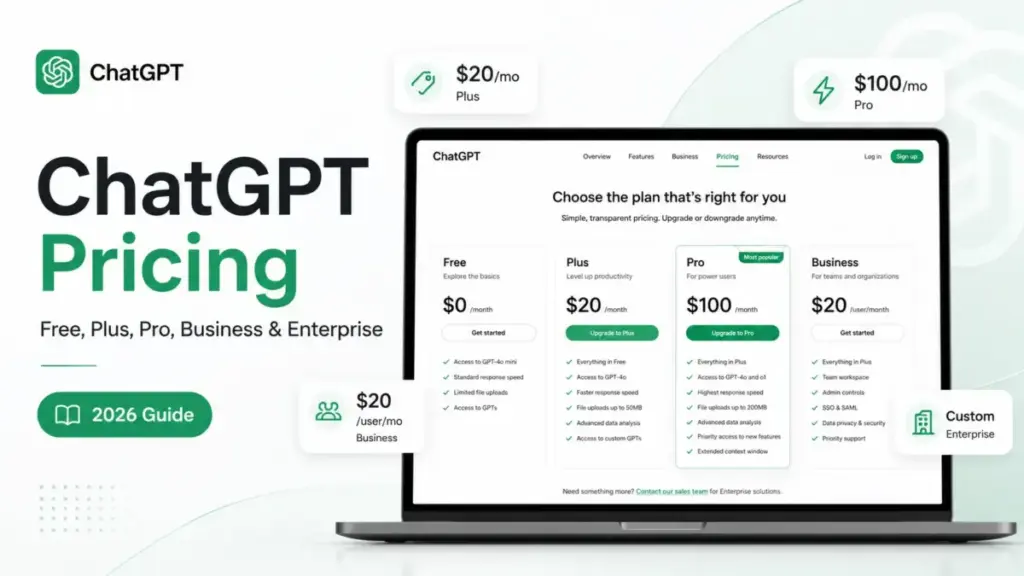
This independent guide compares all 2026 plans, exposes hidden overage charges, and helps you select the best path. ChatGPT pricing in 2026 starts with a free plan, then moves to Go, Plus, Pro, Business, and Enterprise tiers.
The listed monthly fee is only part of the story because teams also need to account for seat minimums, workspace credits, API billing, admin controls, and enterprise security gates. This guide breaks down every plan, the real cost at 5 to 100 users, and when each upgrade makes sense.
The following table summarizes the starting costs, sweet spots, and main trade-offs for each tier:
Quick Pricing Verdict
| Plan | Starting Price | Billing Basis | Best For | Biggest Gotcha | Best Alternative | Verified Date |
|---|---|---|---|---|---|---|
| Free | $0 | Per user | Casual users | Strict query caps | Google Gemini AI Pro | May 25, 2026 |
| Go | $8/month | Per user | Budget individuals | Includes ads | Claude Team | May 25, 2026 |
| Plus | $20/month | Per user | Power professionals | No team admin controls | Claude Team | May 25, 2026 |
| Pro $100 | $100/month | Per user | Specialized developers | Lower usage than Pro $200 | Google Gemini AI Pro | May 25, 2026 |
| Pro $200 | $200/month | Per user | Heavy research roles | No credit pooling | Google Gemini AI Pro | May 25, 2026 |
| Business Standard | $20/user/month | Per user (2-seat minimum) | Small to mid-size teams | Extra credit purchases | Claude Team | May 25, 2026 |
| Business Codex-only | Usage credits | Usage basis | Developer-only teams | Requires active credits | Claude Team | May 25, 2026 |
| Enterprise | Custom | Custom contract | Large corporations | Sales negotiation gate | Claude Team | May 25, 2026 |
What this means:
This pricing snapshot shows that individual plans scale horizontally, while team workspaces introduce seat minimums and usage credits. Individuals requiring advanced reasoning models must choose between Plus and Pro subscriptions. Workspaces with 2 or more seats must utilize the Business tier to gain compliance controls, as self-serve individual accounts do not support centralized team governance.
The Advertised Price vs. The Real Price
OpenAI advertises ChatGPT starting prices from $0 to $20/month for individuals, but team plans carry strict minimum costs. According to official pricing documentation verified on May 25, 2026, the self-serve Business plan requires a 2-seat minimum, raising the entry threshold to $40/month (billed annually) or $50/month (monthly).
Evaluating these plans requires looking beyond the single-user subscription fee. For example, if a team of five purchases independent Plus licenses, the monthly cost is $100. This approach avoids the seat minimum, but leaves the organization without SAML SSO, centralized billing, or data privacy. Upgrading that same team to the Business plan costs $125/month on monthly billing, but secures the workspace and prevents model training on proprietary company data.
When analyzing the price, buyers must separate consumer application pricing from programmatic developer costs. A subscription to Plus or Pro does not grant API access, which OpenAI bills separately. Our our detailed ChatGPT review shows that mixing consumer subscriptions with separate developer tokens is the most common billing mistake organizations make.
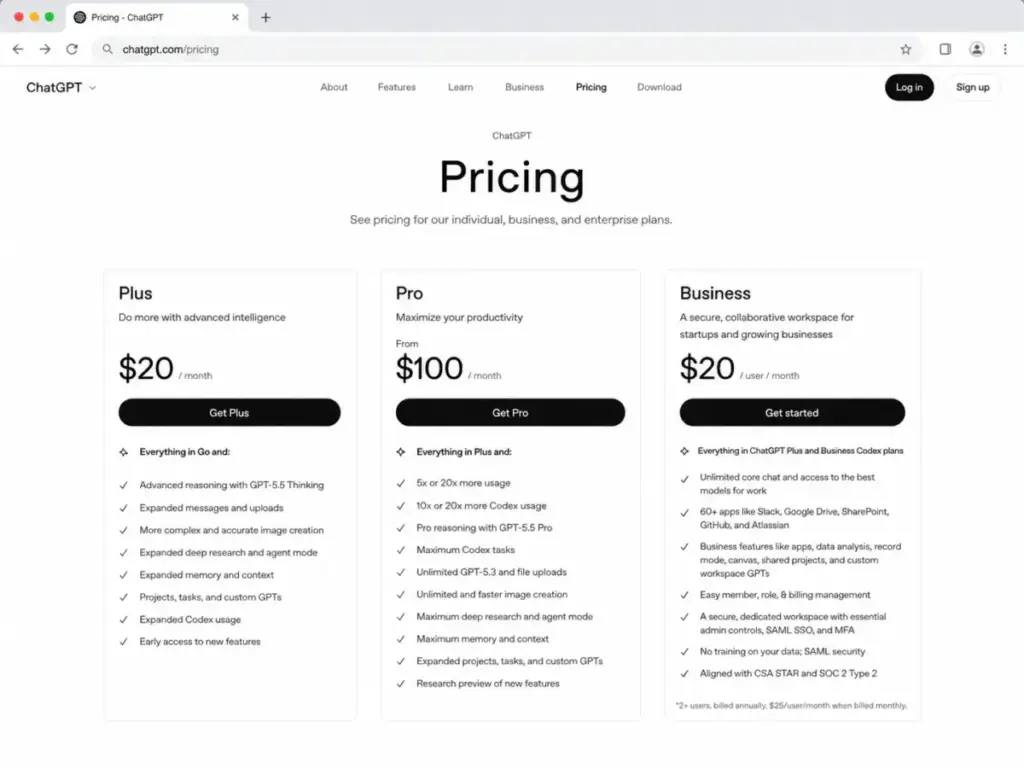
The master plans comparison table below outlines the rates, billing cycles, and sweet spots for each option:
ChatGPT Plans and Cost Structures
| Plan Name | Monthly Cost | Annual Cost | Billing Basis | Best For | Key Limits |
|---|---|---|---|---|---|
| Free | $0 | $0 | Per user | Occasional search | Strict GPT-5.5 caps |
| Go | $8/month | Not offered | Per user | Price-sensitive users | Ads included |
| Plus | $20/month | Not offered | Per user | Individual specialists | Standard usage limits |
| Pro $100 | $100/month | Not offered | Per user | Specialized creators | 5x Plus limits |
| Pro $200 | $200/month | Not offered | Per user | Heavy research roles | Abuse guardrails apply |
| Business Standard | $25/user/month | $20/user/month | Per user | Mid-size workspaces | 2-seat minimum |
| Business Codex-only | Usage credits | Usage credits | Usage credits | Independent developers | Credit consumption caps |
| Enterprise | Custom | Custom contract | Custom contract | Large corporations | Sales contract gate |
What this means:
While consumer accounts rely on flat-rate per-user billing, professional team workspaces use a hybrid model. The entry-level Go plan targets casual users, but inserts promotional ads. The Pro tier is split into two packages, allowing power users to scale usage limits without moving to enterprise contracts. Business plans reduce per-seat subscription rates on annual agreements but introduce credit consumption for advanced features.
The 5 Hidden Costs of ChatGPT
Analysis of OpenAI’s 2026 contract terms shows that standard subscriptions exclude high-volume API queries and advanced developer activities. While individual users pay flat rates, business teams must budget for consumption-based workspace credits to prevent service disruptions. OpenAI notes Codex usage can vary significantly by developer workflow.
Understanding total cost of ownership requires identifying these five specific hidden expenses:
1. API Usage is Billed Separately
Consumer plans like Plus or Pro do not include developer API usage. If your developers build custom software utilizing OpenAI API keys, the organization receives a separate consumption-based bill. Paying $20/month for a Plus account does not offset these API fees.
2. Workspace Credits After Included Limits
Business and Enterprise workspaces feature base usage limits for advanced models. Once your team exhausts these limits, advanced tasks consume workspace credits. Organizations must purchase credit packs to continue using high-cost capabilities like GPT-5.5 Pro or Deep Research without interruption.
3. Codex Usage Variability
Codex-only seats do not charge a flat monthly fee. Instead, developers pay entirely through credit consumption based on input and output tokens. A developer team processing large context windows can experience major monthly fluctuations, with costs averaging $150/developer/month under heavy code synthesis.
4. No Invoice Billing for Self-Serve Business
The Business plan only supports self-serve credit card or debit card payments. If your procurement department requires invoices, purchase orders, ACH transfers, or net terms, you cannot use the self-serve portal. You must contact sales to negotiate an Enterprise contract, which raises the minimum spend.
5. Custom Enterprise-Only Governance
Admin features like SCIM provisioning, Enterprise Key Management (EKM), domain verification, and localized data residency require the Enterprise tier. Teams requiring these compliance gates cannot use the $20/user/month Business plan. They must purchase custom contracts through sales.
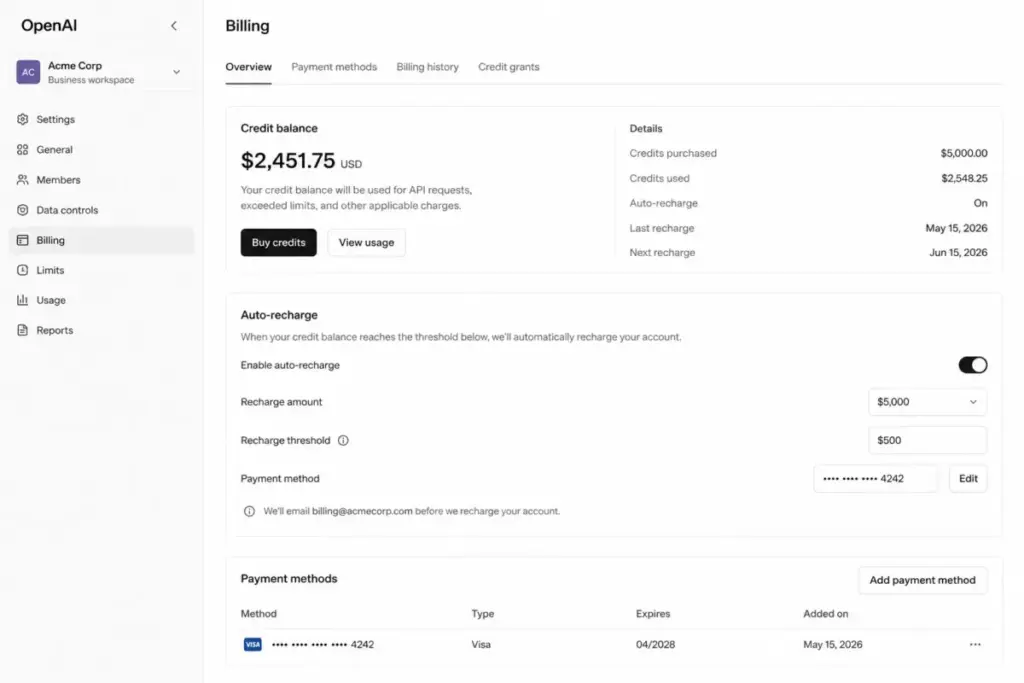
The table below maps the official rates and limits for ChatGPT add-ons and credit consumption:
ChatGPT Add-ons and Credit Consumption Rates
| Add-on / Service | Official Rate | What It Unlocks |
|---|---|---|
| Workspace Credits | Credit-pack pricing is variable | Overage usage for advanced models |
| GPT-5.5 Thinking | 10 credits per message | Deep reasoning query capacity |
| GPT-5.5 Pro | 50 credits per message | Top-tier intelligence access |
| Agent Mode | 30 credits per message | Automated multi-step workflows |
| Deep Research | 50 credits per task | Long-form autonomous web research |
| Image Generation | 5 credits per image | High-fidelity image synthesis |
| Voice Mode | 5 credits per minute | Live audio conversations |
| Codex Input Tokens | 125 credits per 1M inputs | Code analysis inputs |
| Codex Cached Inputs | 12.50 credits per 1M inputs | Cached code retrieval |
| Codex Output Tokens | 750 credits per 1M outputs | Code generation outputs |
What this means:
Advanced features in professional workspaces operate on a clear credit rate card. Routine queries use standard subscription capacity, but specialized tasks draw from your credit balance. For instance, running 10 Deep Research tasks consumes 500 credits, while generating 100 images costs 500 credits. Teams must monitor these rates to estimate monthly overage costs.
Plan-by-Plan Breakdown
According to official documentation, OpenAI divides ChatGPT into eight distinct billing tiers for individuals, teams, developers, and enterprises. Each tier features specific context limits, model access gates, and credit usage policies.
Below is the detailed operational breakdown of each tier:
ChatGPT Free
- Cost: $0
- Best For: Occasional users performing basic searches or writing simple text.
- Includes: Limited access to GPT-5.5 Instant, basic custom GPTs, and memory storage.
- Missing: GPT-5.5 Thinking, GPT-5.5 Pro, advanced Deep Research, projects, tasks, workspace admin controls, SAML SSO, and SCIM.
- Avoid-If: You use ChatGPT for daily work, require reasoning capabilities, or process confidential data.
ChatGPT Go
- Cost: $8/month (no annual option)
- Best For: Budget-conscious individuals who outgrow the free plan’s message limits.
- Includes: 10x more messages and uploads than the Free tier, memory, and custom GPTs.
- Missing: GPT-5.5 Thinking, GPT-5.5 Pro, workspace admin consoles, and data privacy options.
- Avoid-If: You require ad-free workflows or need advanced reasoning models for complex tasks.
ChatGPT Plus
- Cost: $20/month (no annual option)
- Best For: Solo professionals, writers, and general operators.
- Includes: Expanded access to GPT-5.5 Instant, GPT-5.5 Thinking, custom GPTs, projects, tasks, and early feature access.
- Missing: GPT-5.5 Pro, workspace admin console, SSO, SCIM, and data privacy controls.
- Avoid-If: You work in a regulated industry requiring secure data handling, or need team collaboration features.
ChatGPT Pro $100
- Cost: $100/month (no annual option)
- Best For: Individual developers and researchers who hit Plus caps.
- Includes: Access to GPT-5.5 Pro, Pro reasoning models, and 5x higher usage limits than Plus.
- Missing: Workspace admin consoles, role management, SAML SSO, and SCIM.
- Avoid-If: You do not hit the message limits of the standard Plus subscription.
ChatGPT Pro $200
- Cost: $200/month (no annual option)
- Best For: Power users with heavy reasoning workflows.
- Includes: Unlimited or maximum access to GPT-5.5 Pro, maximum context windows, and maximum Codex tasks.
- Missing: Team collaboration spaces, shared projects, SSO, and SCIM.
- Avoid-If: You do not require top-tier reasoning capabilities for hours each day.
Business ChatGPT and Codex Standard Seat
- Cost: $25/user/month (billed monthly) or $20/user/month (billed annually, 2-seat minimum)
- Best For: Professional teams of 2 to 100 users requiring secure environments.
- Includes: Secure workspace, admin console, SAML SSO, MFA, shared projects, and a guarantee that Business and Enterprise data is not used for training by default unless the organization opts in
- Missing: SCIM provisioning, Enterprise Key Management (EKM), and custom legal contracts.
- Avoid-If: Your IT department mandates SCIM provisioning or localized data residency.
Business Codex-only Seat
- Cost: No fixed seat fee; billed entirely on usage credits.
- Best For: Developer teams who do not need the standard ChatGPT chat application.
- Includes: API-like Codex access for code synthesis directly within developer environments.
- Missing: Standard ChatGPT chat UI and consumer tools.
- Avoid-If: Your developers require chat interfaces for general research and writing tasks.
ChatGPT Enterprise
- Cost: Custom pricing (sales contract required)
- Best For: Organizations with 100+ users or strict compliance requirements.
- Includes: SCIM provisioning, EKM, domain verification, advanced analytics, data residency in 10 regions, and SLAs.
- Missing: Self-serve card checkouts.
- Avoid-If: You are a small team that can manage access without SSO integration.
When the Free Plan Stops Working
OpenAI gates its most sophisticated reasoning models and research tools behind paid individual and workspace accounts. While the free tier provides basic access, professional tasks require upgrading to unlock advanced features. Before upgrading, you must understand what an AI chatbot actually is to see if the technology fits your workflow. some users may hit limits quickly during complex research workflows.
The free tier is built to introduce users to ChatGPT, but its limitations quickly show under professional workloads. Hitting the query cap on GPT-5.5 Instant drops you to slower, less capable models. This change interrupts deep analytical work. The free plan does not support custom projects or task scheduling.
Upgrading to a paid tier becomes necessary when you experience these three triggers:
- Hitting Query Caps: If you use ChatGPT for research throughout the day, the free model’s limits will interrupt your work.
- Needing Advanced Reasoning: Complex programming or data analysis requires GPT-5.5 Thinking, which the free plan excludes.
- Handling Sensitive Data: If you input client details or business data, the free plan’s default model training policies pose a compliance risk.
Feature Gates: What You Actually Get by Plan
Evaluating ChatGPT plans requires mapping key capabilities to specific subscription gates. The following table displays model access, admin features, and security controls across plans.
Understanding where these gates lie prevents teams from purchasing licenses that do not support their workflows. For example, if your team needs to build custom workflows, buying independent Plus accounts will block you from sharing custom GPTs securely within a team workspace.
The table below outlines the exact feature availability by tier:
ChatGPT Feature Gates by Plan
| Feature / Model | Free | Go | Plus | Pro | Business | Enterprise |
|---|---|---|---|---|---|---|
| GPT-5.5 Instant | Limited | Expanded | Unlimited | Unlimited | Unlimited | Unlimited |
| GPT-5.5 Thinking | No | No | Expanded | Maximum | Credit-based | Credit-based |
| GPT-5.5 Pro | No | No | No | Yes | Credit-based | Credit-based |
| Deep Research | Limited | Limited | Yes | Maximum | Yes | Yes |
| Workspace Admin | No | No | No | No | Yes | Yes |
| SAML SSO & MFA | No | No | No | No | Yes | Yes |
| SCIM & Provisioning | No | No | No | No | No | Yes |
| No-Training Data | No | No | Optional | Optional | Yes | Yes |
| Advanced Residency | No | No | No | No | No | Yes (10 regions) |
What this means:
Reasoning models like GPT-5.5 Pro remain locked behind the Pro subscriptions or require credit purchases on team plans. Advanced security controls are split between Business and Enterprise. While Business unlocks SAML SSO and admin consoles, it excludes SCIM provisioning and localized data residency.
Real Cost Scenarios: How Much ChatGPT Costs at Scale
Calculating total cost of ownership for teams requires analyzing user seat counts and billing cycles. The table below outlines monthly and annual costs for five team scenarios.
This math demonstrates the financial difference between purchasing individual plans and team workspaces. While individual Plus accounts appear simple, they fail to deliver volume discounts or security controls at scale.
The table below outlines the cost trajectory at common team sizes:
Real Cost Scenarios by Workspace Size
| Users | Recommended Plan | Estimated Monthly Cost | Estimated Annual Cost | Notes |
|---|---|---|---|---|
| 1 User | Plus | $20/month | $240/year | Billed monthly; no annual individual discount |
| 5 Users | Business (Annual) | $100/month | $1,200/year | Saves$300/year versus monthly Business pricing |
| 10 Users | Business (Annual) | $200/month | $2,400/year | Costs same as 10 Plus accounts but secures data |
| 25 Users | Business (Annual) | $500/month | $6,000/year | Volume billing starts; evaluates custom integrations |
| 50 Users | Business (Annual) | $1,000/month | $12,000/year | Annual savings reach$3,000 over monthly plans |
| 100 Users | Enterprise (Custom) | Custom | Custom contract | Requires sales engagement for volume pricing |
What this means:
At 10 users, the Business plan costs $200/month on an annual contract. This matches the cost of 10 individual Plus licenses but adds team management and data privacy. Larger teams exceeding 100 users must negotiate custom Enterprise rates to secure SCIM provisioning and credit pooling.
Monthly vs. Annual Billing: Calculating the Business Savings
OpenAI offers a 20% discount on self-serve Business plans when organizations commit to annual contracts. While individual plans lack annual options, teams save $60/user/year by paying upfront. According to official billing data, a 10-user team cuts its annual bill from $3,000 to $2,400 with this commitment.
Choosing between monthly and annual billing depends on your team’s headcount predictability. The monthly plan ($25/user/month) allows organizations to add or remove seats at the end of each billing cycle. This flexibility fits teams utilizing seasonal contractors.
For core employee groups, the annual commitment ($20/user/month) is the better choice. It locks in the lower rate and simplifies budgeting. The table below compares the cost of monthly and annual plans at different team sizes:
Monthly vs. Annual Billing Comparison
| Team Size | Monthly Billed Plan | Annual Billed Plan (Monthly Equivalent) | Net Annual Savings |
|---|---|---|---|
| 2 Users (Min) | $50/month | $40/month | $120/year |
| 5 Users | $125/month | $100/month | $300/year |
| 10 Users | $250/month | $200/month | $600/year |
| 50 Users | $1,250/month | $1,000/month | $3,000/year |
What this means:
Committing to an annual agreement reduces software spend by 20% across all seat configurations. Organizations should start with monthly billing during initial deployment, then move to the annual plan once seat counts stabilize.
Which ChatGPT Plan Should You Choose?
Choosing the right ChatGPT plan depends on your team size, developer presence, and reasoning requirements. We have categorized recommendations for four buyer personas:
Individual Professionals: ChatGPT Plus
Solo consultants, copywriters, and operators should select ChatGPT Plus ($20/month). It provides the best balance of model access and price, unlocking GPT-5.5 Thinking and Deep Research.
Budget Users: ChatGPT Go
If you need more query capacity than the free plan but do not require advanced reasoning, select ChatGPT Go ($8/month). This plan provides 10x more usage than the Free tier, though it contains ads.
Small and Growing Teams: Business Annual
Workspaces with 2 or more users should choose the Business annual contract ($20/user/month). It costs the same as individual Plus accounts but adds SAML SSO, team workspaces, and data privacy.
Developer Teams: Codex-only and Business Tiers
Software engineering teams should combine Business seats with Codex-only seats to optimize costs. Codex seats run entirely on usage-based credits, preventing you from paying for unused chat licenses.
Which ChatGPT Plan Should You Avoid?
Certain subscriptions carry significant premium rates without delivering proportional value for specific use cases. We recommend avoiding these plans under certain conditions:
Individual Plus Licenses for Teams
Do not purchase separate Plus licenses for a team of two or more. This approach lacks centralized admin controls and exposes company data to model training. Choose the Business plan instead to secure your workspace.
ChatGPT Pro $200
Avoid the $200/month Pro plan unless you regularly hit the limits of the $100 Pro tier. The $200 plan carries a steep premium that is difficult to justify without constant top-tier reasoning needs.
Free Tier for Business Tasks
Do not use the Free tier for professional activities involving sensitive data. The default free plan terms allow OpenAI to use your queries for model training, posing a compliance risk.
ChatGPT Pricing vs. Competitors
OpenAI’s pricing matches market standards for individual seats but differs in team scaling models. According to public rate cards from May 2026, Anthropic’s Claude Team plan costs $25/user/month (billed monthly). Perplexity Enterprise Pro costs $34/user/month (billed annually). Google Gemini AI Pro matches individual rates at $19.99/user/month. This comparison helps you analyze the ChatGPT vs Claude comparison. You can also check the Claude subscription pricing to compare detailed plans.
Each AI provider uses a slightly different approach to packages and features. While Google bundles storage with its AI Pro plans, Microsoft requires a qualifying Microsoft 365 license before teams can add Copilot.
The table below compares ChatGPT’s entry and team pricing against the leading alternatives:
Competitor Pricing Comparison
| Provider / Plan | Starting Individual Price | Practical Team Plan | 10-User Monthly Cost | Best For |
|---|---|---|---|---|
| ChatGPT | $20/month (Plus) | $20/user/month (Business) | $200/month (Annual) | General productivity |
| Claude | $20/month (Pro) | $20/user/month (Team) | $200/month (Annual) | Writing and coding |
| Google Gemini | $19.99/month (Pro) | $19.99/user/month (Workspace) | $199.90/month | Google ecosystem integration |
| Copilot | $20/month (Pro) | $18/user/month (Business) | $180/month (Annual) | Microsoft Office integration |
| Perplexity | $20/month (Pro) | $34/user/month (Enterprise) | $340/month (Annual) | Search and research |
What this means:
ChatGPT, Claude, and Gemini maintain identical individual price points at roughly $20/month. For teams, Microsoft Copilot and Google Gemini offer the lowest entry points if you are already inside their respective office ecosystems. Perplexity carries a premium rate because it focuses on search-engine synthesis.
Is ChatGPT Worth the Price in 2026?
Our evaluation shows that ChatGPT’s value depends on your weekly usage density and reasoning complexity. While casual users get sufficient value from free models, professional developers justify the $100/month Pro tier through time savings. According to user feedback, If ChatGPT saves even 2 hours per month on administrative tasks.
Evaluating ChatGPT requires looking at the actual time savings it generates for your specific role. For a writer producing high volumes of copy or a programmer debugging complex code, the subscription price is recovered quickly.
ChatGPT is worth paying for if:
- You hit query limits daily: If message limits interrupt your research or coding workflow, upgrading to Plus or Pro is worth the cost.
- You handle business data: The data privacy protection on Business and Enterprise plans is necessary to meet compliance standards.
- You need deep reasoning: If your work requires complex problem solving, the access to GPT-5.5 Thinking and GPT-5.5 Pro justifies the premium.
ChatGPT is NOT worth paying for if:
- You only perform simple searches: If you use ChatGPT like a standard search engine, the Free or Go tiers are sufficient.
- You only need API access: If you build applications using API keys, you do not need a consumer Plus or Pro subscription.
- Your company blocks external AI: If compliance policies prevent you from using external models, paying for a subscription is a waste of budget.
How to Avoid Overpaying for ChatGPT
Organizations can reduce their software bills by optimizing seat allocation and credit consumption. These six tips help you avoid unnecessary upgrades and overages.
Applying these tips prevents common billing errors that inflate software spend:
- Audit Seat Usage Quarterly: Remove seats for team members who do not log in regularly. Reallocate those licenses to active users.
- Combine ChatGPT and Codex Seats: Do not purchase standard Business seats for developers who only use Codex. Use the credit-based Codex-only seats to pay only for actual token consumption.
- Use Credit Pooling: On Enterprise plans, pool your usage credits across the organization. This prevents heavy users from triggering individual overages while others maintain unused credit balances.
- Clean Contact Lists: If you connect ChatGPT to automated sequences, audit your pipelines. Active workflows running on dead records burn through credits without generating returns. You can configure a Zapier integration review to filter out unengaged leads.
- Manage Auto-Recharge Limits: Set strict monthly credit recharge caps in your billing panel. This prevents runaway agent scripts from continuously purchasing credit packs.
- Compare Competitor Pricing regularly: Audit rate changes across major providers. You can review the Google Gemini pricing breakdown to verify you are getting the best cost-per-token rate.
FAQ
How much does ChatGPT cost per month?
ChatGPT Plus costs $20/month for individuals. The entry-level Go plan costs $8/month, while the Business plan costs $25/user/month on monthly billing or $20/user/month on annual contracts.
Is ChatGPT still free?
Yes. OpenAI offers a free tier of ChatGPT. This plan provides limited access to GPT-5.5 Instant, but excludes advanced reasoning models like GPT-5.5 Thinking and has strict query limits.
Does ChatGPT have an annual plan?
The consumer Plus and Pro plans do not offer annual billing. The Business plan offers an annual contract at $20/user/month, which delivers a 20% discount compared to the monthly rate.
Does ChatGPT Business have a minimum number of seats?
Yes. The self-serve Business plan requires a minimum of 2 seats. This requirement establishes a minimum entry cost of $40/month on annual billing or $50/month on monthly billing.
Does ChatGPT Plus include API access?
No. The ChatGPT Plus subscription does not include API usage. OpenAI bills API consumption separately based on the number of input and output tokens processed.
Is ChatGPT Enterprise pricing public?
No. OpenAI does not publish Enterprise rates. Enterprise plans require custom sales contracts, which depend on seat count, credit requirements, and security configurations.
Does ChatGPT Business include SSO?
Yes. The Business plan includes SAML SSO and Multi-Factor Authentication (MFA). Advanced admin tools like SCIM provisioning remain locked behind the Enterprise tier.