Analyzing Claude pricing in 2026 reveals a major gap between advertised fees and the actual cost of enterprise tokens. Anthropic advertises a low $20 seat fee for its Enterprise plan, but that fee only covers network access. This structure forces companies to pay standard API rates for every single token.
For this analysis, we reviewed Anthropic’s official pricing page, billing documentation, support resources, API pricing details, and developer terms. This guide explains each Claude plan, hidden fees, seat minimums, usage-based costs, and the best buying path for individuals, teams, and enterprises.
Understanding these differences is important because Claude competes directly with the best AI chatbots in the market. Choosing the wrong tier can quickly blow your budget.
Quick Pricing Verdict
| Pricing Dimension | Verified Details |
|---|---|
| Starting Price | $0/month (Free tier) |
| Free Plan / Trial | Free tier is available; no standing public trial |
| Best Plan for Most | Pro ($20/month) for individuals; Team Standard ($20/seat/month annually) for small teams |
| Plan to Avoid | Team Premium ($100/seat/month annually) unless you have high-volume coding workflows |
| Biggest Hidden Cost | Enterprise seat fee ($20/seat/month) excludes usage, which is billed at API rates |
| Best Alternative | ChatGPT Plus (starts at$20/month) |
| Pricing Verified Date | May 25, 2026 |
What this means:
Individual users should start on the Free plan and upgrade to Pro only when capacity limits interrupt their daily work. Small businesses must calculate the 5-seat minimum on Team plans before purchasing, as this shifts the real starting price.
For comparison, our ChatGPT pricing guide shows how OpenAI structures its individual and team limits.
The Advertised Price vs The Real Price
The real price of Claude depends on seat minimums, metered enterprise usage, and developer API routing. Looking only at the starting prices leads to budget surprises. Many users view the Free tier as a trial for what is an AI chatbot. In reality, paid plans gate projects, memory, and developer tools.
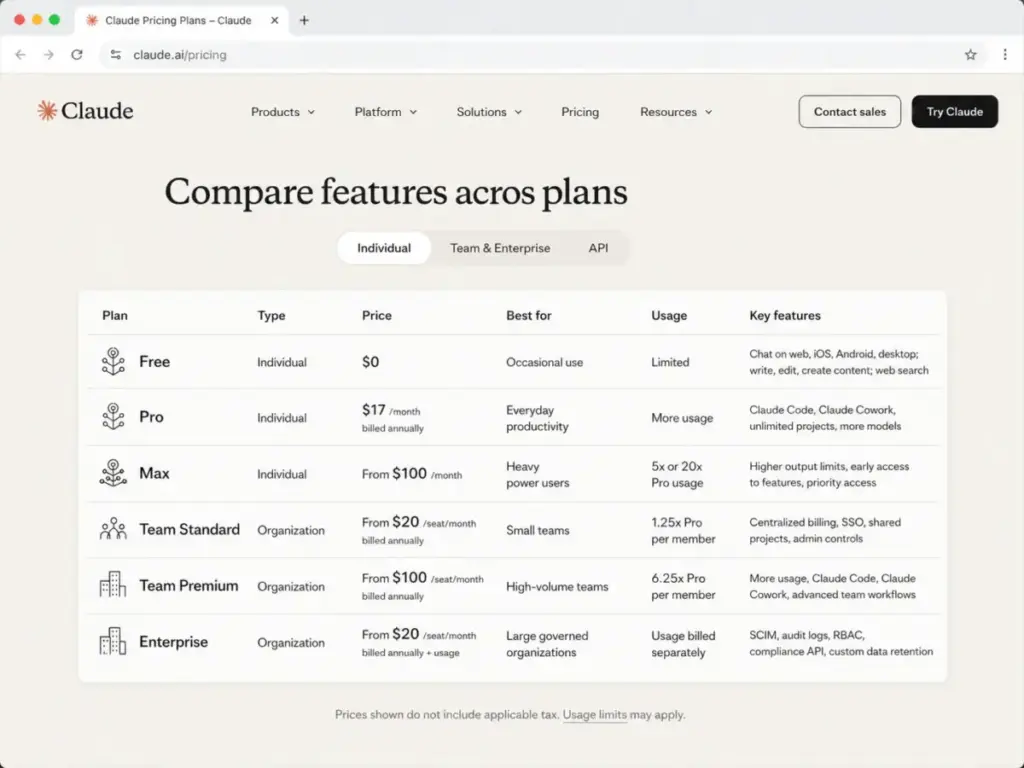
To help you compare, I compiled the official 2026 pricing schedule for all individual and organizational tiers.
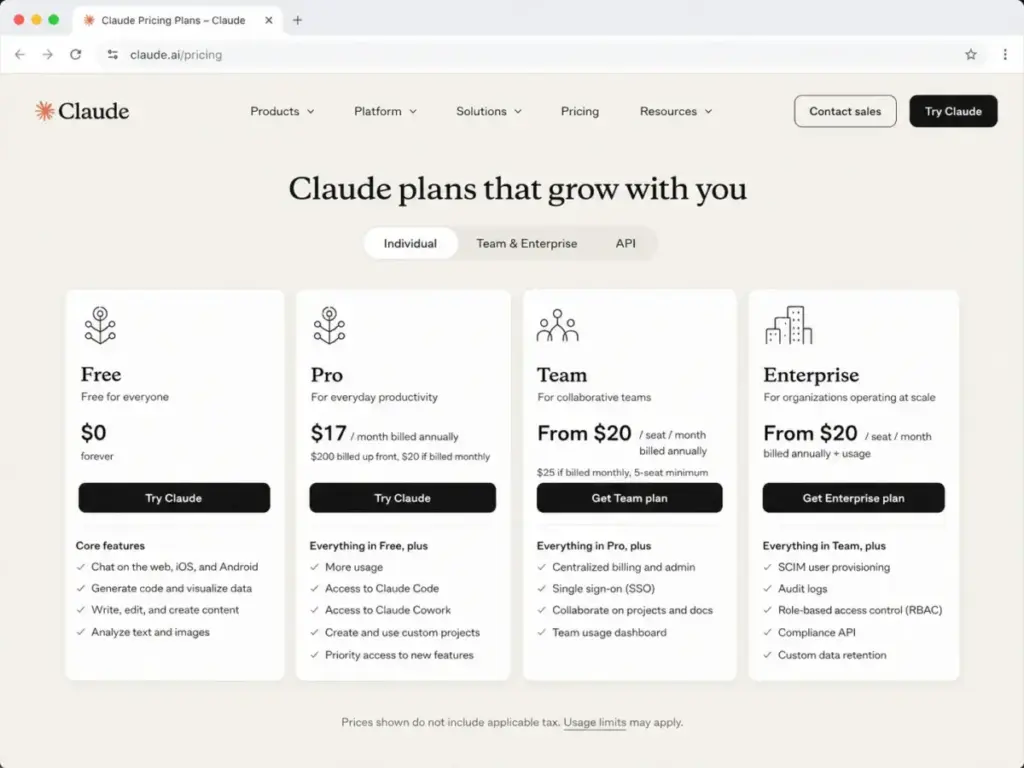
| Plan Tier | Monthly Price (USD) | Annual Price (USD) | Billing Basis | Best For | Key Limits |
|---|---|---|---|---|---|
| Free | $0 | $0 | Per user | Occasional users | Capacity resets dynamically based on demand |
| Pro | $20 | $200 (about $17/mo) | Per user | Solo professionals | 5x usage capacity compared to Free plan |
| Max 5x | $100 | Not listed | Per user | Power users | 5x Pro capacity per session |
| Max 20x | $200 | Not listed | Per user | Heavy users | 20x Pro capacity; higher output limits |
| Team Standard | $25/seat | $20/seat (billed annually) | Per seat (min5) | Small teams | 1.25x Pro capacity per member |
| Team Premium | $125/seat | $100/seat (billed annually) | Per seat (min5) | Developer teams | 6.25x Pro capacity; Claude Code access |
| Enterprise | $20/seat + usage | $240/seat + usage | Per seat + API usage | Large companies | Access only; all token usage metered separately |
| API Usage | Metered rates | Metered rates | Per million tokens | Developers | Pay-as-you-go based on model family and tools |
What this means:
Anthropic splits its product into distinct tracks. Individual subscriptions offer predictable monthly costs. Team plans introduce strict seat minimums. The Enterprise plan shifts completely to a usage-based cost structure.
The 5 Hidden Costs Nobody Mentions
The advertised price is rarely what you pay because Anthropic bundles seat minimums, metered tokens, and API overages. Failing to account for these items leads to monthly billing surprises.
1. The Team Plan 5-Seat Minimum
Any Team subscription starts at 5 seats. This means the entry price is 5 times the seat fee. Even if you only have 3 users, you must pay for 5. Standard monthly billing starts at $125/month, and Premium monthly billing starts at $625/month.
2. Enterprise Seat Fees Do Not Include Usage
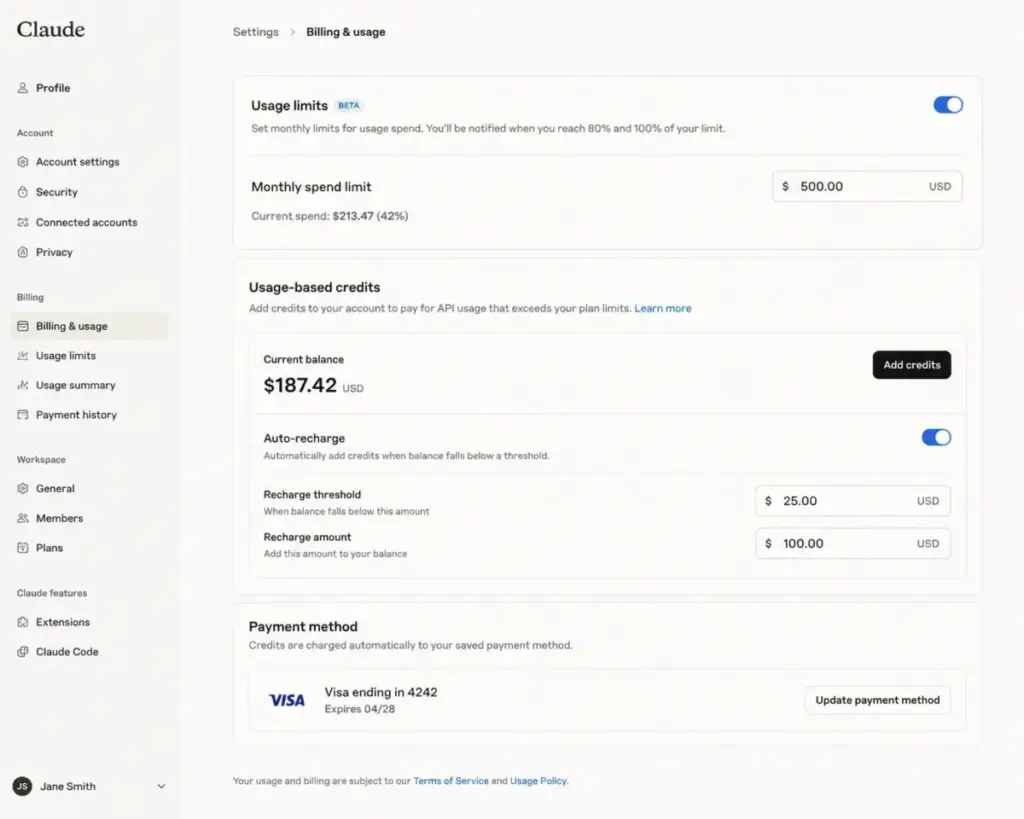
The Enterprise seat fee only covers software access. Every token processed is billed at standard API rates. Anthropic does not bundle usage credits in this seat fee. If your employees use the model heavily, your total cost will exceed the seat fee.
3. Claude Code API Key Billing Surprise
If Claude Code uses ANTHROPIC_API_KEY, usage is billed through your API account instead of your subscription allowance. Developers often set this environment variable to bypass rate limits. Doing so routes all costs to pay-as-you-go credits, leading to unexpected API charges.
4. Usage Credits After Plan Limits
Usage credits act as a bridge. They allow users to pay for extra capacity when standard limits are reached. When Pro or Team users hit their weekly capacity limits, they can continue working by enabling credit billing. This switches their account to consumption pricing at standard API rates.
5. API Tool Add-Ons and Premium Routing
API workloads incur charges beyond standard model tokens. These include search queries and agent runtimes. Anthropic charges a flat fee for web searches and custom agent hours. Routing calls through US-only servers also incurs a 10% cost premium.
Exposing the Hidden Cost Breakdown
| Hidden Cost or Add-On | Rate or Fee (USD) | When It Applies |
|---|---|---|
| Team Standard Minimum | $125/month (monthly) or $1,200/year (annual) | Applies to all Team Standard organizations (min5 seats) |
| Team Premium Minimum | $625/month (monthly) or $6,000/year (annual) | Applies to all Team Premium organizations (min5 seats) |
| Enterprise Usage | Standard API rates per million tokens | Billed for every input and output token on Enterprise |
| Claude Code API Overages | Standard API rates | Triggered when ANTHROPIC_API_KEY is configured in terminal |
| Usage Credits Bridge | Standard API rates | When a user opts to continue working after plan limits reset |
| Managed Agents | $0.08 per session-hour | Billed for active agent runtimes on the Anthropic platform |
| Web Search API | $10 per 1,000 searches | Applies to all search tool calls made through API apps |
| Code Execution Overage | $0.05 per container-hour | Container runtimes exceeding50 free daily hours per org |
| US-Only Inference | 1.1x standard token pricing | When API calls require US-only routing compliance |
| Sales Tax | Varies by state and region | Excluded from all published individual and team rates |
What this means:
Organizing your deployment requires looking beyond per-seat fees. If you run developer tools or require strict compliance routing, you must factor in metered credits.
Plan-by-Plan Breakdown and Feature Gates
Each Claude plan serves a specific user profile, dividing access by capacity limits and management controls. Choosing the right tier requires analyzing features, usage gates, and organizational constraints. For an analysis of the model’s interface, read our detailed Claude AI review.
Claude Free: For Occasional Use
- Best For: Casual users and initial testing.
- Includes: Web, mobile, desktop access, web search, memory, file creation, connectors, and extended thinking.
- Missing: High-capacity limits, unlimited projects, admin controls, and official Claude Code terminal access.
- Avoid If: You require consistent access during peak hours or use the tool for full-time work.
Claude Pro: For Solo Professionals
- Best For: Individual developers, writers, and power users.
- Includes: 5x usage capacity compared to Free plan, unlimited projects, and basic customer support.
- Missing: Centralized billing, team workspace management, and enterprise security features.
- Avoid If: You need to share resources or require central billing for corporate compliance.
Claude Max: For Heavy Power Users
- Best For: Solopreneurs requiring extreme generation volume.
- Includes: 5x Pro capacity (Max 5x at $100/mo) or 20x Pro capacity (Max 20x at $200/mo).
- Missing: Administrative controls, seat management, and compliance integrations.
- Avoid If: You manage a team or need centralized oversight of user prompts.
Claude Team: For Managed Collaboration
- Best For: Small agencies and startup engineering groups.
- Includes: 5-seat minimum, central billing, SSO, and 1.25x Pro capacity (Standard) or 6.25x Pro capacity (Premium).
- Missing: Enterprise governance tools like SCIM, audit logs, and custom data retention.
- Avoid If: Your organization has strict data security compliance mandates.
Claude Enterprise: For Governed Organizations
- Best For: Large companies with strict compliance requirements.
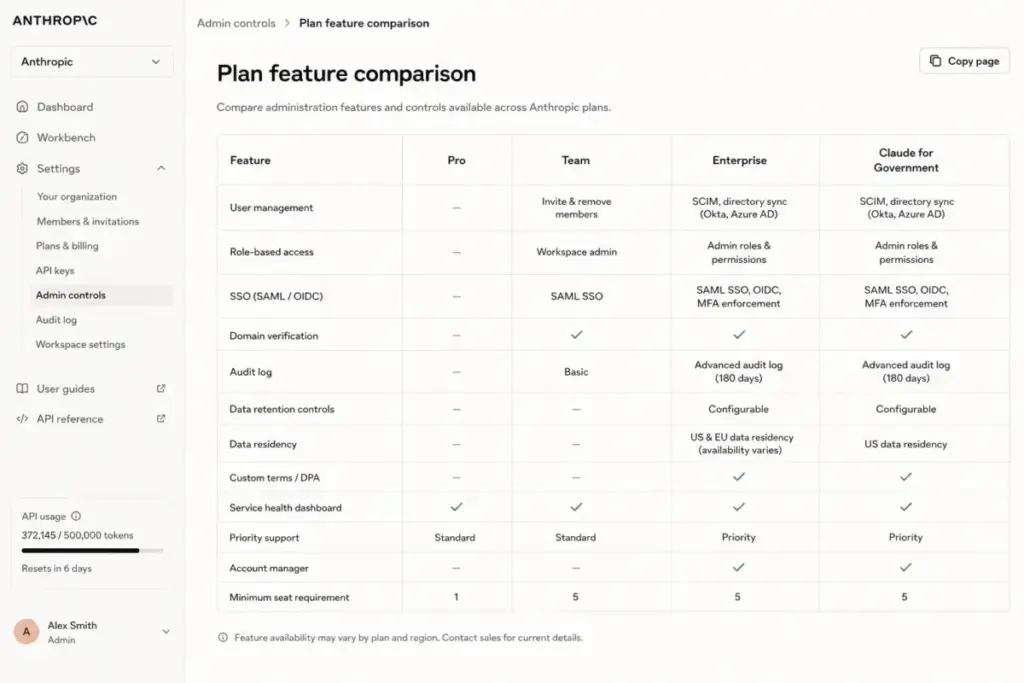
- Includes: SCIM provisioning, audit logs, RBAC, compliance API, custom retention, IP allowlisting, and HIPAA-ready status.
- Missing: Fixed flat-rate usage.
- Avoid If: Your finance team requires a predictable monthly software bill without usage variance.
Claude API: For Custom Integrations
- Best For: Developers building applications or automating back-office tasks.
- Includes: Pay-as-you-go billing, prompt caching, batch processing, and custom agent hosting.
- Missing: Pre-built chat interface or project storage.
- Avoid If: You only need a standard chat window to query models manually.
Feature Gates: What You Actually Get by Plan
| Feature Gate | Free | Pro | Max (5x/20x) | Team Standard | Team Premium | Enterprise |
|---|---|---|---|---|---|---|
| App Access | Yes | Yes | Yes | Yes | Yes | Yes |
| Usage Capacity | Demand-based | 5x Free | 5x/20x Pro | 1.25x Pro | 6.25x Pro | Billed at API rates |
| Unlimited Projects | No | Yes | Yes | Yes | Yes | Yes |
| Claude Code CLI | No | Yes | Yes | Yes | Yes | Yes |
| Claude Cowork | No | Yes | Yes | No | Yes | Yes |
| Central Billing | No | No | No | Yes | Yes | Yes |
| SSO Login | No | No | No | Yes | Yes | Yes |
| SCIM User Control | No | No | No | No | No | Yes |
| Audit Logs | No | No | No | No | No | Yes |
| RBAC Roles | No | No | No | No | No | Yes |
| Custom Retention | No | No | No | No | No | Yes |
| Spend Controls | No | No | No | Limited | Limited | Yes |
What this means:
Basic capacity and workspace tools scale from Free to Team Premium. Moving from Team to Enterprise does not increase included capacity. It shifts security and compliance controls, moving all usage to metered API billing.
When the Free Plan Stops Working
The Free plan stops working when dynamic demand limits interrupt your workflow or when you need developer features. Anthropic does not guarantee server capacity for Free users. During high-demand periods, message limits restrict generation.
Occasional users can write short text drafts or run basic code execution scripts. Heavy users will quickly hit capacity walls. You must upgrade to Pro to bypass these blocks.
The upgrade triggers when:
- Dynamic capacity limits disrupt your work schedule.
- You need unlimited projects and custom system instructions.
- Your team requires central billing and shared resources.
- You need consistent developer terminal access using Claude Code.
What this means:
The Free tier serves as a basic testing ground. It is not built to handle professional work volumes under load.
Real Cost Scenarios: Scaling From 5 to 100 Users
The real cost of Claude varies by user headcount, billing cycle, and feature tier. Understanding how seat minimums shape your budget helps prevent unexpected expenditure.
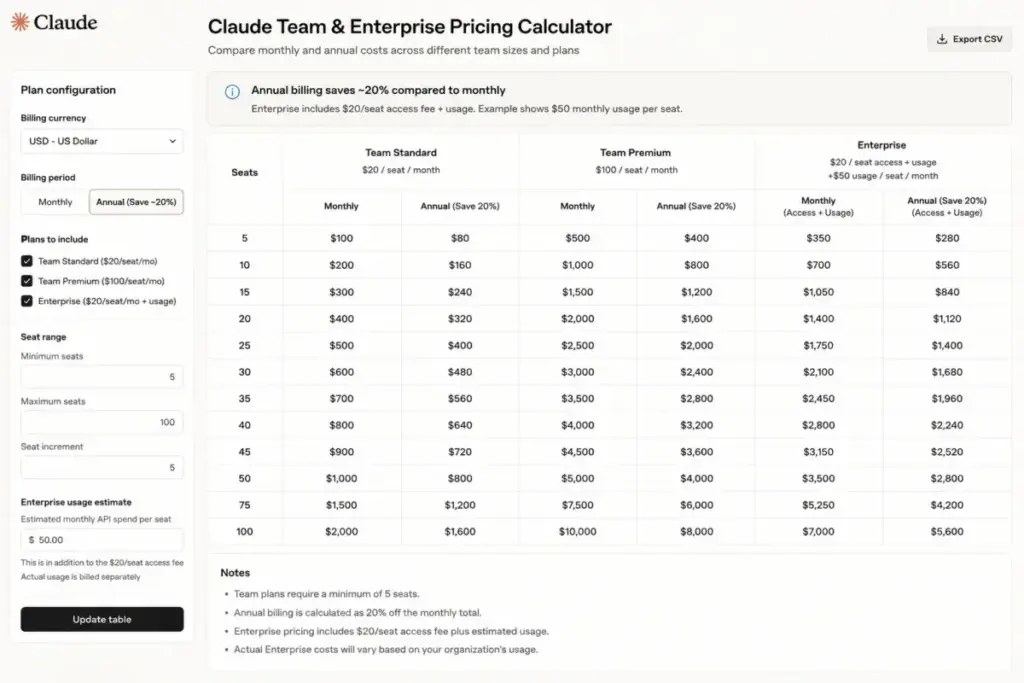
| User Count | Recommended Plan | Monthly Cost (Monthly Billing) | Annual Cost (Annual Billing) | Scenario Notes |
|---|---|---|---|---|
| 5 Users | Team Standard | $125/month | $1,200/year (about $100/mo) | Minimum entry level for corporate plans. Premium seat alternative costs $6,000/year. |
| 10 Users | Team Standard | $250/month | $2,400/year (about $200/mo) | Baseline for small startups. Premium seat alternative costs $12,000/year. |
| 25 Users | Team Standard | $625/month | $6,000/year (about $500/mo) | Mid-market sweet spot. Premium seat alternative scales to $30,000/year. |
| 50 Users | Team Standard | $1,250/month | $12,000/year (about $1,000/mo) | Large teams may consider Enterprise, but metered usage fees apply separately. |
| 100 Users | Team Standard | $2,500/month | $24,000/year (about $2,000/mo) | Fits under the 150-seat limit. Enterprise seat fees equal $24,000/year before tokens. |
What this means:
Seat-based math scales linearly up to 150 seats. Annual billing reduces standard team costs by 20%, saving up to $600/year on Standard and $3,000/year on Premium for a 10-user team.
Monthly vs Annual Billing Options
Pro annual subscriptions cost $200/year, saving 16.7% compared to monthly billing ($240/year).
For organization plans, the savings increase. Standard seat fees drop from $25/month to $20/month annually. Premium seat fees drop from $125/month to $100/month annually.
If your company plans to use Claude for more than 6 months, commit to annual billing. The upfront discount offsets onboarding friction.
Which Claude Plan Should You Choose?
The right Claude plan depends on your team size, usage volume, and developer tooling needs.
Choose Pro if you are a solo professional hitting Free plan limits. It removes peak-time blocks and provides project grouping.
Select Team Standard if your 5-to-150 person team needs central billing and basic SSO. It provides adequate limits for general workflows.
Choose Team Premium if your developer team needs Claude Code terminal access and high capacity limits. It includes Claude Cowork.
Select Enterprise if you require SCIM, audit logs, custom retention, and HIPAA compliance options.
Which Claude Plan Should You Avoid?
You should avoid plans that lock you into high fixed costs without providing corresponding capacity value.
Avoid Team Premium if your team only needs basic support chat. The 5x price jump from Standard is difficult to justify without developer workflows.
Avoid Enterprise if your budget requires predictable flat-rate billing. Every token is billed at API rates, which can escalate under heavy use.
Avoid the Free tier if your business processes depend on timely outputs. Demand spikes will interrupt your workflows.
Claude Pricing vs Competitors
Claude is price-competitive with standard AI chat subscriptions, but its team plans are more expensive than most rivals. For a detailed cost comparison of Google’s plans, read our Gemini pricing breakdown.
You can also check our ChatGPT vs Claude comparison to see how their features align.
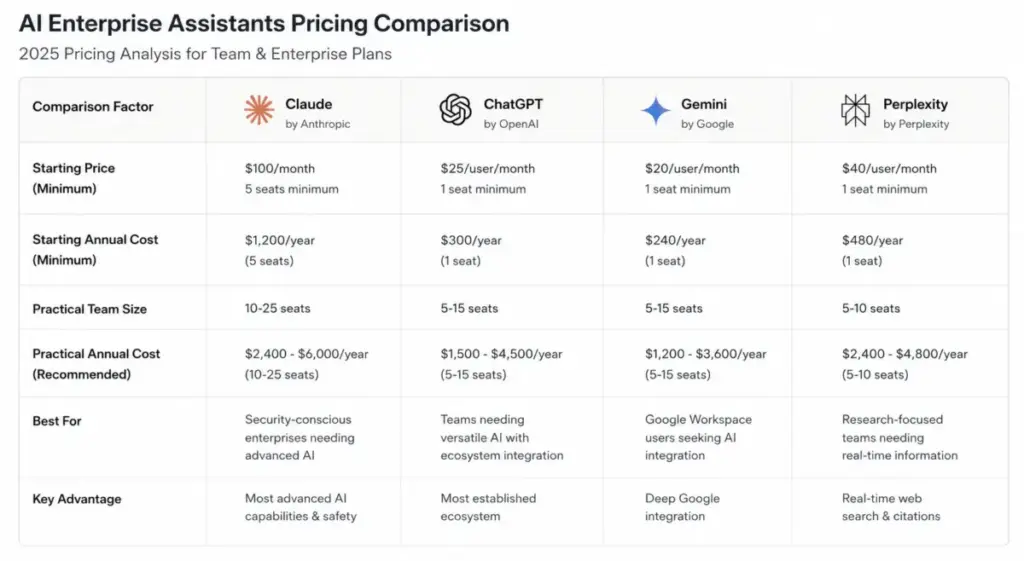
Multi-User Competitor Cost Matrix
| Platform | Starting Price (USD) | Practical Sales-Ready Tier (USD) | 10-User Monthly Cost (USD) | Best For |
|---|---|---|---|---|
| Claude | $0 | Team Standard ($20/seat annual) | $200/month (annual billing) | Advanced coding and long-context writing |
| ChatGPT | $0 | Business ($25/seat annual) | $200/month (annual billing) | Broad office automation and custom GPTs |
| Google Gemini | $0 | AI Pro ($19.99/user monthly) | $199.90/month (individual plans) | Google Workspace search integration |
| Perplexity | $0 | Enterprise Pro ($34/seat annual) | $340/month (annual billing) | Sourced web research and search indexing |
| Microsoft 365 Copilot | $21/user (Normal Business) | Business Add-On ($21/user) | $210/month (excludes base licenses) | Microsoft 365 enterprise environments |
What this means:
Claude matches ChatGPT Business on annual billing. Google Gemini is cheaper for individuals but lacks consolidated team controls. Perplexity commands a premium for search-heavy workflows.
Is Claude Worth the Price?
Claude is worth the price if your daily workflows require complex coding, developer terminal automation, or document synthesis. The Pro subscription matches industry standards while providing a strong long-context document workflows.
The right alternative depends on the failure mode you accept. Some buyers may find ChatGPT better for general office workflows, while Perplexity remains stronger for search-first research.
It is worth paying for if:
- You are an engineer using Claude Code for terminal-integrated development.
- Your workflow requires analyzing large files that exceed other model capacity limits.
- You need standard SSO integration to govern group writing projects.
It is not worth the price if:
- You only ask occasional questions or perform basic web searches.
- You are a team under 5 users, since you will pay for unused seats.
- Your organization requires a predictable flat-rate enterprise billing agreement.
How to Avoid Overpaying for Claude
You can avoid overpaying for Claude by optimizing user seats, monitoring API-key routing, and auditing unused capacity.
To prevent runaway token charges:
- Use individual Pro plans for groups under 5 users to bypass seat minimums.
- Downgrade unused Team seats early, as seat reductions only apply at the end of billing cycles.
- Configure spend caps when building custom tools or using what an API is for automation.
- Buy prepaid usage bundles to save up to 30% on pay-as-you-go credits.
- Implement prompt caching to reduce developer input token costs by up to 90%.
- Utilize batch API processing to cut non-urgent token costs by 50%.
What this means:
Simple seat allocation management and API developer settings can materially reduce unnecessary AI spend.
! NOTE
Eligible nonprofits can access discounted monthly pricing. The Standard tier costs $8/user/month, while the Premium tier costs $40/user/month. Contact Anthropic directly to verify your organization’s tax-exempt eligibility before signing up.
Frequently Asked Questions
Claude’s various subscription tiers can be confusing, so I answered the most common buyer questions below.
How much does Claude cost per month?
Claude Pro costs $20/month (billed monthly). Team plans cost $25/seat/month or $125/seat/month (monthly billing).
Is Claude free to use?
Yes, Claude has a $0 Free tier with web, mobile, and desktop access for occasional use.
What is the best Claude plan for small teams?
The best Claude plan for small teams is Team Standard (starting at $20/seat/month billed annually).
Does Claude have hidden costs?
Yes, Claude’s hidden costs include a 5-seat minimum on Team plans and metered token billing on Enterprise.
Is Claude Pro worth the price?
Yes, Claude Pro is worth the price for heavy users needing 5x more capacity than the Free plan.
Is Claude cheaper than ChatGPT?
No, Claude pricing matches ChatGPT Plus at $20/month, but ChatGPT’s team plans do not enforce Premium seat upgrades.
Does Claude offer nonprofit pricing?
Yes, eligible nonprofits can get Claude Standard for $8/user/month or Premium for $40/user/month (billed monthly).