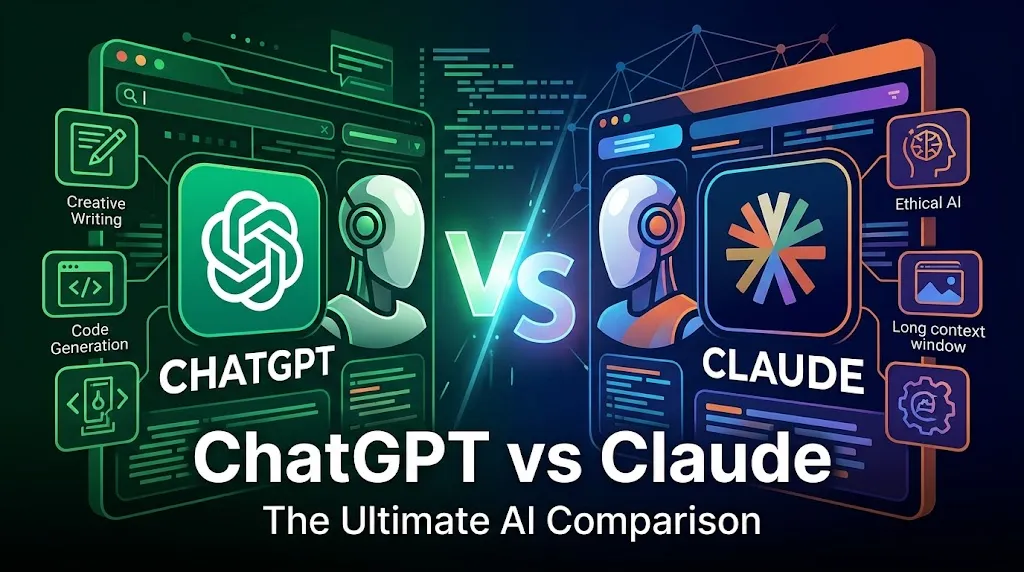
The ChatGPT vs Claude decision is costing teams real time and money in 2026. Both tools cost $20 at the entry paid tier. Both sound capable on paper. The problem is that their actual workflow coverage is very different, and picking the wrong one means paying for a tool that cannot do your hardest daily job.
I evaluated both against 12 operational dimensions, and the answer is not “it depends on your needs.” I will give you a direct verdict for each one. Our best AI chatbots guide covers the broader generative AI market, but this article is built for buyers who are choosing between exactly these two tools right now.
TL;DR: ChatGPT Wins for Most Users
ChatGPT is the better default AI workspace for most individuals and teams in 2026. It covers more ground across images, voice, data analysis, and web search. Claude is a better specialist for writing, coding, and long-document reasoning.
- Overall winner: ChatGPT for general use, all-in-one workflows, and mixed business teams.
- Writing and coding: Claude wins. It produces more natural prose and handles multi-file code review better than ChatGPT.
- Image generation, voice, agents: ChatGPT wins by default. Claude does not generate images natively.
- Long documents and deep reasoning: Claude wins. It holds context without losing the thread in large files.
- Enterprise compliance: Tie. Both carry serious security controls.
- Budget pick for solo users: Claude Pro at $17/month annually if writing or coding is your only job. ChatGPT Plus if you need an all-in-one tool.
Find Your Match in 30 Seconds
Your workflow type determines the correct tool faster than any feature comparison. Answer the question that fits your daily reality and follow the recommendation in this table.
| User Profile | Daily Primary Task | Recommended Tool | Plan to Start |
|---|---|---|---|
| Solo creator | Blog writing, social copy | Claude Pro | Pro ($17/mo annual) |
| Solo creator | Images, research, voice | ChatGPT Plus | Plus (see pricing page) |
| 5-person content team | Long-form writing, editing | Claude Team | Team (verify on Team page) |
| 10-person startup | Mixed tasks, apps, data | ChatGPT Business | Business (verify on pricing page) |
| Developer or dev shop | Code review, multi-file work | Claude Pro or Team | Pro or Team |
| Research analyst | Web research, live data | ChatGPT Plus | Plus |
| Enterprise buyer | Compliance-heavy operations | Verify both Enterprise tiers | Custom pricing for both |
| Student on a budget | Writing help, problem solving | Claude Free or ChatGPT Free | Free tiers on both |
ChatGPT vs Claude at a Glance
The structural differences between these two tools are clearer than most comparisons admit. ChatGPT is an all-in-one AI workspace built around multimodal output. Claude is a text and code reasoning specialist built around depth over breadth.
| Feature | ChatGPT | Claude | Winner |
|---|---|---|---|
| Image generation | Yes, native | No | ChatGPT |
| Voice mode | Advanced voice and screen share | No voice mode | ChatGPT |
| Long-document synthesis | Good | Excellent | Claude |
| Coding agent | Codex | Claude Code | Claude |
| Web research | Deep Research + Agent | Web search (via Claude Research) | ChatGPT |
| Projects and memory | Projects, memory, custom GPTs, tasks | Projects (clean, structured) | Slight ChatGPT |
| Business app connectors | Google Drive, SharePoint, GitHub, Slack, Box | Limited native connectors | ChatGPT |
| API pricing (mid-tier) | Verify on OpenAI API page | Sonnet 4.6: $3 input / $15 output per 1M tokens | Claude for API cost |
| Free plan message limits | 10 messages per 5 hours on GPT-5.3 | Up to 5 projects, session limits apply | Tie |
| Compliance certifications | SCIM, EKM, RBAC, domain verification | SOC 2 Type 2, ISO 27001, HIPAA, FedRAMP High | Tie |
How We Compared ChatGPT and Claude
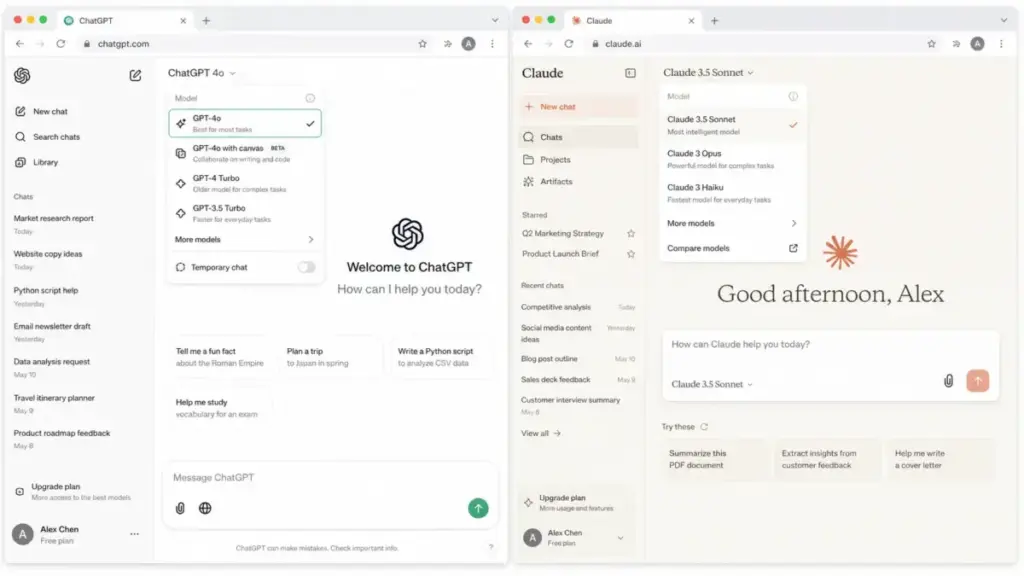
This comparison is an editorial evaluation based on official product documentation, pricing pages, and published usage limit data as of May 2, 2026. We did not fabricate benchmark tests or hands-on scores. We weighted each dimension by how much it affects daily workflow decisions for the buyer types listed in this article. You can read our full review methodology for the scoring framework we apply to AI tools.
We gave higher weight to usage limits, pricing math by team size, migration friction, and workflow fit. We gave lower weight to marketing claims that are not backed by official documentation.
ChatGPT Overview
ChatGPT is OpenAI’s generalist AI platform and the current market default for knowledge workers. It runs on GPT-5.5 Thinking for complex reasoning tasks and GPT-5.3 for standard usage. The platform covers text, images, voice, data analysis, web search, and agentic tasks from a single interface. For a full breakdown of how the plans differ, see our ChatGPT review.
The Free plan gives users up to 10 GPT-5.3 messages every 5 hours. ChatGPT Plus includes advanced reasoning with GPT-5.5 Thinking, expanded messages, improved image creation, deep research, agent mode, memory, projects, tasks, custom GPTs, and Codex usage. Plus and Go users can send up to 160 messages every 3 hours on GPT-5.3, after which chats switch to the mini model until the window resets. ChatGPT Business adds apps, data analysis, record mode, canvas, shared projects, custom workspace GPTs, member and billing management, SAML SSO, MFA, and a clear promise of no training on business data. ChatGPT Enterprise adds expanded context, longer inputs, larger file support, SCIM, EKM, user analytics, domain verification, RBAC, and enterprise-grade controls.
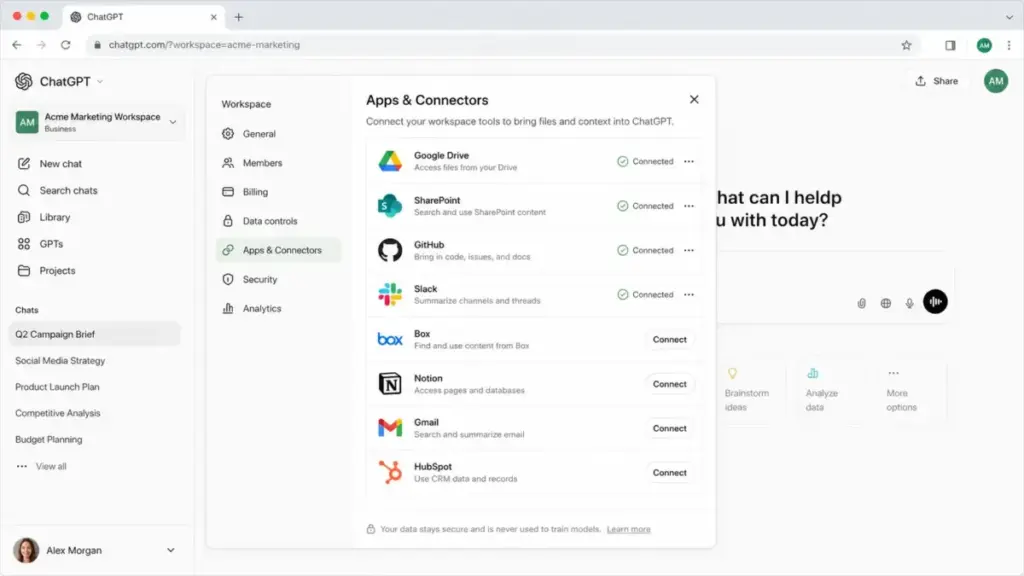
Apps and connectors bring third-party data from Google Drive, SharePoint, GitHub, Slack, Box, and other business platforms directly into the chat environment. This connector layer is what separates ChatGPT Business from every other plan for team buyers.
Claude Overview
Claude is Anthropic’s text and reasoning specialist, built for users whose primary work happens in documents, codebases, and structured analysis. The current model family includes Claude Opus 4.7 and Claude Opus 4.6 at the top tier, Claude Sonnet 4.6 for the mid-tier balance of cost and capability, and Claude Haiku 4.5 as the lightweight option. For detailed plan comparisons, see our Claude review.
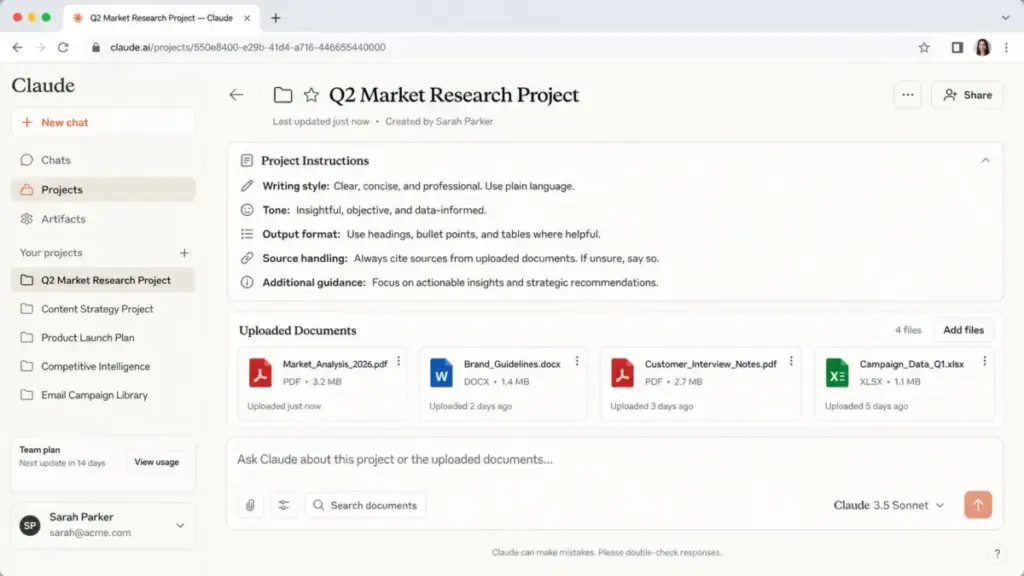
Claude Free gives users up to five projects and a session usage limit tracked in Settings. Claude Pro at $17/month annually (or $20/month monthly) includes expanded usage, Claude Code, Claude Cowork, unlimited projects, Research, additional model access, and beta integrations including Claude for Excel, Claude for PowerPoint, and Claude for Word. Claude usage limits are tracked by five-hour session and weekly usage windows, visible in Settings under Usage. Max is Claude’s higher-usage individual tier; verify the current price before purchase. Team pricing should be verified on Claude’s current Team page. Enterprise tier offers custom or self-serve options depending on the current page structure. The Anthropic Trust Center lists SOC 2 Type 2, ISO 27001, ISO 42001, CSA STAR, HIPAA, NIST 800-171, FedRAMP High, DoD IL4, and DoD IL5 coverage by product route.
Feature-by-Feature Comparison
Twelve dimensions. Twelve verdicts. No fence-sitting. Each section below leads with the winner and the evidence for that call.
ChatGPT vs Claude for Everyday Use
ChatGPT wins for everyday assistance. The broader toolset, faster general utility, and native multimodal workflow make it the better default application for users who need text, images, data, and web search without switching tabs. Reddit user little_king7 put it plainly in r/ChatGPT: “Claude better for accuracy, professionalism, and not sounding like chatgpt. However, I still find GPT more creative when it comes to certain writing types.” That creative range matters when everyday use includes tasks beyond documents.
Winner: ChatGPT
Claude vs ChatGPT for Writing
Claude wins the writing dimension. It produces more natural prose with less editing required. It adapts tone more accurately to a style guide and shows stronger judgment when rewriting long-form content. Claude avoids the recognizable cadence that makes ChatGPT outputs feel templated. Reddit user MissXHere noted in r/ArtificialInteligence: “Claude is excellent for anything that involves analysing written work. Chat GPT is not as strong in this area.” For teams building out their stack of AI tools for content creation, Claude is the better daily writing tool.
Winner: Claude
Both tools appear in our best AI writing tools ranking, where we score them against dedicated writing platforms like Jasper and Writesonic.
Claude vs ChatGPT for Coding
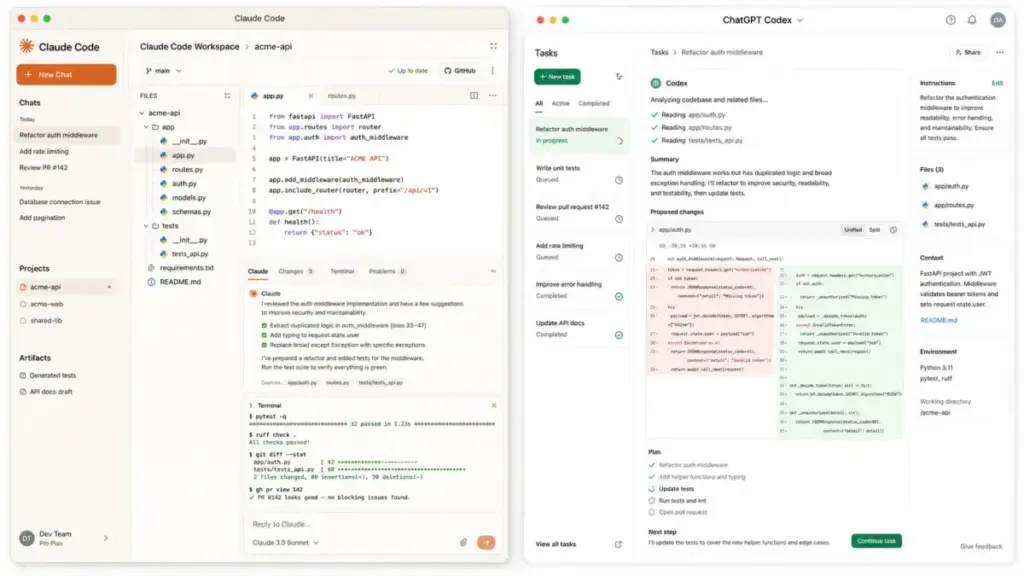
Claude wins the coding comparison. Claude Code offers stronger multi-file reasoning and more useful review-style feedback compared to ChatGPT Codex. Developers doing vibe coding or running structured code reviews find that Claude tracks dependencies across large repository structures more accurately. Reddit user Party-Election-6039 in r/Claude said: “Claude is better at text and solving problems. If you ask it to solve a problem its reasoning its incredible.” Note that ChatGPT Codex remains a strong option for teams already embedded in the OpenAI ecosystem.
Winner: Claude
ChatGPT vs Claude for Research
ChatGPT wins the research category. The Deep Research workflow, ChatGPT Agent for browser tasks, and business app connectors to live data sources give ChatGPT a structured research advantage. Claude has added web search through its Research feature, but the productized research pipeline inside ChatGPT is more mature. If your workflow demands a dedicated search-first tool, our Perplexity review covers the leading research-only alternative. For teams already on Microsoft 365 who need research grounded in their own work data, our Microsoft Copilot review covers how Work IQ connects to Outlook, Teams, and SharePoint.
Winner: ChatGPT
Claude vs ChatGPT for Long Documents
Claude wins the long-document analysis category. Its long-context synthesis holds the thread across hundreds of pages without losing key details from earlier sections. The catch is that processing very large documents consumes session usage quickly, and you may hit a five-hour limit on a single intensive analysis session. For users who work primarily with local document vaults, the NotebookLM review covers a strong complement to either tool.
Winner: Claude
ChatGPT vs Claude for Image Generation
ChatGPT wins the image generation and visual work category by default. Claude does not generate images natively. If your daily workflow involves creating assets, mockups, product visuals, or social images, Claude is the wrong tool. This is not a close comparison. ChatGPT Plus includes improved image creation, and it integrates multimodal output into its broader workflow. Claude is not the right pick for image-first work.
Winner: ChatGPT (Claude does not compete in this dimension)
ChatGPT vs Claude for Voice and Screenshare
ChatGPT wins the real-time assistance category. Advanced voice mode, video, and screen share capabilities make ChatGPT the clear option for users who prefer audio-first interaction, live walkthroughs, or mobile-first use cases. Claude has no equivalent voice mode. This is a clear structural gap, not a feature gap.
Winner: ChatGPT
ChatGPT vs Claude for Projects and Memory
This dimension is a tie with a slight edge to ChatGPT for workspace breadth. Claude Projects are clean and structured for knowledge work. Free users get up to five projects. Pro users get unlimited projects with persistent instructions and document uploads. However, ChatGPT offers projects, cross-chat memory, custom GPTs, tasks, and broader app context in a single workspace. For users who build shared team knowledge bases, ChatGPT Business provides more administrative control around shared projects.
Winner: Tie (ChatGPT for breadth, Claude for clarity)
ChatGPT Agent vs Claude Code
ChatGPT wins for general automation. Claude wins for developer-specific automation. ChatGPT Agent handles browser tasks and workflow-level automation with monthly usage caps: 40 messages per month on Plus, 400 per month on Pro, and 40 per month on Business and Enterprise. Claude Code handles terminal and multi-file coding tasks with a depth that ChatGPT Agent does not match in developer contexts. For teams who need no-code or low-code workflow connections, our Zapier review explains how third-party automation compares to both native agents.
Winner: ChatGPT for general agents, Claude for coding agents
ChatGPT vs Claude for Enterprise Security
This dimension is a tie. Both platforms carry enterprise-grade controls. ChatGPT Enterprise includes SCIM, EKM, user analytics, domain verification, RBAC, and expanded context. The Anthropic Trust Center lists SOC 2 Type 2, ISO 27001, ISO 42001, CSA STAR, HIPAA, NIST 800-171, FedRAMP High, DoD IL4, and DoD IL5 coverage by product route. Enterprise buyers should request current documentation from both vendors before committing.
Winner: Tie
ChatGPT vs Claude Usage Limits
Neither tool is transparent enough about its limits for buyers to make fully informed decisions without testing. Claude usage limits are tracked by five-hour session and weekly usage, visible in Settings under Usage. This is a rolling consumption model. ChatGPT has published GPT-5.3 message windows: Free users get 10 messages per 5 hours, and Plus and Go users get up to 160 messages per 3 hours before switching to the mini model. ChatGPT Agent monthly limits are 40 messages per month for Plus and Business, and 400 messages per month for Pro. Both platforms can hit friction points during heavy research or document processing days.
Winner: No clear winner (both have limits that matter at scale)
ChatGPT vs Claude Reliability
Neither tool is reliable enough for unsupervised production use. Both hallucinate facts. Both lose accuracy at the edges of their training data. Both require human review for legal, medical, financial, production code, and business-critical outputs. Any comparison article that declares one tool more reliable than the other without documented benchmark data is overclaiming. I am not doing that here.
Winner: No clear winner
How Does ChatGPT Pricing Compare to Claude?
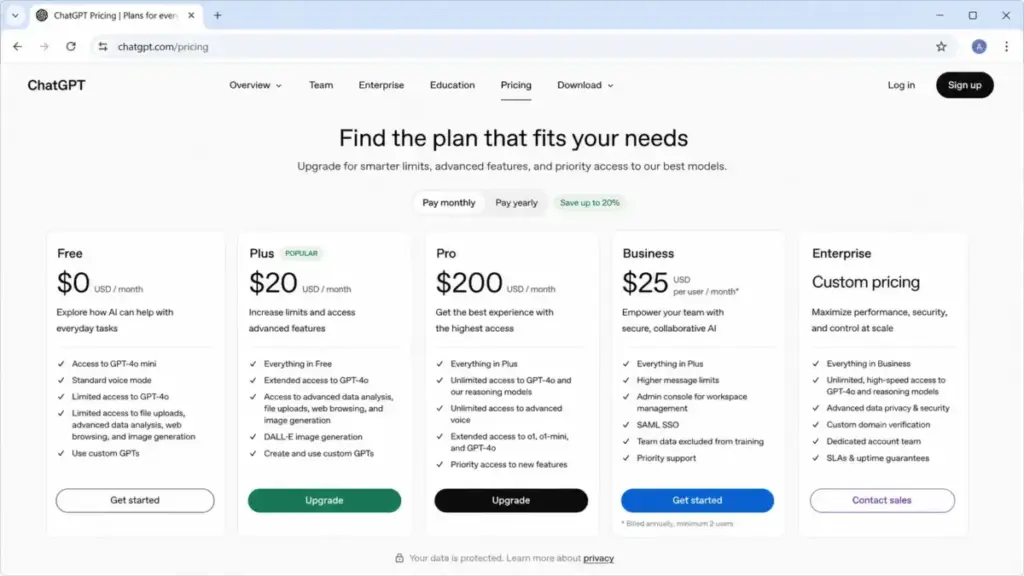
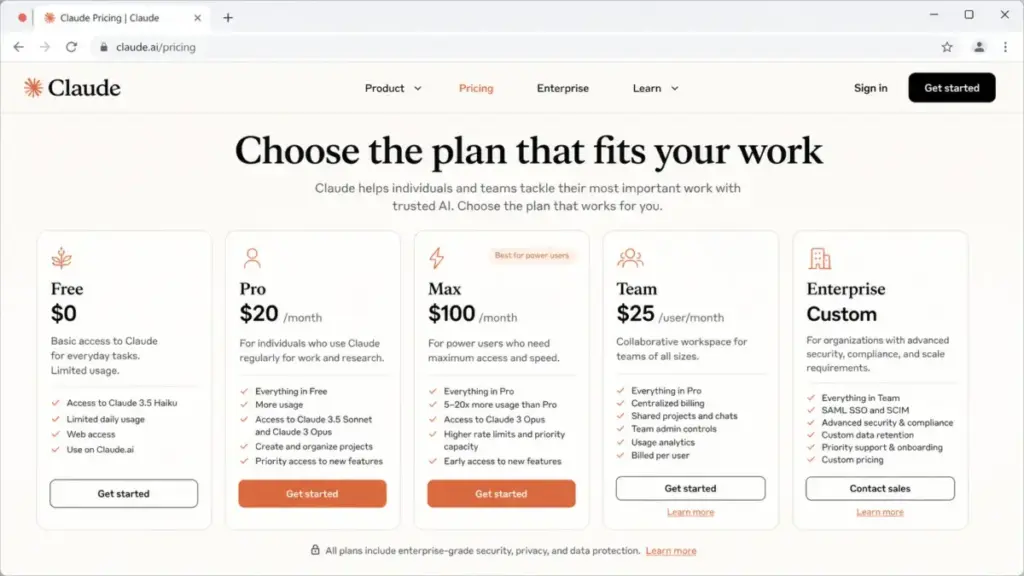
The $20 entry-tier comparison is misleading because usage limits, image generation, agent access, and coding tools change the real value at every plan level. This table outlines the most likely plans by team size and honestly flags where pricing requires verification before purchase. All pricing reflects data checked against official pages on May 2, 2026. See our dedicated ChatGPT pricing and Claude pricing breakdowns for per-seat math as plans update.
| Scenario | ChatGPT Likely Plan | Claude Likely Plan | Cost Certainty | Winner | Why |
|---|---|---|---|---|---|
| 1 user | Plus or Pro | Pro ($17/mo annual) or Max | Medium | Depends on workflow | ChatGPT for all-in-one; Claude for writing or coding |
| 5 users | Business | Team or Pro/Max mix | Medium | ChatGPT for mixed teams | Shared workspace and app connectors justify the cost |
| 10 users | Business | Team | Medium | ChatGPT for mixed operations | Broader workflow coverage across diverse roles |
| 25 users | Business or Enterprise | Team or Enterprise | Low without vendor quote | Tie | Security needs, usage limits, and admin requirements decide |
Claude individual plans (verified): Pro is $17/month billed annually or $20/month billed monthly. Max is Claude’s higher-usage individual tier; verify current price on the official pricing page before purchase. Team pricing should be verified on Claude’s current Team page. Enterprise options vary; verify before purchase.
ChatGPT individual plans: Plus is priced per user per month on the official pricing page. Pro is a higher-usage individual plan; verify on the official page before final purchase. Business and Enterprise pricing should be confirmed on the OpenAI business pricing page.
Claude API pricing (official, verified): Claude Opus 4.7 is $5 per million input tokens and $25 per million output tokens. Claude Sonnet 4.6 is $3 per million input tokens and $15 per million output tokens. Claude Haiku 4.5 is $1 per million input tokens and $5 per million output tokens.
Should You Pay for Both?
For most users, paying for both subscriptions is a waste of capital. Paying for both only makes sense when each tool owns a clearly separate recurring workflow with no overlap. Here are the exact conditions where running both accounts is rational:
Pay for both if:
- Your content team writes in Claude daily and your marketing team generates images and runs web research in ChatGPT daily. The workflows do not overlap.
- You are a developer who uses Claude Code for code review and ChatGPT for image assets and voice brainstorming. Both tools are active every day.
- You are running an agency where Claude Pro handles client copywriting and ChatGPT Business handles data analysis and client presentations.
Do not pay for both if:
- You use one tool occasionally and the other as your primary. Cancel the occasional one.
- You are testing both tools without a committed workflow split. Choose one, use it for 30 days, then evaluate.
- Your team size is under 5 and you do not have a defined workflow division. ChatGPT Business is sufficient for mixed teams.
Migration Reality Check
Switching AI tools is not as fast as exporting a file. The real cost of migration is rebuilding contextual memory, prompt libraries, and team habits. Before you switch, account for every item below.
Switching from ChatGPT to Claude:
- You lose access to all custom GPTs. Claude Projects do not import GPT configurations. You must manually rewrite each project’s system instructions.
- Memory does not transfer. Claude does not have cross-chat memory equivalent to ChatGPT’s memory system. You need to front-load project instructions for every context type.
- Your image generation workflow breaks immediately. Claude has no native image output. You need a separate tool like Midjourney or ChatGPT for any visual work.
- ChatGPT Agent tasks must be rebuilt as Claude Code scripts or manual workflows.
Switching from Claude to ChatGPT:
- Claude Projects do not export to ChatGPT Projects. You must manually rebuild each workspace with new instructions and uploaded documents.
- Users familiar with Claude’s clean, document-focused interface may find ChatGPT’s feature density disorienting at first. Expect a team adjustment period of one to two weeks.
- If your team relied on Claude Code for code review, you will need to assess whether ChatGPT Codex covers the same multi-file reasoning depth.
- Running both platforms during a migration means paying for duplicate subscriptions for at least one billing cycle.
Who Should Choose ChatGPT?
ChatGPT is the right tool for any buyer who needs more than text. The multimodal coverage, app connector ecosystem, and agentic workflow tools make it the better default workspace for mixed-discipline teams.
- You generate images daily. Claude cannot help with this workflow.
- You need voice interaction or screen share for walkthroughs. ChatGPT has the feature. Claude does not.
- Your team is 10 or more people across different roles. ChatGPT Business handles shared workspaces, apps, and admin controls at scale.
- You run automated web research tasks. ChatGPT Agent and Deep Research cover this better.
- You build and share custom GPTs with your team. ChatGPT Business supports custom workspace GPTs.
- You connect to Google Drive, SharePoint, GitHub, Slack, or Box. ChatGPT’s app connector layer handles this natively.
Who Should Choose Claude?
Claude is the right tool when your primary daily output is words, code, or structured analysis. The tool excels when depth matters more than breadth.
- You write long-form content every day. Claude’s prose quality and tone adaptation are measurably better for this workflow.
- You review code or manage multi-file development work. Claude Code handles this better than ChatGPT Codex for most development scenarios.
- You analyze long reports, contracts, or research documents. Claude’s long-context synthesis holds up across hundreds of pages.
- You want a clean, structured project workspace without feature clutter. Claude Projects are organized and predictable.
- You are a developer building AI-assisted applications via API. Claude Opus 4.7 and Sonnet 4.6 API pricing is competitive and the model quality for reasoning tasks is high.
- You are a student on a budget who writes a lot. Claude Free gives useful access. Claude Pro at $17/month annual is the best value per output quality if writing is your primary need.
What Both Products Lack
Neither tool is ready for unsupervised deployment in production workflows. This section is not a criticism of either company. It is an honest accounting of what both products still cannot do reliably in 2026.
- Both hallucinate. They generate confident, plausible-sounding statements that are factually wrong. Do not use either tool without human review for anything that will be published, filed, or acted on legally.
- Both struggle with source verification. Without careful prompt engineering, neither tool consistently separates verified facts from synthesized inference. This is a structural problem, not a bug to be fixed with a model update.
- Both hit usage limits at inconvenient times. Claude’s five-hour session limits and ChatGPT’s message windows both create friction on heavy analysis days. Neither platform has solved the “I need this now and my limit just reset” problem.
- Both are risky for autonomous production actions. ChatGPT Agent and Claude Code can execute tasks with real-world consequences. Running either without human checkpoints in a production environment is an operational risk.
- Both require ongoing prompt maintenance. Projects and custom GPTs go stale as products evolve. Neither tool self-updates its system instructions when underlying platform features change.
FAQ
Here are direct answers to the most common questions about ChatGPT vs Claude in 2026.
Is Claude better than ChatGPT in 2026?
Claude is better than ChatGPT for writing, code review, and long-document analysis. ChatGPT is better than Claude for image generation, voice, agents, and general all-in-one use. Neither is universally better. The right answer depends on what your daily primary output is.
Should I use ChatGPT or Claude for writing?
Use Claude for writing. It produces more natural prose, adapts tone better, and rewrites long-form content with fewer heavy-handed edits required.
Which is better for coding, ChatGPT or Claude?
Claude is better for coding in most developer workflows. Claude Code handles multi-file reasoning and code review depth that ChatGPT Codex does not match for complex repository tasks. For a broader comparison that includes Cursor, Windsurf, Tabnine, and other dedicated platforms, see our ranked guide to the top AI coding assistants.
Should I pay for ChatGPT Plus or Claude Pro?
Pay for ChatGPT Plus if you need image generation, voice, web research, or an all-in-one workspace. Pay for Claude Pro if your daily work is writing, code review, or analyzing large documents. Claude Pro costs $17/month with annual billing or $20/month billed monthly.
Can Claude generate images like ChatGPT?
No. Claude does not generate images natively. If image creation is part of your workflow, Claude is the wrong primary tool. You need ChatGPT or a dedicated image tool.
Does Claude have better reasoning than ChatGPT?
Claude shows stronger reasoning on text-heavy problems: document synthesis, code review, and long-form logic chains. GPT-5.5 Thinking is competitive on complex general reasoning. The difference is narrow at the frontier models and depends on the specific task type.
Which AI chatbot is best for business teams?
ChatGPT Business is better for mixed-discipline teams of 10 or more who need shared workspaces, app connectors, data analysis, and admin controls. Claude Team is better for writing-heavy or coding-heavy teams who do not need image generation.
Should I use both ChatGPT and Claude?
Only if each tool owns a clearly separate recurring workflow. For a single-role individual or a team without a defined workflow split, one tool is sufficient. Paying for both without that split is redundant spend.
What are the best ChatGPT alternatives if I want to try something different?
The main alternatives to ChatGPT in 2026 are Claude, Google’s AI assistant, and Perplexity for research-first users. Our Gemini review covers Google’s platform.
How do I get better results from either tool?
Learn the basics of prompt engineering before judging either product. Most users who find one tool “worse” than the other are writing prompts that do not specify context, constraints, or output format.
Final Verdict: ChatGPT vs Claude
ChatGPT is the better default AI assistant in 2026 for most users and teams. It covers more ground. It generates images. It connects to more business apps. It handles voice and screen share. It runs agents. If you want one AI workspace that handles the majority of your work without a second tool, buy ChatGPT.
Claude is the better specialist for writing, coding, and long-document work. If you write for a living, review code for a living, or spend your day processing large documents, Claude’s output quality per dollar is superior in those specific categories. Claude Opus 4.7 API pricing at $5 input and $25 output per million tokens is also competitive for developers building reasoning-heavy applications.
The choice in 2026 is not complex. ChatGPT is the default. Claude is the specialist. Pay for both only when your workflow is split clearly enough to justify two subscriptions. For most people reading this, one tool is enough.