Zapier connects more SaaS tools than any other automation platform on the market, with over 9,000 app integrations and 66,000+ triggers and actions. But breadth alone does not make a product worth the budget. This Zapier review breaks down the platform’s 2026 features, pricing math, AI orchestration additions, and real limitations so you can decide whether it fits your team or whether Make, n8n, or Pabbly Connect is the better call.
I am Daniel Rivera, AI and Emerging Technology Editor at SaaSZap.com. I evaluated Zapier’s current platform state, pricing tiers, AI features (including MCP and Agents), support access, and task-cost economics using official documentation verified as of April 27, 2026. My evaluation follows SaaSZap’s published review methodology, which prioritizes verified data, limitation honesty, and buyer-fit segmentation over vendor marketing language.
Quick Verdict: Zapier Review 2026
Score: 8.6 / 10
Best for: Non-technical teams that need fast, reliable automation across many SaaS apps.
Not best for: High-volume workflows, developer-led teams, or buyers who need predictable flat-rate automation costs.
Starting price: $19.99/month (Professional, billed annually).
Free plan: Yes, 100 tasks/month, two-step Zaps only.
Main limitation: Task-based pricing scales poorly for multi-step, high-volume workflows.
Best alternative by use case: Make for visual complexity and cost headroom. n8n for technical teams wanting self-hosted control.
Zapier Review 2026: Quick Scorecard
| Category | Score (out of 10) | What I Found | Buyer Impact |
|---|---|---|---|
| Ease of use | 9 | Fastest setup for non-technical users. Templates cover common workflows. | Low learning curve saves onboarding time. |
| App ecosystem | 10 | 9,000+ integrations, 66,000+ triggers/actions. Broadest in the category. | Almost any SaaS stack is covered. |
| Pricing value | 7 | Starts low but task costs compound fast on multi-step Zaps. | Budget risk grows as workflows scale. |
| AI and automation depth | 8 | MCP, Agents, Copilot, and AI fields add real capability. | Useful, but each MCP tool call costs two tasks. |
| Support access | 7 | Live chat requires Professional at 2,000+ tasks or Team/Enterprise. | Lower-tier paid users get email only. |
| Security and compliance | 9 | SOC 2 Type II (annual audit), penetration testing, Trust Center. | Meets most SMB and mid-market requirements. |
| Governance and team features | 7 | Shared folders and SSO on Team. Advanced controls on Enterprise only. | Small teams lack governance tools. |
| Overall | 8.6 | Strong for speed and breadth. Weaker at scale and cost predictability. | Best value under ~2,000 tasks/month. |
What Is Zapier?
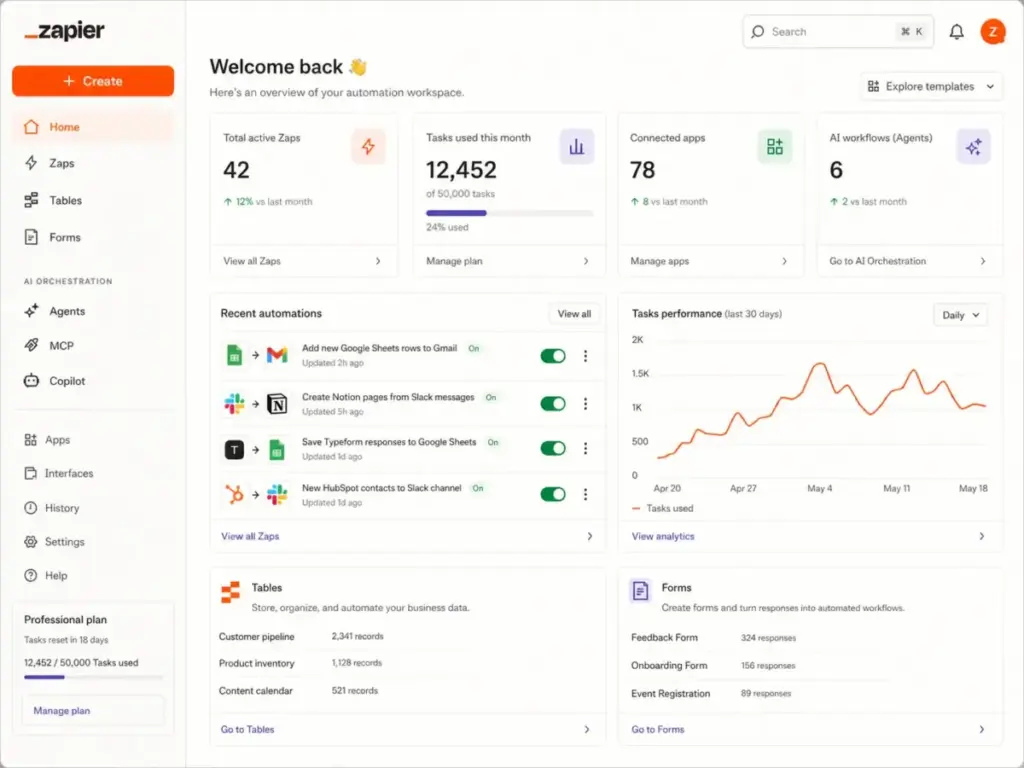
Zapier is a workflow automation and AI orchestration platform that connects over 9,000 apps through automated workflows called Zaps. Each Zap starts with a trigger (an event in one app) and runs one or more actions (tasks in other apps). The platform now includes Zaps, Tables, Forms, Canvas, MCP, Agents, Chatbots, and Functions (beta), making it far more than the simple app connector it was five years ago. For a deeper understanding of what workflow automation means and how it differs from RPA and AI agents, see our complete workflow automation guide.
For buyers evaluating their first automation tool, the core value proposition is simple: Zapier lets you move data between apps without writing code. A new form submission in Google Forms can create a HubSpot contact, send a Slack notification, and add a row in Google Sheets, all without touching an API integration or hiring a developer.
What Changed in Zapier in 2026?
Zapier’s biggest shift in 2026 is the move from “app connector” to “AI orchestration platform.” This matters because it changes what you pay for and how you plan costs.
The most significant structural change is the unified plan. Zaps, Tables, Forms, and Zapier MCP are now included in Free, Professional, and Team tiers. Previously, Tables and Interfaces were separate add-ons. This consolidation simplifies purchasing but also means the task-based billing model now governs a wider surface area of platform usage.
Zapier MCP (Model Context Protocol) lets AI models like ChatGPT and Claude call Zapier actions as tools. This is powerful for AI-connected workflows. However, each MCP tool call costs two Zapier tasks. If an AI agent triggers five Zapier actions in one conversation, that is ten tasks consumed. For teams exploring generative AI workflows, MCP is a real capability gain, but it also makes task-cost forecasting harder.
Zapier Copilot, the AI assistant for building Zaps, is available on all plans with daily message limits on Free. Copilot can suggest triggers, actions, and field mappings. It works best for straightforward workflows. For complex branching logic or custom API calls, you still need to understand prompt engineering concepts and manual configuration.
My take: the 2026 changes make Zapier more capable. They also make cost estimation more important. If your team plans to use MCP or Agents alongside traditional Zaps, you need to budget tasks across all of those surfaces, not just your Zap runs.
Zapier Features That Matter
Zapier’s feature set splits into five areas that directly affect whether the platform fits your team. The platform is strongest in app breadth and weakest in advanced workflow governance.
Zapier Zaps and Multi-Step Workflows
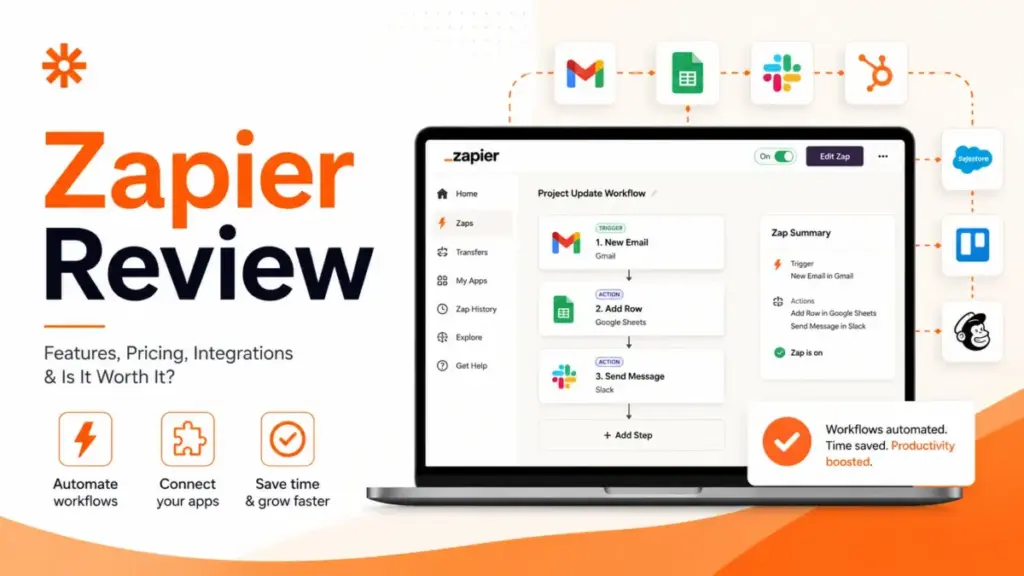
Zaps are the core automation unit. Free plans allow two-step Zaps (one trigger, one action). Professional and above unlock multi-step Zaps with paths, filters, formatters, and conditional logic. A typical 5-step Zap, for example one that captures a form submission, enriches the lead via Clearbit, routes it to the right Salesforce owner, sends a Slack alert, and logs it in Google Sheets, consumes four tasks per run (the trigger does not count, but each successful action does).
Paths let you build if/then branches within a single Zap. Filters stop a Zap run when conditions are not met, and filter steps do not count as tasks. Formatter steps handle text manipulation, date formatting, and number parsing. These built-in tools reduce the need for external processing but add workflow complexity that can become hard to debug at scale.
Zapier Tables and Forms
Tables is a lightweight database built into Zapier. You can store, query, and update records without leaving the platform. Forms lets you create input forms that feed directly into Zaps or Tables. Both are now included in all paid plans.
For small teams, Tables replaces the need for a separate Airtable or Google Sheets backend in simple workflows. The limitation is that Tables lacks the formula depth, views, and collaboration features of dedicated database tools.
Zapier Webhooks and API Workflows
Webhooks by Zapier (available on Professional and above) let you receive or send HTTP requests. This is where Zapier bridges into custom API territory. You can catch webhooks from apps that do not have native Zapier integrations, or send custom API requests to any endpoint.
For teams that need to connect internal tools or unsupported apps, Webhooks and the Custom Request action are the bridge. But building and maintaining these requires more technical skill than standard Zap building.
Zapier Copilot, MCP, and Agents
Copilot assists Zap building through natural language. You describe what you want (“When a new row is added in Google Sheets, create a HubSpot contact and send me a Slack message”), and Copilot suggests the workflow steps. It accelerates setup for common patterns.
MCP connects Zapier’s action library to external AI models. An AI assistant can call Zapier actions as tools during a conversation, enabling AI-driven workflows that span multiple apps. The cost: two tasks per tool call.
Zapier Agents is the platform’s autonomous workflow capability. Agents can monitor conditions and take multi-step actions based on rules you define. This is the most forward-looking feature but also the most unpredictable in terms of task consumption.
Zapier Integrations
With 9,000+ app integrations and 66,000+ triggers and actions, Zapier has the broadest connector library in the automation category. This is its strongest competitive advantage. Whether you use HubSpot, Salesforce, Slack, OpenAI, Google Sheets, or niche industry tools, the odds of finding a supported integration are high.
The distinction that matters: not all integrations are equal. Some apps have dozens of triggers and actions. Others have only one or two. Premium apps (those requiring a paid Zapier plan) are available on Professional and above. The integrations page at zapier.com/apps lets you check coverage before committing.
Zapier Pricing and Task Limits
Zapier’s pricing is the section that determines whether the platform is “worth it” for your specific use case. The sticker price is low, but the real cost depends on how many action steps your workflows run each month.
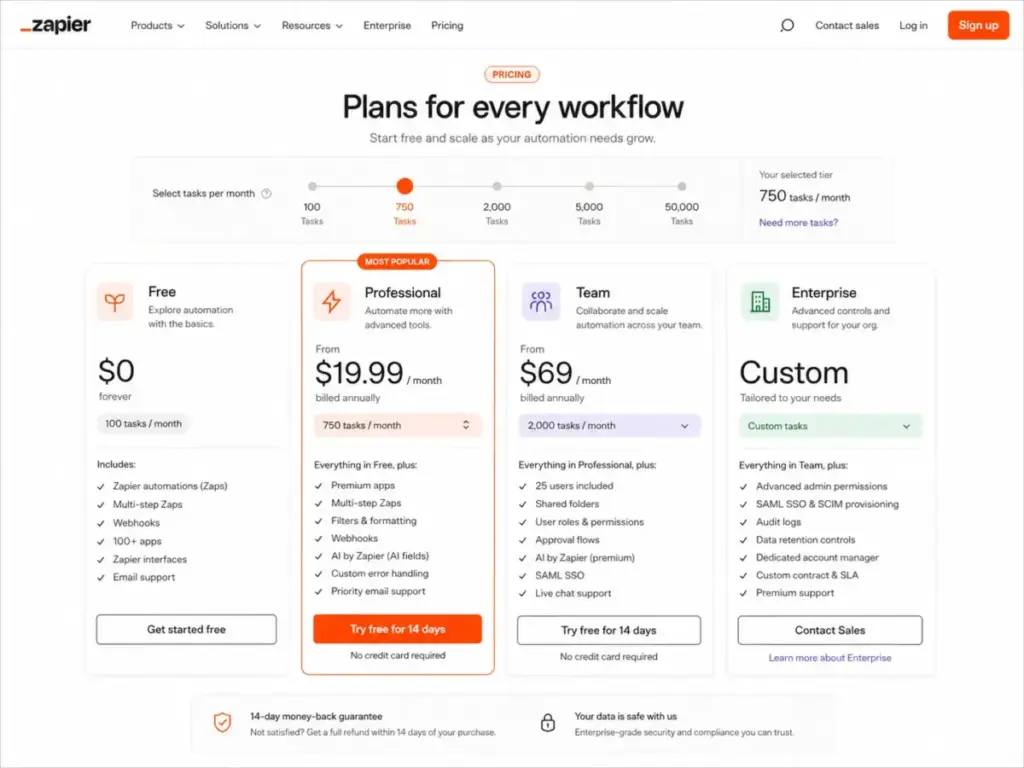
All pricing below was verified on Zapier’s pricing page on April 27, 2026.
Zapier Pricing Table (April 2026)
| Plan | Monthly Price (Billed Annually) | Tasks/Month | Key Inclusions |
|---|---|---|---|
| Free | $0 | 100 | Two-step Zaps, Copilot (daily limits), Tables, Forms |
| Professional | $19.99 | 750 | Multi-step Zaps, premium apps, Webhooks, AI fields, email support |
| Team | $69 | 2,000 | 25 users, shared folders, shared connections, SAML SSO, Premier Support |
| Enterprise | Custom | Custom | Unlimited users, advanced admin, Technical Account Manager |
What Counts as a Zapier Task?
Only successful action steps count. Triggers, filters, and certain built-in tool steps do not consume tasks. This is important: a 5-action Zap that runs 200 times per month uses 1,000 tasks, not 200. The official task usage documentation confirms this counting method.
When you hit your task limit, Zap runs are held, not lost. Held runs can be replayed from Zap History once tasks become available. Zapier sends email notifications as you approach and reach your limit.
Task-Cost Reality Check
This table shows how tasks disappear in realistic workflows:
| Workflow Example | Actions per Run | Runs/Month | Tasks Consumed | Plan Needed |
|---|---|---|---|---|
| Simple lead capture (form to Google Sheets) | 1 | 100 | 100 | Free |
| 5-step CRM enrichment (form, enrich, route, notify, log) | 4 | 200 | 800 | Professional (750 base, overage or upgrade) |
| AI/MCP agent workflow (3 tool calls at 2 tasks each) | 6 | 100 | 600 | Professional |
| 5-step CRM enrichment at scale | 4 | 500 | 2,000 | Team |
The math shows the core tension. A solo consultant running simple automations fits comfortably on the Free or entry Professional plan. A RevOps team running multi-step workflows across hundreds of leads per month can burn through the Professional tier in weeks.
“I dislike that you pay per task.” – Verified G2-sourced AWS Marketplace reviewer, March 19, 2026.
Zapier User Experience
Zapier’s onboarding is the fastest in the automation category. Building a first Zap takes under 10 minutes for most users, and the template library covers hundreds of common app combinations.
The Zap editor is linear and straightforward. You pick a trigger app, configure the trigger event, add action steps, map fields, and turn it on. Copilot can assist with setup. For simple two-step or three-step Zaps, the experience is smooth.
Where complexity enters: multi-step Zaps with paths, filters, and formatters require more careful planning. Field mapping between apps can be confusing when data structures differ. A HubSpot contact field does not always map cleanly to a Salesforce lead field, and debugging mismatched data types often requires trial-and-error testing.
Debugging tools have improved. Zap History shows each run with step-by-step results, including which steps succeeded, failed, or were filtered. But when a Zap fails silently (for example, due to an app API change or a field mapping that produces empty values), finding the root cause can take time.
“This tool acts as the bridge that keeps our data management consistent.” – Verified Capterra reviewer in hospitality, January 15, 2026.
Workflow maintenance is the hidden cost of any automation platform. When a connected app updates its API, changes a field name, or modifies its authentication flow, Zaps can break. Zapier handles most API versioning behind the scenes, but edge cases still occur.
“It also sometimes seems to run zaps twice when it shouldn’t.” – Verified Capterra reviewer, December 22, 2025.
Zapier Pros and Cons
The strengths and weaknesses below are based on verified platform capabilities, official pricing, and documented user feedback, not vendor marketing copy.
- Broadest app ecosystem. 9,000+ integrations and 66,000+ triggers/actions. No competitor matches this coverage.
- Fastest path to automation for non-technical users. Template library and Copilot reduce setup time to minutes for common workflows.
- Strong workflow components. Tables, Forms, Webhooks, and Formatters let you build complete workflows without leaving the platform.
- AI and MCP layer adds real capability. MCP, Agents, and AI fields connect Zapier to the AI tool ecosystem, including OpenAI and Claude integrations.
- Unified plans simplify purchasing. Tables, Forms, and MCP are now bundled into standard plans, reducing add-on confusion.
- Security posture is strong. SOC 2 Type II (annual audit), penetration testing, and a published Trust Center meet most SMB and mid-market requirements.
- Task pricing gets expensive at scale. A 5-step Zap running 500 times/month consumes 2,000 tasks, pushing you to the Team tier at $69/month.
- Multi-step workflows burn tasks quickly. Every successful action step counts. Complex Zaps with 4 to 6 actions multiply your task consumption per run.
- Debugging complex workflows is time-consuming. Paths, filters, and multi-step logic can produce silent failures that are hard to trace.
- Live chat support is gated by task tier. Professional users only get live chat at the 2,000+ task level. Lower Professional tiers are email-only.
- Advanced governance requires Team or Enterprise. Shared folders, SSO, and admin controls are not available on Professional.
- App API limits can break workflows. Third-party rate limits and API changes can cause Zap failures outside of Zapier’s control.
What Zapier Does Not Tell You
This section covers friction points that are not prominently disclosed on Zapier’s marketing pages. These are not defects. They are structural realities of the platform that affect cost planning and operational reliability.
A workflow’s real cost depends on actions per run, not Zaps per month. The pricing page emphasizes monthly task counts, but the variable that matters is how many action steps each Zap executes. A single 6-step Zap running 300 times per month costs 1,500 tasks. Two simple 1-step Zaps running 100 times each cost 200 tasks. Same number of Zaps, very different task bills.
AI and MCP tool calls consume two tasks each. If you route Zapier actions through MCP to an AI assistant, each tool call costs double. An AI agent that calls five Zapier actions in one session burns ten tasks. This is documented in Zapier’s MCP guide, but it is easy to overlook when planning AI workflow budgets.
Held Zap runs are not lost, but they pause operations. When you hit your task limit, pending Zap runs are held in queue. They can be replayed once tasks become available. However, time-sensitive workflows (like lead routing or support ticket escalation) cannot wait until next month’s task reset.
App-specific API changes can break automations. Zapier maintains integrations with thousands of apps, but when a third-party app changes its API, authentication method, or field structure, your Zaps may fail. Zapier cannot control third-party API stability.
Live chat is not included at every paid tier. The official support documentation confirms that live chat is available for Professional users only at the 2,000+ task tier, and for all Team and Enterprise users. If you are on the Professional plan at 750 tasks, your support channel is email.
Zapier vs Alternatives
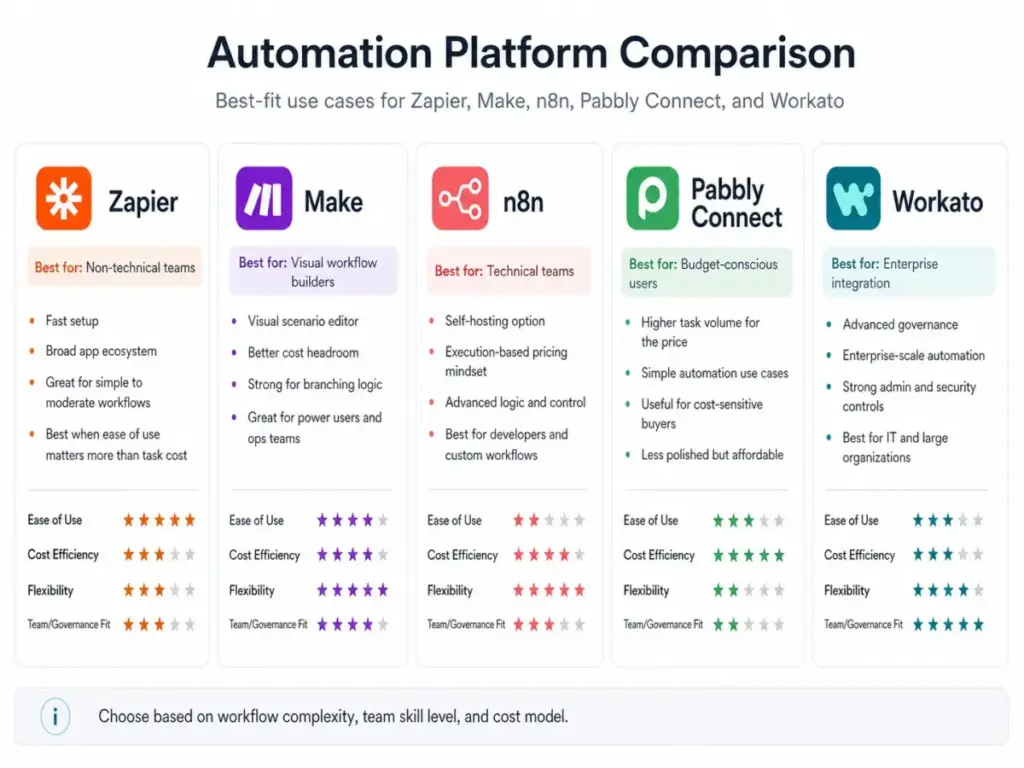
Choosing the right automation platform depends on workflow complexity, task volume, technical skill, and budget shape. Below are the four comparisons that matter most in 2026. For a broader view, see our full Zapier alternatives guide.
Zapier vs Make
Make (formerly Integromap) offers a visual workflow builder with a scenario-based design that excels at complex branching logic. Make’s pricing starts at $9/month (Core plan, billed annually) for 10,000 operations/month, compared to Zapier’s $19.99/month for 750 tasks. Make’s pricing model gives significantly more execution headroom at lower tiers.
Winner: Zapier wins for ease of use and app breadth. Make wins for visual workflow complexity and cost headroom. Read the full Make review for a deeper breakdown.
Zapier vs n8n
n8n is a workflow automation tool built for technical teams. Its Starter plan starts at EUR 20/month for 2,500 workflow executions with unlimited steps. The key difference: n8n charges per workflow execution, not per action step. A 10-step workflow in n8n costs one execution. In Zapier, it costs 9 tasks.
n8n also offers self-hosting, giving teams full control over data, infrastructure, and costs. The tradeoff is a steeper learning curve and more setup overhead. Check n8n’s pricing page for current tier details.
Winner: Zapier wins for non-technical users who want fast setup. n8n wins for technical teams that need execution-based pricing, self-hosting, and custom logic. See the full n8n review.
Zapier vs Pabbly Connect
Pabbly Connect targets budget-conscious buyers with higher task allowances at lower price points. Its Standard plan includes 10,000 tasks/month, and internal app steps (filters, routers, formatters) do not count as tasks. See Pabbly Connect’s product page for current pricing.
The tradeoff: Pabbly’s app ecosystem is smaller, its interface is less polished, and enterprise governance features are minimal.
Winner: Zapier wins for ecosystem breadth and interface quality. Pabbly wins for budget-friendly task volume on simple workflows.
Zapier vs Workato
Workato is an enterprise iPaaS platform with custom pricing, advanced governance, and deep integration architecture. It is built for IT and integration teams managing hundreds of workflows across enterprise systems. Workato’s pricing is usage-based and not self-service.
Winner: Zapier wins for SMB automation speed and self-service purchasing. Workato wins for enterprise iPaaS, governance, and complex integration architecture.
Who Should Use Zapier?
Zapier fits best when setup speed and app coverage matter more than per-task cost optimization. Here are five buyer profiles where Zapier delivers clear value.
| Buyer Profile | Why Zapier Works | Recommended Plan |
|---|---|---|
| Solo consultant running 3 to 5 lead capture automations | Simple Zaps, low volume, fast setup | Free or Professional (750 tasks) |
| 5-person marketing team syncing forms, spreadsheets, and email tools | Templates cover common marketing stacks, no code needed | Professional (750 to 2,000 tasks) |
| 8-person RevOps team enriching and routing leads | Multi-step Zaps with paths and filters, shared connections on Team | Team (2,000+ tasks) |
| Agency managing 20+ client workflows | Broad app coverage, folders for organization, SSO for team access | Team or Enterprise |
| Customer support team syncing tickets, Slack alerts, and spreadsheets | Pre-built integrations for Zendesk, Intercom, Freshdesk | Professional or Team |
For teams using best team collaboration tools alongside Zapier, the platform’s Slack, Microsoft Teams, and Notion integrations provide strong out-of-the-box connectivity.
Who Should Not Use Zapier?
Zapier is not the best fit for every automation need. These buyer profiles should evaluate alternatives before committing.
- Teams with high-volume, multi-step workflows. If you run 4+ action Zaps at 500+ executions per month, task costs escalate quickly. Make or n8n offer better cost structures for this pattern.
- Developers who want self-hosted logic and version control. n8n supports self-hosting, Git-based workflow management, and custom code nodes. Zapier does not.
- Enterprises needing full iPaaS governance. Workato, MuleSoft, or Boomi provide deeper governance, compliance, and integration architecture than Zapier Enterprise.
- Budget-sensitive users running thousands of repetitive actions. Pabbly Connect’s higher task allowances at lower price points serve this profile better.
- Teams that need guaranteed live support on lower tiers. If live chat access matters and your task volume is under 2,000/month on Professional, Zapier’s support model may not meet your expectations.
Final Verdict
Score: 8.6 / 10
Zapier is worth it if speed, app breadth, and low-code accessibility matter more than per-task cost. It remains the fastest path to automation for non-technical teams, and its 9,000+ integration library is unmatched in the category. The 2026 additions of unified plans, MCP, Agents, and AI fields make the platform more capable than ever.
It is not the best fit if you already know your workflows will run thousands of multi-step actions every month. The task-based pricing model that makes Zapier simple to start also makes it expensive to scale. And the support gating (live chat only at Professional 2,000+ tasks or Team/Enterprise) means lower-tier buyers should not expect instant help.
My recommendation by buyer type:
- Non-technical SMB teams connecting multiple SaaS apps: Zapier is the right choice. Start with Free or Professional.
- Marketing and RevOps teams at moderate volume: Zapier Professional or Team. Watch task consumption monthly.
- High-volume automation teams: Evaluate Make or n8n for better cost structures.
- Budget-first buyers: Check Pabbly Connect for higher task limits at lower cost.
- Enterprise integration teams: Workato or a full iPaaS platform is the better fit.
Zapier is easy until task math becomes the product. Know your workflow volume before you commit, and you will get strong value from the platform.
For teams exploring AI-powered automation, also consider how best AI chatbots integrate with workflow tools like Zapier through MCP and API connections.
FAQ
These questions reflect the most common search queries about Zapier in 2026.
Is Zapier worth it in 2026?
Yes, for non-technical teams that need fast automation across multiple SaaS apps. Zapier’s 9,000+ integrations and low setup time deliver real value for low-to-medium volume workflows. It becomes less worth it when task consumption exceeds 2,000/month on multi-step Zaps.
How much does Zapier cost?
Zapier’s Free plan is $0 for 100 tasks/month. Professional starts at $19.99/month billed annually for 750 tasks. Team starts at $69/month billed annually for 2,000 tasks and 25 users. Enterprise pricing is custom. Verified April 27, 2026.
What counts as a Zapier task?
Each successful action step in a Zap counts as one task. Triggers, filters, and certain built-in steps do not count. A Zap with one trigger and four actions uses four tasks per run.
Is Zapier free?
Yes. Zapier offers a free-forever plan with 100 tasks/month, two-step Zaps, Tables, Forms, and Copilot with daily message limits.
Is Zapier better than Make?
Zapier is better for non-technical users who need the broadest app ecosystem and fastest setup. Make is better for users who need visual workflow logic, lower entry cost ($9/month for 10,000 operations), and more cost headroom at scale.
Is Zapier better than n8n?
Zapier is better for teams that want no-code automation with minimal setup. n8n is better for technical teams that want execution-based pricing (not per-step), self-hosting, and advanced custom logic.
What is the best Zapier alternative?
It depends on your use case. Make for visual complexity and cost savings. n8n for technical control and self-hosting. Pabbly Connect for budget task volume. Workato for enterprise iPaaS governance.
Does Zapier support AI workflows?
Yes. Zapier offers AI fields, Copilot for Zap building, MCP for connecting AI models to Zapier actions, and Agents for autonomous workflows. MCP tool calls cost two tasks each.
Does Zapier have live chat support?
Live chat is available for Professional users at the 2,000+ task tier, all Team users, and Enterprise users. Professional users below the 2,000-task tier have email support only.
Is Zapier secure enough for business use?
Zapier maintains SOC 2 Type II certification (audited annually), publishes penetration testing results, and operates a Trust Center with security whitepapers and compliance documentation. This meets most SMB and mid-market security requirements. The official security page has full details.