Most definitions of an AI chatbot stop at “software that talks to users.” That framing skips the part that actually determines whether the chatbot helps or creates new problems: the knowledge sources it pulls from, the permissions it respects, the escalation rules it follows, and the cost model it runs on. An AI chatbot is a conversational interface powered by artificial intelligence, but evaluating AI chatbot tools in practice requires looking past the marketing language and into the operational reality.
This guide explains what AI chatbots actually are, how they work under the hood, the key types you will encounter, where they create genuine value, and the risks that most explainers skip entirely. I based this analysis on official product documentation, published security frameworks from OWASP and NIST, and current pricing and feature data from five major AI chatbot products (as of June 2026).
Quick Answer: An AI chatbot is a software application that uses natural language processing, machine learning, and often large language models to understand user input and generate conversational responses.
Unlike rule-based chatbots that follow fixed scripts, AI chatbots interpret meaning, retrieve relevant information from knowledge sources, and produce natural-language replies. The key difference from an AI agent: a chatbot primarily responds to queries, while an agent can follow procedures, use tools, and take actions across systems.
A practical edge case is Moonshot AI’s Kimi assistant, which blends consumer chat, document workflows, API access, and agent features.
What AI Chatbot Actually Means
An AI chatbot is a software application or interface that simulates conversation with users through text or voice, using AI techniques to understand input, retrieve or reason over relevant information, and generate a response. IBM defines a chatbot as “a computer program that simulates human conversation with an end user,” and Google Cloud distinguishes AI chatbots from standard chatbots by their use of NLP, NLU, ML, and LLMs rather than scripted flows alone.
That definition covers a wide range. Here is a three-layer breakdown to make it concrete:
Layer 1: Simple Definition
An AI chatbot is a program that reads what you type (or say), figures out what you mean, and writes back a useful answer. It does this using artificial intelligence instead of a fixed menu of canned responses.
Layer 2: Technical Definition
An AI chatbot processes natural language input through intent classification, entity extraction, and context tracking. Modern implementations use large language models to generate responses, often combined with retrieval-augmented generation (RAG) to ground answers in approved knowledge sources such as help centers, product documentation, PDFs, or CRM records. Output goes through safety and policy filters before reaching the user.
Layer 3: Business Definition
For businesses, an AI chatbot is a customer-facing or internal interface that automates responses to routine questions, reduces support ticket volume, enables 24/7 availability, and (when properly implemented) maintains answer quality by pulling from verified company knowledge. The business value depends entirely on resolution quality, knowledge source accuracy, escalation design, and cost-per-interaction economics.
In 2026, the competitive question has shifted. It is no longer “Can the chatbot answer FAQs?” The question is: “Can it answer accurately, use approved knowledge, escalate safely, respect permissions, and justify its cost?”
How AI Chatbots Work
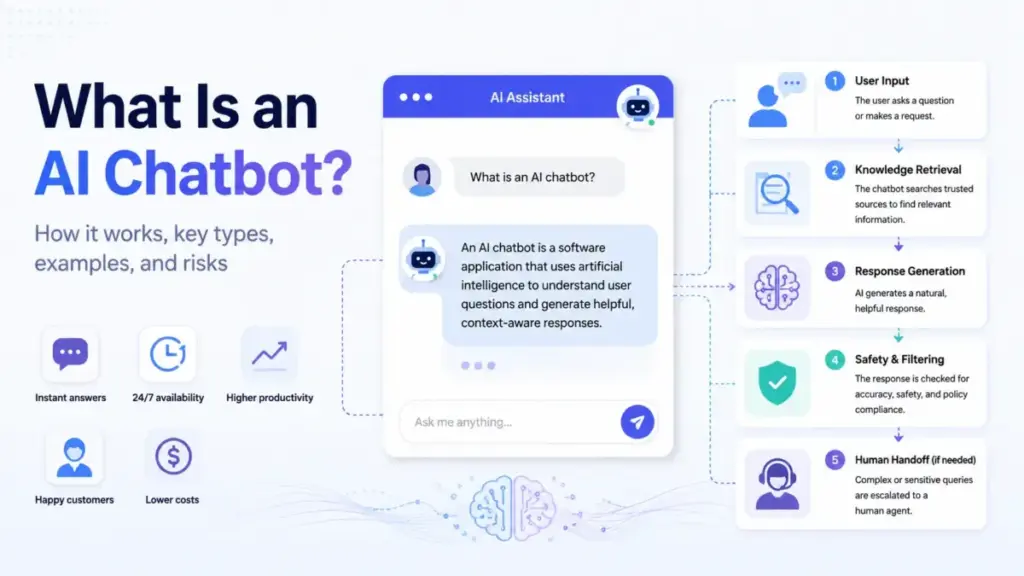
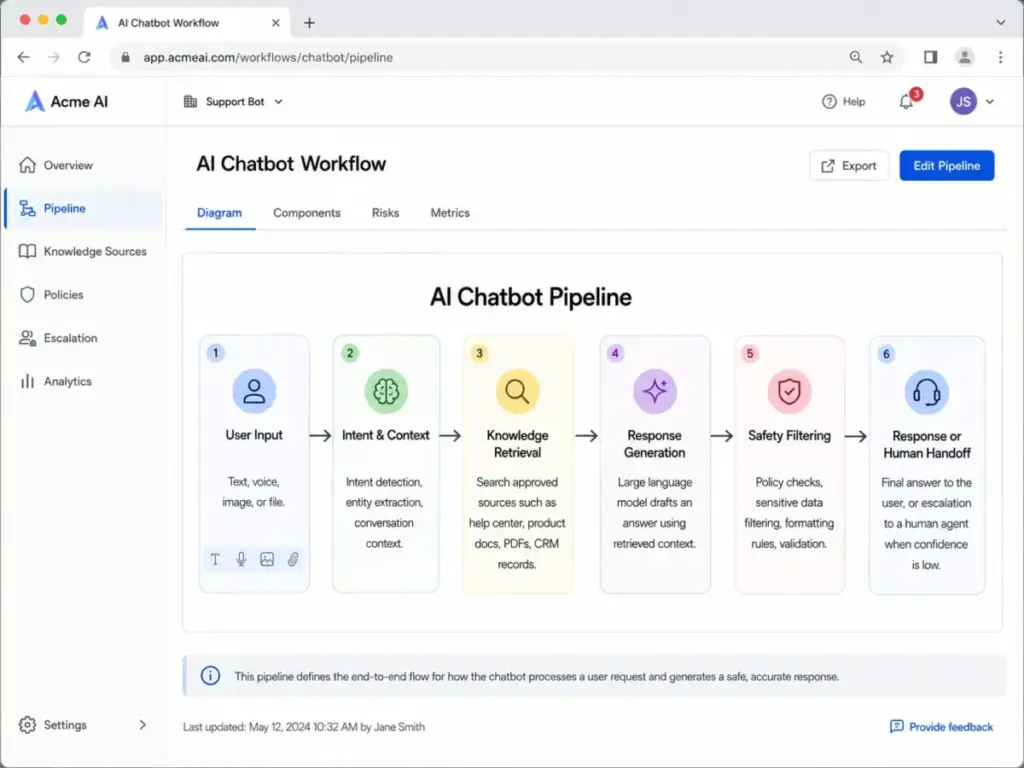
The typical AI chatbot follows a pipeline that most explainers oversimplify. Here is the actual flow, including the failure points that matter for business deployment:
Step 1: Input. The user enters text, voice, an image, or a file. The system receives this as raw input.
Step 2: Intent and context classification. The chatbot identifies what the user is asking (intent), extracts key entities (product names, account numbers, dates), and checks the conversation history for context.
Step 3: Knowledge retrieval. For business chatbots, this is where RAG comes in. The system searches approved knowledge sources: help center articles, internal documents, product data, CRM records, or web pages. The chatbot does not rely only on what the AI model has memorized. It retrieves specific information relevant to the query.
Step 4: Response generation. The AI model drafts a response using the retrieved information and the conversation context. This is where large language models generate natural-sounding text.
Step 5: Safety and policy filtering. Before the response reaches the user, it passes through constraints: content policies, formatting rules, brand guidelines, sensitive data filters, and output validation. This step is often missing from simple chatbot descriptions, but it is where governed deployments succeed or fail.
Step 6: Response or handoff. The chatbot delivers the answer, or, if it cannot answer with sufficient confidence, routes the conversation to a human agent with the full conversation context preserved.
Where the Pipeline Breaks
The failure points that most articles skip:
- Knowledge gap: The chatbot retrieves outdated or conflicting articles. Answer quality is only as good as the knowledge base.
- Hallucination: The model generates plausible-sounding but incorrect information, especially when retrieval returns no relevant results.
- Prompt injection: A user crafts input that tricks the model into ignoring its instructions or revealing information it should not share. OWASP identifies prompt injection as a core LLM vulnerability.
- Missing escalation: The chatbot does not recognize when it is out of its depth and continues generating low-confidence answers instead of routing to a human.
AI Chatbot vs Chatbot vs AI Agent
Google Cloud states that AI chatbots differ from standard chatbots by leveraging large language models and NLP/NLU instead of relying only on pre-programmed responses. But there is a second distinction that matters just as much: the difference between an AI chatbot and an AI agent.
| Capability | Rule-Based Chatbot | AI Chatbot | Retrieval-Grounded Chatbot | AI Agent |
|---|---|---|---|---|
| Understands free-text input | No (menus/scripts only) | Yes | Yes | Yes |
| Generates natural responses | No | Yes | Yes | Yes |
| Answers from approved knowledge | No | Sometimes | Yes (RAG) | Yes |
| Follows multi-step procedures | No | Limited | Limited | Yes |
| Uses external tools | No | No | No | Yes |
| Takes actions across systems | No | No | No | Yes |
| Needs human oversight | Low | Medium | Medium | High |
| Hallucination risk | None | High without grounding | Lower with good sources | Present |
| Best for | Simple menu flows | Open-ended Q&A | Support and knowledge search | Workflow automation |
The practical takeaway: a chatbot answers questions. An AI agent can act on them. Most products in 2026 blur these lines. ChatGPT and Claude function as AI chatbots for most users but gain agentic capabilities (tool use, multi-step reasoning, file actions) at higher plan tiers.
Types of AI Chatbots
Not every AI chatbot works the same way. The architecture determines what the chatbot can do, what it costs, and where it fails.
Rule-Based Chatbot
Uses menus, decision trees, or fixed scripts. Best for predictable flows like order tracking or appointment scheduling. Cannot handle open-ended questions. Zero hallucination risk because it only outputs pre-written responses.
NLP or Intent-Based Chatbot
Understands free-text input by matching user intent to predefined answers or workflows. More flexible than rule-based, but still limited to its training data. Common in early customer service implementations.
Generative AI Chatbot
Uses LLMs to generate natural responses, summarize documents, draft content, translate, analyze data, or answer questions. This is where ChatGPT, Claude, and Google Gemini operate. The tradeoff: more capable, but higher risk of hallucination without grounding.
Retrieval-Grounded Chatbot
Combines an LLM with RAG to answer from approved knowledge sources. The chatbot searches your help center, PDFs, internal docs, or product data before generating a response. Intercom Fin operates this way. This architecture reduces hallucination but does not eliminate it.
Agentic Chatbot
Goes beyond answering questions. Can follow procedures, call APIs, trigger workflows, update records, and complete multi-step tasks. Microsoft Copilot and Intercom Fin cross into this territory with their agent and workflow capabilities.
Voice AI Chatbot
Handles spoken input and output for phone lines, contact centers, or voice assistant workflows. Adds speech-to-text and text-to-speech layers on top of the standard chatbot pipeline.
How to Implement an AI Chatbot
Implementation determines whether an AI chatbot reduces costs or creates new problems. Here is a 9-step process based on patterns from actual business deployments:
- Define the job. Support deflection, lead qualification, onboarding guidance, internal knowledge search, or workflow automation. A chatbot without a defined scope answers everything poorly.
- Separate safe automation from high-risk cases. Legal, medical, financial, emotional, security, and account-sensitive questions need human fallback. Do not automate what you cannot afford to get wrong.
- Clean the knowledge base. Remove outdated articles, conflicting policies, duplicate FAQs, and unsupported claims before connecting the chatbot. A chatbot trained on messy knowledge gives messy answers.
- Choose architecture. Scripted bot, intent-based NLP, RAG chatbot, general AI assistant, or agentic workflow tool. Match the architecture to the complexity of your use case.
- Set permissions and data boundaries. Decide what the chatbot can access, store, reveal, and act on. Enterprise deployments from Microsoft 365 Copilot Chat respect existing Microsoft 365 permissions. Consumer chatbots often do not have this layer at all.
- Write escalation rules and failure messages. The chatbot needs to know when it does not know. A clear “I cannot answer this, let me connect you to a person” is better than a confident wrong answer.
- Test with real user questions. Include ambiguous wording, adversarial prompts, multilingual questions, and edge cases. Do not test only with the questions you expect.
- Launch in limited scope first. Monitor quality, review transcripts, and improve knowledge sources weekly.
- Track cost per resolved interaction, not just plan price. A $0.99/outcome chatbot that resolves 60% of queries costs less per resolution than a $20/seat subscription where agents still handle most tickets.
Limitations and Risks Most Articles Skip
OWASP’s top LLM application risks include prompt injection, insecure output handling, sensitive information disclosure, excessive agency, and overreliance. NIST’s AI Risk Management Framework requires risk management across design, deployment, evaluation, and monitoring. Most “What is an AI chatbot?” articles mention “sometimes gives wrong answers” and stop there.
Here are the risks that matter in 2026:
| Risk | Example | Mitigation | When to Escalate |
|---|---|---|---|
| Hallucination | Chatbot invents a refund policy that does not exist | Ground answers in RAG with approved sources; add citation requirements | Always escalate financial or policy claims the chatbot cannot cite |
| Prompt injection | User tricks bot into revealing system instructions or bypassing safety | Input filtering, output monitoring, separate system prompts from user context | Any response that references internal instructions |
| Overreliance | Team treats chatbot answers as verified without review | Confidence scoring, mandatory human review for high-stakes topics | Medical, legal, financial, identity queries |
| Sensitive information disclosure | Chatbot reveals customer data, internal pricing, or PII | Strict permission boundaries, data access controls | Any response containing PII or account-specific data |
| Excessive agency | Agentic chatbot takes actions the user did not authorize | Approval workflows, action logging, scope limits | Anything modifying accounts, payments, or records |
| Youth safety | Consumer companion chatbot engages minors without guardrails | Age gating, content filtering, disclosure requirements | Any interaction with users under 18 |
The bottom line: RAG and fine-tuning improve relevance but do not fully remove prompt injection risk or output uncertainty. Treating the chatbot as a reliable knowledge source without verification creates liability.
Common Misconceptions About AI Chatbots
Misconception: “Every chatbot is an AI chatbot.”
Reality: Some chatbots are simple scripted flows with button menus. AI chatbots use NLP, machine learning, and often LLMs to interpret free-text input and generate responses. The distinction matters because scripted bots have zero hallucination risk; AI chatbots trade accuracy guarantees for flexibility.
Misconception: “AI chatbots know the truth.”
Reality: They generate statistically likely responses based on model patterns and available context. They do not “know” anything. Grounding, citations, review processes, and human escalation are required for any high-stakes use case.
Misconception: “A chatbot and an AI agent are the same thing.”
Reality: An AI agent has more autonomy: it can follow procedures, use tools, trigger workflows, and act across systems. Most chatbots respond. Agents act.
Misconception: “Adding an AI chatbot automatically reduces support cost.”
Reality: Cost reduction depends on resolution quality, knowledge quality, escalation rules, pricing model, and monitoring. A chatbot with a messy knowledge base deflects tickets by giving wrong answers, which generates escalations, callbacks, and churn.
Misconception: “RAG eliminates hallucinations.”
Reality: RAG improves relevance by pointing the model at approved sources. It does not prevent the model from misinterpreting the retrieved content, combining sources incorrectly, or generating answers when retrieval returns nothing useful.
5 Real-World AI Chatbot Examples
These five products demonstrate how AI chatbots operate across different use cases in 2026. Pricing reflects official published rates as of May 2026.
ChatGPT: General-Purpose AI Chatbot
ChatGPT is OpenAI’s general-purpose AI chatbot for writing, analysis, file work, research, image generation, and coding. According to ChatGPT’s pricing page, it offers Free, Go, Plus, Pro, Business, and Enterprise tiers. The free plan provides limited access to GPT-4o. Higher tiers unlock extended usage limits, advanced reasoning models, and agent-mode capabilities.
Pricing model: Subscription (consumer/business/enterprise) plus usage-based developer API.
Claude: AI Assistant for Reasoning and Analysis
Claude, built by Anthropic, focuses on language, reasoning, analysis, coding, research, artifacts, and enterprise search. Claude’s pricing page shows Free, Pro ($17/month annual or $20 monthly), Max, Team ($20/seat/month annually), and Enterprise options. Usage limits apply across all plans.
Pricing model: Subscription per seat plus API token pricing.
Google Gemini: Ecosystem-Connected AI Chatbot
Google Gemini connects across the Google ecosystem: Gmail, Docs, Deep Research, long context, NotebookLM, and Google AI plans. Google’s subscription page lists AI Pro and Ultra plan tiers with benefits that vary by region.
Pricing model: Subscription (consumer) plus separate API token pricing for developers.
Microsoft 365 Copilot Chat: Workplace AI
Microsoft 365 Copilot Chat uses files, work context, tools, voice input, and agents inside Microsoft 365 environments while respecting enterprise permissions. According to Microsoft’s pricing page, Copilot Chat is included at no additional cost for eligible Microsoft Entra account users with an eligible Microsoft 365 subscription. Agent use requires Azure subscription or capacity.
Pricing model: Included with eligible subscription; capacity-based for agents.
Intercom Fin: Customer Service AI Agent
Intercom Fin is a customer service AI agent that answers support questions across chat, email, voice, and social channels. It learns from company help centers, PDFs, webpages, and support content. According to Intercom’s pricing page, Fin costs $0.99 per outcome with a 50-outcome monthly minimum. Combined with Intercom’s helpdesk, seat pricing starts at $29/seat/month.
Pricing model: Per outcome plus seat pricing for helpdesk.
Pricing Model Comparison
| Product | Billing Model | Entry Cost | Key Constraint |
|---|---|---|---|
| ChatGPT | Subscription | Free (limited) | Usage caps by tier |
| Claude | Subscription / seat / API | $0 (Free) or $17/mo (Pro annual) | Usage limits per plan |
| Google Gemini | Subscription / API | Free (limited) | Geo-specific pricing; API separate |
| Microsoft 365 Copilot Chat | Included with M365 | $0 (eligible users) | Agents require Azure capacity |
| Intercom Fin | Per outcome + seat | $0.99/outcome + $29/seat | 50-outcome minimum; helpdesk seat costs |
What this means: AI chatbot costs range from free consumer access to per-outcome pricing that scales with volume. Comparing products requires matching the billing model to your usage pattern, not just comparing sticker prices.
When to Use an AI Chatbot (And When Not To)
Use an AI Chatbot When:
- The task is repeatable, knowledge-backed, and high-volume (support FAQs, product onboarding, account status explanations)
- You need 24/7 availability for routine questions that do not require human judgment
- Your knowledge base is clean, current, and well-organized
- You have human fallback for complex or sensitive cases
- You can measure resolution quality, not just deflection volume
Do Not Use an AI Chatbot (Without Heavy Guardrails) When:
- Errors could cause legal, medical, financial, safety, identity, or privacy harm
- Your knowledge base is outdated, conflicting, or incomplete
- There is no human escalation path for low-confidence answers
- Users may mistake generated output for professional or medical advice
- The deployment targets minors without age-appropriate safety controls
- You cannot monitor, review, and improve chatbot performance regularly
How to Measure AI Chatbot Success
After launch, track these metrics grouped by category:
| Category | Metric | Why It Matters |
|---|---|---|
| Customer experience | First response time | Faster response increases satisfaction |
| Customer experience | Customer satisfaction (CSAT) | Direct measure of answer quality |
| Operational efficiency | Resolution rate | Percentage of queries resolved without human involvement |
| Operational efficiency | Containment rate | Percentage of queries handled entirely by the chatbot |
| Operational efficiency | Escalation rate | Lower is better, but zero means poor escalation design |
| Quality | Hallucination/error rate | Tracks answer accuracy over time |
| Quality | Answer citation coverage | Measures how often answers cite approved sources |
| Safety | Security incident rate | Tracks prompt injection, data leaks, or policy violations |
| Cost | Cost per resolution | The metric that determines actual ROI |
AI Chatbot Beginner Checklist
Use this checklist before deploying your first AI chatbot:
- [ ] Define the specific job the chatbot will handle (not “answer everything”)
- [ ] Audit and clean your knowledge base before connecting it
- [ ] Identify high-risk topics that require human fallback
- [ ] Set data permissions and access boundaries
- [ ] Write escalation rules with specific trigger conditions
- [ ] Write failure messages that are honest (“I cannot answer this”)
- [ ] Test with real user questions, edge cases, and adversarial inputs
- [ ] Launch in limited scope and monitor transcripts weekly
- [ ] Track cost per resolution, not just subscription price
- [ ] Review and update knowledge sources on a regular schedule
- [ ] Document your chatbot’s limitations for internal stakeholders
FAQ
What is an AI chatbot in simple terms?
An AI chatbot is a computer program that reads your message, understands what you mean using artificial intelligence, and writes back a response in natural language. Unlike a rule-based chatbot that follows a script, an AI chatbot can handle open-ended questions and generate new responses for each conversation.
How does an AI chatbot understand questions?
AI chatbots use natural language processing (NLP) and natural language understanding (NLU) to break down your message into intent (what you want) and entities (specific details like product names or dates). Modern chatbots powered by large language models process the full context of the conversation, not just individual keywords.
What is the difference between a chatbot and an AI chatbot?
A standard chatbot follows pre-programmed rules: if a user clicks “Track my order,” the bot returns a tracking page. An AI chatbot uses machine learning and language models to interpret free-text input and generate responses. The tradeoff: AI chatbots are more flexible but introduce hallucination and prompt injection risks that rule-based bots do not have.
What is the difference between an AI chatbot and an AI agent?
An AI chatbot primarily responds to queries. An AI agent can follow multi-step procedures, call external tools, trigger workflows, and take actions across systems with more autonomy. Intercom Fin, for example, can follow support procedures and route tickets, which crosses into agent territory. ChatGPT and Claude gain agentic features at higher plan tiers.
Are AI chatbots safe for business use?
AI chatbots are safe for business use when properly governed. That means grounding answers in approved knowledge, setting permission boundaries, designing escalation paths for high-risk queries, monitoring for prompt injection, and tracking answer quality over time. Without these controls, AI chatbots can disclose sensitive information, generate incorrect answers, or take unauthorized actions.
Can AI chatbots replace human customer support?
AI chatbots handle routine, knowledge-backed questions effectively (FAQ answers, account status, troubleshooting steps). They cannot reliably handle emotionally charged situations, complex multi-system problems, or queries requiring professional judgment. The most effective deployments use chatbots for first-line responses and route complex cases to human agents with the conversation context preserved.
How do AI chatbots use company data?
Business AI chatbots use retrieval-augmented generation (RAG) to search approved company knowledge sources, such as help center articles, PDFs, internal documentation, and product data, before generating a response. The chatbot retrieves relevant content and uses it to ground the AI model’s output. Access controls determine what data the chatbot can search and what it can reveal.
Do AI chatbots actually reduce support tickets?
They can, when the knowledge base is accurate and the chatbot resolves queries rather than deflecting them. The metric that matters is resolution rate (queries fully resolved by the chatbot), not deflection rate (queries that never reach a human, regardless of quality). A chatbot that deflects tickets by giving wrong answers increases callbacks and churn.
What should I measure after launching an AI chatbot?
Track resolution rate, containment rate, escalation rate, customer satisfaction, hallucination rate, answer citation coverage, cost per resolution, and security incident rate. Cost per resolution is the single most important metric for ROI. A chatbot that costs less per subscription but resolves fewer queries costs more per resolution.
When should a business not use an AI chatbot?
Avoid deploying AI chatbots (or deploy with heavy guardrails) when errors could cause legal, medical, financial, safety, or compliance harm; when your knowledge base is outdated or incomplete; when there is no human escalation path; or when users could mistake chatbot output for verified professional advice.