Most buyers ask the wrong question about ChatGPT. They ask “is it good?” instead of “is this specific plan worth my specific workload?” This ChatGPT review cuts through that confusion.
ChatGPT is built on generative AI technology that has matured considerably since its debut. In 2026 it functions as a modular workspace, not a single chatbot.
If you are comparing the best AI chatbots before committing to a subscription, you need a plan-by-plan breakdown, not a feature parade. That is exactly what this review delivers.
In this review, I evaluate ChatGPT using official plan data, documented limits, current pricing pages, published user-review signals, and buyer workflow analysis. Pricing and model facts are verified as of June 30, 2026, and two structural changes since the spring make the old plan math obsolete: Pro is now two separate prices, and every tier now starts from the same GPT-5.5 Instant model.
ChatGPT Review Verdict
ChatGPT is the most versatile general-purpose AI assistant available in 2026, but the right plan for you depends on your daily prompt volume and workflow type, not on which model name sounds most impressive.
The product has expanded well beyond text chat. It now covers file analysis, image generation, voice, live search, connectors to external tools, business workspaces, agentic task flows, and a US personal-finance preview.
The buying decision got harder in one specific way this year. Since GPT-5.5 Instant became the default for everyone on May 5, 2026, the plans no longer differ much on raw model quality. They differ on usage volume, reasoning depth, memory, and admin controls, which is a subtler thing to price against your own workload.
| Category | Score | Why It Matters |
|---|---|---|
| Individual Productivity | 9.1 / 10 | Replaces several single-function tools for writing, research, coding, and file work |
| Team Deployment | 8.6 / 10 | Business value is real, and the April price cut to $20/seat improved the math |
| Pricing Transparency | 7.6 / 10 | Plans are public, but the new two-tier Pro split and dynamic limits require honest math |
| Competitive Breadth | 9.0 / 10 | No single competitor matches its full tool surface for individual buyers |
| Business Security | 8.2 / 10 | Strong controls at Business and Enterprise; individual plans still require manual opt-out |
Quick Verdict:
- Overall Score: 8.8 / 10
- Best For: Solo professionals, students, developers, and teams needing one all-in-one AI workspace
- Not For: Buyers whose sole need is cited research with visible source links
- Best Plan For Most: ChatGPT Plus at $20/month
- Main Reason To Avoid: If your primary use case is source-grounded research, Perplexity or NotebookLM is a better fit and a cheaper one
What Is ChatGPT?
ChatGPT is OpenAI’s general-purpose AI assistant, available at chatgpt.com, and calling it a chatbot undersells what it has become by 2026. It handles text generation, coding help, file analysis, web search, image creation, voice interaction, app connectors, custom GPTs, business workspaces, and agentic task execution, all from a single product surface.
The capability available to you depends on your plan, but the base model no longer does. A Free account and an Enterprise account both start on GPT-5.5 Instant now. What separates them is how much you can use, how deeply the model reasons, and what governance sits around it.
ChatGPT Features That Matter
Not every ChatGPT feature is available on every plan, and treating the product as one uniform tool leads to subscription waste or missed capability. The sections below map features to the plans where they actually function, so you can assess value before you spend.
ChatGPT model picker and reasoning modes
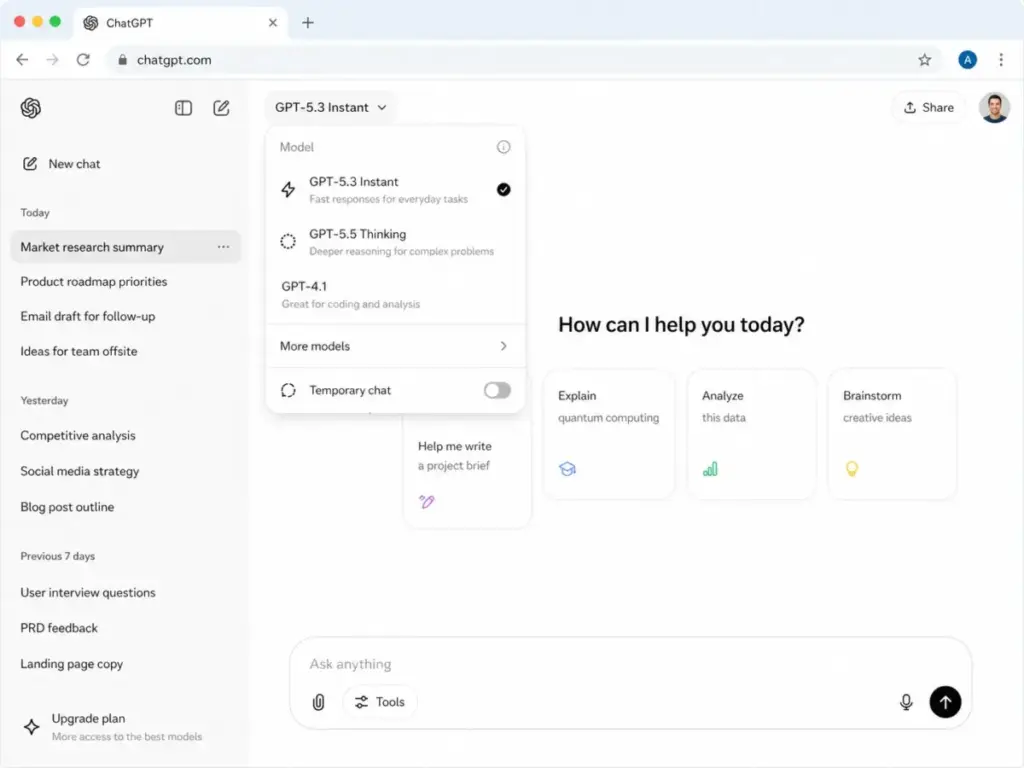
The picker no longer asks you to memorize model names. It reads as a speed-versus-depth control: Instant for everyday work, then Medium, High, and Extra High for progressively harder reasoning, plus Pro Standard and Pro Extended on the paid Pro tiers.
Instant is the default on every plan and auto-routes complex prompts to a Thinking pass when the query warrants it. The old naming (Thinking Standard, Extended, Heavy) was renamed to Medium, High, and Extra High in the June 2026 picker update, and Thinking Light was removed.
Free accounts run GPT-5.5 Instant with limited access in a rolling 5-hour window, and OpenAI now describes those caps as dynamic rather than a fixed number. Plus and Go users can send up to 160 GPT-5.5 messages every 3 hours before chats drop to a mini variant, per OpenAI’s help center.
Model access still changes during a subscription. OpenAI retired GPT-5.2 on June 12, 2026 and GPT-4.5 on June 26, 2026, moving existing chats to GPT-5.5. Do not assume the model you read about today will behave identically three months into your subscription, because OpenAI keeps models live for roughly 90 days after a successor ships.
Where GPT-5.6 fits, and why it is not in ChatGPT yet
OpenAI previewed its next generation, GPT-5.6, on June 26, 2026 as a three-model family: Sol (the flagship), Terra (positioned near GPT-5.5 quality at roughly half the API cost), and Luna (the fastest and cheapest). The naming also changed, so the number now marks the generation while Sol, Terra, and Luna are durable capability tiers meant to persist across future releases.
Here is the part that matters for a ChatGPT buyer: GPT-5.6 is not available in ChatGPT during the preview. It is limited to the OpenAI API and Codex for roughly 20 vetted partner organizations, released this way at the U.S. government’s request, with no public waitlist and no eligibility for individual or consumer ChatGPT accounts.
OpenAI says it plans general availability across ChatGPT, Codex, and the API in the coming weeks but has not committed to a date. For now GPT-5.5 remains the engine behind every ChatGPT plan, so there is nothing to buy or upgrade for GPT-5.6 today, and when it does arrive it should reach existing plans rather than require a new one.
ChatGPT search and deep research
ChatGPT connects to live web data for search-augmented answers, and Deep Research mode runs longer, multi-step queries that synthesize results before answering. On Plus, Deep Research is capped at around 10 runs per month, which a heavy analyst can exhaust in a single busy week.
For broad research and synthesis, this is useful. For tasks where you need every specific citation clearly labeled and linked, it is less reliable than a dedicated research tool.
ChatGPT file analysis and data work
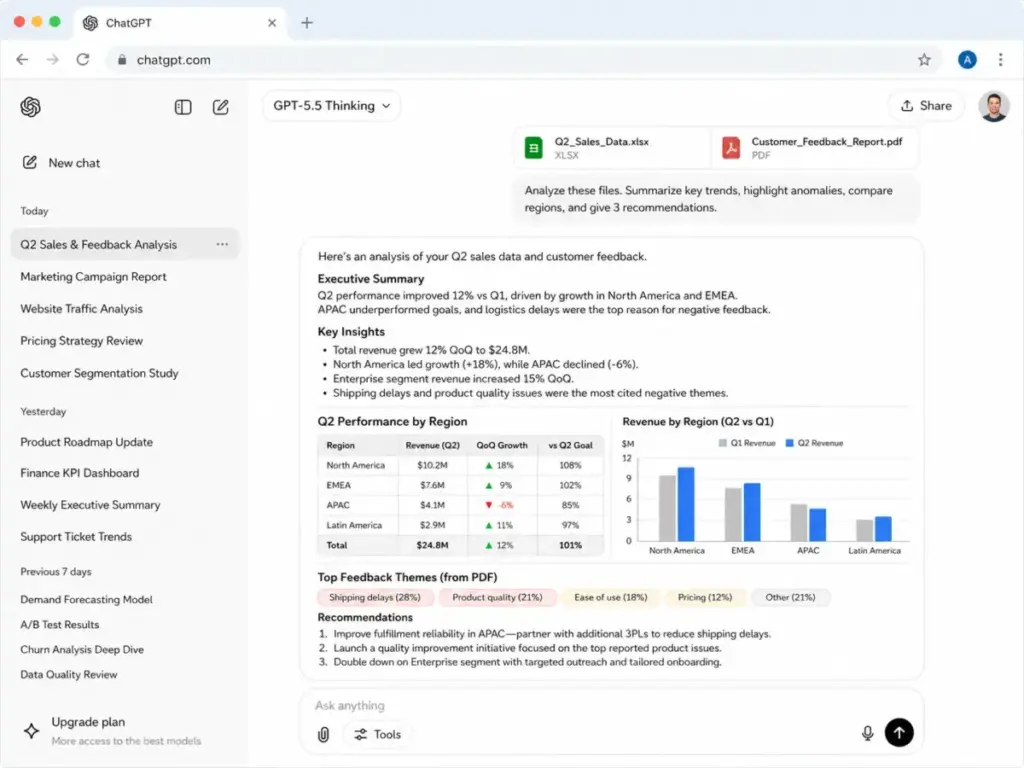
Uploading documents, spreadsheets, and PDFs turns static files into queryable data sources. You can summarize a contract, pull figures from a spreadsheet, or compare two uploaded documents in one thread.
Context window size is the constraint that matters here, and it scales with plan and model. GPT-5.5 Thinking reaches up to 400K tokens on the Pro tiers and up to 256K tokens on Plus and Business per current usage documentation, with the $200 Pro tier extending context furthest. These figures are plan-dependent and change with model releases, so verify against the plan you buy.
ChatGPT image, voice, and multimodal tools
Image generation moved to ChatGPT Images 2.0 in April 2026, which plans an image’s structure before rendering, supports 2K resolution, and can produce up to eight images that keep characters and objects consistent across the batch. Instant image mode is available to everyone including Free, while the reasoning-based Thinking image mode is Plus and above.
Voice mode supports hands-free interaction, and a new speech-to-text dictation model rolled out across all plans in June 2026 with measurable accuracy gains, including for Vietnamese, Japanese, and accented English. These features consume usage limits, so heavy image or voice users on Plus should watch their caps.
ChatGPT apps, connectors, and custom GPTs
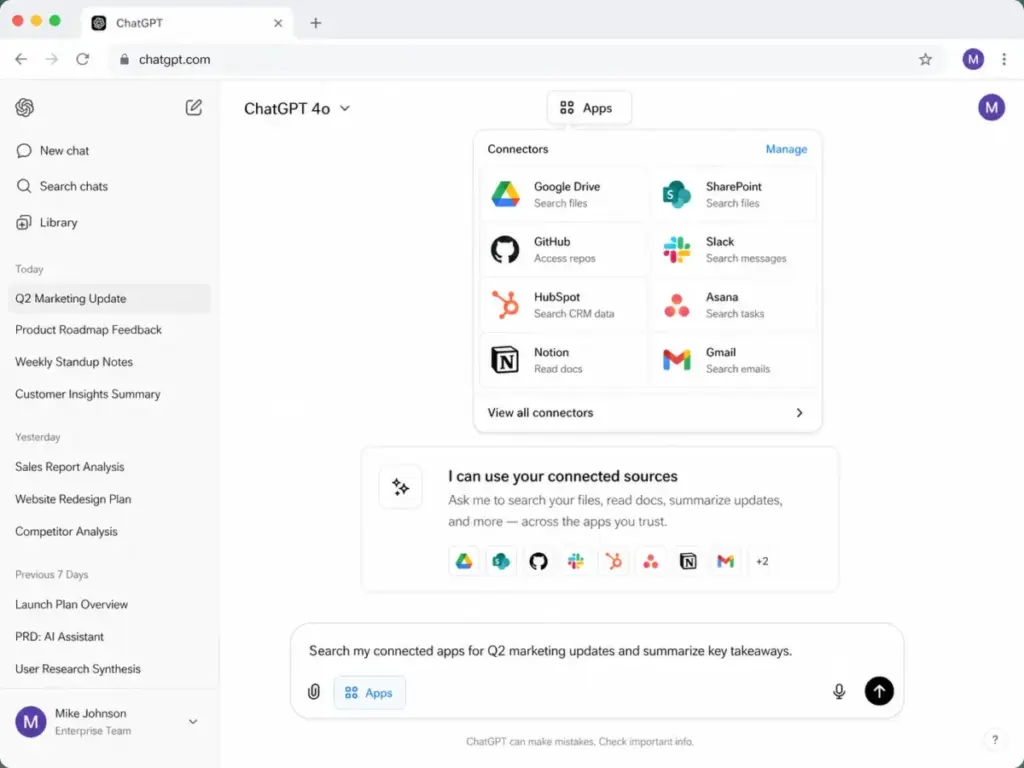
ChatGPT connects to external tools including Google Drive, SharePoint, GitHub, HubSpot, Slack, Notion, and Asana, depending on plan availability and rollout status. Teams already invested in Microsoft 365 should also evaluate Microsoft Copilot, which provides native Graph-grounded access to Outlook, Teams, Word, and SharePoint without third-party connectors.
These connectors let the assistant read from and act on your existing data. Custom GPTs let you save a set of instructions, files, and behaviors so you do not re-prompt from scratch every session, and both features require careful permission management in a business context.
ChatGPT Codex and coding workflows
Codex is OpenAI’s coding-focused capability set, and it expanded meaningfully in 2026. Codex Remote is now generally available on all ChatGPT plans, so from the mobile app you can start or continue work on a connected Mac or Windows host, review progress, and approve actions from your phone.
For individual developers, ChatGPT handles debugging, code review, function writing, and explanation across languages including Python and JavaScript. If you are experimenting with vibe coding for fast prototyping, ChatGPT is one of the more capable environments for that workflow, and the $100 Pro tier is built around heavier Codex usage.
ChatGPT Personal Finance (US preview)
OpenAI launched a Personal Finance experience on May 15, 2026 as a US-only preview, and by June it expanded from Pro to Plus users on web and iOS, and to Pro and Plus users on Android. It links supported bank and brokerage accounts through Plaid, then answers questions grounded in your balances, transactions, investments, and liabilities.
The feature is read-only by design. It can see balances and transactions but cannot view full account numbers or move money, which limits both the risk and the depth of what it can do.
ChatGPT Pricing and Plans
The lineup now spans seven price points across six plan names, and the gap between what plans cost and what they deliver in daily use is wider than the pricing page suggests. Pricing below is verified as of June 30, 2026. Check the current ChatGPT pricing page before subscribing, because plan prices and limits change without formal notice.
| Plan | Starting Price | Best For | Key Limits (Verified Jun 30, 2026) | Source |
|---|---|---|---|---|
| Free | $0 | Casual use, basic prompting, light research | GPT-5.5 Instant, limited use in a 5-hour window (dynamic); US ads | OpenAI Pricing Page |
| Go | $8/month | Low-cost paid access with higher volume | GPT-5.5 Instant, 160 messages / 3 hours; ad-supported; no Deep Research/Sora | OpenAI Pricing Page |
| Plus | $20/month | Daily writing, coding, file work, image generation | 160 GPT-5.5 messages / 3 hours; Deep Research ~10/mo; Sora | OpenAI Help |
| Pro (Codex) | $100/month | Heavy weekly use, Codex-first developers | 5x Plus usage; GPT-5.5 Pro; up to 400K context | OpenAI Pricing Page |
| Pro (Max) | $200/month | Daily power users living inside ChatGPT | 20x Plus usage; largest context and Deep Research quota | OpenAI Pricing Page |
| Business | $20/user/mo (annual), $25 (monthly) | Teams of 2+ needing workspace controls | SSO, admin controls, default training exclusion, GPT-5.5 Pro | OpenAI Business Page |
| Enterprise | Custom pricing | Large deployments needing SSO, SCIM, data residency | Highest limits, data residency, compliance support | OpenAI Enterprise Docs |
Two changes reshaped this table since spring. On April 9, 2026 OpenAI split the old single $200 Pro plan into a $100 tier and a $200 tier that run the same models and differ only in usage volume, and on April 2, 2026 Business dropped from $25 to $20 per seat on annual billing.
For context on how Claude pricing compares at similar usage levels, see our dedicated breakdown.
ChatGPT Plan Decision Matrix
| Workload | Recommended Plan | Why | When to Upgrade |
|---|---|---|---|
| Occasional writing, light research | Free | GPT-5.5 Instant at zero cost is now genuinely usable | When the 5-hour cap blocks daily work |
| Higher volume, still solo, budget-first | Go | $8/month buys Plus-level message volume | When you need Deep Research, Sora, or an ad-free UI |
| Daily writing, briefs, summaries | Plus | $20/month, ad-free, full feature set for one person | When you consistently exhaust Plus reasoning limits |
| Heavy weekly coding or analysis | Pro (Codex) $100 | 5x Plus usage and GPT-5.5 Pro at half the old premium | When you burn through the $100 tier’s 5x ceiling |
| All-day power use inside ChatGPT | Pro (Max) $200 | 20x Plus usage and the largest quotas | This is the individual ceiling |
| Small team, shared billing | Business | 2-seat minimum, admin controls, default data exclusion | When SSO, SCIM, or data residency is required |
| Regulated industry, large org | Enterprise | Data residency, compliance support, custom pricing | N/A, this is the top tier |
What the Pricing Page Does Not Tell You
First, the Pro split changes the upgrade math. Most people who used to eye the $200 plan now fit inside the $100 Codex tier, which carries the same GPT-5.5 Pro model and 5x Plus usage, so paying $200 only makes sense if you regularly exhaust the $100 tier’s ceiling.
Second, Free and Go now show ads in the US, live since February 2026 and buyable through OpenAI’s self-serve Ads Manager. If an ad-free experience matters for client-facing work, that alone is a reason to skip Go and pay for Plus.
Third, the five-seat crossover makes Business nearly free relative to Plus. Five Plus accounts cost $100 per month, and five Business seats on annual billing also cost $100 per month while adding SSO, SOC 2 Type II coverage, admin controls, and default training exclusion. Below five seats you pay a small premium for governance; at five you get it for the same money.
ChatGPT Pros and Cons
The product’s strengths are real, but several limitations directly affect subscription value and should factor into your buying decision.
- Broadest tool surface of any individual AI assistant. Text, files, code, images, voice, search, and a US finance preview in one subscription.
- Plus holds at $20/month for a feature set that replaces several single-function tools, and Business dropped to $20/seat annually in April.
- Same base model on every tier. GPT-5.5 Instant is the default from Free up to Enterprise, so the upgrade question is now about volume, not model quality.
- File analysis handles large documents. GPT-5.5 Thinking reaches up to 400K tokens on Pro, enough for long contracts or full codebases.
- Custom GPTs eliminate repetitive setup. You define instructions once and reuse them across sessions.
- Business plan offers self-serve team access starting at two seats without a sales call.
- Free and Go now carry ads in the US. That is a new cost of the cheap tiers, and a reason client-facing users pay for Plus.
- Model access changes mid-subscription. GPT-5.2 and GPT-4.5 were both retired in June 2026, with existing chats moved to GPT-5.5 automatically.
- The Pro split adds a decision, not just an option. Buyers must now math out whether $100 or $200 fits their volume instead of defaulting to one Pro price.
- Connector permissions are not self-auditing. If you connect Google Drive or Slack, you must manually verify what the model can access and share.
- Subscription overlap risk is real. Teams running Notion AI, GitHub Copilot, or Grammarly alongside ChatGPT often duplicate capabilities they already pay for.
- Hallucinations persist across all model tiers. GPT-5.5 Instant cut high-stakes hallucinations sharply versus its predecessor, but confident wrong answers remain a documented failure mode.
What Are ChatGPT’s Biggest Limitations?
The limitations below are not edge cases. They affect real buying decisions and should be weighed before upgrading plans or deploying the tool across a team.
ChatGPT can still sound confident when wrong
The model predicts probable text sequences, so when it does not know something, it often produces a plausible-sounding answer rather than a correct one. OpenAI’s own figures show GPT-5.5 Instant produced 52.5% fewer hallucinated claims than GPT-5.3 Instant on high-stakes prompts, which is progress, not a fix.
One Capterra reviewer, Jessieah M., a Patient Specialist, wrote: “Can at times spit out unruly, inaccurate information.” Never use model output as a final source for medical, legal, financial, or high-stakes decisions without independent verification.
ChatGPT depends heavily on prompt quality
Output quality scales directly with instruction quality. Vague prompts produce generic output, while specific, structured prompts with context, format, and constraints produce usable work.
Learning basic prompt engineering is not optional for professional users. A Reddit user on r/chatgptplus summarized it accurately: “Prompt quality matters way more than I expected.”
ChatGPT plan limits change over time
Your subscription grants access to a dynamic system, not fixed software. OpenAI’s release notes document model retirements and picker changes throughout 2026, including the June rename of the reasoning tiers and the retirement of GPT-5.2 and GPT-4.5.
Build your workflow around the floor of what a plan guarantees, not the ceiling it provided on your trial day. The model you tested in April may be a retired name by summer.
ChatGPT is not always the best research tool
For tasks requiring visible, per-claim citations linked to source documents, ChatGPT search falls short of purpose-built tools. It synthesizes well but does not always preserve exact source links in a reviewable format.
If your core workflow is verifiable research, our ChatGPT vs Perplexity comparison shows why a purpose-built answer engine fits better. This is a fit problem, not a quality problem.
ChatGPT business setup requires governance
Rolling the tool out to a team is not just a billing exercise. Connector permissions must be configured deliberately, because a member who connects a personal Google Drive or shared Slack workspace can expose data beyond the intended scope.
The Business and Enterprise plans include admin controls, and a new Lockdown Mode (announced June 4, 2026) can switch ChatGPT into a conservative configuration for sensitive data. Those controls still require someone to configure and monitor them, so factor governance setup time into ROI.
ChatGPT vs Alternatives
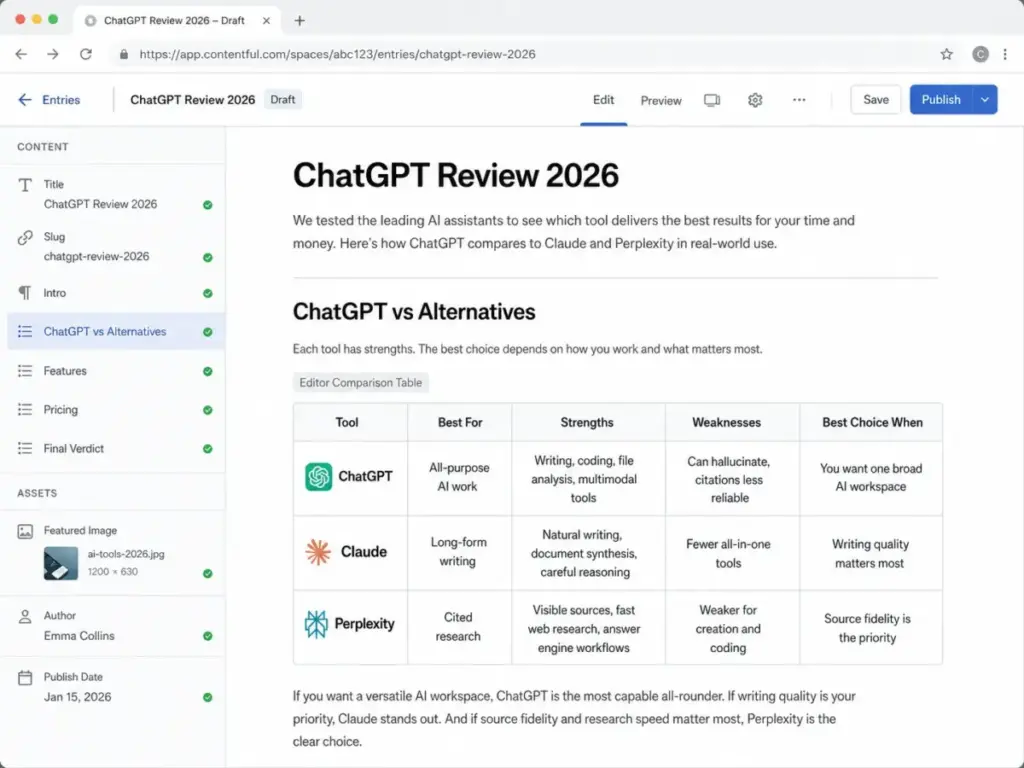
The right alternative to ChatGPT is determined by the failure mode you cannot accept, not by which product has the highest benchmark score.
ChatGPT vs Claude
Anthropic’s Claude is stronger for nuanced, natural-sounding long-form writing and careful document synthesis. Our ChatGPT vs Claude comparison breaks down where each one wins.
Claude’s weakness is a narrower consumer tool ecosystem, and developers using Claude Code for heavy work may find usage economics confusing at scale. Choose Claude when writing quality and careful reasoning are your top priorities, and ChatGPT when you need breadth across writing, coding, images, and voice.
ChatGPT vs Gemini
Gemini is the better option for buyers already running their workflows inside Google Workspace. Our ChatGPT vs Gemini comparison covers the Gmail, Docs, and Drive integration details.
The limitation is that Gemini’s buyer experience depends heavily on your Google account setup and regional feature availability. If you do not live in Google Workspace, Gemini’s integration advantage disappears.
ChatGPT vs Perplexity
Perplexity is purpose-built for cited search, and every answer includes visible source links designed for verification. Its answer-engine model is built around that single job.
It is weaker than ChatGPT for general writing, coding, and multimodal work. Choose Perplexity when source visibility is the core requirement.
ChatGPT vs Microsoft Copilot
Copilot delivers its strongest value inside Microsoft 365. If your company runs on Word, Excel, PowerPoint, and Teams, Copilot’s data access is a clear advantage.
As a standalone creative or coding assistant outside that ecosystem, it is not competitive with ChatGPT. The deciding factor is where your company’s data already lives.
ChatGPT vs NotebookLM
NotebookLM from Google is designed for source-grounded document analysis. You upload a fixed set of sources, and it answers only from within them.
It is the better tool when your task is analyzing specific documents with no hallucination risk from outside sources. It is not useful as a general-purpose assistant.
| Alternative | Better Than ChatGPT For | Worse Than ChatGPT For | Choose It When |
|---|---|---|---|
| Claude | Nuanced long-form writing, document synthesis | Broad consumer tool surface, voice, image generation | Writing quality matters more than tool breadth |
| Gemini | Google Workspace integration, Gmail and Docs workflows | Standalone creative and coding tasks | Your team already runs on Google |
| Perplexity | Cited search, visible per-claim sources | General coding, creation, agentic tasks | Source fidelity is the top requirement |
| Microsoft Copilot | Microsoft 365 data access, Teams and Excel workflows | Standalone use outside the Microsoft ecosystem | Company data lives in Microsoft 365 |
| NotebookLM | Source-grounded document analysis, citation fidelity | General all-purpose assistance | The task is “analyze my files only” |
Is ChatGPT Safe for Business?
Data safety on ChatGPT depends on which plan you use, and the difference between individual and business plans is significant enough to affect every team deployment decision.
On Free and Plus plans, OpenAI’s default settings may use your conversations to improve its models unless you opt out manually in account settings. On ChatGPT Business, ChatGPT Enterprise, and API products, OpenAI’s enterprise privacy policy states that business data is not used for training by default, and that exclusion is automatic at the plan level.
Enterprise customers have access to data residency options in regions including the U.S., Europe, UK, and Japan, per OpenAI’s business data page. This matters for teams with regulatory requirements around where data is processed and stored.
Connector permissions are a separate risk layer. When a user connects ChatGPT to Google Drive, SharePoint, or Slack, the model gains read access to whatever that user can access, so a connector misconfigured at onboarding can expose internal documents beyond the intended scope.
Two 2026 additions help here. Lockdown Mode, announced June 4, 2026, can restrict live web access, connectors, Deep Research, Agent Mode, and file downloads for sensitive work, and Business now includes plugin governance controls in workspace settings for discovery and install policy.
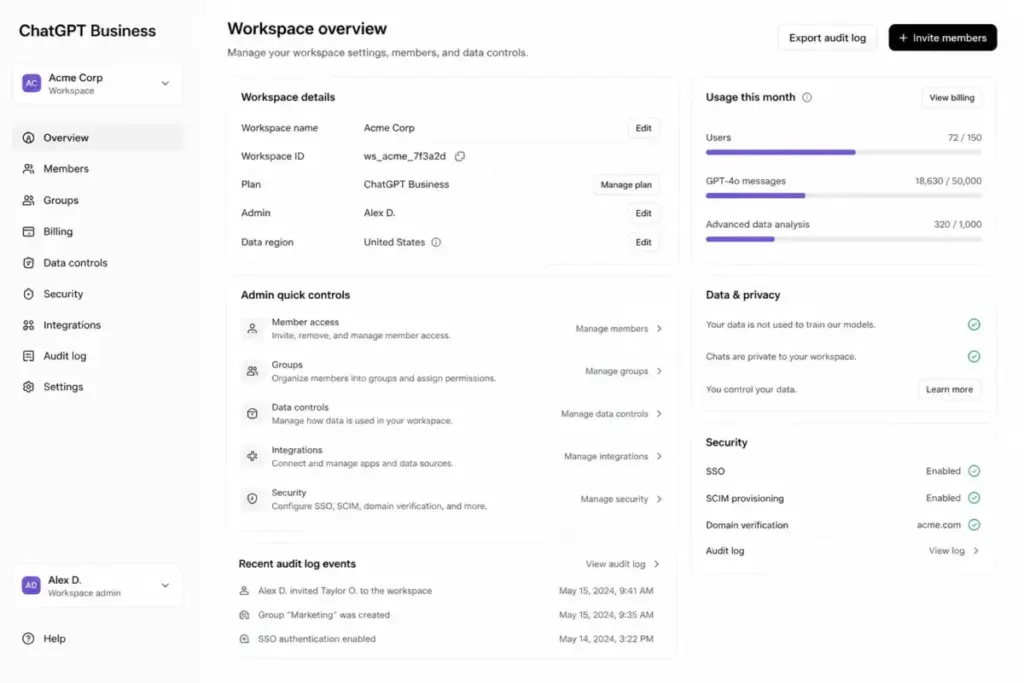
Enterprise tier adds SSO, SCIM provisioning, and dedicated compliance support. If your organization operates in a regulated sector and requires documented compliance coverage, Enterprise is the only tier with the controls to support that conversation with your legal team. Do not make compliance promises to clients based on Business tier controls alone.
Who Should Use ChatGPT?
Fit depends on workload, not job title. The profiles below map real workflows to specific plan recommendations.
Solo consultant writing 10-20 client emails per week: The Free plan may hit its limit quickly, and its US ads are a distraction for client work. Plus at $20/month removes both, adds file upload for reference documents, and pays for itself in one or two hours of saved writing time per week.
Budget-first freelancer who mostly drafts and edits: Go at $8/month buys Plus-level message volume on the same GPT-5.5 Instant model, which is the cheapest way to escape the Free cap. Move to Plus only when you need Deep Research, Sora, or an ad-free interface.
Freelance developer debugging Python or React projects: Plus handles code explanation, error analysis, and function generation well for moderate use. For heavy daily coding where you hit caps consistently, the $100 Pro Codex tier is the calculation to run against your billing rate.
3-person content team producing 8-12 briefs per month: Business at the 2-seat minimum centralizes billing, shares custom GPTs with preset brand voice, and keeps chat history in the workspace rather than personal accounts. At $20/seat annually, it is close to Plus pricing with added controls.
5-person SaaS sales team writing account research and follow-ups: Business with connectors to HubSpot or Salesforce supports account research at scale, and at five seats it matches the cost of five Plus accounts while adding governance. Configure connector permissions before deployment.
College student summarizing notes and planning study sessions: Plus is the right tier for file upload, long study threads, and image-based study aids at $20/month. Go at $8 works if ads and the lighter feature set are acceptable.
20-person operations team testing AI workflows before enterprise rollout: Business is the correct entry point, allowing real workspace testing with admin controls without an Enterprise sales cycle. Use it to document governance gaps before scaling.
Enterprise admin needing SSO, SCIM, data residency, and compliance controls: This is the explicit use case for ChatGPT Enterprise, where custom pricing is standard. Budget for implementation time alongside the license cost.
Who Should Not Use ChatGPT?
There are several cases where a different tool is the more honest recommendation.
If one of these describes your core need, our ChatGPT alternatives guide lines up the full shortlist side by side.
- Use Perplexity if cited search is your core workflow. ChatGPT’s search does not match Perplexity’s source-linking discipline for research tasks.
- Use NotebookLM if your source set is fixed and citation fidelity matters more than general assistance. Answers grounded strictly in your uploaded files carry lower hallucination risk.
- Use Claude if long-form writing quality matters more than tool breadth. Claude produces more natural prose for documents, reports, and long-form content.
- Use Gemini if Google Workspace-native AI is the main need. ChatGPT’s Google Drive connector does not match Gemini’s native Docs and Gmail integration.
- Use Microsoft Copilot if Microsoft 365 is the center of your work. Copilot’s data access inside Teams, Excel, and Word is a structural advantage ChatGPT cannot match with connectors alone.
- Skip the cheap tiers for client-facing work if ads are a problem. Free and Go now show ads in the US, so pay for Plus when a clean, ad-free interface matters.
- Do not use ChatGPT alone for medical, legal, financial, or high-stakes decisions. The model can produce confident-sounding incorrect output without flagging uncertainty.
Review Methodology
This review follows our SaaS Zap review methodology, which relies on official product documentation, verified pricing data with source dates, documented plan limits, published user-review signals from G2 and Capterra, and structured buyer workflow analysis. No benchmark scores, latency numbers, or testing periods are invented.
Pricing, model, and feature facts in this update were verified against OpenAI’s pricing page, help center, and release notes as of June 30, 2026. Where a figure is dynamic or varies by region, the article says so rather than stating false precision.
Daniel Rivera’s Quick Take
Most buyers overthink the plan decision and underthink the prompt decision. I have watched professionals pay for the top Pro tier because the name sounds like the professional one, even though their daily volume fits comfortably inside Plus. That is straightforward subscription waste.
The split Pro lineup makes this worse if you are not paying attention. Since April, there is a $100 Pro tier and a $200 Pro tier running the same GPT-5.5 Pro model, and the only difference is usage volume. If you are eyeing $200, start at $100, because most people who think they need the top tier never exhaust the middle one.
The bigger 2026 shift is that the model gap between plans has nearly closed. GPT-5.5 Instant is the default from Free to Enterprise now, so what separates a productive user from a frustrated one is not which plan they bought. It is how well they structure their instructions, and a tight prompt on the Free tier will beat a lazy prompt on Pro every time.
The one area where I would push buyers up early is team deployment. At five seats, Business costs the same as five Plus accounts and adds SSO, default training exclusion, and admin controls, so there is no reason to have a team copy-pasting between personal accounts. Pay the seat cost and get the governance from day one.
FAQ
Is ChatGPT worth it in 2026?
Yes, for most professional workflows at the Plus tier. At $20/month it replaces several single-function writing and research tools. It is not worth it if your only use case is cited research, where Perplexity fits better at a lower price.
What is ChatGPT best used for?
Daily writing, coding help, file analysis, structured research synthesis, and image generation, plus building repeatable workflows with custom GPTs. It is less reliable for tasks needing exact source citations or high-stakes factual accuracy without verification.
How much does ChatGPT cost in 2026?
Free is $0. Go is $8/month, Plus is $20/month, Pro is $100 or $200/month across two tiers, and Business is $20/user/month on annual billing (or $25 monthly, two-seat minimum). Enterprise is custom pricing, verified as of June 30, 2026.
What is the difference between ChatGPT Free and Plus?
Both now run GPT-5.5 Instant by default. Free has limited use in a rolling 5-hour window and shows US ads, while Plus adds 160 messages every 3 hours, Deep Research, Sora, higher reasoning limits, and an ad-free interface for $20/month.
Is ChatGPT Pro worth the price?
Only if you consistently exhaust Plus limits on high-complexity work. Since April 2026, start with the $100 Pro tier, which carries the same GPT-5.5 Pro model and 5x Plus usage; the $200 tier only pays off if you regularly blow through that ceiling.
Is ChatGPT Go worth $8/month?
Yes if you hit the Free cap but do not need premium features. Go gives Plus-level message volume on GPT-5.5 Instant, but it still shows ads and excludes Deep Research and Sora, so ad-averse or research-heavy users should pay for Plus.
Is GPT-5.6 available in ChatGPT?
Not yet. OpenAI previewed GPT-5.6 (Sol, Terra, and Luna) on June 26, 2026 through the API and Codex for about 20 vetted partner organizations only, so it is not in ChatGPT during the preview. GPT-5.5 remains the model behind every ChatGPT plan, with general availability for GPT-5.6 expected in the coming weeks and no committed date.
What are the biggest limitations of ChatGPT?
Hallucinations, plan-limit and model changes without notice, prompt sensitivity, connector permission risk, ads on the cheap tiers, and subscription overlap with other tools. Business deployment also requires deliberate governance setup.
Is ChatGPT safe for business use?
On Business and Enterprise plans, yes, with proper configuration. OpenAI’s enterprise privacy policy excludes business data from training by default on those tiers, while Free and Plus users must opt out manually and connector permissions require admin oversight on every plan.
Does ChatGPT use my data for training?
On Free and Plus plans, conversations may be used unless you opt out in settings. On Business, Enterprise, and API products, data is excluded from training by default per OpenAI’s documented policy.
Which is better, ChatGPT or Claude?
Claude is better for careful, high-quality long-form writing and document-heavy synthesis. ChatGPT is better when you need a wider set of tools across text, code, image, voice, and search in one subscription.
Which is better, ChatGPT or Gemini?
Gemini is better if your team already runs on Google Workspace. ChatGPT is better as a standalone tool or for users not embedded in the Google ecosystem.
Which is better, ChatGPT or Perplexity?
Perplexity is better for cited search where source visibility matters per claim. ChatGPT is better for general writing, creation, coding, and multimodal tasks.
What ChatGPT plan should I choose?
Start with Free to confirm the product fits, since it now runs the same GPT-5.5 Instant model as paid tiers. Move to Go at $8 or Plus at $20 when you hit the cap, choose Business when a team of two or more needs shared billing or admin controls, and consider Enterprise only when SSO, data residency, or compliance documentation is required.