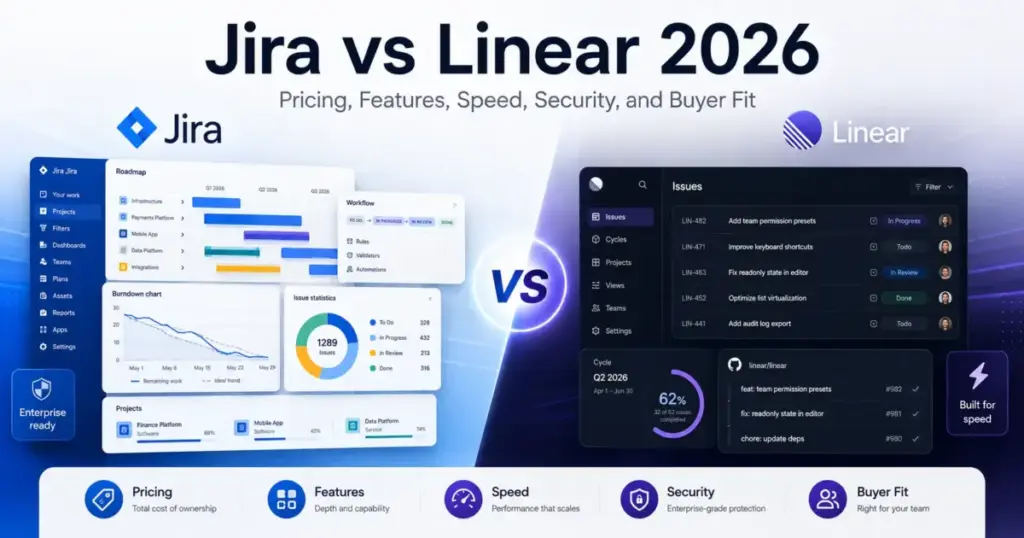
Most Jira vs Linear comparisons tell you Linear is sleeker and Jira is bigger. That framing misses the actual decision. The real trade-off is governance depth versus product-team momentum, and which one costs you more depends on your team size, reporting needs, and how much admin overhead you can absorb.
I’ve tracked both tools through migrations, pricing changes, and feature launches over the past two years. Here is the short version: choose Jira if your organization needs cross-team dashboards, workflow customization, Marketplace ecosystem depth, and enterprise governance. Choose Linear if you are a product or engineering team that values speed, opinionated workflows, GitHub-native development, and minimal configuration. If you need project management software for non-technical departments, resource planning, or client-facing work, skip both and evaluate alternatives below.
| Category | Winner | Why |
|---|---|---|
| Pricing and cost predictability | Tie | Jira starts lower per seat; Linear has simpler tiers with fewer add-on assumptions |
| Ease of setup and adoption | Linear | Opinionated workflows reduce configuration overhead for engineering teams |
| Workflow customization | Jira | Custom fields, work types, Marketplace apps, broader cross-team configuration |
| Reporting and governance | Jira | Advanced dashboards, planning features, enterprise administration |
| Developer workflow and speed | Linear | Built around issues, cycles, GitHub automation, keyboard-first UX |
| Integrations and ecosystem | Jira | 3,000+ Marketplace apps versus Linear’s focused integration set |
| Security and compliance | Tie | Both offer SOC 2, GDPR, encryption; plan gates for SSO/SCIM differ |
| API and automation ceilings | Caveated | Jira enforcing new REST rate limits March 2026; Linear has documented inconsistency |
| Support and SLA | Jira | SLA available at Premium tier; Linear reserves SLA for Enterprise |
At a Glance: Jira vs Linear
| Dimension | Jira | Linear |
|---|---|---|
| Best for | Mid-market and enterprise teams needing customizable workflows, cross-team reporting, and Atlassian ecosystem depth | Product and engineering teams that prioritize speed, clean UX, and low admin overhead |
| Starting paid price | $7.91/user/month (Standard) | $10/user/month billed yearly (Basic) |
| Practical tier for most teams | Standard or Premium | Basic or Business |
| Free plan | Yes, up to 10 users, 2 GB storage | Yes, unlimited members, capped at 250 issues and 2 teams |
| Setup difficulty | Medium to high | Low to medium |
| Official pricing page | Jira pricing | Linear pricing |
How We Compared Jira and Linear
This comparison evaluates Jira and Linear across nine dimensions: pricing, ease of setup, workflow customization, reporting and governance, developer workflow speed, integrations, security, API/automation limits, and support. Every claim is backed by official product pages, pricing pages, documentation, and billing references retrieved on June 18, 2026.
I did not test either product hands-on for this comparison. All evidence comes from official and documented sources. Where data is caveated (Atlassian’s calculator-based pricing, Linear’s API rate-limit documentation inconsistency, the permanence of Linear’s data region choice), I note it explicitly. SaaSZap has no affiliate relationship with Atlassian or Linear.
If You Need Speed and Low Config Overhead, Choose Linear
This is the scenario where Linear pulls ahead with zero debate.
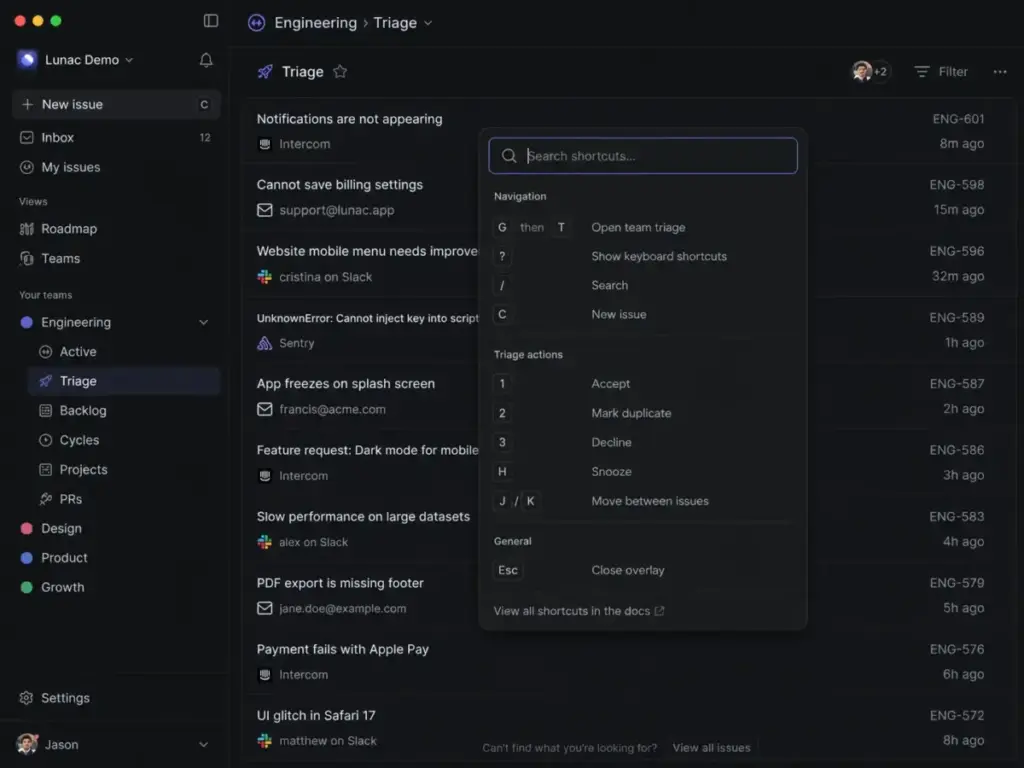
Picture a 10-person engineering team spinning up their first issue tracker. In Linear, you create a workspace, invite the team, and start writing issues. Cycles replace sprint ceremonies. Triage queues replace backlog grooming meetings. The keyboard shortcuts mean most engineers never touch the mouse. That is the workflow test: from signup to first shipped cycle, Linear takes hours, not days.
Jira can be fast with a Scrum or Kanban template, but the configuration surface expands quickly. Custom fields, workflow states, permission schemes, board filters. A 10-person team using standard agile workflows will be fine. A 10-person team that tries to replicate their last company’s Jira setup will spend a week configuring before writing the first ticket. The admin overhead adds up. (Source: C11, C12, C20, C21, C24)
Who this applies to: Startups, seed-stage teams, and engineering-only squads under 25 people who want to ship code, not configure project management software.
If You Need Cross-Team Reporting and Governance, Choose Jira
Your reporting needs will answer this one fast.
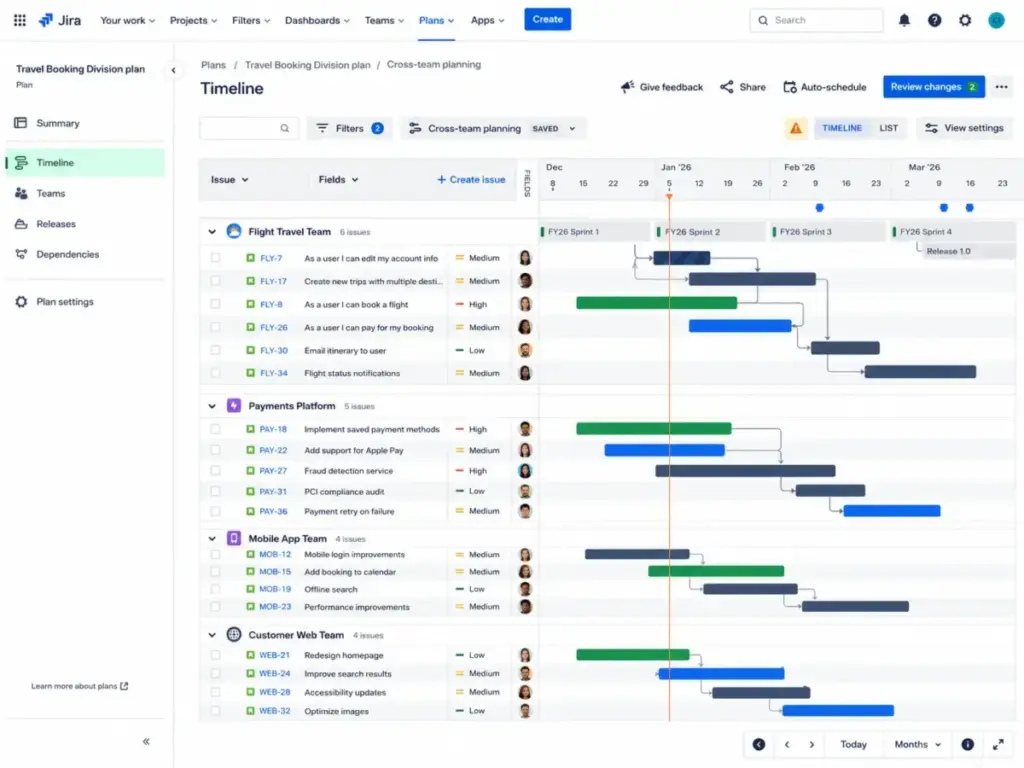
Jira offers dashboards, advanced planning (Premium and above), cross-project queries via JQL, goals tracking, and the kind of multi-team visibility that engineering leadership and product operations teams expect. When your VP of Engineering asks for a cross-team velocity dashboard that feeds into quarterly planning, Jira delivers it out of the configuration panel. Linear has Insights and dashboards, and they are improving. But Linear’s reporting is built for product teams tracking cycles and initiatives, not for portfolio-level governance across five departments.
Does this tool work the same at 50 users as at 5? For Jira, the answer is yes, though the admin cost grows proportionally. For Linear, the answer is yes for engineering workflows, but cross-functional visibility starts to strain. (Source: C2, C3, C19, C26)
Who this applies to: Product organizations with 50+ people, multiple departments, and leadership reporting requirements. Also, teams subject to audit trails, compliance workflows, and formal approval chains.
If You Want GitHub-Native Development Workflows, Choose Linear
Linear was built around how engineers actually work with code. GitHub automation triggers issue state changes on PR merge. Diffs give code-aware context inside issues. The triage queue acts as an inbox for incoming bugs and requests. The entire interface is keyboard-first.
Jira integrates with GitHub through native and Marketplace connections. You can link commits, branches, and pull requests to Jira issues. But the experience routes through a broader project management interface designed for mixed audiences. The friction point: switching between Jira’s board view and GitHub’s PR view loses context that Linear keeps in one place.
The paraphrased sentiment from engineering teams on Reddit captures it well: startup and engineering users frequently praise Linear for a cleaner interface, faster adoption, and less overhead than Jira. (Source: C11, C17, C21, C22, C23, C25)
Who this applies to: Engineering teams with GitHub or GitLab as their primary development platform. Teams that measure productivity in PRs merged and bugs triaged, not in dashboard widgets created.
If You Need Marketplace Ecosystem Depth, Choose Jira
Jira’s Atlassian Marketplace lists 3,000+ apps. That includes native and third-party integrations with Confluence, Bitbucket, Slack, Microsoft Teams, Google Workspace, Zoom, GitHub, GitLab, Figma, Jenkins, ServiceNow, and hundreds more niche tools.
Linear’s integration set is focused: GitHub, GitLab, Slack, Figma, Sentry, Zendesk, Intercom, Front, Salesforce, Microsoft Teams, Notion, Zapier, Google Sheets, Discord, and others. It also supports a GraphQL API and webhooks. For teams that live in GitHub and Slack, Linear’s integrations are sufficient.
But here is the scale question. If your organization depends on Tempo for time tracking, BigPicture for portfolio planning, or any of the niche Marketplace apps that connect Jira to ITSM, finance, or compliance tooling, Linear does not have an equivalent ecosystem. That is not a criticism of Linear. It is a category difference. (Source: C4, C17, C19, C26, C28)
For a broader look at what connects to Jira, see our Jira analysis and review.
If You Need Enterprise SSO and SCIM, Compare the Right Tiers
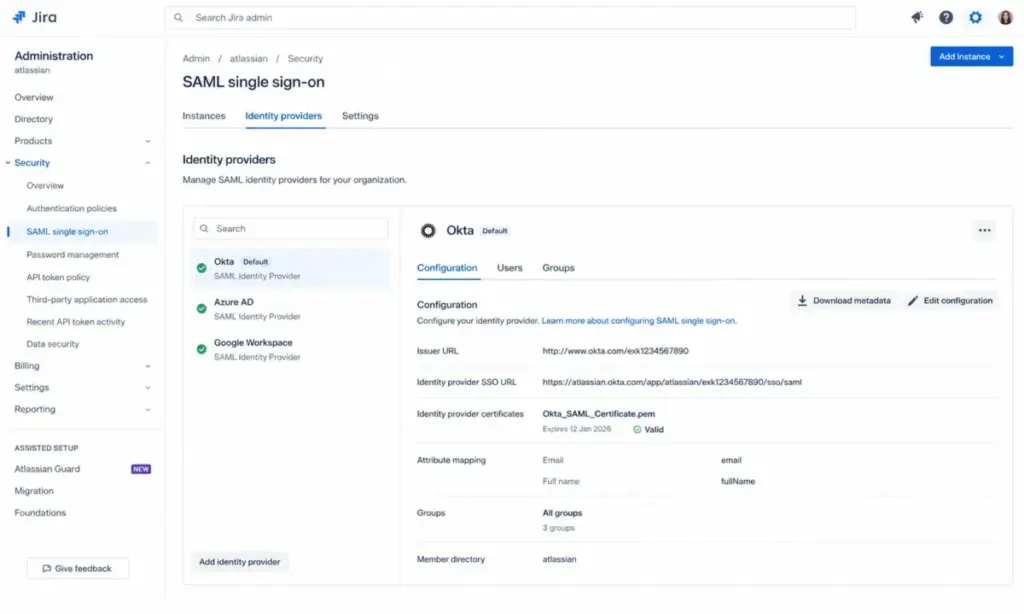
Both tools gate SAML SSO and SCIM provisioning behind higher-priced plans. Comparing entry tiers on security features misleads buyers.
- Jira: SAML and SCIM require Atlassian Guard (a separate subscription) or are included with Jira Enterprise. Jira Premium adds IP allowlisting and a 99.9% SLA. Enterprise adds 99.95% SLA, phone support, and centralized administration. (Source: C2, C5)
- Linear: SAML and SCIM are Enterprise-only. Linear Enterprise includes granular admin controls, advanced org modeling, priority support, account management, custom terms, and an uptime SLA. HIPAA BAA is also available at the Enterprise tier. (Source: C8, C13)
| Security Feature | Jira Plan Gate | Linear Plan Gate | Buyer Impact |
|---|---|---|---|
| SAML SSO | Guard add-on or Enterprise | Enterprise only | Both gate SSO high; compare Guard cost vs. Linear Enterprise |
| SCIM provisioning | Guard add-on or Enterprise | Enterprise only | Same gate pattern for identity automation |
| SOC 2 | All plans (Atlassian Trust) | All plans (Type II) | Equivalent baseline |
| GDPR | All plans | All plans | Equivalent baseline |
| HIPAA | Not prominently listed | Enterprise with BAA | Linear advantage for healthcare use cases |
| Data residency | Standard and above | All plans (US or EU, permanent) | Linear’s region choice is irreversible |
| IP allowlisting | Premium and above | Not prominently listed | Jira advantage for network-level access |
| Uptime SLA | 99.9% at Premium | Enterprise only (custom) | Jira offers SLA at a lower price tier |
If your security team requires SSO and SCIM, price the comparison at Jira Enterprise (or Jira Standard/Premium plus Atlassian Guard) versus Linear Enterprise. The entry paid tiers do not include these features on either platform.
Jira vs Linear Pricing Breakdown
Pricing is the section where most SERP articles lose precision. They quote a headline number and skip the billing model, plan gates, and hidden costs that shape your actual invoice.
Jira Plans (verified June 18, 2026)
- Free: $0 for up to 10 users. 2 GB file storage. Community support. Limited automation.
- Standard: Starts at $7.91/user/month. 250 GB storage. Advanced permissions. Data residency. Standard support. Atlassian’s pricing is calculator-based and varies by seat tier. (Source: C1, C2)
- Premium: Starts at $14.54/user/month. Unlimited storage. 99.9% SLA. 24/7 Premium Support with 1-hour critical response target. Advanced planning. (Source: C1, C2)
- Enterprise: Custom pricing, annual billing, contact sales. Guard Standard included, 99.95% SLA, multiple instances, phone support. (Source: C2, C5)
Monthly cloud subscriptions use Maximum Quantity Billing (MQB): the highest user count during a billing period determines the charge. That detail matters for teams with seasonal contractors or fluctuating headcount.
Linear Plans (verified June 18, 2026)
- Free: $0 for unlimited members. Capped at 2 teams, 250 issues, 10 MB file uploads. Agent platform and Linear Agent included. (Source: C8, C9)
- Basic: $10/user/month billed yearly. 5 teams. Unlimited issues. Unlimited file uploads. Admin roles. Monthly billing exists, but the exact monthly surcharge was not visible on the retrieved pricing page. (Source: C8, C10)
- Business: $16/user/month billed yearly. Unlimited teams. Private teams and guests. Triage Intelligence. Linear Insights. Linear Asks. Zendesk and Intercom integrations. (Source: C8, C9)
- Enterprise: Custom pricing, annual billing only. SAML, SCIM, priority support, account management, custom terms, uptime SLA. (Source: C8, C13)
For a deeper breakdown of Jira’s pricing structure and tier math, we have a separate guide.
Cost at Scale
| Users | Jira Standard (est.) | Linear Basic (est.) | Caveat | Price Winner |
|---|---|---|---|---|
| 5 | $39.55/mo | $50/mo | Both free tiers may suffice; Jira caps at 10 users, Linear caps at 250 issues | Jira |
| 10 | $79.10/mo | $100/mo | Jira Free still works at 10 users; Linear Free hits issue cap fast | Jira |
| 25 | $197.75/mo | $250/mo | Jira’s progressive pricing may lower per-seat cost further | Jira on sticker; Linear may win on admin overhead |
| 50 | $395.50/mo | $500/mo | Jira may need Marketplace apps or admin time | Jira on sticker; total cost depends on add-ons |
Jira Standard prices use the starting price of $7.91/user/month from Atlassian’s pricing page. Actual cost varies by seat tier. Linear Basic uses the annual-billed $10/user/month. Prices verified June 18, 2026. Taxes, add-ons, AI credits, Marketplace apps, implementation, and migration costs are not included. (Source: C1, C2, C8, C10)
Hidden Costs
Jira: Marketplace apps, Atlassian Guard for SAML/SCIM (unless Enterprise), Confluence or Loom subscriptions, implementation and admin time, workflow cleanup, migration consulting, MQB effects, taxes.
Linear: Business tier required for private teams, guests, Linear Insights, Linear Asks, and support integrations. Enterprise required for SAML/SCIM. Optional AI credits. Sales tax in listed US jurisdictions. Migration cleanup for complex Jira histories.
At 25 seats, the math changes. A Jira Standard subscription runs about $197.75/month. Linear Basic runs $250/month. Jira looks cheaper. But if the Jira instance needs two Marketplace apps at $3/user/month each and a half-day per week of admin time, the gap narrows or inverts. Run both calculations before committing.
Setup and Migration Difficulty
| Migration Item | Jira to Linear | Linear to Jira | Risk Level |
|---|---|---|---|
| Issues and comments | Supported via Jira sync / Migration Assistant | CSV export then Jira CSV import | Low |
| Custom fields | Not auto-mapped; manual recreation needed | Must create matching fields in Jira | Medium |
| Workflow statuses | Linear uses a fixed status model; complex Jira statuses need mapping | Jira supports custom statuses; rebuild needed | Medium |
| Saved queries and filters | JQL filters do not transfer | Linear views do not transfer | Medium |
| Marketplace app data | Not portable | N/A | High |
| Automation rules | Must rebuild in Linear’s automation model | Must rebuild in Jira automation | Medium |
| Attachments | Check file size limits (Linear Free caps at 10 MB) | May need manual handling | Medium |
| Compliance audit trails | Not portable; archive before migration | Not portable; archive before migration | High |
Jira to Linear difficulty: Medium to High. Linear provides a Jira sync feature and an Issue Migration Assistant. Standard issues, projects, and comments transfer well. Custom fields, complex statuses, saved JQL filters, Marketplace app data, and automation rules require manual cleanup. (Source: C7, C16)
Linear to Jira difficulty: Medium. Linear data can be exported and imported via CSV. Jira Cloud recommends splitting large imports into batches of 1,500 work items per file. Jira admins will need to recreate workflows, fields, permissions, and dashboards.
The insider tip: if you are migrating from a heavily customized Jira instance, run a test import with 50 issues before committing. The migration assistant handles structure well, but field mappings and status translations break in ways you will not predict from reading documentation alone.
Where Jira Wins
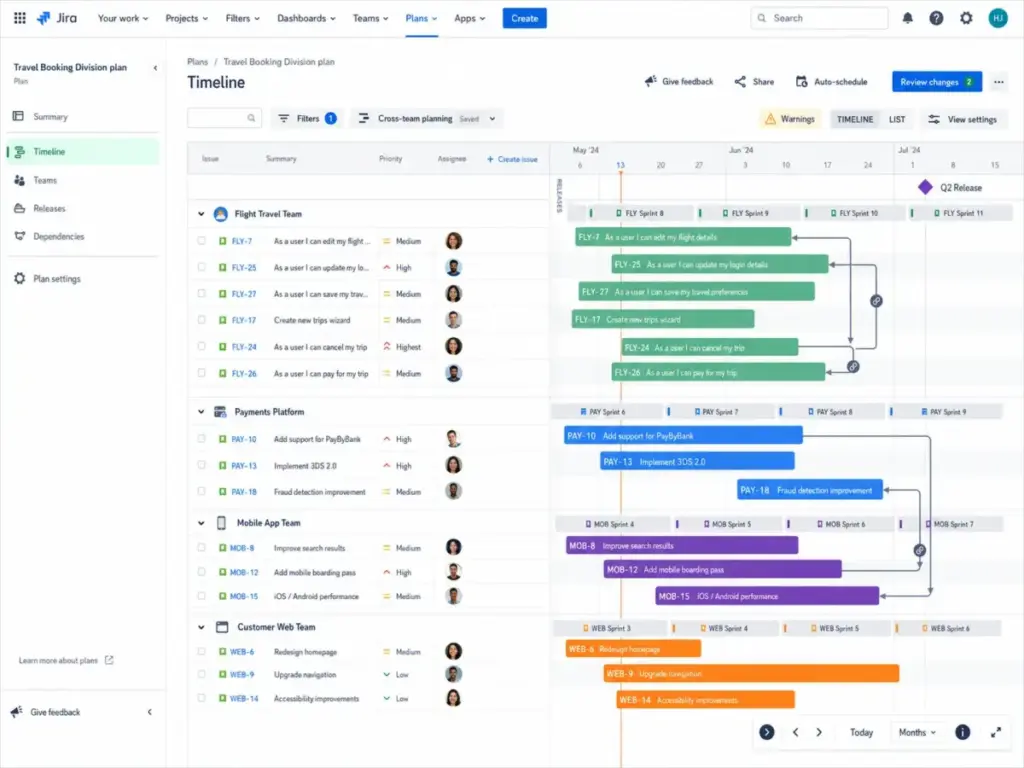
- Cross-team dashboards and JQL queries for multi-department visibility
- 3,000+ Marketplace apps covering time tracking, portfolio planning, ITSM, and niche integrations
- Custom workflow states, approval chains, and conditional field logic for complex processes
- Atlassian ecosystem depth: Confluence, Loom, Bitbucket, Jira Product Discovery, Jira Align
- SLA and uptime guarantees at Premium tier (99.9%) versus Linear’s Enterprise-only SLA
For teams considering other options alongside Jira, our Jira alternatives breakdown covers the full landscape.
Where Linear Wins
- Setup speed: From signup to first shipped cycle in hours, not days
- Keyboard-first engineering UX with GitHub automation, Diffs, and triage queues
- Low admin overhead: No dedicated Jira admin needed for a 25-person team
- Simpler pricing tiers with fewer ecosystem add-on assumptions
- AI-native features: Linear Agent, MCP access, and Asks built into the product (Business tier and above)
If you want to compare Linear against other focused tools, see our Linear alternatives guide.
When to Avoid Both: Alternatives Worth Evaluating
Neither Jira nor Linear fits every team. Here is when to look elsewhere.
| Alternative | Best For | Why Consider |
|---|---|---|
| monday dev | Cross-functional product and development teams wanting visual PM with broad non-technical adoption | Fills the gap when Linear is too engineering-specific and Jira is too admin-heavy |
| Shortcut | Software teams wanting a lighter developer-focused tool | Middle path: more structure than GitHub Issues, less governance than Jira |
| ClickUp | Teams wanting all-in-one tasks, docs, dashboards, and broad department coverage | Best when the goal is consolidating multiple work management tools into one |
Avoid both if you need resource planning and time tracking as first-class features, client-facing work management with billing, or product discovery and delivery combined in one tool.
If the Jira vs Linear comparison has you leaning toward Jira but wanting less complexity, our Jira vs ClickUp comparison and Jira vs Asana comparison explore those trade-offs.
Final Verdict
There is no universal winner here. That is not a cop-out; it is the math.
Choose Jira if you need advanced reporting, workflow customization, stakeholder visibility, enterprise administration, complex permissions, or Atlassian ecosystem depth. You will pay for it in admin time and configuration complexity, and that trade-off is worth it at 50+ seats with cross-functional requirements.
Choose Linear if you are a product and engineering team that values speed, clean UX, cycles, GitHub/GitLab workflows, and minimal admin overhead. You will pay more per seat at the entry tier ($10 vs $7.91), but you will spend less time configuring and more time building.
Choose neither if your needs are broader than software product development. Monday dev, Shortcut, ClickUp, and Asana each serve adjacent use cases that Jira and Linear do not prioritize.
Understanding what project management involves at a fundamental level can help frame which tool category fits your team’s actual work.
FAQ
Is Linear actually better than Jira for developers?
Yes, if your definition of “better” means faster issue creation, keyboard-first navigation, GitHub-native automation, and less UI friction. Linear was built for engineering workflows. Jira works for developers too, but its interface serves a broader audience, which means more clicks and more configuration to get to the same endpoint.
Why do startups prefer Linear over Jira?
Low setup overhead. Linear’s opinionated workflow (issues, cycles, triage) means a 5-person team can start shipping in an afternoon. Jira’s free tier works for up to 10 users, but the configuration surface can feel like overkill when the team just needs to track bugs and features.
Is Jira still worth the complexity in 2026?
Yes, if your organization has outgrown simple issue tracking. Jira’s value shows up when you need JQL-powered cross-project queries, department-level dashboards, Marketplace integrations for time tracking or ITSM, and formal governance. At 50+ seats with multiple teams, Jira’s complexity becomes a feature, not a bug.
How much does Jira really cost after add-ons?
More than the pricing page suggests. Jira Standard starts at $7.91/user/month, but add Atlassian Guard for SSO ($0 to $5+/user/month depending on tier), a time-tracking app ($3–$8/user/month), and Confluence for documentation ($5.16/user/month starting), and the per-user cost can double. Compare that total against Linear Business at $16/user/month before making a decision.
Is Linear's free plan enough for a startup?
No, unless your team creates fewer than 250 issues total and uses no more than 2 teams. Active product teams hit the 250-issue cap within weeks. Once you outgrow it, Basic at $10/user/month billed yearly removes the cap and adds 5 teams.
Can non-engineering teams use Linear?
Yes, if they accept Linear’s opinionated workflow model. Design and product management teams adopt Linear well because its triage, cycles, and project structure map to product development. Marketing, sales, and operations teams will find it limiting, as Linear does not offer the custom templates, client-facing views, or broad field types that general-purpose PM tools provide.
How hard is it to import Jira issues into Linear?
Depends on your Jira complexity. Linear offers a Jira sync feature and an Issue Migration Assistant that handles standard issues, comments, and projects well. Custom fields, complex workflow statuses, JQL filters, and Marketplace app data require manual migration. For a team with 500 standard issues, expect a day. For a team with 5,000 issues, custom fields, and automation rules, expect a week of cleanup.
What does Jira do better than Linear?
Jira outperforms Linear in five areas: cross-team dashboards and reporting, workflow customization with conditional logic, Marketplace ecosystem breadth (3,000+ apps), enterprise administration and governance, and uptime SLA availability at the Premium tier. These advantages matter most for organizations with 50+ users and cross-functional requirements.
Methodology
This comparison was researched and written by James Carter, Senior Product Analyst at SaaSZap. All pricing was verified against official product pricing pages on June 18, 2026. Feature, security, and integration claims are sourced from official product documentation and billing references. User sentiment was gathered from public Reddit discussions and is clearly marked as paraphrased. SaaSZap has no affiliate relationship with Atlassian or Linear.
For more on how we evaluate agile and scrum workflows in the tools we review, see our knowledge base.
James Carter, Senior Product Analyst at SaaSZap James covers project management and product development tools, helping teams match their workflow complexity to the right software.