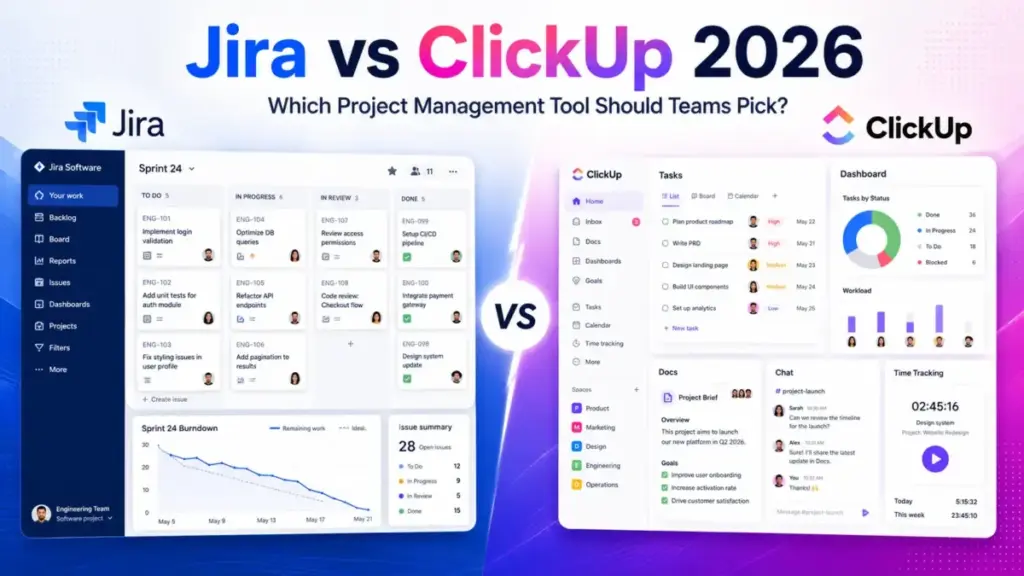
Your engineering lead wants Jira for sprint control. Your marketing manager wants ClickUp because it bundles docs, chat, and dashboards. Both are staring at you, waiting for a decision.
That tension is the real Jira vs ClickUp question in 2026. It is not “which has more features.” It is whether your team needs a governed engineering system or a flexible all-in-one work hub. After comparing pricing at scale, feature gates, automation limits, and buyer-fit scenarios across both platforms, here is the short version: choose Jira if your team ships software with formal Scrum or Kanban and needs Atlassian ecosystem depth. Choose ClickUp if your team wants tasks, docs, chat, time tracking, and dashboards in a single workspace without buying Confluence separately.
This comparison draws on official documentation, verified pricing pages, and third-party review signals from Capterra for both tools. I review top project management tools regularly, and the Jira vs ClickUp decision keeps coming up for teams choosing between project management approaches that serve very different operational models.
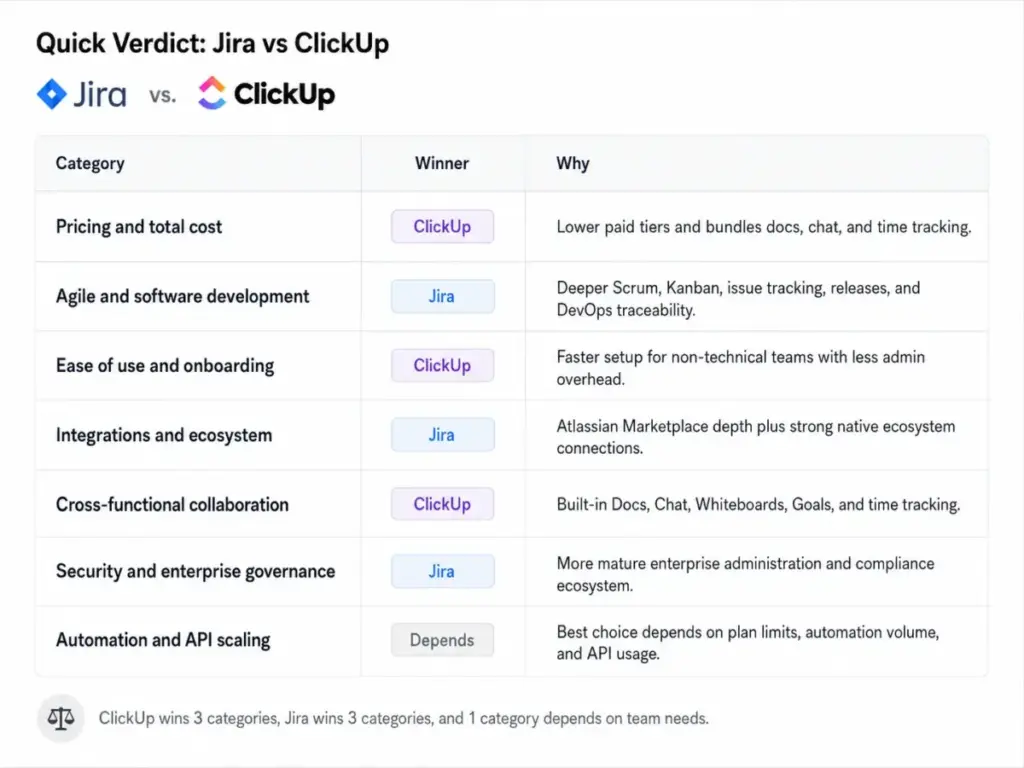
Quick Verdict: Jira vs ClickUp
| Category | Winner | Why |
|---|---|---|
| Pricing and total cost | ClickUp | Lower paid tiers and bundles docs, chat, time tracking that Jira offloads to Confluence or Marketplace |
| Agile and software development | Jira | Deeper Scrum, Kanban, issue tracking, releases, and DevOps traceability |
| Ease of use and onboarding | ClickUp | Faster setup for non-technical teams, less admin overhead |
| Integrations and ecosystem | Jira | Atlassian Marketplace with thousands of apps, plus native Bitbucket, Confluence, and Trello connections |
| Cross-functional collaboration | ClickUp | Built-in Docs, Chat, Whiteboards, Goals, and native time tracking |
| Security and enterprise governance | Jira | More mature enterprise administration, compliance ecosystem, and multi-site controls |
| Automation and API scaling | Depends | Jira automation tiers push teams toward Premium. ClickUp exposes clear API rate limits by plan |
What this means: ClickUp wins 4 of 7 categories, but the categories Jira wins (agile depth, ecosystem, enterprise governance) are the ones engineering-heavy organizations care about most. Neither tool is universally better. The winner depends on your team composition.
How We Compared Jira and ClickUp
James Carter here. I have reviewed 35+ project management and collaboration tools for SaaSZap, and I have tracked migrations between tools like Asana, Monday.com, Trello, ClickUp, and Jira across 20+ teams.
For this comparison, I used official pricing pages (verified June 8, 2026), official documentation, Atlassian Trust Center data, ClickUp help docs, and third-party review sentiment from Capterra.
Testing level: Jira is classified as official_research_only. ClickUp is classified as third_party_validated. I did not run hands-on tests for this comparison, so you will not see “I tested” language here. Every claim is sourced from official product pages, pricing pages, or aggregated user review patterns.
Pricing verification date: June 8, 2026.
Limitation: Jira pricing can vary by user tier and billing cycle. ClickUp Business Plus pricing was verified through help docs and third-party references but was not visible in the static crawl of the main ClickUp pricing page. Both caveats are noted throughout.
Workflow 1: Sprint Planning and Agile Delivery
Jira wins this one, and the gap is not small.
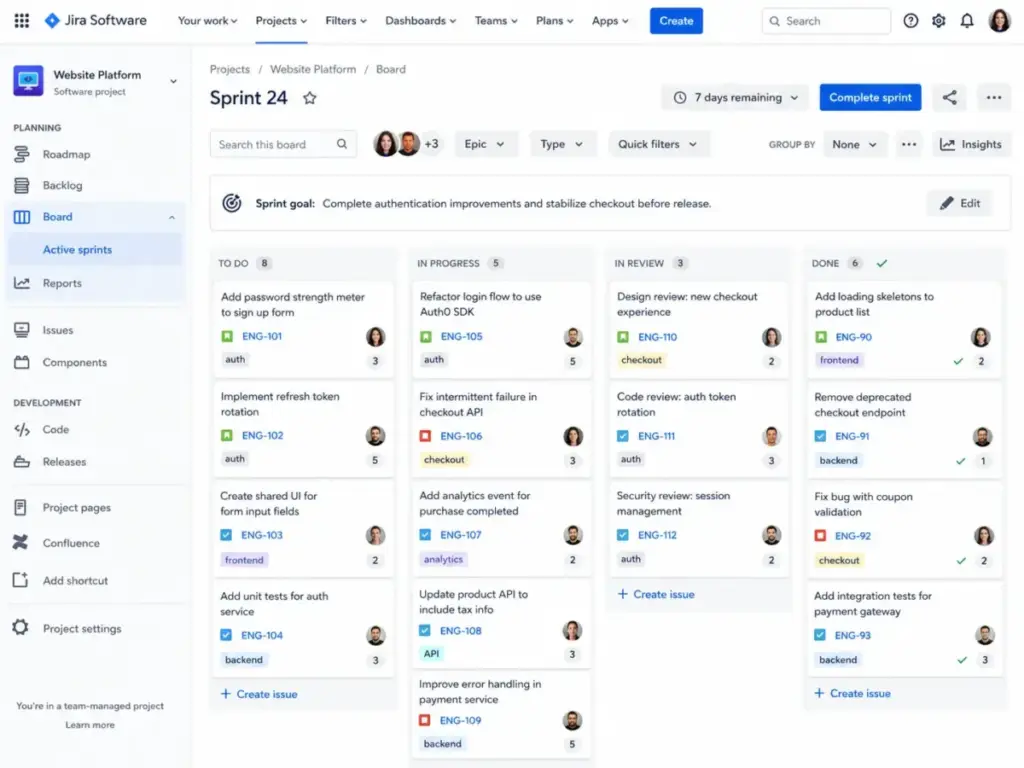
Jira was built for agile software teams. Scrum boards, Kanban boards, backlog management, sprint planning, release coordination, agile velocity charts, burndown reports, and custom issue workflows are core functionality. You get structured issue types (epics, stories, tasks, bugs, subtasks), configurable workflow states, and release tracking that maps directly to how engineering teams ship software.
ClickUp added sprint management to its platform, and it works. You get sprint folders, story points, sprint reporting, and velocity tracking. But ClickUp treats sprints as one view among many. Jira treats sprints as the operating model.
The difference shows up at scale. A 25-person engineering team running formal Scrum with release branches, QA handoffs, and deployment tracking will find Jira’s issue hierarchy, workflow permissions, and developer integrations (Bitbucket, GitHub, GitLab) purpose-built for that work. ClickUp can do it, but the team will spend more time configuring Spaces, Folders, Lists, and statuses to approximate what Jira gives out of the box.
Winner: Jira. If your team ships software with formal agile processes, Jira is the stronger fit. Read the full Jira platform review for deeper coverage of agile workflows.
One thing I have learned tracking PM tool migrations: teams that move from Jira to ClickUp for agile work often miss the structured issue hierarchy within 3 months.
Workflow 2: Cross-Team Projects With Docs, Chat, and Dashboards
ClickUp wins here, and it is not close for mixed-department teams.
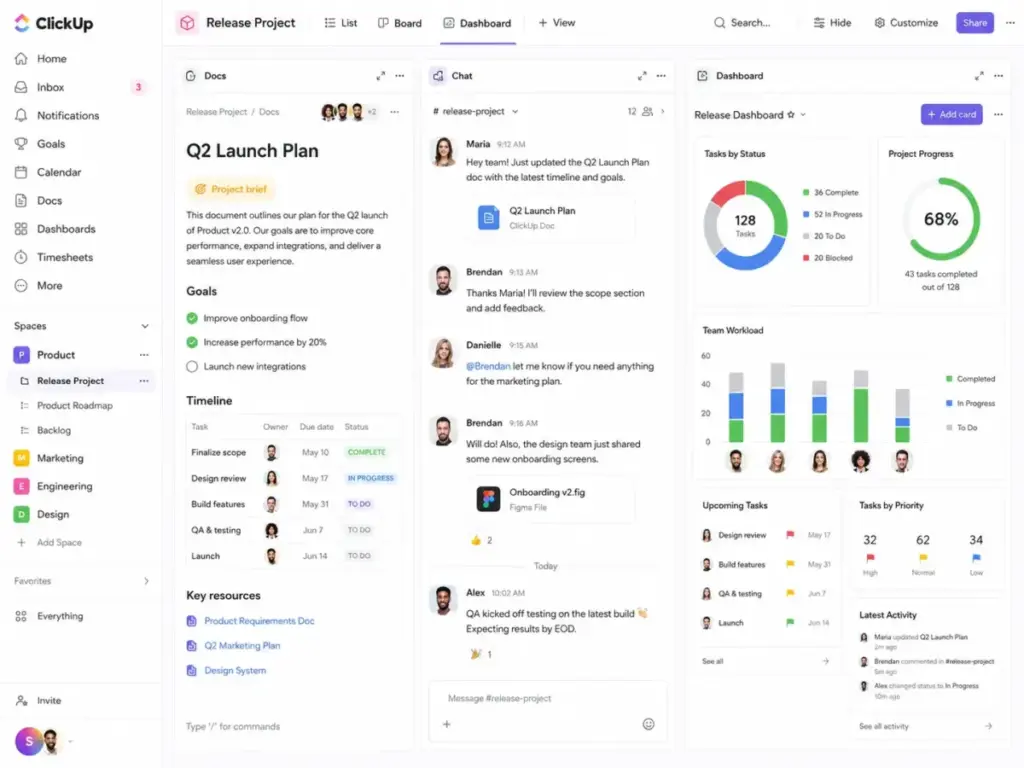
ClickUp bundles Docs, Chat, Goals, Whiteboards, native time tracking, dashboards, forms, and resource management inside the core product. A marketing team running campaigns, an agency managing client deliverables, or an operations team consolidating multiple apps can work inside a single ClickUp workspace without buying separate tools.
Jira does not include docs natively. You need Confluence for wiki and documentation workflows, which adds a separate subscription. Jira does not include native time tracking, chat, whiteboards, or forms without Marketplace apps. For a cross-functional team that needs all of those, the Atlassian stack requires assembling multiple products.
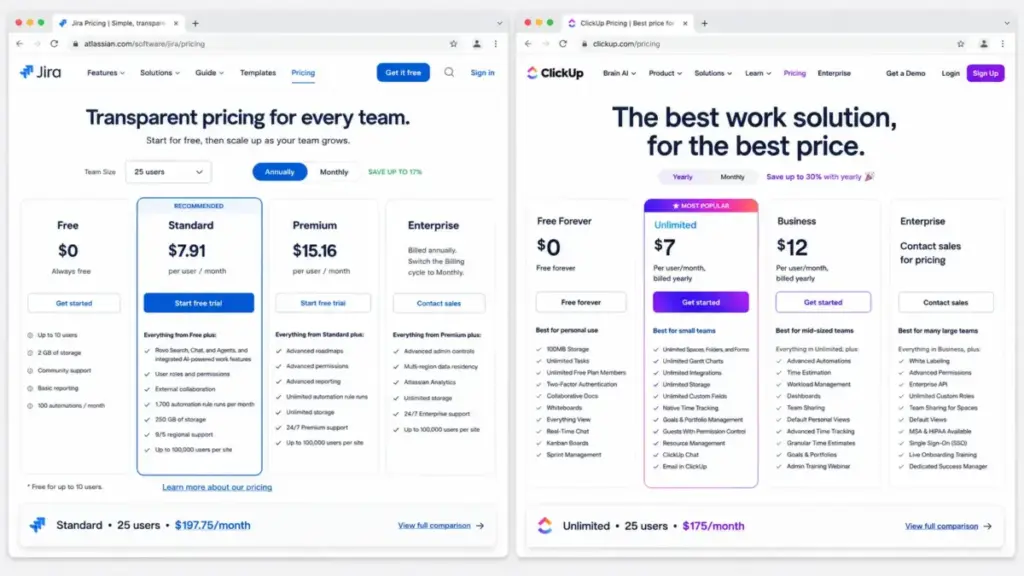
The practical impact: an agency managing client delivery, tracking time, writing project briefs, and building status dashboards needs ClickUp Unlimited at $7/user/month (annual billing). The same agency using Jira would need Jira Standard at $7.91/user/month plus Confluence Standard, plus a Marketplace time tracker. The total cost and admin burden stack up.
Winner: ClickUp. If your team is cross-functional and wants one workspace for tasks, docs, chat, and dashboards, ClickUp reduces tool sprawl. See the full ClickUp platform review for workspace setup details.
Workflow 3: Automation, AI, and Scaling Past 25 Users
This one depends on which plan ceiling matters to your team.
Jira automation is built into every plan, but capacity scales by tier. Free and Standard plans have more constrained automation limits. Premium and Enterprise open access to higher capacity, sandboxes, release tracks, and advanced planning features. If your team runs high-volume automation, you may need Jira Premium at $14.54/user/month (annual equivalent) to avoid hitting ceilings.
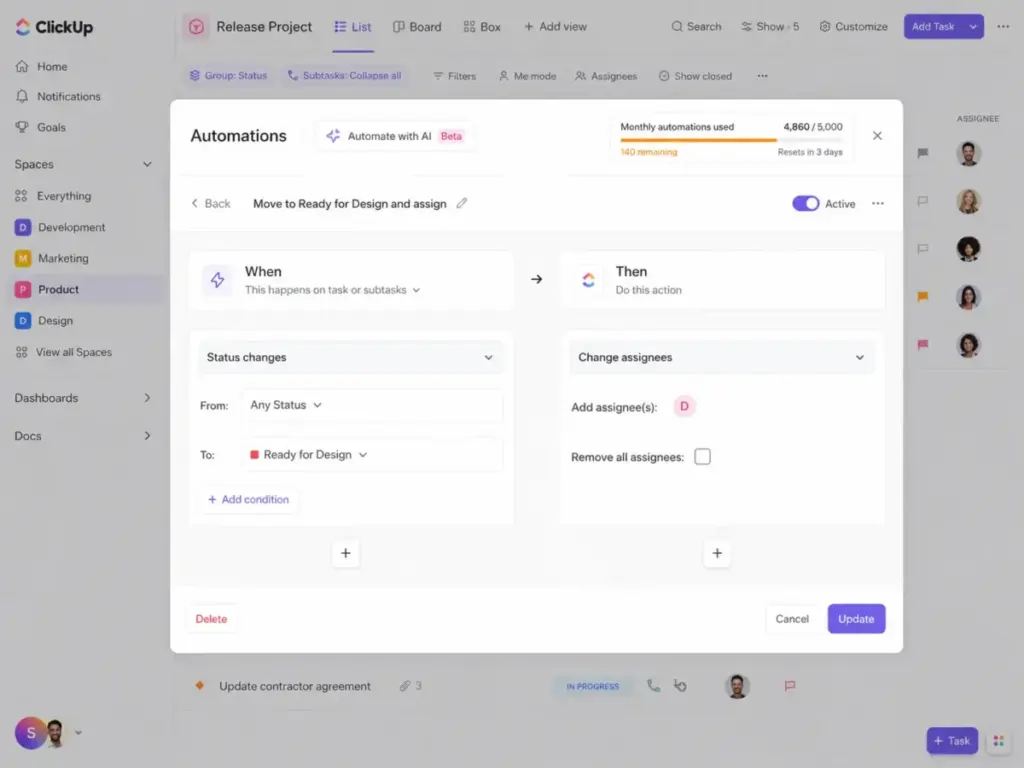
ClickUp automation is also tiered. Business gives you 5,000 automations per month. Enterprise jumps to 250,000 automations per month. ClickUp’s API rate limits are transparent: Free, Unlimited, and Business get 100 requests/minute/token. Enterprise gets 10,000 requests/minute/token. That is a 100x jump.
On the AI front, both platforms charge extra. ClickUp Brain costs $9/user/month as an add-on. The Everything AI bundle costs $28/user/month. Jira’s AI features (Atlassian Intelligence) are part of the Atlassian ecosystem, but availability and scope vary by plan and product.
The automation friction point is real for both tools. Teams that pile up automation rules without auditing them quarterly burn through limits. I have seen this on both platforms. Review your automation rules regularly.
Winner: Depends. Compare Jira Premium/Enterprise automation capacity against ClickUp Business/Enterprise before deciding. The right answer depends on your automation volume and API usage patterns.
Jira vs ClickUp at a Glance
| Feature | Jira | ClickUp |
|---|---|---|
| Best for | Engineering, DevOps, QA, product teams | Cross-functional, agencies, marketing, operations |
| Starting price | $0 (Free, up to 10 users) | $0 (Free Forever, unlimited members) |
| Practical paid tier | Standard at $7.91/user/month | Unlimited at $7/user/month |
| Free plan limit | 10 users | Unlimited members, 60MB storage |
| Native docs | No (needs Confluence) | Yes (built-in Docs) |
| Native time tracking | No (Marketplace app) | Yes (Unlimited plan and above) |
| Native chat | No | Yes (Unlimited plan and above) |
| Agile depth | Strong (Scrum, Kanban, releases, backlogs) | Moderate (sprints, points, basic reporting) |
| Marketplace apps | Thousands (Atlassian Marketplace) | 1,000+ integrations |
| AI add-on | Atlassian Intelligence (plan-dependent) | Brain at $9/user/month, Everything AI at $28/user/month |
| Enterprise governance | Strong (multi-site, SAML, 99.95% SLA) | Growing (SAML SSO, SCIM, audit log, data residency) |
| Setup difficulty | High for non-technical teams | Medium |
What this means: The at-a-glance table confirms the core split. Jira is deeper for engineering. ClickUp is broader for everyone else. The “starting price” comparison is misleading without context: Jira Free caps at 10 users, while ClickUp Free Forever allows unlimited members but with 60MB storage.
Pricing and Value per Dollar
| Users | Jira Standard (annual equiv.) | ClickUp Unlimited (annual) | Winner |
|---|---|---|---|
| 5 | $39.55/month | $35/month | ClickUp |
| 10 | $79.10/month | $70/month | ClickUp |
| 25 | $197.75/month | $175/month | ClickUp |
| 50 | $395.50/month | $350/month | ClickUp |
Jira pricing: Official pricing page verified June 8, 2026. Annual monthly-equivalent; exact billing may vary by user tier.
ClickUp pricing: Official pricing page verified June 8, 2026.
What this means: ClickUp Unlimited is consistently cheaper than Jira Standard at every team size. At 50 users, the gap is $45.50/month ($546/year). But the pricing comparison misses two critical factors.
Jira hidden costs: Confluence may be needed for docs and wiki workflows. Marketplace apps may be needed for time tracking, test management, and advanced reporting. Premium or Enterprise may be needed for higher automation capacity, SLA guarantees, and sandbox environments.
ClickUp hidden costs: Brain AI at $9/user/month adds $450/month for 50 users. Everything AI at $28/user/month adds $1,400/month for 50 users. Enterprise is required for SAML SSO, SCIM, audit logs, data residency, and 250K automations/month.
The sticker price favors ClickUp. The total cost depends on which add-ons and plan upgrades your team actually needs. For deeper pricing breakdowns, see the Jira pricing analysis and ClickUp pricing analysis.
Feature Gates: What You Get on Each Plan
| Feature | Jira Plan Gate | ClickUp Plan Gate | Buyer Implication |
|---|---|---|---|
| Unlimited storage | Premium ($14.54/user/month) | Unlimited ($7/user/month) | ClickUp gives unlimited storage at a lower tier |
| Advanced roadmaps / Plans | Premium | Business portfolios ($12/user/month) | Both lock planning behind mid-tier |
| Sandboxes | Premium | Not available | Jira advantage for change management |
| Release tracks | Premium | Not available | Jira advantage for deployment coordination |
| 99.9% uptime SLA | Premium | Enterprise (custom) | Jira offers SLA at a lower tier |
| SAML SSO | Standard (Atlassian Guard) | Enterprise (custom) | Jira makes SSO accessible earlier |
| SCIM provisioning | Atlassian Guard | Enterprise (custom) | Jira again |
| Audit logs | Atlassian Guard | Enterprise (custom) | Same pattern |
| Data residency | Enterprise | Enterprise | Tie |
| Native docs | Not available (Confluence) | Free Forever | ClickUp includes docs from day one |
| Native time tracking | Not available (Marketplace) | Unlimited ($7/user/month) | ClickUp bundles time tracking |
| 250K automations/month | Enterprise | Enterprise | Tie at enterprise tier |
| AI features | Atlassian Intelligence (varies) | Brain $9/user/month add-on | Both charge for AI |
What this means: Jira gates enterprise governance features (SSO, SCIM, audit logs) at Standard with Atlassian Guard, while ClickUp locks these behind Enterprise. But ClickUp gates collaboration features (docs, time tracking, chat) at lower tiers. The plan you need depends on whether governance or collaboration is your priority.
Setup and Migration Difficulty
| Dimension | Jira | ClickUp |
|---|---|---|
| Initial setup | High for non-technical teams. Medium-High for engineering. | Medium. Faster for non-technical users. |
| Onboarding learning curve | Steeper. Workflow design, issue types, and permissions require admin maturity. | Moderate. Many views and features can create “where do I start?” confusion. |
| Migration from the other tool | Medium to High (ClickUp to Jira). Rebuild docs, forms, dashboards, and chat in Atlassian tools. | Medium to High (Jira to ClickUp). Translate issue types, workflows, epics, and permissions into Spaces/Folders/Lists. |
| Data portability | Jira supports imports/exports. Atlassian provides ClickUp importer. | ClickUp supports Jira import via official workflow. |
| Admin overhead at scale | High. Workflow governance, permission schemes, and Marketplace app management. | Medium-High. Workspace structure, views, and usage limits. |
What this means: Neither tool is plug-and-play at 25+ users. Jira requires deliberate admin investment in workflow design. ClickUp requires workspace architecture discipline. Teams switching between the two should budget 4 to 8 weeks for migration, not counting workflow logic and permission rebuilding.
Does ClickUp scale the same way at 50 users as it does at 5? User review patterns suggest performance slowdowns and weaker mobile reliability can surface in larger workspaces. Jira scales better for governed engineering workflows but demands more admin capacity to maintain.
Where Jira Wins
- Formal Scrum and Kanban with structured issue hierarchies, sprint goals, and release coordination.
- DevOps traceability with native Bitbucket, GitHub, and GitLab integrations linking code to issues.
- Atlassian ecosystem depth for teams already using Confluence, Bitbucket, Jira Service Management, or Marketplace apps. See the Confluence platform review for how the docs layer connects.
- Enterprise governance with multi-site controls, stronger compliance resources, and Atlassian Trust Center backing.
- Agile reporting with velocity charts, burndown, cumulative flow, and sprint-level analytics purpose-built for engineering cadence.
Where ClickUp Wins
- All-in-one workspace with tasks, Docs, Chat, Whiteboards, Goals, dashboards, and forms in a single product.
- Lower total cost at the paid entry tier, bundling features that Jira offloads to Confluence and Marketplace.
- Faster onboarding for non-technical teams (marketing, agencies, operations) who need quick project setup.
- Native time tracking without buying a separate app.
- Flexible cross-functional views with List, Board, Gantt, Calendar, Timeline, and resource management views from the Unlimited plan.
- Budget-friendly scaling for teams of 25 to 50 users on paid plans. Compare this against the ClickUp vs Monday.com decision if you are also considering Monday.com.
Who Should Choose Jira
- Software engineering teams running formal Scrum or Kanban with sprints, releases, and DevOps traceability.
- QA and product teams that need structured issue types, custom workflows, and testing integrations.
- Enterprises already in the Atlassian ecosystem (Confluence, Bitbucket, Jira Service Management, Marketplace apps).
- Organizations that need governed administration with SSO, SCIM, audit logs, and uptime SLAs at the Premium tier.
- Teams willing to invest in admin maturity to design workflows, permissions, and dashboards properly.
Who Should Choose ClickUp
- Cross-functional teams (marketing, operations, agencies) that want tasks, docs, chat, and time tracking in one workspace.
- Startups and small teams choosing their first PM tool and wanting the broadest feature set at the lowest cost.
- Agencies managing client delivery that need project briefs, time tracking, forms, and client dashboards without assembling multiple tools.
- Budget-conscious teams at 25 to 50 users where the per-user cost difference compounds.
- Teams consolidating multiple apps into a single work hub.
Who Should Avoid Both
- Teams that need simple visual project tracking without the complexity of either tool. Consider Asana as an alternative for cleaner task dependencies and simpler setup.
- Teams that want a spreadsheet-database hybrid for custom workflows. Consider Airtable or Baserow.
- Teams with strict portfolio management needs beyond project-level tracking. Consider enterprise PPM tools.
- Solo founders or freelancers who only need a lightweight task list. Both Jira and ClickUp carry more complexity than a 1-person workflow requires.
Alternatives if Neither Fits
| Alternative | Best For | Why Consider | Internal Coverage |
|---|---|---|---|
| monday.com | Visual work management for marketing, operations, and PMO teams | Easier visual boards without Jira engineering depth | monday.com review |
| Asana | Teams that want simpler project planning and task dependencies | Useful when ClickUp feels over-configurable and Jira feels too technical | Asana platform review |
| Baserow | Database-style project tracking and custom internal workflows | Useful when neither the issue model (Jira) nor the workspace model (ClickUp) fits | — |
What this means: If you need simpler project management with fewer configuration decisions, Asana is the cleaner pick. If you need visual boards for non-technical teams, monday.com fills that gap. If neither Jira nor ClickUp matches your operational structure, explore Jira alternative options or ClickUp alternative options for broader coverage.
Final Verdict: Jira vs ClickUp in 2026
The Jira vs ClickUp decision is not about which tool has more features. It is about whether your team needs a governed engineering system or a broad cross-functional work hub.
Choose Jira if your team ships software, runs formal agile workflows, and operates inside the Atlassian ecosystem. The admin investment pays off in workflow discipline, release coordination, and DevOps traceability. Start with Standard at $7.91/user/month and move to Premium when you need advanced planning and higher automation capacity.
Choose ClickUp if your team is cross-functional, wants one workspace for tasks, docs, chat, and dashboards, and needs lower total cost at scale. Start with Unlimited at $7/user/month and move to Business when you need advanced dashboards and 5K automations per month.
Skip both if your team needs simple project tracking without the complexity overhead. Asana or monday.com will get you running faster with less configuration.
The worst decision is spending six weeks evaluating tools instead of shipping work. Pick the one that matches your team’s operating model today, not the one with the longest feature list.
James Carter, Productivity and Collaboration Software Analyst at SaaSZap. Pricing verified June 8, 2026.
FAQ
Is ClickUp better than Jira for software teams?
No, for most software teams. Jira has deeper Scrum boards, Kanban boards, issue tracking, release coordination, and DevOps integrations. ClickUp added sprint features, but Jira treats agile as the core operating model, not an optional view. If your team runs formal Scrum with releases and QA handoffs, Jira is the stronger pick.
Is ClickUp cheaper than Jira in 2026?
Yes, on sticker price. ClickUp Unlimited costs $7/user/month (annual) versus Jira Standard at $7.91/user/month (annual equivalent). At 50 users, ClickUp saves about $546/year. But Jira’s total cost rises if you add Confluence and Marketplace apps. ClickUp’s total cost rises if you add Brain AI at $9/user/month or Everything AI at $28/user/month.
Can ClickUp replace Jira for engineering teams?
It can, but with tradeoffs. ClickUp offers sprints, story points, and GitHub integration. But engineering teams that need structured issue hierarchies, governed workflows, release tracks, and deep Atlassian ecosystem connections will find Jira harder to replicate in ClickUp. Migration difficulty is medium to high.
Which is easier to learn, Jira or ClickUp?
ClickUp is easier for non-technical teams. The workspace setup is more visual and less admin-heavy. Jira has a steeper learning curve because workflow design, issue types, permission schemes, and board configurations require deliberate admin investment. For engineering teams familiar with agile, Jira’s learning curve is manageable.
Does ClickUp include time tracking?
Yes. Native time tracking is included from the Unlimited plan ($7/user/month). Jira does not include native time tracking. Teams using Jira typically add a Marketplace app like Tempo Timesheets, which adds to the total cost.
Should I switch from Jira to ClickUp?
Switch if your team is mostly non-technical, needs docs and chat inside the PM tool, and finds Jira’s admin overhead excessive. Do not switch if your team depends on Jira’s agile depth, release workflows, or Atlassian ecosystem integrations. Budget 4 to 8 weeks for migration. Issue types, workflows, and permissions do not translate directly.
Which is better for a 5-person startup?
ClickUp. Both have usable free plans, but ClickUp Free Forever includes unlimited members, Docs, sprint management, and basic custom fields. Jira Free caps at 10 users with more limited storage and collaboration features. For a small team choosing its first PM tool, ClickUp’s broader feature set at the free tier reduces the need for extra tools.
Do I need Confluence if I use Jira?
You do not need it, but you will probably want it. Jira does not include docs, wikis, or knowledge base features natively. Teams that need project documentation, meeting notes, or internal wikis alongside their Jira boards typically add Confluence. That adds a separate subscription and admin layer.
Does Jira have a free plan?
Yes. Jira Free supports up to 10 users with Scrum and Kanban boards, backlog management, basic automation, and limited storage. It is a solid starting point for small engineering teams but lacks the paid administration controls, support tiers, and automation capacity of Standard and Premium.
Can I migrate from ClickUp to Jira?
Yes. Atlassian offers a ClickUp importer for Jira. But workflow logic, custom field mappings, automation rules, permissions, dashboards, and embedded docs do not transfer automatically. Plan for manual mapping and testing. Migration difficulty is medium.