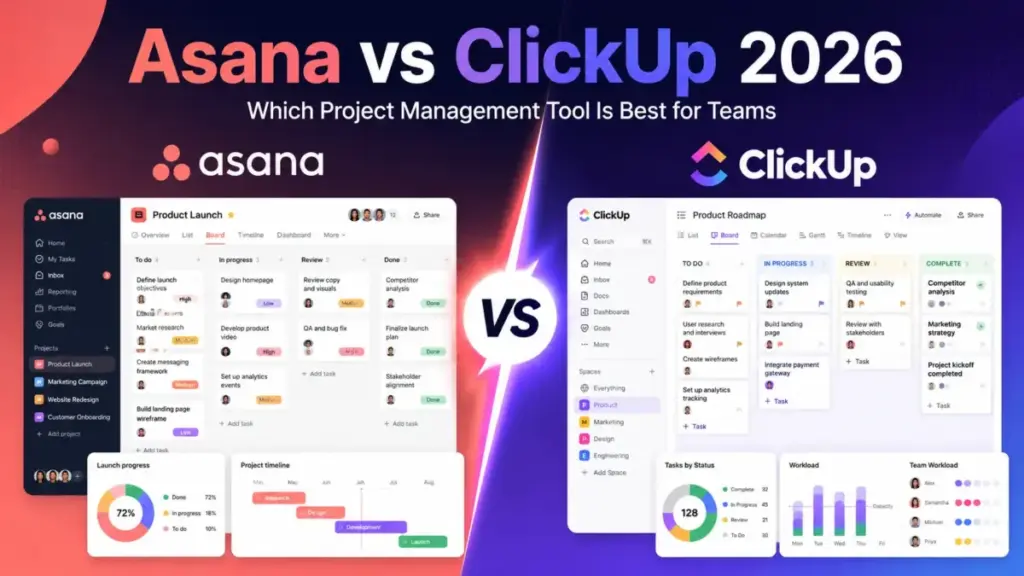
Your team just spent 20 minutes debating whether to track a campaign in a spreadsheet or the project tool nobody fully adopted. That friction is the real Asana vs ClickUp decision. Choose Asana if your team needs clean project structure, fast adoption, and portfolio-level visibility across departments. Choose ClickUp if your team wants one workspace for tasks, docs, dashboards, time tracking, and chat at a lower per-seat cost. This comparison breaks down pricing at real team sizes, feature gates by plan, automation and API limits, AI add-on costs, and the migration math that most reviews skip.
One thing I found during research: the annual billed cost gap between these two tools at 10 users is $39.90 per month, but the hidden add-on costs can flip that gap entirely. More on that in the pricing section.
If you are comparing top project management tools in 2026, this Asana vs ClickUp breakdown gives you the numbers and trade-offs to make a decision your team will not regret in six months.
Quick Verdict: Asana vs ClickUp
| Category | Winner | Why |
|---|---|---|
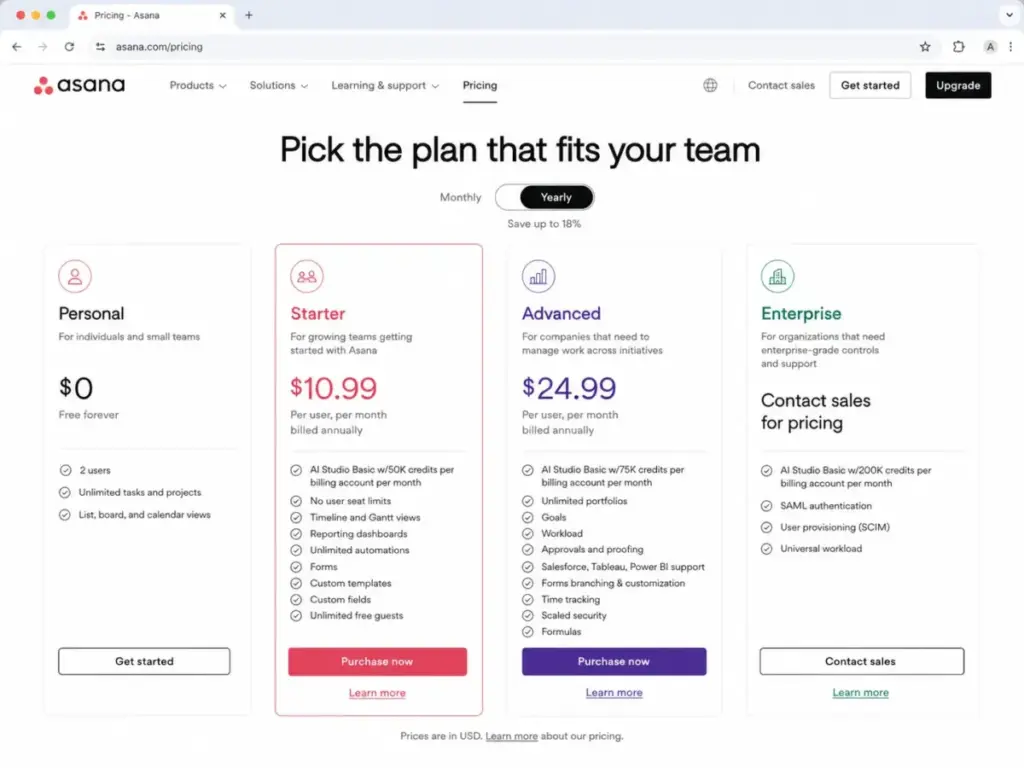
| Lowest paid entry cost | ClickUp | Unlimited plan starts at 7/user/monthbilledannuallyvsAsanaStarterat10.99/user/month |
| Ease of use and adoption | Asana | Cleaner interface, fewer configuration decisions, faster onboarding for non-technical teams |
| All-in-one feature breadth | ClickUp | Native docs, chat, whiteboards, time tracking, dashboards, and forms in one workspace |
| Portfolio and goal governance | Asana | Stronger structured portfolios, goals, workload management, and cross-project reporting on Advanced |
| Automation and API limits | Tie | ClickUp offers more in-app automations earlier; Asana has higher paid API rate limits (1,500 vs 100 requests/minute) |
| Integrations and ecosystem | ClickUp | Claims 1,000+ integrations plus native docs, chat, and email |
| Enterprise security | Tie | Both offer SOC 2, HIPAA-related compliance, SAML SSO, and data residency on Enterprise tiers |
| Native time tracking | ClickUp | Included on Unlimited. Asana charges a $5.99/user/month Timesheets add-on |
| Free plan | ClickUp | Free Forever has unlimited tasks and members. Asana Personal caps at 2 users |
| AI features | Tie | Both charge separately. Asana AI Studio credits are account-wide. ClickUp Brain starts at $9/user/month |
What this means: ClickUp wins on cost and feature breadth. Asana wins on structure and adoption speed. The tie categories depend on your team’s specific bottleneck: API throughput vs in-app automation volume, or Asana’s account-wide AI credits vs ClickUp’s per-user AI pricing.
How James Carter Compared These Tools
I evaluated Asana and ClickUp based on official product documentation, public pricing pages verified on June 5, 2026, and user sentiment from project management communities. After reviewing 35+ project management and collaboration tools for SaaSZap, I have learned that the tool your team actually uses daily matters more than the tool with the longest feature list. That principle shapes this comparison.
What I compared: pricing at 5, 10, 25, and 50 users; feature gates by plan; automation limits; API rate limits; AI add-on costs; onboarding complexity; migration paths; and what project management software does for team workflows.
Testing level: This comparison is based on official documentation research, not hands-on product testing. Pricing, features, and plan details reference the official Asana and ClickUp product pages and developer documentation. I did not independently verify UI claims or benchmark performance.
Limitation: ClickUp monthly billing prices were not fully visible in the retrieved official pricing text, so I use the annual billed monthly-equivalent pricing and note this caveat. Asana AI Studio paid add-on pricing beyond the included credits is not fully public.
Asana vs ClickUp at a Glance
| Dimension | Asana | ClickUp |
|---|---|---|
| Best for | Operations, marketing, and cross-functional teams that need structured workflows | Startups, agencies, and product teams that need broad workspace consolidation |
| Free plan | Personal: up to 2 users | Free Forever: unlimited members, 60 MB storage |
| Starting paid price (annual) | $10.99/user/month (Starter) | $7/user/month (Unlimited) |
| Practical plan | Advanced at $24.99/user/month | Business at $12/user/month |
| Native time tracking | No (add-on at $5.99/user/month) | Yes, included on Unlimited |
| AI features | AI Studio Basic included on Starter and Advanced (credit-based) | ClickUp Brain at $9/user/month (separate add-on) |
| Automation | Rules on Starter and above | Automations with plan-based limits (5K/month on Business) |
| API rate limit | 1,500 requests/minute on paid plans | 100 requests/minute on Free/Unlimited/Business |
| Enterprise plan | Custom (contact sales) | Custom (contact sales) |
| Security | SOC 2 Type 2, ISO 27018, ISO 27701 | SOC 2, ISO 27001, GDPR |
| Setup difficulty | Low to Medium | Medium to High |
What this means: Asana’s paid entry is $3.99/user/month more than ClickUp Unlimited when billed annually. But ClickUp Unlimited includes native time tracking, unlimited storage, and goals that Asana gates behind the Advanced plan or charges as an add-on. The “cheaper” tool is not always the cheaper operating model.
Workflow 1: Setting Up and Running a Team Project
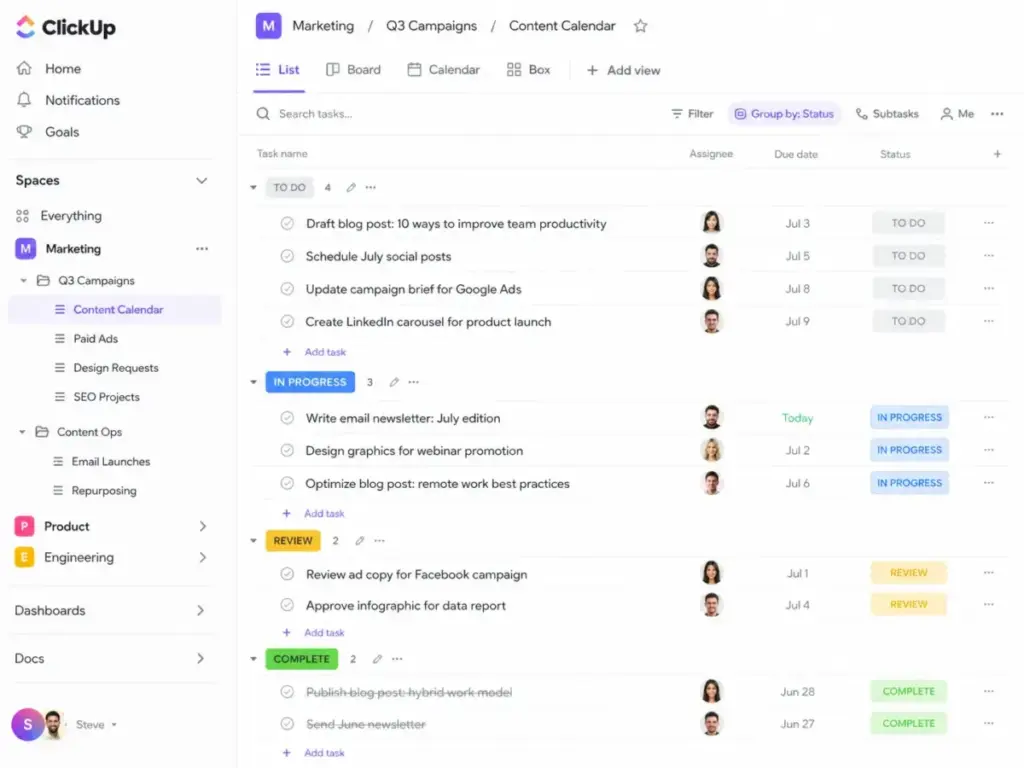
Asana wins on first-project speed for most teams. The interface gives you list, board, and calendar views on every plan, and the learning curve stays flat for the first two weeks. A 7-person marketing team can import tasks, assign owners, and build a timeline in under 15 minutes. The notification defaults are aggressive, though. Teams spend more time configuring notification rules than they expect.
ClickUp trades that simplicity for depth. Unlimited gives you spaces, folders, lists, and multiple view types from day one. That flexibility is a strength for teams that want to customize. It is a tax for teams that just need to assign tasks and track deadlines. The hierarchy decisions (Workspace > Space > Folder > List > Task) require planning before your team opens the tool.
One thing I have seen across Asana project management analysis: teams that value clean structure adopt Asana faster. Teams that value workspace breadth adopt ClickUp with more friction but fewer separate tools.
Winner: Asana for clean setup speed. ClickUp requires more upfront architecture decisions that slow down teams without a dedicated project admin.
Workflow 2: Pricing and Total Cost at Real Team Sizes
ClickUp costs less per seat on paper. The Unlimited plan at 7/user/month∗∗billedannuallyincludesnativetimetracking,unlimitedstorage,Ganttcharts,andgoals.AsanaStarterat∗∗10.99/user/month billed annually skips time tracking, locks portfolios behind Advanced, and caps AI Studio credits at 50,000 per billing account per month (as of June 2026).
Here is what matters: the cost at scale.
| Team Size | Asana Starter (annual) | ClickUp Unlimited (annual) | Difference |
|---|---|---|---|
| 5 users | $54.95/month | $35/month | ClickUp saves $19.95/month |
| 10 users | $109.90/month | $70/month | ClickUp saves $39.90/month |
| 25 users | $274.75/month | $175/month | ClickUp saves $99.75/month |
| 50 users | $549.50/month | $350/month | ClickUp saves $199.50/month |
What this means: At 10 users, ClickUp Unlimited saves 39.90/month∗∗comparedtoAsanaStarter.Thatgapwidensto∗∗199.50/month at 50 users. But this comparison uses the Unlimited-to-Starter tier. If your team needs portfolios, workload management, and advanced reporting, the comparison shifts to Asana Advanced (24.99/user/month∗∗)vsClickUpBusiness(∗∗12/user/month), where ClickUp still leads but the feature overlap changes.
The Hidden Cost Problem
Asana’s Timesheets and Budgets add-on costs 5.99/user/month∗∗billedannually.A10−personteamonStarterthatneedstimetrackingpays∗∗109.90 + 59.90=169.80/month. That narrows the gap with ClickUp Unlimited to just $99.80/month difference, and ClickUp already includes time tracking in the base price.
ClickUp’s hidden costs come from AI. ClickUp Brain costs 9/user/month∗∗.EverythingAIcosts∗∗28/user/month. AI Super Credits cost 10per10,000credits∗∗.A10−personteamaddingBrainAIpays∗∗70 + 90=160/month. Add Business-tier features and it becomes 120+90 = $210/month. The “cheaper tool” argument depends on which add-ons your team actually needs.
I call this the SaaS Cost Shift Test: compare the base plan price, then add every add-on your team would realistically use in the first six months. The winner often changes. In this case, ClickUp still wins at equivalent feature tiers for most teams under 25 users. But the margin is thinner than the pricing pages suggest.
Winner: ClickUp on base pricing. The gap narrows when you factor in Asana’s time tracking add-on and ClickUp’s AI add-on costs.
You can check the full Asana pricing breakdown for plan-by-plan specifics.
For ClickUp’s full tier breakdown, see the ClickUp pricing details.
Workflow 3: Automation, API, and Scaling Past 25 Users
This is where the Asana vs ClickUp comparison gets nuanced. Both tools offer automation. The question is which ceiling you hit first.
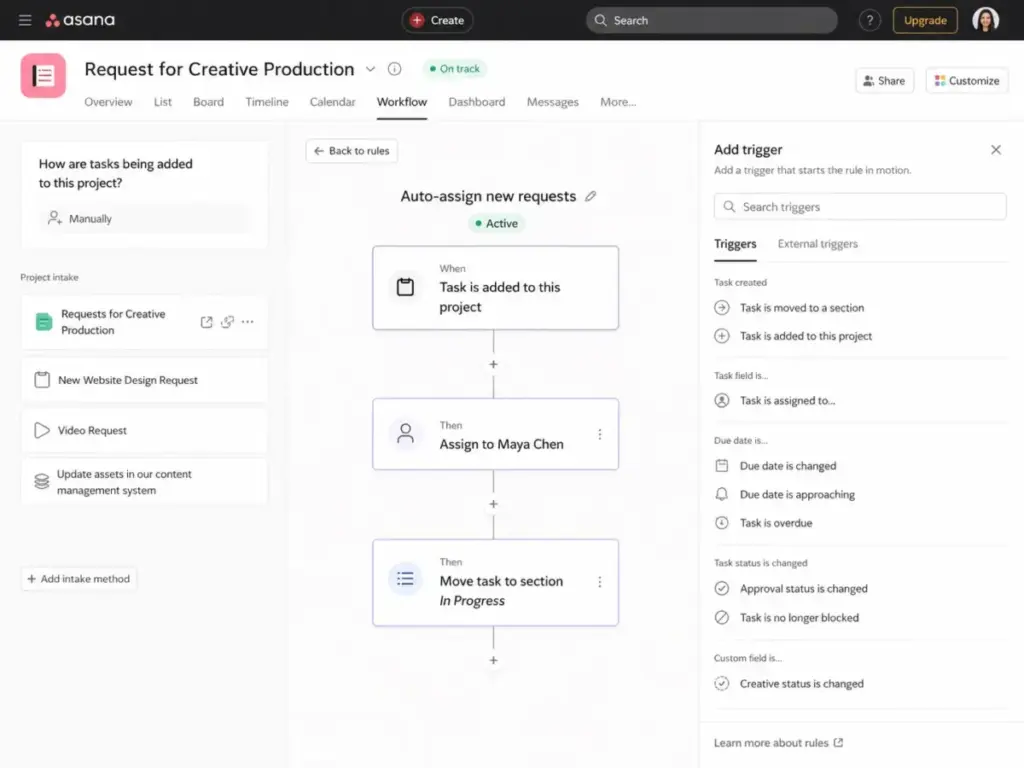
Asana includes rules-based automation on Starter. You can trigger actions when tasks change status, due dates arrive, or forms are submitted. The official developer documentation states that paid Asana domains get 1,500 API requests per minute. That is 15x what ClickUp offers on Unlimited and Business (100 requests/minute).
ClickUp gates automation volume by plan. Business gets 5,000 automations per month. Enterprise gets 250,000 automations per month. ClickUp also offers webhooks on Business, which Asana supports on paid plans as well.
Feature Gate Comparison
| Feature | Asana Plan Gate | ClickUp Plan Gate | Buyer Implication |
|---|---|---|---|
| Timeline and Gantt views | Starter ($10.99) | Unlimited ($7) | ClickUp opens Gantt earlier |
| Custom fields | Starter ($10.99) | Unlimited ($7) | Same tier, lower ClickUp price |
| Portfolios | Advanced ($24.99) | Unlimited ($7) | Major price gap for portfolio access |
| Goals | Advanced ($24.99) | Unlimited ($7) | ClickUp includes goals at lower tier |
| Native time tracking | Add-on ($5.99/user) | Unlimited ($7) | ClickUp includes it, Asana charges extra |
| Workload management | Advanced ($24.99) | Business ($12) | Both require mid-tier plan |
| Automation rules | Starter ($10.99) | Business ($12), 5K/month | Similar tier, ClickUp caps volume |
| API rate limit | 1,500/min on paid | 100/min on Business | Asana wins 15x on API throughput |
| Dashboards (advanced) | Advanced ($24.99) | Business ($12) | ClickUp cheaper for dashboards |
| SAML SSO | Enterprise (custom) | Enterprise (custom) | Both gate SSO behind Enterprise |
What this means: ClickUp opens more features at lower price points. Asana gates portfolio governance and goals behind the Advanced tier. But Asana’s API rate limit is substantially higher, which matters for teams running external integrations or syncing data between tools.
Does this tool work the same way at 50 users as it does at 5? For Asana, the answer is mostly yes. The structure stays clean. For ClickUp, the answer depends on whether someone built the workspace architecture correctly. Without governance rules, a 50-person ClickUp workspace can become a maze of spaces, folders, and orphaned lists.
Winner: Tie. ClickUp wins on in-app automation access and feature breadth at lower tiers. Asana wins on API throughput. Choose based on whether your bottleneck is in-app workflow automation or external API integration.
Workflow 4: AI Features and Add-On Costs
Both Asana and ClickUp added AI features in 2025-2026. Both charge for them. The pricing models differ enough that a direct comparison is useful.
Asana includes AI Studio Basic on Starter (50,000 credits per billing account per month) and Advanced (75,000 credits per billing account per month). The credits are shared across the billing account, not per user. Asana also references AI Teammates and higher AI Studio tiers, but exact paid add-on pricing beyond the included credits was not fully visible in the official pricing text I reviewed.
ClickUp separates AI into three tiers: Brain AI at 9/user/month∗∗,EverythingAIat∗∗28/user/month, and AI Super Credits at $10 per 10,000 credits. These are per-user costs.
For a 10-person team:
- Asana Starter with AI Studio Basic included: $0 extra (50K credits shared)
- ClickUp Unlimited with Brain AI: $90/month extra
- ClickUp Unlimited with Everything AI: $280/month extra
The credit-based model (Asana) vs per-user model (ClickUp) creates different pressure points. Asana’s included credits run out at scale if the team is heavy on AI-assisted workflows. ClickUp’s per-user pricing adds up fast for teams above 10 users. Neither model is the definite winner. It depends on how much AI your team actually uses daily.
Winner: Depends. Asana includes baseline AI credits at no extra cost. ClickUp offers deeper AI features but at a per-user premium.
Where Asana Wins
Asana is the clearer fit for teams that value:
- Structured adoption with low admin overhead. A 15-person operations team can set up projects, assign tasks, and build portfolio views without a workspace architect.
- Portfolio-level governance. Cross-project visibility, goal tracking, and workload management on Advanced give department leads a single dashboard for multi-team execution.
- Campaign and intake workflows. Asana’s forms, approval workflows, and rules fit structured campaign management and client intake processes.
- Higher API throughput. At 1,500 requests/minute on paid domains, Asana supports heavier external integration loads without rate-limiting friction.
- Faster onboarding for non-technical teams. Marketing, HR, and operations teams report less configuration anxiety than with ClickUp’s deeper hierarchy.
Where ClickUp Wins
ClickUp is the clearer fit for teams that value:
- Lower paid entry pricing. At 7/user/month∗∗onUnlimited,a10−personteampays∗∗70/month vs $109.90/month for Asana Starter.
- All-in-one workspace consolidation. Docs, chat, whiteboards, native time tracking, dashboards, and forms reduce the need for separate tools.
- Deep customization and flexibility. Custom statuses, views, automations, and workspace hierarchy allow teams to build exactly the workflow they need.
- Native time tracking without add-ons. Included from the Unlimited plan. No extra billing line item.
- Generous free plan. Free Forever allows unlimited members and tasks with basic project management features. Asana Personal caps at 2 users.
Who Should Choose Asana
Choose Asana if your team fits these profiles:
A 12-person marketing team managing campaigns and approvals. Asana’s forms, workflow builder, and approval chains are built for structured campaign execution. The timeline view and portfolio reporting give the marketing director visibility without building custom dashboards.
A 30-person operations department standardizing cross-functional workflows. Asana Advanced’s portfolios, goals, and workload management create a governance layer that keeps multiple teams aligned. The lower learning curve means faster rollout across departments.
A team that values clean UX over maximum features. If your team resists tools that feel cluttered or require a dedicated admin, Asana’s narrower feature surface is a feature, not a limitation.
Who Should Choose ClickUp
Choose ClickUp if your team fits these profiles:
A 5-person startup choosing its first project management tool. The Unlimited plan at $7/user/month delivers time tracking, docs, dashboards, goals, and portfolio management at a price point that leaves budget for other tools.
An agency managing client work with time tracking and docs. Native time tracking, guest permissions, docs, dashboards, and custom views reduce the tool stack. A 15-person agency can run client projects, track billable hours, and share deliverables from one workspace.
A product team that wants deep customization. ClickUp’s hierarchy, custom statuses, and view types give product managers the flexibility to model complex workflows without outgrowing the tool.
Who Should Avoid Both
Skip both Asana and ClickUp if:
- You need dev-specific issue tracking with release management. Neither replaces Jira for engineering teams that need sprint boards, release tracking, bug workflows, and CI/CD integration. Consider our Jira project management analysis instead.
- You want a visual Work OS for cross-department operations. If your priority is visual low-code workflows across HR, IT, and operations, monday.com’s Work OS approach is a better fit than either Asana’s project structure or ClickUp’s task hierarchy. Check our monday.com evaluation.
- You need AI-first automatic scheduling. Tools like Motion prioritize calendar-based AI scheduling over workspace management. Neither Asana nor ClickUp focuses on daily schedule optimization.
Migration and Switching Costs
Switching between Asana and ClickUp is a medium-effort project. Here is what to plan for:
| Migration Direction | Official Path | Key Risk | Cleanup Needed |
|---|---|---|---|
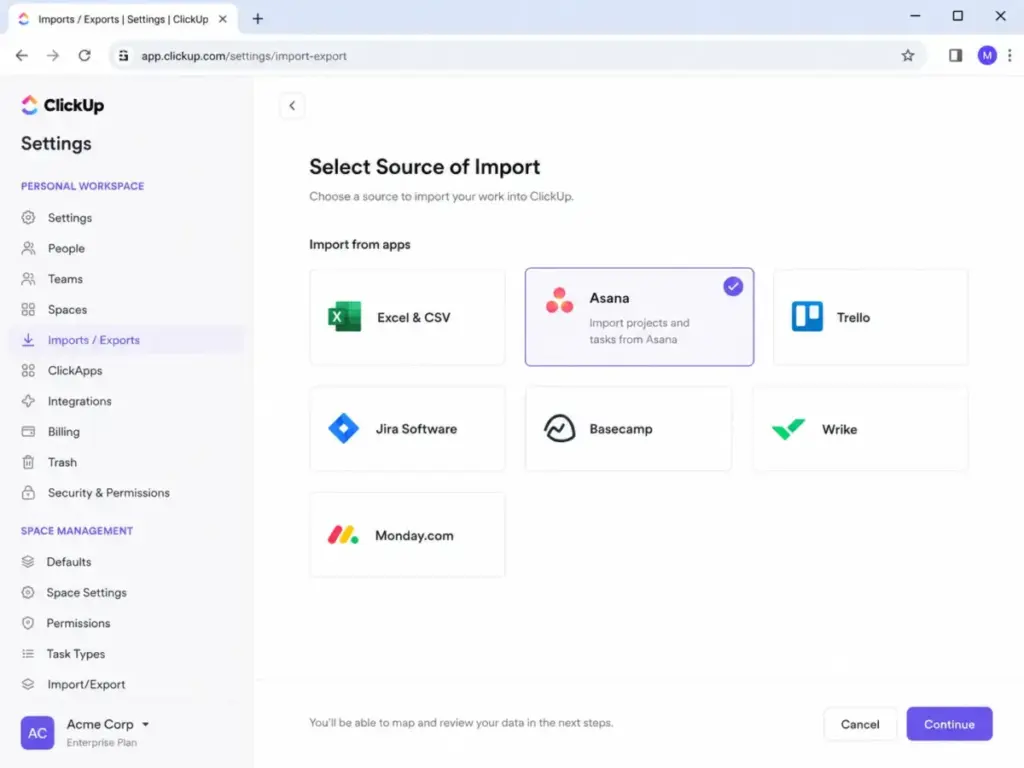
| Asana → ClickUp | ClickUp has an official Asana importer | Custom fields, statuses, and dependencies may not map cleanly | Rebuild automations, verify hierarchy, audit permissions |
| ClickUp → Asana | CSV export/import (no official importer) | Hierarchy remapping (Spaces/Folders/Lists to Projects) | Recreate custom statuses, reassign dependencies, rebuild views |
What this means: Moving from Asana to ClickUp has lower friction because of the official importer. Moving from ClickUp to Asana requires more manual work. In both directions, treat migration as an opportunity to simplify workflows rather than cloning every view and automation from the old tool.
Migration cost is not just data transfer. It includes team retraining, workflow rebuild time, and the 2-4 weeks of reduced productivity while people learn the new tool. For a 25-person team, that hidden cost can exceed the annual pricing difference between the two tools.
Alternatives to Consider
If neither Asana nor ClickUp fits your team:
monday.com is a better pick for teams that want a visual Work OS with cross-department workflows and low-code automations. It sits between Asana’s structure and ClickUp’s breadth. Check our monday.com alternatives comparison if you want to see how it stacks up against other options.
Jira is the standard for software development teams that need issue tracking, agile boards, releases, and dev-specific workflows. It does not try to be an all-in-one workspace, which is the point.
Motion works for small teams and individuals who want AI-driven daily scheduling and automatic task prioritization rather than a full project management workspace.
| Alternative | Best For | Starting Price |
|---|---|---|
| monday.com | Visual operations and cross-department workflows | Contact for current pricing |
| Jira | Software development teams with agile workflows | Free for up to 10 users |
| Motion | AI scheduling for small teams | Contact for current pricing |
What this means: Asana vs ClickUp covers most general project management needs. If your team has a specific workflow (engineering sprints, visual operations, AI scheduling) that neither covers well, one of these alternatives is a better fit.
Final Verdict: Asana vs ClickUp in 2026
The Asana vs ClickUp decision is not about which tool is better. It is about which operating model your team can sustain.
Choose Asana if your team needs structured project execution with low admin overhead. Marketing teams, operations departments, and cross-functional groups that value clean portfolio governance over feature breadth will get more out of Asana Advanced. The higher per-seat cost buys you faster adoption and fewer workspace architecture decisions.
Choose ClickUp if your team needs a lower-cost workspace that consolidates tasks, docs, time tracking, dashboards, and chat. Startups, agencies, and product teams that want deep customization and broad feature access at $7/user/month will find more value in ClickUp Unlimited. The trade-off is a steeper learning curve and more admin decisions.
The one metric that decides it: Count how many separate tools your team uses today for tasks, docs, time tracking, and internal communication. If the answer is three or more, ClickUp’s consolidation saves money and context-switching time. If the answer is one or two, Asana’s focused project management avoids the complexity tax.
James Carter has reviewed 35+ project management and collaboration tools for SaaSZap. This comparison uses official pricing and feature documentation verified as of June 2026.
You can also explore Asana alternative options if you want to expand your shortlist.
For ClickUp replacements, check the ClickUp alternative options for a full list.
FAQ
Is ClickUp cheaper than Asana for a 10-person team?
Yes, at equivalent entry tiers. ClickUp Unlimited costs $70/month for 10 users billed annually. Asana Starter costs $109.90/month for 10 users on the same billing cycle. That is a $39.90/month difference. The gap narrows if you add ClickUp Brain AI ($90/month extra) or if Asana eliminates the need for a separate time tracking tool your team already pays for.
Does Asana have native time tracking?
No. Asana offers a Timesheets and Budgets add-on at $5.99/user/month billed annually. ClickUp includes native time tracking on the Unlimited plan at no extra cost. For a 10-person team, Asana’s time tracking add-on costs $59.90/month on top of the base subscription. This is a real cost difference for teams that need to track billable hours.
Which is easier to learn, Asana or ClickUp?
Asana has a shorter onboarding curve for most non-technical teams. The interface presents fewer configuration choices upfront. ClickUp offers more flexibility but requires more decisions about workspace hierarchy, custom statuses, and view layouts. Teams with a project admin or operations lead handle ClickUp’s depth well. Teams without one report feeling overwhelmed in the first two weeks.
Can I migrate from Asana to ClickUp?
Yes. ClickUp provides an official Asana importer that transfers tasks, projects, and basic metadata. Custom fields, automations, dependencies, and advanced permission structures need manual cleanup after import. Plan for 1-2 weeks of cleanup and team retraining for a 15-person team. Treat the migration as an opportunity to simplify, not a 1:1 clone of your old workspace.
Which tool has better automation, Asana or ClickUp?
It depends on what type of automation you need. Asana offers rules-based automation on Starter with a higher API rate limit (1,500 requests/minute on paid domains). ClickUp offers 5,000 automations per month on Business and exposes webhooks earlier. If your team builds external integrations through the API, Asana has more headroom. If your team needs high-volume in-app automations and webhooks, ClickUp’s Business plan is the better fit.
Does ClickUp have a free plan worth using?
Yes. ClickUp Free Forever includes unlimited tasks, unlimited members, docs, Kanban boards, sprint management, calendar view, and 24/7 support. The 60 MB storage limit and 1-form cap are the main restrictions. For a 3-person team testing project management tools, it is a functional starting point. Asana Personal limits the free plan to 2 users, which makes it impractical for any team larger than a pair.
Which is better for enterprise teams, Asana or ClickUp?
Asana’s Enterprise and Enterprise+ plans offer SIEM integrations, data residency, audit logs, and managed workspaces that align with enterprise governance requirements. ClickUp Enterprise offers SAML SSO, SCIM provisioning, audit logs, 250,000 automations per month, and custom branding. Both tools meet enterprise security standards. Asana’s edge is in structured portfolio governance and easier cross-department adoption. ClickUp’s edge is in workspace consolidation and lower per-seat cost at scale.
Should I switch from Asana to ClickUp in 2026?
Switch if your team needs native time tracking, docs, chat, and deeper customization without adding separate tools. Stay with Asana if your team values structured workflows, clean portfolio reporting, and lower admin complexity. The migration effort is medium difficulty from Asana to ClickUp, thanks to the official importer. Budget 1-2 weeks for cleanup and retraining for teams of 10 or more. Compare your Asana vs monday.com options if you want a third perspective before deciding.
How do Asana and ClickUp compare on security and compliance?
Both tools publish enterprise-grade security certifications. Asana references SOC 2 Type 2, ISO 27018:2019, ISO 27701:2019, and HIPAA-related audits. ClickUp references SOC 2, ISO 27001, GDPR, and HIPAA availability on Enterprise. Both gate advanced security controls (SAML SSO, SCIM, audit logs, data residency) behind their Enterprise plans. For teams in regulated industries, the security question is less about which tool is safer and more about which Enterprise plan terms fit your procurement requirements.