Your team picked a project management tool six months ago. Now half the team tracks work in the tool and the other half tracks work in a spreadsheet next to it. That disconnect is not a people problem. It is a tool-fit problem.
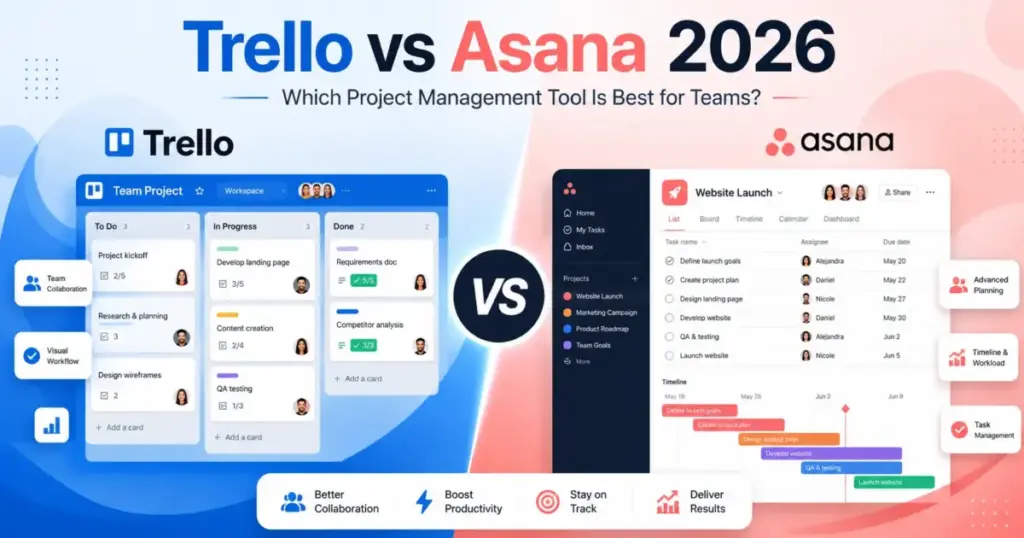
Trello vs Asana is not a simple “boards versus lists” decision among top project management tools. The real split is between low-friction visual execution and structured work management at scale. Choose Trello if your team needs fast setup, visual boards, and the lowest per-user cost. Choose Asana if your team needs Timeline, Gantt, dashboards, portfolios, workload planning, and cross-project governance. After reviewing 35+ project management tools, James Carter breaks down pricing, plan gates, automation limits, and buyer fit so you can skip the spreadsheet workaround entirely.
Here is what most Trello vs Asana comparisons skip: the cost math at 25 and 50 users, the exact plan tier where each feature unlocks, and the automation ceilings that create upgrade pressure. Understanding what project management is helps frame why these plan gates matter. This comparison covers all three.
Quick Verdict: Trello vs Asana in 2026
| Category | Winner | Why |
|---|---|---|
| Pricing and total cost | Trello | Trello Standard costs 5/user/monthannualvsAsanaStarterat10.99/user/month annual. Trello Free allows up to 10 collaborators. Asana Personal caps at 2 users. |
| Ease of use and setup speed | Trello | Board-first design. Teams start in minutes. Lower onboarding friction for non-technical users. |
| Project management depth | Asana | Timeline, Gantt, dashboards, forms, portfolios, goals, workload, approvals, proofing, and time tracking on Starter and Advanced. |
| Automation and workflows | Asana | Asana Starter includes unlimited automations. Trello caps Workspace command runs at 1,000/month on Standard and has per-operation and per-email quotas. |
| Integrations and ecosystem | Tie | Trello offers 200+ Power-Ups. Asana offers 100+ free integrations plus Salesforce, Tableau, and Power BI on Advanced. Different strengths. |
| Security and enterprise governance | Asana | Broader Trust Center compliance set (SOC 2, ISO 27001, HIPAA, GDPR). Enterprise includes SAML, SCIM, capacity planning. |
| Mobile capture and personal tasks | Trello | Inbox, Planner, Slack/Teams/email capture, and quick card creation from phone. Stronger for personal productivity. |
What this means: Trello wins four categories, Asana wins three, and integrations are a tie. But category count alone does not pick the right tool. The gap between “good enough” and “necessary” depends on your team size, workflow complexity, and budget. A 5-person startup and a 25-person marketing department face very different decisions. Read on for the cost math and plan gates that separate them.
How James Carter Compared Trello and Asana
This comparison is based on official product documentation, pricing pages, and published feature lists for both Trello and Asana (as of June 2026). Pricing was verified on June 8, 2026 directly from Official pricing page for Trello and Official pricing page for Asana.
I reviewed plan gates, automation limits, security certifications, and integration ecosystems for both tools. I also analyzed SERP competitor articles and user sentiment from platforms including Zapier and TechRepublic to identify what existing comparisons miss.
Testing level: This comparison uses official research only. For deeper analysis of each tool individually, see our Trello review and evaluation and Asana review and analysis. I did not conduct hands-on testing for this article. All feature claims reference official product pages and documented specifications.
Limitation: Enterprise pricing for Asana is contact-sales. AI Teammates, Compliance management, and Permissions management are add-ons or enterprise-gated with undisclosed pricing. Trello Enterprise is listed publicly at $17.50/user/month annual, but Atlassian Guard add-ons can be separate. Exact automation operation quotas for Trello can change without notice.
Workflow 1: Task Capture and Daily Board Management
Trello wins for teams that need fast, visual task capture with minimal friction.
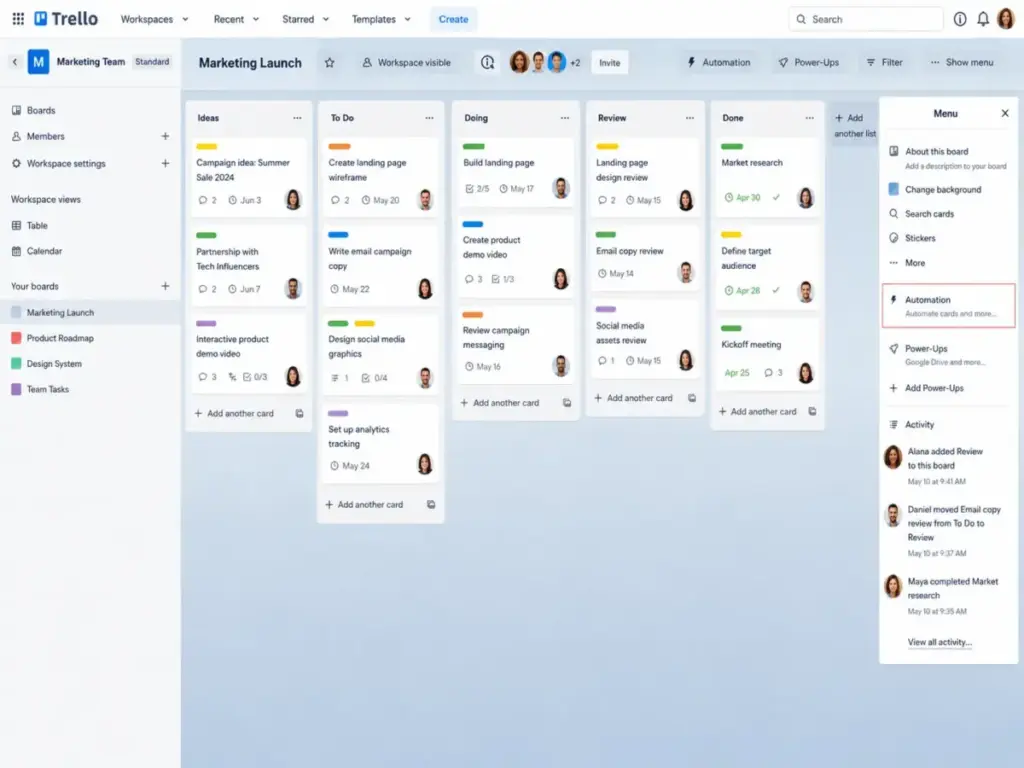
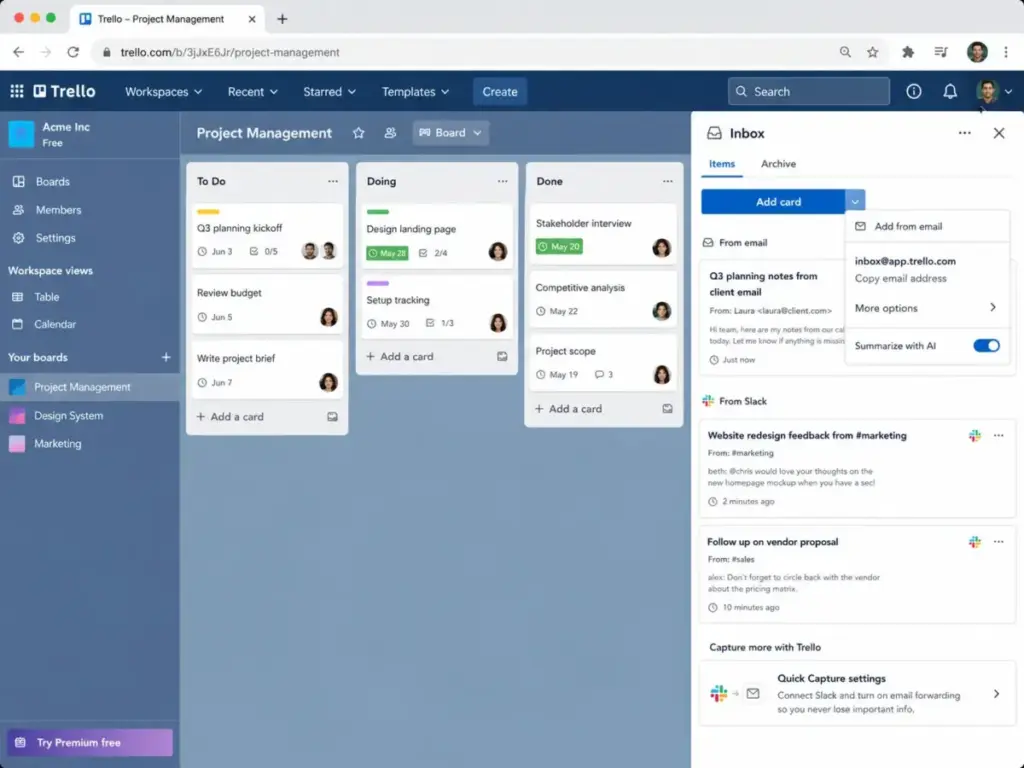
Trello is built around boards, lists, and cards. Creating a task takes one click. Moving a card between columns is a drag. The Inbox feature captures tasks from email, Slack, and Microsoft Teams without switching apps. Planner syncs with your calendar. For a 5-person content team managing a weekly editorial calendar, this workflow runs on Trello Free or Standard with zero learning curve.
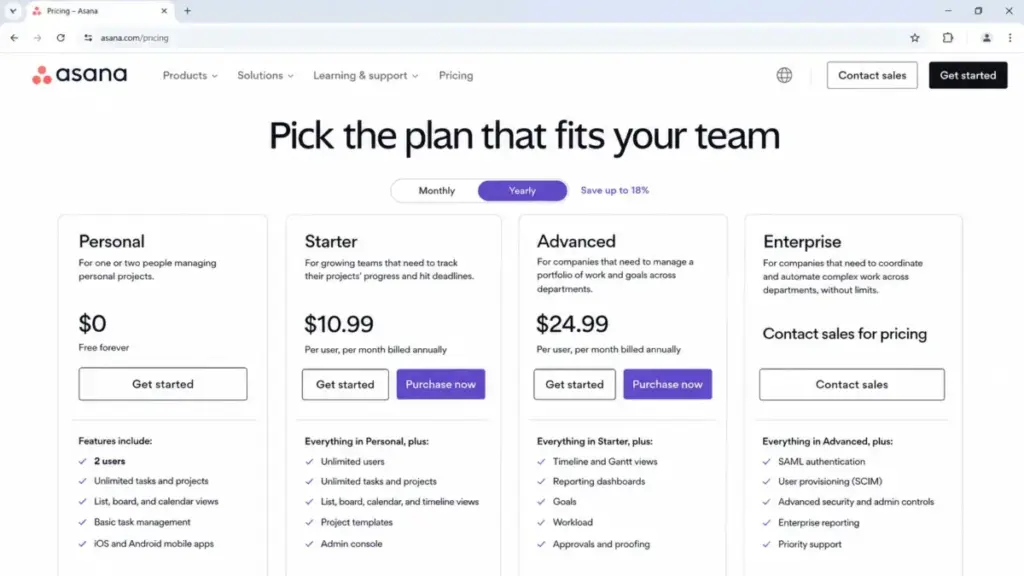
Asana handles daily task management well, but the setup is heavier. Asana Personal (free) limits you to 2 users. That is not a team plan. Asana Starter at $10.99/user/month annual unlocks the first practical team tier with unlimited automations, forms, custom fields, and Timeline view.
Here is the friction point. Trello Free supports up to 10 collaborators per Workspace with 10 boards. Asana Personal supports 2 users with unlimited tasks and projects. A 5-person team on Trello Free pays nothing. The same team on Asana must pay $54.95/month on Starter.
Winner: Trello. For quick daily task capture and board management, Trello requires less setup, costs less, and handles small-team Kanban workflows without forcing an upgrade.
Workflow 2: Structured Project Delivery with Deadlines and Dependencies
Asana wins when projects need Timeline, Gantt, dependencies, and dashboards.
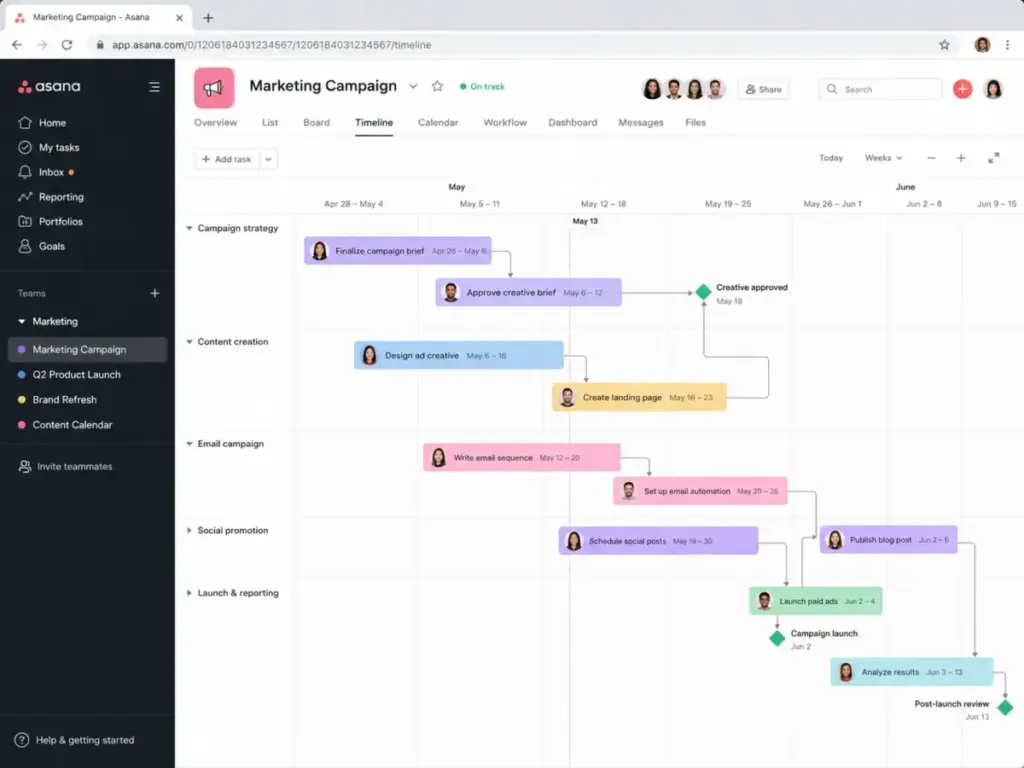
Asana Starter includes Timeline and Gantt views. A 10-person marketing team running campaign launches with overlapping deadlines can map dependencies, track milestones, and visualize the critical path. Dashboards show project status without building a separate report. Forms capture campaign briefs from stakeholders. Custom fields track priority, budget, and approval status.
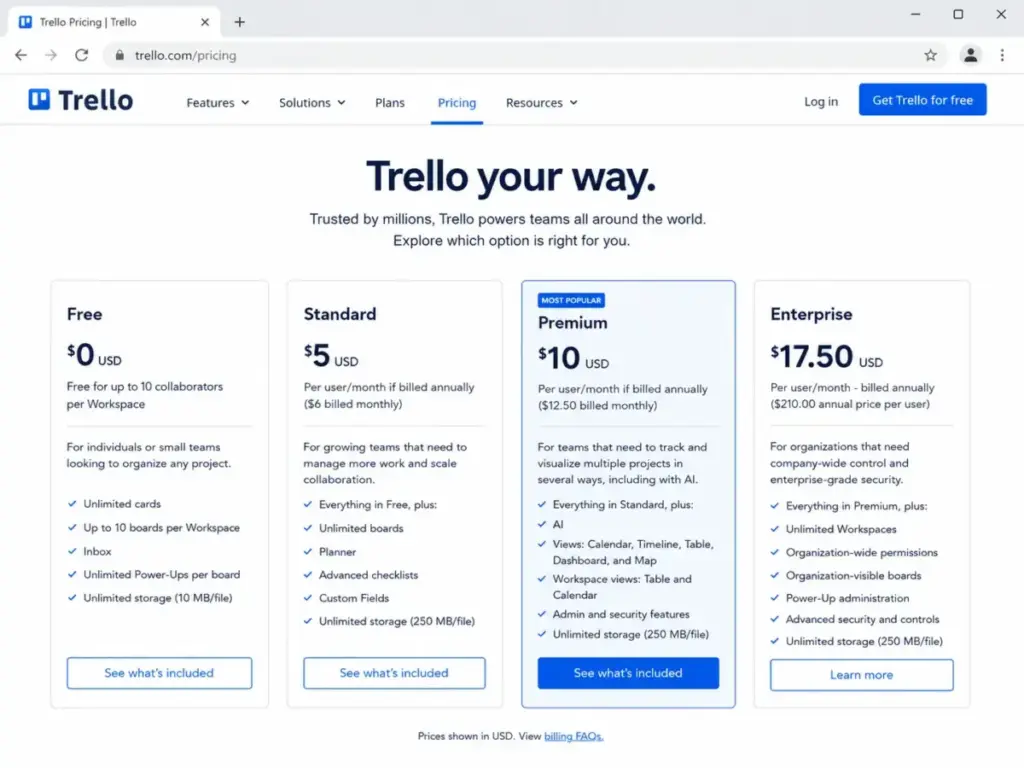
Trello can display a Timeline view, but only on Premium at $10/user/month annual. Calendar, Table, Dashboard, and Map views are also Premium-gated. On Free and Standard, Trello is a board tool. Period.
| Feature | Trello Plan Required | Asana Plan Required | Buyer Impact |
|---|---|---|---|
| Timeline / Gantt view | Premium ($10/user/month) | Starter ($10.99/user/month) | Nearly same price, but Asana Starter includes more depth |
| Dashboards | Premium ($10/user/month) | Starter ($10.99/user/month) | Asana dashboards are richer out of the box |
| Custom fields | Standard ($5/user/month) | Starter ($10.99/user/month) | Trello is cheaper for basic custom fields |
| Forms | Not native (Power-Up required) | Starter ($10.99/user/month) | Asana forms are built in. Trello needs a third-party Power-Up. |
| Portfolios | Not available | Advanced ($24.99/user/month) | Trello has no native portfolio management |
| Goals | Not available | Advanced ($24.99/user/month) | Trello has no native goals tracking |
| Workload planning | Not available | Advanced ($24.99/user/month) | Trello has no native workload view |
| Approvals and proofing | Not available | Advanced ($24.99/user/month) | Trello has no native approval workflows |
| Time tracking | Not available | Advanced ($24.99/user/month) | Asana includes time tracking on Advanced |
What this means: Trello Premium and Asana Starter are priced within $1/user/month of each other on annual billing. But Asana Starter includes forms, unlimited automations, and unlimited free guests that Trello Premium does not match. The plan-gate difference widens at the Advanced tier, where Asana adds portfolios, goals, workload, approvals, proofing, and time tracking. Trello has no native equivalent for any of these.
Winner: Asana. For structured project delivery with timelines, dependencies, and cross-project visibility, Asana provides the features natively. Trello requires Premium for basic multi-view access and has no portfolio or workload layer.
Workflow 3: Automation at Scale
Asana wins on automation volume and workflow sophistication. Trello wins on accessibility and budget.
Trello Butler Automation
Trello Butler automation is accessible on every plan. Free gets 250 Workspace command runs/month. Standard gets 1,000 runs/month. Premium and Enterprise get unlimited Workspace command runs.
But “unlimited” has caveats. Teams that rely heavily on what Kanban is and its principles will notice these limits faster. Trello enforces per-operation quotas, per-email quotas, a 20-action single-run limit, button limits, and a 64,000-character automation storage limit. These limits can change without notice. A 10-person team automating card movements, due date reminders, and Slack notifications on Standard can burn through 1,000 runs in under three weeks if automations fire on every card update.
Asana Automations
Asana Starter includes unlimited automations. No monthly cap. No Workspace-level pooling. Triggers include task completion, field changes, form submissions, due date proximity, and section moves. Asana also supports multi-step rules and cross-project automation on Starter.
| Automation / API Area | Trello | Asana | Practical Risk |
|---|---|---|---|
| Workspace command runs | 250/month (Free), 1,000 (Standard), unlimited (Premium+) | Unlimited on Starter and above | Trello Standard teams hit the ceiling with moderate automation use |
| Actions per single run | 20-action limit | No published per-rule action cap | Complex Trello automations need splitting into multiple rules |
| Email quotas | Quota applies (varies by plan) | Not published as a constraint | Trello email-based automations add quota pressure |
| Automation storage | 64,000-character limit | Not published | Large Trello Workspaces with many rules risk hitting storage caps |
| API rate limits | 300 requests/10 seconds per key, 100/10 seconds per token | 1,500 requests/minute paid, 150/minute free, 60/minute search | Asana paid API limits are higher for integration-heavy teams |
What this means: Trello automation is good enough for simple card-level triggers. Asana automation handles structured intake, multi-step workflows, and cross-project coordination. If your team automates fewer than 1,000 actions per month, Trello Standard works. If your team relies on form-to-task pipelines, conditional fields, or portfolio-level automation, Asana Starter is the practical choice.
Winner: Asana. Asana’s unlimited automations on Starter and higher API rate limits on paid plans give growing teams more room before hitting ceilings. Trello’s automation is budget-friendly but capped in ways that create upgrade pressure.
Trello vs Asana Pricing: The Full Cost Math
Trello costs less at every team size when comparing equivalent paid tiers. The gap grows as teams scale.
| Users | Trello Standard (annual) | Asana Starter (annual) | Monthly Difference | Annual Difference |
|---|---|---|---|---|
| 5 | $25/month | $54.95/month | $29.95 | $359.40 |
| 10 | $50/month | $109.90/month | $59.90 | $718.80 |
| 25 | $125/month | $274.75/month | $149.75 | $1,797.00 |
| 50 | $250/month | $549.50/month | $299.50 | $3,594.00 |
What this means: At 50 users, Trello Standard saves $3,594/year compared to Asana Starter. That gap funds a separate tool, a part-time hire, or the upgrade to Trello Premium. The savings are real, but they come with a feature tradeoff: Trello Standard has no Timeline, no Gantt, no dashboards, and no forms.
For teams that need the features Asana Starter provides, the comparison shifts to Trello Premium vs Asana Starter. Our Trello pricing breakdown and Asana pricing breakdown cover every tier in detail.
| Users | Trello Premium (annual) | Asana Starter (annual) | Difference |
|---|---|---|---|
| 5 | $50/month | $54.95/month | Asana is $4.95 more |
| 10 | $100/month | $109.90/month | Asana is $9.90 more |
| 25 | $250/month | $274.75/month | Asana is $24.75 more |
| 50 | $500/month | $549.50/month | Asana is $49.50 more |
At this tier, the price gap narrows. Trello Premium at 10/user/monthandAsanaStarterat10.99/user/month are close. But Asana Starter includes unlimited automations, forms, and unlimited free guests. Trello Premium includes AI features, multiple views, and unlimited Workspace command runs.
Hidden Costs to Watch
Trello hidden costs:
- Partner Power-Ups can require separate subscriptions
- Atlassian Guard add-ons can be separate outside Enterprise inclusion
- Multi-board guests can become billable users
- Reporting, Gantt, and resource planning gaps may require third-party tools or Power-Ups
- Sales tax applies in some jurisdictions
Asana hidden costs:
- Timesheets and Budgets add-on costs $5.99/user/month billed annually
- AI Teammates pricing is contact-sales
- Compliance management and Permissions management are Enterprise add-ons
- Seat increments create billing overhead as teams grow
- Sales tax applies in some jurisdictions
Trello vs Asana: Security, Compliance, and Enterprise Controls
Asana publishes a broader enterprise compliance portfolio. Trello is strong within the Atlassian ecosystem.
Trello provides SOC 2 Type 2, ISO/IEC 27001, PCI-DSS, and 2FA across plans. Enterprise includes Atlassian Guard Standard with SSO, user provisioning, organization-level permissions, multi-board guest management, and public board controls.
Asana’s Trust Center lists SOC 2 Type 2, SOC 3, ISO/IEC 27001, ISO/IEC 27017, ISO/IEC 27018, ISO/IEC 27701, GDPR, CCPA, and HIPAA compliance. Enterprise adds SAML, SCIM, universal workload, capacity planning, service accounts, and view-only licenses.
For a 50-person enterprise team requiring SSO, SCIM user provisioning, workload visibility, and published compliance documentation, Asana Enterprise covers more requirements natively. Trello Enterprise at $17.50/user/month is publicly priced and includes Atlassian Guard Standard, which is a strength for teams already in the Atlassian ecosystem (Jira, Confluence, Bitrix).
Winner: Asana. Asana’s compliance portfolio is broader and its Enterprise tier includes capacity planning and universal workload management that Trello does not offer natively.
Trello vs Asana: Integrations and Ecosystem
Trello offers 200+ Power-Ups and integrations including Slack, Google Drive, Salesforce, Microsoft Teams, and email capture. Some partner Power-Ups require separate subscriptions.
Asana offers 100+ free integrations on all plans, including Slack, Google Drive, and Zoom. Advanced adds Salesforce, Tableau, and Power BI. All plans include the Asana developer API.
The integration story is different, not better or worse. Trello’s Power-Up model gives broader marketplace flexibility. Asana’s integration model provides fewer but more structured enterprise connections.
Winner: Tie. The right ecosystem depends on whether you need marketplace breadth (Trello) or structured BI and CRM connections (Asana).
Migration and Switching Between Trello and Asana
Moving from Trello to Asana is easier when boards are simple. Asana provides a CSV importer that maps task names, descriptions, assignees, due dates, start dates, dependencies, followers, and custom fields from Trello exports.
Moving from Asana to Trello is harder. Teams lose hierarchy depth, portfolios, goals, workload views, approvals, proofing, and advanced reporting. Rebuilding these workflows requires boards, Power-Ups, or third-party tools.
| Direction | Difficulty | Main Risk |
|---|---|---|
| Trello to Asana | Medium | Custom Power-Up workflows and Butler rules do not auto-migrate. Requires manual rebuild of automations. |
| Asana to Trello | Medium to High | Portfolio, goal, and workload data has no Trello equivalent. Teams lose multi-project governance. |
What this means: If you are on Trello today and outgrowing it, moving to Asana is practical. The reverse move sacrifices structured project management features that Trello cannot replicate natively.
Where Trello Wins
- 5-person startup managing a content calendar. Trello Free or Standard handles Kanban workflows at the lowest cost.
- Budget-sensitive teams that only need boards. At 50 users, Trello Standard saves $3,594/year vs Asana Starter.
- Personal task capture and quick-entry workflows. Trello Inbox, Planner, and phone capture are stronger for individual productivity.
- Non-technical teams that want zero onboarding. Trello’s board-first interface requires no training.
- Small agencies with client-facing boards. Trello’s visual simplicity translates well for external collaboration.
Where Asana Wins
- 10-person marketing team with campaign intake and deadlines. Asana Starter unlocks forms, Timeline, Gantt, dashboards, and unlimited automations.
- 25-person cross-functional team tracking projects across departments. Asana Advanced adds portfolios, goals, workload, approvals, proofing, and BI integrations.
- Teams that need structured approval workflows. Asana Advanced includes native approvals and proofing.
- Enterprise teams requiring SSO, SCIM, and compliance documentation. Asana Enterprise covers SAML, SCIM, universal workload, and published Trust Center materials.
- Teams that automate heavily. Unlimited automations on Starter removes the ceiling Trello imposes on Standard.
Who Should Choose Trello
Choose Trello if your team fits these conditions:
- Your team is under 10 people and mostly needs visual task boards
- Your budget prioritizes low per-user cost over advanced project views
- Your workflows are card-based: move tasks through columns, assign owners, set due dates
- Your team uses Slack, email, or Microsoft Teams and wants quick task capture from those channels
- You do not need native Gantt charts, portfolios, or workload planning
Who Should Choose Asana
Choose Asana if your team fits these conditions:
- Your team is over 10 people and needs structured project delivery with timelines and dependencies
- You need dashboards, forms, and custom fields on the first paid tier
- Your team manages multiple projects across departments and needs portfolio visibility
- You need unlimited automations without worrying about monthly run caps
- Your enterprise requires SAML, SCIM, and published compliance certifications
Who Should Avoid Both
Neither Trello nor Asana is the right pick if:
- You need all-in-one docs, chat, and project management. Consider tools that combine documentation, real-time communication, and task tracking in a single workspace.
- You need database-style apps with relational data. Airtable or similar tools handle content databases, asset libraries, and operational trackers better than either Trello or Asana.
- You need a Work OS that spans departments beyond project management. monday work management offers operational customization for cross-department workflows that go beyond classic PM. Our ClickUp vs Monday comparison covers how those two stack up.
- You need Trello’s simplicity at Asana’s feature depth without paying Asana’s price. ClickUp bundles docs, goals, dashboards, and project management at a lower starting price than Asana Advanced. See our ClickUp review and evaluation for the full breakdown.
Alternatives to Consider If Neither Fits
| Alternative | Best For | Why Consider | Starting Price |
|---|---|---|---|
| ClickUp | Teams that want PM plus docs, goals, and dashboards in one workspace | Good when Asana feels expensive and Trello feels too lightweight | Free plan available; paid from $7/user/month |
| monday work management | Operations-heavy teams needing a flexible Work OS for cross-department workflows | Good when the buyer needs operational customization beyond classic PM | From $9/seat/month |
| Airtable | Teams managing work as relational data, content databases, or operations trackers | Good when projects depend on structured records and filtered views | Free plan available; paid from $20/seat/month |
What this means: ClickUp is the most common middle ground for teams that find Trello too simple and Asana too expensive. Our Airtable review and analysis covers the data-driven alternative in depth. monday work management serves teams with operational workflows beyond standard project management. Airtable is the pick when work is data-driven rather than task-driven.
Final Verdict: Trello vs Asana in 2026
There is no universal winner. The right tool depends on team size, workflow complexity, and budget.
Choose Trello for teams under 10 that need fast setup, visual boards, lightweight task tracking, personal capture, and the lowest per-user cost. Trello Standard at $5/user/month annual is the best value in project management for Kanban-first teams.
Choose Asana for teams over 10 that need structured project delivery, Timeline and Gantt, dashboards, forms, portfolios, workload planning, approvals, and stronger enterprise governance. Asana Starter at 10.99/user/monthannualistheentrypoint,butmostgrowingteamsenduponAdvancedat24.99/user/month for full functionality.
Consider alternatives if you need all-in-one docs and chat, database-style apps, or a Work OS that spans departments beyond project management.
One thing I have learned from tracking 20+ tool migrations: the biggest cost is not the subscription. Teams considering a broader set of options can explore Asana vs ClickUp or browse our best team collaboration tools for tools that combine communication and project management. It is the three months of partial adoption where half the team uses the new tool and the other half uses the old one. Pick the tool that matches your workflow today, not the tool with the longest feature list. The best project management tool is the one your team actually uses every day.
FAQ
Is Trello better than Asana for small teams?
Trello is the better choice for small teams under 10 people that primarily need Kanban boards. Trello Free supports up to 10 collaborators per Workspace at no cost. Asana Personal (free) limits you to 2 users. For small teams on a budget that do not need Timeline, Gantt, or dashboards, Trello delivers more value at a lower price. The gap closes when small teams need structured project views.
Is Asana more expensive than Trello?
Yes. At every comparable tier, Asana costs more per user. Trello Standard is 5/user/monthannual.AsanaStarteris10.99/user/month annual. At 25 users, that difference adds up to $1,797/year. The higher price buys Timeline, Gantt, dashboards, forms, unlimited automations, and unlimited free guests. Whether that premium is worth it depends on which features your team actually uses.
Does Trello have Gantt charts?
Trello includes a Timeline view on Premium at 10/user/monthannual.FreeandStandardplansdonotincludeTimelineorGantt.AsanaincludesTimelineandGanttonStarterat10.99/user/month annual. If Gantt is a requirement, both tools gate it behind a paid plan at a similar price point.
Can I migrate from Trello to Asana?
Yes. Asana provides a CSV importer that supports imports from Trello and maps task names, descriptions, assignees, due dates, start dates, dependencies, followers, and custom fields. The main risk is that custom Power-Up workflows and Butler automation rules do not auto-migrate. Expect to manually rebuild automations after the import.
Which tool has better automation?
Asana has stronger automation at scale. Asana Starter includes unlimited automations with no monthly run cap. Trello Standard caps Workspace command runs at 1,000/month and enforces per-operation, per-email, and storage quotas. For teams with moderate automation needs, Trello works. For teams that automate form-to-task pipelines or cross-project workflows, Asana is the safer pick.
Which is easier to use for non-technical users?
Trello is easier. The board-and-card interface is visual and requires no training. Asana has a steeper learning curve because it offers more views, fields, and configuration options. Non-technical teams that only need Kanban boards should start with Trello. Teams that need structured project views will invest more setup time in Asana but gain more capability.
Should I switch from Trello to Asana?
Switch if your team has outgrown Trello’s board-only approach and needs Timeline, dashboards, forms, portfolios, or workload planning. Stay with Trello if boards are your primary workflow and you do not need the governance features Asana offers. The migration is practical but requires rebuilding automations manually.
What are the hidden costs of Trello and Asana?
Trello’s hidden costs include partner Power-Up subscriptions, Atlassian Guard add-ons outside Enterprise, and billable multi-board guests. Asana’s hidden costs include the $5.99/user/month Timesheets and Budgets add-on, contact-sales pricing for AI Teammates, and Enterprise-gated compliance and permissions management. Both charge sales tax in applicable jurisdictions.
Which tool is better for remote teams?
Both work for remote teams. Trello excels at asynchronous task capture from email, Slack, and Teams. Asana excels at structured project tracking with Timeline, dashboards, and workload visibility. For remote teams that need visibility into who is working on what across multiple projects, Asana provides better native reporting. For remote teams that need simple shared boards, Trello is sufficient.
When should I consider neither Trello nor Asana?
Consider alternatives when you need all-in-one docs and chat combined with project management, database-style relational apps, or a Work OS that handles operational workflows across departments beyond standard project management. ClickUp, monday work management, and Airtable each serve different gaps that Trello and Asana do not fully cover.