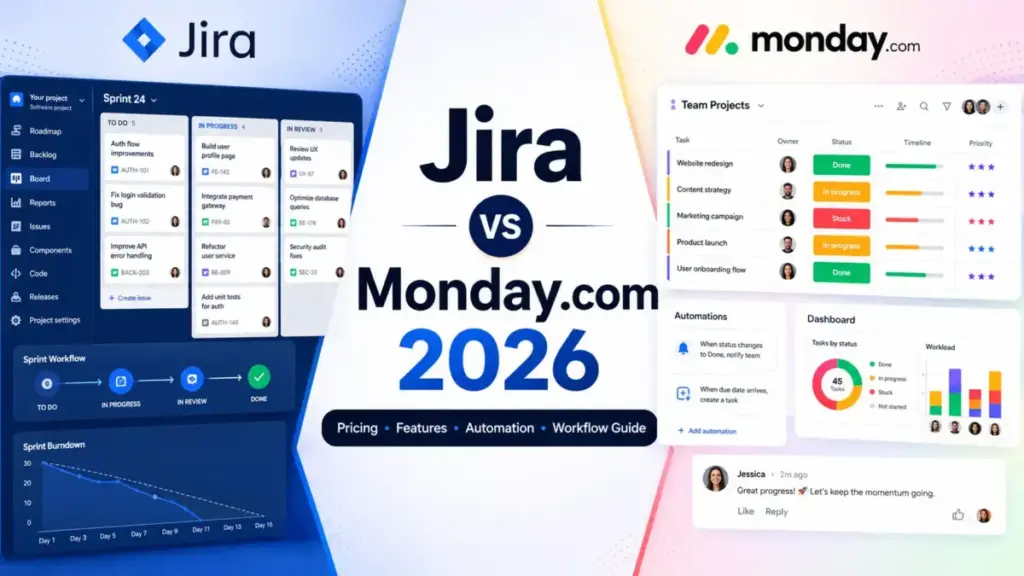
Your team just spent 30 minutes debating whether to track a feature request as an “item” or an “issue.” That argument tells you more about the Jira vs Monday.com decision than any feature checklist ever will.
Jira is the stronger pick for software and engineering teams that need sprint planning, backlog control, and developer integrations. Monday.com Work Management is the better fit for marketing, operations, and cross-functional teams that want visual boards, no-code automations, and faster adoption without admin overhead.
The gap between these tools is not about what project management software does. It is about whether your team thinks in issues and sprints or in boards and color-coded statuses. I will break down pricing at 5, 10, 25, and 50 users, map the automation quota limits most comparisons ignore, and show you exactly which plan gates block the features you actually need.
Quick Verdict: Jira vs Monday.com
| Category | Winner | Why |
|---|---|---|
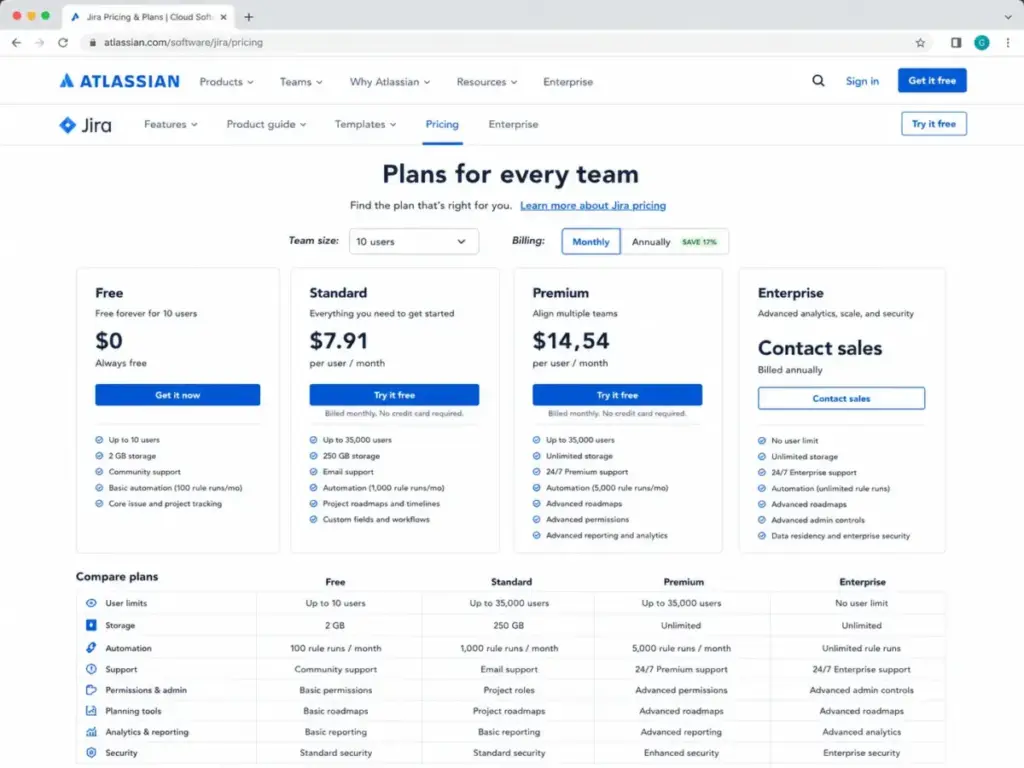
| Pricing at 5–50 users | Jira | Free up to 10 users. Standard at 7.91/user/monthvsmondayStandardat12/seat/month |
| Ease of use and onboarding | Monday.com | Visual, no-code boards. Lower admin training. Faster first-day adoption |
| Agile and software development | Jira | Native Scrum/Kanban, backlog, sprint planning, velocity reports, developer ecosystem |
| Cross-functional business workflows | Monday.com | Better for marketing calendars, operations, PMO dashboards, and non-technical teams |
| Automation model | Tie | Jira is better for technical triggers. Monday.com is easier for business rules. Both have quota gates |
| Integrations | Tie | Jira has deeper developer Marketplace. Monday.com has broader business app ecosystem (850+) |
| Support and enterprise governance | Tie | Monday.com offers 24/7 for all plans. Jira has stronger tiered governance on Premium/Enterprise |
What this means: Jira wins on cost and technical depth. Monday.com wins on usability and cross-team adoption. Neither wins across the board, and the right choice depends on your team’s primary workflow, not a generic feature count.
How We Compared Jira and Monday.com
James Carter covers best project management software and has reviewed 35+ tools in this category. This comparison is based on official pricing pages, feature documentation, plan gate analysis, and published user sentiment from G2 and Capterra. Testing level: official research only. I did not run hands-on tests for this article.
Pricing was verified on June 15, 2026 using each vendor’s official pricing page. Enterprise pricing for both products is custom and requires contacting sales. All prices are in USD and reflect annual billing unless stated otherwise.
This comparison evaluates Jira (by Atlassian) against monday.com Work Management (by monday.com Ltd.), not monday dev. Most SERP comparisons blur the line between monday Work Management and monday dev. I am keeping them separate because their feature sets, pricing, and buyer fit are different.
Jira vs Monday.com at a Glance
| Dimension | Jira | Monday.com Work Management |
|---|---|---|
| Best for | Software, product, IT, and technical ops teams | Marketing, operations, PMO, HR, and cross-functional teams |
| Free plan | Up to 10 users | Up to 2 seats (3 boards, no automations) |
| Starting paid price | $7.91/user/month (Standard) | $9/seat/month billed annually (Basic, no automations) |
| Practical tier | Standard (7.91)orPremium(14.54) | Standard (12)orPro(19) |
| Setup difficulty | High for non-technical teams | Low to medium |
| Automation model | Monthly flow runs (100–unlimited by plan) | Monthly actions (0–250,000 by plan) |
| Core workflow | Issues, epics, sprints, backlogs, Scrum/Kanban boards | Boards, items, groups, columns, timeline, Gantt |
What this means: Jira’s free tier covers up to 10 users, giving small software teams a real starting point. Monday.com’s free tier caps at 2 seats with no automations, which is more of a trial than a working plan.
If You Run Sprints and Ship Code, Choose Jira
Jira is the default choice for 25-person engineering teams running Scrum or Kanban with GitHub, sprint metrics, and bug triage. That is not a controversial take. It is the reason Jira exists. For a deeper look at Jira as a standalone tool, read our Jira project management review.
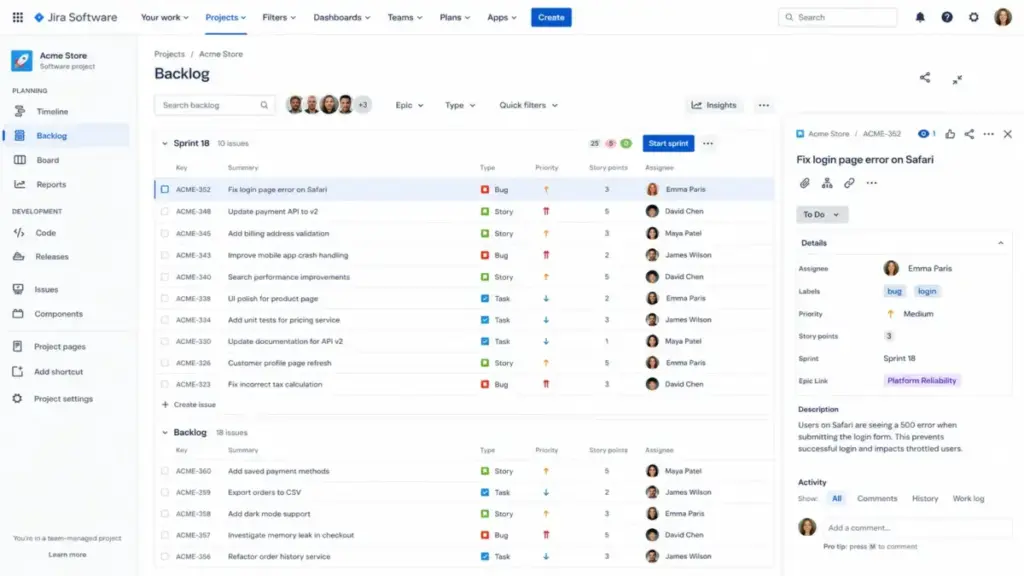
Jira gives engineering teams native sprint planning, backlog grooming, velocity charts, burndown reports, and issue hierarchy (epics, stories, tasks, subtasks). Monday.com has Kanban boards and timeline views, but it does not have native sprint velocity tracking or backlog-to-sprint drag-and-drop workflow that engineering teams expect.
The Atlassian ecosystem adds Confluence for documentation, Bitbucket for code, and over 3,000 Marketplace apps. For a 25-person engineering team already using GitHub, the Jira-GitHub integration handles commits, branches, and pull request tracking inside issue views.
Paraphrased user sentiment from G2 and Capterra: reviewers praise Jira for its deep customization, workflow control, and integrations, but repeatedly mention complexity and setup friction for new users.
The friction point: Jira’s complexity scales with your configuration. A clean Jira instance is fast. A Jira instance with 47 custom fields, 12 workflow states, and 9 permission schemes is a nightmare for anyone outside the admin team.
If You Manage Marketing or Operations, Choose Monday.com
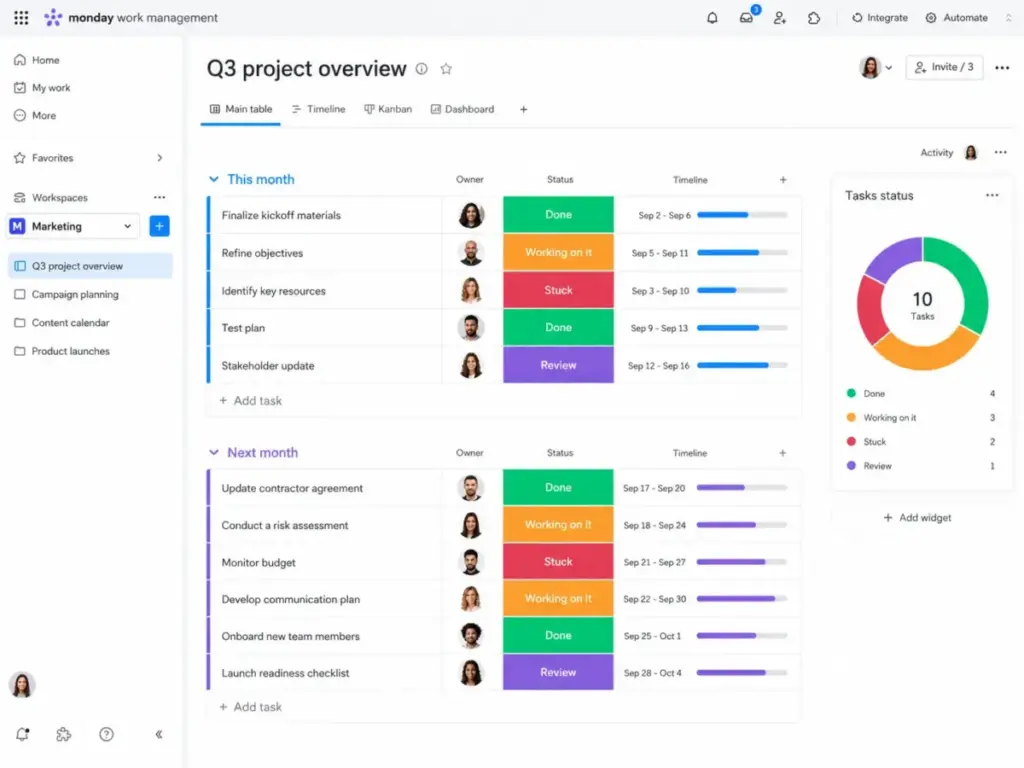
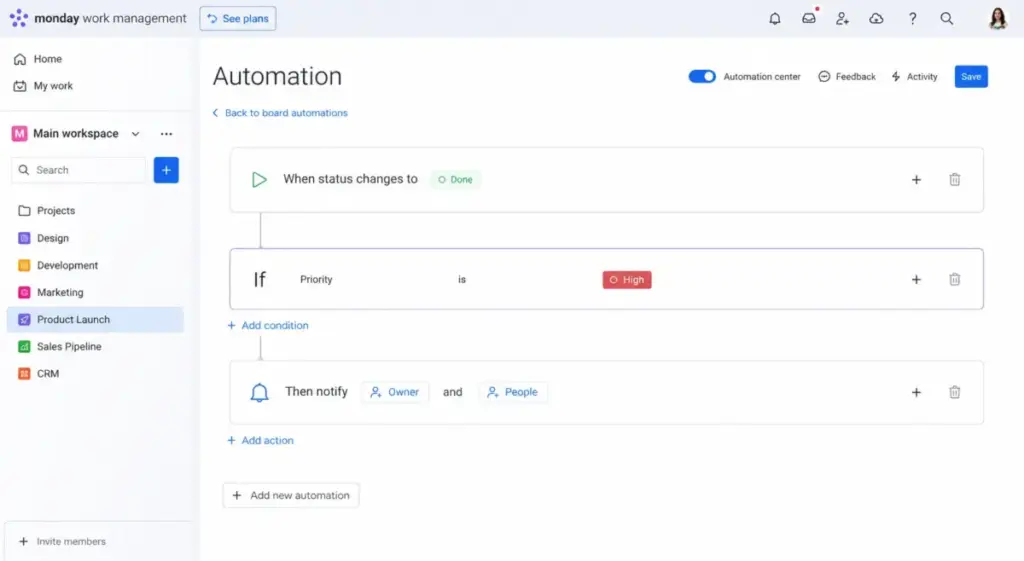
A 15-person marketing and operations team will adopt Monday.com Work Management faster than Jira. The boards are visual. The templates are ready. The automations are no-code.
Monday.com lets non-technical users build campaign trackers, content calendars, approval workflows, and client dashboards without understanding what an “issue type” or “workflow scheme” means. Forms, docs, and guest access are built in on Standard and above.
For a 50-person PMO coordinating business stakeholders, monday.com offers dashboard rollups, portfolio management (Enterprise), workload views (Pro), and visual status reporting that executives can read without training.
Paraphrased user sentiment from Capterra and G2: users praise monday.com for daily task tracking, cross-department coordination, and no-code automation flexibility, while noting that complex shared views and data updates can still cause friction at scale.
If Budget Is the Priority, Choose Jira
Jira costs less than monday.com at every team size I calculated. For a full breakdown of every Jira tier, see the Jira pricing analysis. Here is the math.
Cost at Scale: Jira Standard vs Monday.com Standard
| Team size | Jira Standard | Monday.com Standard | Difference | Free plan caveat |
|---|---|---|---|---|
| 5 users | $39.55/mo | $60/mo | Jira saves $20.45/mo | Jira Free covers 5 users at $0 |
| 10 users | $79.10/mo | $120/mo | Jira saves $40.90/mo | Jira Free covers 10 users at $0 |
| 25 users | $197.75/mo | $300/mo | Jira saves $102.25/mo | — |
| 50 users | $395.50/mo | $600/mo | Jira saves $204.50/mo | — |
What this means: At 50 users on comparable Standard plans, Jira saves 204.50permonth,or2,454 per year (as of June 2026). For a 5-person software startup, Jira Free at $0 is hard to beat when monday.com Free caps at 2 seats and has zero automations.
Official pricing page for Jira.
Official pricing page for monday.com.
Hidden Costs to Watch
Jira hidden costs: Confluence licenses for documentation teams. Marketplace app costs for resource planning, test management, or advanced reporting. Premium/Enterprise upgrade required for higher automation limits, 99.9% SLA, and advanced planning. Jira admin time or consulting for complex configurations.
Monday.com hidden costs: Basic plan includes zero automations and zero integrations. Standard needed for Timeline/Gantt views and 250 automation actions/month. Pro required for time tracking, private boards, formula columns, and 25,000 actions/month. Enterprise required for portfolio management, resource management, and 250,000 actions/month. AI credit add-ons and regional tax can change checkout totals.
If Non-Technical Users Build the Automations, Choose Monday.com
Both tools offer automations, but they work differently and hit different walls. This is where James Carter sees most comparison articles fall short: they say “both have automation” without showing the quota gates.
Automation Quota Comparison
| Plan level | Jira flow-run limit | Monday.com action limit | What happens at scale |
|---|---|---|---|
| Free | 100 runs/month | 0 actions/month | Monday.com Free has no automations at all |
| Standard / Basic | 1,700 runs/month (Jira Standard) | 0 actions/month (monday Basic) | Monday Basic still locks automations out |
| Standard (monday) | — | 250 actions/month | 250 actions runs out fast for a 10-person team with daily triggers |
| Premium / Pro | 1,000 runs/user/month (Jira Premium) | 25,000 actions/month (monday Pro) | Jira scales per user. Monday caps per workspace |
| Enterprise | Unlimited (Jira Enterprise) | 250,000 actions/month (monday Enterprise) | Both remove practical limits at enterprise tier |
What this means: Jira Standard gives you 1,700 automation flow runs per month. Monday.com Standard gives you 250 automation actions per month. That is a 6.8x difference in raw automation capacity at the Standard tier. But Jira automations are built for issue-based triggers (status changes, sprint events, field updates). Monday.com automations are easier for marketing teams to set up without technical help.
The real risk: automation limits can stop rules from firing until the next month when the usage cap is reached. On both platforms, unused runs do not roll over.
If You Need Enterprise Governance, Compare Both Closely
Enterprise governance is a tie, but for different reasons.
Jira Enterprise includes Atlassian Analytics and Data Lake, Atlassian Guard Standard (SSO, SCIM, audit logs), up to 150 sites, 99.95% SLA, 24/7 all-issue support with 30-minute critical response, and unlimited automation. Security controls include SOC 2 reporting, ISO/IEC 27001-linked GDPR controls, and data residency from Standard and up.
Monday.com Enterprise includes custom pricing, enterprise security and governance aligned with ISO 27001, ISO 27018, SOC 2, and OWASP Top 10, up to 250,000 automation and integration actions/month, portfolio and resource management, multi-level permissions, tailored onboarding, and 99.9% SLA. HIPAA-compliant plans are available for eligible Enterprise setups.
Monday.com gives 24/7 support to all paid users, including Basic. Jira gates support by tier: Free gets community only, Standard gets 9/5 regional support, Premium gets 24/7 for critical issues, Enterprise gets 24/7 for all issues with phone support.
Enterprise buyers should compare support SLAs and security controls directly in vendor conversations. Both platforms meet baseline compliance needs, but the governance depth and support response times vary by contract.
Feature Gate Comparison: Where Plan Locks Hit
This table shows which features require which plan. Most comparison articles list features without telling you which tier unlocks them.
| Feature | Jira plan gate | Monday.com plan gate | Buyer implication |
|---|---|---|---|
| Automations | Free (100 runs) | Standard (250 actions) | Monday Basic and Free have zero automations |
| Integrations | Free (basic) | Standard (250 actions) | Monday Basic has zero integrations |
| Timeline/Gantt views | Free (timeline) | Standard ($12/seat/mo) | Monday locks visual views behind Standard |
| Time tracking | Not native (Marketplace) | Pro ($19/seat/mo) | Monday Pro required. Jira needs an app |
| Sprint planning and backlog | Free | Not native | Monday.com does not have native sprint velocity |
| Data residency | Standard ($7.91) | Not specified publicly | Jira offers it from Standard up |
| Private boards/docs | All plans (permissions) | Pro ($19/seat/mo) | Monday Pro required for private boards |
| Portfolio management | Premium ($14.54) | Enterprise (custom) | Both gate this behind higher tiers |
| 99.9%+ SLA | Premium ($14.54) | Enterprise (custom) | Jira Premium SLA is cheaper to access |
| Unlimited automation | Enterprise (custom) | Enterprise (250K cap) | Jira Enterprise is truly unlimited |
What this means: Monday.com’s Basic plan at 9/seat/monthlookscheap,butitincludeszeroautomationsandzerointegrations.Formostteams,therealstartingplanismondayStandardat12/seat/month. Jira Free gives you automations (100 runs), integrations, and timeline views at $0 for up to 10 users.
Setup and Migration Difficulty
| Dimension | Jira | Monday.com |
|---|---|---|
| Initial setup | High for non-technical teams. Medium for agile teams | Low to medium. Visual and template-driven |
| Admin training | Requires Jira admin knowledge (workflows, schemes, permissions) | Lower. No-code configuration for most setups |
| Migration to the other tool | Medium. Issues, statuses, and workflows map to boards and columns | Medium-High. Boards do not map cleanly to Jira issue types and workflow schemes |
| Data portability | Import/export for GDPR. API available | APIs, SDKs, spreadsheet imports. Complex automations need manual rebuild |
| Scaling complexity | Grows with custom fields, permission schemes, and workflow rules | Grows with multi-board systems, cross-board automations, and dashboard sprawl |
What this means: If you are migrating from Jira to monday.com, expect to rebuild issue hierarchies into board structures. If you are migrating from monday.com to Jira, business boards without clean issue-type mapping will take longer to restructure. Neither migration is simple.
Where Jira Wins
- 5-person software startup on a budget. Jira Free covers up to 10 users with core agile views, sprint boards, and 100 automation runs. Monday.com Free caps at 2 seats with no automations.
- 25-person engineering team running Scrum. Native backlog grooming, sprint planning, velocity charts, burndown reports, and GitHub/Bitbucket integrations. Monday.com lacks native agile reporting depth. If you are also considering ClickUp, see the Jira vs ClickUp comparison.
- Enterprise software organization in the Atlassian ecosystem. Atlassian Analytics, Guard Standard, Confluence, Marketplace depth, and 99.95% SLA. Switching costs are high if you already run Confluence and Bitbucket.
- Teams that need technical automation triggers. Jira automation rules fire on issue transitions, field changes, sprint events, and JQL conditions. Standard gives 1,700 runs/month. Premium scales to 1,000 runs per user per month.
- Cost-sensitive teams at any size. Jira Standard at 7.91/user/monthis4.09 cheaper per seat than monday Standard at 12/seat/month.At50users,thatgapis204.50/month.
Where Monday.com Wins
- 15-person marketing team tracking campaigns. Board templates, calendar views, forms for intake, guest access for clients, and no-code automations for status-change notifications.
- 50-person PMO with executive reporting. Dashboard rollups, portfolio management (Enterprise), workload views (Pro), and visual status boards that non-technical stakeholders read without training.
- Cross-functional teams with mixed technical and non-technical users. The board interface requires no Jira-style vocabulary (no “epics,” “stories,” or “permission schemes”). Teams adopt it faster.
- Teams that need 24/7 support from day one. Monday.com offers 24/7 support for all paid plans, including Basic. Jira gates 24/7 support behind Premium.
- Operations and HR teams running approval workflows. No-code automations, form-based intake, doc collaboration, and visual status tracking fit operational workflows better than issue-based tracking.
Who Should Choose Jira
Choose Jira if your team runs Scrum or Kanban sprints with backlog grooming and velocity tracking. Choose Jira if your developers need GitHub, Bitbucket, or CI/CD integrations inside their issue tracker. Choose Jira if your budget matters and Jira Free or Standard covers your needs at a lower per-user cost. Choose Jira if you already use Confluence, Bitbucket, or other Atlassian tools and want ecosystem integration without third-party connectors.
Who Should Choose Monday.com
Choose monday.com Work Management if your team is non-technical and wants visual boards without learning agile terminology. Choose monday.com if marketing, operations, or HR owns the tool and needs forms, docs, guest access, and template-driven setup. Choose monday.com if 24/7 support matters from day one without paying for a Premium tier. Choose monday.com if you need a single platform for project tracking, client-facing dashboards, and cross-department coordination.
Who Should Avoid Both
Not every team fits Jira or monday.com. Consider alternatives if:
- You need docs, tasks, chat, and a wiki in one workspace. Neither Jira nor monday.com replaces a combined docs-and-tasks tool. Look at ClickUp (see our ClickUp project management review) or Notion.
- You need spreadsheet-style portfolio management with dependencies and approvals. Smartsheet is built for PMOs that think in rows, dependencies, and critical path analysis. Read the full Smartsheet review for details.
- Your team is under 5 people and needs a simple free task tool. Trello (free Kanban) or Todoist (free task lists) might be all you need without the overhead of either platform.
- You want a lighter project tool without Jira complexity or monday.com’s board sprawl. Asana offers cleaner workflows for business teams that find Jira too technical and monday.com too board-centric. See the Asana review for teams.
Alternatives to Jira and Monday.com
| Alternative | Best for | Why consider |
|---|---|---|
| ClickUp | Teams wanting tasks, docs, dashboards, goals, and AI in one platform | Useful when Jira feels too technical and monday.com feels too board-centric |
| Asana | Business teams needing clean work intake, accountability, and portfolio visibility | Better for operations and marketing teams that want structure without Jira-level configuration |
| Smartsheet | PMOs and operations teams that think in spreadsheets, dependencies, and approvals | Consider when spreadsheet-style project controls matter more than issue tracking or colorful boards |
What this means: If you are evaluating ClickUp against Asana, see the Asana vs ClickUp comparison.
For a direct Jira matchup against Asana, see the Jira vs Asana comparison.
For a broader view of the category, browse our top project management tools for free options.
If neither Jira nor monday.com fits, explore Jira alternatives for more options.
Final Verdict: Jira vs Monday.com in 2026
There is no single winner. The right choice depends on your team type, workflow complexity, and automation needs.
Choose Jira if you are a software, product, or IT team that runs sprints, tracks bugs, manages backlogs, and needs Atlassian ecosystem depth. Jira wins on pricing, agile reporting, and developer integrations.
Choose Monday.com if you are a marketing, operations, PMO, or cross-functional team that needs visual adoption, no-code automations, and lower admin overhead. Monday.com wins on ease of use, onboarding speed, and business-user accessibility.
Choose neither if you need a combined docs-and-tasks workspace (try ClickUp or Notion), spreadsheet-style portfolio controls (try Smartsheet), or a simpler free tool for a very small team (try Trello or Todoist).
The biggest mistake I see teams make: choosing based on a feature checklist instead of testing whether the tool fits how their team actually works. A 10-person marketing team will hate Jira. A 10-person engineering team will outgrow monday.com. Match the tool to the workflow, not the other way around.
FAQ
Is Jira better than monday.com for software teams?
Yes, for most software teams. Jira has native Scrum and Kanban boards, backlog management, sprint planning, velocity charts, burndown reports, and deep developer integrations with GitHub, Bitbucket, and CI/CD tools. Monday.com Work Management does not provide native agile reporting at the same depth. If your team runs sprints and tracks bugs, Jira is the stronger fit.
Is monday.com easier to use than Jira?
Yes. Monday.com uses visual boards, drag-and-drop columns, and no-code automations that non-technical users can set up without admin training. Jira requires familiarity with issue types, workflow schemes, permission configurations, and agile terminology. Teams with mixed technical and non-technical users adopt monday.com faster.
Which is cheaper for 25 users, Jira or monday.com?
Jira Standard costs $197.75/month for 25 users. monday.com Standard costs $300/month for 25 users. Jira saves $102.25/month at this team size, or $1,227 per year. Both prices are based on annual billing and were verified on June 15, 2026.
Can monday.com replace Jira for product teams?
It depends on the product team’s workflow. If the team manages roadmaps, priorities, and cross-functional coordination without deep agile ceremonies, monday.com works. If the team runs sprints, tracks story points, reviews velocity metrics, and manages developer branches, Jira is the better system of record.
Which has better automations, Jira or monday.com?
Both offer automations, but with different models. Jira Standard includes 1,700 flow runs/month. Monday.com Standard includes 250 actions/month. Jira automations are stronger for technical triggers (issue transitions, JQL conditions). Monday.com automations are easier for business users to build with no-code rules. Check your team’s automation volume before picking a plan.
How hard is it to migrate from Jira to monday.com?
Medium difficulty. You need to map Jira issues, epics, statuses, assignees, labels, custom fields, and attachments into monday.com boards, groups, and columns. Workflow states and permission schemes do not transfer directly. Complex Jira automations need to be rebuilt as monday.com recipes. Plan for 2-4 weeks of mapping and testing for a 25-person team.
Is Jira free for 10 users?
Yes. Jira Free supports up to 10 users with core project views, Scrum/Kanban boards, and 100 automation runs per month (as of June 2026). Monday.com Free supports only 2 seats with 3 boards, 500 MB storage, and no automations or integrations.
Which is better for executives and dashboards?
Monday.com is stronger for executive dashboards. The visual boards, dashboard widgets, portfolio views (Enterprise), and workload charts (Pro) are designed for non-technical stakeholders. Jira dashboards require more configuration and are better suited for engineering leads who understand issue-based metrics like velocity, cycle time, and sprint burndown.
Should a small team use Jira or monday.com?
For a 5-person software team: Jira Free at $0. For a 5-person marketing or operations team: monday.com Standard at $60/month for 5 seats. The team type matters more than the team size. A small engineering team gets more value from Jira’s free agile tools, while a small business team gets more from monday.com’s visual boards and templates.
Does monday.com integrate with Jira?
Yes. Monday.com lists integrations with Jira, allowing teams to sync items between the two platforms. Some organizations run both: Jira for the engineering team and monday.com for business teams, with integration bridges between them. This adds complexity but can work for large organizations with distinct technical and non-technical workflows.