
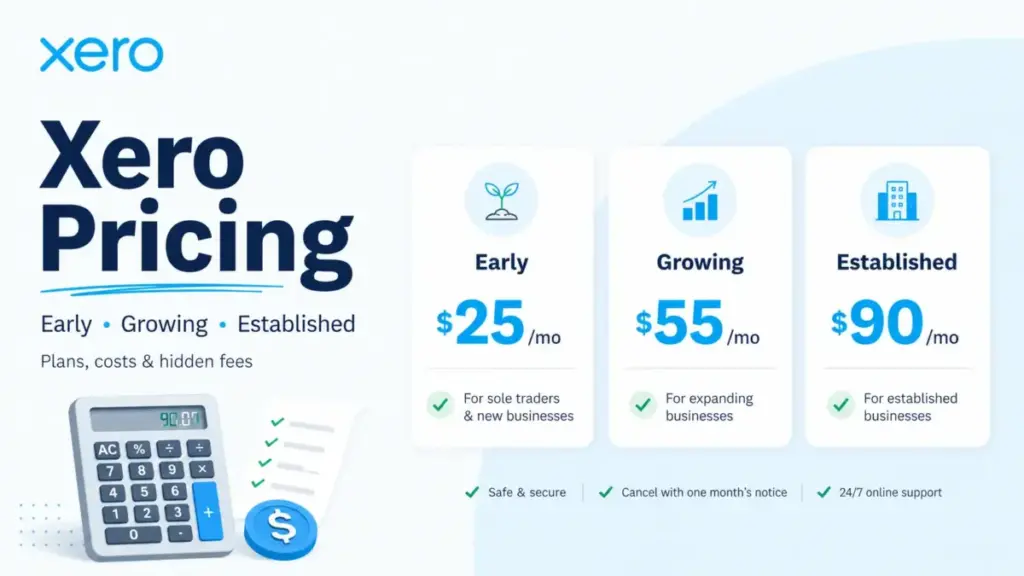
Xero charges $25 per month for its cheapest US plan. That is the Early plan, and it caps you at 20 invoices, 5 bills, and no multicurrency. For most best accounting software buyers running a real business, the actual starting line is Growing at $55 per month, because that is where Xero removes the invoice and bill limits that make Early unworkable past the first few weeks.
The pricing question most articles skip is not which plan costs least. It is how Xero’s flat per-organization pricing, with no per-user license fees, changes the math at 10, 25, or 50 users compared with per-seat competitors like QuickBooks Online and FreshBooks.
Many ranking pages still mix US and global Xero plan names, repeat outdated prices, or treat promotional offers as the normal price. Xero’s US plans are Early, Growing, and Established. If you see Starter, Standard, or Premium, those are non-US plan names and different prices.
This guide covers every US plan at real team sizes, maps the feature gates that force upgrades, surfaces the hidden costs and bill payment fees most pricing pages ignore, and calculates what Xero actually costs for 5 to 100 users (as of June 2026).
| Quick Pricing Verdict | |
|---|---|
| Starting price | $25/month (Early) |
| Free plan | No. 30-day free trial, no credit card required |
| Best plan for most businesses | Growing ($55/month) |
| Plan to avoid | Early, if you will exceed 20 invoices or 5 bills |
| Biggest hidden cost | Bill payment fees through Melio: checks from $1.50, wires $10, overnight checks $50 |
| Per-user fees | None. Xero does not charge per-user license fees |
| Best alternative if too expensive | Zoho Books (free plan available; Premium at $36/month includes 10 users) |
| Pricing verified | June 2026, official US pricing page |
US pricing only: This article uses Xero’s US pricing page at xero.com/us/pricing-plans/. Readers outside the US may see different plan names (Starter, Standard, Premium) and different prices. All dollar amounts below are in USD, exclude taxes, and reflect regular monthly billing rates, not promotional offers.
Xero’s Three US Plans at a Glance
| Plan | Monthly Price | Annual Equivalent | Invoice/Bill Limits | Key Feature Gates |
|---|---|---|---|---|
| Early | $25/month | $300/year | Up to 20 invoices and quotes, up to 5 bills | No unlimited invoicing, no dashboards, no multicurrency, no projects, no expense claims |
| Growing | $55/month | $660/year | Unlimited invoices and bills | No multicurrency, no projects, no employee expenses, no KPI ratios |
| Established | $90/month | $1,080/year | Unlimited invoices and bills | Includes multicurrency, projects, expense claims, mileage, KPIs, benchmarking, 180-day forecast |
Annual equivalent is calculated as monthly price times 12. Xero’s US pricing page does not publicly show a separate annual billing discount. All three plans include bank reconciliation, sales tax, W-9 and 1099 management, and Hubdoc receipt capture (as of June 2026).
If You Are a Solo Business or Very Low-Volume Freelancer
Recommended plan: Early ($25/month, $300/year equivalent)
Early works for a single-person business that sends fewer than 20 invoices per month and enters fewer than 5 bills. You get bank reconciliation, basic reports, a 30-day cash flow forecast, and W-9 and 1099 management.
Here is what you give up: no unlimited invoices, no performance dashboards, no financial scorecards, no multicurrency, no project tracking, no employee expense claims, no mileage tracking, and no Inventory Plus add-on. The 20-invoice limit also applies to approving and sending invoices, and app partner transactions can count toward that limit. If you connect a third-party app that creates invoices, those invoices may reduce your remaining count.
For a freelancer sending 10 invoices a month with no bill-heavy vendor relationships, Early is sufficient. For anyone running a growing ecommerce store or service business, the invoice ceiling arrives fast.
Solo user cost: $25/month. No per-user fees, no seat charges.
If You Have 5 to 10 Users
Recommended plan: Growing ($55/month)
| Team Size | Plan | Monthly Cost | Annual Equivalent | Notes |
|---|---|---|---|---|
| 5 users | Growing | $55/month | $660/year | Base subscription is flat. No per-user fees. Best default for unlimited invoices and bills without multicurrency or projects. |
| 10 users | Growing | $55/month | $660/year | Same flat cost. Upgrade to Established only if you need multicurrency, project tracking, employee expenses, or KPI ratios. |
Growing removes the invoice and bill limits that make Early impractical. You get unlimited invoices and quotes, unlimited bills, auto-reconcile bank transactions (beta), smart document capture, performance dashboards, financial scorecards, and a 60-day cash flow forecast. Inventory Plus is available as an optional $39/month add-on.
The feature that Growing still locks out is multicurrency. If your business invoices clients in more than one currency, Growing cannot handle it. You need Established. The same applies to project time tracking, employee expense claims, mileage tracking, KPI ratios, industry benchmarking, and the 180-day cash flow forecast.
What this means for a 10-user team: Your base subscription stays at $55/month whether you have 1 user or 10. Compare that with QuickBooks Online review, where a 10-user team needs the Advanced plan at $275/month. At 10 users, Xero’s Growing plan costs $220/month less than QuickBooks Advanced for the base subscription alone.
If You Have 25 to 100 Users
Recommended plan: Established ($90/month)
| Team Size | Plan | Monthly Cost | Annual Equivalent | Notes |
|---|---|---|---|---|
| 25 users | Established | $90/month | $1,080/year | Recommended once you need multicurrency, projects, expense claims, mileage, KPIs, or benchmarking. Base cost does not increase per user. |
| 50 users | Established | $90/month | $1,080/year | Base subscription remains flat. Budget separately for Inventory Plus ($39/month), bill payment fees, payroll, and app integrations. |
| 100 users | Established | $90/month | $1,080/year | Xero does not list per-user fees, but a 100-user organization should validate permissions, controls, integrations, and whether an ERP-class system is more appropriate. |
Established includes everything in Growing plus multicurrency accounting, project time and cost tracking, employee expense claims, mileage tracking, KPI ratios, industry benchmarking, and a 180-day cash flow forecast. It is the only plan where a multi-division business can track project profitability and manage expenses in one system.
At 50 users on Established, the base subscription is still $90/month. But total cost includes add-ons, payment fees, payroll software integration costs, and potentially third-party app subscriptions from the Xero App Store. The $90 base is the floor, not the ceiling.
At 100 users, the practical question changes. Xero does not charge per-user fees, but a 100-person organization should test whether Xero’s permission model, audit trails, and reporting depth meet enterprise-grade requirements. Some businesses at this scale find that an ERP system provides better multi-entity controls.
Feature Gates: What Each Plan Actually Unlocks
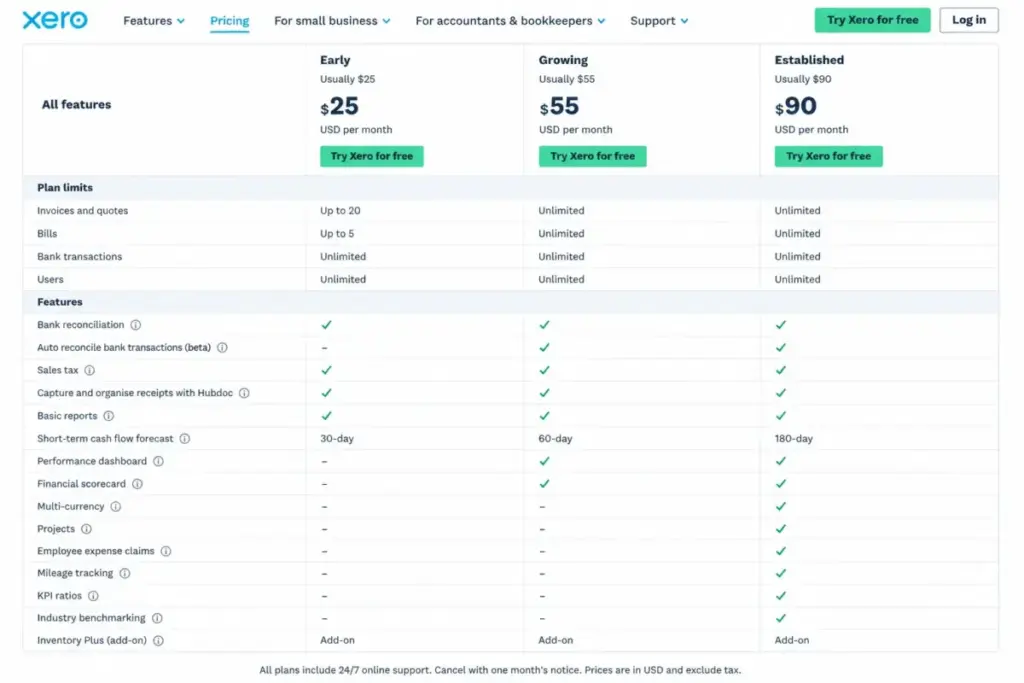
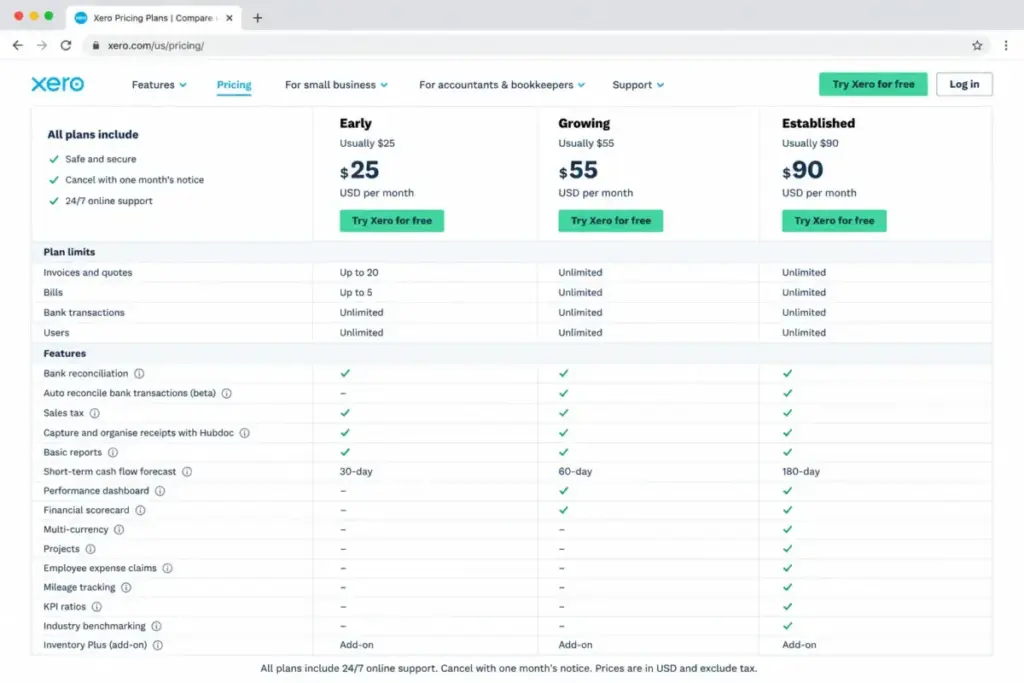
| Feature | Early | Growing | Established |
|---|---|---|---|
| Invoices and quotes | Up to 20 | Unlimited | Unlimited |
| Bills | Up to 5 | Unlimited | Unlimited |
| Bank reconciliation | Yes | Yes | Yes |
| Auto-reconcile (beta) | No | Yes | Yes |
| Cash flow forecast | 30 days | 60 days | 180 days |
| Performance dashboards | No | Yes | Yes |
| Financial scorecards | No | Yes | Yes |
| KPI ratios | No | No | Yes |
| Multicurrency | No | No | Yes |
| Project time and cost tracking | No | No | Yes |
| Employee expense claims | No | No | Yes |
| Mileage tracking | No | No | Yes |
| Industry benchmarking | No | No | Yes |
| Inventory Plus add-on | Not available | Optional $39/month | Optional $39/month |
| No per-user license fees | Yes | Yes | Yes |
What this means: Two feature gates force the most upgrades. The first is the invoice and bill limit on Early, which pushes any growing business to Growing within the first month. The second is multicurrency and projects, which exist only on Established. If your business operates in multiple currencies or tracks project profitability, there is no workaround on Growing. You must pay $90/month for Established.
Hidden Costs and Fees Nobody Mentions
| Hidden Cost | Amount | When It Hits |
|---|---|---|
| Taxes | Not included in listed prices | Xero states prices exclude taxes |
| Bill payment fees (non-ACH) | Varies: checks from $1.50, fast checks $20, overnight checks $50, wires $10, percentage-based fees for card-funded and instant methods | When paying bills through non-standard ACH methods via Melio |
| Standard ACH bill payments | Free | No charge for standard ACH |
| Inventory Plus | $39/month | When Growing or Established users need inventory management beyond basic accounting |
| Payment processor fees | Processor-dependent (e.g., Stripe) | When customers pay invoices online through a connected payment processor |
| Payroll, Projects, Expenses usage charges | Not fully publicly itemized | Xero states usage charges for these services can be invoiced with the monthly subscription |
| Promotional exclusions | Add-ons, usage charges, and payment fees are excluded from promotional discounts | Promotions apply to base plan subscriptions only |
The bill payment fee structure deserves special attention. Standard ACH bill payments through Xero are free. But if you pay a vendor by check, fast check, overnight check, wire, same-day ACH, instant bank transfer, or card-funded payment, fees apply.
These fees are processed by Melio and are separate from the Xero subscription. A business paying 50 vendor bills per month by check at $1.50 each adds $75/month on top of the base subscription. That cost is invisible until you look at the Xero bill payment fee page.
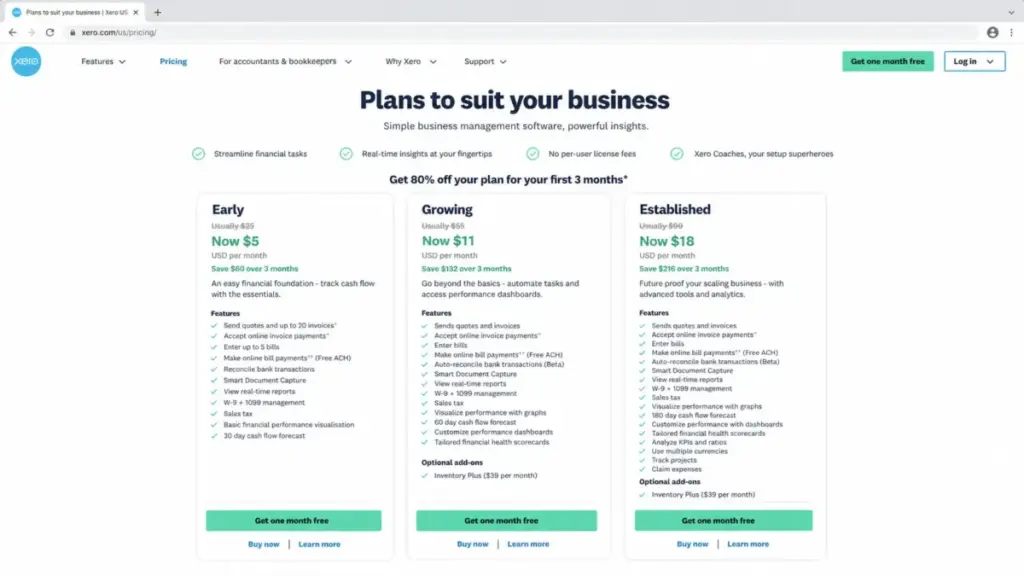
Promotional pricing warning: Xero periodically runs promotional offers, including temporary discounts like 80% off the first three months. These apply to the base plan subscription only. Add-ons, usage charges, and payment fees are not discounted. Do not confuse the promotional price with the regular monthly rate. After the promotional period, billing reverts to the standard price.
Xero Cost Compared With Competitors at 10 Users
| Accounting Tool | Starting Price | 10-User Monthly Cost | Free Plan | Per-User Fees | Why It Costs What It Does |
|---|---|---|---|---|---|
| Xero Growing | $55/month | $55/month | No (30-day trial) | None | Flat per-organization pricing; no per-user charges |
| QuickBooks Online | $38/month (Simple Start) | $275/month (Advanced) | No (30-day trial) | Yes, lower tiers cap users | Needs Advanced for 10+ users |
| FreshBooks | $23/month (Lite) | ~$122-$142/month | No (30-day guarantee) | $11/user/month extra | Base plus team member fees |
| Zoho Books | $0 (Free) / $12/month (Standard) | $36/month (Premium) | Yes, subject to limits | Included users per tier | Premium includes 10 users |
| Wave | $0 (Starter) / $19/month (Pro) | $19/month (Pro) | Yes | None | Flat pricing; limited automation |
What this means: Xero is not the cheapest accounting tool at 10 users. Zoho Books Premium at $36/month and Wave Pro at $19/month both cost less. But Xero’s advantage is that its $55/month flat fee includes unlimited users with no per-seat surcharge, strong bank reconciliation, and an accounting workflow that accountants and bookkeepers know well. For a deeper look at how Xero performs beyond pricing, see our Xero review. QuickBooks Online is the most expensive at 10 users because its lower tiers cap included users, forcing an upgrade to Advanced at $275/month.
The real comparison depends on workflow. If your 10-user team needs multicurrency on Xero, the cost rises to $90/month (Established). If your team fits within Zoho Books’ free-plan revenue limits, Zoho is the better deal. If your team needs only basic invoicing and bookkeeping, Wave covers it at $0 to $19/month.
Which Xero Plan Should You Avoid?
Avoid Early if your business sends more than 20 invoices per month or enters more than 5 bills. The $25 sticker price looks attractive, but the operational ceiling is the real limit. A business that exceeds 20 invoices in its first month will need to upgrade to Growing immediately. The only thing Early accomplished was adding a billing change mid-cycle.
Early makes sense for one scenario: a new business in its first weeks that genuinely sends fewer than 20 invoices, enters fewer than 5 bills, and does not need dashboards, multicurrency, projects, or expense tracking. That is a narrow window.
Is Xero Worth the Price?
Worth it if:
- You have a multi-user team and want flat base pricing without per-seat charges
- Your business needs strong bank reconciliation, what accounting software does, and accountant-friendly reporting
- You work with a bookkeeper or accountant who already uses Xero
- You need multicurrency, project tracking, or expense management on Established
Not worth it if:
- You are a solo freelancer with very simple invoicing needs (consider Wave at $0 or FreshBooks Lite at $23/month)
- Your team is under Zoho Books’ free-plan revenue limits (Zoho is free and includes solid accounting features)
- You need free project management alongside accounting and Xero’s project tracking is locked behind Established
- You need heavy inventory management without paying $39/month extra for Inventory Plus
- You have 100+ users and need ERP-grade multi-entity controls (validate Xero’s fit before committing)
How to Avoid Overpaying for Xero
- Skip Early unless your invoice volume is genuinely under 20 per month. The upgrade to Growing is inevitable for most businesses, and the $30/month difference buys unlimited invoices and bills.
- Do not upgrade to Established unless you need a feature that Growing lacks. The three upgrade triggers are multicurrency, project tracking, and employee expense claims. If none of those apply, Growing at $55/month is the better value.
- Budget for bill payment fees separately. Standard ACH is free, but check, wire, and card-funded payments add per-transaction costs through Melio. Calculate your monthly vendor payment volume before committing.
- Treat promotional pricing as a temporary benefit, not the real cost. Plan your budget around the regular monthly price. Promotional discounts end, and add-ons are excluded.
- Evaluate Inventory Plus before subscribing. At $39/month on top of Growing ($55) or Established ($90), the inventory add-on brings total monthly cost to $94 or $129. Compare that with competitors that include inventory in the base plan.
- Use the 30-day free trial before choosing a plan. The trial does not require a credit card. Test invoicing volume, bank feeds, and reporting to determine whether Growing or Established fits your workflow.
Xero Pricing FAQ
How much does Xero cost per month in 2026?
Xero costs $25 to $90 per month in the US across three plans: Early ($25/month), Growing ($55/month), and Established ($90/month). These are regular monthly billing prices. Add-ons like Inventory Plus ($39/month), bill payment fees, and taxes are additional. Pricing verified June 2026 from the official Xero US pricing page.
Does Xero have a free plan?
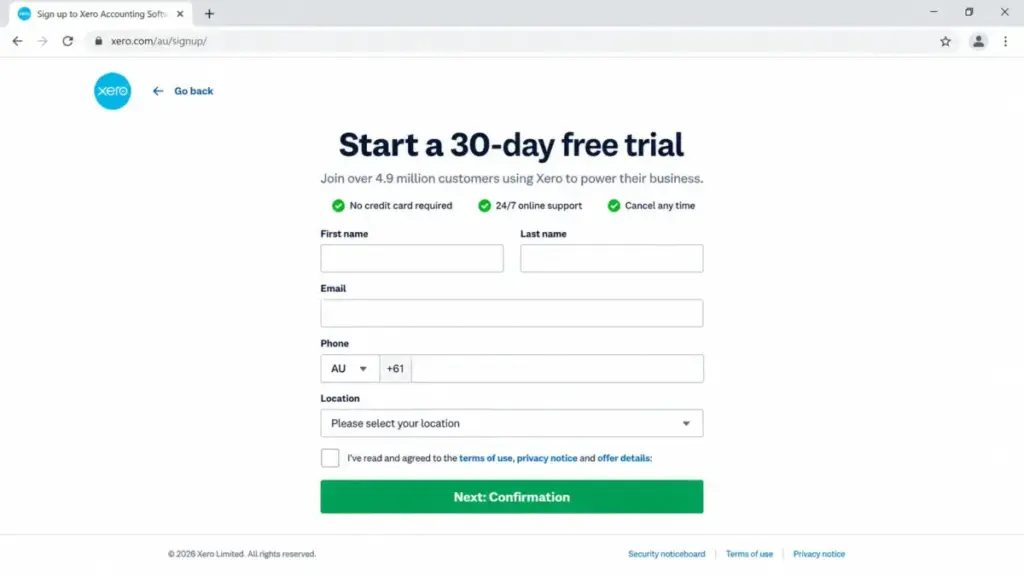
No. Xero does not offer a permanent free accounting plan. It provides a 30-day free trial with no credit card required. After the trial, you must select a paid plan. Xero also runs periodic promotional discounts, but those are temporary and apply to base subscriptions only.
Does Xero charge per user?
No. Xero states there are no per-user license fees on its US pricing page. All three plans use flat per-organization pricing. Whether you have 1 user or 50 users, the base monthly subscription cost stays the same.
What is the difference between Xero Early, Growing, and Established?
Early is limited to 20 invoices and 5 bills with basic reporting. Growing removes those limits and adds dashboards, scorecards, and a 60-day forecast. Established adds multicurrency, project tracking, employee expense claims, mileage, KPI ratios, benchmarking, and a 180-day forecast. The key upgrade trigger from Early to Growing is invoice volume. The trigger from Growing to Established is multicurrency or project tracking.
Does Xero offer a free trial?
Yes. Xero offers a 30-day free trial from its signup page. No credit card is required. The trial gives you access to Xero’s features so you can test invoicing, bank reconciliation, and reporting before choosing a paid plan.
What are Xero's hidden fees?
The main hidden fees are bill payment charges through Melio (checks from $1.50, wires $10, overnight checks $50), Inventory Plus at $39/month, payment processor fees when customers pay invoices online, potential usage charges for payroll, projects, and expenses, and taxes excluded from listed prices. Promotional discounts do not apply to add-ons, usage charges, or payment fees.
Is Xero cheaper than QuickBooks Online?
At 10 users, yes. Xero Growing costs $55/month flat regardless of user count. QuickBooks Online requires the Advanced plan at $275/month to support 10 users. At 1 user, QuickBooks Simple Start at $38/month is closer to Xero Early at $25/month. The gap widens as user count increases because Xero does not charge per-user fees while QuickBooks caps users per tier.
Which Xero plan supports multicurrency?
Only Established ($90/month). Multicurrency accounting is not available on Early or Growing. If your business invoices or receives payments in more than one currency, Established is the only option.
Does Xero include payroll?
Xero integrates with payroll services, but the exact US payroll pricing is not fully itemized on the pricing page. Xero states that usage charges for services like Xero Payroll can be invoiced with the monthly subscription. Some businesses use Gusto payroll review as a standalone payroll provider alongside Xero. Budget for payroll as a separate cost line and confirm pricing during signup or trial.
Is Xero Developer pricing the same as Xero accounting pricing?
No. Xero Developer pricing applies to app developers and integration businesses building on the Xero API platform. It is separate from the Early, Growing, and Established accounting subscription plans. If you are buying Xero for accounting, the developer pricing page does not apply to you.
Pricing data in this article was verified on June 2026 from the official Xero US pricing page and the Xero bill payment fee page. Annual equivalents are calculated as monthly price times 12; no public US annual billing discount was verified. Prices may change. Check the official pricing page for the most current rates.
