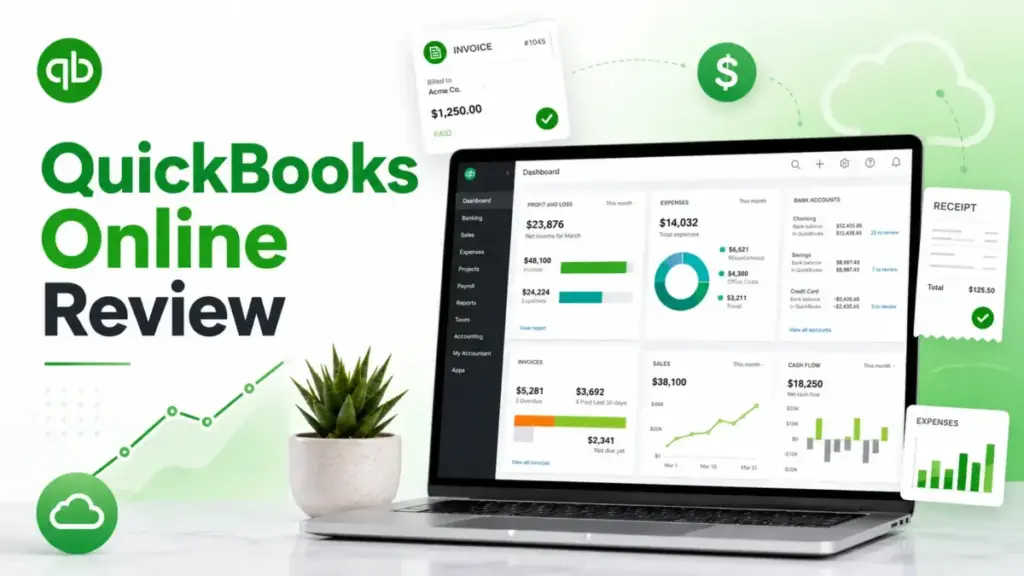
QuickBooks Online is the accounting tool most small businesses evaluate first, and that familiarity creates a blind spot. This QuickBooks Online review breaks down what Intuit’s SaaS accounting platform actually costs in 2026, where it earns its reputation, and where the pricing math stops making sense.
Plans now range from $38 to $275 per month before payroll, payments, or user-cap upgrades, and the gap between promotional pricing and renewal reality catches more buyers than it should.
I verified every price, feature gate, and plan limit against Intuit’s official pricing page on April 28, 2026. What follows is a grounded assessment: where QuickBooks Online delivers real value, where it quietly gets expensive, and which alternatives win for specific use cases.
If you want to compare QuickBooks Online against Xero, Wave, FreshBooks, and seven other platforms before committing, start with our best accounting software guide for 2026.
Quick Verdict: Is QuickBooks Online Worth It?
QuickBooks Online earns an 8.4/10 for small businesses that work with outside accountants, but it is not the cheapest or simplest option on this list. The score reflects accounting maturity, app ecosystem depth, and the practical reality that most U.S. bookkeepers and CPAs already know this platform. It loses points for user caps that force expensive upgrades, add-on costs that inflate the base price, mixed support quality, and edge-case limitations that affect specific industries.
I arrived at this score using the SaaSZap review methodology, which weights pricing transparency, core feature depth, real user feedback, scaling friction, and buyer-fit segmentation equally.
Score: 8.4 / 10
Best for:
- 2 to 10 person service businesses with accountant support
- Bookkeeper-led small businesses that need familiar workflows
- Ecommerce sellers needing inventory, sales tax, and app integrations
- Teams that value accountant familiarity over the lowest monthly price
Not for:
- Budget-only freelancers sending fewer than 10 invoices per month
- Teams needing more than 5 users without paying for Advanced features
- Complex nonprofits requiring fund accounting
- Multi-entity businesses needing consolidated reporting
- Construction firms needing WIP, retention, or over/under billing
- Businesses requiring advanced inventory, warehouse, or manufacturing workflows
| Category | Verdict | Notes |
|---|---|---|
| Pricing | Expensive but predictable if you model add-ons | $38 to $275/month before payroll |
| Core accounting | Strong | Best when an accountant is involved |
| Invoicing | Strong | Payments add convenience but fees matter |
| Inventory | Good on Plus, limited for complex operations | Advanced inventory belongs elsewhere |
| AI features | Useful but uneven | Many features are beta or capped |
| Support | Mixed | Advanced gets Priority Circle |
| Alternatives | Xero, FreshBooks, Wave, Zoho Books, Gusto | Use case matters more than brand |
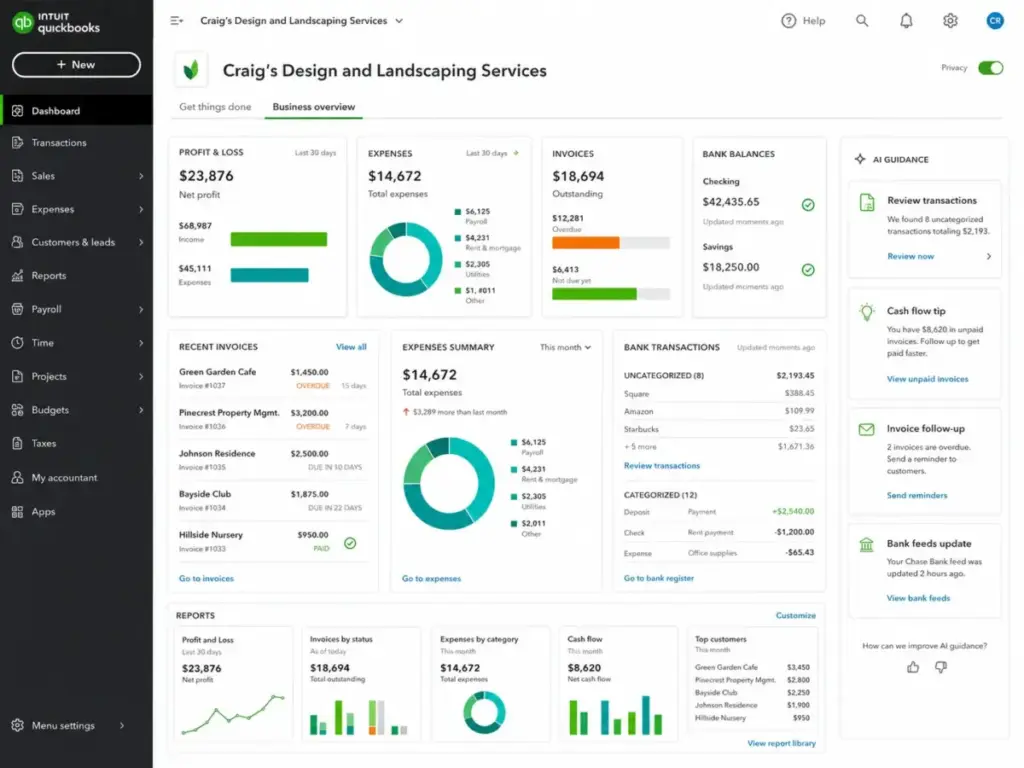
What Is QuickBooks Online?
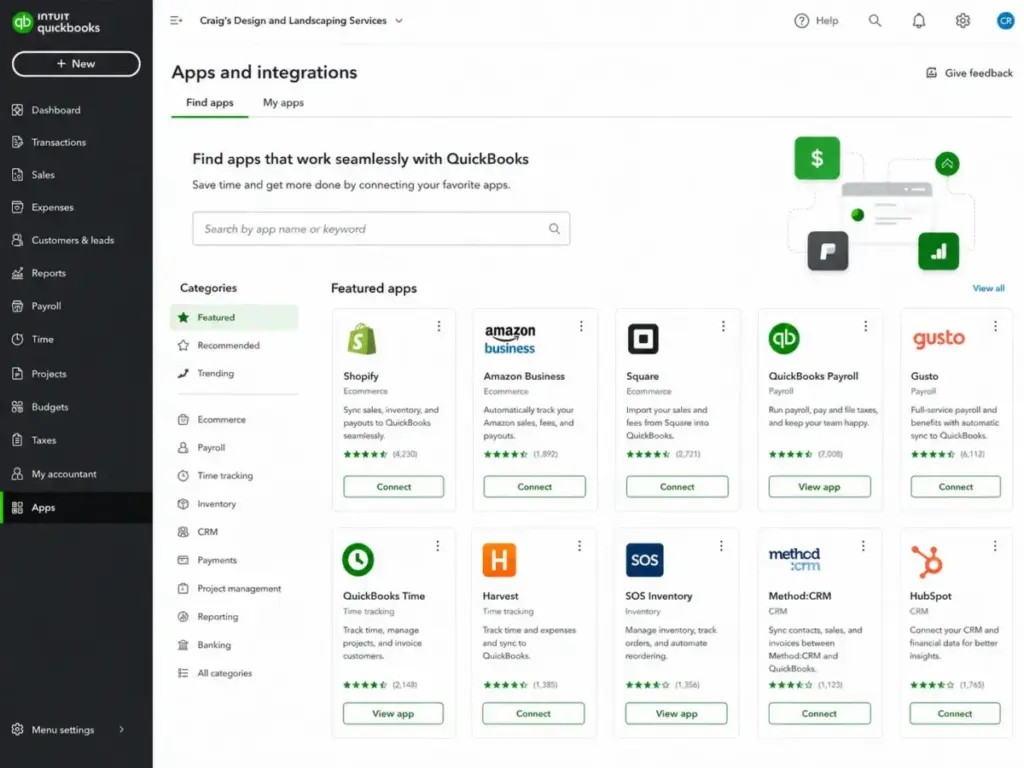
QuickBooks Online is Intuit’s cloud accounting platform built for small and mid-size businesses that need invoicing, expense tracking, bank reconciliation, reporting, and accountant collaboration in one system. It is not desktop software. It runs entirely in the browser, syncs across devices, and connects to over 800 business apps through Intuit’s integrations marketplace.
Intuit positions QBO as the center of a small business financial stack. The platform covers double-entry accounting, accounts payable and receivable, bill pay, sales tax tracking, project profitability (on Plus and above), and inventory reporting. Payroll and payment processing are available as paid add-ons through QuickBooks Payroll and QuickBooks Payments.
The real advantage is the accountant ecosystem. Most U.S. CPAs and bookkeepers have a QuickBooks Online Accountant login. That means your accountant can access your books directly, pull tax reports, reclassify transactions, and close periods without needing a file export or screen share. As one G2 reviewer put it:
“I like that our accountant can access it easily and pull all the tax information we need.”
— Karen R., Bookkeeper, Small-Business user, G2, April 15, 2026
That accountant access alone keeps many businesses on QBO even when cheaper alternatives exist.
QuickBooks Online Features
QBO’s feature set is wide enough for most small businesses, but the value depends heavily on which plan you choose. Simple Start covers basic bookkeeping. Essentials adds multi-user access and enhanced reports. Plus unlocks inventory and project tracking. Advanced adds custom dashboards, workflow automation, and priority support. Knowing which features sit behind which paywall is the difference between a smart purchase and a frustrating upgrade cycle.
QuickBooks Online Invoicing and Payments
Invoicing is one of QBO’s strongest areas. You can create branded invoices, set payment terms, track payment status, and accept credit card or ACH payments through QuickBooks Payments. Customers can pay directly from the invoice link, which reduces follow-up time.
The catch is in the details. Simple Start includes 5 free ACH payments per month. Every standard ACH transaction beyond that costs $0.50. For businesses sending 50 or more invoices per month, that overage adds up quietly. Credit card processing fees apply on top of the subscription, and QuickBooks Payments is a separate cost layer, not included in any plan’s base price.
Recurring invoices, payment reminders, and invoice scheduling are available, but some of these features are gated by plan tier. Before committing, verify that your invoicing volume and payment method mix align with the plan you are considering.
QuickBooks Online Bank Reconciliation
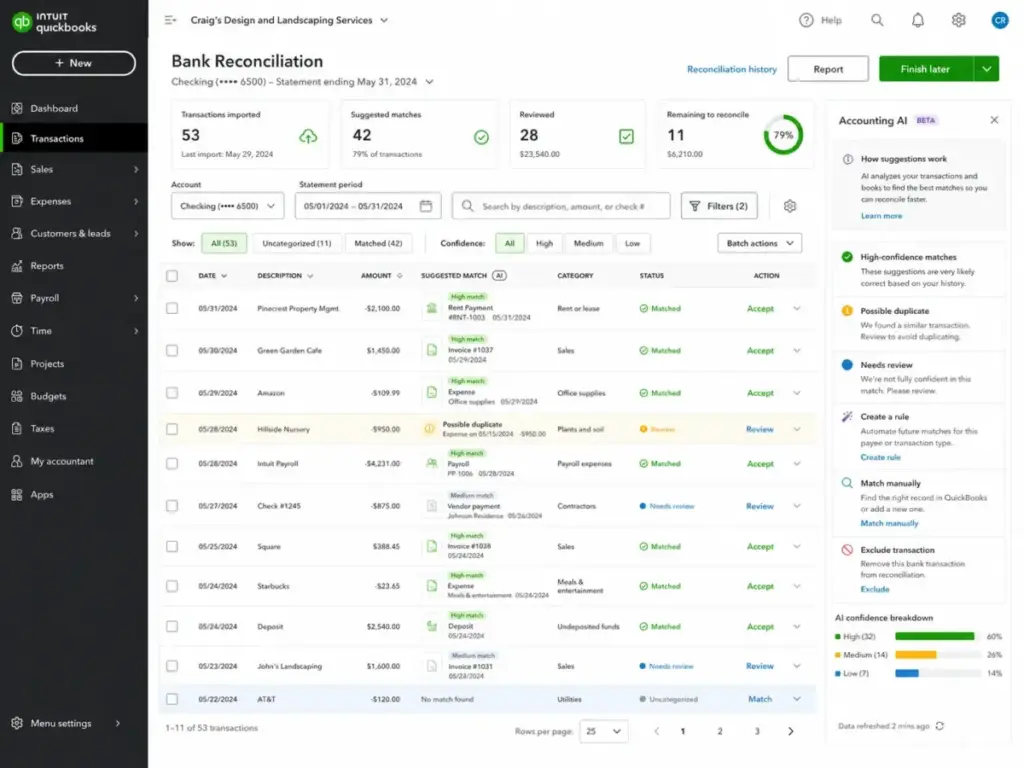
Bank feeds connect directly to QBO, pulling in transactions automatically. The system suggests category matches based on past behavior, and you review, approve, or reclassify each entry. This is the daily workflow that most small business owners interact with.
Intuit’s March 2026 product update introduced AI-powered reconciliation, which the company claims can accelerate the reconciliation process by nearly 3x. That figure comes from Intuit’s internal data as of November 2025, comparing opted-in customers against those not using AI reconciliation. I have not independently verified the 3x claim, but the feature does surface suggested matches and reduces manual categorization steps in the interface.
One important limitation: the official QuickBooks test drive lets you explore the interface using demo data, but you cannot connect a real bank account in the demo. That means you will not see how bank feeds perform with your actual transaction volume until you are on a paid plan or free trial.
QuickBooks Online Bill Pay and Expenses
Bill pay lets you track vendor bills, schedule payments, and manage accounts payable from within QBO. The March 2026 update added parallel approval workflows with up to 5 approvers, which helps growing teams that need sign-off controls before payments go out.
Expense tracking works through receipt capture (mobile photo or email forwarding), manual entry, or bank feed categorization. For most small businesses, the combination of bank feeds and receipt capture covers daily expense management without a third-party tool.
The limitation here is that approval workflows and advanced bill pay controls are stronger on the Advanced plan. If your team needs structured approvals but does not need the other Advanced features, you are paying $275 per month for a capability that some competitors include at lower tiers.
QuickBooks Online Reporting
Reporting quality varies sharply by plan. Simple Start offers basic financial reports: profit and loss, balance sheet, and cash flow. Essentials adds accounts receivable and payable aging reports. Plus includes inventory reports, enhanced sales reports, profitability reports, and budgets. Advanced unlocks custom KPIs, dashboards, Excel sync, and cash flow and profit forecasting.
For businesses that rely on reporting for monthly close, investor updates, or tax prep, Plus is typically the minimum viable plan. Simple Start and Essentials reporting is functional but limited. If you need custom dashboards or the ability to sync report data with Excel for further analysis, Advanced is the only option within QBO.
QuickBooks Online Inventory and Projects
Plus adds inventory tracking with reports and project profitability analysis. You can track cost of goods sold, monitor stock levels, and see profit margins per project or client. For service businesses running 5 to 15 active projects, this is a practical tool.
The warning applies to businesses with complex inventory needs. QBO’s inventory is designed for light retail and simple product tracking. If you need lot tracking, serial numbers, warehouse management, bill of materials, or manufacturing workflows, you will outgrow QBO quickly. Integrations like SOS Inventory can extend the capability, but that adds cost and complexity. For advanced inventory, a purpose-built system is a safer long-term choice.
Similarly, project profitability in QBO works for time-and-materials service firms. It does not replace job costing systems needed in construction, where work-in-progress (WIP) tracking, retention billing, and over/under calculations are standard requirements.
QuickBooks Online AI Features
Intuit has invested heavily in AI across QuickBooks Online, but not every AI feature delivers equal value today. In November 2025, Intuit signed a multi-year deal worth more than $100 million with OpenAI to bring AI capabilities across its products, including QuickBooks.
Here is what currently exists across plans:
- Accounting AI (Essentials and above): Assists with categorization and bookkeeping suggestions
- Payments AI (Essentials and above): Helps with payment-related insights
- Sales Tax AI (Plus and above): Supports sales tax calculations and compliance
- Customer AI (Plus and above): Provides customer-related insights
- Project Management AI (Advanced): Assists with project tracking
- Finance AI (Advanced): Supports forecasting and financial planning
- AI chat: 25 questions per month on Essentials, Plus, and Advanced
The AI reconciliation feature from the March 2026 update is the most practically useful addition I have seen. It reduces manual matching time during bank reconciliation. The other AI features range from helpful suggestions to early-stage tools that still require human review.
My recommendation: treat AI features as time-saving assists, not as replacements for accounting judgment. If your bookkeeper or CPA reviews the books monthly, AI categorization can reduce their billable hours. If you are relying on AI to handle accounting decisions without professional review, you are taking on risk that no software disclaimer covers.
QuickBooks Online Pricing and Plans
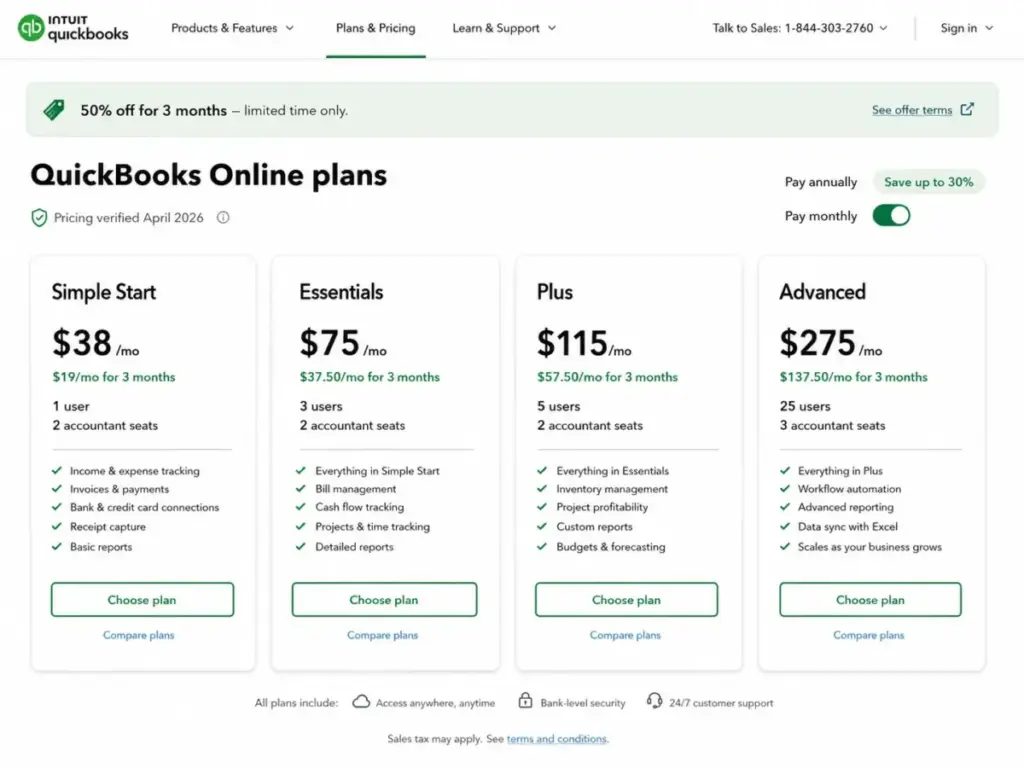
QBO pricing starts at $38 per month for a single user and scales to $275 per month for 25 users, but the number on the pricing page is not the number most businesses actually pay. Promotional pricing, payroll add-ons, payment processing fees, ACH overages, and user-cap upgrade pressure all change the real monthly cost.
Pricing verified against Intuit’s official page on April 28, 2026.
| Plan | Regular Price | Promo Price (3 months) | Users | Accountant Access | Best For | Main Upgrade Trigger |
|---|---|---|---|---|---|---|
| Simple Start | $38/month | $19/month | 1 | 2 | Solo operators, single-user bookkeeping | Need more users or enhanced reports |
| Essentials | $75/month | $37.50/month | 3 | 2 | Small teams needing AP/AR and time tracking | Need inventory, projects, or class tracking |
| Plus | $115/month | $57.50/month | 5 | 2 | Growing businesses with inventory or projects | 6th user forces Advanced upgrade |
| Advanced | $275/month | $137.50/month | 25 | 3 | Multi-user teams needing custom reporting | Outgrowing QBO entirely |
Hidden cost table:
| Cost Item | Why It Matters | Buyer Risk |
|---|---|---|
| Payroll | Core $6.50, Premium $10, Elite $12 per employee/month | Payroll-heavy teams pay significantly more than the base plan |
| Payments | ACH and card processing fees on every transaction | High invoice volume changes the ROI calculation |
| User caps | Plus stops at 5 users | A 6th user pushes the entire team to Advanced at $275/month |
| Add-ons | Time tracking, payroll, payments, support tiers | Base price is not the full price |
| State filing | $12/month per additional state (Core and Premium) | Multi-state payroll gets expensive fast |
| Downgrading | Some features must be disabled before downgrading | Switching to a lower plan is not frictionless |
| ACH overage | $0.50 per standard ACH transaction over monthly allotment | Simple Start’s 5-transaction limit is tight for active invoicers |
What the Pricing Page Does Not Tell You
The gap between QuickBooks Online’s advertised price and the real monthly cost is where most buyer regret starts. This section covers the pricing details that do not appear in the promotional banner.
Month 4 price jump. Every QBO plan offers 50% off for the first 3 months. Simple Start goes from $19 to $38. Plus jumps from $57.50 to $115. Advanced doubles from $137.50 to $275. If you are budgeting based on the promo price, your accounting software cost doubles in month 4.
Payroll is always extra. No QBO plan includes payroll. QuickBooks Payroll starts at $6.50 per employee per month on Core, $10 on Premium, and $12 on Elite. A 10-person team on Core payroll adds $65 per month on top of the base subscription. Additional state tax filings cost $12 per month per state on Core and Premium plans. Elite includes multi-state filing, but the base price is higher.
ACH overage fees. Simple Start includes 5 standard ACH payments per month. Each additional ACH transaction costs $0.50. If you send 30 ACH-paid invoices per month, that is an extra $12.50 in fees that the pricing page does not surface prominently.
User cap upgrade pressure. This is the pricing trap that frustrates growing teams the most. Plus supports 5 users. If your business adds a 6th team member who needs QBO access, you jump from Plus at $115/month to Advanced at $275/month. That is a $160 monthly increase for one additional user. Xero’s pricing structure handles user scaling differently, which makes it a common alternative for teams hitting this wall.
Downgrade friction. If you start on Plus or Advanced and later want to drop to a lower plan, you may need to disable features first. Recurring transactions, extra user seats, inventory tracking, multi-currency, class and location tracking, and some third-party app connections may need to be turned off before the system allows a downgrade. This is documented in Intuit’s comparison page, but it is not something most buyers consider at sign-up.
No prorated refunds. If you cancel mid-billing cycle, your access continues through the end of that cycle, but you do not receive a prorated refund. The account charges monthly until you actively cancel.
When accountant compatibility justifies the cost. Despite the add-on pressure, QBO remains worth it for businesses whose accountant already works in the platform. If your CPA charges $150 per hour and QBO saves 2 to 3 hours per month in data exchange and reclassification, the subscription cost is justified by reduced professional fees alone.
[VISUAL: QuickBooks Online hidden cost calculator showing base plan, payroll users, payment fees, user caps, and upgrade triggers – Place after “What the Pricing Page Does Not Tell You”]
QuickBooks Online User Experience
The first 30 minutes in QuickBooks Online tell you whether the platform fits your workflow, but the real test comes at month-end and renewal. Here is what the lifecycle looks like at each stage.
First 30 minutes. QBO walks you through a setup guide: business type, fiscal year, chart of accounts template, and bank connection. You can also explore the interface risk-free using Intuit’s official test drive, which loads a demo company called “Craig’s Design and Landscaping Services.” The test drive gives you access to invoicing, expenses, reports, and navigation. The limitation: demo changes do not save, and you cannot connect a real bank account. This means you can evaluate the interface but not the bank feed experience.
One Capterra reviewer captured the day-to-day simplicity well:
“I only use it a few times a month, but when I do, it’s simple and quick every time.”
— Madeline R., Mechanical Engineer, 2 to 10 employees, Capterra
First month. Once bank feeds are connected, the daily workflow becomes transaction categorization, invoice creation, and expense matching. Most small business owners settle into a pattern: check bank feeds, approve matches, send invoices, and capture receipts. The learning curve is moderate if you have basic bookkeeping knowledge. If you do not, connecting with an accountant early prevents miscategorized transactions from compounding.
During the first month, you will also set up rules for recurring transactions, customize your chart of accounts, and configure sales tax settings if applicable. These setup decisions affect reporting accuracy for months afterward, so it is worth getting them right before volume builds.
Month-end. This is where QBO’s value becomes clear or falls short. Running profit and loss reports, reconciling bank accounts, reviewing accounts receivable aging, and preparing data for your accountant are all built into the platform. If your accountant has QuickBooks Online Accountant access, they can log in, review your books, reclassify entries, and close the period without needing a file export.
For businesses on Plus or Advanced, month-end also includes project profitability review, inventory reconciliation, and budget-to-actual comparisons. Simple Start users will find month-end reporting limited to the basics.
Renewal month. This is the pressure point. The promotional discount expires after month 3, and the full price hits in month 4. At renewal, you should also audit your actual usage: how many users are active, whether payroll costs have grown, whether you are hitting ACH overage fees, and whether your plan tier still matches your feature needs. This is the moment when many businesses either commit to QBO long-term or start evaluating alternatives.
QuickBooks Online Pros and Cons
QBO’s strengths center on accounting maturity and ecosystem depth, while its weaknesses cluster around pricing pressure and support inconsistency. Here is the breakdown based on verified features, official documentation, and real user feedback.
- Strong accountant ecosystem. Most U.S. bookkeepers and CPAs already use QuickBooks Online Accountant. This reduces onboarding friction and makes tax season collaboration straightforward. Karen R., a bookkeeper on G2, confirmed: “I like that our accountant can access it easily and pull all the tax information we need.”
- Mature core accounting. Double-entry bookkeeping, chart of accounts management, bank reconciliation, and financial reporting are all well-built. QBO has been refining these workflows for years, and it shows in the reliability of the core accounting engine.
- Good invoicing and payments workflow. Invoice creation, payment tracking, and QuickBooks Payments integration let you send invoices and get paid in one system. Recurring invoices and payment reminders reduce manual follow-up.
- Broad app ecosystem. Over 800 integrations cover ecommerce (Shopify, Amazon), CRM, time tracking (QuickBooks Time), inventory (SOS Inventory), and workflow tools. If you use Zapier or Make for automation, QBO connects to both. Understanding how these connections work often involves APIs, though most users will never need to touch one directly.
- Useful reporting at Plus and Advanced. Inventory reports, project profitability, class and location tracking, custom KPIs, and Excel sync give growing businesses the financial visibility they need for informed decisions.
- Strong fit for bookkeeper-led businesses. If a part-time bookkeeper manages your books and a CPA handles tax prep, QBO is the platform both are most likely to know already.
- Official test drive lowers exploration risk. You can try the full interface without entering payment information, which is uncommon among accounting platforms.
- Expensive after promotional period. The 50% discount ends after 3 months. A Plus plan goes from $57.50 to $115 overnight. Businesses that budget based on promo pricing face a real cost shock.
- User caps force expensive upgrades. Plus supports 5 users. The jump to Advanced for a 6th user costs an additional $160 per month, which is difficult to justify when the team only needs one more seat.
- Payroll and payments are add-on costs. Neither is included in any base plan. A business with 10 employees on Core payroll adds $65/month on top of the subscription, and payment processing fees apply to every transaction.
- Support feedback is mixed. G2 users report inconsistent support quality. One verified user stated: “Some features break fairly often, and the support isn’t very good.” Advanced plan subscribers get Priority Circle support, but lower-tier users report longer wait times and less helpful responses.
- AI features require cautious adoption. AI categorization and reconciliation can save time, but the 25-question monthly chat limit on Essentials through Advanced is low for active users. AI suggestions still need human review, especially for tax-sensitive categorization.
- Weak for advanced inventory, construction WIP, multi-entity, and fund accounting. QBO does not handle lot tracking, serial numbers, warehouse management, work-in-progress billing, retention, consolidated multi-entity reporting, or nonprofit fund accounting. Businesses with these needs will hit walls quickly.
- Feature changes frustrate long-time users. Some workflows have been removed or changed over time. One G2 user noted QBO “no longer [has] sales orders as previous QuickBooks.” When features disappear or move behind higher-tier paywalls, it erodes trust with existing subscribers.
QuickBooks Online vs Alternatives
No single accounting tool is best for every business, and choosing the right one depends on your team size, budget, industry, and whether your accountant has a platform preference. Here is how QBO compares against the most common alternatives.
QuickBooks Online vs Xero
This is the most common comparison for small businesses evaluating cloud accounting.
QuickBooks wins for accountant familiarity in the U.S. market. If your CPA already uses QuickBooks Online Accountant, the collaboration workflow is faster than onboarding them to a new platform. QBO also has a deeper app ecosystem for U.S.-specific integrations.
Xero wins for user scaling and international businesses. Xero does not impose the same user-cap pressure that forces QBO users from Plus to Advanced. Teams frustrated by QBO’s pricing jumps often find Xero’s plan structure more predictable. For a full comparison, see the SaaSZap Xero review.
Bottom line: Choose QBO if your accountant prefers it. Choose Xero if user count or international multi-currency is the primary concern.
QuickBooks Online vs FreshBooks
FreshBooks wins for client-service businesses that live in proposals, time tracking, invoicing, and client communication. Its interface is built around the client relationship, not the general ledger.
QuickBooks wins for deeper accounting, reporting, and accountant collaboration. FreshBooks is not a full double-entry system in the way QBO is, and CPAs generally prefer working in QBO for tax prep.
Bottom line: Choose FreshBooks if you are a freelancer or agency that bills clients by the hour and needs clean invoicing. Choose QBO if you need real accounting depth and accountant access.
QuickBooks Online vs Zoho Books
Zoho Books wins for budget-conscious teams already in the Zoho ecosystem. If you use Zoho CRM, Zoho Projects, or Zoho People, the native integration reduces tool sprawl and total cost.
QuickBooks wins for U.S. accountant familiarity and third-party app depth. Zoho Books has fewer U.S. accountant users, which can create friction during tax season if your CPA does not know the platform.
Bottom line: Choose Zoho Books if you are a Zoho shop and cost matters most. Choose QBO if accountant compatibility and app ecosystem breadth are priorities.
QuickBooks Online vs Wave
Wave wins for tiny businesses that need free invoicing and basic bookkeeping. Wave’s core accounting and invoicing are free, which makes it hard to beat for solo operators with simple needs.
QuickBooks wins for businesses that need accountant-ready books, payroll integration, inventory tracking, sales tax automation, or more than basic reporting. Wave’s free tier covers the basics, but it does not scale into multi-user accounting or complex compliance.
Bottom line: Choose Wave if you send fewer than 10 invoices per month, have no payroll, and want to spend nothing on accounting software. Choose QBO when your business outgrows free tools.
QuickBooks Online vs Gusto
This is not a direct accounting comparison. Gusto is a payroll-first platform with HR capabilities, while QBO is an accounting-first platform with payroll add-ons.
Gusto wins for businesses where payroll, benefits, onboarding, and HR compliance are the primary needs. Gusto’s payroll experience is deeper than QuickBooks Payroll, and its HR tools (like those useful alongside employee scheduling software) extend beyond what QBO offers.
QuickBooks wins for businesses that want accounting as the foundation and payroll as a connected add-on. If your primary need is bookkeeping, invoicing, and reporting with payroll bolted on, QBO keeps everything in one login.
Bottom line: Choose Gusto if payroll and HR are your primary pain points. Choose QBO if accounting is the center and payroll is secondary. Some businesses use both: QBO for accounting and Gusto for payroll, syncing data between them.
[COMPARISON VISUAL: QuickBooks Online vs Xero vs FreshBooks vs Zoho Books vs Wave vs Gusto by best-fit use case – Place after Alternatives section]
Who Should Use QuickBooks Online?
QBO fits best when accountant compatibility, core accounting depth, and app integrations matter more than the lowest monthly price. Here are the specific buyer profiles where QBO makes sense.
- 2 to 10 person service businesses with a part-time bookkeeper. This is QBO’s core audience. The bookkeeper handles daily categorization and invoicing, the CPA reviews quarterly or at tax time, and the business owner checks dashboards. The accountant access feature makes this workflow efficient.
- Ecommerce sellers using Shopify, Amazon, Wix, or Square. QBO’s integration depth with ecommerce platforms means transaction data, sales tax, and inventory can sync without manual data entry. Plus plan’s inventory reports and sales tax tracking cover most small ecommerce needs.
- Local contractors with simple project tracking. Plumbers, electricians, landscapers, and similar trades that need job-level profitability without full construction accounting. Plus plan’s project profitability feature works here, as long as the business does not need WIP or retention billing.
- Retail businesses needing light inventory and accountant review. Small shops tracking 50 to 500 SKUs with straightforward cost-of-goods-sold calculations. QBO handles this well on Plus. Beyond that volume or complexity, a dedicated inventory system is better.
- Owner-led businesses preparing for tax season with an outside CPA. If your CPA charges by the hour and already uses QuickBooks Online Accountant, QBO’s direct access reduces prep time and professional fees. The platform pays for itself in reduced CPA hours.
- Teams where accountant familiarity saves training time. If you are hiring a bookkeeper, the applicant pool with QBO experience is larger than for any other cloud accounting platform in the U.S. That reduces training cost and onboarding risk.
Who Should Not Use QuickBooks Online?
QBO’s limitations are specific, and knowing them before you subscribe prevents expensive mistakes. Here are the cases where another tool is a better fit.
- Solo freelancers with fewer than 10 invoices per month and no payroll. Wave or a simple invoicing tool covers this use case at zero cost. Paying $38 per month for QBO Simple Start is hard to justify when your accounting needs are minimal.
- 6-person teams that only need more users, not Advanced features. If your team has 6 people who need QBO access but you do not need custom KPIs, workflow automation, or batch operations, you are paying $275 per month for what is essentially a 6th user seat. Xero handles this better.
- Nonprofits with complex fund accounting. QBO does not support true fund accounting with restricted and unrestricted fund tracking, grant reporting by fund, or the kind of audit-ready fund statements that nonprofit boards and grantors require. Purpose-built nonprofit accounting systems are the right choice.
- Construction firms needing retention, over/under billing, and WIP reporting. Construction-specific accounting requires work-in-progress scheduling, retention tracking, AIA billing, and job cost reporting that QBO does not offer. Construction accounting software (Sage 300 CRE, Foundation, or similar) is necessary.
- Multi-entity businesses. QBO does not support consolidated reporting across multiple entities from a single login. Each entity requires a separate QBO subscription, and consolidation must happen in Excel or a third-party tool.
- Businesses needing advanced inventory, warehouse, or manufacturing workflows. Lot tracking, serial numbers, bin locations, bill of materials, and production order management are beyond QBO’s scope. Even with integrations like SOS Inventory, the complexity often justifies a dedicated ERP or inventory management system.
- Teams that cannot tolerate support variability. If fast, consistent support is a hard requirement, QBO’s mixed support reviews are a risk. Advanced plan’s Priority Circle helps, but lower-tier plans rely on standard support channels that users frequently criticize.
Final Verdict: QuickBooks Online Review 2026
QuickBooks Online remains one of the safest accounting choices for small businesses that work with outside accountants, but it is not the cheapest or cleanest tool available in 2026. The product earns its 8.4/10 score through accounting maturity, a broad app ecosystem, strong accountant access, and reporting that improves meaningfully at Plus and Advanced tiers.
It loses points for user caps that create unnecessary upgrade pressure, add-on costs that inflate the real monthly price, inconsistent support quality on lower-tier plans, and edge-case limitations that make it a poor fit for construction, nonprofits, multi-entity businesses, and teams needing advanced inventory.
The key decision rule is simple: if your accountant already works in QuickBooks Online, the collaboration savings often justify the subscription cost even when cheaper alternatives exist. If your accountant does not have a platform preference and cost or user scaling matters more, Xero, FreshBooks, Wave, or Zoho Books may be a better fit depending on your specific constraints.
Final Score: 8.4 / 10
FAQ
Is QuickBooks Online worth it in 2026?
Yes, for businesses that work with an accountant who already uses the platform. The accountant collaboration, core accounting depth, and app integrations justify the cost when the alternative is manual data exchange with your CPA. It is not worth it for solo freelancers with minimal bookkeeping needs or teams frustrated by user-cap pricing pressure.
How much does QuickBooks Online cost?
QuickBooks Online costs $38 to $275 per month at regular pricing, after a 50% promotional discount for the first 3 months. Simple Start is $38, Essentials is $75, Plus is $115, and Advanced is $275. Payroll, payments processing, ACH overages, and additional state tax filings add costs beyond the base subscription.
Which QuickBooks Online plan is best?
Plus at $115 per month is the best fit for most small businesses that need inventory, project tracking, class and location tracking, and up to 5 users. Simple Start works for solo operators. Essentials covers small teams needing 3 users. Advanced is justified only when you need 6 or more users, custom dashboards, or workflow automation.
Does QuickBooks Online include payroll?
No. Payroll is a separate add-on through QuickBooks Payroll. Core costs $6.50 per employee per month, Premium costs $10, and Elite costs $12. Additional state filing fees of $12 per month per state apply on Core and Premium plans. For payroll-first needs, Gusto is a stronger alternative.
Is QuickBooks Online better than Xero?
It depends on your priorities. QuickBooks Online is better for U.S. businesses whose accountants already use the platform and for teams that need deep third-party app integrations. Xero is better for teams that need more flexible user scaling without forced plan upgrades and for international businesses needing multi-currency support.
What are the biggest QuickBooks Online limitations?
The most impactful limitations are: user caps that force expensive upgrades (Plus stops at 5 users), payroll and payments as add-on costs, mixed support quality on lower plans, no fund accounting for nonprofits, no WIP or retention billing for construction, no multi-entity consolidation, and limited advanced inventory capabilities. AI features are improving but remain uneven and should not replace professional accounting review.
Can I invite my accountant to QuickBooks Online?
Yes. Every plan includes accountant access: 2 accountant seats on Simple Start through Plus, and 3 on Advanced. Your accountant logs in through QuickBooks Online Accountant, which gives them direct access to your books, reports, and transaction data without needing a separate file export.
Is QuickBooks Online good for inventory?
It is good for light inventory on the Plus plan: tracking stock levels, cost of goods sold, and basic inventory reports. It is not good for complex inventory needs like lot tracking, serial numbers, warehouse management, bill of materials, or manufacturing. Businesses with more than a few hundred simple SKUs should evaluate dedicated inventory or ERP systems.
What is the best QuickBooks Online alternative?
The best alternative depends on the specific constraint. Xero for user scaling and international multi-currency. FreshBooks for client-service invoicing and time tracking. Wave for free basic bookkeeping. Zoho Books for budget-conscious teams in the Zoho ecosystem. Gusto for payroll-first HR workflows. No single alternative beats QBO across all categories.
Is QuickBooks Online good for freelancers?
It can work, but it is often more than a freelancer needs. Simple Start at $38 per month provides solid invoicing, expense tracking, and bank reconciliation. However, freelancers sending fewer than 10 invoices per month with no payroll or inventory needs will find Wave or FreshBooks more cost-effective. QBO makes sense for freelancers whose accountant already uses the platform or who anticipate growing into a multi-person business.