QuickBooks Online starts at $38 per month for a single user. Xero charges $25 per month but caps the lowest plan at 20 invoices. Wave offers a $0 Starter plan that does not include automatic bank imports. The subscription price on a vendor’s pricing page is almost never the full story, and that gap between the listed price and the actual operating cost is the first thing any buyer should understand about accounting software.
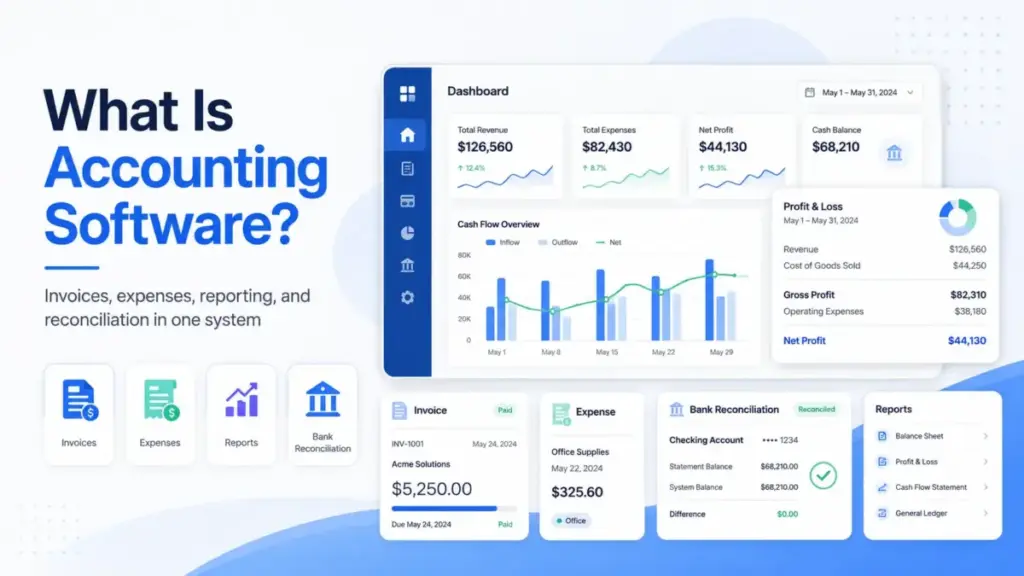
Accounting software is a category of business applications that records, organizes, processes, and reports financial data. It turns transactions, invoices, bills, payments, and bank activity into structured records that produce financial statements, tax reports, and cash-flow visibility. For businesses that send invoices, pay bills, track expenses, or share books with an accountant, accounting and finance tools have replaced spreadsheets as the standard operating layer for financial recordkeeping.
This guide explains what accounting software actually does, how data flows through it, what plan limitations buyers miss, how much it costs with real pricing examples (as of May 2026), common setup mistakes, and how to choose a tool without overbuying or underbuying. It is built from official pricing pages, vendor documentation, and authoritative industry sources rather than hands-on product testing.
If you already understand what accounting software does and want to jump straight to choosing one, our best accounting software guide ranks the top ten platforms for 2026.
Quick Answer: Accounting software records business transactions, produces financial reports, manages invoices and bills, reconciles bank activity, and prepares tax-ready records. It ranges from free tools for solopreneurs to cloud platforms for growing teams, with pricing, user limits, and feature gates that vary significantly by plan.
The 60-Second Explanation of Accounting Software
In simple terms: Accounting software is a digital system that tracks every dollar coming in and going out of a business. It replaces manual spreadsheets and paper ledgers with automated transaction recording, invoice creation, and report generation.
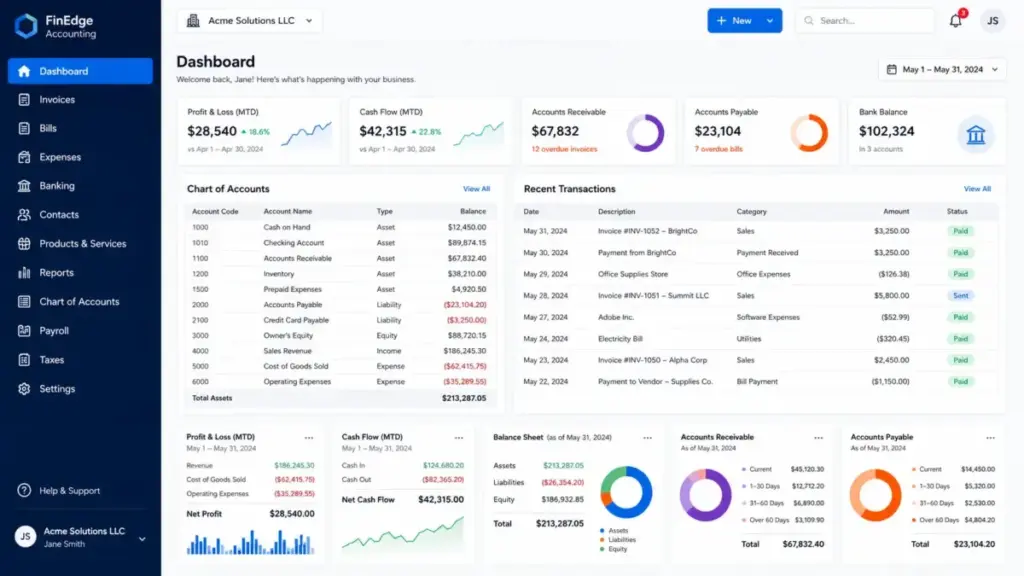
In technical terms: The system starts with a chart of accounts and a transaction database. Sales, purchases, bills, payments, payroll entries, bank-feed imports, and manual journal entries are recorded against specific accounts. Workflow rules handle invoice status, bill due dates, tax codes, payment matching, bank reconciliation, and user permissions. Reports such as profit and loss, balance sheet, cash flow, accounts receivable aging, accounts payable aging, and tax summaries are generated from the same structured records.
In business terms: Accounting software is the operating layer between raw financial activity and actionable decisions. It answers questions like: How much cash do I have? Who owes me money? What do I owe? Am I profitable this quarter? Is my sales tax correct? Can I close the books this month without rebuilding a spreadsheet? For growing companies, it also supports inventory tracking, project profitability, multi-currency transactions, and accountant collaboration. That last point matters more than most buyers realize: the difference between a SaaS tool that includes accountant access and one that charges per user for it can shape the total cost of ownership.
How Accounting Software Actually Works
Understanding the data flow is more useful than memorizing a feature list. Here is the pipeline that every accounting system follows, along with the points where things go wrong.
Step 1: Chart of accounts and initial setup
Every accounting system begins with a chart of accounts, which is the master list of categories (assets, liabilities, income, expenses, equity) that organize all financial activity. Getting this right at the start determines whether reports make sense later. A common failure point is accepting the default chart of accounts without customizing it to match the business model.
Step 2: Transaction recording
Invoices, bills, expenses, payments, refunds, and journal entries create the core transaction database. Cloud accounting tools typically support invoice creation, expense capture, receipt scanning, and bill entry. This is where double-entry accounting matters: every transaction affects at least two accounts, keeping the books in balance.
Step 3: Bank feed integration
Most cloud platforms import bank and credit card transactions automatically through bank feeds. The system suggests category matches, and the user confirms, edits, or creates rules. The failure point here is treating bank feeds as automatic bookkeeping. They import activity, but the business still needs correct categorization, documentation, and review. Connecting bank feeds before mapping category rules often creates messy books faster than manual entry.
Step 4: Reconciliation
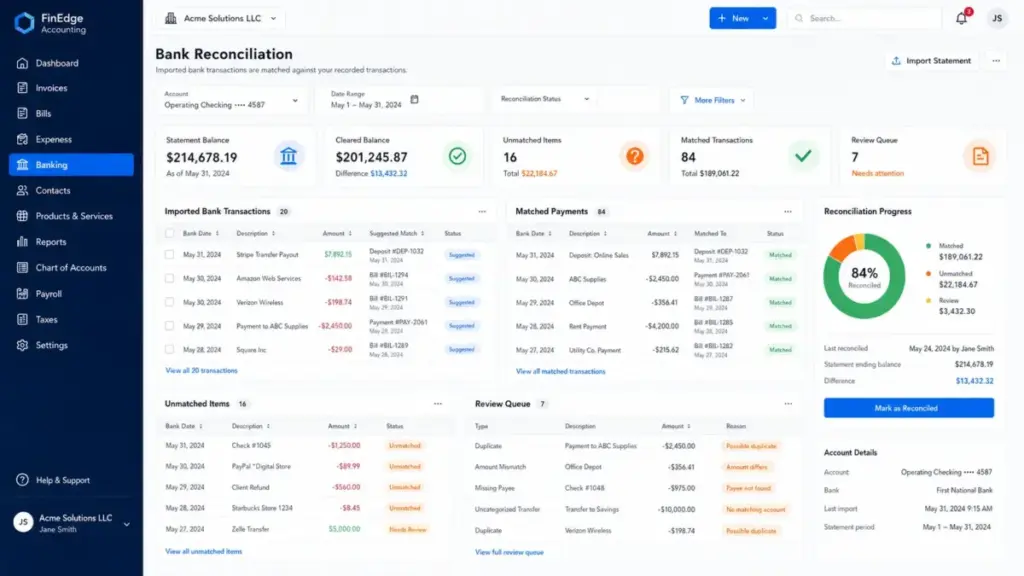
Bank reconciliation matches imported transactions with the business’s internal records. Unmatched items, duplicates, and missing entries surface during this step. The reconciliation cadence, whether weekly for high-volume businesses or monthly at minimum, directly affects the reliability of financial reports.
Step 5: Reporting and review
Profit and loss, balance sheet, cash flow, AR and AP aging, and tax summaries are generated from the same data entered in previous steps. An accountant or bookkeeper typically reviews these reports, catches classification errors, and prepares for period-end close and tax filing.
Where it breaks
The most common failure is not a software bug. It is incorrect setup, unmatched bank transactions, duplicate imports, and a lack of regular review. Automation speeds up data entry, but accounting judgment, clean categorization, and consistent reconciliation still require human attention.
Accounting Software vs Related Concepts
| Concept | What it does | When to use it | Key difference from accounting software |
|---|---|---|---|
| Invoicing software | Creates and sends invoices, collects payments | You only need to bill clients and collect money | Missing reconciliation, expense tracking, AP, financial statements |
| Bookkeeping software | Records daily transactions and categorizes expenses | You need organized records but not full financial reporting | Usually a subset of accounting; may lack tax, inventory, or multi-user controls |
| ERP finance systems | Full general ledger, AP, AR, cash management, fixed assets, procurement, consolidation | Mid-market or enterprise companies with complex operations | Far broader scope; includes modules accounting software does not cover |
| Payroll software | Processes employee pay, tax withholding, filings | You have employees and need tax-compliant payroll | Standalone function; often integrates with accounting but is not accounting itself |
| Expense management | Captures, categorizes, and reimburses employee expenses | You need receipt capture and approval workflows | One workflow inside a larger accounting system |
Understanding these distinctions prevents two common buying mistakes: using an invoicing app when the business needs full accounting, and buying an ERP system when a $25/month cloud tool would handle the workload. If your business also manages employee payroll and benefits, accounting software often integrates with dedicated payroll platforms rather than replacing them.
Step-by-Step Implementation
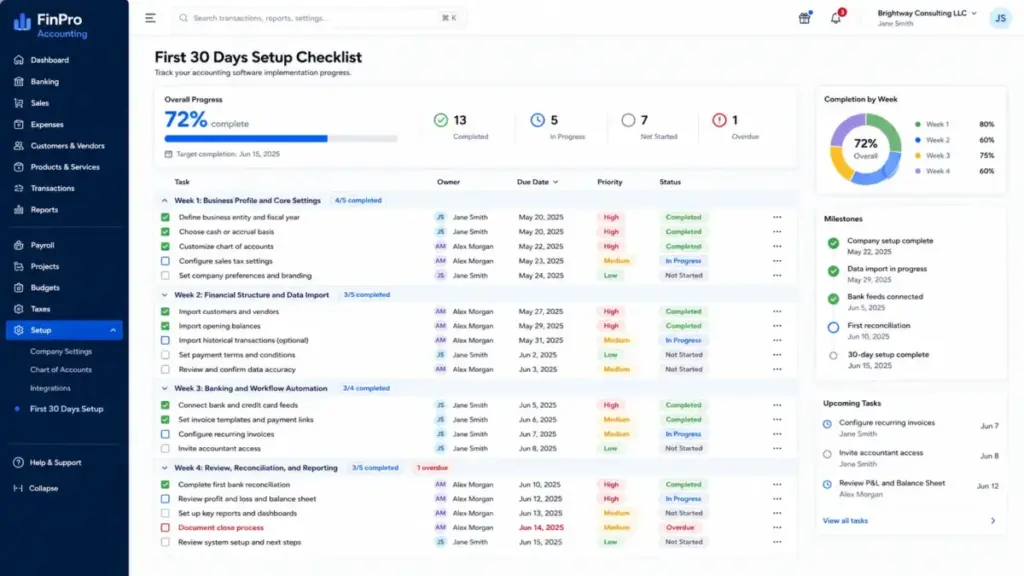
Setting up accounting software correctly in the first 30 days prevents months of cleanup later. Based on official documentation from QuickBooks, Xero, Zoho Books, FreshBooks, and Wave, here is the implementation sequence that applies across platforms.
Step 1: Define business model and accounting needs
Service billing, retail sales, ecommerce, inventory, contractors, payroll, multi-currency, or project profitability. Each model influences which plan tier and features you actually need.
Step 2: Configure chart of accounts, fiscal year, and tax settings
Set the accounting basis (cash or accrual), customize the chart of accounts for your business, establish the fiscal year, configure sales tax, and define user roles and approval rules before importing any data.
Step 3: Import opening data carefully
Opening balances, customers, vendors, products or services, unpaid invoices, unpaid bills, and bank balances. Importing duplicates or incorrect opening balances creates reconciliation problems that compound every month.
Step 4: Connect bank feeds and integrations
Link bank accounts, credit cards, payment processors, payroll, ecommerce, and expense tools only after mapping how data should be categorized. Rules-first, connections-second.
Step 5: Configure invoice and payment workflows
Set up invoice templates, payment links, sales tax rules, late payment reminders, recurring invoices, and estimate-to-invoice workflows.
Step 6: Establish a reconciliation cadence
Weekly for high-volume businesses. Monthly at minimum for everyone else. Every unreconciled week adds cleanup time that multiplies later.
Step 7: Invite accountant access
Grant your accountant or bookkeeper access and document who owns categorization, reconciliation, period close, and tax review. Some platforms charge per user for this access. Others, like Xero’s accounting plans, include unlimited users with no per-seat fees.
Step 8: Reassess plan fit as the business grows
Adding users, bills, inventory, multi-currency, contractors, approval workflows, or deeper reporting almost always means moving to a higher tier. Check plan limits before you hit them.
The Mistakes That Waste Your First 3 Months
- Choosing the cheapest plan without checking limits. A $0 plan that excludes bank imports (Wave Starter) or a $25/month plan capped at 20 invoices (Xero Early) may force an upgrade within weeks.
- Connecting bank feeds before setting categories and rules. This creates messy, uncategorized transactions faster than manual entry. Set rules first.
- Using invoicing software as a substitute for accounting. If the business needs bills, tax records, reconciliation, or financial statements, an invoice-only tool is not enough.
- Ignoring add-on costs. Payment processing fees, payroll add-ons, advisory services, annual billing commitments, and promotional price expirations all contribute to total cost. The subscription price is not the total operating cost.
- Assuming auto-categorization is always correct. Bank rules, AI suggestions, and auto-matching are time savers, not accuracy guarantees. Regular review catches classification errors before they compound.
- Waiting until tax season to clean up transactions. Monthly reconciliation is cheaper than an annual rescue. Every unreconciled month adds friction to tax preparation and financial decision-making.
Common Misconceptions
Misconception: Accounting software is only for accountants.
Reality: Business owners use it for invoicing, payments, expense capture, cash-flow visibility, and tax preparation. Accountants use the same records for review, cleanup, reporting, and compliance. Both need access.
Misconception: A free plan means accounting is free.
Reality: Free plans handle basic invoicing and recordkeeping, but payment processing, payroll, bank automation, receipt capture, advisory services, and higher usage tiers add costs. Wave’s Starter plan is $0, but Pro features like automatic bank imports cost $19/month.
Misconception: Bank feeds equal accurate bookkeeping.
Reality: Bank feeds import activity. The business still needs correct categorization, reconciliation, documentation, and review. Imported data is raw input, not finished books.
Misconception: Invoicing software and accounting software are the same.
Reality: Invoicing is one workflow. Full accounting covers expenses, reconciliation, reporting, taxes, chart of accounts, accounts payable, accounts receivable, and sometimes inventory, projects, payroll, or fixed assets.
Misconception: AI accounting features can replace setup and review.
Reality: AI and automation assist with classification, reporting, and workflow suggestions. But source data quality, accounting rules, review processes, and internal controls still matter. The AICPA and CIMA position AI as a force changing finance work, but their materials frame it as an area requiring professional competence and judgment, not a replacement for accounting expertise.
When to Use Accounting Software and When to Avoid It
Use accounting software when:
- The business sends invoices or receives client payments
- You pay bills, track expenses, or manage cash flow
- An accountant or bookkeeper needs access to shared financial records
- Tax reporting requires organized income, expense, and sales tax data
- Monthly financial reports inform business decisions
- The business has outgrown spreadsheets or paper records
Avoid overbuying when:
- The business sends fewer than 5 invoices per month with no reporting complexity. A spreadsheet or simple invoicing tool may be enough for now.
- There are no employees, no inventory, no multi-currency needs, and no accountant collaboration requirements.
Avoid underbuying when:
- The business needs multiple users, bill management, inventory tracking, workflow automation, project profitability, audit trails, or approval controls. A free or entry-level plan without these features will force an upgrade or a messy workaround.
How to Measure Success
| Metric | What it measures | Why it matters |
|---|---|---|
| Bank reconciliation lag | Days between transaction date and reconciliation | Longer lag means less reliable reports and harder month-end close |
| Month-end close time | Days to produce reliable monthly financial statements | Faster close means earlier visibility into business performance |
| Invoice-to-cash time | Days from invoice creation to payment collection | Directly affects cash flow and working capital |
| Uncategorized transaction rate | Percentage of transactions needing manual review | High rate signals poor automation setup or missing category rules |
| AR and AP aging accuracy | Whether invoices and bills reflect current status | Inaccurate aging hides cash-flow problems |
| Tax readiness | Ability to produce clean sales tax, 1099, and year-end reports | Determines how painful and expensive tax season is |
What Good Accounting Software Looks Like: 5 Examples with Pricing Caveats
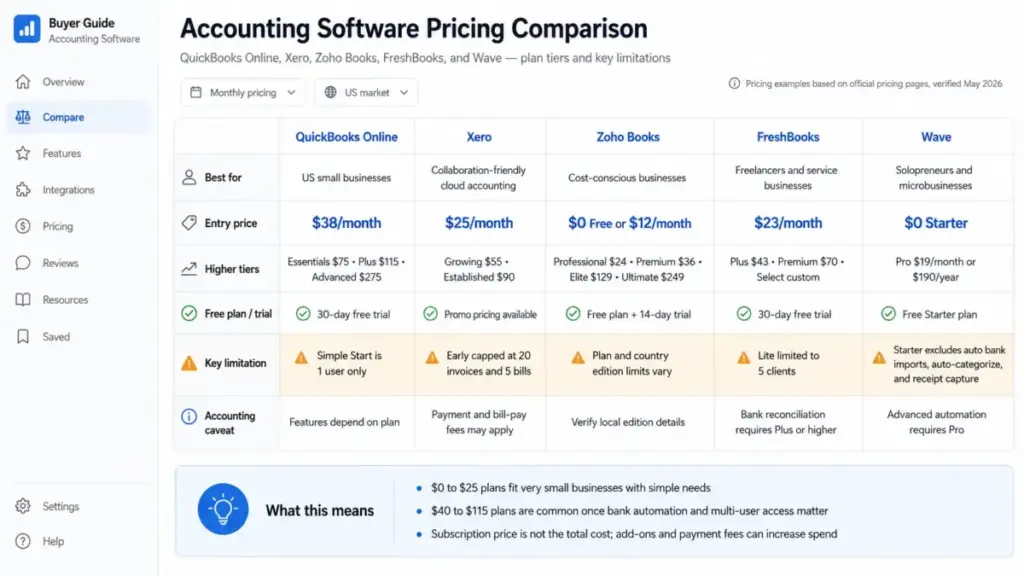
The following pricing data is based on official pricing pages verified on May 19, 2026. Promotional pricing, add-on fees, and plan details can change. Check official pricing pages for current rates before purchasing.
| Product | Entry price | Higher tiers | Free plan or trial | Key limitation |
|---|---|---|---|---|
| QuickBooks Online | Simple Start $38/month | Essentials $75/month, Plus $115/month, Advanced $275/month | 30-day free trial | Simple Start is 1 user only. Plan-dependent features. |
| Xero | Early $25/month | Growing $55/month, Established $90/month | Promotional pricing available | Early capped at 20 invoices and 5 bills |
| Zoho Books | Free $0, Standard $12/month | Professional $24/month, Premium $36/month, Elite $129/month, Ultimate $249/month | Free plan and 14-day trial | Plan, country, and edition limits vary. Verify for your region. |
| FreshBooks | Lite $23/month (standard) | Plus $43/month, Premium $70/month, Select custom | 30-day free trial | Lite limited to 5 clients. Double-entry and bank reconciliation require Plus or higher. |
| Wave | Starter $0 | Pro $19/month or $190/year | Free Starter plan | Starter excludes auto bank imports, auto-categorize, and receipt capture |
What this means: The $0 and sub-$25 plans work for solopreneurs and microbusinesses with simple invoicing needs. But most growing businesses land on a $40 to $115/month plan once they need multiple users, bank automation, bills, inventory, or project features. Payment processing fees, payroll add-ons, and advisory services add to the subscription cost on every platform.
QuickBooks Online fits US small businesses that want broad plan coverage and accountant ecosystem familiarity. Plan user caps (1 on Simple Start, 3 on Essentials, 5 on Plus, 25 on Advanced) are the feature gate that forces upgrades.
Xero works for businesses that want collaboration-friendly pricing with no per-user license fees. The invoice and bill caps on Early, and separate fees for payment processing and bill payment, are the main caveats.
Zoho Books serves cost-conscious businesses inside a broader Zoho ecosystem. The free plan and low Standard price are attractive, but plan limits on invoices, bills, expenses, and add-ons require careful edition review.
FreshBooks prioritizes service businesses, freelancers, and agencies with strong invoicing, estimates, expenses, and payment collection. Client limits on Lite and Plus, and the restriction of double-entry accounting to higher plans, define its boundaries.
Wave gives solopreneurs and microbusinesses a free starting point. The Starter plan includes unlimited invoices and bookkeeping records, but Pro ($19/month) is needed for automatic bank imports, auto-categorization, and receipt capture.
Accounting Software Tools That Make Financial Management Easier
If you are evaluating specific platforms, SaaSZap has detailed reviews of QuickBooks Online and Xero pricing plans that cover tiers, feature gates, limitations, and who should or should not use each tool. For businesses that also need HR and payroll tools, the BambooHR review covers the operations side.
For larger businesses outgrowing cloud accounting, the distinction between accounting software and ERP finance systems matters. ERP platforms add general ledger, procurement, fixed assets, cash management, consolidation, and multi-entity reporting that cloud SMB tools do not provide.
Your First 30 Days: Accounting Software Setup Checklist
- [ ] Define business model, accounting needs, and plan requirements
- [ ] Choose accounting basis (cash or accrual) and fiscal year
- [ ] Customize chart of accounts for your industry and business structure
- [ ] Import opening balances, customers, vendors, and unpaid invoices carefully
- [ ] Configure user roles, permissions, and approval rules
- [ ] Connect bank feeds and credit cards after setting category rules
- [ ] Set up invoice templates, payment links, and sales tax
- [ ] Configure recurring invoices and late payment reminders
- [ ] Invite accountant or bookkeeper access
- [ ] Complete first bank reconciliation
- [ ] Review profit and loss, balance sheet, and cash flow reports
- [ ] Document who owns categorization, reconciliation, and period close
FAQ
What does accounting software do?
Accounting software records business transactions, creates invoices, tracks expenses, reconciles bank activity, produces financial reports (profit and loss, balance sheet, cash flow), and prepares tax-ready records. It replaces spreadsheets with structured, auditable financial data.
Is Excel an accounting software?
Excel is a spreadsheet tool, not accounting software. It can track transactions and create reports manually, but it lacks double-entry controls, bank reconciliation, invoice workflows, audit trails, and multi-user collaboration. Businesses that rely on Excel for accounting typically outgrow it when they need bank feeds, tax-ready reports, or accountant access.
What is the difference between bookkeeping software and accounting software?
Bookkeeping software focuses on recording daily transactions and categorizing expenses. Accounting software includes those functions plus financial reporting, tax preparation, bank reconciliation, accounts payable, accounts receivable, and sometimes inventory, payroll integration, or project tracking. Bookkeeping is a subset of accounting.
Does accounting software replace an accountant?
No. Accounting software automates transaction recording, reporting, and workflow management, but it does not replace the judgment an accountant provides for tax strategy, compliance, financial analysis, and business advisory. Most platforms include accountant access specifically because businesses need both.
How much does accounting software cost?
Entry prices range from $0 (Wave Starter, Zoho Books Free) to $38/month (QuickBooks Simple Start) as of May 2026. Most growing businesses pay $40 to $115/month for plans with bank automation, multiple users, and full accounting features. Payment processing, payroll, and advisory services are additional costs on every platform.
What is cloud accounting software?
Cloud accounting software runs in a web browser with data stored on remote servers. Examples include QuickBooks Online, Xero, Zoho Books, FreshBooks, and Wave. It supports remote access, automatic updates, bank feed integration, and multi-user collaboration without installing software on a local machine.
When should a business upgrade its accounting software?
When the current plan hits user limits, invoice or bill caps, or lacks features the business now needs: bank automation, inventory, multi-currency, project management software tracking, approval workflows, or deeper reporting. Growing past 3 to 5 users typically triggers an upgrade on most platforms.
What are the disadvantages of accounting software?
Entry-level plans often hide user caps, invoice limits, and missing features. Automation does not remove the need for correct setup, review, and reconciliation. Payment processing and payroll add-ons increase total cost beyond the subscription price. Growing businesses may outgrow simple tools and need stronger controls, inventory, or ERP finance workflows.
What accounting software is best for freelancers?
FreshBooks and Wave are commonly used by freelancers. FreshBooks prioritizes client billing, estimates, expenses, and payment collection. Wave offers free invoicing and bookkeeping. The choice depends on whether the freelancer needs bank automation (Wave Pro or FreshBooks Plus) or can manage with manual entry on a free plan.
How do you set up accounting software?
Start with chart of accounts configuration, fiscal year, and tax settings. Import opening balances, customers, vendors, and unpaid invoices. Connect bank feeds after setting category rules. Configure invoice templates and payment workflows. Invite accountant access. Complete your first reconciliation. Then establish a regular review cadence, monthly at minimum.