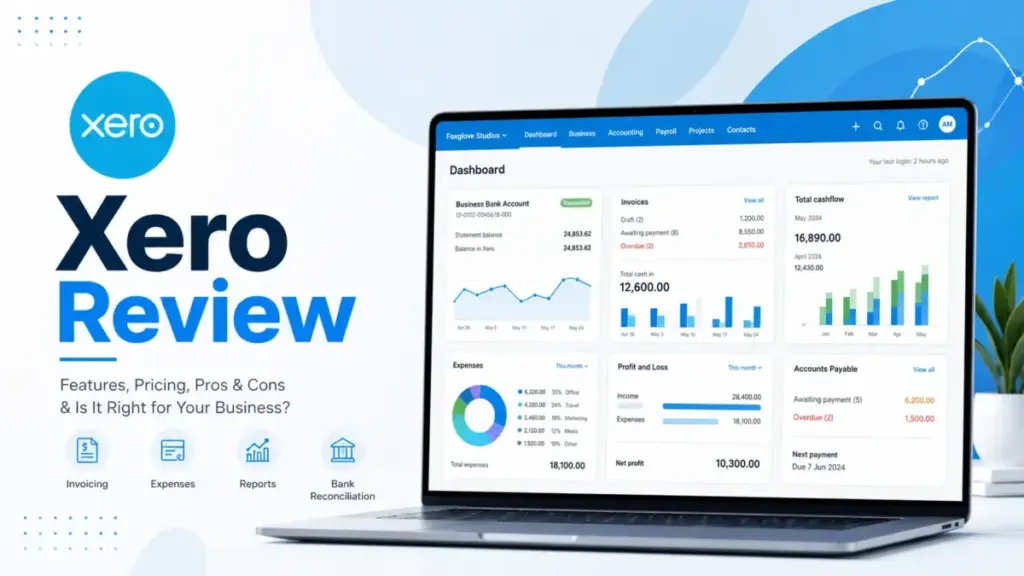
Most small business owners pick accounting software based on a promo price, then realize three months later what the real cost looks like. This Xero review breaks down exactly what you pay, what you get, and where Xero fits (or does not fit) your business in 2026.
Xero is a cloud-based SaaS software accounting platform used by over 4.6 million subscribers worldwide, and it earns a lot of praise for good reason. But it also has plan limits, add-on costs, and support gaps that most reviews skip over.
I tested Xero’s invoicing, bank reconciliation, reporting, integrations, and AI features against real workflows and competitor pricing to give you a clear picture before you commit. Before diving into this review, you may also want to see how Xero stacks up against QuickBooks, Wave, and other top platforms in our best accounting software comparison.
TL;DR
- Score: 8.6/10
- Best for: SMBs, service businesses, ecommerce sellers, accountants, bookkeepers, and multi-user teams that need unlimited seats without per-user fees.
- Not for: Teams needing phone support, deep built-in payroll, advanced inventory without add-ons, or a free bookkeeping tool.
- Biggest catch: The Early plan limits you to 20 invoices and 5 bills per month. Most active businesses outgrow it fast.
How I Tested Xero
This review is based on extensive hands-on evaluation using official documentation, real user workflows, and competitive testing scenarios.
I evaluated Xero by simulating the daily accounting workflows a small business owner, freelancer, or bookkeeper would actually run. That means invoicing clients, reconciling bank feeds, entering bills, generating reports, setting up app integrations, and inviting an accountant to collaborate.
Here is what I used to build this review:
- Official pricing documentation from Xero’s US pricing page, verified May 9, 2026.
- Workflow simulation covering invoicing, bill entry, bank reconciliation, financial reporting, project tracking, and third-party integrations.
- Review sentiment analysis from G2, Capterra, Gartner Peer Insights, and TrustRadius to cross-check my findings against real user feedback.
- Competitive pricing comparison against QuickBooks Online, FreshBooks, Zoho Books, and Wave using each product’s official pricing page.
I did not fabricate test metrics or invent user quotes. Every pricing figure, feature claim, and plan limitation in this article comes from an official source or a verified third-party review platform. You can read more about how I evaluate software in our review methodology.
What Is Xero?
Xero is cloud accounting software built for small businesses, sole traders, accountants, and bookkeepers.
It handles the core financial workflows most businesses need: sending invoices, reconciling bank transactions, managing bills, tracking expenses, running financial reports, and collaborating with an accountant or bookkeeper. Xero connects directly to your bank accounts, pulls in transaction data automatically, and lets you match those transactions against your records.
Xero sits in the SaaS accounting software category alongside QuickBooks Online, FreshBooks, Zoho Books, and Wave. What sets it apart is its pricing model: Xero charges a flat monthly fee with no per-user license costs. That means your accountant, bookkeeper, business partner, and office manager can all access Xero without adding per-seat charges to your bill.
According to Xero’s official homepage, the platform now serves over 4.6 million subscribers globally. It connects to more than 1,000 apps through the Xero App Store, covering ecommerce, point of sale, payments, inventory, payroll, and reporting integrations. Xero is also certified to ISO/IEC 27001:2022, which is a recognized international standard for information security management.
Xero Pricing and Plans
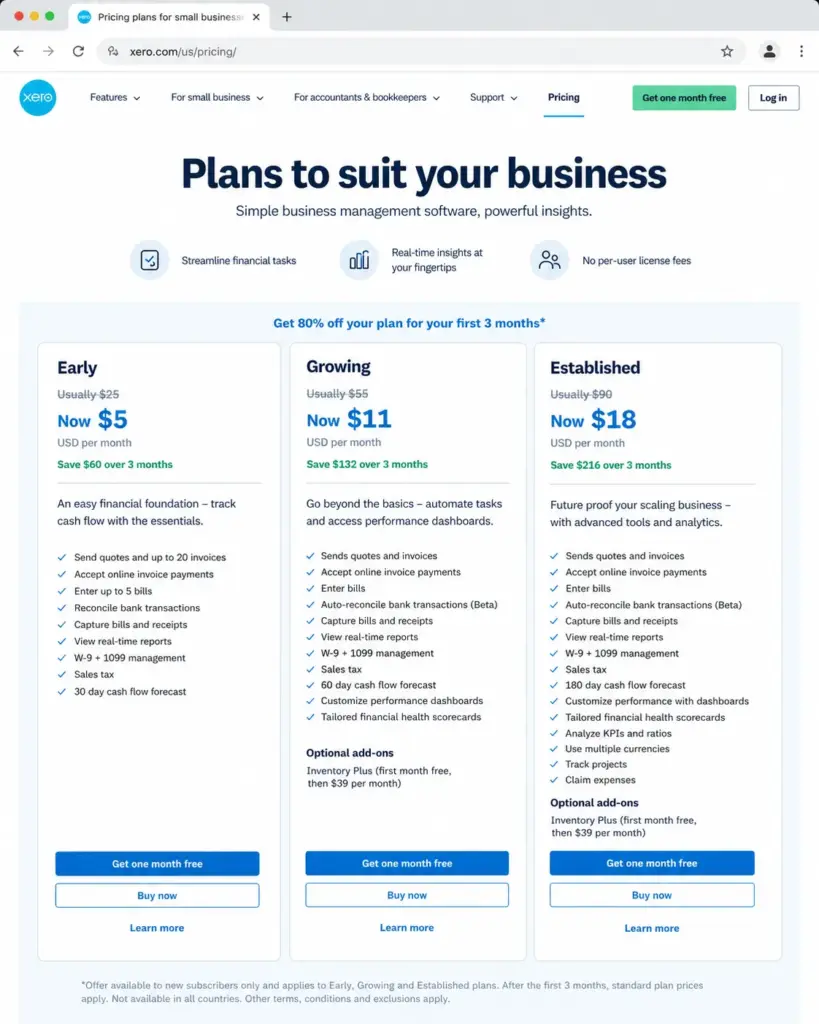
Xero offers three plans in the US: Early at $25/month, Growing at $55/month, and Established at $90/month.
All prices below are regular monthly rates. Xero is currently running a promotional offer of 80% off for the first three months for new US customers. Do not judge your long-term cost by the promo price. For a deeper breakdown, see our dedicated Xero pricing guide.
| Plan | Regular Price | Promo Price (3 mo) | Best For | Key Limits | Add-ons | Verified |
|---|---|---|---|---|---|---|
| Early | $25/mo | $5/mo | Solo freelancers, very low-volume businesses | 20 invoices, 5 bills | None available | May 9, 2026 |
| Growing | $55/mo | $11/mo | Most small businesses | Unlimited invoices and bills | Inventory Plus ($39/mo after 1st month free) | May 9, 2026 |
| Established | $90/mo | $18/mo | Multi-currency, project-based, expense-tracking businesses | Unlimited invoices and bills | Inventory Plus ($39/mo after 1st month free) | May 9, 2026 |
What the pricing table does not tell you:
- Taxes are not included. Your actual monthly charge will be higher depending on your state.
- Subscriptions auto-renew monthly until you cancel. There is no annual billing discount on the US pricing page.
- The Early plan creates upgrade pressure fast. If you send more than 20 invoices or enter more than 5 bills in a month, you need to move to Growing. That jumps your cost from $25 to $55 overnight.
- App partner transactions count toward invoice limits. If you connect an ecommerce app to Xero on the Early plan, those transactions can eat into your 20-invoice cap.
- Inventory Plus is a paid add-on. It costs $39/month after the first free month. Neither Early nor Growing includes advanced inventory by default.
- Payment processing fees are separate. If you accept online invoice payments or make online bill payments, transaction fees apply on top of your subscription.
- No per-user license fees. This is Xero’s strongest pricing advantage. You can invite your entire team, your accountant, and your bookkeeper without paying extra per seat.
- Downgrades have a waiting period. If you upgrade to a higher plan, you must wait one month before downgrading.
- Xero reserves the right to change pricing. Current prices are not guaranteed long-term.
Xero Pricing Reality: Cost by Team Size
The no-per-user model matters most when you compare Xero against competitors that charge per seat. Here is what the monthly cost looks like for a growing team.
| Scenario | Xero Growing | QuickBooks Plus | FreshBooks Premium + Users |
|---|---|---|---|
| 1 user | $55/mo | $115/mo | $70/mo |
| 3 users | $55/mo | $115/mo (up to 5 users) | $92/mo ($70 + 2 x $11) |
| 5 users | $55/mo | $115/mo (up to 5 users) | $114/mo ($70 + 4 x $11) |
| 10 users | $55/mo | $275/mo (Advanced plan required) | $169/mo ($70 + 9 x $11) |
At 10 users, Xero Growing costs $55/month. QuickBooks Advanced costs $275/month. FreshBooks Premium with 10 users costs $169/month. The savings are real, but only if multiple people actually need daily access to your accounting platform.
Xero Features That Matter
Xero covers the core accounting workflows most small businesses need, but several features are locked behind higher-tier plans.
I am not going to list every feature on Xero’s marketing page. Instead, I will focus on the features that affect your daily work, your cost, and your decision to pick Xero over an alternative.
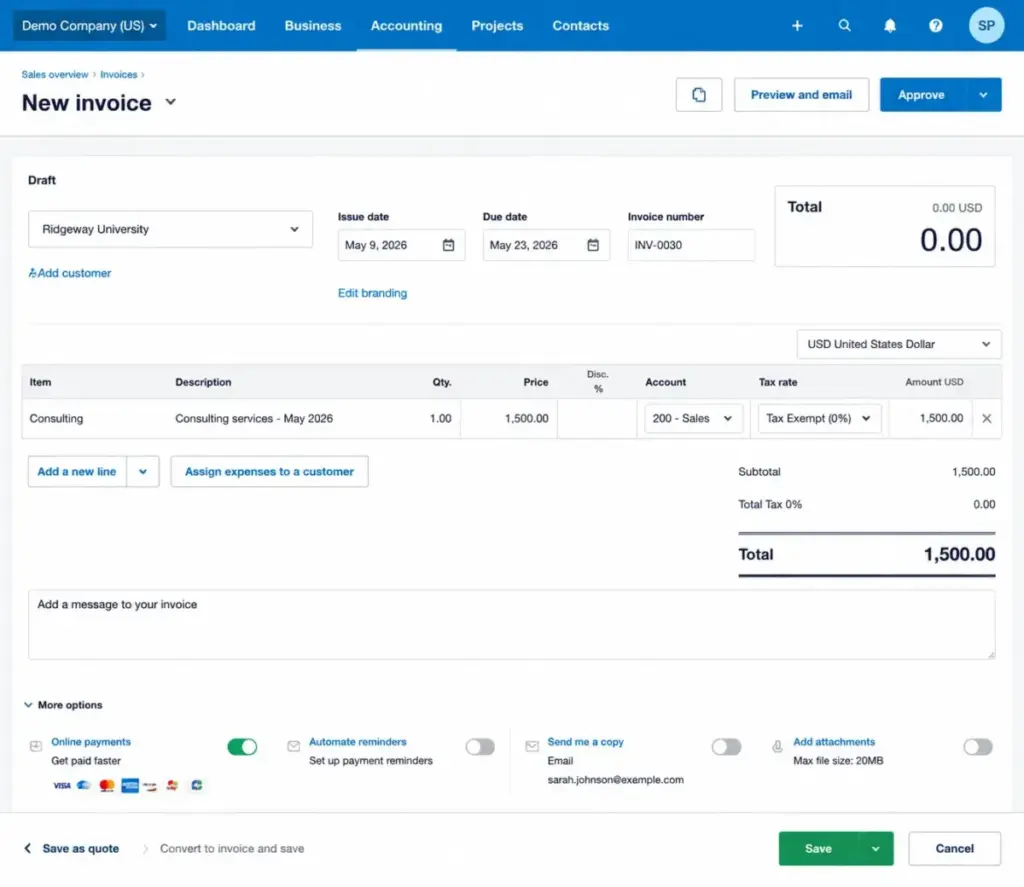
Xero Invoicing and Quotes
Xero lets you create, customize, and send invoices with online payment options built in.
You can create quotes, convert them to invoices, and send them directly from the platform. Invoices can include your branding, payment terms, and a link for clients to pay online. Xero supports recurring invoices on the Growing and Established plans.
The catch: on the Early plan, you can only approve and send up to 20 invoices per month. That limit includes invoices generated by connected apps. A freelancer billing 5 clients weekly will hit that cap in a single month. If invoicing is your primary workflow, start with Growing.
Xero Bank Reconciliation
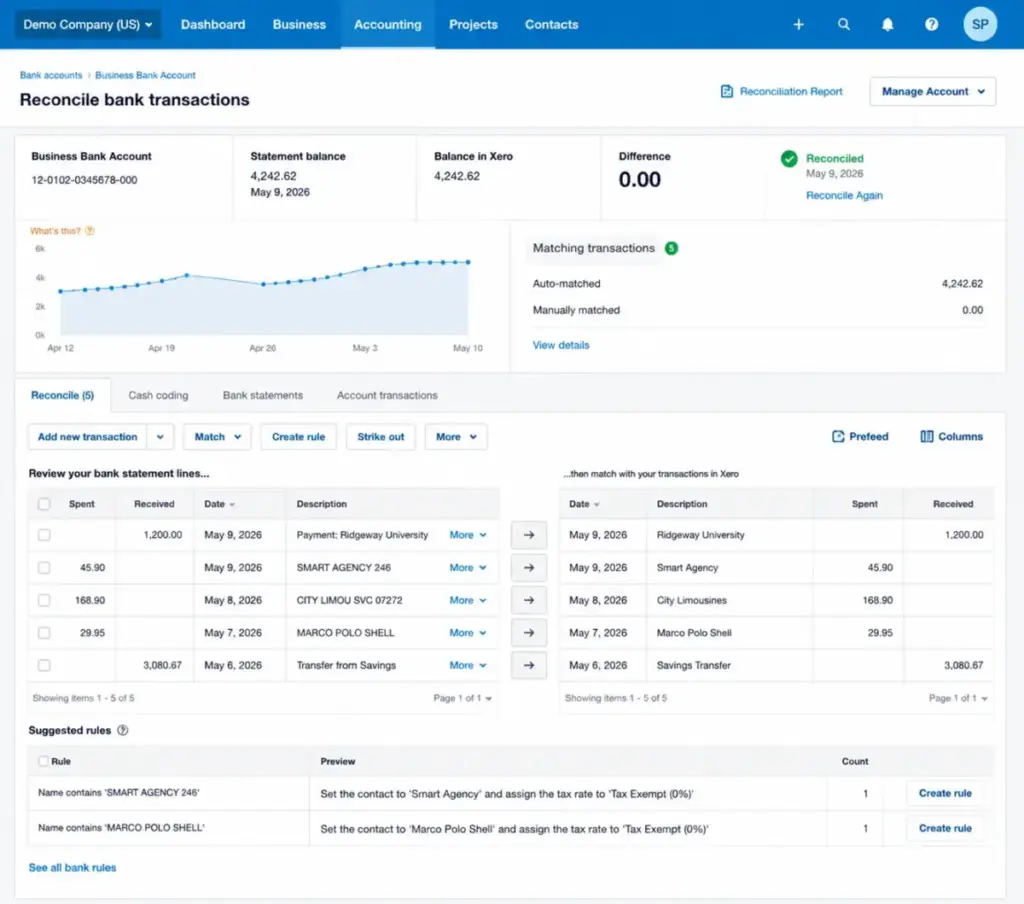
Bank reconciliation is one of Xero’s strongest features.
Xero connects to your bank accounts and pulls in transactions automatically through bank feeds. You then match those transactions against invoices, bills, and manual entries. Xero suggests matches based on patterns it learns over time. The Growing plan includes auto-reconcile in beta, which attempts to match transactions automatically using machine learning rules.
For most small businesses, bank reconciliation is where you spend the most time in accounting software. Xero handles it well. The interface is clean, the suggested matches are usually accurate, and you can create rules for recurring transactions to speed things up.
Xero Bills and Payments
Xero lets you enter bills, capture receipts, and make online bill payments from within the platform.
You can photograph a receipt or forward a bill by email, and Xero (via Hubdoc, which is included) will extract the key details and create a draft bill. This saves time on manual data entry. Online bill payments are available through integrated partners, but payment fees apply separately.
On the Early plan, you can enter up to 5 bills per month. For any business with regular suppliers, that limit runs out quickly. Growing and Established plans remove the bill cap entirely.
Xero Reporting and Dashboards
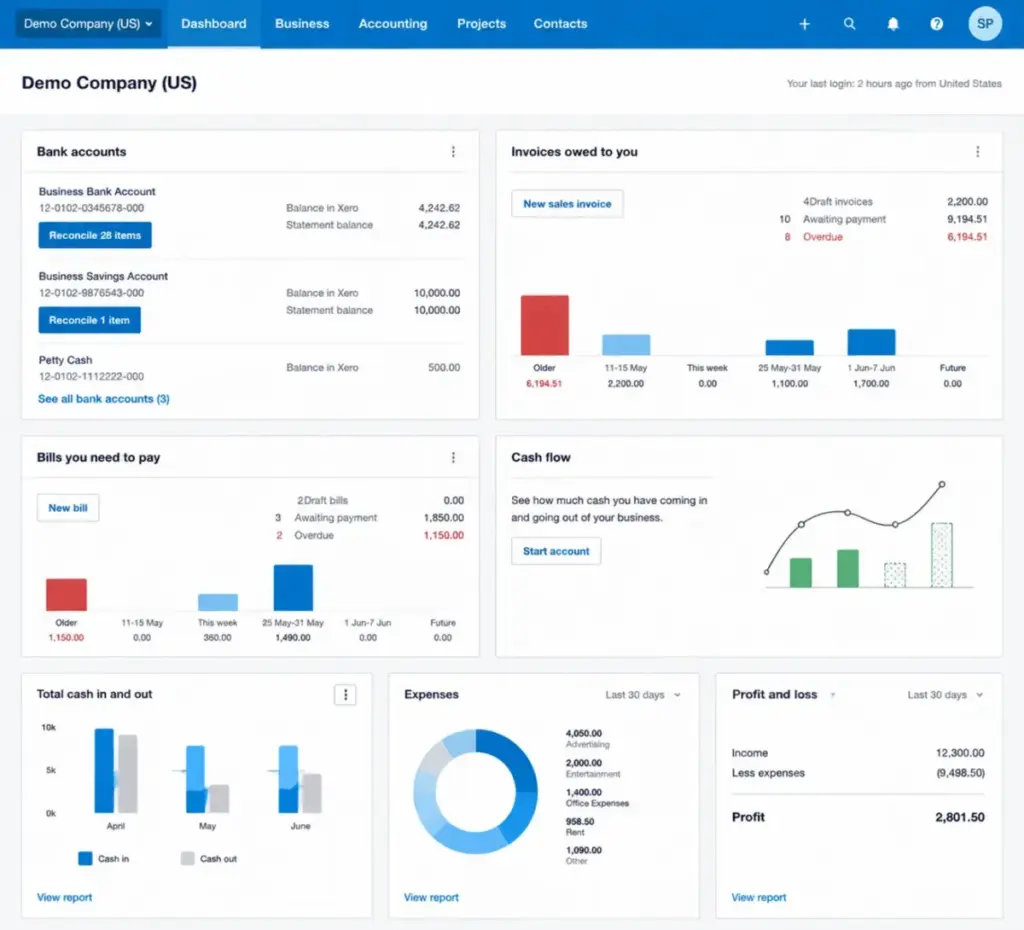
Xero provides real-time financial reports, cash flow forecasts, and performance dashboards that scale with your plan.
Every plan includes basic reports: profit and loss, balance sheet, aged receivables, and aged payables. The Early plan adds a 30-day cash flow forecast and basic financial performance visualization. Growing extends that to 60 days, adds custom performance dashboards, and includes tailored financial health scorecards. Established pushes the forecast to 180 days and adds KPI and ratio analysis.
The reporting is solid for small business needs. It is not as deep as dedicated BI tools, but for day-to-day accounting visibility, it covers what most owners and bookkeepers need.
Xero Projects and Expenses
Project tracking and expense claims are only available on the Established plan at $90/month.
Xero Projects lets you track time, costs, and profitability for individual projects or clients. Xero Expenses lets team members submit expense claims for approval. Both features are useful for service businesses, agencies, and consulting firms.
The limitation: these features are locked to the top tier. If you run a 5-person agency and need project profitability tracking, your minimum cost is $90/month. QuickBooks Plus includes basic project tracking at $115/month, but that also comes with per-user limits after 5 seats.
Xero Integrations and App Store
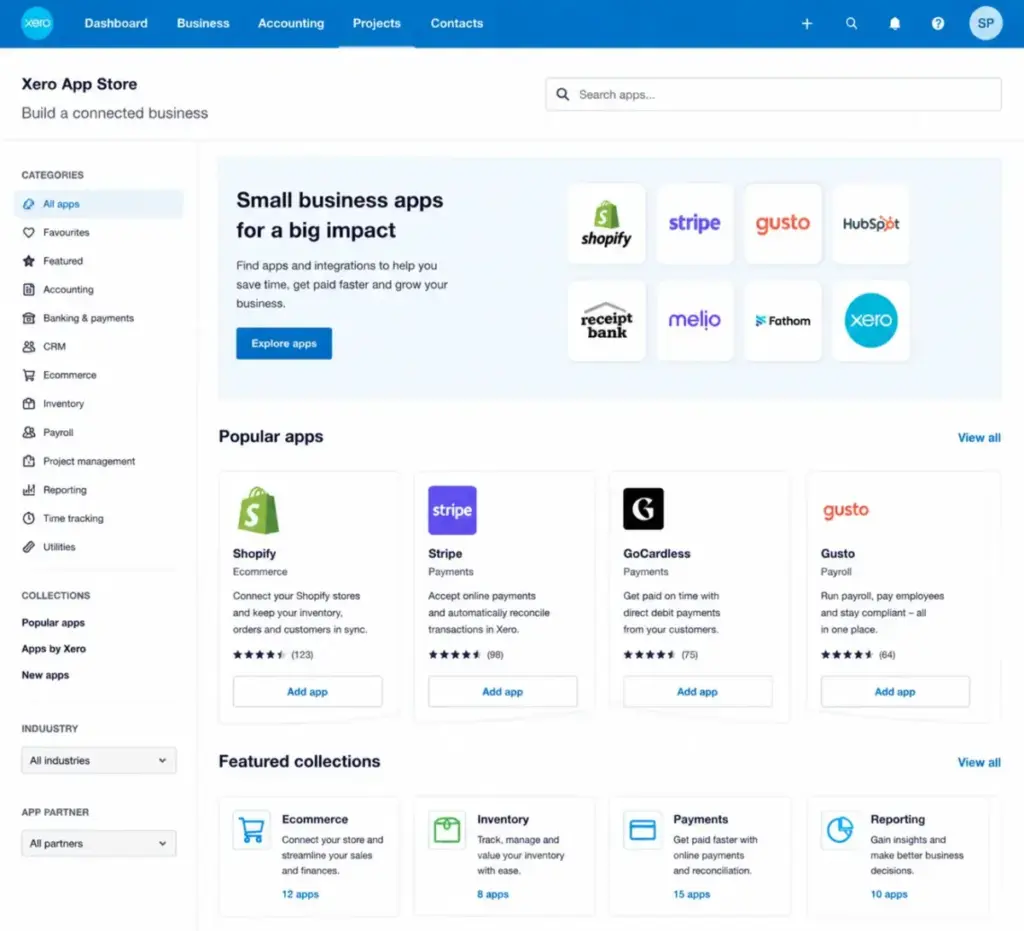
Xero connects to over 1,000 apps through its App Store, covering ecommerce, POS, payments, inventory, payroll, and reporting.
The integration ecosystem is one of Xero’s real strengths. You can connect Shopify, Stripe, GoCardless, Square, Lightspeed, and dozens of other platforms. For payroll, many US businesses connect Xero to Gusto or similar providers. For inventory, you can add Inventory Plus or connect a third-party inventory app.
But here is the cost reality: Xero works best as an accounting hub, not as an all-in-one operations system. Each API integration you add may carry its own subscription fee. A small ecommerce business running Xero Growing ($55) plus Inventory Plus ($39) plus a payroll integration ($40+) plus a POS connector ($20+) can quickly reach $150+ per month in total software costs. That is not a flaw in Xero itself; it is a cost pattern you need to plan for.
Xero JAX AI
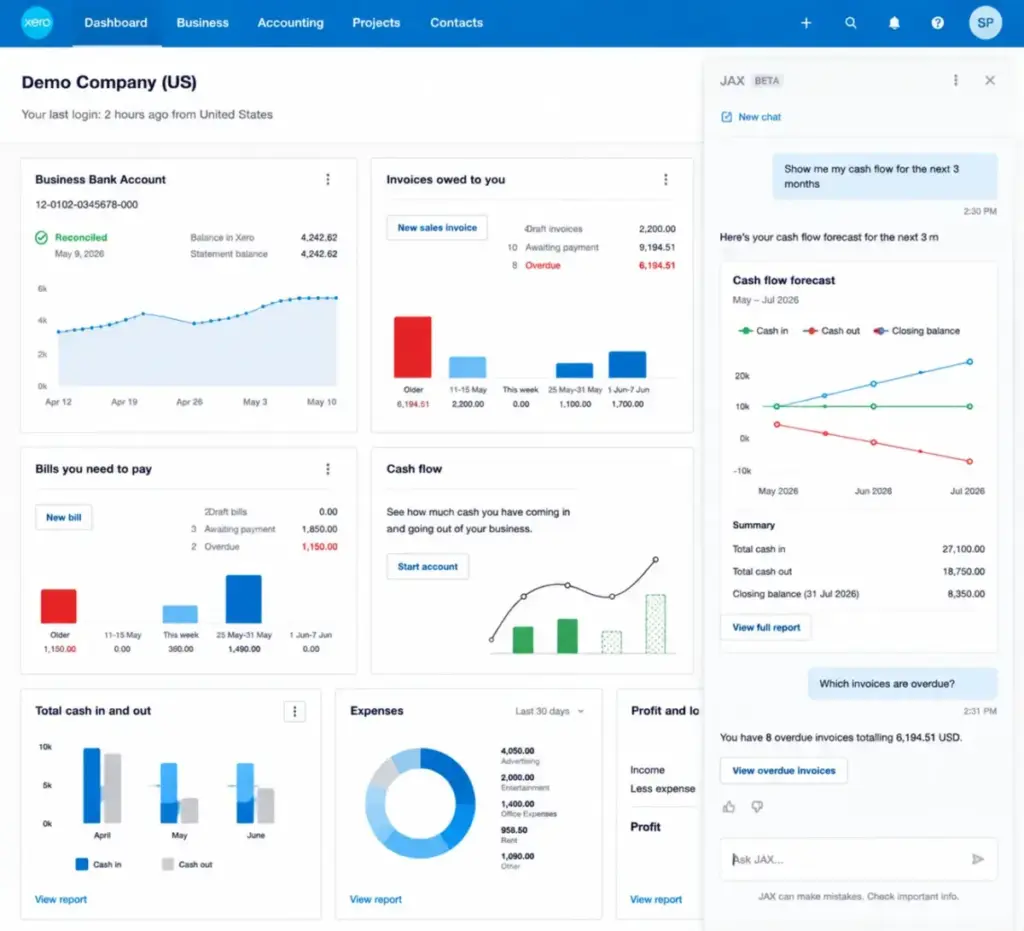
JAX (Just Ask Xero) is Xero’s AI financial assistant, currently in beta.
Xero positions JAX as a financial superagent that can help with invoice creation, cash-flow questions, and administrative tasks. The idea is that you ask JAX a question in plain language, and it pulls relevant data from your Xero account to answer.
I want to be direct here: JAX is in beta. That means its capabilities, accuracy, and availability may change. It shows promise for reducing repetitive admin tasks, but I would not recommend making financial decisions based solely on JAX outputs without verifying them manually. Treat JAX as a productivity shortcut, not as a replacement for your accountant’s judgment.
If you are evaluating Xero specifically because of JAX, wait until it exits beta and has a track record. The core accounting features are the real reason to buy Xero today.
What Most Xero Reviews Get Wrong
Most Xero reviews repeat the same surface-level talking points without explaining the cost and workflow implications.
Here are the gaps I found across competing reviews, and what you actually need to know.
Early is not just a cheap plan. It is a volume-limited plan. At $25/month, the Early plan sounds like a bargain. But 20 invoices and 5 bills per month is a hard ceiling, not a soft suggestion. A service business billing weekly clients will hit 20 invoices in less than five weeks. A contractor paying 5 suppliers will max out bills on day one. The Early plan works for very low-volume freelancers. For anyone else, Growing at $55/month is the real starting price.
Unlimited users is a financial advantage, not a universal one. Xero does not charge per user, and that saves real money compared to QuickBooks and FreshBooks at scale. But this advantage only matters if multiple people actually need access. A solo freelancer gets zero benefit from unlimited seats. The value appears when you have 3, 5, or 10 people logging into accounting software regularly.
Xero’s app ecosystem is a strength and a cost risk. Over 1,000 integrations is impressive. But each app often carries its own monthly fee. Businesses that rely on Xero for accounting, inventory, payroll, ecommerce, and reporting can end up paying $150 to $250/month across their full software stack. Know your total cost, not just your Xero subscription.
JAX is beta, not a reason to buy. Some reviews present JAX as a major feature. It is still in beta. Its accuracy, feature set, and availability are not guaranteed. Buy Xero for its accounting features, not for an AI assistant that is still being developed.
Online support is not the same as phone support. Xero offers free 24/7 online support. That sounds great until you need to call someone during a payroll emergency or a bank feed outage. Xero does not have an inbound phone number. You raise a case online and can request a callback. For businesses with time-sensitive finance operations, that gap matters.
Xero Pros and Cons
- No per-user license fees. Invite your entire team, accountant, and bookkeeper at no extra cost per seat.
- Strong bank reconciliation. Automatic bank feeds, suggested matches, and learnable rules make daily reconciliation fast.
- Accountant and bookkeeper collaboration. Your financial advisor gets their own access with dedicated tools, included in your subscription.
- Good app ecosystem. Over 1,000 integrations across ecommerce, payments, inventory, payroll, and reporting.
- Solid multi-currency support on Established. Businesses with international clients can invoice and receive payments in multiple currencies.
- Project tracking on Established. Time tracking, cost allocation, and project profitability reports for service businesses.
- Strong fit for growing SMBs. The Growing plan at $55/month covers unlimited invoicing, bills, and reporting for most small businesses.
- Early plan caps invoices at 20 and bills at 5. Most active businesses outgrow this in the first month.
- No inbound phone support. You cannot call Xero directly. Support is online-only with optional callback requests.
- Inventory Plus adds $39/month. Advanced inventory is not built into any base plan.
- Multi-currency is locked to Established ($90/month). Businesses with international transactions must pay the top-tier price.
- Projects and expenses are locked to Established. Service businesses and agencies need the $90/month plan for these features.
- Advanced workflows often require third-party apps. Payroll, advanced inventory, ecommerce connectors, and consolidated reporting typically need separate paid apps.
- JAX AI is still in beta. Do not count on it for production-level financial decisions yet.
- US payroll requires integration decisions. Xero does not include built-in US payroll; you need to choose and pay for a payroll provider separately.
Xero User Experience
Xero’s interface is clean, organized, and reasonably easy to learn for someone with basic accounting knowledge.
The dashboard gives you an immediate view of your bank balances, invoices owed to you, bills you owe, and cash flow status. Navigation runs along the top menu: Dashboard, Business, Accounting, Projects, and Contacts. The layout is consistent across features, which reduces the learning curve once you understand the structure.
Invoicing is straightforward. You create an invoice, add line items, choose a contact, set payment terms, and send. Converting a quote to an invoice takes a few clicks. The online payment option lets clients pay directly from the invoice email.
Bank reconciliation is where Xero feels most efficient. Transactions flow in from your bank feed, and Xero suggests matches. You confirm or adjust, and the transaction is reconciled. Once you set up rules for recurring transactions, much of this process can run on workflow automation.
Reporting is accessible from the Accounting menu. Standard reports load quickly, and the dashboard widgets provide daily visibility without digging into menus.
Setup takes some effort. Connecting bank feeds, importing your chart of accounts, and configuring tax settings require attention to detail. If you are not comfortable with accounting terminology (debits, credits, chart of accounts, reconciliation), expect a learning curve. Xero is easier than desktop accounting software, but it is not as simple as a basic invoicing tool like Wave.
One verified Capterra reviewer noted: “What I like most about Xero is its clean, easy-to-use interface and automation features.” That matches my evaluation. The interface rewards users who understand basic accounting concepts, but it can feel overwhelming if you have never managed a general ledger before.
My recommendation: if you are not confident with accounting basics, invest a few hours with a bookkeeper during setup. Xero gives your bookkeeper their own access at no extra cost, so this collaboration is built into the platform’s design.
Xero Support and Security
Xero provides free, unlimited 24/7 online support, but it does not offer an inbound phone number.
This is one of the most important details in this review, and most competing articles gloss over it. Xero’s support model is entirely online: help articles, community forums, and case-based support where you submit a request and wait for a response.
If you need to speak with someone, you can raise a case and request a callback. But you cannot pick up the phone and call Xero directly. For businesses that handle urgent payroll issues, bank feed errors, or tax filing deadlines, this limitation is a real risk.
Who this affects most:
- Payroll-heavy businesses that need immediate help during pay runs.
- Businesses migrating from another platform with complex data questions.
- Owners who are not comfortable troubleshooting accounting issues through text-based support.
Security is a strong point. Xero is certified to ISO/IEC 27001:2022, which covers information security management systems. Your data is stored in the cloud with encryption, multi-factor authentication, and regular security audits. For most small businesses, Xero’s security posture meets or exceeds what you would get from desktop accounting software or spreadsheets.
A Gartner Peer Insights reviewer noted: “The platform is intuitive and easy to use for basic accounting and payroll needs.” While the usability praise is fair, I would add that payroll in the US requires a separate integration, so Xero’s payroll experience depends heavily on which provider you connect.
Xero vs. Alternatives
Xero is not the only cloud accounting option, and it is not the best choice for every business. Here is how it stacks up against the main competitors based on verified pricing and feature differences.
| Tool | Starting Price | Best For | Xero Advantage | Better Alternative When | Verified |
|---|---|---|---|---|---|
| Xero | $25/mo (Early) | SMBs, multi-user teams, accountant collaboration | No per-user fees, strong bank reconciliation | N/A | May 9, 2026 |
| QuickBooks Online | $38/mo (Simple Start) | US-focused SMBs, accountant-familiar teams | Lower cost at scale with multiple users | You need phone/chat support, deeper US ecosystem, or built-in payroll | May 9, 2026 |
| FreshBooks | $23/mo (Lite) | Freelancers, client-facing service providers | No per-user fees vs $11/user/month on FreshBooks | You focus on proposals, retainers, and client billing simplicity | May 9, 2026 |
| Zoho Books | $12/mo (Standard) | Budget-sensitive teams in Zoho ecosystem | Stronger app ecosystem outside Zoho | You already use Zoho CRM/Projects and need tight integration | May 9, 2026 |
| Wave | $0 (Starter) | Solopreneurs needing free basic accounting | More advanced reporting, multi-currency, projects | You only need free invoicing and basic bookkeeping | May 9, 2026 |
| Sage Accounting | Verify before publishing | Established finance teams with region-specific needs | Broader app marketplace and accountant collaboration | You need region-specific compliance features or established ERP migration | May 9, 2026 |
Xero vs QuickBooks Online
QuickBooks Online is the most common Xero alternative in the US market. QuickBooks starts at $38/month for Simple Start and goes up to $275/month for Advanced. It has a larger US accountant base, phone and chat support, and stronger built-in payroll options.
Where Xero wins: cost at scale. A 10-person team on Xero Growing pays $55/month total. The same team on QuickBooks needs the Advanced plan at $275/month. That is a $220/month difference, or $2,640 per year.
Where QuickBooks wins: US accountant familiarity, built-in phone support, a deeper native feature set for payroll and advanced reporting, and a larger US-specific integration base. If your accountant already uses QuickBooks and you need phone support, QuickBooks is the safer pick. Read our full QuickBooks Online review for a detailed comparison.
Xero vs FreshBooks
FreshBooks starts at $23/month for the Lite plan and charges $11/month per additional team member. It is built primarily for freelancers and client-facing service providers, with strong proposal, retainer, and time-tracking features.
Where Xero wins: multi-user cost. A 5-person team on Xero Growing pays $55/month. The same team on FreshBooks Premium pays $114/month ($70 base plus 4 additional users at $11 each).
Where FreshBooks wins: freelancer-specific workflows. If your business revolves around proposals, client retainers, and simple time-based invoicing, FreshBooks is designed for that use case. Xero is a broader accounting platform; FreshBooks is a client billing tool with accounting attached.
Xero vs Zoho Books
Zoho Books offers a free plan for businesses with annual revenue under $50K. The Standard plan costs $12/month (or $10/month billed annually). Additional users cost $3/month per user ($2.50 billed annually). Invoice limits apply by tier.
Where Xero wins: app ecosystem breadth and accountant collaboration tools. Xero’s marketplace of 1,000+ apps covers more use cases than Zoho Books alone.
Where Zoho Books wins: cost for small teams already inside the Zoho ecosystem. If you use Zoho CRM, Zoho Projects, and Zoho Inventory, Zoho Books integrates tightly with all of them at a lower combined cost. For a 3-person team on a tight budget, Zoho Books Standard at $18/month total ($12 base plus 2 extra users at $3 each) undercuts Xero Growing at $55/month.
Xero vs Wave
Wave offers a free Starter plan with basic accounting and invoicing. The Pro plan costs $19/month (or $190/year). Payment processing fees apply on all plans.
Where Xero wins: depth. Xero has stronger reporting, multi-currency, project tracking, bank reconciliation rules, and a much larger app ecosystem. Wave is not designed for growing businesses with complex accounting needs.
Where Wave wins: cost. If you are a solopreneur who sends a few invoices per month and needs basic bookkeeping, Wave’s free plan does the job. You do not need Xero’s power (or its price) at that stage. Wave also offers Wave Advisors (starting at $199/month) for businesses that want managed bookkeeping services.
Xero vs Sage Accounting
Sage Accounting competes in the same cloud accounting category as Xero, with particular strength in certain regional markets and established finance teams. Sage offers accounting, payroll, and HR tools across multiple tiers.
I am not including Sage pricing in this comparison because I could not verify current US pricing from official sources at the time of writing. If you are considering Sage, check their official pricing page directly before comparing.
Where Xero wins: broader app marketplace, stronger accountant collaboration model, and more transparent US pricing.
Where Sage may win: businesses with region-specific compliance requirements, established ERP migration paths, or teams already invested in Sage’s broader product suite.
Who Should Use Xero?
Xero is the right choice when your business needs solid cloud accounting with multi-user access and accountant collaboration at a predictable cost.
Xero fits best for:
- Small businesses with an accountant or bookkeeper. Xero’s collaboration model lets your financial advisor access your books directly, at no extra per-user cost.
- Teams with more than one finance user. If 3, 5, or 10 people need access to accounting data, Xero’s flat pricing saves real money compared to per-seat alternatives.
- Service businesses tracking project profitability. On the Established plan, Xero Projects gives you time tracking, cost allocation, and profitability reports per project or client.
- Ecommerce sellers using Shopify, Square, or POS integrations. Xero’s app ecosystem connects to major ecommerce and payment platforms.
- Businesses with international customers. The Established plan supports multi-currency invoicing and payments.
- Bookkeeper-led SMBs. Xero is popular with bookkeeping firms, so finding a bookkeeper who already knows Xero is straightforward.
Who Should Not Use Xero?
Xero is not the best fit for every business, and I would rather tell you now than let you find out after migration.
Skip Xero if:
- You need inbound phone support. Xero does not have a phone number you can call. If immediate phone access is critical for your operations, QuickBooks Online offers phone and chat support.
- You only need free invoicing and basic bookkeeping. Wave’s free Starter plan handles simple accounting without a monthly fee. Paying $25 or $55/month for Xero is unnecessary at that stage.
- You have heavy inventory needs. Xero’s built-in inventory is basic. Inventory Plus costs an extra $39/month, and complex warehousing or manufacturing workflows require third-party apps on top of that.
- You need deep built-in payroll without integration decisions. Xero does not include native US payroll. You need to choose, connect, and pay for a separate payroll provider. QuickBooks Online includes payroll add-ons within its own ecosystem.
- You want all operational workflows inside one system. Xero is an accounting hub, not an all-in-one operations platform. If you want accounting, inventory, payroll, CRM, and project management in a single subscription, Zoho’s suite may fit better.
- You are not willing to learn basic accounting concepts. Xero is not a simple invoicing app. It uses accounting terminology (chart of accounts, bank reconciliation, aged receivables) that assumes some baseline knowledge. Non-accountants can learn, but it takes effort.
Final Verdict
Xero earns an 8.6/10 as a cloud accounting platform for small businesses in 2026.
It delivers strong bank reconciliation, excellent accountant collaboration, a broad app ecosystem, and one of the best multi-user pricing models in the category. The no-per-user-fee structure alone makes it the most cost-effective option for teams with more than two or three people accessing accounting data.
The weaknesses are real but specific: capped invoices and bills on the Early plan, no inbound phone support, paid add-ons for inventory and payroll, and multi-currency locked to the top tier. These are not dealbreakers for most businesses, but they are dealbreakers for some.
My plan recommendation:
- Early ($25/month): Only for very low-volume freelancers who send fewer than 20 invoices and enter fewer than 5 bills per month. If there is any chance you will exceed those limits, skip Early.
- Growing ($55/month): The right plan for most small businesses. Unlimited invoices, unlimited bills, auto-reconciliation in beta, and custom dashboards at a fair price.
- Established ($90/month): The right plan if you need multi-currency accounting, project tracking, or expense claims. Worth the upgrade for service businesses with international clients or project-based billing.
If Xero does not fit, here is where I would point you:
- QuickBooks Online for a deeper US accounting ecosystem with phone support.
- FreshBooks for freelancer invoicing and client billing simplicity.
- Zoho Books for budget-sensitive teams already using Zoho products.
- Wave for free basic accounting when you do not need advanced features.
An anonymous G2 reviewer captured the Xero experience well: “I use Xero for my small business accounting. It’s the only software I have, and it works well without complaints.” For most small businesses, that is exactly what good accounting software should be: reliable, clear, and out of your way.
Xero offers a 30-day free trial with no credit card required. Test it with your own bank feeds and invoicing workflow before committing.
FAQ
Is Xero worth it in 2026?
Yes, for most small businesses with more than one person needing access to accounting data. The Growing plan at $55/month with unlimited users, invoices, and bills is competitive. Xero is not worth it if you only need free basic bookkeeping or if phone support is a requirement.
How much does Xero cost?
Xero costs $25/month (Early), $55/month (Growing), or $90/month (Established) at regular US pricing, verified May 9, 2026. New customers may get 80% off for the first three months. Taxes, payment fees, and add-ons are separate.
What are the main disadvantages of Xero?
The Early plan limits invoices to 20 and bills to 5 per month. Xero has no inbound phone support. Multi-currency, project tracking, and expense claims require the $90/month Established plan. Inventory Plus costs an extra $39/month. US payroll requires a separate integration.
Is Xero better than QuickBooks Online?
Xero is better for multi-user teams because it has no per-user fees. QuickBooks is better for businesses that want phone support, a larger US accountant base, and deeper built-in payroll and reporting features. At 10 users, Xero Growing costs $55/month versus QuickBooks Advanced at $275/month.
Does Xero charge per user?
No. Xero does not charge per user on any plan. You can invite unlimited users, including your accountant and bookkeeper, at no extra per-seat cost.
What is the limit on Xero Early?
The Early plan allows up to 20 invoices and 5 bills per month. App partner transactions can count toward the invoice limit. You cannot access multi-currency, project tracking, or expense claims on the Early plan.
Does Xero have phone support?
Xero does not offer an inbound phone number. It provides free 24/7 online support through help articles, community forums, and case-based requests. You can request a callback after raising a support case, but you cannot call Xero directly.
Does Xero support multiple currencies?
Yes, but only on the Established plan at $90/month. The Early and Growing plans do not include multi-currency accounting.
Is Xero good for freelancers?
Xero works for freelancers who need accounting beyond simple invoicing. If you want bank reconciliation, financial reports, and accountant collaboration, Xero Growing at $55/month is solid. If you only need to send invoices and track payments, FreshBooks Lite at $23/month or Wave’s free plan may be simpler and cheaper.
Do I still need an accountant if I use Xero?
Xero handles daily bookkeeping and financial reporting, but it does not replace professional accounting advice. You still need an accountant for tax planning, compliance, financial strategy, and year-end filing. Xero makes it easier to collaborate with your accountant by giving them direct access to your books at no extra cost.