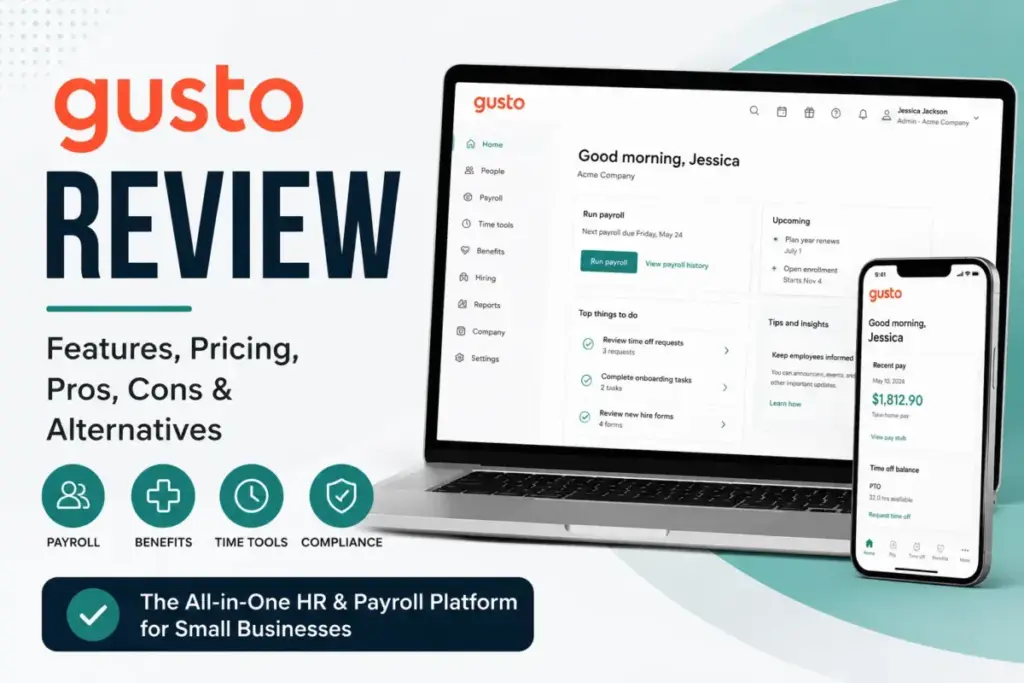
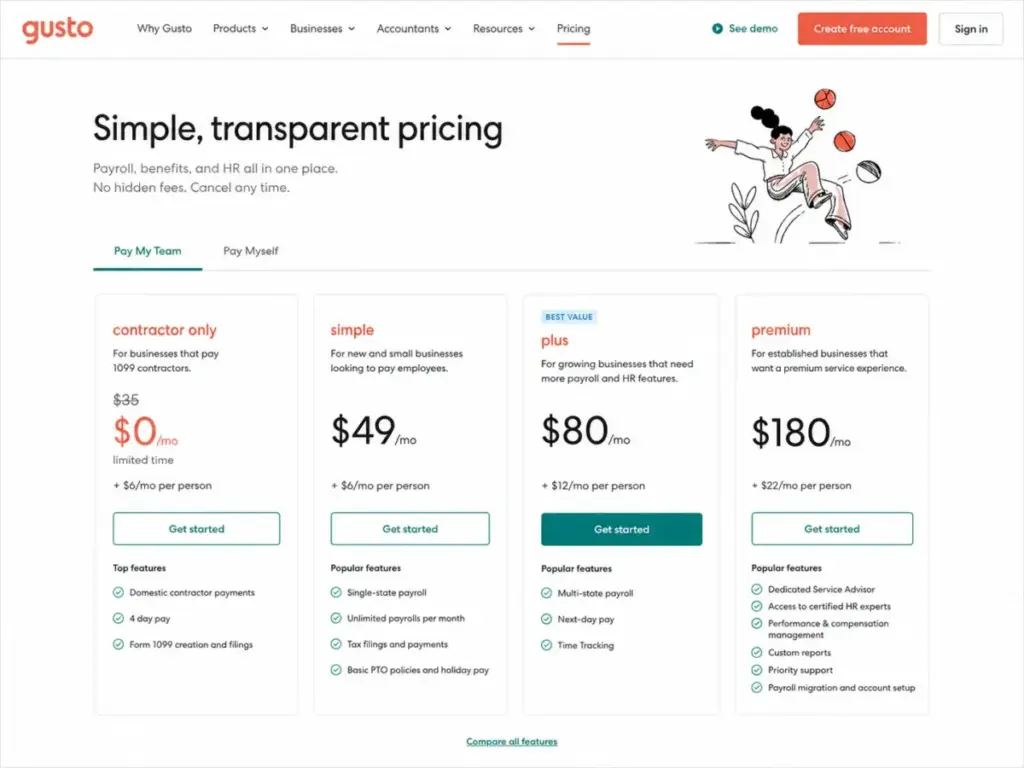
Gusto lists Simple at $49/month plus $6/month per person. A 10-person team pays $109/month before adding time tracking, next-day direct deposit, or priority support. Those features sit on Plus at $80/month plus $12/month per person, which brings the same team to $200/month.
That gap between the marketing page price and the operational cost is where most Gusto buyers get surprised, and it is the central question of this Gusto review. If you are comparing multiple payroll and accounting platforms side by side, see our best accounting software ranking for the full picture.
Gusto is a payroll software platform that combines full-service payroll, tax filing, benefits administration, onboarding, and basic HR tools into one system for US-based small businesses. For teams under 25 employees that want payroll handled without a dedicated HR department, Gusto delivers.
For teams needing multi-state payroll, fast direct deposits, or dedicated support, the cost rises faster than the pricing page suggests. This review breaks down every plan, add-on cost, feature gate, limitation, and buyer scenario so you know exactly what Gusto costs and whether it fits your team in 2026.
| Category | Verdict |
|---|---|
| Best for | US small businesses with 2-25 W-2 employees needing payroll, tax filing, and basic HR in one platform |
| Not ideal for | Teams needing 24/7 support, global full-time employee payroll, or deep HR customization |
| Starting price | $49/month + $6/person (Simple) |
| Best practical plan | Plus at $80/month + $12/person, because it adds multi-state payroll, next-day pay, and time tracking |
| Free plan/trial | Free account setup and exploration before running payroll; not a permanent free plan |
| Setup difficulty | Low to medium |
| Main strength | Full-service payroll with automated federal, state, and local tax filing for US businesses |
| Main limitation | Simple is single-state only; multi-state, faster pay, priority support, and key HR tools require Plus, Premium, or paid add-ons |
| Best alternative | OnPay for simpler multi-state payroll at a lower per-person cost |
What this means: Gusto is a strong payroll-first platform, but the plan you need depends on whether your team operates in one state, needs faster direct deposits, or requires dedicated support. The verdict table above shows the quick split. The rest of this review shows the math behind it.
How We Reviewed Gusto
This evaluation is based on independent editorial research, analyzing official product documentation, feature specifications, and verified customer feedback. I did not run live payroll through Gusto for this review.
The analysis draws from Gusto’s official pricing page, product documentation, support and security pages, and developer API documentation. I cross-referenced pricing and feature claims with verified user sentiment on G2, Capterra, and TrustRadius to identify recurring strengths and complaints.
Pricing data in this review reflects Gusto’s official published rates, which I checked in May 2026. Add-on pricing for state tax registration, R&D tax credits, benefits, and 401(k) varies by provider, state, and promotion, so I flag those as variable rather than stating exact amounts.
Review limitation: This review uses official pricing, public product documentation, and verified user sentiment from G2, Capterra, and TrustRadius. I did not deploy Gusto with a live payroll team, so real-world support response times, exact direct deposit processing speeds, and state-specific tax registration experiences should be confirmed directly with Gusto.
The 3 Problems Gusto Solves
Payroll Complexity for Small Teams
Gusto eliminates the manual work of payroll processing for US small businesses. According to Gusto’s product page, all paid plans include unlimited payroll runs, automatic calculation of federal, state, and local payroll taxes, tax payments and filings, W-2 and 1099 preparation and filing, and employee self-service portals. A 5-person team running biweekly payroll does not need to calculate withholdings, file quarterly taxes, or mail year-end forms. Gusto handles all of it.
The practical value here is compliance confidence. Gusto files and pays payroll taxes on your behalf, which reduces the risk of penalties for missed or late filings. For a first-time employer who has never run payroll, this single feature justifies the subscription.
I suspect most teams under 10 employees will find Gusto’s payroll automation sufficient on the Simple plan, as long as all employees work in the same state.
Benefits Administration Without a Broker Team
Gusto integrates health insurance, workers’ compensation, HSA, FSA, commuter benefits, dependent care FSA, and 401(k) into the same platform where you run payroll. This matters because small businesses typically do not have a benefits administrator on staff. Gusto lets the business owner set up and manage benefits alongside payroll deductions.
The catch: benefits administration is not free. According to Gusto’s official pricing, workers’ compensation starts at $14/month. HSA costs $2.50/month per participant. FSA and dependent care FSA each cost $4/month per participant with a $20/month minimum. The $200 annual service charge applies across tax-advantaged benefit account types. Health insurance broker integration costs $6/month per eligible employee, and 401(k) pricing varies by integration partner.
These are real costs that most Gusto review articles gloss over. A 10-person team adding HSA and health insurance broker integration pays an extra $85/month in add-ons before touching payroll fees.
Onboarding and Employee Self-Service
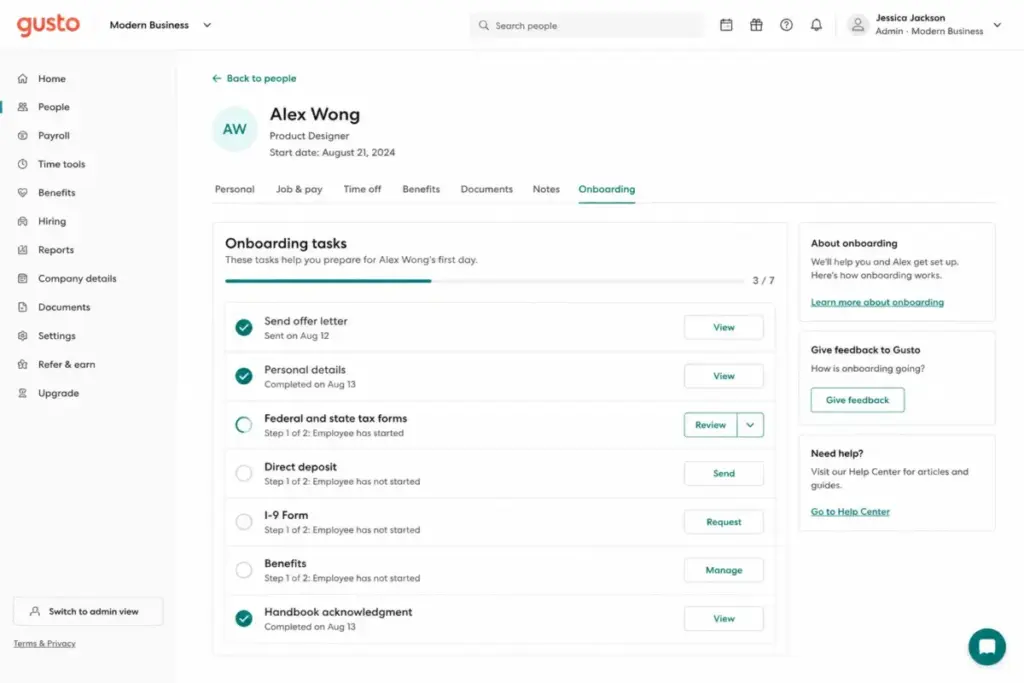
Gusto provides digital onboarding checklists, offer letter templates, and electronic document signing. New employees can enter their personal information, tax forms, and direct deposit details before their first day. After onboarding, employees access a self-service portal to view pay stubs, download tax documents, request time off, and update personal information.
This saves the business owner from manually collecting paperwork and answering routine employee questions about pay. On G2, users commonly praise the employee-facing experience as a core strength. On TrustRadius, users frequently cite onboarding and direct deposit access as reasons they chose Gusto.
The 2 Problems Gusto Creates
Plan Upgrades Accumulate Faster Than Expected
Gusto’s pricing page shows four plans. The structure looks simple. The problem is that features buyers expect on a “payroll platform” are often gated behind higher tiers or paid add-ons.
Here is the plan-gate decision matrix that most competing reviews do not show:
| Trigger | You need this plan | Avoid if |
|---|---|---|
| Employees in one state only | Simple ($49 + $6/person) | You have remote employees in multiple states |
| Employees in 2+ states | Plus ($80 + $12/person) | Per-person cost doubles and you only need payroll |
| Next-day direct deposit | Plus ($80 + $12/person) or Simple with add-on ($15/month + $3/person) | You are fine with 4-day standard processing |
| Time tracking synced to payroll | Plus ($80 + $12/person) or Simple with add-on ($6/person after trial) | Your team already uses a separate time tracking tool |
| Priority support | Premium ($180 + $22/person) or any plan with add-on ($30/month + $3/person) | Budget is tight and standard business-hour support is acceptable |
| Dedicated Service Advisor | Premium ($180 + $22/person) | You do not need a named support contact |
| Contractor-only payments (no W-2) | Contractor Only ($35 + $6/person, with limited-time $0 base offer) | You also have W-2 employees, since Contractor Only excludes most add-ons |
| HR expert access and custom reports | Premium ($180 + $22/person) or HR Resources add-on ($50/month + $5/person) | Your team does not need certified HR guidance |
What this means: the jump from Simple to Plus doubles the per-person fee from $6 to $12. For a 15-person team, that is the difference between $139/month (Simple) and $260/month (Plus). The trigger is usually multi-state payroll or next-day deposits, not a luxury feature. I keep coming back to this gap because it shapes every recommendation I make about Gusto.
Support Access Is Tiered, Not Universal
Gusto’s support model is more layered than most reviews acknowledge. Here is how it works:
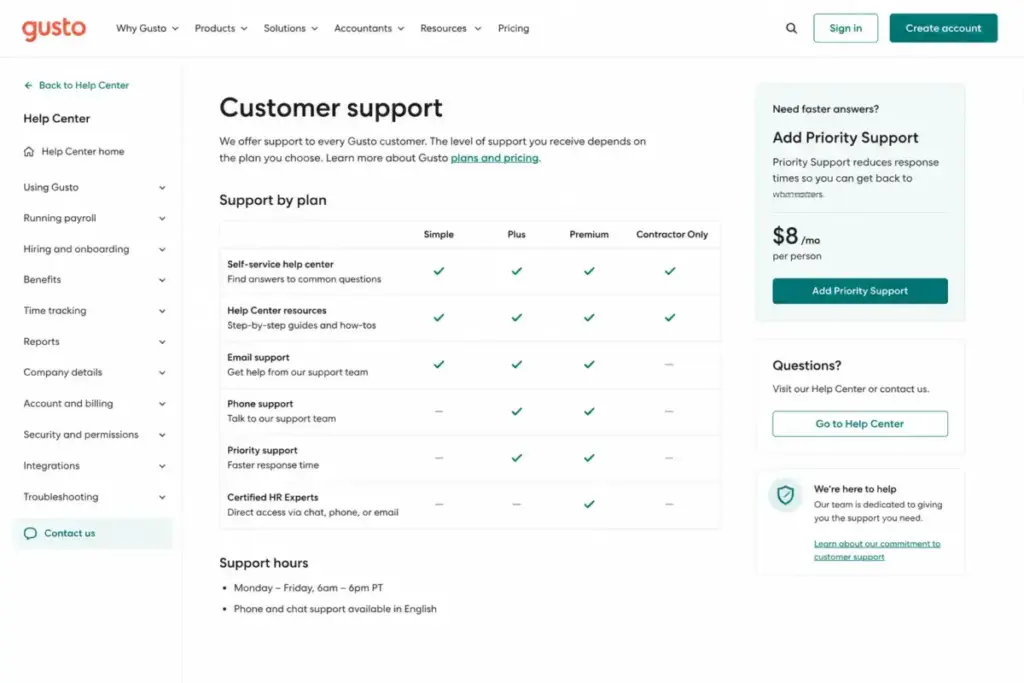
- All plans: 24/7 Help Center access (self-service articles and guides)
- Simple and Plus: Phone and chat support during business hours. Gusto routes initial contact through an AI assistant before connecting to a human agent.
- Priority Support add-on (Simple and Plus): $30/month plus $3/month per person. Provides faster response and priority routing.
- Premium: Includes Priority Support and a Dedicated Service Advisor, a named contact who knows your account.
Paraphrased sentiment from G2 reviews: users commonly praise ease of use and payroll simplicity, while support responsiveness and missing customization appear as recurring complaints. On Capterra, reviews show strong ease-of-use ratings, but some users note that admin versus employee views are not always clear. On TrustRadius, users cite mobile app gaps and scaling limitations alongside praise for payroll accuracy.
The risk for a first-time employer on Simple: you get business-hour phone and chat, routed through an AI assistant first. If payroll runs into a tax filing issue, the speed of resolution depends on your plan tier. That is not a dealbreaker for a 3-person team, but it is worth knowing before you commit.
Gusto Pricing and Plans in 2026
Gusto’s official pricing page lists four plans as of May 2026. All plans bill monthly with no long-term contract. You can cancel anytime, upgrade immediately, and downgrades take effect at the beginning of the next billing period.
| Plan | Base Price | Per Person | 10-Person Cost | Best For | Key Limitation |
|---|---|---|---|---|---|
| Contractor Only | $35/month (limited-time $0) | $6/month | $95/month | Businesses paying contractors only, no W-2 employees | Excludes W-2 payroll and most plan add-ons except global contractor payments |
| Simple | $49/month | $6/month | $109/month | Single-state teams running payroll for the first time | Single-state payroll only; no time tracking, next-day pay, or multi-state |
| Plus | $80/month | $12/month | $200/month | Multi-state teams needing next-day pay and time tracking | Per-person cost doubles; still no dedicated advisor or custom reports |
| Premium | $180/month | $22/month | $400/month | Scaling teams needing HR experts, priority support, and payroll migration | Highest cost; justified only if you use the included premium services |
What this means: Gusto Simple looks affordable for a very small team. A 3-person team pays $67/month. A 10-person team pays $109/month. That is competitive. The pain starts when you need multi-state payroll (forced upgrade to Plus) or faster deposits (add-on or upgrade). The pricing page price is real, but the operational cost is often higher.
Costs That Can Change Your Gusto Bill
Beyond the base plan fees, Gusto has add-ons that can shift your monthly bill:
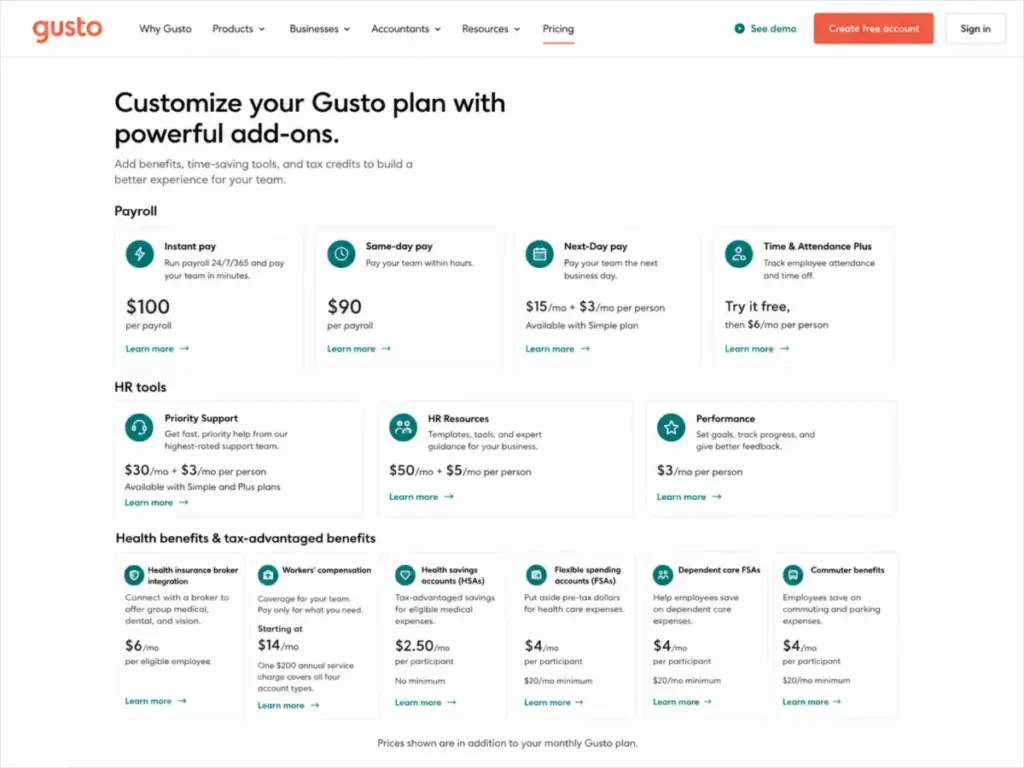
- Same-day pay: $90 per payroll
- Instant pay: $100 per payroll
- Next-day pay for Simple: $15/month + $3/month per person
- Time and Attendance Plus for Simple: free trial, then $6/month per person
- Priority Support: $30/month + $3/month per person
- HR Resources: $50/month + $5/month per person
- Performance management: $3/month per person
- Health insurance broker integration: $6/month per eligible employee
- Workers’ compensation: starts at $14/month
- Gusto Money Plus: $19/month
- Tax-advantaged benefits: $200 annual service charge plus per-participant fees (HSA $2.50, FSA $4, dependent care FSA $4, commuter $4, each with minimums)
- Global contractor payments: no monthly per-contractor fee, $5 per payment to US-based bank accounts, foreign exchange rates may vary
- State tax registration: pricing varies by state
- R&D tax credits: 15% of identified tax credits (Premium discounts may apply)
- 401(k): pricing varies by integration partner
A 10-person team on Simple adding next-day pay, priority support, and workers’ compensation pays $109 + $45 + $60 + $14 = $228/month before benefits. The same team on Plus with workers’ compensation pays $200 + $14 = $214/month and already includes next-day pay and time tracking. In some cases, upgrading to Plus is cheaper than stacking Simple add-ons.
That is the pricing math most payroll software reviews do not break down.
Payroll Speed: What Each Tier Actually Gets You
Gusto offers four deposit speeds, and most reviews mention “direct deposit” without explaining the gates:
| Speed | Available On | Additional Cost | Processing Time |
|---|---|---|---|
| Standard (4-day) | All plans including Contractor Only | Included | 4 business days |
| Next-day | Plus and Premium (included); Simple (add-on) | $0 on Plus/Premium; $15/month + $3/person on Simple | Next business day |
| Same-day | Available as per-payroll add-on | $90 per payroll | Same business day |
| Instant | Available as per-payroll add-on | $100 per payroll | Minutes (via Gusto Wallet) |
What this means: if your employees expect next-day deposits, the Simple plan does not include it. You either add $15/month + $3/person or upgrade to Plus. Same-day and instant pay cost extra on every plan. A team running biweekly payroll with same-day pay pays an additional $180/month in same-day fees alone.
Gusto Key Features with Plan Gates
Full-Service Payroll and Tax Filing
Gusto runs payroll calculations, withholds taxes, files and pays federal, state, and local payroll taxes, and prepares W-2s and 1099s. All W-2 plans include unlimited payroll runs per month. Contractor Only includes domestic contractor payments, 4-day processing, and Form 1099 creation and filing, but excludes backup withholding and most plan add-ons.
The key differentiator: Gusto handles the filing and payment of payroll taxes on the employer’s behalf, not just the calculation. For a business owner who previously outsourced this to an accountant, the automation saves both time and professional fees.
Time Tracking Synced to Payroll
Time tracking on Gusto syncs employee hours directly to payroll, eliminating manual hour entry. This feature is included on Plus and Premium. Simple plan users can add Time and Attendance Plus after a free trial at $6/month per person.
The limitation worth knowing: Gusto’s time tracking is functional for basic clock-in and clock-out workflows. Teams with complex scheduling, shift swaps, or project-based time tracking will likely need a dedicated tool like Homebase, Deputy, or When I Work, which Gusto integrates with.
At that point, the decision shifts from payroll software to the best free employee scheduling software category.
Benefits Administration
Gusto supports health insurance (broker integration or Gusto-brokered), workers’ compensation, HSA, FSA, dependent care FSA, commuter benefits, and 401(k) through integration partners. Benefits deductions sync to payroll automatically.
The practical value: a 10-person team can manage benefits enrollment, deductions, and compliance from the same dashboard where they run payroll. The practical cost: each benefit type carries its own monthly fee structure, as detailed in the add-on section above.
Employee Self-Service and Mobile App
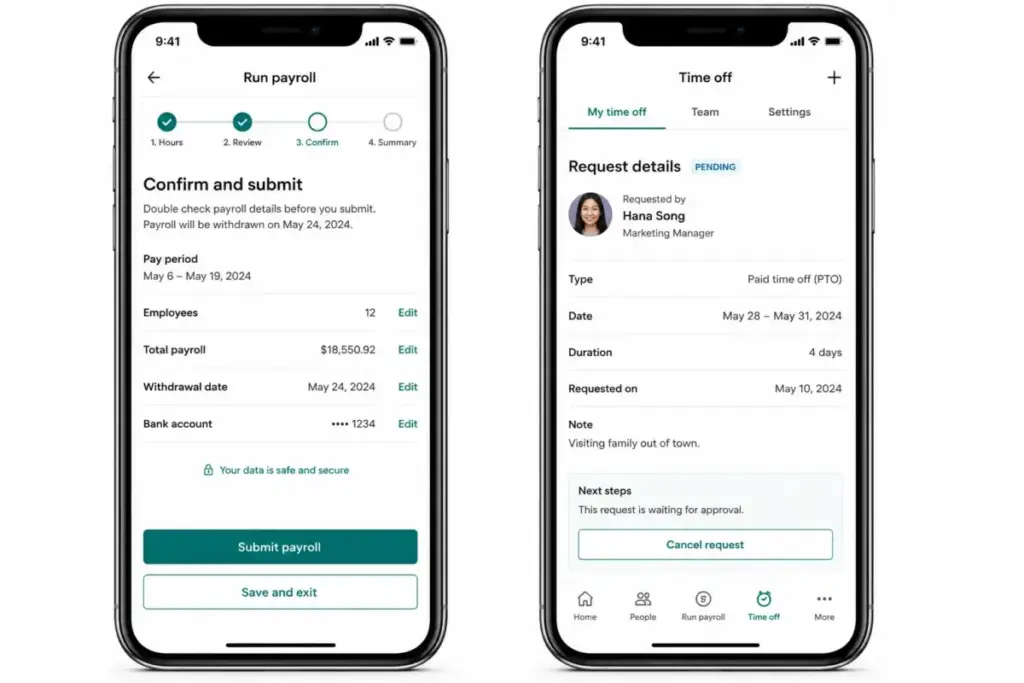
Gusto provides a mobile app on iOS and Android for both employers and employees. Employers can run payroll and manage their team. Employees can track time, request time off, access tax documents (W-2s, pay stubs), and manage personal information.
The caveat that most reviews skip: verified user sentiment on TrustRadius and G2 notes that mobile and desktop functionality can differ. Some features available on the desktop version are not fully replicated on mobile. For a business owner who expects to manage everything from a phone, the desktop remains the more complete experience.
Ease of Use, Integrations, and Support
Setup and Onboarding
Gusto rates as low to medium setup difficulty. New businesses can create an account and explore the platform before running payroll. Switching payroll from another provider mid-year requires your EIN, employee addresses, salary details, and prior payroll tax documents.
According to Capterra reviews, setup can be time-consuming for some new users, particularly when importing historical payroll data or configuring state-specific tax settings. Once configured, the day-to-day payroll workflow is straightforward.
Integrations
Gusto integrates with QuickBooks Online, Xero, FreshBooks, Aplos, ZipBooks, Autobooks, Expensify, Hubstaff, Clover, Homebase, When I Work, Deputy, QuickBooks Time, and Trainual, among other marketplace integrations.
For accounting specifically, the QuickBooks and Xero integrations sync payroll journal entries, which reduces manual data entry between payroll and bookkeeping. Teams already using QuickBooks or Xero for accounting will find the integration natural.
Security, API, and Developer Access
Gusto maintains SOC 1 and SOC 2 reports (updated annually, NDA required for access), supports two-step verification, follows HIPAA guidelines for protected health information, and has a dedicated security team and bug bounty program.
For technical buyers: Gusto provides developer tools, API versions, OAuth2 authentication, system access tokens, idempotency controls, pagination, scopes, rate limits, and webhook event categories. Production API access requires pre-approval and a security review. This is not an open API. Teams building custom payroll integrations need to plan for the approval process.
This is the part most payroll reviews skip entirely. If your team needs to pull payroll data into a custom dashboard, BI tool, or internal system, Gusto can support it, but the access is gated behind a review process that takes planning.
Gusto Limitations
Gusto is strong for US small business payroll, but it has limits that matter for specific buyer profiles.
- Single-state restriction on Simple. The most affordable W-2 plan locks you to one state. A small team with even one remote employee in a different state needs Plus, which doubles the per-person cost. This is the most under-discussed limitation in competing reviews.
- No 24/7 live support. Business-hour phone and chat with AI assistant routing is the baseline. Priority support and a dedicated advisor require Premium or paid add-ons. For a first-time employer running their first payroll at 9pm, the Help Center articles are the only immediate resource.
- Per-person pricing scales linearly. Gusto charges per person on every plan. At 50 employees, Plus costs $680/month. At 100 employees, it is $1,280/month. There are no volume discounts publicly listed. Enterprise payroll providers like ADP and Paychex often offer negotiated rates at scale.
- No global full-time employee payroll. Gusto handles US payroll and global contractor payments. It does not offer full-time employee payroll for international workers. Teams hiring full-time abroad need a dedicated global payroll or EOR provider like Deel or Remote.
- Mobile app does not fully replace desktop. Verified user sentiment on multiple platforms confirms that not all desktop features are available on mobile. Business owners who need to manage payroll, benefits, and HR primarily from a phone should verify specific functionality before committing.
- Contractor Only excludes most add-ons. Contractor Only is designed for businesses without W-2 employees. It includes domestic contractor payments and 1099 filing, but excludes benefits, time tracking, HR tools, and most plan add-ons except global contractor payments. Buyers who mistake Contractor Only for a starter plan will hit walls quickly.
Gusto Pros and Cons
| Pros | Cons |
|---|---|
| Unlimited payroll runs on all W-2 plans, no extra charge for off-cycle payroll | Simple plan is single-state only, forcing a costly upgrade for multi-state teams |
| Automated federal, state, and local tax filing and payments reduce compliance risk | Per-person pricing with no volume discounts makes Gusto expensive at 50+ employees |
| Employee self-service portal with pay stubs, tax documents, and time-off requests | Priority support and a dedicated advisor cost extra outside Premium |
| Benefits administration (health, HSA, FSA, 401k, workers comp) in one platform | Same-day pay ($90/payroll) and instant pay ($100/payroll) add significant cost for speed |
| QuickBooks, Xero, and marketplace integrations sync payroll to accounting | Mobile app does not fully replicate desktop functionality based on user reports |
| No long-term contract, cancel anytime, month-to-month billing | Contractor Only excludes most plan add-ons and is not a universal starter tier |
What this means: the strengths are real and well-documented. The cons cluster around cost escalation, support access, and feature gates that force plan upgrades. For a buyer who stays within Simple’s boundaries, Gusto delivers strong value. For a buyer who needs Plus features, the cost calculus changes.
Who Should Use Gusto
- US small businesses with 2-25 W-2 employees in a single state who want full-service payroll with tax filing handled automatically. Gusto Simple covers this at a competitive price.
- S-corp owners paying themselves who need payroll to process their own salary, tax withholdings, and year-end W-2. Gusto handles this without requiring an accountant for payroll specifically.
- Startups offering health insurance and benefits for the first time who need benefits administration integrated with payroll. Gusto makes the enrollment and deduction process manageable without a benefits broker team.
- Teams already using QuickBooks or Xero for accounting who want payroll journal entries to sync automatically. The integration reduces double-entry and reconciliation work.
- Businesses paying only 1099 contractors who need payment processing and year-end 1099 filing. Contractor Only covers this at a low per-person cost, as long as no W-2 employees are involved.
Who Should Avoid Gusto
- Teams with employees in 3+ states that want to minimize cost. Plus is required for multi-state payroll, and the per-person fee doubles. Compare BambooHR or OnPay for multi-state payroll at a lower per-person rate.
- Businesses needing 24/7 live support. Gusto’s support model is business-hour phone and chat with AI routing. If after-hours payroll emergencies are a concern, consider ADP or Paychex, which offer broader support windows.
- Companies growing past 100 employees. Gusto’s linear per-person pricing and limited HRIS customization become less competitive at scale. Rippling, ADP, or dedicated enterprise HR platforms offer volume pricing and deeper workflows.
- Teams needing global full-time employee payroll. Gusto does not support payroll for full-time international employees. Global employer-of-record platforms like Deel or Remote are the better fit.
- Buyers who need deep workflow automation or IT device management. Gusto is a payroll-first platform with light HR. For teams needing HRIS, IT provisioning, and workflow automation in one system, Rippling is the stronger option.
Gusto Alternatives
If Gusto does not fit your scenario, here are the alternatives worth evaluating:
| Alternative | Better For | Why Choose It | Starting Price |
|---|---|---|---|
| OnPay | Multi-state payroll at lower per-person cost | Flat $6/person for all features, no plan tiers, multi-state included | $40/month + $6/person |
| QuickBooks Payroll | Teams already deep in the QuickBooks ecosystem | Tighter accounting integration, payroll tax penalty protection on Elite | $37.50/month + $6/person |
| Paychex Flex | Mid-size teams needing dedicated support and compliance help | Broader support options, HR advisory included on higher tiers | Custom quote |
| ADP Run | Businesses scaling past 50 employees | Volume pricing, compliance tools, and enterprise payroll infrastructure | Custom quote |
| Rippling | Teams needing payroll, HR, IT, and device management in one platform | Unified employee system beyond just payroll, global payroll available | Custom quote |
What this means: OnPay is the closest direct competitor for small US teams because it includes multi-state payroll at a flat per-person rate with no tier-based feature gates. QuickBooks Payroll makes sense if accounting integration is the priority. Paychex and ADP are better when support access, compliance scale, or volume pricing matter more than interface simplicity.
Choose Gusto if your team is under 25 people, US-based, and values a clean payroll experience over deep HR customization.
Choose OnPay if you need multi-state payroll included at the base price without upgrading.
Choose Rippling if your team is growing past 50 and needs payroll, HR, IT, and app management in one system.
Final Verdict: Is Gusto Worth It in 2026?
Gusto earns 7.8/10 for US small business payroll. It is the right fit for teams under 25 employees in a single state that want automated payroll, tax filing, and benefits in one clean interface. The Simple plan at $49/month plus $6/person is genuinely competitive for that use case.
It is not the right fit for multi-state teams on a budget (the forced upgrade to Plus doubles per-person costs), teams needing 24/7 support (Priority Support is a paid add-on or Premium feature), or businesses scaling past 50 employees (per-person pricing with no volume discounts becomes expensive).
The practical plan for most teams is Plus at $80/month plus $12/person, because it includes multi-state payroll, next-day direct deposit, and time tracking. If your team stays in one state and does not need those features, Simple is a strong starting point.
Before choosing Gusto, ask:
- Do we have employees in more than one state now, or will we within 12 months?
- Is next-day or same-day direct deposit important enough to pay for?
- Can we work with business-hour support, or do we need a dedicated advisor?
- Will our headcount exceed 50 in the next 18 months?
If the answers push you toward Plus or Premium, run the monthly cost calculation at your actual headcount before committing. The difference between marketing-page pricing and operational cost is where Gusto’s value equation shifts.
Frequently Asked Questions
Is Gusto still worth it after the pricing tiers went up?
Yes, if your team is under 15 employees and operates in a single state. The Simple plan at $49 plus $6 per person is competitive with OnPay and QuickBooks Payroll for that profile. The value weakens when you need Plus features, because the per-person cost doubles. Run the math at your actual headcount before committing.
Should I start with Gusto Simple or Plus?
Start with Simple if all employees are in one state and you are fine with 4-day direct deposits. Move to Plus if you have employees in multiple states, need next-day pay, or want built-in time tracking. Adding next-day pay and time tracking as Simple add-ons can cost more than upgrading to Plus for teams over 5 people.
Is Gusto good for a two-person S-corp?
Yes, if both owners need W-2 payroll for reasonable compensation. Gusto Simple handles salary payments, tax withholdings, quarterly filings, and year-end W-2 preparation. The total cost is $61/month for two people on Simple. For a two-person team, that is less than most accountants charge for monthly payroll processing alone.
Can Gusto handle employees in multiple states?
No, unless you are on Plus or Premium. The Simple plan is explicitly single-state. Multi-state payroll requires Plus at $80/month plus $12/person. If multi-state payroll is your primary need, OnPay includes it at a flat $6/person with no tier upgrade required.
Does Gusto charge extra for off-cycle payroll?
No. All W-2 plans include unlimited payroll runs per month. You can run off-cycle bonus payroll, corrections, or ad-hoc payments without additional fees. The extra charges come from deposit speed (same-day, instant) and add-on features, not from payroll frequency.
Is Gusto Contractor Only enough for a freelancer-heavy agency?
Yes, if you have no W-2 employees. Contractor Only covers domestic contractor payments, 4-day processing, and Form 1099 creation and filing. The limitation: it excludes backup withholding and most plan add-ons except global contractor payments. If you later hire a W-2 employee, you will need to upgrade to Simple or higher.
How much does Gusto really cost for 10 employees?
On Simple: $109/month. On Plus: $200/month. On Premium: $400/month. Add workers’ compensation ($14+), HSA ($25+), and health insurance broker integration ($60) and the total climbs further. The base plan price is accurate but incomplete for most teams.
Does the Gusto mobile app replace the desktop version?
No. The mobile app lets employers run payroll and manage their team, and employees can track time, request PTO, and access tax documents. Verified user reviews on TrustRadius and G2 note that mobile and desktop functionality differs. For full administrative control, the desktop version is more complete.
Is Gusto better than QuickBooks Payroll for a small business?
It depends on your accounting setup. If you already use QuickBooks Online for bookkeeping, QuickBooks Payroll offers tighter accounting integration and payroll tax penalty protection on Elite. If you want a standalone payroll platform with broader benefits administration and a cleaner employee-facing portal, Gusto is the better choice.
Is Gusto secure enough for handling payroll data?
Yes. Gusto maintains SOC 1 and SOC 2 reports (updated annually), supports two-step verification, follows HIPAA guidelines for protected health information, and runs a bug bounty program. SOC reports require NDA access, which is standard for payroll and financial services platforms. For most small businesses, Gusto’s security posture meets the threshold.