Payroll gets messy fast. One missed tax deposit, one misclassified contractor, one state registration you forgot to file, and your small business is facing IRS penalties before you even realize something went wrong.
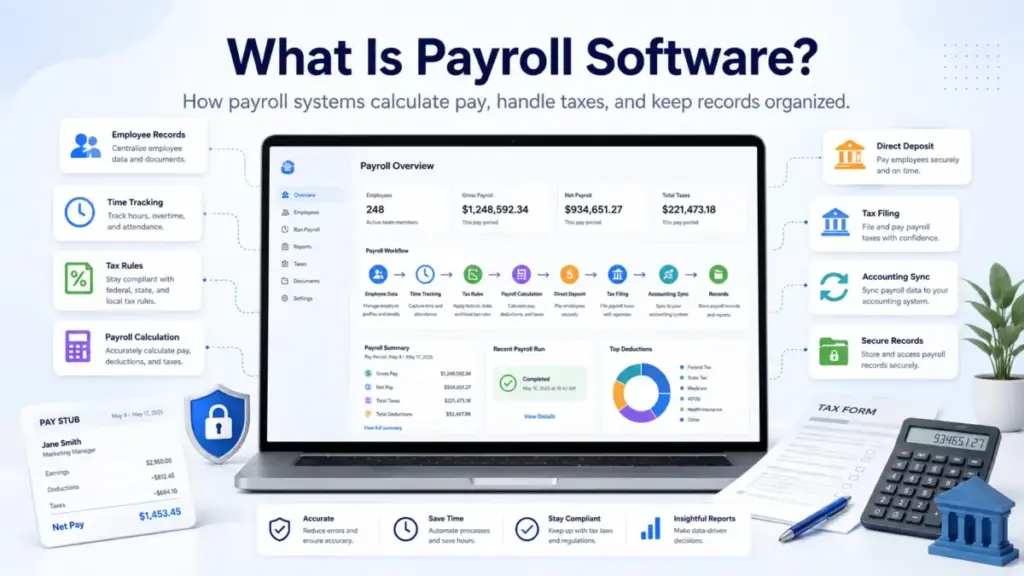
Payroll software is the system that sits between your employee data and every paycheck, tax filing, and compliance record your business produces. It calculates gross pay, applies deductions and withholdings, handles payroll taxes, pays employees and contractors, and stores the records you need for audits, accounting, and year-end forms.
But here is what most definitions skip: payroll software does not run itself. It automates calculations and payments, but someone still needs to validate hours, verify classifications, approve exceptions, and review every run before money moves. This guide covers how payroll and HR tools actually work, what they cost, where they fail, and when your business needs one.
Payroll data ultimately flows into your accounting system, so choosing the right best accounting software to pair with your payroll tool is equally important.
Quick Answer: Payroll software is a cloud-based or on-premises system that calculates employee and contractor pay, applies tax withholdings and deductions, initiates payments, files or prepares payroll tax forms, and maintains payroll records. It automates the math but still requires validated input data, correct employee classifications, and human approval before each payroll run.
What Payroll Software Actually Means
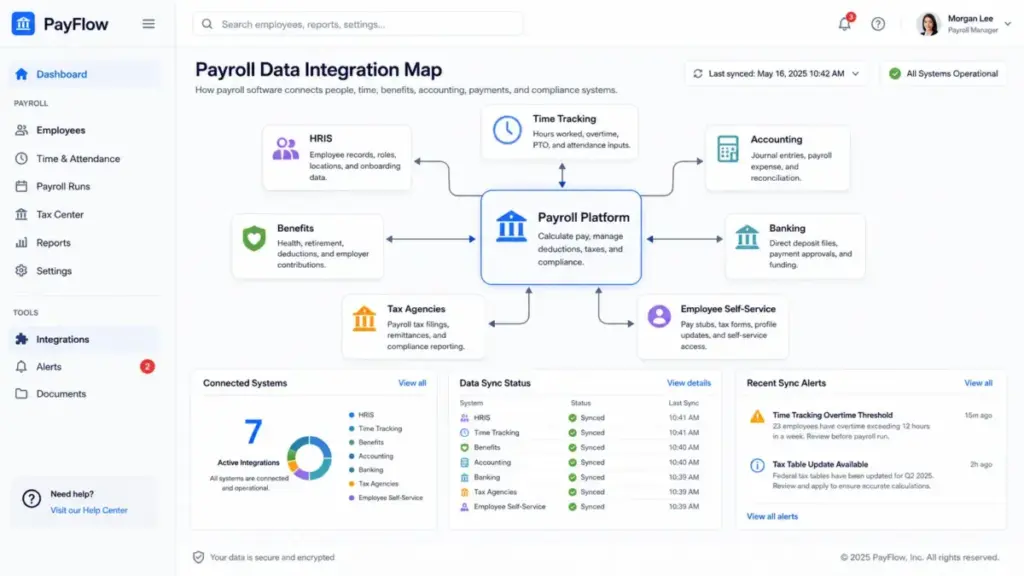
Oracle defines payroll software as a solution that manages, maintains, and automates payments to employees. That definition is accurate but incomplete. In practice, payroll software is the operating layer that connects employee records, pay rules, time data, tax tables, benefit deductions, approval workflows, payment processing, tax filings, and compliance records into a single system.
Three layers help explain it:
For beginners: Payroll software replaces the spreadsheet where you calculate paychecks. It handles the tax math, sends money to employee bank accounts, and keeps records so you do not have to track everything manually.
For operations teams: Payroll software ingests time and attendance data, applies federal, state, and local tax rules, calculates gross-to-net pay including pre-tax and post-tax deductions, initiates direct deposits or pay cards, generates pay stubs, and files or prepares quarterly and annual tax forms. Most modern systems run in the cloud and update tax tables automatically.
For business owners: Payroll software is a compliance tool. It reduces the risk of late tax deposits, missed filings, and recordkeeping gaps that trigger IRS failure-to-deposit penalties. It also creates the payroll data your accountant, auditor, and general ledger need.
The distinction matters because payroll is not optional. The IRS requires employers to withhold, deposit, report, and pay employment taxes according to Publication 15 rules. Payroll software helps you meet those obligations consistently, but the legal responsibility stays with you.
How Payroll Software Works
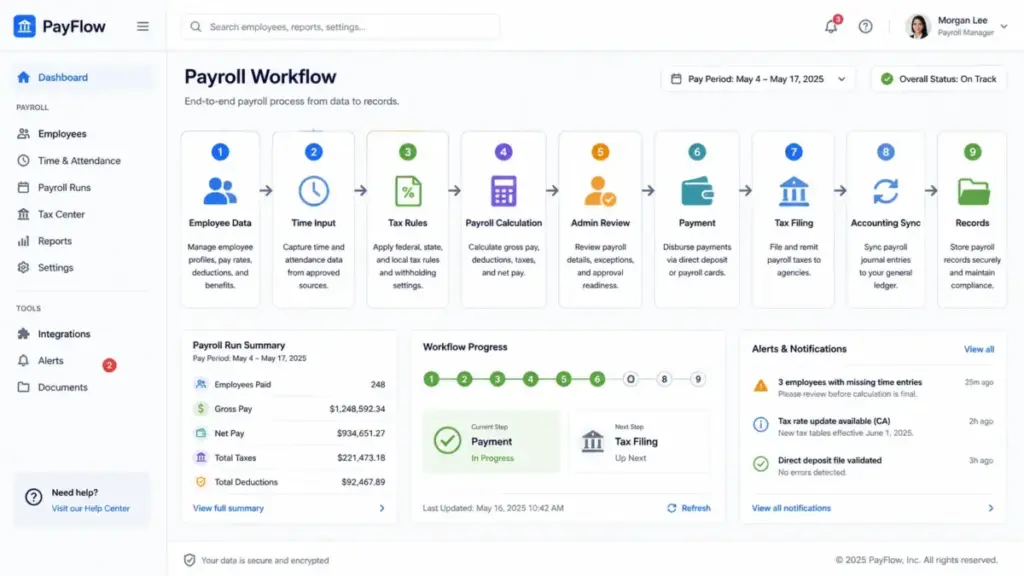
Payroll software follows a repeatable cycle, but every step has a failure point that most guides do not mention.
Step 1: Employee and contractor records. You create profiles with legal names, addresses, SSNs or TINs, tax forms (W-4, W-9), bank details, pay rates, roles, locations, and classifications. Getting the W-2 versus 1099 classification wrong here creates problems that compound with every pay period.
Step 2: Tax and deduction setup. Federal, state, and local tax settings are configured. Benefits deductions (health insurance, retirement contributions), garnishments, and employer-paid taxes (FICA, FUTA, state unemployment) are mapped to each worker. If a deduction mapping is wrong, every paycheck going forward carries that error.
Step 3: Time and earnings input. Hours, PTO, overtime, bonuses, commissions, and reimbursements flow in from time tracking, HRIS, or manual entry. This is where most payroll errors start. Unapproved timecards, missing overtime calculations, or forgotten PTO adjustments create downstream problems.
Step 4: Payroll calculation. The system calculates gross pay, subtracts employee taxes and deductions, adds employer-side taxes, and produces net pay. Full-service payroll systems also calculate tax deposits and prepare filing data.
Step 5: Admin review and approval. An administrator reviews exceptions, checks for new hires or terminations, verifies one-off adjustments, and approves the payroll run. Skipping this step is where “automated payroll” breaks down.
Step 6: Payment and filing. The system initiates direct deposits, generates pay stubs, makes tax deposits (or prepares them for manual deposit), and files payroll tax forms if full-service is included.
Step 7: Records and reporting. Payroll data syncs to accounting, reports are generated, and records are stored. The U.S. Department of Labor requires employers to preserve payroll records for at least three years and wage computation records for two years.
Payroll Software vs Payroll Service vs PEO
This is the comparison most definition articles skip, even though it changes who controls your payroll and who is responsible when something goes wrong.
| Factor | Payroll Software | Payroll Service | PEO |
|---|---|---|---|
| Who runs payroll | Your admin, inside the platform | Provider handles after you submit inputs | Co-employer handles payroll as part of broader HR |
| Control over corrections | Direct, real-time access | Depends on provider response time | Shared with PEO |
| Employment relationship | Unchanged, you are the employer | Unchanged, you are the employer | Co-employment model, PEO becomes co-employer |
| Compliance support | Tax calculations, filings, records | Tax calculations, filings, plus provider review | Full HR compliance, benefits, workers comp |
| Best fit | Businesses that want direct control and transparency | Businesses that want to hand off payroll operations | Businesses that want outsourced HR, benefits, and payroll together |
What this means: Payroll software gives you the most control. You see every calculation, approve every run, and fix errors immediately. A payroll service adds a handoff, which reduces your workload but can slow corrections. A PEO changes the employment relationship itself, which makes sense for some businesses but adds complexity that basic payroll software avoids.
Types of Payroll Software
Not all payroll systems work the same way. The type you choose affects what you control, what you pay, and what support you get.
Cloud payroll software runs online, sells by subscription, and handles tax table updates, access controls, and integrations through the vendor. Most small-business payroll tools (Gusto, OnPay, QuickBooks Workforce Payroll) fall here.
On-premises payroll software is installed and maintained internally. It gives more infrastructure control but requires IT staff for updates, security patches, and tax table maintenance. Increasingly rare for small businesses.
Full-service payroll combines software with provider support for tax calculations, tax filings, deposits, W-2s, 1099s, and compliance support. The software runs the calculations; the service layer handles filing and deposit execution.
Payroll module inside HCM or HRIS packages payroll as part of a broader HR, benefits, time, recruiting, or performance management suite. Useful when you want a single system, but payroll-specific depth varies.
Outsourced payroll means a third-party provider handles more of the payroll operation after you submit inputs. This reduces workload but can reduce direct control and correction speed.
Key Features That Actually Matter
The feature list on a payroll software page can be long. These are the capabilities that affect your daily payroll operations:
Payroll calculation and tax handling. The system calculates gross pay, federal and state income tax withholding, FICA (Social Security and Medicare), FUTA, state unemployment, and local taxes. Full-service platforms also file quarterly Form 941, year-end W-2, W-3, and 1099-NEC forms. IRS employment tax due dates include Form 941 quarterly filings (April 30, July 31, October 31, January 31) and annual W-2/W-3 deadlines.
Direct deposit and payment options. Most payroll software supports direct deposit. Some offer next-day or same-day options depending on plan tier.
Multi-state payroll. If your employees work in multiple states, your payroll system needs to handle different withholding rules, state tax accounts, and reporting requirements for each state. This is a key complexity threshold. Reuters reported in March 2026 that rising state-level compliance requirements around paid leave, retirement mandates, and wage transparency are making in-house payroll harder for small firms.
Time tracking and PTO integration. Connecting time data to payroll reduces manual entry errors. Some platforms include time tracking; others require integrations.
Employee self-service. Employees access pay stubs, tax forms, and personal information through a portal. Reduces HR support requests.
Accounting and general ledger sync. Payroll data flows to your accounting software for reconciliation. Without this, you are manually matching payroll journal entries, which invites errors.
Contractor payments. W-2 employees and 1099 contractors often need to be paid through the same system. Not all plans handle both equally.
How Much Does Payroll Software Cost?
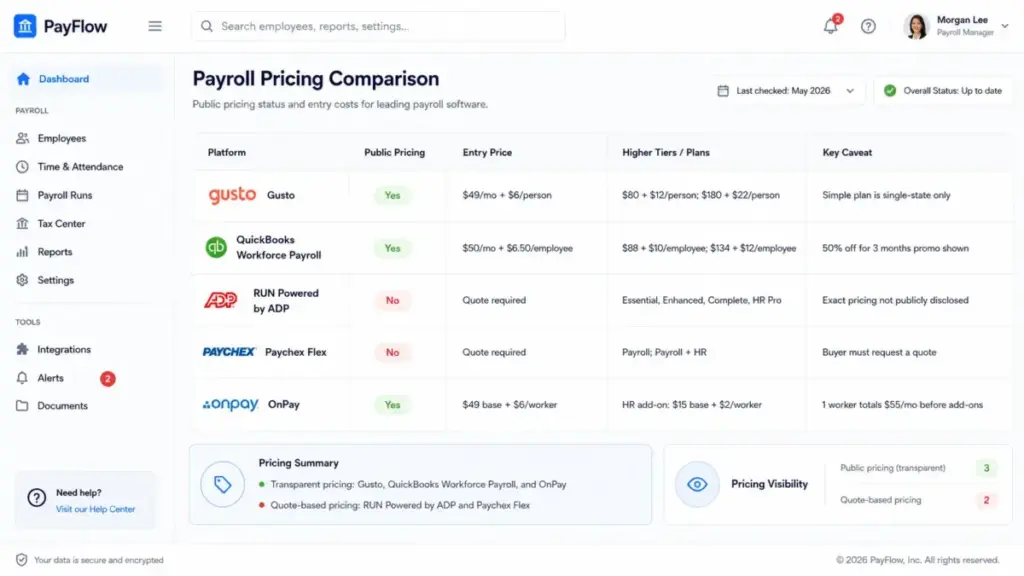
Pricing varies more than most guides acknowledge. Some platforms publish exact prices. Others require a quote. Here is what the official pricing pages show (as of May 2026):
| Platform | Public Pricing | Entry Price | Higher Tiers | Key Caveat |
|---|---|---|---|---|
| Gusto | Yes | $49/month + $6/person/month | $80 + $12/person; $180 + $22/person | Simple plan is single-state only |
| QuickBooks Workforce Payroll | Yes | $50/month + $6.50/employee/month | $88 + $10/employee; $134 + $12/employee | Promotional 50% discount for 3 months shown on page |
| RUN Powered by ADP | No | Quote required | Essential, Enhanced, Complete, HR Pro tiers | Exact pricing not publicly disclosed |
| Paychex Flex | No | Quote required | Payroll and Payroll plus HR plans | Buyer must request a quote for pricing |
| OnPay | Yes | $49 base + $6/worker/month | HR add-on: $15 base + $2/worker/month | One worker totals $55/month before add-ons |
What this means: For a business with 10 employees, Gusto Simple costs roughly $109/month, QuickBooks Workforce Payroll costs roughly $115/month, and OnPay costs roughly $109/month before add-ons. ADP and Paychex require conversations with sales teams to get exact numbers. The lowest base price is not always the lowest total cost once you factor in per-person fees, add-ons, multi-state requirements, and year-end processing.
Payroll Software Examples in Practice
Here is how five established payroll platforms put these concepts into action:
Gusto combines full-service payroll with tax filings and payments, unlimited payroll runs, time syncing, PTO and holiday tracking, and HR support tiers. The Simple plan covers single-state payroll. Multi-state requires the Plus plan at a higher per-person rate.
QuickBooks Workforce Payroll ties payroll directly to QuickBooks bookkeeping. It includes automated taxes and forms, 1099 e-file and pay, payroll reports, an employee portal, and direct deposit. Time tracking is included with Premium and Elite, not the base plan.
RUN Powered by ADP packages payroll delivery, tax filing, general ledger interface, W-2s, 1099 forms, multi-jurisdiction payroll, employee access, onboarding, and new-hire reporting. ADP includes full-service tax calculation, filing, and deposit across every RUN package.
Paychex Flex calculates pay, handles direct deposits and tax filings, supports multi-state payroll, and connects payroll to HR, benefits, and time tools. Paychex states its payroll is primarily designed for U.S.-based employees and contractors.
OnPay offers a transparent single-plan structure with W-2 and 1099 payments, federal, state, and local taxes, multi-state payroll at no extra cost, unlimited pay runs, new-hire reporting, onboarding tools, accounting integrations, and benefits administration. HR is a separate add-on.
Benefits and Limitations
| Benefits | Limitations |
|---|---|
| Faster payroll runs with fewer manual calculations | Does not fix bad input data or wrong employee classifications |
| Centralized payroll records for audits and compliance | Some providers add fees for HR, time tracking, extra states, or year-end |
| Automatic or assisted tax calculation, deposit, and filing | Employers remain legally responsible for payroll accuracy |
| Employee self-service access to pay stubs and tax forms | Quote-only pricing from some vendors makes cost comparison harder |
| Direct deposit support and accounting integrations | Multi-state payroll, contractor payments, and benefits add complexity |
| Better visibility into labor costs through reporting | Off-cycle payrolls, corrections, and exceptions still need manual review |
Common Misconceptions
Misconception: Payroll software means payroll is completely hands-off.
Reality: The system automates calculations, payments, filings, and records. Administrators still need to validate hours, rates, deductions, exceptions, employee status, and approval timing before every run.
Misconception: Payroll software and payroll service mean the same thing.
Reality: Payroll software gives the employer direct control inside the platform. Payroll services add a provider handoff, which reduces workload but can slow corrections.
Misconception: A payroll system replaces an accountant or tax advisor.
Reality: Payroll software handles routine calculations and reports. Complex tax, entity, equity, classification, and multi-state issues still require accounting or legal advice.
Misconception: The lowest monthly price is the lowest total cost.
Reality: Total cost depends on worker count, pay frequency, tax filings, year-end forms, state coverage, HR add-ons, time tracking, benefits, support tier, and implementation.
When to Use Payroll Software (and When You Need Something Else)
Use payroll software when:
- You have employees or contractors to pay on a recurring schedule
- You need tax calculations, deposits, and filing support
- You want direct deposit instead of manual check writing
- You need payroll records for accounting, audits, and year-end forms
- You want integrations with time tracking, HR, benefits, or workflow automation tools
Consider a payroll service or PEO instead when:
- You have complex multi-country payroll requirements
- You have unresolved worker classification disputes
- You need union payroll rules or equity compensation handling
- You want outsourced HR, benefits administration, and compliance together
- Your business needs a co-employment model rather than employer-managed payroll
You can probably wait on payroll software if:
- You are the only employee (sole proprietor with no payroll obligations)
- You have not yet hired your first employee or contractor
How to Implement Payroll Software
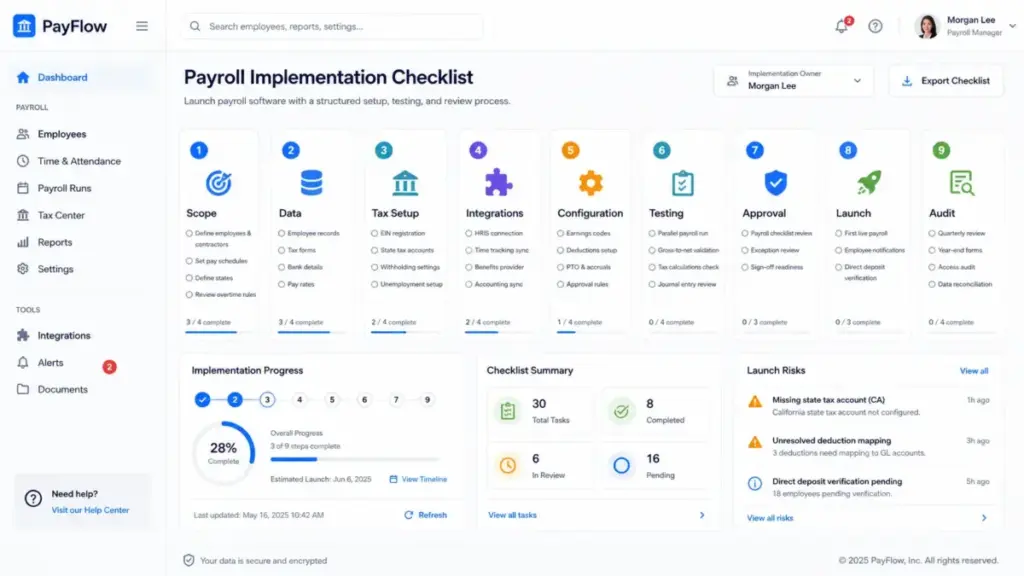
Skipping setup steps causes problems that show up in every payroll run afterward. One tip I have learned: run a parallel payroll before going live. Compare every number, line by line, against your current process. It takes one extra cycle but catches configuration errors before they become real payment mistakes.
- Map your payroll scope: W-2 employees, 1099 contractors, pay schedules, states, overtime rules, benefits, garnishments, PTO, reimbursements, bonuses, and commissions.
- Confirm employer registrations: EIN, state tax accounts, workers compensation, and required employee forms.
- Clean employee and contractor data: legal names, addresses, SSNs or TINs, tax forms, bank details, pay rates, classifications.
- Connect time tracking, HRIS, benefits, and accounting systems. Define which system owns each data field.
- Configure earnings codes, deductions, tax settings, pay schedules, PTO policies, overtime logic, approval rules, and general ledger mappings.
- Run a parallel or test payroll. Compare gross pay, deductions, taxes, net pay, employer taxes, and accounting journal entries.
- Create a payroll approval checklist: time data, new hires, terminations, PTO, bonuses, reimbursements, deductions, and exceptions.
- Plan quarterly and year-end work: Form 941, W-2, W-3, 1099-NEC, FUTA, state filings, reconciliation, and record retention.
- Schedule periodic audits for employee classifications, state registrations, tax settings, deduction mappings, and access permissions.
Common Mistakes to Avoid
- Choosing based only on base price. Per-person fees, add-ons, and state coverage change the real cost.
- Ignoring multi-state payroll complexity. Each work state can introduce new tax accounts, withholding rules, paid leave obligations, and reporting.
- Skipping parallel runs before go-live. Untested configurations create errors that affect real paychecks.
- Not reconciling payroll to accounting. If payroll and your general ledger do not match, audit problems follow.
- Assuming all features are included. Time tracking, HR, benefits, and support tiers are often add-ons.
- Not checking W-2 versus 1099 classification. Misclassification creates back-tax liability, penalties, and legal exposure.
- Relying on automation without reviewing exceptions. Off-cycle payments, bonuses, terminations, and new hires need manual review.
- Switching mid-year without validating year-to-date data. Incorrect YTD imports cause wrong tax calculations and filing errors.
Payroll Metrics That Matter
| Metric | What It Measures | Why It Matters |
|---|---|---|
| Payroll run time | Hours from data close to payment initiation | Shows operational efficiency |
| Payroll error rate | Errors per payroll run | Tracks data quality and process reliability |
| Late payment count | Payments delivered after scheduled date | Affects employee trust and compliance |
| Tax filing exceptions | Rejected or corrected tax filings | Signals configuration or data problems |
| Off-cycle payroll count | Unscheduled payroll runs per period | Indicates process gaps or policy exceptions |
| Direct deposit adoption | Percentage of employees on direct deposit | Reduces check processing cost |
| Cost per payroll run | Total payroll cost divided by run count | Benchmarks operational spending |
Beginner Payroll Checklist
- [ ] Register for an EIN with the IRS
- [ ] Register with state tax and unemployment agencies for each work state
- [ ] Collect W-4 forms from employees and W-9 forms from contractors
- [ ] Classify each worker correctly as W-2 employee or 1099 contractor
- [ ] Set up direct deposit with employee bank information
- [ ] Choose a pay schedule (weekly, biweekly, semimonthly, monthly)
- [ ] Configure benefits deductions, garnishments, and employer contributions
- [ ] Connect payroll to your accounting software
- [ ] Run a test payroll before processing the first live run
- [ ] Create a quarterly review calendar for Form 941 filings
- [ ] Plan for year-end: W-2, W-3, 1099-NEC, and FUTA deadlines
AI in Payroll: What It Can and Cannot Do
Payroll vendors are adding AI-assisted checks, anomaly detection, and workflow automation. Reuters reported in August 2025 that Paycom raised revenue forecasts after adding AI features to workforce management services. QuickBooks mentions Payroll Agent features on its pricing page.
The honest assessment: AI can help collect time data, flag payroll anomalies, compare pay runs, and draft routine calculations. It does not replace the human review step. Payroll is a compliance-sensitive process where one automated error, repeated across pay periods, creates liability faster than manual payroll ever could. Treat AI payroll features as a draft check, not a final approval.
Related Resources
FAQ
Do I need payroll software if I only have one employee?
If you have even one W-2 employee, you have payroll tax obligations: withholding, deposits, quarterly filings, and year-end forms. Payroll software handles those calculations and deadlines. For a single employee, platforms like OnPay and Gusto start at roughly $55/month total, which is less than the cost of one missed tax deposit penalty.
Can payroll software file payroll taxes for me?
Full-service payroll platforms (Gusto, QuickBooks Workforce Payroll, OnPay, and ADP RUN) calculate, deposit, and file federal, state, and local payroll taxes as part of the subscription. Basic payroll software calculates taxes but may not file automatically. Check the plan details before assuming filings are included.
What is the difference between payroll software and a PEO?
Payroll software lets you run payroll directly while keeping full employer status. A PEO enters a co-employment arrangement where it becomes a co-employer, handling payroll, benefits, HR, and compliance together. A PEO changes the employment relationship. Payroll software does not.
How much does payroll software cost for a small business?
For a 10-employee business, Gusto Simple and OnPay both cost roughly $109/month (as of May 2026). QuickBooks Workforce Payroll costs about $115/month. ADP and Paychex require quotes. Total cost varies by features, states, add-ons, and plan tier.
Can payroll software handle 1099 contractors?
Most payroll platforms support contractor payments and 1099-NEC filing. Gusto offers a dedicated Contractor Only plan. QuickBooks includes 1099 e-file and pay. OnPay includes W-2 and 1099 payments in its base plan. Check each platform for contractor-specific limitations.
Does payroll software handle multiple states?
Most platforms support multi-state payroll, but not always on every plan. Gusto limits the Simple plan to single-state payroll. OnPay includes multi-state at no extra cost. ADP and Paychex support multi-jurisdiction payroll across their packages. Each additional state can require separate tax registrations and withholding configurations.
How hard is it to switch payroll providers mid-year?
Switching mid-year requires importing year-to-date pay, tax, and deduction data for every employee. If YTD figures are wrong, tax calculations and year-end forms will be wrong. Run a parallel payroll during the transition quarter and verify every number before fully switching.
What happens if payroll software calculates taxes wrong?
The employer is ultimately responsible for correct tax withholding, deposits, and filings. Some providers (like QuickBooks Workforce Elite) offer tax penalty protection up to a specified amount. Others do not. If the software makes an error, you may face IRS penalties unless your provider has a guarantee.
Should I use payroll software or hire an accountant for payroll?
Payroll software handles routine pay calculations, tax math, direct deposits, and filings. An accountant handles complex tax situations, entity structure questions, equity compensation, and multi-state compliance strategy. Most small businesses need both: software for execution, an accountant for advisory work.
Which payroll software has no hidden fees?
OnPay and Gusto publish transparent per-person pricing on their official pages. ADP and Paychex use quote-based pricing, so total cost is harder to estimate without a conversation. Even with transparent pricing, check for add-on costs: HR features, time tracking, benefits administration, and year-end processing fees.