Anthropic markets Claude as “the AI for problem solvers,” but the marketing page buries the detail that matters most: your subscription plan controls how much you can actually use it. Claude Pro resets usage every five hours. Max increases volume but keeps the same 200K context window. And as of June 15, 2026, automated workflows now bill from a separate credit pool, not your subscription.
This Claude AI review breaks down what each plan delivers, where Claude genuinely outperforms ChatGPT and Gemini, and when you should pick a competitor instead.
Claude is an AI chatbot built by Anthropic PBC. It handles long-form writing, document analysis, code generation, structured reasoning, and research workflows across web, desktop, iOS, and Android apps.
This review is based on official Anthropic documentation, verified pricing pages, third-party user sentiment from G2, Capterra, TrustRadius, and Trustpilot, and competitive SERP analysis conducted in June 2026. I did not perform live account testing for this article, so all claims reference official sources and third-party evidence.
TL;DR: Quick Verdict
| Category | Detail |
|---|---|
| Score | 7.8/10 |
| Best for | Writers, developers, analysts, and consultants who need strong reasoning, long-document work, and code review |
| Not for | Users who need native image generation, unlimited fixed-price usage, or Google Workspace-native AI |
| Price range | $0 to $200/month individual; $25 to $125/seat/month team; Enterprise is custom |
| Top alternative | ChatGPT Plus for media breadth; Gemini for Google ecosystem |
The 3 Problems Claude Solves Better Than Most AI Assistants
Writing and Long-Document Reasoning That Holds Up
Claude consistently earns praise for writing quality across competitor reviews, user sentiment platforms, and coding comparison articles. According to Anthropic’s official product page, Claude handles complex problem solving, data analysis, and content creation across connected work tools.
The pattern in third-party evidence confirms this. On G2, reviewers highlight Claude’s interface quality and coding usefulness. On Capterra, users praise summarization, complex data analysis, rephrasing, and business research capabilities. On TrustRadius, consultants and small business users report strong results for document review, analysis, strategic planning, and code assistance.
One detail most reviews miss about Claude: the writing quality advantage compounds over longer outputs. Short prompts produce similar results across Claude, ChatGPT, and Gemini. The gap widens when you feed Claude a 50-page PDF and ask for structured analysis with specific citations.
Coding, Code Review, and Developer Workflows
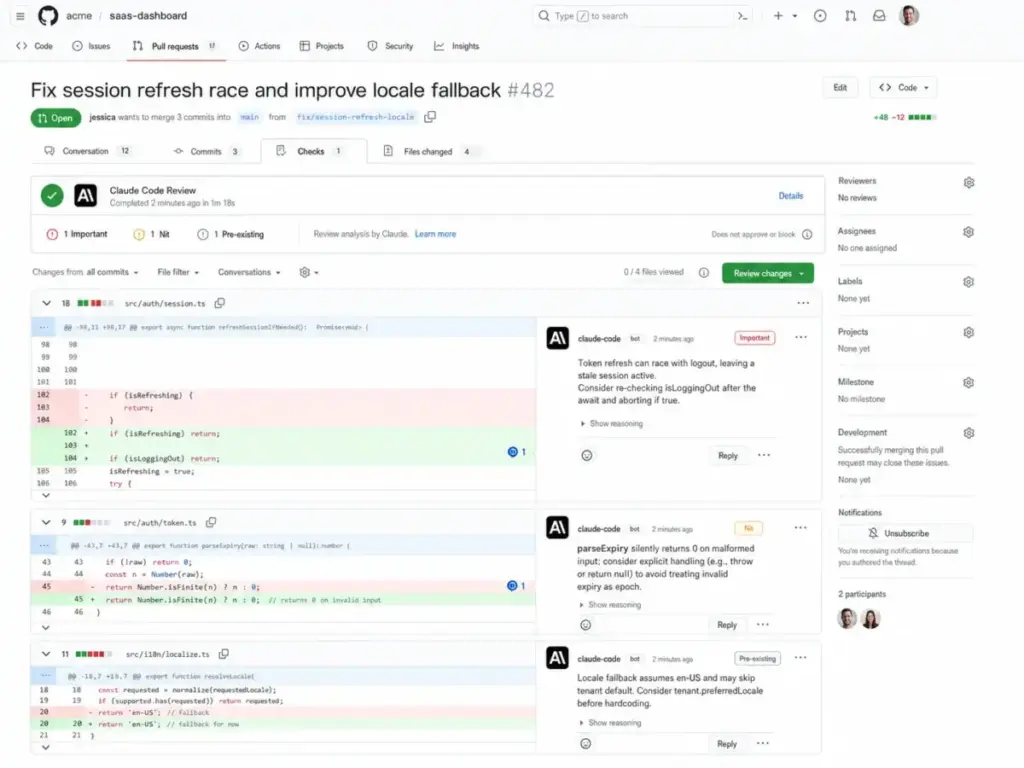
Claude Code ships with Pro, Max, Team, and Enterprise plans. According to Anthropic’s Code Review documentation, the system uses multiple agents to analyze pull requests, verify findings, deduplicate issues, rank severity, and post inline GitHub comments.
The trigger system matters for cost control. Commenting @claude review on a PR subscribes that PR to automatic reviews on every future push. Commenting @claude review once runs a single analysis without subscribing. Teams that do not understand this distinction can accumulate unexpected usage from repeated automated reviews on active branches.
A coding-focused comparison from Playcode recommends Claude for debugging complex issues, code quality assessment, large codebase analysis, architectural decisions, and thorough code review. ChatGPT wins for quick working solutions. Gemini wins for speed and handling extremely large context windows.
Research and Extended Thinking for Knowledge Work
Claude Pro includes Research mode, unlimited Projects, Claude Cowork, and access to flagship models including Opus 4.8, Sonnet 4.6, and Haiku 4.5. In June 2026, Anthropic introduced Claude Fable 5, its most capable “Mythos-class” model, with promotional access for Pro and Team subscribers until June 22.
According to Anthropic’s Opus product page, Opus handles professional software engineering, complex agentic workflows, and high-stakes enterprise tasks.
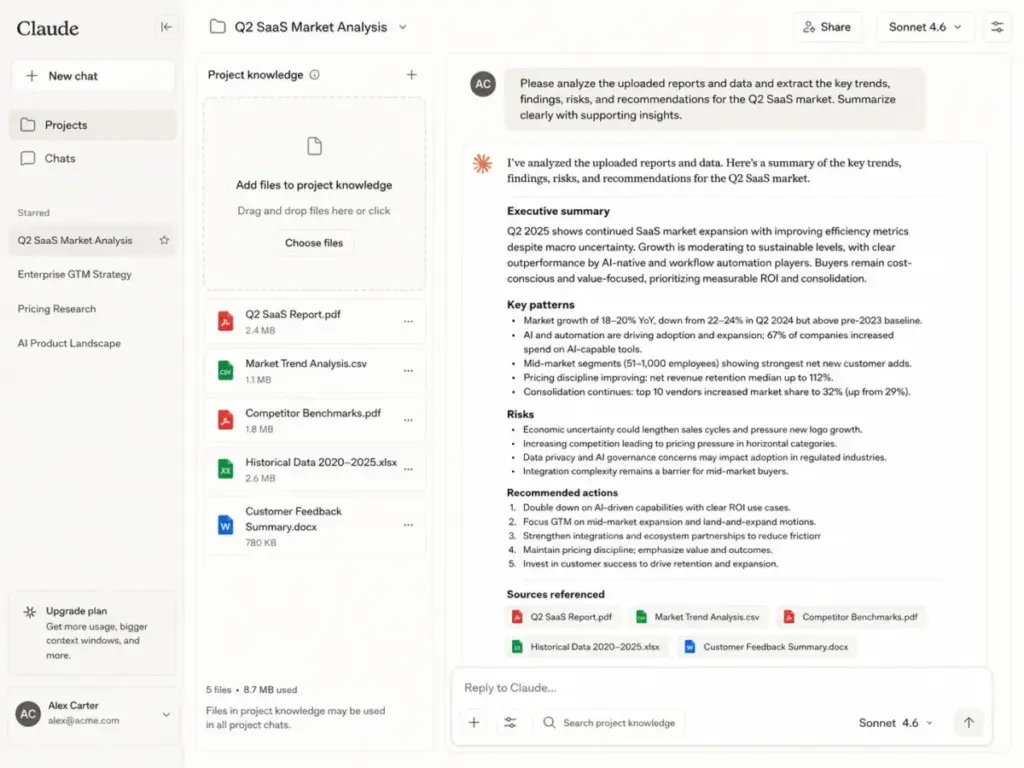
The Projects feature lets you attach reference documents, set custom instructions, and maintain persistent context across conversations. For analysts and consultants who repeatedly work with the same data sets, this eliminates re-uploading and re-explaining context every session.
The catch: Research and extended thinking consume more of your usage allocation per message. Heavy users of these features hit limits faster than someone sending short chat messages.
The 2 Problems Claude Creates
Usage Limits That Frustrate Even Paying Users
The biggest mistake most Claude subscribers make is assuming a paid plan means unlimited access. It does not.
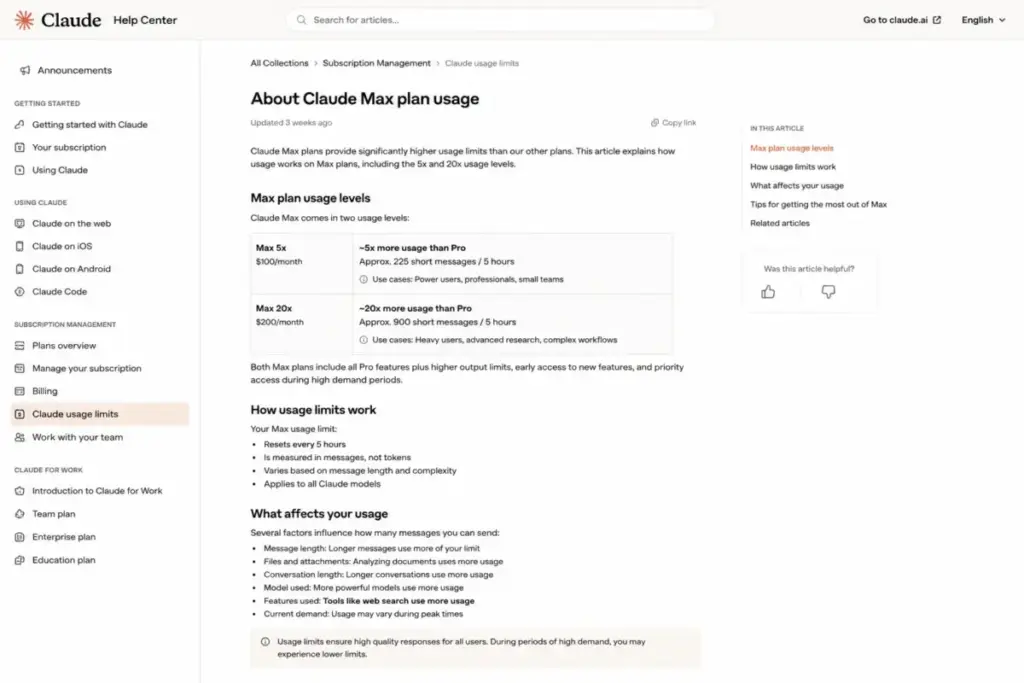
According to Claude’s Pro usage Help Center article, Pro offers at least five times the free-tier usage per session during peak hours. The limit resets every five hours, and the actual message count varies based on message length, attached files, conversation length, model choice, feature use, and current capacity.
That is not a simple monthly quota. It is a dynamic system where every variable affects how quickly you burn through your allocation.
Trustpilot sentiment for Claude confirms this friction. Summarized consumer complaints center on restrictive usage limits, paid subscription interruptions, incomplete outputs, and pricing transparency issues. Reddit threads echo the same concern: users report hitting Pro limits during active work sessions and debating whether Max or a different tool makes more sense.
So does the Max plan fix this? Partially. According to Claude’s Max usage article, Max 5x estimates at least 225 short messages every five hours on less compute-intensive models. Max 20x estimates at least 900 short messages under the same conditions. The context window stays at 200K tokens across all plans. Max increases message volume, not the depth of any individual conversation.
No Native Image or Video Generation
Claude does not create graphical images. TrustRadius reviewers specifically flag this gap, noting that Claude handles document prep and analysis but cannot produce visual assets or Office-type documents natively.
ChatGPT and Gemini subscriptions both include image generation. If your workflow depends on creating marketing visuals, social media graphics, or product mockups alongside text generation, Claude requires a separate tool for that work.
Not a deal-breaker for writers and developers. A clear gap for creative teams and marketers who want one subscription covering text and visuals.
Claude Pricing in 2026: The Feature-to-Plan Map
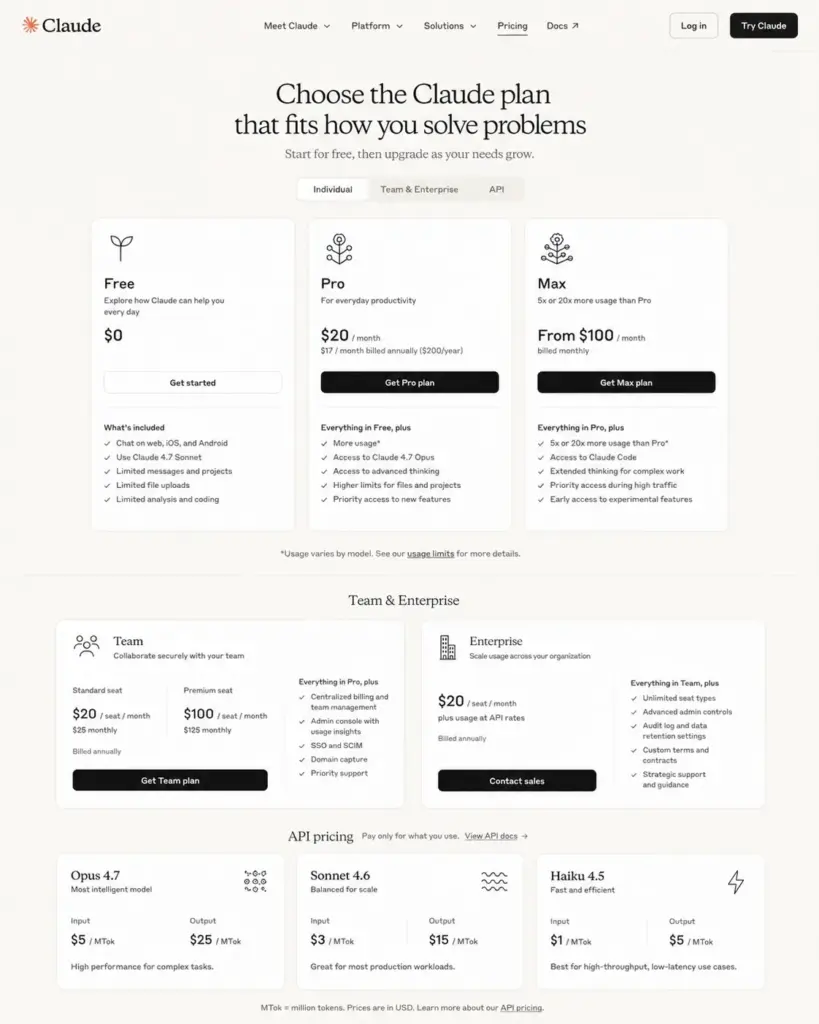
According to Claude’s official pricing page (as of June 2026), here is what each tier actually includes:
| Plan | Price | Billing | Usage Capacity | Key Features Included | Best For |
|---|---|---|---|---|---|
| Free | $0 | Free | Limited | Chat, web search, memory, code execution, connectors, extended thinking (with limits) | Evaluation and light use |
| Pro | $20/mo ($17/mo annual) | Monthly or $200/yr | 5x free tier, resets every 5 hours | Claude Code, Cowork, unlimited Projects, Research, Opus 4.8 / Fable 5 access, Microsoft 365 | Regular individual knowledge work |
| Max 5x | $100/mo | Monthly | ~225 short messages/5hr estimate | Everything in Pro + higher output limits, early access, priority | Heavy daily users hitting Pro limits |
| Max 20x | $200/mo | Monthly | ~900 short messages/5hr estimate | Same as Max 5x with 20x volume | Power users, developers in active sprints |
| Team Standard | $25/seat/mo ($20 annual) | Monthly or annual | More than Pro per user | SSO, admin controls, enterprise search, Slack and M365 connections, no training by default | Teams of 5-150 needing shared knowledge |
| Team Premium | $125/seat/mo ($100 annual) | Monthly or annual | ~225 messages/5hr estimate | 5x standard seat usage | Teams with heavy per-user usage needs |
| Enterprise | Custom | Annual terms available | Usage at API rates | SCIM, audit logs, Compliance API, custom retention, IP allowlisting, HIPAA-ready, Claude Security beta | Compliance-driven organizations |
The June 2026 Billing Split: Interactive vs. Automated Usage
Starting June 15, 2026, Anthropic split Claude billing into two categories. This is the most significant pricing change since the Max tier launch.
Interactive Usage covers manual chatting on claude.ai, mobile apps, and interactive terminal sessions. Your existing subscription limits (Pro, Max, or Team) apply exactly as before.
Automated/Headless Usage covers programmatic calls: the Claude Agent SDK, headless claude -p commands, GitHub Actions via Claude Code, and third-party agent integrations. These no longer count against your subscription message limits. They draw from a separate dollar-denominated monthly credit pool:
- Pro subscribers: $20/month in automated credits
- Max 5x subscribers: $100/month in automated credits
- Max 20x subscribers: $200/month in automated credits
Once credits are exhausted, further automated usage either stops or continues at standard API token rates, depending on your account settings.
This is something I wish more reviews explained clearly: if you only chat manually, nothing changes. If you run headless PR reviews or agent pipelines, your costs are now metered separately. A developer running 50 automated code reviews per week will burn through the Pro credit pool in days. That developer needs Max 5x at minimum, or a direct API key with its own budget.
For a deeper breakdown of every tier, add-on, and billing scenario, see our dedicated Claude pricing guide.
Where Pricing Starts to Pinch
The Pro plan at $20/month looks straightforward. The friction appears when you scale or specialize.
A freelance writer sending 30-40 longer prompts daily with document attachments can exhaust Pro limits within a single five-hour window. The jump to Max 5x at $100/month is a 5x price increase for 5x the volume. That math works. Max 20x at $200/month competes directly with ChatGPT Pro tiers at the same price point, and ChatGPT bundles image generation, voice, and Deep Research that Claude does not include.
For teams, the minimum is 5 seats. Team Standard at $20/seat/month (annual) means $100/month minimum before anyone sends a message. Team Premium at $100/seat/month (annual) for 5 users reaches $500/month. Claude does not train on Team or Enterprise content by default, which is a genuine security advantage over consumer plans.
API Pricing: Subscription Is Not API Pricing
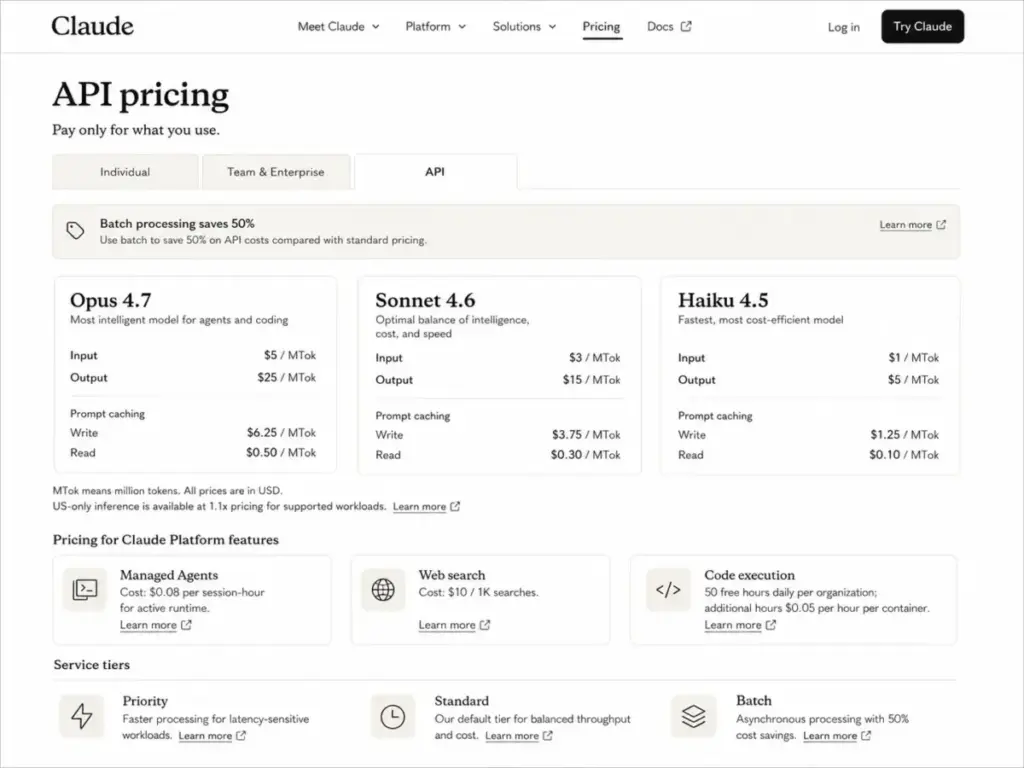
Claude’s API bills separately from app subscriptions. According to the Claude API pricing documentation (as of June 2026):
| Model | Input | Output | Cache Write | Cache Read |
|---|---|---|---|---|
| Opus 4.8 | $5/MTok | $25/MTok | $6.25/MTok | $0.50/MTok |
| Sonnet 4.6 | $3/MTok | $15/MTok | $3.75/MTok | $0.30/MTok |
| Haiku 4.5 | $1/MTok | $5/MTok | $1.25/MTok | $0.10/MTok |
Additional API costs that most reviews skip:
- Web search: $10 per 1,000 searches (excluding standard token costs)
- Code execution: 50 free hours daily per organization, then $0.05/hour per container
- Managed Agents: $0.08 per active runtime session-hour
- US-only inference: 1.1x multiplier on input and output tokens
- Fast mode (Opus, beta): 6x standard rates
- Batch processing: 50% off standard API prices
Before you commit to API-heavy workflows, watch out for the compounding effect: web search tokens plus managed agent runtime plus Opus 4.8 output pricing can push a single complex workflow well beyond what a Pro subscription costs monthly.
Claude vs ChatGPT vs Gemini: Who Wins by Workflow
The common “Claude is just a better writer” summary is incomplete. The winner changes based on what you actually need the AI to do daily. Here is how the three compare across buyer-relevant dimensions, based on official product pages, third-party reviews, and competitive analysis:
| Workflow | Winner | Why | Evidence |
|---|---|---|---|
| Long-form writing and editing | Claude | Repeatedly positioned as stronger for structured reasoning, editorial refinement, and document analysis across competitor reviews and user sentiment | G2, Capterra, TrustRadius, RivalFlow, Towards AI |
| Coding and code review | Claude | Claude Code includes multi-agent PR analysis, verification, deduplication, and severity ranking; recommended for debugging complex issues and architecture | Playcode comparison, official Code Review docs |
| Native image and video generation | ChatGPT or Gemini | Claude does not create graphical images natively; both competitors bundle visual creation in their subscriptions | TrustRadius user complaints, competitor feature pages |
| Google Workspace integration | Gemini | Google AI plans include Gemini inside Gmail, Docs, Vids, plus Google One storage and NotebookLM | Official Google AI subscription page |
| Enterprise compliance controls | Claude | SCIM, audit logs, Compliance API, custom retention, IP allowlisting, and HIPAA-ready configuration with BAA available | Official Anthropic Privacy Center |
| Research with live web data | Tie | All three offer web search; Gemini benefits from native Google Search integration | Official product pages |
| Budget entry point | Gemini | Google AI Plus starts around $7.99/month (US pricing); Claude and ChatGPT both start at $20/month for paid plans | Official subscription pages |
The simplest way to think about this: Claude wins when the task rewards careful thinking. ChatGPT wins when you need the broadest feature bundle in one subscription. Gemini wins when your workflow already lives inside Google apps.
If you are comparing Claude and ChatGPT directly, see our Claude vs ChatGPT comparison for a deeper breakdown. For Gemini-specific analysis, our ChatGPT vs Gemini comparison covers pricing and feature differences in detail.
What Real Users Praise and Complain About
User sentiment across G2, Capterra, TrustRadius, and Trustpilot reveals consistent patterns that align with, and sometimes challenge, official claims.
What users consistently praise:
- Writing quality, summarization, and long-document analysis
- Coding assistance, refactoring, and debugging help
- Interface design and ease of initial use
- Free-tier value for evaluation
- Business research and Excel formula generation
What users consistently complain about:
- Usage limits that interrupt active work sessions, even on paid plans
- Incomplete outputs on longer generation tasks
- Hallucinations with numerical data and statistics
- No native image generation capability
- Limited integrations compared to competitors
- Desire for more Office-type document creation
- Confusion about the new automated/headless billing split
A financial services analyst on Capterra reported using Claude for summarizing long content, complex data analysis, and business research, but flagged hallucinations with numbers and hitting limits during PDF queries. A consulting CEO on TrustRadius praised document review, analysis, and strategic planning workflows, but wanted more integrations and noted the lack of graphical image creation.
This is the part most reviews skip: the gap between “Claude writes better” and “Claude works better for my workflow” depends almost entirely on whether you hit usage limits before finishing your task.
Security, Privacy, and Business Controls
Claude’s compliance story is stronger than most consumer AI reviews acknowledge, but the protections differ sharply by plan tier.
According to Anthropic’s Privacy Center, commercial products (Claude for Work and the Anthropic API) maintain:
- SOC 2 Type I and Type II certification
- ISO 27001:2022 certification
- ISO/IEC 42001:2023 certification
- HIPAA-ready configuration with BAA available
Free and Pro users: Consumer plans. Anthropic’s privacy policies apply, but these are individual accounts without enterprise-grade controls.
Team plans: No model training on customer content by default. Central billing, SSO, and admin controls included. Enterprise desktop deployment available.
Enterprise: Adds spend controls, Google Docs cataloging, role-based access, SCIM provisioning, audit logs, Compliance API, custom data retention, network-level access control, IP allowlisting, and Claude Security beta.
The distinction matters. A startup founder on Pro gets strong AI but consumer-grade privacy. A regulated healthcare team needs Enterprise with BAA for HIPAA compliance. Mixing these up is a compliance risk that most reviews gloss over.

Who Wins and Who Should Skip Claude
Use Claude If:
- You write, edit, or analyze documents longer than 10 pages regularly
- You debug code, review pull requests, or build AI-powered workflows
- You need a reasoning-focused assistant with Projects and persistent context
- Your team needs SSO, admin controls, and no-training-by-default data policies
- You value writing quality and structured thinking over media generation breadth
Do Not Buy Claude If:
- Your workflow depends on native image or video generation (choose ChatGPT or a dedicated tool)
- You need predictable unlimited usage without five-hour resets or variable caps
- Your core apps live inside Google Workspace and you want AI embedded in Gmail, Docs, and Drive (choose Gemini)
- You send fewer than 10 substantive prompts per day (the free tier or a cheaper Gemini plan covers this)
- You need voice-first or multimodal media interaction as the primary use case
Better Alternatives by Scenario
| Scenario | Best Choice | Why | Avoid Claude If |
|---|---|---|---|
| Freelance writer or SEO strategist wanting one $20 plan | Claude Pro | Strongest writing quality, Projects for client context, Research mode | You need built-in image generation for content |
| Developer on large codebases and PRs | Claude Pro, Max, or Team Premium | Claude Code, Code Review, multi-agent analysis | Automated usage exceeds Pro credit pool; budget Max or API accordingly |
| Google Workspace user wanting AI in Gmail and Docs | Gemini / Google AI Pro | Native integration, Google One storage, NotebookLM, Flow | Google ecosystem is your primary workspace |
| Visual content creator needing text + images | ChatGPT Plus | Image generation, voice, broader creative tools | You need image generation in the same subscription |
| Enterprise compliance buyer | Claude Enterprise | SCIM, audit logs, Compliance API, HIPAA-ready, custom retention | Your compliance needs are basic and Pro suffices |
For a detailed look at ChatGPT’s features and pricing, see our full review. If Gemini fits your workflow better, read our Gemini review. Developers evaluating coding-specific tools should also consider our Perplexity AI review for research-heavy workflows and the Microsoft Copilot review for Office-integrated AI.
For a broader look at AI chatbot alternatives or a head-to-head Claude alternatives breakdown, those guides compare 10+ tools by pricing, limits, and use case.
FAQ
Is Claude worth it in 2026?
Claude Pro at $20/month is worth it for writers, analysts, and developers who use AI for long-form drafts, document analysis, and code work daily. The value drops if you send fewer than 10 substantive prompts per day or need image generation, where ChatGPT or Gemini offer more for the same price.
How much does Claude cost?
Claude Free costs $0. Pro costs $20/month (or $17/month billed annually at $200/year). Max 5x costs $100/month. Max 20x costs $200/month. Team Standard starts at $20/seat/month (annual). Team Premium starts at $100/seat/month (annual). Enterprise pricing is custom. All prices verified on Claude’s pricing page as of June 2026.
What is the difference between Interactive and Automated usage?
As of June 15, 2026, Anthropic splits billing into two categories. Interactive usage (manual chatting on claude.ai and interactive terminal sessions) draws from your subscription’s message limits with five-hour resets. Automated usage (headless agents, Claude Agent SDK, GitHub Actions) draws from a separate dollar-denominated credit pool included in your plan, switching to API billing once exhausted.
What is the difference between Claude Pro and Max?
Pro resets usage every five hours with variable message limits. Max 5x provides approximately 225 short messages per five hours and Max 20x approximately 900, both on less compute-intensive models. Max adds higher output limits, early access, and priority. The context window stays at 200K tokens across all plans. Max increases volume, not conversation depth.
Does Claude have usage limits?
Yes. Every plan has limits. Free is the most restricted. Pro resets every five hours, with actual message counts varying by message length, attachments, conversation length, model, feature use, and capacity. Max increases the allocation but does not remove limits entirely. Team and Enterprise limits apply per member, not team-wide.
Can Claude generate images?
No. Claude does not natively create graphical images. If you need AI image generation, ChatGPT includes DALL-E, and Gemini offers image creation within Google AI subscriptions. For dedicated image tools, see our best AI image generators guide.
Is Claude better than ChatGPT for writing?
For long-form writing, document analysis, and structured reasoning, Claude consistently receives stronger reviews from users and third-party comparisons. ChatGPT offers broader media capabilities including image generation, voice interaction, and a larger plugin ecosystem. The winner depends on whether you prioritize writing depth or feature breadth.
Is Claude better than Gemini for research?
Claude’s Research mode and Projects provide strong document-based research workflows. Gemini benefits from native Google Search integration and Google Workspace embedding. If your research involves uploaded documents and structured analysis, Claude has the edge. If your research depends on live web information and Google apps, Gemini fits better.
What plan do I need for Claude Code?
Claude Code is included in Pro, Max, Team, and Enterprise plans. Free users do not get Claude Code access. For heavy automated coding usage, be aware that headless Claude Code runs now draw from your automated credit pool, not your interactive message limits.
Is Claude safe for business use?
Team and Enterprise plans do not train on customer content by default. Anthropic holds SOC 2 Type I and II, ISO 27001, and ISO 42001 certifications. Enterprise adds SCIM, audit logs, custom retention, and HIPAA-ready configuration. Free and Pro are consumer plans without these enterprise controls.
What are the main disadvantages of Claude?
Usage limits that vary by multiple factors and reset every five hours. No native image or video generation. API costs that are separate from and additional to subscription pricing. The 200K context window does not expand with higher-tier plans. Limited integrations compared to ChatGPT’s plugin ecosystem or Gemini’s Google Workspace depth. Hallucinations with numerical data reported by users on review platforms. The new automated billing split adding complexity for users running headless workflows.
Final Verdict
Claude earns 7.8/10. It is the strongest AI assistant for writers, analysts, and developers who prioritize reasoning quality, long-document work, and structured code review over media generation breadth.
Choose Claude Pro at $20/month if you write, analyze, or code daily and value output quality over feature count. Upgrade to Max only when Pro limits interrupt your work more than twice per week. Choose Team Standard when your organization needs shared knowledge, SSO, and admin controls for 5+ users. Choose Enterprise when compliance requirements demand SCIM, audit logs, and HIPAA-ready configuration.
Avoid Claude if native image generation, unlimited fixed-price usage, or deep Google Workspace integration define your workflow. Choose ChatGPT for the broadest single-subscription AI feature set. Choose Gemini when your work lives inside Google apps.
If I could give just one piece of advice about Claude: evaluate the plan limits and the new billing split before the features. The AI quality is among the best available. The question is whether the usage structure fits how you actually work.