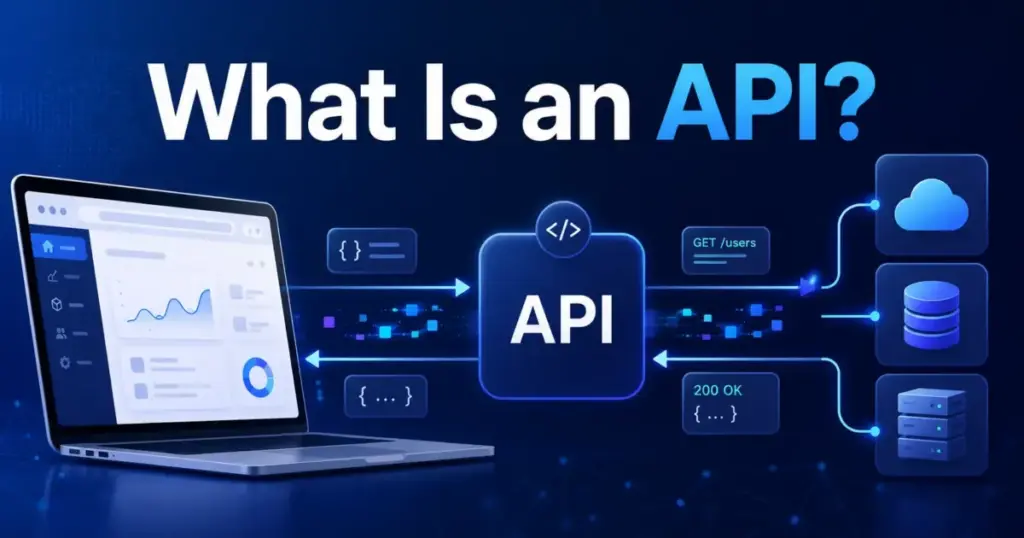
An API (application programming interface) is a documented set of rules that lets one piece of software request data or actions from another piece of software. That single sentence already puts you ahead of most explanations, which stop at “APIs help apps talk to each other” and leave you guessing what that actually means for your workflows.
Here is the fuller version. An API defines endpoints, methods, authentication, data formats, permissions, rate limits, and error responses so that two systems can exchange information without either side exposing its internal code. IBM describes an API as rules or protocols that enable applications to exchange data, features, and functionality. AWS frames the interface as a contract of service between two applications.
If you run a SaaS stack with a CRM, a payment processor, a messaging tool, and a reporting dashboard, APIs are the reason those systems can sync contacts, trigger invoices, send notifications, and feed analytics without anyone copy-pasting CSV files at midnight.
This guide goes beyond the basics. You will see how an API call actually works, which types of APIs exist, what real SaaS vendors expose through their APIs, where security risks hide, and how to decide whether a custom API integration is worth building in the first place.
How Does an API Work? The Anatomy of an API Call
Most articles use a restaurant analogy here. I will skip the waiter metaphor and show you what actually happens when software sends an API request.
An API call follows a client-server pattern. Your application (the client) sends a structured request to a specific URL (the endpoint) hosted by the provider (the server). The server validates the request, processes it, and sends back a structured response.
Here is a simplified breakdown of each component:
| Component | What It Does | Example |
|---|---|---|
| Endpoint | The URL the client calls | https://api.stripe.com/v1/charges |
| Method | The action type (HTTP verb) | GET (read), POST (create), PUT (update), DELETE (remove) |
| Headers | Metadata, including authentication | Authorization: Bearer sk_live_... |
| Parameters | Filters or identifiers in the URL | ?customer=cus_123&limit=10 |
| Request body | Data payload sent with the request | JSON object with charge amount, currency, source |
| Response | Structured data returned by the server | JSON with status, charge ID, amount, timestamp |
| Status code | Numeric result indicator | 200 (success), 401 (unauthorized), 429 (rate limited) |
| Rate limit | Maximum requests allowed per time window | 100 requests per second, per API key |
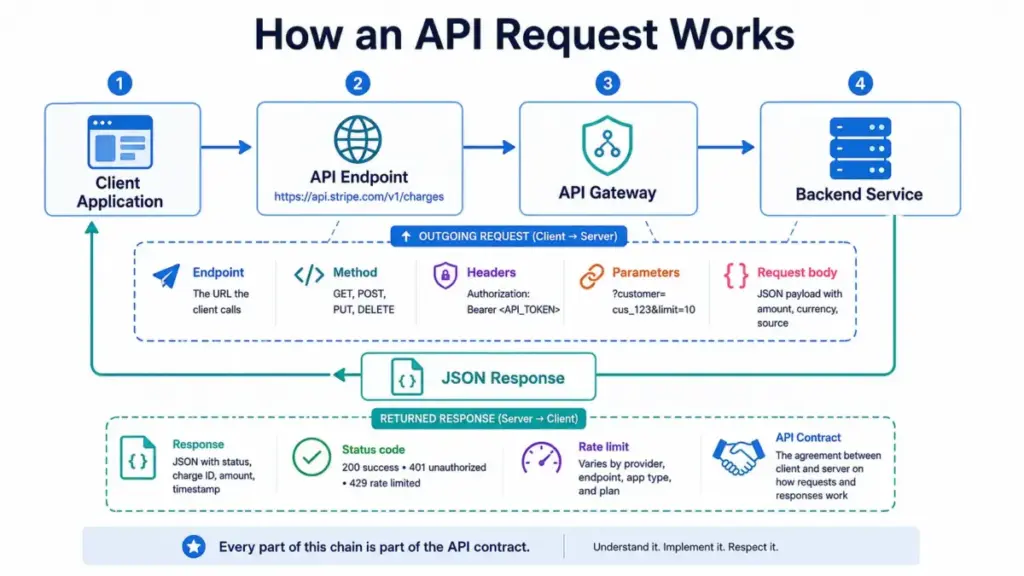
Every part of that chain is part of the API contract. When someone says “just hit the API,” they are talking about all of those components working together, not just a URL that returns JSON.
What does API stand for? API stands for application programming interface. The “interface” part is the key word: it is the documented surface that your software interacts with, while the actual service logic stays hidden behind it.
Types of APIs: Access Models vs. Architecture Styles
One of the most confusing things about API explanations is that many guides mix access categories with architecture styles as if they belong to the same list. They don’t.
Access models describe who can use the API. Architecture styles describe how the API communicates. Here is a table that separates them clearly:
API Access Models (Who Can Use It)
| Access Type | Who Gets Access | Example |
|---|---|---|
| Public (open) API | External developers, customers, or partners. Often requires API keys, OAuth, or billing. | Google Maps Platform, Stripe |
| Partner API | Approved business partners or marketplace apps only | Salesforce AppExchange partner APIs |
| Private (internal) API | Internal teams connecting microservices, dashboards, mobile apps | Company’s internal user service API |
| Composite API | Combines multiple service calls into one request to reduce round trips | Checkout API that charges payment, updates inventory, and sends confirmation in one call |
API Architecture Styles (How It Communicates)
| Style | How It Works | Best For |
|---|---|---|
| REST | Resource-oriented HTTP methods (GET, POST, PUT, DELETE) with URIs | Most SaaS integrations, CRUD workflows |
| GraphQL | Client requests the exact data shape through a query language | Complex front-ends needing flexible data retrieval |
| gRPC | High-performance RPC using Protocol Buffers and HTTP/2 | Service-to-service communication, microservices |
| SOAP | XML-based protocol with strict contracts (WSDL) | Enterprise, financial, and legacy systems |
| WebSocket | Persistent two-way connection for real-time data | Chat, live dashboards, streaming updates |
A REST API can be public or private. A GraphQL API can be a partner API. The access model and architecture style are independent choices. Postman’s comparison of REST vs. SOAP vs. GraphQL vs. gRPC covers the trade-offs in more detail, but for most SaaS buyers, the REST API is the one you will encounter first and most often.
Real-World SaaS API Examples
Enough theory. Here is how five SaaS platforms you probably already use expose their APIs in production:
| Platform | What the API Enables | Key Detail |
|---|---|---|
| Stripe | Accept payments, manage subscriptions, send payouts, build financial workflows | Unified REST API with consistent authentication, test mode, and detailed error handling (Stripe API docs) |
| Slack | Send messages, manage channels, build bots, automate notifications | HTTP RPC-style Web API with OAuth bearer tokens and endpoint-specific rate limits |
| Salesforce | Create, read, update, search CRM records programmatically | REST API with OAuth 2.0, governor limits, and API version management |
| Twilio | Send SMS, make calls, look up phone numbers, route communications | REST API organized around communication resources (Twilio docs) |
| HubSpot | Manage contacts, companies, deals, tickets, and marketing workflows | CRM APIs with date-versioned documentation and OAuth app marketplace (HubSpot API docs) |
Notice the pattern. Every one of these APIs requires authentication, has rate limits, follows versioning practices, and includes documentation that goes far beyond a simple URL. That is the contract I mentioned at the start.
Are APIs Secure? An Honest Security Checklist
An API key does not make an API secure. An API key identifies the calling application, but it does not handle authorization, object-level access, data minimization, or abuse monitoring.
OWASP’s API Security Top 10 consistently flags broken object-level authorization (BOLA) as the number-one API vulnerability. And NIST’s 2024 guidance on cloud-native API protection (SP 800-228) pushes zero-trust principles even further: authenticate every request, authorize every resource, log everything.
Here is a practical security checklist for SaaS teams evaluating or building API integrations:
- Authenticate every request using OAuth 2.0 tokens, short-lived credentials, or API keys stored in a secrets manager. Never hardcode keys in source files.
- Authorize at the object level. A valid token should not automatically grant access to every record. Check permissions per resource and per field.
- Use least-privilege scopes. Request only the OAuth scopes your integration actually needs. Broad scopes increase blast radius if credentials leak.
- Enforce rate limits on your own endpoints and respect rate limits on vendor APIs. Build backoff and retry logic before hitting production.
- Log and monitor API traffic. Track request volume, error spikes, auth failures, and unusual access patterns. Alert on anomalies.
- Inventory your endpoints. Shadow APIs and undocumented endpoints are common attack surfaces. Know what is exposed.
- Minimize data in transit. Only request and return the fields your workflow requires. Avoid pulling full customer records when you need an email address.
- Rotate credentials on a schedule. Token expiry and key rotation reduce the window of exposure if secrets are compromised.
The point is not to make API integration scary. The point is that security requires more than a single key. If a vendor tells you their API is “secure” without explaining auth model, scopes, rate limits, and monitoring, ask more questions before connecting your production data.
When Should You Use an API? A Decision Framework
Not every data sync needs a custom API integration. Sometimes a native connector, a webhook, or even a manual CSV export is the better choice. Here is a framework for deciding:
Use an API when:
- You need repeatable, automated data exchange between two systems (e.g., syncing CRM contacts with a billing platform every hour).
- The native integration does not cover your workflow, or it lacks the fields, filters, or triggers you need.
- You are building a product feature that embeds third-party functionality (maps, payments, messaging).
- You need real-time or near-real-time data for dashboards, workflow automation, or AI agent access.
- You are building a marketplace app or partner integration that requires programmatic access.
Consider alternatives when:
- A trusted native integration (like a CRM’s built-in email sync) already solves the workflow without custom code.
- The data transfer is one-time, low-volume, and low-stakes. A CSV import may be safer and faster.
- A webhook is the better event pattern: you need to react when something happens (order placed, ticket closed) rather than polling an endpoint repeatedly.
- An iPaaS platform like Zapier or Make already handles the connection and your team cannot maintain custom auth and monitoring.
- The vendor’s API documentation is incomplete, unstable, or not versioned. Building on a shaky contract creates maintenance debt.
What about webhooks? A webhook is a related but different pattern. A typical API call is pull-based: your system calls the endpoint when it needs data. A webhook is push-based: the other service sends data to your URL when an event occurs. You often need both: a webhook to get notified that something changed, and an API call to fetch the full record details.
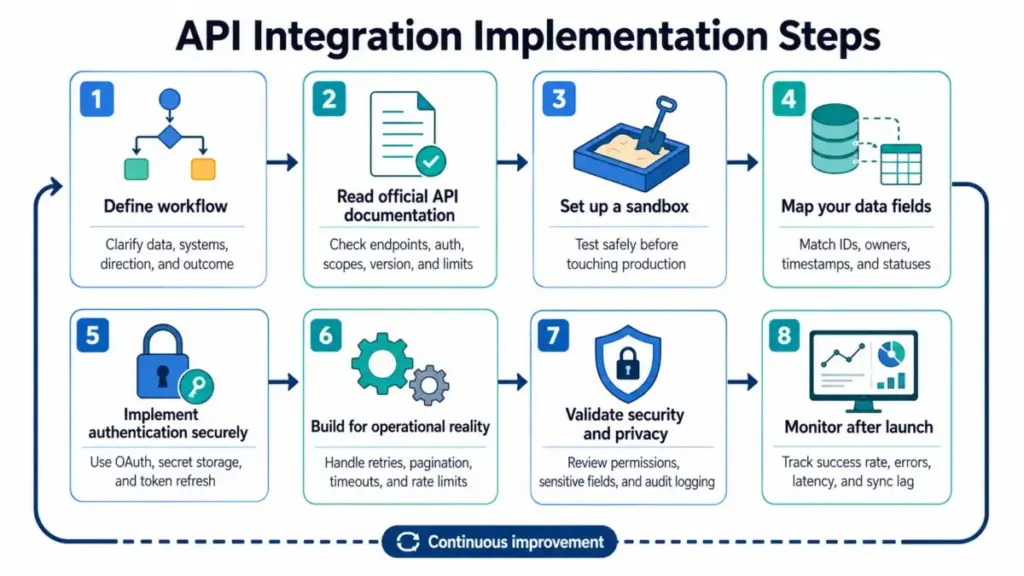
How to Implement an API Integration (Step by Step)
If you have decided that an API integration is the right approach, here is a practical implementation sequence:
- Define the business workflow. What data needs to move, between which systems, how often, and in which direction? Start with the outcome, not the endpoint.
- Read the official API documentation. Identify endpoints, methods, authentication method, required scopes, payload format, pagination, version, and rate limits. If the docs are poor, that is a red flag.
- Set up a sandbox. Most SaaS APIs offer test environments or sandbox accounts. Make your first requests with safe test data before touching production records.
- Map your data fields. Source IDs, destination IDs, timestamps, owners, statuses, and data types rarely match perfectly between systems. Plan your field mapping early.
- Implement authentication securely. Use OAuth flows, store secrets in a vault, apply least-privilege scopes, and build token refresh logic.
- Build for operational reality. That means retries with exponential backoff, timeout handling, pagination loops, deduplication, idempotency keys, and rate-limit awareness.
- Validate security and privacy. Check object-level authorization, sensitive field handling, data retention policies, consent requirements, and audit logging.
- Monitor after launch. Track success rate, error rate by endpoint, p95 latency, rate-limit events, sync lag, duplicate records, failed records, and support tickets. An integration that works on day one can break quietly on day thirty.
API Benefits and Limitations: A Balanced View
What APIs Enable
- Reduced duplicate development. Teams reuse existing services instead of rebuilding payment processing, messaging, or data enrichment from scratch.
- SaaS automation at scale. CRMs, billing systems, communication tools, and analytics platforms exchange data without manual export-import cycles.
- Product ecosystems and revenue. Postman’s 2025 State of the API report found that 65 percent of organizations generate revenue from API programs.
- Stable integration contracts. A well-documented, versioned API gives developers a predictable surface to build against, even as the underlying service evolves.
- Foundation for AI-agent workflows. More on this below.
Where APIs Fall Short
- Security and governance risk. Weak authentication, missing authorization checks, shadow endpoints, and poor monitoring create real attack surfaces (see the checklist above).
- Vendor-imposed limits. Rate limits, endpoint-specific restrictions, marketplace approval requirements, usage fees, plan-based access gates, and downtime windows can all constrain your integration. Always check official docs for the specific API you are using, because limits vary by vendor, endpoint, plan, and region.
- Maintenance debt. Breaking changes, version deprecations, incomplete docs, and sunset endpoints mean that API integrations require ongoing attention, not just initial setup.
Postman reported in 2025 that 82 percent of organizations have adopted some level of API-first approach. That number signals widespread adoption, but it also means that the organizations who manage API governance, security, and monitoring well will pull ahead of those who treat APIs as set-and-forget connections.
Why APIs Matter More in 2026: The AI Agent Factor
Gartner predicted that more than 30 percent of the increase in API demand would come from AI and LLM-based tools by 2026. That prediction is playing out now.
AI agents are increasingly the ones calling APIs, not just human developers. An AI agent that schedules meetings, enriches lead data, drafts responses, or triggers sales automation workflows needs API access to the same tools your team uses: CRMs, communication platforms, document systems, billing tools.
But agent-ready APIs need more than just open endpoints:
- Machine-readable documentation. The OpenAPI Specification provides a standardized way to describe HTTP APIs so that both humans and tools can discover, understand, and interact with endpoints programmatically.
- Least-privilege scopes and permissions. An AI agent should never have broader access than the human workflow it replaces.
- Safe error semantics. The agent needs clear, structured error responses to decide whether to retry, escalate, or stop, not vague 500 errors with HTML stack traces.
- Monitoring for non-human consumers. Agent-driven API traffic patterns differ from human patterns: higher volume, more consistent timing, broader endpoint coverage. Your monitoring should distinguish them.
Postman’s 2025 report put it directly: “API strategy is fast becoming AI strategy.” If your SaaS tools expose well-documented, properly scoped, and monitored APIs, they are ready for both human and agent consumers. If they don’t, you will hit friction fast as agent adoption accelerates.
Common Misconceptions About APIs
“An API is just a URL that returns JSON.” A URL endpoint can be part of an API, but the API also includes the contract: methods, authentication, parameters, request bodies, response formats, errors, limits, versioning, and documentation. Calling a URL without understanding the contract is like signing a business agreement without reading the terms.
“APIs are only for developers.” Developers implement APIs, but buyers, operators, RevOps teams, product managers, and security teams all depend on APIs for automation, reporting, data quality, partner ecosystems, and AI readiness. If your CRM cannot sync data because the vendor restricts API access to enterprise plans, that is a buying decision, not a coding problem.
“An API key means the API is secure.” An API key can identify an app. Secure API design also needs authorization, least privilege, token handling, object-level access checks, rate limiting, monitoring, and data minimization. One key alone is not a security posture.
“GraphQL is always better than REST.” GraphQL helps clients request specific data shapes, but REST remains widely used and easier for many resource-oriented workflows. The best choice depends on consumers, data shape, caching needs, performance constraints, governance, and tooling maturity.
“Public API means free and unrestricted.” Public APIs often require accounts, keys, OAuth apps, billing, quotas, marketplace approval, or commercial usage review. “Public” describes access availability, not cost or terms.
“Webhooks and APIs are the same thing.” A typical API is called by your system when you need data or action. A webhook is usually pushed to your system by another service when an event occurs. Both are useful; they serve different patterns.
FAQ
What does API stand for?
API stands for application programming interface. The “interface” part means it is the documented surface that other software interacts with, while the internal logic of the service stays hidden.
How does an API work, step by step?
Your application sends a request to a documented endpoint using an HTTP method (like GET or POST), with authentication headers, optional parameters, and a data payload. The server validates the request, processes the action, and returns a structured response (usually JSON) with a status code indicating success or failure.
What is the difference between an API and a webhook?
An API call is pull-based: your system calls the endpoint when it needs data. A webhook is push-based: the other service sends data to your URL when a specific event happens. Many integrations use both together.
What is an API endpoint?
An API endpoint is a specific URL that represents a resource or action within an API. For example, https://api.example.com/v1/contacts might be the endpoint for managing contact records.
What is an API key used for?
An API key identifies the calling application or account when making API requests. It is one layer of authentication, but it does not replace authorization, scoping, or access control for individual resources.
Do I need an API if Zapier already connects my tools?
Not necessarily. If a workflow automation platform like Zapier or Make already handles the connection and your team cannot maintain custom code, the iPaaS route may be safer and cheaper. Use a custom API integration when you need more control, custom logic, higher volume, or data not covered by existing connectors.
Why do SaaS vendors charge extra for API access?
Some vendors gate API access by plan tier to manage server load, support costs, and usage-based infrastructure expenses. Always check which plan includes API access, what the rate limits are, and whether commercial use requires additional approval.
Can AI agents use APIs safely?
Yes, but only when the API provides machine-readable documentation, least-privilege scopes, structured error responses, and monitoring for non-human traffic patterns. An agent with overbroad API access and no monitoring is a governance risk.
What is the difference between REST API and GraphQL?
REST uses fixed endpoints with HTTP methods to access resources. GraphQL uses a single endpoint with a query language, letting clients request exactly the data shape they need. REST is simpler for resource-oriented CRUD. GraphQL offers flexibility for complex data needs but adds query complexity and governance overhead.
When should you NOT use an API?
Avoid custom API work when a native integration already handles the workflow, the data transfer is one-time and low-volume, the vendor’s documentation is unstable, your team cannot maintain auth and monitoring long-term, or a webhook is the better event-driven pattern.