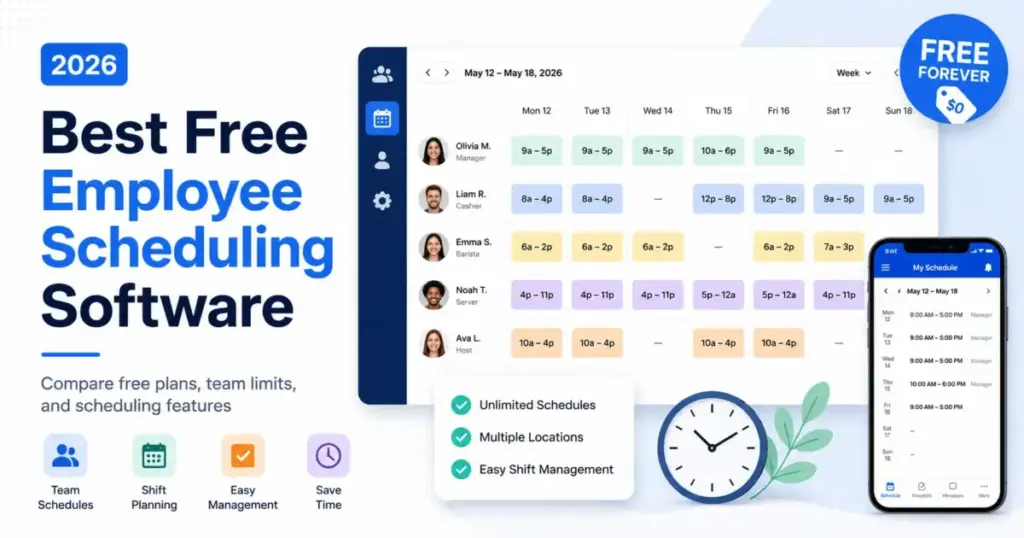
Sling lets you schedule up to 30 employees for $0. Homebase caps free at 10 employees and one location. Connecteam gives you everything, but only for 10 users. The numbers matter more than the features because the free cap is the single variable that decides whether a tool is genuinely free for your team, or a trial with a different label.
I analyzed pricing pages, help docs, and official feature lists for 30 scheduling tools to find the 10 that offer a real free plan, not a 14-day trial dressed up as “freemium.” For each one, I mapped the exact employee cap, the features you lose on the free tier, and the upgrade trigger that moves you to paid. If you manage shifts for a restaurant, retail store, or service team, this breakdown tells you which free plan fits your headcount without a surprise invoice next month.
One finding worth flagging now: Jibble’s shift scheduling feature is still marked “coming soon” on its official pricing page. I included it because its free time tracking is genuinely useful for attendance-first teams, but if you need shift scheduling today, treat that caveat seriously. Details are in the Jibble section below.
Here is what the best free employee scheduling software actually costs when the free plan runs out, and which tool fits which team size.
Quick Verdict: Best Free Scheduling Software by Use Case
| Use Case | Best Pick | Why It Fits |
|---|---|---|
| Best overall free scheduling | Sling | Free for up to 30 users with shift scheduling, templates, and messaging |
| Best for single-location small businesses | Homebase | Free scheduling plus basic time tracking for 1 location and 10 employees |
| Best for mobile-first deskless teams | Connecteam | Full operations hub free for 10 users, including GPS clock-in |
| Best free restaurant scheduler | 7shifts | Restaurant-built with POS integrations, free for 15 employees |
| Best free plan for 20-person teams | ZoomShift | Highest free user cap (20) among simple schedulers |
| Best for tiny teams (under 5) | Findmyshift | Drag-and-drop scheduling with time clocking, free for 5 employees |
| Best free plan for compliance-aware teams | SocialSchedules | Free for 10 employees with labor law compliance upgrade path |
| Best free scheduling and attendance bundle | Shifton | Scheduling, time clock, attendance, and unlimited locations free for 10 members |
| Best attendance-first free plan | Jibble | Unlimited free users for time tracking, but shift scheduling is coming soon |
| Best lightweight roster builder | ScheduleBee | Simple weekly grid scheduling, free for up to 5 employees |
| Best free plan with payroll integration | Homebase | Payroll add-on available from $39/month on free plan |
| Budget pick | Sling | $0 for 30 users is the most generous free cap on this list |
What this means: If your team has fewer than 10 people, most tools on this list work. The decision only gets hard at 11+ employees, where Sling (30-user cap) and ZoomShift (20-user cap) become your only truly free options.
How We Chose and Ranked These Tools
I started with 30 candidates sourced from SERP competitors, official websites, help docs, and pricing pages. Each tool had to meet four criteria to make this list:
- A confirmed forever-free plan with employee scheduling access (not a time-limited trial)
- Official pricing evidence from the vendor’s own website or help center
- Feature evidence from official product pages
- Limitation and caveat evidence documented from official sources
Tools that failed any of these criteria were excluded. When I Work, Deputy, and Agendrix all offer strong scheduling, but none had a confirmed forever-free scheduling plan at the time of review. Clockify is an excellent free time tracker, but it is not primarily a shift scheduling tool.
Scoring Methodology
Each tool was scored across six weighted criteria:
| Criterion | Weight | What I Checked |
|---|---|---|
| Pricing value | 20% | Free cap, paid-plan trigger, minimum seats, hidden costs |
| Core feature depth | 20% | Scheduling, availability, time-off, shift swaps, reminders, time clock |
| Ease of use | 15% | Setup clarity, manager workflow, mobile access, schedule publishing |
| Integrations | 15% | Payroll, POS, calendar, API, Zapier |
| Scalability | 15% | Multi-location support, roles, permissions, upgrade path |
| User fit | 15% | Best-for and not-best-for clarity, limitation severity |
All pricing was verified on May 27, 2026 from official sources. Testing level for all products is official research only: I evaluated official documentation, pricing pages, and feature lists, not hands-on product testing.
Payroll is the most common integration point for scheduling tools, and understanding what payroll software does helps explain why so many free plans gate payroll exports behind paid tiers.
Best Overall Free Scheduling Plan: Sling
Starting price: $0 (Free plan for up to 30 users)
Paid upgrade: Premium from $2/user/month (monthly) or $1.70/user/month (annually)
Parent company: Toast, Inc.
Free trial: 15-day trial for paid plans
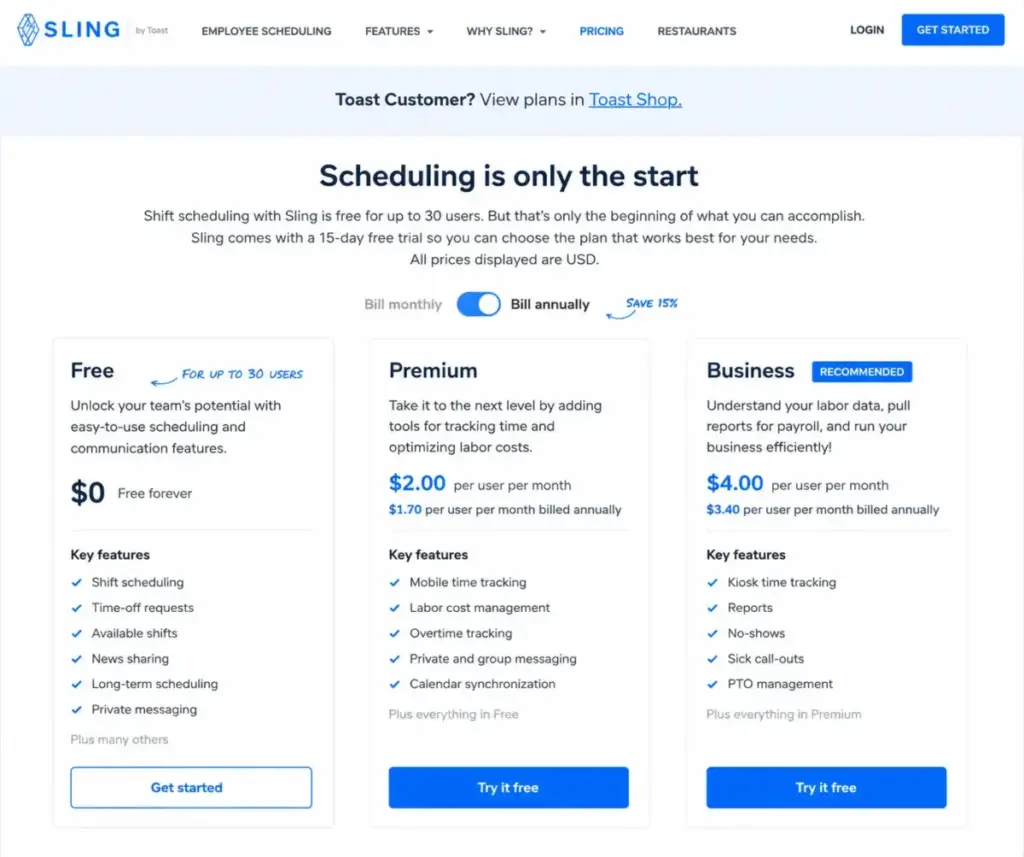
Sling earns the top spot for a simple reason: 30 free users is the highest cap on this list, and the free plan includes shift scheduling, time-off requests, available shifts, shift swaps, schedule templates, private messaging, and news sharing.
The free plan is not a stripped-down trial. You get long-term scheduling, shift templates, and team communication without a time limit. For a 25-person cafe staff or a 20-person retail crew, that is a real operating tool, not a demo.
The upgrade trigger you need to know
Time tracking, labor cost management, overtime tracking, reports, PTO management, and kiosk time tracking are all locked behind the Premium ($2/user/month) or Business ($4/user/month) plans. If your team needs to clock in and out or track overtime within the same app, you will hit the paywall.
| Plan | Price | Key Features Added |
|---|---|---|
| Free | $0 (up to 30 users) | Shift scheduling, time-off requests, shift swaps, templates, messaging |
| Premium | $2/user/month | Time tracking, labor cost management, overtime tracking |
| Business | $4/user/month | Reports, PTO management, kiosk time tracking, advanced controls |
What this means: Sling is free as long as scheduling is the only job you need it to do. The moment you need time tracking or labor cost visibility, the per-user cost starts. At 30 users on Premium, that is $60/month.
Best for: Small restaurants, cafes, retail teams, and hourly teams that need free shift scheduling and communication for up to 30 users.
Avoid if: You need time clocking, labor cost management, overtime tracking, reports, or PTO management on the free plan.
Score: 8.77/10
Best for Single-Location Small Businesses: Homebase
Starting price: $0 (Basic plan, 1 location, up to 10 employees)
Paid upgrade: Essentials $30/location/month (monthly) or $24/location/month (annually)
Free trial: 14-day All-in-One trial, no credit card required
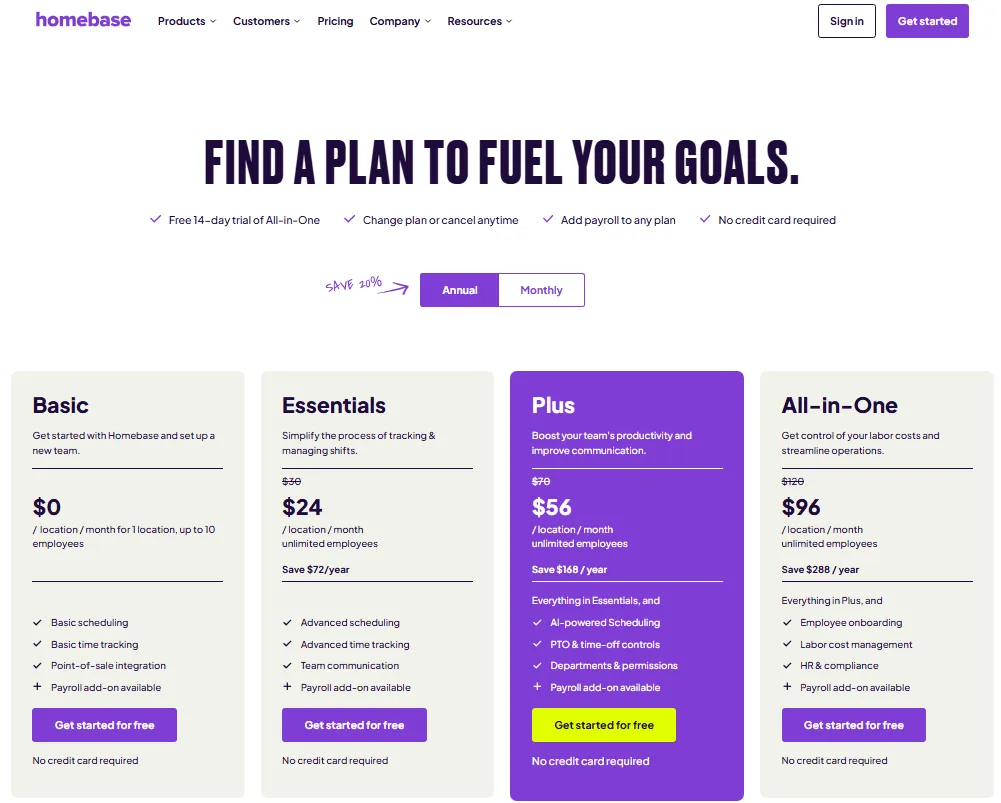
Homebase bundles basic scheduling and basic time tracking on the free plan. That combination is rare: most free schedulers give you shifts but make you pay to clock hours. For a single-location shop, salon, or cafe with 10 or fewer employees, Homebase covers the two biggest operational needs without a bill.
The free plan also includes POS integration, which matters for retail and food service teams that run Square or Clover. If your team uses one of those POS systems, the QuickBooks Online review on SaaSZap covers how its payroll module connects with tools like Homebase on paid tiers.
The upgrade trigger you need to know
The free plan caps at 1 location and 10 employees. A second location or an eleventh employee pushes you to Essentials at $30/location/month. Advanced scheduling and advanced time tracking also require paid plans.
Hidden costs worth noting
Homebase’s payroll add-on is $39/month plus $6/month per paid employee. Tip Manager costs $25/month per location. These add-ons are not included in any plan tier.
| Plan | Price (Monthly) | Price (Annual) |
|---|---|---|
| Basic (Free) | $0/location | $0/location |
| Essentials | $30/location | $24/location |
| Plus | $70/location | $56/location |
| All-in-One | $120/location | $96/location |
What this means: A single-location team of 10 stays free indefinitely. The cost curve steepens fast: a 2-location team on Essentials pays $60/month, plus $39 + employee fees if they add payroll.
Best for: Local shops, restaurants, salons, cafes, and service businesses that want scheduling, time tracking, and POS integration in one small-business app.
Avoid if: You have more than one location, more than 10 employees, or need advanced scheduling features without paying.
Score: 8.70/10
Best Mobile-First Free Plan: Connecteam
Starting price: $0 (Small Business Plan, up to 10 users, free for life)
Paid upgrade: Operations Basic $29/month (annually) or $35/month (monthly) for first 30 users
Free trial: 14-day trial, no credit card required
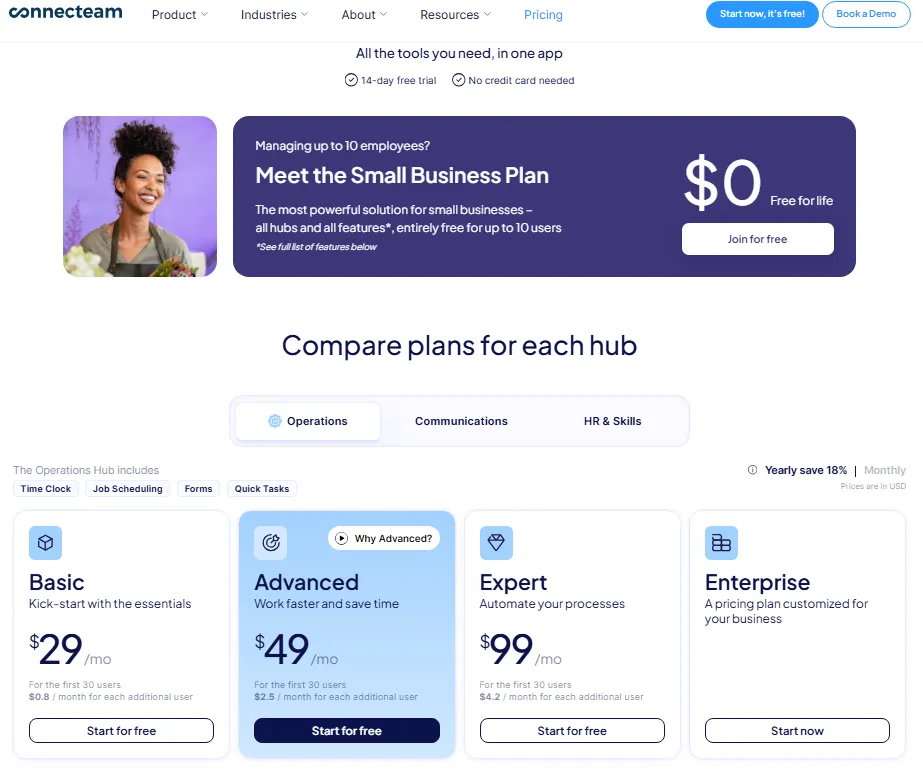
Connecteam is a full operations hub, not just a scheduler. The free Small Business Plan includes job scheduling, real-time GPS clock in/out, forms, tasks, and open shifts for up to 10 users. For deskless and mobile teams (field service, cleaning crews, delivery teams), the GPS time tracking alone justifies the pick.
The upgrade trigger you need to know
The all-features free plan is for 10 users only. After the trial period, teams above 10 may move to a limited free plan with reduced capabilities, or they upgrade to the Operations Hub starting at $29/month (annually) for 30 users. Hub-based pricing can also complicate the total cost: if you need features from multiple hubs (Operations, Communications, HR), each hub bills separately.
What $29/month gets a growing team
On the Operations Basic plan, the first 30 users are included. Each additional user costs $0.80/month on annual billing. A 50-user team pays $29 + (20 x $0.80) = $45/month on the annual plan. That is competitive for a platform that combines scheduling, time clock, and task management.
Best for: Deskless and mobile teams that want scheduling, time clock, jobs/projects, forms, tasks, and team operations in one app.
Avoid if: You have more than 10 users and want all features fully free without limited-plan restrictions.
Score: 8.69/10
Best Free Restaurant Scheduler: 7shifts
Starting price: $0 (Comp plan, single location, up to 15 employees)
Paid upgrade: Essentials $44.99/month/location (monthly) or $39.99/month/location (annually)
Free trial: Available for paid plans
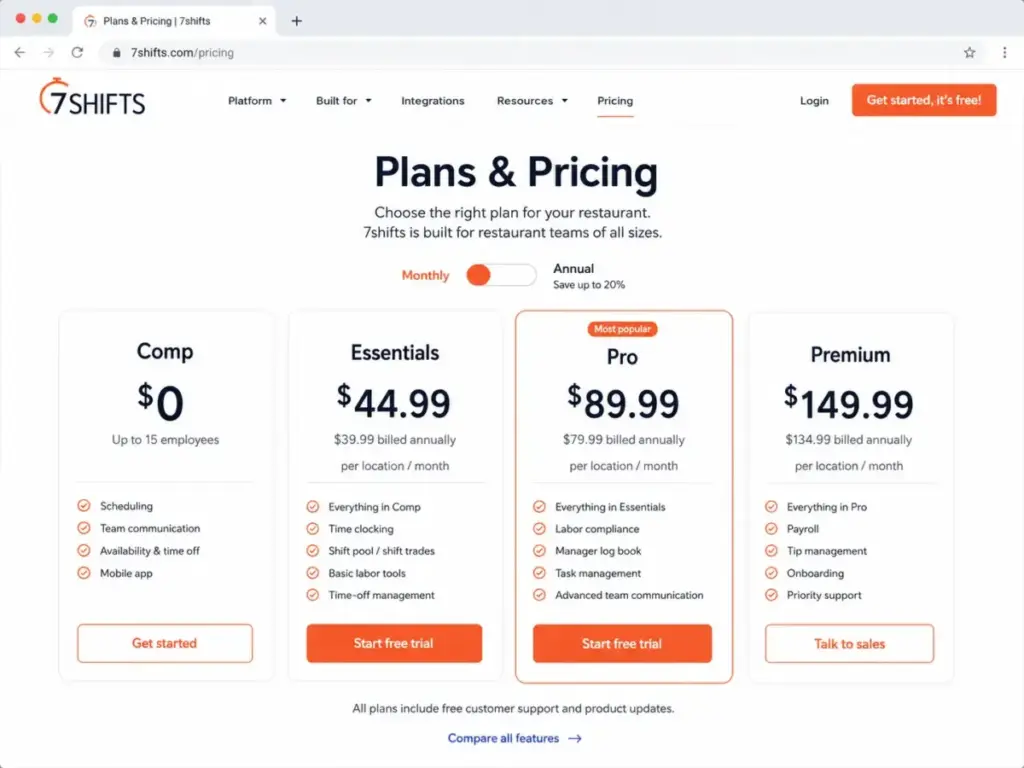
7shifts is built for restaurants, and the free Comp plan covers basic scheduling, one-way announcements, availability requests, and time-off requests for a single location with up to 15 employees. The product integrates with Square, Clover, Toast, Lightspeed, and other POS systems that restaurant teams already use.
A correction worth noting
Some third-party sources list the 7shifts free cap at 30 employees. Official comparison page evidence confirms the free Comp plan caps at 15 employees, not 30. The 30-employee cap applies to the paid Essentials tier.
The upgrade trigger you need to know
Advanced scheduling, team messaging, time clocking, PTO accruals, labor compliance, log book, tip management, task management, and payroll integrations all require paid tiers or add-ons. The Comp plan is scheduling-only with basic communication.
| Plan | Monthly | Annual | Employee Cap |
|---|---|---|---|
| Comp (Free) | $0 | $0 | 15 employees |
| Essentials | $44.99/location | $39.99/location | 30 employees |
| Pro | $89.99/location | $79.99/location | Varies |
| Premium | $149.99/location | $134.99/location | Varies |
What this means: A 12-person restaurant kitchen stays free. A 16th employee forces a jump to $44.99/month. The per-location pricing also means multi-location restaurant groups scale costs quickly.
Best for: Single-location restaurants that want basic free scheduling with a restaurant-specific upgrade path for communications, time clocking, compliance, tips, and payroll.
Avoid if: You are not a restaurant, or you have more than 15 employees and need to remain free. Teams needing payroll integration should check our Gusto review and verify compatibility at the Essentials tier.
Score: 8.60/10
Best Free Plan for 20-Person Teams: ZoomShift
Starting price: $0 (Essentials, up to 20 users)
Paid upgrade: Starter from approximately $2.50/active team member/month
Free trial: 14-day trial for paid plans, no credit card required
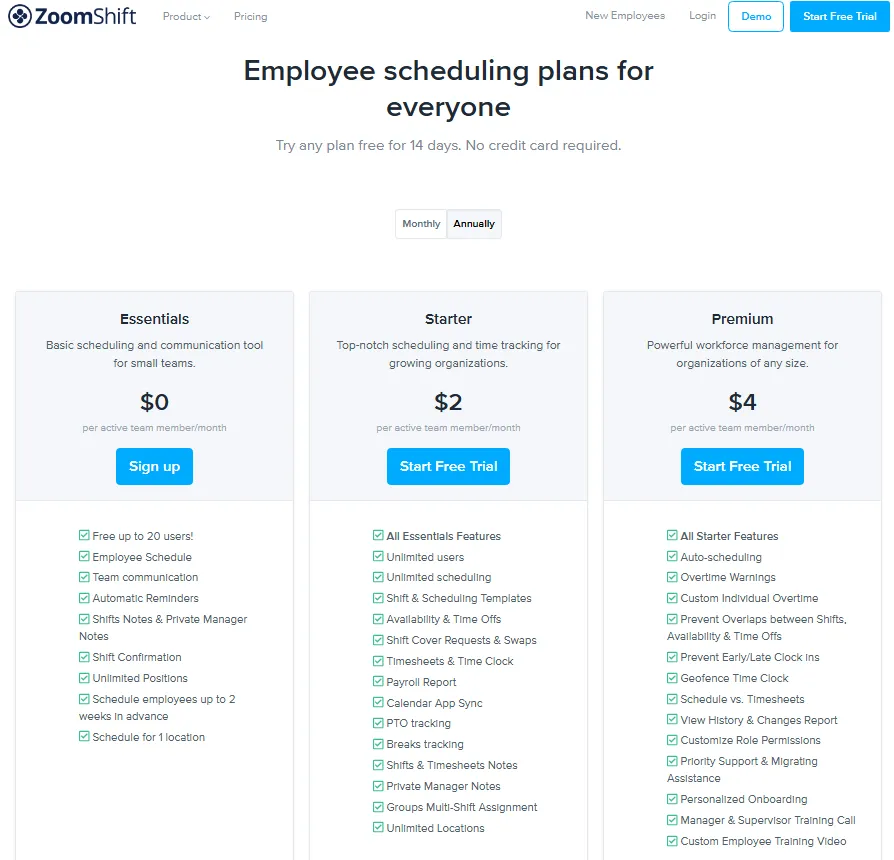
ZoomShift’s free Essentials plan covers up to 20 users, which puts it second only to Sling (30) for free user cap. The free plan includes employee scheduling, team communication, automatic reminders, shift notes, private manager notes, shift confirmation, and unlimited positions.
The upgrade trigger you need to know
The free plan restricts scheduling to one location and two weeks in advance. Time clock, timesheets, payroll reports, time off, shift swaps, unlimited scheduling, and unlimited locations all require the paid Starter plan or above.
Two weeks of forward scheduling is the real limitation here. If your manager builds monthly or quarterly schedules, ZoomShift free will not support that workflow.
Best for: Small teams under 20 users that need basic scheduling, reminders, shift notes, and one-location schedules.
Avoid if: You need to schedule more than two weeks ahead, or you need time clocking, timesheets, payroll reports, or multi-location support.
Score: 8.05/10
Best for Tiny Teams: Findmyshift
Starting price: $0 (free forever for teams of 5 employees or less)
Paid upgrade: From $27/month
Free trial: All features free for first 3 months
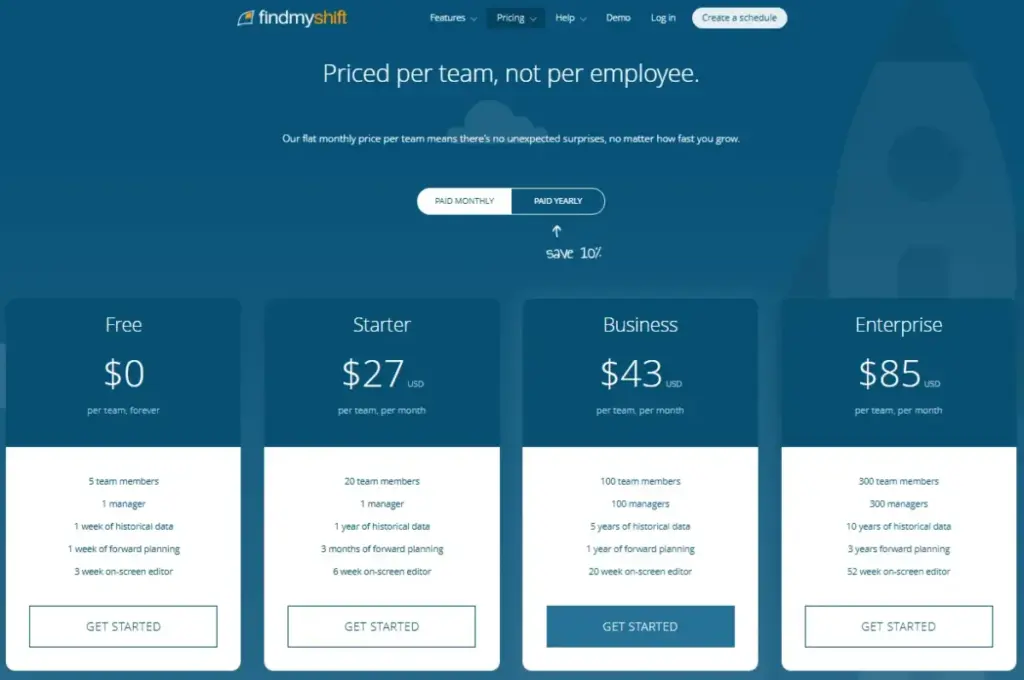
Findmyshift offers drag-and-drop scheduling, time clocking, timesheets, messaging, and shift requests on the free plan. That is a more complete feature set than most free tiers. The tradeoff: 5 employees maximum, one week forward scheduling, and one week historical data.
The upgrade trigger you need to know
Employee #6 forces the upgrade. Templates, custom columns, real-time reporting, and payroll calculation also require paid plans. The one-week forward scheduling window means you cannot build schedules more than seven days ahead on the free tier.
The 3-month all-features trial is generous for evaluation. But once it expires, the free plan constraints are among the tightest on this list.
Best for: Very small teams, volunteer groups, and micro-businesses that need drag-and-drop scheduling, time clocking, timesheets, and messaging.
Avoid if: You have more than 5 employees, or you need templates, custom columns, real-time reporting, or payroll calculation on the free plan.
Score: 7.71/10
Best Free Plan for Compliance-Aware Small Teams: SocialSchedules
Starting price: $0 (free plan, up to 10 employees)
Paid upgrade: Pricing charged in USD per location/month (exact prices should be verified on the current pricing page)
Free trial: Not verified in official documentation
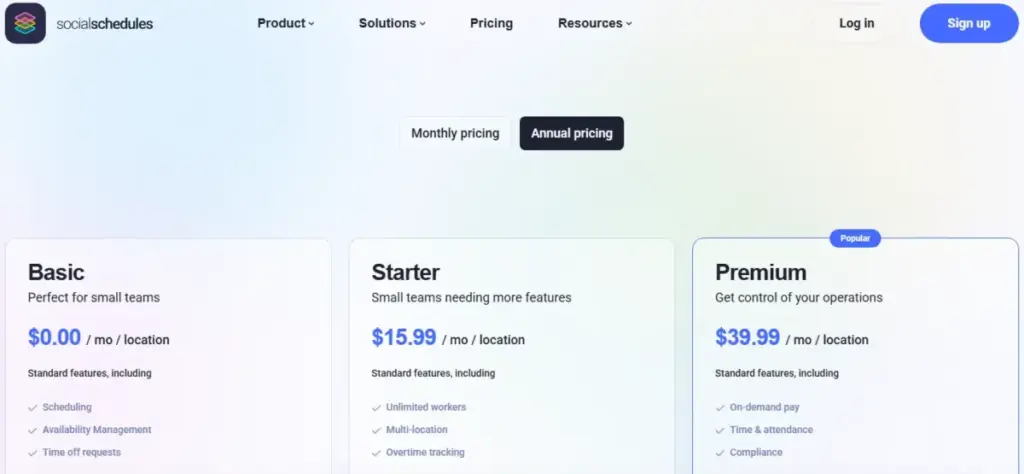
SocialSchedules positions itself around labor law compliance. The free plan includes basic scheduling and attendance tools for up to 10 employees, with paid tiers unlocking compliance tools, advanced time tracking, payroll connectivity, and advanced reporting.
A pricing caveat
The official help center confirms the free plan and USD billing, but exact paid plan prices were not fully visible in the documentation I reviewed. The help page states that annual subscriptions save 20-25%, but specific dollar amounts should be verified directly on the pricing page before committing.
This pricing transparency gap is the main reason SocialSchedules ranks below tools with fully visible pricing.
Best for: Small hourly teams that want free basic scheduling with a compliance and payroll upgrade path.
Avoid if: You need exact paid pricing before signing up, or you need advanced compliance and payroll workflows on the free plan.
Score: 7.77/10
Best Free Scheduling and Attendance Bundle: Shifton
Starting price: $0 (free forever, up to 10 team members)
Paid upgrade: Module-based pricing depends on modules activated and team size
Free trial: Up to 30 days free when activating modules
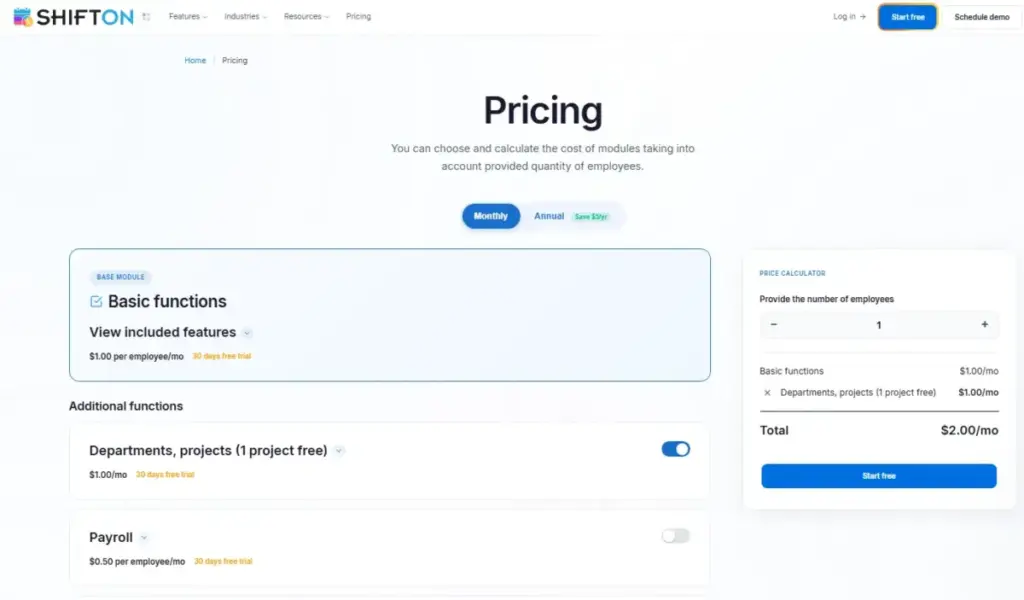
Shifton’s free plan includes scheduling, time clock/attendance, mobile apps, unlimited schedules, unlimited locations, and reports. Unlimited locations on the free plan is unusual: most competitors restrict free plans to a single location.
The upgrade trigger you need to know
Shifton uses module-based paid pricing. Each module gets a free trial period (up to 30 days; some modules show 10 days), then bills based on the modules you keep active and your team size. Annual billing saves 20% versus monthly.
Hidden costs
SMS notifications require a balance top-up and can cost $0.20-$0.70 per message depending on the recipient’s country. Teams above 50 employees move to custom pricing.
The module pricing model makes it harder to predict your paid bill in advance compared to per-seat or flat-rate competitors.
Best for: Small teams wanting scheduling, time clock, attendance, mobile access, and unlimited locations on a free plan.
Avoid if: You need predictable paid pricing before signup, or you need a stronger US-market review footprint for comparison shopping.
Score: 7.87/10
Best Attendance-First Free Scheduler: Jibble
Starting price: $0 (free forever, unlimited users)
Paid upgrade: Premium $4.49/user/month; Ultimate $7.99/user/month
Free trial: 14-day full access to Premium and Ultimate features
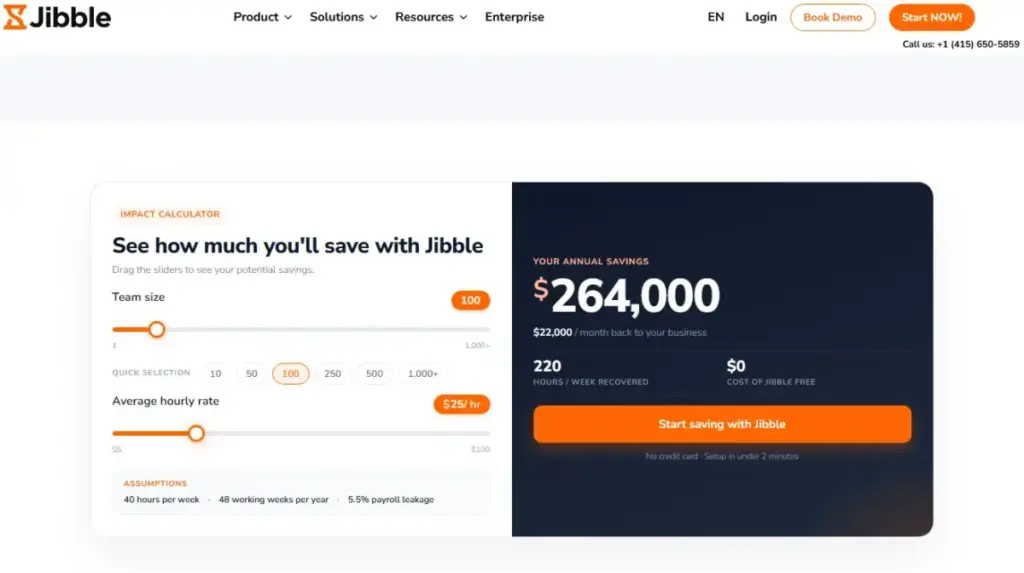
Jibble’s free plan supports unlimited users for time tracking, which is the most generous user cap on this entire list. Free features include automated timesheets, custom breaks, overtime rules, GPS time tracking, biometric verification, one work schedule, two geofences, and one kiosk.
The critical caveat
Jibble’s shift scheduling feature is marked “Soon” or “Coming soon” on the official pricing page as of May 2026. I cannot present shift scheduling as fully available. If your primary need is attendance and time tracking with work schedule visibility, Jibble delivers. If you need active shift scheduling today, choose a different tool from this list.
What Premium unlocks
Premium ($4.49/user/month) adds unlimited work schedules, unlimited geofences, advanced permissions, and more. For a 20-person team, that is $89.80/month. The free-to-Premium jump is the cost of removing limits on schedules and location controls.
Jibble integrates with Slack, Microsoft Teams, Xero, QuickBooks Online, Deel, and Zapier. The QuickBooks and Xero connections make it relevant for teams already comparing the best accounting software options.
Best for: Attendance-first teams that want free time tracking, work schedules, timesheets, GPS controls, and payroll-hour visibility.
Avoid if: You need fully launched shift scheduling today.
Score: 7.91/10
Best Lightweight Roster Builder: ScheduleBee
Starting price: $0 (free, up to 5 employees, not including admin)
Paid upgrade: Pro $2.99/employee/month
Free trial: 14-day trial on Pro
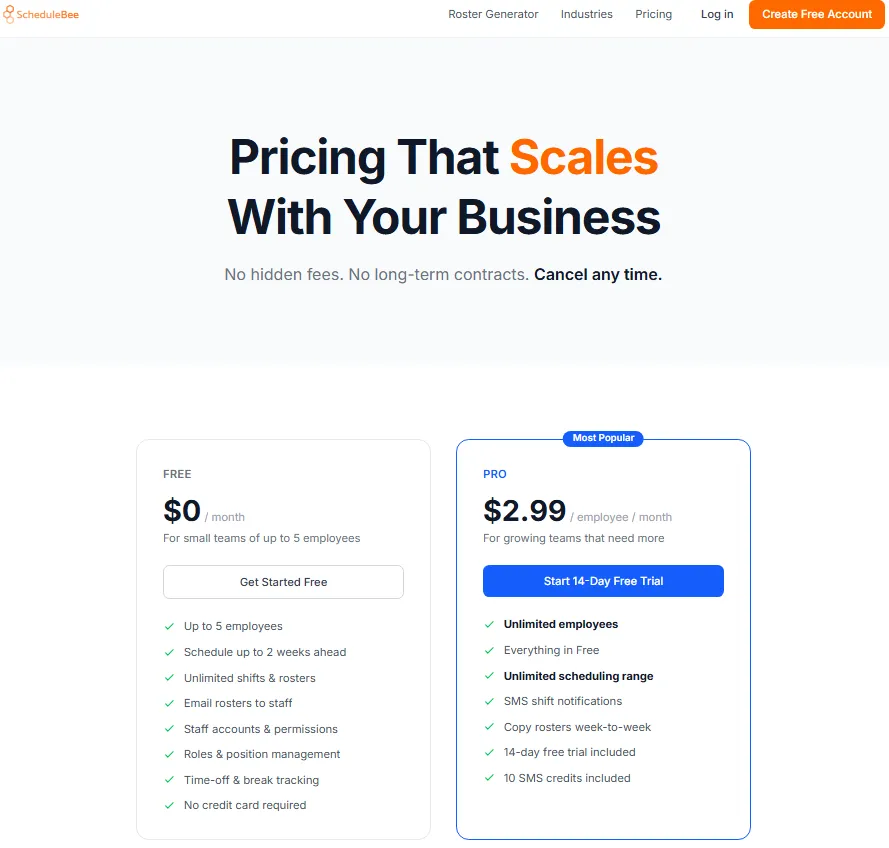
ScheduleBee is the simplest tool on this list. The free plan includes weekly grid shift management, staff invitations, email roster publishing, roles and positions, time-off tracking, break tracking, staff accounts, and permissions for up to 5 employees.
The upgrade trigger you need to know
Employee #6, SMS shift notifications, unlimited scheduling range, and roster copying require the Pro plan at $2.99/employee/month. Pro includes 10 SMS credits. The free plan limits scheduling to two weeks ahead, similar to ZoomShift.
ScheduleBee does not confirm broad payroll or POS integrations. If your workflow requires payroll export or POS data syncing, this tool will not cover that need.
Best for: Very small teams that need a simple roster builder with email rosters, roles, permissions, and time-off and break tracking.
Avoid if: You need advanced HR, payroll integrations, POS integrations, compliance features, or a deep workforce management platform. At that point, scheduling software is no longer the right category; a full BambooHR review is more useful for HRIS-style needs.
Score: 7.25/10
Pricing Comparison: Free Caps and Paid Upgrade Triggers
| Tool | Free User Cap | Free Location Cap | Paid Starting Price | Billing Model | Key Paid Trigger |
|---|---|---|---|---|---|
| Sling | 30 users | Not specified | $2/user/month | Per user | Time tracking, labor costs |
| Homebase | 10 employees | 1 location | $30/location/month | Flat rate | 2nd location or 11th employee |
| Connecteam | 10 users | Not specified | $29/month (30 users) | Flat rate | 11th user |
| 7shifts | 15 employees | 1 location | $44.99/location/month | Flat rate | 16th employee or time clocking |
| ZoomShift | 20 users | 1 location | ~$2.50/active member/month | Per user | Time clock, 3+ week scheduling |
| Findmyshift | 5 employees | Not specified | $27/month | Flat rate | 6th employee |
| SocialSchedules | 10 employees | Not specified | Check pricing page | Flat rate | Advanced compliance, time tracking |
| Shifton | 10 members | Unlimited | Module-based | Per module | Modules after trial period |
| Jibble | Unlimited | Not specified | $4.49/user/month | Per user | Unlimited schedules, geofences |
| ScheduleBee | 5 employees | Not specified | $2.99/employee/month | Per user | 6th employee, SMS notifications |
What this means: Sling’s 30-user free cap is the clear leader. ZoomShift’s 20-user cap is second. Every other tool caps between 5 and 15 on the free plan, except Jibble which offers unlimited users but with a scheduling feature caveat. If your team is growing past 15 people, only Sling keeps you free.
Pricing verified May 27, 2026 from official sources. SocialSchedules paid prices should be verified directly. Shifton module pricing varies by configuration.
Feature Gate Comparison: What Is Free vs. What Is Paid
| Feature | Sling Free | Homebase Free | Connecteam Free | 7shifts Free | ZoomShift Free |
|---|---|---|---|---|---|
| Shift scheduling | Yes | Basic | Yes | Basic | Yes |
| Time tracking | No | Basic | Yes | No | No |
| Shift swaps | Yes | No | Yes | No | No |
| Time-off requests | Yes | No | Yes | Yes | No |
| Schedule templates | Yes | No | Not confirmed | Not confirmed | Not confirmed |
| Team messaging | Yes (news/PM) | No | Yes | One-way only | Yes |
| GPS clock-in | No | No | Yes | No | No |
| POS integration | No | Yes | No | Yes (restaurant) | No |
| Payroll integration | No | No | Yes | No | No |
| Reports | No | No | Yes | No | No |
| Multi-location | Not specified | No (1 only) | Not specified | No (1 only) | No (1 only) |
What this means: Connecteam’s free plan is the most feature-rich but also the most user-restricted (10 users). Sling’s free plan prioritizes scheduling breadth over depth. Homebase and 7shifts bundle industry-specific features (POS) that the others skip. If you need time tracking and scheduling together for free, Connecteam and Homebase are your only options.
Setup Difficulty Matrix
| Tool | Setup Difficulty | Why |
|---|---|---|
| Sling | Low | Web-based signup, schedule creation within minutes |
| Homebase | Low | Quick setup for single location, POS integration guides available |
| Connecteam | Medium | Multiple hubs and modules require initial configuration |
| 7shifts | Low-Medium | Restaurant-specific setup, POS integration may need configuration |
| ZoomShift | Low | Simple interface, minimal setup required |
| Findmyshift | Low | Drag-and-drop interface, straightforward for small teams |
| SocialSchedules | Medium | Compliance features require additional setup |
| Shifton | Medium | Module selection and configuration adds steps |
| Jibble | Low-Medium | Time tracking setup is simple; scheduling feature is limited |
| ScheduleBee | Low | Weekly grid is intuitive for very small teams |
Which Free Scheduling Tool Should You Avoid?
Not every tool on this list is right for every team. Here are the situations where specific tools become the wrong choice:
- Avoid Jibble for shift scheduling today. The shift scheduling feature is marked “coming soon.” If you need active shift building and publishing, pick Sling, Homebase, or ZoomShift instead.
- Avoid 7shifts if you are not a restaurant. The product is built around restaurant workflows, POS integrations, and food service compliance. A retail or service team will find features they do not need and miss features they do.
- Avoid Findmyshift and ScheduleBee for growing teams. Both cap at 5 employees. If you expect to hire within 6 months, start with a tool that has a higher free cap so you do not face a migration mid-growth.
- Avoid SocialSchedules if pricing transparency matters to you. The exact paid plan prices were not visible in official documentation. You may not know your upgrade cost until you are already in the product.
How to Choose the Right Free Scheduling Tool
Follow these steps to narrow your choice:
- Count your employees. If under 5, any tool works. If 6-10, you have 6 options. If 11-20, choose ZoomShift or Sling. If 21-30, Sling is your only free option.
- Count your locations. If you have more than one location and need free scheduling, Shifton (unlimited locations on free) is your best bet. Homebase, 7shifts, and ZoomShift lock free plans to a single location.
- Check whether you need time tracking. If yes, your free options narrow to Homebase (basic), Connecteam, and Shifton. Sling, 7shifts, and ZoomShift charge for time tracking.
- Check your industry. Restaurant teams should start with 7shifts. Deskless/field teams should start with Connecteam. General retail and service teams should start with Sling or Homebase.
- Decide your scheduling horizon. If you build schedules more than two weeks ahead, avoid ZoomShift and ScheduleBee free plans. Findmyshift free limits you to one week ahead.
- Check integration requirements. If you need the best free project management software alongside scheduling, none of these tools overlap well. You will likely run separate apps.
- Consider customer service needs separately. Teams needing the best help desk software for support scheduling should look at dedicated customer service platforms instead.
- Plan for growth. If your team will exceed the free cap within 12 months, compare the paid pricing now. A free tool with expensive paid tiers costs more long-term than a free tool with affordable upgrades.
Common Mistakes When Choosing Free Scheduling Software
Mistake 1: Choosing by feature count instead of free cap. A tool with 20 free features and a 5-employee cap costs you money faster than a tool with 8 free features and a 30-employee cap.
Mistake 2: Ignoring the scheduling horizon. ZoomShift and ScheduleBee limit free scheduling to two weeks ahead. Findmyshift limits it to one week. If your business plans monthly, these limits break your workflow on day one.
Mistake 3: Assuming “free” means no upgrade pressure. Every tool on this list has upgrade triggers. The generous ones (Sling, ZoomShift) trigger on features. The tight ones (Findmyshift, ScheduleBee) trigger on headcount. Know your trigger before you invest time in setup.
Mistake 4: Picking a restaurant tool for a non-restaurant team. 7shifts is excellent for restaurants. It is mediocre for everything else. The POS integrations, tip management, and food-service compliance features take up space that a retail or field-service team does not need.
Mistake 5: Treating time tracking and scheduling as the same need. They are different workflows. Sling schedules for free but charges for time tracking. Jibble tracks time for free but does not fully schedule shifts yet. Map both needs before choosing, because understanding what SaaS is means accepting that each platform covers one job, and a gap in coverage means a second tool.
Mistake 6: Skipping the paid pricing comparison. The best free plan is the one attached to the most affordable paid plan. If you outgrow free in 6 months, the paid price matters more than the free features.
Final Verdict
Sling is the best free employee scheduling software for most teams. The 30-user free cap is unmatched, the scheduling features are complete, and the paid upgrade path is transparent at $2/user/month.
Here is my recommendation by team type:
- Teams of 1-10 employees, any industry: Start with Homebase if you need time tracking included. Start with Sling if scheduling alone is enough.
- Teams of 11-20 employees: ZoomShift (20-user cap) or Sling (30-user cap). ZoomShift is simpler; Sling has more scheduling features.
- Teams of 21-30 employees: Sling is your only free option at this headcount.
- Restaurant teams: 7shifts is purpose-built for your workflows, but verify the 15-employee free cap fits your staff size.
- Deskless/mobile teams under 10: Connecteam gives you the most operational features for free, including GPS tracking.
- Micro-teams of 5 or fewer: Findmyshift offers the most complete free feature set (scheduling + time clock + timesheets) at this size.
- Attendance-first teams (any size): Jibble has unlimited free users for time tracking, but do not rely on it for shift scheduling until that feature fully launches.
The tool that fits is the one whose free cap matches your current headcount and whose paid trigger aligns with the feature you will need next.
FAQ
Is there completely free employee scheduling software?
Yes. Sling offers a free plan for up to 30 users that includes shift scheduling, time-off requests, shift swaps, and templates with no time limit. Homebase, Connecteam, ZoomShift, and others also offer free-forever plans, but with lower user caps (5 to 20 employees depending on the tool).
What is the best free employee scheduling app for small businesses?
For most small businesses, Sling is the best free option because of its 30-user cap and included scheduling features. Single-location businesses with 10 or fewer employees that also need time tracking should consider Homebase, which bundles basic scheduling and time tracking at no cost.
Can I use free scheduling software for multiple locations?
Most free plans restrict you to one location. Shifton is the exception: its free plan includes unlimited schedules and locations for up to 10 team members. Sling’s free plan does not specify a location limit. Homebase, 7shifts, and ZoomShift all cap their free plans at a single location.
What is the best free scheduling tool for restaurants?
7shifts is built specifically for restaurants and offers a free Comp plan for single locations with up to 15 employees. It includes POS integrations with Square, Clover, Toast, and Lightspeed. The free cap was verified at 15 employees, not the 30 sometimes cited by third-party sources.
How many employees can I schedule for free?
It depends on the tool. Sling: 30 users. ZoomShift: 20 users. 7shifts: 15 employees. Homebase, Connecteam, SocialSchedules, and Shifton: 10 each. Findmyshift and ScheduleBee: 5 each. Jibble supports unlimited users for time tracking, but shift scheduling is not fully available yet.
Do free scheduling tools include time tracking?
Not always. Homebase, Connecteam, Shifton, and Findmyshift include some form of time tracking on their free plans. Sling, 7shifts, and ZoomShift require paid plans for time tracking features.
What features are typically locked behind paid plans?
The most common paid-only features across these tools are: advanced scheduling (multi-location, unlimited horizon), time tracking and timesheets, payroll integrations, labor cost management, labor compliance tools, shift swap management, overtime tracking, and detailed reports.
Is Jibble good for employee scheduling?
Jibble is excellent for time tracking and attendance, with unlimited free users. However, its shift scheduling feature is marked “coming soon” as of May 2026. Use Jibble if attendance and timesheet management are your priority. Choose a different tool if you need shift scheduling today.
What happens when I outgrow a free scheduling plan?
You upgrade to a paid tier. Costs vary: Sling Premium starts at $2/user/month, Homebase Essentials at $30/location/month, 7shifts Essentials at $44.99/location/month, and ZoomShift Starter at approximately $2.50/active team member/month. Compare the paid pricing before committing to a free plan, because the upgrade cost becomes your operating cost.
Should I use a free scheduling tool or a spreadsheet?
A free scheduling tool is better than a spreadsheet for any team larger than 3 people. Scheduling software provides automatic notifications, shift swap requests, availability tracking, and mobile access that spreadsheets cannot replicate. The setup time for most tools on this list is under 15 minutes, which is less time than building and maintaining a scheduling spreadsheet.