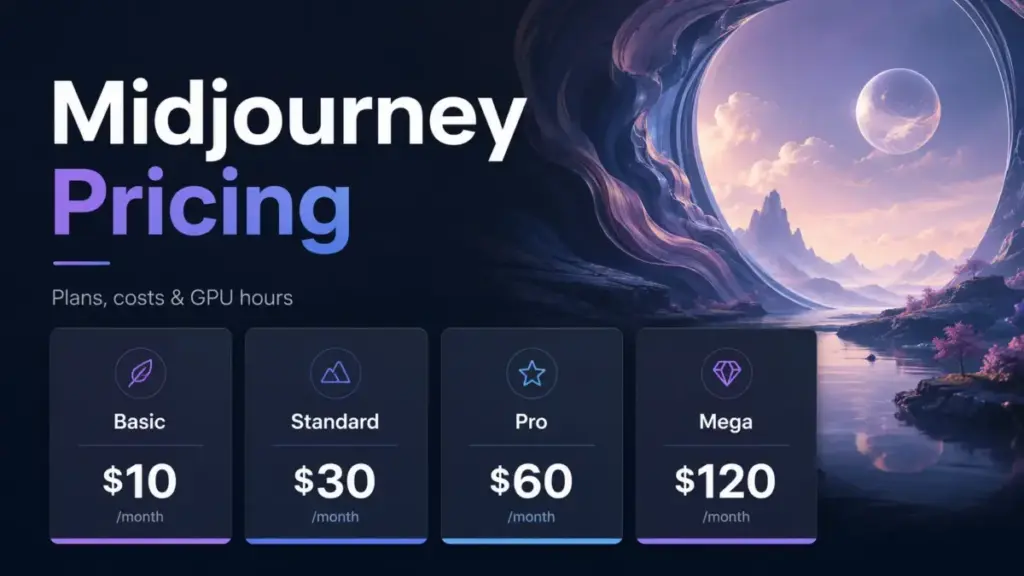
Midjourney pricing starts at $10 per month for Basic (as of June 2026). That number appears on every best AI image generator ranking page, and it is technically correct. It is also the plan most serious users outgrow within two weeks.
Basic gives you 3.3 hours of Fast GPU time, no Relax Mode, no HD video, no Stealth Mode, and a concurrency cap of 3 image prompts and 1 video prompt. You exhaust that GPU budget faster than you expect, especially once you start generating video.
I have tracked AI pricing changes across 12 tools monthly for 18 months, and Midjourney’s four-tier structure hides more decision points than any headline price suggests: GPU hour burn rates that vary by output type, purchased Fast Time that expires after 60 days, a $1 million revenue rule that forces larger companies onto Pro or Mega, and a bulk-billing threshold that does not include SSO or seat management (as of June 2026).
Most competing pricing pages repeat the plan table and stop. This guide maps every hidden cost, calculates what 5 to 100 users pay in practice, and tells you which plan to buy, which to skip, and when the cheapest option is the most expensive mistake.
Quick Pricing Verdict
| Detail | Answer |
|---|---|
| Starting price | $10 per month (Basic, monthly billing) |
| Best value plan | Standard at $30 per month or $288 per year ($24 per month equivalent) |
| Plan to avoid | Basic, for anyone generating images regularly |
| Free plan | No |
| Free trial | No free trial on Midjourney web or Discord |
| Annual discount | 20% across all tiers |
| Biggest hidden cost | Extra Fast GPU Time at$4 per hour, expires after 60 days |
| Best alternative if too expensive | Leonardo.Ai free plan or Adobe Firefly Standard at $9.99 per month |
| Pricing verified | June 2026, via Midjourney plan comparison page |
What this means: Midjourney has no free plan and no free trial for its web or Discord platform. The $10 Basic plan is the entry point, but Standard at $30 per month is where most individual creators should start. It adds 15 hours of Fast GPU time and unlimited Relax Mode for images, both of which Basic lacks entirely.
Midjourney Plans and Pricing Breakdown
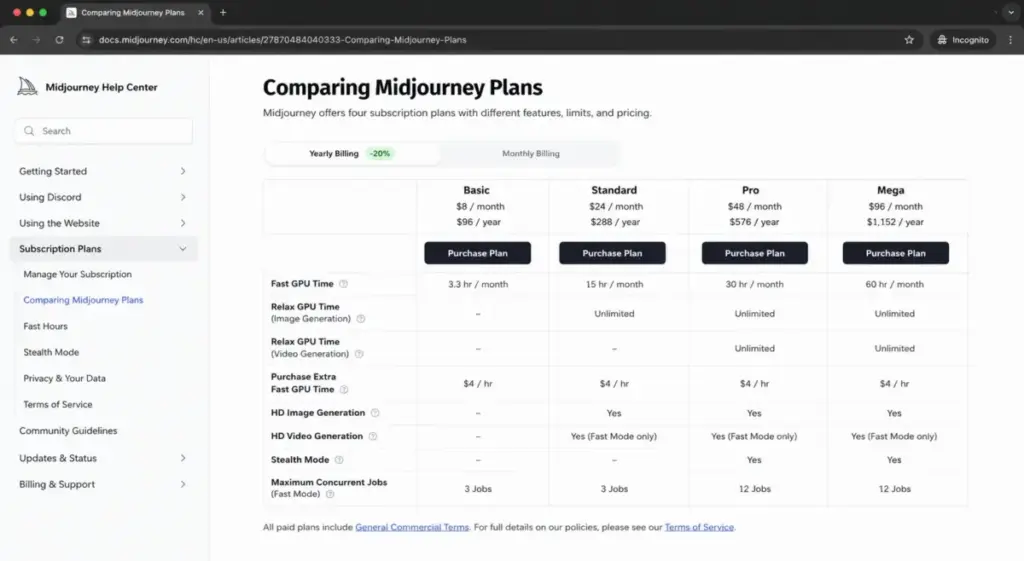
Midjourney offers four subscription tiers: Basic, Standard, Pro, and Mega. All plans renew automatically on either monthly or annual billing, and annual billing saves 20% across every tier. Here is the complete pricing table with verified monthly and annual rates.
| Plan | Monthly price | Annual price | Fast GPU hours | Relax Mode (images) | Relax Mode (SD video) | HD video | Stealth Mode |
|---|---|---|---|---|---|---|---|
| Basic | $10/month | $96/year ($8/month) | 3.3 hours | No | No | No | No |
| Standard | $30/month | $288/year ($24/month) | 15 hours | Yes, unlimited | No | Yes, Fast only | No |
| Pro | $60/month | $576/year ($48/month) | 30 hours | Yes, unlimited | Yes, unlimited | Yes, Fast only | Yes |
| Mega | $120/month | $1,152/year ($96/month) | 60 hours | Yes, unlimited | Yes, unlimited | Yes, Fast only | Yes |
What this means: The price doubles at each tier, and so does the Fast GPU allocation. But the real value jumps happen between specific plans. Basic to Standard is where you gain Relax Mode for images (unlimited generation when you are not in a rush). Standard to Pro is where you gain Stealth Mode, SD video Relax Mode, and commercial eligibility for companies exceeding $1 million annual gross revenue. Pro to Mega is a pure GPU capacity increase with the same feature gates.
The Plan-Gate Map: What Each Midjourney Tier Locks
This is Daniel Rivera’s plan-gate map for Midjourney. Every feature-to-plan relationship below comes from official Midjourney documentation. The gates determine when you are forced to upgrade, not just when you might want to.
| Feature | Basic | Standard | Pro | Mega |
|---|---|---|---|---|
| Monthly price | $10 | $30 | $60 | $120 |
| Annual price | $96/year | $288/year | $576/year | $1,152/year |
| Fast GPU time | 3.3 hr/month | 15 hr/month | 30 hr/month | 60 hr/month |
| Relax Mode for images | No | Unlimited | Unlimited | Unlimited |
| Relax Mode for SD video | No | No | Unlimited | Unlimited |
| HD video generation | No | Fast Mode only | Fast Mode only | Fast Mode only |
| Stealth Mode | No | No | Yes | Yes |
| Max concurrent image prompts | 3 Fast | 3 Fast or Relax | 12 Fast or 3 Relax | 12 Fast or 3 Relax |
| Max concurrent video prompts | 1 Fast | 3 Fast | 6 Fast or 3 Relax | 12 Fast or 3 Relax |
| Max repeat/permutation jobs | 4 | 10 | 40 | 40 |
| Commercial use (companies over $1M revenue) | No | No | Yes | Yes |
| Bulk billing eligibility | No | No | Yes (50+ yearly) | Yes (50+ yearly) |
What this means: Three features create hard upgrade triggers. Relax Mode forces you from Basic to Standard the first time you run out of Fast GPU hours and want to keep generating. Stealth Mode forces you from Standard to Pro if you need image privacy for client work. The $1 million revenue rule forces qualifying companies from Standard to Pro or Mega regardless of feature needs. Mega only makes sense over Pro if you consistently burn through 30 hours of Fast GPU time per month.
The concurrency gap matters for batch workflows. Basic users can run 1 video prompt at a time. Mega users can run 12. If you queue permutation prompts or large video batches, the lower tiers slow you down.
The 6 Hidden Costs Competitors Skip
Most Midjourney alternatives pages list the four plan prices and move on. The actual cost of using Midjourney includes at least six expenses that do not appear in the headline number.
Extra Fast GPU Time Charges
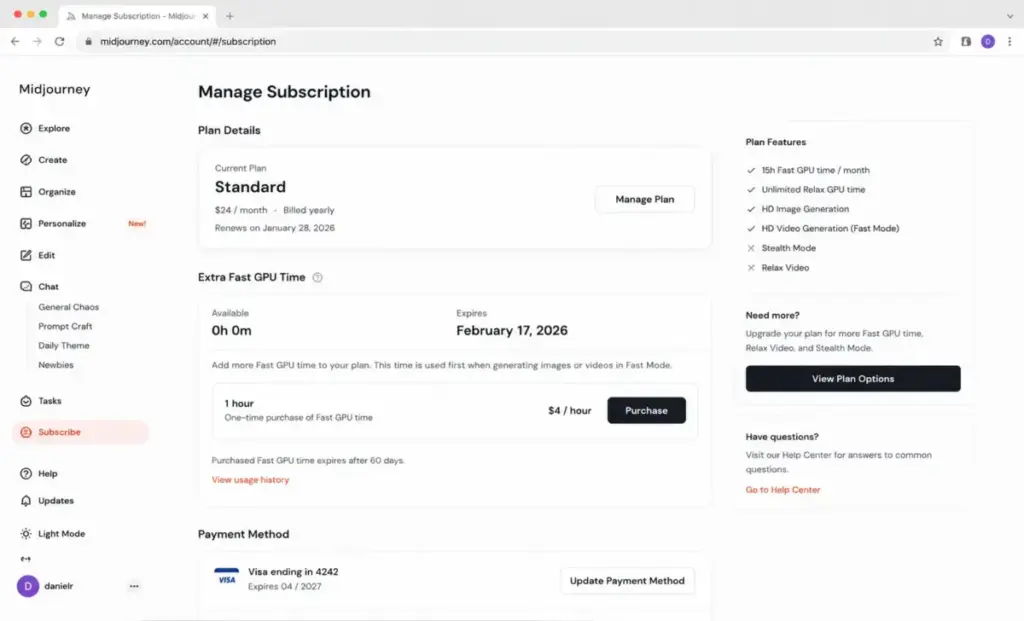
When you deplete your monthly Fast GPU allocation, Midjourney offers additional Fast hours at $4 per hour. That sounds reasonable until you realize purchased hours expire after 60 days, require an active subscription, and are non-refundable. If you buy 10 hours at $40 and do not use them within 60 days, you lose that money. No rollover. No refund.
Video GPU Burn Rate
Video generation consumes Fast GPU time dramatically faster than images. Official estimates show approximately 8 minutes of GPU time for a batch of 4 SD videos and approximately 26 minutes for HD videos. A Standard user with 15 hours (900 minutes) of Fast GPU time can burn through a significant chunk of their monthly allocation in a single video session. The exact consumption varies by settings, resolution, and model parameters.
Turbo Mode GPU Multiplier
Turbo Mode processes prompts up to 4 times faster but consumes double the Fast GPU time. A prompt that costs 1 minute in Fast Mode costs 2 minutes in Turbo Mode. Users who leave Turbo Mode enabled by default drain their GPU budget at twice the expected rate.
No Fast GPU Rollover
Unused included monthly Fast GPU time does not carry over to the next billing period. If your Basic plan resets with 1.5 hours unused, those hours disappear. This penalizes sporadic users and makes annual billing a gamble if your usage is inconsistent.
Purchased Fast Time Expiration
This is the hidden cost most pricing articles miss entirely. Purchased Fast hours (at $4 per hour) expire after 60 days from purchase, not from usage. They also require an active subscription to use. If you cancel your plan, unused purchased hours are gone. Free Fast Time earned through daily image rating expires after 30 days.
Downgrade Timing
Downgrades take effect at the next renewal and do not refund the current billing period. If you pay for Pro monthly and realize Standard is sufficient on day 5, you still pay for the full Pro month. There is no mid-cycle prorating on downgrades.
| Hidden cost | Amount | When it triggers |
|---|---|---|
| Extra Fast GPU Time | $4/hour | Fast hours depleted |
| Video GPU burn | ~8 min for 4 SD, ~26 min for HD video | Any video generation |
| Turbo Mode GPU multiplier | 2x Fast GPU consumption | Turbo Mode enabled |
| No Fast GPU rollover | Unused included hours reset | Plan renewal |
| Purchased Fast Time expiration | Purchased hours expire in 60 days | Buying extra Fast hours |
| Downgrade timing | No mid-cycle refund | Switching to a lower plan |
What this means: A Pro user at $60 per month who buys 5 extra Fast hours ($20) and uses Turbo Mode for half their prompts could spend $80 to $100 in a month and still run out of GPU time. Budget for the subscription plus at least one top-up if you generate video or use Turbo Mode regularly.
GPU Modes Explained: Fast, Relax, and Turbo
Midjourney pricing is GPU pricing. Understanding the three generation modes is the key to controlling cost. Here is what each mode does and which plans support it.
Fast Mode
Fast Mode uses your included monthly GPU hours. Every plan includes Fast GPU time: Basic gets 3.3 hours, Standard gets 15 hours, Pro gets 30 hours, Mega gets 60 hours. When Fast hours run out, you either buy more at $4 per hour or wait until your plan renews.
Relax Mode
Relax Mode lets you generate without consuming Fast GPU time. Jobs queue behind other users and may take 0 to 30 minutes depending on demand and your recent usage history. Here is the catch: Relax Mode is not available on Basic at all. For images, it starts at Standard. For SD video, it starts at Pro. HD video is never available in Relax Mode on any plan.
That distinction matters. A Standard user can generate unlimited images in Relax Mode but must use Fast Mode for every video. A Pro user can generate unlimited images and unlimited SD video in Relax Mode but must use Fast Mode for every HD video.
Turbo Mode
Turbo Mode processes prompts up to 4 times faster than Fast Mode but consumes 2x the GPU time. A 1-minute Fast job costs 2 minutes of your allocation in Turbo. Use it for deadline-critical work, not as a default.
| GPU Mode | Speed | GPU cost | Available on |
|---|---|---|---|
| Fast | Standard speed | 1x GPU time per minute | All plans |
| Relax | 0 to 30 min queue | No GPU time consumed | Standard+ (images), Pro+ (SD video) |
| Turbo | Up to 4x faster | 2x GPU time per minute | All plans |
What this means: Relax Mode is the hidden value of Standard and Pro. A Standard user who generates images in Relax Mode effectively has unlimited image generation. A Basic user has no safety net: once 3.3 hours of Fast time runs out, the only options are waiting for the next billing cycle or paying $4 per hour. This is why I call Basic the most expensive cheap plan in AI image generation.
Video Generation and GPU Burn Rates
Video is Midjourney’s biggest GPU cost multiplier. All four plans can generate videos in Fast Mode, but the GPU burn rate makes video a fundamentally different cost calculation than images.
| Video type | Approximate GPU time per batch | Plans with Relax Mode for video |
|---|---|---|
| SD video (4-video batch) | ~8 minutes | Pro and Mega only |
| HD video | ~26 minutes | No plan (Fast Mode only) |
What this means: A Standard user with 15 hours (900 minutes) of monthly Fast GPU time can generate approximately 112 SD video batches or about 34 HD video sessions before running out, assuming they generate zero images. In practice, users mix images and video, so the real video capacity is lower.
Pro and Mega users can offload SD video generation to Relax Mode, preserving Fast GPU hours for HD video and time-sensitive work. This makes Pro the practical minimum plan for anyone doing regular video work.
Here is the math for a 10-person creative agency where each person generates 5 HD videos per week. Each HD video session burns approximately 26 minutes: 10 users x 5 videos x 26 minutes = 1,300 minutes per week, or roughly 5,200 minutes per month. Even Mega’s 60 hours (3,600 minutes) is not enough. That team would need extra Fast GPU hours at $4 per hour, adding approximately $107 per month in top-up costs on top of the Mega subscription.
Midjourney Cost at Scale: 5 to 100 Users
Most Midjourney pricing pages show individual plan prices. Here is what teams pay in practice. Each user needs their own subscription because Midjourney does not offer shared team pools of GPU time.
| Users | Standard monthly | Standard annual | Pro monthly | Pro annual | Mega monthly | Mega annual |
|---|---|---|---|---|---|---|
| 5 | $150/month | $1,440/year | $300/month | $2,880/year | $600/month | $5,760/year |
| 10 | $300/month | $2,880/year | $600/month | $5,760/year | $1,200/month | $11,520/year |
| 25 | $750/month | $7,200/year | $1,500/month | $14,400/year | $3,000/month | $28,800/year |
| 50 | $1,500/month | $14,400/year | $3,000/month | $28,800/year | $6,000/month | $57,600/year |
| 100 | $3,000/month | $28,800/year | $6,000/month | $57,600/year | $12,000/month | $115,200/year |
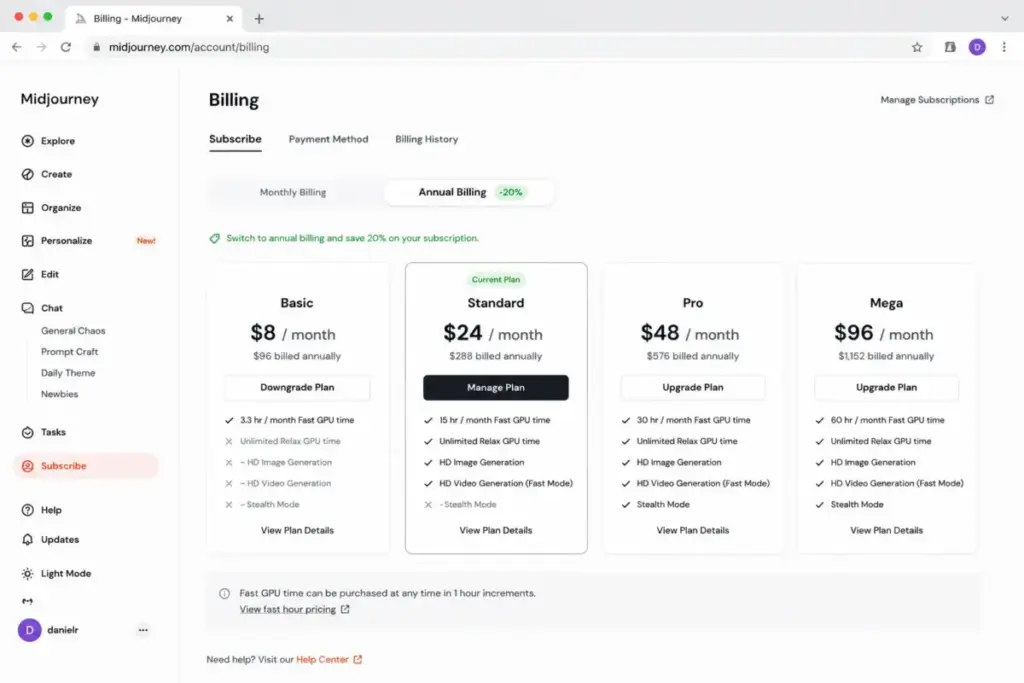
What this means: Annual Standard billing saves $720 per year at 10 users versus monthly billing. At 50 users on Pro, annual billing saves $7,200 per year compared to monthly. The savings justify the commitment for teams with predictable usage.
A 10-person marketing team on annual Standard pays $2,880 per year. The same team on annual Pro pays $5,760 per year, double the cost but necessary if the team needs Stealth Mode, SD video Relax Mode, or the company exceeds $1 million annual gross revenue.
Bulk Billing for Organizations
Midjourney offers bulk billing for organizations with 50 or more yearly Pro or Mega subscriptions. Bulk billing provides a single invoice arrangement but does not include SSO, seat-admin management, vendor review processes, or supplier/security questionnaires.
Procurement warning: IT, finance, and security teams expecting standard enterprise administration should know that Midjourney does not publish support for SSO, seat management, or enterprise procurement workflows. Bulk billing is an invoicing convenience, not an enterprise management layer.
The $1 Million Revenue Rule
Midjourney’s terms require companies with more than $1,000,000 USD per year in gross revenue to subscribe to Pro or Mega to own generated assets for company use. Basic and Standard subscribers at companies above this threshold do not have commercial asset ownership rights for company use.
This rule creates three distinct buyer categories.
Solo creators and small companies under $1 million revenue: Any plan works for commercial use. Standard is sufficient for most individual creators and small teams.
Companies between $500,000 and $1 million revenue: Watch your trajectory. If your company crosses the $1 million threshold mid-subscription, you need to upgrade to Pro or Mega to maintain commercial eligibility.
Companies above $1 million revenue: Pro at $60 per month per user (or $48 annual) is the minimum. There is no way to use Standard commercially at this scale, regardless of how few images you generate.
A 5-person design agency billing $1.2 million annually must put all five users on Pro or Mega. At annual Pro billing, that is $2,880 per year. On Standard, the same team would pay $1,440 per year but risk losing commercial asset ownership. The $1,440 annual difference is the cost of licensing compliance.
Stealth Mode Is Not Total Privacy
Stealth Mode, available on Pro and Mega at $60 and $120 per month, controls whether your generated images appear in the Midjourney review gallery on the Midjourney website. It is a valuable privacy feature for agencies, brand teams, and client work. But it has limits that most pricing pages gloss over.
Stealth Mode does not hide images generated in public Discord channels. If you generate an image in a public Discord server, other members of that server can see it regardless of your Stealth Mode status. Previously generated images that were public do not retroactively become private when you enable Stealth Mode; you need to manually change their visibility.
The safer workflow for confidentiality is: enable Stealth Mode, generate through the Midjourney web interface (Create tab), or use Discord direct messages, or use a private Discord server. Public Discord channel generation with Stealth Mode on still exposes your prompts and outputs to anyone in that channel.
For a design agency handling NDA-protected client briefs, this matters. Stealth Mode is necessary but not sufficient. Combine it with a private workspace to get actual confidentiality.
Which Midjourney Plan to Choose and Which to Avoid
Plan to Avoid: Basic at $10 per Month
Basic is the easiest Midjourney plan to outgrow. 3.3 hours of Fast GPU time translates to roughly 200 minutes of generation. With no Relax Mode, no HD video, no Stealth Mode, and the lowest concurrency (3 image prompts, 1 video prompt), Basic runs out fast for anyone generating more than casual personal images.
The trap: a user who exhausts Basic’s GPU hours and buys 5 extra hours at $4 per hour has spent $30 in a single month, the same price as Standard, but without Relax Mode, HD video, or higher concurrency. Basic only makes sense for someone who generates fewer than 50 images per month and never touches video.
Plan to Choose: Standard for Most Individual Creators
Standard at $30 per month (or $24 per month annually) is the best value plan for most individual users. It provides 15 hours of Fast GPU time, unlimited Relax Mode for images, HD video in Fast Mode, and triple the video concurrency of Basic.
The unlimited image Relax Mode is the key. When Fast hours run out, you keep generating images at slower speeds for free. On Basic, you stop or pay.
When to Choose Pro
Choose Pro at $60 per month (or $48 annually) if:
- You need Stealth Mode for client confidentiality or brand privacy
- Your company exceeds $1 million annual gross revenue and needs commercial asset ownership
- You generate SD video regularly and want unlimited Relax Mode for video
- You need higher concurrency: 12 Fast image prompts and 6 Fast video prompts versus Standard’s 3 each
When to Choose Mega
Choose Mega at $120 per month (or $96 annually) only if you consistently exhaust Pro’s 30 hours of Fast GPU time. Mega doubles the Fast allocation to 60 hours and increases video concurrency to 12 Fast video prompts. The feature gates are identical to Pro. This is purely a capacity purchase.
Midjourney Pricing vs Competitors
Midjourney competes with both subscription-based and usage-based AI image generation tools. Here is a 10-user comparison using the closest practical plan for each tool.
| AI platform | 10-user monthly cost | Free plan | Billing model | Best for |
|---|---|---|---|---|
| Midjourney Standard | $300/month (annual: $240/month) | No | Flat subscription | Image quality and style control |
| Adobe Firefly Standard | $99.90/month (10 seats) | Yes, limited | Flat individual plans | Adobe ecosystem integration |
| Leonardo.Ai Team Starter | ~$240/month (team pricing) | Yes | Freemium + per-seat teams | Budget-friendly with API access |
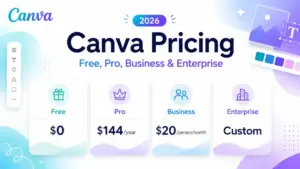
| Canva Business | $200/month (10 users) | Yes, limited AI | Per-person team pricing | Non-designer marketing teams |
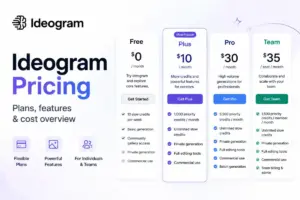
| Ideogram 4.0 Turbo API | ~$30 for 1,000 images (usage-based) | Yes (app) | Usage-based API | Text rendering and API integration |
| OpenAI GPT-Image-2 API | Usage-based (token pricing) | No confirmed free | Usage-based API | Developer integration |
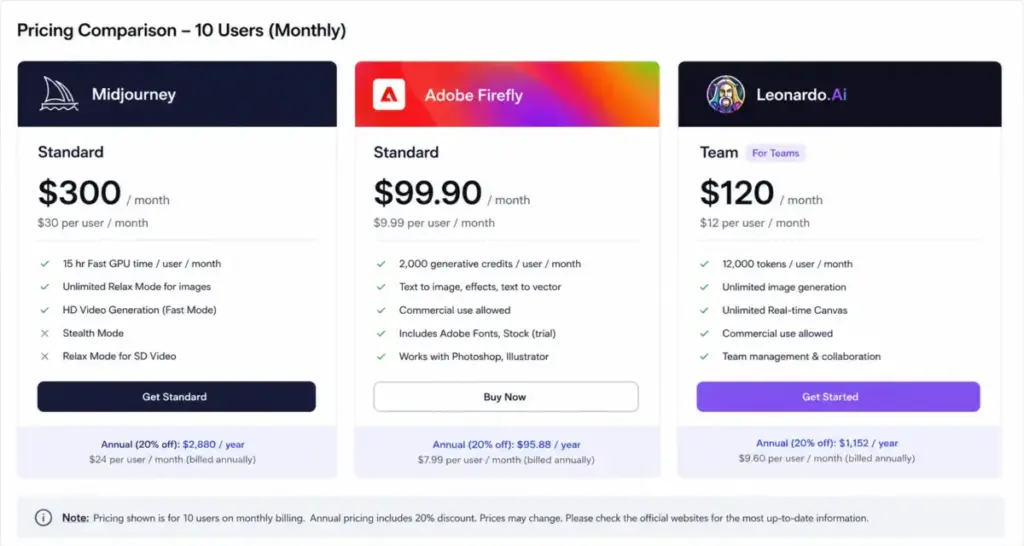
What this means: At 10 users, Midjourney Standard costs $300 per month (monthly) or $240 per month (annual), making it mid-range among subscription tools. Adobe Firefly pricing at $9.99 per seat for Firefly Standard is cheaper per user, but Midjourney’s image quality and prompt control remain the primary reason teams pay the premium.
Leonardo.Ai offers a free plan that Midjourney does not, making it the better starting point for teams testing AI image generation before committing budget. Canva Business at $20 per person per month bundles AI image generation with a full design suite, a better fit for non-designer marketing teams who need more than just generation.
Usage-based tools like Ideogram API and OpenAI GPT-Image-2 price per image or per token, making them cheaper for low-volume or API-driven workflows but harder to budget predictably.
Is Midjourney Worth the Price?
Midjourney is worth it if:
- You are an individual creator, designer, or artist who generates images weekly and values Midjourney’s specific aesthetic style and prompt control
- Your team of 5 to 15 people creates marketing assets, product concepts, or social media visuals and needs consistent high-quality output
- You need video generation and plan to stay on Pro or Mega for Relax Mode video access
- You already know your monthly GPU consumption and can pick the right tier without over-buying
Midjourney is not worth it if:
- You generate fewer than 20 images per month (a free or credit-based competitor like Leonardo.Ai or DALL-E alternatives is more cost-effective)
- Your team wants an all-in-one design suite with AI generation built in (Canva AI alternatives like Canva Business start at $20 per person per month and include a full template library)
- Your team needs enterprise administration, SSO, or seat management (Midjourney does not offer these)
- Your company is under $1 million revenue but needs Stealth Mode for privacy (you must pay $60 per month Pro for a feature that reasonably belongs on Standard)
- You primarily need AI images for one-off projects rather than ongoing creation (usage-based pricing from Ideogram or OpenAI is cheaper per image)
Daniel Rivera’s bottom line on Midjourney pricing: the monthly sticker price is fair for what you get in image and video quality. The gap between advertised simplicity and real cost shows up in GPU burn rates, purchased hour expiration, video mode restrictions, and the enterprise administration void. Budget for the plan that matches your actual GPU consumption, not the cheapest one that gets you in the door.
How to Avoid Overpaying for Midjourney
Here are six specific steps to reduce your Midjourney costs.
1. Start on Standard, not Basic. Basic’s 3.3 hours and no Relax Mode make it a false economy. Standard’s unlimited Relax Mode for images means you never truly run out of generation capacity for static images.
2. Use annual billing. The 20% discount applies to every tier. On Pro, annual billing saves $144 per year per user. At 10 users, that is $1,440 per year saved.
3. Default to Relax Mode for non-urgent work. Keep Fast Mode for deadline-critical output and Turbo Mode for emergency jobs. Run portfolio exploration, style tests, and batch concepts in Relax Mode to preserve Fast hours.
4. Disable Turbo Mode when speed is not critical. Turbo consumes 2x GPU time. Leaving it on by default halves your effective Fast GPU allocation.
5. Track purchased Fast Time expiration. If you buy extra hours, use them within 60 days. Buy small increments ($4 per hour) rather than bulk purchasing hours you might not use before they expire.
6. Audit your team’s tier needs individually. Not every team member needs the same plan. A creative director generating 500 images per month needs Pro or Mega. A copywriter generating 20 reference images per month may be fine on Standard.
FAQ
How much does Midjourney cost per month?
Midjourney costs $10 per month for Basic, $30 per month for Standard, $60 per month for Pro, and $120 per month for Mega. Annual billing reduces those rates by 20% to $8, $24, $48, and $96 per month equivalent. All plans auto-renew. Extra Fast GPU time costs $4 per hour when the monthly allocation runs out.
Is Midjourney free in 2026?
No. Midjourney does not offer a free plan or a free trial on its web platform or Discord. A limited trial exists through the Niji Journey app, but the limits are not fully documented in public pricing pages. Any standard Midjourney generation workflow requires a paid subscription starting at $10 per month.
Which Midjourney plan is best for beginners?
Standard at $30 per month is the best plan for beginners who plan to use Midjourney regularly. It includes 15 hours of Fast GPU time and unlimited Relax Mode for images, so you can experiment freely without worrying about running out of GPU hours. Basic at $10 per month lacks Relax Mode, which means beginners who experiment heavily can exhaust their allocation within days.
Does Midjourney Pro include Stealth Mode?
Yes. Stealth Mode is included in Pro ($60 per month) and Mega ($120 per month). It is not available on Basic or Standard. Stealth Mode prevents your images from appearing in the public Midjourney gallery on the website. It does not hide images generated in public Discord channels.
Do unused Midjourney GPU hours roll over?
No. Unused included monthly Fast GPU time resets at the start of each billing cycle. Purchased extra Fast hours expire after 60 days from purchase date. Free Fast Time earned through daily image rating expires after 30 days. None of these carry over to the next month.
Can my company use Midjourney Standard commercially?
Companies with annual gross revenue under $1,000,000 can use any Midjourney plan for commercial purposes. Companies above that threshold must subscribe to Pro or Mega for commercial asset ownership. Using Basic or Standard at a company exceeding $1 million revenue does not grant commercial use rights for company assets.
Does Midjourney have team accounts or SSO?
Midjourney does not offer team accounts, SSO, seat-admin management, or standard enterprise administration features. Each user needs an individual subscription. Organizations with 50 or more yearly Pro or Mega plans can request bulk billing for a single invoice, but this is an invoicing arrangement, not a team management platform.
How much does Midjourney cost for 10 users?
Ten users on Standard pay $300 per month (monthly billing) or $2,880 per year (annual billing). Ten users on Pro pay $600 per month or $5,760 per year. Ten users on Mega pay $1,200 per month or $11,520 per year. Annual Standard saves $720 per year compared to monthly billing at 10 users.
Is the Midjourney Basic plan worth $10?
Basic is worth $10 per month only for casual users who generate fewer than 50 images per month, never use video, and do not need privacy or Relax Mode. For anyone who generates images regularly, Standard at $30 per month provides dramatically more value: 4.5 times the GPU hours, unlimited Relax Mode, HD video access, and higher concurrency.
Are Midjourney extra GPU hours worth buying?
Extra Fast GPU Time at $4 per hour is worth buying as an occasional top-up for deadline-critical work. It is not worth buying in bulk because purchased hours expire after 60 days and are non-refundable. If you consistently need extra hours, upgrading to the next plan tier is almost always cheaper than repeatedly buying top-ups.