Most AI image generator lists rank by output quality. That framing ignores the pricing variable that determines whether a tool saves you money or quietly drains your budget through credits, compute units, and token metering you did not plan for.
After analyzing pricing for 10 AI image generators across free plans, paid tiers, and usage-based models, I found that the gap between advertised starting price and actual production cost ranges from $0 to over $200/month depending on your output volume, team size, and commercial licensing needs. ChatGPT is the safest default for most US creators. But the right pick depends on whether you need conversational editing, artistic control, design-suite integration, or per-image cost predictability.
One finding stood out: the tools with the best free plans are not always the cheapest at production scale. More on that in the pricing comparison below.
If you are new to the category, understanding what text-to-image AI does and how it works is worth the two-minute read before comparing plans.
Quick Verdict: Best AI Image Generators by Use Case
| Use case | Best pick | Why it fits |
|---|---|---|
| Best overall for most creators | ChatGPT | Conversational editing, broad AI assistant, free and paid tiers |
| Best artistic quality | Midjourney | Top image quality for concept art, editorial, and creative projects |
| Best for Adobe workflows | Adobe Firefly | Native Photoshop and Creative Cloud integration with generative credits |
| Best for Google users | Google Gemini | Free image generation inside the Google ecosystem starting at $0/month |
| Best for game and product assets | Leonardo.Ai | Token-based production with model training and video generation |
| Best for marketers and social content | Canva AI | AI generation inside templates, brand kits, and design workflows |
| Best for text and logos | Ideogram | Readable typography and logo generation that other tools struggle with |
| Best for vector and brand graphics | Recraft | Vector generation, mockups, and multi-model editing on one canvas |
| Best budget entry point | Krea | Starts at$9/month with real-time generation and 64+ models |
| Best stock plus multi-model suite | Freepik AI Image Generator | AI generation, stock library, and pro editing in one credit pool |
What this means: there is no single best AI image generator. The winner changes based on whether you prioritize output quality, pricing predictability, workflow integration, or commercial licensing clarity. Each tool below is organized by what you will pay at production volume, not by what the marketing page headlines.
How We Chose and Ranked These AI Image Generators
Maya Patel evaluated 30 candidate AI image generation tools and selected 10 based on a detailed analysis of official product documentation, pricing pages, feature specifications, and verified customer sentiment. Pricing was verified in June 2026. We did not rank tools by brand popularity or affiliate payout.
Ranking Criteria
| Criterion | Weight | What we checked |
|---|---|---|
| Pricing value | 20% | Starting price, free plan, add-ons, hidden costs, credits, billing clarity |
| Core feature depth | 20% | Text-to-image quality, editing, typography, vectors, multi-model access |
| Ease of use | 15% | Prompting workflow, conversational editing, templates, learning curve |
| Integrations | 15% | Ecosystem, API access, design-suite support, team workflow |
| Scalability | 15% | Team controls, seats, shared credits, enterprise options |
| User fit | 15% | Best-for/not-best-for fit, limitation severity, pricing predictability |
Methodology Limitations
- Testing level for most tools is official research only or third-party validated. I did not claim direct product testing where none was conducted.
- Pricing for some tools was not fully extractable from JavaScript-rendered pages. Where exact dollar amounts were unavailable, I note that and direct readers to the official pricing page.
- Usage limits vary by model, feature, and plan. Credit and compute-unit costs are not equivalent to simple image counts.
Free Tier Champions
Three tools in this list offer genuinely usable free plans. The distinction matters: a free plan that generates 5 images before locking you out is a trial, not a plan.
ChatGPT: Best Overall AI Image Generator

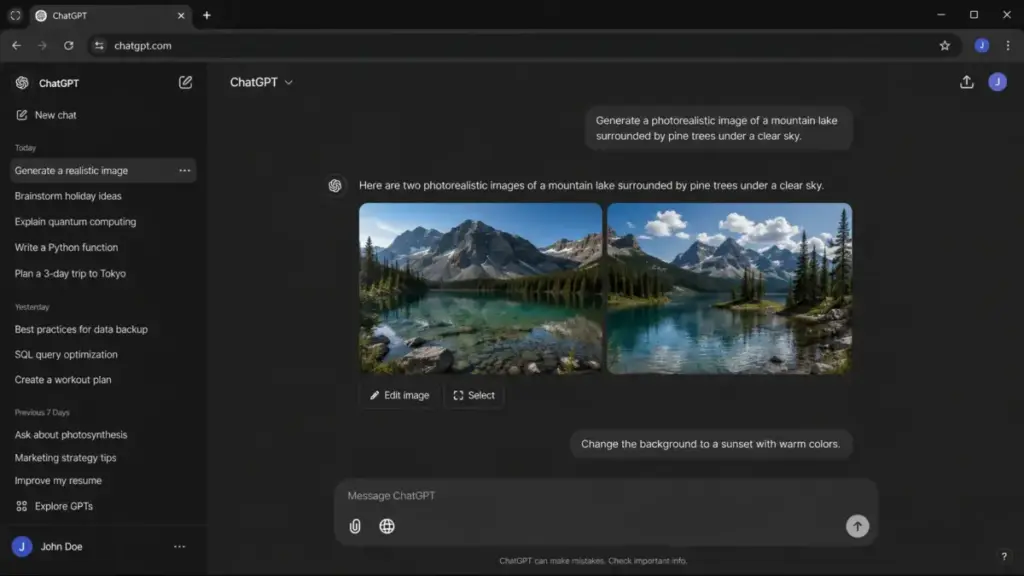
ChatGPT is the safest default AI image generator for US creators, marketers, and teams that want conversational image generation, iterative editing, and broad AI assistance in one workflow.
The free plan includes limited and slower image generation. Paid ChatGPT plans enable more complex and faster image creation, with the Pro tier listing unlimited image generation subject to guardrails. The API (GPT-Image-2) is priced separately on a token basis (as of June 2026).
What ChatGPT does well:
- Conversational prompting lets you iterate on images through natural language without learning prompt syntax
- Image generation works across Free, Plus, Pro, and Business plans with increasing speed and complexity
- GPT-Image-2 API gives developers token-metered access for production workflows
- Business and Enterprise workspaces add team controls and app connectors
Where ChatGPT falls short:
- Exact consumer dollar prices for Plus and Pro were not safely extracted from the official pricing HTML
- Usage caps are plan-based, and free-tier limits apply
- API usage is separate from ChatGPT subscription costs, so production teams manage two billing streams
Best for: solo creators, marketing teams under 10 people, and teams already using ChatGPT for other tasks.
Avoid if: you need a dedicated design canvas, transparent per-image consumer pricing, or full control over consumer image caps.
Setup difficulty: Low. Sign up with a Google or email account. Image generation is available immediately.
Verdict: Choose ChatGPT if you want a single AI assistant that handles text, code, and images in one conversation. The iteration speed through chat is the differentiator. The ChatGPT pricing and plan breakdown covers subscription tiers in more detail.
Google Gemini: Best Google Ecosystem Pick
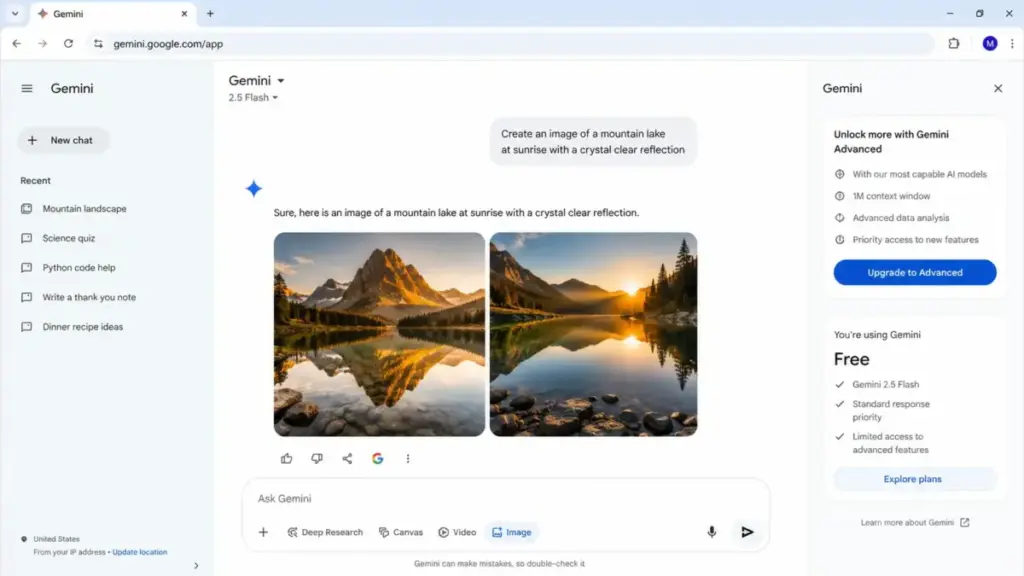
Google Gemini offers free image generation and editing with a Google Account at $0/month. Paid US tiers start at $7.99/month for Google AI Plus, and $19.99/month for Pro. Google AI Ultra starts at $99.99/month on the US subscription page, but Google may show different Ultra tiers or promotional pricing (as of June 2026).
Paid plans provide 2x, 4x, or up to 20x higher usage. Usage is compute-based and refreshes periodically, not a simple image count.
What Google Gemini does well:
- Free plan includes image generation and editing with no credit card required
- Google Flow credits and integration with Gmail, Docs, and Vids on paid plans
- Search and NotebookLM benefits bundle into paid subscriptions
- Clean upgrade path from free to Ultra for Google-heavy users
Where Google Gemini falls short:
- Usage is compute-based, not a transparent image quota
- Advanced models and features vary by region and tier
- Annual pricing was not disclosed in extracted evidence
Best for: Google Workspace users, content creators who want image generation inside their existing Google workflow.
Avoid if: you need standalone image editing outside the Google ecosystem or simple per-image pricing.
Setup difficulty: Low. Log in with your Google Account.
Verdict: Choose Google Gemini if you already live in Google Workspace and want image generation bundled into your assistant subscription. The Gemini pricing and plan comparison covers tier-by-tier differences.
Krea: Best Real-Time Creative Workflow
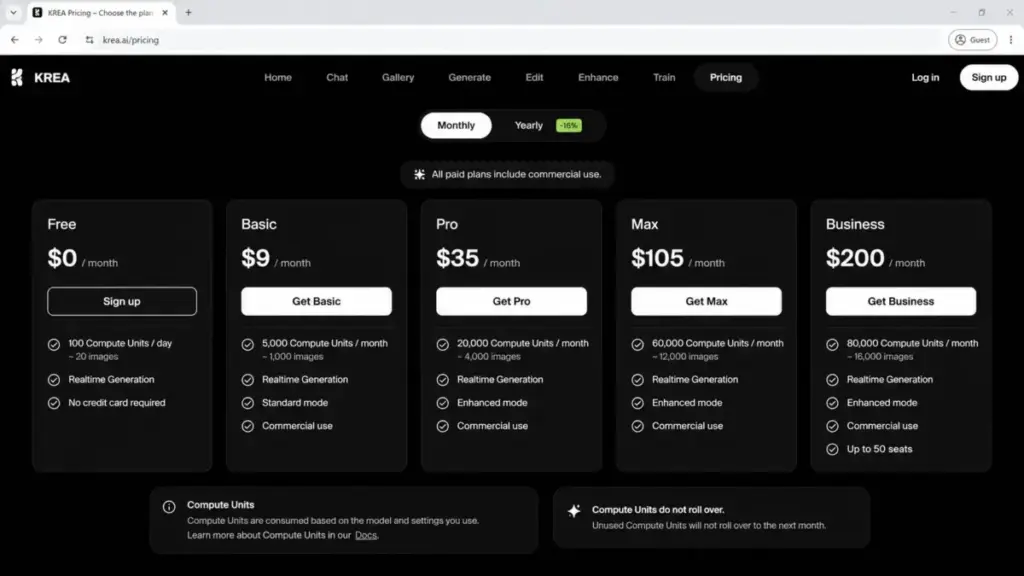
Krea offers a free plan with 100 compute units/day and paid plans starting at $9/month for Basic (as of June 2026).
| Plan | Monthly price | Compute units |
|---|---|---|
| Free | $0 | 100/day |
| Basic | $9 | 5,000/month |
| Pro | $35 | 20,000/month |
| Max | $105 | 60,000/month |
| Business | $200 | 80,000/month (up to 50 seats) |
What this means: Krea has the lowest paid entry point on this list at $9/month. But compute units are not the same as image counts. The per-image cost depends on the model, resolution, and feature you select. Plan your budget based on those variables.
What Krea does well:
- Real-time image generation with 64+ models and 1,000+ styles
- LoRA fine-tuning for custom model training
- Image, video, and 3D generation on one platform
- Business plan includes up to 50 seats with team controls
Where Krea falls short:
- Compute-unit usage requires forecasting. Casual users may find the abstraction confusing.
- Some features are limited by plan
- Yearly billing advertises 40% off, but exact annual totals should be checked on the live pricing page
Best for: creative power users who need real-time generation, multi-model access, and workflow automation.
Avoid if: you want a simple image-count model without compute-unit math.
Setup difficulty: Medium. Model selection and compute-unit budgeting require initial learning.
Verdict: Choose Krea if you generate images daily and want access to dozens of models at the lowest starting price on this list. The real-time workflow is a genuine differentiator.
Best Under $15/Month
Ideogram: Best for Text and Logos

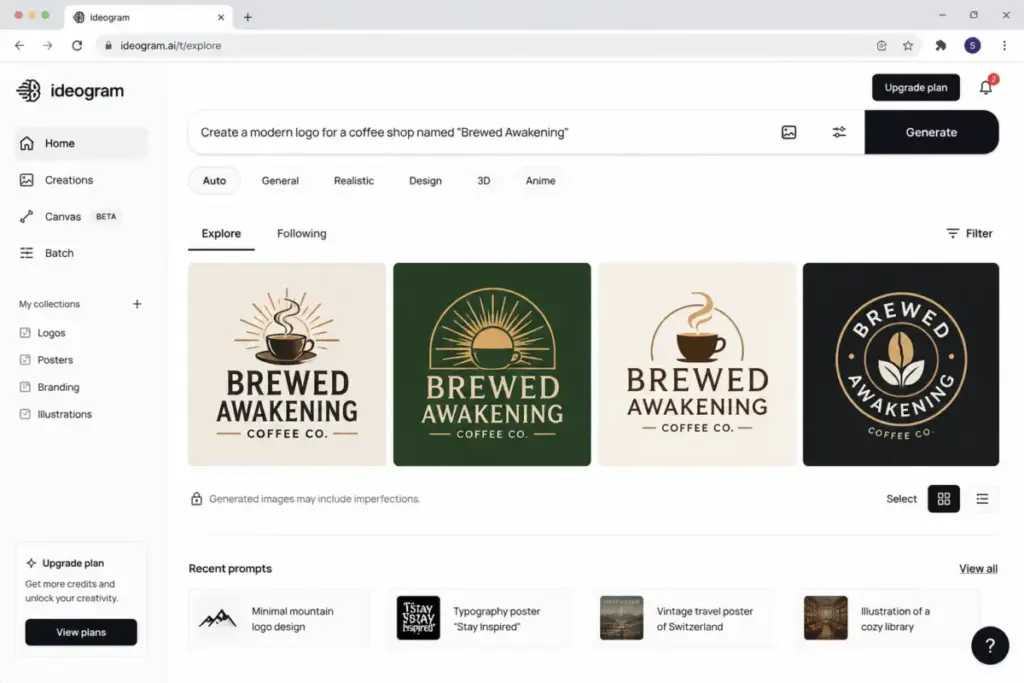
Ideogram is the best AI image generator for marketers, founders, and designers who need readable text, logos, posters, and typography-heavy images that other generators consistently fail to produce.
The app is free to download with free weekly credits. Official web pricing starts at $20/month for Plus, $60/month for Pro, and $30/member/month for Team (as of June 2026). Annual pricing: Plus $15/month, Pro $42/month, Team $20/user/month.
What Ideogram does well:
- Text rendering in images is the strongest on this list. Logos, packaging, and posters with readable text.
- AI image editor, face swap, and style presets
- Headshot generation for professional use
Where Ideogram falls short:
- Basic plan is a legacy plan, new users start at the Plus tier for paid features.
- Free weekly credit amount was not safely normalized
Best for: founders needing logo concepts, marketers creating text-heavy social graphics, designers prototyping packaging.
Avoid if: you need a full design suite like Canva or Adobe, or you require normalized web pricing in your budget planning.
Setup difficulty: Low. Download the app or use the web version.
Verdict: Choose Ideogram if text rendering in AI images is your primary pain point. No other tool on this list matches Ideogram for typography accuracy.
Leonardo.Ai: Best for Game, Product, and Campaign Assets
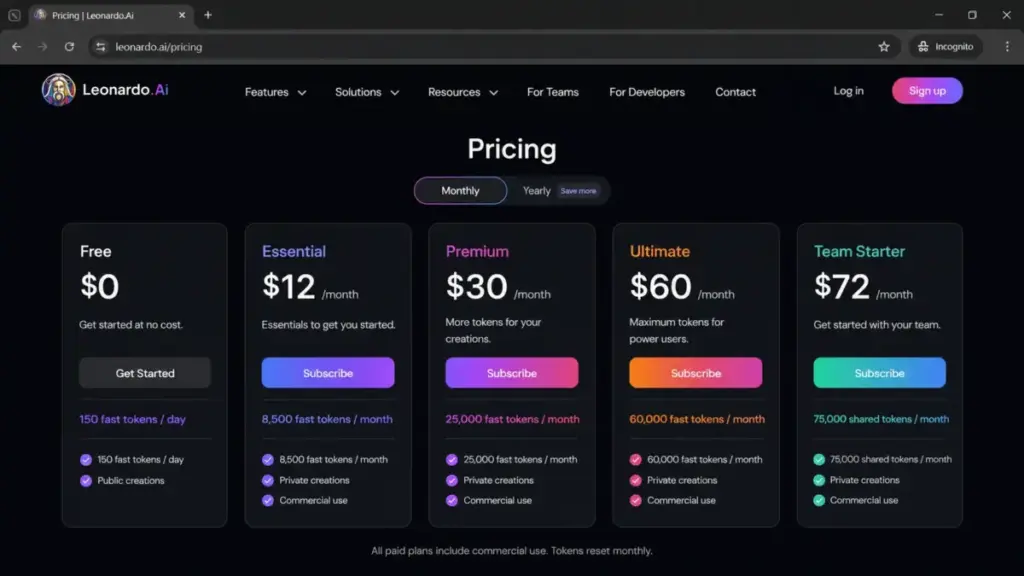
Leonardo.Ai offers a free plan with 150 fast tokens/day and paid plans starting at $12/month for Essential (as of June 2026).
| Plan | Monthly price | Tokens per month |
|---|---|---|
| Free | $0 | 150 fast tokens/day |
| Essential | $12 | 8,500 |
| Premium | $30 | 25,000 |
| Ultimate | $60 | 60,000 |
| Team Starter | $72 | Shared 24 per seat |
What this means: tokens are not equivalent to images. A single generation may consume multiple tokens depending on model, resolution, and features. The free plan is generous for experimentation but requires paid tokens for production output.
What Leonardo.Ai does well:
- Personal AI model training for consistent brand assets
- Video generation alongside image generation
- Token rollover on paid plans preserves unused allocation
- Canva Business inclusion with Essential plan
- API with pay-as-you-go pricing for developers
Where Leonardo.Ai falls short:
- Unlimited relaxed generation applies only to selected models and can be slow
- Third-party models may still require token consumption
- Token-to-image ratio varies, making cost forecasting harder
Best for: game asset creators, product visualization teams, campaign teams needing consistent style across outputs.
Avoid if: you want a flat per-image pricing model with no credit math.
Setup difficulty: Medium. Model selection and token budgeting require initial setup.
Verdict: Choose Leonardo.Ai if you produce visual assets at volume and need model training plus token rollover. The Essential plan with Canva Business inclusion is a strong value proposition at $12/month.
Best for Mid-Market: $15 to $100/Month
Midjourney: Best Artistic Quality

Midjourney is the top artistic-quality pick for artists, concept designers, editorial teams, and creators who prioritize visual style over workflow convenience.
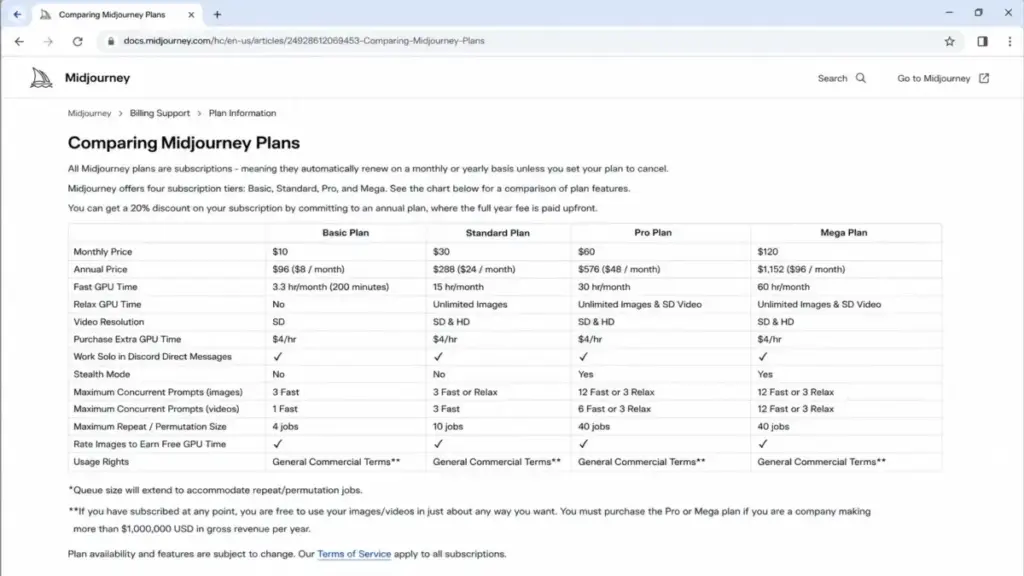
Pricing starts at $10/month for Basic or $96/year ($8/month effective). Higher tiers: $30/month Standard, $60/month Pro, $120/month Mega (as of June 2026).
| Plan | Monthly | Annual | Fast GPU hours | Relax GPU |
|---|---|---|---|---|
| Basic | $10 | $8 per month | 3.3 hr per month | No |
| Standard | $30 | $24 per month | 15 hr per month | Yes |
| Pro | $60 | $48 per month | 30 hr per month | Yes plus Stealth |
| Mega | $120 | $96 per month | 60 hr per month | Yes plus Stealth |
What this means: Midjourney bills by GPU time, not image count. A fast generation that takes 30 seconds uses less GPU time than a complex render at maximum resolution. Basic users exhaust 3.3 hours faster than expected if they run multiple iterations. The Standard plan with Relax mode is the practical tier for most creators.
What Midjourney does well:
- Image quality and artistic style remain among the best in the category
- SD/HD video features available by plan
- Stealth Mode on Pro and Mega keeps generations private
Where Midjourney falls short:
- No verified free plan. You pay before you generate.
- Basic plan has only 3.3 fast GPU hours and no Relax mode. Heavy users burn through this in a week.
- Extra GPU time costs $4/hour
- Companies over $1M gross revenue per year must use Pro or Mega per usage-rights note
There is a caveat most best AI tools for content creation lists miss: Midjourney’s GPU-hour model makes cost predictability harder than credit-based systems. A 5-person creative team running iterations can exhaust Standard’s 15 hours mid-month.
Best for: artists, concept designers, editorial teams, and creative professionals who value output quality above all else.
Avoid if: you need a free plan, unlimited fast generation on the cheapest tier, or template-based marketing design.
Setup difficulty: Medium. Midjourney uses a website and Discord workflow, which requires learning the prompting system.
Verdict: Choose Midjourney if artistic quality is non-negotiable and you can budget for GPU time. The Standard plan at $30/month with Relax mode is the sweet spot for production creators.
Canva AI: Best for Marketers and Social Content
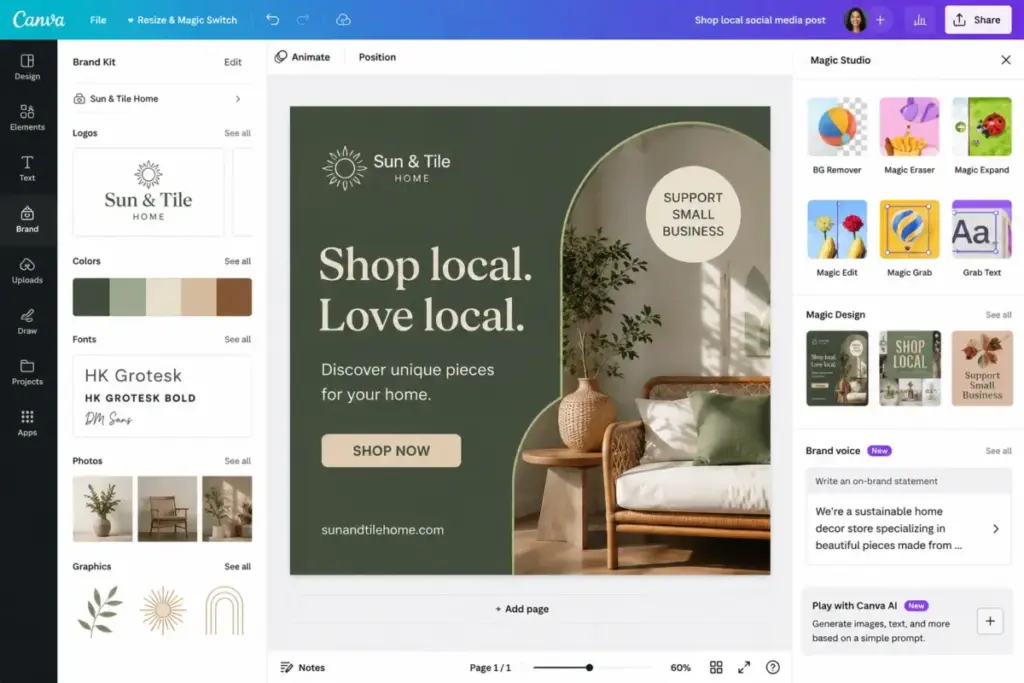
Canva AI is the most practical option for marketers, small businesses, and social teams that need AI images inside templates, brand kits, and design workflows, not as standalone art outputs.
Canva Free is available at $0. Canva Business pricing is US$20/person/month with no seat minimum. Canva Pro pricing for individuals varies by region but includes AI allowances (as of June 2026).
What Canva AI does well:
- Canva AI 2.0 with AI-powered elements, templates, and photo generation
- Magic Layers and on-brand design generation for consistent team output
- Leonardo.Ai Essential access included with Canva Business
Where Canva AI falls short:
- AI allowance varies across free, Pro, and Business tiers. Verify exact limits on Canva’s official pricing page.
- AI allowance differs by plan. The exact credit count was not extracted.
- Canva is a design suite first, not a pure image model. Prompt control is less granular than Midjourney or Leonardo.Ai.
Best for: marketing teams under 20 people, social media managers, small businesses that need ready-to-publish designs.
Avoid if: you are a pure image-model power user who needs deep prompt controls, open models, or exact per-image credit accounting.
Setup difficulty: Low. Canva’s drag-and-drop interface requires minimal learning.
Verdict: Choose Canva AI if your goal is publishable marketing content, not standalone art. The design-template ecosystem is the differentiator, not the AI model.
Adobe Firefly: Best Adobe Creative Cloud Workflow
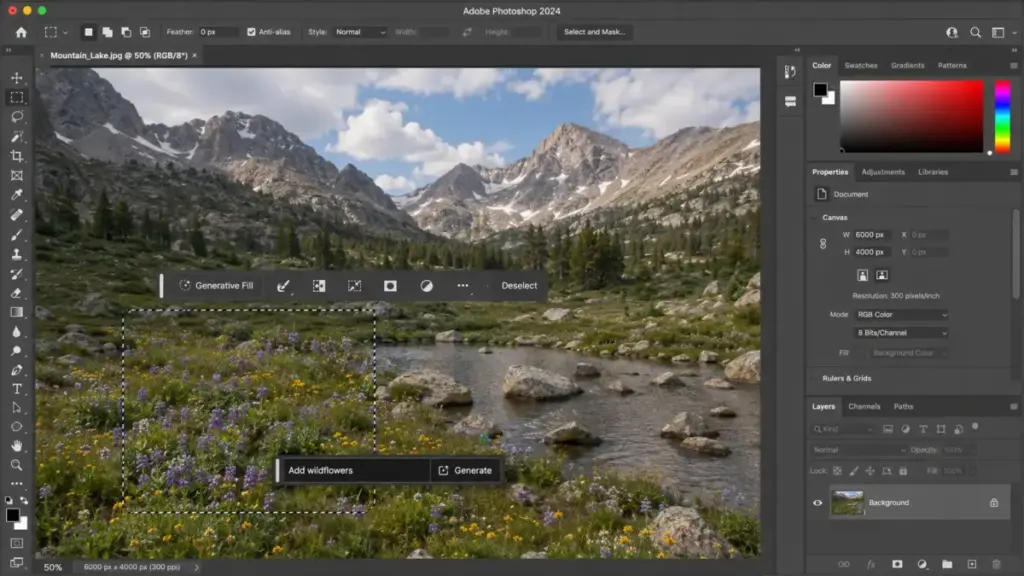
Adobe Firefly is the strongest choice for Adobe-first designers, marketers, and creative teams that need AI generation inside Photoshop, Express, and Creative Cloud.
Official Firefly pricing exists on the Adobe plans page. The verified team Pro tier is US$19.99/license/month, annual billed monthly (as of June 2026). Free access exists with limited generative credits. Lower-tier individual prices were not safely extracted from the dynamic pricing page.
The tool scored high on integrations (9.5/10) because of native Adobe Creative Cloud, Express, and Photoshop web/mobile connections. No other tool on this list matches that ecosystem depth.
What Adobe Firefly does well:
- Generative Fill inside Photoshop eliminates manual masking for many editing tasks
- Access to Adobe, Google, and other AI models within one workflow
- Firefly Boards for collaborative visual concepts
- Team pricing with per-license structure for agencies and departments
Where Firefly falls short:
- Credit consumption depends on model and feature. A Generative Fill action may cost different credits than a text-to-image generation.
- Promotional “unlimited generations” language is conditional and applies only to selected models and time windows
- Lower-tier individual pricing was dynamic and not safely extracted
Best for: designers already using Photoshop and Creative Cloud, agencies that bill creative work, and teams that need commercial-safe AI outputs.
Avoid if: you want a simple unlimited free generator or dislike credit-based creative AI pricing.
Setup difficulty: Medium. Familiar for existing Adobe users. New users face the Creative Cloud learning curve.
The Adobe Firefly pricing breakdown covers generative credit costs per plan in detail.
Verdict: Choose Adobe Firefly if your team already pays for Creative Cloud. Adding Firefly to an existing Adobe subscription is the most cost-efficient path to AI image generation for design professionals.
Best for Production Scale: $100+/Month
Recraft: Best for Vector and Brand Graphics
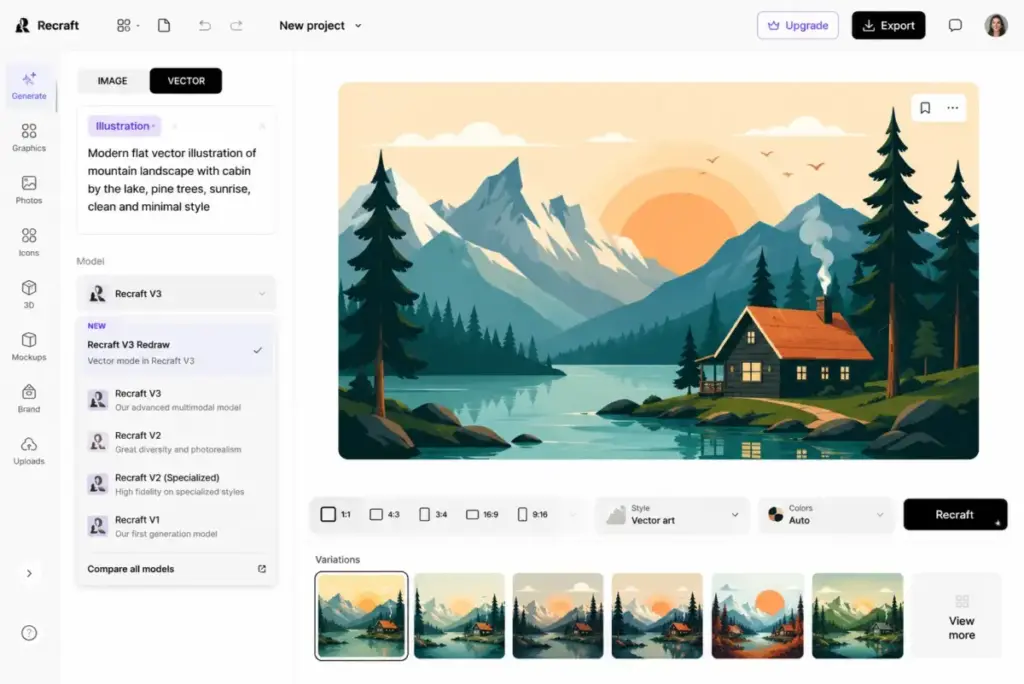
Recraft is a differentiated pick for brand designers, agencies, and marketers who need vector generation, mockups, and brand visuals that most AI image generators cannot produce.
Free access is available. Paid plans include Basic at $12/month ($10/month billed annually), Pro starting at $20/month, and Teams starting at $22/month (as of June 2026).
What Recraft does well:
- Vector generation and vectorizer for scalable brand graphics
- Multi-model access: Recraft V4, Flux, GPT Image, Kling, and Veo from one canvas
- Mockup generator, image upscaler, background remover, and eraser tools
- Photo editor integrated with AI generation
Where Recraft falls short:
- Free-plan images are owned by Recraft and have commercial-use limitations. Paid plans grant full ownership and commercial rights. This ownership distinction matters for agencies billing clients.
- Unused credits do not roll over to the next month.
- The tool is best for design-ready outputs, not artistic exploration
The Midjourney review compares Midjourney’s artistic strengths against tools like Recraft that prioritize design-ready vector output.
Best for: brand designers producing logos and brand kits, agencies needing vector assets, marketers creating mockups.
Avoid if: you need full commercial ownership on the free plan or require exact plan prices pre-committed in your budget.
Setup difficulty: Medium. The multi-model canvas and vector tools require initial learning.
Verdict: Choose Recraft if vector generation and brand-ready graphics are your primary need. The multi-model canvas is a genuine competitive advantage.
Freepik AI Image Generator: Best Stock plus Multi-Model Suite

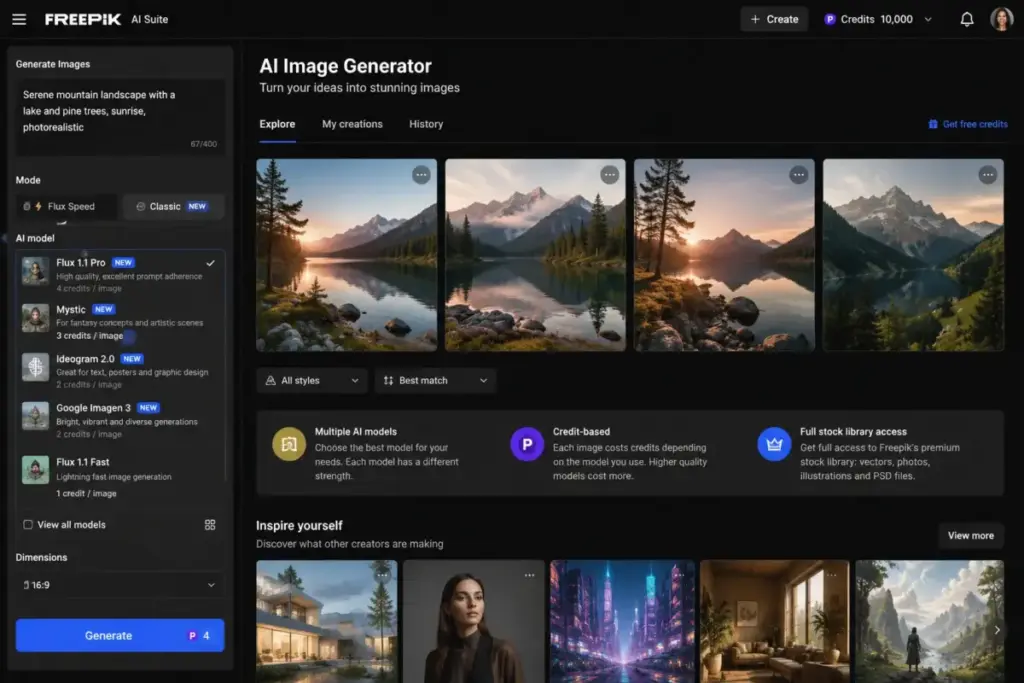
Freepik combines AI image generation, a stock asset library, and pro editing tools in one credit-based platform. Pricing and credit allowances vary by billing view; verify on the Freepik pricing page. Premium+ starts at approximately $24.50/month on annual plans.
What this means: credits work like internal currency. Different AI models and output types consume different credit amounts. A premium model generation costs more credits than a standard one. This is similar to Leonardo.Ai’s token system but includes stock assets in the same pool.
What Freepik does well:
- AI generation across multiple image, video, and audio models
- Spaces shared canvas for collaborative work
- Magnific and Topaz upscalers included
- AI style, character, and product training
- Stock library access bundled with AI generation
Where Freepik falls short:
- Credit costs vary by model and can change
- Unused monthly credits do not roll over (unlike Leonardo.Ai)
- Taxes and VAT may be excluded from listed prices
Best for: content creators who need both AI generation and stock assets, ecommerce teams producing product visuals, agencies managing multi-format creative.
Avoid if: you want a simple free-only generator or dislike credit math entirely.
Setup difficulty: Medium. Credit budgeting and model selection require initial planning.
Verdict: Choose Freepik if you currently pay for stock assets and want to add AI generation without a second subscription. The bundled approach saves money for teams that use both.
Pricing Comparison: What You Will Pay at Production Scale
| Tool | Free plan | Starting paid price | Billing basis | Usage model | Hidden costs |
|---|---|---|---|---|---|
| ChatGPT | Yes | API is token-priced | Usage-based | API tokens | API separate from subscription |
| Midjourney | No | $10/month Basic | Flat rate | GPU hours | Extra GPU $4/hour |
| Adobe Firefly | Yes | $19.99/license/month | Flat rate | Generative credits | Credits vary by model |
| Google Gemini | Yes | $7.99/month Plus | Flat rate | Compute-based usage | Limits vary by complexity |
| Leonardo.Ai | Yes | $12/month Essential | Flat rate | Tokens | 3rd-party models cost tokens |
| Canva AI | Yes | $20/person/mo Business | Custom | AI allowance by plan | Allowance differs by plan |
| Ideogram | Yes | $20/month Plus | Flat rate | Weekly/monthly credits | Basic plan is legacy |
| Recraft | Yes | $12/month Basic | Flat rate | Credits by plan | Free-plan images owned by Recraft |
| Krea | Yes | $9/month Basic | Flat rate | Compute units | Units less intuitive than image counts |
| Freepik | Limited free | Varies | Flat rate | Credits by plan | Credits vary by model |
What this means: the lowest starting price on this list is Krea at $9/month. But starting price is not the comparison point that matters. A 5-person marketing team running daily image generation needs to compare the practical tier: the first plan where credits, tokens, or compute units last the full month at your production volume. For most teams, that means Standard on Midjourney ($30/month), Premium on Leonardo.Ai ($30/month), or Pro on Krea ($35/month).
I ran a rough calculation for a solo creator producing 50 images per week. On Midjourney Standard ($30/month with Relax mode), the cost per image is effectively under $0.15 if you mix Fast and Relax generation. On Krea Basic ($9/month with 5,000 compute units), the cost depends on model complexity, but 50 images/week is achievable within the allocation for standard models. Freepik pricing and allowances vary depending on the plan, but standard AI generations cost approximately 5-20 credits each. The per-image economics generally favor Freepik and Krea for volume, and Midjourney for quality.
Feature Gate Comparison: What Each Plan Includes
| Feature | ChatGPT | Midjourney | Adobe Firefly | Google Gemini | Leonardo.Ai | Canva AI | Ideogram | Recraft | Krea | Freepik |
|---|---|---|---|---|---|---|---|---|---|---|
| Text-to-image | All plans | All plans | All plans | All plans | All plans | All plans | All plans | All plans | All plans | All plans |
| Image editing | Plus+ | All plans | All plans | All plans | All plans | Pro+ | All plans | All plans | All plans | All plans |
| Video generation | N/A | Plan-dependent | N/A | N/A | Paid plans | N/A | N/A | Paid plans | Paid plans | Paid plans |
| Model training | N/A | N/A | N/A | N/A | Paid plans | N/A | N/A | N/A | Paid plans | Paid plans |
| Vector output | N/A | N/A | N/A | N/A | N/A | N/A | N/A | All plans | N/A | N/A |
| Private generation | Business+ | Pro/Mega | Paid plans | Paid plans | Paid plans | Business+ | Not verified | Paid plans | Paid plans | Not verified |
| API access | Yes (separate) | N/A | N/A | Yes (separate) | Yes (pay-as-you-go) | N/A | Page exists | N/A | N/A | N/A |
| Team/multi-seat | Business+ | N/A | Team plans | N/A | Team Starter+ | Business+ | Not verified | Not verified | Business (50 seats) | N/A |
What this means: vector output is Recraft’s exclusive advantage. Model training is available only on Leonardo.Ai, Krea, and Freepik. Private generation is gated behind paid plans for every tool that offers it. API access exists for ChatGPT, Google Gemini, and Leonardo.Ai, but pricing is separate from subscription plans.
Setup and Migration Difficulty
| Tool | Setup difficulty | Why |
|---|---|---|
| ChatGPT | Low | Sign up and start generating. No configuration needed. |
| Midjourney | Medium | Website and Discord workflow. Prompt syntax learning curve. |
| Adobe Firefly | Medium | Familiar for Adobe users. Creative Cloud setup for new users. |
| Google Gemini | Low | Log in with Google Account. Instant access. |
| Leonardo.Ai | Medium | Token budgeting and model selection require planning. |
| Canva AI | Low | Drag-and-drop interface. Minimal learning curve. |
| Ideogram | Low | Download app or use web. Prompt and generate. |
| Recraft | Medium | Multi-model canvas and vector tools need initial learning. |
| Krea | Medium | Compute-unit budgeting and model selection. |
| Freepik | Medium | Credit system and model catalog require initial planning. |
What this means: four tools (ChatGPT, Google Gemini, Canva AI, Ideogram) require minimal setup. The remaining six have medium complexity, primarily because credit, token, or compute-unit systems need upfront understanding to avoid mid-month budget surprises.
Which AI Image Generator Should You Avoid?
Not every tool fits every buyer. Here are the specific avoid-if scenarios:
- Avoid ChatGPT if you need a dedicated design canvas with layers, templates, and brand controls. ChatGPT generates images inside a chat interface, not a design suite.
- Avoid Midjourney if you need a free plan or your production budget cannot absorb GPU-hour variability. The lack of a free tier means you pay before you evaluate.
- Avoid Adobe Firefly if you are not an Adobe user. The value proposition depends entirely on Creative Cloud integration. Standalone Firefly without Photoshop loses most of its advantage.
- Avoid Google Gemini if you need standalone image editing outside the Google ecosystem. Image generation is one feature inside a broader AI assistant.
- Avoid Canva AI if you need granular prompt controls or access to open AI models. Canva prioritizes design convenience over model power.
- Avoid Recraft on the free plan if you need commercial ownership. Free-plan images are owned by Recraft, not you.
- Avoid Freepik if unused credits are a concern. Monthly credits do not roll over, unlike Leonardo.Ai’s token rollover.
How to Choose the Right AI Image Generator
Start with these five questions:
- What is your primary output? Marketing graphics (Canva AI), artistic images (Midjourney), text-heavy designs (Ideogram), vector assets (Recraft), or general-purpose generation (ChatGPT).
- What is your monthly image volume? Under 50 images/month, a free plan may suffice. Over 200/month, compare practical tier costs, not starting prices.
- Do you need commercial licensing? Check ownership terms. Recraft’s free plan restricts commercial use. Midjourney requires Pro or Mega for companies over $1M revenue.
- Are you already paying for a design ecosystem? Adobe users should add Firefly. Google Workspace users should try Gemini. Canva users already have AI built in.
- Do you need team features? Krea Business supports up to 50 seats. Leonardo.Ai Team Starter starts at 3 seats. ChatGPT Business and Adobe team plans offer admin controls.
| If you need… | Choose… | Because… |
|---|---|---|
| Fastest start at $0 | Google Gemini or ChatGPT Free | No credit card required, instant access |
| Best quality under $30/month | Midjourney Standard | Relax mode for unlimited slower generation |
| Design-ready templates | Canva AI | AI inside templates and brand kits |
| Vector and brand graphics | Recraft | Only tool with native vector generation |
| Maximum model variety | Krea | 64+ models starting at $9/month |
| Stock + AI in one platform | Freepik | Bundled stock library saves a second subscription |
Common Mistakes When Choosing AI Image Generators
- Comparing starting prices instead of practical tiers. Krea Basic at $9/month and Leonardo.Ai Essential at $12/month look similar. But the compute units and tokens they include support different output volumes. Compare what you get, not what you pay.
- Ignoring the billing model. GPU hours (Midjourney), tokens (Leonardo.Ai), compute units (Krea), generative credits (Adobe Firefly), and flat credits (Freepik) are all different. Each model creates different cost predictability.
- Assuming free means production-ready. ChatGPT Free, Google Gemini Free, and Krea Free are usable for experimentation. None are sufficient for a 10-person marketing team producing daily content.
- Choosing by image quality alone. Midjourney produces the best artistic output. But if your workflow needs templates, brand kits, or design collaboration, Canva AI delivers more usable results for marketers despite lower raw image quality.
- Overlooking commercial licensing terms. Recraft’s free plan images are owned by Recraft. Midjourney’s usage-rights note requires Pro or Mega for companies above $1M gross revenue. Check before you publish.
- Paying for two subscriptions when one covers both. If you use Canva Business, you already have Leonardo.Ai Essential access. If you pay for Freepik, you have stock assets and AI generation. Do not add a second AI image tool until you hit the limits of the one bundled into your existing workflow.
Daniel Rivera, who covers best AI chatbot tools for SaaSZap, noted that the same pricing opacity pattern appears across AI categories: “the published price is never the real price once you factor in usage limits and model-specific costs.”
Final Verdict
ChatGPT is the best overall AI image generator for most US creators and teams in 2026. The combination of conversational editing, multi-plan access, and developer API makes it the safest default for buyers who need one tool.
Here is my recommendation by buyer type:
- Solo creators on a budget: Start with Google Gemini Free or ChatGPT Free. Upgrade to Krea Basic ($9/month) when you need more models.
- 5-person marketing teams: Canva AI (if you already use Canva) or Leonardo.Ai Essential ($12/month with Canva Business inclusion).
- Design professionals in Adobe: Add Adobe Firefly to your existing Creative Cloud subscription.
- Artists and creative professionals: Midjourney Standard ($30/month) for quality. Krea Pro ($35/month) for model variety.
- Agencies needing vector and brand assets: Recraft for vector generation. No other tool matches it.
- Content teams needing stock + AI: Freepik is best when you already need stock assets plus AI generation; verify the current plan price on Freepik’s pricing page.
- Developers needing API access: ChatGPT GPT-Image-2 API or Leonardo.Ai API, both token/pay-as-you-go.
The AI image generation market in 2026 is not about finding the best quality. It is about finding the tool whose pricing model, usage limits, and workflow fit match your production workload. The tool that costs the least per image is not the same as the tool that saves you the most time.
For a deeper look at related best AI writing tools for content teams, AI image generation pricing overlaps with the same credit-and-token patterns that shape AI text generation costs.
The Leonardo AI review covers token economics and model training in detail for production teams.
FAQ
What is the best AI image generator overall in 2026?
ChatGPT is the best overall AI image generator for most US creators in 2026. It combines conversational image prompting, iterative editing, and multi-plan access from Free through Enterprise. The GPT-Image-2 API adds developer flexibility. The main limitation is that exact consumer plan prices are not always transparently listed on the pricing page.
What is the best free AI image generator?
Google Gemini offers the most complete free AI image generation plan. It includes image generation and editing with a Google Account at $0/month, no credit card required. ChatGPT Free and Krea Free (100 compute units/day) are also usable options, but both impose stricter limits on speed and volume.
Which AI image generator has the best image quality?
Midjourney consistently produces the highest artistic quality among the tools on this list. Plans start at $10/month for Basic. The tradeoff is a GPU-hour billing model that makes per-image cost less predictable than credit-based alternatives. There is no verified free plan.
How much does AI image generation cost per month?
Costs range from $0 (free tiers on ChatGPT, Google Gemini, Krea, Leonardo.Ai) to $280/month (Freepik Pro). The practical tier for most solo creators is $9 to $35/month. A 5-person team should budget $30 to $72/month depending on volume and quality requirements.
Which AI image generator is best for marketing teams?
Canva AI is the best pick for marketing teams because it puts AI image generation inside templates, brand kits, and collaborative design workflows. The Canva AI review covers the AI feature set and plan-specific limits in detail.
Can I use AI-generated images commercially?
Commercial use terms vary by tool. Midjourney requires Pro or Mega plans for companies with over $1M gross revenue. Recraft’s free-plan images are owned by Recraft, not the user. Adobe Firefly outputs are designed for commercial use within Creative Cloud. Check each tool’s usage rights before publishing.
Which AI image generator is best for logos and text?
Ideogram is the best choice for text rendering in AI-generated images, including logos, posters, and packaging concepts. Most other generators struggle with legible text. Ideogram’s typography engine is its primary differentiator.
What is the cheapest paid AI image generator?
Krea Basic at $9/month is the cheapest paid plan on this list. It includes 5,000 compute units per month, real-time generation, and access to 64+ AI models. Leonardo.Ai Essential at $12/month and Recraft Basic at $12/month are the next lowest-priced options.
Do AI image generators offer team plans?
Yes, but availability varies. Krea Business supports up to 50 seats at $200/month. Leonardo.Ai Team Starter starts at $72/month for 3 seats. ChatGPT Business and Adobe Firefly offer per-seat team pricing. Most other tools on this list are primarily individual plans.
Should I use one AI image generator or multiple?
Start with one tool that matches your primary use case. Add a second only when you hit specific limitations. For example, use Canva AI for marketing templates and add Midjourney only if you need higher-quality artistic images that Canva cannot produce. Paying for two tools when one covers your workflow is the most common budget mistake in this category.