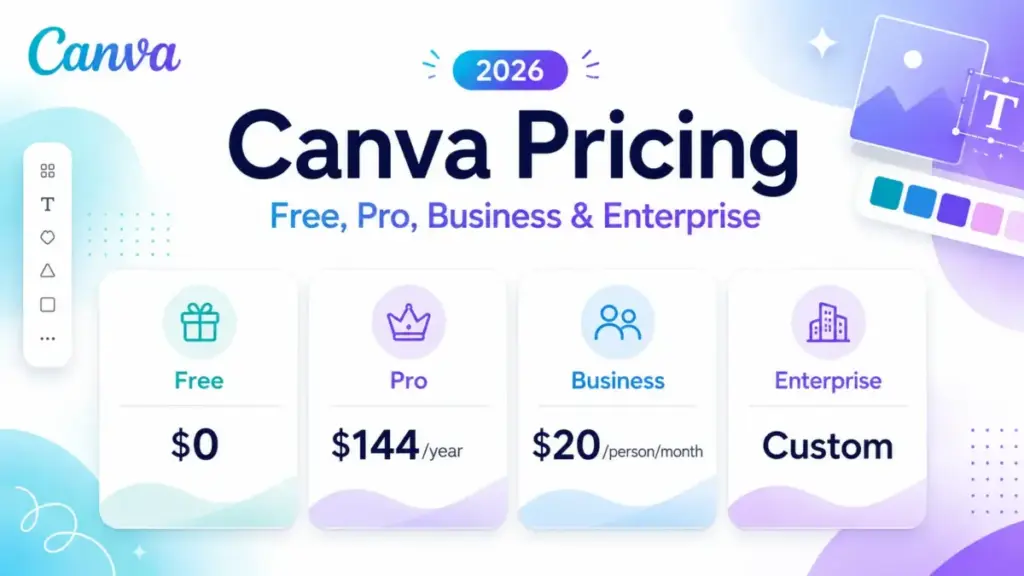
Canva’s US pricing page shows Pro at $144 per year for one person. Search for “Canva Pro monthly price,” though, and you will find some accounts seeing $18 per month while others report $15 or even $12. That is not a bug.
Canva’s terms state that pricing can vary by location and billing information, which means the number on your checkout screen is not always the number on someone else’s.
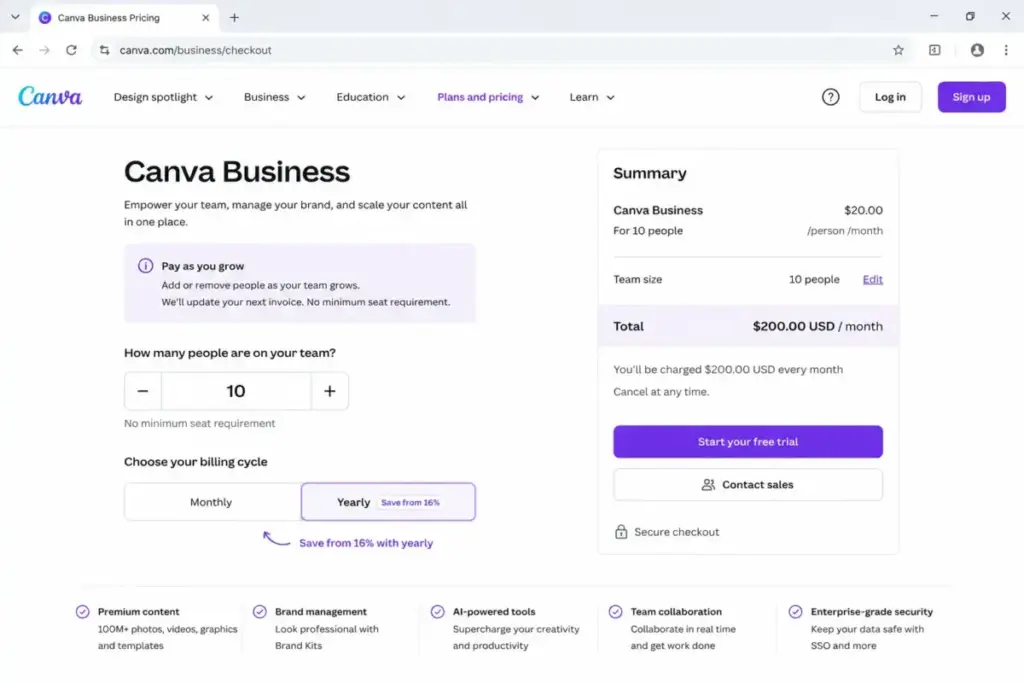
The confusion gets worse with teams. Canva retired the old Teams plan for new buyers and replaced it with Canva Business at $20 per person per month with no seat minimum.
Among the best AI image generators, Canva combines design, content production, collaboration, and AI tools within one subscription.
Most ranking pages still quote legacy Teams pricing that new US customers cannot buy. If you are budgeting from those pages, you are budgeting against a plan that no longer exists for new sign-ups.
This guide uses verified pricing from Canva’s official pages as of June 13, 2026, labels every number by its source type, and shows what Canva costs at 5, 10, 25, 50, and 100 users.
I tracked AI pricing changes across 12 tools monthly for 18 months, and Canva’s shift from a flat team plan to per-seat Business billing is one of the larger structural pricing changes I have documented.
| Quick Pricing Verdict | |
|---|---|
| Starting price | $0 (Canva Free, permanent) |
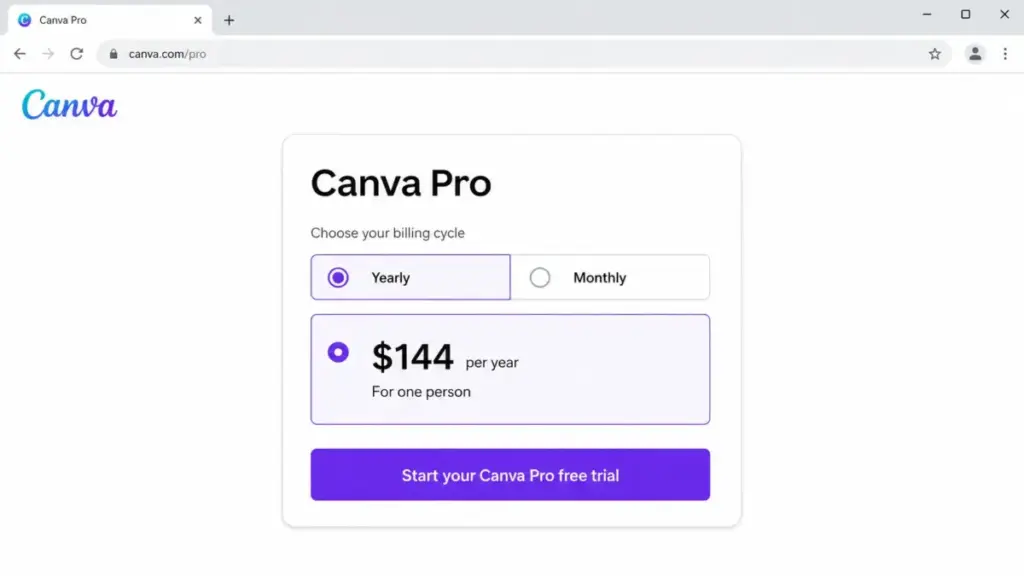
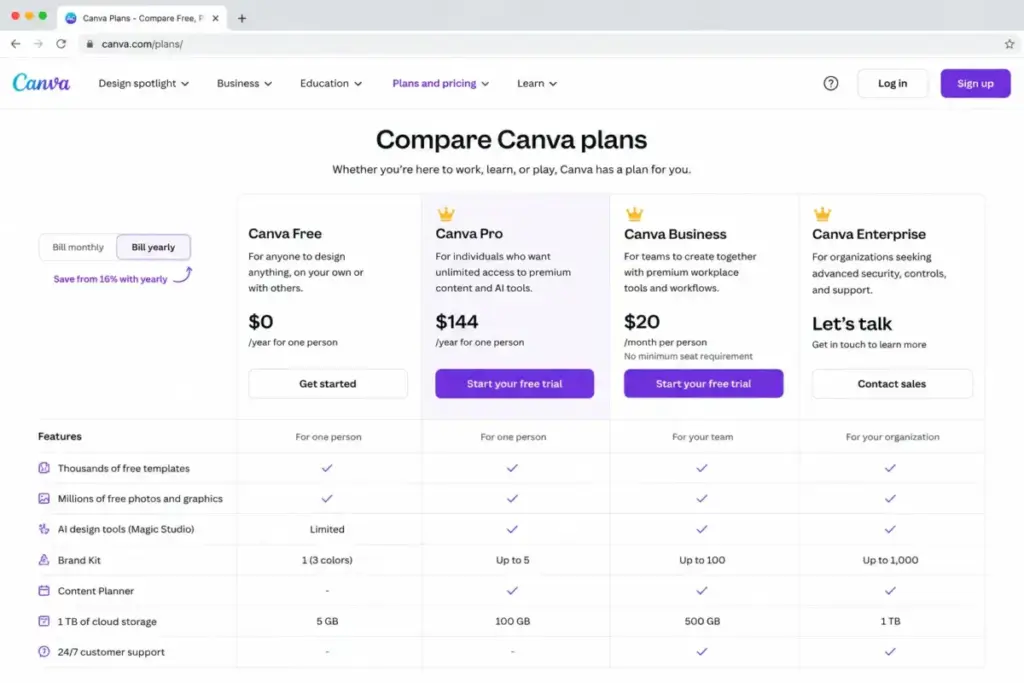
| Pro annual price (official) | $144/year for one person |
| Pro monthly price (US observation) | $18/month (account-specific, not universally confirmed) |
| Business price | $20/person/month (official, no seat minimum) |
| Enterprise price | Custom quote |
| Free plan | Yes, permanent with limited AI, storage, and Brand Kits |
| Free trial | Available for eligible accounts; duration and terms vary |
| Best plan for most solo users | Canva Pro |
| Best plan for teams | Canva Business |
| Plan to avoid | Business for a solo user who only needs premium assets |
| Biggest hidden cost | AI Pass add-on (price undisclosed) and quarterly seat reconciliation on annual plans |
| Best alternative if too expensive | Adobe Express ($9.99/month individual) or VistaCreate (reported $13/month Pro) |
| Pricing verified | June 13, 2026 |
The Advertised Price vs the Real Price
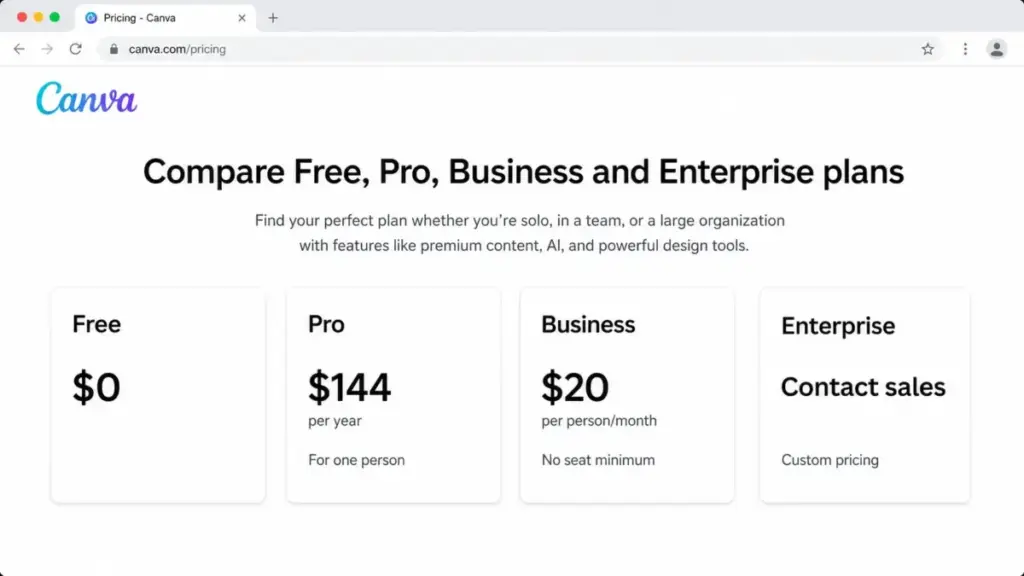
Canva’s pricing page presents clean numbers. The reality is messier, and that gap is the first thing a buyer needs to understand.
| Price type | What Canva shows | What you may actually pay | Source |
|---|---|---|---|
| Pro annual | $144/year for one person | $144/year (confirmed on official pricing page) | Official |
| Pro monthly | Often displays as $12/month (annual effective rate) | $18/month observed in current US accounts; varies by account | Account-observed |
| Business monthly | $20/person/month | $20/person/month (official launch announcement) | Official |
| Business annual | Not publicly exposed | $240/person/year is the annualized monthly run rate; exact annual checkout not verified | Annualized arithmetic |
| Enterprise | “Contact sales” | Custom quote based on seats, contract terms, and services | Custom |
What this means: If you see Canva Pro listed as “$12/month” on the pricing page, that is the monthly equivalent of the $144 annual price divided by 12. It is not the month-to-month price. The actual monthly charge for current US accounts has been observed at $18. Before canceling a grandfathered subscription to re-subscribe, check your logged-in checkout screen. Your existing rate may be lower than what a new account sees.
I have published 50+ AI tool evaluations with plan-gate mapping, and Canva’s pricing variability is among the hardest to pin down from public pages alone. The data package for this article distinguishes official prices, annualized arithmetic, current third-party observations, and unverified values so you can see exactly what is confirmed and what is not.
The Hidden Costs Nobody Mentions
Most Canva pricing pages stop at the plan table. Here are the costs that show up after you subscribe.
AI Pass
Canva sells an add-on called AI Pass for Pro and Business users who need more AI generation capacity. It provides up to 40x the Pro allowance or 20x the Business allowance from a single shared pool. The price is not publicly disclosed on the crawlable US product page. It is billed as a recurring monthly charge, pro-rated to align with your base subscription cycle, and can be assigned to selected team members.
If your team relies heavily on AI image generation, background removal at scale, or Magic Write, the base plan AI allowance will not be enough. AI Pass is the answer, but you cannot budget for it without seeing the price in your account dashboard.
Pay as You Grow Seat Billing
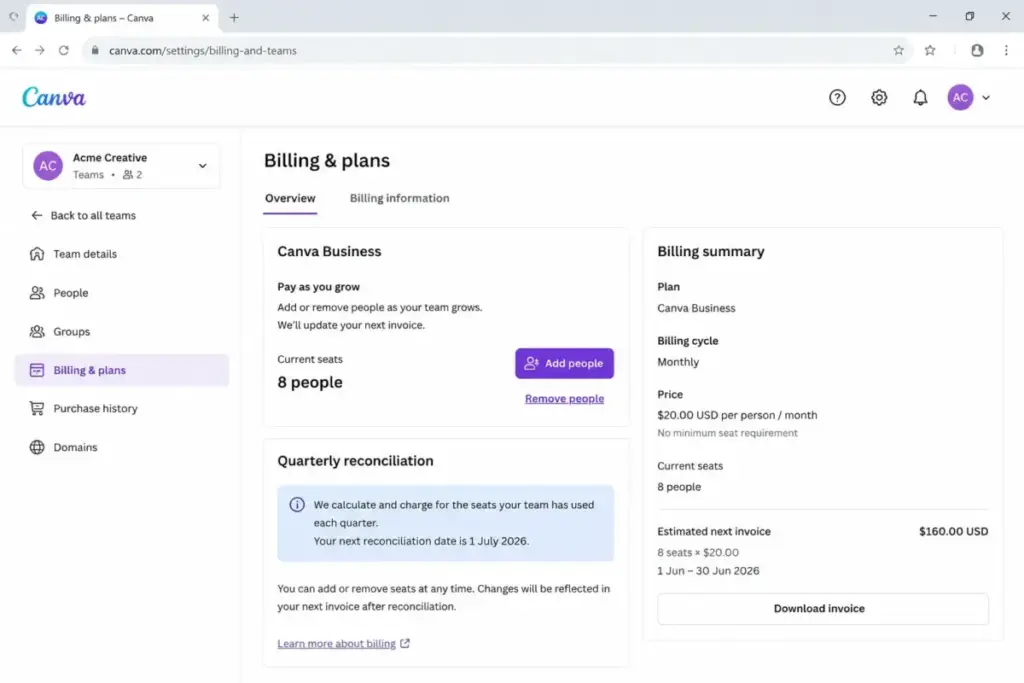
Canva’s seat billing follows a “Pay as You Grow” model. Here is how it works:
- Monthly plans: Added seats are billed at the next monthly renewal.
- Annual plans: Added seats are reconciled every three months, not immediately.
- Removed seats: Removing an already-paid seat does not generate a refund or credit.
This means a 10-person annual Business team that adds 3 people in month two will receive a quarterly adjustment invoice covering those seats at the contracted annual rate. That adjustment arrives months after the original annual invoice and can catch finance teams off guard.
Taxes
Applicable tax is calculated from your billing address and the tax rate at the time of the charge. This varies by US state and is not included in the published plan prices.
Canva Print and Shipping
Printed products are billed separately from the subscription. Business and Enterprise accounts may receive a 10% product discount where available, but the discount does not apply to shipping costs and cannot be combined with other offers.
Enterprise Services
Enterprise contracts may include onboarding, implementation, migration, creative services, and custom support. None of these have publicly listed prices. If your organization needs them, they add to the custom quote.
| Hidden cost | Amount | When it applies |
|---|---|---|
| AI Pass | Undisclosed recurring monthly add-on | Pro or Business user needs more Standard, Premium, or Ultra AI usage |
| Additional Business seats | $20/person/month at public rate; annual plans reconcile quarterly | Adding team members after initial purchase |
| Taxes | Varies by US billing address | Every charge |
| Canva Print and shipping | Order-dependent | Ordering printed products |
| Enterprise services | Custom | Negotiated Enterprise contracts |
What this means: The $20/person/month Business price is the floor, not the ceiling. AI Pass, quarterly seat adjustments, taxes, and print orders can add 15-30% to the base subscription depending on usage patterns. Budget accordingly.
Plan-by-Plan Breakdown
Canva Free
Canva Free is not a trial. It is a permanent plan with real limits.
You get 5 GB of cloud storage, 1 Brand Kit limited to 3 colors, access to approximately 1.6 million templates and 4.7 million free stock assets, and a small AI allowance: up to 200 Standard AI uses or 20 Premium AI uses from a shared pool. There is no Ultra AI tier access.
Missing: full premium content library, Magic Resize, full Background Remover workflow, social Content Planner, premium brand scale, Business workspace, advanced ad insights, SSO, SCIM, and audit logs.
Mini verdict: Free works for occasional personal projects and light social media graphics. It stops working the moment you need to remove a watermark from a premium template, resize a design for multiple platforms, or schedule social content.
Avoid if: You are a professional creator producing branded content more than twice a week. The upgrade triggers will accumulate faster than you expect.
Canva Pro
Pro is Canva’s best-value plan for solo professionals.
The official US price is $144/year for one person. Current US accounts have observed a monthly rate of $18/month, but this varies by account and is not reliably exposed by the public pricing page.
You get 100 GB storage, 5 Brand Kits, access to approximately 3.6 million templates and 141 million premium assets, and a larger AI allowance: up to 2,000 Standard, 200 Premium, or 20 Ultra AI uses depending on the mix consumed from one shared pool.
Includes: premium assets, Magic Resize, translation tools, Background Remover, and social content scheduling.
Missing: collaborative Business workspace, Canva Grow Insights, 100 Brand Kits, Enterprise SSO/SCIM, audit logs, multi-team administration, and group approvals.
Mini verdict: Pro is the right plan for a solo marketer, freelance designer, or content creator who needs premium templates, AI tools, and brand management without team collaboration features.
Avoid if: You manage more than 5 client brands (Pro caps at 5 Brand Kits) or need a shared team workspace with approval workflows.
Canva Business
Business replaced the legacy Canva Teams plan for new US buyers. The official price is $20/person/month with no seat minimum. Teams of one are allowed.
The exact US annual checkout price has not been publicly verified. Using the monthly rate, $240/person/year is the annualized run rate, but this is arithmetic, not a quoted annual price.
You get 500 GB storage, 100 Brand Kits, and a higher AI allowance: up to 4,000 Standard, 400 Premium, or 40 Ultra AI uses from the shared pool.
Includes everything in Pro, plus: team collaboration, individual design approvals, Canva Grow Insights, supported data connectors, Leonardo.Ai Essential and Flourish Presenter inclusions as made available, and a 10% Canva Print product discount.
Missing: Enterprise SSO/SCIM, audit logs, custom apps, multi-team controls, group approvals, and organization-level governance.
Mini verdict: Business is the plan for teams that need shared brand assets, approval workflows, marketing analytics, and higher AI capacity. The value is in the collaboration and marketing tools, not just the premium assets.
Avoid if: You are a solo user who only needs premium templates and resizing. Pro costs less and covers that use case. Do not assemble separate Pro accounts as a cheap team workaround; Pro is licensed for one person and omits the shared Business workspace.
Canva Enterprise
Enterprise requires a custom quote. Published feature additions include 1 TB storage, up to 1,000 Brand Kits, SSO, SCIM, audit logs, custom apps, multi-team administration, group approvals, centralized brand governance, and priority support.
Some features have seat thresholds:
- AI output indemnity and certain content controls: shown from 100 seats
- Dedicated customer success and creative services: shown from 150 seats
Mini verdict: Enterprise is for organizations that need identity management, compliance auditing, and centralized brand control across multiple teams. The pricing is custom and cannot be estimated from public rates.
Avoid if: Your team is under 25 people and does not need SSO, SCIM, or audit logs. Business covers the collaboration and AI features at a transparent public price.
When the Free Plan Stops Working
Canva Free is genuinely free with no time limit. But the upgrade triggers are designed to be felt, not just seen.
The five most common triggers:
- Premium content watermarks. You find the right template, customize it, and discover the watermark at export. Removing it requires Pro or higher.
- Background Remover and Magic Resize. Free gives limited access. Frequent use of either tool forces the upgrade conversation.
- Brand Kit limits. Free allows 1 kit with 3 colors. Managing even one professional brand properly requires more.
- Social Content Planner. Not available on Free. If you schedule social posts from Canva, you need Pro.
- AI usage ceiling. 200 Standard or 20 Premium AI uses per month is enough for occasional use. A daily content creator burns through that in the first week.
My take: Free is a real plan for personal and occasional use. It is also a very effective conversion mechanism. Canva does not pressure you with trial countdowns. Instead, it lets you build workflows that depend on premium features, then gates those features at the point of output. By the time you hit the wall, switching costs are already baked in.
Canva AI Limits by Plan
This is the section most competing articles get wrong. Canva’s AI allowance is not three separate buckets. It is one shared pool that can be consumed as Standard, Premium, or Ultra uses.
| Plan | Standard AI uses | Premium AI uses | Ultra AI uses | Shared pool? |
|---|---|---|---|---|
| Free | Up to 200 | Up to 20 | 0 | Yes, one shared allowance |
| Pro | Up to 2,000 | Up to 200 | Up to 20 | Yes, one shared allowance |
| Business | Up to 4,000 | Up to 400 | Up to 40 | Yes, one shared allowance |
| Enterprise | Business-level unless contracted otherwise | Same | Same | Yes |
| AI Pass (add-on) | Up to 40x Pro or 20x Business | Proportional | Proportional | Yes |
What this means: The published maximums imply a ratio of up to 100 Standard-equivalent uses per Ultra use, but Canva may apply different consumption rates to individual tools and models.. A Pro user who generates 5 Ultra images has effectively used 500 of their 2,000 Standard equivalent allowance. The numbers in the table represent the maximum if you use only that tier type.
If you do heavy AI image generation, the allowance math matters more than the plan price. A Pro user generating 10 Ultra images per month uses half their pool on Ultra alone. That is the real upgrade trigger to Business or AI Pass, and most pricing pages do not show this calculation.
Real Cost Scenarios: 5, 10, 25, 50, and 100 Users
All scenarios below use the verified $20/person/month Business rate. Annual figures are annualized monthly run rates, not verified annual checkout prices.
| Team size | Monthly cost | Annual cost (annualized) | Plan | Notes |
|---|---|---|---|---|
| 1 (solo) | $18/month observed; $12/month annual effective | $144/year (official) | Canva Pro | Pro is the correct solo plan. Business is unnecessary for one person without team needs. |
| 5 | $100/month | $1,200/year | Canva Business | No seat minimum. Business collaboration and higher AI allowance included. |
| 10 | $200/month | $2,400/year | Canva Business | Compare against the live annual checkout. Budget separately for AI Pass, taxes, and print orders. |
| 25 | $500/month | $6,000/year | Canva Business | Business remains the transparent public-price baseline. Evaluate Enterprise if SSO, SCIM, or audit logs are required. |
| 50 | $1,000/month | $12,000/year | Business or Enterprise evaluation | Centralized governance requirements may justify an Enterprise quote at this scale. |
| 100 | $2,000/month (Business baseline) | $24,000/year (Business baseline) | Compare Business with Enterprise | Enterprise matrix begins to expose AI output indemnity and content-control value at 100 seats. $2,000/month is a Business baseline, not an Enterprise estimate. |
What this means: Business pricing scales linearly. There is no volume discount in the public pricing. At 50+ users, the per-seat cost stays $20/month while the total bill becomes material enough to justify requesting an Enterprise quote for comparison, especially if your organization needs identity and compliance controls that Business does not include.
Plan to Avoid and Plan to Choose
Avoid: Canva Business for a Solo User
Business at $20/month costs more than Pro at $18/month (observed) or $12/month (annual effective), and the collaboration, approval, and Grow Insights features have no value for a single user. The extra AI allowance is the only potential reason, and even that is better addressed by AI Pass on Pro if you need it.
Avoid: Assembling Separate Pro Accounts as a Team Workaround
Pro is licensed for one person. It does not include a shared workspace, shared Brand Kits across team members, approval workflows, or team-level analytics. Buying 5 separate Pro subscriptions ($720/year) saves money compared to 5 Business seats ($1,200/year annualized), but you lose every collaboration feature. If your team needs to share assets and maintain brand consistency, separate Pro accounts create more problems than they solve.
Choose: Canva Pro for Solo Professionals
Solo marketers, freelance designers, and content creators who produce frequent branded content and need premium templates, Magic Resize, Background Remover, and up to 5 Brand Kits.
Choose: Canva Business for Collaborative Teams
Small marketing teams, agencies, and multi-brand operators with active collaboration, approval needs, higher AI demand, and Canva Grow Insights integration requirements.
Choose: Canva Enterprise for Governance-First Organizations
Organizations that require SSO, SCIM, audit logs, custom apps, multi-team administration, or group approvals. Request pricing before committing to Business at scale.
Stay on Free If:
You are an occasional creator, a student, or an educator. Eligible US K-12 educators should apply for Canva for Education before paying. Qualifying nonprofits should check Canva for Nonprofits for their dedicated free program.
Canva Pricing vs Competitors
| Tool | Starting price | 10-user monthly cost | Free plan | Best for |
|---|---|---|---|---|
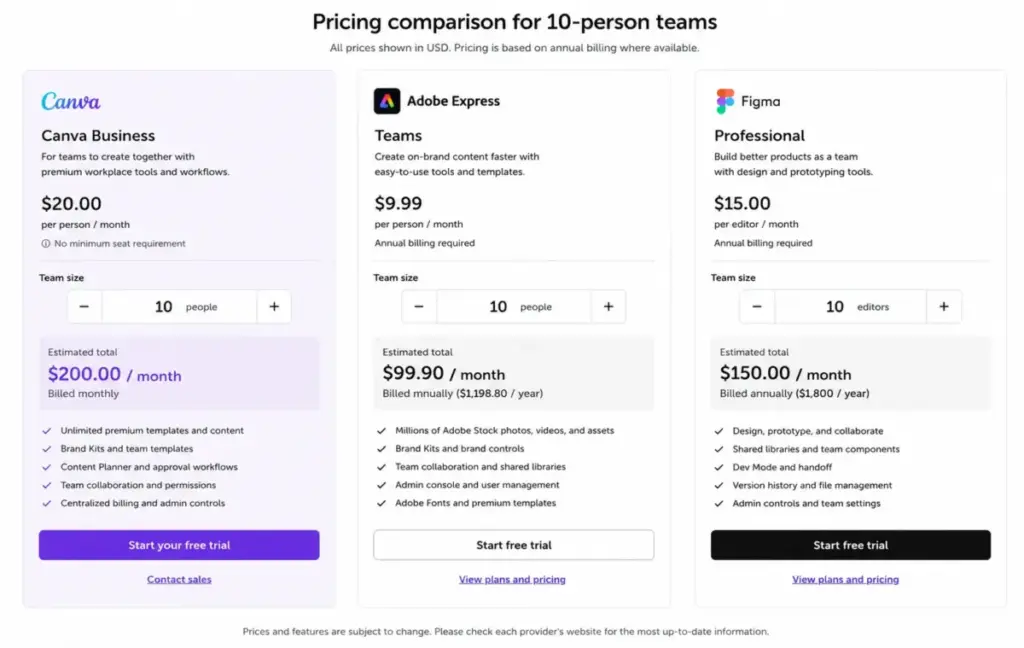
| Canva Business | $20/person/month | $200/month | Yes (Free tier) | Teams needing design + content + AI in one subscription |
| Adobe Express | $9.99/month (Premium individual) | $79.90/month (Teams at $7.99/license; $49.90/month at $4.99 first-year promo) | Yes | Individual designers in the Adobe ecosystem |
| VistaCreate | ~$13/month Pro (secondary evidence) | ~$13/month (Pro workspace reported to support up to 10 users) | Yes | Budget-conscious teams with basic design needs |
| Figma | $16/month (Professional Full seat) | $160/month (10 Full seats) | Yes | Product design teams focused on UI/UX prototyping and developer handoff |
What this means: Canva Business is more expensive than Adobe Express Teams on a per-seat basis, but Canva Business may justify its higher price through its specific combination of brand controls, Canva Grow Insights, AI allowances, and Canva-native workflows. Compare the exact feature limits rather than assuming Adobe Express lacks AI, scheduling, or brand tools.
If your team’s primary need is UI/UX design rather than marketing content, see our Figma review before choosing Canva on price alone.
For a deeper look at Figma’s plan costs, our Figma pricing breakdown compares per-seat rates at team scale.
Feature Gates: What You Actually Get by Plan
| Feature | Free | Pro | Business | Enterprise |
|---|---|---|---|---|
| Premium templates and stock library | Limited free library | Yes | Yes | Yes |
| Background Remover, Magic Resize, premium translation | No or limited preview | Yes | Yes | Yes |
| Social Content Planner | No | Yes | Yes | Yes |
| Brand Kits | 1 restricted (3 colors) | Up to 5 | Up to 100 | Up to 1,000 |
| Cloud storage | 5 GB | 100 GB | 500 GB | 1 TB |
| Ultra AI tier access | No | Up to 20 uses (equivalent) | Up to 40 uses (equivalent) | Up to 40 (unless contracted) |
| Collaborative workspace | No | No (one person) | Yes | Yes |
| Individual design approvals | No | No | Yes | Yes |
| Canva Grow Insights and data connectors | No | No | Yes | Yes |
| SSO and SCIM | No | No | No | Yes |
| Audit logs, multi-team admin, group approvals | No | No | No | Yes |
| Custom apps and org-wide governance | No | No | No | Yes |
| Dedicated customer success | No | No | No | From 150 seats |
What this means: The feature gate that forces the most upgrades is the collaborative workspace. Pro is strictly a one-person plan. The moment you need a second person to edit, approve, or share Brand Kit access within a managed workspace, Business becomes the minimum. The SSO/SCIM gate forces the Enterprise jump for any organization with identity management requirements, regardless of team size.
Monthly vs Annual Billing
Canva’s pricing page advertises yearly savings from 16%, but the exact discount varies by plan and checkout.
For Pro: the current $18 US monthly observation versus the official $144 annual price produces a 33.3% arithmetic saving ($72 saved per year). That is a strong incentive to commit annually if you plan to use Canva for at least 6 months.
For Business: the exact annual checkout price was not verified in the public crawl. Do not assume the Pro discount percentage applies to Business. Check the live annual checkout for your account before committing.
My recommendation: Pay annually for Pro if you are confident in the tool. For Business, request the annual price in your checkout before assuming the monthly rate is the only option. And if you are on a grandfathered subscription at a lower rate, do not cancel to re-subscribe without checking what the new rate will be.
Is Canva Worth the Price?
Worth it if:
- You are a solo creator or marketer who produces visual content daily and needs premium assets, Magic Resize, Background Remover, and social scheduling. Pro at $144/year is strong value for this use case.
- You run a marketing team that needs shared brand assets, approval workflows, Canva Grow Insights, and higher AI capacity. Business at $20/person/month is competitive for what it includes.
- Your organization needs centralized brand governance with SSO, SCIM, and audit logs, and the Enterprise quote fits your IT budget.
Not worth it if:
- You create designs occasionally for personal use. Stay on Free.
- Your primary design need is UI/UX prototyping and developer handoff. Figma is the better tool for that workflow.
- Your team already uses Adobe Creative Cloud and needs AI generation that integrates with Photoshop and Illustrator. Our Adobe Firefly review covers how that workflow compares.
- You need only basic social media graphics and have no brand management requirements. The free tier handles this, and paying for Pro adds features you will not use.
Daniel Rivera, SaaSZap’s AI and Emerging Technology Editor, has tracked Canva’s pricing evolution through the Teams-to-Business transition. The shift to per-seat pricing with no seat minimum is a net positive for transparency, but it also means team costs scale linearly with no volume break at the public price level.
How to Avoid Overpaying for Canva
- Check your logged-in checkout price. Canva’s terms allow location- and account-based pricing. The price you see may differ from published reports.
- Start with Pro before buying Business for a solo use case. Business adds collaboration tools you do not need as a single user.
- Audit your AI usage monthly. If you consistently hit the AI ceiling, compare AI Pass cost to upgrading from Pro to Business before buying the add-on.
- Pay annually for Pro. The confirmed saving versus observed monthly pricing is over 30%.
- Do not cancel a grandfathered plan without checking new rates. Legacy subscribers may have lower rates than current new-subscriber pricing.
- Apply for Canva for Education or Nonprofits first. Eligible US K-12 educators and qualifying nonprofits can access premium features through dedicated free programs. Check eligibility before paying.
- Request an Enterprise quote at 25+ users if you need governance features. Do not pay $500+/month on Business and then discover you need SSO and audit logs that require a separate Enterprise contract.
Canva Alternatives Worth Considering
If Canva’s per-seat pricing is too high for your team, or if you need a tool better suited to a different workflow, here are the options worth evaluating.
For teams exploring other AI-powered visual tools beyond Canva, our roundup of Canva AI alternatives covers 10 platforms mapped to specific switching triggers.
FAQ
How much does Canva cost per month in 2026?
Canva Free costs $0. Canva Pro has been observed at $18/month in current US accounts, but pricing varies by account and billing information. The official annual price for Pro is $144/year for one person. Canva Business costs $20/person/month. Enterprise is custom.
Is the $144 Canva Pro annual plan the new US price?
Yes. Canva’s official US pricing page exposes $144/year for Pro. This replaced earlier pricing for new subscribers. Existing subscribers may see different rates depending on when they enrolled.
Did Canva Business replace Canva Teams?
Yes. Canva officially states that Business is the plan for new team sign-ups and upgrades. Existing Teams customers remain on grandfathered plans, but new US buyers cannot select the legacy Teams plan.
Does Canva Business have a minimum number of users?
No. Canva’s official Business announcement confirms no seat minimum. Teams of one are allowed, though Pro is typically the better value for solo users.
How many AI generations do I get with Canva Pro?
Canva Pro provides a shared AI allowance equivalent to up to 2,000 Standard, 200 Premium, or 20 Ultra uses per month. These are not three separate pools. Using higher-tier AI consumes proportionally more from the shared allowance.
What is Canva AI Pass, and how much does it cost?
AI Pass is a recurring monthly add-on for Pro or Business users that provides a larger AI allowance (up to 40x Pro or 20x Business). The price is not publicly disclosed on the crawlable US product page. You need to check your account dashboard for the current rate.
Does Canva charge immediately when I add a team member?
On monthly plans, added seats are billed at the next monthly renewal. On annual plans, added seats are reconciled every three months. Removing a paid seat does not generate a refund.
Is Canva Pro enough for managing multiple client brands?
Pro allows up to 5 Brand Kits. If you manage 5 or fewer client brands and work solo, Pro is sufficient. For more than 5 brands or team collaboration, Business provides up to 100 Brand Kits.
Is Canva free for teachers and schools?
Canva offers a dedicated Canva for Education program for eligible US K-12 educators and students. This provides premium features at no cost. Eligibility must be verified through Canva’s application process.
Is Adobe Express cheaper than Canva for a 10-person team?
At standard rates, Adobe Express Teams costs $79.90/month for 10 licenses ($7.99/license), compared to Canva Business at $200/month for 10 users. Adobe Express is cheaper on a per-seat basis, but Canva includes social scheduling, AI generation tools, Brand Kit management, and Grow Insights that Adobe Express does not offer at the same tier.