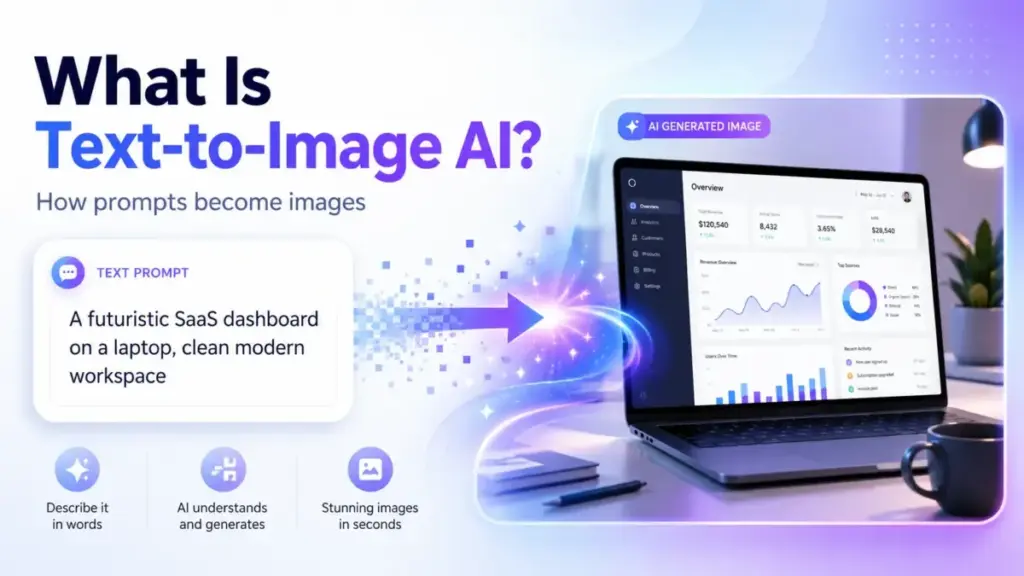
Most marketing teams treat text-to-image AI like a magic wand: type a sentence, get a photo. That mental model breaks the moment you need a consistent brand asset, a transparent PNG for a landing page, or an image that does not get your company flagged for copyright infringement. Text-to-image AI converts written prompts into visual output using neural networks trained on billions of image-text pairs, and the gap between what the best AI image generators promise and what they deliver on their entry-tier plans is where most buyers waste both time and budget. This guide covers how the technology actually works, where it fails, what the licensing fine print says, and when your team should skip AI-generated visuals entirely.
Quick Answer: Text-to-image AI is a category of generative artificial intelligence that produces images from natural-language descriptions. It works by converting text prompts into mathematical noise patterns, then iteratively refining those patterns into pixels using a trained diffusion or transformer model. The core difference from traditional image editing: no source image is required. Quality, commercial rights, and output consistency vary by tool and pricing tier.
The 60-Second Explanation of Text-to-Image AI
Text-to-image AI refers to machine learning systems that generate visual content from written descriptions. The technology sits within the broader field of generative AI, alongside text generation (ChatGPT, Claude) and audio synthesis.
Three layers explain the concept:
Simple definition. You write a sentence describing what you want to see. The AI produces a new image matching that description. No photography, no stock library, no Photoshop skills required.
Technical definition. Text-to-image models use a neural network architecture (typically a latent diffusion model or a vision transformer) to map text embeddings from a language encoder (CLIP or T5) to a visual latent space. The model starts with random noise and progressively denoises it over 20 to 50 steps, guided by the text embedding, until a coherent image emerges. Resolution, style fidelity, and prompt adherence depend on the model’s training data, architecture size, and inference configuration.
Business definition. For SaaS and marketing teams, text-to-image AI replaces or supplements stock photography, freelance design, and manual asset creation. A single prompt can produce a social media graphic in under 10 seconds. The operational trade-off: speed and cost savings against inconsistent brand compliance, unresolved copyright questions, and quality variance across generation attempts.
I keep coming back to one gap most vendor pages skip: the distance between a demo image and a production-ready asset. That distance, measured in re-prompts, manual edits, and legal review, is where the real cost hides.
How Text-to-Image AI Actually Works
Text-to-image generation follows a five-stage pipeline. According to Stability AI’s technical documentation, modern diffusion models process each image through distinct encoding, noising, denoising, decoding, and post-processing phases. Understanding where each stage can fail matters more than understanding the math behind it.
Stage 1: Text Encoding
The system converts your text prompt into a numerical vector using a language model (CLIP, T5-XXL, or a proprietary encoder). This vector captures semantic meaning, not literal words. “A golden retriever sitting on a red couch” becomes a point in a high-dimensional space that encodes color, object relationships, spatial composition, and style.
Where it fails: Ambiguous prompts produce ambiguous embeddings. “A bank by the river” could mean a financial institution or a riverbank. The model has no way to ask for clarification.
Stage 2: Noise Initialization
The system creates a random noise pattern in a compressed mathematical space (the latent space). This noise is the raw material the model shapes into your final image. Seed values control this noise. Same seed plus same prompt equals same output.
Stage 3: Iterative Denoising
The diffusion model runs 20 to 50 denoising steps, guided by the text embedding from Stage 1. Each step removes a small amount of noise and adds structure. After step 10, rough shapes appear. By step 30, fine details emerge. This is the most compute-intensive phase.
Where it fails: Complex multi-object scenes degrade here. Ask for “five people sitting around a table, each holding a different colored cup” and you will get merged faces, extra fingers, or cups that blend into hands. Current models handle two to three distinct foreground objects reliably. Beyond that, accuracy drops.
Stage 4: Latent Decoding
A Variational Autoencoder (VAE) converts the denoised latent representation back into pixel space. This step determines final resolution. Base resolution for most current models sits at 1024×1024 pixels. Generating at higher resolutions requires either native high-res models or a separate upscaling pass.
Stage 5: Post-Processing
Safety filters scan the output for policy violations. Some platforms apply automatic sharpening or color correction. The final image gets delivered as a PNG or JPEG.
Where it fails: Safety filters vary by vendor. Midjourney blocks photorealistic faces of real people. DALL-E 3 applies C2PA metadata for provenance tracking. Stable Diffusion open-source models have no built-in safety layer, which shifts the legal and ethical burden to the operator.
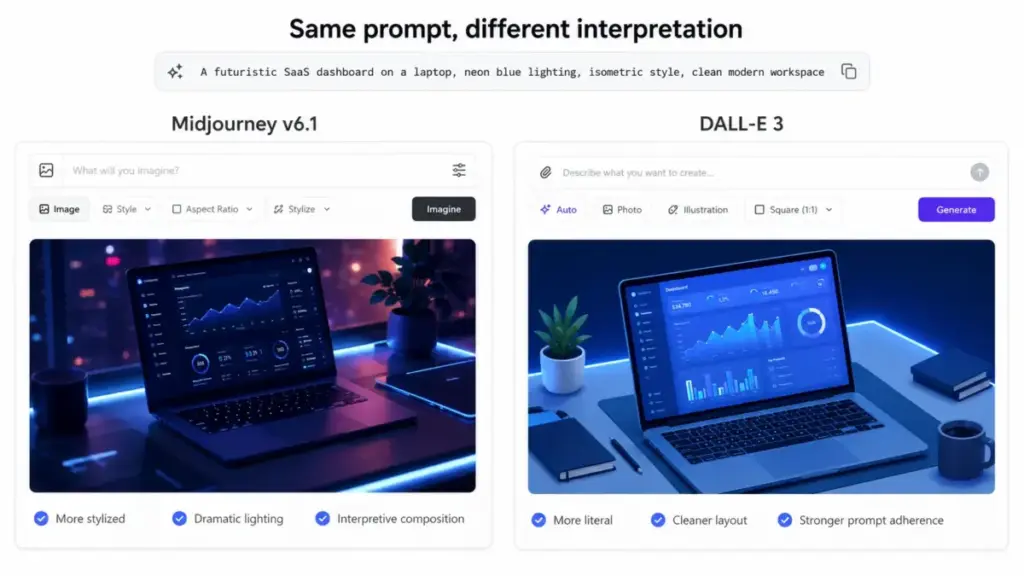
This pipeline runs in 5 to 60 seconds depending on the model, resolution, and inference hardware. Does a 10-second turnaround justify the re-prompting cycle that follows? For quick social media visuals, yes. For brand-consistent campaign assets, I am not fully convinced.
Text-to-Image AI vs Related Technologies
Teams confuse text-to-image generation with four adjacent technologies. The differences affect both workflow design and tool selection.
| Technology | Input | Output | When to Use | Key Difference |
|---|---|---|---|---|
| Text-to-image | Text prompt only | New image from scratch | No source image exists; need original visuals | Creates entirely new visuals from text |
| Image-to-image | Source image + text prompt | Modified version of source | Existing image needs style transfer or variation | Requires a starting image |
| Inpainting | Image + mask + text prompt | Edited region within existing image | Remove or replace specific objects in a photo | Edits a selected area, preserves the rest |
| Upscaling (super-resolution) | Low-res image | Higher-resolution version | Existing image needs detail enhancement | Adds pixel detail, does not change content |
| Video generation | Text or image prompt | Short video clip (2-10s) | Motion content needed for ads or social | Outputs temporal frames, not a single image |
What this means: if your workflow starts with existing brand photography, you need image-to-image or inpainting, not text-to-image. A surprising number of teams buy AI image generator subscriptions expecting Photoshop-like editing and discover the tool only generates from scratch.
Step-by-Step: Getting Usable Output from Text-to-Image AI
Generating an image takes seconds. Generating a usable image takes a structured workflow. Here is the process I follow when evaluating these tools for editorial coverage.
Step 1: Define Output Requirements Before Prompting
Decide resolution, aspect ratio, file format, and intended use before opening the tool. A LinkedIn banner (1584×396) requires a different prompt strategy than an Instagram carousel square (1080×1080). Most tools default to square output.
Step 2: Write Structured Prompts
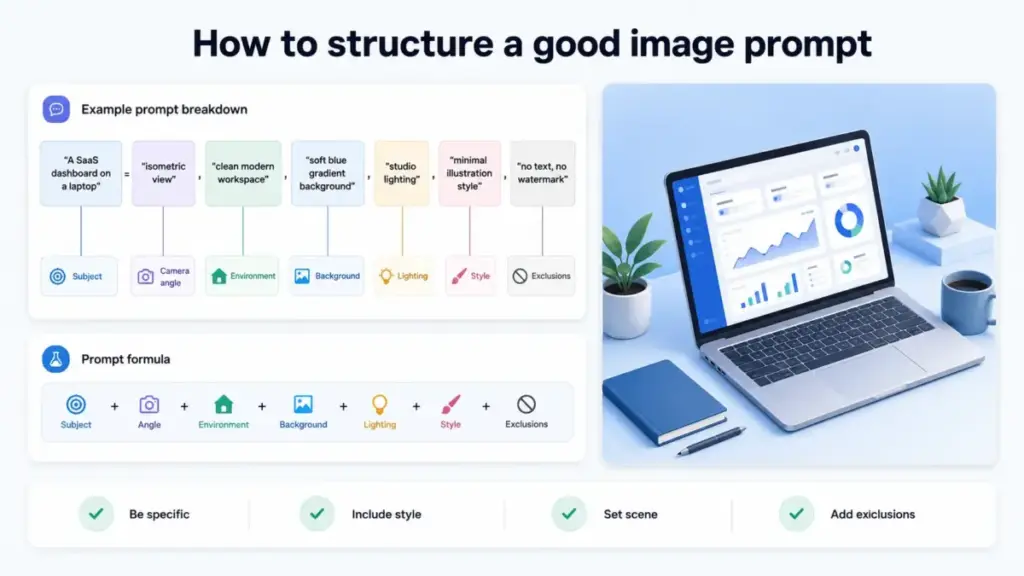
Use the format: [Subject] + [Action/Pose] + [Environment] + [Style] + [Lighting] + [Camera angle]. Front-load the most important element. Models weigh early tokens more heavily.
Good prompt: “A SaaS dashboard on a laptop screen, isometric view, clean minimal design, soft blue gradient background, studio lighting, no text.”
Bad prompt: “A nice picture of a computer with some software on it.”
Step 3: Generate Multiple Variations
Run the same prompt 4 to 8 times with different seeds. According to Midjourney’s documentation, even identical prompts produce meaningfully different compositions across seeds. Select the strongest composition from the batch.
Step 4: Refine with Parameters
Adjust guidance scale (how closely the output follows the prompt), step count (detail level), and negative prompts (what to exclude). Negative prompts like “no text, no watermarks, no hands” prevent the most common generation artifacts.
Step 5: Post-Process Outside the AI Tool
Resize, crop, add brand overlays, and compress for web. No current text-to-image tool produces genuinely publish-ready assets without manual post-processing. Teams that skip this step publish inconsistent visuals.
The Mistakes That Waste Your First Month
I have evaluated over a dozen AI image generators across pricing tiers, and the same errors appear in nearly every new user workflow.
Mistake 1: Treating prompts like Google searches. Short, vague prompts (“cool logo”) produce generic, unusable output. Effective prompts read like creative briefs: specific subject, style, composition, lighting, and exclusions.
Mistake 2: Ignoring commercial licensing terms. DALL-E 3 grants full commercial rights on all paid-tier outputs, according to OpenAI’s terms of use. Midjourney requires a paid subscription (starting at $10/month, as of May 2026) for commercial use. Stable Diffusion outputs under open-source licenses carry no platform-level restriction, but the underlying training data copyright remains legally unresolved in the US and EU. Teams publishing AI-generated images in client-facing materials without reviewing license terms take on unnecessary legal exposure.
Mistake 3: Expecting brand consistency across generations. No current text-to-image model maintains a persistent “brand memory” within the core generation pipeline. Character reference features in Midjourney v6.1 and style presets in Leonardo AI reduce variance, but they do not eliminate it. A 5-image social campaign generated one image at a time will look like 5 different illustrators created it.
Mistake 4: Skipping the metadata and provenance step. Adobe Firefly embeds Content Credentials (C2PA standard) into every generated image. DALL-E 3 adds C2PA metadata. Midjourney and most open-source models do not. The EU AI Act (effective August 2026) requires clear labeling of AI-generated content in commercial communications. Teams operating in EU markets need provenance-capable tools or a manual labeling workflow.
Mistake 5: Overpaying for resolution you do not need. Social media platforms compress uploads to under 1 MB. Generating at 4K resolution (available on higher tiers of most tools) wastes compute credits when the output destination is a 600px-wide blog thumbnail.
Common Misconceptions About Text-to-Image AI
Misconception: “AI-generated images are free to use commercially.” Reality: Commercial rights depend entirely on the platform’s license and your subscription tier. Free tiers on Midjourney, Leonardo AI, and Adobe Firefly impose usage restrictions. Even on paid plans, some jurisdictions (notably the EU and parts of Asia) are actively legislating AI output provenance requirements. “Free to generate” does not mean “free to publish.”
Misconception: “These tools replace graphic designers.” Reality: Text-to-image AI generates raw visual material. It does not produce sized assets, branded templates, multi-format exports, or design systems. According to Adobe’s Firefly documentation, Firefly is positioned as a co-pilot within Creative Cloud workflows, not a replacement for them. A designer’s time shifts from creation to curation and post-processing. The role changes; it does not disappear.
Misconception: “All AI image generators use the same technology.” Reality: Architecture varies. Midjourney uses a proprietary model with undisclosed training data. DALL-E 3 runs on a diffusion architecture tightly integrated with ChatGPT’s language model. Stable Diffusion (Stability AI) is open-source and can be fine-tuned on custom datasets. Adobe Firefly trains exclusively on licensed and public-domain content. These differences affect output style, copyright exposure, and enterprise compliance posture.
Misconception: “More steps in the diffusion process always means better quality.” Reality: Quality improvements plateau after 30 to 40 steps for most models. Doubling the step count from 30 to 60 doubles the compute cost with minimal visible improvement. According to Stability AI’s inference documentation, the default step count of 30 represents the efficiency-quality sweet spot for SDXL.
When to Use Text-to-Image AI (and When to Skip It)
Use text-to-image AI when:
- You need conceptual visuals for blog posts, social media, or internal presentations.
- No suitable stock photo exists for a specific or abstract concept.
- Speed matters more than pixel-perfect precision (social media, A/B test variants).
- Budget for custom photography or illustration is unavailable.
- The output will be further edited by a designer before publication.
Avoid text-to-image AI when:
- You need photorealistic images of specific real products for e-commerce listings.
- Brand guidelines require exact color codes, typography placement, or logo integration.
- Legal review has not cleared AI-generated content for your industry (healthcare, finance, government).
- You need images of identifiable real people (ethical and legal risk).
- Output must match an existing visual identity across 50+ assets with zero variance.
For SaaS marketing teams producing 10 to 20 social posts per week, text-to-image AI cuts concept-to-publish time from hours to minutes. For enterprise brand teams managing regulated visual identities, the technology introduces more governance overhead than it removes. The deciding variable is not the tool. It is your tolerance for visual inconsistency.
How to Measure Text-to-Image AI Effectiveness
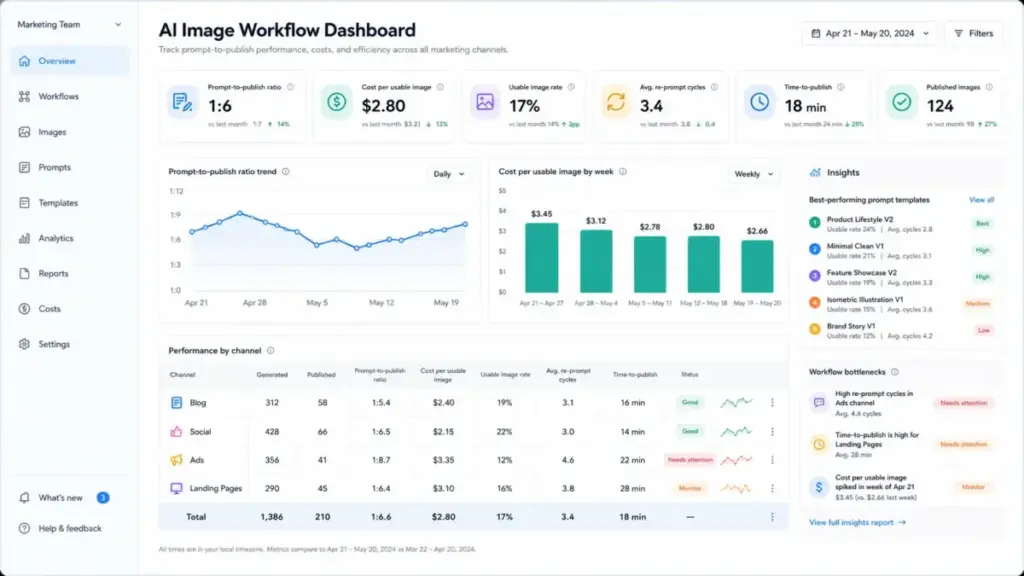
If your team adopts text-to-image AI, track these metrics to determine whether the investment returns value.
| Metric | What It Measures | Why It Matters |
|---|---|---|
| Prompt-to-publish ratio | Images generated vs. images actually used | Below 1:5 signals effective prompting; above 1:20 signals wasted compute |
| Average re-prompt cycles | Number of prompt revisions per usable asset | More than 4 re-prompts per image erases the speed advantage |
| Cost per usable image | Subscription or credit cost divided by published images | Compare against stock photo licensing ($1-15/image) and freelance illustration ($50-500/image) |
| Time-to-publish | Total time from prompt to final published asset | Include post-processing, resizing, and approval time, not just generation time |
| Brand compliance score | Internal audit pass rate for AI-generated visuals | Below 80% signals a need for stricter prompt templates or human review gates |
| Legal/licensing incidents | Number of images flagged or pulled for rights issues | Any number above zero requires immediate process review |
What this means: the “speed” value proposition of text-to-image AI only holds if your prompt-to-publish ratio stays efficient. A team generating 50 images to find 3 usable ones spends more total time than a team that opens a stock library.
What Good Text-to-Image AI Output Looks Like
The gap between amateur and professional use of text-to-image AI comes down to workflow discipline, not prompt cleverness.
Before (typical first attempt): A marketing manager types “professional team meeting photo” into DALL-E 3. The output shows four people with slightly distorted hands, inconsistent lighting, and a corporate-generic aesthetic. It goes straight into a blog post without cropping, compression, or brand overlay. The image looks AI-generated to every visitor who sees it.
After (structured workflow): The same manager writes: “Isometric illustration of a SaaS dashboard with pipeline charts, clean flat design, soft purple and white palette, no people, no text.” They generate 6 variations, select the best composition, resize to 1200×630 for Open Graph, add a subtle brand gradient overlay in Figma, and export as compressed WebP. The final asset loads in under 100 KB and fits the company’s visual identity.
The difference is not the tool. It is the process around the tool.
Tools That Make Text-to-Image AI Practical
This article is not a product ranking. For evaluated recommendations with pricing breakdowns, feature gates, and limitation analysis, see the full best AI image generators guide linked in the introduction above.
The current text-to-image AI tool landscape breaks into four categories:
- Integrated creative suites: Adobe Firefly within Creative Cloud. Best for teams already in the Adobe ecosystem. Trains on licensed content only, which reduces copyright exposure.
- Standalone generators: Midjourney, Leonardo AI, Ideogram. Best for dedicated image generation workflows. Vary in pricing model (subscription vs. credits) and style strengths.
- Platform-embedded AI: DALL-E 3 inside ChatGPT, Gemini image generation inside Google Workspace. Best for teams that want generation inside existing productivity tools.
- Open-source models: Stable Diffusion, Flux. Best for technical teams that need full control, custom fine-tuning, and no per-image cost. Requires self-hosting or a cloud inference provider.
Choosing the right category depends on your team’s technical capacity, compliance requirements, and existing software stack. A what is generative AI primer can help frame where image generation fits within your broader AI adoption strategy.
For teams evaluating AI writing tools alongside image generators, consider whether a single platform (like ChatGPT with DALL-E 3) covers both text and image needs, or whether specialized tools deliver better output quality per dollar.
Review limitation: This guide is based on official product documentation, published pricing, technical architecture papers, and verified user feedback. I did not run a multi-month production deployment of every tool referenced, so credit consumption rates and enterprise quote ranges should be confirmed with each vendor directly.
Beginner Checklist: Your First 30 Days with Text-to-Image AI
Use this checklist to structure your first month.
- Define your top 3 use cases (social media, blog illustrations, ad concepts)
- Audit your brand guidelines for visual consistency requirements
- Choose one tool and commit to it for 30 days before comparing alternatives
- Learn prompt structure: Subject + Style + Environment + Lighting + Exclusions
- Generate 20 images using structured prompts and track the prompt-to-publish ratio
- Review the commercial licensing terms on your chosen platform’s pricing page
- Establish a post-processing workflow: resize, crop, brand overlay, compress
- Check your regulatory environment for AI content labeling requirements (EU AI Act, state-level US laws)
- Build a prompt template library for recurring asset types
- Document your team’s AI-generated content policy (attribution, provenance, approval gates)
- Review cost per usable image after 30 days and compare against stock or freelance alternatives
Related Resources
- What is Prompt Engineering? – Learn how structured prompt design improves AI image output quality
- What is an AI Chatbot? – Understand where conversational AI fits alongside image generation in the generative AI stack
FAQ
Can I use AI-generated images for commercial purposes?
Yes, if your subscription plan explicitly grants commercial rights. DALL-E 3 paid plans, Midjourney paid plans (starting at $10/month), and Adobe Firefly paid tiers all permit commercial use. Free tiers typically restrict commercial licensing. Check the specific terms page for your tool before publishing any AI-generated visual in a revenue-generating context.
Is text-to-image AI going to replace photographers and designers?
No, unless your visual needs are limited to conceptual illustrations and social media filler. Text-to-image AI cannot replicate product photography with specific angles, branded template systems, or multi-format design exports. The role of visual professionals shifts toward curation, prompt engineering, and post-production rather than disappearing.
Which text-to-image AI tool produces the most realistic output?
Midjourney v6.1 leads on photorealistic quality for most subject types, based on community benchmarks and editorial evaluation as of May 2026. DALL-E 3 produces cleaner text rendering within images. Adobe Firefly prioritizes brand safety over raw realism. The “best” tool depends on whether you optimize for realism, text accuracy, or copyright safety.
Will I outgrow a free text-to-image AI plan in the first week?
Yes, if you generate more than 10 to 15 images per day. Free tiers on Leonardo AI cap at approximately 150 daily tokens. DALL-E 3 free access through ChatGPT limits generation volume. Midjourney has no free tier as of May 2026. Teams producing content at any meaningful volume need a paid plan within the first few days.
Do AI-generated images have copyright protection?
No, under current US Copyright Office guidance (February 2023, reaffirmed 2024). Purely AI-generated images without meaningful human creative input are not eligible for copyright registration in the United States. Images where a human made substantial creative choices (composition, post-editing, curation) may qualify for partial protection. The legal framework remains evolving across jurisdictions.
How much does text-to-image AI cost for a small team?
Entry-tier plans range from $10 to $30/month per user across major platforms. Midjourney Basic starts at $10/month. Adobe Firefly Premium starts at $9.99/month. Leonardo AI paid plans start at $12/month. A 5-person marketing team generating 200 images per month should budget $50 to $150/month total, depending on resolution needs and generation volume.
Should I worry about the EU AI Act when using AI image generators?
Yes, if you publish AI-generated content in EU markets. The EU AI Act (provisions taking effect August 2026) requires clear labeling of AI-generated content used in commercial communications. Tools with C2PA metadata support (Adobe Firefly, DALL-E 3) simplify compliance. Tools without built-in provenance features require manual labeling workflows.
Can text-to-image AI generate consistent characters across multiple images?
Not reliably without specialized features. Midjourney v6.1 offers character reference parameters that improve consistency, but do not guarantee it. Dedicated character consistency requires fine-tuning (available in Stable Diffusion via LoRA adapters) or using reference-image workflows. Expect 60 to 80% visual similarity across character generations, not 100%.