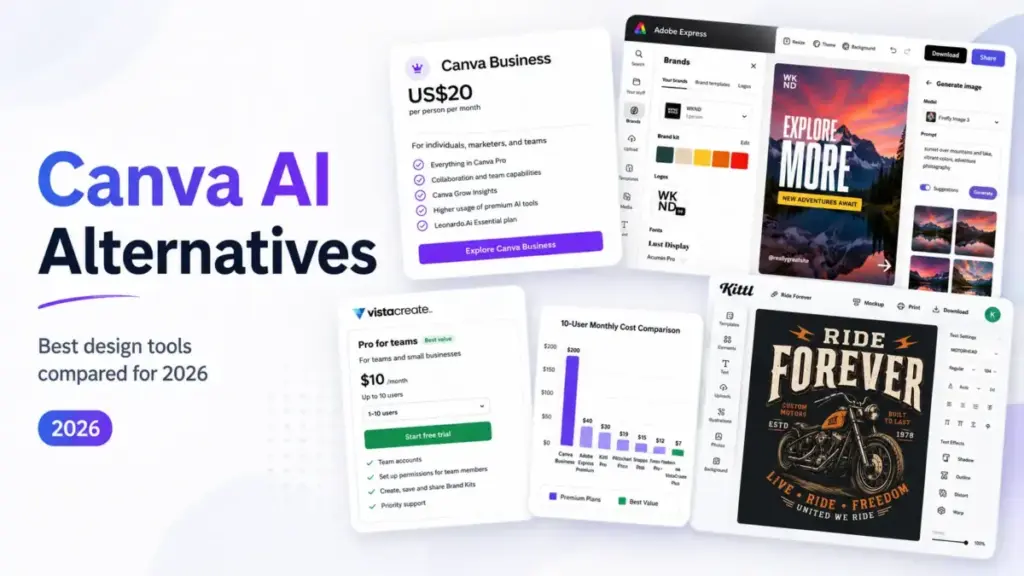
Canva AI bundles prompt-to-design, image generation, AI writing, and social scheduling inside one editor. That breadth is the product. It is also the ceiling. Heavy users burn through shared AI credit pools before mid-month.
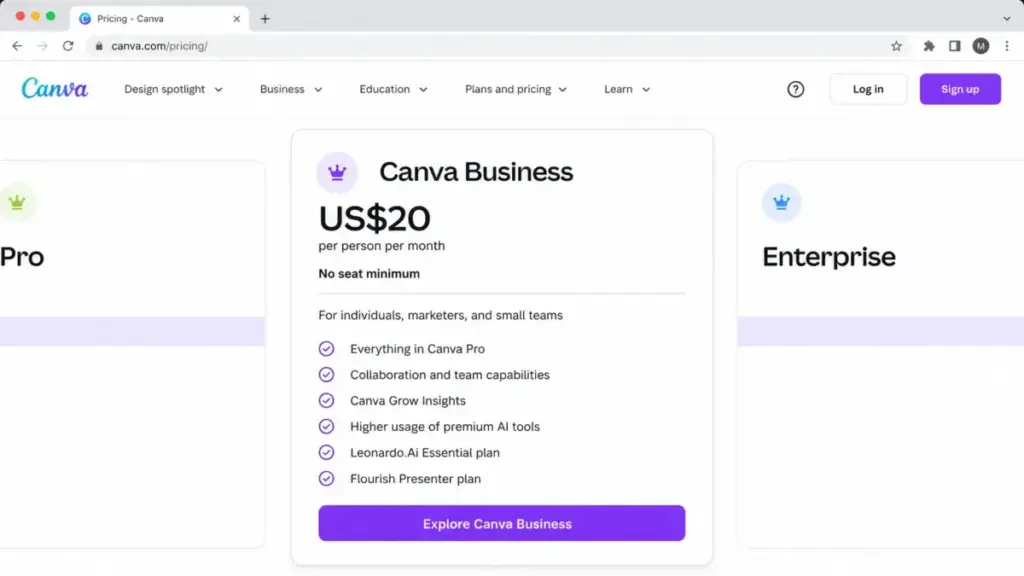
Export quality drops unless you know the workaround. And once a team hits 10 seats on Canva Business at $20/person/month (as of June 2026), the bill reaches $200/month for a tool that still gates advanced brand controls behind Enterprise pricing. If you are looking for top AI image generator options, the market has shifted in 2026.
This guide compares 10 Canva AI alternatives by the specific pain point each one solves, from AI credit limits and image generation quality to team pricing, brand governance, and commercial licensing.
Daniel Rivera mapped every alternative to a switching trigger, verified pricing against official sources, and flagged where credits expire, exports watermark, or the “free plan” comes with strings.
Here is what stood out: the cheapest 10-user option costs $10/month total, and the strongest image generator is not the tool most lists rank first. More on both below.
Quick Verdict: Best Canva AI Alternatives by Switching Trigger
| If you are leaving Canva AI because… | Best alternative | Why |
|---|---|---|
| AI credit ceilings hit too fast | Magnific / Freepik | 240K credits/year on Premium; unlimited models on Premium+ |
| Image generation quality is not sharp enough | Ideogram | Focused prompt-to-image with strong text rendering |
| Per-seat team pricing is too expensive | VistaCreate | Pro at$10/month includes up to 10 team seats |
| You need Adobe ecosystem and commercial-safe AI | Adobe Express | Firefly credits, Adobe Stock, Adobe Fonts, commercial positioning |
| You need data-heavy presentations, not social graphics | Visme | Stronger for infographics, reports, charts, and analytics |
| You need pro typography and merch-ready vector exports | Kittl | Built for apparel, packaging, posters, and typographic designs |
| You need AI photo/video editing, not template layouts | Picsart | Advanced background/object removal, bulk editing, AI models |
| You already work in Microsoft 365 all day | Microsoft Designer | Free AI design assistant inside the Microsoft ecosystem |
| You want AI copy, video, scheduling, and design in one tool | Simplified | Bundles AI writer, video, clips, scheduling, and brand books |
| You want low-friction AI photo editing for quick tasks | Fotor | Free plan with AI portrait retouching, templates, and AI Agent |
What this means: every row maps to a specific Canva AI pain point. If your frustration is not listed, Canva AI itself may still be the better fit. Scroll to When to Stay with Canva AI before switching.
How We Evaluated These Canva AI Alternatives
Daniel Rivera reviewed official pricing pages, feature documentation, help center articles, and published user feedback for all 10 alternatives on this list. Testing level for every product is official_research_only: no direct product testing was conducted for this article. All pricing was verified against official sources as of June 2026. Where official pricing pages used dynamic rendering, this is noted per product.
Evaluation criteria: AI credit structure, generation quality positioning, team pricing at 10 users, commercial licensing, export formats, migration difficulty, and what generative AI means for design tools versus what their marketing pages claim.
Limitation: this guide does not include API-only image generation platforms (Midjourney, DALL-E, Stable Diffusion) that require a separate design tool. It focuses on tools that combine AI generation with a visual design or editing workflow.
The Canva AI Problem Map
Canva AI is a strong all-in-one design tool. The problems surface at specific usage boundaries, and those boundaries determine which alternative fits.
Problem 1: AI Credit Ceilings and Unclear Heavy-Use Economics
Canva AI provides AI image generation, AI writing, and AI photo editing across its plans. Free users get limited access. Paid users share AI allowances across the team. The issue: heavy users on creative teams do not always know how many credits remain, and shared pools create friction when one designer’s workflow eats into another’s allocation.
As one Capterra reviewer noted:
“Sometimes The App Crashes, it can be because of my device but not sure actually, Sometimes Canva Doesn’t Load!” — Sayan Dey, Freelancing (Capterra)
Credit ceilings affect 3-person content teams producing daily social assets and solo creators running batch generation workflows. The alternative needs either a larger credit pool, clearer per-user allocation, or an unlimited generation tier. Our Canva AI review covers these limits in more detail.
Problem 2: Template-Led Design Limits Creative and Professional Depth
Canva AI excels at template-driven social graphics. It is less suited for vector-precise typography, professional photo retouching, merchandise-ready exports, or data-heavy business documents.
“When downloading an image, the quality is low unless you make it into a higher quality, which some people don’t know how to do.” — Patrica Cardenas, College and Career Technician (Capterra)
Solo freelancers selling print-on-demand merchandise, 8-person agency teams producing client presentations, and content marketers building data reports all hit this ceiling at different points.
Problem 3: Team Cost and Support Gaps at Scale
Canva Business was announced at $20/person/month. A 10-person team pays an estimated $200/month. That cost is competitive for what you get, but teams that only use AI generation or only need social templates may find specialist tools cheaper. And support friction is real:
“some time we need costumer service or technical support and we can not get any of it,” — alex M, CEO (Capterra)
The alternative needs lower per-seat cost, better support channels, or a flat-rate team plan.
Best Canva AI Alternatives for AI Credits and Image Generation
Adobe Express: Best Canva AI Alternative for Adobe Users

Adobe Express is the strongest Canva AI alternative for designers who already use Adobe Creative Cloud, need Firefly generative credits, and want commercial-use positioning built into the platform.
Pricing starts at free, with Adobe Express Premium at $9.99/month (as of June 2026). Premium includes 250 monthly generative credits. Heavier AI workflows (video, audio) require Firefly Pro at $19.99/month with 4,000 credits.
A 10-user team on Adobe Express Teams costs approximately $79.90/month at $7.99/license/month. That is less than half of Canva Business at 10 seats.
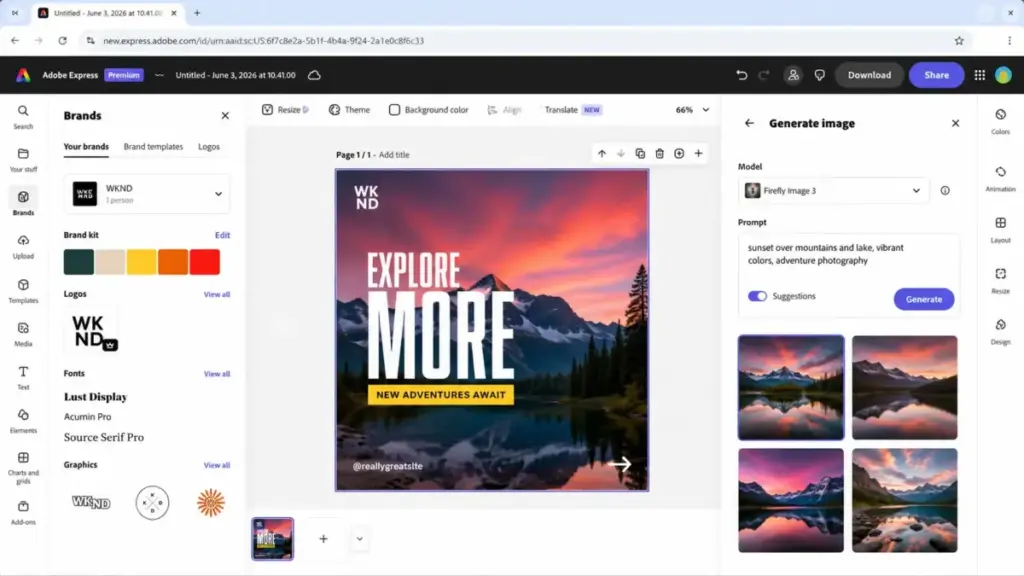
Adobe Express does better than Canva AI in premium font access (Adobe Fonts), stock asset depth (Adobe Stock integration), and commercial-safety positioning through Firefly’s training approach.
The tradeoff is less Canva-like simplicity for users outside the Adobe ecosystem. Non-Adobe users face a steeper learning curve for Creative Cloud adjacency features.
Best for:
- 5-person design teams already paying for Adobe Creative Cloud
- Freelancers who sell assets and need commercial-use clarity
- Marketing teams that combine Express with Photoshop or Illustrator
Avoid if:
- Your team has zero Adobe experience and wants drag-and-drop simplicity
- You need social scheduling built into the design tool
Migration difficulty: Medium
Verdict: Choose Adobe Express if your team already uses one Adobe product. The shared ecosystem saves more than the subscription costs.
Magnific / Freepik: Best for High-Volume AI Generation and Stock Assets


Magnific (Freepik’s AI-forward brand) is the strongest Canva AI alternative for creators who need multiple AI models, annual credit pools, and access to 250M+ stock assets alongside image, video, and audio generation.
Pricing: free plan available with limited daily access. Premium costs $14.50/month billed annually (as of June 2026) with 240K credits/year. Premium+ at $33.75/month billed annually adds unlimited models and 600K credits/year.
A 10-user team on individual Premium subscriptions costs approximately $145/month. Business plans may offer separate team pricing.
Magnific does better than Canva AI in raw generation volume, model variety, and annual credit pools that let creators plan usage across campaigns rather than watching monthly resets.
The tradeoff: Magnific is not a beginner-friendly template editor. It lacks Canva’s quick-start social layouts and presentation tools.
Best for:
- Solo creators generating 50+ AI images per week for client work
- 4-person content agencies that need stock assets plus AI generation in one subscription
- E-commerce teams producing product backgrounds and lifestyle imagery at scale
Avoid if:
- You mainly need templates for Instagram Stories and presentations
- Your team needs real-time collaboration on layouts
Migration difficulty: Medium
Free plan caveat: personal use only, attribution required, capped at 20 daily in-house image generations.
Ideogram: Best for Prompt-to-Image and Text Rendering

Ideogram is the strongest Canva AI alternative for creators whose primary workflow is AI image generation, especially for poster concepts, visual ideation, and typography-in-image outputs.
Pricing: free plan available. Plus starts at $15/month billed yearly (as of June 2026) with priority credits and concurrent generation queues.
A 10-user team on individual Plus subscriptions costs approximately $150/month.
Ideogram does better than Canva AI in focused prompt-to-image quality and text rendering inside generated images. It is purpose-built for generation, not layout.
The tradeoff: Ideogram is not a Canva replacement for drag-and-drop templates, brand kits, social scheduling, or presentations. It solves one problem well.
Best for:
- Solo designers generating concept art and poster visuals
- 3-person creative teams that use a separate layout tool and need a dedicated generation engine
Avoid if:
- You need a full design suite with brand kits, resizing, and scheduling
- Your workflow is template-first, not prompt-first
Migration difficulty: Low for image generation; High as a full Canva replacement
Picsart: Best for AI Photo and Video Editing

Picsart is the strongest Canva AI alternative for users whose main workflow is image editing, AI backgrounds, bulk image processing, and mobile/web creative editing rather than template-based social graphics.
Pricing: Pro at $10.50/month (as of June 2026). Ultra at $31.66/month for heavier AI generation and premium models.
A 10-user team on Pro costs approximately $105/month. Ultra for 10 users reaches $316.60/month.
Picsart does better than Canva AI in advanced background and object removal, access to frontier AI models for generation, and bulk editing (up to 50 images on Pro). Teams that focus specifically on photo editing may also want to compare best AI photo editor tools.
The tradeoff: Picsart is less structured than Canva for business documents, presentations, and template-led team workflows. Real-time collaboration is marked as coming soon.
Best for:
- E-commerce product photographers editing 20-50 images per batch
- Solo social media managers who need quick AI background swaps
- 6-person creative teams that edit photos more than they design layouts
Avoid if:
- Your primary output is presentations, reports, or print documents
- You need real-time multi-user collaboration today
Migration difficulty: Medium
Canva AI Alternatives That Fix Team Cost and Workflow Gaps
Microsoft Designer: Best Free Alternative for Microsoft 365 Users
Microsoft Designer is the strongest free Canva AI alternative for anyone already working inside Microsoft 365 apps daily.
Pricing: free with monthly AI credits (as of June 2026). Microsoft 365 Personal at $9.99/month or $99.99/year provides broader 365 value but is not Designer-specific pricing.
A 10-user team using free Designer costs $0/month. If each user needs Microsoft 365 Personal, the cost is approximately $99.90/month total.
Microsoft Designer does better than Canva AI in zero-cost AI image and design generation, including object removal, background blur/removal, brand kit support, and resizing.
The tradeoff: Designer is not as complete as Canva for template libraries, brand publishing workflows, social scheduling, and collaborative marketing production. Monthly credit limits apply. Product availability can vary by region.
Best for:
- 10-person teams that already have Microsoft 365 subscriptions
- Solo users who need occasional AI-generated images without a paid design subscription
- Internal communications teams producing quick branded graphics
Avoid if:
- You need deep template libraries, social scheduling, or print-ready exports
- Your team’s primary tools are Google Workspace, not Microsoft 365
Migration difficulty: Low
VistaCreate: Best Budget Alternative for Small Teams

VistaCreate is the strongest Canva AI alternative for small teams leaving because per-seat pricing is too expensive.
Pricing: free Starter plan available. Pro at $10/month (as of June 2026) includes up to 10 team seats, based on the official VistaCreate help center.
A 10-user team on VistaCreate Pro costs $10/month total. Compare that to Canva Business at $200/month for 10 users. The difference is $190/month or $2,280/year.
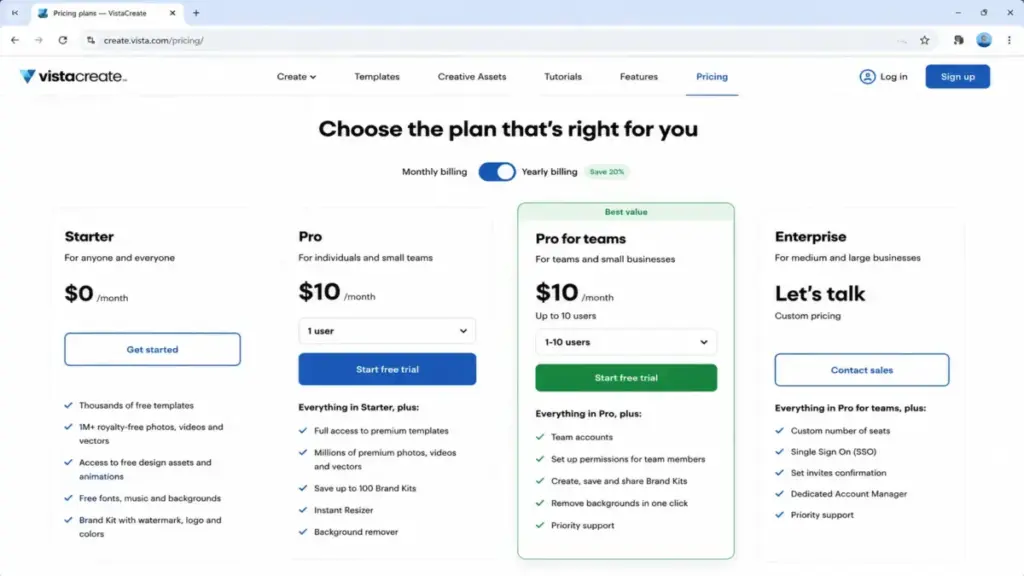
VistaCreate does better than Canva AI in flat-rate team pricing, with Pro including unlimited brand kits, AI image generator, AI writer, object remover, background remover, HD downloads, and social scheduling.
The tradeoff: VistaCreate is less advanced than Canva for broad ecosystem depth, AI roadmap, integrations, and enterprise-grade controls. AI image generations are capped at 100/month on Pro.
Best for:
- 5-10 person marketing teams that need basic social graphics and brand assets
- Nonprofit or education teams with tight per-seat budgets
- Freelancers managing multiple client brands
Avoid if:
- You need more than 100 AI image generations per month
- You need enterprise-level admin controls and compliance features
Migration difficulty: Low
Simplified: Best for Social Content Teams
Simplified is the strongest Canva AI alternative for marketers who want AI design, AI video, AI writing, social scheduling, and brand management in one platform.
Pricing: free Forever plan available. Simplified One starts at $20/month billed annually (as of June 2026).
One plan includes 100 AI design generations, 50 AI video generations, 100K AI words, 7 social accounts, and 5GB storage. Extra users, social profiles, bulk scheduling, and brand books are available as add-ons.
A 10-user team on individual One subscriptions costs approximately $200/month. The Growth plan includes 5 users at $83.30/month billed annually, so 10-user cost depends on seat and add-on structure.
Simplified does better than Canva AI in bundling design, video, writing, clips, subtitles, chatbot, and scheduling functions. Canva has these features spread across different interfaces.
The tradeoff: Simplified’s design editor and template polish may not match Canva’s template ecosystem depth. Some workflows are capped or require add-on purchases.
Best for:
- 4-person marketing teams producing social content, video clips, and blog drafts daily
- Agencies managing multiple social accounts across clients
- Content creators who want AI writing and AI design without switching tools
Avoid if:
- You need best-in-class design templates and Canva-level visual polish
- Your free plan budget is limited (Simplified Free allows only 5 AI design generations)
Migration difficulty: Medium
Canva AI Alternatives That Fix Creative Depth and Specialist Needs
Kittl: Best for Merch and Typography

Kittl is the strongest Canva AI alternative for creators making apparel, print-on-demand products, posters, logos, and typography-heavy designs.
Pricing: free plan available with limited/preview access (as of June 2026). Paid plans open access to commercial rights, more AI tokens, premium templates, vector exports, and larger project limits. Exact paid plan prices should be verified on the Kittl pricing page.
Kittl does better than Canva AI in polished creative designs, premium templates and mockups, vector exports, AI visual generation, product backgrounds, and commercial licensing for creators selling physical products.
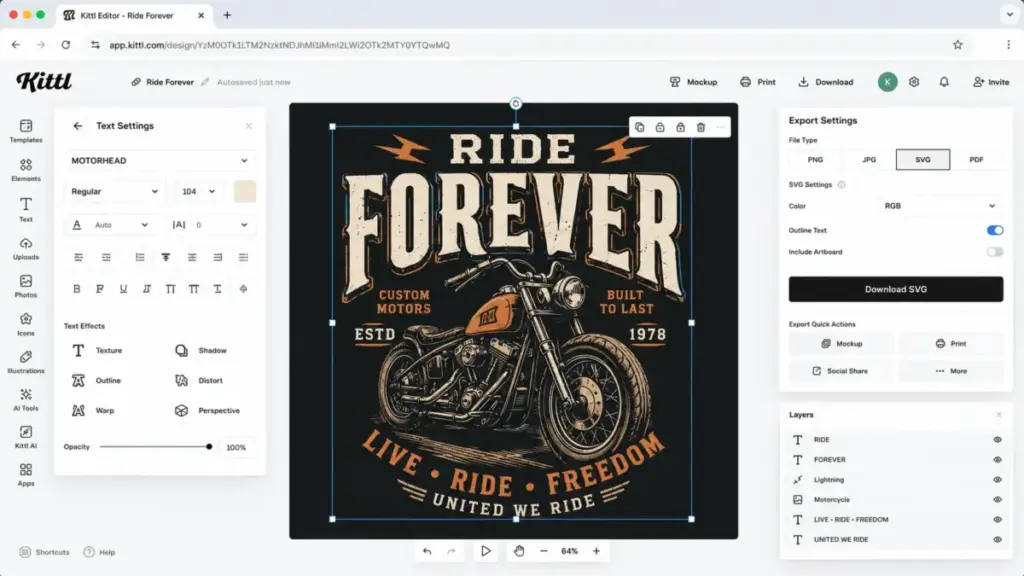
The tradeoff: Kittl is not as broad as Canva for presentations, social scheduling, everyday business documents, and general team content workflows. Free plan is personal use only. Included subscription tokens do not roll over month to month.
Best for:
- Print-on-demand sellers designing 10+ new products per month
- Packaging designers who need vector-quality exports
- Freelance illustrators and typographers
Avoid if:
- You need social media scheduling and general marketing templates
- You produce presentations or business reports
Migration difficulty: Medium
Visme: Best for Presentations and Reports

Visme is the strongest Canva AI alternative for business users who create presentations, infographics, documents, and reports more than social graphics.
Pricing: free Basic plan available. Paid plans start at $12.25/month billed annually for individuals (as of June 2026). Team plan at $24.75/user/month billed annually.
A 10-user team on the Team plan costs approximately $247.50/month. Individual Starter plans for 10 users cost approximately $122.50/month.
Visme does better than Canva AI in data-heavy business visuals, interactive presentations, analytics, and brand governance across teams. For teams that also need AI-generated imagery inside presentations, understanding what text-to-image AI does helps set expectations.
The tradeoff: Visme can feel less casual and less social-template-first than Canva. Premium downloads and advanced team features require paid plans.
Best for:
- 8-person sales teams building client-facing decks with live data
- Marketing directors producing quarterly reports with embedded charts
- Business consultants creating interactive proposals
Avoid if:
- Your primary output is Instagram posts and TikTok graphics
- You want a free plan with full export capabilities
Migration difficulty: Medium
Fotor: Best for Low-Friction Photo Editing
Fotor is the strongest Canva AI alternative for users who mainly need quick photo retouching, AI headshots, background removal, and image enhancement without a full design suite.
Pricing: free plan available (as of June 2026). Paid Pro/Pro+ pricing is dynamically rendered on the official pricing page. Free exports are watermarked.
Fotor does better than Canva AI in AI portrait retouching, batch edits, AI Agent Sisi integration, and multiple image/video models accessible from one interface.
The tradeoff: Fotor is less complete than Canva for all-in-one marketing design, collaboration, social publishing, and brand workflows.
Best for:
- Solo real estate agents editing listing photos
- Headshot photographers using AI retouching for volume work
- Social media managers who need quick image enhancement without opening Photoshop
Avoid if:
- You need templates, brand kits, or team collaboration features
- You want watermark-free exports without a paid subscription
Migration difficulty: Low
Canva AI Alternatives Pricing Comparison: Monthly Cost, AI Credits, and 10-User Teams
| Alternative | Starting price | 10-user cost | Free plan | Billing basis |
|---|---|---|---|---|
| Canva AI | Free; Business $20/person/mo | $200/mo | Yes | Per user |
| Adobe Express | Free; Premium $9.99/mo | $79.90/mo (Teams) | Yes | Per license |
| Microsoft Designer | Free; M365 $9.99/mo | $0 (free) to $99.90/mo | Yes | Free or bundle |
| VistaCreate | Free; Pro $10/mo | $10/mo (up to 10 seats) | Yes | Flat plan |
| Kittl | Free; paid plans vary | Check live pricing page | Yes | Free + paid plans |
| Picsart | Pro $10.50/mo | $105/mo | Limited free tools | Per user |
| Magnific / Freepik | Free; Premium $14.50/mo (annual) | $145/mo | Yes | Individual or team |
| Visme | Free; Starter $12.25/mo (annual) | $247.50/mo (Team) | Yes | Individual or team |
| Ideogram | Free; Plus $15/mo (yearly) | $150/mo | Yes | Credit subscription |
| Fotor | Free; paid price dynamic | $0 (free with watermarks) | Yes | Free + paid tiers |
| Simplified | Free; One $20/mo (annual) | $200/mo | Yes | Subscription + add-ons |
What this means: VistaCreate Pro is the clear budget winner at $10/month for up to 10 seats. Adobe Express Teams at $79.90/month offers the strongest value-to-feature ratio for teams already in Adobe’s ecosystem. Microsoft Designer costs nothing if your team already has Microsoft 365 subscriptions. Every other option charges per-user, making team costs scale linearly.
Pricing note: all prices were verified against official pricing pages as of June 2026. Prices for Canva, Adobe Express, Picsart, VistaCreate, Magnific, Visme, Ideogram, and Simplified are from published pricing pages. Fotor and Kittl use dynamic pricing pages that may show different rates depending on region and billing cycle. Always verify the current price before purchasing.
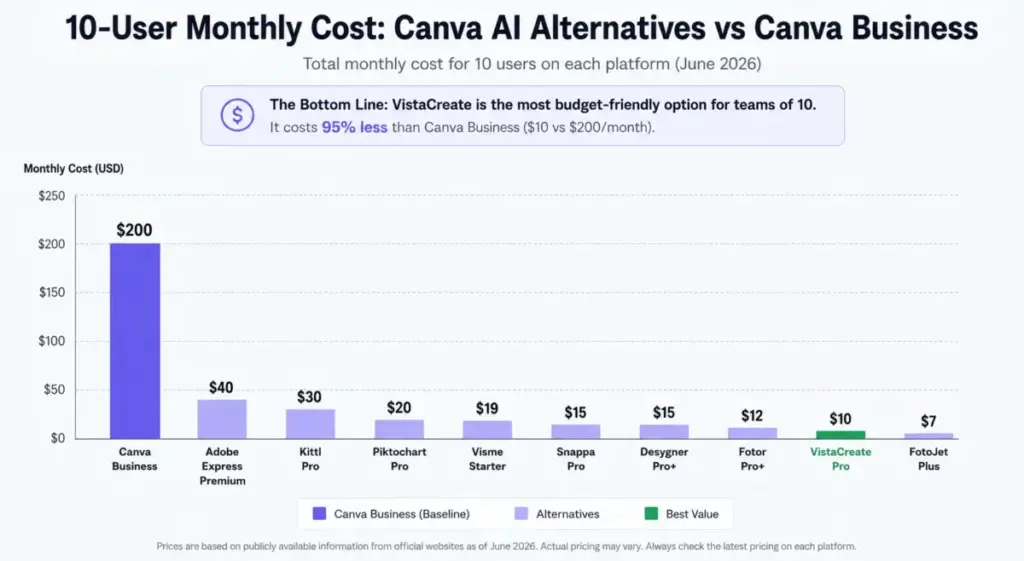
The “Daniel Rivera 10-User Cost Test” for Canva AI alternatives: if your team has 10 designers and you switch from Canva Business to VistaCreate Pro, you save $2,280/year. That savings buys 10 months of a separate Ideogram Plus subscription for your lead designer’s generation work.
How to Choose the Right Canva AI Alternative
The right Canva AI alternative depends on why you are leaving, not which tool has the longest feature list.
Step 1: Identify your primary frustration. Is it AI credit limits? Per-seat cost? Image quality? Template depth? Export precision? Each frustration maps to a different tool.
Step 2: Check your team size math. A solo creator and a 10-person marketing team face different economics. VistaCreate’s flat pricing helps at 10 seats. Adobe Express Teams helps at 5-20 seats. Simplified’s add-on model adds complexity above 5 users.
Step 3: Audit what you use most. If 80% of your Canva usage is social templates, you need a template-first tool (VistaCreate, Microsoft Designer). If 80% is AI generation, you need a generation-first tool (Magnific, Ideogram). If 80% is photo editing, Picsart or Fotor fits better.
Step 4: Check commercial licensing. Kittl gates commercial rights behind paid plans. Magnific’s free plan is personal-use only with attribution. Adobe Express emphasizes commercial safety through Firefly. If you sell outputs, read the license terms before committing.
Step 5: Calculate migration cost honestly. A tool that saves $100/month but takes 40 hours to migrate templates, rebuild brand kits, and retrain a team may not pay off for 6 months.
Which Canva AI Alternative Should You Avoid?
Every tool on this list has scenarios where it is the wrong pick.
| Alternative | Avoid if… |
|---|---|
| Adobe Express | You have zero Adobe experience and no other Adobe subscriptions |
| Microsoft Designer | You need enterprise-grade template libraries and social scheduling |
| VistaCreate | You need more than 100 AI generations/month or enterprise admin controls |
| Kittl | You primarily create presentations, social posts, and business documents |
| Picsart | You need real-time collaboration or presentation-first workflows |
| Magnific / Freepik | You need beginner-friendly drag-and-drop template editing |
| Visme | Your primary output is quick social media graphics, not reports |
| Ideogram | You need a full design suite, not just an image generator |
| Fotor | You want watermark-free exports on a free plan |
| Simplified | You need Canva-level template polish and visual design depth |
What this means: the avoid-if column is not a criticism. It is a fit filter. The best Canva AI alternative is the one where your team’s primary workflow matches the tool’s primary strength.
The Alternative Nobody Mentions
Microsoft Designer gets overlooked on most Canva AI alternatives lists because it does not position itself as a Canva competitor. It is a free AI design tool bundled inside the Microsoft ecosystem.
For a 10-person team already paying for Microsoft 365, Designer adds AI image generation, background removal, brand kit support, and resizing at no additional cost. That is a $200/month savings compared to Canva Business, with the caveat that Designer’s template library and social scheduling features are not as deep.
If your team uses Microsoft 365 for email, documents, and meetings, try Designer before paying for any alternative. The worst outcome is that you learn Designer’s limits and make a more informed decision.
Feature Gate Comparison: Where AI Credits and Controls Differ
The pricing table shows what each tool costs. This table shows what each tool gives you at its paid tier versus Canva AI.
| Feature | Canva AI (Business) | Adobe Express (Premium) | VistaCreate (Pro) | Magnific (Premium) | Picsart (Pro) | Ideogram (Plus) |
|---|---|---|---|---|---|---|
| AI image generation | Shared team pool | 250 credits/mo | 100/month | 240K/year | Included | Priority queue |
| AI writing | Included | Included | Included | N/A | N/A | N/A |
| Background removal | Included | Included | Included | N/A | Up to 50 batch | N/A |
| Brand kit | Pro+ | Premium | Unlimited on Pro | N/A | N/A | N/A |
| Social scheduling | Included | Not included | Included | N/A | N/A | N/A |
| Vector export | Limited | PDF/SVG | Standard formats | N/A | N/A | N/A |
| Commercial license | Paid plans | Firefly-trained | Paid plans | Paid plans | Paid plans | Check terms |
| Video editing | Basic | Basic | Basic | Video gen credits | Video models | N/A |
| Real-time collaboration | Yes | Yes | Yes | No | Coming soon | No |
| Custom fonts | Upload only | Adobe Fonts | Upload only | N/A | N/A | N/A |
What this means: Canva AI is the broadest all-in-one tool. Adobe Express matches it on commercial safety and adds premium fonts. VistaCreate matches it on social scheduling and brand kits at a fraction of the team cost. Magnific and Ideogram trade breadth for depth in AI generation. Picsart trades templates for editing power.
The feature gate that matters most depends on your workflow. If your team generates 200+ AI images per month, Canva AI’s shared pool may not be enough. If your team needs social scheduling built into the design tool, that eliminates Magnific, Ideogram, Picsart, and Kittl immediately.
For teams evaluating generation-focused alternatives specifically, our Adobe Firefly review and evaluation covers how Firefly credits compare to other generation models.
For a broader view of Firefly competitors beyond Canva, see our Adobe Firefly alternatives comparison.
Migration Risk Assessment
| Alternative | Migration difficulty | Main risk | Template rebuild needed? |
|---|---|---|---|
| Adobe Express | Medium | Learning Adobe ecosystem if new to it | Yes, partial |
| Microsoft Designer | Low | Feature gaps for advanced template workflows | Minimal |
| VistaCreate | Low | AI generation cap (100/month) may frustrate heavy users | Yes, partial |
| Kittl | Medium | Different design philosophy; commercial license review needed | Yes, full rebuild |
| Picsart | Medium | Different workflow; collaboration not yet available | Yes, different format |
| Magnific / Freepik | Medium | Not a template tool; credit system learning curve | N/A (different tool type) |
| Visme | Medium | Steeper learning curve for data visualization features | Yes, partial |
| Ideogram | Low (generation) / High (full replacement) | Not a design suite replacement | N/A (image generation only) |
| Fotor | Low | Watermarks on free tier; paid pricing not confirmed in source | Minimal |
| Simplified | Medium | Add-on cost complexity; template polish gap | Yes, partial |
What this means: the lowest-risk switches are Microsoft Designer (free, low friction) and VistaCreate (similar workflow to Canva). The highest-risk switch is replacing Canva entirely with Ideogram, which only covers image generation. Most teams should expect 2-4 weeks of adjustment.
When to Stay with Canva AI
Canva AI is still the right choice for teams that match these conditions:
- Your team uses templates, AI generation, social scheduling, and brand kits inside one tool, and the combined value exceeds any specialist alternative.
- You have fewer than 5 team members and Canva Pro covers your AI usage without hitting credit ceilings.
- Your workflow spans presentations, social graphics, documents, video clips, and website mockups. No single alternative covers all of these at Canva’s breadth.
- You have already built 50+ branded templates in Canva and the migration cost (time, retraining, template rebuild) exceeds 6 months of subscription savings.
- Your team includes non-designers who rely on Canva’s beginner-friendly editor. Switching to a tool with a steeper learning curve will slow production.
Stay-vs-switch signal: if your frustration is occasional (AI credits run low once per quarter), the switching cost likely outweighs the benefit. If your frustration is structural (you hit credit limits weekly, your export quality is consistently insufficient, or your 10-person team overpays by $190/month compared to VistaCreate), switching is worth the migration effort.
Final Verdict: Best Canva AI Alternative for Most Teams
The best Canva AI alternative depends on the exact reason you are leaving.
Best overall for most teams: Adobe Express. It covers template design, AI generation, premium assets, and commercial licensing at $9.99/month per user, with ecosystem depth that grows as your design needs grow. Teams already using any Adobe product get the most value.
Best for budget-conscious teams (10 seats): VistaCreate Pro at $10/month total is the largest cost gap on this list.
Best for AI generation volume: Magnific / Freepik with 240K+ annual credits and access to multiple AI models.
Best free option: Microsoft Designer, if your team already uses Microsoft 365.
Best for niche creative work: Kittl for merch and typography. Visme for presentations and data reports. Picsart for photo/video editing.
Daniel Rivera’s recommendation: do not switch to the tool with the longest feature list. Switch to the tool that fixes the specific frustration driving your search. If you are not sure what that frustration is, Canva AI is probably still your best option.
FAQ
What is the best free Canva AI alternative?
Microsoft Designer offers AI image generation, background removal, resizing, and brand kit support at no cost. It works best for users already inside the Microsoft 365 ecosystem. VistaCreate also has a free Starter plan, but AI generation and premium templates require the $10/month Pro upgrade. For free AI image generation specifically, Ideogram and Fotor both offer free-tier access with usage limits.
Is Adobe Express better than Canva AI for commercial design work?
Adobe Express positions Firefly-generated content as trained on licensed and public domain data, which gives commercial users more confidence in output rights. Canva AI also allows commercial use on paid plans, but Adobe’s explicit commercial-use framing and Adobe Stock integration make Express a stronger fit for teams selling design assets or producing client deliverables. Premium costs $9.99/month with 250 monthly generative credits.
What is the cheapest Canva AI alternative for a 10-person team?
VistaCreate Pro costs $10/month and includes up to 10 team seats, making it the cheapest option at $1/user/month effective cost. Compare that to Canva Business at $200/month for 10 users. The tradeoff is VistaCreate’s 100 AI generation/month cap and simpler enterprise controls.
Which Canva AI alternative has the best AI image generator?
Ideogram and Magnific / Freepik focus specifically on AI image generation quality. Ideogram is stronger for text rendering inside images. Magnific provides higher credit volumes and access to multiple AI models. Canva AI’s built-in generation is convenient but template-led rather than generation-focused.
Can I migrate my Canva templates to another tool?
No direct template migration path exists between Canva and most alternatives. You can export Canva designs as PNG, JPG, or PDF files, but editable templates need to be rebuilt in the new tool. VistaCreate and Adobe Express have the most Canva-like workflows, making template recreation faster. Budget 2-4 weeks for a team of 10 to rebuild core templates.
Is Kittl better than Canva for print-on-demand design?
Kittl is better than Canva AI for typography-heavy, merchandise-ready designs. It offers vector exports, premium mockups, and commercial licensing on paid plans. Canva AI is broader but less specialized for apparel, packaging, and poster design. The caveat: Kittl’s included AI tokens do not roll over month to month, and the free plan is personal use only.
What should agencies use instead of Canva AI?
Agencies managing multiple client brands should consider Simplified (bundles design, video, writing, scheduling, and brand books with add-on flexibility) or Adobe Express (premium fonts, stock assets, and Firefly credits scale across client work). VistaCreate Pro’s 10-seat flat pricing is also strong for small agencies with tight margins.
Does Canva AI have usage limits?
Yes. Canva AI features are available across plans, but advanced tools and higher-volume usage require paid plans. Free users receive limited AI access. Canva Business and Enterprise tiers enable higher allowances, but shared credit pools mean team usage is collective, not per-user. Exact credit allocations depend on plan type and regional pricing, which can vary from published rates.
Which Canva alternative works best for presentations?
Visme is the strongest Canva AI alternative for presentations, infographics, and data-heavy business visuals. It offers interactive presentations, embedded analytics, and workflows that Canva’s presentation builder does not match. Teams that also produce written content alongside visuals can explore top AI content creation tools for complementary options. Paid plans start at $12.25/month billed annually.
For presentation teams that also need AI video, check our list of top AI video generator tools.
Should I switch from Canva AI or stay?
Stay with Canva AI if your team uses 3+ Canva features daily (templates, AI generation, scheduling, brand kit) and your monthly bill is under $100. Switch if you consistently hit AI credit limits, overpay for seats your team barely uses, or need specialist depth (photo editing, vector typography, data presentations) that Canva AI does not prioritize.