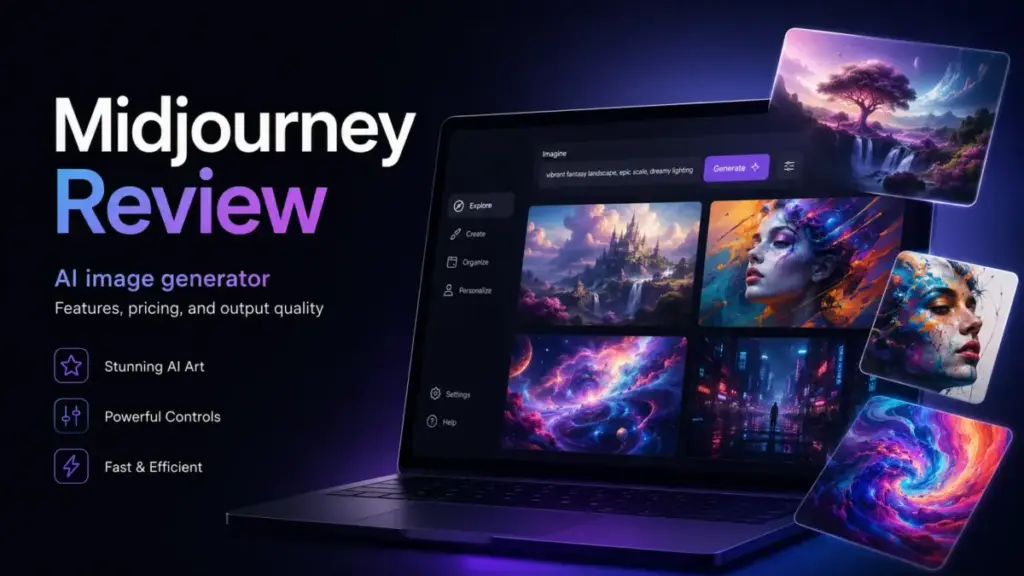
Midjourney starts at $10/month and remains one of the strongest AI image generators for visual quality, but price alone does not tell you whether it fits your workflow.
This Midjourney review breaks down the V8.1 model update, GPU time math that most reviews skip, privacy gaps you need to plan around, and the real cost of video generation. I scored it, compared it against five alternatives, and mapped which plan fits each buyer type, so you can decide before your first GPU minute ticks away.
Quick Verdict
| Detail | Summary |
|---|---|
| Score | 8.2 / 10 |
| Best for | Creators and designers who prioritize visual aesthetics and style exploration |
| Not for | Teams that need full privacy, exact prompt control, or readable text in images |
| Best plan for most users | Standard ($30/month) for regular image work; Pro ($60/month) if you need Stealth Mode |
| Main limitation | Open-by-default privacy model; Stealth Mode is Pro/Mega only and still does not cover public Discord channels |
| Pricing verified | May 1, 2026 |
Midjourney Review: My Quick Verdict
Midjourney earns an 8.2 out of 10 because its image quality and style range remain ahead of most competitors, but its privacy model, refund restrictions, and prompt adherence gaps create real friction for professional teams. I recommend the Standard plan for solo creators and the Pro plan for anyone handling client work that requires confidentiality.
If you need exact text rendering, full local control, or a free entry point, look at the alternatives section below before subscribing.
What Is Midjourney?
Midjourney is a generative AI tool that creates images and videos from text prompts. It operates through a web application at midjourney.com and through Discord, where users type commands to generate four-image grids they can then upscale, vary, or edit. As of April 30, 2026, the latest model is V8.1, which Midjourney describes as its fastest version so far.
Unlike tools such as Stable Diffusion that run locally, Midjourney is fully cloud-based. You pay for GPU time on a subscription plan, and all generation happens on Midjourney’s servers. This simplifies setup but means you depend on their infrastructure, their content moderation, and their default privacy settings.
Midjourney Web App and Discord
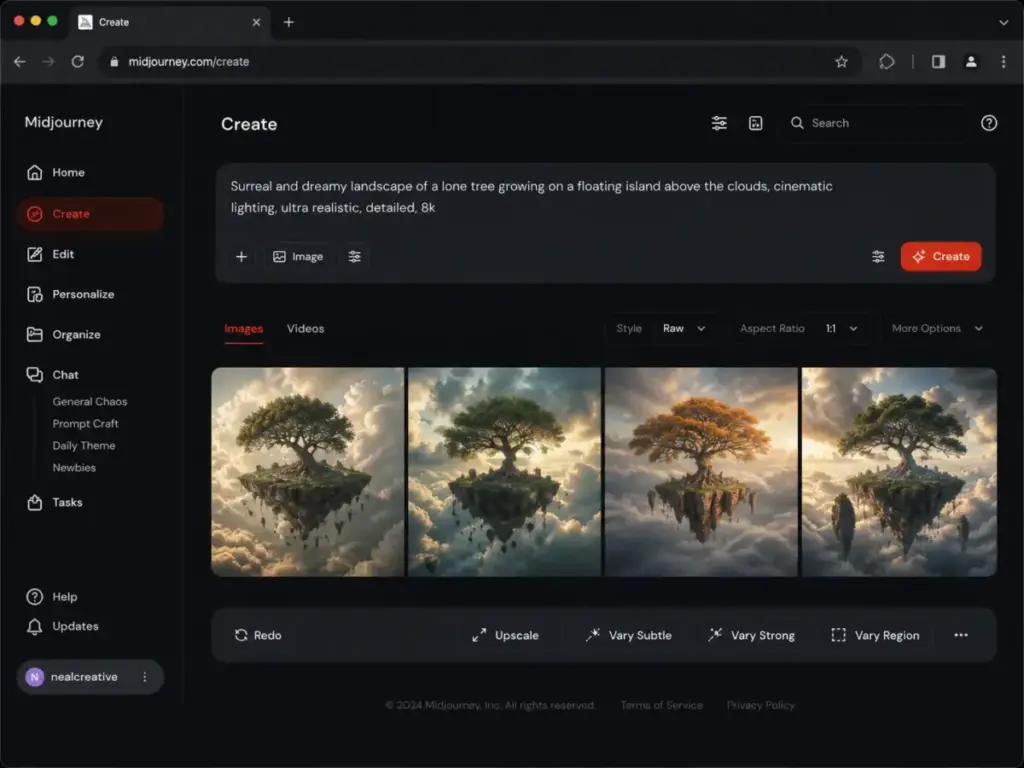
Midjourney offers two primary interfaces. The web app (midjourney.com) includes a Create page for prompting, an Organize page for managing your image library, and an Explore page where public community creations are browsable. Discord remains the original interface, where you type slash commands in channels or direct messages to generate images.
The web app is cleaner for focused work. Discord is noisier but useful for watching community prompts in real time. For privacy, the web Create page or Discord DMs paired with Stealth Mode (Pro and Mega only) is the safest combination. Public Discord channel prompts remain visible to anyone in that channel, even with Stealth Mode active.
Midjourney Image Generation Workflow
Every prompt produces a grid of four images. From there, you can upscale any image to full resolution, create variations, or open the Editor for inpainting, panning, and zoom-out adjustments. The workflow is fast once you learn the parameter syntax: flags like --ar 16:9 for aspect ratio, --stylize for creative interpretation strength, and --v 8.1 for model selection.
One image prompt generating a set of four images usually costs about 1 minute of GPU time. This is the baseline cost you need to understand before choosing a plan, because everything else (HD, video, Omni Reference) multiplies from there.
The First 30 Minutes With Midjourney
Here is what your first session looks like. You sign up at midjourney.com, choose a plan (there is no general free tier), and land on the Create page. You type a prompt, wait a few seconds with V8.1, and see four images. You click one to upscale, try a variation, maybe open the Editor to change a region. You browse the Explore page, save a few community images for reference, and organize your gallery.
In 30 minutes on the Standard plan, you will use roughly 30 GPU minutes of your 15-hour monthly budget. That is about 3.3% of your Fast time. The workflow feels natural for exploration, but structured production (batch social content, consistent brand assets) requires more planning around style references, moodboards, and prompt templates.
Midjourney Features That Matter
Midjourney’s feature set has expanded well beyond basic text-to-image generation. The areas that matter most for a buying decision are model quality, editing tools, personalization, reference systems, and video. I will focus on each from a practical workflow perspective rather than listing every parameter.
Midjourney V8.1 and Image Quality
V8.1, released April 30, 2026, is documented by Midjourney as roughly 4 to 5 times faster than earlier versions for standard jobs. It supports HD 2K images, which cost about 1.33 GPU minutes compared to less than 1 minute for standard-definition V8.1 images. The default model remains V7, so you need to specify --v 8.1 or change your settings to use it.
V8.0 Alpha remains available for a limited time but carries restrictions: Fast mode only, some style reference workflows cost 4x GPU time, and HD combined with quality 4 can cost 16x GPU time. For most users, V8.1 is the better choice because of its speed and lower GPU cost.
Image quality remains Midjourney’s core strength. Community sentiment consistently praises its aesthetic output, and as one Reddit user (gippalippa) put it: “midjourney is by far the best in terms of aesthetics and possible styles it can reproduce.” This aligns with what I observe: Midjourney tends to produce images with strong composition, lighting, and mood out of the box, even from simple prompts.
Midjourney Editor and Variations
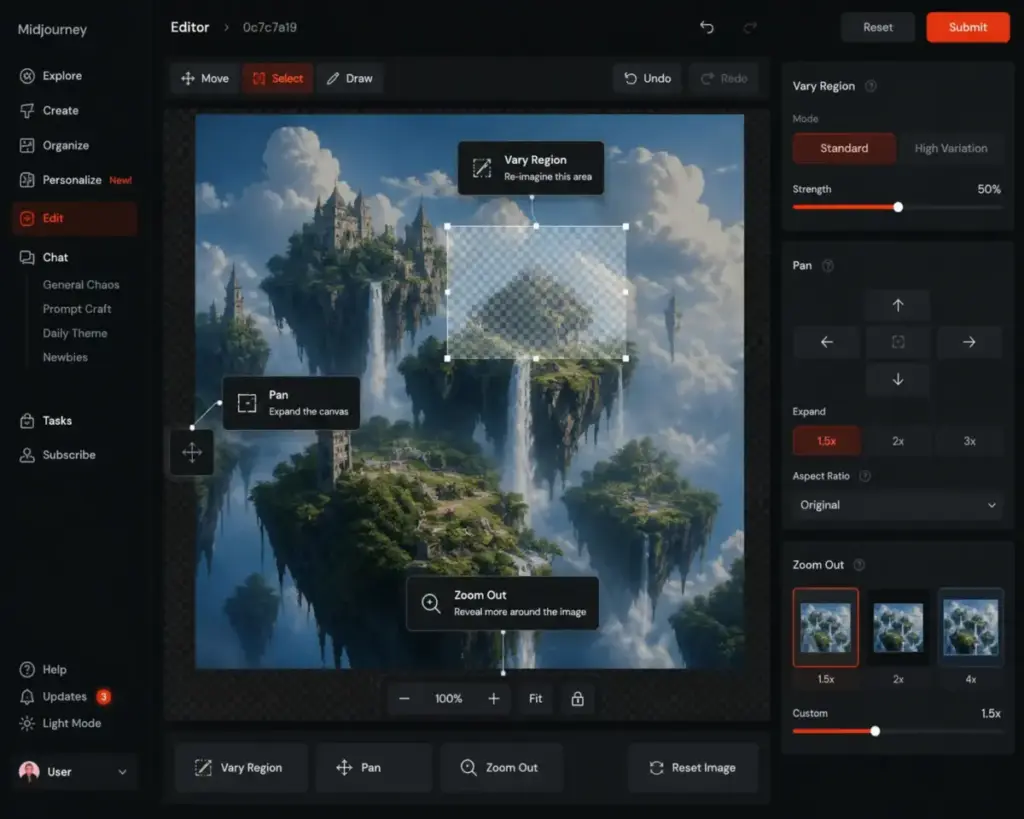
The Editor supports Remix, inpainting (Vary Region), Pan, and Zoom Out. These tools let you modify generated images without starting a new prompt from scratch. Vary Region is particularly useful for fixing specific areas, like replacing a background element or correcting a face, without regenerating the entire image.
One important limitation: Editor functionality currently uses V6.1 even when editing V8.1 images. This means edits may not perfectly match the style of your V8.1 output. For workflows that depend on iterative editing, this version mismatch is worth tracking as Midjourney updates the Editor pipeline.
Midjourney Moodboards and Personalization
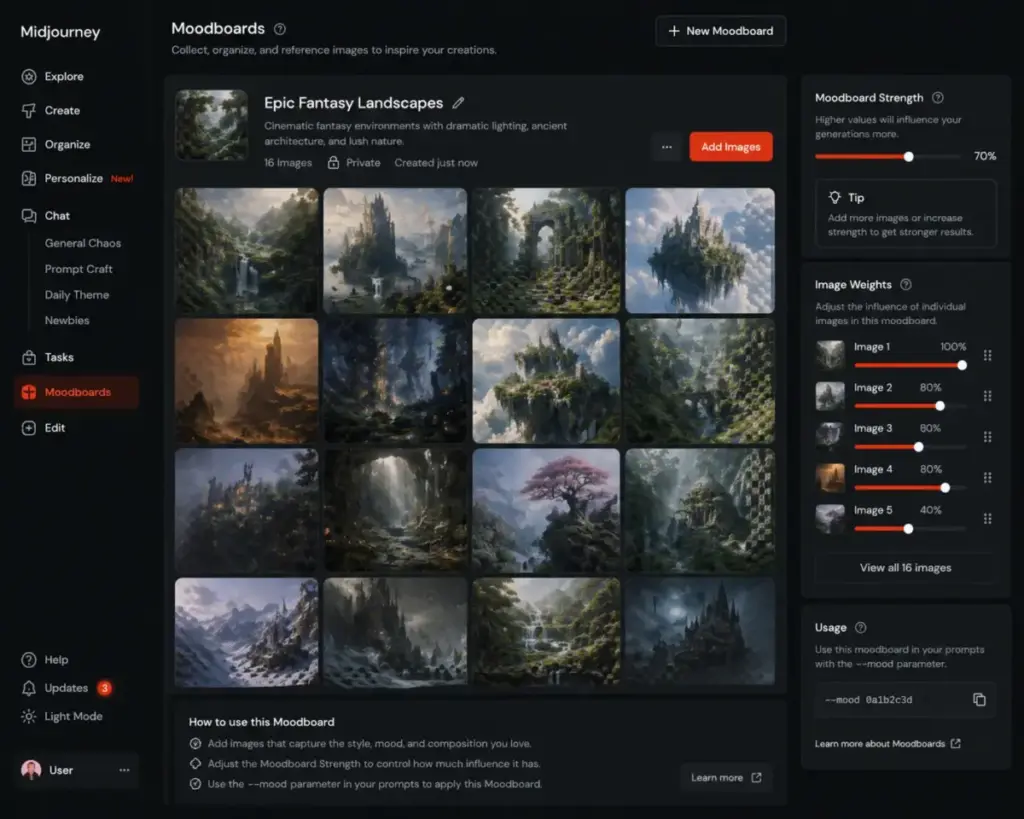
Moodboards let you select a set of images that define a visual style for your project. Instead of describing a style in every prompt, you assign a moodboard and Midjourney applies that aesthetic direction automatically. This is valuable for brand consistency, editorial illustration series, or any project where visual coherence matters across multiple generations.
Moodboards currently work with versions 6 and 7. Whether they extend to V8.1 is worth checking in the official documentation as updates roll out. For teams producing ongoing content, moodboards reduce prompt repetition and improve style consistency across sessions.
Midjourney Omni Reference
Omni Reference lets you place characters, objects, vehicles, or creatures from a reference image into new creations. This is useful for character consistency across a series or for placing a specific product into different scenes.
Omni Reference is compatible with V7 and costs 2x normal V7 GPU time. It is not compatible with some editing tools, Fast Mode, Draft Mode, Conversational Mode, or quality 4 settings. These restrictions limit its flexibility in fast-paced workflows, but when it works, it solves one of the hardest problems in AI image generation: keeping a specific subject consistent across multiple outputs.
Midjourney Video Generation
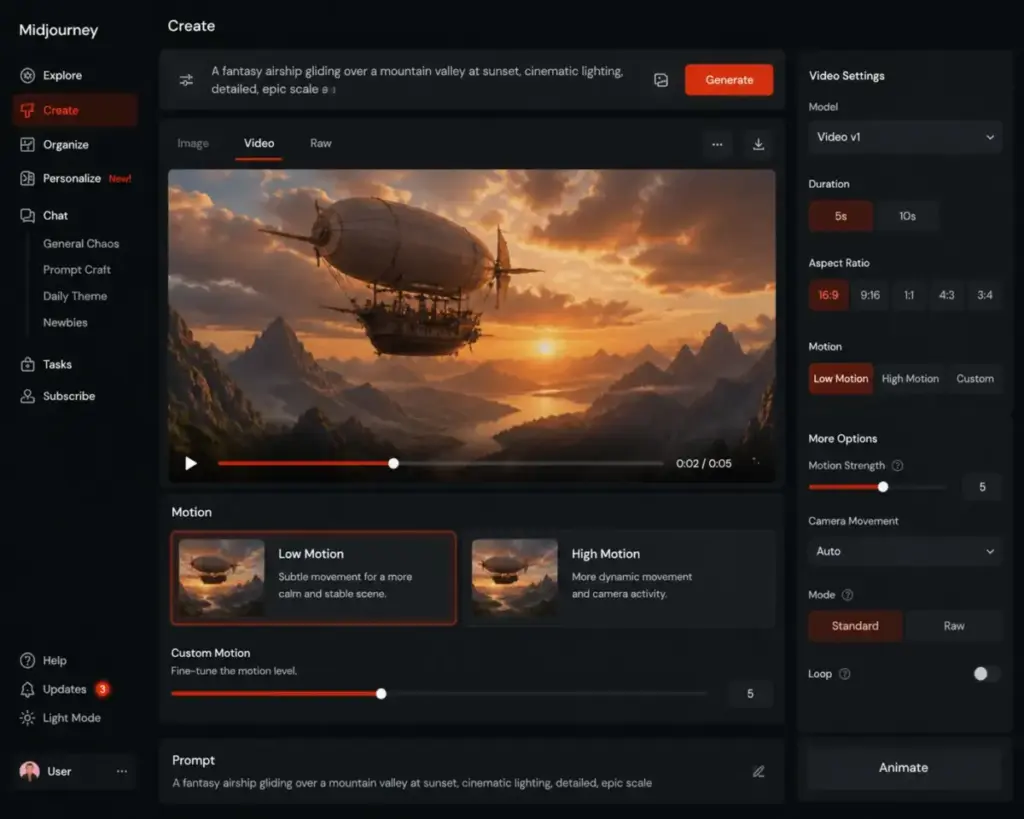
Midjourney can animate images (both Midjourney-generated and uploaded) into short videos. Parameters include motion intensity (low, high), raw mode, loop, and end-frame control. All plan tiers can generate videos in Fast Mode. Standard, Pro, and Mega can generate HD videos in Fast Mode. Pro and Mega can generate SD videos in Relax Mode.
The GPU cost is where video gets expensive. One video prompt costs about 8 GPU minutes. A batch of 4 SD videos costs about 8 minutes. A batch of 4 HD videos costs about 26 minutes. On a Basic plan with 200 minutes of Fast time, a single HD video batch consumes 13% of your monthly budget. This makes video a Pro/Mega feature in practice, even though Basic technically supports it.
Midjourney Pricing and Plans
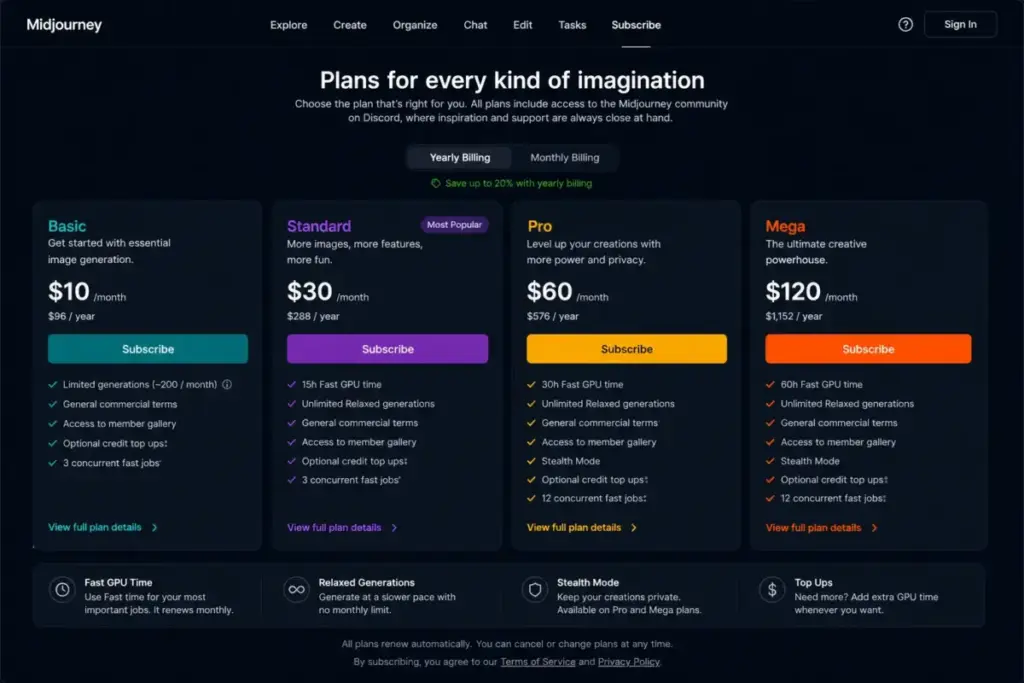
Midjourney offers four subscription tiers with no general free plan. Pricing starts at $10/month for Basic, and annual billing reduces each tier by 20%. Every plan includes commercial-use rights, but companies with over $1,000,000 in annual gross revenue must subscribe to Pro or Mega for company commercial use, as documented in Midjourney’s commercial-use terms.
All prices below were verified against the official Midjourney pricing page on May 1, 2026.
| Plan | Monthly | Annual (per month) | Fast GPU Time | Relax Images | Relax SD Video | Stealth Mode | Best Fit |
|---|---|---|---|---|---|---|---|
| Basic | $10 | $8 | 3.3 hr (200 min) | No | No | No | Casual exploration |
| Standard | $30 | $24 | 15 hr | Yes | No | No | Regular creators |
| Pro | $60 | $48 | 30 hr | Yes | Yes | Yes | Client work, privacy |
| Mega | $120 | $96 | 60 hr | Yes | Yes | Yes | High-volume teams |
Pricing verified May 1, 2026. Extra GPU time available at $4/hour.
Midjourney GPU Time Explained
GPU time is the real currency of Midjourney. Fast Mode gives you priority processing. Relax Mode (Standard and above) queues your job with variable wait times of 0 to 30 minutes depending on demand and your usage history. Fast time resets monthly. Unused Fast time does not roll over.
Here is what your GPU budget actually buys:
| Action | Approximate GPU Cost | Basic (200 min) Output | Standard (15 hr) Output |
|---|---|---|---|
| 1 image prompt (4 images) | ~1 minute | ~200 prompts | ~900 prompts |
| 1 HD image (V8.1) | ~1.33 minutes | ~150 HD images | ~675 HD images |
| 1 video prompt | ~8 minutes | ~25 videos | ~112 videos |
| 4 SD videos (batch) | ~8 minutes | ~25 batches | ~112 batches |
| 4 HD videos (batch) | ~26 minutes | ~7 batches | ~34 batches |
This table reveals why plan selection matters. Basic is fine for image-only exploration. The moment you add video or HD images regularly, Standard becomes the practical minimum, and Pro’s 30 hours with Relax video access becomes the value play for mixed workflows.
Midjourney Basic vs Standard
Basic ($10/month) gives you 200 minutes of Fast GPU time, 3 concurrent Fast image jobs, 1 concurrent Fast video job, and no Relax Mode. Standard ($30/month) triples your cost but gives you 15 hours (900 minutes) of Fast time, plus unlimited Relax Mode for images.
The jump from Basic to Standard is worth it if you generate images more than a few times per week. Relax Mode alone justifies the upgrade for regular users, because once your Fast time runs out on Basic, you stop generating. On Standard, you switch to Relax and keep working. As one Reddit user (SorryYouAreJustWrong) noted about Pro pricing: “$60 is pricey, but imo absolutely worth it. Especially if you make clever use of /Relax mode.” That logic applies equally to Standard’s Relax access.
Midjourney Pro vs Mega
Pro ($60/month) adds Stealth Mode, 30 hours of Fast GPU time, Relax SD video, 12 concurrent Fast jobs, and up to 40 repeat/permutation jobs. Mega ($120/month) doubles the Fast time to 60 hours and increases concurrent video limits.
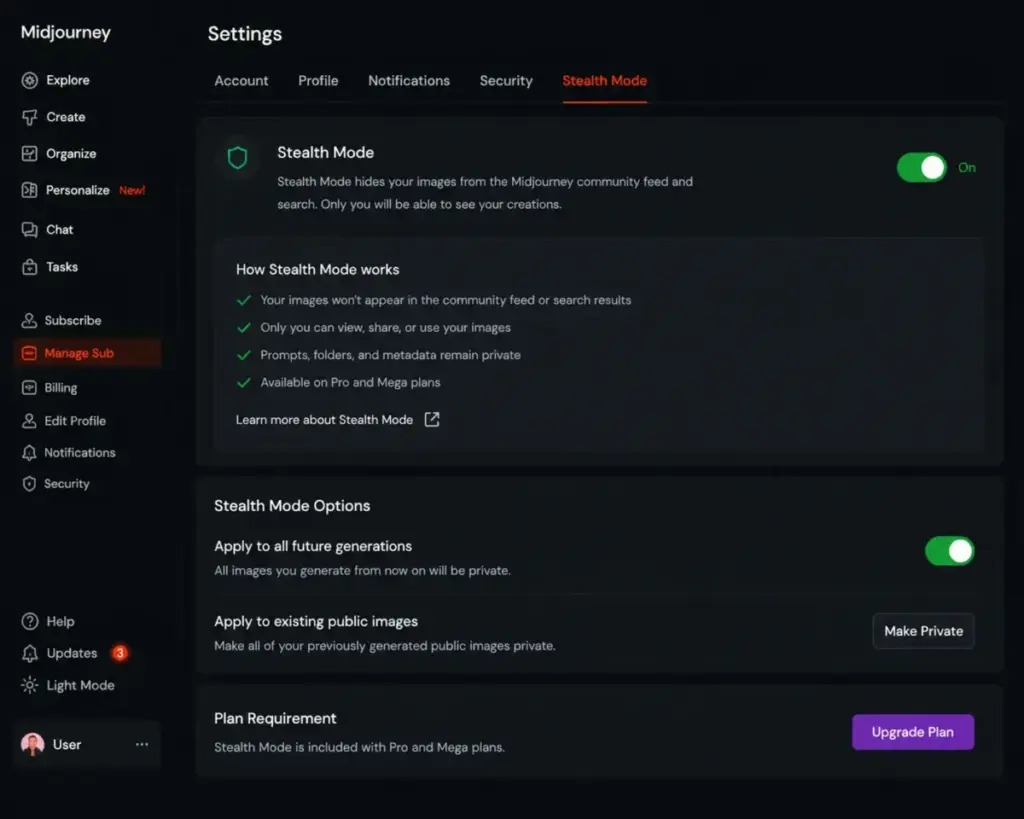
Pro is the real plan for professional use. Stealth Mode keeps your creations off the Explore page on midjourney.com. If you handle client work, brand concepts, or anything you do not want publicly browsable, Pro is the minimum tier. Mega is only necessary for high-volume production teams who consistently burn through 30+ hours of Fast time monthly.
What the Pricing Page Does Not Tell You
Three things the pricing comparison misses:
Refund restrictions. Midjourney’s refund policy requires that your account has used less than 20 lifetime GPU minutes. At 1 minute per image prompt, you hit that threshold in your first 20 prompts. After that, no refund. If you are considering annual billing to save 20%, understand that you are committing with almost no refund window.
Video changes the math. A Basic subscriber who generates 10 HD video batches uses 260 minutes, exceeding their entire 200-minute monthly Fast budget. Video is marketed to all tiers, but it is financially practical only on Standard and above.
Stealth Mode is not full privacy. Stealth Mode prevents your images from appearing on the Explore page at midjourney.com. But if you prompt in a public Discord channel, those creations remain visible to anyone in that channel. For actual privacy, you need Stealth Mode plus the web Create page, Discord DMs, or a private Discord server. Midjourney’s privacy documentation explains this, but many buyers miss it.
Midjourney Pros and Cons
Midjourney’s strengths center on image quality and creative range. Its weaknesses cluster around privacy, control, and cost transparency. Below are the specific pros and cons that matter most for a buying decision, not generic talking points.
Midjourney Pros
1. Best-in-class aesthetic quality. Midjourney consistently produces images with strong composition, lighting, color, and mood. Simple prompts often yield polished results that would require significant post-processing with other tools. This is its primary competitive advantage and the reason most users subscribe.
2. V8.1 speed improvement. Standard V8.1 jobs render 4 to 5 times faster than earlier versions. This reduces the iteration cycle and makes Fast GPU time more productive per minute spent.
3. Moodboards for style consistency. The moodboard system lets you define a visual direction once and apply it across multiple prompts. For editorial teams, brand projects, or content series, this reduces prompt repetition and keeps outputs visually coherent.
4. Omni Reference for character consistency. Placing a consistent character or object across multiple scenes is a hard problem in AI generation. Omni Reference addresses it directly, even if the 2x GPU cost and V7-only compatibility limit its current reach.
5. Commercial ownership clarity. Midjourney’s commercial-use documentation states: “With Midjourney, you own all the images and videos you create, even if you decide to cancel your subscription.” This is clearer than many competitors’ licensing terms.
6. Relax Mode value on Standard and above. Once you have Relax access, your effective output becomes unlimited for images. Wait times vary, but the ability to keep generating without burning Fast minutes makes Standard and Pro plans much more practical for regular use.
Midjourney Cons
1. No general free plan. Midjourney does not offer a free tier for ongoing use. You must subscribe starting at $10/month to generate anything. Competitors like Leonardo AI and Ideogram offer free credit-based access, and ChatGPT includes image generation in its free tier. This makes Midjourney the hardest tool to evaluate before committing money.
2. Refund threshold is effectively zero. Refunds require less than 20 lifetime GPU minutes used. Since one image prompt costs about 1 minute, you exhaust refund eligibility in roughly 20 prompts. Most users will pass this threshold in their first session. If you subscribe to an annual plan and dislike the product after day one, you likely cannot get a refund.
3. Privacy requires Pro/Mega and specific workflow choices. Midjourney is open-by-default. Your images may appear on the Explore page. Stealth Mode (Pro and Mega only, starting at $60/month) hides creations from the Explore page on midjourney.com, but public Discord channel prompts remain visible in those channels. True privacy requires Stealth Mode combined with the web Create page, Discord DMs, or a private Discord server. This is documented by Midjourney but not obvious during signup.
4. Prompt adherence and text rendering weaknesses. Community sentiment frequently notes that Midjourney sometimes ignores parts of complex prompts or interprets instructions loosely. Text rendering inside images (signs, logos, UI text) remains unreliable. If your workflow depends on exact instruction-following or readable text in generated images, this is a recurring friction point.
5. Video GPU cost is high for lower-tier plans. A single HD video batch costs about 26 GPU minutes. On a Basic plan with 200 minutes, that is 13% of your monthly budget for four videos. Video generation is technically available on all plans, but the economics only work on Standard and above, and realistically on Pro or Mega for regular video use.
6. Editor uses V6.1, not the current model. When editing V8.1 images, the Editor falls back to V6.1. This version mismatch can produce visible style inconsistencies between your original generation and edited regions. For workflows that rely on iterative editing, this adds friction.
7. Support and billing friction. Billing support goes through billing@midjourney.com. Community feedback on platforms like Product Hunt and G2 indicates that users sometimes experience delays with support responses. There is no live chat or phone support channel documented.
Midjourney vs Alternatives
Midjourney is not the only option, and it is not the best option for every workflow. Below I compare it against five alternatives, each with a specific use case where it wins.
Midjourney vs DALL-E / ChatGPT Images
Midjourney wins on visual style, atmosphere, and creative exploration. Its outputs tend to have stronger aesthetic choices out of the box. ChatGPT Images (powered by DALL-E) wins on conversational iteration, text reasoning, and integration with a general assistant. You can describe changes in natural language, reference previous outputs, and refine step by step within a chat.
Choose ChatGPT Images when you want natural-language editing, multi-step prompt refinement, or when image generation is part of a larger task (writing, research, planning). Choose Midjourney when visual quality and style range are your priority. For a detailed breakdown, see our DALL-E review.
Midjourney vs Adobe Firefly
Midjourney wins on aesthetics and community prompt culture. Adobe Firefly wins for users already inside Adobe Creative Cloud, because Firefly integrates directly into Photoshop, Illustrator, and Express. Firefly also offers stronger brand and legal comfort: Adobe trains on licensed content and provides IP indemnification on some plans.
Choose Adobe Firefly if your team already uses Adobe tools, if legal/IP clarity is a priority, or if you need generation embedded in a production design workflow. Choose Midjourney if standalone image quality matters more than ecosystem integration. See our Adobe Firefly review for plan details.
Midjourney vs Leonardo AI
Midjourney wins on out-of-the-box image taste. Leonardo AI wins on creator tooling breadth, token-based pricing flexibility, and game/asset production pipelines. Leonardo also offers a free tier with daily token credits, making it accessible for evaluation without payment.
Choose Leonardo AI if you want a free entry point, need integrated creative controls for game assets or 3D textures, or prefer token-based pay-as-you-go pricing. Choose Midjourney if visual quality per prompt is your top priority and you are willing to pay from day one. Read our Leonardo AI review for a full comparison.
Midjourney vs Ideogram
Midjourney wins on cinematic, illustrative, and atmospheric visuals. Ideogram wins for text rendering. If your use case involves posters, social graphics with readable words, logo concepts, or any image where text accuracy matters, Ideogram handles it better.
Choose Ideogram when readable words inside the image are a requirement. Choose Midjourney when the image does not need embedded text and visual mood matters more.
Midjourney vs Stable Diffusion
Midjourney wins on ease of use, aesthetics, and zero setup. Stable Diffusion wins on local control, custom models, LoRAs, full privacy (runs on your hardware), and workflow ownership. There are no subscription fees, no GPU time limits, and no content moderation beyond what you configure yourself.
Choose Stable Diffusion if you are technical, want maximum control, need true local privacy, or want to train custom models. Choose Midjourney if you want high-quality results without managing infrastructure. The tradeoff is convenience versus control.
Who Should Use Midjourney?
Midjourney fits specific buyer profiles well. The right plan depends on your output volume, privacy needs, and whether you generate video. Here is a micro-cohort breakdown:
| Buyer Type | Recommended Plan | Why |
|---|---|---|
| Solo creator, occasional use | Basic ($10/month) | 200 minutes covers light exploration; no Relax needed |
| Solo creator, daily use | Standard ($30/month) | Relax Mode prevents budget anxiety; 15 hr Fast time is enough |
| 2-5 person content team | Standard or Pro | Standard if privacy is not critical; Pro if any client-facing work |
| Agency handling client work | Pro ($60/month) | Stealth Mode is mandatory for client confidentiality |
| Brand team with legal/privacy needs | Pro ($60/month) minimum | Stealth Mode plus web Create page for actual privacy |
| High-volume production team | Mega ($120/month) | 60 hr Fast time for batch workflows and video |
| Prompt engineering power user | Pro ($60/month) | 12 concurrent Fast jobs, 40 permutation jobs |
Midjourney is strongest when visual taste and creative exploration are the primary goals. If you want to produce concept art, social media visuals, editorial illustrations, or moodboard-driven content series, it delivers better aesthetic output per prompt than most alternatives.
Who Should NOT Use Midjourney?
Not every workflow benefits from Midjourney’s strengths. Be direct about when to look elsewhere.
Do not choose Midjourney if you need readable text in images. Text rendering remains inconsistent. Posters, social graphics with headlines, and logo concepts are better handled by Ideogram or manual design tools.
Do not choose Midjourney if you require full local privacy. Even with Stealth Mode on Pro/Mega, your images are generated on Midjourney’s servers. If data sovereignty, air-gapped workflows, or zero third-party processing matters, Stable Diffusion running locally is the only real option.
Do not choose Midjourney if you want a free evaluation period. There is no general free plan. You pay before you generate. If you need to test before spending, Leonardo AI or ChatGPT (free tier) let you evaluate AI image generation at no cost.
Do not choose Midjourney if exact prompt adherence is critical. Midjourney interprets prompts with creative latitude. This produces beautiful results but frustrates users who need precise, literal instruction-following. Community sentiment frequently cites this as a pain point.
Do not choose Midjourney if your team needs a best AI video generator first. Midjourney’s video is an add-on feature, not a dedicated video platform. For video-first workflows, tools like Runway or Pika offer more control, longer outputs, and dedicated video editing pipelines.
How I Scored Midjourney
I scored Midjourney using SaaSZap’s review methodology, which weights six criteria relevant to SaaS buyers. Each criterion is scored out of 10, then weighted to produce a final score. The methodology prioritizes practical value over feature counts.
| Criterion | Weight | Score | Weighted |
|---|---|---|---|
| Core feature quality | 25% | 9.5 | 2.38 |
| Pricing transparency and value | 20% | 7.5 | 1.50 |
| Ease of use and onboarding | 15% | 8.5 | 1.28 |
| Privacy and data handling | 15% | 7.0 | 1.05 |
| Support and documentation | 10% | 7.0 | 0.70 |
| Competitive positioning | 15% | 8.5 | 1.28 |
| Final Score | 100% | 8.2 / 10 |
The highest score goes to core feature quality (9.5) because image output remains Midjourney’s clear differentiator. Privacy scores 7.0: Stealth Mode works when configured correctly, but the open-by-default model and Pro/Mega gate cost it points. Support scores 7.0: documentation is solid, but billing support is email-only with no live channel.
Final Verdict
Midjourney remains the strongest AI image generator for visual quality and style range in 2026. V8.1’s speed gains, moodboard consistency, and Omni Reference make it a more capable tool than it was a year ago. But the no-free-plan barrier, near-zero refund window, open-by-default privacy, and prompt interpretation gaps mean it is not the right fit for every buyer.
If you prioritize aesthetics and are comfortable with the subscription model, start with the Standard plan at $30/month. If you handle client work or need privacy, start with Pro at $60/month and use the web Create page with Stealth Mode enabled. And if your workflow depends on text in images, local control, or free evaluation, look at the alternatives I compared above.
Midjourney is excellent at what it does. Just make sure what it does is what you actually need.
FAQ
Here are answers to the most common questions about Midjourney in 2026.
Is Midjourney worth it in 2026?
Yes, for users who prioritize image aesthetics and style exploration. The Standard plan at $30/month offers the best value for regular creators thanks to Relax Mode. It is not worth it if you need free access, full privacy, or exact prompt control.
How much does Midjourney cost in 2026?
Midjourney costs $10/month (Basic), $30/month (Standard), $60/month (Pro), or $120/month (Mega). Annual billing reduces each price by 20%. See the official pricing page for current details.
Does Midjourney have a free plan?
No. Midjourney does not offer a general free plan as of May 2026. You must subscribe to generate images or videos.
What is the best Midjourney plan?
Standard ($30/month) is the best plan for most users. It includes 15 hours of Fast GPU time and Relax Mode for unlimited image generation. Pro ($60/month) is the best plan if you need Stealth Mode for privacy.
Can I use Midjourney images commercially?
Yes. All paid subscribers have commercial-use rights. However, companies with over $1,000,000 in annual gross revenue must subscribe to Pro or Mega for company commercial use, per Midjourney’s commercial terms.
Is Midjourney better than DALL-E?
Midjourney produces stronger visuals for creative and artistic use cases. DALL-E (via ChatGPT Images) is better for conversational prompt iteration and text-based reasoning. The best choice depends on whether you prioritize aesthetics or natural-language editing.
What is Midjourney Stealth Mode?
Stealth Mode prevents your images from appearing on the Explore page at midjourney.com. It is available on Pro and Mega plans only. It does not hide creations made in public Discord channels.
How does Midjourney GPU time work?
Each prompt consumes GPU time. One image prompt costs about 1 minute. One video prompt costs about 8 minutes. Fast time resets monthly and does not roll over. Relax Mode (Standard and above) lets you generate images without consuming Fast time, with variable queue wait times.
Does Midjourney make videos?
Yes. Midjourney can animate images into short videos. All plans support Fast Mode video. Pro and Mega support Relax Mode SD video. HD video batches cost about 26 GPU minutes, making video expensive on lower-tier plans.
What are the main disadvantages of Midjourney?
The main disadvantages are: no free plan, a near-zero refund window (20 GPU minutes lifetime), open-by-default privacy requiring Pro/Mega for Stealth Mode, inconsistent prompt adherence, weak text rendering, and limited support channels. See the full cons section above for details.