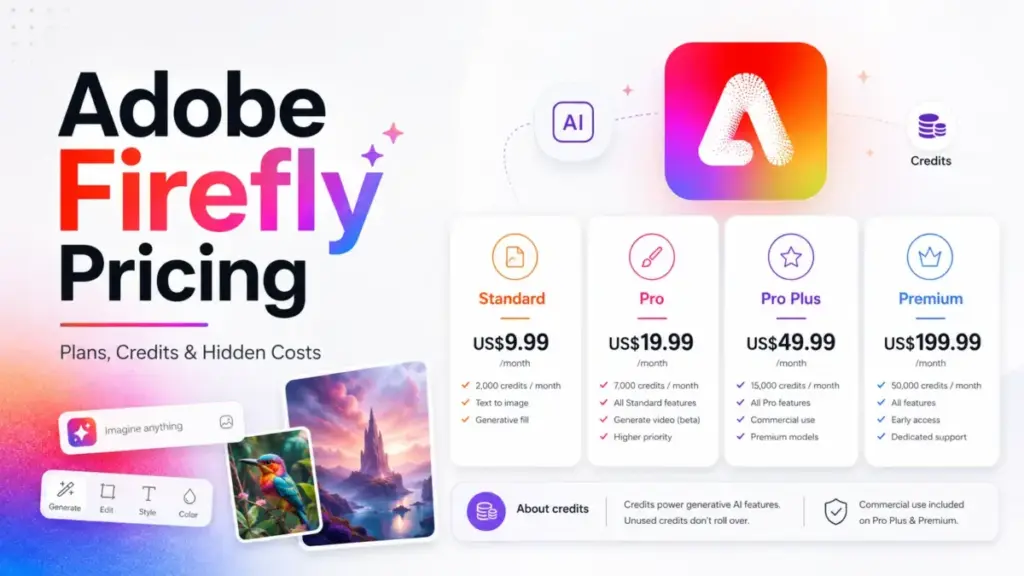
Adobe Firefly pricing starts at $9.99 per month on Standard. But this rate rarely reflects real creative costs. Most individual users need the Pro plan at $19.99 per month. This tier grants full access to Photoshop on web and mobile.
The biggest pricing gotcha lies in the credit engine. Generative credits do not roll over monthly. Standard image features are unlimited. However, premium video burns up to 100 credits per second.
If you are looking for the best AI image generators, monthly subscription cost is only half of the decision. SaaSZap tracks AI software pricing changes across official pricing pages and help center documentation.
My analysis of official Adobe plans shows the real cost of Firefly in 2026. This guide breaks down plan limits, hidden fees, and competitor pricing.
| Term | Detail |
|---|---|
| Starting Price | $9.99 per month (Standard Plan) |
| Free Options | Free plan available (limited credits); 7-day Pro trial (via Adobe Express checkout) |
| Best Plan for Most Teams | Firefly Pro for teams ($19.99/user/month) or individual Firefly Pro ($19.99/month) |
| Plan to Avoid | Firefly Premium ($199.99/month) for light users; Free plan for predictable work |
| Biggest Hidden Cost | Credit drawdown for video (up to 100 credits/sec) and translation (5 credits/sec); unused credits expire monthly |
| Best Alternative | Midjourney (starting at $10/month) or Canva (starting at $15/month) |
| Pricing Verified Date | May 26, 2026 |
| Official Pricing Source | Adobe Firefly Plans Page |
What this verdict means: Buyers should not select a plan based solely on the starting subscription price. Instead, you must match your plan choice to your monthly consumption of video, audio translation, and Photoshop application access.
The Advertised Price vs The Real Price
The advertised prices on Adobe’s marketing pages look straightforward. But in practice, the credit engine determines your monthly cost. Before committing to a subscription, it helps to understand what text-to-image AI does behind the scenes.
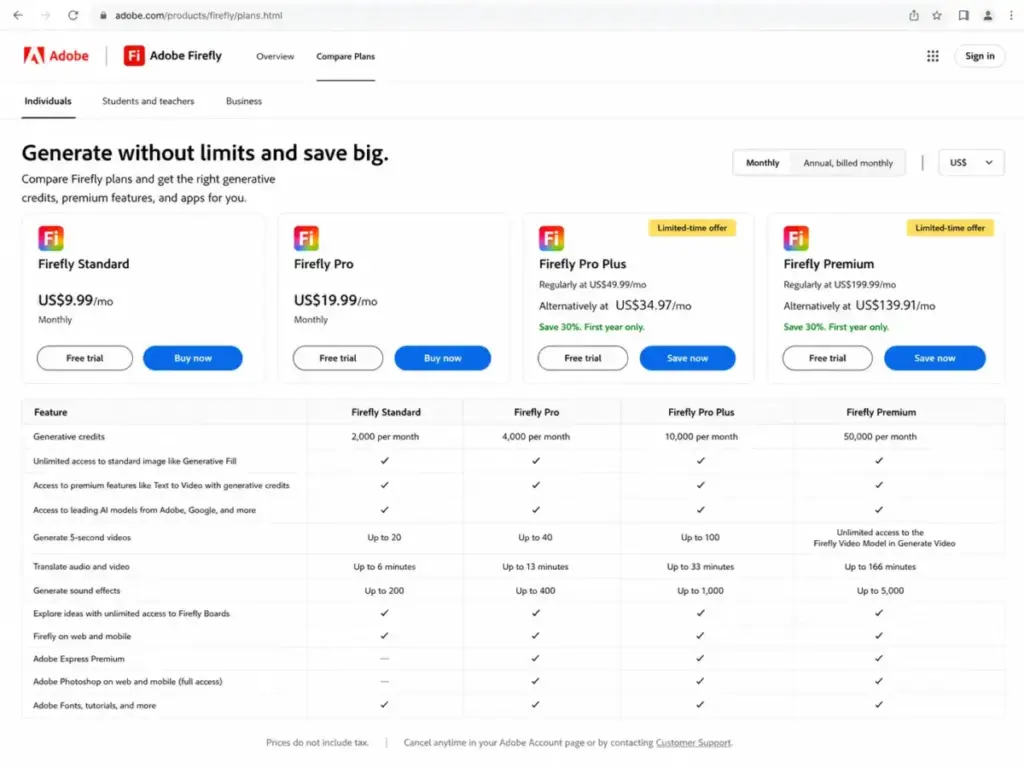
Every time you generate an image, edit a photo, or render a video, Adobe deducts credits from your account. The starting Standard plan provides 2,000 credits for $9.99 per month. The Pro plan provides 4,000 credits for $19.99 per month.
But these credit allocations are not independent pools. They represent the maximum budget for all generative features combined. If you run out of credits, standard generations continue at a slower speed. Premium features, however, are gated or require add-on credit purchases.
| Plan Tier | Advertised Monthly Cost | Real Cost (Light Use) | Real Cost (Heavy Video/Translation Use) |
|---|---|---|---|
| Firefly Free | $0 | $0 (limited access) | Upgrade required (no credit add-ons allowed) |
| Firefly Standard | $9.99 | $9.99 (no add-ons) | $9.99 + undisclosed credit add-on fees |
| Firefly Pro | $19.99 | $19.99 | $19.99 + undisclosed credit add-on fees |
| Firefly Pro Plus | $49.99 | $49.99 | $49.99 + undisclosed credit add-on fees |
| Firefly Premium | $199.99 | $199.99 | $199.99 + undisclosed credit add-on fees |
What this comparison means: Firefly costs scale with your usage of video generation and audio translation. Solo creators who only make static images will likely stay at the base subscription price. Creators who produce video or localized content will face additional costs once their monthly credit pool is exhausted.
The 6 Hidden Costs Nobody Mentions
1. Unused Credits Expire Monthly Without Rollover
Adobe does not roll over unused generative credits to the next billing cycle. If you buy the Pro plan and only use 1,000 of your 4,000 credits, the remaining 3,000 credits disappear on your renewal date. This setup creates a recurring loss of paid value. You pay for your maximum capacity every month, regardless of your actual creative output.
2. Premium Video and Translation Draw Down Credits Rapidly
The credit math gets complicated when you use premium features. Generating video using the Firefly Video Model costs up to 100 credits per second for high-quality outputs. A single 5-second video clip can deduct 500 credits from your pool.
Audio and video translation features deduct 5 credits per second of processed media. This rate translates to 300 credits per minute. If you translate a 13-minute video, you burn 3,900 credits. This single action almost completely drains the 4,000-credit pool on the Pro plan.
3. The Cost of Buying Credit Add-ons
If you exhaust your monthly credit allotment, standard generations slow down. But if you need to continue using premium video, translation, or partner-model features, you must buy add-on credit packs.
Adobe offers credit add-on plans containing 2,000, 4,000, 7,000, 10,000, or 50,000 credits. However, Adobe does not publicly list the exact pricing for these add-on plans on its main plans page. You must check the pricing at checkout when your credit pool runs low.
4. Annual Subscription Cancellation Fees
Adobe standard subscription terms apply to Firefly paid plans. If you sign up for an annual subscription paid monthly, you commit to a 12-month contract.
Canceling after the initial refund window can trigger a cancellation fee. This fee is often calculated as 50% of the remaining contract balance. This contract obligation turns a monthly payment into a significant commitment.
5. Teams Plans Require a Fixed Annual Commitment
The Firefly teams plans do not offer a flexible, month-to-month subscription. Adobe lists these plans on an annual-billed-monthly basis.
If you purchase seats for a five-person team, you commit to paying for those seats for a full year. There is no public option to add and remove seats dynamically on a month-to-month billing cycle.
6. Enterprise Custom Agreements and Opaque API Costs
Large organizations requiring custom deployments, single sign-on (SSO), or SCIM provisioning must negotiate custom agreements. Adobe does not publish exact enterprise seat minimums or custom tier pricing.
Developers looking for programmatic access will also find that API pricing is not disclosed on the main plans page. You must contact Adobe sales or check checkout for custom developer rates.
Plan-by-Plan Breakdown: What You Actually Get by Plan
| Plan | Monthly Cost | Annual Cost | Billing Basis | Best For | Key Limits |
|---|---|---|---|---|---|
| Firefly Free | $0 | $0 | Per user | Casual testing | Limited credit pool; no paid app access |
| Firefly Standard | $9.99 | $119.88 (equivalent) | Per user | Casual creators | 2,000 credits; no Express Premium or Photoshop |
| Firefly Pro | $19.99 | $239.88 (equivalent) | Per user | Solo designers | 4,000 credits; includes Photoshop web/mobile |
| Firefly Pro Plus | $49.99 | $599.88 (equivalent) | Per user | Heavy creators | 10,000 credits; first-year promo eligible |
| Firefly Premium | $199.99 | $2,399.88 (equivalent) | Per user | Video studios | 50,000 credits; unlimited video model access |
| Pro for teams | $19.99/user | $239.88/user | Per user | Small businesses | 4,000 credits/user; admin tools; 24/7 support |
| Pro Plus for teams | $49.99/user | $599.88/user | Per user | Growing marketing teams | 10,000 credits/user; admin tools; 24/7 support |
| Premium for teams | $199.99/user | $2,399.88/user | Per user | High-volume production | 50,000 credits/user; unlimited video model |
| Enterprise / ETLA | Custom | Custom | Custom agreement | Large companies | Custom credits (700–8,000); enterprise support |
What this plan comparison means: Individual and teams plans share identical seat prices. However, they differ in support and administrative features. Individual users can get first-year promotional discounts. Teams pay regular rates in exchange for centralized seat administration.
Firefly Free: For Occasional Testing Only
The Free plan is designed for basic evaluation of Adobe’s generative AI models.
- Best For: Users who want to test generative prompts before buying.
- What is Included: Limited access to standard generative AI features.
- What is Missing: Predictable monthly credit allotments; unlimited standard generations; paid app access.
- Mini Verdict: The Free plan is a conversion channel rather than a production tool.
- Avoid If: You need a reliable, daily credit budget for client work.
Firefly Standard ($9.99/month): Individual Creator Entry Point
The Standard plan is the cheapest paid entry point for solo users.
- Best For: Hobbyists who want to use standard generative features without speed throttling.
- What is Included: 2,000 monthly credits; up to 20 five-second videos; up to 6 minutes of translation.
- What is Missing: Full access to Photoshop on web/mobile; Adobe Express Premium.
- Mini Verdict: This plan is a middle ground that provides credits but gates the most useful Adobe apps.
- Avoid If: You use Photoshop daily and want a bundled subscription.
Firefly Pro ($19.99/month): The Best Value for Solo Creators
The Pro plan is the most balanced option for professional designers who use Adobe’s ecosystem.
- Best For: Professional graphic designers and content creators.
- What is Included: 4,000 monthly credits; up to 40 five-second videos; up to 13 minutes of translation; Photoshop web/mobile full access; Adobe Express Premium.
- What is Missing: High-volume credit pools for video production teams.
- Mini Verdict: The inclusion of Photoshop web/mobile and Express Premium makes this the best value plan.
- Avoid If: Your primary output is high-definition video generation.
Firefly Pro Plus ($49.99/month): Scaled Image and Video Creator Plan
This tier is built for creators who regularly work with high-drawdown media.
- Best For: Active content creators and social media managers.
- What is Included: 10,000 monthly credits; up to 100 five-second videos; up to 33 minutes of translation.
- What is Missing: Enterprise-grade admin controls or custom model training capabilities.
- Mini Verdict: Useful if you generate multiple video assets per week, but regular pricing is steep.
- Avoid If: You do not use translation or video features regularly.
Firefly Premium ($199.99/month): Scaled Creative Production Tiers
The Premium tier is a high-cost plan designed for heavy video production.
- Best For: Creative agencies and professional video editors.
- What is Included: 50,000 monthly credits; unlimited access to the Firefly Video Model in Generate Video; up to 166 minutes of translation.
- What is Missing: Custom enterprise terms or API integration support.
- Mini Verdict: The main value is the unlimited video generation, which justifies the high cost for video-heavy workflows.
- Avoid If: You primarily generate static images.
Firefly for Teams (Starting at $19.99/user/month): Admin-Administered Organization Plan
Adobe offers Pro, Pro Plus, and Premium tiers for teams.
- Best For: Marketing departments and creative agencies.
- What is Included: Seat allocations matching individual tiers (4,000 to 50,000 credits per user); admin tools; 24/7 technical support.
- What is Missing: Individual promotional rates (teams are excluded from promotional pricing).
- Mini Verdict: The per-user cost is identical to individual plans, but the administrative dashboard is necessary for managing multiple seats.
- Avoid If: You are a solo freelancer who does not need centralized billing.
Adobe Firefly Enterprise: Custom TCO Agreements
Enterprise agreements are customized contracts for large organizations.
- Best For: Enterprises needing strict governance, SSO, and custom integrations.
- What is Included: Custom credit allocations (typically 700 to 8,000 credits depending on agreement); custom licensing; programmatic API access.
- What is Missing: Publicly listed seat pricing or standard checkout options.
- Mini Verdict: Necessary for compliance, but requires manual contract negotiation.
- Avoid If: You do not have dedicated IT procurement resources.
Feature-to-Plan Map: What You Actually Get by Plan
The plan you choose dictates which features are available and how quickly you can generate assets. Comparing these plans to Claude pricing details is helpful for text-based workflows.
| Feature / Gate | Free | Standard | Pro | Pro Plus | Premium |
|---|---|---|---|---|---|
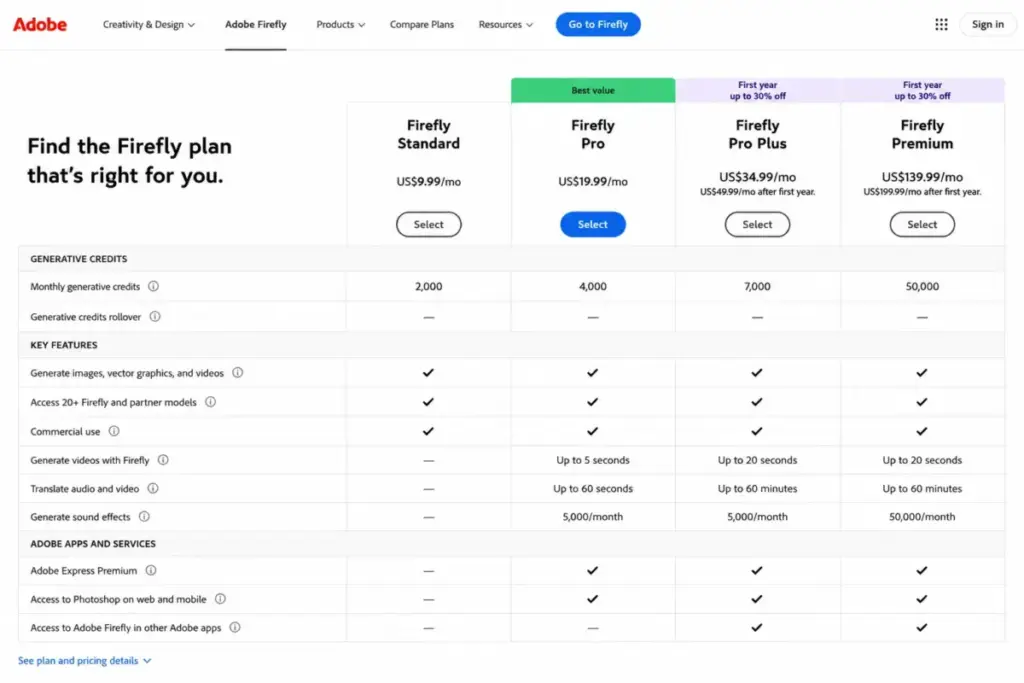
| Generative Credits | Limited (unstable) | 2,000 | 4,000 | 10,000 | 50,000 |
| Unlimited Standard Generations | No (deducts credits) | Yes | Yes | Yes | Yes |
| Premium Video (5-Sec Clips) | Limited | Up to 20 | Up to 40 | Up to 100 | Unlimited Video Model |
| Audio/Video Translation | Limited | Up to 6 min | Up to 13 min | Up to 33 min | Up to 166 min |
| Generate Sound Effects | Limited | Up to 200 | Up to 400 | Up to 1,000 | Up to 5,000 |
| Adobe Express Premium | No | Not confirmed | Included | Included | Included |
| Photoshop Web/Mobile | No | Not confirmed | Included | Included | Included |
| Admin Tools & 24/7 Support | No | No | No (individual) | No (individual) | No (individual) |
What this feature-to-plan map means: The Standard plan gates Photoshop access and Express Premium. Upgrading to the Pro plan is the only way to get these bundled apps. For video-heavy teams, the Premium plan gates unlimited video model access, which is unavailable on standard tiers.
When the Free Plan Stops Working
SaaSZap’s research shows that the Free plan is unsuitable for professional workflows. The primary issue is the unstable credit allocation. Adobe states that free credit numbers are limited and subject to change without notice. Furthermore, standard image features like Generative Fill deduct credits on the Free plan, whereas they are unlimited on paid tiers.
Upgrade to a paid plan when you experience these triggers:
- Free credits run out, blocking your daily generative work.
- You need access to the full desktop and web versions of Photoshop or Adobe Express.
- Your workflow requires generating five-second video clips or translating audio assets.
- You need to remove the Adobe watermark from generated creative assets.
- Your team requires centralized seat management, administrative dashboards, and B2B technical support.
Total Cost at Scale: 5, 10, and 20 Users
For teams, the cost of Adobe Firefly scales linearly based on seat count. The team plans require an annual commitment, which must be factored into your software budget.
| Team Size | Monthly Cost | Annual Cost | Recommended Plan | Key Notes |
|---|---|---|---|---|
| 5 Users | $99.95 | $1,199.40 | Firefly Pro for teams | Includes admin console and 24/7 business support |
| 10 Users | $199.90 | $2,398.80 | Firefly Pro for teams | Best value for small creative agencies |
| 25 Users | $499.75 | $5,997.00 | Firefly Pro for teams | Centralized billing; compare with enterprise at this scale |
| 50 Users | $999.50 | $11,994.00 | Mixed allocations | Mix Pro and Pro Plus seats based on user roles |
| 100 Users | $1,999.00 | $23,988.00 | Enterprise Agreement | Contact sales for custom licensing and SSO integration |
What this scale comparison means: These numbers represent the base cost of subscriptions. They exclude taxes, add-ons, or custom enterprise discounts. At 25 users or more, organizations should compare these team prices against enterprise agreements to evaluate volume discounts.
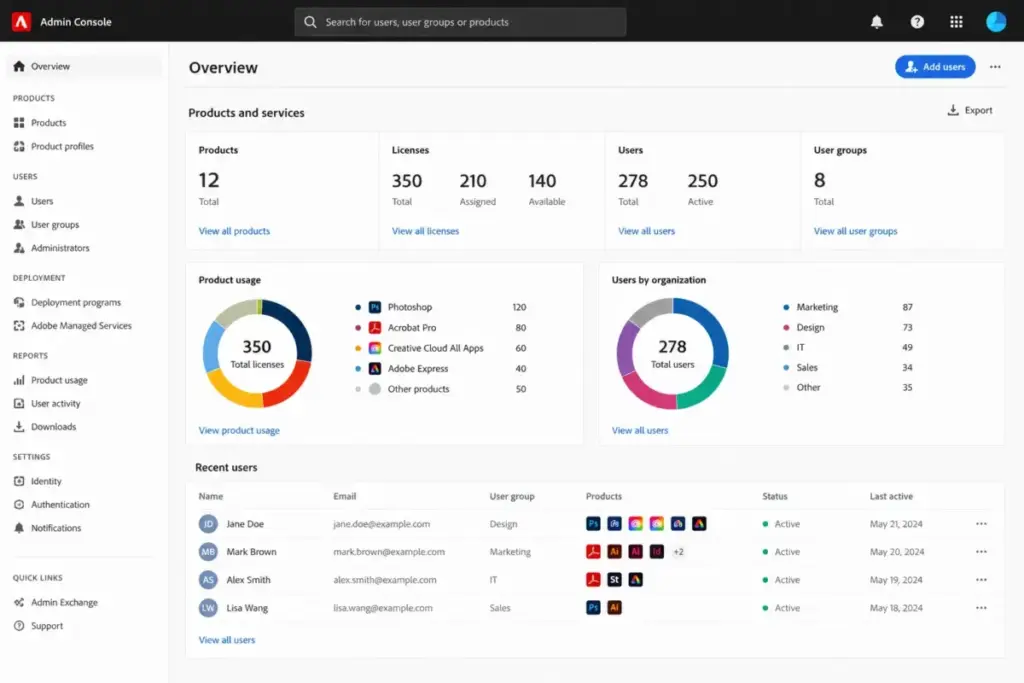
Which Plan Should You Choose?
The best Adobe Firefly plan depends on your team size and whether you need Photoshop integration.
- Solo Freelancers: The individual Firefly Pro plan ($19.99/month) is the most logical choice. It provides 4,000 monthly credits and bundles Photoshop web/mobile and Express Premium. This bundle saves money compared to buying the apps separately.
- Small Marketing Teams (2–10 users): The Firefly Pro for teams plan ($19.99/user/month) provides the administrative dashboard to manage seats. The 4,000 credits per user are sufficient for standard image and minor video campaigns.
- Growing Agencies (10–25 users): A mix of Pro for teams and Pro Plus for teams ($49.99/user/month) is recommended. Assign Pro Plus seats to video editors who require higher monthly credit allotments for video rendering.
- Enterprise Organizations (50+ users): Request a custom Enterprise or ETLA quote. This route is the only way to secure single sign-on (SSO), SCIM provisioning, and custom corporate liability protections.
Which Plan Should You Avoid?
Avoid plans that create billing redundancies with your current Adobe apps or exceed your monthly video production needs.
- Firefly Standard ($9.99/month): Avoid this plan if you use Photoshop. This tier does not confirm access to Photoshop on web and mobile. If you purchase Standard and subsequently buy a Photoshop subscription, you will pay twice for the same generative capabilities.
- Firefly Premium ($199.99/month): Avoid this tier if your team only generates static images. The $199.99 rate is only cost-effective if you regularly use the Firefly Video Model. For static images, the Pro plan offers better value at a tenth of the price.
Adobe Firefly Pricing vs Competitors
Adobe Firefly’s pricing is highly competitive with other design tools, but it is more credit-restricted than standalone video models. For specialized video editing, look at the Runway ML pricing plans to weigh your options. To see how other image creators compare, read our Midjourney review and Canva AI review for feature breakdowns.
| Competitor | Starting Price | Billing Model | Free Plan | Cost for 10 Users |
|---|---|---|---|---|
| Adobe Firefly | $9.99/mo | Per user (monthly/annual) | Yes (limited credits) | $199.90/mo (Pro teams) |
| Midjourney | $10/mo | Flat per account | No | $100/mo (Basic) / $300/mo (Standard) |
| Runway | $12/user/mo | Per user + credits | Yes (125 credits) | $280/mo (Pro annual) |
| Ideogram | $20/mo | Flat or per-member team | Yes | $300/mo (Team monthly) |
| Luma Dream Machine | $9.99/mo | Flat subscription + credits | Yes | $299.90/mo (Plus, commercial) |
| Canva | $15/mo | Per user | Yes | $100/mo (Teams monthly) |
What this competitor comparison means: Adobe Firefly is priced competitively against design-focused tools like Canva. However, for standalone video generation, dedicated platforms like Runway offer different credit structures that may fit specialized production pipelines better.
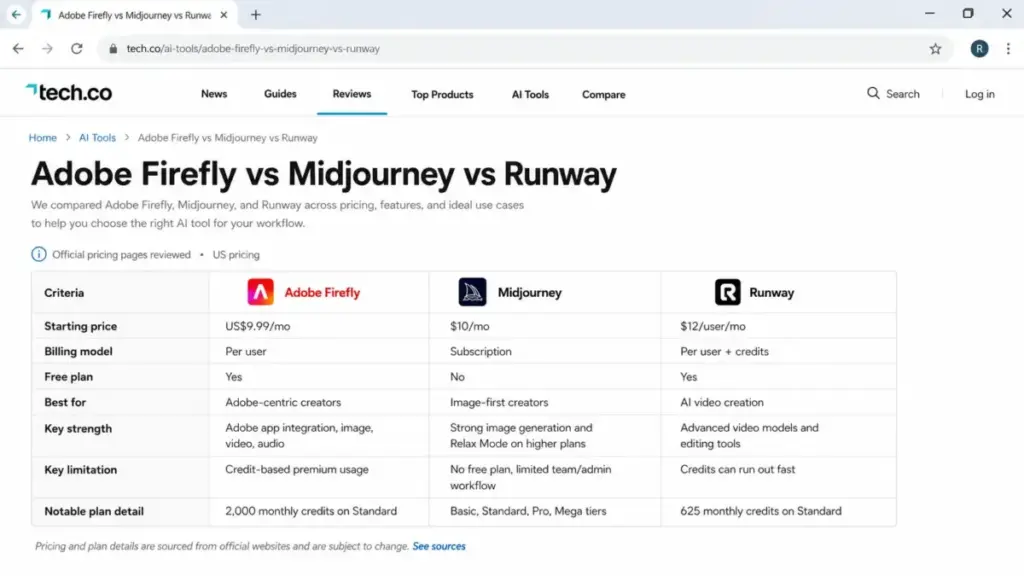
The Failure Mode Comparison: What Breaks First?
As an editor focused on AI tools, I recommend selecting your alternative based on which failure mode your workflow can tolerate:
- Adobe Firefly’s Failure Mode: You run out of generative credits on standard tiers because video rendering (up to 100 credits/sec) drains the pool quickly. Standard image generations remain unlimited, but premium features lock up.
- Midjourney’s Failure Mode: The tool lacks administrative controls and web-based workspace integration. Your team must manage assets across individual Discord accounts, which creates security friction.
- Runway’s Failure Mode: Video generations are expensive. Once you exhaust the monthly credit pool, you must buy top-up packages or experience complete generation blocks.
- Luma’s Failure Mode: Commercial rights are restricted on lower plans. If you need commercial usage terms, you are forced onto higher tiers regardless of your credit needs.
Is Adobe Firefly Worth the Price?
If you already use the Adobe Creative Cloud suite, Adobe Firefly is worth the price. The generative models are integrated directly into Photoshop and Illustrator, which simplifies your existing workflow.
Worth It If:
- You use Photoshop or Illustrator daily and want generative tools inside your workspace.
- You need commercial licensing protection (Adobe indemnifies enterprise users against copyright claims).
- You want a bundle that includes Adobe Express Premium for social media templates.
- You need to translate video or audio campaigns into multiple languages within a single tool.
Not Worth It If:
- You only need a simple, low-cost tool to generate conceptual images (Midjourney is the clearer fit for this use case).
- You require a developer-first API with simple per-token pricing.
- You are a solo creator who does not use Adobe Creative Cloud applications.
How to Avoid Overpaying for Adobe Firefly
1. Monitor Credit Drawdown on Video Projects
Keep a close eye on your credit balance when using the Generate Video tool. Because high-resolution rendering drains up to 100 credits per second, generating a few test drafts can exhaust your monthly pool. Use lower resolutions for drafts and reserve high-quality settings for final renders.
2. Clean Up Your Team Seats Annually
Adobe teams plans commit you to an annual billing cycle. Audit your active users before your renewal date. If a team member has not logged in for 90 days, remove their seat to save $239.88 per year on the Pro tier.
3. Check for First-Year Promotional Discounts
If you are an individual subscriber, look for first-year promotions. Adobe often runs discounts of up to 30% on eligible individual plans like Pro Plus and Premium. Note that teams and enterprise accounts are excluded from these promotions.
4. Use Express Premium Instead of Standalone Subscriptions
If your team members only need basic graphic design capabilities, assign them a Firefly Pro seat. This plan includes full access to Adobe Express Premium. This bundle prevents you from paying for separate Canva or graphic design subscriptions.
5. Review Cancellation Policies at Checkout
To prevent unexpected contract penalties, review the cancellation terms during checkout. If you cancel an annual contract early, you may face a fee equal to half of your remaining balance. Opt for a month-to-month plan if your team size fluctuates.
FAQ
How much does Adobe Firefly cost?
Adobe Firefly pricing starts at $9.99 per month for the Standard plan. The Pro plan costs $19.99 per month, and the Premium plan costs $199.99 per month. Team plans start at $19.99 per user per month on an annual contract.
Is Adobe Firefly free?
Yes, Adobe offers a free version of Firefly. However, the Free plan has limited features, gates premium capabilities, and provides an unstable credit pool that is subject to change.
What is the difference between Firefly Standard and Pro?
The Standard plan ($9.99/mo) provides 2,000 monthly credits but gates access to Photoshop on web and mobile. The Pro plan ($19.99/mo) provides 4,000 monthly credits and includes full access to Photoshop web/mobile and Adobe Express Premium.
Do Adobe Firefly credits roll over?
No, unused generative credits do not roll over. All credits expire at the end of each billing cycle, and a new allotment is added on your monthly renewal date.
What happens when you run out of Adobe Firefly credits?
When you run out of credits, standard image generations continue at a reduced speed. However, premium features like video generation and translation are blocked until your monthly renewal or until you purchase a credit add-on pack.
Is Adobe Firefly included with Creative Cloud?
Yes, certain Creative Cloud subscriptions include Firefly generative credits. However, standalone Firefly plans are available if you only need the generative tools without the full Creative Cloud application suite.
Does Adobe Firefly have a free trial?
Yes, Adobe offers a 7-day free trial for the Pro plan. You can access this trial during checkout on the official Adobe pricing pages.
Is Adobe Firefly cheaper than Midjourney?
At the entry tier, the costs are similar: Firefly Standard costs $9.99 per month, while Midjourney Basic costs $10 per month. However, Midjourney does not offer a free tier, whereas Firefly does.
Does Adobe Firefly have API pricing?
Yes, Adobe provides API access for developers. However, the pricing is not listed publicly. You must contact Adobe sales or check developer checkout for a custom quote.