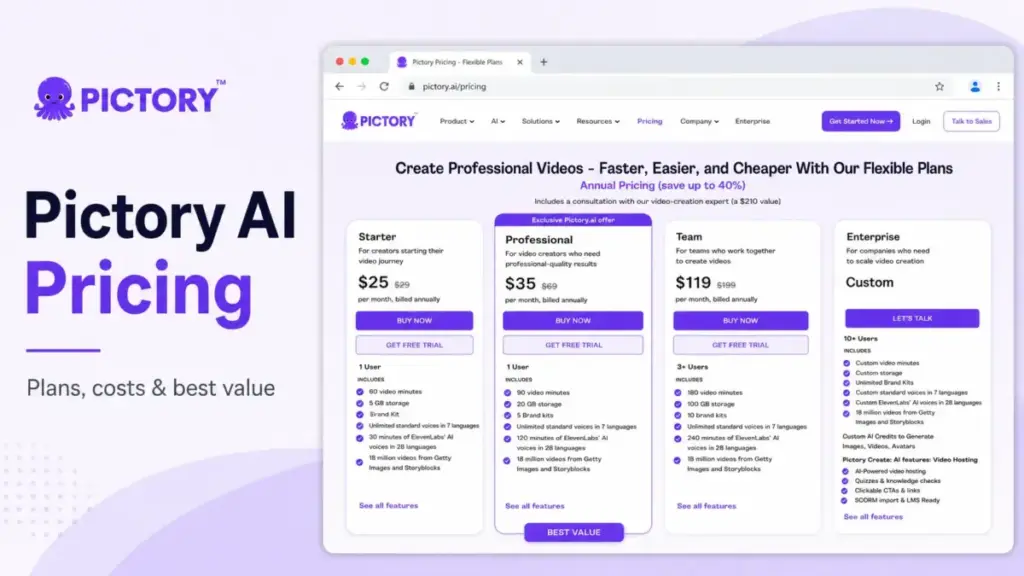
Pictory AI starts at $25 per month when billed annually, but that price only tells part of the story. The real cost depends on your plan, video-minute limits, AI credits, team size, and whether you need advanced features like 1080p exports, voice cloning, custom avatars, or Enterprise support.
In this guide, we break down every Pictory AI pricing tier, including Starter, Professional, Team, Enterprise, the free trial, hidden add-on costs, AI credit packs, and cost-at-scale scenarios.
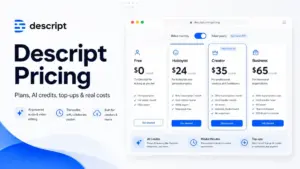
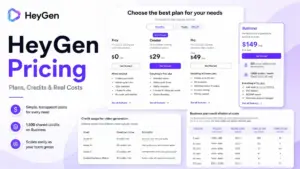
We also compare Pictory with Synthesia, HeyGen, Descript, Runway, and invideo AI so you can decide whether Pictory is actually good value for your workflow.
Key Takeaways
- Pictory runs from $25/month (Starter, annual) to $119/month (Team, annual); Enterprise is custom-quoted for 10+ users.
- Professional at $35/month annually is the best-value plan: 3x Starter’s video minutes, 1080p output, and the advanced AI toolset for $10 more a month.
- AI credits are a separate, capped resource; heavy generative use can add $25–$199/month in add-on packs on top of the subscription.
- There is no permanent free plan, only a 14-day no-credit-card trial with watermarked exports.
- Public pricing is calculable only up to ~5 users; beyond that, Pictory routes buyers to custom Enterprise quotes.
Quick Pricing Verdict
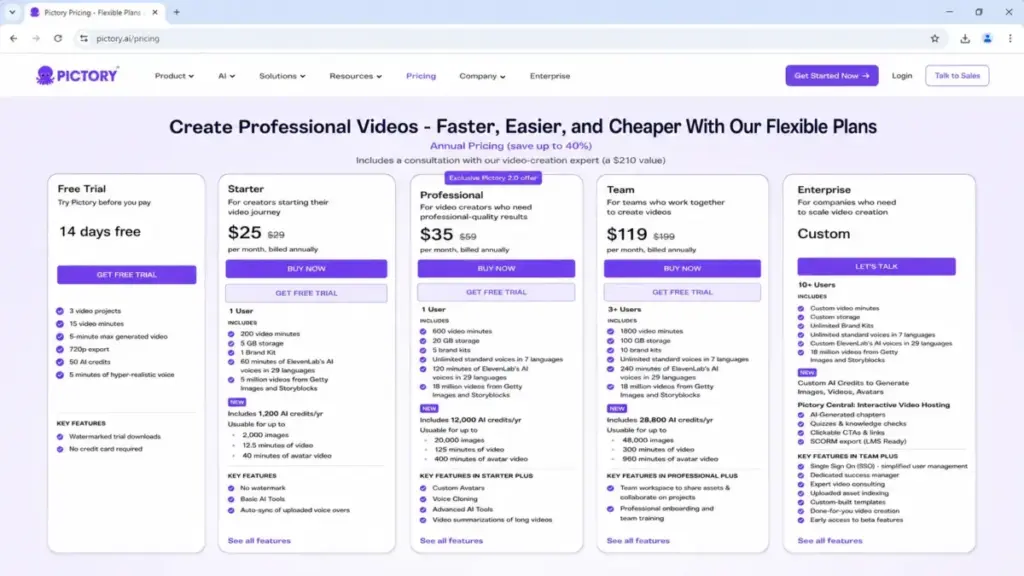
Pictory AI starts at $25/month billed annually (Starter) and runs to $119/month billed annually (Team), with Enterprise priced by custom quote for 10 or more users. Professional at $35/month annually is the best-value plan for most serious solo creators, and Starter is the plan most buyers outgrow fastest.
| Decision point | Verdict (verified June 25, 2026) |
|---|---|
| Starting price | $25/month (Starter, billed annually); $29/month month-to-month |
| Free plan | No permanent free plan; 14-day free trial, no credit card required |
| Best plan for most | Professional, $35/month annually ($59 monthly) |
| Plan to avoid | Starter, for anyone needing 1080p or multi-brand output |
| Biggest hidden cost | AI credit add-on packs, $25 to $199/month recurring |
| Best alternative if too expensive | Runway for credit-heavy generative video; see Runway pricing |
| Pricing verified | June 25, 2026, from pictory.ai/pricing |
The Advertised Price vs The Real Price
The $25 headline is real, but it is the price of the most limited paid tier, and the gap between advertised and effective monthly pricing is large on the plans most buyers actually want. Pictory shows two prices per plan: a higher month-to-month rate and a lower effective monthly rate when you commit to a year up front.
Here is the part the pricing page does not connect for you. The annual commitment changes the math differently on each plan. Starter drops only from $29 to $25, but Professional drops from $59 to $35 and Team drops from $199 to $119. The deeper discounts sit on the plans that cost more, which is the opposite of how buyers usually assume volume pricing works.
| Plan | Month-to-month | Effective monthly (annual) | Billed annually | Approx. annual saving vs monthly |
|---|---|---|---|---|
| Starter | $29/mo | $25/mo | $300/year | ~14% |
| Professional | $59/mo | $35/mo | $420/year | ~41% |
| Team | $199/mo | $119/mo | $1,428/year | ~40% |
| Enterprise | Custom quote | Custom quote | Custom quote | Not disclosed |
One caveat worth flagging, because it is a genuine inconsistency in Pictory’s own materials. The plan-card math above implies discounts of roughly 14%, 41%, and 40%, while Pictory’s subscription FAQ separately states annual billing can save up to 24%. Both come from official sources and they do not reconcile. Use the per-plan card math for your own budgeting, and treat the 24% figure as a rough marketing average rather than a per-plan promise.
The other half of the real-price picture is what the cheap plans cannot do. Starter lacks 1080p export (1080p arrives at Professional), gives you one brand kit, and 200 video minutes a month. The advertised $25 is accurate; the assumption that $25 buys a publish-ready production setup is not.
The 5 Hidden Costs Nobody Mentions
Pictory’s subscription price is the floor, not the ceiling, and four of the five real cost traps live outside the plan cards entirely. Most pricing guides stop at the four-plan table. The costs that actually surprise buyers sit in the help center.
AI Credits Are the Real Variable Cost
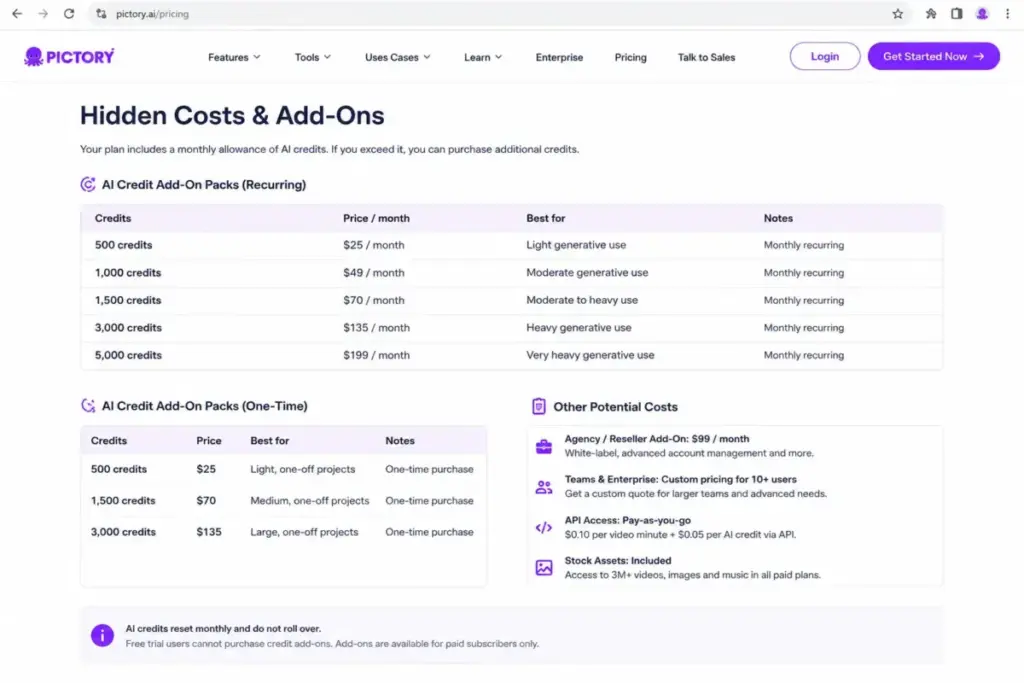
AI credits are separate from video minutes, and they are the cost line that scales with generative work. Each plan includes a monthly credit allowance: 100 credits on Starter, 500 on Professional, and 2,400 on Team (or the larger annual-grant equivalents).
When you exceed that allowance generating AI images, AI videos, or avatars in AI Studio, you buy more. Pictory’s help center lists recurring credit packs at $25/month for 500 credits, $49/month for 1,000, $70/month for 1,500, $135/month for 3,000, and $199/month for 5,000. One-time prepaid packs run $25 for 500, $70 for 1,500, and $135 for 3,000.
The usage math matters here. If your workflow leans on generative avatars and AI imagery, a $35 Professional subscription plus a $199 credit pack is a $234/month tool, not a $35 one. Free users cannot buy credit add-ons at all, and on Team plans credits pool at the workspace level rather than per seat.
| AI credit pack | Recurring price | One-time price |
|---|---|---|
| 500 credits | $25/mo | $25 |
| 1,000 credits | $49/mo | Not listed |
| 1,500 credits | $70/mo | $70 |
| 3,000 credits | $135/mo | $135 |
| 5,000 credits | $199/mo | Not listed |
Professional Video-Minute Expansion
Professional ships with 600 video minutes a month, but Pictory’s help center confirms you can customize that up to 3,600 minutes a month from the subscription page, with the price rising as minutes rise. The exact price ladder is not published in the accessible help doc, so budget for it as a known-but-undisclosed cost rather than a fixed number.
The Enterprise API Setup Fee
If you need API access for Enterprises rather than the $79/month API Self-Serve tier, Pictory’s API pricing page states there is a one-time setup fee plus actual video minutes billed monthly. The setup fee amount is not disclosed publicly. Treat it as a custom line item to negotiate, not a published rate.
No Refunds After You Subscribe
Pictory’s pricing FAQ states paid subscriptions are not refunded. You can cancel anytime to stop renewal, but cancellation prevents the next charge rather than refunding the current period. For a tool with monthly quotas that reset, forgetting to cancel before renewal is a real money leak.
The Trial Watermark Re-Download Tax
This one costs time rather than dollars, but it surprises people. Trial exports carry Pictory branding. After you upgrade, removing that branding from trial-created videos requires re-downloading them under the paid plan. If you produced a batch during the trial, plan to reprocess them.
Plan-by-Plan Breakdown
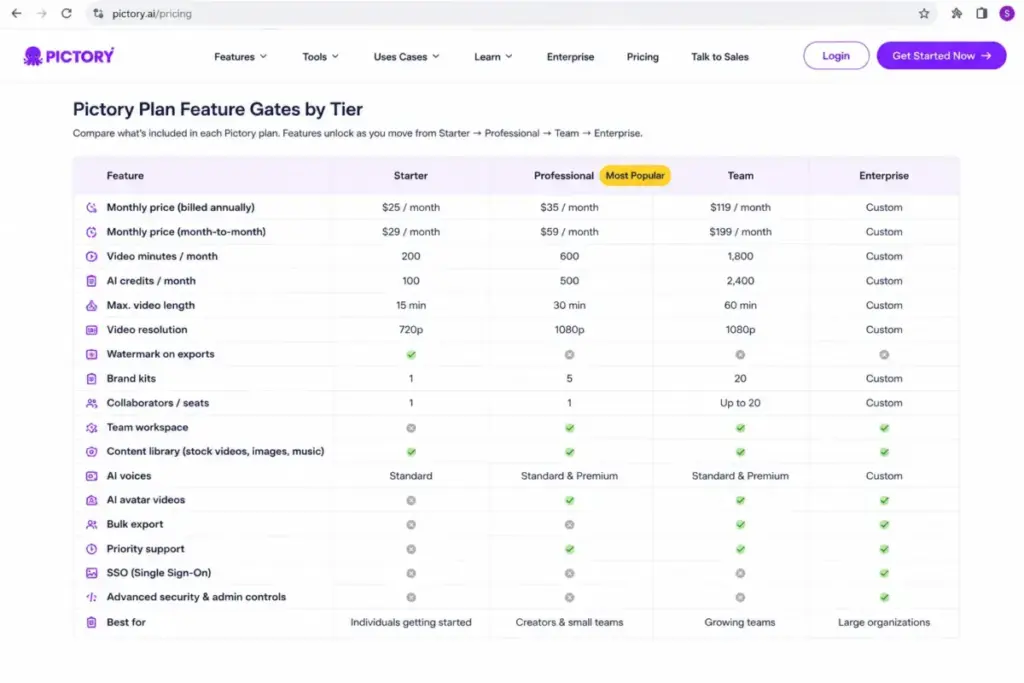
Each Pictory tier is gated less by raw features than by production capacity, and the jump from Starter to Professional is the single most consequential upgrade in the lineup. Below is what each plan actually includes, what it withholds, and who it fits.
Starter, $25/month annually
Starter gives one user 200 video minutes a month, a 30-minute max generated video length, 5 GB of storage, one brand kit, 100 AI credits a month, and access to 5 million Getty and Storyblocks stock videos. It withholds custom avatars, voice cloning, advanced AI tools, long-video summarization, the team workspace, and SSO.
There is also a documented wrinkle on ElevenLabs voices: the plan card lists 60 minutes, but Pictory’s voiceover help doc indicates premium voices are limited on Starter beyond previews, so confirm that quota before relying on it. Starter is a validation tier, not a publishing tier.
Professional, $35/month annually
Professional is where Pictory becomes a real production tool. For $10 more a month on annual billing than Starter, you triple video minutes to 600, gain 1080p output, jump to 20 GB storage and five brand kits, and add custom avatars (2), voice cloning (2), advanced AI tools, long-video summarization, 120 minutes of ElevenLabs voices, and the larger 18-million-clip stock library. The capacity delta, not the feature checklist, is what justifies it.
Team, $119/month annually
Team starts at three or more users and adds the collaboration layer: a shared team workspace, shared assets, professional onboarding, and team training. It pools 1,800 video minutes a month across the workspace, 100 GB storage, 10 brand kits, and 2,400 AI credits. What stays locked behind Enterprise: SSO, a dedicated success manager, custom templates, Pictory Central, SCORM export, and done-for-you video creation.
Enterprise, custom quote
Enterprise is listed for 10 or more users and priced by quote. It layers SSO, a dedicated success manager, expert consulting, uploaded asset indexing, custom-built templates, done-for-you video creation, early beta access, Pictory Central, quizzes, clickable CTAs, and SCORM export on top of Team. Pictory does not publish an Enterprise starting price, and at least one third-party review quotes one that the official page does not support, so ignore any fixed Enterprise number you see elsewhere and request a quote.
Team seat caveat: Pictory’s official sources conflict on the Team ceiling. The Teams product page mentions collaborating with up to 20 members, while the subscription FAQ says additional members beyond the plan limit are deactivated and suggests contacting Enterprise for more than 5 users. If you have 6 to 20 users, confirm seat coverage with Pictory in writing before you buy Team on the assumption it scales to 20.
When the Free Trial Stops Working
Pictory has no permanent free plan; it offers a 14-day free trial with no credit card required, and the trial is designed to expire into a paywall rather than degrade into a free tier. This is a distinction several SERP pages blur.
The trial includes 3 video projects, 15 video minutes, a 5-minute max generated video length, 720p export, 50 AI credits, and 5 minutes of hyper-realistic voice. Every trial download carries Pictory branding.
The upgrade triggers are concrete: you hit the wall the moment you want watermark-free downloads, 1080p output, more than 15 video minutes, higher credit allowances, or any Professional feature such as custom avatars and voice cloning. The trial answers “does this tool fit my workflow,” not “can I run on this for free.” Treat it as a 14-day audition, then expect to pay.
Real Cost Scenarios: 5, 10, 25, 50, and 100 Users
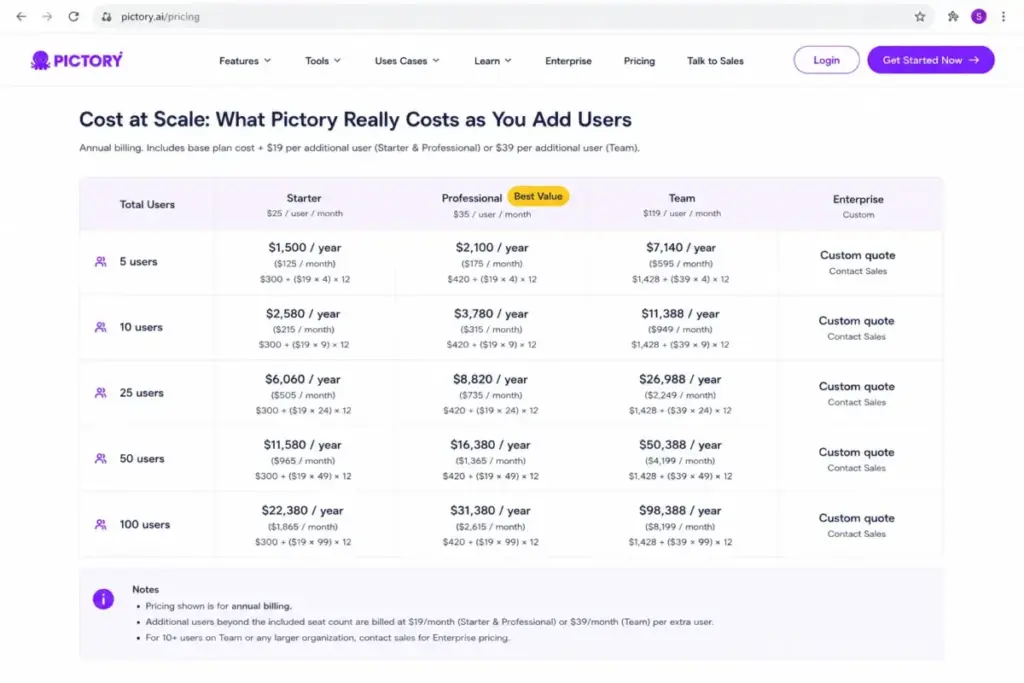
Pictory’s pricing is publicly calculable only up to about 5 users; past that point, the buyer is pushed into custom Enterprise territory, which is itself a finding worth knowing before you start a procurement process. Below is what you can and cannot price from public information.
| Users | Plan | Effective annual cost | Notes |
|---|---|---|---|
| 5 | Team | $1,428/year (annual) or $2,388/year (monthly) | Calculable, but with the seat-ceiling caveat above |
| 10 | Enterprise | Custom quote | Enterprise begins at 10+ users; do not estimate |
| 25 | Enterprise | Custom quote | Custom minutes, storage, support, possibly Pictory Central |
| 50 | Enterprise | Custom quote | Factor SSO, success manager, custom templates into TCO |
| 100 | Enterprise | Custom quote | Discuss security, implementation, API, support, not per-seat math |
The honest answer for 10 or more users is that anyone quoting you a precise per-seat figure is guessing. Pictory routes that volume to sales, so the real number depends on negotiated minutes, storage, and services. Budget for the Enterprise feature set, then get the quote.
Which Plan to Avoid, and Which to Choose
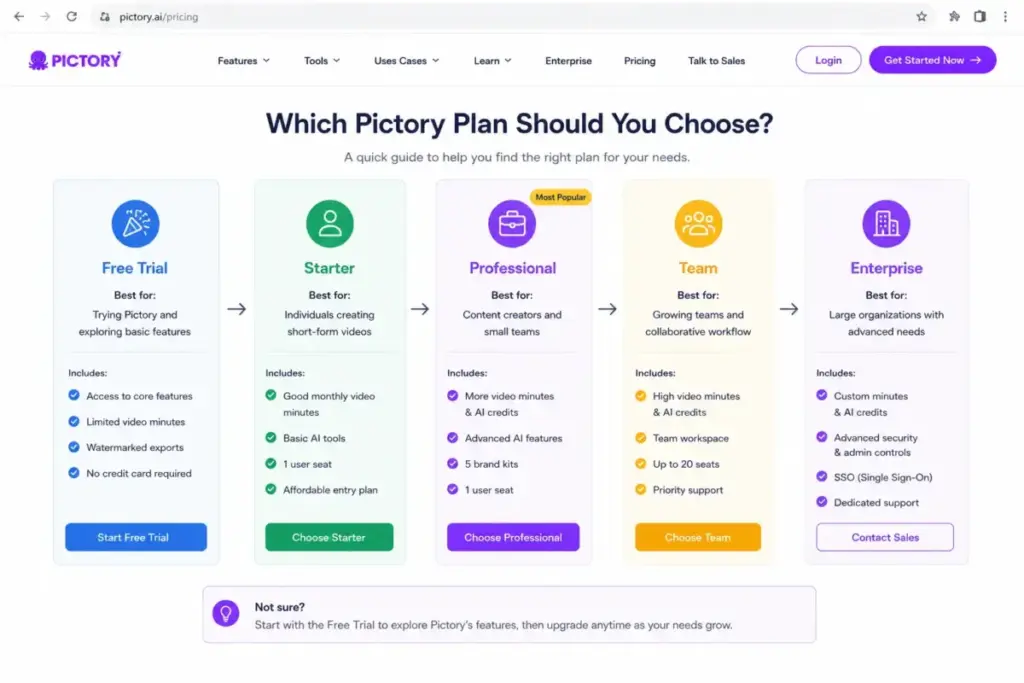
Avoid Starter unless you are genuinely doing light or trial-grade work, and choose Professional if you publish at all seriously. Starter’s weakness is not its price; it is the 200-minute cap, single brand kit, and missing 1080p output, which together make it a poor fit for anyone publishing client work, repurposing long-form content, or managing multiple brands.
Professional earns the recommendation on capacity, not features. The upgrade from Starter buys 3x the video minutes, 1080p, four times the storage, five brand kits instead of one, and the advanced AI toolset, for $10 more a month annually. That is the rare upgrade where the price delta is small and the capability delta is large.
The buyers who genuinely should not pay for Pictory: teams that need cinematic generative AI video at volume, frame-level manual editing, or 10-plus seats with predictable self-serve pricing. Those needs point toward credit-heavy generative tools or an Enterprise quote, not a $35 stock-footage workflow.
Pictory Pricing vs Competitors
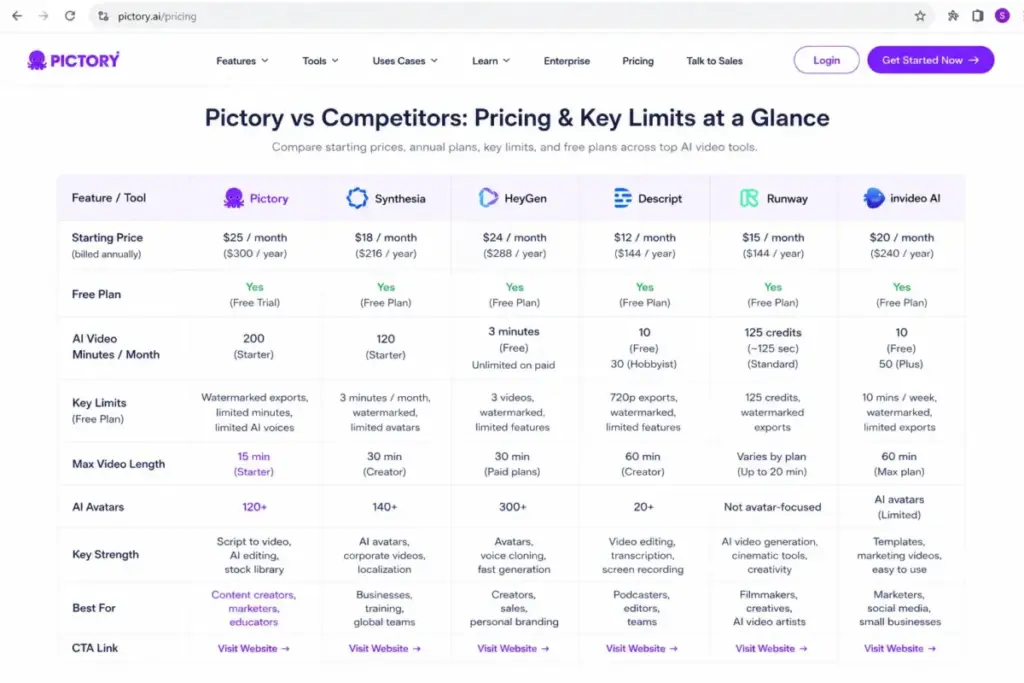
Pictory is competitively priced for stock-footage and repurposing workflows, but it is not the cheapest entry point in the AI video category, and its credit economics differ meaningfully from rivals. The table below uses each vendor’s official pricing, verified June 25, 2026. Where a 10-user cost is not publicly confirmable, it is marked as such rather than estimated.
| Tool | Starting price | Free plan | Billing basis | Notes on 10 users |
|---|---|---|---|---|
| Pictory AI | $25/mo annual (Starter) | Trial only | Plan + video minutes + AI credits | Custom Enterprise at 10+ |
| Synthesia | $18/mo yearly (Starter); Basic $0 | Yes | Editor + minutes/credits | Likely Enterprise; not a simple 10-editor plan |
| HeyGen | $24/mo annual (Creator) | Yes | Credits + plan + seats | ~$329/mo Business ($149 + 9 seats at $20); verify quote |
| Descript | $16/mo annual (Hobbyist) | Yes | Per person/month | ~$500/mo annual on Business (10 x $50) |
| Runway | $12/mo annual (Standard) | Yes | Per editor + credits | ~$280/mo annual on Pro (10 x $28) |
| invideo AI | $17/mo yearly (Plus) | Yes | Credit-based + top-ups | 10-user cost not fully verified from official HTML |
A few reads from this. Runway and Descript publish clean per-seat pricing that scales predictably to 10 users, which Pictory does not; if generative volume is your priority, our Runway review covers how that workflow differs. HeyGen and Synthesia, like Pictory, lean on credit systems that make the headline price an incomplete picture.
The note on invideo AI is deliberate: its team cost at 10 users was not visible in the accessible official pricing HTML, so it is context, not a confirmed benchmark. The takeaway is not that Pictory is expensive; it is that Pictory optimizes for blog-to-video and script-to-video repurposing, while pure generative-volume buyers will price out better elsewhere. For the broader field, our AI content creation tools guide maps adjacent options.
Is Pictory Worth the Price?
Pictory is worth it if your job is turning existing text, scripts, recordings, or URLs into publishable stock-footage videos, and it is not worth it if you need high-volume generative AI video or predictable large-team pricing. The product turns blogs, PPTs, scripts, images, screen recordings, and links into branded videos with captions, AI voices, avatars, and templates, and at $35/month for Professional that is a fair price for that specific job.
It stops being worth it when generative work dominates. Because AI credits are a separate, capped, top-up-priced resource, a heavy AI Studio workflow can quietly triple the effective monthly cost. The question to ask is not “is $35 cheap” but “how many AI credits does my actual workflow burn per month.” Answer that, add the credit pack, and you have the real price.
Third-party review sentiment on G2 and Capterra skews toward Pictory being easy to use with straightforward pricing, though that sentiment should be read as qualitative signal rather than quantitative proof.
How to Avoid Overpaying for Pictory
The fastest way to overpay is to buy capacity you do not need or to ignore the credit and renewal mechanics. Seven practical moves:
- Run the full 14-day trial before paying, and confirm your real video-minute and credit burn rather than guessing.
- Default to annual billing on Professional and Team, where the discount is roughly 40%, not on Starter, where it is only about 14%.
- Buy one-time prepaid credit packs instead of recurring packs if your generative work is occasional rather than constant; prepaid credits stay valid while your subscription is active.
- Do not buy Starter if you need 1080p or more than one brand kit; the Professional jump is only $10/month annually and saves a forced re-upgrade.
- Set a renewal reminder, because there are no refunds and cancellation only stops the next charge.
- If you are 6 to 20 users, get the Team seat ceiling confirmed in writing before paying, given the conflicting official statements.
- Keep API pricing separate in your planning: the $79/month API Self-Serve tier and custom API Enterprise are distinct from the web-app subscription and solve a different problem.
API note: API access is priced apart from normal plans. API Self-Serve is $79/month with 120 video minutes; API for Enterprises is custom, with a one-time setup fee and usage billed monthly. If you are buying for automation through Make, Zapier, or n8n, evaluate the API page, not the consumer plans.
How We Verified This Pricing
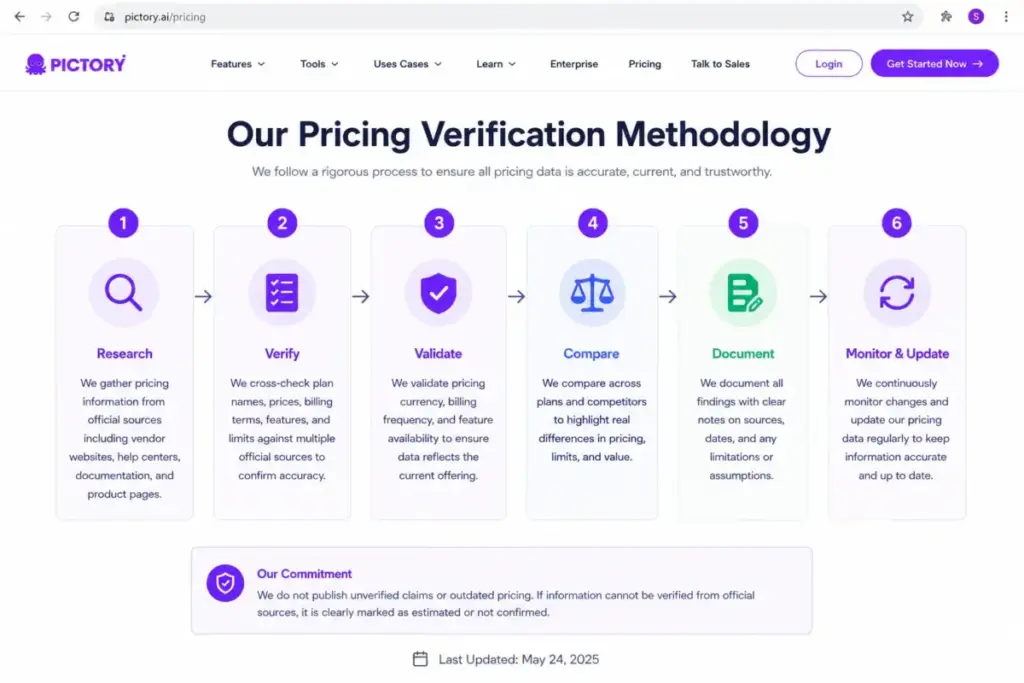
Every price in this guide was checked against primary sources on June 25, 2026: Pictory’s official pricing page, its API pricing page, and multiple help-center articles covering AI credits, video-minute structure, brand-kit limits, voiceover quotas, and subscription terms. Competitor pricing came from each vendor’s own official pricing page on the same date.
Where third-party SERP pages conflicted with Pictory’s current official figures, the official figures won, and the stale third-party data was logged rather than repeated. Several widely ranked Pictory pricing articles still show older $19/$29/$49/$99 plan prices or video-count language from a retired pricing model; Pictory has since moved to a video-minute structure, which is why those pages and the current official page disagree.
FAQ
How much does Pictory AI cost in 2026?
Pictory ranges from $25/month (Starter, billed annually) to $119/month (Team, billed annually), with month-to-month rates of $29, $59, and $199 respectively. Enterprise is custom-quoted for 10 or more users. For a solo creator publishing regularly, Professional at $35/month annually is the practical entry point.
Does Pictory AI have a free plan?
No. Pictory offers a 14-day free trial with no credit card required, not a permanent free tier. The trial includes 3 projects, 15 video minutes, 50 AI credits, and 720p exports with Pictory branding, and it expires into a paywall rather than dropping to a free plan.
What are Pictory AI credits and do they roll over?
AI credits power generative work such as AI images, AI video, and avatars, and they are separate from video minutes. Included monthly allowances run from 100 (Starter) to 2,400 (Team), and add-on quotas reset monthly without rolling over, so unused monthly credits do not bank for later.
Can I buy more Pictory AI credits?
Yes, if you are a paid subscriber. Recurring packs run $25/month (500 credits) up to $199/month (5,000 credits), and one-time prepaid packs run $25 to $135. Free trial users cannot purchase credit add-ons, and on Team plans the credits pool across the workspace.
Does Pictory offer refunds?
No. Pictory’s pricing FAQ states paid subscriptions are non-refundable. Cancelling stops the next renewal charge but does not refund the current billing period, so set a reminder before your renewal date if you are unsure about continuing.
Does the Team plan really support 20 users?
This is unclear from Pictory’s own materials. The Teams page references up to 20 members, while the subscription FAQ suggests contacting Enterprise for more than 5 users and deactivating members beyond the plan limit. If you have 6 to 20 seats, confirm coverage with Pictory before purchasing Team.
Is Pictory expensive compared with Synthesia or Runway?
For stock-footage and repurposing work, Pictory’s Professional plan is competitive at $35/month annually. For high-volume generative video, credit-based tools like Runway (from $12/month annually) often price better per generation, so the cheaper option depends on whether your workflow is repurposing-led or generation-led.
How does Pictory's API pricing work?
API access is separate from the web-app plans. API Self-Serve is $79/month with 120 video minutes; API for Enterprises is custom with an undisclosed one-time setup fee plus usage billed monthly. Buyers automating through Make, Zapier, or n8n should evaluate the API page rather than the consumer subscription tiers.