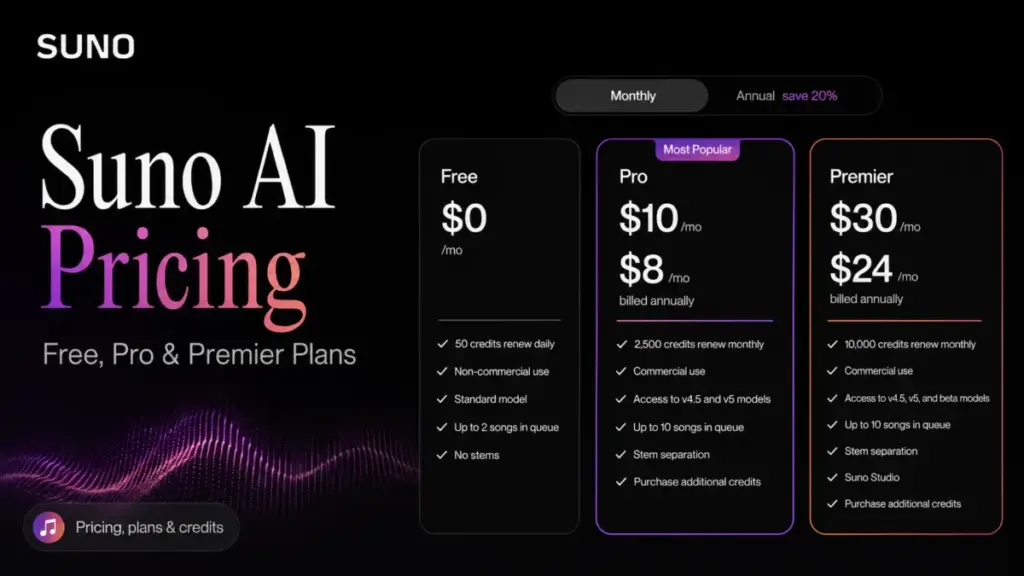
Suno AI pricing starts at $0 on Free and $10/month on Pro, but the entry number is not the decision most buyers think it is. The real choice is whether you need commercial rights, the v5.5 model, and enough monthly credits before those credits quietly expire.
Most pricing pages foreground the $8 annual headline and skip the part where monthly Pro is actually $10, subscription credits never roll over, and “commercial use” is not the same thing as owning a copyright.
I cover AI tools and generative AI for SaaSZap, and Suno is one of the clearer examples of a product where the plan you pick determines whether the AI helps or just burns credits.
This guide breaks down every Suno plan, the credit math, the hidden costs, a feature-to-plan gate map, team cost at scale, and how Suno compares with other best AI tools for content creation.
One finding up front that trips up new buyers: upgrading to Pro does not retroactively make your old Free songs commercial. More on why that matters below.
Key Takeaways
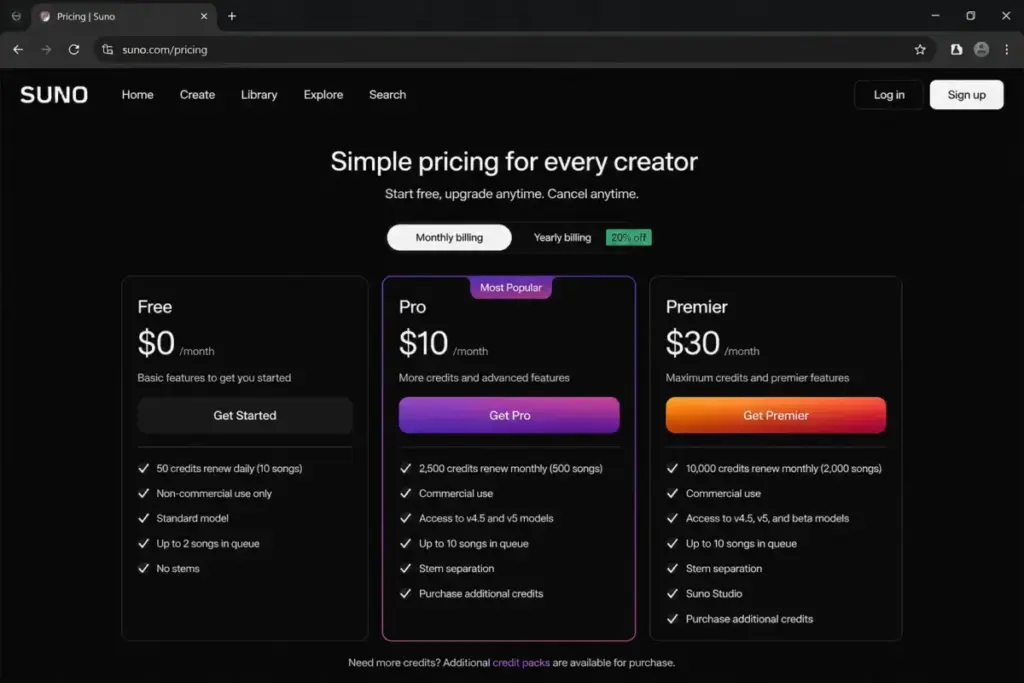
- Suno has three public plans: Free ($0), Pro ($10/month or $8/month billed annually), and Premier ($30/month or $24/month billed annually), verified June 2026.
- Pro is the best-value plan for most commercial creators because it unlocks commercial rights, advanced models through v5.5, 2,500 monthly credits, and add-on credit purchases.
- Subscription credits do not roll over. Free credits reset daily and paid credits reset monthly, so unused allotment is lost, not banked.
- Commercial rights attach to songs made while you are subscribed, not to anything you generated on Free or Basic.
- Commercial permission is not guaranteed copyright. Suno’s Terms state it makes no warranty that copyright will vest in any output.
- No public team or enterprise plan exists, so multi-creator pricing is a one-account-per-seat estimate, not an official quote.
Quick Pricing Verdict
Suno AI pricing is inexpensive on raw monthly cost and generous on credits compared with most AI music generators, but it gets expensive in three specific ways: unused credits expire, you need a separate paid account per creator, and copyright certainty is not something the price buys.
| Decision point | Answer (as of June 2026) |
|---|---|
| Starting price | $0 Free, then $10/month Pro |
| Free plan? | Yes, 50 credits that renew daily |
| Best plan for most people | Pro at $10/month ($8/month annually) |
| Plan to avoid | Premier, unless you need Suno Studio or 10,000 credits |
| Biggest hidden cost | Subscription credits expire and do not carry over |
| Best alternative if too costly | Udio or Mureka for lighter monthly use |
What this means: If you are experimenting, stay on Free. If you plan to publish or monetize anything, Pro is the entry point because Free output is non-commercial. Premier only earns its price tag for high-volume production teams.
Pricing verified June 2026. Suno can change plan prices, credits, and terms by billing cycle and region, so confirm the current rates on Suno’s official pricing page before you subscribe.
The Advertised Price vs the Real Price
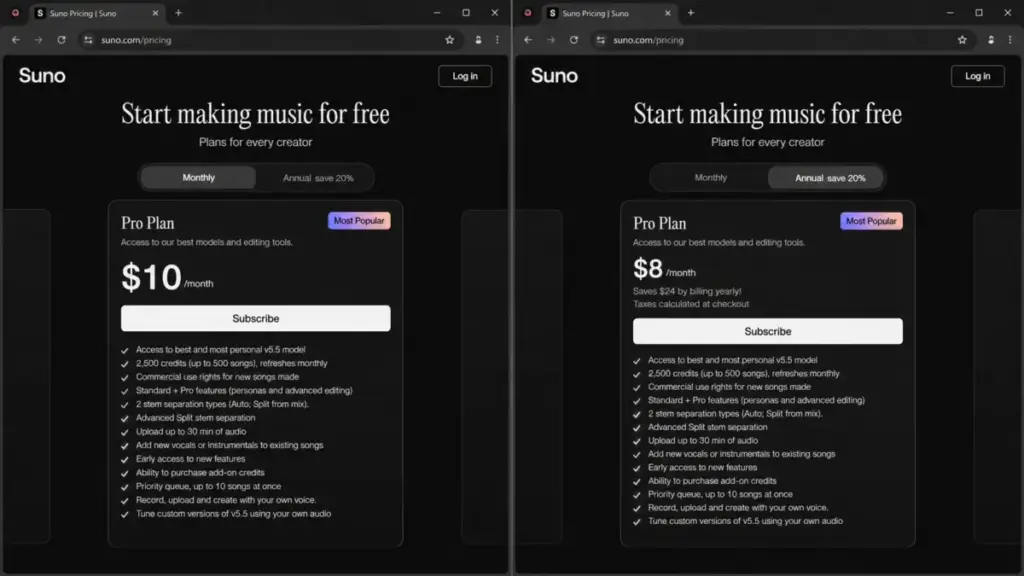
Suno’s advertised price and your real price diverge the moment billing cycle and credit expiry enter the math. The pricing page surfaces annual-billing effective rates of $8/month for Pro and $24/month for Premier, while Suno’s own hub confirms the month-to-month prices are $10 and $30, both listed on the Suno official pricing page. Annual billing saves 20%, but it locks you in for a year.
| Plan | Advertised (annual effective) | Real month-to-month | Annual total |
|---|---|---|---|
| Free | $0 | $0 | $0 |
| Pro | $8/month | $10/month | $96/year |
| Premier | $24/month | $30/month | $288/year |
What this means: The $8 and $24 figures are real, but only if you commit to 12 months upfront. For a 5-person social content team testing Suno for a single campaign, the honest monthly cost is $10 per seat, not $8. Quote the annual rate only after you have decided Suno is a keeper.
The second gap is credits. A plan’s monthly credit allotment looks like a balance, but it behaves like a meter. On Pro, 2,500 credits reset each month whether you used them or not. Buy the plan for a busy month and underuse it the next, and you paid for credits you never spent. That is the real price most pricing pages skip.
The Five Hidden Costs Nobody Lists
Suno’s hidden costs are not surprise fees. They are structural rules in the credit system and the Terms that quietly change what you actually pay and what you actually get.
Subscription credits expire
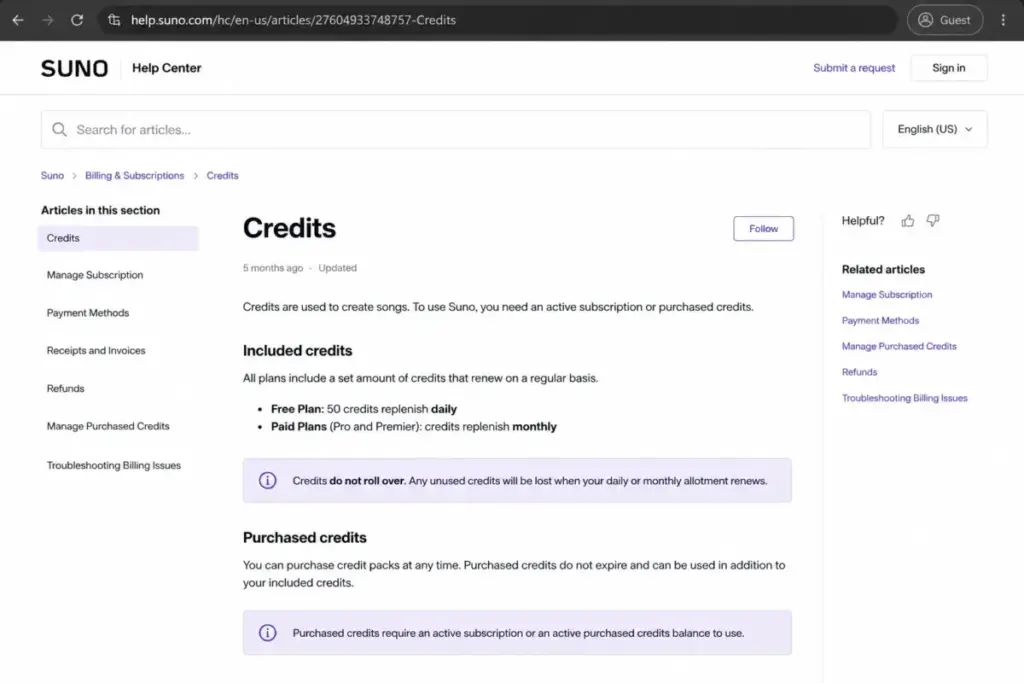
Suno subscription credits do not carry over. Free credits replenish daily and paid credits replenish monthly, so any unused balance is gone at reset. For a creator who batches work, this means a heavy month and a light month average out worse than two steady months on the same plan.
Top-up credits lock to an active subscription
Pro and Premier subscribers can buy add-on credits, and those purchased credits do not expire. The catch: they require an active subscription to use. Cancel or drop to Free and your paid top-up credits sit frozen. You bought them, but you cannot spend them without paying again.
Commercial rights depend on timing
Free and Basic tier output is limited to lawful, internal, personal, non-commercial use with attribution to Suno. Upgrading later does not convert those older tracks. Commercial rights apply to songs generated while Pro or Premier is active, which means a back catalog made on Free stays non-commercial even after you pay.
Taxes land at checkout
Suno calculates taxes at checkout, so the plan price is not the charged price. Payments run through Stripe, auto-renew by default, and are final and non-refundable unless Suno decides otherwise. Price changes carry at least 15 days notice per the Terms.
No team discount exists
There is no public Suno team, enterprise, SSO, or seat-minimum tier. A 10-creator agency pays for 10 individual subscriptions at list price. The hidden cost here is not a fee, it is the absence of the volume discount buyers expect at scale.
What this means: None of these are dealbreakers on their own, but together they reward steady, in-subscription usage and punish stop-start workflows. The buyers most exposed are casual users who cancel between projects and agencies assuming a bulk rate.
Plan-by-Plan Breakdown
Each Suno plan gates a specific set of features, and knowing which feature forces the upgrade is more useful than the feature list itself. Here is what actually changes as you move up.
Free: built for learning, not publishing
Free gives you 50 credits that renew daily, up to 10 songs a day, access to v4.5-all, a shared queue, four concurrent generations, and audio upload up to 8 minutes. It does not include commercial use, add-on credit purchases, stem separation, advanced models, or priority queue. Free is the right call for anyone learning the tool or testing prompt ideas with no plan to release the results.
Pro: the plan most creators actually need
Pro at $10/month ($8/month annually) is where commercial use begins. It includes 2,500 monthly credits, up to 500 songs, advanced models through v5.5, 30-minute uploads, priority queue up to 10 songs at once, two stem separation types, advanced editing, personas, own-voice recording, custom v5.5 tuning, and add-on credit access. The one thing it lacks is Suno Studio.
Premier: high-volume and Suno Studio only
Premier at $30/month ($24/month annually) adds 10,000 monthly credits, up to 2,000 songs, Suno Studio, and broader stem separation on top of everything in Pro. It is built for production workflows and creators who genuinely run thousands of generations a month. For everyone else, it is four times the Pro credit allotment most users will never touch.
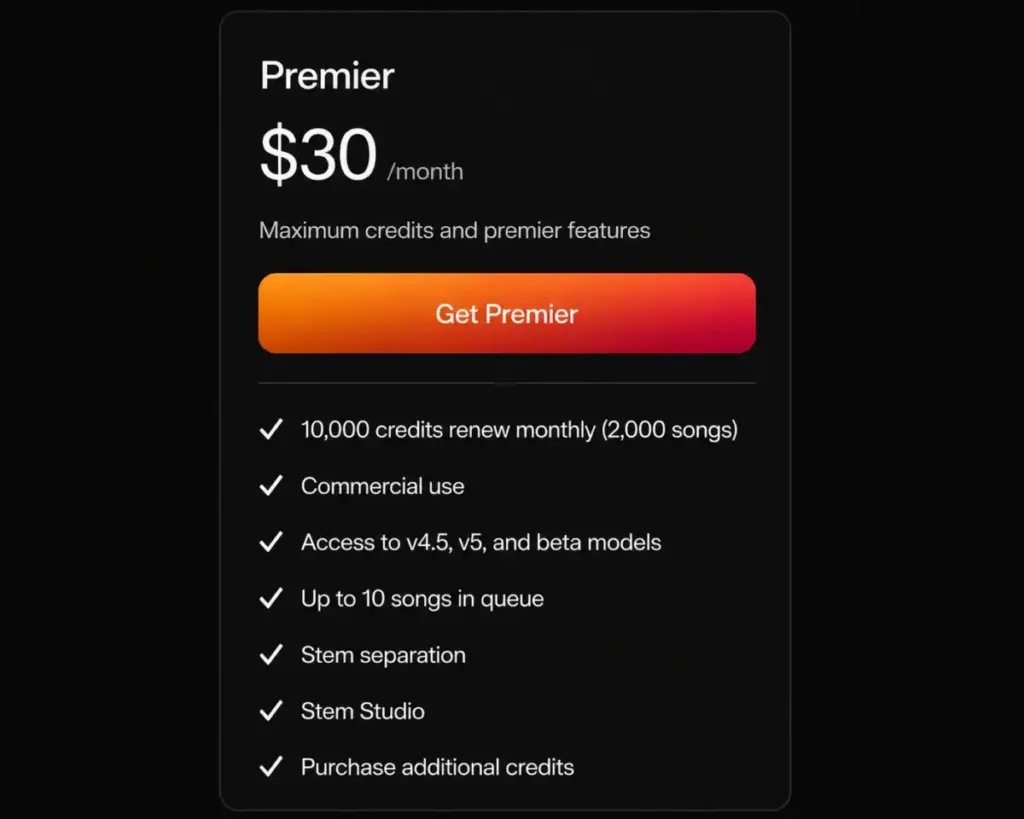
What this means: The upgrade triggers are clear. You move from Free to Pro for commercial rights and v5.5. You move from Pro to Premier only for Suno Studio or credit volume. There is no in-between tier, so the jump from $10 to $30 is a real cliff, not a gradient.
Suno feature gate map
| Feature | Free | Pro | Premier |
|---|---|---|---|
| Commercial use rights (new songs) | No | Yes | Yes |
| Advanced models v4 to v5.5 | No | Yes | Yes |
| Monthly credit allotment | 50/day | 2,500/mo | 10,000/mo |
| Priority queue (10 at once) | No (shared) | Yes | Yes |
| Add-on credit purchases | No | Yes | Yes |
| Audio upload length | 8 min | 30 min | 30 min |
| Stem separation | No | Yes (2 types) | Yes (broader) |
| Advanced editing and personas | No | Yes | Yes |
| Own-voice and custom v5.5 tuning | No | Yes | Yes |
| Suno Studio | No | No | Yes |
What this means: Commercial use and v5.5 are the two gates that pull most buyers off Free. Suno Studio is the only gate that justifies Premier. If your reason for considering Premier is not Studio or raw volume, Pro covers it.
When the Free Plan Stops Working
Suno’s Free plan stops working the moment your output leaves your own device. The 50 daily credits and 10-song cap are workable for practice, but Free output is non-commercial with required attribution, so any YouTube monetization, Spotify release, client deliverable, or paid social ad crosses a line Free does not permit.
Free also caps you out of the models and tools serious work needs. No v5.5, no priority queue, no stem separation, no 30-minute uploads, and no add-on credits. A solo creator scoring a weekly podcast intro will hit the commercial-use wall before the credit wall.
The trigger to upgrade is almost never running out of daily credits. It is the first time you want to publish. Generative AI tools like Suno often make the free tier feel generous on volume while gating the one thing that matters for a working creator: the right to use what you made. You can read more about how these models work in this overview of what generative AI is.
Real Cost Scenarios at Team Scale
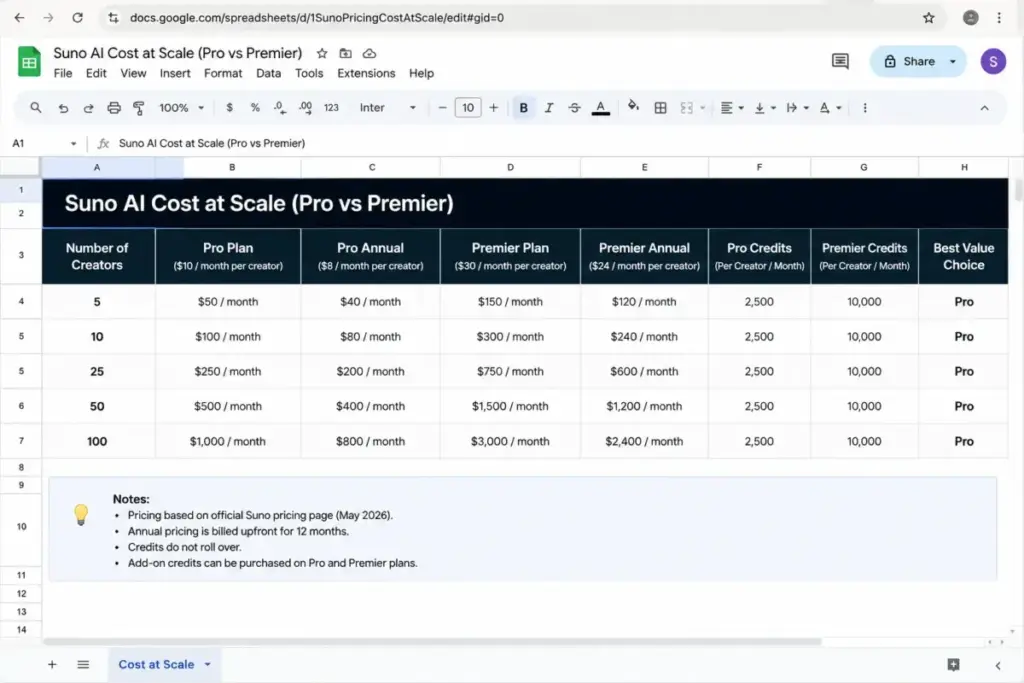
Suno team cost scales linearly because there is no volume discount. With no public team plan, the only honest estimate is one paid account per creator, billed at list price. These are per-account estimates, not official Suno team quotes.
| Creators | Pro monthly | Pro annual | Premier monthly | Premier annual |
|---|---|---|---|---|
| 5 | $50/mo | $480/year | $150/mo | $1,440/year |
| 10 | $100/mo | $960/year | $300/mo | $2,880/year |
| 25 | $250/mo | $2,400/year | $750/mo | $7,200/year |
| 50 | $500/mo | $4,800/year | $1,500/mo | $14,400/year |
| 100 | $1,000/mo | $9,600/year | $3,000/mo | $28,800/year |
What this means: Annual billing saves 20%, so a 10-creator team on Pro saves $240/year and the same team on Premier saves $720/year by paying upfront. The bigger caveat is governance. At 25 creators and up, the missing piece is not price, it is the lack of admin seats, SSO, and centralized billing. A 50-person content studio should expect a mix of Pro and Premier seats rather than all-Premier, and should treat these numbers as a planning estimate until Suno confirms any team arrangement directly.
Commercial Rights and the Copyright Caveat
Suno’s paid plans grant commercial use rights for songs generated during the subscription term, but that is a narrower promise than ownership. Pro and Premier subscribers receive Suno’s right, title, and interest in output that Suno owns, for output made while subscribed. Suno separately states it makes no representation or warranty that copyright will vest in any output, per its official Terms of Service.
That distinction is where most competitor articles get sloppy. Commercial permission lets you use and monetize the track. It does not guarantee you a registrable, defensible copyright the way a human-composed work would. For a YouTube creator, the commercial-use grant is usually enough. For a brand running a national ad campaign, the lack of a copyright warranty is a reason to involve legal counsel.
A practical rights checklist for working creators:
- Generate any track you plan to monetize while Pro or Premier is active, not on Free.
- Keep your generation dates, receipts, and exports as proof the song was made in-subscription.
- Do not assume old Free songs became commercial after you upgraded. They did not.
- For client work or paid advertising, separate “I can use this” from “I provably own this” and get legal sign-off if certainty matters.
What this means: Suno is safe for most creator monetization if you generate while subscribed. It is not a substitute for legal advice when defensible ownership is the whole point of the deliverable.
Add-Ons, Trials, and the Student Discount
Suno’s add-ons and discounts are real but under-documented on the public pricing page, so treat the specifics as things to verify in your account before committing budget.
Paid users can buy top-up credits, but Suno does not list the bundle prices on the public pricing page I checked for this article. Older third-party sources quote specific bundles, but those were not confirmed on Suno’s official page, so check the account UI before planning a large project around extra credits.
A free trial is not clearly advertised on the pricing page. Suno’s Terms reference paid-service trials lasting the duration in the confirmation email, or 7 days if unspecified, and note a trial may convert to a paid subscription if not cancelled. A Student Pro discount of $5/month after a 30-day trial has appeared in Suno’s own social posts for verified students, but it was not visible on the main public plan table during this research. Verify current student eligibility before relying on it.
What this means: Budget from the confirmed list prices. Treat top-up bundles, trials, and student pricing as bonuses to confirm at checkout, not as guarantees.
Plan to Avoid and Plan to Choose
The plan to avoid for most buyers is Premier, and the plan to choose for most buyers is Pro. The gap between them is $20/month, and almost all of that buys Suno Studio plus credit headroom most creators will not use.
Choose Pro if you are a YouTuber, podcaster, indie artist, marketer, or social content creator who will publish commercially and use a meaningful share of 2,500 monthly credits. It is the cheapest plan with commercial rights and v5.5, and it is the best value in the lineup.
Avoid Premier unless you specifically need Suno Studio, broader stem separation, or genuinely generate thousands of songs a month. Paying $30 for 10,000 credits you will not touch is the most common Suno overspend.
Avoid Free the moment you intend to publish. Free is excellent for learning and useless for monetization because of the non-commercial restriction.
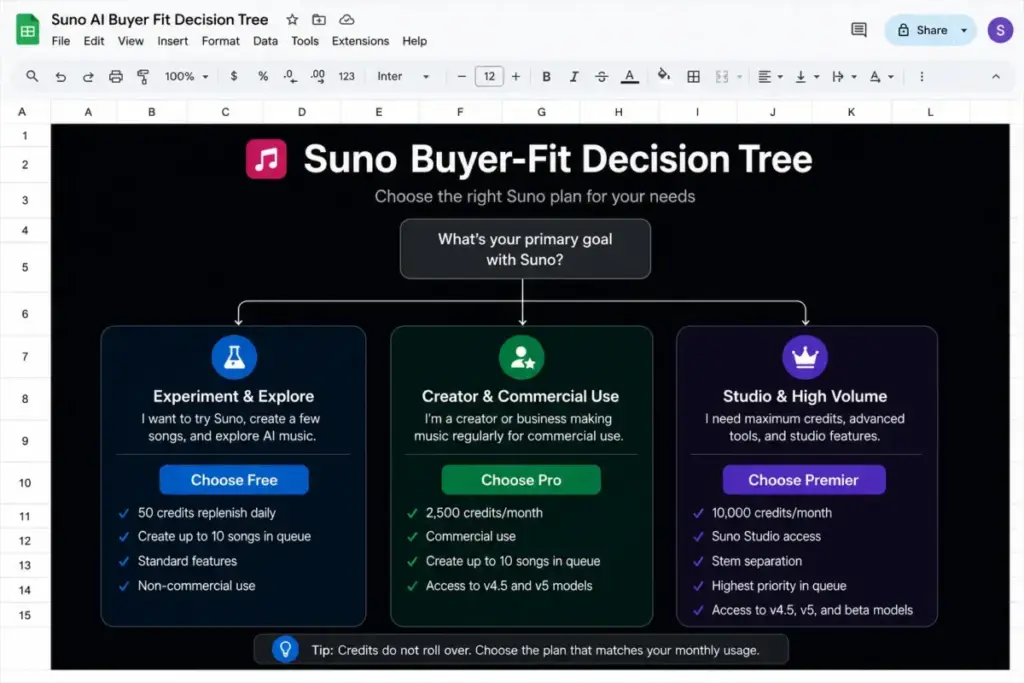
What this means: The decision tree is short. Not publishing yet means Free. Publishing means Pro. Running a production pipeline means Premier. There is no scenario where Premier beats Pro for a typical solo creator.
Is Suno Expensive Compared With Competitors?
Suno is mid-priced for the AI music category, not the cheapest and not the most expensive. Its $10 Pro entry sits right in line with rivals, and its credit allotments are generous, but several competitors undercut it on sticker price. All competitor figures below are per-account estimates assuming one subscription per creator.
| Tool | Starting price | Free plan? | Billing basis | 10-user estimate |
|---|---|---|---|---|
| Suno (Pro) | $10/mo ($8 annual) | Yes | Credits + subscription | $100/mo |
| Udio (Standard) | $10/mo | Yes | Credits + a-la-carte | $100/mo |
| Mureka (Pro) | $7.17/mo ($86/year) | Yes | Songs + speech limits | $71.70/mo |
| Musicfy (Starter) | $9.99/mo (sale) | Yes | Generation limits | $99.90/mo |
| SOUNDRAW (Creator) | $5.99/mo (limited offer) | No public tier | License/download tier | $59.90/mo |
| MusicAI.ai (Starter) | $10.49/mo ($125.92/year) | Yes | Credits + generations | $104.90/mo |
What this means: Mureka and SOUNDRAW look cheaper on the headline, but Mureka’s full plan table did not fully load during research and SOUNDRAW’s prices were a limited-time offer, so treat both as medium-confidence benchmarks. Udio is the closest direct match to Suno on price and model. The right read: Suno is priced fairly for its credit volume and model quality, and you pick a cheaper rival mainly to save a few dollars per seat, not because Suno is overpriced. Verify current rates on each vendor’s official pricing page before switching: Musicfy pricing, MusicAI.ai pricing, Mureka pricing, and SOUNDRAW pricing.
Is Suno AI Worth the Price?
Suno is worth the price for creators who publish, generate steadily, and treat commercial-use rights as the feature they are paying for. At $10/month, Pro is one of the better value entries in AI music when measured by credits and model access per dollar.
It is not worth paying for if you are a casual experimenter who should stay on Free, a team that needs SSO and admin controls Suno does not offer, or a buyer who needs defensible copyright ownership rather than commercial permission. The question Daniel Rivera asks of any AI subscription applies here: does the value come from using it inside the subscription, or are you paying for headroom you will never spend? On Suno, the answer is clear for Pro and shaky for Premier.
What this means: Most creators get real value from Pro. Premier is a niche plan. Free is a sandbox, not a publishing tool.
How to Avoid Overpaying for Suno
You avoid overpaying for Suno by matching your plan to your actual monthly output and by respecting how credits expire. Three rules keep your spend honest.
First, do not buy Premier for credit headroom. If you are not using Suno Studio and not pushing past Pro’s 2,500 monthly credits, the extra $20/month is waste. Track a few real months before upgrading.
Second, time your annual commitment. The 20% annual discount is real, but only commit after a month or two on monthly billing confirms Suno fits your workflow. Locking in for a year on day one risks paying for a tool you abandon.
Third, generate commercial work only while subscribed and keep your records. The most expensive Suno mistake is not a plan choice, it is making a monetizable catalog on Free and discovering it is non-commercial after the fact.
What this means: The cheapest correct plan is usually Pro on monthly billing until you are sure, then Pro on annual billing once you are committed. Premier is the exception, not the default.
Frequently Asked Questions
How much does Suno AI cost?
Suno AI costs $0 on the Free plan, $10/month on Pro ($8/month billed annually), and $30/month on Premier ($24/month billed annually), as of June 2026. Annual billing saves 20% but requires a 12-month commitment. Taxes are added at checkout, and Suno processes payments through Stripe with automatic renewal unless you cancel before the next cycle.
Is Suno AI free to use?
Yes, Suno has a Free plan with 50 credits that renew daily and up to 10 songs per day. The catch is that Free output is limited to personal, non-commercial use with attribution to Suno. You cannot monetize Free songs on YouTube, Spotify, or client work. To publish commercially, you need Pro or Premier, and the rights apply only to songs made while subscribed.
What is the difference between Suno Pro and Premier?
Pro at $10/month includes 2,500 monthly credits, commercial rights, advanced models through v5.5, stem separation, and add-on credits. Premier at $30/month adds 10,000 monthly credits, Suno Studio, and broader stem separation. The practical difference is Suno Studio and credit volume. For most creators who do not run a production pipeline, Pro covers everything Premier offers except Studio.
Do Suno credits roll over?
No. Suno subscription credits do not carry over between cycles. Free credits reset daily and paid credits reset monthly, so any unused allotment is lost at reset. Purchased top-up credits are different: they do not expire, but they require an active subscription to use. If you cancel or drop to Free, your top-up credits are frozen until you resubscribe.
Does Suno give me copyright ownership?
Not exactly. Suno’s paid plans grant commercial use rights for songs generated while subscribed, and assign Suno’s interest in output it owns to Pro and Premier subscribers. However, Suno’s Terms state it makes no warranty that copyright will vest in any output. Commercial permission lets you use and monetize the track, but it is not the same as guaranteed, registrable copyright ownership.
Does Suno have team or enterprise pricing?
No public Suno team, enterprise, SSO, or seat-minimum pricing was found during this research. Multi-creator costs are best estimated as one paid account per person at list price, so 10 Pro creators run about $100/month. There is no volume discount or centralized admin tier publicly listed, which becomes a real buying consideration for agencies above 25 creators.
Is Suno cheaper than Udio?
They are close. Suno Pro and Udio Standard both start at $10/month, and both offer free tiers and credit-based billing. Suno lists 2,500 monthly credits on Pro, while Udio’s documented limits vary between its help articles, viewable on the Udio pricing page. On pure price, the two are nearly identical, so the choice usually comes down to model quality and feature fit rather than cost.
Are Suno top-up credits worth buying?
Top-up credits make sense only if you are an active Pro or Premier subscriber who exceeds your monthly allotment on a real project. They do not expire, which is a plus, but they lock to an active subscription, so they are useless if you cancel. Suno does not publicly list bundle prices on its pricing page, so check the in-app price before planning a large project around them.
Final Verdict
Suno AI pricing is honest on the surface and tricky in the details. The headline numbers are fair, but the decision that matters is not Free versus paid. It is whether you need commercial rights, the v5.5 model, and enough monthly credits before they expire. For the large majority of creators, Pro at $10/month answers all three and stands as the clear value pick. Premier is a specialist plan for Suno Studio and high-volume production, and Free is a sandbox that stops working the day you decide to publish.
Budget from the confirmed list prices, generate commercial work only while subscribed, and wait until Suno earns a month or two of steady use before locking in the annual rate. Treat Suno AI pricing as a usage decision, not a sticker-price decision, and you will land on the right plan. For broader context on the category, the SaaSZap overview of what AI is is a useful next read.