Descript pricing starts at $16 per editor per month on the Hobbyist plan billed annually, but that number hides the part most buyers learn the hard way.
The price you pay is not just the seat. It is the seat plus a monthly media-hour ceiling, plus a monthly AI-credit ceiling, plus top-ups when you blow past either one, plus a seat cliff that pushes growing teams toward a custom Enterprise quote.
By the end of this guide, you will know exactly when a $16 plan becomes a $200 month, and which buyers should never touch the Free plan.
Descript is one of the clearer examples of usage-based pricing dressed up as simple subscription tiers. The Free, Hobbyist, Creator, Business, and Enterprise structure looks tidy on the pricing page.
The real cost lives in the limits underneath it. This breakdown covers every plan, every hidden cost, the top-up economics nobody charts, the team-seat math, and whether Descript earns its price in 2026.
Quick Pricing Verdict
Descript is inexpensive for solo creators who stay inside the limits, and it gets expensive fast once you add editors, run heavy AI workflows, or need enterprise security. The table below is the 30-second version.
| Question | Answer |
|---|---|
| Starting price | $16 per editor/month (Hobbyist, billed annually); $24/month month-to-month |
| Free plan | Yes. 60 media minutes/month, 100 one-time AI credits, 720p export, watermark, 1 seat |
| Free trial | No published timed paid-plan trial. The Free plan is the ongoing try-before-you-buy |
| Best plan for most teams | Creator ($24/editor/month annually). 4K export, 30 media hours, 800 AI credits, top-ups |
| Plan to avoid | Hobbyist for anyone needing 4K, team workflows, or regular AI generation |
| Biggest hidden cost | Top-ups. AI credits run $35–$200 per bundle; media minutes run $25–$150 per bundle |
| Best alternative if too expensive | Kapwing at $16/member/month annually, or OpusClip for clip-only workflows |
| Pricing verified | June 2026, from the official Descript pricing page |
What this means: if you are a solo podcaster or YouTuber who edits transcript-first, Creator is the plan to budget for, not the $16 headline. If you are a five-person studio, your real number is closer to $3,000 per year before a single top-up. Pricing changes often, so check the official Descript pricing page for current rates before you buy.
This guide sits inside our wider coverage of the best AI tools for content creation, where Descript competes with editing, transcription, and clip-generation tools.
The Advertised Price vs The Real Price
The advertised price is the per-editor subscription. The real price is that subscription plus usage limits plus the cost of going over them. Descript advertises “save up to 35%” with annual billing, but the gap between sticker and spend comes from media hours and AI credits, not the billing cycle.
Here is how the two numbers diverge at each tier (as of June 2026).
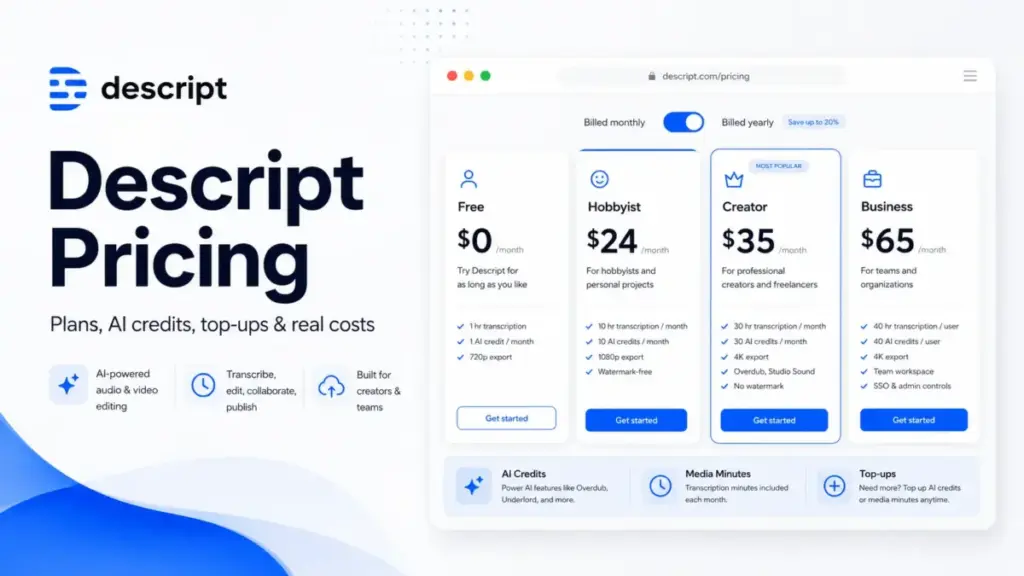
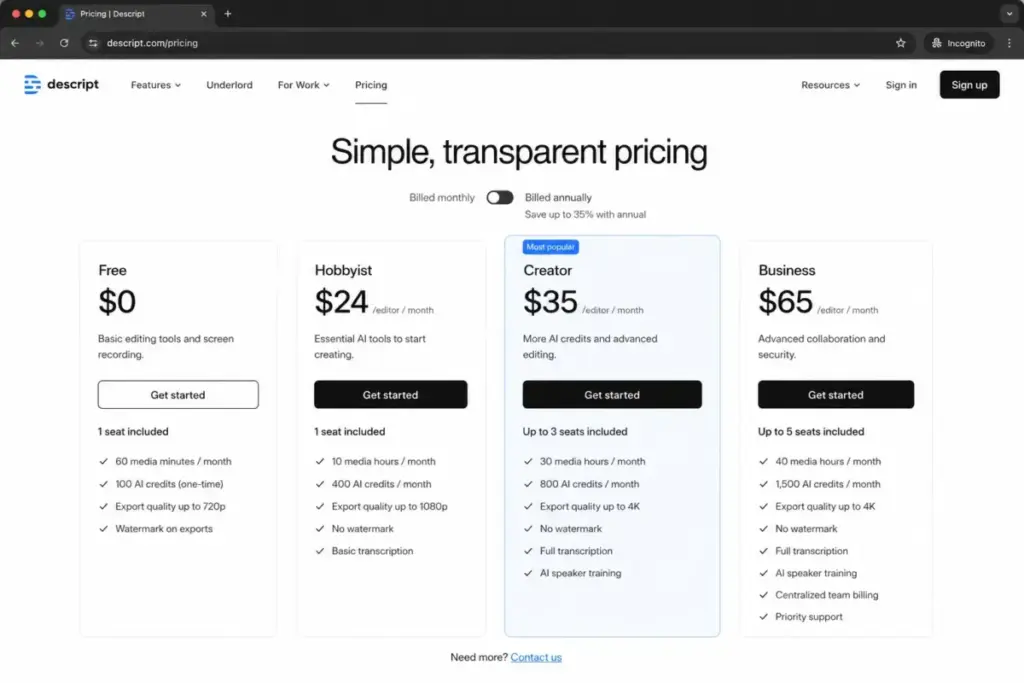
| Plan | Advertised (annual) | What the price actually buys | Where the real cost hides |
|---|---|---|---|
| Free | $0 | 1 seat, 60 media minutes/month, 100 one-time AI credits, 720p, watermark | Watermark and 720p block production; AI credits do not refill |
| Hobbyist | $16/editor/month | 1 seat, 10 media hours, 400 AI credits/month, 1080p | No 4K, no top-ups, no team scaling |
| Creator | $24/editor/month | Up to 3 seats, 30 media hours, 800 AI credits/month, 4K | Each seat billed separately; top-ups start here |
| Business | $50/editor/month | Up to 5 seats, 40 media hours, 1,500 AI credits/month, 4K | SSO, SCIM, and brand controls still gated to Enterprise |
| Enterprise | Custom | Custom credits, security, support, billing | No public price; quote required |
What this means: the headline number is real, but it is the floor, not the ceiling. A Creator seat is $24 per month annually, yet a creator who runs out of media hours mid-month pays $3 to $5 more per extra hour through top-ups. The advertised price assumes you never exceed the allowance. Heavy users always do.
The 5 Hidden Costs Nobody Mentions
Most Descript pricing articles stop at the plan grid. The money that surprises people lives in five line items the pricing page does not total for you.
Hidden cost 1: AI credit and media-minute top-ups
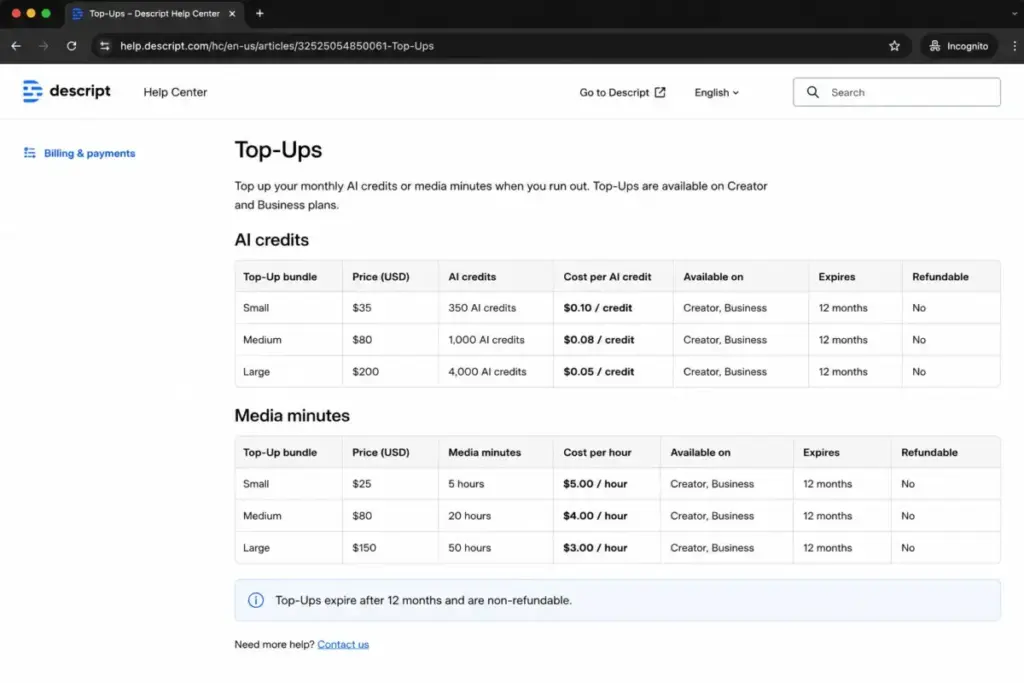
Top-ups are the single biggest swing factor in a Descript bill. They are available on Creator and Business, and they kick in only after your monthly allowance runs dry. Both AI credits and media minutes expire 12 months after purchase, and neither is refundable.
| Top-up bundle | Price | Per-unit cost | Available on |
|---|---|---|---|
| 350 AI credits | $35 | $0.10/credit | Creator, Business |
| 1,000 AI credits | $80 | $0.08/credit | Creator, Business |
| 4,000 AI credits | $200 | $0.05/credit | Creator, Business |
| 5 media hours | $25 | $5.00/hour | Creator, Business |
| 20 media hours | $80 | $4.00/hour | Creator, Business |
| 50 media hours | $150 | $3.00/hour | Creator, Business |
What this means: buying small is the trap. A 350-credit pack costs twice as much per credit as the 4,000-credit pack. The same logic applies to media hours, where $25 for 5 hours works out to $5 each, versus $3 each in the 50-hour bundle. If you top up more than once a month, you are likely paying for the wrong plan. See the official Descript top-ups documentation for the current bundle list.
Hidden cost 2: extra editor seats
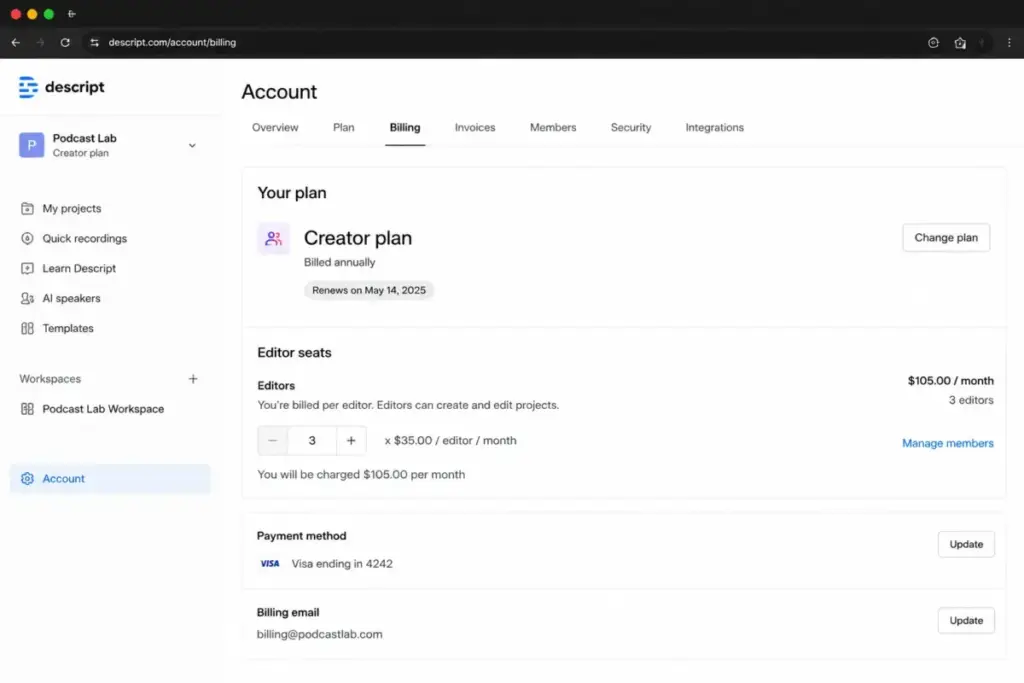
Descript bills per Editor seat, and adding an Editor adds a charge at your plan’s rate. A second Creator seat is another $24 per month annually. A second Business seat is another $50. The seats are billed separately, so a three-person Creator setup is three times the per-seat price, not a flat team rate.
Hidden cost 3: the drive-invite billing trap
This one catches agencies and freelancer-heavy teams. In Descript, Drive Editors are paid seats and Drive Viewers are free. Inviting a freelancer or client into your drive as an Editor can create an additional seat charge. Set collaborators who only need to review as Viewers, and you avoid paying for access they do not use. The role you assign at invite time is a pricing decision, not just a permissions one.
Hidden cost 4: sales tax
Descript may charge applicable sales tax depending on your location. The plan price you see is pre-tax, so your final invoice can run higher than the sticker. This is small per seat but adds up across a team.
Hidden cost 5: the Enterprise security gate
SSO, SCIM, custom legal terms, granular brand controls, custom AI controls, and dedicated support all require Enterprise. There is no self-serve price for these. If your security team mandates single sign-on, you are in custom-quote territory regardless of how few seats you need. For mid-size companies, this is the cost that turns a predictable subscription into a sales call. The Descript enterprise page outlines what the tier covers without listing a price.
Plan-by-Plan Breakdown
Each Descript plan targets a different buyer, and the gates between them are usage limits, not just feature checkboxes. Here is what each tier includes, what it withholds, and who should skip it.
Free: a demo, not a production plan
Free gives you 60 media minutes per month, 100 one-time AI credits, 720p export, and a Descript watermark on one seat with 5GB storage. The AI credits do not refill, which is the detail that matters. Once you spend the 100, they are gone unless you upgrade.
Free works for testing the transcript-first editing flow or trimming a short internal clip. It does not work for anything you publish. The watermark and 720p ceiling rule out client work, and 60 minutes covers barely one short episode. Treat Free as a trial that never expires, not a tier you can grow on.
Hobbyist: the awkward middle
Hobbyist costs $24 per editor per month monthly, or $16 billed annually, and includes 10 media hours and 400 AI credits per month with 1080p watermark-free export. It removes the watermark, which is the main reason to leave Free.
The problem is what it still lacks. No 4K export, no top-ups, no team scaling, no unlimited stock library, and no access to the latest AI video generation. For a hobbyist posting 1080p clips occasionally, it is fine. For anyone whose work touches 4K or who runs out of credits, it is a dead end, because you cannot buy your way past the limits.
Creator: the plan most serious users actually need
Creator costs $35 per editor per month monthly, or $24 billed annually, scales to a team of 3 billed separately, and includes 30 media hours and 800 AI credits per editor per month with 4K export. Annual billing adds 5 bonus media hours and 500 bonus AI credits.
This is the value tier. It opens 4K watermark-free export, the unlimited royalty-free stock library, the latest AI video models, and top-ups when you run short. For a solo podcaster, YouTuber, or course creator who edits in Descript several times a week, Creator clears the limits that strangle the cheaper plans. The catch is the three-seat ceiling, which I will get to.
Business: team controls, but not enterprise security
Business costs $65 per editor per month monthly, or $50 billed annually, scales to a team of 5 billed separately, and includes 40 media hours and 1,500 AI credits per editor per month. Annual adds 10 bonus media hours and 1,000 bonus AI credits.
Business adds team-wide Brand Studio and priority support on top of everything in Creator. What it does not add is SSO, SCIM, or custom legal terms. Those stay locked to Enterprise. So Business is the plan for a content studio that wants shared brand controls and faster support, but it is not the plan for a company whose IT department requires single sign-on.
Enterprise: custom everything
Enterprise pricing is custom; contact Descript for a quote. It covers advanced security, SSO, SCIM, granular brand controls, custom AI credits and media minutes, custom legal terms, flexible licensing and billing, dedicated support, and onboarding. There is no published seat price, and the public Business card scales only to five seats, so larger or security-bound teams land here by default.
When the Free Plan Stops Working
The Free plan stops working the moment you need to publish, collaborate, or use AI more than once. Three triggers push people off it fast.
First, the watermark and 720p export block any client or public-facing video. Second, the 100 AI credits are one-time, so a single afternoon of testing Underlord, Studio Sound, and filler-word removal can burn them. Third, the 60-minute media ceiling covers one short recording, not a weekly show. If the terms here are unfamiliar, our AI terms glossary defines credits, media processing, and the generative features that consume them.
Here is the catch most reviews miss: the Free plan’s AI credits do not refill monthly the way paid plans’ do. That makes Free useful for exactly one evaluation pass. After that, the conversion pressure is real, and Hobbyist is the cheapest exit at $16 per month annually. If your work is generative-AI-heavy, understanding what generative AI is and how credit consumption works will save you from underbuying.
Real Cost Scenarios: 5, 10, 25, 50, and 100 Users
Per-seat pricing looks linear until you hit the seat cliff. Descript’s public cards scale Creator to 3 editors and Business to 5 editors, each billed separately. Past five seats, the public path runs out and Enterprise becomes the realistic route. The numbers below use the Business annual rate as a proxy for larger teams, marked as such, because Descript does not publish per-seat pricing above five.
| Team size | Plan | Monthly (proxy) | Annual (proxy) | Notes |
|---|---|---|---|---|
| 5 users | Business | $325/month | $3,000/year | Supported on the public Business card; 200 media hours and 7,500 AI credits/month pooled |
| 10 users | Enterprise recommended | $650/month | $6,000/year | Proxy only. Public Business scales to 5; request a custom quote |
| 25 users | Enterprise | $1,625/month | $15,000/year | Proxy only. Use Enterprise for central admin, SSO, SCIM, pooled usage |
| 50 users | Enterprise | $3,250/month | $30,000/year | Proxy only, not an official offer. Custom credits and terms likely apply |
| 100 users | Enterprise | $6,500/month | $60,000/year | Proxy only. Exact cost depends on licensing, security, and usage |
What this means: only the 5-user row reflects a real self-serve price. Every row above it is an estimate built from the Business seat rate, not a quote you can buy at checkout. A 10-person studio that assumes simple per-seat math at $50 will likely face a different Enterprise figure once SSO and admin controls enter the conversation. Budget for the cliff, not the slope.
Here is the original calculation that reframes Descript for podcasters. A weekly 45-minute episode with two recorded takes can consume roughly 3 media hours per month once you import raw audio and re-runs. Hobbyist’s 10 hours covers it. But add a video version, b-roll, and Studio Sound passes, and a Creator team can clear 30 hours quickly. The plan you need is set by your raw media volume, not your published runtime.
Which Plan Should You Avoid?
Avoid Hobbyist if you need 4K export, regular AI generation, team collaboration, or the ability to buy top-ups. Hobbyist’s hard ceiling is the issue. You cannot purchase extra credits or media hours on it, so the moment you exceed 10 media hours or 400 credits, your only move is to upgrade. For a 1080p-only hobbyist with light AI use, it is fine. For anyone scaling, it is the plan you outgrow within a month and resent paying for twice.
Free is the other plan to avoid for production. The watermark, 720p cap, and one-time credits make it an evaluation tool, not a workspace.
Which Plan Should You Choose?
Match the plan to your seat count, media volume, and AI appetite. I use a simple filter I call the Three-Ceiling Test: before picking a plan, check the seat ceiling, the media-hour ceiling, and the AI-credit ceiling against your real monthly usage. Whichever ceiling you hit first decides your plan.
Solo creators and freelancers under heavy AI use should pick Creator at $24/editor/month annually. It clears the 4K and top-up gates that Hobbyist locks. A 1080p-only hobbyist with light editing can sit on Hobbyist at $16.
Small podcast or video teams of two to five should pick Business at $50/editor/month annually for shared Brand Studio and priority support, or Creator if the team is three or fewer and does not need brand controls. A five-person studio budgets $3,000 per year before top-ups.
Security-conscious companies and teams above five seats should go straight to Enterprise for SSO, SCIM, and central admin. There is no cheaper public path to single sign-on, so do not waste time pricing Business for a team that requires it.
Education and Nonprofit Pricing
Descript offers education and nonprofit pricing at $12 per editor per month billed monthly, or $8 per editor per month billed annually, with Hobbyist features and limits. That makes it the cheapest legitimate route into watermark-free 1080p editing for eligible individuals.
The trade-off is the Hobbyist feature set. You get the reduced price, but also the Hobbyist ceilings: 10 media hours, 400 AI credits, no 4K, and no top-ups. It suits an eligible student or solo nonprofit creator working in 1080p, not a department that needs 4K or team controls.
Monthly vs Annual Billing
Annual billing saves real money, but the discount is not the flat 35% the marketing line implies. The savings vary by tier because each plan’s monthly and annual prices were set independently.
| Plan | Monthly rate | Annual rate (per month) | Actual annual saving |
|---|---|---|---|
| Hobbyist | $24 | $16 | ~33.3% ($96/year) |
| Creator | $35 | $24 | ~31.4% ($132/year) |
| Business | $65 | $50 | ~23.1% ($180/year) |
What this means: Hobbyist benefits most from annual billing in percentage terms, while Business saves the most in raw dollars per seat. The “up to 35%” claim is closest to true on Hobbyist and overstates the Business discount. Annual billing also adds bonus media hours and AI credits on Creator and Business, which the percentage alone does not capture. Billing changes apply immediately with prorated charges when you upgrade or add editors, per Descript’s billing documentation.
Descript Pricing vs Competitors
Descript is mid-priced against transcript-first and clip-generation rivals, but direct comparison is tricky because the tools bill differently. Some charge per member, some per workspace, some by usage credits. The table below uses each tool’s official starting price as of June 2026.
| Tool | Starting price | Billing model | Free plan | Notes |
|---|---|---|---|---|
| Descript | $16/editor/month annually | Per editor + usage limits | Yes | 4K and top-ups on Creator and up |
| Riverside | $24/month annually (Pro) | Workspace-style with usage limits | Yes | Business is custom; treat as workspace, not seat math |
| Kapwing | $16/member/month annually | Per member | Yes | $24/member monthly; 10 members = $160/month annually |
| VEED | Around $12/month annually (Lite) | Mixed or per-seat | Yes | Official price cards were not fully verified this pass |
| Castmagic | $21/month annually (Hobby) | Tiered, seats and hours included | No public free plan in reviewed source | Starter $79/month annually includes 10 seats |
| OpusClip | $14.50/month annually (Pro) | Usage credits | Yes | Clip generator, not a full transcript editor |
What this means: Kapwing matches Descript’s $16 entry and bills cleanly per member, which makes it the easier team-math choice for repurposing-heavy workflows. Castmagic looks expensive at the seat level but bundles 10 seats into its $79 Starter, so a 10-person podcast team pays less there than on Descript Business. OpusClip is cheaper but not comparable; it generates clips rather than replacing a full editor. Treat VEED’s number as approximate until you confirm it on the official VEED pricing page, since the current cards did not extract cleanly. You can compare these across our AI tools pricing guides and the best AI video generator options.
Is Descript Worth the Price?
Descript is worth the price if you edit transcript-first and use its AI workflow often enough to justify the media and AI ceilings. The question to ask is whether the AI saves you time on work you already do every week. For a podcaster cutting filler words, generating show notes, and fixing audio with Studio Sound, the answer is usually yes, and Creator at $24 per month annually is a fair rate for that.
It is not worth the price if you only need occasional clip generation, if you want enterprise security on a tight budget, or if you primarily edit on a traditional timeline rather than from a transcript. Light clippers get more value from OpusClip. Security-bound teams face an Enterprise quote that can dwarf the seat price.
As Daniel Rivera, who covers AI tools and generative AI at SaaSZap, my read is this: Descript’s pricing is honest about its tiers and quiet about its ceilings. The product earns its keep for daily transcript editors. It punishes occasional users who underbuy and then pay top-up premiums.
How to Avoid Overpaying for Descript
A few habits keep your Descript bill close to the sticker price rather than well above it.
Pick the plan by your first ceiling, not the headline price. Run the Three-Ceiling Test on seats, media hours, and AI credits before you commit. Buy top-ups in the largest bundle you will use within 12 months, since the 4,000-credit and 50-hour packs cost far less per unit than the small ones. Set collaborators who only review as Viewers, not Editors, so you never pay for passive access.
Choose annual billing if your usage is steady, because it cuts 23% to 33% per seat and adds bonus hours and credits. Watch the seat cliff: at six or more seats, get an Enterprise quote rather than stacking Business seats blindly. And reassess every quarter, because if you top up more than once a month, the next tier up is almost always cheaper than the overage.
FAQ
How much does Descript cost?
Descript costs $0 on Free, $24 per editor per month on Hobbyist ($16 annually), $35 on Creator ($24 annually), and $65 on Business ($50 annually). Enterprise is custom. The real cost depends on how many editor seats you add and whether you buy AI-credit or media-hour top-ups when your monthly allowance runs out.
Is Descript free?
Descript has a Free plan with $0 pricing, no credit card required to sign up. It includes 60 media minutes per month, 100 one-time AI credits, 720p export, and a watermark on one seat. The AI credits do not refill, so Free works as a one-time evaluation rather than an ongoing production workspace.
Does Descript charge per user?
Yes. Descript bills per Editor seat at your plan’s rate, and each seat is billed separately. Creator scales to 3 editors and Business to 5, with each additional Editor adding a charge. Drive Viewers are free, so inviting a reviewer as a Viewer instead of an Editor avoids a seat charge.
What are Descript AI credits and media minutes?
AI credits power generative features and media minutes cover transcription and processing time. Both are monthly allowances tied to paid Editor seats, shared across a drive, and they do not roll over. When you exceed them on Creator or Business, you buy top-ups: $35 to $200 for AI credits, $25 to $150 for media hours.
Does Descript have a free trial?
Descript offers a free plan rather than a published timed paid-plan trial. You can create a Free account without a credit card and test the transcript-first editing flow indefinitely, within the Free limits. To try paid features like 4K export or top-ups, you upgrade to a paid plan rather than starting a separate trial.
What is the difference between Descript Creator and Business?
Creator ($24/editor/month annually) scales to 3 seats with 30 media hours and 800 AI credits each. Business ($50/editor/month annually) scales to 5 seats with 40 media hours and 1,500 AI credits each, plus team-wide Brand Studio and priority support. Neither includes SSO or SCIM; those require Enterprise.
Does Descript offer enterprise pricing and SSO?
Yes. Enterprise pricing is custom and unlocks SSO, SCIM, granular brand controls, custom legal terms, custom AI credits and media minutes, dedicated support, and onboarding. There is no public seat price. Any team that requires single sign-on must contact Descript for a quote, since SSO is not available on Free, Hobbyist, Creator, or Business.
Can I buy more Descript credits, and do top-ups expire?
Yes, on Creator and Business. AI credit top-ups cost $35 for 350, $80 for 1,000, or $200 for 4,000. Media-hour top-ups cost $25 for 5 hours, $80 for 20, or $150 for 50. All top-ups expire 12 months after purchase and are non-refundable, so buy the largest bundle you will use within a year.
Is Descript cheaper than Riverside or Kapwing?
Descript starts at $16 per editor per month annually, matching Kapwing’s $16 per member and undercutting Riverside’s $24 Pro. Kapwing’s per-member billing is simpler for team math. Riverside bills workspace-style, so per-seat comparison is loose. For a 10-person podcast team, Castmagic’s seat-bundling can undercut all three.