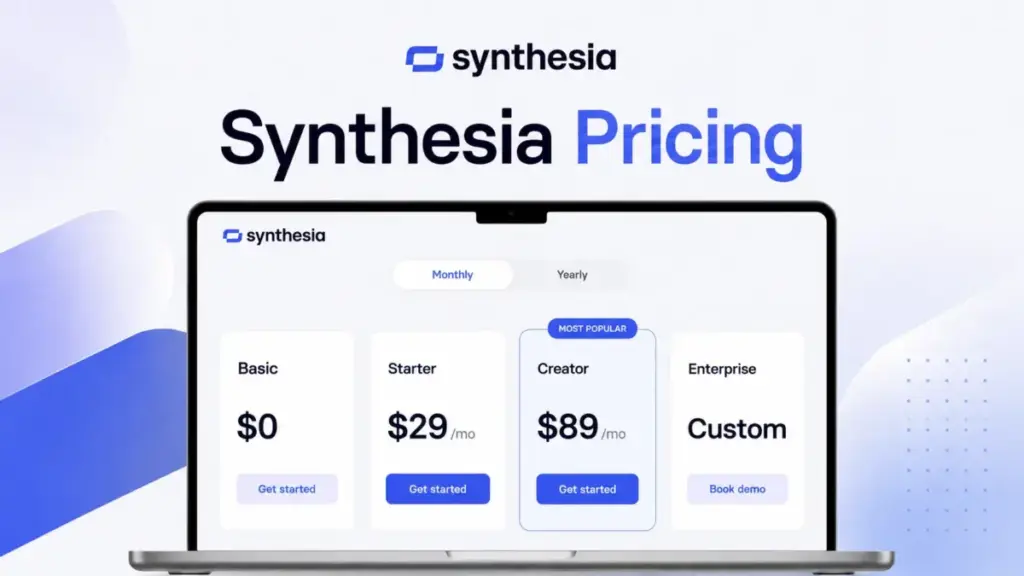
Synthesia lists its Starter plan at $29 per month (as of June 2026). That price gets you 10 minutes of video, 1 editor seat, and 1,200 credits. What it does not get you is enough production capacity for most L&D teams, API access, or even the ability to put two avatars in the same scene.
The real pricing question is not which plan costs less. It is whether Synthesia’s minute caps, credit multipliers, and single-editor model fit the way your team actually produces video.
I tracked Synthesia’s pricing page changes across 12 tools on our best AI video generator list for 18 months.
This guide compares Synthesia’s current pricing against official plan data, feature gates, and competitor pricing benchmarks.
If you are still exploring what generative AI is and what it can do for content production, start there before diving into pricing.
Quick Pricing Verdict
| Category | Details |
|---|---|
| Starting price | $0/month (Basic free plan) |
| Official pricing page | Verified June 2026 |
| Free plan | Yes: 10 min/month, 9 avatars, 1 editor, no downloads |
| Best plan for most teams | Creator at $89/month or $64/month billed yearly |
| Plan to avoid | Starter on monthly billing (same 10 min/month as free Basic, but costs $29) |
| Biggest hidden cost | Credit multipliers: Lip Sync uses 2x credits, Veo 3.1 and Sora 2 clips cost 48 credits each |
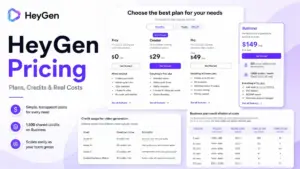
| Best alternative if too expensive | HeyGen starting at $24/month billed annually with a free plan |
| Pricing verified | June 23, 2026, via official Synthesia pricing page |
What this means: Synthesia’s free Basic plan works for experimenting with AI avatars. But the moment you need to download a video, remove the Synthesia watermark, or dub into another language, you are paying at least $29 per month. The jump from Starter to Creator triples the cost but also triples the video minutes from 10 to 30 per month on monthly billing.
The Advertised Price vs The Real Price
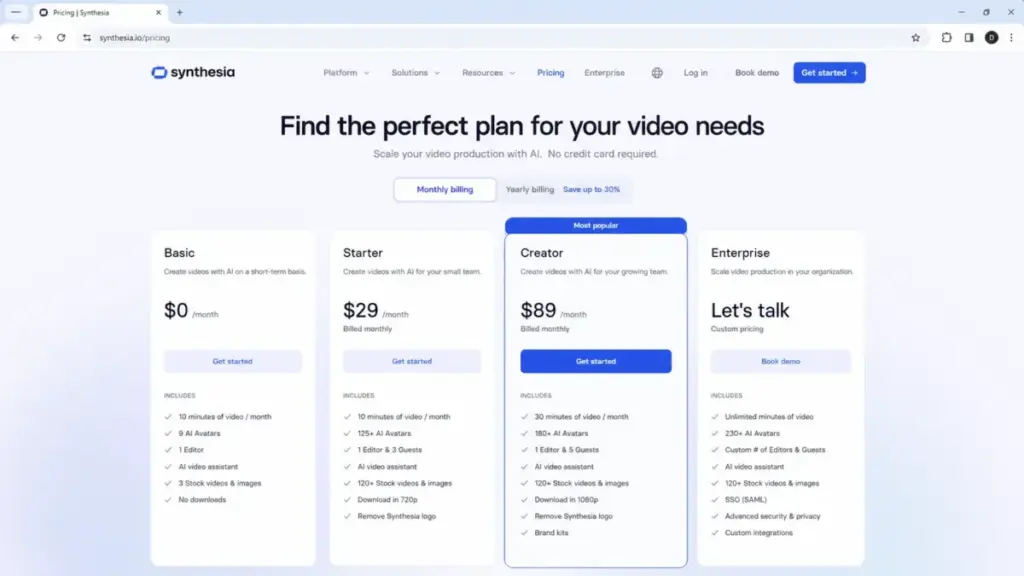
Synthesia advertises four plans: Basic at $0, Starter at $29 per month, Creator at $89 per month, and Enterprise at custom pricing. Those headline numbers suggest a low-cost entry point. The reality is more complicated.
| What You See | What You Actually Get | The Gap |
|---|---|---|
| Starter: $29/month | 10 min of video, 1 editor, 3 guests, 1,200 credits | Same monthly video minutes as the free Basic plan |
| Creator: $89/month | 30 min of video, 1 editor, 5 guests, 3,600 credits | Still only 1 editor seat per workspace |
| Creator annual: $64/month | $768/year total, 360 min/year, 44,000 credits/year | Minute pool is yearly, not monthly rollover |
| Enterprise: Custom | Unlimited minutes, custom editors, SAML/SSO, SCORM | No public price; requires a sales call |
What this means: the advertised price tells you what Synthesia charges per month. It does not tell you that Starter and Basic share the same 10-minute monthly cap, that every workspace is limited to 1 editor, or that credit-heavy features like AI Dubbing and Sora 2 clips burn through your allocation at 2x to 48x the base rate. Daniel Rivera, our AI tools editor at SaaSZap, verified every price on this page against the official Synthesia pricing page on June 23, 2026. Where the official FAQ or snippet text suggested different annual totals, I used the visible pricing card as the primary source and noted the conflict.
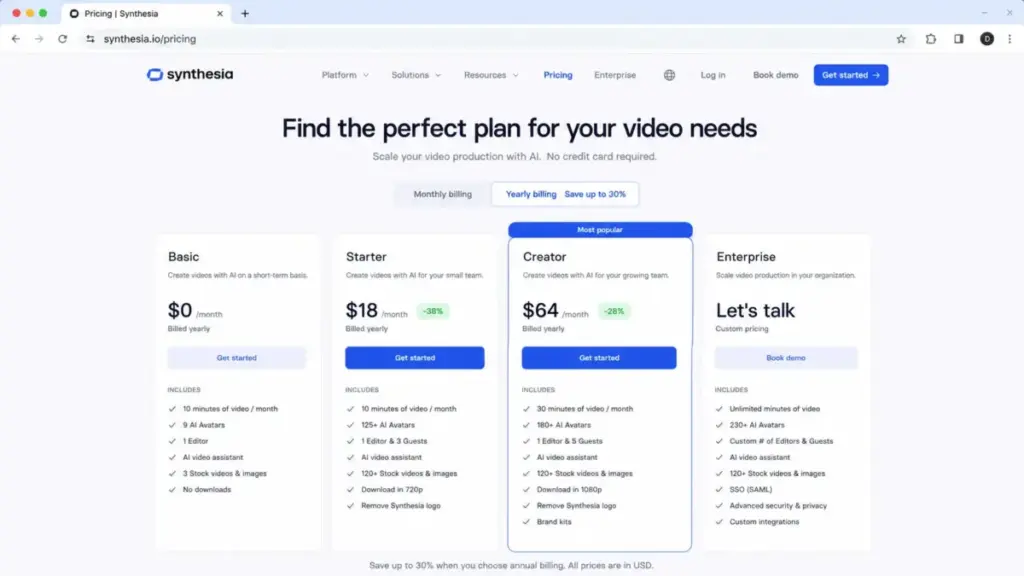
Pricing verification note: Several SERP articles repeat annual prices that conflict with the current official pricing card. The visible card checked on June 23, 2026 shows Starter at $18/month billed yearly and Creator at $64/month billed yearly. Parsed official FAQ text elsewhere suggests older totals. This article uses the current visible card and flags where ambiguity exists.
The 5 Hidden Costs Nobody Mentions
Synthesia’s pricing page is transparent about plan prices. It is less transparent about what eats into your included allocation and what costs extra on top of the plan fee.
1. Credit Multipliers Change Your Real Capacity
Synthesia uses credits as a shared currency across AI features. Every plan includes a monthly credit pool: 1,200 on Basic and Starter, 3,600 on Creator. But not every feature costs the same number of credits.
- Lip Sync (AI Dubbing): 2x credits per unit
- Veo 3.1 and Sora 2 video clips: 48 credits per asset
- Avatar action b-roll: 96 credits per asset
At 48 credits per Sora 2 or Veo 3.1 asset, a 3,600-credit Creator allocation supports up to 75 such assets before other credit-consuming features are counted. If you add avatar action b-roll, the number drops further.
What this means: Synthesia’s “30 minutes per month” on Creator assumes standard video generation. The moment you use advanced AI models or dubbing, your real capacity is lower than the plan page suggests. This is the single biggest hidden cost most pricing guides skip.
2. Studio Express-1 Avatar Add-On
Synthesia includes personal avatars in paid plans: 3 on Starter, 5 on Creator, unlimited on Enterprise. But the Studio Express-1 Avatar, a higher-fidelity custom avatar, is a separate paid add-on.
- Price: $1,000 per year
- Availability: Annual plan users only
- Processing time: Up to 10 days
This is not the same as the included personal avatars. If your team needs a polished, broadcast-quality avatar for external training or customer-facing video, the Studio Express-1 is the upgrade path, and it costs as much as an entire year of the Starter plan.
3. The 1-Editor Workspace Limit
Starter and Creator plans include 1 editor per workspace. Guests (3 on Starter, 5 on Creator) can view and comment, but they cannot edit videos. If your team has 5 people who all need to build videos, you need either 5 separate Creator workspaces at $445 per month or an Enterprise contract.
This is the cost trap that most pricing articles miss when they calculate Synthesia team pricing. They assume Creator is a per-user plan. It is not. It is a per-workspace plan with one editor seat.
4. API Usage Beyond Plan Limits
Synthesia API access starts on Creator. The API draws from your existing video minute and credit allocation. If you need additional API usage beyond your Creator limits, extra usage is available as a paid add-on, but the public price is not disclosed. That means you cannot budget API overage without contacting Synthesia sales.
5. Enterprise Onboarding and Implementation
Enterprise includes tailored onboarding, implementation services, and a dedicated customer success manager. Whether these are free with the Enterprise contract or line-item priced separately is not public. Ask for a line-item breakdown during your Enterprise sales call.
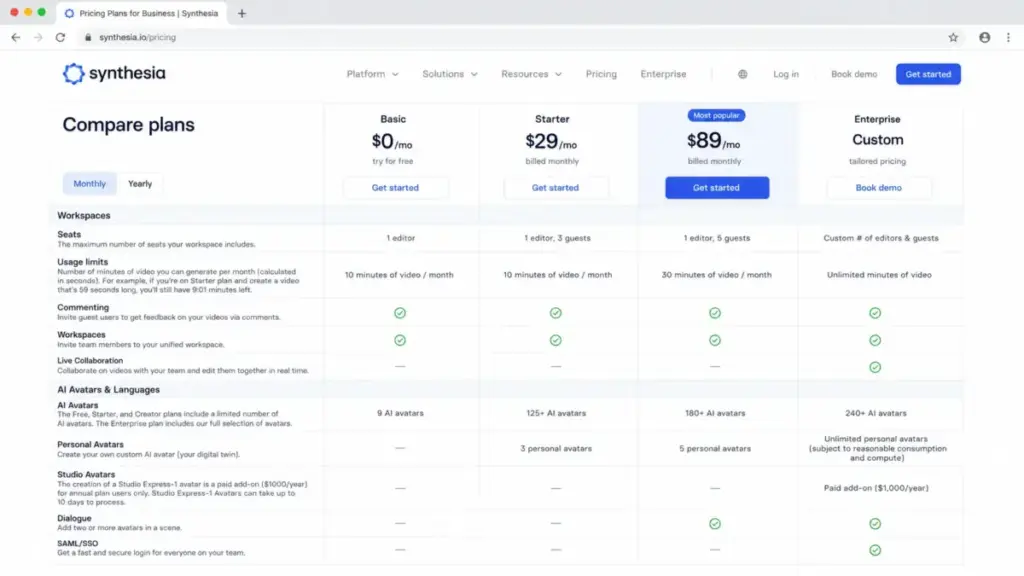
Synthesia Plan-by-Plan Breakdown
Each Synthesia plan targets a different production profile. Here is what you get, what you lose, and who each plan fits.
Synthesia Pricing Plans Compared
| Plan | Monthly Price | Annual Price | Video Minutes | Credits/Month | Editors | AI Avatars | Best For |
|---|---|---|---|---|---|---|---|
| Basic | $0 | $0 | 10 min/month | 1,200 | 1 | 9 | Testing Synthesia before committing |
| Starter | $29/month | $18/month ($216/year) | 10 min/month or 120 min/year | 1,200/month or 14,500/year | 1 + 3 guests | 125+ | Solo creators needing downloads and logo removal |
| Creator | $89/month | $64/month ($768/year) | 30 min/month or 360 min/year | 3,600/month or 44,000/year | 1 + 5 guests | 180+ | Regular producers needing API, branded pages, and more minutes |
| Enterprise | Custom | Custom (annual) | Unlimited | Custom | Custom | 240+ | Teams needing SSO, SCORM, Brand Kits, and unlimited minutes |
What this means: the jump from Basic to Starter buys you production rights (downloads, logo removal, AI Video Assistant, AI Dubbing, more avatars, guest seats). It does not buy you more monthly video minutes on monthly billing. Both Basic and Starter cap at 10 minutes per month. The jump from Starter to Creator is where you get more capacity: 30 minutes monthly, 3x credits, API access, branded video pages, interactive videos, and multiple avatars per scene.
Basic (Free)
Best for: Solo individuals testing AI video creation before paying anything.
Includes: 10 min/month, 1,200 credits/month, 25 AI-generated video assets, 9 AI avatars, 1 editor, no credit card required.
Missing: Video downloads, logo removal, AI Video Assistant, AI Dubbing, API access, branded pages, SAML/SSO, SCORM export.
Avoid if: You need to download videos or share them without the Synthesia watermark. Basic is an evaluation tool, not a production tool.
Starter ($29/month)
Best for: Solo content creators who need to download and share watermark-free avatar videos at low volume.
Includes: Everything in Basic plus downloads, Synthesia logo removal, AI Video Assistant, AI Dubbing, 125+ avatars, 3 personal avatars, 3 guest seats, chat and email support.
Missing: API access, branded video pages, multiple avatars per scene, interactive videos, SAML/SSO, SCORM, Brand Kits, unlimited minutes.
Avoid if: You produce more than 10 minutes of video per month on monthly billing. Starter offers the same 10-minute monthly cap as Basic. You are paying $29 for production rights, not more capacity.
Creator ($89/month)
Best for: Individual producers or small content teams (1 editor, up to 5 guests) who need 30 minutes per month, API access, branded pages, and priority support.
Includes: Everything in Starter plus 30 min/month (or 360 min/year on annual), 3,600 credits/month, 180+ avatars, 5 personal avatars, API access, branded video pages, multiple avatars per scene, interactive videos, priority support.
Missing: SAML/SSO, SCORM export, Brand Kits, live team collaboration, dedicated CSM, unlimited minutes. Still 1 editor per workspace.
Avoid if: Your team needs more than 1 editor in a shared workspace. Creator does not support multi-editor collaboration. That feature requires Enterprise.
Enterprise (Custom)
Best for: L&D teams of 10 or more editors, organizations requiring SSO, SCORM export for LMS distribution, Brand Kits, and unlimited video minutes.
Includes: Unlimited minutes, custom credits, custom editors and guests, 240+ stock avatars, unlimited personal avatars, 1-click translations into 80+ languages, SAML/SSO, live team collaboration, Brand Kits, SCORM export, tailored onboarding, implementation services, dedicated CSM.
Avoid if: You are a solo creator. Enterprise is built for coordinated teams with governance requirements. If you need fewer than 30 minutes per month and work alone, Creator is more cost-effective.
Synthesia Feature Gates by Plan
Not every feature is available on every plan. This table maps exactly which tier unlocks each capability.
| Feature | Basic ($0) | Starter ($29) | Creator ($89) | Enterprise (Custom) |
|---|---|---|---|---|
| Video generation | 10 min/month | 10 min/month or 120 min/year | 30 min/month or 360 min/year | Unlimited |
| AI avatars | 9 | 125+ | 180+ | 240+ |
| Personal avatars | No | 3 | 5 | Unlimited |
| MP4 downloads | No | Yes | Yes | Yes |
| Remove Synthesia logo | No | Yes | Yes | Yes |
| AI Video Assistant | No | Yes | Yes | Yes |
| AI Dubbing | No | Yes | Yes | Yes |
| API access | No | No | Yes | Yes |
| Branded video pages | No | No | Yes | Yes |
| Multiple avatars per scene | No | No | Yes | Yes |
| Interactive videos | No | No | Yes | Yes |
| Brand Kits | No | No | No | Yes |
| SCORM export | No | No | No | Yes |
| SAML/SSO | No | No | No | Yes |
| Dedicated CSM | No | No | No | Yes |
What this means: the feature gate between Starter and Creator is where Synthesia locks API access, branded pages, multi-avatar scenes, and interactive video. The gate between Creator and Enterprise is where it locks governance features: SSO, SCORM, Brand Kits, live collaboration, and the dedicated CSM. If your procurement team requires SAML/SSO or your L&D team distributes via an LMS that needs SCORM, Enterprise is not optional. It is required.
When the Synthesia Free Plan Stops Working
Synthesia Basic is genuinely free: no credit card, 10 minutes per month, 9 avatars, 1 editor. That is enough to test avatar quality, try the editor, and generate a few short clips.
The free plan stops working the moment you need any of these:
- Download a video as MP4. Basic does not allow downloads. Your videos live on Synthesia’s hosted page with the Synthesia logo.
- Remove the Synthesia watermark. Logo removal starts at Starter.
- Dub a video into another language. AI Dubbing starts at Starter.
- Access the Synthesia API. API access starts at Creator.
- Add a second editor. All self-serve plans cap at 1 editor. Enterprise is the only way to get shared multi-editor workspaces.
- Export to your LMS via SCORM. SCORM export is Enterprise-only.
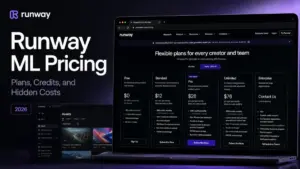
For a 3-person L&D team producing weekly 2-minute training videos, the free plan runs out in under a month. Teams at this scale should compare the Runway ML pricing breakdown to see how Synthesia’s model compares to a credits-based alternative. The upgrade trigger is not feature curiosity. It is production necessity.
Real Cost: Synthesia at 5, 10, 25, 50, and 100 Users
Synthesia’s per-workspace pricing model makes team-size math unusual. Unlike per-seat SaaS tools, you cannot multiply the plan price by the number of users and get an accurate total.
| Team Size | Setup | Monthly Cost | Annual Cost | Notes |
|---|---|---|---|---|
| 1 user | 1 Creator workspace | $89/month | $768/year | Best value for solo producers |
| 5 users | 1 Creator (1 editor + 4 guests) | $89/month | $768/year | Works only if 4 users are guests, not editors |
| 5 users | 5 separate Creator workspaces | $445/month | $3,840/year | Required if all 5 need to edit |
| 10 users | Enterprise recommended | Custom | Custom | Self-serve plans cannot support 10 editors in one workspace |
| 25 users | Enterprise recommended | Custom | Custom | Benchmark: 25 separate Creator workspaces = $2,225/month |
| 50 users | Enterprise recommended | Custom | Custom | Benchmark: 50 separate Creator workspaces = $4,450/month |
| 100 users | Enterprise only | Custom | Custom | Benchmark ceiling: $8,900/month or $76,800/year for 100 separate workspaces |
What this means: for a 5-person team where one person edits and four people review, a single Creator workspace at $89 per month works. But if all five people need editor access, the cost jumps to $445 per month because you need five separate workspaces. At 10 or more editors, Enterprise is not just recommended. It is the only viable option because self-serve plans do not support shared multi-editor organizations.
Here is my original cost calculation: a 10-person L&D team on separate Creator workspaces would pay $7,680 per year on annual billing. That is a ceiling benchmark, not a recommendation. The practical path is Enterprise, where unlimited minutes and shared governance features justify the sales conversation.
Which Synthesia Plan to Avoid
Avoid Starter on monthly billing if you need more than 10 minutes of video per month.
Here is why: Starter monthly gives you 10 minutes per month, the exact same video allowance as the free Basic plan. You are paying $29 per month for production rights (downloads, logo removal, AI Dubbing, more avatars, guests), not for more video capacity. If your primary bottleneck is minutes, skip Starter and go straight to Creator at $89 per month for 30 minutes.
The one exception: if you produce fewer than 10 minutes per month and your only upgrade trigger is downloading watermark-free videos, Starter on annual billing at $18 per month is reasonable. But check whether the yearly allocation of 120 minutes on annual Starter meets your full-year needs before committing.
Which Synthesia Plan Should You Choose
- Testing AI video with no commitment: Basic (free). No credit card. Experiment with 9 avatars and 10 minutes.
- Solo L&D creator producing fewer than 10 minutes per month: Starter annual at $18/month. Gets you downloads, logo removal, and 120 minutes per year.
- Solo or small team (1 editor, up to 5 guests) producing 10 to 30 minutes per month: Creator at $89/month or $64/month billed yearly. This is the best-value plan for regular production.
- Teams of 5 or more editors, or any team needing SSO, SCORM, Brand Kits, or unlimited minutes: Enterprise. Contact Synthesia sales for a custom quote.
When Enterprise Becomes Unavoidable
Enterprise is not just “the expensive plan.” It is the only plan that unlocks these features:
- SAML/SSO for IT-managed access control
- SCORM export for LMS distribution (Cornerstone, Docebo, TalentLMS)
- Brand Kits for consistent visual identity across teams
- Live team collaboration with multiple editors in one workspace
- Dedicated customer success manager for onboarding and support
- Unlimited video minutes with no monthly cap
- 1-click translations into 80+ languages
If your organization checks even two of those boxes, Enterprise is the only path forward.
Synthesia Pricing vs Competitors
How does Synthesia compare to other AI video platforms on price? Here is a side-by-side look at five alternatives.
| Platform | Starting Price | Free Plan | Practical Plan | 10-User Cost (Est.) | Best For |
|---|---|---|---|---|---|
| Synthesia | $0 (Basic) | Yes: 10 min, 9 avatars, no downloads | Creator: $89/month | Custom (Enterprise) | L&D, training, multilingual avatar video |
| HeyGen | $29/month Creator or $24/month annual | Yes: 3 videos/month | Business: $149/month + $20/seat | ~$329/month (Business) | Marketing video, social content |
| Colossyan | $27/month Starter or $19/month annual | Yes | Business: $88/editor/month | ~$880/month (Business monthly) | Training video with compliance focus |
| Elai.io | $29/month Creator or $23/month annual | Yes: 1 min | Team: $125/month (3 editors) | Custom likely | Quick avatar video from docs |
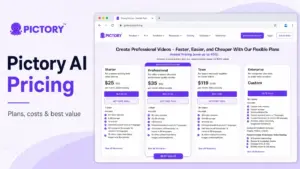
| Pictory | $29/month Starter or $25/month annual | No (free trial) | Team: $199/month (3+ users) | Custom (Enterprise 10+) | Text-to-video, repurposing content |
| D-ID Studio | $4.70/month Lite (annual) | Trial available | Pro: $16/month annual | ~$47/month (10 Lite, not a team plan) | Short talking-head clips |
What this means: Synthesia is price-competitive at the solo level. At team scale, it becomes expensive because of the 1-editor workspace model. HeyGen’s Business plan at $149/month plus $20 per additional seat gives you a cleaner per-user pricing structure for teams. Colossyan charges per editor, which makes 10-user math straightforward at $880 per month. Synthesia does not offer a comparable public team plan, pushing anything beyond 1 editor into Enterprise territory.
For 3-person L&D teams producing weekly training content, Synthesia Creator at $768 per year is competitive if only one person edits. If you work with shorter clips and need a different approach, our Runway ML analysis covers that workflow in depth. If all three need to edit, HeyGen Business or Colossyan Business is cheaper and simpler.
Is Synthesia Worth the Price?
Worth it if:
- You are a solo L&D professional or enablement creator producing polished multilingual avatar videos within 30 minutes per month.
- Your organization needs governance features (SSO, SCORM, Brand Kits) and can justify Enterprise pricing through a formal procurement process.
- You value AI avatar quality and Synthesia’s library of 180+ to 240+ avatars over raw video output volume. Our top AI content creation tools ranking covers broader options if avatar video is only part of your content workflow.
Not worth it if:
- You are a solo creator making frequent social videos. HeyGen’s credit-based model is more flexible for high-volume short clips.
- Your team has 3 or more editors who all need to build videos. Synthesia’s 1-editor workspace model forces separate subscriptions, which adds up fast.
- You produce tutorial or explainer content that does not need talking-head avatars. Pictory, our Pika Art review, or a screen recording tool may be more cost-effective.
- Your monthly video output regularly exceeds 30 minutes. Creator caps at 30 min/month, and exceeding it means waiting until next month or upgrading to Enterprise.
Monthly vs Annual: Synthesia Billing Comparison
| Plan | Monthly Billing | Annual Billing | Annual Savings |
|---|---|---|---|
| Starter | $29/month ($348/year) | $18/month ($216/year) | ~$132/year (~38% off) |
| Creator | $89/month ($1,068/year) | $64/month ($768/year) | ~$300/year (~28% off) |
What this means: annual billing saves substantial money on both plans. Starter’s 38% discount is the steepest. Creator’s 28% savings equals about $300 per year. The trade-off is a 12-month commitment.
My recommendation: if you have used Synthesia for at least one month and know your production volume fits within Creator’s limits, switch to annual billing. The $300 per year savings is material for a solo budget.
Synthesia’s help center confirms the platform does not offer student, education, nonprofit, or general discounts. Annual billing is the only publicly available discount mechanism.
Payment methods: Starter and Creator accept major credit cards, direct debit, and PayPal. Enterprise accepts credit cards and bank or wire transfers. No cryptocurrency is accepted.
How to Avoid Overpaying for Synthesia
- Start with Basic before paying anything. The free plan gives you 10 minutes and 9 avatars. Test avatar quality, editor workflow, and output format before committing $29 or more.
- Skip Starter if you need more than 10 minutes per month. Go straight to Creator. Starter’s monthly minute cap matches Basic.
- Switch to annual billing after your first month. Creator annual saves $300 per year over monthly billing. Commit only after confirming your production volume.
- Audit your credit usage before advanced features burn through your allocation. Lip Sync uses 2x credits. Sora 2 and Veo 3.1 clips cost 48 credits each. Plan your content pipeline around standard generation first.
- Use guests instead of buying extra workspaces. If only one person needs to edit and others review, Creator’s 5 guest seats avoid separate subscriptions.
- Ask for a line-item Enterprise quote. Do not accept a single lump-sum number. Request separate lines for seats, onboarding, implementation, and any add-ons so you can compare against the Creator benchmark.
- Compare against HeyGen or Colossyan before signing an annual contract. If your primary need is team video production at scale, per-seat competitors may offer better math than Synthesia’s per-workspace model.
FAQ
How much does Synthesia cost in 2026?
Synthesia offers four plans as of June 2026. Basic is free at $0 per month. Starter costs $29 per month or $18 per month billed yearly. Creator costs $89 per month or $64 per month billed yearly. Enterprise is custom pricing, requires a sales call, and is billed annually. Prices verified against the official Synthesia pricing page on June 23, 2026.
Is Synthesia free?
Yes. Synthesia Basic is a free plan that includes 10 minutes of video per month, 1,200 credits, 9 AI avatars, and 1 editor. No credit card is required. The free plan does not allow video downloads or logo removal. Those features require the paid Starter plan at $29 per month.
Does Synthesia have a free trial?
Synthesia Basic is free and does not expire. For paid plans like Starter and Creator, the pricing page shows “Try for FREE” buttons, but the trial duration and credit card requirements are not publicly disclosed. Start with Basic to evaluate the platform at no cost.
What is the difference between Synthesia Starter and Creator?
Starter and Creator share the same 1-editor workspace model. Starter includes 10 minutes per month on monthly billing, 125+ avatars, and 3 personal avatars. Creator includes 30 minutes per month, 180+ avatars, 5 personal avatars, API access, branded video pages, interactive videos, and priority support. Creator costs $60 more per month but triples the video capacity and adds production-grade features.
How many video minutes do you get with each Synthesia plan?
Basic and Starter both include 10 minutes per month on monthly billing. Starter annual includes 120 minutes per year. Creator includes 30 minutes per month on monthly billing or 360 minutes per year on annual billing. Enterprise includes unlimited minutes.
Does Synthesia charge per user?
No. Synthesia charges per workspace, not per user. Each Starter or Creator workspace includes 1 editor. Guests (3 on Starter, 5 on Creator) can view and comment but cannot edit. If multiple people need editor access, you need separate workspaces or an Enterprise plan with custom editor seats.
What happens when I run out of Synthesia minutes or credits?
Synthesia does not charge overage fees. When your monthly or yearly allocation is exhausted, video generation is paused until your next billing cycle. You can upgrade to a higher plan mid-cycle, but unused minutes do not carry over.
How much does a custom Synthesia avatar cost?
Personal avatars are included in paid plans: 3 on Starter, 5 on Creator, unlimited on Enterprise. The Studio Express-1 Avatar, a higher-fidelity custom avatar, is a paid add-on at $1,000 per year for annual plan users only. Processing takes up to 10 days.
Which Synthesia plan includes API access?
API access starts on the Creator plan at $89 per month. The API draws from your existing video minute and credit allocation. Additional API usage beyond your plan limits is available as a paid add-on, but the price is not publicly listed.
Is Synthesia cheaper than HeyGen?
At the solo level, Synthesia and HeyGen are comparable. Synthesia Starter costs $29 per month versus HeyGen Creator at $29 per month. At team scale, HeyGen’s Business plan at $149 per month plus $20 per additional seat is more transparent than Synthesia’s custom Enterprise pricing. For a 10-person team, HeyGen Business is roughly $329 per month, while Synthesia requires a custom Enterprise quote.