Your team signed up for a project tool last Tuesday. No server rack. No IT ticket. No three-week procurement review. Someone entered a credit card, invited five people, and the whole team was working inside it by lunch.
That is SaaS in practice, and it is the way most business software gets bought in 2026. But the speed that makes SaaS attractive also makes it easy to skip the questions that matter: who controls the data, what happens at renewal, and how much you will actually pay once the team grows past 10.
SaaS is not just “software in a browser.” It is a delivery model, a pricing model, an operating model, and a risk model, all bundled into one subscription. This guide breaks down how cloud APIs power these tools, how the model works, where it helps, where it creates problems, and how to evaluate any SaaS product before your team commits.
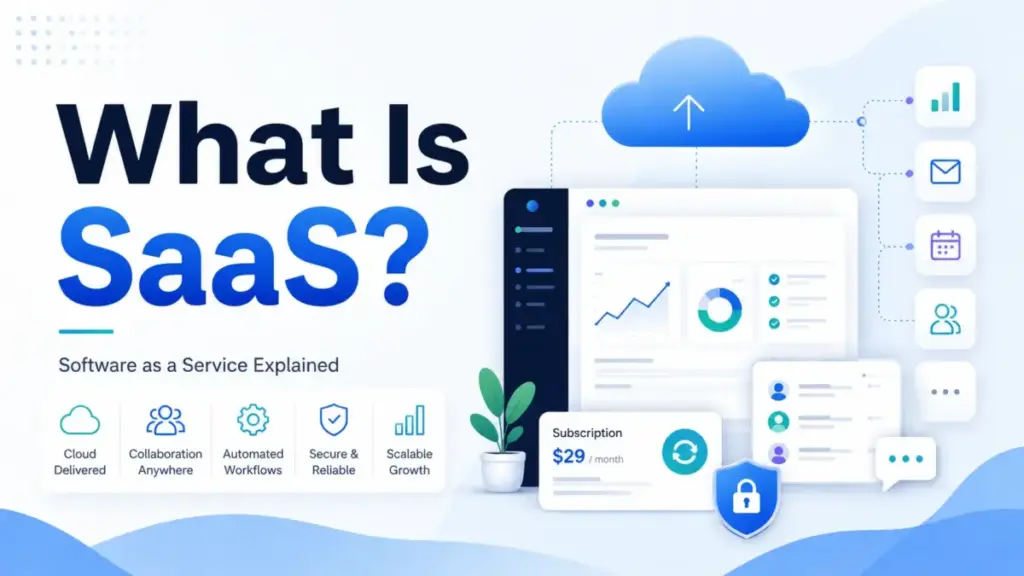
Quick Answer: SaaS (software as a service) is a cloud delivery model where a provider hosts the application and infrastructure, and customers access it over the internet through a browser, app, or API. The provider manages updates, uptime, and maintenance. The customer manages data, identities, permissions, compliance, and contract decisions. Most SaaS products use recurring subscription billing, though pricing models now include per-seat, usage-based, and AI-credit-based options.
The 60-Second Explanation of SaaS
Simple version: SaaS is software you rent instead of install. You log in through a browser or app, and the company that made it handles the servers, updates, and security patches. You pay monthly or yearly to keep access.
Technical version: In a SaaS architecture, the vendor operates the application on cloud infrastructure (typically AWS, Azure, or Google Cloud). Most SaaS products use multitenant architecture, meaning one shared platform serves many customers with logically isolated data and configuration. The vendor owns the deployment pipeline, manages uptime engineering, ships feature updates centrally, and maintains the application stack. Some enterprise vendors also offer dedicated or single-tenant options for customers with isolation requirements.
Business version: SaaS changes the buying calculus. Instead of a large upfront license and a 12-month implementation, you start with a monthly or annual subscription and begin using the product within days. But “lower upfront cost” is not the same as “lower total cost.” Recurring seats, add-ons, usage fees, AI credits, transaction charges, and renewal increases can push the real cost well above what the pricing page shows. The NIST definition describes SaaS as “provider’s applications running on a cloud infrastructure”, but the operational reality for buyers is much wider than that single sentence.
How SaaS Actually Works
Here is the basic pipeline behind every SaaS product, whether it is a CRM tool, a collaboration platform, or an online store.
Step 1: The vendor builds and hosts the application. The SaaS provider deploys the software on cloud infrastructure and operates it as a centralized service.
Step 2: You subscribe and configure. Your team signs up, picks a plan, and configures users, roles, permissions, and integrations to match your workflows.
Step 3: Your team uses it through a browser, app, or API. End users log in. Data flows between the SaaS app and your other tools through integrations or APIs.
Step 4: The vendor ships updates centrally. New features, patches, and security fixes roll out to all customers. You do not run upgrade projects. You also do not control the timing.
Step 5: You manage what the vendor does not. You still manage data quality, identity and access controls, endpoint security, compliance obligations, and contract renewals.
Where things go wrong
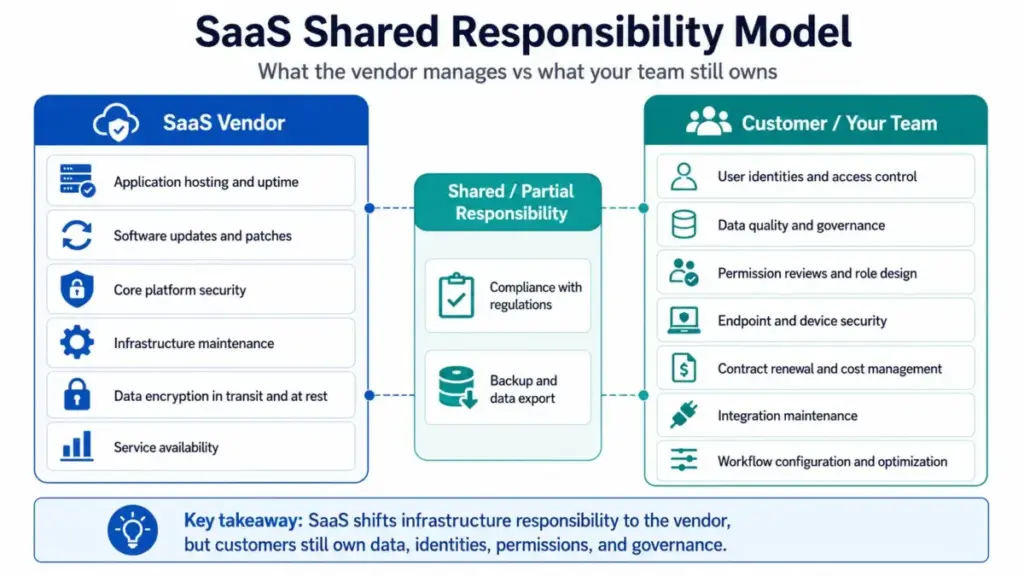
The common failure point is Step 5. Teams assume SaaS removes all technical responsibility. It does not. Here is what the vendor manages versus what stays with your team:
| Responsibility | SaaS Vendor | Your Team |
|---|---|---|
| Application hosting and uptime | ✅ | |
| Software updates and patches | ✅ | |
| Core platform security | ✅ | |
| Data encryption in transit and at rest | ✅ | |
| User identities and access control | ✅ | |
| Data quality and governance | ✅ | |
| Permission reviews and role design | ✅ | |
| Endpoint and device security | ✅ | |
| Compliance with regulations | Shared | ✅ |
| Backup and data export | Partial | ✅ |
| Contract renewal and cost management | ✅ | |
| Integration maintenance | ✅ | |
| Workflow configuration and optimization | ✅ |
What this means: SaaS shifts infrastructure responsibility to the vendor. It does not eliminate operational responsibility for the buyer. Teams that skip identity management, permission reviews, and data governance in SaaS products face the same configuration risks they would face with on-premises software.
SaaS vs PaaS vs IaaS
SaaS is one of three main cloud service models. The difference comes down to how much you manage versus how much the provider manages.
| Layer | IaaS (e.g., AWS EC2) | PaaS (e.g., Heroku) | SaaS (e.g., Salesforce) |
|---|---|---|---|
| Networking and storage | Provider | Provider | Provider |
| Servers and virtualization | Provider | Provider | Provider |
| Operating system | You | Provider | Provider |
| Runtime and middleware | You | Provider | Provider |
| Application code | You | You | Provider |
| Data and configuration | You | You | You |
| User identity and access | You | You | You |
What this means: SaaS gives you the least control and the lowest maintenance burden. IaaS gives you the most control and the highest maintenance burden. PaaS sits in between. The right model depends on whether your team needs to customize the application stack or just use it.
Choose SaaS when you need a ready-made application for a standard business workflow. Choose PaaS when your developers need to build and deploy custom applications. Choose IaaS when you need full control over the infrastructure layer.
Types of SaaS Products
SaaS is not one category. It spans at least seven distinct types, and the differences affect pricing, contracts, and implementation.
- Productivity and collaboration tools. Software for email, documents, chat, meetings, and file sharing. Examples: Microsoft 365, Google Workspace, Slack.
- Business application software. Core systems for CRM, accounting, HR, help desk, marketing automation, and project management.
- Vertical platforms. Industry-specific tools built for healthcare, construction, education, legal, retail, or hospitality. Compliance features are usually built in.
- Commerce SaaS. Hosted platforms for online stores, checkout, payments, inventory, and sales channels. Example: Shopify.
- Platform and ecosystem products. Tools that combine an application layer with APIs, app marketplaces, and developer extensibility.
- AI-native tools. Products where AI assistants, agents, credits, tokens, or usage-based work units are central to the experience and pricing model.
- Embedded or API-first products. Software delivered mainly through APIs, webhooks, SDKs, or embedded components inside another product.
One thing I have learned reviewing team collaboration tools and project management software: the type of SaaS shapes your contract risk. Vertical SaaS often locks you into longer commitments. AI-native SaaS can create unpredictable usage bills. Commerce SaaS layers transaction fees on top of subscriptions. Know the type before you sign.
Step-by-Step: How to Evaluate Any SaaS Product
Here is a practical implementation path for choosing and deploying SaaS. I have watched teams skip steps 4 and 6 and regret both within three months.
Step 1: Define the workflow you need to improve
“We need a better collaboration tool” is too vague. “Our 12-person marketing team needs shared project tracking with client visibility and Slack notifications” is a starting point. Name the users, the data sensitivity, and the integration requirements.
Step 2: Decide if SaaS is the right cloud model
Compare SaaS against PaaS, IaaS, or on-premises. If you need air-gapped environments or deep source-code ownership, SaaS may not fit.
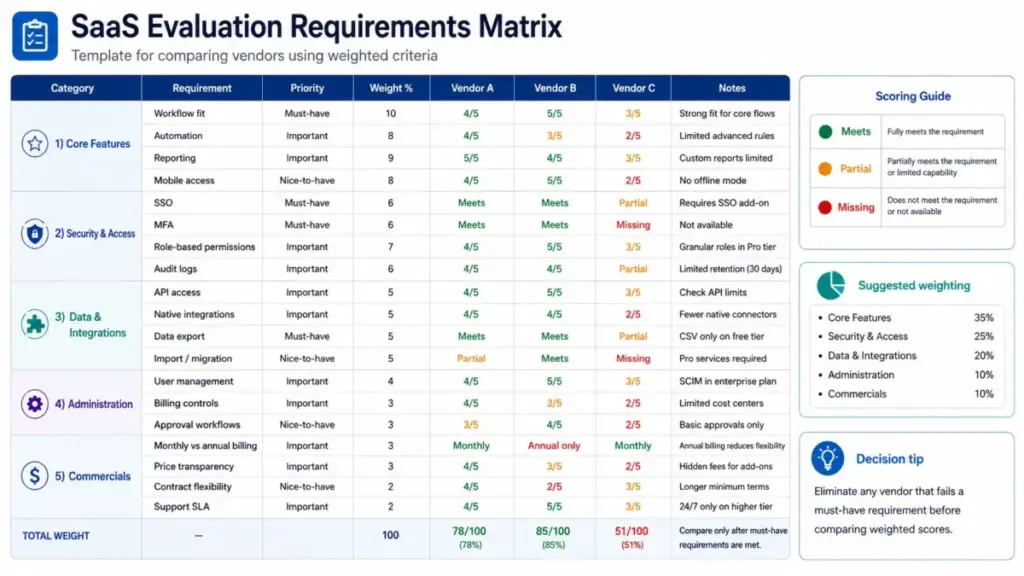
Step 3: Build a requirements matrix
Cover must-have workflows, admin controls, compliance, data export, integrations, SSO, and MFA. Weight each criterion. If a tool fails a must-have, it is out.
Step 4: Verify pricing and contract structure
Check monthly versus annual billing, renewal terms, add-on costs, transaction fees, AI credits, usage charges, and seat reduction rules.
Step 5: Run a pilot with realistic workflows
Use a limited user group. Test permissions, data import, automation, reporting, and support responsiveness. A 30-minute demo is not a pilot.
Step 6: Plan the full implementation
Cover data migration, training, permission design, backup strategy, a named internal owner, and a renewal review date.
Step 7: Monitor and optimize
Track license utilization, workflow improvements, support tickets, and renewal ROI. Workflow automation can help here, but only if someone is assigned to maintain it.
The Mistakes That Waste Your First Three Months
After reviewing 35+ tools across project management and collaboration categories, I keep seeing the same SaaS buying mistakes:
- Buying more seats than needed. Annual plans lock in seat counts. If you buy 25 licenses and only 15 people use the product, you cannot reduce until renewal.
- Ignoring annual contract restrictions. Google Workspace annual or fixed-term billing can restrict license reductions until renewal, and early cancellation can require payment of the remaining commitment.
- Assuming SaaS removes all security work. The vendor manages the platform. You still own identity management, access controls, configuration, and data governance.
- Skipping data export testing. Before signing a contract, test whether you can actually export your data in a usable format. If the export is messy or incomplete, you are building vendor lock-in into your stack.
- Over-customizing early. Heavy customization in month one means heavy rework in month six when you understand your actual workflows better.
- Treating AI usage costs as fixed. Some SaaS products now charge per query, per token, or per AI action. Andrea Zimmerman of Target noted in a Reuters interview that this shift is real: “Change isn’t going to be immediate, and it is certainly not free.”
- Not tracking inactive users and duplicate apps. SaaS sprawl is a real cost driver. Teams adopt tools individually, and nobody audits the overlap until the finance review.
Common Misconceptions About SaaS
Misconception: SaaS means any website or online tool.
Reality: SaaS is specifically provider-hosted application software delivered as a service through recurring access. A static website or a downloadable app you install locally is not SaaS.
Misconception: SaaS means IT and security teams have nothing to manage.
Reality: The vendor manages the platform, but the customer still owns data, identities, access controls, configuration, compliance, and usage governance. Skipping MFA and permission reviews on a SaaS tool is just as risky as skipping them on an on-premises system.
Misconception: SaaS is always cheaper than traditional software.
Reality: SaaS reduces upfront infrastructure cost. Total cost can rise through seats, add-ons, transaction fees, AI usage credits, and renewal commitments. A 10-person team on Salesforce Sales Cloud Enterprise at $175 per user per month billed annually pays $21,000 per year before add-ons for AI or data features.
Misconception: SaaS only works in a browser.
Reality: Many SaaS products are accessed through browsers, desktop apps, mobile apps, APIs, embedded widgets, or integrations. Slack runs as a desktop app. Shopify offers a mobile app and a POS system. Microsoft 365 includes downloadable Office applications.
Misconception: SaaS and cloud computing are the same thing.
Reality: SaaS is one cloud service model. PaaS and IaaS provide different levels of control over applications, runtime, servers, storage, and networking. Cloud computing is the umbrella. SaaS is one floor of the building.
When to Use SaaS and When to Avoid It
Use SaaS when:
- You need fast deployment without managing servers or infrastructure.
- Your team needs remote access and real-time collaboration from multiple locations.
- You want frequent vendor-managed feature updates without internal upgrade projects.
- Standard workflows (email, CRM, project tracking, help desk, commerce) are a good fit.
- Scalability through adding seats, storage, or usage is important.
Avoid SaaS when:
- You require air-gapped or fully offline operation.
- Strict infrastructure control and deep source-code ownership are non-negotiable.
- Unusual data residency constraints cannot accept provider-hosted applications.
- You need fixed long-term cost certainty and cannot absorb renewal price increases.
- Highly custom workflows require infrastructure-level changes that SaaS architecture does not support.
What Good SaaS Looks Like: 5 Real-World Examples
These are not endorsements. They are examples that show how SaaS works across different product categories, with real pricing and buyer caveats.
| Product | Category | How It Implements SaaS | Starting Price (USD) | Buyer Caveat |
|---|---|---|---|---|
| Salesforce Sales Cloud | CRM SaaS | Hosts CRM workflows, pipeline management, automation, AI-supported selling, and APIs as a cloud application | Starter Suite$25/user/month (billed annually) | Prices and details may change per Salesforce; Agentforce 1 Sales runs $550/user/month |
| Microsoft 365 Business | Productivity SaaS | Delivers email, Office apps, Teams, OneDrive, admin controls, and AI chat through subscription plans | Business Basic$6/user/month | Microsoft announced July 2026 price changes: Basic to $7, Standard to $14 |
| Google Workspace | Productivity SaaS | Delivers Gmail, Drive, Docs, Meet, Gemini features, and admin controls through flexible or annual plans | Business Starter$7/user/month (annual) | Annual billing restricts seat reductions until renewal; early cancellation may require remaining payment |
| Slack | Collaboration SaaS | Hosts team messaging, app integrations, huddles, Slack Connect, and AI features as cloud-based plans | Pro$7.25/user/month (annual) | Enterprise pricing is custom; promotional pricing may differ from list pricing |
| Shopify | Commerce SaaS | Hosts online stores, checkout, POS connections, inventory, and sales channels as subscription commerce | Basic$19/month (annual) | Transaction fees, card rates, paid apps, themes, and Plus commitments affect total cost beyond the subscription |
What this means: SaaS pricing models vary by category. CRM tools charge per user per month. Productivity suites tier by features and storage. Commerce platforms add transaction fees on top of subscription costs. The subscription price is the starting point, not the total cost.
(Pricing as of May 2026 based on official pricing pages. Verify current prices before purchasing.)
SaaS Pricing Models Explained
In 2026, SaaS pricing is no longer just “pick a plan, pay per seat.” Here are the main models you will encounter:
- Per-seat (per user per month). The most common model. You pay for each person who uses the product. Salesforce, Microsoft 365, and Slack use this approach.
- Tier-based (fixed price per plan level). The price is set per plan, not per user. Shopify Basic at $19/month is a flat rate regardless of how many staff access the admin panel.
- Usage-based. You pay based on consumption: API calls, emails sent, storage used, or transactions processed. This model is growing in AI-native SaaS.
- AI-credit or token-based. Some SaaS products charge per AI generation, per agent action, or per work unit. Salesforce Agentforce 1 Sales at $550/user/month includes AI agent capabilities that carry separate pricing from the core CRM tiers.
- Transaction-based. Common in commerce SaaS. Shopify charges card processing fees and transaction fees on top of the monthly subscription.
- Custom or enterprise. Slack Enterprise Grid pricing is custom. Google Workspace Enterprise pricing requires contacting sales. You lose pricing transparency at scale.
The shift toward usage and AI-credit pricing is worth watching. Anushree Verma of Gartner noted in a Reuters report that “most agentic AI projects right now are early stage experiments”, but the pricing structures are already in production. If your SaaS vendor adds AI features, ask whether costs are included in your current plan or charged separately.
Tools That Make SaaS Easier to Manage
Once you are running five or more SaaS products, management becomes its own job. These tool categories help:
- Identity and access management: Microsoft Entra, Okta. Enforce SSO and MFA across your SaaS stack.
- Integration platforms: Zapier, Workato, Make. Connect SaaS products that lack native integrations. See our Zapier review for pricing and automation limits.
- SaaS management: Zylo, BetterCloud, Torii. Track licenses, find duplicate apps, and monitor spend.
- SaaS security posture: Microsoft Defender for Cloud Apps, AppOmni. Monitor configuration risks.
- SaaS backup: Dedicated backup for Microsoft 365, Google Workspace, Salesforce, and Slack workspaces. Your data export strategy is your responsibility.
Beginner Checklist: Getting Started with SaaS
Use this checklist before committing to any SaaS subscription:
- [ ] Define the specific workflow this tool must improve
- [ ] Confirm SaaS is the right cloud model (vs PaaS, IaaS, on-premises)
- [ ] List must-have features and rank them by priority
- [ ] Check the official pricing page for your team size and plan level
- [ ] Verify annual vs monthly billing rules, including seat reduction restrictions
- [ ] Test data export before signing a contract
- [ ] Confirm SSO and MFA support on your plan tier
- [ ] Run a pilot with real workflows and a limited user group
- [ ] Assign an internal owner for vendor relationship and renewal reviews
- [ ] Set a calendar reminder 60 days before renewal to review utilization and negotiate
Related Resources
If you are evaluating specific SaaS categories, these guides go deeper:
- Best CRM software options for sales and pipeline teams
- Help desk software comparison for customer support
- Salesforce CRM review for enterprise CRM evaluation
- Google Workspace review for cloud-native productivity
FAQ
What is SaaS in simple terms?
SaaS stands for software as a service. It is software a company hosts online and you access through a browser, app, or API. You pay a subscription instead of installing it on your own servers.
What are examples of SaaS products?
Salesforce Sales Cloud (CRM), Microsoft 365 (productivity), Google Workspace (productivity), Slack (team messaging), and Shopify (e-commerce) are all SaaS products.
Is SaaS the same as cloud computing?
No. Cloud computing includes three models: SaaS, PaaS (platform as a service), and IaaS (infrastructure as a service). SaaS gives you the least infrastructure control. IaaS gives you the most.
Is Microsoft 365 a SaaS product?
Yes. Microsoft hosts the applications on its cloud infrastructure. Customers subscribe per user per month and access tools through browsers, desktop apps, and mobile apps.
Who owns the data in a SaaS application?
In most SaaS contracts, you own your data. The vendor hosts and processes it on your behalf. But before signing, verify that the vendor provides complete data export in a standard format.
How do SaaS companies charge customers?
The most common model is per user per month. But pricing now includes tier-based, usage-based, AI-credit, transaction-based, and custom enterprise models. Check total cost, not just the starting price.
When should a business avoid SaaS?
Avoid SaaS when you need air-gapped operation, strict infrastructure control, deep source-code ownership, fixed long-term cost certainty, or when regulations prohibit provider-hosted applications.
Is SaaS secure?
SaaS providers manage platform security. But security is shared. Your team must manage identities, enforce MFA, review permissions, and audit integrations. Most SaaS breaches trace to customer-side configuration issues.
What is multitenant SaaS?
Multitenant SaaS means one shared platform serves many customers with logically isolated data. This is how most SaaS products reduce cost and ship updates to all customers at once.
What happens to my data if I cancel a SaaS subscription?
Most vendors provide a data export window after cancellation (30 to 90 days is common). Test the export function before cancellation, and download everything in a usable format.