Most free project management software stops being free the moment your team actually needs it. Storage caps hit at week two, user limits block your fourth hire, and the Gantt chart you saw in the demo turns out to be a paid feature. If you are entirely new to formal workflows, our guide to what is project management will help you decide if you actually need these tools or just a simple to-do list before you start testing them.
We evaluated 25 project management software tools and ranked the 10 that offer genuine, lasting free-plan value. This guide separates free-forever plans from free trials, scores each tool on real-world survivability, and tells you exactly when (and why) you will be asked to pay.
The 60-Second Version
ClickUp leads this ranking because its free plan covers more ground than any competitor before asking for payment. But “best overall” does not mean “best for you.” Here is where each tool wins.
- Best overall free plan: ClickUp
- Best visual Kanban board: Trello
- Best for structured team tasks: Asana
- Best for agile software teams: Jira
- Best free Gantt option: Zoho Projects
- Best database-style workflow: Airtable
- Best docs plus tasks: Notion
- Best for 1 to 2 users: monday.com
- Best open-source option: OpenProject
- Best simple Gantt planner: TeamGantt
Best Free Project Management Tools Compared
The table below ranks all 10 tools by score, free-plan limits, and the first event that typically forces a paid upgrade. Use this as a quick filter before reading the full reviews.
| Rank | Tool | Score | Best For | Free Plan Limit | First Upgrade Trigger | Best-Fit Team |
|---|---|---|---|---|---|---|
| 1 | ClickUp | 9.2 | Broadest free feature set | Unlimited tasks, 100MB storage | Advanced automations, reporting | 3-8 person startup |
| 2 | Trello | 8.9 | Visual Kanban boards | 10 boards, unlimited cards | Timeline view, advanced permissions | Freelancers, 2-5 person teams |
| 3 | Asana | 8.7 | Structured team workflows | Unlimited tasks, 100MB/file | Timeline, Gantt, portfolios | 5-10 person marketing/ops teams |
| 4 | Jira | 8.5 | Agile software teams | 10 users, 2GB storage | Advanced permissions, reporting | 3-10 person dev teams |
| 5 | Zoho Projects | 8.4 | Free Gantt charts | 5 users, 3 projects, 5GB | 4th project or 6th user | 2-5 person structured teams |
| 6 | Airtable | 8.1 | Custom database workflows | 1,000 records/base | Record cap, automation limits | Content ops, inventory tracking |
| 7 | Notion | 7.9 | Docs plus light PM | Unlimited pages (solo) | Team collaboration, permissions | Solo founders, small content teams |
| 8 | monday.com | 7.6 | Polished visual boards | 2 seats, 3 boards | 3rd team member | Solo or two-person teams |
| 9 | OpenProject | 7.5 | Self-hosted, unlimited | Unlimited (self-hosted) | Cloud hosting, enterprise features | Technical teams, nonprofits with IT |
| 10 | TeamGantt | 7.2 | Simple Gantt planning | 1 project, 40 tasks | 2nd project | Solo planners, students |
Free Forever, Freemium, Trial: What Counts Here?
Not every “free” label means the same thing. Before the ranking, it is worth defining four categories so you know exactly what you are comparing. This distinction matters because trial-only products were excluded or ranked lower in this guide.
Free forever means a permanent plan with no expiration. You can use it indefinitely. ClickUp, Trello, Asana, Jira, and monday.com all offer this. The limits vary, but the plan itself does not expire.
Freemium means a free tier exists, but the product is designed to push you toward paid plans through feature gates, user caps, or storage limits. Most tools in this ranking are technically freemium. The question is how much useful work you can do before the gates close.
Open-source free means the software code is freely available and you can self-host it with no license fee. OpenProject Community edition falls here. The cost shifts from subscription to server maintenance and setup time.
Free trial means temporary access to a paid product. When the trial ends, you either pay or lose access. Products like Smartsheet and Microsoft Project fall into this category. They were excluded from the main ranking because they do not meet the “free project management software” intent.
Why this matters: Several SERP competitors mix free-forever plans with 14-day trials in the same ranking. That makes comparison unreliable. Every tool ranked below has a permanent free plan or a free open-source edition.
10 Best Free Project Management Software Reviews
Each review below follows the same structure: a quick verdict, a free-plan reality check with exact limits, best-fit and worst-fit audiences, standout features, competitive weaknesses, pricing traps, and an editorial take. Scores are based on a weighted rubric covering free-plan usefulness (25%), upgrade pressure (20%), core PM depth (20%), ease of adoption (15%), collaboration (10%), scalability (5%), and fit clarity (5%).
ClickUp – Best Overall Free Plan

Score: 9.2/10 – Excellent
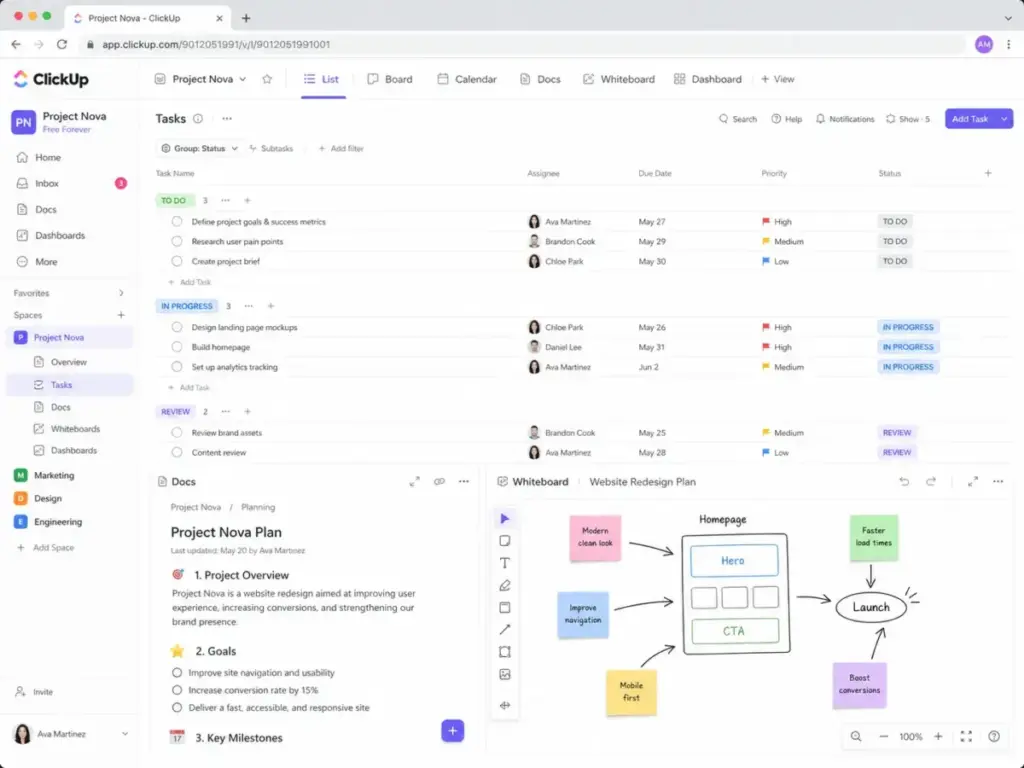
ClickUp earns the top position because its Free Forever plan includes more functional surface area than any other free project management tool. You get unlimited tasks, multiple views (list, board, calendar, table), Docs, whiteboards, and basic workflow customization in a single workspace. For a small team that wants to consolidate tools before paying anything, ClickUp is the strongest starting point.
Free Plan Reality Check:
The Free Forever plan allows unlimited tasks and members, but caps storage at 100MB total, limits automations, and restricts advanced reporting and permissions. Custom fields are available, but advanced dashboards, goals, and portfolio features require paid plans. A 5-person team can run task management, basic docs, and simple boards comfortably. They will feel pressure when storage fills up, when recurring automation needs grow, or when leadership wants reporting dashboards.
Best for:
- 3 to 8 person startup teams managing multiple workstreams
- Solo operators juggling several client projects
- Content teams with recurring editorial workflows
Not for:
- Teams that want the simplest possible Kanban board (Trello is easier)
- Teams that need advanced reporting from day one
Standout features:
- Unlimited tasks across multiple views (list, board, calendar, Gantt-style)
- Built-in Docs and whiteboards replace separate wiki tools
- Custom statuses and task types allow process design without paid add-ons
Where it loses: ClickUp’s free plan is broader than Trello’s, but Trello is faster to learn. Jira offers deeper agile workflow structure for software teams. ClickUp’s breadth creates configuration overhead that simpler tools avoid.
Pricing trap: The 100MB storage cap is the first wall. Teams sharing screenshots, PDFs, or design files will hit it within weeks. After that, paid plans start the upgrade conversation, and automation limits push teams further. Advanced Gantt, workload views, and dashboards sit behind higher tiers. Teams that hit those free-plan ceilings should compare ClickUp alternatives by storage limits, free-user rules, Gantt access, automation ceilings, and how quickly the free workspace becomes a paid implementation.
Maya Patel’s Quick Take: ClickUp is the most generous free plan I have seen for teams that want everything in one place. But generosity creates complexity. Start with a simple setup (one Space, one list view) and expand only when the team outgrows it. Otherwise, you will spend more time configuring ClickUp than using it.
Trello – Best Visual Kanban

Score: 8.9/10 – Very Good
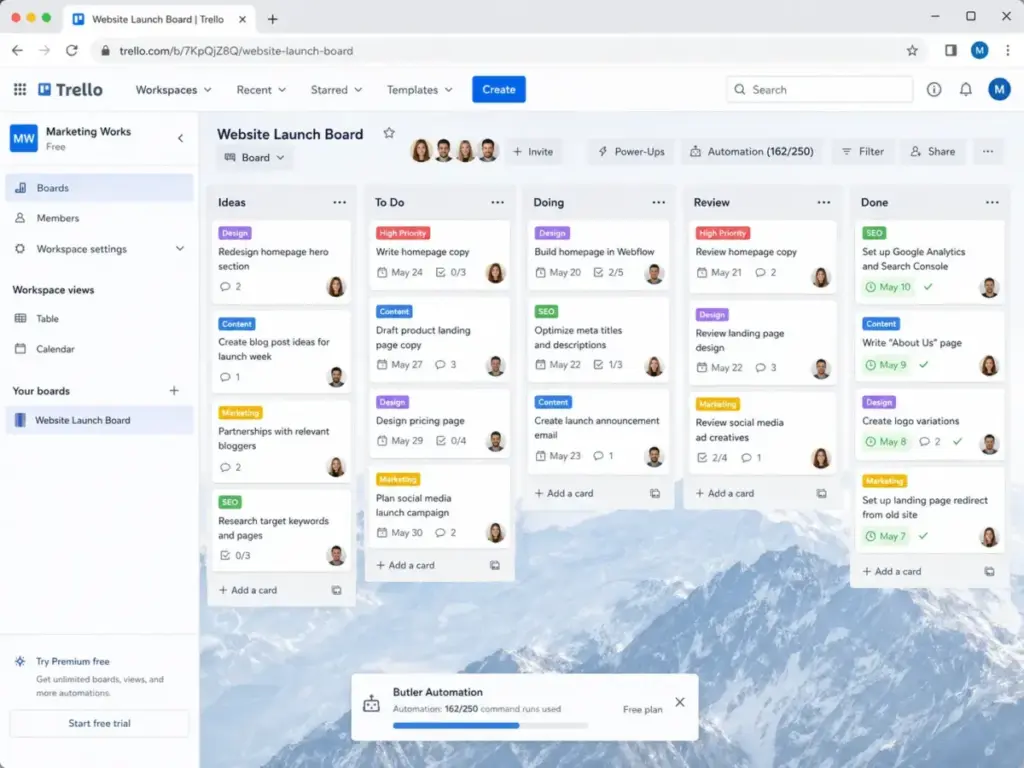
Trello is the easiest free project management tool to adopt. Its card-and-board interface requires almost no training, and most teams can run their first workflow within minutes. The free plan includes unlimited cards, up to 10 boards per Workspace, unlimited Power-Ups per board, and 250 Workspace command runs per month for basic automation.
Free Plan Reality Check:
Free Trello gives you 10 boards per Workspace, unlimited cards, and one Power-Up attachment per board (now unlimited since Trello changed its model). Storage is capped at 10MB per file attachment. You cannot access Timeline view, Dashboard view, advanced checklists, or workspace-level admin controls.
A 3-person team running editorial, client work, or sprint tasks on fewer than 10 boards will stay free for months. Teams that need portfolio-level reporting, calendar views, or admin permissions will outgrow it. If those free-plan walls are likely to appear within the next quarter, compare Trello alternatives by board limits, reporting access, admin controls, storage needs, and upgrade timing.
Best for:
- Freelancers tracking personal and client tasks
- 2 to 5 person teams running editorial calendars or simple sprints
- Anyone who needs the lowest setup friction possible
Not for:
- Multi-project operations teams needing portfolio dashboards
- Teams that need Gantt charts or timeline views on the free plan
Standout features:
- Drag-and-drop Kanban boards with almost zero learning curve
- Unlimited Power-Ups per board give free users access to integrations
- Butler automation (250 command runs/month) handles basic repeatable tasks
Where it loses: Trello is simpler than ClickUp but also shallower. It lacks the task depth of Asana, the agile workflow structure of Jira, and the Gantt capabilities of Zoho Projects. When work needs dependencies, cross-project reporting, or advanced permissions, Trello’s simplicity becomes a ceiling.
Pricing trap: Trello looks free for a long time because most teams start small. The upgrade trigger is usually timeline/calendar views, advanced admin controls, or the need for workspace-level dashboards. Trello’s paid tiers start at Standard, which adds unlimited boards and advanced checklists. As one Reddit user put it: “For small teams, simple usually wins.” Trello works because it does less, and that becomes the problem when work needs structure.
Maya Patel’s Quick Take: Trello is the tool I recommend to anyone who says “I just need a board.” It works until it does not, and most teams know exactly when that moment arrives. If you need reporting, timelines, or cross-board visibility, look at ClickUp or Asana before committing further.
Asana – Best for Team Tasks

Score: 8.7/10 – Very Good
Asana occupies the middle ground between Trello’s simplicity and ClickUp’s density. Its free Personal plan gives teams unlimited tasks, unlimited projects, and storage with a 100MB per-file limit. The structure is strong: list views, board views, calendar views, assignees, due dates, and project sections create a clean execution layer for teams that need clarity on who owns what.
Free Plan Reality Check:
Asana’s free plan is unlimited on tasks and projects, which is rare. The limits appear in features, not volume. Timeline (Gantt-style) view, workflow builder, portfolios, goals, and advanced reporting are all paid. Forms are limited. Admin and permission controls are basic. A 5 to 10 person team can manage task execution well on the free plan, but the moment someone asks “can I see all projects on one timeline?” or “can we automate task handoffs?”, the free plan falls short.
Best for:
- 5 to 10 person marketing or operations teams
- Nonprofit teams coordinating recurring programs
- Cross-functional teams that need clear task ownership
Not for:
- Teams that need free Gantt charts (Zoho Projects is better)
- Developer teams that need sprint boards and backlog management (Jira is better)
Standout features:
- Unlimited tasks and projects with no artificial volume caps
- Clean task assignment and due-date workflows reduce confusion
- Board, list, and calendar views cover most non-Gantt planning needs
Where it loses: Asana is more structured than Trello but less configurable than ClickUp. It also lacks Jira’s depth for agile software workflows. The biggest gap: Asana’s Timeline view, which is the closest thing to a Gantt chart, is a paid feature. Teams that need visual scheduling on the free plan should consider Zoho Projects or ClickUp instead.
Pricing trap: The Asana Starter plan unlocks Timeline, workflow builder, and forms. Teams that start free often upgrade within 60 to 90 days when they realize scheduling and automation are gated. The jump is not just a feature unlock; it is a per-user cost that scales with team size.
Maya Patel’s Quick Take: Asana becomes valuable when the team agrees on process rules. Without clear workflows, it is just a task list. With them, it is one of the best free tools for structured execution. I recommend it over Trello for any team larger than five people who need accountability, not just visibility.
Jira – Best for Agile Teams

Score: 8.5/10 – Very Good
Jira’s free plan is one of the strongest options for small software teams that use Scrum or Kanban. It supports up to 10 users with Scrum boards, Kanban boards, backlog management, basic roadmaps, and issue tracking. For engineering teams that think in sprints, stories, and epics, Jira speaks their language natively.
Free Plan Reality Check:
The free plan supports up to 10 users with 2GB of file storage and community-only support. You get Scrum and Kanban boards, backlog, basic roadmaps, and 100 monthly email notifications. Advanced permissions, audit logs, IP allowlisting, and project archiving are paid. Automation is limited to single-project rules. A 5-person dev team can run sprints, manage backlogs, and track bugs comfortably on the free plan. They will hit friction when they need cross-project automation, advanced reporting, or admin governance.
Best for:
- 3 to 10 person software engineering teams
- Indie dev teams and startup engineering squads
- Teams already using Agile/Scrum methodology
Not for:
- Marketing, HR, or client-service teams that need simple task visibility
- Nontechnical teams that find issue-tracking terminology confusing
Standout features:
- Native Scrum and Kanban boards with sprint planning, velocity tracking, and backlog grooming
- Issue types (bugs, stories, epics, tasks) match software development language
- Atlassian ecosystem (Confluence, Bitbucket) integrates tightly for technical workflows
Where it loses: Jira is overbuilt for nontechnical teams. Asana and Trello are faster to adopt for marketing or operations work. ClickUp offers a more flexible all-in-one workspace. Jira’s strength is its weakness: the depth that software teams love is the complexity that business teams avoid. If that complexity outweighs the free-plan value, compare Jira alternatives by stakeholder visibility, Agile workflow depth, learning curve, free-user limits, and whether the team is truly engineering-led.
Pricing trap: The 10-user cap is the most common trigger. Once team 11 joins, the Standard plan kicks in with per-user pricing. Marketplace apps (time tracking, advanced reporting, test management) add cost even on paid plans. Confluence, which many teams pair with Jira, has its own pricing tier. The real cost of Jira is often Jira plus its ecosystem.
Maya Patel’s Quick Take: If your team runs sprints and thinks in user stories, Jira’s free plan is hard to beat for up to 10 people. But if your team includes nontechnical stakeholders who just want to see project status, pair it with something simpler for visibility or consider Asana instead.
Zoho Projects – Best Free Gantt
Score: 8.4/10 – Very Good
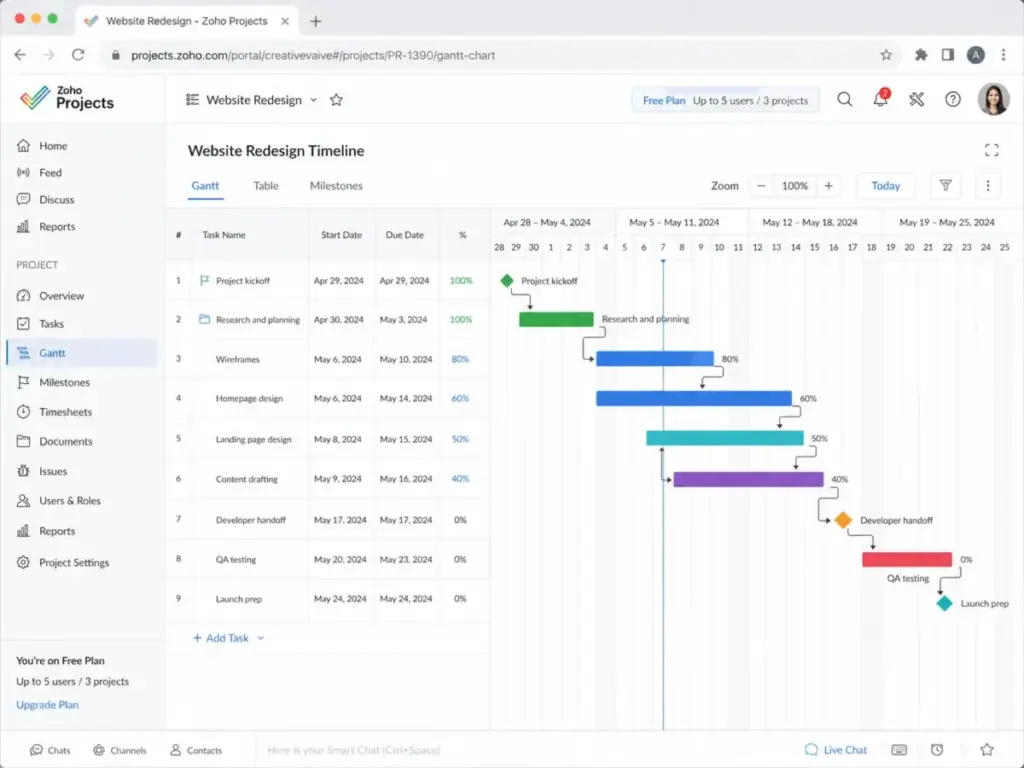
Zoho Projects stands out for one specific reason: it includes Gantt charts on the free plan. Most competitors lock visual timeline planning behind paid tiers. For small teams that need real project scheduling with task dependencies, milestones, and timelines, Zoho Projects offers planning depth that Trello, Asana, and Notion do not provide at $0.
Free Plan Reality Check:
The free plan allows up to 5 users, 3 projects, and 5GB of storage. You get tasks, subtasks, Gantt charts, and basic project tracking. The 3-project cap is the hard limit. Multi-client agencies or teams managing more than three active projects will outgrow it immediately. Time tracking, advanced reporting, and resource utilization are paid features.
Best for:
- 2 to 5 person teams managing a small number of structured projects
- Teams that need Gantt charts without paying for a PM suite
- Small construction, event, or launch teams with clear project timelines
Not for:
- Agencies managing more than three active client projects
- Teams that need unlimited projects on the free plan (ClickUp or Asana are better)
Standout features:
- Free Gantt chart access with task dependencies and milestones
- Classic project planning structure (tasks, subtasks, deadlines, assignments)
- Part of the Zoho ecosystem, which means integration with Zoho CRM, Zoho Mail, and other Zoho apps
Where it loses: Zoho Projects is deeper than Trello for traditional project planning but less flexible than ClickUp. The 3-project cap is its sharpest constraint. Asana allows unlimited projects on its free plan, and ClickUp provides unlimited tasks with multiple views. If project volume matters more than Gantt depth, Zoho Projects loses.
Pricing trap: The Premium plan unlocks unlimited projects, resource utilization, and advanced Gantt features. Teams often hit the paywall the moment they add a fourth project. For freelancers or consultants juggling five or six clients, this makes the free plan a short-lived benefit.
Maya Patel’s Quick Take: Zoho Projects is the best free option when you need a real project timeline, not just a task list. But the 3-project cap means it works best when your project count is low and your planning depth needs are high. If you manage many small projects, ClickUp or Asana will serve you longer before an upgrade.
Airtable – Best Database Workflow

Score: 8.1/10 – Very Good
Airtable is not a traditional project management tool. It is a database that you can shape into a project tracker, a CRM, a content calendar, or an inventory system. Its free plan includes unlimited bases with up to 1,000 records per base, multiple views (grid, Kanban, gallery, calendar), and lightweight automation. For teams whose “projects” look more like structured data than simple task lists, Airtable fills a gap that Trello and Asana leave open.
Free Plan Reality Check:
The free plan allows unlimited bases but caps each base at 1,000 records. Automation runs are limited to 100 per month. Interface Designer is available with restrictions. Extensions (charts, pivot tables) are limited. Rich field types (attachments, linked records, formulas) are included. A small content team tracking 200 to 500 articles, campaigns, or inventory items per base can stay free comfortably. Teams that need more than 1,000 rows in any single tracker or want advanced automation will hit the upgrade wall.
Best for:
- Content operations teams tracking editorial pipelines
- Small teams building custom project trackers without code
- Inventory-style or CRM-style project workflows
Not for:
- Teams wanting a ready-made project management system with no setup
- Teams that need Gantt charts, sprint boards, or formal PM structure
Standout features:
- Flexible database structure with custom fields, linked records, and rollups
- Multiple views (grid, Kanban, gallery, calendar, form) from a single data source
- Interface Designer creates simple dashboards without coding
Where it loses: Airtable requires design work that tools like Asana or ClickUp do not. You must build your project structure from scratch. For teams that want to start managing tasks in five minutes, Trello or Asana will always be faster. Zoho Projects provides better traditional PM depth.
Pricing trap: The 1,000 record-per-base limit is the most common trigger. Teams scaling a content calendar, product backlog, or client database beyond 1,000 rows need the paid Team plan. Automation limits (100 runs/month on free) also push growing teams toward upgrades.
Maya Patel’s Quick Take: Airtable rewards teams that think in tables and relationships. If your project data has custom fields, linked entities, and needs filtering from multiple angles, Airtable is more capable than any Kanban board. But if you just want to assign tasks and track deadlines, you are overengineering it.
Notion – Best Docs Plus Tasks

Score: 7.9/10 – Good
Notion blurs the line between documentation and project management. Its free plan gives solo users unlimited pages and blocks, which means you can build wikis, task databases, meeting notes, and project dashboards in one workspace. The strength is integration: your project plan lives beside your product specs, your meeting notes, and your team wiki. The weakness is that Notion is not a project manager by default. You must build it into one.
Free Plan Reality Check:
Solo users get unlimited pages and blocks on the free plan. The free plan for teams is more restricted, with a block limit for team workspaces and limited file upload size (5MB). Guest access is limited. AI features require a paid add-on. Version history is restricted to 7 days on free. A solo founder or two-person team can use Notion as a combined wiki-plus-task tracker for months without paying. Once the team grows to five or more and needs advanced permissions, longer version history, or team collaboration features, the paid Plus plan becomes necessary.
Best for:
- Solo founders combining notes, docs, and task tracking
- Small content teams that need a wiki alongside their project board
- Teams that value documentation as much as task management
Not for:
- Teams that need formal project dependencies, workload management, or time tracking
- Groups that want a ready-made PM system without building custom databases
Standout features:
- Unlimited pages and blocks for solo users create a genuine all-in-one workspace
- Database views (table, board, timeline, calendar, gallery) turn any page into a tracker
- Templates marketplace offers pre-built project management setups
Where it loses: Notion’s project management layer is self-built, not native. Asana, ClickUp, and Jira all provide structured PM workflows out of the box. Notion lacks native Gantt charts with dependencies (timeline view exists but is less capable than Zoho Projects or ClickUp). Reporting is manual. As one community user noted, “What actually matters is whether people keep using it after the novelty wears off.”
Pricing trap: Team collaboration is the trigger. Solo use stays free, but adding team members with full editing access, needing longer version history, or wanting AI features pushes toward the Plus plan. File upload limits (5MB on free) also frustrate teams sharing design files or videos.
Maya Patel’s Quick Take: Notion is the tool I recommend when someone says “I need a wiki and a project board in the same place.” It is not the tool I recommend when someone says “I need project management software.” That distinction matters. If documentation is central to your workflow, Notion is excellent. If task execution and deadlines are central, look at Asana or ClickUp.
monday.com – Best Visual Starter

Score: 7.6/10 – Good
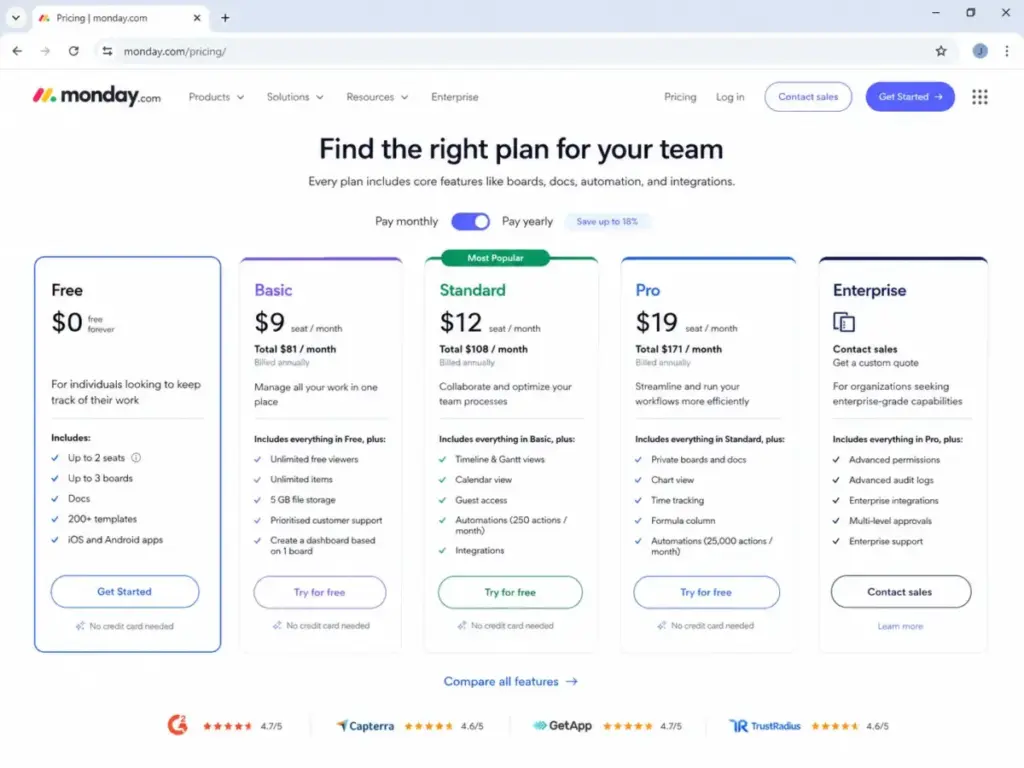
monday.com is a polished, visually appealing work management platform. Its free plan, however, is one of the most restricted in this ranking: 2 seats and 3 boards. That makes it a strong fit for solo operators or two-person teams who want a clean, modern interface for simple project tracking, but a poor fit for almost any real team.
Free Plan Reality Check:
The free plan includes up to 2 seats, 3 boards, unlimited docs, and 200+ templates. You cannot add a third collaborator without upgrading. Automations, integrations, timeline views, Gantt charts, and dashboards are all paid features. A solo founder or a two-person partnership can use monday.com Free for personal work tracking and simple project boards. The moment a third person needs access, the free plan ends.
Teams approaching that third collaborator should compare monday.com alternatives by free-user caps, board limits, paid collaboration triggers, dashboard access, and whether another tool survives longer before forcing an upgrade.
Best for:
- Solo founders tracking personal projects
- Two-person partnerships managing shared workflows
- Anyone evaluating monday.com vs Asana before committing
Not for:
- Any team with 3 or more active collaborators
- Teams that need automations, integrations, or timeline views on a free plan
Standout features:
- Clean, colorful visual board interface with low learning curve
- 200+ templates cover common workflows (marketing, sales, product, HR)
- Unlimited docs included even on the free plan
Where it loses: The 2-seat cap makes monday.com Free uncompetitive against ClickUp (unlimited users), Trello (unlimited users), and Asana (unlimited users on the free plan). For any team beyond two people, monday.com stops being an option at $0. Trello offers more boards, and ClickUp offers more features, both for free.
Pricing trap: The paid Basic plan requires a minimum of 3 seats, and billing is annual for the best rate. This means your first upgrade jump is not “$0 to one paid seat” but “$0 to three paid seats on annual billing.” That is a notable cost increase for a small team testing the waters.
Maya Patel’s Quick Take: monday.com is a well-designed product with a free plan that functions more as a demo than a working tool. If you are a solo operator who values visual boards, it works. If you have a team, look elsewhere for free. The paid product is strong, but this is a free-plan ranking, and 2 seats is too few.
OpenProject – Best Open Source

Score: 7.5/10 – Good
OpenProject is the only tool in this ranking that offers a completely free, self-hosted option with unlimited users and unlimited projects. The Community edition is open-source, and you install it on your own server. There are no seat caps, no board limits, no storage limits imposed by a SaaS vendor. The trade-off is setup and maintenance: you need technical capacity to install, configure, secure, and update the software.
Free Plan Reality Check:
The Community edition includes work packages (tasks), Gantt charts, boards, time tracking, wiki, and basic reporting. There are no user limits or project limits. However, you must self-host, which requires a Linux server, Docker, or a packaged installer. Cloud-hosted OpenProject is a paid product. Enterprise features (LDAP, 2FA, advanced permissions, support SLAs) require a paid license. As one Reddit user in r/selfhosted shared: “OpenProject is probably your best bet, fully open source, self-hosted Community Edition is free forever.”
Best for:
- Technical teams with server infrastructure and Linux administration skills
- Nonprofits or universities with IT support that need free software without vendor lock-in
- Organizations that require data sovereignty and on-premises hosting
Not for:
- Nontechnical teams that want a hosted, ready-to-use solution
- Small teams without anyone who can manage server maintenance
Standout features:
- Unlimited users and projects with no SaaS-imposed caps
- Built-in Gantt charts, boards, time tracking, and wiki
- Full data control on your own infrastructure
Where it loses: Every SaaS tool in this ranking is easier to start using. ClickUp, Trello, and Asana are all sign-up-and-go products. OpenProject requires server setup, security configuration, and ongoing maintenance. For nontechnical teams, this is a non-starter. The UX is also more utilitarian than polished SaaS competitors.
Pricing trap: “Free” refers only to the self-hosted Community edition. Cloud hosting through OpenProject’s own service is paid. Enterprise features (SSO, advanced reporting, premium support) require a paid license. The real cost is not software but the infrastructure and time to maintain it.
Maya Patel’s Quick Take: OpenProject is free in dollars but not in effort. If your team has a sysadmin and values data control, it is the most unrestricted option in this ranking. If you do not have someone who can maintain a Linux server, this is not your tool. The freedom is real, but so is the maintenance burden.
TeamGantt – Best Simple Gantt

Score: 7.2/10 – Good
TeamGantt exists for one purpose: simple Gantt chart planning. Its free plan allows 1 manager, 1 active project, and up to 40 tasks. That is narrow, but it fills a specific gap. If you need to build a project timeline with dependencies, milestones, and a visual schedule, and you only have one project to plan, TeamGantt does it more simply than most full PM suites.
Free Plan Reality Check:
The free plan is limited to 1 manager, 2 additional collaborators, 1 active project, and 40 tasks. You get Gantt chart views, task dependencies, milestones, and basic PDF export. There are no automation features, no Kanban view, and no multi-project support. A student planning a thesis, a freelancer scheduling a single client project, or a small team creating a launch timeline can use TeamGantt Free effectively. Anyone managing more than one active project cannot.
Best for:
- Solo planners creating a single project schedule
- Students building thesis or capstone timelines
- Freelancers delivering one-off client project plans
Not for:
- Multi-project teams or ongoing operations
- Anyone who needs Kanban boards, task management beyond scheduling, or automation
Standout features:
- Clean, focused Gantt chart interface with drag-and-drop scheduling
- Task dependencies and milestones included on the free plan
- PDF export for sharing timelines with stakeholders
Where it loses: TeamGantt is not a project management system. It is a scheduling tool. ClickUp, Asana, and Zoho Projects all offer broader PM capabilities with Gantt or timeline views included. For any team managing multiple projects or needing task management beyond timelines, TeamGantt is too narrow. Zoho Projects offers free Gantt charts with more project capacity.
Pricing trap: The paid Lite plan unlocks unlimited projects and more collaborators. The jump from “1 project” to “unlimited projects” is a full plan upgrade. Teams that discover TeamGantt for a single project and want to expand will pay immediately.
Maya Patel’s Quick Take: TeamGantt is excellent when you need one schedule, not an operating system. I recommend it for the specific moment when someone says “I just need a Gantt chart for this one project.” For anything recurring or multi-project, Zoho Projects or ClickUp are better long-term free options.
Free Plan Survivability Matrix
How long can a real team stay on each free plan? This matrix scores each tool from 1 to 10 based on user limits, project limits, storage, automation access, reporting, and how quickly upgrade pressure builds. A higher score means you can stay free longer.
| Tool | Survivability Score | Can 5 People Stay Free? | Can 10 People Stay Free? | Main Free-Plan Limit | Upgrade Risk Timeline |
|---|---|---|---|---|---|
| ClickUp | 8/10 | Yes | Yes | 100MB storage, automation caps | 60-90 days (storage, reporting) |
| Trello | 8/10 | Yes | Yes | 10 boards, no timeline view | 90+ days (views, admin controls) |
| Asana | 8/10 | Yes | Yes | No timeline/Gantt, limited forms | 60-90 days (scheduling needs) |
| Jira | 7/10 | Yes | Yes (exactly 10) | 2GB storage, basic permissions | 90+ days (11th user, reporting) |
| Zoho Projects | 5/10 | Yes (exactly 5) | No | 3 projects, 5 users | 30-60 days (4th project) |
| Airtable | 6/10 | Yes | Yes | 1,000 records/base | 30-90 days (record growth) |
| Notion | 6/10 | Solo only (team limited) | No (team plan needed) | Team block limits, 5MB uploads | 30 days (team collaboration) |
| monday.com | 3/10 | No | No | 2 seats, 3 boards | Day 1 (3rd team member) |
| OpenProject | 10/10 | Yes | Yes | Self-hosting required | Never (if self-hosted) |
| TeamGantt | 2/10 | No (3 people max) | No | 1 project, 40 tasks | Day 1 (2nd project) |
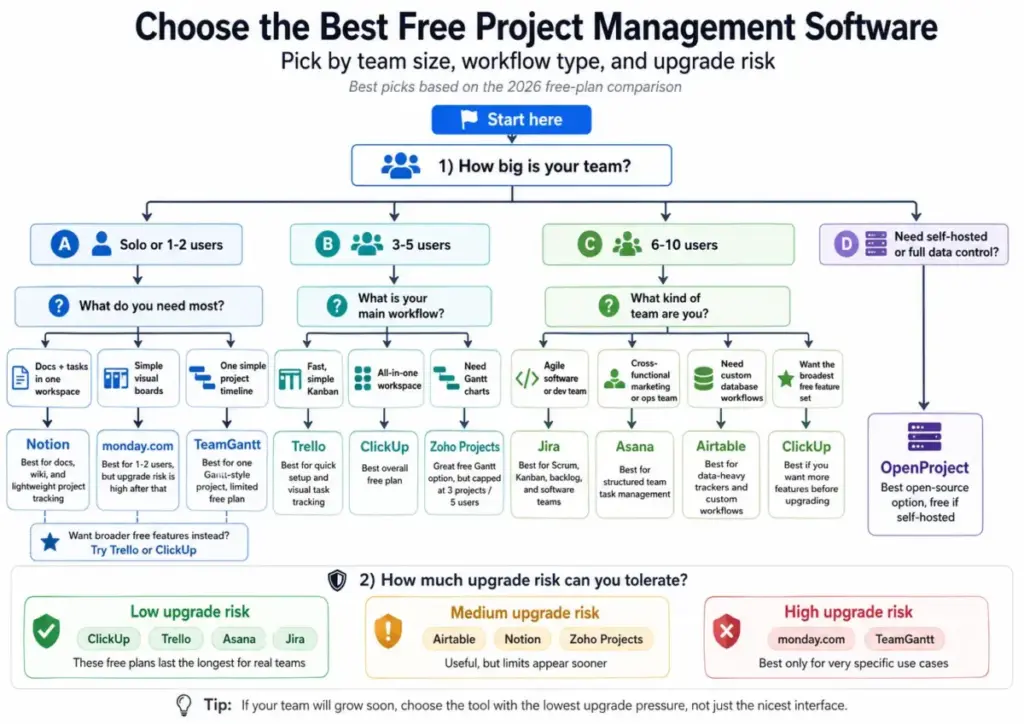
Key takeaway: ClickUp, Trello, Asana, and Jira offer the longest free-plan survival for real teams. OpenProject is unlimited but requires technical setup. monday.com and TeamGantt have the tightest free-plan constraints.
Pricing Decoder
This table shows what happens after free. Understanding the first paid tier helps you calculate whether starting free is worth the eventual cost.
| Tool | Free Plan | First Paid Plan | Hidden Cost or Upgrade Trigger | 12-Month Cost (10 Users, First Paid Tier) |
|---|---|---|---|---|
| ClickUp | $0, unlimited users | Unlimited (checkpricing page) | Storage, automations, dashboards | Varies by tier, per user/month |
| Trello | $0, unlimited users | Standard (~$5/user/month billed annually) | Timeline view, unlimited boards | ~$600/year |
| Asana | $0, unlimited users | Starter (~$10.99/user/month billed annually) | Timeline, workflow builder, forms | ~$1,319/year |
| Jira | $0, up to 10 users | Standard (~$7.75/user/month) | 11th user triggers billing | ~$930/year |
| Zoho Projects | $0, up to 5 users | Premium (~$4/user/month billed annually) | 4th project, 6th user | ~$480/year |
| Airtable | $0, unlimited bases | Team (~$20/user/month billed annually) | 1,001st record in any base | ~$2,400/year |
| Notion | $0 (solo) | Plus (~$10/user/month billed annually) | Team collaboration, version history | ~$1,200/year |
| monday.com | $0, 2 seats | Basic (~$9/seat/month, min 3 seats) | 3rd team member, automations | ~$1,080/year (min billing) |
| OpenProject | $0 (self-hosted) | Cloud or Enterprise (varies) | Cloud hosting, SSO, support | Server costs only if self-hosted |
| TeamGantt | $0, 1 project | Lite (~$19/manager/month) | 2nd project | ~$228/year (1 manager) |
Note: Prices are based on publicly listed rates as of April 28, 2026. Check each vendor’s pricing page for current rates, as prices change frequently.
How to Choose Free Project Management Software
The best free project management tool depends on your team size, workflow type, and tolerance for upgrade pressure. Below are recommendations for seven specific micro-cohorts.
Solo consultant managing 5 client projects:
Use ClickUp or Trello. ClickUp gives you more views and features. Trello gives you faster setup. Both support unlimited tasks for free. Avoid Zoho Projects (3-project cap) and TeamGantt (1-project cap).
3-person content agency:
Use Trello or Asana. Trello is simpler for editorial boards. Asana is better if you need task assignments and structured handoffs. Avoid monday.com (2-seat limit blocks your third person).
5-person SaaS startup:
Use ClickUp or Asana. ClickUp offers the widest feature set. Asana offers cleaner team execution. If you need Gantt charts on the free plan, add Zoho Projects as a complement. Avoid Jira unless your team is engineering-only.
10-person software team:
Use Jira. Its free plan supports exactly 10 users with native agile workflows. If your team includes nontechnical roles, pair Jira with Trello or Notion for cross-functional visibility. ClickUp is the alternative if you want one tool for the whole team.
Nonprofit volunteer team:
Use Asana (unlimited tasks/projects, clean interface) or OpenProject (unlimited users if you can self-host). Avoid Airtable unless someone on the team can build the database structure. Avoid monday.com (2-seat cap is too restrictive for volunteer coordination).
Two-person ecommerce team:
Use Trello or monday.com. Both work at this team size. Trello gives you more boards. monday.com gives you a more polished interface. Either works until you add a third person, at which point monday.com requires a paid plan.
Technical self-hosted team:
Use OpenProject. It is the only option with unlimited everything at $0, provided you can maintain the server. If self-hosting is not feasible, use ClickUp or Jira for the closest SaaS alternatives.
How We Tested and Ranked
We evaluated 25 free project management tools and ranked the 10 that provide the most genuine free-plan value. The evaluation used official pricing pages, product documentation, free-plan feature lists, SERP competitor analysis, and user community discussions. Here is the scoring rubric.
| Criteria | Weight | What We Measured |
|---|---|---|
| Free-plan usefulness | 25% | Users, projects, tasks, storage, views, and features available at $0 |
| Upgrade pressure | 20% | How soon a real team of 3 to 10 people hits a paid gate |
| Core PM depth | 20% | Tasks, dependencies, Gantt, Kanban, reporting, templates |
| Ease of adoption | 15% | Time to first usable workflow, learning curve for new users |
| Collaboration | 10% | Comments, guests, docs, file sharing, notifications |
| Scalability | 5% | Admin controls, permissions, reporting, portfolio readiness |
| Fit clarity | 5% | How clearly the tool serves a specific team type or workflow |
What was penalized:
- Free plans capped at fewer than 3 users
- Free plans limited to fewer than 3 projects or boards
- Missing Kanban or list view on the free tier
- Requiring a credit card to activate the free plan
- Mixing “free trial” language with “free plan” on the pricing page
What was not tested:
- We did not conduct timed usability studies or formal UX benchmarks
- We did not test enterprise SSO, SAML, or advanced security features
- We did not evaluate mobile app performance in detail
- We did not test third-party integrations beyond checking availability on free plans
- Community quotes were used from publicly available Reddit discussions, not from structured interviews
For a full explanation of how SaaSZap evaluates software, see our review methodology.
Products We Evaluated But Did Not Rank
We reviewed 25 tools total. The following were evaluated but excluded from the final 10 for specific reasons.
Wrike: Has a free plan, but the free-tier value is narrower than ClickUp, Trello, Asana, Jira, and Zoho Projects. Limited active tasks and no subtasks on the free plan reduce its usefulness for most teams.
Paymo: Free plan is limited to 1 user, 2 projects, and 1GB storage. Useful for solo freelancers with time-tracking needs, but too narrow for a team-focused ranking.
Smartsheet: Primarily trial-led for this search intent. The 30-day free trial does not qualify as a free-forever project management plan.
Microsoft Project: No meaningful free-forever project management plan for this audience. Part of Microsoft 365, which is a paid subscription.
Miro: Useful for brainstorming, visual planning, and workshops, but not a core project management system. Better classified as a collaboration tool.
Teamwork: Strong for client work and agency billing, but the free-plan feature set is less central than the ranked options for general project management. Lean teams may get more from Teamwork software alternatives with stronger free plans.
Basecamp: Strong simple project collaboration product, but Basecamp’s model focuses on per-organization pricing rather than traditional free-plan comparison. Not ideal for “best free” intent.
Todoist: Excellent personal task manager, but too personal-task oriented for a project management software ranking. Better suited for individual productivity guides. For that individual-productivity lane, best Todoist alternatives are a better fit.
Linear: Excellent for product and engineering teams building software, but too narrow for “best free project management” intent. Strong alternative to Jira for dev-focused workflows. That narrow focus makes Linear alternative tools worth checking for broader teams.
Nifty: Useful smaller PM tool with milestone-based tracking, but less search demand, fewer trust signals, and a less proven track record than ranked tools.
Common Mistakes When Choosing Free PM Software
Avoiding these mistakes will save your team weeks of wasted setup and forced migrations.
Treating a free trial as free software. A 14-day trial of Smartsheet or Microsoft Project is not the same as Trello’s unlimited free plan. If the tool expires, it is not free. Check whether “free” means forever or temporary before committing your workflow. If the trial-only model is a problem, compare Smartsheet alternatives before building your workflow there.
Ignoring storage caps. ClickUp’s 100MB total storage and Trello’s 10MB per-file limit seem fine until your team uploads a few PDFs and screenshots. If your workflow involves file sharing, calculate your storage needs before choosing.
Ignoring user caps. monday.com (2 seats), Zoho Projects (5 users), and Jira (10 users) all have explicit user limits. If your team is growing, choose a tool where the cap is higher than your 6-month headcount projection.
Picking too much software for simple work. ClickUp and Jira are powerful, but a 2-person team tracking 15 tasks does not need 20 views and sprint velocity charts. Trello or a simple Asana board will ship faster with less setup time.
Picking Trello when reporting is mandatory. Trello does not offer reporting on the free plan. If your stakeholders need dashboards, status summaries, or cross-board reporting, Trello will frustrate everyone who is not looking at the board directly.
Picking Jira for nontechnical teams. Jira’s terminology (epics, stories, sprints) and interface are designed for software teams. Marketing, HR, and operations teams consistently find it confusing. Use Asana or ClickUp instead.
Ignoring data export and migration. Before committing, check whether the free plan lets you export your data. Some tools restrict export to paid plans. If you cannot get your data out, you are locked in, not just opted in.
FAQ
What is the best free project management software in 2026?
ClickUp is the best free project management software in 2026 based on our evaluation of 25 tools. Its Free Forever plan includes unlimited tasks, multiple views, Docs, whiteboards, and broad customization. It scored 9.2/10 in our ranking for free-plan usefulness, core PM depth, and flexibility.
Which free project management tool is best for small teams?
For small teams of 3 to 5 people, ClickUp and Asana offer the most useful free plans. Both allow unlimited tasks and projects. Trello is the better choice if the team only needs simple Kanban boards. Zoho Projects is best if the team needs Gantt charts and has fewer than 4 projects.
Is ClickUp really free?
Yes. ClickUp offers a Free Forever plan with unlimited tasks and members. The free plan has limits on storage (100MB), automations, and advanced features like dashboards and goals. You do not need a credit card to start. The plan does not expire.
Is Trello free enough for a team?
Trello’s free plan supports unlimited users and unlimited cards with up to 10 boards per Workspace. For a small team running simple Kanban workflows, it is enough. Teams that need timeline views, advanced admin controls, or more than 10 boards will need to upgrade to the Standard plan.
Is Asana free for project management?
Yes. Asana’s Personal plan is free with unlimited tasks and projects. The free plan lacks Timeline (Gantt-style) view, workflow automation, portfolios, and advanced forms. Teams can manage task execution effectively for free, but visual scheduling and automation require paid plans.
What is the best free project management software with Gantt charts?
Zoho Projects is the best free option with Gantt charts included on the free plan (up to 5 users and 3 projects). OpenProject Community edition also includes free Gantt charts with unlimited users if you can self-host. Most other tools (Asana, Trello, monday.com) lock Gantt or timeline views behind paid tiers.
What is the best open-source project management software?
OpenProject Community edition is the strongest open-source project management option in this ranking. It is free to self-host with unlimited users and projects, and includes Gantt charts, boards, time tracking, and a wiki. The trade-off is that you need a server and technical skills to install and maintain it.
Which free project management tool is best for software teams?
Jira is the best free project management tool for software teams. Its free plan supports up to 10 users with Scrum boards, Kanban boards, backlog management, and native agile workflows. It is purpose-built for sprint planning, issue tracking, and software development. Linear is a strong alternative but was not ranked because its focus is narrower than general PM intent.
What free project management tools should agencies avoid?
Agencies should avoid monday.com Free (2-seat cap blocks team growth), TeamGantt Free (1-project cap is too narrow), and Zoho Projects Free (3-project cap limits multi-client work). Agencies managing 5 or more clients need a tool with unlimited projects and guest access. ClickUp or Asana are safer free starting points for agency workflows.
When should you upgrade from a free project management plan?
Upgrade when the free plan blocks your team’s actual work, not when you want more features. Specific triggers include: your team exceeds the user cap (Jira at 10, Zoho at 5, monday.com at 2), you run out of storage (ClickUp at 100MB), you need reporting dashboards your manager or client expects, or automation limits force manual repetitive work. If none of those apply, stay free.
Final Verdict
If you want one answer: ClickUp is the best free project management software in 2026 for most teams. Its free plan covers more use cases than any competitor before asking for payment.
But “most teams” is not every team. Here are exact recommendations:
Choose Trello if your team is 2 to 5 people, you want the fastest setup possible, and you only need Kanban boards. Do not choose Trello if reporting matters.
Choose Asana if your team is 5 to 10 people and needs structured task execution with clear ownership. Do not choose Asana if you need free Gantt charts.
Choose Jira if your team writes software and uses agile methodology. Do not choose Jira if your team includes nontechnical roles who need simple task visibility.
Choose Zoho Projects if you need free Gantt charts and your project count stays below 4. Do not choose Zoho Projects if you manage many active clients.
Choose OpenProject if you have technical infrastructure and want unlimited everything with no vendor lock-in. Do not choose OpenProject if no one on your team can administer a Linux server.
Choose monday.com or TeamGantt only if you are a solo operator or a two-person team. Both free plans are too restricted for real team use.
Choose Airtable if your “project” is really a structured database. Choose Notion if your project work lives inside documentation.
The free plan is a starting point, not a destination. The best choice is the tool where your team can do real work the longest before the first upgrade conversation. For most teams in 2026, that tool is ClickUp.