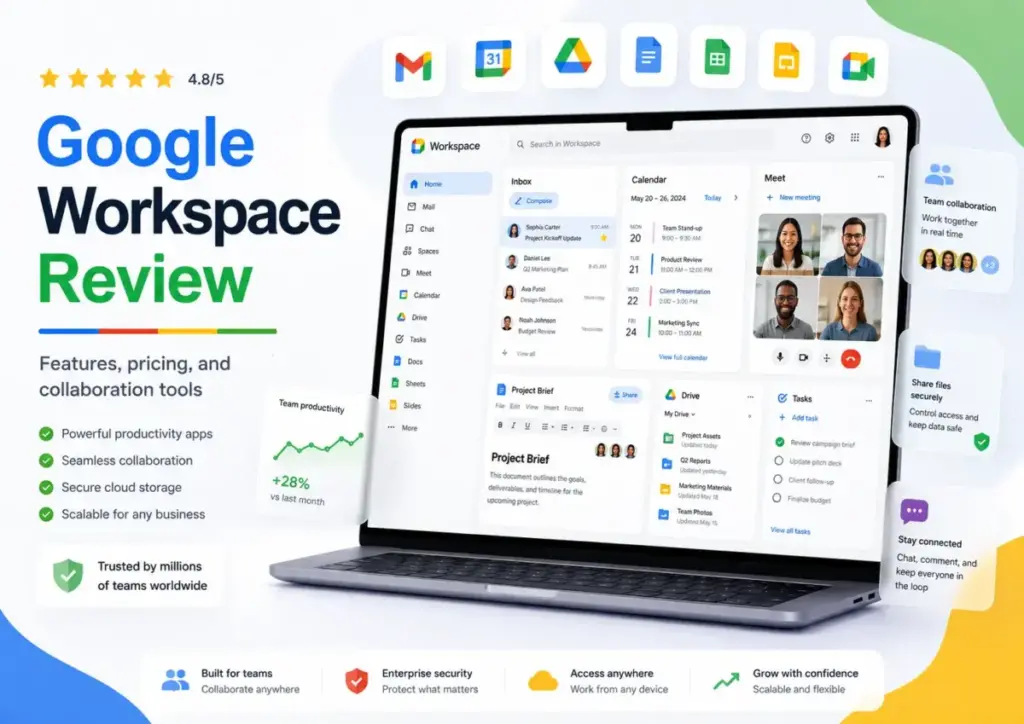
Most teams pick Google Workspace because Gmail feels familiar. That is the wrong reason to choose a plan. The real 2026 buying decision is not whether Google apps are easy to use (they are), but which plan gates the storage, Gemini AI access, Meet recording, Vault compliance tools, and endpoint controls your team actually needs.
Business Starter at $7/user/month sounds affordable until you realize it caps storage at 30 GB, limits Meet to 100 participants, and locks Gemini out of Docs, Sheets, and Slides entirely. This Google Workspace review breaks down every plan gate, hidden cost, and practical limitation so you can pick the right tier without overpaying or underbuying. If your team relies on collaboration and communication tools daily, the plan you choose matters more than whether you choose Google over Microsoft.
This review is based on official Google documentation, verified pricing data, and third-party user sentiment from G2, Capterra, TrustRadius, and GetApp. I did not score this product based on brand popularity alone.
| Quick Verdict | |
|---|---|
| Score | 8.2/10 |
| Best For | Remote teams, Gmail-native orgs, real-time doc collaboration |
| Not For | Excel-heavy finance teams, long offline workflows, single-app buyers |
| Starting Price | $7/user/month (Annual) |
| Free Trial | 14 days |
| Recommendation | Business Standard is the practical default for most growing teams |
The 3 Problems Google Workspace Solves
Google Workspace exists to solve three specific team problems. Each one maps to a plan tier, and understanding the match saves you from buying too much or too little.
Problem 1: Professional Email Without IT Overhead
Google Workspace turns Gmail into a custom domain email system. Every plan includes business email with your domain, shared calendars, Google Chat, and basic admin controls. For a 5-person agency that just needs professional email and cloud storage, Business Starter at $7/user/month (annual) or $8.40/user/month (flexible) handles the job. According to Google’s official pricing page, all Business editions include secure custom business email, and Business Starter adds Gemini in Gmail plus basic Gemini app access (as of May 2026).
One thing worth noting: Business Starter includes 30 GB pooled storage per user. That is enough for email-first teams, but image-heavy or video-producing teams will burn through it fast.
Problem 2: Real-Time Collaboration at Scale
The second problem is live document work. Google Docs, Sheets, and Slides let multiple people edit simultaneously without version conflicts. Google Meet handles video calls. Google Chat and Spaces handle async messaging.
At that point, you are choosing a productivity suite, not just email.
But here is where plan gates create friction. Business Starter limits Meet to 100 participants and does not include meeting recording, breakout rooms, polls, Q&A, or noise cancellation. According to Google’s Meet feature comparison, those features unlock at Business Standard (as of May 2026). Standard also bumps Meet capacity to 150 participants and adds appointment booking pages and eSignature.
For a 40-person remote company running frequent client meetings, Starter is a ceiling. Standard at $14/user/month (annual) is where the collaboration suite becomes genuinely useful beyond basic document editing.
Problem 3: AI-Assisted Productivity Across Apps
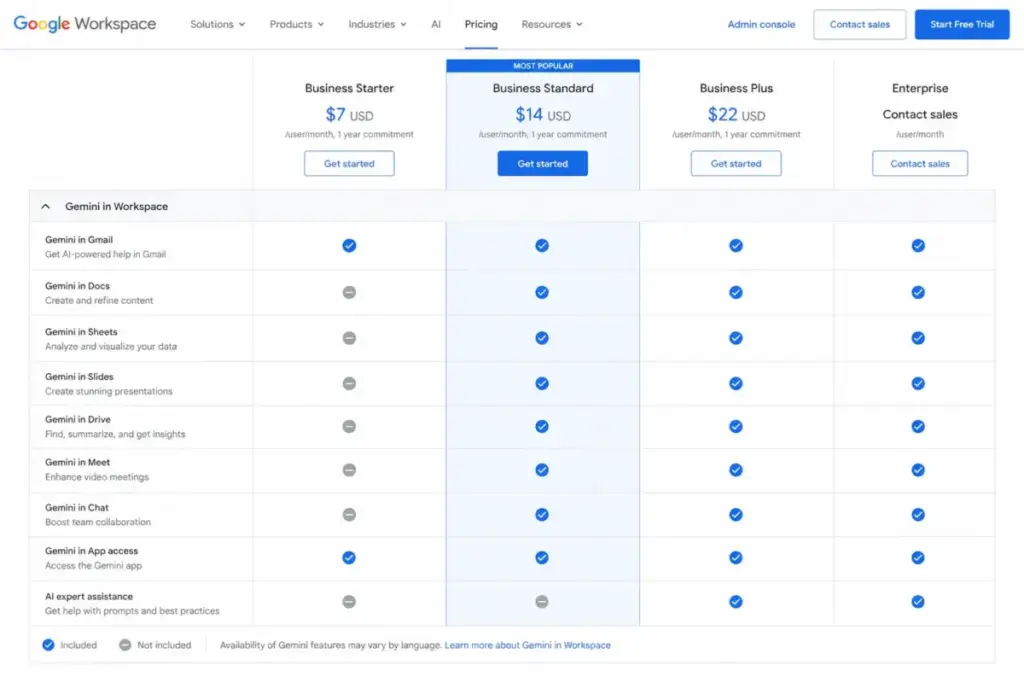
Gemini in Google Workspace is included in every plan. That claim is technically true and practically misleading. On Business Starter, Gemini works in Gmail and through basic Gemini app access. It does not extend to Docs, Sheets, Slides, Drive, Meet, or Chat. According to Google’s business edition comparison, Gemini across those broader Workspace apps requires Business Standard or higher (as of May 2026).
So does the Gemini upgrade justify the price jump from $7 to $14/user/month? For teams that live in Docs and Sheets daily, yes. For teams that mostly use Gmail and Calendar, probably not.
Google also offers AI Expanded Access add-ons for higher usage limits on features like video generation, real-time speech translation, and Workspace Studio automations. The add-on pricing is not publicly listed on the main pricing page, so budget for it separately if advanced AI features matter to your workflow.
The 2 Problems Google Workspace Creates
No productivity suite is problem-free. Google Workspace introduces two friction points that most reviews gloss over.
The Microsoft Office Compatibility Gap
Google Workspace handles basic Microsoft file imports well. Complex Excel workbooks with macros, advanced PowerPoint animations, and heavily formatted Word documents lose fidelity. Capterra reviewers consistently note that Google Workspace earns praise for collaboration and ease of use, but some find Microsoft 365 stronger for advanced professional document and spreadsheet work (as of May 2026).
This is not a minor inconvenience for finance teams, legal departments, or agencies that exchange native Microsoft files with clients regularly. If your team depends on complex Excel workbooks or macros, Google Sheets is not a drop-in replacement. Consider Microsoft Teams and its Office integration before committing.
The Suite Bundling Tax
Google Workspace is a suite. You pay per user for the entire package even if you only need Gmail or Drive. Capterra reviewers mention this bundling frustration: paying per user for Workspace when they wanted only one Google app or a narrower capability. There is no option to buy just Google Meet for Business or just Google Drive with admin controls.
For a 10-person team at Business Standard, that is $140/month or $1,680/year for the full suite. If half the team only uses email, you are paying Standard rates for features they never touch.
That is a real cost consideration.
Google Workspace Pricing in 2026: The Plan Gate Map
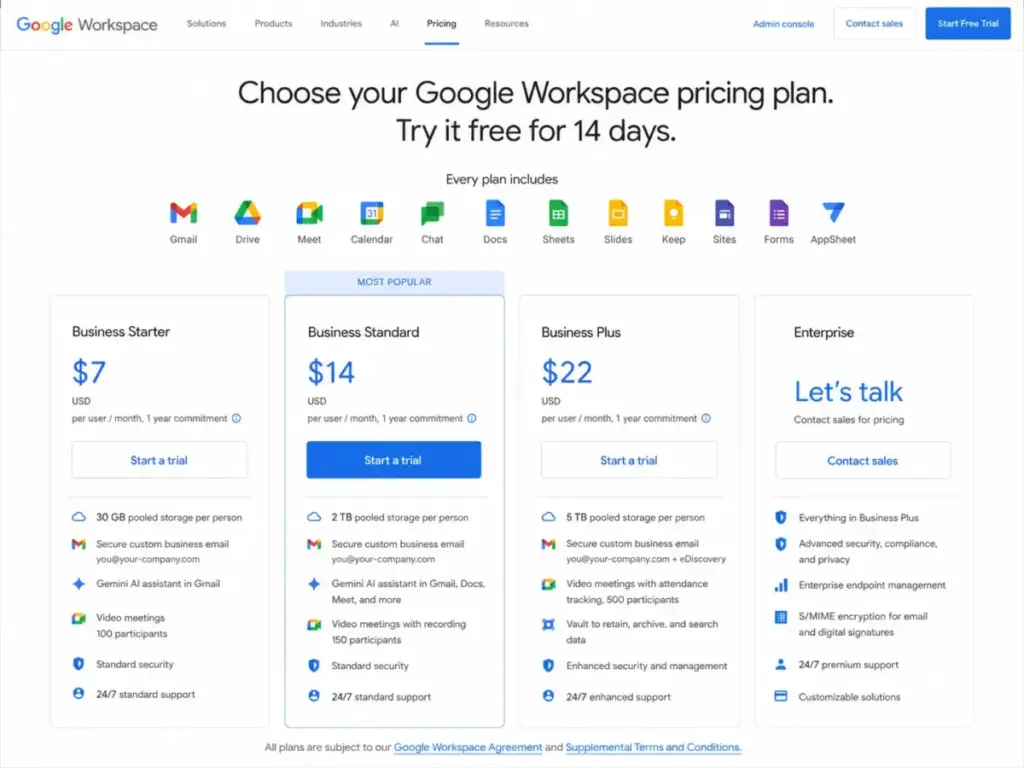
Google Workspace pricing looks straightforward until you map what each plan actually unlocks. According to Google’s official business editions page, here is what you get at each tier (as of May 2026):
| Feature | Business Starter | Business Standard | Business Plus | Enterprise |
|---|---|---|---|---|
| Annual Price | $7/user/mo | $14/user/mo | $22/user/mo | Contact sales |
| Flexible Price | $8.40/user/mo | $16.80/user/mo | $26.40/user/mo | Custom |
| Pooled Storage | 30 GB/user | 2 TB/user | 5 TB/user | 5 TB+ (expandable) |
| Meet Participants | 100 | 150 | 500 | 1,000 |
| Meet Recording | No | Yes | Yes | Yes |
| Gemini in Gmail | Yes | Yes | Yes | Yes |
| Gemini in Docs/Sheets/Drive/Meet | No | Yes | Yes | Yes |
| Vault and eDiscovery | No | No | Yes | Yes |
| Advanced Endpoint Mgmt | No | No | Yes | Yes |
| DLP and Context-Aware Access | No | No | No | Yes |
| Max Users | 300 | 300 | 300 | Unlimited |
Where Pricing Starts to Pinch
The annual commitment reduces per-user pricing but locks the organization into a fixed-term plan. Here is the math at scale:
10-person team on Business Standard (annual): $14 x 10 = $140/month, $1,680/year.
25-person team on Business Plus (annual): $22 x 25 = $550/month, $6,600/year.
50-person team on Business Plus (annual): $22 x 50 = $1,100/month, $13,200/year. And at 50 users, you are still under the 300-user Business edition cap, but Enterprise sales conversations typically start here if you need DLP or Context-Aware Access.
According to Google’s storage documentation, buying additional storage separately (100 GB for $15, 1 TB for $40, 10 TB for $300) can cost more than upgrading your plan. Google itself suggests that Business Starter, Standard, or Plus customers may find it more cost-effective to upgrade their subscription than to buy more storage (as of May 2026).
Hidden Costs Most Reviews Skip
The per-user plan price is not the full picture. Budget for these separately:
- Enhanced Support: Paid upgrade for Business Standard and Plus. Included in Enterprise. According to Google’s support documentation, Standard Support (included) offers 24/7 access with a 4-hour service-level objective for P1 cases (as of May 2026).
- Google Voice, AppSheet, Meet Hardware, Chrome Enterprise: Each sold as separate add-ons.
- AI Expanded Access: Separately sold add-on for higher AI usage limits.
- Assured Controls: Available as add-on for certain Enterprise compliance needs.
- Additional Storage: Priced separately if pooled storage fills up.
The biggest mistake most teams make with Google Workspace pricing is comparing only the per-user rate. The real cost depends on which add-ons your workflows require.
Security, Compliance, and the Business Plus Threshold
Google Workspace is secure at every tier. Every plan includes 2-Step Verification, password controls, security reports, and basic endpoint management. According to Google’s compliance resources, Workspace satisfies certification and compliance standards including SOC 1, SOC 2, and ISO reports (as of May 2026). Google Cloud confirms that core Workspace SOC 2 Type II reports are issued quarterly.
But the compliance threshold that matters for regulated organizations starts at Business Plus.
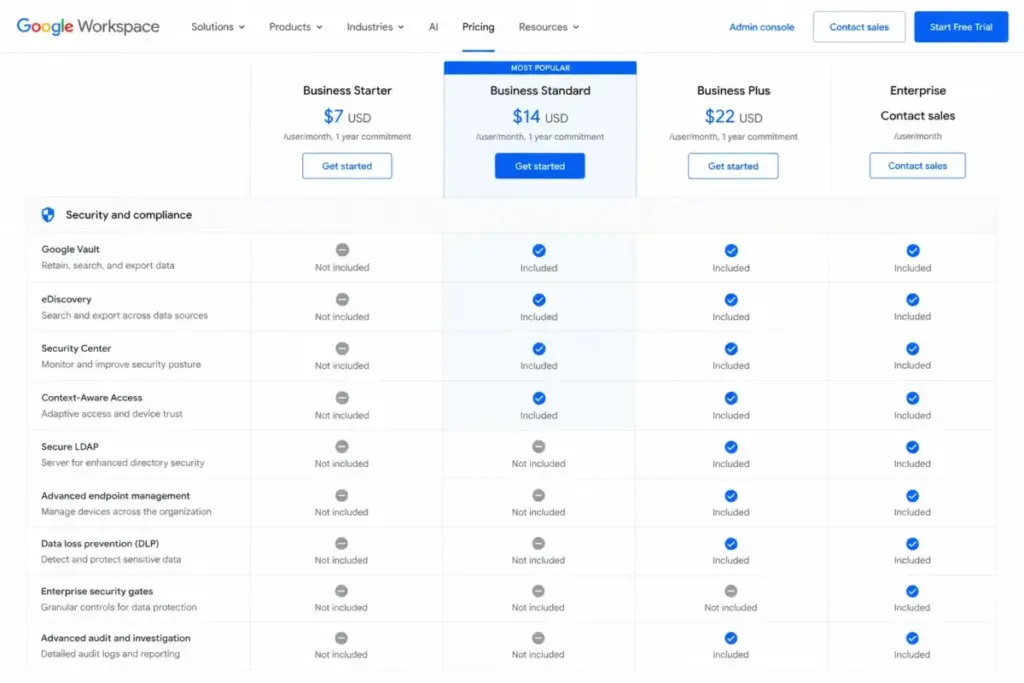
According to Google’s business edition comparison, Business Plus is the first business tier with Vault, eDiscovery, Secure LDAP, and advanced endpoint management including strong passcode enforcement, mobile device security policies, Android work profiles, remote device wipe, and Windows device management (as of May 2026).
Enterprise adds DLP (Data Loss Prevention), Context-Aware Access, S/MIME encryption, Enterprise data regions, Cloud Identity Premium, and AI Classification for Google Drive.
If your organization needs retention policies or device controls, Starter and Standard are not enough. Business Plus at $22/user/month is the compliance entry point. Enterprise is required for DLP and data residency.
Integrations, API, and Automation
Google Workspace connects to third-party tools through the Google Workspace Marketplace. The Marketplace supports add-ons across Gmail, Drive, Calendar, Docs, Sheets, Slides, Forms, Chat, Meet, and Gemini. Published integrations include Canva, Confluence, Asana, Figma, RingCentral, and Lucidchart (as of May 2026).
For teams building custom workflows, Google offers Apps Script, AppSheet (no-code app builder), and product APIs including Gmail API, Directory API, and Groups Settings API.
One detail most reviews miss about Google Workspace APIs: they are quota-bound. The Directory API documentation warns that excessive or inefficient requests can be blocked. The Groups Settings API lists a quota of up to 100,000 queries per day. The Gmail API defines usage limits in quota units. These limits matter for teams building automations at scale.
What Real Users Say About Google Workspace
Third-party review platforms consistently support the same pattern. Google Workspace scores well for ease of use, real-time collaboration, cloud accessibility, and tool consolidation.
Across Capterra’s verified reviews, users praise Google Workspace for easy collaboration, link sharing, file sharing, and daily productivity. The recurring concern: Microsoft 365 remains stronger for advanced professional document and spreadsheet work (as of May 2026).
TrustRadius review themes highlight straightforward email, centralized Drive storage, flexible permissions, third-party integrations, and Gemini usefulness. The downside: pricing can feel convoluted as AI and Cloud-related options change (as of May 2026).
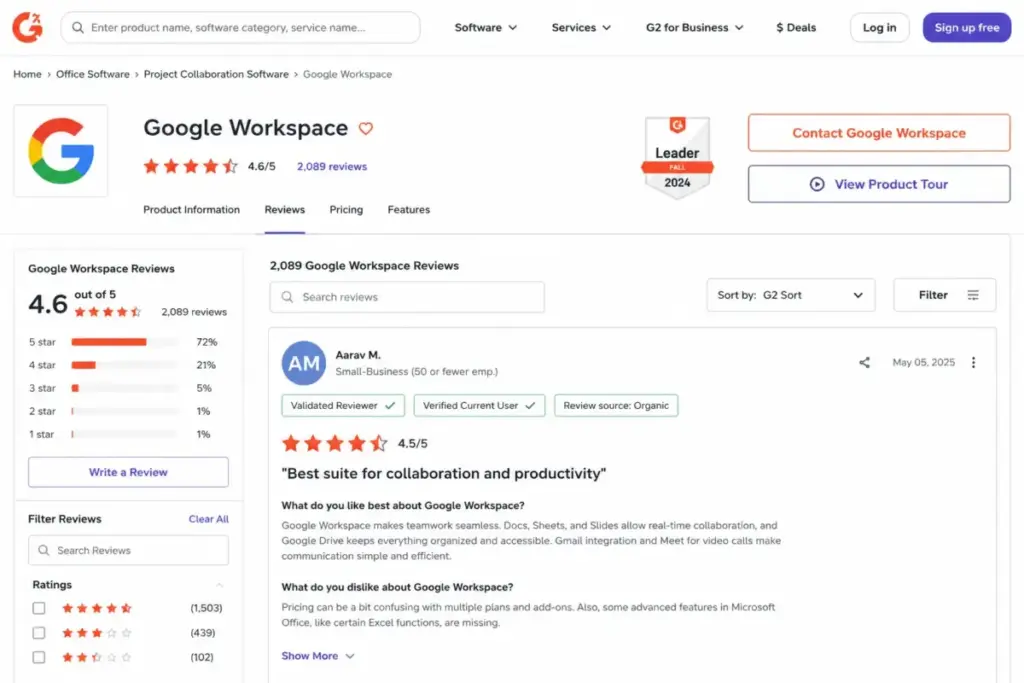
G2 review snippets describe Google Workspace as reliable, flexible, efficient, and useful for collaboration, communication, project management, and organizing everyday work (as of May 2026).
GetApp aggregates over 17,500 verified reviews and reports themes including collaboration tools, cloud services, email and document management, alongside concerns about recurring software glitches, complex account handling, and reliance on internet access (as of May 2026).
Google Workspace Mobile Experience
Google Workspace mobile apps cover Gmail, Drive, Docs, Sheets, Slides, Calendar, Meet, and Chat on both Android and iOS. According to Google’s mobile access documentation, Workspace mobile apps are built specifically for Android and Apple iOS devices (as of May 2026).
Mobile access is a strength for everyday communication and document review. Creating complex spreadsheets, managing admin settings, or running advanced Meet features remains easier on desktop.
Who Wins and Who Loses with Google Workspace
Google Workspace fits specific team profiles. Here is where each plan makes sense and where it does not.
| Scenario | Best Plan | Why |
|---|---|---|
| 5-person agency, first business email | Business Starter | Custom Gmail, basic Drive, 100-person Meet. Enough for email-first teams. |
| 40-person remote company, frequent client meetings | Business Standard | 150 Meet, recording, noise cancellation, 2 TB storage, booking pages, broader Gemini |
| 150-person regulated company, retention and device controls | Business Plus or Enterprise | Vault, eDiscovery, Secure LDAP, advanced endpoint management start at Plus |
| Finance team dependent on advanced Excel | Consider Microsoft 365 | Google Sheets lacks macro depth and advanced spreadsheet fidelity |
| Solo user wanting just email | Evaluate alternatives | Paying for a full suite when you need one app is inefficient |
Use Google Workspace If:
- Your team already lives in Gmail, Drive, and Calendar
- You collaborate in real time on Docs and Sheets daily
- You prefer browser-based work over desktop applications
- You have distributed staff across time zones
- You want simpler admin deployment than desktop-first Office suites
Avoid Google Workspace If:
- Your team depends on complex Excel workbooks and macros
- You exchange native Microsoft files with clients who require perfect fidelity
- You work offline for extended periods
- You only need one app (email or storage) but not the full suite
- You need DLP or data residency on a published-price plan (Enterprise is custom quoted)
Better Alternatives by Scenario
Google Workspace is not the right fit for every team. Here is when to look elsewhere.
For desktop Office depth and Excel-heavy workflows: Microsoft 365 provides native Excel, PowerPoint, and Word with full macro support, offline desktop apps, and deeper formatting controls. If your finance or legal team relies on spreadsheet complexity, Microsoft is the safer choice. See our Zoom Workplace review if video conferencing is your primary need rather than a full productivity suite.
For visual collaboration and whiteboarding: If your team needs brainstorming, diagramming, or design collaboration more than email and docs, tools like Miro or Figma specialize in those workflows.
For async video communication: If your team communicates primarily through recorded video messages rather than live meetings, Loom handles that workflow better than Google Meet.
For file storage without the suite: If you need cloud storage and file sharing without paying for the full Workspace suite, Dropbox offers standalone storage plans.
For team messaging without bundled email: Slack provides team messaging and channels without requiring a full productivity suite purchase.
Final Verdict: Google Workspace Earns 8.2/10
Google Workspace earns 8.2/10. It is the most accessible cloud productivity suite for teams that already work in Gmail and Google Drive. Real-time collaboration is genuinely strong. Admin deployment is simpler than Microsoft 365 for most small and mid-size teams.
The catch: Business Starter is more limited than its price suggests. Business Standard at $14/user/month is the practical default for teams that need recording, 2 TB storage, and Gemini across Workspace apps. Business Plus at $22/user/month is the compliance entry point. Enterprise requires a sales conversation.
If I could give just one piece of advice about Google Workspace, it would be this: do not choose your plan based on price alone. Choose it based on the storage, Gemini access, Meet recording, and compliance gates your team needs today, not six months from now when an upgrade disrupts your budget.
Google Workspace is a strong buy for Gmail-native, remote-first, browser-based teams. It is not the best fit for Excel-dependent finance teams, offline-heavy workflows, or organizations that need only one app but must pay for the suite.
Start with the 14-day free trial on Business Standard. If your team collaborates primarily in Docs and Meet, you will know within a week whether the plan fits. Check our review methodology for how we evaluate productivity and collaboration software.
FAQ: Google Workspace in 2026
Is Google Workspace worth it in 2026?
Google Workspace is worth it for teams that collaborate in Gmail, Docs, Sheets, and Meet daily. Business Standard at $14/user/month is the best value for most teams because it unlocks 2 TB storage, meeting recording, and Gemini across Workspace apps. Starter works for email-only teams with light storage needs.
How much does Google Workspace cost per user?
Business Starter costs $7/user/month (annual) or $8.40 (flexible). Business Standard costs $14/user/month (annual) or $16.80 (flexible). Business Plus costs $22/user/month (annual) or $26.40 (flexible). Enterprise uses custom sales-quoted pricing. All Business editions cap at 300 users.
Which Google Workspace plan includes Gemini in Docs and Sheets?
Business Standard, Business Plus, and Enterprise include Gemini in Docs, Sheets, Slides, Drive, Meet, and Chat. Business Starter limits Gemini to Gmail and basic Gemini app access only.
Which Google Workspace plan includes Vault?
Business Plus is the first business tier with Vault and eDiscovery. Starter and Standard do not include Vault. Enterprise also includes Vault plus DLP and Context-Aware Access.
Which Google Workspace plan has meeting recording?
Business Standard, Business Plus, and Enterprise include Meet recording. Business Starter does not support recording, breakout rooms, polls, Q&A, or noise cancellation.
Can Google Workspace replace Microsoft 365?
Google Workspace replaces Microsoft 365 for teams that work primarily in browsers, collaborate in real time, and do not depend on advanced Excel macros or native Office formatting. Finance teams, legal departments, and organizations exchanging complex Microsoft files with external clients should evaluate Microsoft 365 or a hybrid setup.
Does Google Workspace work offline?
Google Workspace supports offline access for Gmail, Docs, Sheets, Slides, and Calendar through Chrome browser extensions. The offline experience is limited compared to native desktop applications. Teams that work offline for extended periods should consider desktop-first alternatives.
What are the hidden costs of Google Workspace?
Hidden costs include Enhanced Support (paid upgrade for Standard and Plus), additional storage purchases, Google Voice, AppSheet, Meet Hardware, Chrome Enterprise, AI Expanded Access add-ons, and Assured Controls. Annual commitment plans lock pricing but reduce flexibility.
Is Google Workspace good for small businesses?
Google Workspace fits small businesses that need professional domain email, shared Drive storage, and basic collaboration tools. Business Starter handles 5-person teams well. Teams that need meeting recording, 2 TB storage, or broader Gemini access should start at Business Standard.
What is the best alternative to Google Workspace?
Microsoft 365 is the strongest alternative for teams needing desktop Office depth, advanced Excel, and offline work. For team messaging without a full suite, Slack is a focused alternative. For standalone cloud storage, Dropbox offers dedicated plans without suite bundling.