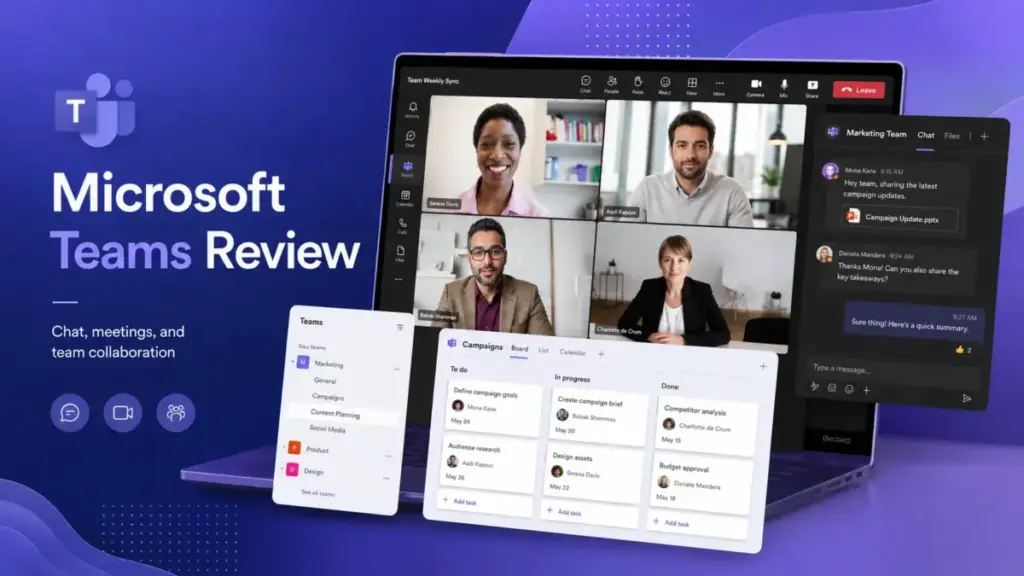
Microsoft Teams is not cheap just because it ships with Microsoft 365. That claim, repeated across dozens of review pages, ignores the real 2026 buying decision: which Teams license, which add-ons, and how much friction your team can tolerate. This Microsoft Teams review breaks down verified pricing across nine plan and add-on tiers, maps feature gates that most reviews blur, and explains the licensing shifts arriving July 1, 2026.
I evaluated Microsoft Teams through official Microsoft documentation, verified pricing pages, Microsoft Learn references, and aggregated user sentiment across G2 (4.4/5, 18,440+ reviews), Capterra (4.5/5, 10,833+ reviews), and TrustRadius. If your company already runs on team collaboration tools inside the Microsoft 365 stack, Teams is the default hub. The question is whether that default is worth the complexity.
Score: 7.8/10. Best for Microsoft 365 businesses with 10 to 300 employees that need chat, meetings, Outlook, OneDrive, and identity controls in one platform. Not ideal for async-first teams that want lightweight chat with minimal administration.
The 3 Problems Microsoft Teams Solves
Fragmented Communication Across Microsoft 365
Microsoft Teams consolidates chat, channels, video meetings, file sharing, and Outlook calendar integration into a single app. According to Microsoft’s official service description, Teams functions as the hub for teamwork in Microsoft 365, connecting instant messaging, audio and video calling, online meetings, file collaboration, and extensibility with partner apps. For organizations already paying for Exchange, OneDrive, and SharePoint, Teams eliminates the need for a separate chat tool.
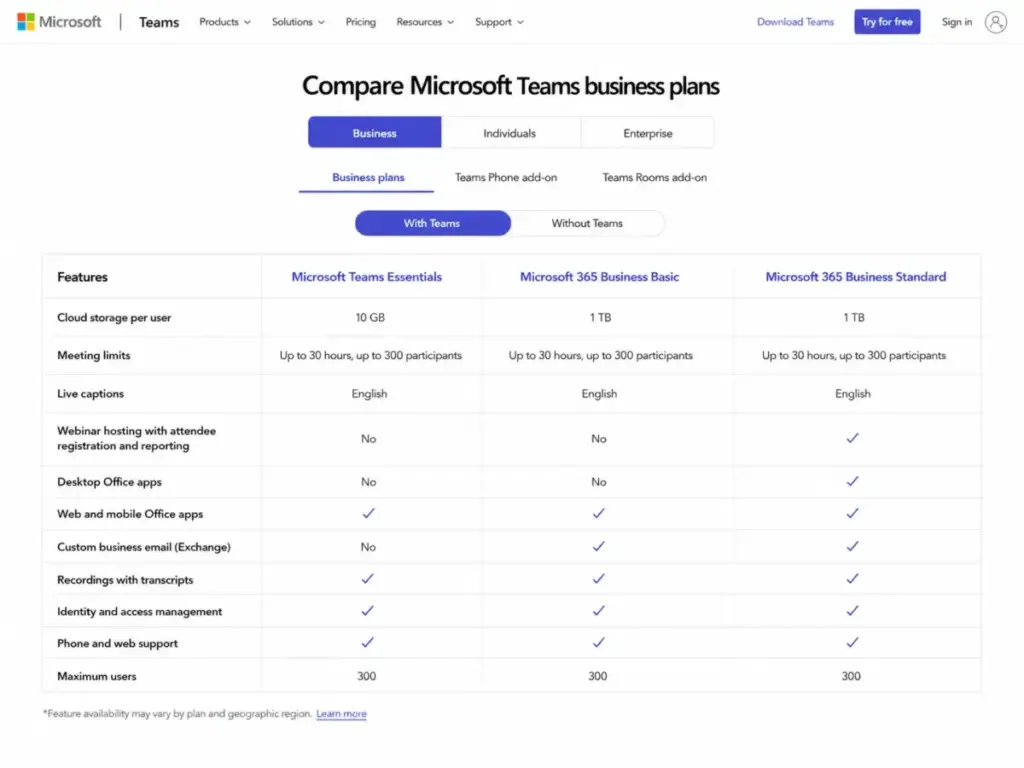
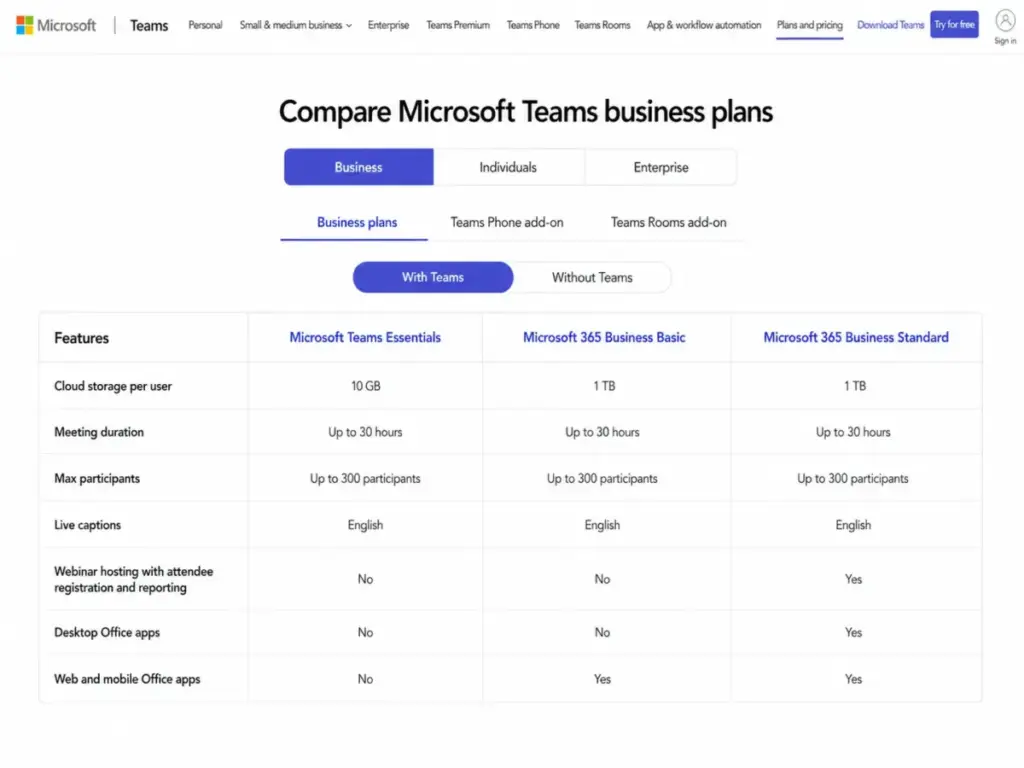
The practical value shows up in meeting workflows. Paid business plans support meetings up to 30 hours with 300 participants, meeting recordings with transcripts, and English live captions on Teams Essentials and above (as of May 2026, Microsoft Teams business plan comparison). Outlook calendar integration means meetings auto-sync without third-party connectors.
Identity and Security Gaps in Collaboration
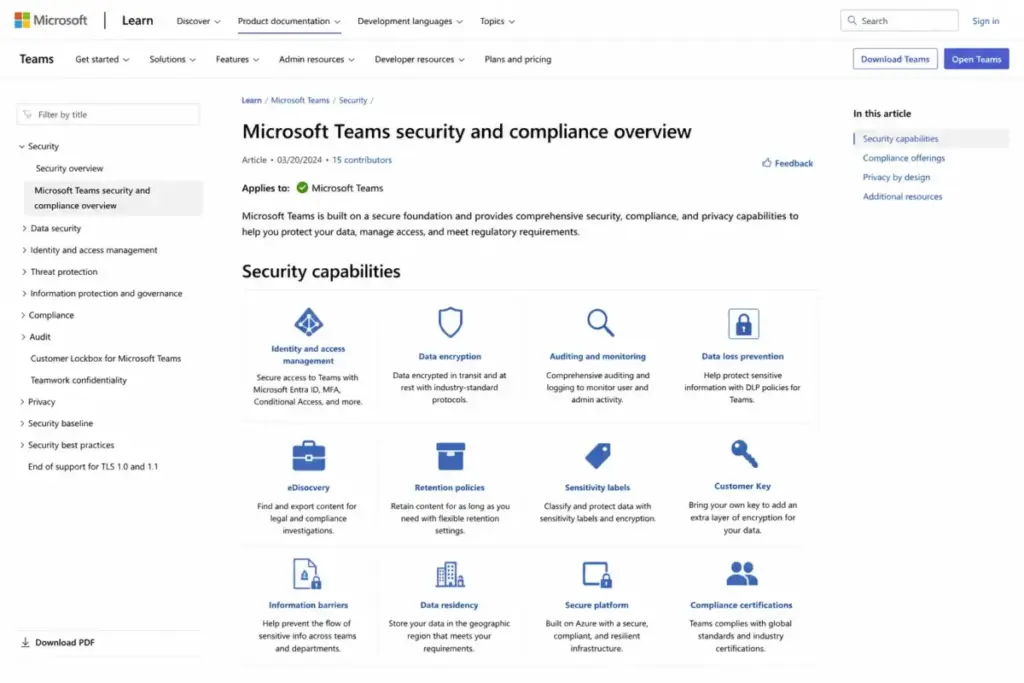
Most video conferencing platforms treat security as a checkbox. Teams treats it as a Microsoft 365 governance layer. According to Microsoft Learn’s security and compliance documentation, Teams supports Microsoft Entra ID single sign-on, two-factor authentication, encryption in transit and at rest, Conditional Access, auditing, Microsoft Purview Communication Compliance, Data Loss Prevention, eDiscovery, retention policies, sensitivity labels, Customer Key, and data residency by tenant region.
This depth matters for regulated industries. Teams does not bolt on security as an upsell. It inherits security from the Microsoft 365 tenant configuration. A 200-person professional services company running Outlook, SharePoint, and OneDrive gets Entra ID, DLP, and retention policies across chat, channels, and files without purchasing a separate security product. That is a genuine advantage over standalone collaboration tools.
Disconnected Meetings, Files, and Tasks
Teams connects OneDrive and SharePoint file storage directly into channels and chats. Files shared in a channel are stored in the team’s SharePoint site. Files shared in chat go to OneDrive. This means coauthoring Word, Excel, or PowerPoint documents happens inside Teams without switching apps.
The platform also supports Planner for task tracking, Forms for polling, Bookings for appointment scheduling (Business Basic and above), and Microsoft Loop workspaces on Business Standard. None of these replace dedicated project management tools.
Teams is a collaboration hub, not a PM system. Teams that need Gantt charts, dependencies, portfolio reporting, or workload management still need Planner, Microsoft Project, or a platform like Asana or ClickUp. That is where the best project management software category becomes the better comparison set.
The 2 Problems Microsoft Teams Creates
The Performance and UI Friction Problem
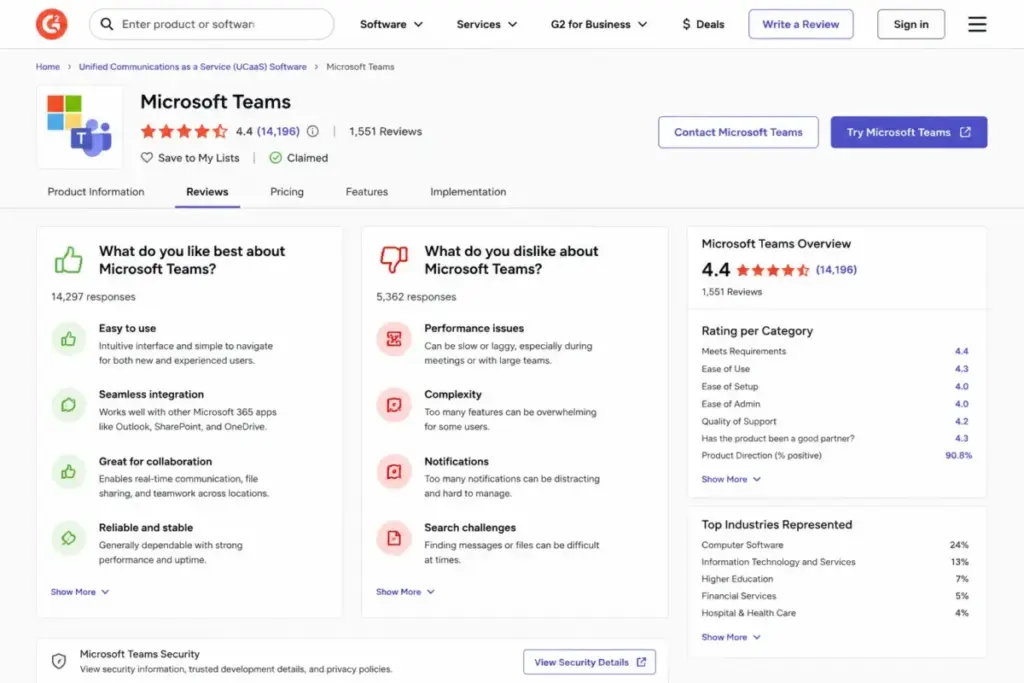
G2’s aggregated review data (4.4/5 from 18,440+ reviews) reveals a consistent pattern: users praise ease of use, collaboration, communication, and file sharing, but frequently criticize slow loading, resource usage, UI clutter, connectivity issues, and notification friction. Capterra reviews (4.5/5 from 10,833+ reviews) echo this with recent mentions of glitches, slow startup, rapid feature changes, and messy file storage discovery. TrustRadius reviewers describe Teams as strong for all-in-one communication but mention clunky UI, spotty notifications, and heavy video-call performance.
This is not a minor complaint. For a tool your team opens every morning, performance friction compounds. A 3-second delay loading chat is 15 minutes lost across a 50-person team over a week. Desktop resource usage affects developers, designers, and anyone running memory-intensive tools alongside Teams.
One thing worth flagging: file organization inside Teams confuses many users. Files live in SharePoint behind the scenes, but the Teams file tab, OneDrive sync, and SharePoint document library each show the same files in different views. New users regularly lose track of where files actually live.
The Licensing Complexity Problem
Microsoft offers Teams across at least nine licensing paths: Teams Free, Teams Essentials, Microsoft 365 Business Basic, Business Standard, Teams Enterprise, Microsoft 365 E3, E5, plus add-ons for Teams Premium, Teams Phone, Teams Rooms, and Microsoft 365 Copilot. Each has different feature gates, storage limits, and participant caps.
The common claim that “Teams comes free with Microsoft 365” requires context. Microsoft also sells Microsoft 365 Business Basic without Teams at $4.40/user/month and Business Standard without Teams at $9.29/user/month (as of May 2026). These no-Teams SKUs exist because of European regulatory unbundling. Buyers must verify which Microsoft 365 license they actually hold.
Microsoft Teams Pricing in 2026
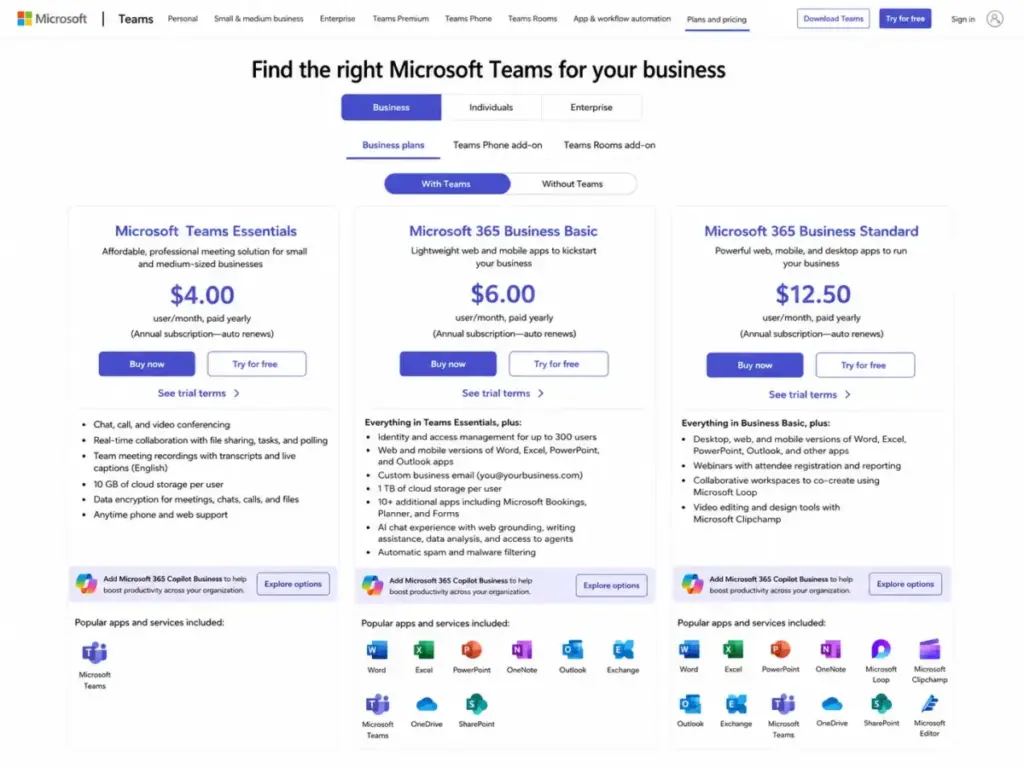
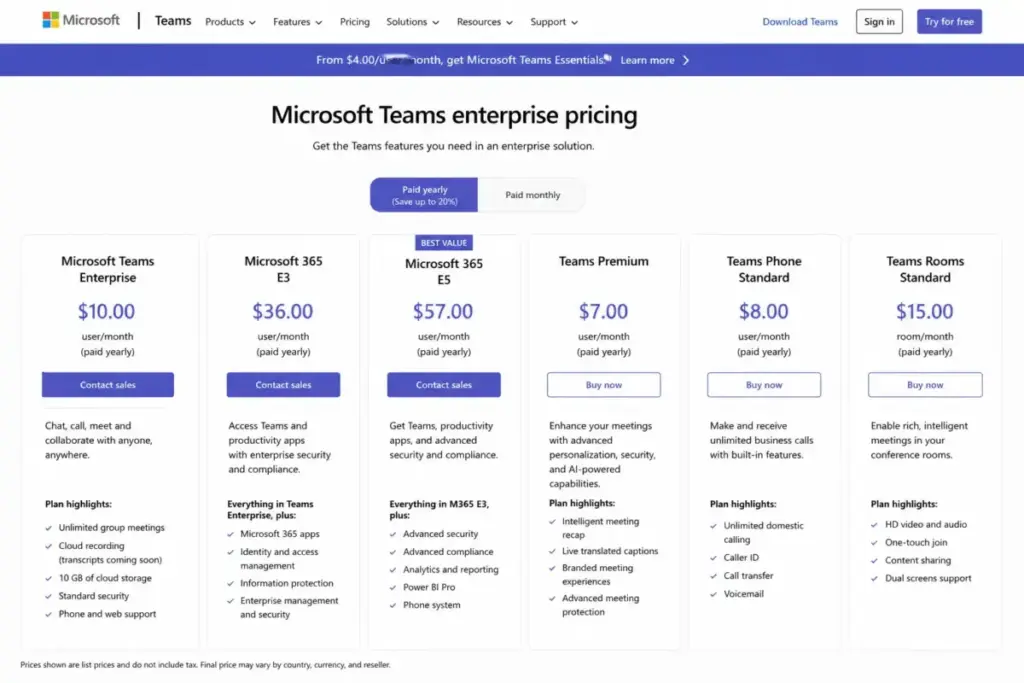
Microsoft Teams pricing spans multiple tiers depending on whether you buy Teams standalone, Teams with Microsoft 365, or Teams with enterprise licensing. All prices below are verified from Microsoft’s official business pricing page and enterprise pricing page as of May 13, 2026.
| Plan | Price | Storage | Meeting Limits | Key Additions | Best For |
|---|---|---|---|---|---|
| Teams Free | $0 | 5 GB/user | 60 min group, 100 participants | Chat, tasks, polling, encryption | Personal use, very small groups |
| Teams Essentials | $4.00/user/mo | 10 GB/user | 30 hours, 300 participants | Recordings, transcripts, English captions | Small teams wanting Teams without Microsoft 365 |
| M365 Business Basic | $6.00/user/mo | 1 TB/user | 30 hours, 300 participants | Web/mobile Office apps, custom email, Bookings, Planner, Copilot Chat | SMBs wanting Teams plus Microsoft 365 web apps |
| M365 Business Standard | $12.50/user/mo | 1 TB/user | 30 hours, 300 participants | Desktop Office apps, webinars, Loop, Clipchamp | Teams needing desktop Office and webinar hosting |
| Teams Enterprise | $8.55/user/mo | 10 GB/user | 30 hours, 300 participants | Enterprise standalone Teams | Enterprise orgs adding Teams to existing Microsoft licensing |
| M365 E3 | $36.00/user/mo | 1-5+ TB/user | Enterprise meetings | Full productivity suite, enhanced security | Mid-to-large enterprise |
| M365 E5 | $57.00/user/mo | 1-5+ TB/user | Enterprise meetings | Teams Phone, Power BI, XDR, advanced compliance | Enterprise needing telephony and advanced security |
All paid plans require annual commitment, paid yearly, with auto-renewal. Microsoft lists a 7-day cancellation window for prorated refunds after subscription begins.
July 2026 Price Increase Alert
Microsoft announced pricing changes effective July 1, 2026 (Microsoft licensing update page). If you are budgeting for later 2026 renewals, expect these changes:
| Plan | Current Price | July 1, 2026 Price | Change |
|---|---|---|---|
| M365 Business Basic (with Teams) | $6.00/user/mo | $7.00/user/mo | +$1.00 |
| M365 Business Standard (with Teams) | $12.50/user/mo | $14.00/user/mo | +$1.50 |
| M365 Business Premium | $22.00/user/mo | $22.00/user/mo | No change |
| M365 Business Basic (no Teams) | $4.40/user/mo | $5.40/user/mo | +$1.00 |
| M365 Business Standard (no Teams) | $9.29/user/mo | $10.79/user/mo | +$1.50 |
For a 25-person team on Business Basic, that is an increase from $1,800/year to $2,100/year. Not dramatic, but worth factoring into multi-year budget planning.
When Teams Gets Expensive: The Add-On Layer
The base plans cover chat and meetings. Several capabilities require separate add-on licenses (verified from Microsoft’s pricing pages as of May 2026):
| Add-On | Price | Requires |
|---|---|---|
| Teams Premium | $10.00/user/mo | Eligible Teams license |
| Teams Phone Standard | $10.00/user/mo | Teams license + PSTN via Calling Plans, Operator Connect, or Direct Routing |
| Teams Phone with Calling Plan (US) | $17.00/user/mo | Teams license |
| Teams Phone domestic + international | $34.00/user/mo | Teams license |
| Teams Rooms Basic | Free | Certified device, max 25 rooms |
| Teams Rooms Pro | $40.00/room/mo | Certified device |
| Microsoft 365 Copilot (Business) | ~$18.00/user/mo (promotional) | Eligible Microsoft 365 plan |
| Microsoft 365 Copilot (Enterprise) | $30.00/user/mo | Eligible Microsoft 365 E3/E5 |
Here is where the “Teams is cheap” narrative falls apart. A 50-person company on Business Standard ($12.50/user/mo) that adds Teams Phone ($10/user/mo) and Teams Premium ($10/user/mo) pays $32.50/user/month, or $19,500/year. Add Copilot at $18/user/month and the total reaches $30,000/year before any hardware, training, or migration costs.
Microsoft Teams Free Is Not Business Teams
Microsoft Teams Free exists, but it is a personal and small-group product. Free Teams includes 1:1 calls up to 30 hours, group meetings up to 60 minutes, up to 100 participants, 5 GB storage per user, chat, tasks, polling, and encryption (verified from Microsoft Teams Free page as of May 2026).
What Free Teams does not include: custom business email, identity and access management, 1 TB storage, 30-hour meetings, 300-participant meetings, meeting recordings, transcripts, Bookings, Planner, Forms, or phone and web support. Microsoft states that robust business options require business-class licensing. If you are evaluating Teams for a business with more than five people, Free Teams is a trial, not a plan.
Microsoft Teams Feature Gates by Plan
Most reviews list Teams features without explaining which plan unlocks them. This table maps the feature gates that affect real buying decisions:
| Feature | Teams Essentials ($4) | M365 Business Basic ($6) | M365 Business Standard ($12.50) | Teams Premium (add-on) | |
|---|---|---|---|---|---|
| Chat and channels | Yes | Yes | Yes | Yes | |
| 30-hour meetings, 300 participants | Yes | Yes | Yes | Yes | |
| Meeting recordings and transcripts | Yes | Yes | Yes | Yes | |
| Live captions (English) | Yes | Yes | Yes | 30+ languages | |
| Cloud storage | 10 GB/user | 1 TB/user | 1 TB/user | Inherited | |
| Web/mobile Office apps | No | Yes | Yes | Inherited | |
| Desktop Office apps | No | No | Yes | Inherited | |
| Custom business email | No | Yes | Yes | Inherited | |
| Identity management (up to 300 users) | No | Yes | Yes | Inherited | |
| Bookings, Planner, Forms | No | Yes | Yes | Inherited | |
| Webinars with registration | No | No | Yes | Inherited | |
| Loop workspaces | No | No | Yes | Inherited | |
| AI-powered meetings | No | No | No | Yes | |
| Copilot Chat | No | Yes | Yes | Inherited |
The jump from Teams Essentials to Business Basic at $2.00/user/month more is significant: you gain 1 TB storage (100x increase), web Office apps, custom email, identity management, and Copilot Chat. For most businesses, Business Basic is the real starting point.
Microsoft Teams Security and Compliance
Teams inherits security from the Microsoft 365 tenant, not from the Teams app itself. According to Microsoft Learn, the security and compliance capabilities include:
- Authentication: Microsoft Entra ID single sign-on, two-factor authentication, Conditional Access
- Encryption: Data encrypted in transit and at rest
- Data governance: Microsoft Purview Communication Compliance, Data Loss Prevention, eDiscovery, retention policies, sensitivity labels
- Data sovereignty: Customer data stored in the tenant’s Microsoft 365 region
- Advanced: Customer Key support, auditing and logging
This is not a feature list to skim past. For a 300-person company in financial services or healthcare, these capabilities eliminate the need for a separate compliance overlay. Teams channels, chats, and meeting content all fall under the same DLP, retention, and eDiscovery policies that govern Exchange and SharePoint.
The caveat: advanced compliance features like Customer Key, advanced eDiscovery, and full Purview capabilities require Microsoft 365 E3 or E5 licensing. Teams Essentials and Business Basic do not include the full compliance stack.
The Connector Retirement Risk Most Reviews Skip
If your IT team uses Teams channel webhooks for production alerts, monitoring, or service notifications, this section matters more than pricing.
Microsoft’s Developer Blog confirmed that Office 365 Connectors within Teams are being retired. Microsoft extended the initial timeline through December 2025, and later Microsoft Message Center mirrors and Microsoft Answers discussions indicate further 2026 migration extensions. Organizations using legacy connector webhooks must migrate to Power Automate Workflows, Teams apps, or Microsoft Graph-based alternatives.
Two additional constraints from Microsoft’s incoming webhook documentation: incoming webhook messages have a 28 KB message size limit, and Microsoft can throttle messages if more than four requests are made in a second.
For IT teams relying on old Teams incoming webhooks for Datadog, PagerDuty, Jira, or custom alerting, the connector retirement creates real migration work. Audit your connector usage now. Do not assume legacy webhooks will keep working indefinitely.
What Users Consistently Like and Dislike
I triangulated user sentiment across three major review platforms to identify patterns, not cherry-picked quotes.
What users consistently praise (across G2, Capterra, and TrustRadius):
- Microsoft 365 integration: Outlook calendar sync, OneDrive file sharing, SharePoint collaboration, and Office coauthoring inside Teams
- All-in-one communication: chat, channels, video meetings, screen sharing, and recordings in one app
- Cross-device availability: desktop, web, iOS, and Android apps for chats, channels, meetings, storage, tasks, and calendars
- Security features: SSO, MFA, encryption, and compliance controls built into the platform
- Meeting quality: recordings, transcripts, live captions, and third-party app integrations
What users consistently criticize:
- Slow loading and resource usage: G2 reviewers frequently cite performance delays, heavy RAM consumption, and slow startup times
- UI clutter and navigation confusion: channels, teams, chats, and activity feeds can overwhelm new users
- Notification friction: inconsistent notification delivery, hard-to-configure settings, and missed messages across desktop and mobile
- File storage confusion: files split between OneDrive and SharePoint with different access patterns creates discovery problems
- Rapid feature changes: frequent UI updates disrupt established workflows
Who Wins and Who Loses With Microsoft Teams
Choose Teams If:
- Your company already pays for Microsoft 365 Business Basic or higher
- You need Outlook calendar-connected meetings as a daily workflow
- Your team collaborates heavily in Word, Excel, and PowerPoint documents
- You require Entra ID, DLP, retention policies, or eDiscovery for compliance
- You want chat, meetings, files, webinars, phone, and rooms in one platform
- You have IT staff to manage Teams administration, guest access, and governance
Avoid Teams If:
- Your team is async-first and wants lightweight chat with minimal admin (consider Slack instead)
- You run on Google Workspace and prefer Google Chat and Meet natively (see our Google Workspace review)
- You collaborate heavily with external clients who do not use Microsoft 365
- Your team is under 8 people and wants minimal licensing complexity
- App heaviness, notification clutter, and frequent UI changes frustrate your team
- You need simple webhook-based alerting without migration planning
| Buyer Scenario | Recommendation | Why |
|---|---|---|
| 25-person M365 Business Basic company | Choose Teams | Business Basic includes Teams, web Office, 1 TB storage, email, and identity for $6/user/mo |
| 8-person async startup | Consider alternatives | Teams adds more platform weight than needed; lighter tools reduce admin overhead |
| 300-person enterprise on Outlook/SharePoint | Choose Teams | Strongest when paired with Exchange, OneDrive, SharePoint, Entra ID, and Purview |
| IT team relying on legacy webhooks | Choose Teams with migration planning | Audit connector usage and plan Workflows migration before connectors are fully retired |
Better Alternatives for Teams Avoiders
Teams is not the only option, and it is not always the best one. Here is when to consider something else:
Slack fits async-first teams that want clean channel organization, threaded conversations, and a lighter desktop experience. Slack’s app directory and workflow builder appeal to teams outside the Microsoft stack.
Zoom Workplace is stronger for teams where video meetings are the primary use case. Zoom’s meeting quality, webinar tools, and phone system compete directly with Teams meetings and Teams Phone. If meetings matter more than chat, evaluate our Zoom Workplace evaluation.
Google Workspace (with Google Chat and Google Meet) is the natural fit for Google-first organizations. If your team lives in Gmail, Google Drive, and Google Docs, forcing Teams into that workflow adds friction.
| Scenario | Best Choice | Why |
|---|---|---|
| Microsoft 365 company wanting one hub | Microsoft Teams | Native integration with Outlook, OneDrive, SharePoint, Entra ID |
| Async-first startup wanting clean chat | Slack | Lighter, better threads, less admin overhead |
| Video-meeting-heavy organization | Zoom Workplace | Stronger meeting experience and webinar tools |
| Google-first company | Google Workspace | Native Gmail, Drive, Docs integration |
Frequently Asked Questions About Microsoft Teams
Is Microsoft Teams free?
Microsoft Teams Free exists for personal and small-group use with 60-minute group meetings, 100 participants, and 5 GB storage. It lacks business email, identity management, 1 TB storage, recordings, and admin controls. For business use, Teams Essentials starts at $4/user/month paid yearly.
How much does Microsoft Teams cost in 2026?
Teams Essentials costs $4.00/user/month, Microsoft 365 Business Basic costs $6.00/user/month, and Business Standard costs $12.50/user/month, all paid yearly (verified May 13, 2026). Microsoft 365 Business Basic rises to $7.00 and Business Standard to $14.00 on July 1, 2026. Enterprise plans range from $8.55 (Teams Enterprise) to $57.00 (Microsoft 365 E5) per user per month.
What is the difference between Teams Essentials and Business Basic?
Teams Essentials ($4/user/mo) includes chat, meetings, 10 GB storage, recordings, and English captions. Business Basic ($6/user/mo) adds web and mobile Office apps, custom business email, 1 TB storage (100x more), identity management for up to 300 users, Bookings, Planner, Forms, and Copilot Chat. The $2 upgrade is significant for most businesses.
Is Microsoft Teams included with Microsoft 365?
Teams is included with Microsoft 365 Business Basic, Business Standard, E3, and E5 plans. Microsoft also sells “no Teams” versions of Business Basic ($4.40/user/mo) and Business Standard ($9.29/user/mo). Verify your specific license includes Teams before assuming it does.
Is Microsoft Teams better than Slack?
Teams is stronger for Microsoft 365-integrated organizations that need Outlook, OneDrive, SharePoint, and compliance controls in one platform. Slack is better for async-first teams wanting lightweight chat, clean threads, and minimal Microsoft dependency. The winner depends on your existing technology stack.
Does Microsoft Teams include phone calling?
Teams supports VoIP calling between Teams users. PSTN calling (external phone numbers) requires Teams Phone Standard at $10/user/month plus a Microsoft Calling Plan, Operator Connect, or Direct Routing. Microsoft 365 E5 includes Teams Phone as part of the bundle.
What are Microsoft Teams webhooks and are they being retired?
Microsoft confirmed that Office 365 Connectors in Teams are being retired. Organizations using legacy connector webhooks must migrate to Power Automate Workflows, Teams apps, or Microsoft Graph. Incoming webhooks have a 28 KB message size limit and throttle at more than four requests per second.
Does Microsoft Teams work for small businesses?
Teams works for small businesses already using Microsoft 365. Business Basic at $6/user/month provides chat, meetings, 1 TB storage, web Office apps, and email. Teams can feel heavy for very small teams (under 8 people) that want simple chat without Microsoft 365 administration overhead.
Is Microsoft Teams secure?
Teams inherits Microsoft 365 security: Entra ID SSO, MFA, encryption in transit and at rest, Conditional Access, DLP, eDiscovery, retention policies, and sensitivity labels. Advanced compliance features require E3 or E5 licensing. Security depth is a genuine advantage over standalone collaboration tools.
What Microsoft Teams add-ons cost extra?
Teams Premium costs $10/user/month, Teams Phone Standard costs $10/user/month, Teams Phone with Calling Plan costs $17/user/month (US), Teams Rooms Pro costs $40/room/month, and Microsoft 365 Copilot costs $18-30/user/month depending on license tier. All add-ons require eligible base licenses.
Final Verdict: Microsoft Teams Review Score
Microsoft Teams earns 7.8/10. It is the strongest default collaboration platform for organizations running Microsoft 365 with Outlook, OneDrive, SharePoint, and Entra ID. The integration depth, meeting capabilities, and security governance are genuine advantages that standalone tools cannot match.
It is not the best fit for async-first teams under 10 people, Google Workspace organizations, or teams that prioritize lightweight chat over platform depth. The licensing complexity, add-on costs, and performance friction are real trade-offs.
Choose Slack if your team values clean async chat over Microsoft 365 integration. Choose Zoom if meetings matter more than persistent chat. Choose Google Workspace if your company runs on Gmail and Google Drive.
For Microsoft 365 businesses, start with Business Basic at $6/user/month. That single upgrade from Teams Essentials gives you 100x storage, web Office apps, email, identity management, and Copilot Chat. Visit the Microsoft Teams pricing page to verify current rates for your team size.