Slack Pro lists at $7.25/user/month billed annually (as of June 2026). Slack may show a temporary promotional monthly rate, but that should not be treated as the standard annual price. Microsoft Teams Essentials starts at $4.00/user/month. Google Workspace Business Starter lists at $7.00/user/month. Three different starting prices, three entirely different collaboration philosophies, and none of them tell you what your 10-person team will actually pay once you add AI features, storage upgrades, or advanced admin controls.
I spent the past six weeks analyzing 28 team collaboration tools across official pricing pages, product documentation, and verified feature specifications. The best team collaboration tools in 2026 are not the ones with the longest feature lists. They are the ones that match how your team communicates, documents decisions, tracks work, and controls cost.
For most remote and hybrid teams, Slack is the strongest starting point as a team collaboration software hub. But if your organization already runs on Microsoft 365, Teams costs less and does more inside your existing stack. If your team lives in documents, Google Workspace is the better pick. And if you need project tracking and chat in one system, ClickUp offers the broadest consolidation play, though the setup is heavier.
The gap between marketing-page features and plan-gated reality is where most buyers waste money. I will cover that gap for all 10 tools below.
Quick Verdict: Best Team Collaboration Tools by Use Case
| Use case | Best pick | Why it fits |
|---|---|---|
| Best overall team chat hub | Slack | Fastest channel-based communication with 2,600+ integrations |
| Best for Microsoft 365 organizations | Microsoft Teams | Native integration with Outlook, SharePoint, OneDrive, and 250+ apps at$4.00/user/month |
| Best for document collaboration | Google Workspace | Real-time co-editing in Docs, Sheets, and Slides with pooled storage |
| Best for cross-functional project management | Asana | Structured tasks, timelines, portfolios, and 100+ integrations |
| Best all-in-one work hub | ClickUp | Tasks, docs, goals, dashboards, chat, and whiteboards in one platform |
| Best for visual workflow tracking | monday.com | Approachable boards and workflow automation for operations teams |
| Best for knowledge and docs | Notion | Flexible databases, wikis, and team workspaces for documentation-first teams |
| Best for video-first collaboration | Zoom Workplace | Meetings, recordings, AI notes, and team chat for distributed teams |
| Best for visual workshops | Miro | Infinite canvas for brainstorms, diagrams, and retrospectives |
| Best budget Kanban tool | Trello | Simple card-based tracking at$5/user/month annual for Standard |
What this means: the right collaboration tool depends on your primary workflow. Chat-first teams should start with Slack or Teams. Document-heavy teams should evaluate Google Workspace or Notion. Project-driven teams need Asana, ClickUp, or monday.com. And teams that run on meetings should anchor on Zoom Workplace. Do not try to force a chat tool into a project management role, or vice versa.
How Maya Patel Chose and Ranked These Tools
I evaluated 28 team collaboration software candidates based on a detailed analysis of official product documentation, feature specifications, pricing pages, and verified customer sentiment. Pricing was verified in June 2026. I did not rank tools by brand popularity or affiliate payout.
Ranking criteria
| Criterion | Weight | What I checked |
|---|---|---|
| Pricing value | 20% | Starting price, free plan, minimum seats, add-ons, hidden costs |
| Core feature depth | 20% | Messaging, meetings, docs, tasks, whiteboards, file sharing, AI |
| Ease of use | 15% | Onboarding, interface clarity, setup time, learning curve |
| Integrations | 15% | Native integrations, ecosystem breadth, app marketplaces |
| Scalability | 15% | Team controls, storage, permissions, admin, SSO, enterprise controls |
| User fit | 15% | Strength of best-for use case and severity of limitations |
What this means: I weighted pricing and feature depth highest because those are the two dimensions where official pricing pages mislead buyers the most. A tool that looks affordable at $7/user/month can double in cost once you add AI credits, advanced admin, or remove storage caps.
What this review does not cover
This ranking is based on official research only. I did not conduct hands-on testing of all 10 tools in this round. Feature claims come from official product pages, pricing pages, and verified help documentation. Where official evidence was ambiguous, I noted the caveat in the product section.
Best for Team Chat: Slack
Slack is the best team collaboration tool for remote and hybrid teams that need fast, searchable, channel-based communication with the broadest integration ecosystem in the category.
Pricing and plans
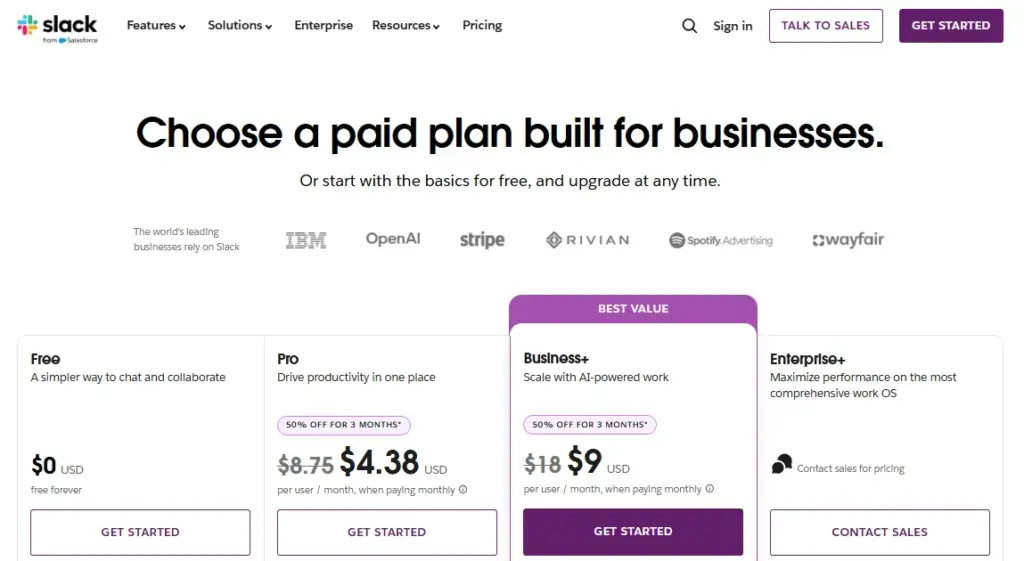
Slack offers a free plan with 90 days of message history and up to 10 apps/integrations. The Pro plan costs $7.25/user/month billed annually on the official pricing page checked June 2026. Slack may display a temporary promotional rate (such as 50% off for 3 months), but the standard annual price is $7.25/user/month.
What Slack does well
- Channels and threads keep conversations organized by topic, project, or team. Search pulls up context from months of history on paid plans.
- Huddles offer quick audio and video calls without switching apps. For a 5-person remote team, this replaces most ad hoc meetings.
- Slack Connect enables external collaboration with clients, vendors, and partners inside your workspace.
- 2,600+ app integrations connect Slack to project management, CRM, help desk, and DevOps tools.
- Workflow Builder automates routine requests, approvals, and status updates without code.
Where Slack falls short
- The free plan limits message history to 90 days and caps integrations at 10 apps. A 10-person team outgrows these limits within the first month.
- Slack is not a project management system. You cannot build timelines, assign dependencies, or create portfolio views natively.
- AI summaries, Enterprise Search, and native DLP require higher tiers or the sales-led Enterprise+ plan.
Total cost at scale
| Team size | Pro (annual) |
|---|---|
| 5 users | $36.25/mo |
| 10 users | $72.50/mo |
| 25 users | $181.25/mo |
What this means: Slack Pro at $7.25/user/month is a mid-range entry point in this list, not the cheapest. But it delivers the broadest integration ecosystem. Advanced controls, compliance features, and AI add-ons push costs to Business+ or Enterprise+ tiers, which require contacting sales.
Avoid Slack if
Your team needs project tracking, task dependencies, or structured work management inside one native system. Slack is a communication hub, not a project management platform. A 15-person operations team that tries to run sprints inside Slack channels will need a separate tool within weeks.
Setup difficulty: Low. Most teams are productive within an hour.
Verdict: Choose Slack if your team communicates primarily through chat and needs deep integration with tools like Asana project management, Jira, or Google Drive. Skip it if your main workflow is document collaboration or project planning.
Best for Microsoft Ecosystem: Microsoft Teams
Microsoft Teams is the best collaboration tool for organizations standardized on Microsoft 365, Outlook, SharePoint, OneDrive, Word, Excel, and PowerPoint.
Pricing and plans
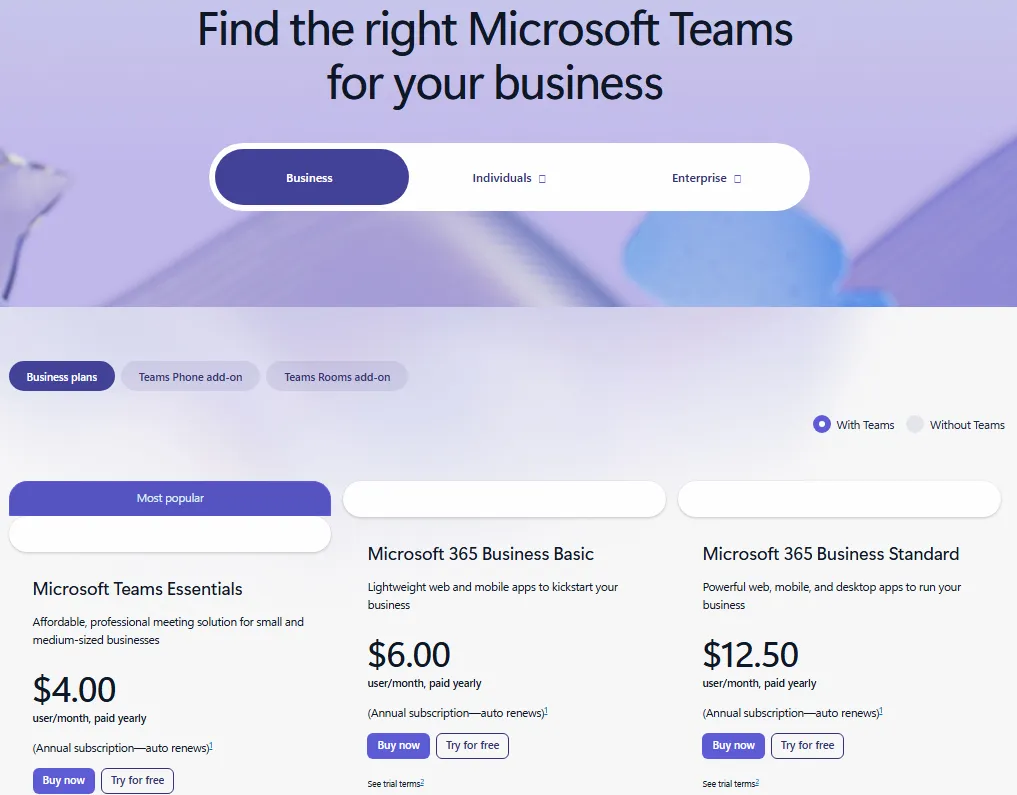
Teams Essentials costs $4.00/user/month paid yearly. Microsoft 365 Business Basic costs $6.00/user/month paid yearly. Business Standard costs $12.50/user/month paid yearly. All business plans support 1-300 employees. The official pricing page includes Try for free links and trial terms.
What Teams does well
- Native Microsoft 365 integration means chat, files, calendar, and office apps share a single workspace. Your team does not need to sync across separate tools.
- Teams Essentials includes 10 GB cloud storage per user. Business Basic and Standard include 1 TB per user.
- 250+ integrated business apps plus native connection to SharePoint, OneDrive, and Power Platform.
- Video conferencing with recordings, transcripts, live captions, and guest access.
Where Teams falls short
- Copilot Business is a separate $21/user/month add-on. Teams Phone and Rooms are separate products.
- Teams delivers the best value when your organization already uses Microsoft 365. Non-Microsoft teams find the interface heavier and less intuitive than Slack.
- Monthly pricing is not disclosed on the cited business pricing page, so annual commitment is effectively required.
Total cost at scale
| Team size | Essentials (annual) | Business Basic (annual) | Business Standard (annual) |
|---|---|---|---|
| 10 users | $40.00/mo | $60.00/mo | $125.00/mo |
| 25 users | $100.00/mo | $150.00/mo | $312.50/mo |
What this means: Teams Essentials is the cheapest paid entry point in this entire list at $4.00/user/month. But the real value shows when you factor in the Office apps and 1 TB storage on Business Basic and Standard. A 10-person team that would otherwise pay separately for email, storage, and office suite saves hundreds monthly.
Avoid Teams if
Your team does not use Microsoft 365 and wants a lighter chat-first tool. A 5-person SaaS startup on Google Workspace will find Teams redundant and heavy. The ecosystem lock-in only pays off if you are already invested in Microsoft.
Setup difficulty: Medium. IT admin setup for SharePoint, permissions, and channel structure takes longer than Slack.
Verdict: Choose Teams if your organization already runs on Microsoft 365. The per-user cost is hard to beat. For non-Microsoft teams, Slack team chat analysis is the better fit.
Best for Document Collaboration: Google Workspace
Google Workspace is the best collaboration tool for teams that work primarily in Gmail, Docs, Sheets, Slides, Drive, Meet, Chat, and Calendar.
Pricing and plans
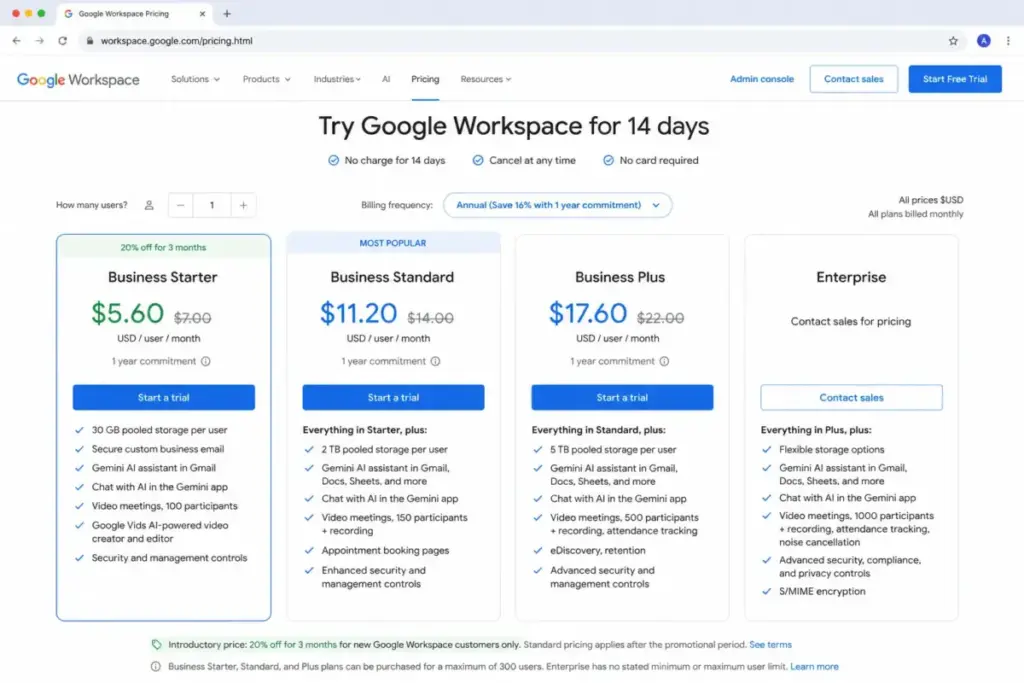
Business Starter standard displayed price is $7.00/user/month in the annual one-year commitment view (as of June 2026). The page also displays $5.60/user/month promotional discount details dated June 16, 2026 through September 16, 2026. No business free plan is available, but a 14-day trial is offered.
What Google Workspace does well
- Real-time co-editing in Docs, Sheets, and Slides is the strongest document collaboration experience in this list.
- 30 GB pooled storage per user on Starter, with higher limits on Standard and Plus.
- Google Meet supports 100-participant video meetings on Starter.
- Gemini AI features are integrated across Gmail, Docs, and other Workspace apps.
- Calendar, Chat, and Drive create a familiar productivity suite most users know from personal Google accounts.
Where Google Workspace falls short
- Starter, Standard, and Plus cap at 300 users. Enterprise requires contacting sales.
- Workspace is document-suite-first, not project-management-first. There is no native Gantt chart, dependency tracking, or sprint management.
- The promotional pricing is date-bound and should not be treated as permanent standard pricing.
Avoid Google Workspace if
Your team needs advanced project management, dependencies, Kanban workflows, or portfolio reporting as the main collaboration layer. A 20-person agency running complex client projects will still need a separate tool like Asana or ClickUp for structured work.
Setup difficulty: Low. Most users are already familiar with the Google interface.
Verdict: Choose Google Workspace if your team collaborates heavily through documents, email, and meetings. The suite approach eliminates app-switching for document-first workflows.
Best for Cross-Functional Project Management: Asana

Asana is the best collaboration tool for cross-functional teams that need structured tasks, timelines, dashboards, forms, portfolios, goals, and automations.
Pricing and plans
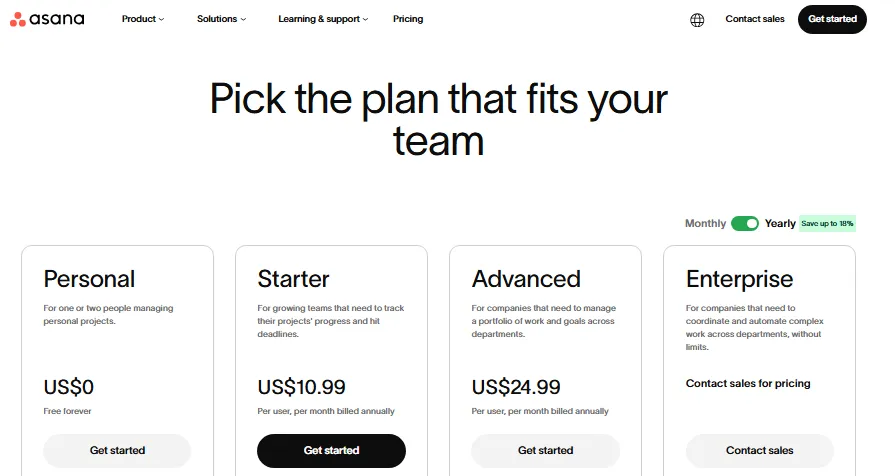
Asana Personal is free for up to 2 users with unlimited tasks/projects and 100 MB max per file. Starter costs $10.99/user/month billed annually or $13.49 billed monthly.
What Asana does well
- Timeline and Gantt views give project managers clear visibility into dependencies and deadlines.
- Portfolios and goals (on Advanced and higher) connect individual tasks to company-level objectives.
- 100+ free integrations plus Salesforce, Tableau, and Power BI integrations on higher tiers.
- Unlimited automations on Starter make it easy to reduce repetitive task management.
- Forms and custom fields standardize how work enters your system.
Where Asana falls short
- The free plan is limited to 2 users. Any team of three or more needs a paid plan.
- Portfolios, goals, workload planning, approvals, and proofing require Advanced or higher.
- Asana is not a native chat hub. Teams still need Slack or Teams for real-time communication.
Total cost at scale
| Team size | Starter (annual) | Starter (monthly) |
|---|---|---|
| 5 users | $54.95/mo | $67.45/mo |
| 10 users | $109.90/mo | $134.90/mo |
| 25 users | $274.75/mo | $337.25/mo |
What this means: Asana’s pricing is transparent but adds up. A 10-person team on Starter pays $109.90/month annually, and upgrading to Advanced for portfolios and goals increases that cost. The 2-user free plan is too restrictive for any real team.
Avoid Asana if
You want a primary chat or live meeting replacement. A 10-person customer support team that communicates mainly through real-time messages will find Asana’s project-first design frustrating for daily communication.
Setup difficulty: Medium. Setting up workflows, custom fields, and team permissions takes planning.
Verdict: Choose Asana if your team needs structured cross-functional project collaboration with clear timelines and goal tracking. For Asana pricing details, check the pricing page for current tier breakdowns.
Best All-in-One Work Hub: ClickUp

ClickUp is the best collaboration tool for operations-heavy teams that want tasks, docs, goals, dashboards, chat, forms, whiteboards, time tracking, and AI in one configurable platform.
Pricing and plans
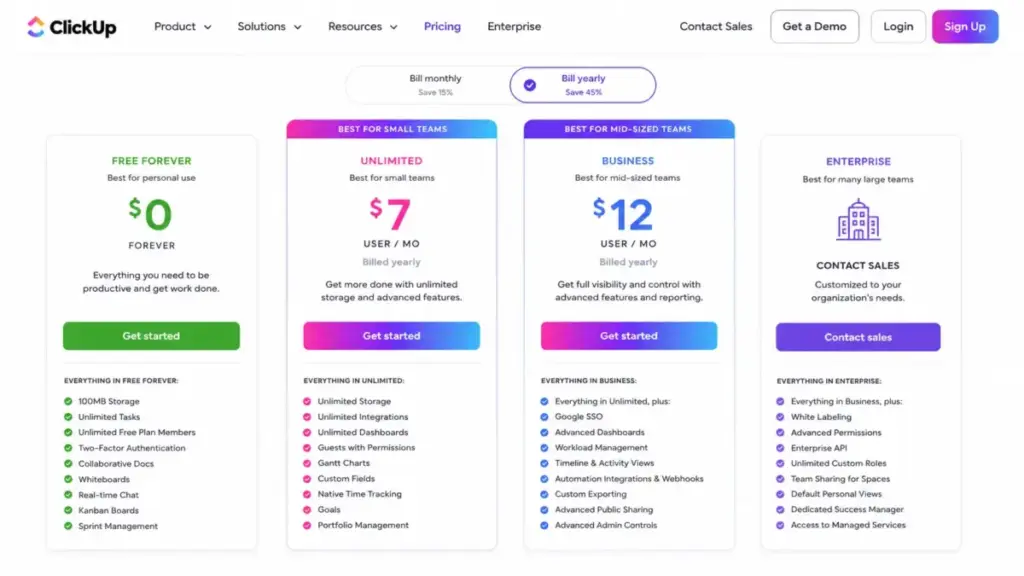
ClickUp offers a Free Forever plan with 60 MB storage, unlimited tasks, unlimited free plan members, docs, Kanban boards, calendar, sprint management, and one form. Unlimited costs $7/user/month billed yearly or $10/user/month monthly. AI is priced separately: Brain AI at $9/user/month and Everything AI at $28/user/month.
What ClickUp does well
- Broadest feature set in this list: tasks, docs, Kanban, calendar, sprints, Gantt, goals, portfolios, time tracking, resource management, and ClickUp Chat.
- Integrations with Slack, HubSpot, Google Drive, and other tools.
- Custom fields and views make it highly configurable for different team workflows.
- $7/user/month for Unlimited is one of the lowest paid entry points for a full-featured work hub.
Where ClickUp falls short
- Free storage is only 60 MB, which fills quickly with file attachments.
- The broad feature set creates a steep learning curve. A 5-person team that wants simple task tracking may feel overwhelmed by configuration options.
- AI adds separate cost through Brain AI, Everything AI, and AI Super Credits. A 10-person team adding Brain AI pays an extra $90/month on top of the Unlimited plan.
Total cost at scale (work management + AI)
| Team size | Unlimited only (annual) | Unlimited + Brain AI |
|---|---|---|
| 5 users | $35.00/mo | $80.00/mo |
| 10 users | $70.00/mo | $160.00/mo |
| 25 users | $175.00/mo | $400.00/mo |
What this means: ClickUp’s base pricing is competitive, but AI pricing changes the math. The real question is whether your team needs AI features or just the core work management platform. At 10 users with Brain AI, you are paying $160/month, which is comparable to Asana Starter without AI.
Avoid ClickUp if
Your team wants a minimal tool with very little setup or configuration. A 3-person freelance team that just needs a Kanban board will find ClickUp’s depth unnecessary. Trello does that job faster and cheaper.
Setup difficulty: High. Configuring workspaces, views, custom fields, and permissions takes time.
Verdict: Choose ClickUp if your team wants to consolidate project work, docs, goals, and chat under one roof. For teams evaluating alternatives, see our ClickUp platform analysis.
Best for Visual Workflow Tracking: monday.com
monday.com is the best collaboration tool for teams that want visual boards, workflow tracking, docs, templates, dashboards, and approachable process management.
Pricing and plans
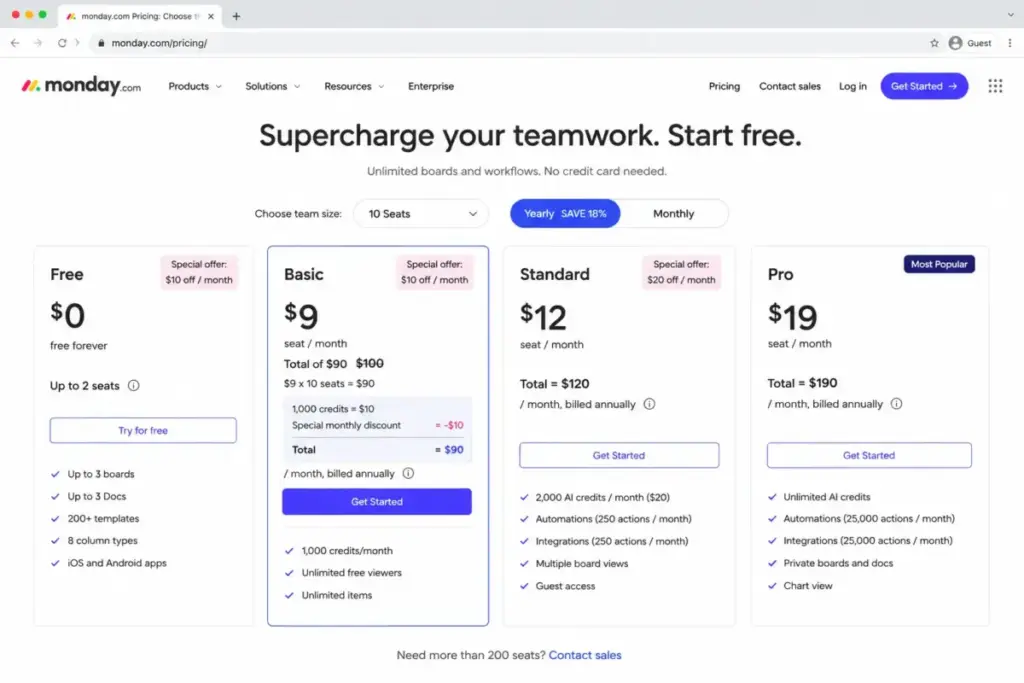
monday.com Free is up to 2 seats with up to 3 boards, 3 docs, 200+ templates, and 8 column types. Basic costs $9/seat/month billed annually in the official 10-seat pricing view. Paid plans use bucket pricing starting at a minimum of 3 seats, then ascending in multiples of 5. New users automatically start a 14-day free Pro trial.
What monday.com does well
- Visual board interface is one of the most approachable in this list. Non-technical teams adopt it quickly.
- 200+ templates cover CRM, project tracking, HR, marketing, and more.
- Automations and integrations start on Standard with 250 actions/month.
- Dashboards aggregate data across boards for status reporting.
Where monday.com falls short
- Bucket pricing can require paying for more seats than active users. If you have 4 users, you pay for 5.
- Basic does not include automations or integrations. Those start on Standard.
- Free plan is limited to 2 seats and 3 boards, which is more restrictive than Trello’s free tier.
Here is the catch with monday.com pricing: the published $9/seat/month is for the 10-seat bucket on Basic. But Basic does not include the 250 automation/integration actions that most teams need. Standard at roughly $12/seat/month is the practical tier for operational workflows.
Avoid monday.com if
You need exact per-seat purchasing without bucket pricing or need automation/integration actions on the lowest paid tier. A 4-person startup paying for a 5-seat bucket on Basic, without automations, is overpaying for features they cannot access.
Setup difficulty: Low to Medium. The visual interface is intuitive, but configuring automations and dashboards requires planning.
Verdict: Choose monday.com if your team values visual workflow tracking and wants an approachable interface. For a deeper dive, read our monday.com detailed evaluation.
Best for Knowledge and Docs: Notion

Notion is the best collaboration tool for teams that need a shared wiki, documentation hub, flexible databases, forms, sites, AI search, and lightweight project tracking.
Pricing and plans
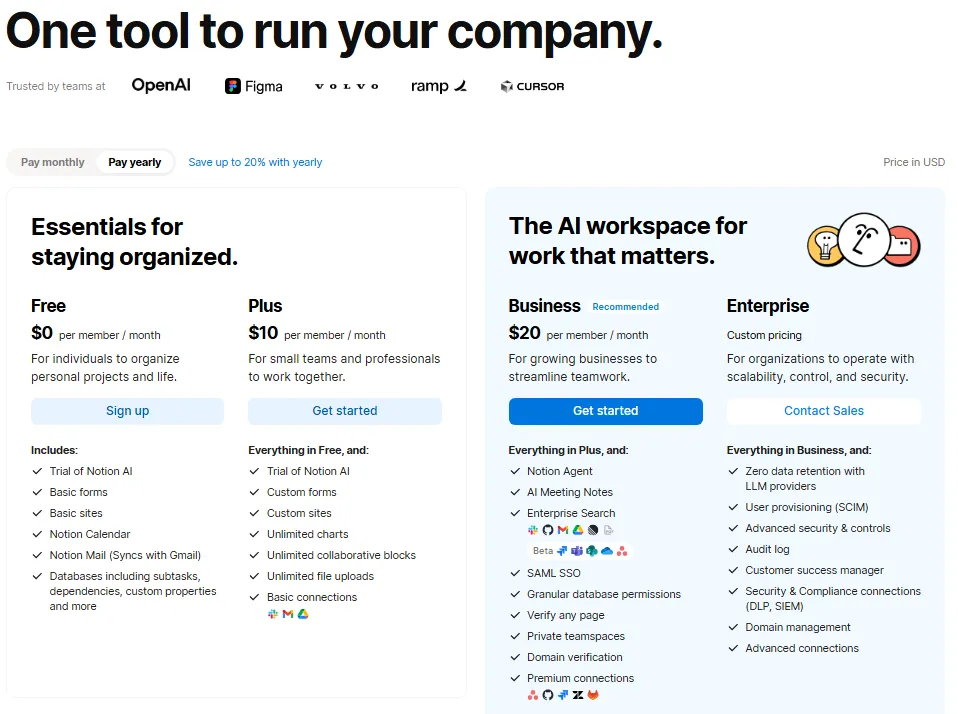
Notion Free includes basic forms, basic sites, Notion Calendar, Notion Mail sync with Gmail, databases, and trial AI capabilities. Plus costs $10/member/month in the yearly view or $12/member/month monthly.
What Notion does well
- Pages, blocks, and databases create a flexible workspace that adapts to wikis, project boards, meeting notes, and CRM-like tracking.
- Notion Calendar and Notion Mail extend the platform beyond documentation.
- Teamspaces organize content by department with permission controls.
- Integrations with Slack, Google Drive, GitHub, Asana, Jira, and Salesforce.
Where Notion falls short
- No native full chat replacement. Teams still need Slack or Teams for real-time communication.
- Multi-member free workspaces have block and file-upload constraints. Free uploads max out at 5 MB.
- Custom domains cost $8/month/domain annually. Custom Agents use credits after trial. These add-ons accumulate.
Avoid Notion if
Your team needs native real-time chat, advanced dependencies, or formal project portfolio controls. A 25-person product team running complex sprints with cross-team dependencies will hit Notion’s project management ceiling quickly.
Setup difficulty: Medium. Building a well-organized workspace with databases, templates, and permissions takes initial investment.
Verdict: Choose Notion if your team prioritizes documentation, wikis, and knowledge sharing over real-time chat or deep project management. For pricing tiers and feature gates, check our Notion pricing breakdown.
Best for Video-First Collaboration: Zoom Workplace
Zoom Workplace is the best collaboration tool for distributed teams, trainers, agencies, and hybrid workplaces that collaborate mainly through meetings, recordings, team chat, docs, whiteboards, clips, and AI notes.
Pricing and plans
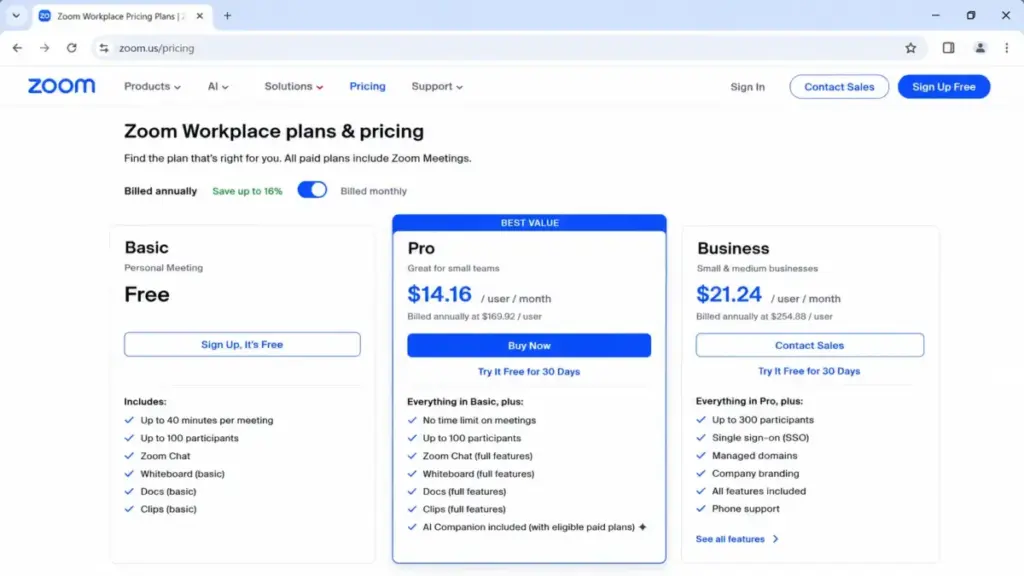
Zoom Workplace Basic is free with 40-minute meetings, 100 participants, team chat, 3 editable whiteboards, and docs with attachments under 10 MB. Pro costs $14.16/user/month billed annually. Monthly pricing should be caveated: official contexts show both $16.99 for new purchase and $15.99 in upgrade views.
What Zoom Workplace does well
- Meeting experience remains the benchmark for video conferencing quality, reliability, and ease of joining.
- AI Companion provides meeting summaries, action items, and smart recordings on paid plans.
- Team Chat, Mail, Calendar, Docs, and Whiteboard extend Zoom beyond meetings into a collaboration layer.
- Pro supports 30-hour meetings and 10 GB cloud storage per user.
Where Zoom Workplace falls short
- Basic meetings are limited to 40 minutes and 100 participants. This is fine for quick calls but forces paid upgrades for any serious meeting schedule.
- Project tracking depth is weaker than dedicated tools like Asana, ClickUp, or monday.com.
- Large Meeting, Phone, Rooms, and webinars require add-ons or higher plans.
Avoid Zoom Workplace if
Your team primarily needs persistent project tracking or rich async threaded chat as the main workspace. A 10-person software team that needs sprint boards, backlog management, and daily task tracking will find Zoom Workplace insufficient as a primary collaboration hub.
Setup difficulty: Low. Zoom’s interface is familiar to most professionals.
Verdict: Choose Zoom Workplace if your team collaborates mainly through meetings and video. For teams evaluating video conferencing options, Zoom remains the strongest standalone video platform in 2026.
Best for Visual Workshops: Miro

Miro is the best collaboration tool for product, design, strategy, consulting, and remote workshop teams that need visual planning, diagrams, brainstorms, roadmaps, retrospectives, and whiteboards.
Pricing and plans
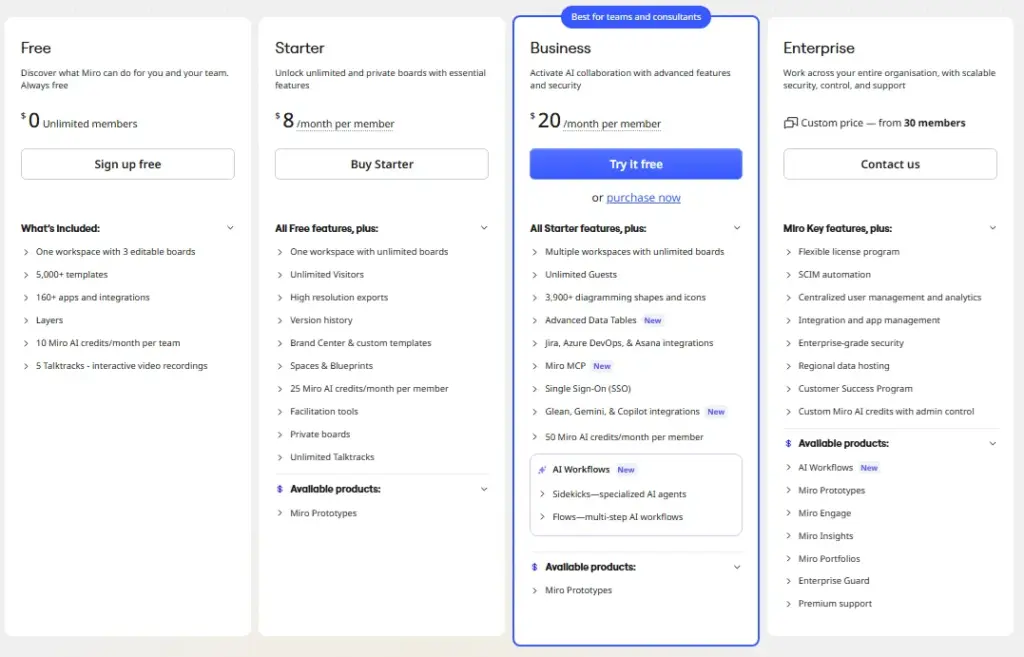
Miro Free includes unlimited members, one workspace with 3 editable boards, 5,000+ templates, 160+ apps/integrations, 10 Miro AI credits per month per team, and 5 Talktracks. Starter costs $8/member/month billed annually or $10/member/month monthly.
What Miro does well
- Infinite canvas is the strongest visual collaboration surface for workshops, brainstorms, and strategy sessions.
- 5,000+ templates cover retrospectives, user story mapping, customer journey maps, and more.
- 160+ integrations including Zoom, Slack, Google Drive, Jira, Confluence, and Asana.
- Docs, Tables, Slides, and Timelines extend beyond whiteboarding into lightweight documentation.
Where Miro falls short
- Free plan has only 3 editable boards. Any team running more than 3 active projects needs a paid plan.
- Miro is a visual collaboration layer, not a full chat, email, or project-management hub.
- Prototypes, Enterprise Guard, advanced AI workflows, and portfolios can be add-ons or higher-tier features.
Avoid Miro if
Your team mainly needs chat, email, daily task execution, or simple document collaboration. A 10-person marketing team that runs daily standups and task assignments does not need an infinite canvas. They need a project management tool.
Setup difficulty: Low to Medium. The canvas interface is intuitive for visual thinkers, but training non-visual team members takes effort.
Verdict: Choose Miro if your team runs workshops, brainstorms, or visual planning sessions regularly. For detailed pricing tiers, see our Miro pricing analysis.
Best Lightweight Kanban Tool: Trello

Trello is the best collaboration tool for small teams, freelancers, agencies, and simple workflows that need visual Kanban task tracking without heavy setup.
Pricing and plans
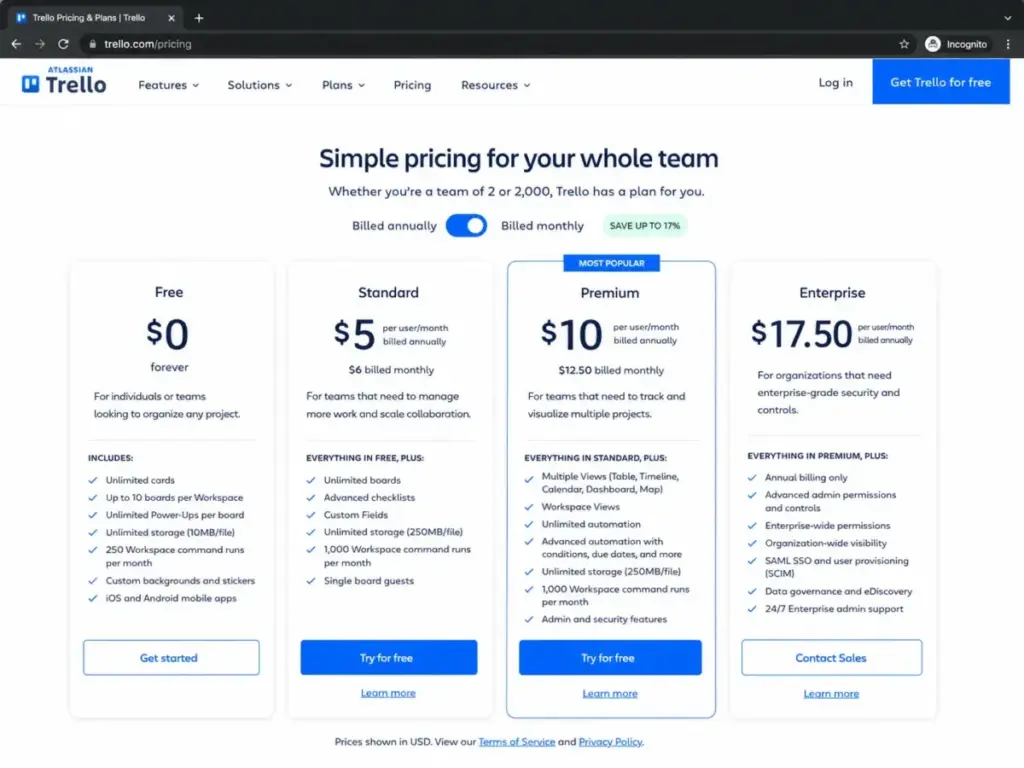
Trello Free is for up to 10 collaborators per Workspace with unlimited cards, up to 10 boards per Workspace, Power-Ups, 10 MB/file, and 250 command runs per month. Standard costs $5/user/month billed annually or $6 monthly. Premium costs $10/user/month annually or $12.50 monthly.
What Trello does well
- The simplest Kanban interface in this list. Drag-and-drop cards, lists, and boards require zero training.
- Free plan is genuinely usable for up to 10 collaborators. That is 5x more generous than Asana’s 2-user free plan and monday.com’s 2-seat free plan.
- Power-Ups add integrations and features without leaving the board.
- $5/user/month Standard is the cheapest paid plan in this ranking.
Where Trello falls short
- No timeline, Gantt, dependency, or portfolio views on Free or Standard. Those require Premium at $10/user/month.
- Free plan caps at 10 boards per Workspace and 10 MB per file.
- Advanced checklists, automations beyond 250 runs, and admin/security features require Premium or Enterprise.
Total cost at scale
| Team size | Free | Standard (annual) | Premium (annual) |
|---|---|---|---|
| 5 users | $0 | $25.00/mo | $50.00/mo |
| 10 users | $0 | $50.00/mo | $100.00/mo |
What this means: Trello is the most affordable option in this list for small teams. The free plan covers up to 10 collaborators, and Standard at $50/month for 10 users is less than half of Asana Starter. But if you need timeline views or advanced automations, Premium doubles the cost.
Avoid Trello if
Your team needs complex project portfolios, resource planning, advanced reporting, or deep native chat and document collaboration. A 20-person engineering team tracking sprints with dependencies and release cycles will outgrow Trello’s Kanban-only design within a quarter.
Setup difficulty: Low. Trello is the easiest tool to set up in this entire list.
Verdict: Choose Trello if your team needs simple, visual task tracking and values fast setup over deep functionality. For more details, read our Trello platform evaluation.
Pricing Comparison: Starting Price vs Practical Tier
| Tool | Starting price (annual) | Practical tier | 10-user cost (annual) | Free plan | Hidden costs |
|---|---|---|---|---|---|
| Slack | $7.25/user/mo | Pro | $72.50/mo | Yes (90-day history) | Enterprise+ for advanced controls, AI add-ons |
| Microsoft Teams | $4.00/user/mo | Business Basic ($6.00) | $60.00/mo | Trial only (business) | Copilot $21/user/mo, Phone add-on |
| Google Workspace | $7.00/user/mo | Business Starter | $70.00/mo | No (14-day trial) | Promo pricing is date-bound, 300-user cap |
| Asana | $10.99/user/mo | Starter | $109.90/mo | Yes (2 users) | Portfolios, goals require Advanced |
| ClickUp | $7.00/user/mo | Unlimited | $70.00/mo | Yes (60 MB storage) | AI Brain $9/user/mo, Everything AI $28/user/mo |
| monday.com | $9.00/seat/mo | Standard (~$12/seat) | $120.00/mo (Standard) | Yes (2 seats) | Bucket pricing, automations start on Standard |
| Notion | $10.00/member/mo | Plus | $100.00/mo | Yes (limited blocks) | Custom domains $8/mo/domain, AI agent credits |
| Zoom Workplace | $14.16/user/mo | Pro | $141.60/mo | Yes (40-min meetings) | Phone, Rooms, Large Meeting add-ons |
| Miro | $8.00/member/mo | Starter | $80.00/mo | Yes (3 boards) | Enterprise Guard, Prototypes, AI workflows |
| Trello | $5.00/user/mo | Standard | $50.00/mo | Yes (10 collaborators) | Timeline/Gantt require Premium at $10/user/mo |
What this means: the cheapest starting price does not always translate to the lowest 10-user cost. Microsoft Teams Essentials at $4.00/user/month looks cheapest, but Business Basic at $6.00/user/month is the practical tier because it includes 1 TB storage and Office apps. ClickUp at $7.00/user/month looks competitive until you add AI. monday.com’s published $9/seat/month does not include automations, so the practical tier is Standard at roughly $12/seat/month.
Maya Patel’s add-on reveal: across these 10 tools, AI features add between $9 and $28 per user per month as separate charges. For a 10-person team, that is $90 to $280/month on top of the base subscription. Budget for the AI tier you actually need, not just the base plan.
Feature Gate Comparison: What Each Tool Unlocks by Plan
| Tool | Automation | AI features | Video/meetings | Docs/wiki | Task management | Admin/SSO |
|---|---|---|---|---|---|---|
| Slack | Workflow Builder (all paid) | AI summaries (Pro+) | Huddles (all plans) | Canvas, Lists (Pro+) | Lists (basic) | Enterprise Grid |
| Microsoft Teams | Power Automate (separate) | Copilot ($21/user add-on) | Built-in (all plans) | SharePoint/OneDrive | Tasks by Planner | Business Basic+ |
| Google Workspace | Apps Script | Gemini (integrated) | Meet (all plans) | Docs/Sheets/Slides (all) | None native | Business Starter+ |
| Asana | Unlimited (Starter+) | AI (Advanced+) | None native | None native | Core strength | Enterprise |
| ClickUp | All plans | Brain AI ($9/user) | None native | Docs (all plans) | Core strength | Business+ |
| monday.com | Standard (250/mo) | AI credits (varies) | None native | Docs (limited free) | Core strength | Enterprise |
| Notion | Plus+ | AI (trial, then credits) | None native | Core strength | Basic (all plans) | Business+ (SSO) |
| Zoom Workplace | None native | AI Companion (Pro+) | Core strength | Docs (all plans) | None native | Business+ |
| Miro | Starter+ | AI credits (10 free/mo) | Video calls (basic) | Docs (Starter+) | None native | Enterprise |
| Trello | 250 runs free, more on Premium | Butler AI (Premium+) | None native | None native | Core strength (Kanban) | Enterprise |
What this means: no single tool covers all six dimensions well. Slack and Teams lead in communication but lack project management. Asana and ClickUp lead in task management but lack native meetings. Google Workspace and Notion lead in documents but lack structured project planning. The practical decision is not “which tool does everything” but “which tool handles your primary workflow, and what do you pair it with?”
Setup and Migration Difficulty
| Tool | Setup difficulty | Why |
|---|---|---|
| Trello | Low | Drag-and-drop boards, no configuration required, productive in minutes |
| Slack | Low | Channel setup takes an hour, most users are already familiar |
| Google Workspace | Low | Familiar Gmail/Docs interface, minimal training needed |
| Zoom Workplace | Low | Join-and-start meeting experience, team chat adds minimal overhead |
| Miro | Low-Medium | Canvas is intuitive, but training non-visual team members takes effort |
| Notion | Medium | Building organized workspace with databases and permissions takes planning |
| monday.com | Medium | Boards are intuitive, automations and dashboards need configuration |
| Asana | Medium | Workflows, custom fields, and team permissions require upfront setup |
| Microsoft Teams | Medium | Channel structure, SharePoint configuration, and permissions need IT planning |
| ClickUp | High | Broadest feature set requires the most configuration time |
What this means: the tools with the most features (ClickUp, Asana) require the most setup time. The tools with the simplest interfaces (Trello, Slack) are productive within an hour. If your team has limited setup capacity, start with a simpler tool and migrate later when complexity is justified.
Which Team Collaboration Tool Should You Avoid?
Every tool on this list has a use case where it is the wrong choice. Here are the most common mismatch patterns:
- Avoid Slack if you need project management as your primary workflow. Slack channels are not task boards.
- Avoid Microsoft Teams if your team does not use Microsoft 365. The value proposition collapses without the ecosystem.
- Avoid Google Workspace if you need structured project tracking with timelines and dependencies.
- Avoid Asana if you need native real-time chat. Your team will end up paying for Asana plus Slack.
- Avoid ClickUp if your team wants a minimal, fast-to-learn tool. The breadth creates configuration overhead.
- Avoid monday.com if you have exactly 4 users and need automations. Bucket pricing and the Standard tier requirement increase your real cost.
- Avoid Notion if you need native chat and advanced project portfolio controls.
- Avoid Zoom Workplace if your team needs persistent project tracking as the main workspace.
- Avoid Miro if your daily work is email, chat, and task assignments, not visual workshops.
- Avoid Trello if your team has more than 15 people running complex multi-project workflows with dependencies.
How to Choose the Right Team Collaboration Tool
Start with these questions before comparing pricing pages:
- What is your team’s primary collaboration mode? Chat-first → Slack or Teams. Documents-first → Google Workspace or Notion. Projects-first → Asana, ClickUp, or monday.com. Meetings-first → Zoom Workplace. Visual-first → Miro.
- How many users need access today and in 12 months? Free plans cap at 2-10 users. Paid costs scale linearly per user. A team growing from 5 to 20 users should calculate the 20-user cost now.
- Which features are non-negotiable? Map your must-have features to plan tiers. Automations, AI, SSO, and advanced admin controls are often gated behind mid-tier or enterprise plans.
- What is your existing tool stack? Microsoft teams should stay with Teams. Google-first teams should stay with Workspace. Integration costs and data migration risks increase with ecosystem switches.
- How much setup complexity can your team absorb? A 3-person startup should start with Trello or Slack. A 50-person department can invest in ClickUp or Asana configuration.
- What is your total budget per user per month? Include the practical tier price, not the starting price. Add AI, storage, and admin add-ons to get the real number.
- Do you need one tool or a combination? Most teams need at least two: one for communication (Slack, Teams, Zoom) and one for work management (Asana, ClickUp, monday.com, Trello). Trying to force one tool into both roles usually creates friction.
Common Mistakes When Choosing Collaboration Software
Choosing by starting price. The starting price is almost never the practical tier. Asana’s free plan covers 2 users. monday.com’s Basic does not include automations. ClickUp’s Free Forever gives you 60 MB of storage. The plan your team actually needs is always one or two tiers higher.
Buying the all-in-one promise. ClickUp, monday.com, and Notion all position as all-in-one platforms. In practice, every team I have analyzed still uses a separate tool for either chat (Slack or Teams) or meetings (Zoom). Budget for two tools, not one.
Ignoring setup time. A tool with 50 features and 3 weeks of configuration time costs more than a simpler tool your team adopts in a day. Factor in the team hours spent on setup, not just the subscription price.
Skipping the 10-user cost calculation. Per-user pricing looks reasonable at 1 user. At 10 users, the monthly cost often surprises buyers. Always calculate the 10-user cost before committing.
Not checking bucket pricing. monday.com uses bucket pricing with a 3-seat minimum ascending in multiples of 5. If your team has 6 users, you pay for 10. This is not disclosed prominently on pricing pages.
Treating AI as free. Slack, ClickUp, Microsoft Teams, and Miro all charge separately for AI features. Budget an extra $9 to $28 per user per month if your team needs AI capabilities.
Choosing a tool your team will not use. The best collaboration tool is the one your team actually opens every day. A technically superior platform that sits unused is worse than a simple tool everyone adopts. Watch adoption rates in the first 30 days.
Final Verdict: Best Team Collaboration Tool for Most Teams
Slack is the best overall team collaboration tool for 2026. It combines the strongest chat experience, the broadest integration ecosystem (2,600+ apps), useful free and affordable paid tiers, and a familiar interface most teams adopt quickly. At $7.25/user/month annual for Pro, it delivers the best balance of communication depth and integration breadth.
But the right choice depends on your primary workflow:
- For Microsoft 365 organizations: Microsoft Teams. You are already paying for it, and the bundled storage and Office apps eliminate redundant subscriptions.
- For document-first teams: Google Workspace. Real-time co-editing in Docs, Sheets, and Slides is the best in category.
- For structured project teams (10-50 people): Asana. Timelines, portfolios, and goals provide the project management depth chat tools lack.
- For consolidation-minded operations teams: ClickUp. The broadest feature set in one platform, though setup takes the longest.
- For visual workflow teams (5-20 people): monday.com. The most approachable board interface for non-technical teams. Budget for Standard tier.
- For remote workshop and design teams: Miro. The strongest visual collaboration canvas.
- For small teams wanting simple task tracking (under 10 people): Trello. Free for up to 10 collaborators, $5/user/month for Standard.
The tool consolidation versus best-in-class specialization decision is the central tension in collaboration software. Most teams perform best with two tools: one for communication (Slack, Teams, or Zoom) and one for work management (Asana, ClickUp, monday.com, or Trello). Trying to replace both with one tool creates gaps in either communication or project tracking.
FAQ
What is the best team collaboration tool overall?
Slack is the best team collaboration tool for most remote and hybrid teams in 2026. It scores highest for communication depth, integration breadth (2,600+ apps), and adoption speed. Pro costs $7.25/user/month annually with a usable free plan. Teams that need project management should pair Slack with a dedicated tool like Asana or ClickUp.
What is the best free team collaboration tool?
Trello offers the most generous free plan for team collaboration, covering up to 10 collaborators per Workspace with unlimited cards and up to 10 boards. Slack Free is useful but limits message history to 90 days. monday.com and Asana free plans cap at just 2 users, which is too restrictive for real team use.
What is the cheapest team collaboration software?
Microsoft Teams Essentials at $4.00/user/month (annual) is the cheapest paid option. Trello Standard at $5.00/user/month is the next cheapest. Slack Pro at $7.25/user/month is mid-range. But cheapest is not always best value. Teams Essentials includes only 10 GB storage per user, while Business Basic at $6.00/user/month adds 1 TB and Office apps.
Which team collaboration tool is best for small businesses?
For small businesses with 5-15 employees, Slack (for chat) paired with Trello (for task tracking) provides the best combination of simplicity and reasonable cost. Total cost for 10 users: roughly $122.50/month (Slack Pro $72.50 + Trello Standard $50, annual billing). If your team prefers visual boards with automations, monday.com Standard is the alternative pick.
Which collaboration tool works best for enterprise teams?
Microsoft Teams is the strongest enterprise collaboration tool because of native Microsoft 365 integration, Active Directory support, compliance controls, and IT admin capabilities. For enterprise project management, Asana Advanced or ClickUp Business offer the depth larger teams need, including portfolios, SSO, and advanced permissions.
How much does team collaboration software cost for a 10-person team?
For a 10-person team on annual billing, monthly costs range from $0 (Trello Free) to $141.60 (Zoom Workplace Pro). Mid-range options include Teams Essentials at $40.00, Trello Standard at $50.00, ClickUp Unlimited at $70.00, Slack Pro at $72.50, and Asana Starter at $109.90. Add $90-$280/month if your team needs AI features.
Can one tool replace all collaboration needs?
No. Based on the analysis of all 10 tools, no single platform handles chat, video, documents, and structured project management equally well. ClickUp comes closest to an all-in-one approach, but most teams still use a separate tool for real-time communication. Budget for at least two tools: one for communication and one for work management.
What features should I look for in team collaboration software?
Yes, if your team communicates daily, you need: real-time messaging or channels, file sharing with adequate storage, integrations with your existing tools, search across message history, and video or audio for meetings. For project-driven teams, add: task assignment, deadline tracking, automation, and reporting. For documentation teams, add: real-time co-editing, wiki structure, and permission controls.