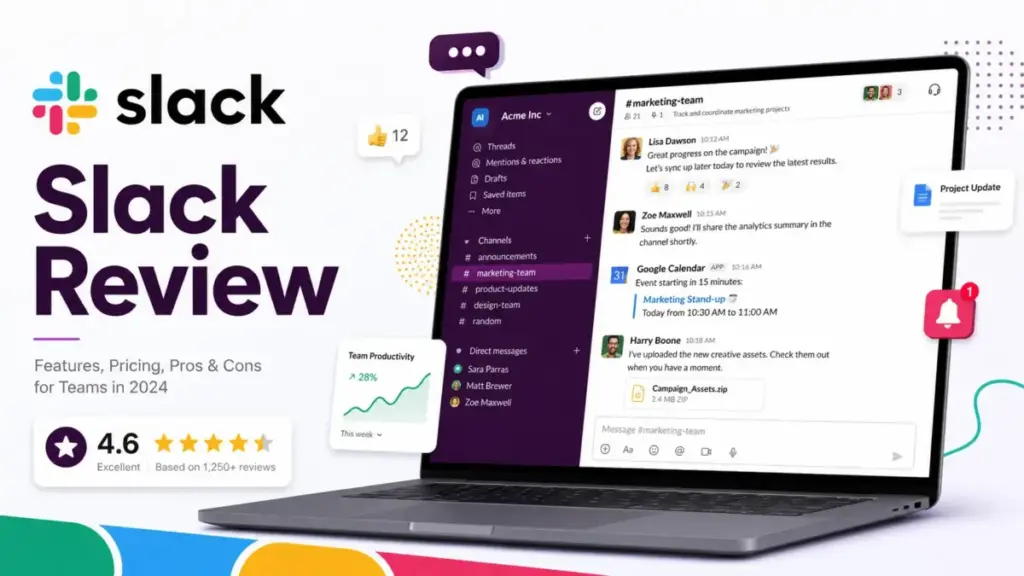
Slack is no longer just a team chat app. This Slack review covers what the product actually is in 2026: a paid work hub with AI summaries, Salesforce integrations, workflow automation, and governance controls baked into every tier. If your team relies on multiple SaaS tools to get work done, Slack probably sits at the center of that stack, or you are deciding whether it should.
I tested Slack across Free, Pro, and Business+ plans to evaluate what works, what costs more than it should, and where competitors like Microsoft Teams or Google Chat fit better. This review breaks down pricing math, feature gates, adoption friction, and the real limits that Slack’s marketing page does not highlight. If you are comparing team collaboration tools for a remote or hybrid team, start here.
Quick Verdict
| Score | 8.7/10 |
| Best for | SaaS-heavy remote and hybrid teams of 10 to 250 people |
| Not best for | Microsoft 365-only teams, price-sensitive small teams, self-hosted security teams |
| Strongest feature | Channels plus integrations across the SaaS stack |
| Biggest risk | Channel sprawl and paid-plan pressure from AI feature gates |
| Best alternative | Microsoft Teams for Microsoft 365 orgs; Google Chat for Workspace-only teams; Mattermost for self-hosted control |
James Carter’s Quick Take
Slack earns an 8.7 because it is still the best channel-based messaging tool for teams that run on SaaS. The integrations are real, the async workflow is strong, and the AI additions on paid plans save daily catch-up time. But the free plan now hides your history after 90 days, the per-user cost adds up fast, and Business+ has become a necessary upgrade for teams that want AI and compliance. If your company already pays for Microsoft 365, Teams is the cheaper pick. If you run Jira, GitHub, Salesforce, Google Drive, and Figma, Slack is the hub that holds everything together.
What Is Slack?
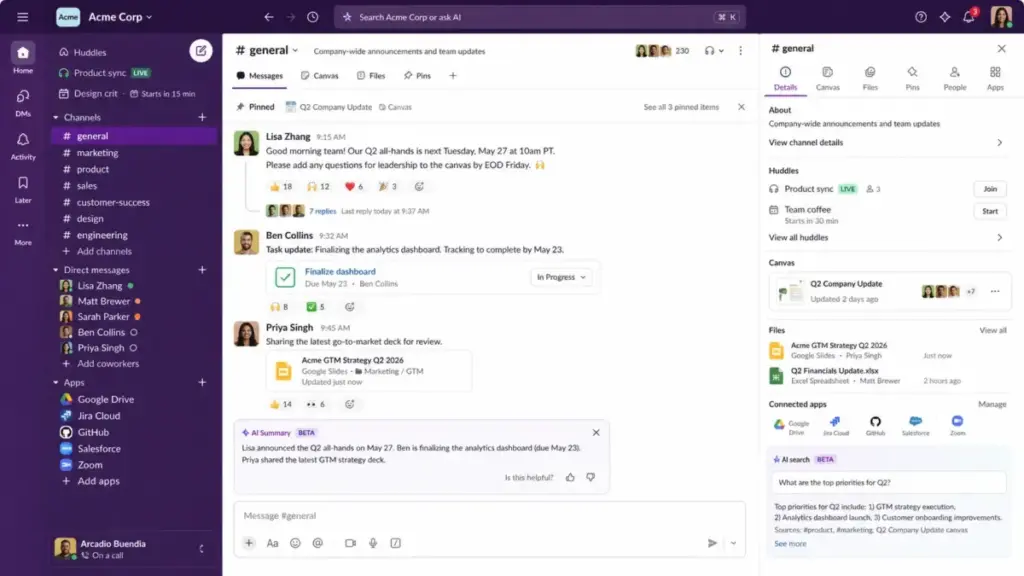
Slack is a workplace messaging platform owned by Salesforce that organizes team communication into channels, direct messages, huddles, and threads. It connects to more than 2,600 apps, supports external collaboration through Slack Connect, and now includes AI features for search, summaries, and workflow automation. Slack runs on desktop, web, iOS, and Android.
Unlike email, Slack structures conversations by topic. Each channel represents a project, team, client, or function. Threads keep side discussions contained. Huddles let you start a quick voice or video call without scheduling. Canvases and lists add lightweight documentation and task tracking inside the workspace. With Salesforce’s ownership, Slack now integrates Agentforce AI agents and deeper CRM workflows for sales and support teams.
What Changed in Slack in 2026?
Slack restructured its plans in mid-2025, and the changes reshaped how teams buy and use the product. The Slack AI add-on is gone. AI features are now baked into plan tiers, which means your plan choice determines your AI access. This matters for budgeting.
Slack AI Is Now Plan-Based
Before June 2025, Slack AI was a paid add-on you could attach to any plan. That option no longer exists on Slack’s website. Now, conversation summaries and huddle notes come with Pro. Advanced AI features (recaps, translations, file summaries, search answers, and workflow generation) sit in Business+ and above. Admins can disable AI features, but Slack’s official documentation confirms that disabling AI does not reduce your bill.
Slack Business+ Became a Bigger Upgrade
Business+ used to be a compliance and admin tier. Now it includes advanced AI, conditional branching in Workflow Builder, data residency, message activity analytics, and advanced Salesforce workflows. For teams that want generative AI inside their chat tool, Business+ is the entry point.
Slack Enterprise+ Targets AI and Governance
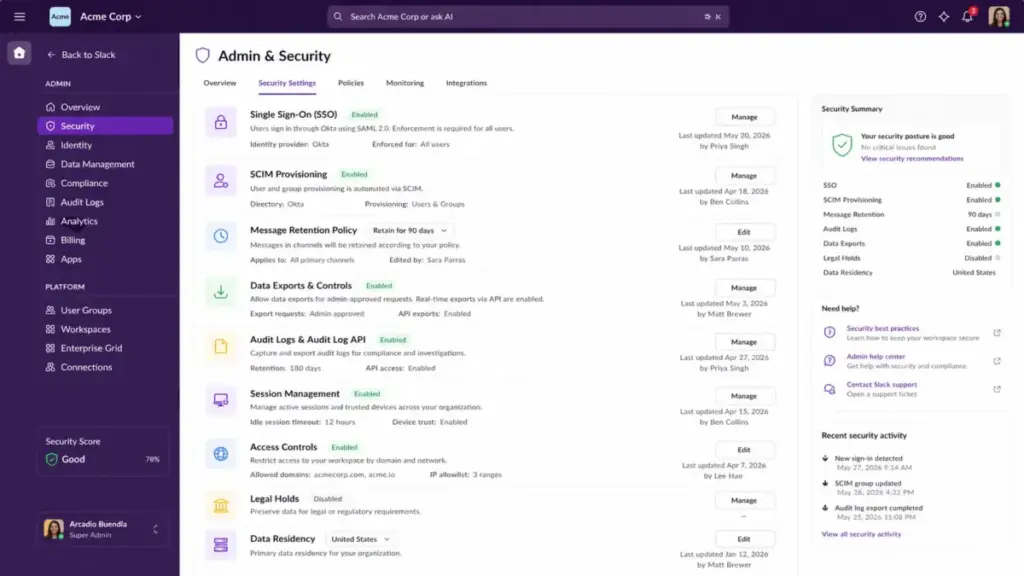
Enterprise+ added enterprise search, native DLP, information barriers, legal holds, Discovery API, audit logs, and HIPAA support. It is Salesforce’s play for regulated industries and large organizations that need AI plus governance under one contract.
Slack Features That Matter
Slack’s value comes from six core capabilities that affect daily workflows, not from a feature checklist. I focused my evaluation on the features that change how teams actually communicate, search, and automate. Here is what matters and where each feature breaks down.
| Feature | Best Use Case | Plan Notes | Limitation |
|---|---|---|---|
| Channels | Organizing conversations by project, team, or client | All plans | Sprawl without naming norms |
| Huddles | Quick voice/video calls without scheduling | Free: 1-to-1 only; Pro+: group | No full meeting features |
| Slack Connect | External collaboration with clients and vendors | Free: 1-to-1 only; Pro+: channels | Both sides need paid plans for channels |
| Workflow Builder | Automating approvals, standup reports, routing | Pro+; conditional branching on Business+ | No code-level logic |
| Apps and Integrations | Connecting Jira, GitHub, Salesforce, Google Drive | Free: 10 apps; Pro+: unlimited | Governance risk without admin controls |
| Slack AI | Summaries, recaps, huddle notes, search answers | Pro: basic; Business+: advanced | Disabling AI does not lower pricing |
Slack Channels Keep Work Organized
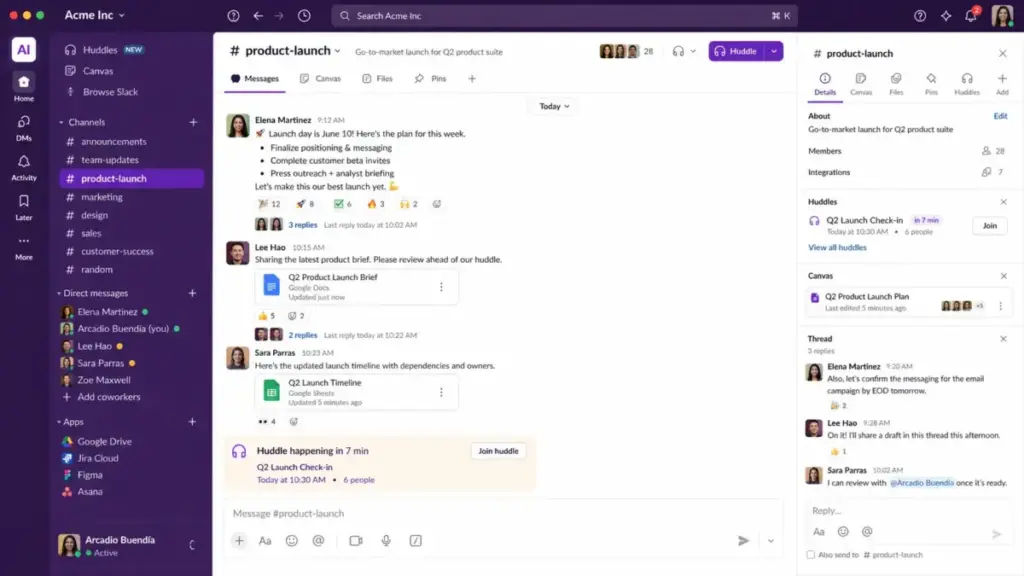
Channels are what separate Slack from email. Each channel is a persistent, searchable conversation about one topic. Public channels let anyone in the workspace follow along. Private channels restrict visibility. When channels are well-named (for example, #proj-website-redesign, #team-engineering, #client-acme), they create a navigable map of your organization’s work. When they are not, you get noise.
The risk is channel sprawl. I have seen workspaces with over 200 channels for 30-person teams. Most are dead. Without a naming convention and archival policy, channels become a source of confusion instead of clarity.
Slack Huddles Replace Quick Meetings
Huddles are lightweight audio and video calls you start from any channel or DM. On paid plans, huddles support group calls with screen sharing and notes. On Free, you are limited to one-to-one huddles.
Are huddles good enough to replace scheduled meetings? For five-minute clarifications and quick pairing sessions, yes. For structured meetings with agendas, recording, and transcripts, you still need Zoom or Teams. Think of huddles as the replacement for tapping someone on the shoulder, not for your weekly all-hands.
Slack Connect Handles External Collaboration
Slack Connect lets you share channels with external organizations. This is valuable for agencies managing client projects, sales teams working with partners, and support teams collaborating with vendors. On Free, Slack Connect is limited to one-to-one direct messages. On Pro and above, you can create shared channels with external workspaces.
The catch: both organizations need Slack on a paid plan for full channel-based collaboration. If your client uses Microsoft Teams, Slack Connect does not help.
Slack Workflow Builder Automates Repeated Work
Workflow Builder lets non-technical users automate common tasks: standup collection, approval routing, onboarding checklists, PTO requests, and channel notifications. On Pro, you get the basic builder. On Business+, you get conditional branching, which adds if/then logic.
For simple automations, Workflow Builder works. For anything that needs external API calls, database lookups, or complex logic, you will need the Slack API or a tool like Zapier.
Slack Apps and Integrations Expand the Workspace
Slack’s app marketplace is one of its strongest advantages. Google Drive, Salesforce, Asana, Zoom, Jira, GitHub, Zapier, Dropbox, Loom, and Miro all have native Slack integrations. On Free, you are limited to 10 app integrations. On Pro and above, there is no limit.
The governance risk is real. When admins approve apps without review, every app gets access to channel data. For teams with more than 30 installed apps, I recommend an app approval workflow and quarterly audits. The marketplace is a strength, but it is also an admin surface area that grows with every integration.
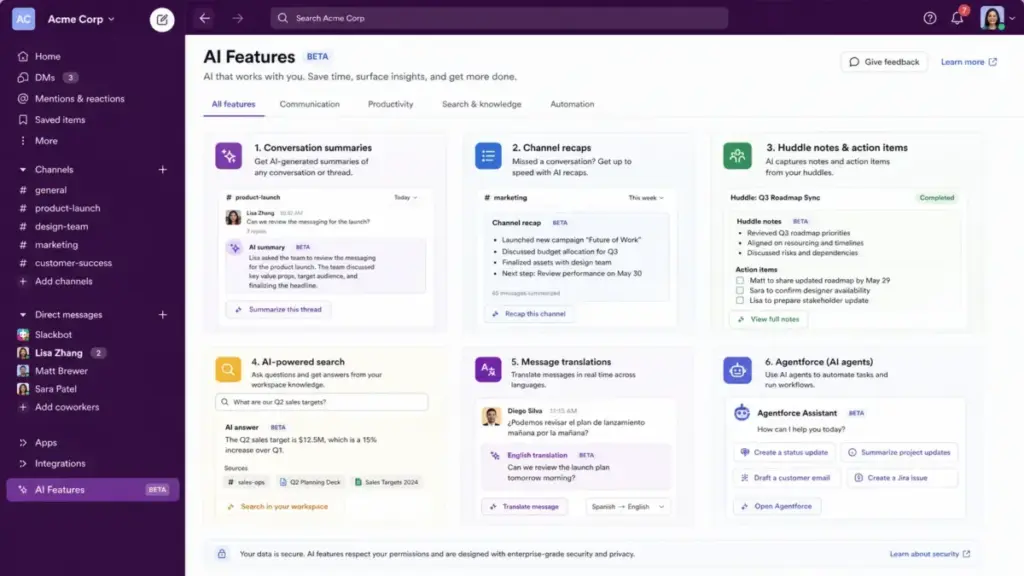
Slack AI Summarizes and Searches Work
Slack AI on Pro gives you conversation summaries and huddle notes. On Business+, you get recaps (daily or weekly digests of channels you follow), translations, file summaries, and search answers that pull context from your workspace history.
The search angle matters most. As one verified Capterra reviewer noted in 2025, “The searchability feature in Slack needs an improvement.” Slack AI’s search answers on Business+ partially solve this by surfacing contextual responses instead of raw message lists. But search quality still depends on thread discipline, channel naming, and access to historical data.
Slack User Experience
Slack’s onboarding is fast, but the real test comes after 30 days when notification fatigue and channel entropy set in. The first-use experience is polished. The long-term experience depends on team discipline.
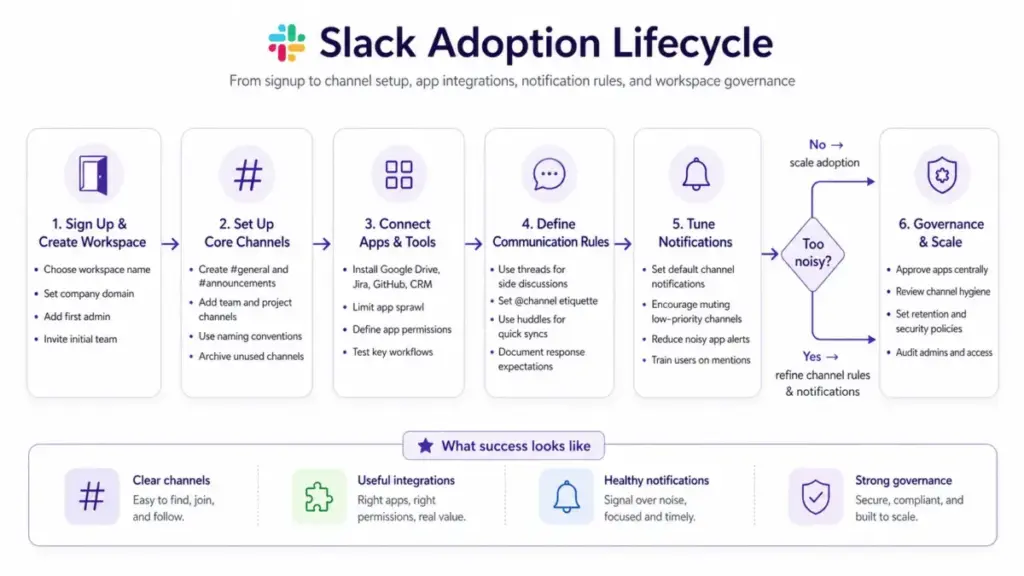
The First 30 Minutes With Slack
Signing up takes less than two minutes. You name your workspace, create a few channels, and invite your team by email or link. Slack walks you through sending your first message, starting a huddle, and installing an app. The desktop and mobile apps are responsive and well-designed. Compared to Microsoft Teams, the initial interface feels lighter and more focused.
The First 30 Days With Slack
Here is where things get real:
- Week 1: Team joins. First channels are created. People figure out threads vs. channel replies. DM volume is high because channel norms are not set yet.
- Week 2: App integrations go in (Jira, Google Drive, GitHub). Notifications from apps start competing with human messages. Someone creates a #random channel that slowly fills with noise.
- Week 3: Channel count starts growing. Teams create channels for every meeting, decision, and side conversation. Without archival rules, dead channels accumulate.
- Week 4: Notification overload hits. As one Capterra reviewer observed, “strict notification discipline is needed.” Users start muting channels. Search becomes the primary way to find past decisions. If threads were not used consistently, search results are messy.
This lifecycle is predictable. Teams that set channel naming conventions, thread expectations, and notification defaults in week one have a better experience in month three.
Where Slack Becomes Noisy
Slack Notification Debt Scorecard
| Signal | Low Risk | Warning | High Risk |
|---|---|---|---|
| Channels per employee | Under 2 | 2 to 4 | Over 4 |
| Daily @channel use | Rare | Weekly | Daily |
| Unread channels | Under 5 | 5 to 15 | Over 15 |
| Apps installed | Under 10 | 10 to 30 | Over 30 |
| Search success | Fast | Inconsistent | Poor |
If your team scores “Warning” or “High Risk” on three or more signals, Slack is creating more noise than clarity. The fix is not a different tool. The fix is channel hygiene, thread norms, and notification defaults set by admins, not left to individual preferences.
Search and Knowledge Retrieval
Slack search works best when threads are used, channels are named clearly, and message history is unlimited (Pro and above). On the Free plan, search only covers the last 90 days of messages and files. Older data can be deleted after one year. This creates a knowledge-retention ceiling for teams that rely on Slack as institutional memory.
On Business+, Slack AI improves search with contextual answers. But even with AI, search quality depends on how consistently your team structures conversations.
Slack Pricing and Real Cost
Slack charges per active user per month, and the annual cost adds up faster than most teams expect. The pricing itself is straightforward. The gaps between plans are not. Pricing verified as of April 29, 2026 using Slack’s official pricing page. Slack occasionally runs promotions; confirm current pricing before purchase.
For a detailed breakdown, see our full Slack pricing guide.
| Plan | Monthly Price | Annual Price | Best For | Key Limits | Verified Date |
|---|---|---|---|---|---|
| Free | $0 | $0 | Trying Slack; very small teams | 90-day history, 10 apps, 1:1 huddles | April 2026 |
| Pro | $8.75/user/mo | $7.25/user/mo | Growing teams needing full history and integrations | No advanced AI, no data residency | April 2026 |
| Business+ | $18/user/mo | $15/user/mo | Teams needing advanced AI, compliance, Salesforce depth | No DLP, no legal holds, no HIPAA | April 2026 |
| Enterprise+ | Custom | Custom | Large regulated organizations | Sales-led pricing | April 2026 |
Slack Free Plan Limits
The Free plan gives access to the most recent 90 days of message and file history. Data older than one year can be deleted on a rolling basis. You are limited to 10 app integrations, one-to-one huddles, and one-to-one Slack Connect. There is no Workflow Builder. Canvases work only in channels and DMs.
This is usable for a 3-person team testing Slack. For any team that needs to search past decisions, onboard new hires with context, or run more than 10 integrations, Free is a trial, not a plan.
Slack Pro Pricing
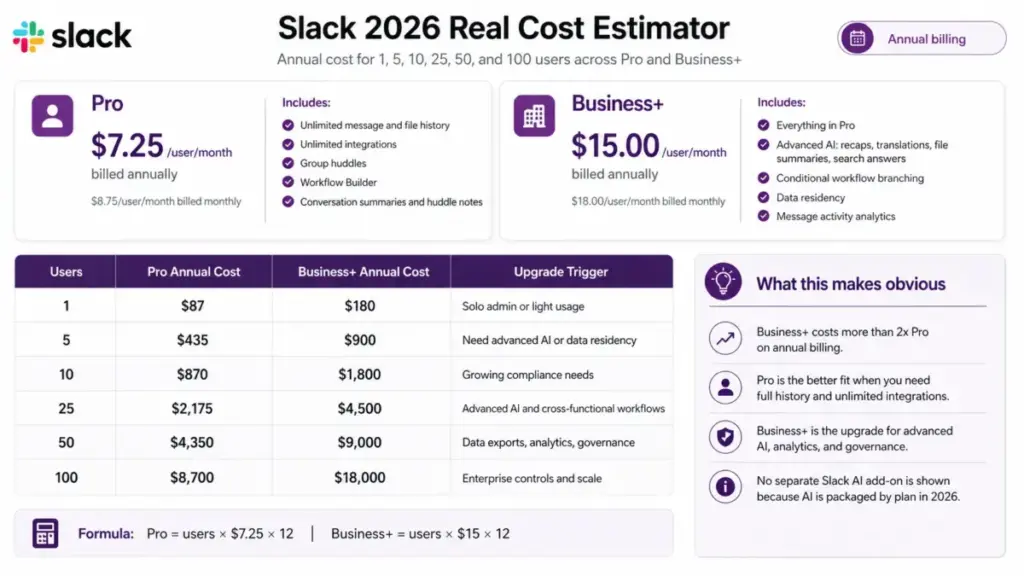
Pro costs $7.25 per active user per month billed annually, or $8.75 billed monthly. You get unlimited message and file history, group huddles, unlimited integrations, Workflow Builder, conversation summaries, and huddle notes.
Slack Business+ Pricing
Business+ costs $15 per active user per month billed annually, or $18 billed monthly. It adds advanced AI (recaps, translations, file summaries, search answers), conditional workflow branching, data residency, message analytics, and advanced Salesforce features.
Slack Enterprise+ Pricing
Enterprise+ requires a sales conversation. It adds enterprise search, native DLP, information barriers, legal holds, Discovery API, audit logs, HIPAA support, and Enterprise Key Management as an add-on. This is Slack’s regulated-enterprise tier.
What Slack’s Pricing Page Does Not Make Obvious
- Free plan data loss is real. After 90 days, your team loses access to older messages and files. After one year, that data can be permanently deleted. For a 10-person startup that relies on Slack as its knowledge base, this is a trap.
- Active user billing helps, but headcount matters. Slack bills only for active users, which saves money when contractors or seasonal staff go idle. But for a 50-person team where everyone is active daily, your cost is 50 seats.
- The jump from Pro to Business+ is steep. Going from $7.25 to $15 per user per month more than doubles your annual cost. The trigger is usually AI features, data residency, or compliance exports.
- Disabling AI does not reduce your bill. If your team upgrades to Business+ for compliance features but wants AI off, Slack’s pricing does not change.
- Microsoft 365 teams may double pay. If your organization already pays for Microsoft 365, you have Microsoft Teams included. Adding Slack means paying twice for team chat. That is justified only if Slack’s integrations and channel experience add enough value over Teams.
Slack Annual Cost by Team Size
| Team Size | Pro Annual Cost | Business+ Annual Cost | Upgrade Trigger |
|---|---|---|---|
| 1 user | $87 | $180 | N/A |
| 5 users | $435 | $900 | Need AI search or data residency |
| 10 users | $870 | $1,800 | Growing compliance requirements |
| 25 users | $2,175 | $4,500 | Advanced AI, Salesforce workflows |
| 50 users | $4,350 | $9,000 | Data exports, admin analytics |
| 100 users | $8,700 | $18,000 | Enterprise governance and AI |
Formula: Pro annual = users × $7.25 × 12. Business+ annual = users × $15 × 12.
Slack Pros and Cons
Slack’s strengths center on structured messaging and integrations; its weaknesses center on cost pressure and adoption discipline. After testing across plans and team sizes, here is my honest breakdown.
- Best-in-class channel-based messaging. No competitor organizes async conversations as well as Slack’s channels and threads.
- Strong app ecosystem. Over 2,600 integrations. Google Drive, Jira, Salesforce, GitHub, and Zapier work natively.
- Fast cross-functional collaboration. Channels break down team silos faster than email chains.
- Good external collaboration. Slack Connect lets agencies, sales teams, and support teams share channels with clients and partners.
- Strong async context. Threads, files, canvases, and lists keep decisions and context inside conversations.
- AI summaries reduce catch-up time. Conversation summaries on Pro and recaps on Business+ help users who join channels late or return from time off.
- Enterprise controls available at high tiers. DLP, legal holds, audit logs, HIPAA, and Enterprise Key Management exist for regulated buyers.
- Free plan history limit can break knowledge retention. 90-day access and one-year data deletion risk make Free unsuitable for any team that treats Slack as a knowledge base.
- Paid cost rises quickly by active user. A 50-person team on Business+ pays $9,000 per year.
- Notification overload is a real adoption risk. Without channel norms and notification defaults, Slack becomes a source of anxiety, not productivity.
- Microsoft 365 teams may already have Teams. Paying for Slack on top of a Microsoft 365 subscription creates cost duplication.
- Advanced AI and governance push users to Business+. The Pro-to-Business+ price jump is significant, and AI is the primary driver.
- Search can frustrate users without disciplined channel structure. Thread consistency, naming conventions, and historical access all affect search quality.
- App governance requires admin discipline. Every installed app gets data access. Without review policies, the marketplace becomes a security surface.
- Compliance exports and legal features are high-tier. Data exports, legal holds, and DLP require Business+ or Enterprise+.
Slack vs Alternatives
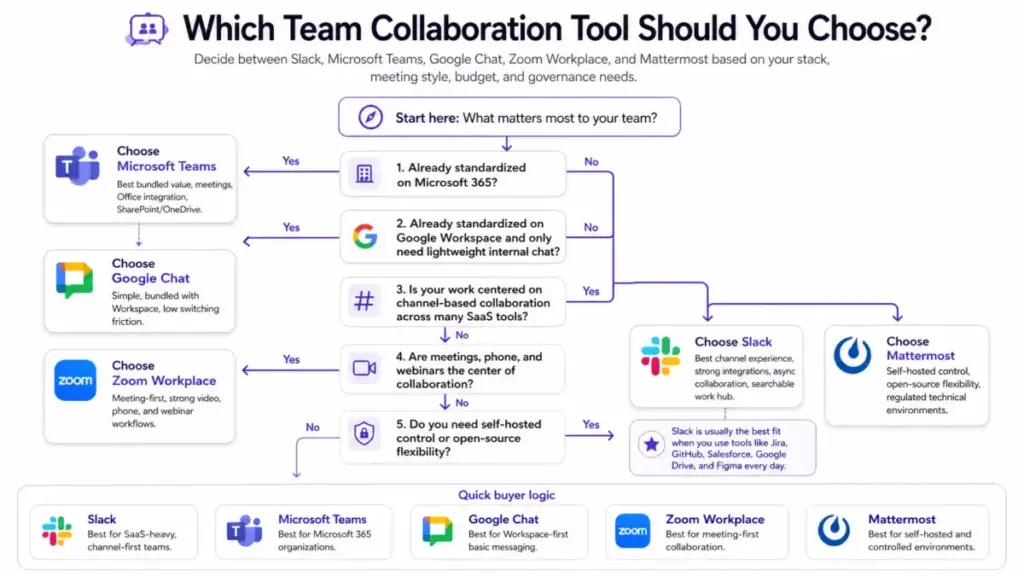
Slack is the best channel-based messaging tool for SaaS-heavy teams, but it is not the best choice for every organization. The right answer depends on your existing software stack, meeting culture, and budget.
Slack vs Microsoft Teams
Microsoft Teams is bundled with Microsoft 365. If your company already pays for Microsoft 365 Business Basic ($6/user/month) or higher, you have Teams included. Adding Slack Pro on top means paying an extra $7.25 per user per month for chat.
Slack wins on channel organization, third-party integrations, and developer-oriented workflows. As one Reddit user noted in 2026, “Slack felt faster and cleaner.” Teams wins on bundled value, video meetings, SharePoint/OneDrive file management, and enterprise procurement simplicity.
My verdict: Choose Teams if your company standardizes on Microsoft 365 and chat is secondary to meetings and Office documents. Choose Slack if collaboration happens across many SaaS tools and channels matter more than bundled cost.
Slack vs Google Chat
Google Chat is included with Google Workspace. For teams that live in Gmail, Google Docs, Google Calendar, and Google Drive, Chat provides basic messaging without adding another vendor.
Slack wins on channel depth, app ecosystem, workflow automation, and search quality around team communication. Google Chat wins on switching friction (zero, if you already use Workspace) and admin simplicity.
My verdict: Google Chat is good enough for lightweight internal communication. Slack is better when chat becomes an operational command center with integrations, automations, and external collaboration.
Slack vs Zoom Workplace
Zoom Workplace centers on meetings, video, phone, and webinars. Its chat and channels exist but are secondary to synchronous communication.
Slack wins on persistent channels, async collaboration, integrations, and searchable work history. Zoom wins when your team’s primary collaboration mode is live meetings, phone calls, and webinars.
If your team is evaluating meeting-first platforms alongside Slack, our best video conferencing tools guide ranks Zoom, Teams, Google Meet, and seven other options by reliability and cost.
Slack vs Mattermost
Mattermost is an open-source, self-hosted messaging platform for technical teams that need data control.
Slack wins on polish, marketplace ecosystem, onboarding speed, and broad business adoption. Mattermost wins on self-hosted control, air-gapped environments, and open-source extensibility.
My verdict: Mattermost fits security-sensitive engineering teams in regulated industries. Slack fits cross-functional business teams that need integrations over infrastructure control.
Slack vs Discord and Pumble
Discord, Pumble, and Rocket.Chat serve budget-sensitive teams, communities, and simple chat use cases. They are cheaper or free. They lack Slack’s enterprise controls, compliance features, and SaaS integration depth.
My verdict: Use these when Slack’s paid plan is too expensive for what you need, or when your team is small enough that a simpler tool works.
Alternatives Comparison Table
| Alternative | Choose Slack If | Choose Alternative If | Winner |
|---|---|---|---|
| Microsoft Teams | You run 10+ SaaS tools and need channel-first collaboration | You standardize on Microsoft 365 and need bundled meetings | Depends on stack |
| Google Chat | You need deep integrations, workflows, and external collaboration | You live in Google Workspace and need basic internal chat | Slack for power users |
| Zoom Workplace | Async messaging and integrations are primary | Meetings, phone, and video are the center of work | Different category |
| Mattermost | You need polish, marketplace apps, and broad team adoption | You need self-hosted control in regulated environments | Depends on security needs |
| Discord / Pumble | You need enterprise controls, compliance, and SaaS workflows | Budget is the priority and compliance is not required | Slack for business |
Who Should Use Slack?
Slack fits best when team communication is the operational layer for SaaS workflows, not when chat is a secondary feature. Here are specific team profiles where Slack earns its cost.
1. 15-person SaaS product team using Jira, GitHub, Google Drive, and Zoom.
Slack becomes the hub where pull request notifications, sprint updates, design reviews, and customer feedback all converge. Channels per project. Threads per discussion. Huddles for quick pairing. Pro plan is sufficient.
2. 30-person remote agency managing client channels and approvals.
Slack Connect creates shared channels with each client. Workflow Builder routes approvals. Canvases hold briefs and deliverables. This team needs Pro or Business+ depending on AI and data residency needs.
3. 75-person customer success team needing fast escalation and searchable account context.
Channels per account tier. Integration with Salesforce and Zendesk for escalation alerts. AI search on Business+ helps CSMs find past resolution context. Business+ is the right tier.
4. 120-person software company with multiple cross-functional projects.
Channels per project, team, and function. Admin controls for app governance. Data exports for compliance. Business+ or Enterprise+ depending on regulatory requirements.
5. Sales and support teams using Salesforce and Slack Connect.
Agentforce integration and Salesforce workflows in Slack make Business+ or Enterprise+ the natural fit. Slack Connect handles partner and customer-facing channels.
Who Should Not Use Slack?
Slack is not the right tool for every team, and I will not pretend otherwise. These are situations where a different product is the better financial or operational choice.
- You standardize on Microsoft 365 and Teams works well enough. Paying for Slack on top of Microsoft 365 creates cost duplication. Unless Slack’s integrations add clear value beyond what Teams provides, stay with Teams.
- You only need simple chat for fewer than 5 people. Slack’s value is in structure, integrations, and search at scale. A 3-person team sending 20 messages a day does not need channels, workflows, or a $435/year Pro plan. Use Google Chat, Discord, or even a group text thread.
- You need self-hosted control. Slack is cloud-only. If your security requirements demand on-premises deployment or air-gapped environments, Mattermost or Rocket.Chat are the right choices.
- Your team cannot enforce notification and channel rules. Slack without discipline is email with a chat interface. If your organization will not set naming conventions, thread norms, or notification defaults, Slack will create more noise than it removes.
- Your budget cannot support per-user paid SaaS chat. At $7.25 per user per month (Pro) or $15 per user per month (Business+), Slack is a line-item expense. For budget-constrained teams, Pumble or Google Chat inside an existing Workspace plan costs less.
- You need advanced compliance but cannot justify Business+ or Enterprise+. Data exports, legal holds, DLP, and audit logs are locked to Business+ and Enterprise+. If compliance is mandatory but your team cannot afford $15 or more per user per month, Slack’s lower tiers will not satisfy your requirements.
Final Verdict
Score: 8.7/10
Slack earns a strong score because it remains the best channel-based messaging platform for teams that run their work across multiple SaaS tools. The integrations are deep, the async workflow is strong, and the 2025-2026 AI additions (summaries, recaps, search answers) add real daily value on paid plans.
The weaknesses are real: the free plan’s 90-day history limit creates a knowledge trap, the per-user cost scales aggressively, and the Pro-to-Business+ jump is steep for teams that want AI and compliance. Microsoft 365 teams should evaluate whether Slack’s value exceeds the cost of double-paying for chat.
Best fit: Remote and hybrid teams of 10 to 250 people that use multiple SaaS tools daily and need channels, integrations, search, and async workflows as an operational hub.
Better alternatives by situation: Microsoft Teams for Microsoft 365-first organizations. Google Chat for Google Workspace-only teams that need basic messaging. Mattermost for self-hosted control in regulated environments. Zoom Workplace when meetings, not messaging, drive collaboration.
One-sentence recommendation: If your team’s work lives across SaaS tools and you need a searchable, integrated, channel-based hub to hold it all together, Slack is worth paying for.
I evaluated Slack using the SaaSZap review methodology, which scores products on features, pricing, usability, support, and competitive fit.
FAQ
Here are the most common questions I see from teams evaluating Slack in 2026.
Is Slack worth it in 2026?
Yes, for teams that run on multiple SaaS tools and need channel-based messaging with integrations. Slack Pro at $7.25/user/month (annual) delivers unlimited history, group huddles, workflows, and basic AI. It is not worth it for Microsoft 365 teams that already have Teams, or for teams with fewer than 5 people.
How much does Slack cost?
Slack Free costs $0. Pro costs $7.25/user/month billed annually ($8.75 monthly). Business+ costs $15/user/month billed annually ($18 monthly). Enterprise+ is custom pricing. A 25-person team on Pro pays $2,175/year. The same team on Business+ pays $4,500/year.
What are Slack's free plan limits?
Slack Free limits message and file history access to the most recent 90 days. Data older than one year can be deleted. You get 10 app integrations, one-to-one huddles only, one-to-one Slack Connect only, and no Workflow Builder.
Is Slack better than Microsoft Teams?
Slack is better for channel-based communication, third-party integrations, and developer workflows. Teams is better when your company already pays for Microsoft 365 and needs bundled meetings, file storage, and Office integration. The answer depends on your existing stack.
Is Slack good for small businesses?
Slack works well for small teams of 10 to 50 people that use multiple SaaS tools. For teams under 5 people with simple communication needs, Google Chat or Discord may be cheaper and sufficient.
What is Slack AI?
Slack AI provides conversation summaries and huddle notes on Pro plans. Business+ adds advanced AI: recaps, translations, file summaries, search answers, and workflow generation. Enterprise+ adds enterprise-wide search. AI is powered by generative AI models and processes your workspace data.
Does Slack have unlimited message history?
Yes, on all paid plans (Pro, Business+, Enterprise+). Slack Free limits history access to the most recent 90 days and can delete data older than one year.
What are the best Slack alternatives?
Microsoft Teams for Microsoft 365 organizations. Google Chat for Google Workspace teams. Zoom Workplace for meeting-first teams. Mattermost for self-hosted, open-source control. Discord and Pumble for budget-sensitive or community use cases.
Can Slack replace email?
Slack can replace most internal email for team communication. It cannot replace email for external communication with people who are not on your Slack workspace. Slack Connect partially addresses external collaboration, but both parties need Slack.
Is Slack secure for enterprise teams?
Slack supports encryption at rest and in transit, SSO, SCIM provisioning, and admin controls on all paid plans. Business+ adds data residency and data exports. Enterprise+ adds DLP, legal holds, audit logs, Discovery API, HIPAA compliance, and Enterprise Key Management. Security capabilities scale with plan tier.