Tired of typing out long, easily misunderstood emails when a quick visual walkthrough would solve the problem instantly? This Loom review explores whether the popular async video tool is still the best option for remote teams in 2026, especially after its acquisition by Atlassian.
For teams looking to replace weekly status calls and streamline their project management software workflows, finding the right screen recording platform is critical. I evaluated Loom’s updated pricing, AI features, and library governance to determine if it truly saves time or just creates another messy repository of unsearchable files.
Quick Verdict
- Score: 8.4/10
- Best for: Remote product teams, customer success teams, and Atlassian-heavy organizations needing fast internal async updates.
- Not for: Sales teams needing CRM analytics, creators needing polished public demos, or teams that only record occasional screen captures.
- Starting price: $0 (Starter free plan).
- Free plan limit: 25 videos per person, 5-minute maximum recording length.
- Best paid tier: Business + AI ($24/user/month) for teams using video as a primary documentation system.
- Biggest caveat: The Atlassian billing migration and Creator Lite true-up billing can cause unexpected costs for growing workspaces.
- Best alternative by use case: Vidyard for sales outreach, Tella for polished product demos, Zight for quick screenshots, and Snagit for local documentation.
Loom Review Verdict
Loom remains the most frictionless way to record and share internal team updates, but its recent pricing complexity means it is no longer an automatic purchase for every small business.
Based on an evaluation of the platform’s core mechanics, pricing structure, and user workflow, Loom earns an 8.4 out of 10. The platform excels at making video creation effortless. A user clicks a button, records their screen and camera bubble, and instantly receives a shareable link. However, the product has evolved. Loom is no longer just a simple recorder; it is becoming a dense collaboration layer within the Atlassian ecosystem. This evolution brings powerful AI meeting recaps and video-to-text workflows, but it also introduces library sprawl and billing friction. If your team relies heavily on Jira or Confluence, Loom is practically mandatory. If you just need to send an occasional tutorial, the paid tiers might feel like overkill.
Scorecard:
| Category | Score | Notes |
|---|---|---|
| Ease of use | 9.5/10 | One-click recording and instant link generation remain best-in-class. |
| Recording quality | 8.5/10 | 4K available on paid plans, but mobile uploads can be slow. |
| Collaboration | 9.0/10 | Comments, emoji reactions, and time-stamped feedback are excellent. |
| AI features | 8.0/10 | Auto-summaries and filler word removal save time but require the highest tier. |
| Pricing transparency | 6.5/10 | Creator/Admin true-up billing and Atlassian migration create confusion. |
| Security/admin controls | 8.5/10 | Good password protection, but Enterprise is required for SCIM and SSO. |
| Alternatives | 8.8/10 | Strong niche competitors exist, but few match Loom’s generalist appeal. |
| Overall score | 8.4/10 | Highly recommended for async-first internal communication. |
What Is Loom?
Loom is an asynchronous video messaging and screen recording platform built for teams. Users record their screen, camera, microphone, or a combination of all three, and the platform automatically hosts the resulting video. Owned by Atlassian since late 2023, Loom is transitioning from a standalone recording utility into an integrated knowledge-sharing system.
Loom Features That Matter
Loom’s feature set revolves around removing the friction between having a thought and sharing it visually.
Loom Screen Recording
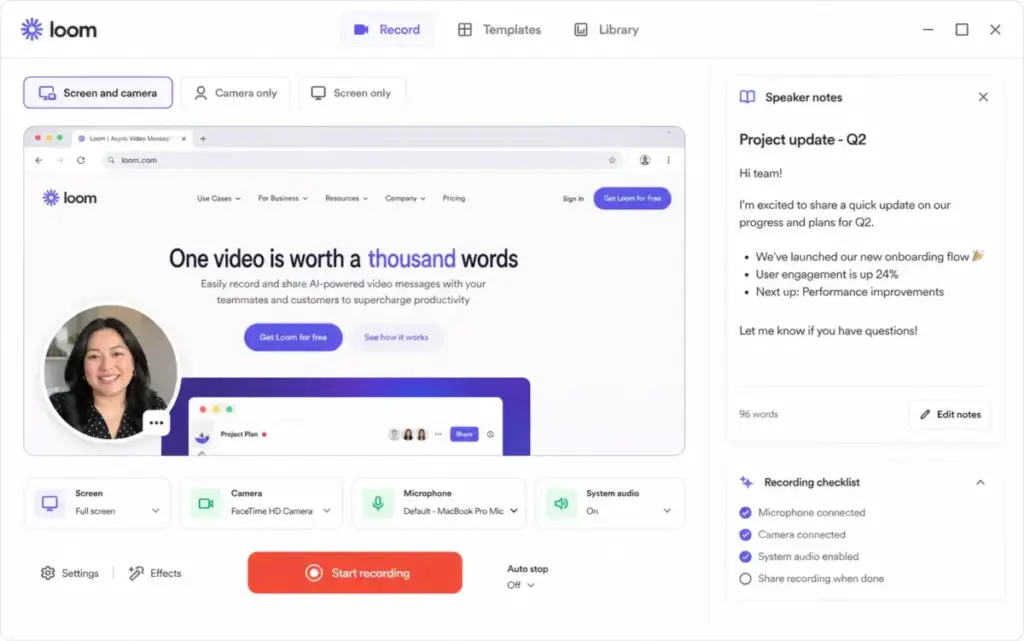
The recording interface is available via a Chrome extension or a desktop app. Users can select full screen, a specific window, or a custom dimension on paid plans. The signature circular camera bubble adds a personal touch to walkthroughs. The tool captures system audio cleanly, making it useful for demonstrating software with sound. Users also get access to speaker notes, virtual backgrounds, and noise suppression, which help keep recordings professional even in loud environments.
Loom Video Sharing
Once a recording stops, Loom generates a hosted link immediately. This is the core value proposition. There is no waiting for large files to render or upload to a separate drive. Viewers can watch the video, read the auto-generated transcript, and leave time-stamped comments or emoji reactions.
This asynchronous feedback loop is what makes Loom an effective alternative to a live Slack huddle or an immediate video call. That makes Loom useful as a focused layer in a broader productivity workflow.
Loom AI Summaries
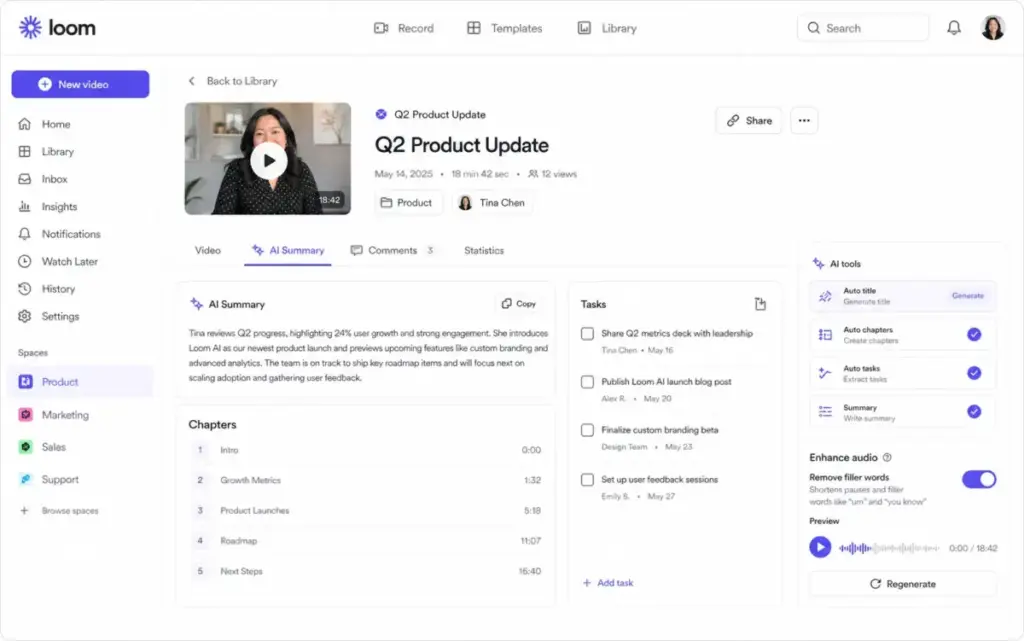
Available on the Business + AI and Enterprise tiers, Loom AI attempts to turn unstructured video into structured documentation. The system generates auto-titles, auto-summaries, auto-chapters, and auto-tasks based on the transcript. It also includes filler word removal and silence removal, which tightens up the final video without requiring manual editing.
Loom Meeting Notes
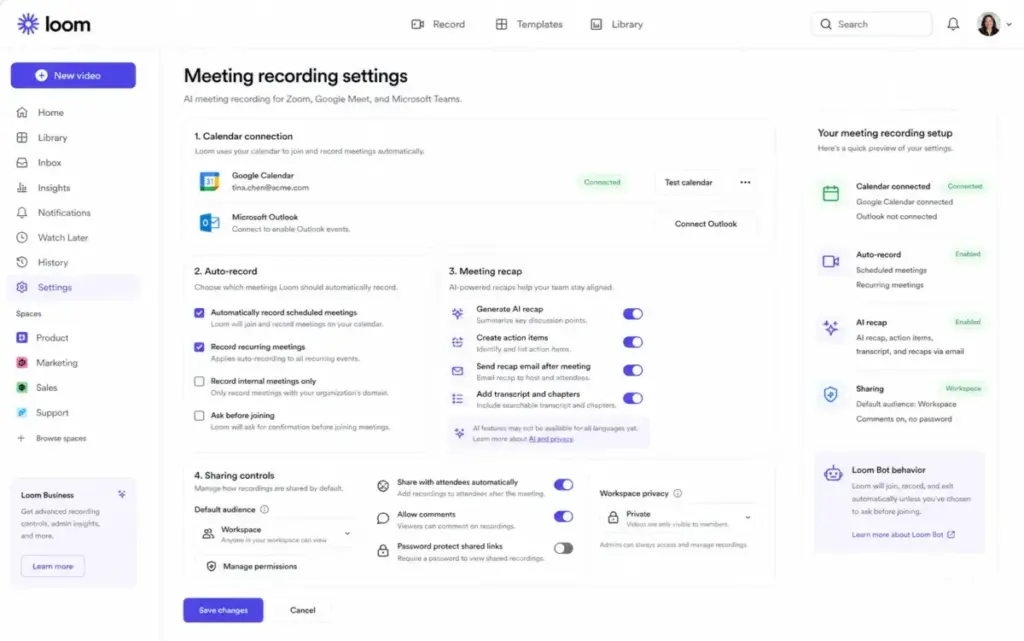
Loom expanded beyond solo recordings with its Meeting Recording feature. Users connect their calendar, and a Loom bot joins Zoom, Google Meet, or Microsoft Teams calls to record and summarize the conversation. While available on all plans, the automated action items require an AI plan. Choosing the right live meeting platform to pair with Loom’s async recordings matters. See our best video conferencing software guide for a head-to-head comparison of Zoom, Google Meet, and Teams.
Loom Team Library
As users record more videos, the team library becomes the central repository. Workspaces use folders and spaces to organize content. The Business plan allows one all-company space plus three additional spaces, while higher tiers remove these restrictions. Proper organization is essential because a poorly managed library quickly turns into an unsearchable mess of “Quick Update” videos.
Loom Security Controls
For enterprise users, security is a major consideration. The Business plan includes password protection and default workspace privacy settings. Enterprise accounts unlock advanced security features like Single Sign-On (SSO), SCIM provisioning, public link expiration, and download restrictions. Organizations can access the Loom SOC 2 report through the Atlassian Trust portal for compliance verification.
Loom User Experience
The initial setup and first recording feel like magic, but long-term workspace management requires discipline.
Loom’s onboarding is famously frictionless. You install the extension, click record, and within minutes, you have a shareable asset. The drawing tool and mouse emphasis features make technical explanations clear. However, user sentiment highlights a specific pain point as adoption scales.
As one user noted in an April 2026 G2 review: “Loom collapsed all of that into a single click from the browser.” The recording part is solved. The challenge is retrieval.
The 40-Video Library Problem
When a team records their first 10 videos, the shared library feels innovative. When a team crosses 40 videos, the library often becomes a junkyard. Because Loom defaults to auto-generated titles, users end up with dozens of videos named “Screen Recording – Tuesday 10 AM.” Finding a specific product walkthrough from three months ago becomes frustrating without strict naming conventions.
Loom Governance Checklist for Team Workspaces
To prevent library sprawl, teams should implement these rules:
- Mandatory Titling: Require creators to rename videos immediately after recording.
- Folder Architecture: Create dedicated folders for “Onboarding,” “Bug Reports,” and “Sprint Updates.”
- Space Segmentation: Keep departmental updates isolated in specific spaces.
- Archive Policy: Regularly archive or delete outdated walkthroughs.
Loom Pricing and Plans
Loom’s pricing tiers look simple on the surface, but the underlying billing mechanics require careful attention.
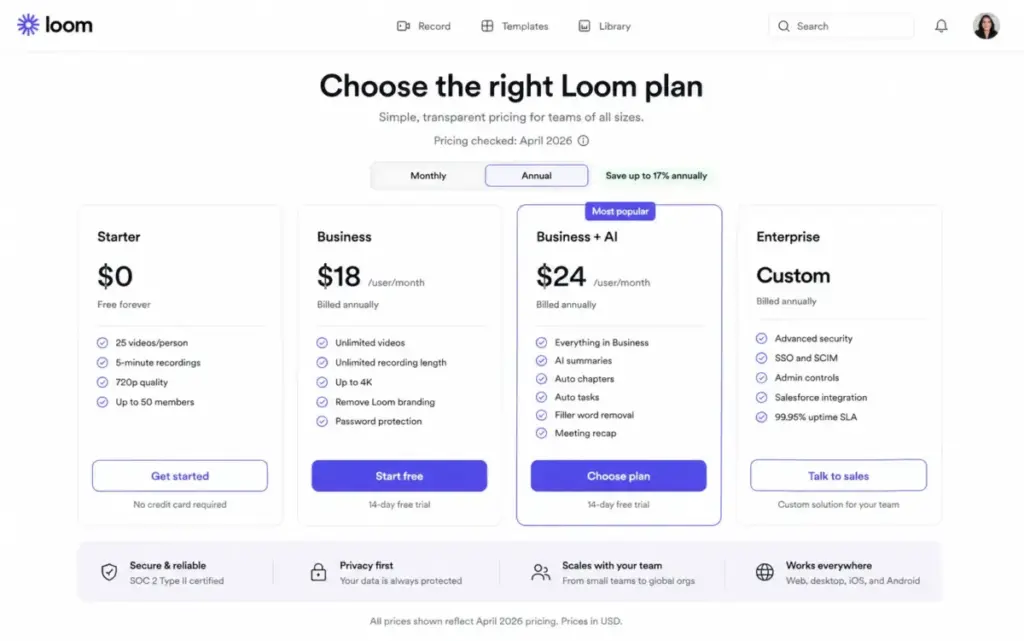
Loom offers four main tiers. The Starter plan remains a functional entry point, but the 5-minute limit forces teams to upgrade quickly. Pricing checked April 29, 2026.
| Plan | Price | Key Limits | Best For |
|---|---|---|---|
| Starter | $0 | 25 videos/person, 5-min limit, 720p | Individuals testing async video. |
| Business | $18/user/month | Unlimited videos, unlimited length, 4K | Teams needing unlimited storage. |
| Business + AI | $24/user/month | Adds AI workflows, summaries, filler word removal | Teams using video as documentation. |
| Enterprise | Custom | Adds SSO, SCIM, Salesforce integration | Large orgs needing governance. |
(Note: Annual billing can save up to 17%, bringing the Business equivalent to roughly $15/user/month and Business + AI to $20/user/month).
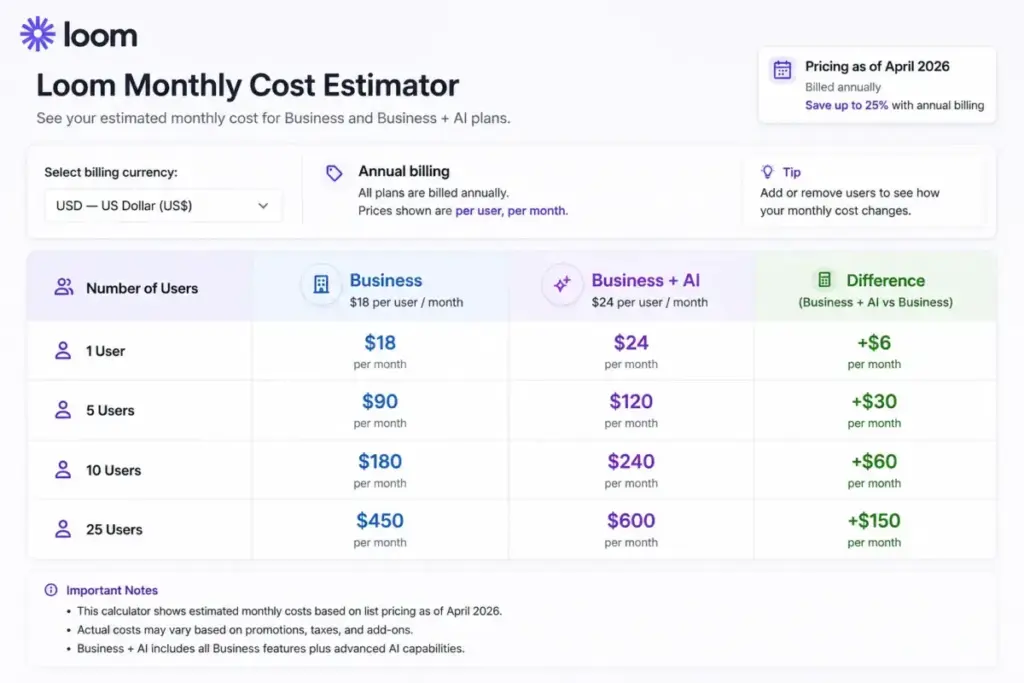
Loom Cost Calculator for 1, 5, 10, and 25 Users
To understand the real financial impact, here is the monthly cost breakdown based on standard monthly pricing.
| Team Size | Business Plan Cost | Business + AI Plan Cost |
|---|---|---|
| 1 User | $18 / month | $24 / month |
| 5 Users | $90 / month | $120 / month |
| 10 Users | $180 / month | $240 / month |
| 25 Users | $450 / month | $600 / month |
What Loom Pricing Hides
The transition to Atlassian’s billing infrastructure introduced friction that buyers must understand before committing.
While the per-user prices are clearly listed, the actual monthly invoice can surprise administrators. The friction comes from how Loom defines user roles and handles workspace expansion.
Creator/Admin True-Up Billing
Loom charges based on paid members, specifically those designated as Creators or Admins. If a team is on a self-serve paid plan and adds new workspace members, Loom charges for those users in the next billing cycle, prorating the cost. For sales-led enterprise customers, Loom executes true-up billing when Creator seats exceed the contracted minimum. This means your bill will increase automatically if you let users self-upgrade.
The Creator Lite Risk
Loom states that upgraded Creator Lite users are charged starting with the first billing cycle after the Atlassian integration date. Administrators have time to review and deactivate users before billing, but if nobody monitors the workspace, free “Viewer” accounts can easily convert into paid “Creator” seats, inflating the monthly cost.
Business vs Business + AI: The $6 Decision
Is Business + AI worth the extra $6 per user per month? The answer depends on your workflow. If your team only uses Loom to send quick visual bug reports, stick to the standard Business plan. However, if you use Loom to replace meetings, the Business + AI tier is worth the premium. The automated meeting notes, auto-tasks, and silence removal save enough manual typing to justify the cost increase.
Loom Pros and Cons
Loom’s strengths lie in speed and accessibility, while its weaknesses relate to long-term content management and mobile performance.
- Fast adoption: The learning curve is almost zero.
- Hosted links: Instantly shareable URLs eliminate rendering and upload times.
- Interactive playback: Viewers can read transcripts, leave time-stamped comments, and react with emojis.
- High quality: Paid plans support high-definition recording up to 4K.
- Atlassian integrations: Deep connections with Jira and Confluence streamline product workflows.
- Meeting recaps: The bot functionality expands Loom beyond solo recordings.
Loom Limitations:
- Strict free limits: The 5-minute recording cap and 25-video limit render the Starter plan useless for serious teams.
- Billing complexity: True-up billing and Creator role management confuse administrators.
- AI paywalls: Valuable features like summaries and filler word removal require the expensive Business + AI tier.
- Library sprawl: Finding old videos is difficult without strict naming conventions.
- Occasional bugs: As one Capterra reviewer noted in late 2025: “I do find that the record button sometimes has a bug.”
- Mobile friction: Mobile app upload times can be slow on weaker connections.
- Governance issues: Public link sharing requires careful management to prevent data leaks.
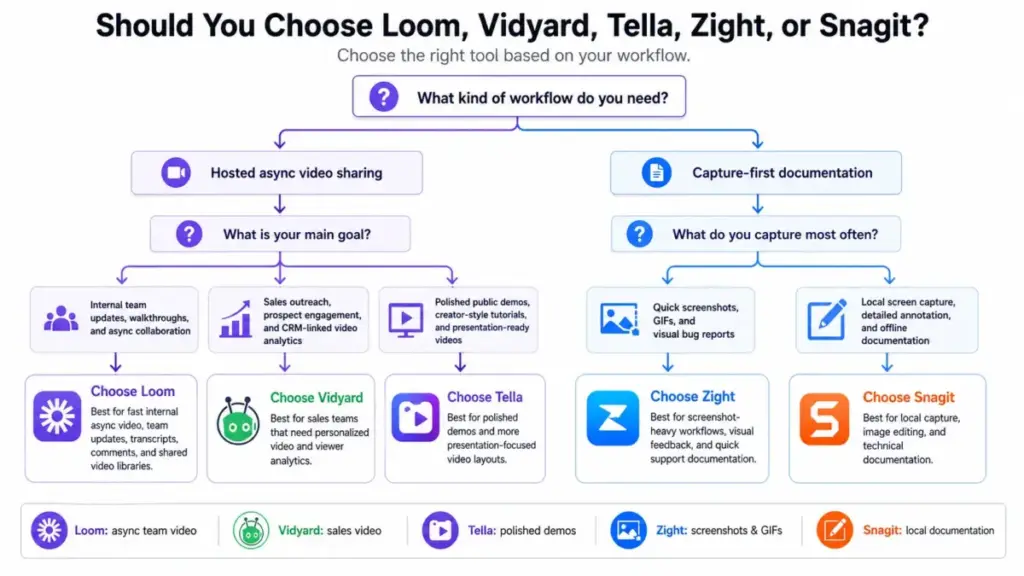
Loom vs Alternatives
Loom is the best generalist tool, but specialized teams should consider niche alternatives.
Not every team needs a general-purpose async tool. Sometimes a specialized platform solves a specific problem better.
Loom vs Vidyard
Vidyard is built for sales teams and marketing departments. Its primary strength against Loom is deep CRM-connected video analytics. Vidyard tells a sales rep exactly how much of a video a prospect watched, helping prioritize follow-ups. Loom’s viewer insights are basic in comparison. Choose Vidyard for revenue video; choose Loom for internal team updates.
Loom vs Tella
Tella focuses on aesthetics. It is built for polished product demos, creator-style tutorials, and design walkthroughs. Its strength against Loom is a cleaner production feel with customizable, beautiful layouts. Loom is functional, but Tella looks professional. Choose Tella for public-facing demos; choose Loom for quick internal bug reports.
Loom vs Zight
Zight excels at quick captures, screenshots, and short GIFs. Its strength against Loom is its screenshot-first workflow, making it perfect for visual bug reports and support teams. While Loom handles screenshots on paid plans, Zight feels more native for still images. Choose Zight for support workflows; choose Loom for team video libraries.
Loom vs Snagit
Snagit is a legacy tool built for local screen capture and detailed documentation. Its strength against Loom is local file control and robust image editing. Its weakness is a lack of hosted async video culture. Choose Snagit for training documentation; choose Loom for fast asynchronous communication.
Comparison Matrix
| Alternative | Best For | Why Choose It | Avoid If |
|---|---|---|---|
| Loom | Remote product teams | Fast, hosted async video with Atlassian integration. | You need deep sales analytics. |
| Vidyard | Sales and marketing | CRM integration and prospect tracking. | You just need internal updates. |
| Tella | Creators and design teams | Polished, beautiful layouts for public demos. | You need enterprise security. |
| Zight | Support and QA teams | Quick screenshots and GIF creation. | You want a searchable video library. |
| Snagit | Technical writers | Local file control and detailed annotation. | You want cloud-hosted links instantly. |
Who Should Use Loom?
Loom works best for teams that value speed over perfection and need to replace synchronous meetings.
Instead of generic advice for “small businesses,” consider these specific cohorts:
- 5-20 person remote product teams using Jira and Confluence. Loom acts as the visual glue between written tickets and code deployment.
- 3-12 person customer success teams recording onboarding walkthroughs. Hosted links are easier for clients to consume than large file attachments.
- 2-8 person SaaS sales teams sending light demo follow-ups. It is fast enough to personalize quickly without heavy production.
- 10-50 person education/training teams building repeatable tutorials. The transcriptions and closed captions support diverse learning styles.
- Atlassian-heavy organizations standardizing async updates. The native integrations make it the obvious choice for companies already paying for Atlassian products.
Who Should Not Use Loom?
Do not buy Loom if your workflow demands high-end production, local file control, or deep sales analytics.
If you are evaluating Zapier alternatives for automation, you might also be re-evaluating your communication stack. Avoid Loom in these scenarios:
- Choose Vidyard if you need sales analytics and CRM-connected video campaigns.
- Choose Tella if you need polished, highly designed public-facing demos.
- Choose Zight if your team relies heavily on annotated screenshots rather than spoken video.
- Choose Snagit if you need to keep files local for training documentation.
- Avoid Loom if your team records fewer than 25 videos per person and can manage within a best free project management software ecosystem using native OS recording tools.
- Avoid Loom if your company is strictly opposed to managing another per-seat SaaS subscription. Tools like Asana and Trello sometimes handle light updates well enough through text.
How We Reviewed Loom
I evaluated Loom using official documentation, live pricing data, user review patterns, and workflow-based buyer scenarios. I examined the SaaSZap review methodology to ensure this evaluation focused on practical buyer constraints rather than vendor hype. My analysis included reviewing the Atlassian acquisition impact, reading the SOC 2 compliance documentation, and comparing Loom’s pricing mechanics against historical data. I mapped Loom against its closest competitors to define clear boundaries around who should use the tool and who should look elsewhere.
Final Verdict
Loom remains a dominant force in asynchronous communication. The platform is exceptional at removing the friction between recording an idea and sharing it with a team. While the Atlassian billing migration and the shift toward higher-priced AI tiers introduce some complexity, the core product works exactly as advertised. If your remote team spends too much time on status calls or typing lengthy explanations in ClickUp, a paid Loom workspace will almost certainly yield a positive return on investment.
FAQ
Is Loom worth it in 2026?
Yes, Loom is worth it for remote and hybrid teams that need to replace synchronous meetings with fast, asynchronous video updates. However, it is only a smart investment if users actively replace live calls with recorded walkthroughs.
How much does Loom cost?
Loom offers a Starter free plan. The Business plan costs $18 per user per month. The Business + AI plan costs $24 per user per month. Annual billing offers discounts up to 17 percent. Enterprise pricing requires contacting sales.
What is included in Loom’s free plan?
The Starter plan includes screen and camera recording, up to 50 workspace members, unlimited screenshots, and basic viewer insights. However, it limits users to 25 videos per person and restricts recording length to 5 minutes.
What is the difference between Loom Business and Business + AI?
Loom Business provides unlimited videos, unlimited recording length, and 4K quality. Business + AI adds advanced automation, including auto-summaries, auto-chapters, auto-tasks, filler word removal, and automated meeting recaps.
Does Loom have a recording time limit?
The free Starter plan limits recordings to 5 minutes. The paid Business, Business + AI, and Enterprise plans offer unlimited recording length.
Is Loom good for remote teams?
Loom is excellent for remote teams because it bridges the gap between text communication and live video calls. It allows team members across different time zones to share context visually without scheduling a meeting.
Is Loom secure for business use?
Yes, Loom provides enterprise-grade security. Paid plans offer password protection and default workspace privacy. Enterprise plans include advanced security features like SSO, SCIM, download restrictions, and access to the SOC 2 report.
Can Loom record Zoom, Google Meet, and Microsoft Teams meetings?
Yes, the Loom Meeting Recording feature allows users to connect their calendar. A Loom bot will then join Zoom, Google Meet, or Microsoft Teams calls to record, summarize, and share the conversation.
What are the best Loom alternatives?
The best alternatives depend on your specific needs. Vidyard is best for sales analytics, Tella is best for polished product demos, Zight is ideal for quick screenshots, and Snagit works best for local technical documentation.
What changed after Atlassian bought Loom?
Following the Atlassian acquisition, Loom introduced tighter integrations with Jira and Confluence. The pricing and billing infrastructure also began migrating to Atlassian’s systems, introducing changes like Creator Lite billing and true-up adjustments for enterprise workspaces.