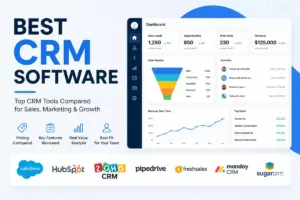
Pipedrive starts at $14/seat/month billed annually. HubSpot starts at $0. Salesforce starts at $25/user/month. Those three numbers tell you almost nothing about what a 10-person sales team will actually pay. Add-ons, seat minimums, contact caps, and tier jumps change the math so fast that starting price comparisons are almost useless for CRM buyers.
I evaluated 25 CRM products and ranked the 10 that deliver the best balance of adoption speed, real-world cost, and daily usability for sales teams. This evaluation is based on independent editorial research, analyzing official product documentation, feature specifications, and editorial comparison criteria.
We reviewed public review themes from G2 and Capterra where available, focusing on repeated comments about setup, adoption, support, and pricing friction. If your team needs best CRM software options that actually match your sales motion, budget, and growth plan, this is the ranking.
The gap between a CRM’s advertised price and its operational cost is where most buying decisions go wrong. Below, I break the list into budget tiers so you can see exactly what each tool costs at the plan where sales teams can actually work.
Quick Verdict: Best CRM for Sales Teams by Use Case
| Use Case | Best Pick | Why It Fits |
|---|---|---|
| Best overall sales CRM | Pipedrive | Visual pipeline, transparent pricing, 500+ integrations |
| Best free-to-scale CRM | HubSpot Sales Hub | $0 start, full ecosystem, grows with your team |
| Best enterprise sales CRM | Salesforce Sales Cloud | Deepest governance, AppExchange, Agentforce AI |
| Best value CRM | Zoho CRM | Free for 3 users, $14/user/month Standard, Zia AI |
| Best budget AI CRM | Freshsales | $9/user/month Growth, built-in phone/email/chat |
| Best for outbound sales | Close | Built-in calling, SMS, email, Power Dialer |
| Best visual work OS CRM | monday CRM | Kanban boards, quotes/invoices, cross-team workflows |
| Best for Google Workspace | Copper CRM | Gmail-native, $9/seat/month Starter |
| Best for post-sale handoffs | Insightly CRM | CRM plus project delivery in one platform |
| Best simple CRM | Less Annoying CRM | $15/user/month, no tiers, no contracts |
What this means: if your team runs outbound calls all day, Close is the pick. If your team lives in Gmail, Copper is the pick. If budget is everything and you just need a CRM that works, Less Annoying CRM or Freshsales both start under $15. The table above filters by what CRM software actually does for specific sales workflows, not by feature count.
How We Chose and Ranked These CRMs
I scored each CRM across six weighted criteria: pricing value (20%), core feature depth (20%), ease of use (15%), integrations (15%), scalability (15%), and user fit (15%). Every product was evaluated using official pricing pages, product documentation, feature specifications, and editorial comparison criteria (as of May 2026).
Review limitation: This ranking uses official pricing pages, product documentation, and verified review signals. I did not run a live multi-week deployment with a real sales team, so workflow speed under load and enterprise quote ranges should be confirmed directly with each vendor.
Free Tier Champions
Three CRMs on this list offer genuine free plans that sales teams can use before upgrading: HubSpot Sales Hub, Zoho CRM, and Freshsales.
HubSpot Sales Hub: Best Free-to-Scale CRM

Badge: Best Free-to-Scale CRM | Score: 8.60/10
HubSpot’s free plan includes deal tracking, live chat, meeting scheduling, and unlimited users. For a solo founder or a 2-person sales team, that is a real working CRM at $0/month. The catch: the moment you need sequences, forecasting, or custom reports, you jump to Professional at $100/month per seat (as of May 2026, per HubSpot’s official product page).
Starter is shown from $10/month per seat with a limited-time discount for new customers. That discount disappears at renewal, and the Starter tier still lacks sales automation and custom reporting. I suspect most 5-person sales teams outgrow Starter within 6 months.
Key features: Lead management, sales automation (Professional+), call tracking, email templates, deal pipelines, AI guided selling, forecasting, conversation intelligence.
Integrations: HubSpot Marketplace, Breeze AI, Commerce Hub ecosystem.
Better than: Most CRMs for free-plan coverage and ecosystem breadth. Worse than: Pipedrive for pipeline-focused simplicity. Salesforce for enterprise governance. Avoid if: You want to avoid seat expansion costs, tier jumps, or HubSpot ecosystem lock-in.
Setup difficulty: Low (free plan is self-serve). Hidden costs: Starter discount expires; CPQ tied to Commerce Hub; Professional onboarding fees possible.
Read our HubSpot CRM review for a deeper breakdown of each tier.
Zoho CRM: Best Value CRM

Badge: Best Value CRM | Score: 8.20/10
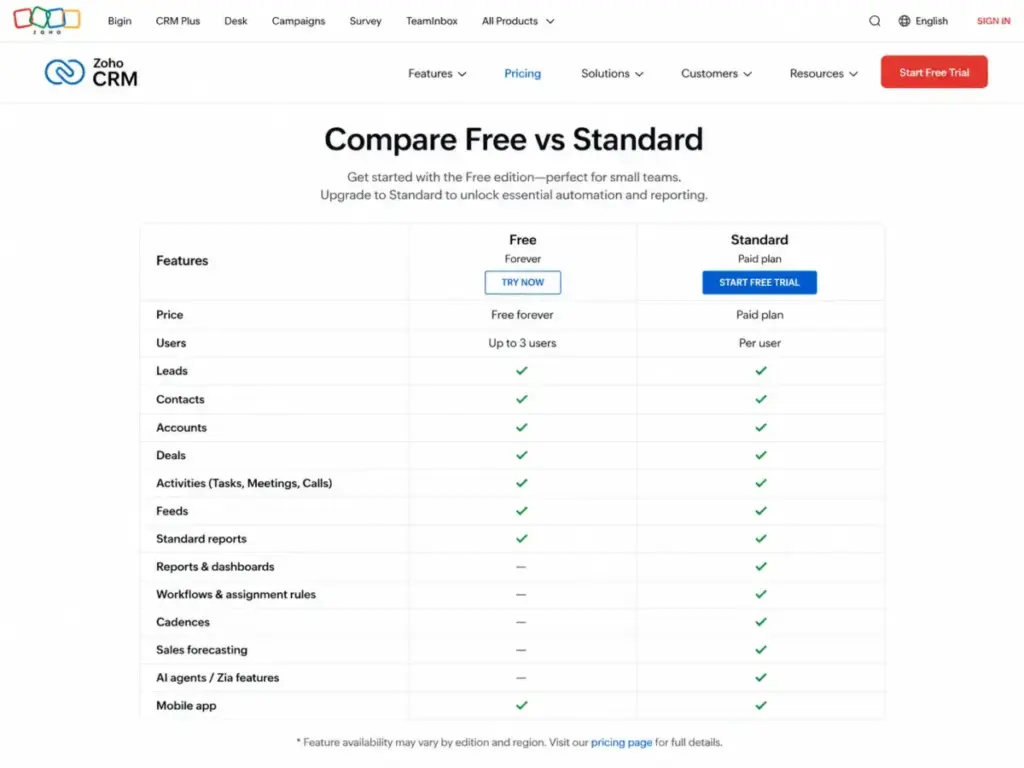
Zoho CRM offers a free edition for up to 3 users with basic contact and lead management. Paid USD pricing is commonly listed from $14/user/month billed annually for Standard, but Zoho’s pricing page may render local currency by region, so confirm the USD price on Zoho’s official pricing page before purchase (cross-checked May 2026). That $14 entry point includes workflows, assignment rules, cadences, and basic reporting.
Monthly billing runs higher: Standard $20, Professional $35, Enterprise $50, Ultimate $65 per user/month. The annual-vs-monthly gap is steep enough that monthly billing only makes sense for short evaluations.
Key features: Workflows and assignment rules, cadences, reports and dashboards, sales forecasting, CPQ, Zia AI (higher tiers), territory management, custom functions.
Integrations: Zoho ecosystem, Google Workspace, Slack, WhatsApp Business, Zoho Desk, Zoho Campaigns, Google Ads.
Better than: Most CRMs on price-to-feature ratio across all tiers. Worse than: Pipedrive for out-of-box pipeline simplicity. Salesforce for enterprise depth. Avoid if: You want the simplest UI or don’t want to manage edition-specific limits.
Setup difficulty: Medium (edition complexity). Hidden costs: Advanced AI, portals, and journey orchestration require higher editions. Pricing page may display local currency by region.
For a head-to-head comparison, see our Zoho CRM vs Salesforce analysis.
Freshsales: Best Budget AI CRM

Badge: Best Budget AI CRM | Score: 8.03/10
Freshsales gives you a free plan for up to 3 users. Paid plans start at $9/user/month billed annually for Growth (as of May 2026, per Freshsales’ official pricing page). At $9, you get Kanban views, built-in phone, email templates, custom fields, workflows, and Slack collaboration.
Pro jumps to $39/user/month and adds sales sequences, custom reports, and Freddy AI scoring. Enterprise is $59/user/month. The free trial runs 21 days, longer than most competitors.
Key features: Built-in chat/email/phone, product catalog, Freddy AI scoring, sales sequences (Pro+), custom reports (Pro+).
Integrations: Freshworks Marketplace, Slack, built-in phone/email/chat.
Better than: Most CRMs for bundled communication channels at a budget price. Worse than: Close for dedicated outbound calling workflows. Salesforce for deep customization. Avoid if: You need unlimited AI/bot sessions or advanced CPQ without add-ons.
Setup difficulty: Low. Hidden costs: CPQ and additional Freddy AI agent sessions are add-ons. Free plan capped at 3 users. 500 Freddy AI agent sessions once per account on paid plans.
Check our Freshsales evaluation for the full feature gate breakdown.
Best Under $25/Month Per Seat
Four CRMs on this list offer serious sales-team functionality at or below $25/seat/month when billed annually.
Pipedrive: Best Overall Sales CRM

Badge: Best Overall Sales CRM | Score: 8.78/10
Pipedrive’s Lite plan starts at US$14/seat/month billed annually (as of May 2026, per Pipedrive’s official pricing page). Growth at $24, Premium at $49, and Ultimate at $69 per seat/month billed annually. There is no permanent free plan. A 14-day free trial is available.
At $24/seat (Growth), you get full email sync, automation, and a stronger reporting layer. That is the practical tier for most sales teams. A 10-person team on Growth pays $240/month before add-ons.
Here is the part most reviews skip. Pipedrive’s expansion features are paid add-ons: LeadBooster from $32.50/month, Projects from $6.67/month, Campaigns from $13.33/month, Web Visitors from $41/month, and Smart Docs from $32.50/month. A team that needs LeadBooster and Campaigns on top of Growth is looking at roughly $286/month for 10 seats, not $240.
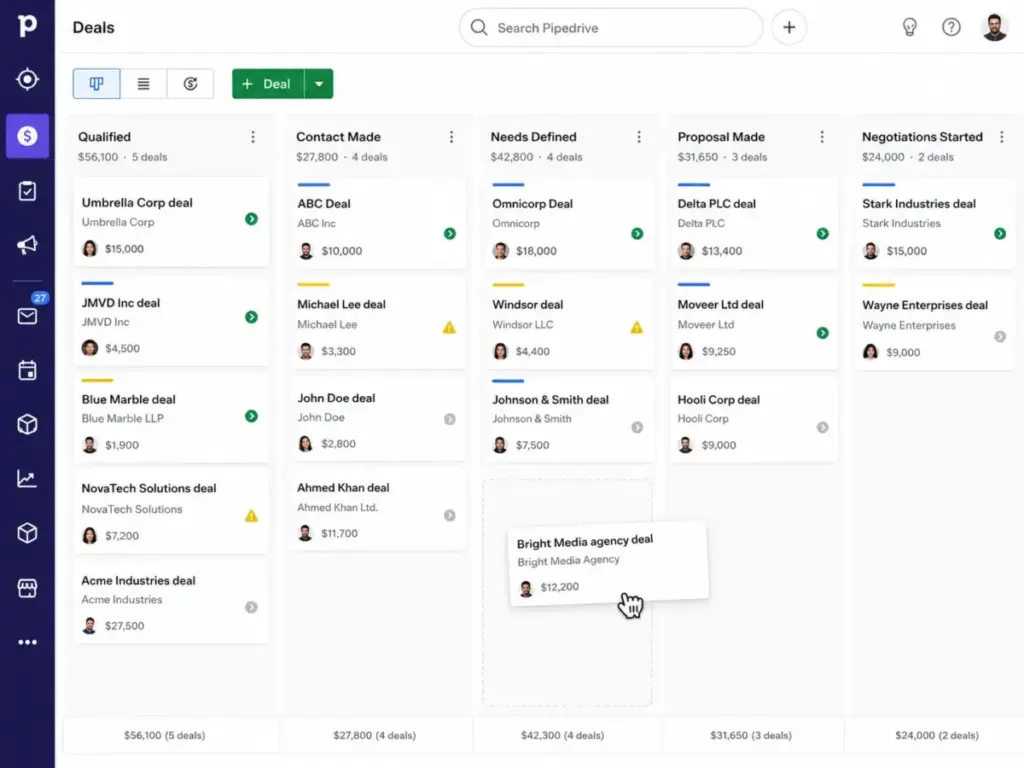
Key features: Visual pipeline management, AI-powered report creation, real-time sales feed, full email sync and automation (Growth+), LeadBooster and e-signature (higher tiers).
Integrations: 500+ integrations including Zapier, Zoom, Lemlist, and a broad marketplace.
Better than: Almost every CRM for visual pipeline usability and transparent per-seat pricing. Worse than: HubSpot for free-tier breadth. Salesforce for enterprise governance. Avoid if: You need a permanent free plan, or you need lead generation, docs, campaigns, and visitor tracking included without add-ons.
Setup difficulty: Low. Hidden costs: Add-ons listed above. VAT may apply.
Our Pipedrive CRM review covers each plan tier in detail.
Close: Best for Outbound Sales

Badge: Best for Outbound Sales | Score: 7.85/10
Close’s Solo plan starts at $9/seat/month billed annually, but Solo is limited to 1 user, 10,000 leads, and no workflows. The real entry point for sales teams is Essentials at $35/seat/month billed annually (as of May 2026, per Close’s official pricing page).
Growth runs $99/seat/month and Scale hits $139/seat/month billed annually. Monthly billing is higher: Essentials $49, Growth $109, Scale $149 per seat/month. For outbound-heavy teams, the built-in calling, SMS, and email tools justify the price because you skip separate telephony subscriptions.
The hidden costs matter here. Premium phone numbers cost $19/month per line plus usage. AI Call Assistant costs $50/month plus $0.02/minute. Additional organizations cost $50/month. A 5-person team on Growth with 2 premium lines and AI Call Assistant could pay roughly $583/month, not the $495 the plan page suggests.
Key features: Built-in forms, email, calling and SMS, centralized inbox, task lists, multiple pipelines, Power Dialer (Growth+), AI Email Assistant, role-based permissions (Scale).
Integrations: Native communication stack, API/developer resources, common sales stack integrations.
Better than: Every CRM on this list for combined CRM + outbound calling workflows. Worse than: Pipedrive for visual pipeline simplicity. monday CRM for cross-team operations. Avoid if: Your team does not run phone-heavy or outreach-heavy sales motions.
Setup difficulty: Low to medium. Hidden costs: Communication add-ons listed above. Custom pricing for 10+ users or complex CRM needs.
See our Close CRM review for the full communication stack breakdown.
monday CRM: Best Visual Work OS CRM

Badge: Best Visual Work OS CRM | Score: 7.75/10
monday CRM Basic starts at $12/seat/month billed annually with a 3-user minimum (as of May 2026, per monday’s official CRM pricing page). Standard is $17, Pro is $28 per seat/month billed annually. Monthly billing runs Basic $18, Standard $25, Pro $41 per seat/month.
That 3-user minimum means the floor is $36/month, not $12. Basic includes 1,000 active contacts/deals, 1 dashboard, and 20 quotes/invoices monthly. Standard bumps to 10,000 contacts/deals, 5 dashboards, and 250 automations/month. Pro unlocks unlimited contacts/deals, 50 dashboards, and 25,000 automations/month.
The automation and contact limits on Basic and Standard are the real constraints. A 10-person team on Standard pays $170/month but is capped at 250 automations per month. Does that matter? For a team running 5 automated follow-up sequences, you could burn through 250 automations in 2 weeks.
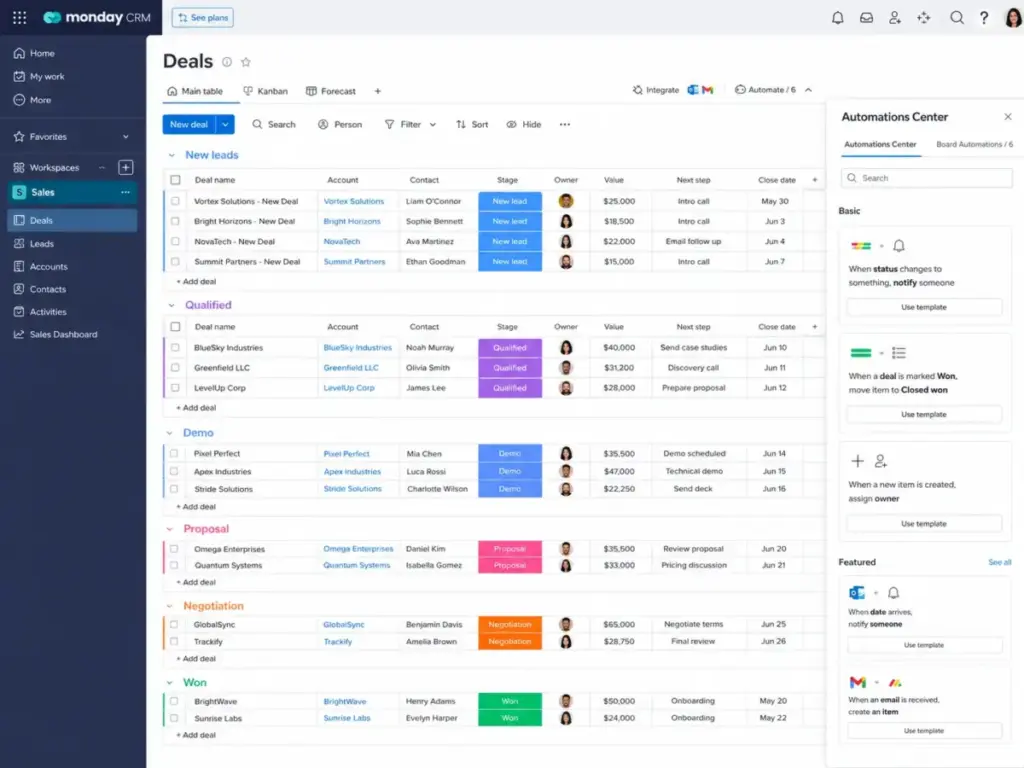
Key features: Visual pipelines, active contacts/deals, dashboards, quotes/invoices, centralized communications hub, mass emails, email sequences, automations, enterprise controls (Ultimate).
Integrations: monday platform integrations, templates, app marketplace, email/activity logging.
Better than: Most CRMs for visual pipeline plus cross-functional operations workflows. Worse than: Pipedrive and Close for pure sales-native CRM workflows. Avoid if: You want a pure sales CRM with no minimum seat floor.
Setup difficulty: Low to medium. Hidden costs: Prices exclude tax. Annual plans paid upfront. AI may need additional purchase.
Copper CRM: Best for Google Workspace Teams

Badge: Best for Google Workspace Teams | Score: 7.55/10
Copper CRM Starter starts at $9/seat/month paid annually (as of May 2026, per Copper’s official pricing page). Basic is $23, Professional is $59, and Business is $99 per seat/month paid annually. Monthly billing is significantly higher: Starter $12, Basic $29, Professional $69, Business $134 per seat/month.
The contact caps are the story here. Starter is capped at 1,000 contacts. Basic at 2,500. Professional at 15,000. Only Business gets unlimited contacts. A 5-person sales team with a 3,000-contact database needs Basic at minimum, which means $115/month for 5 seats. If that database grows past 2,500 in 6 months, you are upgrading to Professional at $295/month for the same 5 seats. That is a 156% increase triggered by contact growth alone.
Key features: Deep Google Workspace integration, tasks and activity feed, forms, Zapier integration, task automation, pipelines, contact enrichment (Professional+), workflow automation, reporting, bulk email.
Integrations: Google Workspace, Zapier, integrations on higher plans, API/developer options.
Better than: Every CRM on this list for Gmail-native workflow integration. Worse than: Pipedrive for non-Google teams. HubSpot for free-tier breadth. Avoid if: You use Microsoft 365, or you expect to hit lower-tier contact limits quickly.
Setup difficulty: Low (if already on Google Workspace). Hidden costs: Taxes and fees not included. Contact caps force upgrades.
Our Copper CRM review digs into the Google Workspace integration depth. If contact growth or non-Google workflows are the switching trigger, use our Copper CRM replacement guide to compare CRMs by sales-team fit, setup friction, and practical monthly cost.
Less Annoying CRM: Best Simple CRM

Badge: Best Simple CRM | Score: 7.25/10
Less Annoying CRM charges $15/user/month after a 30-day free trial. That is the entire pricing model. No tiers, no contracts, no annual discount, no upgrade pressure (as of May 2026, per Less Annoying CRM’s official help page). A 10-person team pays $150/month, period.
No tier-based restrictions. No contact caps. No hidden add-ons. The tradeoff is that Less Annoying CRM does not have advanced AI, deep reporting, marketing automation, role-based enterprise controls, or forecasting. It does contact management, lead tracking, follow-up reminders, calendar, tasks, and pipelines. That is it. Sales teams that need forecasting, role-based controls, or sales automation should compare Less Annoying CRM alternatives against that simple baseline before committing.
Is that enough? For a 3-person contracting company tracking 200 leads, absolutely. For a 15-person SaaS sales team running multi-stage outbound sequences, no.
Key features: Contact management, lead tracking, follow-up management, calendar, tasks, pipelines, custom fields.
Integrations: Google Contacts, Google Calendar, Outlook Calendar, Mailchimp, Zapier, QuickBooks Sync, VoIP/text integrations, 5,000+ apps through Zapier.
Better than: Every CRM on this list for zero-complexity pricing and onboarding. Worse than: Every CRM on this list for advanced analytics, AI, and enterprise controls. Avoid if: You need advanced forecasting, AI, or role-based permissions.
Setup difficulty: Very low. Hidden costs: None. No volume discount either.
Read our Less Annoying CRM review for a full breakdown of what you get and what you give up.
Best for Mid-Market and Enterprise ($25-100+/Month Per Seat)
Two CRMs on this list serve teams that need deeper governance, forecasting, and customization at higher price points.
Salesforce Sales Cloud: Best Enterprise Sales CRM

Badge: Best Enterprise Sales CRM | Score: 8.25/10
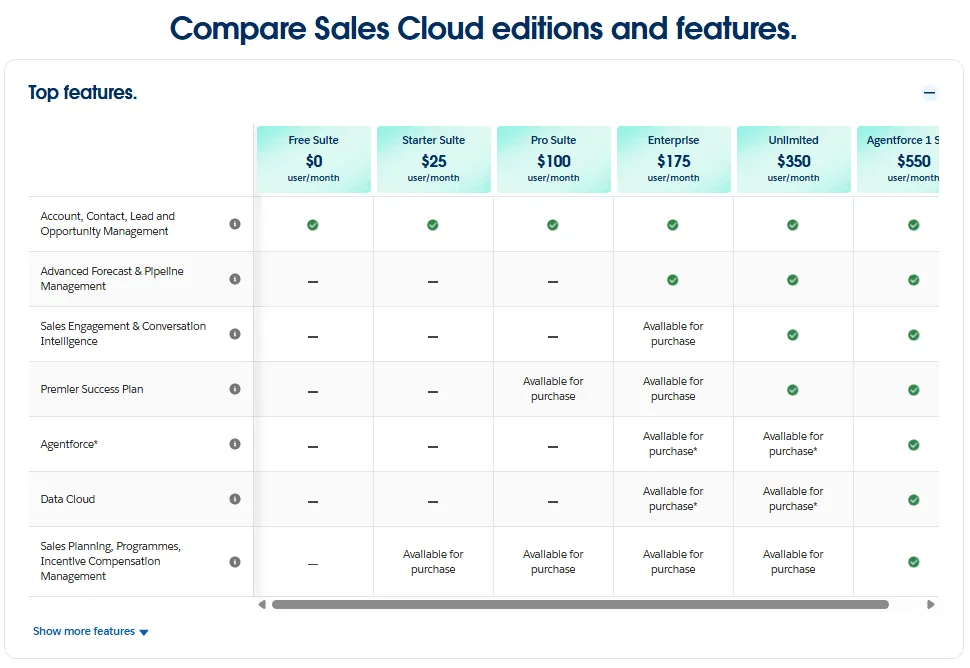
Salesforce Starter Suite starts at $25/user/month (as of May 2026, per Salesforce’s official pricing page). Pro Suite is $100/user/month, Enterprise is $175/user/month, Unlimited is $350/user/month, and Agentforce 1 Sales is $550/user/month, all billed annually.
A 10-person team on Enterprise pays $1,750/month. That is more than 7x what the same team pays for Pipedrive Growth. The question is whether your team needs what Salesforce Enterprise provides: advanced pipeline management, conversation intelligence, lead routing flows, AppExchange, Agentforce AI, sandboxes, and full audit controls.
For teams under 10 reps doing straightforward pipeline sales, Salesforce is overkill. The implementation complexity alone can take weeks. For fast-scaling organizations with 50+ reps, multi-territory pipelines, and compliance requirements, Salesforce is the only CRM on this list with the governance depth to match.
Key features: Lead/account/contact/opportunity management, flows, lead routing, email/event/contact sync, forecasting, AppExchange, advanced pipeline management, conversation intelligence, Agentforce.
Integrations: Salesforce AppExchange, Slack, Tableau, Data Cloud, MuleSoft, APIs.
Better than: Every CRM on this list for enterprise governance, customization depth, and ecosystem breadth. Worse than: Pipedrive and HubSpot for small-team adoption speed and onboarding simplicity. Avoid if: Your team is under 10 reps and wants low setup effort at a low entry price.
Setup difficulty: High. Hidden costs: Premier Support and AI capabilities can be add-ons. Implementation consulting may be required.
Our Salesforce CRM review covers the Starter-to-Enterprise upgrade path.
Insightly CRM: Best for Post-Sale Handoffs

Badge: Best for Post-Sale Handoffs | Score: 7.35/10
Insightly CRM Plus starts at $29/user/month billed annually. Professional is $49 and Enterprise is $99 per user/month billed annually (as of May 2026, per Insightly’s official pricing page). There is no free plan. A 14-day free trial is available.
Insightly’s differentiator is built-in project management alongside CRM. When a deal closes, the sales team can hand it directly to a project delivery workflow inside the same platform. That handoff point is where most CRMs force you into a separate tool.
Enterprise is required for sandboxes, products/pricebooks/quotes, and audit logging. AppConnect (the no-code integration engine) includes required technical setup and potential onboarding fees for platform bundles.
Key features: Lead and contact management, project management, advanced reports, business dashboards, lead routing, workflow automation, AI Copilot, sandboxes (Enterprise), products/pricebooks/quotes (Enterprise), audit logging (Enterprise).
Integrations: Insightly AppConnect connects CRM with hundreds of applications across finance, HR, sales, marketing, support, DevOps/IT, and ecommerce.
Better than: Most CRMs for structured post-sale delivery handoffs. Worse than: Pipedrive for pipeline simplicity. Close for outbound engagement. HubSpot for free-tier entry. Avoid if: You want a free CRM plan, the lowest entry price, or pure outbound sales engagement.
Setup difficulty: Medium to high. Hidden costs: AppConnect and platform bundle pricing includes setup fees. Onboarding and support fees apply for some bundles.
See our Insightly CRM review for the full project management integration analysis.
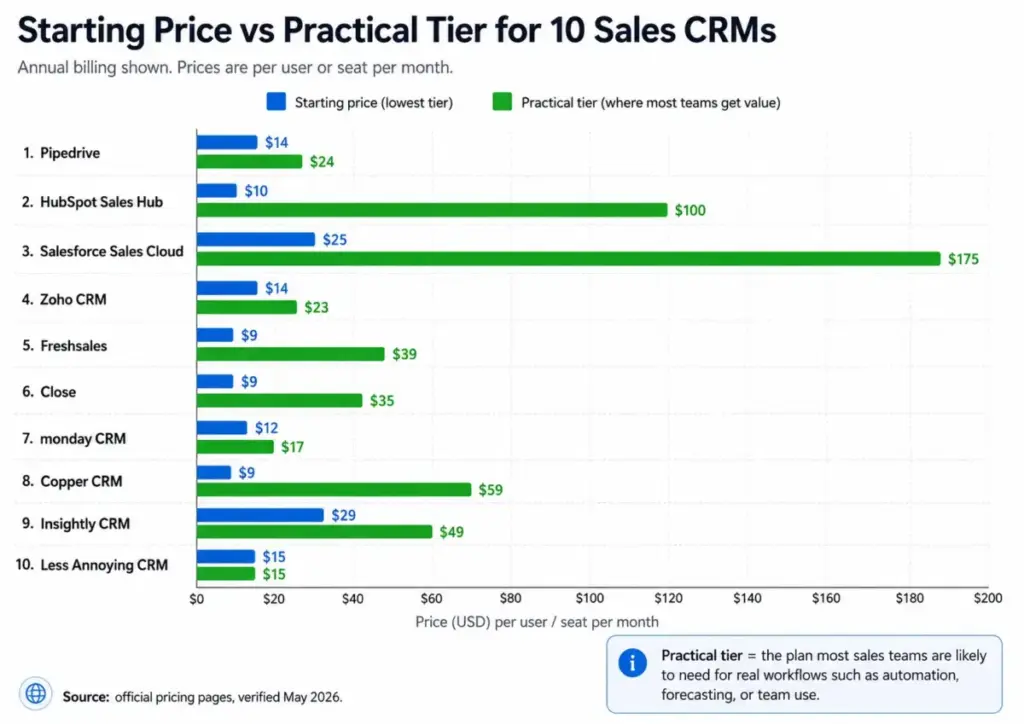
Pricing Comparison: Starting Price vs Practical Tier
| CRM | Free Plan | Starting Paid Price | Practical Sales Tier | 10-User Annual Cost | Free Trial |
|---|---|---|---|---|---|
| Pipedrive | No | $14/seat/mo | Growth $24/seat/mo | $240/mo ($2,880/yr) | 14 days |
| HubSpot Sales Hub | Yes (unlimited users) | $10/seat/mo (Starter, discount caveat) | Professional $100/seat/mo | $1,000/mo ($12,000/yr) | 14 days |
| Salesforce Sales Cloud | Limited Free Suite | $25/user/mo (Starter Suite) | Enterprise $175/user/mo | $1,750/mo ($21,000/yr) | Yes |
| Zoho CRM | Yes (3 users) | $14/user/mo (Standard) | Professional $23/user/mo | $230/mo ($2,760/yr) | Yes |
| Freshsales | Yes (3 users) | $9/user/mo (Growth) | Pro $39/user/mo | $390/mo ($4,680/yr) | 21 days |
| Close | No | $9/seat/mo (Solo, 1 user only) | Essentials $35/seat/mo | $350/mo ($4,200/yr) | Yes |
| monday CRM | No | $12/seat/mo (Basic, 3-seat minimum) | Standard $17/seat/mo | $170/mo ($2,040/yr) | 14 days |
| Copper CRM | No | $9/seat/mo (Starter) | Professional $59/seat/mo | $590/mo ($7,080/yr) | Yes |
| Insightly CRM | No | $29/user/mo (Plus) | Professional $49/user/mo | $490/mo ($5,880/yr) | 14 days |
| Less Annoying CRM | No | $15/user/mo | $15/user/mo (only tier) | $150/mo ($1,800/yr) | 30 days |
What this means: starting price is not the practical price. Pipedrive’s $14 entry is real, but most teams need Growth at $24. HubSpot’s free plan is real, but sales automation starts at $100/seat. Salesforce’s $25 Starter is real, but enterprise features start at $175. The “practical tier” column is where sales teams actually operate. If you are comparing CRMs, compare that column, not the first one.
All prices verified as of May 2026 using official pricing pages. Prices exclude applicable taxes. Annual billing shown.
Feature Gate Comparison
| Feature | Pipedrive | HubSpot | Salesforce | Zoho | Freshsales | Close | monday | Copper | Insightly | LACRM |
|---|---|---|---|---|---|---|---|---|---|---|
| Visual pipeline | All plans | All plans | All plans | All plans | All plans | All plans | All plans | All plans | All plans | Yes |
| Email sync | Growth+ | All plans | All plans | Standard+ | Growth+ | All plans | Standard+ | Basic+ | Plus+ | Via integrations |
| Workflow automation | Growth+ | Professional+ | Enterprise+ | Standard+ | Growth+ | Essentials+ | Standard+ | Professional+ | Plus+ | No |
| Sales forecasting | Premium+ | Professional+ | Professional+ | Standard+ | Pro+ | Growth+ | Pro+ | Business | Enterprise | No |
| AI features | Premium+ | Professional+ | Enterprise+ | Enterprise+ | Pro+ | Growth+ | Pro+ | Not native | Enterprise | No |
| Built-in calling | Not native (add-on) | Available, limits vary | Available, limits vary | Professional+ | Available, limits vary | Native | Not native | Not native | Not native | Not native |
| Custom reports | Growth+ | Professional+ | Enterprise+ | Standard+ | Pro+ | Growth+ | Standard+ | Professional+ | Plus+ | No |
| Role permissions | Premium+ | Professional+ | All plans | Standard+ | Pro+ | Scale | Pro+ | Professional+ | Professional+ | No |
| API access | All plans | All plans | All plans | All plans | All plans | All plans | Standard+ | Professional+ | Plus+ | Limited |
What this means: if your sales team needs built-in calling, your options are HubSpot, Salesforce, Freshsales, and Close. If your team needs AI features below $50/seat/month, Freshsales Pro at $39 and Pipedrive Premium at $49 are the only options. Workflow automation below $20/seat/month is available from Pipedrive Growth ($24), Zoho Standard ($14), and Freshsales Growth ($9). The feature gate determines the real cost, not the starting price.
Setup and Migration Difficulty
| CRM | Setup Difficulty | Main Reason | Migration Risk |
|---|---|---|---|
| Pipedrive | Low | Visual setup, import wizard, no mandatory onboarding | Low |
| HubSpot Sales Hub | Low (free/Starter), Medium (Professional+) | Free self-serve, but Professional+ needs configuration | Medium |
| Salesforce Sales Cloud | High | Custom objects, flows, admin training required | High |
| Zoho CRM | Medium | Edition complexity, module configuration | Medium |
| Freshsales | Low | Built-in channels, guided setup | Low |
| Close | Low-Medium | Simple CRM, but calling setup takes configuration | Low |
| monday CRM | Low-Medium | Board setup intuitive, automation rules need planning | Low |
| Copper CRM | Low (Google teams) | Gmail integration auto-syncs, non-Google teams struggle | Low |
| Insightly CRM | Medium-High | Project management layer adds configuration | Medium |
| Less Annoying CRM | Very Low | Single tier, no modules to configure | Very Low |
What this means: if your team needs to be operational within 1 day, Pipedrive, Freshsales, Copper (Google teams), and Less Annoying CRM are the fastest. If your team has a dedicated admin and 2-4 weeks for setup, Salesforce and Insightly become viable. The setup difficulty is a real cost that most pricing comparisons ignore.
Which CRM Should You Avoid?
Not every CRM on this list fits every sales team. Here are the honest anti-recommendations:
Avoid Salesforce if your team is under 10 reps and you do not have a dedicated CRM admin. The implementation complexity and cost will drain more resources than the tool saves.
Avoid HubSpot Professional if your annual CRM budget is under $5,000. The tier jump from Starter to Professional is steep, and the features that justify it (sequences, forecasting, custom reports) are table stakes at competitors like Pipedrive and Zoho at a fraction of the cost.
Avoid monday CRM Basic if you need more than 1,000 active contacts/deals. You will hit the limit in weeks and need to upgrade.
Avoid Copper if your team uses Microsoft 365. Copper’s entire value proposition depends on Google Workspace integration.
Avoid Less Annoying CRM if you need AI, forecasting, or role-based permissions. It is not built for teams that need those capabilities, and it never will be.
Avoid Close Solo if you are a team. Solo is limited to 1 user, 10,000 leads, and no workflows. It exists for individual founders, not sales teams.
How to Choose the Right CRM for Your Sales Team
This framework helps you narrow 10 options to 2-3 in under 10 minutes:
- Define your sales pipeline motion. Inbound-led? Go HubSpot or Pipedrive. Outbound-heavy with phone calls? Go Close. Mixed? Freshsales bundles both. For that inbound-versus-outbound fork, compare HubSpot vs Close guide.
- Count your team size. Solo or 2-3 people? Less Annoying CRM, Copper Starter, or Freshsales Free. 5-15 reps? Pipedrive Growth, Zoho Professional, or monday Standard. 25+ reps? Salesforce Enterprise or HubSpot Professional.
- Set your per-seat budget. Under $15/seat: Less Annoying CRM, Zoho Standard, Freshsales Growth. $15-50/seat: Pipedrive Growth, Close Essentials, monday Standard, Copper Basic. Over $50/seat: Salesforce, HubSpot Professional, Insightly Professional.
- Check your tech stack. Gmail-first team? Copper is the natural fit. Microsoft 365? Skip Copper. Slack-heavy? monday CRM integrates well. Already using Freshworks? Freshsales syncs natively.
- Identify your deal-breaker feature. Built-in calling? Close or Freshsales. Visual boards? monday or Pipedrive. Post-sale project handoff? Insightly. Free plan forever? HubSpot or Zoho.
- Calculate the 10-user cost at the practical tier. Not the starting price. The tier where your team can actually do its job. Compare that number across your 2-3 finalists.
- Run a free trial with real data. Import your contacts, set up 1 pipeline, and have 2 reps use it for a full sales week. The CRM that feels like less work wins.
Common Mistakes When Choosing a CRM for Sales Teams
Mistake 1: Choosing by starting price. Pipedrive at $14 and Freshsales at $9 look cheaper than HubSpot Free at $0 until you realize the free plan lacks automation. Always compare at the practical tier.
Mistake 2: Ignoring add-on costs. Pipedrive’s LeadBooster ($32.50/month), Close’s AI Call Assistant ($50/month), and HubSpot’s Commerce Hub features are real costs that the base price does not include.
Mistake 3: Buying for features your team will not use. A 5-person team buying Salesforce Enterprise ($175/seat) for “future-proofing” is spending $21,000/year on governance features they will not touch for 2 years.
Mistake 4: Skipping the free trial with real data. Most CRMs on this list offer a free trial or free plan, and buyers should confirm trial availability on the official pricing page before purchase. Import your actual contact list, build your actual pipeline, and test your actual workflow. Demo data tells you nothing.
Mistake 5: Not checking seat minimums. monday CRM requires 3 seats minimum. Close Solo is capped at 1 user. These constraints change the math for very small teams.
Mistake 6: Treating “AI features” as a differentiator. Every CRM on this list claims AI. The question is: which AI features are on your plan, and do they save time on tasks your team actually does?
Mistake 7: Ignoring migration difficulty. Switching from Salesforce to Pipedrive is a project. Switching from Less Annoying CRM to anything is straightforward. Factor setup time into your total cost.
Final Verdict: Best CRM for Sales Teams in 2026
Pipedrive earns the top spot because it offers the best balance of pipeline management usability, transparent pricing, integration breadth, and sales-native workflow design. A 10-person team on Growth pays $240/month and gets a CRM that reps will actually use daily without training.
Choose Pipedrive if your team needs a visual pipeline CRM that is fast to set up and honest about pricing.
Choose HubSpot if you want to start free and grow into a full sales-and-marketing ecosystem.
Choose Salesforce if you need enterprise-grade governance, AppExchange, and Agentforce AI.
Choose Zoho CRM if budget is your primary constraint and you want the most features per dollar.
Choose Freshsales if you need built-in phone, email, and chat at the lowest possible price.
Choose Close if your team runs phone-heavy outbound sales and needs a Power Dialer inside the CRM.
Choose monday CRM if your sales team also needs cross-functional project and operations workflows.
Choose Copper if your team lives in Gmail and Google Calendar.
Choose Insightly if your sales cycle includes post-sale project delivery.
Choose Less Annoying CRM if simplicity and zero pricing complexity are more important than advanced features.
The best CRM for sales teams is not the tool with the longest feature list. It is the CRM that matches your sales motion, your team’s adoption tolerance, and your true cost profile. Start with the practical tier price, run a free trial, and pick the tool your reps will actually open every morning.
For deeper analysis of CRM tools for teams not focused on sales, see our best CRM for small business ranking or our best free CRM software guide.
FAQ
Is Pipedrive the best CRM for every sales team?
No. Pipedrive is the best overall pick for teams that want a visual, pipeline-first CRM with clear pricing. If your team needs a free plan, HubSpot is better. If your team runs outbound calls all day, Close is better. Pipedrive wins on balance across pricing, usability, and integration breadth for the widest range of sales teams.
Can I use HubSpot CRM for free forever?
Yes, HubSpot’s free plan has no time limit and includes deal tracking, live chat, and meeting scheduling for unlimited users. The limitation: sales automation, sequences, forecasting, and custom reports require Professional at $100/seat/month. The free plan works as a starting point, not as a long-term sales CRM for growing teams.
Which CRM is best for outbound sales teams?
Close is the best CRM for outbound sales teams that need built-in calling, SMS, and email sequences inside the CRM. The Power Dialer on Growth ($99/seat/month) eliminates the need for a separate telephony tool. Freshsales is a budget alternative with built-in phone at $9/user/month, but its calling features are less specialized.
Is Salesforce too expensive for small sales teams?
Yes, for most teams under 10 reps. Salesforce Starter Suite at $25/user/month is affordable, but it lacks the advanced pipeline controls that justify choosing Salesforce. Enterprise at $175/user/month is where Salesforce delivers real value, and a 10-person team pays $1,750/month at that tier. Pipedrive or Zoho CRM cover most small-team needs at 85% lower cost.
Which CRM has the best free plan for sales?
HubSpot Sales Hub has the strongest free plan: unlimited users, deal tracking, live chat, and meeting scheduling at $0. Zoho CRM is free for 3 users. Freshsales is free for 3 users. If you need the broadest free-tier coverage without user limits, HubSpot wins. If you need a full Zoho ecosystem at no cost for a tiny team, Zoho’s 3-user free plan is the pick.
Should I pay monthly or annually for a sales CRM?
Annual billing saves 20-40% across most CRMs on this list. Pipedrive Growth is $24/seat/month billed annually versus likely higher rates monthly. Close Essentials is $35 annually versus $49 monthly. The only CRM where billing frequency does not matter is Less Annoying CRM at $15/user/month with no annual option. Pay annually unless you are running a 1-2 month evaluation.
Can I switch CRMs without losing data?
Yes, but migration difficulty varies. Pipedrive, Freshsales, and Less Annoying CRM offer simple CSV imports. Switching from Salesforce requires data mapping for custom objects and flows, which typically takes 2-4 weeks with a dedicated admin. Copper CRM imports are easy if you stay within Google Workspace. Always export your data before canceling any CRM subscription.
Which CRM works best with Google Workspace?
Copper CRM is built for Google Workspace. It lives inside Gmail, auto-logs emails, syncs with Google Calendar, and pulls contact data from Google. No other CRM on this list matches that level of Gmail-native workflow integration. Pipedrive and HubSpot both support Google Workspace sync, but as external connections rather than native embedding.
Is monday CRM a real CRM or a project management tool?
monday CRM is a real CRM built on the monday.com Work OS platform. It includes deal pipelines, contact management, quotes/invoices, email sequences, and automations. The difference: monday CRM also connects to project management boards, making it stronger for teams that need CRM plus cross-functional operations workflows.
The tradeoff is that it is less sales-native than Pipedrive or Close. Sales teams that need the pipeline-plus-operations model but want stronger sales-native controls should compare monday CRM alternatives by calling, email automation, forecasting, and seat-minimum constraints.
What hidden costs should I watch for when buying a sales CRM?
The main hidden costs across CRMs on this list: add-on features (Pipedrive’s LeadBooster at $32.50/month, Close’s AI Call Assistant at $50/month), seat minimums (monday CRM requires 3 seats), contact caps that force upgrades (Copper’s Starter caps at 1,000 contacts), onboarding fees (Salesforce and Insightly platform bundles), and limited-time discounts that expire at renewal (HubSpot Starter). Always calculate the 10-user cost at the practical tier with all necessary add-ons before committing.