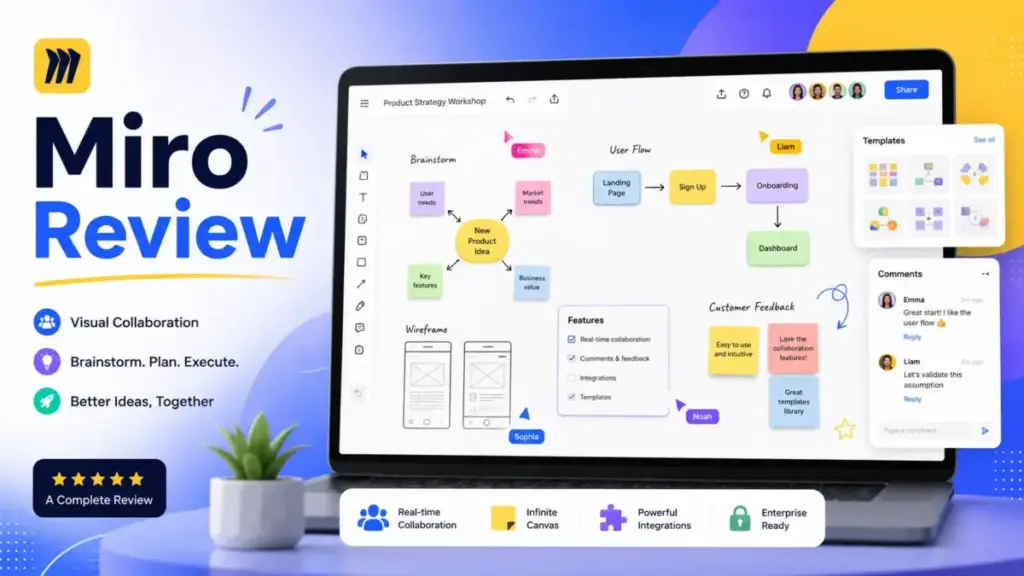
Miro has changed. What started as an online whiteboard for sticky notes and flowcharts now calls itself an AI Innovation Workspace. This Miro review breaks down what that shift means for your team’s budget, workflows, and buying decision in 2026.
I tested Miro’s canvas, templates, AI Workflows, integrations, and admin controls against real product management, UX design, and agile planning scenarios. The result: Miro is one of the strongest team collaboration tools for visual thinking, but its pricing has moved upward, its AI features sit behind plan gates, and some teams will find better value elsewhere.
If you are evaluating what project management means for distributed teams, Miro fits into the discovery and alignment layer, not the execution layer. That distinction matters for cost and workflow planning.
This review is based on extensive hands-on evaluation using official documentation, real user workflows, and competitive testing scenarios. Pricing was verified from official Miro pages on May 10, 2026. User sentiment was checked through G2, Capterra, and GetApp. Alternatives were compared by workflow fit, plan limits, and team type. Scoring weighs collaboration, usability, pricing transparency, integrations, AI features, security, and limitations.
Quick Verdict: Is Miro Worth It?
Miro scores 8.6 out of 10 as a visual collaboration platform, but the right plan depends on how many people need edit access and whether your team will use AI Workflows.
| Field | Details |
|---|---|
| Overall Score | 8.6/10 |
| Best For | Remote product, design, agile, consulting, and enterprise visual collaboration |
| Not Best For | Teams needing offline work, simple free whiteboards, static diagrams only, Microsoft-only shops needing basic boards |
| Price Starts | Free ($0), then Starter at $8/member/month billed annually |
| Main Caveat | Business is now $20/member/month billed annually; AI Workflows create plan pressure |
| Verified | May 10, 2026 |
| Category | Score | Rationale |
|---|---|---|
| Collaboration | 9.5/10 | Real-time boards, facilitation tools, comments, visitors, guests |
| Ease of adoption | 8.2/10 | Fast for basic boards, harder for deeper workflows |
| Pricing clarity | 7.8/10 | Public pricing for self-serve plans, Enterprise custom, AI credits need tracking |
| Integrations | 9.0/10 | Jira, Azure DevOps, Asana, Microsoft 365, Google Workspace, Slack, Marketplace |
| AI features | 8.4/10 | Sidekicks and Flows are useful, but full value sits on Business |
| Security/admin | 8.8/10 | SSO, SCIM, Enterprise Guard, data residency, certifications |
| Performance and reliability | 7.6/10 | Good for most boards, dense boards and mobile use can frustrate users |
What Is Miro?
Miro is a cloud-based visual collaboration platform used by more than 100 million users and 250,000 companies. It provides an infinite canvas where teams brainstorm, diagram, plan products, run workshops, build roadmaps, and map customer journeys in real time.
Miro is no longer just a blank digital whiteboard. The platform now includes Docs, Tables, Slides, Timelines, Talktracks, and AI-powered Workflows. That expansion moves Miro closer to a full innovation workspace, but it also means the product has more surface area, more plan tiers, and more decisions for buyers.
Core use cases include brainstorming sessions, sprint planning, retrospectives, service blueprints, wireframing, stakeholder workshops, and product discovery. Teams in product management, UX design, engineering, operations, and consulting use Miro daily. The platform works inside browsers, desktop apps, and mobile apps, though the desktop and browser experiences are significantly stronger than mobile.
Miro Features I Tested
Miro’s feature set is wide enough to replace several standalone tools, but the value you get depends heavily on which plan you choose. I evaluated the canvas, templates, diagramming, documents, AI Workflows, and integrations across Free, Starter, and Business tiers.
Miro Infinite Canvas and Whiteboards
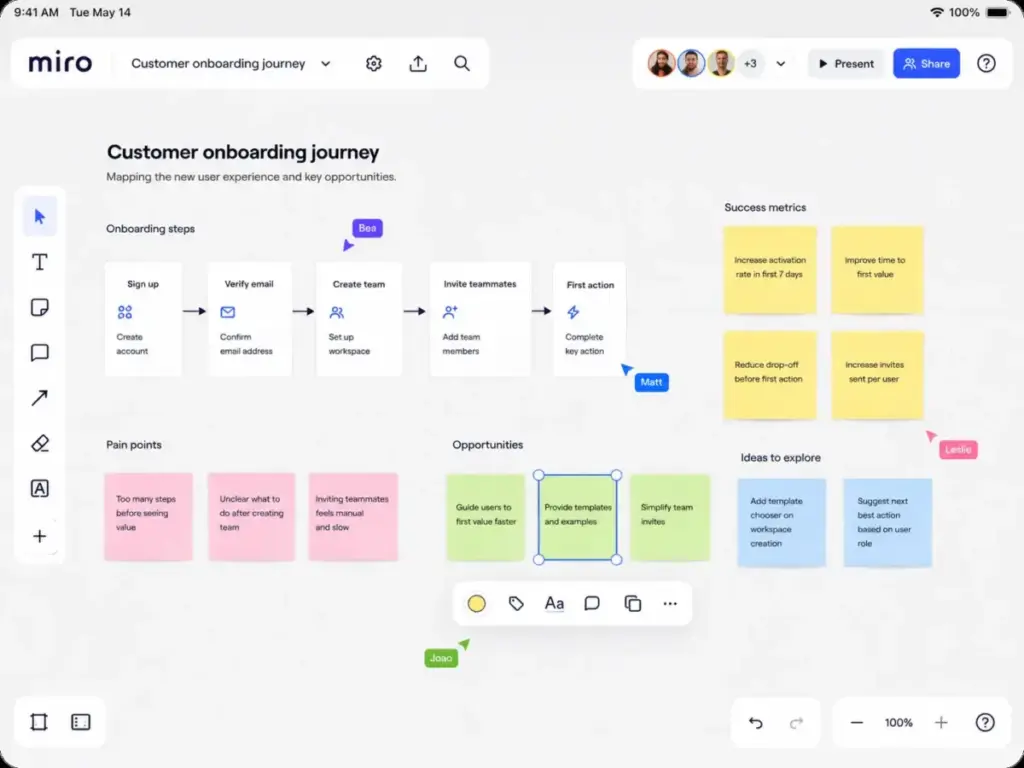
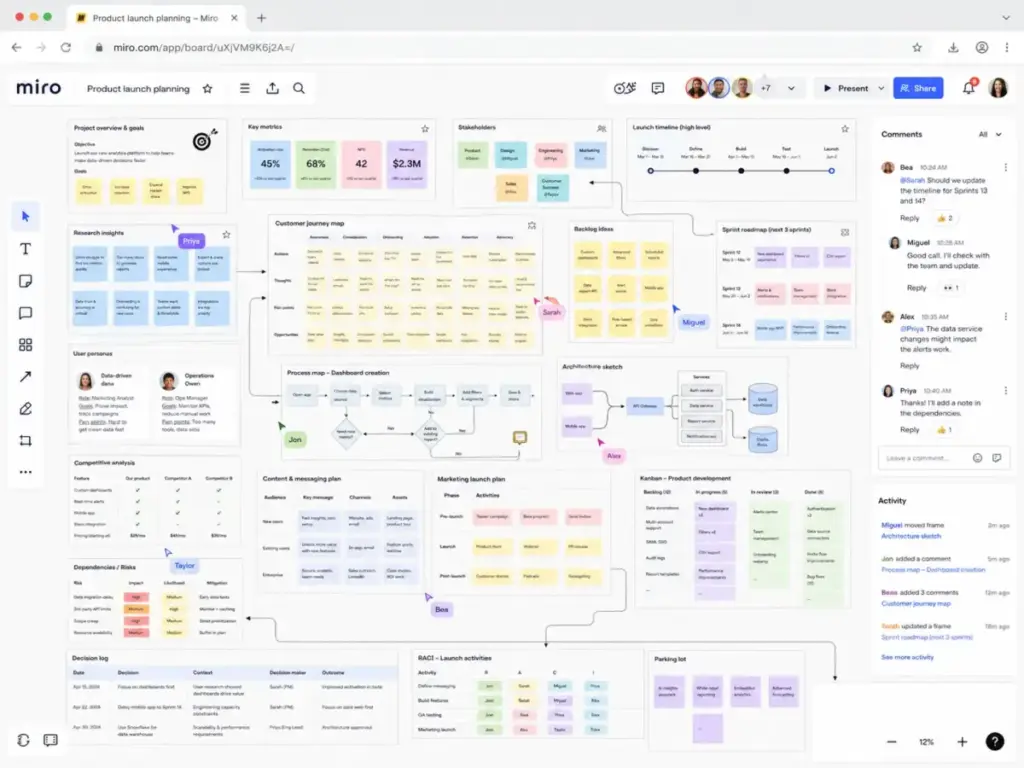
The infinite canvas is Miro’s foundation. You can place sticky notes, shapes, text, images, connectors, frames, and embedded content on a board with no fixed boundary. Zooming and panning feel smooth on boards with moderate content.
Real-time collaboration is where Miro stands out. Multiple team members can edit the same board simultaneously, and cursor presence shows who is working where. As one G2 reviewer noted: “It performs really well and integrates naturally into my workflow” (Michelle M., Intermediate Graphic Designer, G2, May 7, 2026).
Frames help organize sections of large boards. Without frames, boards can become chaotic quickly, especially after workshops with 10 or more participants. Teams who use frames and naming conventions from the start avoid the “board sprawl” problem that affects long-running projects.
Miro Templates and Workshop Tools
Miro offers over 5,000 templates, and they are available on every plan, including Free. Templates cover brainstorming, retrospectives, customer journey maps, empathy maps, SWOT analysis, stakeholder maps, user story maps, Kanban boards, and dozens of other frameworks.
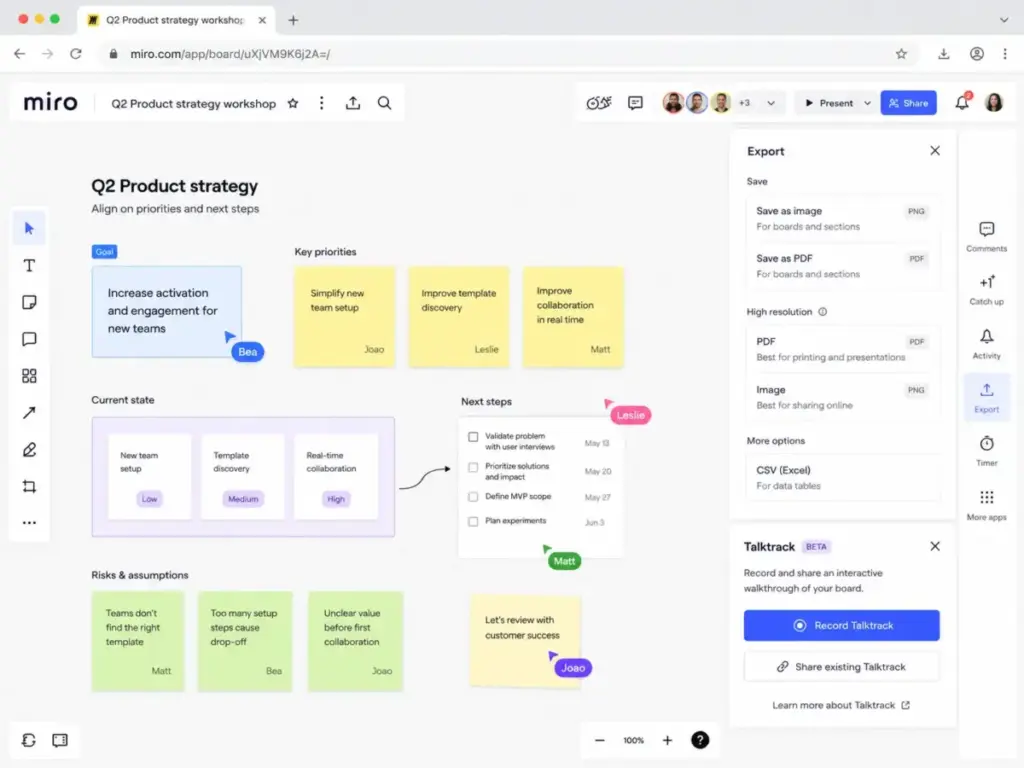
Facilitation tools on Starter and above include voting, timers, attention management, and presentation mode. These features matter for consultants and workshop leaders who run structured sessions. A Capterra reviewer confirmed: “We use this for our agile/scrum stand-up meetings” (Verified Capterra reviewer, September 2, 2025).
The template library reduces preparation time, but templates are starting points. Teams still need to customize layouts, adjust sticky note categories, and adapt frames to their specific process.
Miro Diagramming and Technical Planning
Business plan users get access to 3,900 or more diagramming shapes and icons. This makes Miro viable for flowcharts, org charts, network diagrams, ER diagrams, and process maps without needing a separate diagramming tool.
For teams that build what a Kanban board is into their visual planning, Miro supports Kanban-style layouts on the canvas. However, Miro is not a task management tool. Cards on a Miro board do not have due dates, assignees, or automation rules the way they do in dedicated project management tools.
Technical planning boards for architecture, system design, and infrastructure mapping work well, though teams doing formal technical diagramming at scale may find Lucidspark or Lucidchart more structured.
Miro Docs, Tables, Slides, and Timelines
Miro has expanded beyond the canvas into structured content formats. Docs let teams write long-form content alongside visual boards. Tables (advanced Data Tables on Business) support structured data. Slides let teams present board content without switching to PowerPoint or Google Slides. Timelines provide a visual way to plan schedules and milestones.
These features reduce the need to export Miro content into other tools. However, Miro Docs are not a replacement for a full documentation platform like the ones covered in our Notion review or Confluence. They work best as companions to the canvas, not as standalone document management.
Talktracks let users record audio or video walkthroughs of boards. Free users get 5 Talktracks; Starter and above get unlimited. This feature is useful for asynchronous collaboration in distributed teams.
Miro AI Workflows, Sidekicks, and Flows
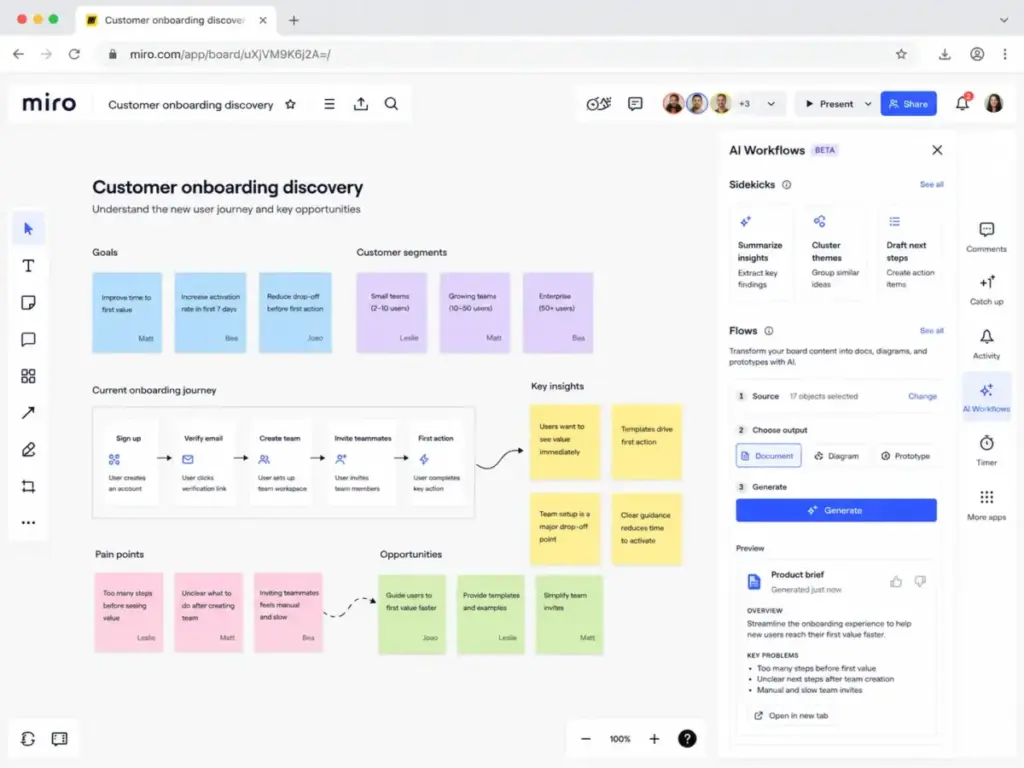
Miro’s biggest product shift in 2026 is the introduction of AI Workflows, available on the Business + AI Workflows plan. This is not just a feature addition; it changes how Miro positions itself and how much it costs.
AI Workflows include two core components:
- Sidekicks: Specialized AI agents that work directly on the canvas. They can summarize sticky notes, cluster ideas, generate follow-up questions, and assist with content creation.
- Flows: Tools that transform Miro board content into outputs such as prototypes, documents, and diagrams.
Think of this as workflow automation applied to visual collaboration. Instead of manually converting workshop output into a PRD or a user flow, Flows attempt to bridge that gap.
AI credits control access. Free plans get 10 AI credits per month per team. Starter plans get 25 credits per member per month. Business plans get 50 credits per member per month. Most actions consume 1 credit, but some consume more. Unused credits do not carry over.
First-time Business subscribers get the new Business + AI Workflows plan. Legacy Business customers can continue temporarily, but Miro has stated the legacy Business plan will be sunset in approximately one year from the April 10, 2026 help article update. If your team is evaluating Business, plan for the AI Workflows version.
Miro also supports Miro MCP (Model Context Protocol), plus integrations with Glean, Gemini, and Copilot on Business. These connections let external AI tools read and write to Miro boards.
Miro Integrations and Developer Platform
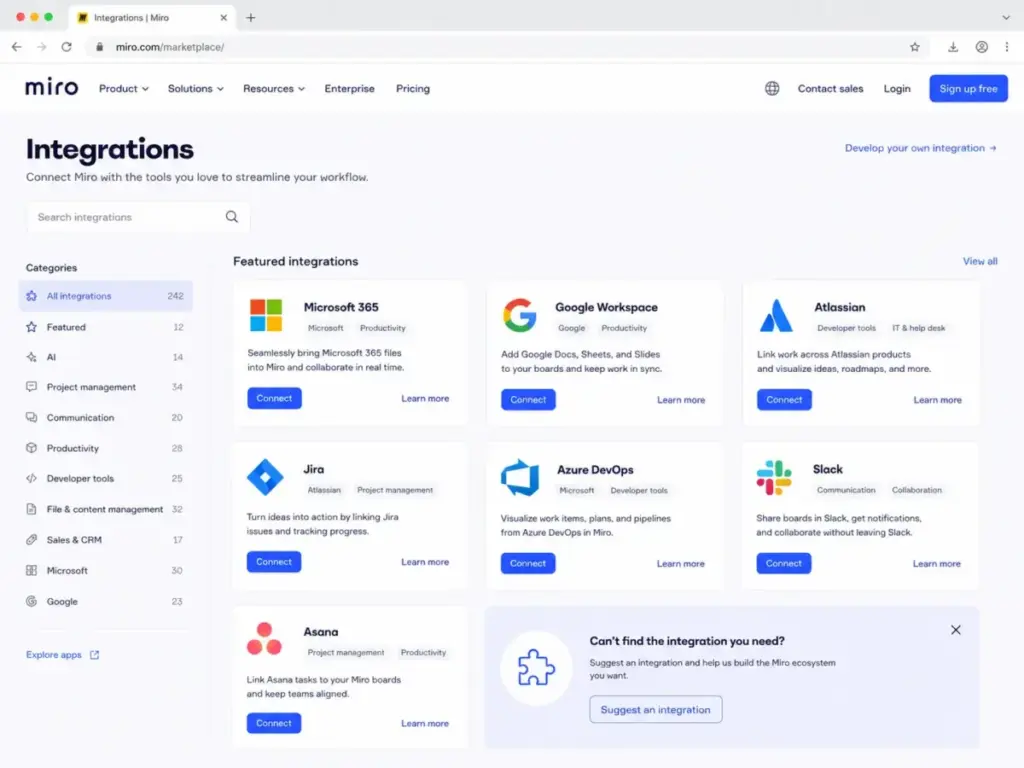
Miro’s Marketplace lists over 250 apps, integrations, and AI tools. The integration ecosystem is one of Miro’s strongest competitive advantages.
Key integrations include Microsoft 365, Google Workspace, Atlassian (Confluence), Jira review, Azure DevOps, Asana review, Slack review, Microsoft Teams review, Gemini CLI, GitHub Copilot, Claude Code, OpenAI Codex, Replit, and ServiceNow.
The Business plan includes bi-directional updates with Jira, Azure DevOps, and Asana. Changes on a Miro board can sync back to your Jira project or Asana workspace, and vice versa. For agile teams, this reduces the double-entry problem where workshop output sits on a board but never reaches the backlog.
The Miro Developer Platform allows custom apps and integrations. Teams with engineering resources can build bespoke workflows, automate board creation, or connect Miro to internal tools.
Miro User Experience
The first 30 minutes on Miro are easy. The first 30 days reveal the complexity. Basic board creation, sticky notes, and shape placement feel intuitive. The learning curve steepens when teams try to use advanced features like Docs, Tables, AI Workflows, and admin controls.
Daily workflow speed is high for experienced users. Keyboard shortcuts, quick-add menus, and frame navigation make it fast to move between sections of a large board. Search helps find boards and content, but board organization becomes a challenge when teams accumulate dozens of boards over months.
Board sprawl is a real governance risk. Without naming conventions, archival policies, and space organization, teams end up with abandoned boards mixed in with active projects. Spaces and Blueprints (available on Starter and above) help, but they require intentional setup.
As one GetApp reviewer noted: “Everyone can contribute in real time without needing to be in the same room” (Rakhi V., QA). That real-time collaboration is consistently Miro’s strongest feature across all review platforms.
Desktop and browser experiences are strong. Mobile is weaker. Editing on a phone is possible but frustrating for detailed work. Tablets are better, but the primary Miro experience is designed for screens with keyboards and mice.
For consultants and client-facing teams, Miro’s visitor and guest access is valuable. Business plans include unlimited guests. This lets external stakeholders view and comment without needing paid seats.
Miro Pricing and Plans
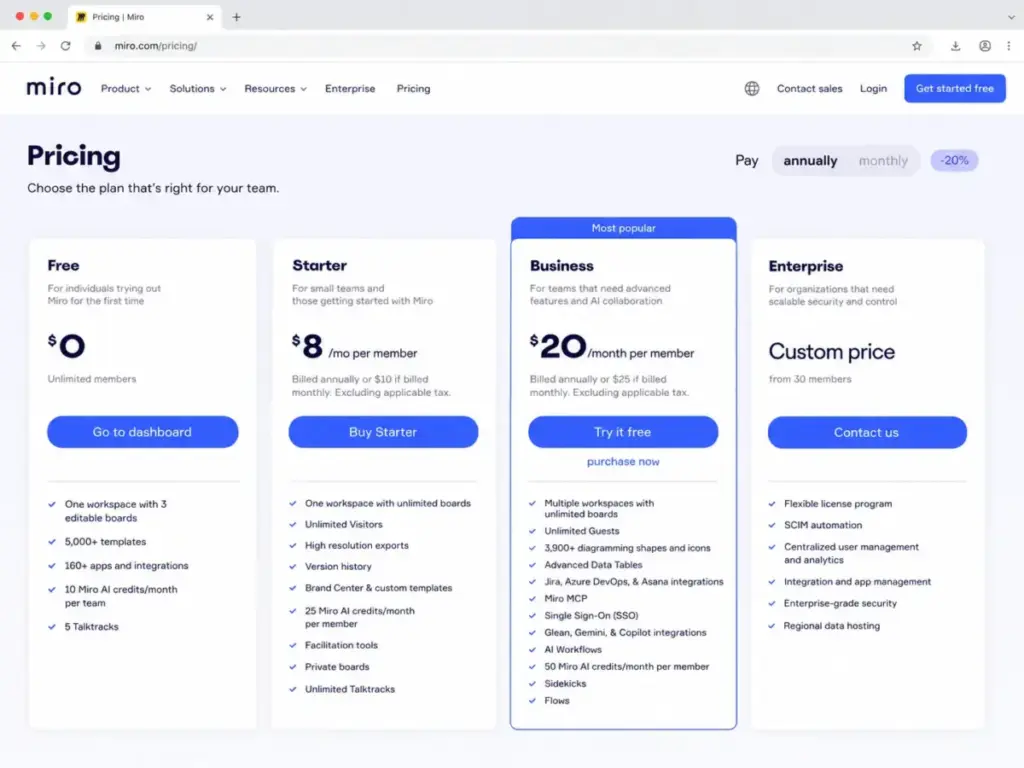
Miro’s Business plan now costs $20 per member per month billed annually, up from the $16 figure that still appears on older review sites. Do not rely on outdated pricing. The table below reflects verified pricing as of May 10, 2026.
For a deeper breakdown including feature gates and plan comparison details, see our dedicated Miro pricing analysis.
| Plan | Annual Price | Monthly Price | Best For | Key Limits | AI Credits | Verified |
|---|---|---|---|---|---|---|
| Free | $0 | $0 | Testing, students, solo use | 1 workspace, 3 editable boards | 10/month/team | May 10, 2026 |
| Starter | $8/member/mo | $10/member/mo | Small teams, private boards | 1 workspace, unlimited boards | 25/member/mo | May 10, 2026 |
| Business | $20/member/mo | $25/member/mo | Product, UX, agile, SSO | Multiple workspaces, unlimited guests | 50/member/mo | May 10, 2026 |
| Enterprise | Custom | Custom | Regulated orgs, 30+ members | Flexible licensing, centralized admin | Custom | May 10, 2026 |
What Miro Really Costs
Pricing per seat looks manageable until you multiply by team size and add annual billing.
5-person team examples (annual billing, before tax):
- Starter: 5 x $8/month x 12 = $480/year
- Business: 5 x $20/month x 12 = $1,200/year
25-person team examples (annual billing, before tax):
- Starter: 25 x $8/month x 12 = $2,400/year
- Business: 25 x $20/month x 12 = $6,000/year
The jump from Starter to Business is $150 per member per year. For a 25-person team, that is $3,600 more per year. The question is whether AI Workflows, SSO, unlimited guests, and deeper integrations justify that gap.
AI credits add another cost layer. Starter, Business, and Enterprise plans can purchase additional AI credits as an add-on. If your team uses AI features heavily, factor this into total cost of ownership.
Why the $16 Business Price Is Wrong
Many review sites and cached search results still show Miro Business at $16 per member per month. That pricing is outdated. Miro’s current Business plan, verified on May 10, 2026, costs $20 per member per month billed annually, or $25 monthly. If you see $16 elsewhere, the source has not updated its data.
Miro Free Plan Limits
Miro’s Free plan sounds generous with unlimited members, but the real limit is 3 editable boards. That is enough to try the product, not enough to run a team.
Free includes:
- Unlimited members in one workspace
- 3 editable boards (you can view more but cannot edit beyond 3)
- 5,000+ templates
- 160+ apps and integrations
- Layers
- 10 Miro AI credits per month per team (not per member)
- 5 Talktracks
Free does not include:
- Private boards
- High-resolution exports
- Version history
- Brand Center or custom templates
- Facilitation tools (voting, timer, attention management)
- Spaces and Blueprints
The 3-board limit is the forcing function. A product team running discovery, sprint planning, and retrospectives will fill 3 boards in the first week. Students, solo freelancers, and evaluators can work within Free. Teams cannot.
Public sharing on Free means anyone with the link can view your boards. If your content is sensitive, you need Starter or above for private boards.
Miro Pros and Cons
Miro’s strengths center on real-time collaboration, template depth, and integration breadth. Its weaknesses center on cost scaling, mobile experience, and post-workshop cleanup.
| Pros | Cons |
|---|---|
| Real-time collaboration is best in class across whiteboard tools | Large or dense boards can lag with many embedded elements |
| 5,000+ templates cover brainstorming, agile, UX, and planning | Mobile editing is not a strong primary experience |
| Facilitation tools support structured workshops | Free plan limits to 3 editable boards |
| Jira, Azure DevOps, Asana, Slack, Teams integrations with bi-directional sync | Business plan is now $20/member/month annual |
| Better for visual product discovery than task-only PM tools | AI credits require monitoring; unused credits expire |
| Enterprise security is stronger than basic whiteboard tools | Workshop output often needs cleanup before becoming deliverables |
| AI Workflows bridge ideation and documentation | Offline use is weak |
| Visitor and guest access for external stakeholders | Enterprise Guard is an add-on, not standard |
Miro Security and Admin Controls
Miro’s enterprise security goes beyond badge-level compliance, but the strongest protections require Enterprise or the Enterprise Guard add-on. Here is what each layer covers, explained for buyers, not auditors.
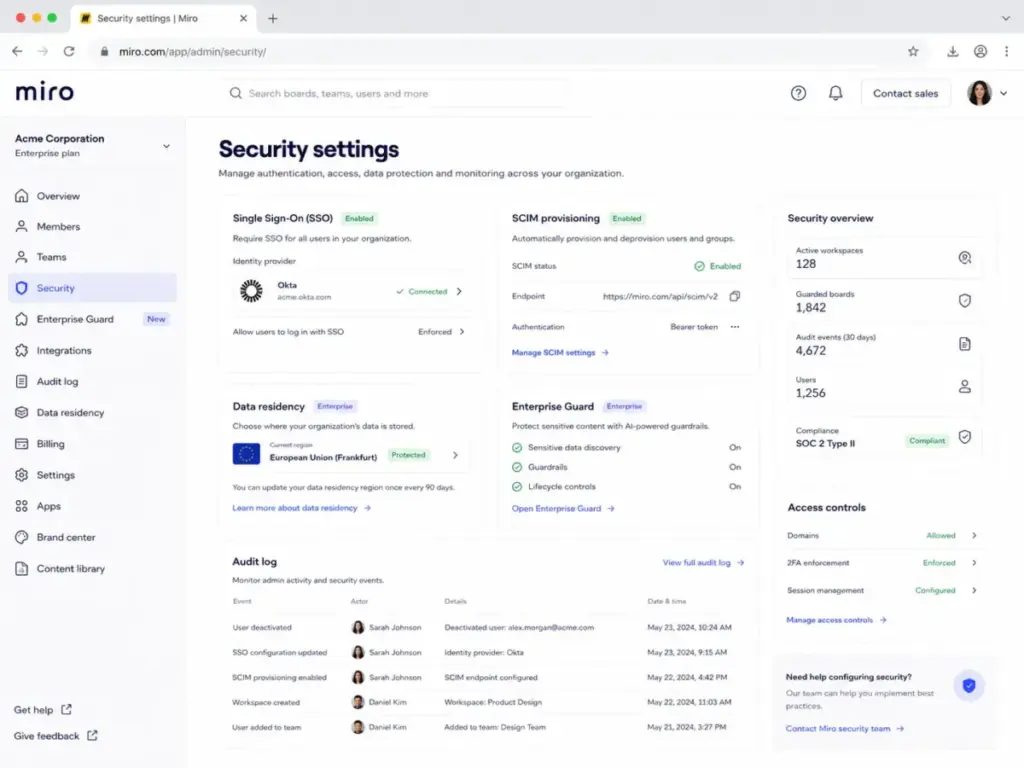
Authentication and access control: Business and Enterprise plans include SSO (single sign-on). Enterprise adds SCIM for automated user provisioning and deprovisioning. This matters when employees join or leave: SCIM ensures Miro access is revoked automatically through your identity provider.
Compliance certifications: Miro holds SOC 2 Type II, ISO/IEC 27001, ISO 42001 (AI management systems), and is GDPR compliant. The SOC 2 Type II certification means Miro’s security controls have been audited over a period, not just at a single point in time.
Data residency: Miro offers data residency options in the EU, US, Australia, and Japan. Customer content is encrypted in transit with TLS 1.3 and at rest with AES 256.
AI privacy: Miro’s Enterprise Security page states that customer data is never used to train Miro AI models. For teams concerned about sensitive board content being processed by AI features, this is a meaningful commitment.
Enterprise Guard: This is a paid add-on for Enterprise plans. It automatically finds, classifies, and secures sensitive data on Miro boards. Features include Intelligent Guardrails (rules that prevent sensitive data from being shared externally), content lifecycle management, eDiscovery support, and encryption key management with AWS KMS.
Enterprise Guard is not included in Business. Teams that need data classification, automated content governance, or customer-managed encryption keys must be on Enterprise with the Guard add-on. For regulated industries (finance, healthcare, government contractors), this is typically a requirement.
Zero Trust Architecture: Miro states it follows a Zero Trust security model. Combined with SSO, SCIM, and data residency, this gives enterprise IT teams a defensible security posture for board-level collaboration.
Miro Alternatives
No single whiteboard tool fits every team. The best Miro alternative depends on what triggered the search. Below, I compare Miro against five competitors using specific switch triggers rather than generic feature lists.
Miro vs FigJam
Switch trigger: Your design team already lives inside Figma.
FigJam is Figma’s built-in whiteboard. If your team uses Figma for UI design, FigJam is included in Figma plans and keeps whiteboarding inside the same ecosystem. Handoff from whiteboard to design file is faster in FigJam than in Miro.
Where Miro wins: deeper template library, stronger facilitation tools, more integrations outside the design workflow, and better support for non-design teams (product managers, consultants, operations).
Where FigJam wins: tighter Figma integration, lower friction for design-only teams, simpler interface.
For more details on Figma’s ecosystem and pricing, see our Figma review and Figma pricing breakdowns.
Miro vs Mural
Switch trigger: Your team runs structured, facilitator-led workshops as a core practice.
Mural was built with facilitation at its center. If your team relies on trained facilitators, structured workshop agendas, and guided activities, Mural’s facilitation features are slightly more opinionated than Miro’s. Mural’s room-based structure also encourages more organized content than Miro’s open canvas.
Where Miro wins: larger template library, broader integration ecosystem, stronger AI Workflows with Sidekicks and Flows, more flexible canvas for freeform work.
Where Mural wins: more structured facilitation framework, room-based organization reduces sprawl, strong focus on guided collaboration.
For teams that do 3 or more structured workshops per week, evaluate both. Miro is more flexible; Mural is more guided.
Miro vs Lucidspark
Switch trigger: Your team needs whiteboarding and formal diagramming in one suite.
Lucidspark is the whiteboarding tool inside the Lucid suite, which also includes Lucidchart for formal diagramming. If your team creates both freeform brainstorms and formal process diagrams, network maps, or ER diagrams, the Lucid suite keeps both in one subscription.
Where Miro wins: stronger real-time collaboration features, larger template library, deeper integrations with Jira, Asana, and Azure DevOps, more AI features.
Where Lucidspark wins: tighter connection to Lucidchart for formal diagrams, better for technical diagramming workflows, combined suite pricing.
Miro vs Microsoft Whiteboard
Switch trigger: Your organization runs on Microsoft 365 and needs basic whiteboarding at no added cost.
Microsoft Whiteboard is included with Microsoft 365 subscriptions. For teams that use Microsoft Teams review daily and only need basic whiteboarding during meetings, Microsoft Whiteboard avoids an additional subscription.
Where Miro wins: far more templates, stronger facilitation tools, deeper canvas capabilities, better for workshops, more integrations, AI Workflows.
Where Microsoft Whiteboard wins: zero additional cost for Microsoft 365 customers, native Teams integration, simpler for basic meeting whiteboards.
If your whiteboarding needs are limited to quick meeting sketches, Microsoft Whiteboard is sufficient. If you run workshops, planning sessions, or product discovery, Miro is the better tool.
Miro vs Canva Whiteboard
Switch trigger: Your team is in marketing or content and needs visual output more than product planning.
Canva Whiteboard is part of Canva’s design suite. If your team creates social media graphics, presentations, and marketing materials, Canva Whiteboard keeps brainstorming inside the same tool that produces finished visual content.
Where Miro wins: stronger for product teams, better integrations with developer and PM tools, deeper facilitation features, more structured for agile and UX workflows.
Where Canva Whiteboard wins: direct path from whiteboard to finished marketing assets, better for teams that produce visual deliverables, simpler for non-technical users.
Who Should Use Miro?
Miro fits teams that think visually and collaborate across roles, locations, or time zones. The right plan depends on team size, security needs, and how much value AI Workflows provide.
| Persona | Why Miro Fits | Best Plan | Watch-Out |
|---|---|---|---|
| Product managers | Discovery, roadmaps, sprint planning, journey maps | Business | AI credits and board sprawl need governance |
| UX designers | Workshops, wireframes, service blueprints, user flows | Business | Miro is not a design tool; pair with Figma for UI work |
| Agile teams | Retrospectives, stand-ups, Kanban, story mapping | Starter or Business | Bi-directional Jira/Asana sync requires Business |
| Consultants | Client workshops, stakeholder alignment, visual facilitation | Business | Guest access for clients needs Business plan |
| Enterprise innovation | Cross-functional collaboration, strategy sessions, OKRs | Enterprise | Enterprise Guard is a paid add-on |
| Engineering teams | Architecture diagrams, system design, technical planning | Starter or Business | Formal diagramming may be better in Lucidchart |
For lightweight task tracking alongside Miro’s visual work, some teams pair it with tools like those in our Trello review. Miro handles the thinking; a task tool handles the doing.
Who Should Not Use Miro?
Miro is not the right tool for every team. Here are specific situations where other tools fit better.
- Solo users who need more than 3 boards but do not need collaboration. You will pay $8 per month for Starter just to get unlimited boards. Excalidraw or Whimsical may cost less for individual use.
- Teams needing offline whiteboarding. Miro requires an internet connection for full functionality. If your team works in environments with unreliable connectivity, consider tools with stronger offline support.
- Teams that only need basic meeting whiteboards inside Microsoft Teams. Microsoft Whiteboard is included with your Microsoft 365 subscription. Adding Miro is an unnecessary cost.
- Teams needing polished slide decks as the final output. Miro Slides exist, but they are not PowerPoint or Google Slides. Workshop output on Miro boards typically requires cleanup and reformatting before client or executive delivery.
- Teams sensitive to per-seat costs with many occasional users. If you have 50 people who need board access but only 10 use it weekly, Miro’s per-seat pricing can feel expensive. Consider how many truly need edit access vs. view-only visitor access.
Final Verdict
Miro scores 8.6 out of 10. It remains the strongest general-purpose visual collaboration platform in 2026, with real-time collaboration, a deep template library, strong integrations, and a growing AI Workflows layer that separates it from simpler whiteboard tools.
The biggest consideration is cost. Business at $20 per member per month (annual) is not cheap, and the jump from Starter to Business is where most teams face a hard decision. AI Workflows, SSO, unlimited guests, and bi-directional Jira/Asana/Azure DevOps sync are powerful, but they only matter if your team will use them.
My plan recommendations:
- Free: Good for testing, students, and solo exploration. Not viable for teams beyond the first week.
- Starter ($8/member/month annual): Right for small teams that need private boards, unlimited boards, version history, and basic facilitation. Skip if you need SSO or deep integrations.
- Business ($20/member/month annual): Right for product, UX, and agile teams that need AI Workflows, SSO, guests, and Jira/Asana/Azure DevOps sync. This is where Miro delivers its full value.
- Enterprise (custom): Right for regulated or large organizations that need SCIM, data residency, centralized admin, and Enterprise Guard.
Miro is not just a whiteboard anymore, but that makes buying it more complex. The best plan is determined by collaborator type, not board count alone. Use the persona table above to match your team to the right tier, and budget for the real per-seat cost before committing.
For teams exploring related tools, our guides on SaaS software and collaboration platforms can help frame the broader buying decision.
FAQ
Is Miro free?
Yes. Miro’s Free plan costs $0 and includes unlimited members, 3 editable boards, 5,000+ templates, 160+ integrations, and 10 AI credits per month per team. The 3-board edit limit is the main constraint that pushes active teams to paid plans.
How much does Miro cost in 2026?
Miro Starter costs $8 per member per month billed annually ($10 monthly). Business costs $20 per member per month billed annually ($25 monthly). Enterprise pricing is custom and starts at 30 members. Pricing verified May 10, 2026.
Is Miro worth it for small teams?
For teams of 3 to 10 people who collaborate visually on product planning, workshops, or agile ceremonies, Miro Starter at $8 per member per month provides strong value. Business at $20 per member per month is worth it only if you need SSO, unlimited guests, or AI Workflows.
What is Miro best used for?
Miro excels at brainstorming, workshop facilitation, sprint planning, retrospectives, customer journey mapping, service blueprints, roadmapping, and cross-functional product discovery. It is strongest when multiple people need to think visually together in real time or asynchronously.
What are Miro's biggest disadvantages?
Large boards can lag. Mobile editing is weak compared to desktop. The Free plan limits teams to 3 editable boards. Business pricing increased from the $16 shown on older review sites to $20 per member per month. AI credits do not carry over. Offline use is limited. Workshop output often needs cleanup before becoming finished deliverables.
Is Miro better than FigJam?
Miro offers a broader feature set, more templates, deeper integrations, and AI Workflows. FigJam is better for design teams already working inside Figma. Choose Miro for cross-functional collaboration. Choose FigJam if your team is design-focused and Figma-native.
Is Miro better than Mural?
Miro is more flexible and has a larger integration ecosystem. Mural is more structured for facilitator-led workshops. Choose Miro for general visual collaboration across roles. Choose Mural if structured workshop facilitation is your primary use case.
Does Miro work with Jira and Asana?
Yes. On the Business plan, Miro integrates with Jira, Azure DevOps, and Asana with bi-directional updates. Changes on Miro boards sync to your project management tool and vice versa. Starter and Free plans have limited integration depth.
Is Miro secure for enterprise teams?
Miro holds SOC 2 Type II, ISO/IEC 27001, ISO 42001, and GDPR compliance. Enterprise plans include SSO, SCIM, and data residency (EU, US, Australia, Japan). Enterprise Guard (paid add-on) adds sensitive data classification, Intelligent Guardrails, eDiscovery, and AWS KMS encryption key management. Customer data is not used to train Miro AI models.
What is the best Miro alternative?
It depends on the switch trigger. FigJam for Figma-native design teams. Mural for structured workshop facilitation. Lucidspark for combined whiteboarding and formal diagramming. Microsoft Whiteboard for Microsoft 365 teams needing basic boards. Canva Whiteboard for marketing teams needing visual output. Excalidraw for free, open-source individual whiteboarding.