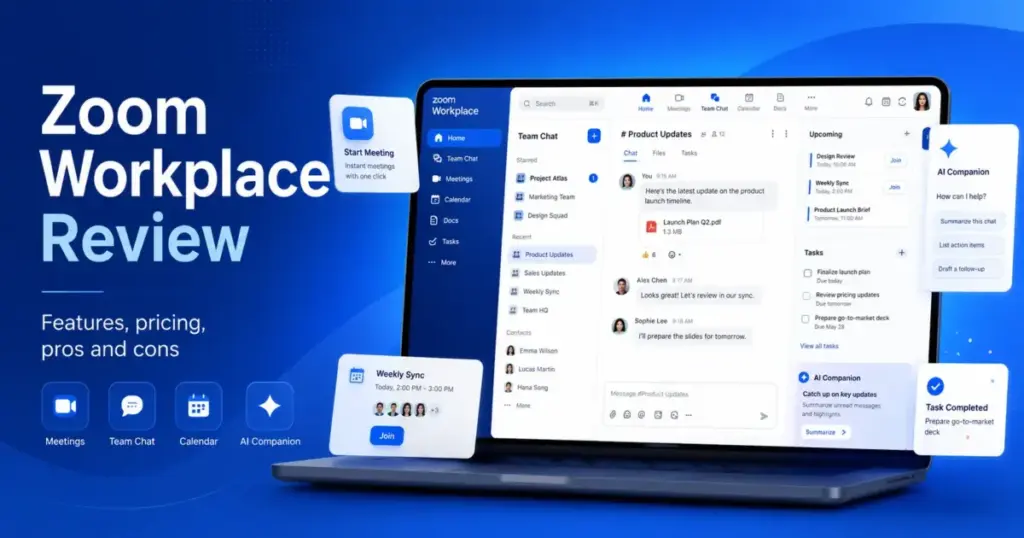
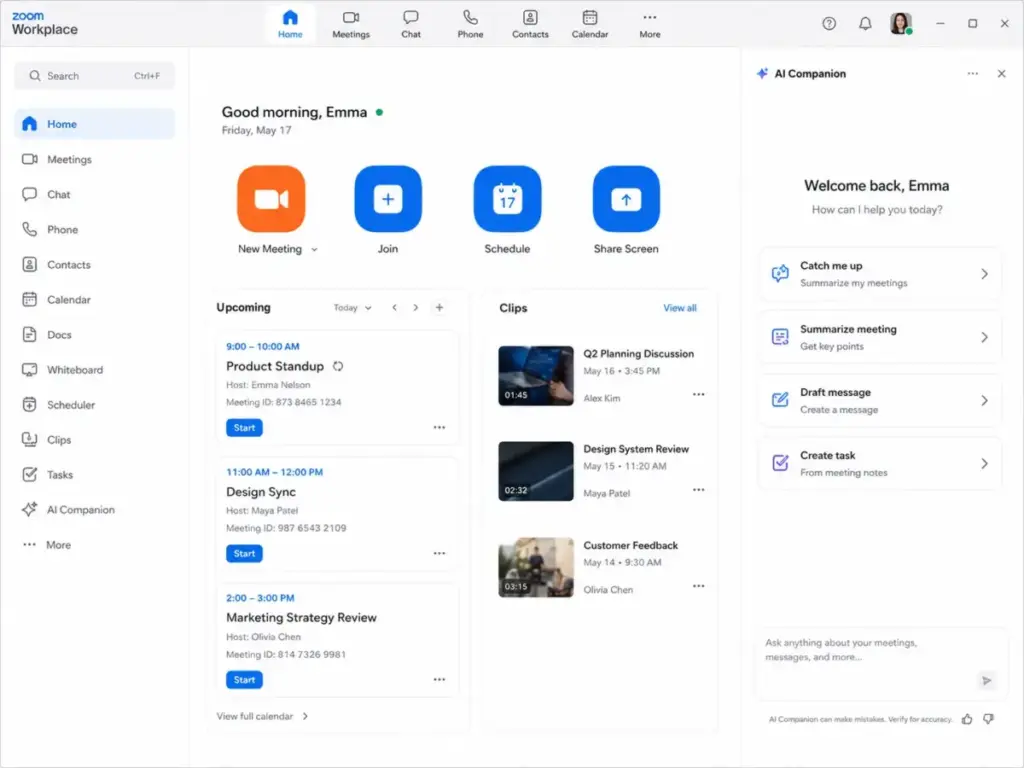
Most teams still think of Zoom as the app they click to join a meeting. That assumption is two years out of date. Zoom Workplace in 2026 is a bundled workspace that includes meetings, Team Chat, Docs, Whiteboard, Scheduler, Clips, Tasks, Notes, Mail, Calendar, and AI Companion, all inside one navigation bar.
The real question in this Zoom Workplace review is not whether the video calls work (they do). The question is whether your team will use enough of that bundle to justify paying for it, or whether the extra surface area creates more clutter than clarity.
I evaluated Zoom Workplace across official documentation, verified pricing pages, public developer docs, app store listings, and user review patterns on G2, Capterra, TrustRadius, and Software Advice. Among team collaboration tools, Zoom still has one of the lowest joining-friction experiences for external participants. Visual collaboration tools like Miro handle whiteboarding better, and dedicated messaging platforms handle async chat better. But for the live meeting itself, Zoom remains the default.
Zoom Workplace scores 7.8/10. It is the right pick for teams that host frequent external meetings, client calls, sales demos, and training sessions where join reliability matters more than deep async collaboration. It is the wrong pick for teams that primarily need internal chat, project management, or document-heavy workflows.
Quick Verdict
| Category | Detail |
|---|---|
| Score | 7.8/10 |
| Best for | Distributed sales, consulting, recruiting, and hybrid teams hosting frequent external video calls |
| Not for | Teams that mainly need async chat, project management, or deep file collaboration |
| Starting price | $0 (Basic), $14.16/user/month billed annually (Pro) |
| Free plan | Yes, 40-minute meeting cap, 100 participants |
| Recommendation | Try on Pro if meetings drive your workflow; skip if you already have Google Workspace or Microsoft 365 and meetings are secondary |
| Pricing verified | Zoom pricing page, 2026-05-12 |
The 3 Problems Zoom Workplace Solves
External meeting friction is still the strongest argument for Zoom
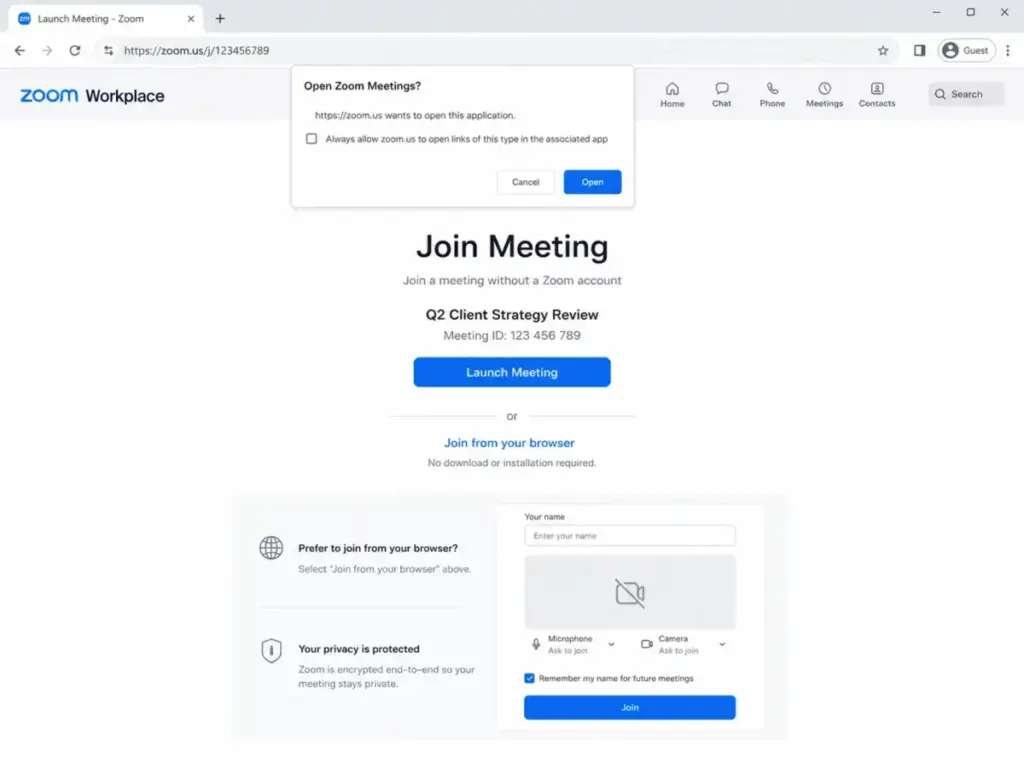
Zoom built its reputation on one thing: anyone can join a meeting without creating an account, installing an app first, or navigating a corporate SSO gate. That advantage persists in 2026. For sales teams running demos, consultants hosting client reviews, recruiters screening candidates, and trainers delivering sessions, Zoom’s join flow creates less friction than Microsoft Teams (which often prompts guests to download) or Google Meet (which works best when both sides use Google).
On paid plans, meetings run up to 30 hours with up to 100 participants on Pro and 300 participants on Business. The Basic plan caps meetings at 40 minutes and 100 participants, which remains Zoom’s most persistent complaint across review platforms.
AI Companion replaces standalone meeting summary tools
Zoom AI Companion is included at no additional cost with eligible paid Workplace plans. It generates meeting summaries, provides productivity assistance, and creates AI-first Tasks from meeting content. For teams currently paying separately for tools like Otter.ai, Fireflies, or similar note-taking services, this inclusion changes the math.
According to Zoom’s official product page, AI Companion capabilities are woven throughout the Workplace platform. Zoom’s AI note-taking features, including My Notes, are included in paid Workplace plans, though availability varies by region and industry vertical.
The practical value: if your team runs 10+ meetings per week and someone currently takes manual notes or pays for a third-party transcription tool, AI Companion on a Pro plan ($14.16/user/month annually) bundles meeting summaries into a tool everyone already has open. Teams that run fewer than five meetings per week or rely on async communication will extract less value from this feature.
The all-in-one bundle reduces vendor count (when meetings are the center of work)
Zoom Workplace now includes Team Chat, Docs, Whiteboard, Clips (short video recordings), Tasks, Notes, Mail, Calendar, and Scheduler. For teams where meetings drive the daily workflow, consolidating these into one vendor eliminates the need for separate subscriptions.
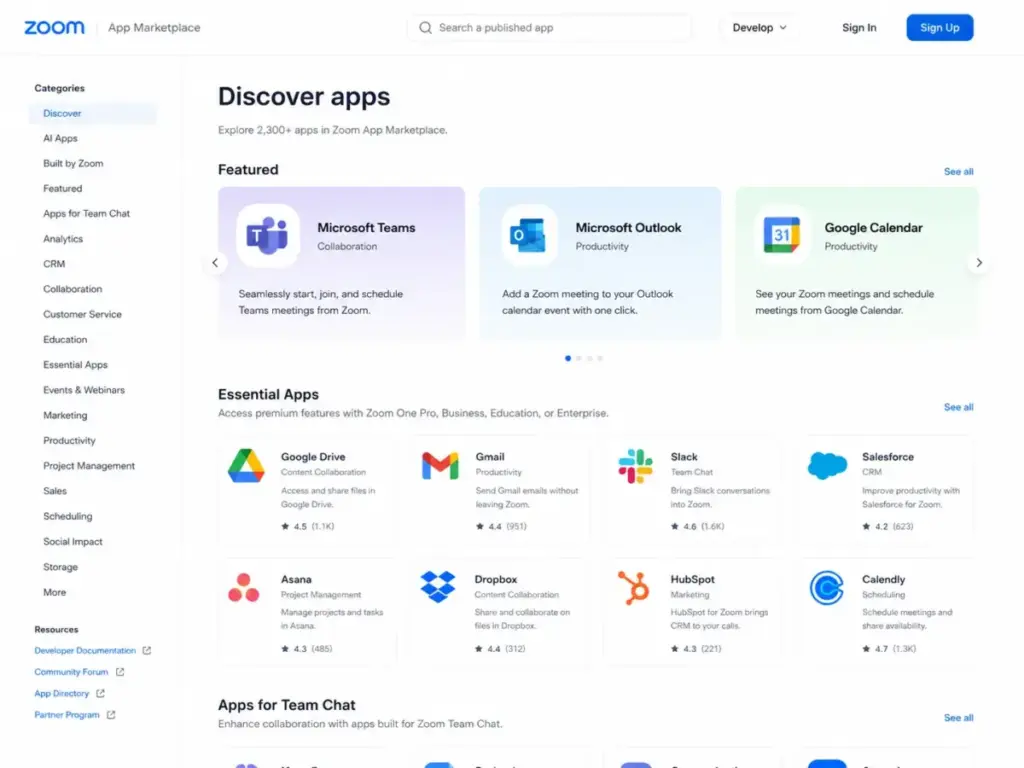
According to Zoom’s Workplace announcement, the platform brings communication, employee engagement, spaces, and productivity solutions together on a single platform. Zoom states it supports more than 2,500 App Marketplace integrations, including Microsoft and Google integrations.
The consolidation argument works best for teams of 5-50 people where meetings generate the primary work artifacts (notes, action items, recordings, follow-up docs). It works poorly for teams where chat or documents drive the day and meetings are occasional check-ins.
The 2 Problems Zoom Workplace Creates
Interface sprawl is the cost of bundling everything
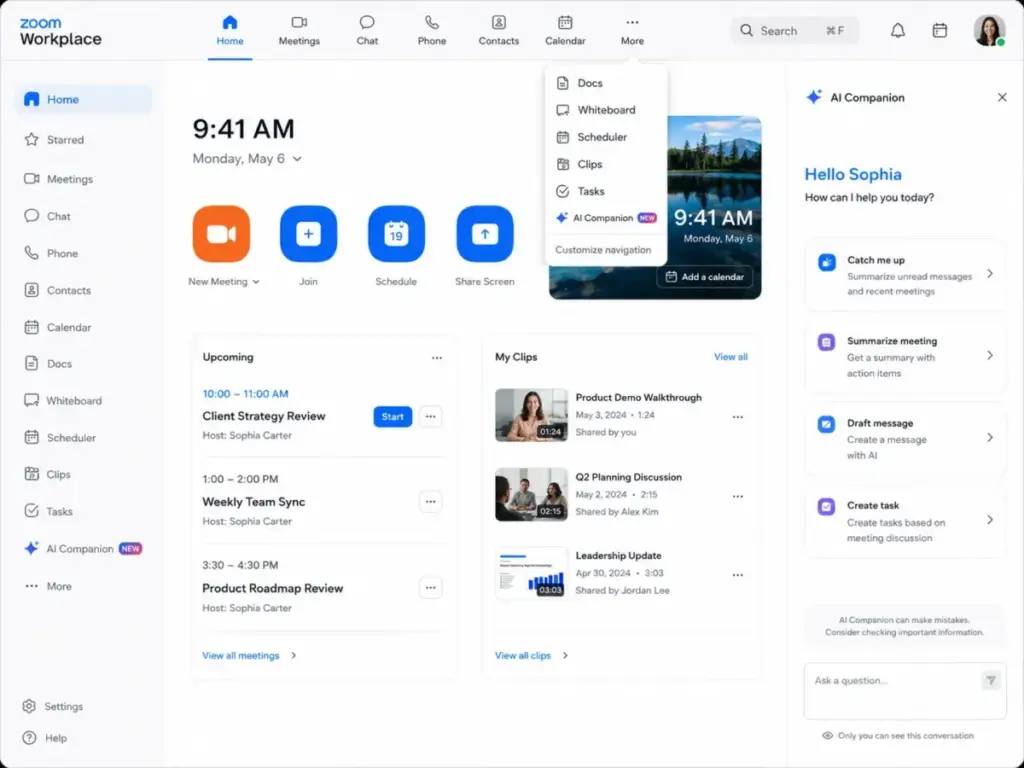
Zoom Workplace’s navigation now includes Meetings, Team Chat, Phone, Docs, Clips, Tasks, Notes, Mail, Calendar, Whiteboard, Scheduler, and more. Users on G2 praise the all-in-one approach but note that the interface can feel cluttered and performance can dip in large meetings with screen sharing or recording enabled. Capterra reviewers on the Zoom review page echo this, citing resource usage and connection struggles after updates.
This is the tension most reviews skip. Zoom’s strength was always simplicity: click a link, join a call. The 2026 Workplace adds a dozen features to a tool people chose because it was simple. For teams that only need meetings, the extra tabs become noise. For teams that commit to using Chat, Docs, and Whiteboard daily, the consolidation creates value. There is no middle ground.
One thing I learned: if your team adopts Zoom Workplace as a full workspace, assign someone to configure which features appear in the navigation. The default view shows everything, and most five-person teams do not need Mail, Calendar, and Phone tabs competing for attention next to their meeting controls.
Add-on costs turn a simple seat price into a complex bill
Zoom’s pricing page shows clean per-seat prices. The real cost depends on how many add-ons your team needs. Cloud storage starts at $10/month for 30 GB. Large Meetings (up to 1,000 attendees) is an add-on. Zoom Webinars is an add-on. Zoom Rooms is an add-on. Premier Support is an add-on. Even AI Companion has a standalone plan at $8.33/user/month billed annually for accounts that do not use paid Workplace plans.
For a 25-person sales team on Workplace Business ($18.33/user/month annually), the base cost is $458.25/month. Add 100 GB extra cloud storage ($30/month), Large Meetings for quarterly all-hands ($varies), and Premier Support, and the bill grows beyond what the pricing page previews. Teams should also budget admin time for license audits because unused paid seats still incur per-user costs.
Zoom Workplace Pricing in 2026
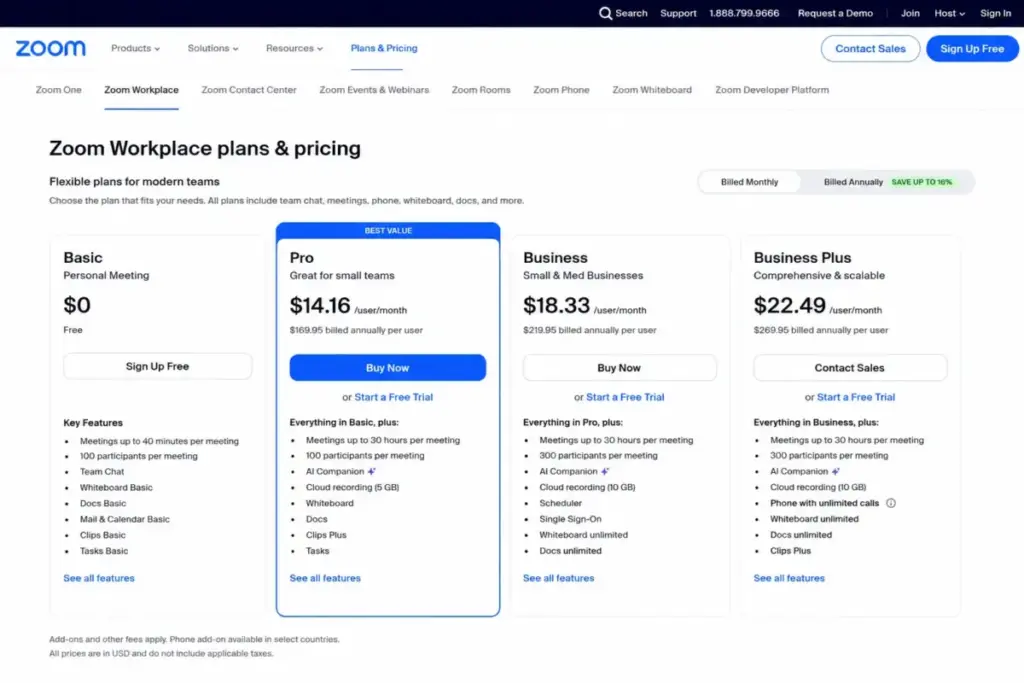
Zoom Workplace pricing starts at $0 for Basic and scales through four paid tiers. All prices below are verified from Zoom’s official pricing page as of May 2026. Zoom’s dynamic pricing pages may show different amounts by country, currency, and billing route. Check the live page before purchase.
| Plan | Monthly Price | Annual Price | Participants | Key Features | Best For |
|---|---|---|---|---|---|
| Basic | $0 | $0 | 100 | 40-min meetings, Chat, Mail, Calendar, 10 shared Docs, 3 Whiteboards, 5 Clips (2 min each) | Occasional meetings under 40 minutes |
| Pro | $16.99/user/mo | $14.16/user/mo | 100 | 30-hour meetings, AI Companion, 10 GB cloud recording, unlimited Docs and Clips, AI-first Tasks | Solo consultants and small teams (1-99 users) |
| Business | $21.99/user/mo | $18.33/user/mo | 300 | All Pro features plus Scheduler, unlimited Whiteboards, SSO, managed domains | Growing teams needing admin controls (1-250 users) |
| Business Plus | ~$29/user/mo | ~$24.50/user/mo | 300 | Business features plus Zoom Phone US/Canada unlimited calling | Teams wanting meetings plus phone in one vendor |
| Enterprise | Contact Sales | Custom quote | Custom | Higher capacity, advanced admin, enterprise support | Large organizations with custom needs |
Note: Some third-party pricing pages still show older Pro pricing at $13.33/month annually. Official Zoom search snippets as of May 2026 show Pro starting at $14.16/user/month billed annually. Business Plus pricing varies between $29.00-$29.40/month depending on region.
Where Pricing Starts to Pinch
The jump from Basic to Pro is the clearest upgrade trigger: the 40-minute meeting cap forces any team with regular meetings longer than a quick check-in to pay. At $14.16/user/month annually, Pro is reasonable for most teams.
The jump from Pro to Business makes sense only when you need 300 participants (up from 100), Scheduler (otherwise $4.99/seat/month as a standalone add-on from Zoom Scheduler page), unlimited Whiteboards (Basic gets 3, Pro does not explicitly expand this), or SSO and managed domain controls. If none of those apply, stay on Pro.
Business Plus is a phone decision, not a collaboration upgrade. It bundles Zoom Phone with US and Canada unlimited calling. If your team does not need business phone service through Zoom, Business Plus adds cost without adding collaboration value. Buy Business and add specific features a la carte instead.
Plan-Gate Decision Table
This table maps key features to the first plan where they become available.
| Feature | First Available Plan | Who Needs It | Skip It If |
|---|---|---|---|
| Meetings beyond 40 minutes | Pro ($14.16/mo annual) | Any team with regular meetings | You only do quick stand-ups under 40 min |
| AI Companion (meeting summaries) | Pro (included with eligible paid plans) | Teams running 10+ meetings/week | Meetings are rare or heavily async |
| Cloud recording (10 GB/license) | Pro | Teams that reference past meetings | You never rewatch recordings |
| 300 participants | Business ($18.33/mo annual) | All-hands, large training, webinars under 300 | Meetings stay under 100 people |
| Scheduler | Business (or $4.99/mo standalone) | Client-facing teams booking external meetings | You already use Calendly or similar |
| Unlimited Whiteboards | Business | Design, product, or strategy teams | You rarely whiteboard |
| SSO and managed domains | Business | IT-managed environments with 50+ users | Small team, no IT admin |
| Zoom Phone (US/Canada unlimited) | Business Plus (~$24.50/mo annual) | Teams replacing a business phone system | You do not need a business phone line |
Who Wins and Who Loses With Zoom Workplace
Win: distributed teams that live in external meetings
Sales teams running demos, consulting firms hosting client calls, recruiting teams screening candidates, and training departments delivering sessions. These teams benefit from Zoom’s low-friction join experience, AI-generated meeting summaries, cloud recordings, and the familiar interface that external participants already know. A 10-person consulting team on Pro pays $141.60/month (annual billing) and gets unlimited meeting length, AI notes, and 100 GB of cloud recording across the team.
Win: hybrid offices standardizing on one meeting platform
If your company has meeting rooms with Zoom Rooms hardware and employees working from home, Zoom Workplace provides a single vendor for in-room and remote meeting experiences. The Business plan adds SSO and managed domain controls that IT teams need for user governance at 50+ seats.
Lose: teams that primarily need async chat and documents
If your daily work revolves around threaded conversations, shared documents, and project boards, Zoom Team Chat and Zoom Docs exist but do not match the depth of Slack for messaging or Google Workspace for document collaboration. Multiple G2 reviewers note that the interface feels cluttered when trying to use Chat and Docs alongside meetings. A team of 20 that primarily collaborates through messages and shared files will find more value in a chat-first or docs-first tool.
Lose: budget-conscious teams already paying for Microsoft 365 or Google Workspace
If your organization already pays for Microsoft Teams through a Microsoft 365 subscription or uses Google Meet through Google Workspace, adding Zoom Workplace creates duplicate costs. Teams meeting included in your existing productivity suite is effectively free. Paying $14.16-$18.33/user/month for Zoom on top of that only makes sense if Zoom’s join experience and AI features provide enough incremental value to justify the cost.
Zoom Workplace Pros and Cons
What Zoom gets right
- Lowest external meeting friction in the category. Any participant joins via browser link without an account. This matters for client-facing teams where attendees are not on your corporate directory.
- AI Companion included with paid plans at no extra charge. Meeting summaries, AI-generated tasks, and productivity assistance come bundled. Teams paying separately for AI note-taking tools can consolidate.
- Reliable video and audio quality across network conditions. Software Advice rates Zoom Workplace at 4.6/5 overall across more than 14,000 reviews, with 4.6/5 for ease of use. TrustRadius reviewers highlight ease of use across calls, Chat, Calendar, and Whiteboard.
- Strong mobile app with full workspace access. The Zoom Workplace app on iOS (rated 4.7/5 from approximately 3.2 million ratings on the App Store) and Android includes meetings, chat, phone, docs, calendar, mail, whiteboard, and AI Companion. This is a genuine mobile workspace, not just a meeting joiner.
- Broad integration ecosystem. More than 2,500 apps in the Zoom App Marketplace, plus APIs, SDKs, and webhooks for custom workflows. Teams using Figma for design collaboration or Dropbox for file storage can connect them through the marketplace.
- Compliance coverage for regulated industries. ISO 27001, SOC 2 Type 2, HITRUST, and GDPR support (detailed in the security section below).
What Zoom gets wrong
- The 40-minute free plan cap is aggressive conversion pressure. Every team that holds meetings longer than a quick sync must upgrade. This is not a limitation; it is a pricing gate.
- Interface clutter from feature sprawl. Meetings, Chat, Phone, Docs, Clips, Tasks, Notes, Mail, Calendar, Whiteboard, Scheduler: the navigation serves power users but overwhelms teams that chose Zoom for simplicity.
- Add-on costs compound quickly. Large Meetings, Webinars, extra cloud storage, Zoom Phone, Zoom Rooms, and Premier Support are all separate charges. The per-seat price on the pricing page is the floor, not the ceiling.
- Support is gated by account type and role. Live chat support is available to owner and admin profiles. Phone support requires owner/admin status on accounts above a monthly recurring revenue threshold. Standard users without admin access file tickets and wait. Zoom’s support plan page documents these restrictions.
- Team Chat does not replace dedicated messaging tools. Zoom Chat works for quick meeting follow-ups but lacks the threaded conversation depth, channel organization, and app integration richness of Slack or Teams for async-heavy teams.
- Performance complaints in large meetings. G2 reviewers report performance dips during large meetings with screen sharing and recording enabled simultaneously. Resource usage on local machines is a recurring Capterra complaint.
Security and Compliance
Zoom lists commercial compliance certifications including ISO 27001, ISO 27017/18, ISO 27701, SOC 2 Type 2, SOC 2 plus HITRUST, CSA STAR Level 2, UK Cyber Essentials Plus, and BSI C5, verified on Zoom’s compliance page.
The SOC 2 Type 2 report covering October 2024 to October 2025 includes Zoom Meetings, Chat, Phone, AI Companion, Docs, APIs and SDKs, Scheduler, Whiteboard, Webinars, and Workflow Automation. This is broader product coverage than many competing platforms document publicly.
Zoom also supports customers with GDPR-aligned technical and organizational measures and provides a Data Processing Addendum incorporated into its Terms of Service. For regulated industries (healthcare, finance, education), these certifications reduce vendor risk assessment friction.
Integrations, API, and Automation
Zoom describes Workplace as an open platform with APIs, SDKs, and a marketplace of more than 2,500 integrations, including Microsoft and Google ecosystem connections.
For technical teams building automations, Zoom provides webhook support for real-time event notifications, with developer documentation covering webhook configuration and subscription management. The API rate limit documentation categorizes endpoints into Light, Medium, and Heavy request classes with different per-second and daily limits by account type.
Before building high-volume meeting automation workflows, verify the specific endpoint limits for your account type. A team automating meeting creation for 200 daily client sessions will hit different constraints than a team pulling weekly analytics reports. The public documentation describes the rate limit framework, but exact endpoint-specific limits require validation against your specific API use case.
Mobile App: A Real Workspace, Not Just a Meeting Joiner
The Zoom Workplace mobile app on Google Play includes video meetings, chat, phone calls, docs, calendar, mail, whiteboard, and AI Companion features. The Apple App Store listing shows a 4.7/5 rating from approximately 3.2 million ratings.
For field sales reps, traveling consultants, and remote workers who split time between laptop and phone, the mobile app handles meeting joins, chat responses, calendar checks, and quick doc edits. AI Companion features are available on mobile with paid licenses, though availability varies by plan and region.
The subscription management caveat: if team members subscribe through the App Store or Google Play instead of through an admin-managed Zoom portal, license governance becomes harder. Centralize billing through the web admin panel.
Support: What to Expect Before You Buy
Zoom’s support structure is tiered in ways most reviews do not explain. Self-service support (Knowledge Base, Community forums, virtual agent) is available to all users. Live chat support is available to owner and admin profiles only. Phone support is available to owner and admin profiles on accounts above a monthly recurring revenue threshold.
This means: a regular team member on a 15-person Business plan cannot call Zoom support directly. They contact their account admin, who then contacts Zoom.
For teams that need guaranteed response times, Premier Support adds priority response, technical resources, technical account management, and SLA-backed response tiers. Premier Support also includes developer and integration support hours, which matters for teams building custom API workflows. Premier Support is a paid add-on, not included in any standard plan.
I suspect most teams under 25 users will never interact with Zoom support directly. The product is familiar enough that most issues resolve through the Knowledge Base. Teams above 50 users with IT admins managing SSO, phone, and compliance should budget for Premier Support.
Better Alternatives When Zoom Is Not the Right Fit
Zoom Workplace is not the right fit for every team. Here is when to choose something else, organized by the reason Zoom fails your requirements.
| If Zoom Fails Because… | Consider Instead | Why |
|---|---|---|
| You already pay for Microsoft 365 and need meetings | Microsoft Teams | Included with your existing subscription; deeper Microsoft ecosystem integration |
| You need lightweight meetings inside Google Workspace | Google Meet | Native to Google Calendar, Docs, Drive; no additional vendor cost |
| Your team needs async chat, not meetings | Slack | Deeper threading, channels, workflow builder, app integrations for chat-first teams |
| You only need external meeting scheduling | Calendly | Scheduling-specific tool without paying for an entire collaboration suite |
| You need phone-first UCaaS with meetings as secondary | RingCentral | Purpose-built unified communications; stronger phone features than Zoom Phone |
| You need async video updates instead of live meetings | Loom for async video | Record and share short video messages without scheduling a live call |
| You are in a Cisco-heavy enterprise environment | Cisco Webex | Native integration with Cisco networking and security infrastructure |
The key question: is your team’s primary workflow built around meetings, or around something else? If meetings are the hub, Zoom Workplace makes sense. If chat, documents, or project boards drive the day, start with the tool that serves that primary workflow and add Zoom only if external meeting quality justifies the extra cost.
Zoom Workplace FAQ
Is Zoom Workplace worth paying for in 2026?
Zoom Workplace Pro is worth it for teams that hold regular meetings longer than 40 minutes and want AI meeting summaries, cloud recording, and unlimited Docs. At $14.16/user/month billed annually, Pro removes the free plan’s hard limits. It is not worth paying for if your meetings are infrequent or under 40 minutes, or if you already have meetings included with Microsoft 365 or Google Workspace.
How much does Zoom Workplace cost in 2026?
Basic is free. Pro starts at $14.16/user/month billed annually ($16.99 monthly). Business is $18.33/user/month billed annually ($21.99 monthly). Business Plus is approximately $24.50/user/month billed annually. Enterprise requires a custom quote. Prices verified on Zoom’s pricing page as of May 2026. Final checkout prices may vary by country, currency, and tax.
Is Zoom Workplace the same as Zoom Meetings?
No. Zoom Workplace replaced the standalone Zoom Meetings app as Zoom’s primary platform. Workplace bundles meetings with Team Chat, Docs, Whiteboard, Clips, Tasks, Notes, Mail, Calendar, Scheduler, and AI Companion. The meeting experience is the same core technology, but the surrounding workspace is substantially larger.
Does Zoom Workplace include AI Companion?
Yes. AI Companion is included at no additional cost with eligible paid Workplace plans (Pro, Business, Business Plus, Enterprise). It provides meeting summaries, productivity assistance, and AI-first task generation. Availability may vary by region and industry. Teams without a paid Workplace plan can purchase AI Companion standalone at $8.33/user/month billed annually.
Which Zoom plan includes Scheduler?
Zoom Scheduler is included with Workplace Business and Enterprise plans. Teams on Pro can purchase Scheduler as a standalone add-on for $4.99/month per seat. If your team books external meetings frequently and Scheduler is the primary reason to upgrade, compare the cost of the Pro-to-Business jump against buying the $4.99 add-on.
Which Zoom plan allows 300 participants?
Workplace Business ($18.33/user/month annually) increases meeting capacity from 100 to 300 participants. For events exceeding 300 attendees, Zoom offers a Large Meetings add-on supporting up to 1,000 attendees as a separate purchase.
Is Zoom Business Plus worth it if I do not need phone?
No. Business Plus is primarily a Zoom Phone bundle that adds US and Canada unlimited calling to the Business plan. If you do not need a business phone system, stay on Business and add only the specific features you need as individual add-ons.
Does Zoom Workplace work well on mobile?
Yes. The Zoom Workplace mobile app includes meetings, chat, phone, docs, calendar, mail, whiteboard, and AI Companion. The iOS app holds a 4.7/5 rating from approximately 3.2 million ratings. The Android app covers the same feature set. Mobile works for joining meetings, responding to chats, and quick doc edits; heavy document work and admin tasks are better on desktop.
What are Zoom Workplace's biggest limitations?
Interface clutter from too many features in one app, the 40-minute free plan meeting cap, add-on costs that exceed the base seat price, support gated by account role and revenue threshold, and Team Chat that does not match Slack or Teams for async depth. Performance can also dip in large meetings with simultaneous screen sharing and recording.
Does Zoom Workplace replace Slack?
Zoom Team Chat handles quick conversations and meeting follow-ups, but it does not match Slack’s threading depth, channel ecosystem, or workflow automation capabilities. Teams that rely on channels for cross-functional communication will find Zoom Chat too thin for primary async work.
Final Verdict: Zoom Workplace Scores 7.8/10
Zoom Workplace earns 7.8/10. It remains the best meeting platform for teams that host frequent external calls where join simplicity, video reliability, and AI meeting summaries matter. The 2026 bundled workspace adds genuine value for teams willing to consolidate chat, docs, and scheduling into one vendor.
Choose Zoom Workplace Pro ($14.16/user/month annually) if your team runs 10+ external meetings per week and wants AI Companion, cloud recordings, and unlimited meeting length without complex admin requirements.
Choose Zoom Workplace Business ($18.33/user/month annually) if you need 300 participants, Scheduler, unlimited Whiteboards, or SSO controls for a managed team of 25-250 users.
Avoid Zoom Workplace if your team primarily works through async chat, shared documents, or project boards. In that case, Slack, Microsoft Teams, or Google Meet will serve your primary workflow better. Check our best video conferencing platforms roundup for a side-by-side comparison of alternatives.
Do not buy Business Plus unless your team specifically needs Zoom Phone with US and Canada unlimited calling. The per-seat premium over Business only pays for itself if you are replacing a separate phone service.
Start with a free Basic account to test the interface, then upgrade to Pro when the 40-minute cap becomes a blocker.