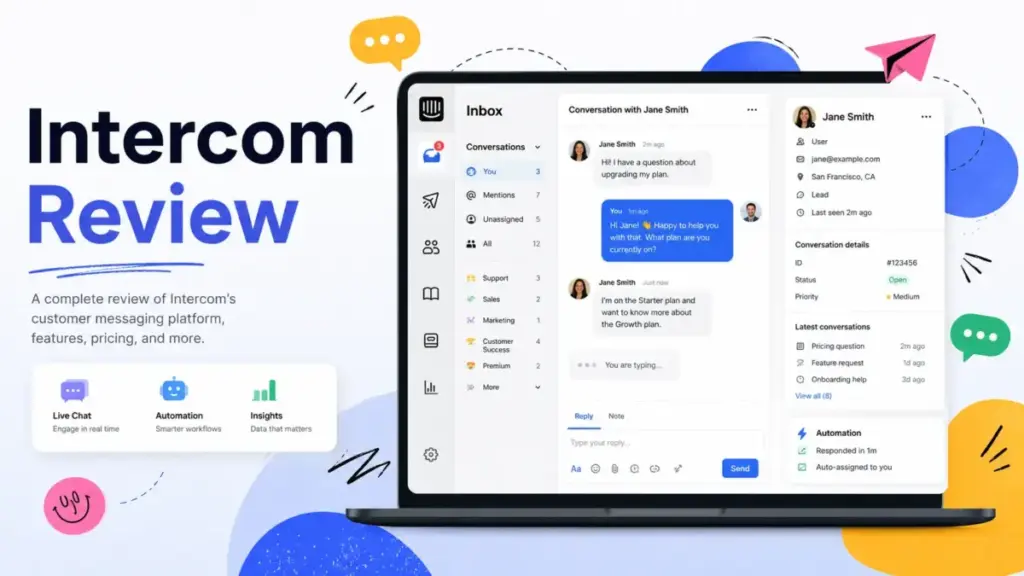
Intercom is one of the strongest AI-first customer support platforms you can buy in 2026, but its pricing model punishes teams that do not plan for it. This Intercom review breaks down every plan, feature, and cost layer so you can decide whether the platform fits your team or drains your budget.
If you are comparing help desk software options right now, Intercom belongs on your shortlist for one reason: Fin AI Agent. Fin can resolve customer questions before a human agent touches them, and it works across chat, email, and other channels. But Fin charges $0.99 per resolved conversation, and that usage cost stacks on top of seat fees, add-ons, and channel charges. I have seen teams celebrate a 50% AI resolution rate, then panic when the monthly invoice arrives.
In this review, I evaluate Intercom based on official documentation, pricing pages, verified user reviews, and buyer scenarios. I cover features, plans, real cost modeling, limitations, and exactly who should and should not use this platform. If you want a broader comparison first, start with our guide to the best help desk software.
Intercom Review: Quick Verdict
Intercom earns an 8.4 out of 10 as a customer support platform built for AI-first SaaS teams. It combines live chat, shared inbox, ticketing, workflow automation, and one of the best native AI agents in the category. The catch is pricing: Intercom becomes expensive precisely when Fin performs well, because every AI resolution adds cost.
| Category | Detail |
|---|---|
| Overall Score | 8.4/10 |
| Best For | SaaS support teams, product-led companies, AI-forward support operations |
| Starting Price | $29/seat/month (Essential, annual) |
| Free Trial | 14 days, no credit card required |
| Fin AI Agent | $0.99 per outcome |
| Top Strength | Native AI agent with deep platform integration |
| Top Weakness | Usage-based pricing makes monthly cost hard to predict |
| Top Alternative | Zendesk for enterprise ticketing, Freshdesk for predictable pricing |
Here is how I scored Intercom across seven weighted categories:
| Category | Weight | Score | Reason |
|---|---|---|---|
| AI support automation | 25% | 9.2 | Fin is one of the strongest native AI agents, but output depends on content quality |
| Help desk functionality | 20% | 8.5 | Strong inbox, ticketing, and workflows, but less structured than Zendesk for ITSM |
| Ease of use | 15% | 8.3 | Modern interface, but automation and AI setup need admin discipline |
| Pricing transparency | 15% | 6.8 | Seat pricing is clear, but Fin and channel costs make bills unpredictable |
| Integrations and scalability | 10% | 8.6 | App Store, APIs, and security controls support growing teams |
| Reporting and admin control | 10% | 8.0 | Good reporting, but advanced AI visibility needs paid add-ons |
| Support and onboarding | 5% | 7.8 | Strong docs, but complex teams may need paid onboarding |
What Is Intercom?
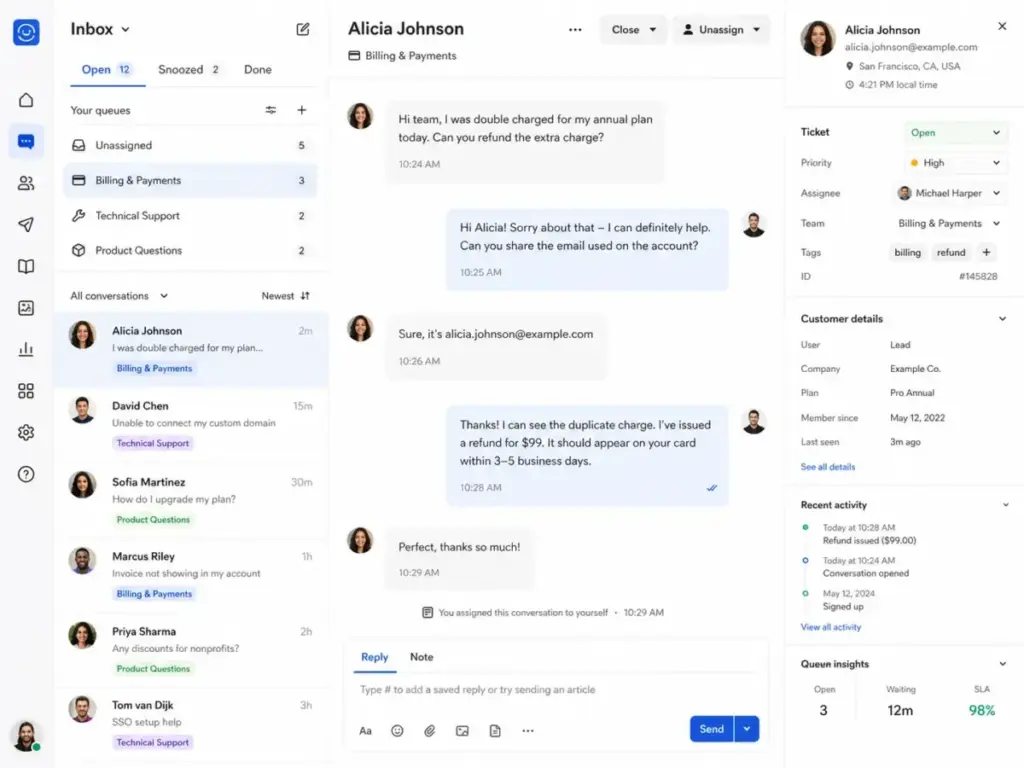
Intercom is an AI-first customer service platform that combines live chat, shared inbox, ticketing, workflow automation, help center, outbound messaging, and an AI agent called Fin into a single system. It serves SaaS companies, product-led startups, and digital-first businesses that want to handle customer support, onboarding, and engagement from one place.
Unlike traditional help desks that treat support as a ticket queue, Intercom treats support as a conversation. The platform started as a customer messaging tool and evolved into a full support operating system. Today, Intercom positions Fin AI Agent as the front line: Fin answers customer questions first, and human agents handle what Fin cannot resolve. To fully grasp this distinction in methodology, it helps to understand how traditional help desk software operates with its rigid SLAs and structured ticket lifecycle management.
Core product components include Fin AI Agent, Messenger, Inbox, Ticketing, Workflows, Help Center, Reporting, outbound messaging, integrations through the App Store, developer APIs, and security controls including SOC 2, ISO 27001, GDPR, and HIPAA support on the Expert plan.
How We Reviewed Intercom
I evaluated Intercom using official product documentation, the current pricing page, verified user reviews from G2 and Capterra, and real buyer cost scenarios. I did not rely on a single demo session or surface-level feature list. You can read our full review methodology for scoring criteria.
My evaluation focused on seven areas: AI support automation, help desk core functionality, ease of use, pricing transparency, integrations, reporting, and onboarding support. Each area carries a weight based on how much it affects a real buyer’s daily experience. AI automation carries the highest weight (25%) because Fin is the defining feature of Intercom in 2026.
I cross-referenced official claims with user reviews to identify gaps between marketing promises and daily reality. Where user sentiment conflicted with official positioning, I flagged it.
Intercom Features That Matter
Intercom packs more features into its platform than most help desks, but not every feature ships on every plan. The gap between Essential and Expert is significant for teams that need workflow automation, SLAs, SSO, or multilingual help center support. Here is what matters most.
Intercom Fin AI Agent
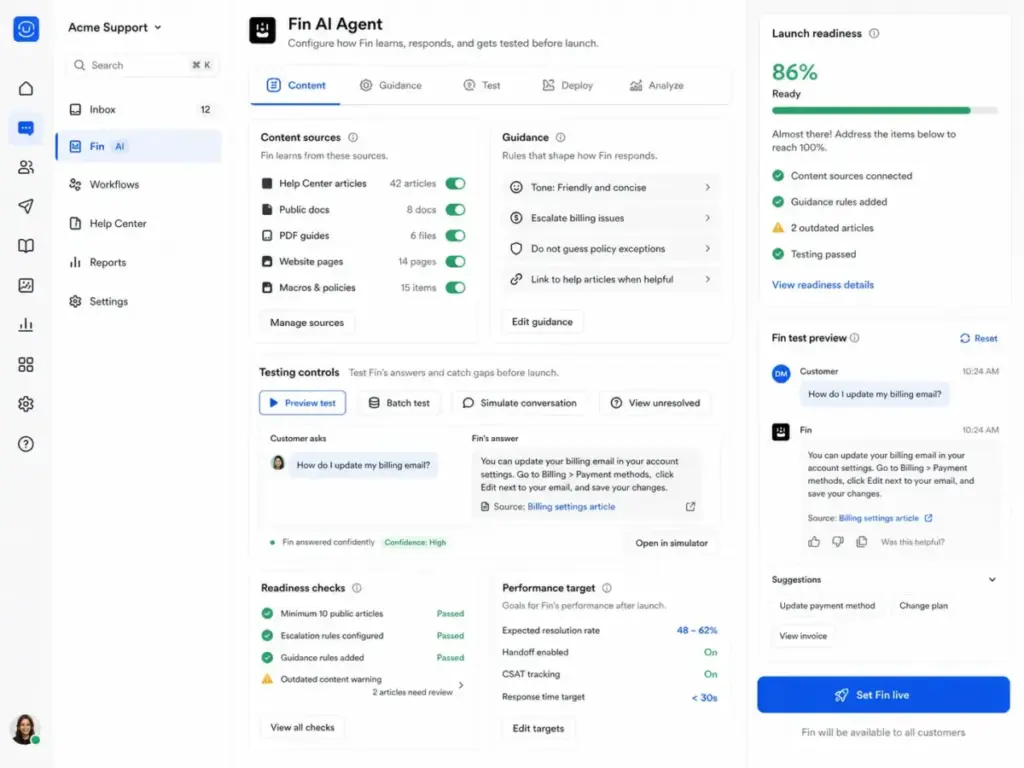
Fin is Intercom’s AI customer agent, and it is the single feature that separates Intercom from most competitors. Fin resolves customer questions across live chat and email by pulling answers from your help center content and other enabled sources.
Key Fin capabilities:
- Answers questions using help center articles, custom content sources, and Fin Guidance rules
- Supports tone customization and answer length preferences
- Includes Fin Procedures, Tasks, Attributes, and Data connectors for advanced automation
- Offers preview testing, batch testing, live testing, and performance analysis
- Reports on unresolved questions, CSAT, automation rate, and resolution quality
- Hands off to human agents when it cannot resolve a question
- Works with external help desks including HubSpot, Freshdesk, and Salesforce
There is one critical requirement: to deploy Fin over chat, your workspace must have at least 10 public Help Center articles. Fin’s answer quality depends entirely on the quality, structure, and freshness of your knowledge base.
“If the content isn’t well organized or kept up to date, the responses can end up being inaccurate or misleading.” — Verified User in Accounting, Enterprise, G2
I consider this Fin’s defining trade-off. It works well when your documentation is strong. It fails when your knowledge base is outdated, thin, or poorly structured.
Fin Readiness Checklist:
Before you turn on Fin, confirm these items:
- [ ] At least 10 published public Help Center articles
- [ ] Articles cover your top 20 most frequent customer questions
- [ ] Content is current (reviewed within the last 90 days)
- [ ] Escalation rules are configured for questions Fin cannot answer
- [ ] Fin Guidance rules are set for tone, restrictions, and edge cases
- [ ] A QA process exists for reviewing Fin’s unresolved questions weekly
- [ ] Your team tracks Fin outcome costs against human support cost per conversation
Intercom Messenger and Inbox
Intercom Messenger is the customer-facing chat widget. It supports live chat, in-app messages, banners, and tooltips. Every plan includes unlimited live chat and in-app conversations.
The shared inbox is where agents manage conversations. On Essential, you get a single shared inbox. On Advanced and Expert, you get multiple team inboxes, round robin assignment, and side conversations for internal collaboration.
Advanced and Expert plans also include Lite seats for internal collaborators who need visibility into conversations without using a full agent seat. Advanced includes 20 Lite seats. Expert includes 50.
Intercom Workflows
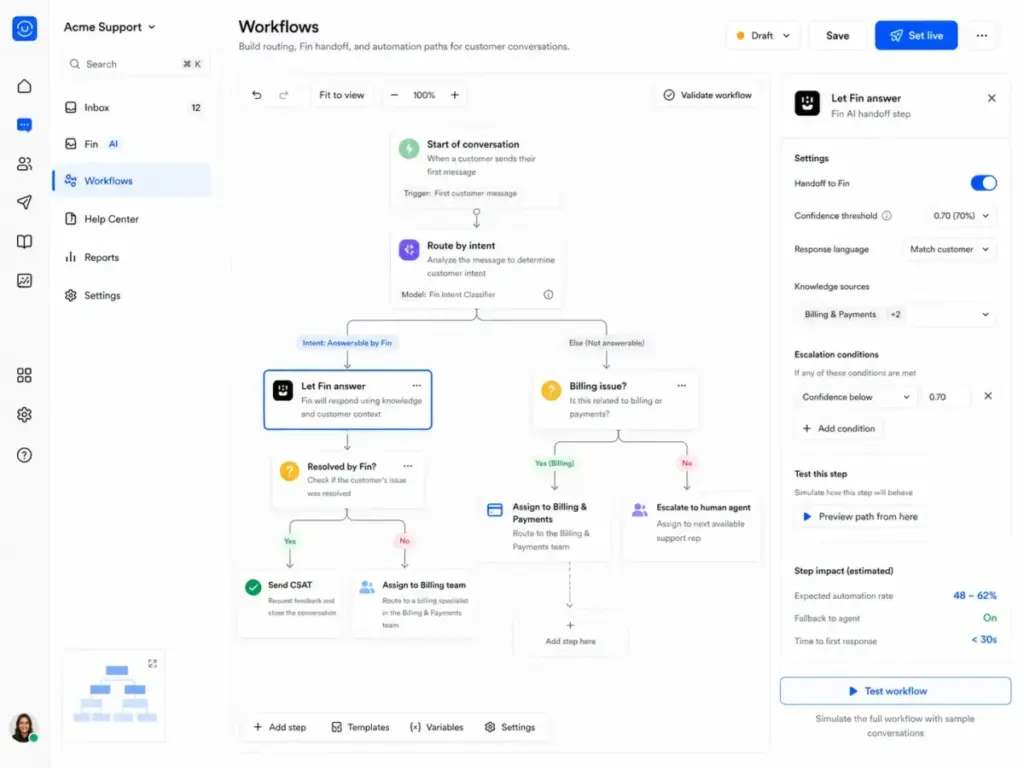
Workflows is Intercom’s automation builder. It handles conversation triage, Fin-first routing, team assignment, CSAT surveys, ticket creation, tagging, and data syncing between systems.
Notable workflow use cases:
- Route all new conversations to Fin before a human agent
- Assign urgent tickets to a priority team
- Trigger Slack notifications when high-value tickets resolve
- Auto-close inactive conversations after a set period
- Sync customer data between Intercom and external systems
Workflows is available starting on the Advanced plan. Essential users get basic automation but not the full visual workflow builder.
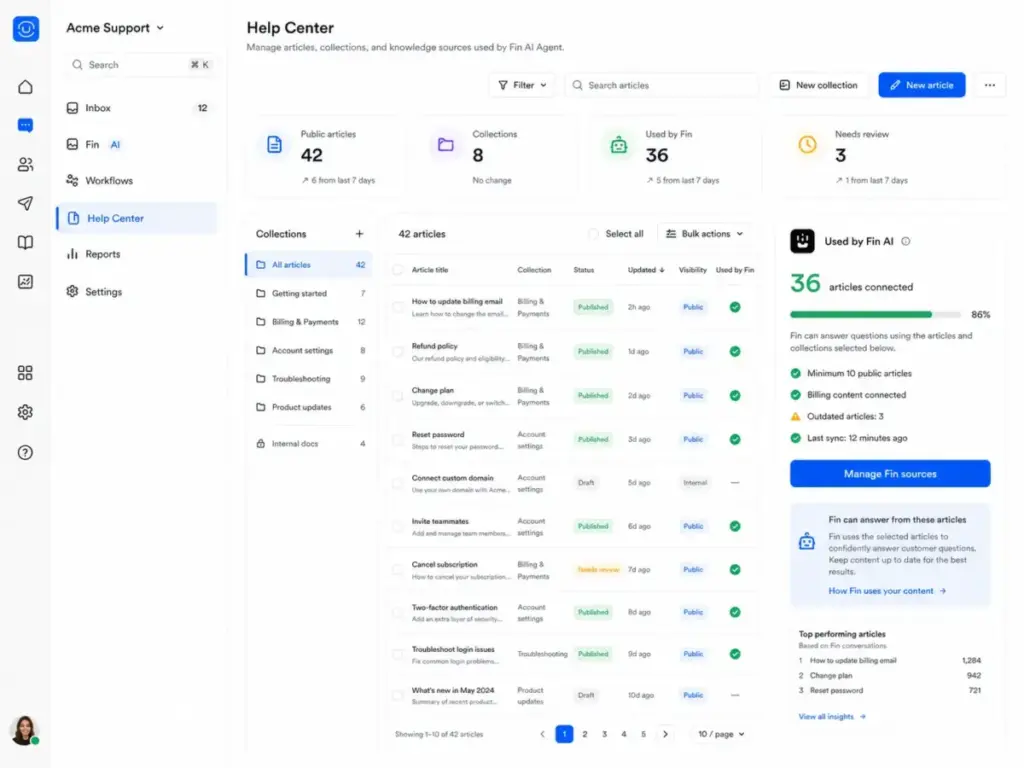
Intercom Help Center
Every plan includes a public Help Center. Advanced adds private and multilingual help center support. Expert adds multibrand Messenger and Help Center.
The Help Center is not optional for teams using Fin. It is Fin’s primary knowledge source. Intercom provides AI-powered recommendations for improving article quality, which directly affects Fin’s resolution rate.
Intercom Reporting
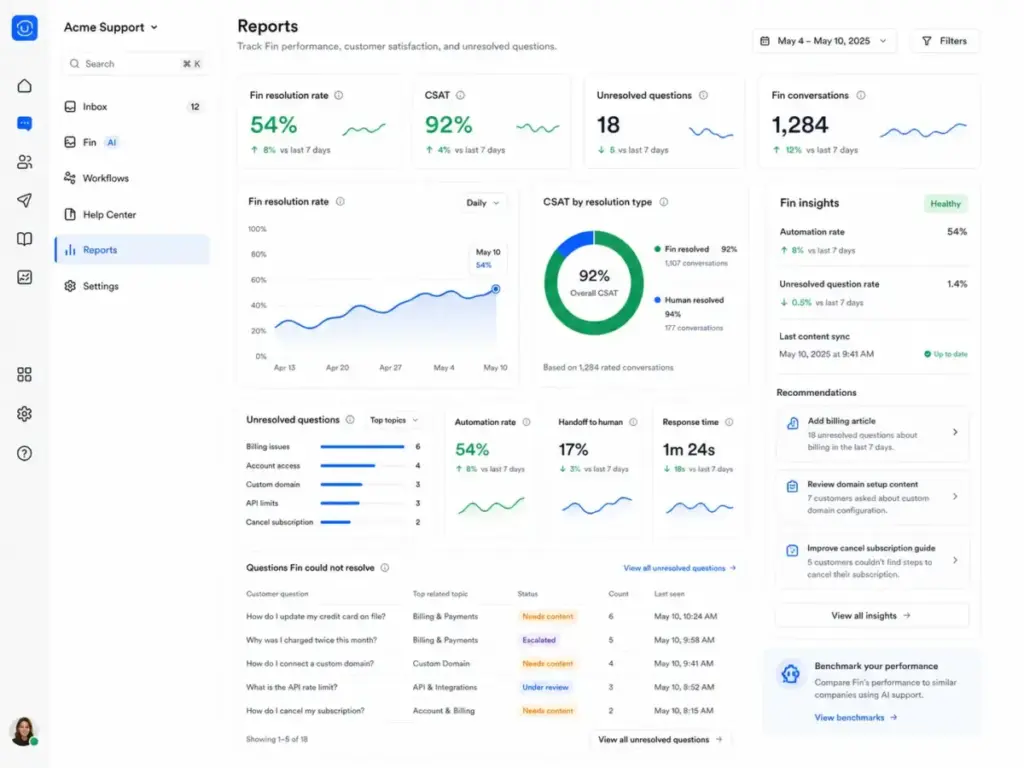
Essential includes pre-built reports. Higher plans and the Pro AI add-on ($99/month) unlock conversation topics, AI insights, CX Score, custom scorecards, and monitoring dashboards.
Fin-specific reporting covers automation rate, unresolved questions, and CSAT by AI versus human resolution. This data is critical for tracking whether Fin outcomes deliver positive ROI.
Intercom Apps and Integrations
Intercom’s App Store includes public apps across analytics, automation, lead capture, sales, marketing, and support. The developer platform provides REST APIs and SDKs for custom integrations.
API rate limits apply: private apps default to 10,000 API calls per minute per app and 25,000 per workspace. Intercom returns 429 errors when limits are exceeded. Rate limit windows are distributed into 10-second intervals, so burst requests can trigger throttling faster than you expect.
User Experience and Setup
Intercom’s modern interface is fast to learn for agents, but takes real admin effort to configure properly. The gap between “account created” and “platform delivering value” is wider than most competitors, because Intercom’s power comes from automation, AI configuration, and workflow design.
Intercom’s First 30 Days
Here is what a typical setup timeline looks like for a mid-size SaaS support team:
Days 1 to 3: Foundation
- Create workspace, invite team, set roles
- Install Messenger on your product or website
- Connect support email
- Import existing help articles or start writing new ones
Days 4 to 7: Inbox and routing
- Configure shared inbox and team inboxes
- Set up conversation assignment rules
- Create initial tags and conversation attributes
- Connect Slack for internal notifications
Week 2: Automation
- Build first workflows for triage and routing
- Configure Fin-first routing (send conversations to Fin before human agents)
- Set up CSAT survey triggers
- Create ticket workflows for issues that need tracking
Weeks 3 to 4: Fin and QA
- Ensure Help Center has 10+ quality articles
- Configure Fin Guidance and tone rules
- Run batch tests and preview tests
- Deploy Fin in limited mode and monitor unresolved questions
- Establish a weekly review cadence for Fin performance and outcome costs
Intercom Admin Learning Curve
Agents can start handling conversations within a day. Admin configuration, including workflows, Fin setup, and reporting, takes 2 to 4 weeks for a team of 5 to 15 agents. Complex teams with multiple brands, languages, or SLA requirements should expect a longer ramp.
Intercom Pricing and Plans
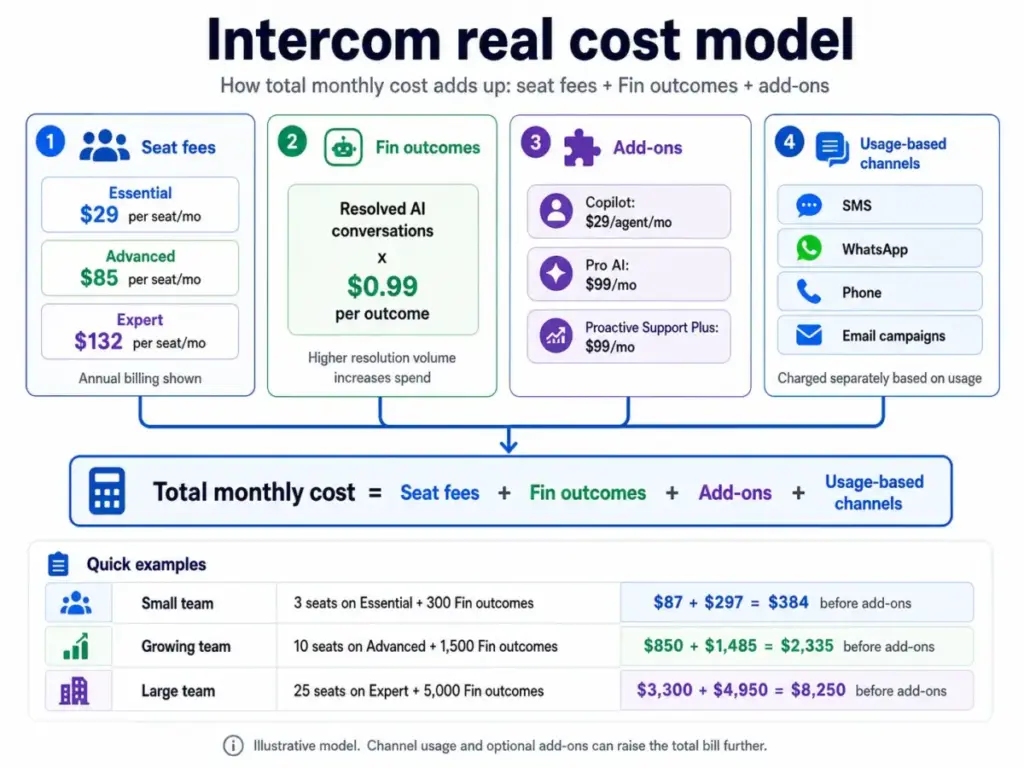
Intercom pricing has three layers: seat fees, Fin outcome charges, and optional add-ons. Understanding all three layers is required before you can estimate your real monthly cost. Prices verified from the Intercom pricing page as of May 2026.
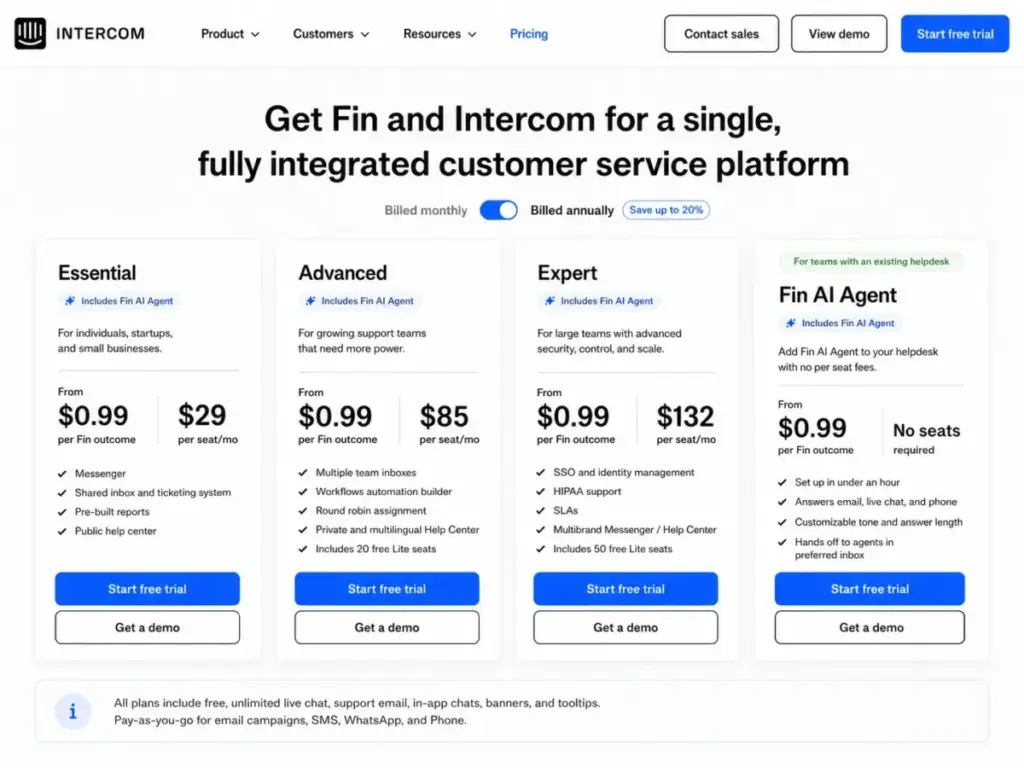
Intercom Seat Pricing
| Plan | Annual Price | Monthly Price | Best For |
|---|---|---|---|
| Essential | $29/seat/month | $39/seat/month | Individuals, startups, small teams |
| Advanced | $85/seat/month | $99/seat/month | Growing support teams |
| Expert | $132/seat/month | $139/seat/month | Large support teams needing SSO, HIPAA, SLAs |
All plans include unlimited live chat, support email, in-app chats, banners, and tooltips. A 14-day free trial is available with no credit card required. Startups can apply for 90% off through the Early Stage program.
Intercom Fin Outcome Pricing
Fin AI Agent costs $0.99 per outcome. An outcome is counted when:
- The customer confirms the issue is resolved
- The customer does not ask for more help after Fin responds
- Fin completes a workflow or Procedure, including handoffs
Intercom states that customers are charged once per conversation, even if multiple questions are answered. Fin can also be purchased for use with external help desks (HubSpot, Freshdesk, Salesforce) without buying Intercom seats, though minimum monthly commitments apply.
This pricing model is both Intercom’s best ROI argument and its biggest budgeting risk. When Fin resolves conversations that would have cost you $5 to $15 in human agent time, the $0.99 per outcome is a clear win. When Fin resolves thousands of conversations in a busy month, the bill spikes.
Intercom Add-Ons and Usage Charges
| Add-On | Cost | Includes |
|---|---|---|
| Copilot | $29/agent/month | AI assistant for agents, unlimited usage |
| Pro AI features | $99/month | Conversation analysis, 1,000 conversations/month |
| Proactive Support Plus | $99/month | 500 outbound messages/month |
Additional usage-based charges apply for email campaigns, SMS, WhatsApp, and Phone. These are not included in seat pricing.
What Intercom Really Costs
Here are three realistic monthly cost scenarios. These are editorial estimates, not official quotes.
| Scenario | Seats | Plan | Seat Cost | Fin Outcomes | Fin Cost | Add-ons | Estimated Monthly Cost |
|---|---|---|---|---|---|---|---|
| Small SaaS support desk | 3 | Essential (annual) | $87 | 300 | $297 | $0 | $384 |
| Growing support team | 10 | Advanced (annual) | $850 | 1,500 | $1,485 | $128 | $2,463 |
| AI-first scale team | 25 | Expert (annual) | $3,300 | 5,000 | $4,950 | $227+ | $8,477+ |
Notice that in every scenario, Fin outcome costs approach or exceed seat costs. A team with 5,000 monthly Fin outcomes pays $4,950 just for AI resolutions. Add seats, add-ons, and usage-based channel fees, and the monthly bill crosses $8,000.
“We used to love it but their pricing is exorbitant and opaque.” — Sam M., Founder, Capterra
This is why I say Intercom is not expensive because of its seat price. Intercom becomes expensive when Fin works well. That makes ROI tracking mandatory, not optional.
Intercom Pros and Cons
Intercom delivers clear strengths in AI automation and platform depth, but carries real risks around cost predictability and knowledge-base dependency.
| Pros | Cons |
|---|---|
| Fin AI Agent is one of the best native AI support agents available | Usage-based Fin pricing makes monthly costs unpredictable |
| Unified platform: chat, email, ticketing, workflows, help center | Advanced features locked behind higher-tier plans |
| Modern, fast interface for agents | Admin setup and workflow configuration take weeks |
| Strong workflow automation on Advanced and Expert | Help Center quality directly limits Fin’s effectiveness |
| Solid security credentials: SOC 2, ISO 27001, GDPR, HIPAA (Expert) | Pro AI reporting features require a $99/month add-on |
| 14-day free trial with no credit card | WhatsApp, SMS, Phone, and email campaigns add usage fees |
| Lite seats for internal collaborators on Advanced and Expert | Not built for ITIL-heavy enterprise service desk workflows |
| Developer APIs and App Store for extensibility | API rate limits can impact high-volume integrations |
What Intercom Does Not Tell You
Every platform has gaps between what the marketing page shows and what daily operations reveal. Here are four things I think Intercom should be more upfront about.
1. Fin is only as good as your support content.
Fin pulls answers from your Help Center and enabled sources. If your articles are outdated, poorly organized, or missing coverage for common questions, Fin will either give inaccurate answers or escalate everything to a human. The 10-article minimum to deploy Fin over chat is a floor, not a target.
2. Outcome billing rewards AI performance with higher bills.
The more conversations Fin resolves, the more you pay. A 50% resolution rate sounds impressive until you calculate 2,000 outcomes at $0.99 each on top of your seat costs. Teams must track cost-per-resolution against human agent cost-per-conversation weekly to confirm positive ROI.
“Within six months, Fin had resolved over 6,000 conversations, saved the team over 1,300 hours and pushed self-serve support rates as high as 87%.” — Constantina Samara, VP of Customer Support at Synthesia, Intercom customer quote
That success story is real, but it also implies roughly $5,940 in Fin outcome charges over six months for just the resolved conversations.
3. Advanced reporting costs extra.
Pre-built reports are included on all plans, but conversation topic analysis, CX Score, custom scorecards, and AI performance monitoring require the Pro AI add-on at $99/month. For teams investing heavily in Fin, operating without this visibility is risky.
4. Channel costs add up quietly.
Live chat and in-app messaging are included. WhatsApp, SMS, Phone, and email campaigns are usage-based. If your support channels extend beyond chat and email, budget for these separately.
Intercom vs Alternatives
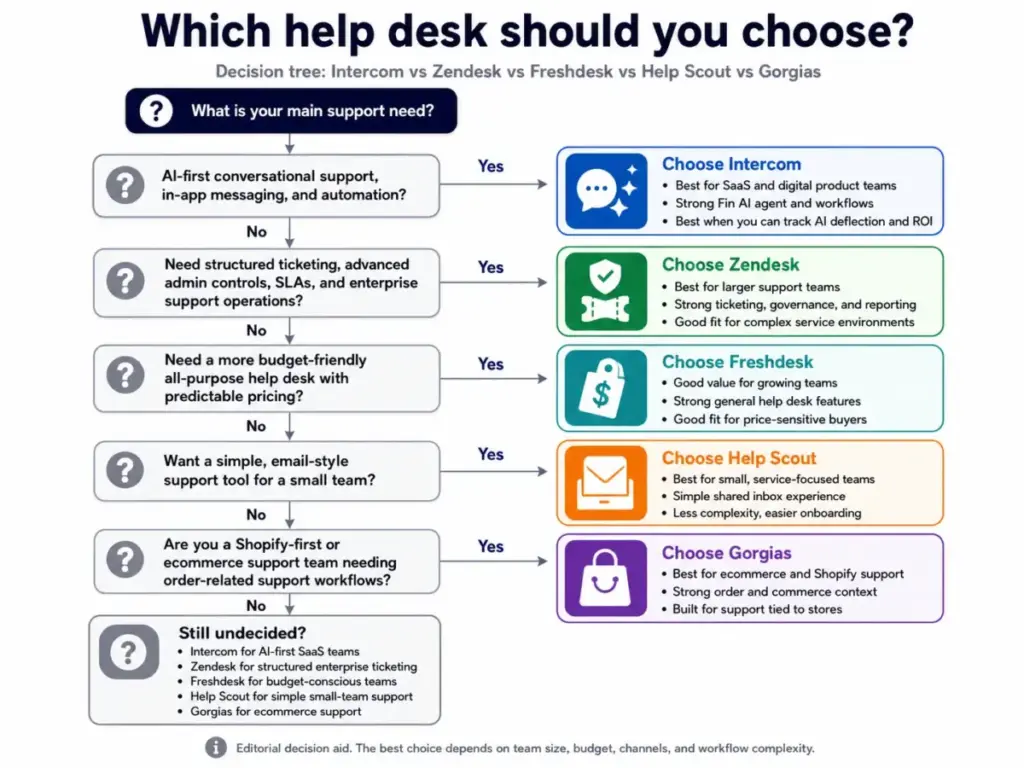
Intercom is not the only strong option in this category, and for some teams, a competitor is the better fit. Here is how Intercom compares to the four most common alternatives based on use case, not just features.
| Criteria | Intercom | Zendesk | Freshdesk | Help Scout | Gorgias |
|---|---|---|---|---|---|
| Best for | AI-first SaaS support | Enterprise ticketing | Budget-conscious teams | Simple human email support | Shopify e-commerce |
| AI agent | Fin ($0.99/outcome) | AI agents (add-on) | Freddy AI (varies) | AI Drafts (limited) | Automate (macro-based) |
| Pricing model | Seat + usage | Seat-based | Seat-based | Seat-based | Ticket-based |
| Cost predictability | Low | Medium | High | High | Medium |
| Workflow automation | Strong (Advanced+) | Strong (all plans) | Good | Basic | E-commerce focused |
| Enterprise controls | Expert plan only | Available on Suite | Enterprise tier | Limited | Limited |
| In-app messaging | Native | Add-on | Limited | No | No |
Intercom vs Zendesk
Zendesk is stronger for structured enterprise ticketing, SLA management, and admin controls across large teams. If your support operation needs ITIL-aligned workflows, granular permissions, and a mature ecosystem of enterprise integrations, Zendesk is the safer pick. Intercom wins when you want AI-first conversational support and in-app messaging for a SaaS product. For a full breakdown, see our Zendesk vs Intercom comparison. You can also read our complete Zendesk review.
Intercom vs Freshdesk
Freshdesk offers more predictable pricing with seat-based plans and no usage-based AI charges at the same scale. For teams that need a solid help desk without worrying about variable monthly bills, Freshdesk is a safer choice. Intercom wins on AI automation depth and in-app messaging, but you pay for that advantage.
Intercom vs Help Scout
Help Scout is built for small teams that prefer email-style support with a simple, clean interface. It does not try to be an AI-first platform. If your team handles under 500 conversations per month and values simplicity over automation, Help Scout is a better fit. Intercom wins when volume is high enough to justify AI deflection.
Intercom vs Gorgias
Gorgias is purpose-built for Shopify and e-commerce support, with native order actions, refund workflows, and commerce-specific automations. If your business runs on Shopify, Gorgias will serve you better than Intercom. Intercom is the stronger choice for SaaS and product-led businesses that need in-app messaging and AI resolution across non-commerce workflows.
For more options, see our full list of Intercom alternatives.
Who Should Use Intercom?
Intercom is the right choice for teams that can measure AI deflection against human support cost. Here are the profiles that benefit most:
- 5 to 20 person SaaS support teams handling 500 to 5,000 monthly conversations with enough volume to justify Fin’s per-outcome cost
- Product-led B2B SaaS companies that use in-app messaging, tooltips, and help center content as part of the product experience
- Support teams with a maintained knowledge base, especially teams with 10+ well-structured public help articles that Fin can use effectively
- Mid-market teams that need chat, email, ticketing, workflows, and AI routing in a single platform instead of stitching together multiple tools
- AI-forward support teams that can commit to monitoring resolution quality, tracking outcome costs weekly, and investing in contact management across the customer lifecycle
Who Should Not Use Intercom?
Intercom is not the right tool for every support team, and pretending otherwise does buyers a disservice. Here are the profiles that should look elsewhere:
- Bootstrapped teams with fewer than 3 agents and unpredictable support volume. The combination of seat fees and Fin outcome charges creates too much billing uncertainty for very small operations.
- Teams without a maintained help center or knowledge base. Fin cannot perform without quality content. Buying Intercom before your documentation is ready wastes money.
- Companies that need flat, predictable support software pricing. If your finance team requires a fixed monthly line item, Intercom’s usage-based model will cause friction. Consider Freshdesk or Help Scout.
- Complex enterprise service desks needing ITIL workflows. Intercom is a conversational support platform, not an IT service management system. Zendesk or Jira Service Management handle ITSM better.
- E-commerce brands needing deep Shopify-native support flows. Order lookups, refund automations, and commerce-specific macros are stronger in Gorgias.
Final Verdict: Is Intercom Worth It?
Intercom earns 8.4 out of 10 and is worth it for the right team. That team has documented support content, enough conversation volume to justify AI deflection, and the operational discipline to track outcome costs against human support savings.
Intercom is not a help desk you buy and forget. It is a support operating system that rewards teams who invest in content, automation, and measurement. Fin AI Agent is genuinely one of the best AI support tools in the market, but it makes your monthly bill a function of performance rather than a fixed cost.
If you have a mature help center, handle hundreds or thousands of support conversations per month, and want AI to handle the repetitive questions before your team touches them, Intercom is a strong investment. If you need flat pricing, minimal setup, or Shopify-native workflows, there are better options.
For more help choosing, explore our guides to the best help desk software, CRM software, and Intercom pricing breakdowns.
FAQ
Here are the most common questions buyers ask about Intercom in 2026.
Is Intercom worth it in 2026?
Yes, for SaaS and product-led teams with enough support volume and a maintained knowledge base. Intercom’s value depends on whether Fin AI resolutions cost less than human agent handling. Teams that track this weekly will see clear ROI. Teams that do not may overspend.
How much does Intercom cost?
Intercom starts at $29 per seat per month on the Essential annual plan. Fin AI Agent adds $0.99 per resolved conversation. Add-ons like Copilot ($29/agent/month) and Pro AI ($99/month) increase the total. A 10-seat Advanced team with 1,500 Fin outcomes can expect roughly $2,400 to $2,500 per month.
Does Intercom include Fin AI Agent?
Fin AI Agent is available on all plans, but it is billed separately at $0.99 per outcome. It is not included in the seat price. Fin can also be purchased standalone for use with external help desks like HubSpot, Freshdesk, and Salesforce.
How does Fin AI Agent pricing work?
Fin charges $0.99 per outcome. An outcome counts when a customer confirms resolution, does not ask for more help after Fin responds, or Fin completes a Procedure or handoff. Intercom charges once per conversation even if multiple questions are answered within it.
Is Intercom better than Zendesk?
It depends on your team. Intercom is better for AI-first conversational support, in-app messaging, and SaaS product teams. Zendesk is better for structured enterprise ticketing, ITIL workflows, and large teams that need granular admin controls.
What is the best Intercom alternative?
The best alternative depends on your needs. Zendesk for enterprise ticketing, Freshdesk for predictable pricing, Help Scout for simple email support, and Gorgias for Shopify e-commerce. See our full guide to Intercom alternatives.
Does Intercom have a free trial?
Yes. Intercom offers a 14-day free trial with no credit card required.
Is Intercom good for small businesses?
Intercom can work for small businesses with at least 3 agents and enough conversation volume to benefit from Fin AI. Very small teams with low, unpredictable volume may find the usage-based pricing model hard to budget around. Freshdesk or Help Scout may be better fits for very small operations.
What are Intercom's biggest limitations?
Fin answer quality depends on your knowledge base quality. Monthly costs are hard to predict due to usage-based Fin and channel charges. Advanced reporting requires a paid add-on. Enterprise controls like SSO, HIPAA, and SLAs are locked to the Expert plan.