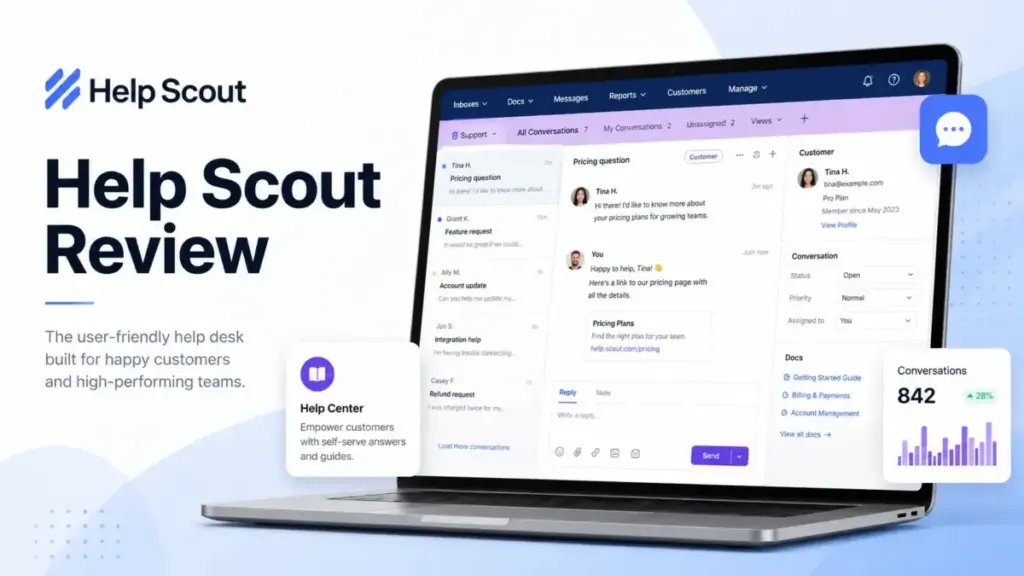
Help Scout is a shared inbox and knowledge base platform built for small and mid-sized support teams that run on email. This Help Scout review covers every plan, feature gate, and cost trap I found after evaluating the product’s pricing, documentation, feature limits, and user review patterns across Capterra (4.6/5 from 225 reviews) and G2.
If your team is outgrowing Gmail but dreading the complexity of enterprise help desk platforms, Help Scout is one of the first tools worth testing. It is not the right tool for every team, and I will explain exactly where it breaks down.
Help Scout starts at $0 on its Free plan (5 users, 1 Inbox, 1 Docs site) and scales to $75/user/month on Pro. AI Answers, its self-service chatbot, adds $0.75 per resolution on top of seat pricing. I scored it 8.4/10 after weighting pricing, inbox workflow, Docs, Beacon, AI, reporting, integrations, scalability, and support quality.
Quick Verdict: Is Help Scout Worth It?
Help Scout is worth it for teams of 3 to 25 agents that need a clean shared inbox, a knowledge base, and fast onboarding without enterprise overhead. It is not worth it for teams that need deep reporting, proactive chat-first messaging, ecommerce order automation, or complex omnichannel routing. The best version of Help Scout is the Plus plan at $45/user/month, where you get WhatsApp, advanced workflows, and unlimited AI Drafts.
| Category | Rating |
|---|---|
| Overall Score | 8.4/10 |
| Ease of Use | 9/10 |
| Features | 8/10 |
| Pricing Value | 8/10 |
| Reporting | 6.5/10 |
| AI Capabilities | 7.5/10 |
| Integrations | 7.5/10 |
| Scalability | 7/10 |
| Customer Support | 9.5/10 |
| Best For | 3-25 agent email-first support teams |
| Not For | Enterprise ticketing, ecommerce automation, chat-first SaaS |
| Starting Price | $0 (Free), $25/user/mo (Standard) |
| Free Plan | Yes, 5 users, 1 Inbox, 1 Docs site, 100 contacts/mo |
| Strongest Feature | Shared inbox + Docs knowledge base |
| Biggest Limitation | Reporting depth and enterprise scalability |
Pricing verified May 2026 from Help Scout’s pricing page.
How We Reviewed Help Scout
I evaluated Help Scout across 10 weighted criteria using official documentation, the live pricing page, the Billing and Plans Guide, the Help Scout API docs, and 225 Capterra user reviews. I did not fabricate hands-on testing claims. My analysis covers the current May 2026 pricing structure, feature gates across Free, Standard, Plus, and Pro plans, and real user complaints that the marketing pages do not surface.
Evaluation criteria and weights:
| Criteria | Weight | What I Evaluated |
|---|---|---|
| Pricing & Value | 15% | Plan costs, hidden add-ons, cost at 3/10/25 agents |
| Inbox Workflow | 15% | Shared inbox, assignments, tags, saved replies, views |
| Knowledge Base (Docs) | 10% | Article editor, categories, search, branding |
| Beacon & Live Chat | 10% | Widget setup, chat, contact forms, article suggestions |
| AI Features | 10% | AI Assist, AI Drafts, AI Summarize, AI Answers |
| Reporting | 10% | Pre-built reports, custom reports, history limits |
| Integrations & API | 10% | 100+ apps, Salesforce, Jira, HubSpot, API rate limits |
| Scalability | 10% | User caps, inbox limits, workflow limits, plan ceilings |
| Customer Support | 5% | Email support, onboarding, priority support |
| Security & Compliance | 5% | SSO/SAML, HIPAA, IP restrictions |
Full scoring details follow our review methodology.
What Is Help Scout?
Help Scout is a customer support platform that combines a shared inbox, a Docs knowledge base, and a Beacon support widget into a single workspace. It is not a traditional ticketing system like Zendesk. Conversations in Help Scout look like email threads, not ticket numbers. This design choice makes it fast to learn but limits its fit for teams that need structured ticket lifecycles, SLA escalation chains, or multi-department routing. Before deciding if this shared inbox model fits your workflow, review what standard help desk software entails, especially regarding strict ITIL alignment and routing complexity.
Help Scout’s core product has four layers:
- Shared Inbox: Email, live chat, Messenger, Instagram, and WhatsApp (Plus and above) conversations arrive in one queue. Agents assign, tag, snooze, and reply from a single view.
- Docs: A knowledge base builder for self-service articles. Customers search it directly, and Beacon surfaces articles contextually.
- Beacon: An embeddable widget for your website or app. It can show help articles, contact forms, and live chat in one place.
- AI Layer: AI Assist (text editing), AI Drafts (reply drafts from past conversations), AI Summarize (thread summaries), and AI Answers (a chatbot that resolves questions from your Docs content at $0.75/resolution).
Help Scout claims teams respond to 56% more messages in their first year, and that its AI agents resolve 73% of interactions on average. These are vendor-supplied metrics. I treat them as directional, not as proof of what your team will experience.
The First 30 Minutes in Help Scout
A new Help Scout account on the Standard plan can reach a working support setup in under 30 minutes. This section covers the recommended first steps, based on documented features and plan limits.
Step 1: Create Your First Inbox
Standard includes 2 inboxes. Create one for your primary support email. Connect your existing support address through email forwarding or a custom domain. Help Scout provides forwarding instructions in its Help Center at docs.helpscout.com.
Step 2: Add Saved Replies
The Free plan limits saved replies to 10. Standard and above include unlimited saved replies. Start with your top 5-8 most common answers: password resets, billing questions, shipping status, product setup, refund policy.
Step 3: Create Tags
Free limits you to 10 tags. Standard and above offer unlimited tags. Set up tags for your top categories: billing, bug, feature-request, shipping, urgent. Tags power workflow automation later.
Step 4: Build a Docs Site
Standard includes 2 Docs sites (additional sites cost $20/month annually, $24/month monthly). Create your first knowledge base and publish 5-10 articles covering your most common support questions. Docs articles feed Beacon and AI Answers.
Step 5: Install Beacon
Free includes 1 Beacon. Standard includes 5 Beacons. Embed the Beacon widget on your website or app. Configure it to show Docs articles, a contact form, and live chat. Beacon pulls from your Docs site automatically.
Step 6: Create One Basic Workflow
Standard includes 1 basic SLA policy and up to 150 workflows. Start simple: create a workflow that auto-tags conversations containing “refund” or “cancel” and assigns them to a specific agent or team.
Step 7: Invite Your Team
Standard supports up to 25 users. Send invitations and set permissions. Help Scout’s learning curve is low: the interface looks like an email client, and most agents need less than an hour to start replying.
What requires planning: Deciding your inbox structure (one inbox for everything vs. separate inboxes per product), defining your tag taxonomy before it grows organically, and choosing which Docs articles to write before installing Beacon.
Help Scout Features That Matter
Help Scout Shared Inbox
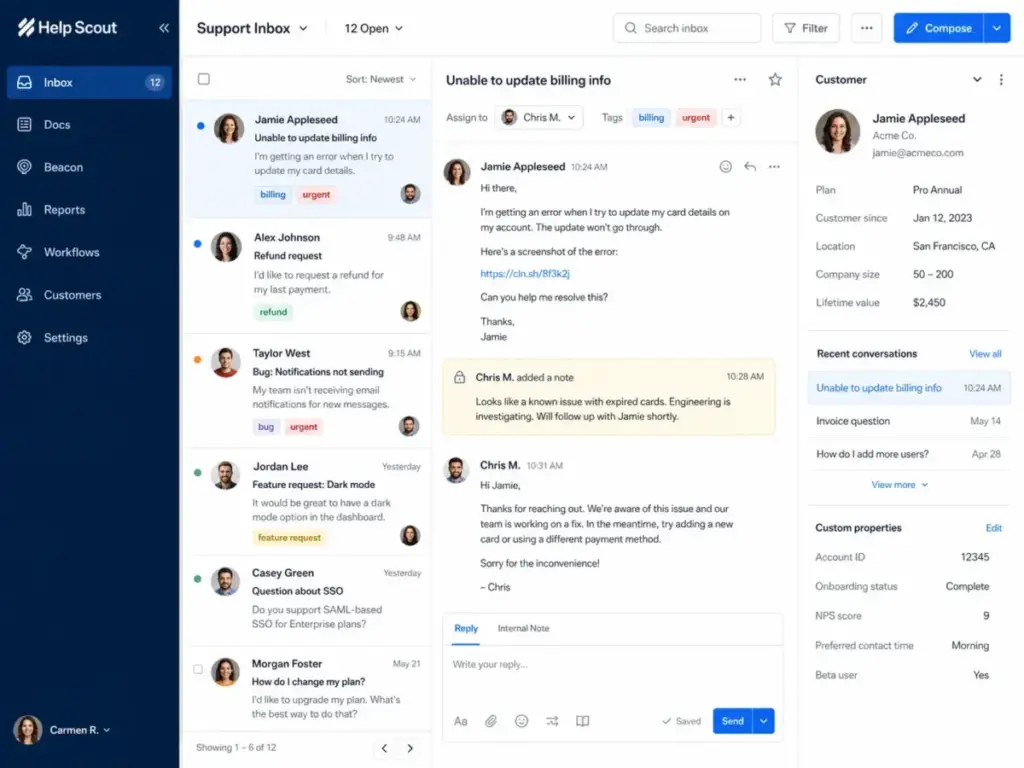
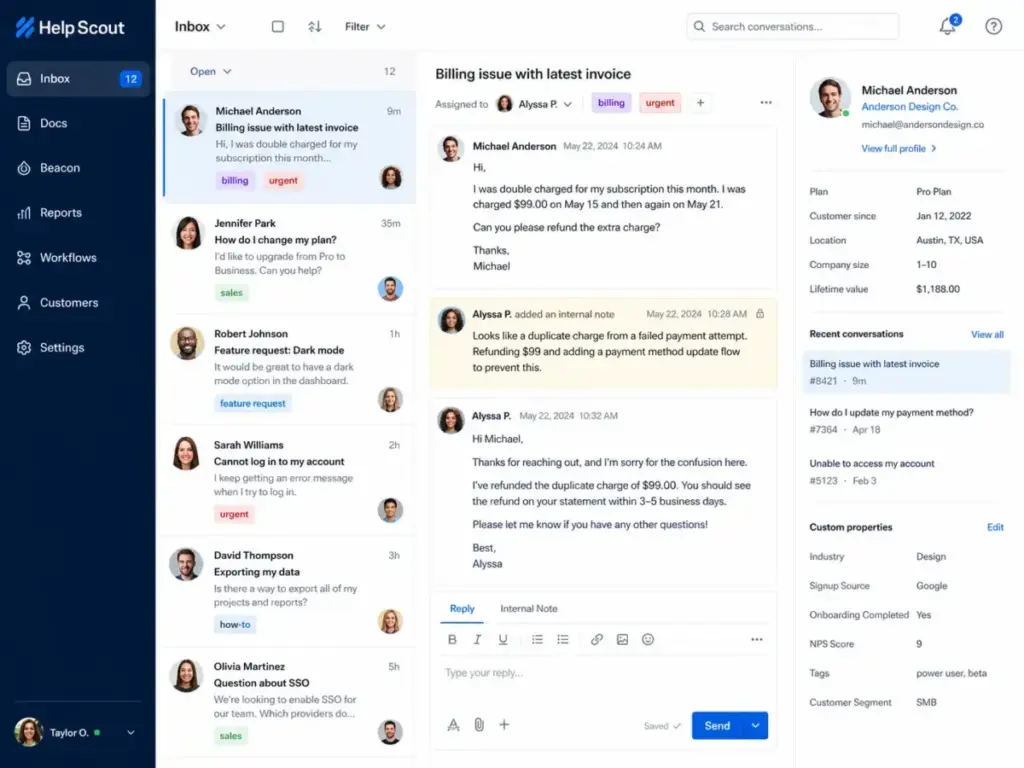
The shared inbox is Help Scout’s core product, and it works like a team email client, not a ticket queue. Every conversation has a customer sidebar showing profile data, previous conversations, and custom properties. Agents can assign conversations, add internal notes, mention teammates, and use collision detection to avoid duplicate replies.
Key inbox features across plans:
- Saved Replies: 10 on Free, unlimited on paid plans. Pre-written answers inserted in two clicks.
- Tags: 10 on Free, unlimited on paid plans. Label conversations for reporting and workflow triggers.
- Views: Unlimited on paid plans. Custom filtered lists by status, assignment, tag, or custom field.
- Snooze: Pause a conversation and bring it back at a set date and time.
- Send Later: Schedule replies for a specific delivery time.
- Customer Properties: Custom data fields displayed in the customer sidebar.
- Company Management: Group contacts by company for account-level visibility (available on Plus and above).
One Capterra reviewer, Josh S., IT Coordinator in Legal Services, described it as a “lightweight help desk portal for our team to collaborate on tickets and create articles for future reference” (May 2025).
Help Scout Docs Knowledge Base
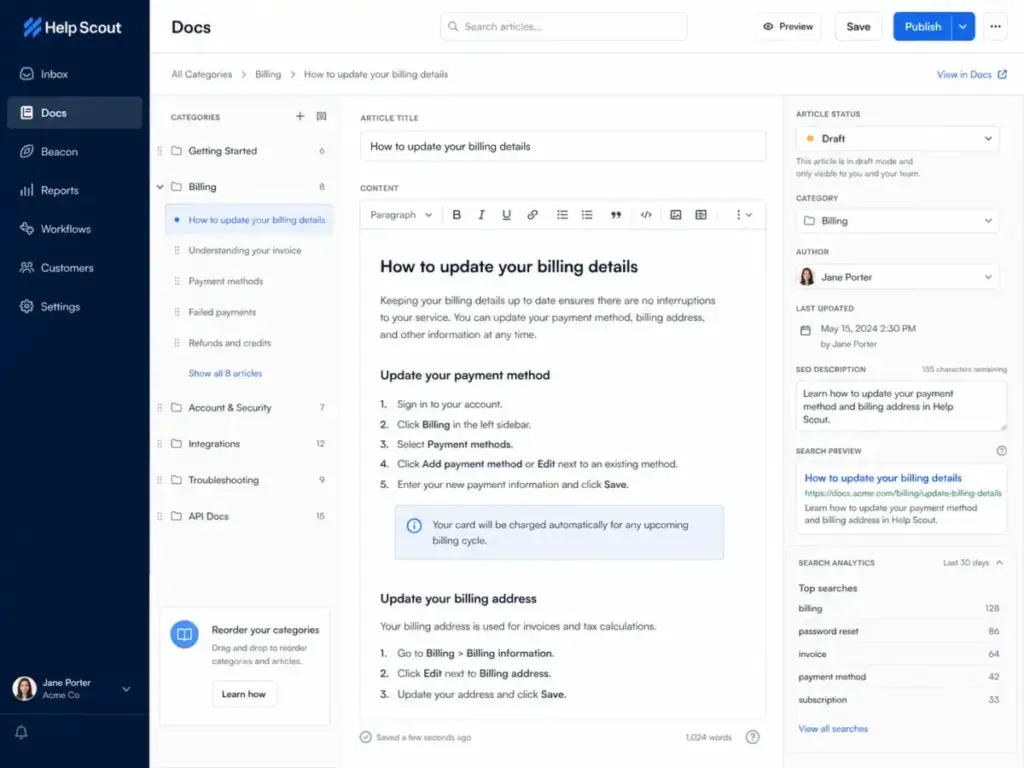
Docs is Help Scout’s knowledge base builder, and it is included in every plan, including Free. The Free plan includes 1 Docs site with up to 10 articles. Standard includes 2 Docs sites with unlimited articles. Additional Docs sites cost $20/month (annual) or $24/month (monthly).
Docs supports:
- A WYSIWYG article editor with text, images, hyperlinks, videos, and tables
- Category organization with drag-and-drop ordering
- Custom site branding with CSS control on paid plans
- Embedded contact forms and live chat
- Restricted Docs sites via API (for internal or customer-specific documentation)
- Full-text search
Docs articles feed into Beacon’s article suggestions and AI Answers. The quality of your Docs content directly affects AI resolution rates. Sparse or outdated articles reduce AI Answers effectiveness and push more conversations to your agents.
Help Scout Beacon and Live Chat
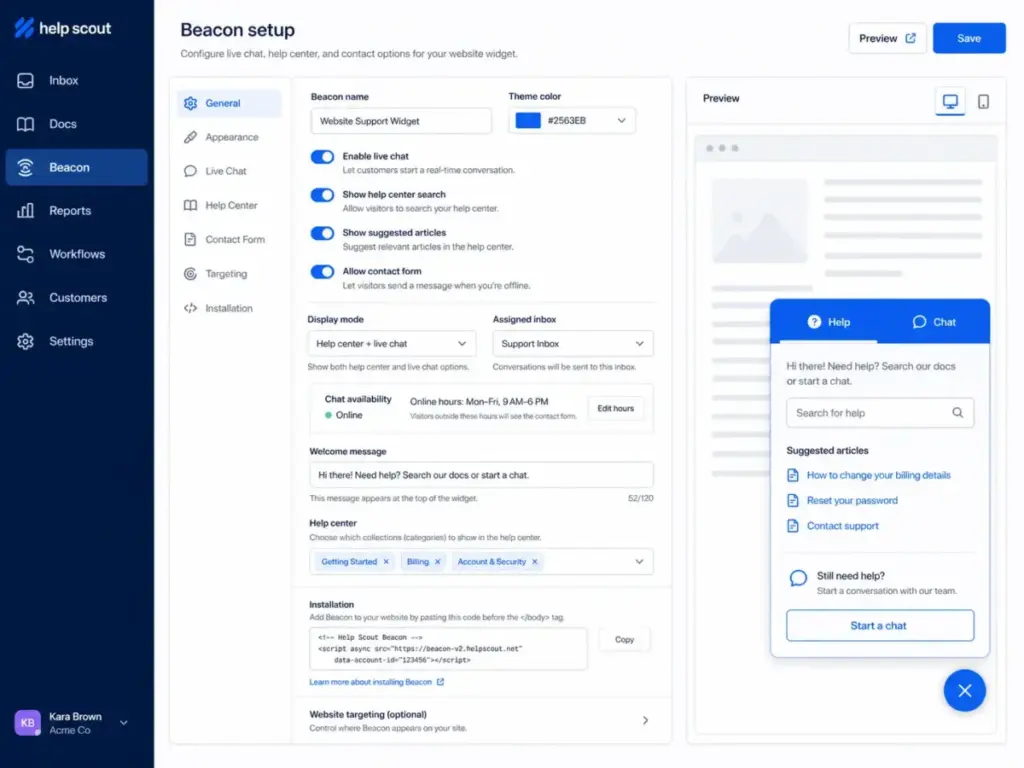
Beacon is an embeddable support widget that combines help articles, contact forms, and live chat in a single interface. Free includes 1 Beacon. Standard includes 5. Plus and Pro include unlimited Beacons.
Beacon features:
- Suggests Docs articles based on the page URL the customer is viewing
- Offers a contact form linked to your inbox
- Supports live chat (available on all paid plans)
- Can be customized per page or per product
Beacon is not a standalone chat product like Intercom’s Messenger. It does not support proactive messaging sequences, product tours, or behavioral targeting. For chat-first support operations, see our Intercom review.
Help Scout Workflows and SLAs
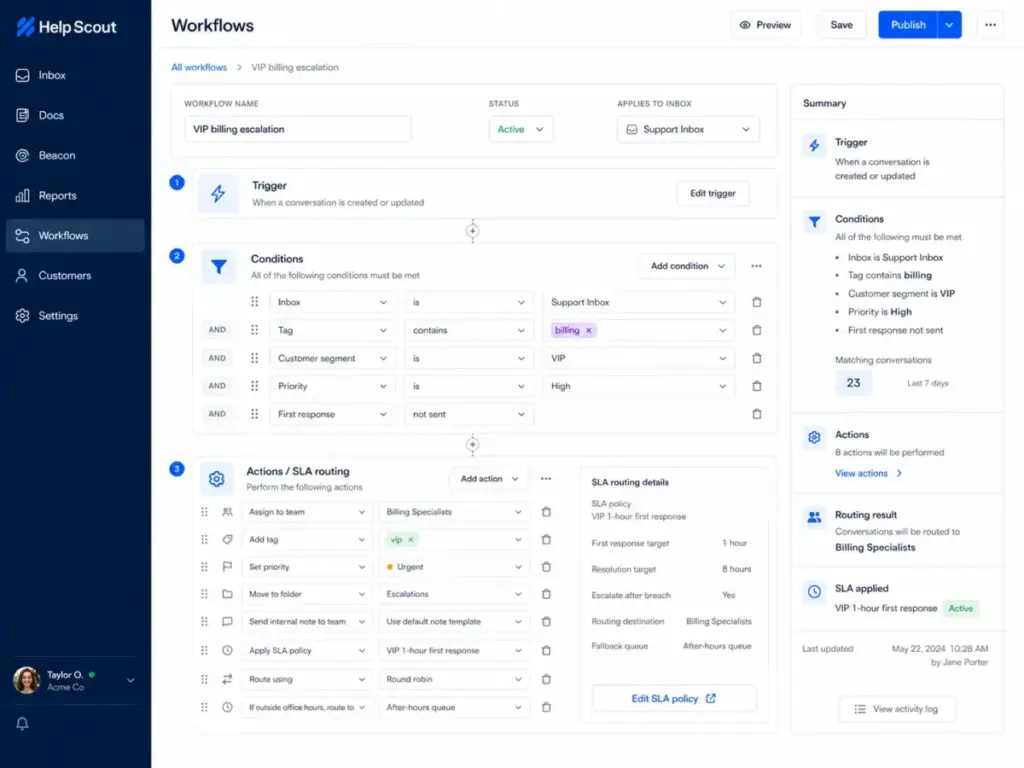
Workflows automate conversation routing, tagging, and assignment based on conditions you define. The Free plan does not include workflows. Standard includes up to 150 workflows and 1 basic SLA policy. Plus includes 500 workflows and 2 advanced SLA policies. Pro includes unlimited workflows and unlimited SLA policies.
Workflow conditions include: subject line, customer email domain, tag, custom field value, time since last reply, and more. Actions include: assign to agent, add tag, move to inbox, send auto-reply, and set priority.
SLA policies let you set response time targets. Standard’s basic SLA tracks first response time. Plus and Pro’s advanced SLAs add resolution time tracking and escalation rules.
Routing options:
- Round robin (Plus): Distributes conversations evenly across agents
- Load-balanced routing (Pro): Assigns based on current agent workload
For teams with complex SLA requirements across multiple products, departments, and priority tiers, Help Scout’s SLA system is simpler than what Zendesk offers.
Help Scout AI Features
Help Scout’s AI has two layers: included AI tools for agents and a paid AI chatbot for customers. Understanding the difference matters because one is free with your plan and the other adds usage-based cost.
Included with Standard and above (no extra cost):
- AI Assist: Expand, shorten, edit, or translate reply text. Available on all paid plans with unlimited usage.
- AI Drafts: AI generates a first-draft reply based on past conversations and Docs content. Available on Plus and Pro with unlimited usage.
- AI Summarize: Condenses long conversation threads into bullet points. Available on Plus and Pro.
Paid add-on (all paid plans):
- AI Answers: A chatbot that resolves customer questions using your Docs content and custom sources. Costs $0.75 per resolution. A resolution counts only when the customer’s question is fully answered without escalation. If the customer clicks “I still need help” or asks follow-up questions, no charge applies. You pay for one resolution per conversation, even if AI handles multiple questions.
Help Scout offers a 3-month free trial of AI Answers with unlimited resolutions. After the trial, you can set a monthly spending cap to prevent cost surprises.
AI Answers cost scenarios:
| Monthly AI Resolutions | Monthly AI Cost | Annual AI Cost |
|---|---|---|
| 250 | $187.50 | $2,250 |
| 500 | $375 | $4,500 |
| 1,000 | $750 | $9,000 |
| 2,000 | $1,500 | $18,000 |
CJ B., Director of Customer Advocacy in Health, Wellness and Fitness, noted on Capterra: “Saved replies are a giant help!” (April 2025). Saved replies remain the most practical daily efficiency tool, even with AI Drafts available.
Help Scout Reporting and Customer Context
Help Scout’s reporting covers conversation volume, response times, and customer satisfaction, but it is not enterprise-grade analytics. The depth depends on your plan.
Reporting limits by plan:
| Plan | Report History | Custom Reports | Exports |
|---|---|---|---|
| Free | 30 days | No | No |
| Standard | 2 years | Yes | Yes |
| Plus | All time | Yes | Yes |
| Pro | All time | Yes | Yes |
Pre-built reports include: conversations by channel, first response time, resolution time, replies per conversation, customer satisfaction (CSAT), and agent performance.
Custom reports let you filter by conversation type, inbox, tag, folder, or custom field. You can export data to CSV or Excel.
What reporting does not include: real-time dashboards, agent utilization tracking, workforce management metrics, predictive analytics, or custom report builders with drag-and-drop chart creation. For teams that need Zendesk Explore-level analytics, Help Scout’s reporting is a gap.
One anonymous Capterra reviewer confirmed: “The reporting isn’t as advanced as some tools out there” (March 2025).
Help Scout Pricing and Real Cost
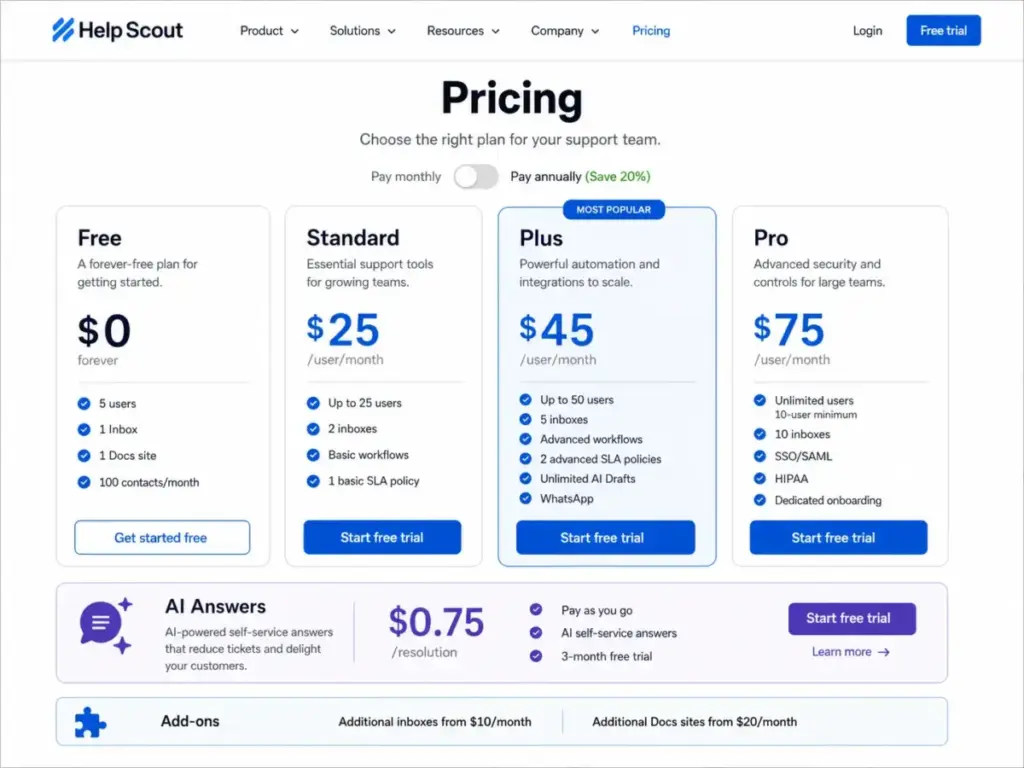
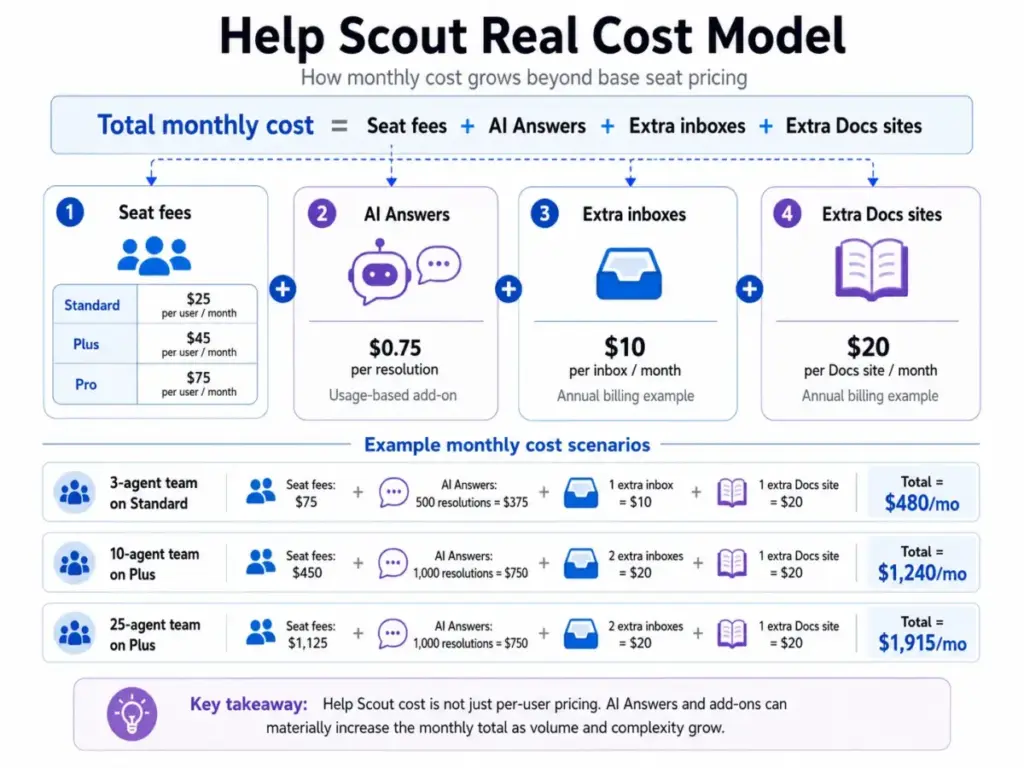
Help Scout’s pricing starts at $0 and scales to $75/user/month, but the real cost depends on inbox add-ons, Docs sites, and AI Answers usage. Most reviews list plan names without doing the math. Here is what each plan actually costs for a real team.
Help Scout Plans (Verified May 2026)
| Plan | Monthly Price | Users | Inboxes | Docs Sites | Workflows | SLA Policies | Best For |
|---|---|---|---|---|---|---|---|
| Free | $0 | Up to 5 | 1 | 1 (10 articles) | None | None | Tiny teams testing Help Scout |
| Standard | $25/user/mo | Up to 25 | 2 | 2 | 150 | 1 basic | Email-first support teams |
| Plus | $45/user/mo | Up to 50 | 5 | 3 | 500 | 2 advanced | Teams needing WhatsApp and workflows |
| Pro | $75/user/mo | Unlimited (10 min) | 10 | 5 | Unlimited | Unlimited | Security and scale |
Source: Help Scout Pricing, verified May 2026. Annual billing assumed.
What the Pricing Page Does Not Make Obvious
- Extra inboxes cost $10/month (annual) or $12/month (monthly) each, on any plan.
- Extra Docs sites cost $20/month (annual) or $24/month (monthly) each.
- Free plan caps contacts at 100/month. After 100 contacts, new conversations are blocked until the next billing cycle or an upgrade.
- Standard caps at 25 users. Growing past 25 agents forces a jump to Plus at $45/user/month, a 80% price increase per seat.
- Pro requires a 10-user minimum. A 10-seat Pro plan costs $750/month before any add-ons.
- AI Answers is separate from AI Drafts. AI Drafts (included on Plus) help agents write replies. AI Answers ($0.75/resolution) deflects customer conversations entirely. They solve different problems.
- SSO/SAML and HIPAA are add-ons on Plus. They are included on Pro. Teams needing compliance at lower cost must still pay for the Pro plan or purchase them as add-ons on Plus.
- API rate limits vary: Standard gets 200 calls/minute, Plus gets 400, Pro gets 800.
Help Scout Real Cost by Team Size
| Team Size | Standard | Plus | Pro | Standard + 500 AI | Plus + 1,000 AI | Best Fit |
|---|---|---|---|---|---|---|
| 3 agents | $75/mo | $135/mo | N/A (10 min) | $450/mo | $885/mo | Standard |
| 10 agents | $250/mo | $450/mo | $750/mo | $625/mo | $1,200/mo | Plus or Pro |
| 25 agents | $625/mo | $1,125/mo | $1,875/mo | $1,000/mo | $1,875/mo | Plus if under limits |
| 25 agents + 2 extra inboxes + 1 extra Docs site | $665/mo | $1,165/mo | $1,895/mo | $1,040/mo | $1,915/mo | Plus or Pro |
AI cost calculated at $0.75/resolution. “500 AI” = 500 AI Answers resolutions/month. “1,000 AI” = 1,000 resolutions/month.
At 25 agents on Plus with 1,000 monthly AI resolutions, two extra inboxes, and one extra Docs site, the monthly cost reaches $1,915. For context, Zendesk pricing starts at $19/agent/month on Support Team but adds significant cost for Suite features, add-ons, and AI.
What Help Scout Does Not Tell You
Help Scout’s marketing highlights simplicity, but several friction points only appear after setup or at scale. These come from user review patterns and documented product limits, not from marketing pages.
| Hidden Issue | Why It Matters | Who Should Care |
|---|---|---|
| Reporting is limited | No real-time dashboards or workforce metrics | 15+ agent teams |
| AI Answers adds cost fast | $0.75/resolution scales with volume | High-volume teams |
| Pro has 10-user minimum | Small teams cannot access HIPAA or SSO cheaply | 3-9 person teams |
| Standard caps at 2 inboxes | Extra inboxes cost $10/month each | Multi-product teams |
| No dark mode | Comfort and accessibility gap | All-day inbox users |
| HTML signatures break | Branded signatures render incorrectly | Teams with formatted signatures |
- Reporting is shallow for data-driven teams. Help Scout offers pre-built reports and basic custom filtering, but no real-time dashboards, no workforce management metrics, and no predictive analytics. Teams that need to measure agent utilization, forecast staffing, or build custom charts will hit a ceiling. One Capterra reviewer noted: “The reporting isn’t as advanced as some tools out there” (Anonymous, March 2025).
- No dark mode. A Capterra reviewer flagged: “No easy option for dark mode theme” (Josh S., IT Coordinator, Legal Services, May 2025). For teams that spend 6-8 hours daily in the support inbox, this is a comfort and accessibility issue.
- HTML signature rendering breaks. The same reviewer noted: “HTML on the portal breaks some signatures” (Josh S., May 2025). If your team uses branded email signatures with logos and formatting, test them in Help Scout before committing.
- AI Answers creates variable monthly costs. Unlike seat-based pricing, AI Answers charges per resolution. A team deflecting 2,000 conversations/month pays $1,500 in AI costs alone. Without a spending cap configured, costs can spike during high-volume months. Help Scout lets you set caps, but you must configure them manually.
- Scaling past 25 agents forces a plan jump. Standard caps at 25 users. The next step is Plus at $45/user/month, an 80% per-seat increase. There is no intermediate tier. Teams growing from 20 to 30 agents face a cost cliff.
- Free plan is a trial, not a real operating plan. The 100-contact monthly cap, 10 saved replies, 10 tags, and 1 Beacon make Free viable only for evaluating the product, not for running production support.
Help Scout Pros and Cons
- Fast onboarding: The inbox looks like email. Most agents start replying within an hour.
- Docs knowledge base included in every plan: Even Free includes 1 Docs site. No separate knowledge base product to buy.
- Beacon combines self-service and contact in one widget: Docs articles, contact forms, and live chat in a single embed.
- Saved replies and tags are unlimited on paid plans: No per-item charges for your FAQ library or labeling system.
- AI Drafts included on Plus: No extra cost for AI-generated reply drafts. Reduces agent writing time.
- Strong customer support: Help Scout claims 99% of emails answered within 24 hours. Capterra rates their customer service 4.7/5.
- Free plan exists: 5 users, 1 Inbox, 1 Docs site at $0. Lets you test the product before paying.
- HIPAA compliance available: Pro plan includes HIPAA, SSO/SAML, and IP restrictions for regulated industries.
- Reporting lacks depth: No real-time dashboards, workforce management, or predictive analytics.
- No dark mode: A daily usability gap for agents in the inbox all day.
- AI Answers adds usage-based cost: $0.75/resolution creates variable monthly bills.
- Standard-to-Plus price jump is steep: $25 to $45/user/month, an 80% increase, triggered by user cap or feature needs.
- Not ecommerce-native: No Shopify order actions, refund workflows, or revenue tracking built in.
- Proactive messaging is limited: Beacon supports targeted messages but lacks Intercom-style product tours, sequences, or behavioral triggers.
- HTML signature rendering issues: Reported by users on Capterra.
- Pro minimum is 10 users: Small teams needing HIPAA or SSO must pay for 10 seats ($750/month) even if only 5 agents use the product.
Help Scout Security, API, and Integrations
Help Scout connects to 100+ apps and offers API access on all plans, but integration depth and security features are plan-gated. Free limits you to 1 integration. Paid plans unlock the full marketplace.
Key integrations by plan:
| Integration | Standard | Plus | Pro |
|---|---|---|---|
| 100+ app marketplace | Yes | Yes | Yes |
| Salesforce | No | Yes | Yes |
| HubSpot | No | Yes | Yes |
| Jira | No | Yes | Yes |
| Linear | Yes | Yes | Yes |
| Aircall (phone) | Add-on | Add-on | Preferred pricing |
| Custom apps | Yes | Yes | Yes |
| API (calls/min) | 200 | 400 | 800 |
| Webhooks & OAuth | Yes | Yes | Yes |
Phone and SMS support are available via integration (Aircall, other providers), not natively. Help Scout does not include a built-in phone channel.
Security and compliance:
- SSO/SAML: Add-on on Plus, included on Pro.
- HIPAA compliance: Available on Pro. Help Scout signs a BAA and encrypts PHI in its own platform, but Help Scout’s HIPAA documentation notes that it cannot control what happens after data leaves Help Scout through third-party integrations. Teams using Salesforce, Slack, or Zapier with PHI must verify each integration’s HIPAA compliance independently.
- IP restrictions: Add-on on Plus, included on Pro.
For API documentation and custom app development, see Help Scout’s Developer site.
Help Scout Alternatives Compared
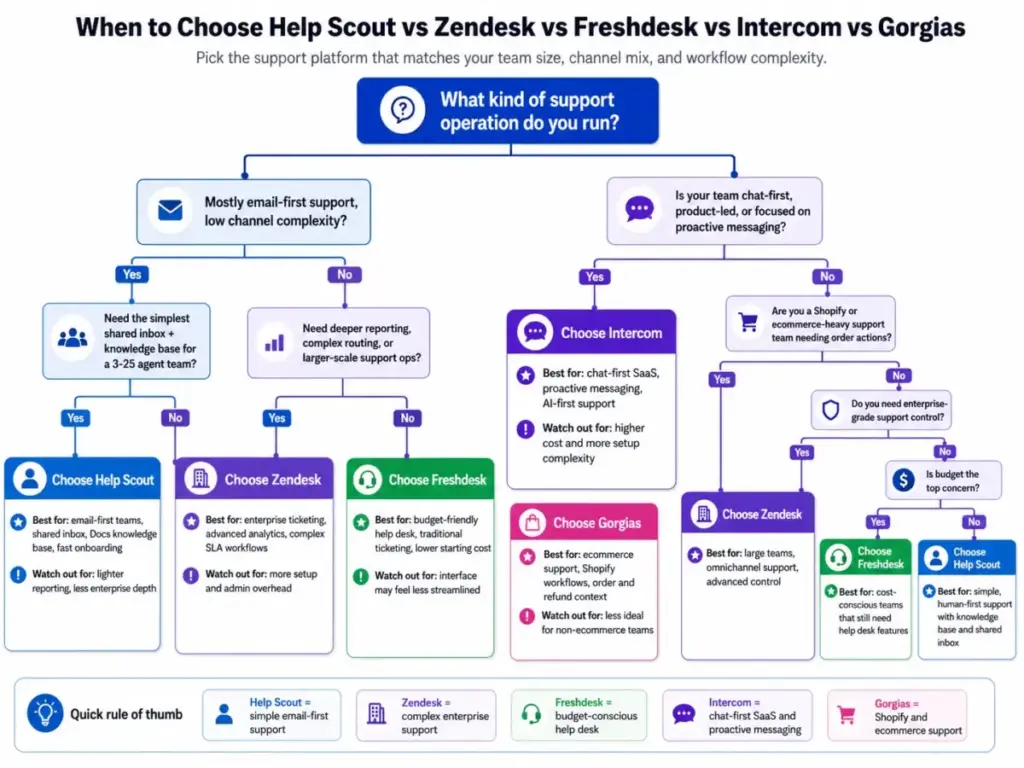
Help Scout fits a specific support profile: email-first, human-first, low-admin teams. If your team’s needs differ, these alternatives are stronger in their respective categories.
Help Scout vs Zendesk
Zendesk is a full enterprise support platform with multi-channel ticketing, advanced reporting (Explore), workforce management, and AI agent capabilities. It is more complex, more expensive, and more configurable. For teams under 25 agents with email-first support, Help Scout is simpler and lower-cost. For teams over 50 agents with multi-department SLAs and phone/chat support, Zendesk is the stronger choice. Read our full Zendesk review and Zendesk vs Intercom comparison.
Help Scout vs Freshdesk
Freshdesk offers a free plan for up to 2 agents (vs. Help Scout’s 5 on Free) and paid plans starting at $15/agent/month. Freshdesk includes a ticket-based structure, a built-in phone channel (Freshcaller), and more granular automation rules at lower tiers.
For budget-conscious teams that want traditional ticketing, Freshdesk is less expensive. For teams that prefer an email-style inbox over ticket numbers, Help Scout provides a cleaner daily experience. See our Freshdesk review.
Help Scout vs Intercom
Intercom is a chat-first, AI-first customer platform built for product-led SaaS. Its Fin AI agent, product tours, proactive messaging sequences, and behavioral targeting are far ahead of Help Scout’s Beacon and AI Answers. Intercom costs more and requires more setup.
For SaaS teams that need in-app messaging, onboarding flows, and AI-driven deflection, Intercom is superior. For teams that handle most support over email and value simplicity, Help Scout wins on usability and cost.
Help Scout vs Gorgias
Gorgias is built for ecommerce, specifically Shopify. It includes order lookups, refund actions, revenue attribution, and Shopify-native automation. Help Scout has no ecommerce-specific features. For Shopify-heavy support teams, Gorgias is the clear winner. For B2B SaaS, agencies, and service businesses, Help Scout is the better fit. See our Gorgias review.
Help Scout vs Zoho Desk
Zoho Desk costs less ($14/user/month on Standard) and integrates natively with the Zoho ecosystem (CRM, Projects, Analytics). If your team already uses Zoho CRM or Zoho One, Zoho Desk provides tighter data flow at lower cost. Help Scout’s inbox experience and Docs knowledge base are cleaner than Zoho Desk’s interface, but Zoho Desk offers more reporting depth at lower tiers.
Alternatives Comparison Table
| Alternative | Better Than Help Scout For | Help Scout Wins For | Best Choice |
|---|---|---|---|
| Zendesk | Enterprise ticketing, analytics, workforce management | Simpler email-first support, lower admin | Zendesk for 50+ agent complex ops |
| Freshdesk | Budget help desk, built-in phone, omnichannel | Cleaner shared inbox, stronger knowledge base | Freshdesk for budgets under $15/agent |
| Intercom | AI chat agents, proactive messaging, product tours | Human-first email support, lower cost | Intercom for chat-first SaaS |
| Gorgias | Shopify ecommerce automation, order actions | Non-ecommerce B2B and service support | Gorgias for Shopify stores |
| Zoho Desk | Zoho ecosystem integration, lower starting price | Cleaner UX, better Docs knowledge base | Zoho Desk for Zoho CRM users |
Who Should Use Help Scout?
Help Scout is strongest for five specific team profiles.
- 3-10 person B2B SaaS team moving from Gmail. You need assignments, collision detection, and a knowledge base. Help Scout Standard at $25/user/month replaces Gmail forwarding and gives you Docs for self-service.
- 5-20 person service business with email-first support. Agencies, consultancies, and professional services that handle client requests over email. Saved replies and tags keep responses consistent. Two inboxes on Standard let you separate departments.
- Bootstrapped software team needing Docs and saved replies. You cannot afford Zendesk or Intercom. Help Scout Free gives you 5 agents and a knowledge base for $0. Standard at $25/user/month adds workflows and unlimited saved replies.
- Support team with 100-1,500 monthly conversations and low channel complexity. Your support is email and live chat, not phone, SMS, social, and video. Help Scout handles this volume without workflow bottlenecks.
- Compliance-aware team that needs HIPAA or SSO. Healthcare, legal, and financial services teams can use Help Scout Pro ($75/user/month, 10-user minimum) for HIPAA compliance and SSO/SAML. Verify third-party integration compliance separately.
Who Should Avoid Help Scout?
Help Scout is the wrong tool for five team profiles.
- 25+ agent enterprise support operation with complex SLAs. You need multi-tier SLA escalation, workforce management, and custom reporting dashboards. Zendesk or Freshdesk Enterprise handle this better.
- Shopify-heavy ecommerce team needing order actions. You need order lookups, one-click refunds, and revenue attribution inside support conversations. Gorgias is purpose-built for this.
- Chat-first product-led SaaS team. You need proactive messaging sequences, product tours, and AI agents that handle complex, multi-turn conversations. Intercom is the stronger platform.
- Team that needs deep reporting and workforce management. You measure agent utilization, forecast staffing needs, and build custom analytics dashboards. Help Scout’s reporting is insufficient.
- Budget-only team that can live with traditional ticketing. Freshdesk starts at $15/agent/month with a built-in phone channel. Zoho Desk starts at $14/user/month with native CRM integration. Both cost less than Help Scout Standard.
Final Verdict: Help Scout Review 2026
Help Scout earns an 8.4/10 as a shared inbox and knowledge base platform for small and mid-sized support teams. It is the right tool for email-first teams that value simplicity, fast onboarding, and a clean daily workflow. It is not the right tool for enterprise ticketing, ecommerce automation, or chat-first SaaS support.
Choose Help Scout if:
- Your team is 3-25 agents handling email and live chat
- You want a knowledge base included in your help desk plan
- You value low-admin setup over deep configurability
- You need HIPAA compliance (on Pro)
Choose a competitor if:
- You need Shopify-native ecommerce support (Gorgias)
- You need proactive messaging and AI chat agents (Intercom)
- You need enterprise ticketing with advanced reporting (Zendesk)
- You need the lowest possible per-seat cost (Freshdesk, Zoho Desk)
Lindsay Cohen, COO of Brilliant, put it directly: “Help Scout is by far the best support product I have ever used.” That statement holds true for the team profile Help Scout is designed for. For teams outside that profile, the best support product is a different one.
Help Scout pricing starts at $0 (Free) and $25/user/month (Standard). Visit Help Scout to start a 15-day free trial of Standard or Plus, no credit card required.
Help Scout FAQ
Is Help Scout worth it in 2026?
Help Scout is worth it for support teams of 3-25 agents that rely on email and live chat. It provides a clean shared inbox, a Docs knowledge base, and AI Drafts (on Plus) for $25-$45/user/month. It is not worth it for teams needing enterprise reporting, ecommerce automation, or proactive messaging.
How much does Help Scout cost?
Help Scout Free costs $0 for 5 users. Standard costs $25/user/month. Plus costs $45/user/month. Pro costs $75/user/month with a 10-user minimum ($750/month). AI Answers adds $0.75 per resolution. Extra inboxes cost $10/month each. Extra Docs sites cost $20/month each. All prices are annual billing, verified May 2026 from Help Scout’s pricing page.
Does Help Scout have a free plan?
Yes. Help Scout Free includes 5 users, 1 Inbox, 1 Docs site, 100 contacts per month, 10 saved replies, 10 tags, and 1 Beacon. It does not include workflows, SLA policies, or AI Drafts. Free is viable for product evaluation but not for production support at scale.
What is Help Scout best for?
Help Scout is best for email-first customer support with a shared inbox and self-service knowledge base. B2B SaaS teams, agencies, service businesses, and bootstrapped startups with low channel complexity get the most value. It is not designed for ecommerce order management or chat-first product support.
Is Help Scout better than Zendesk?
Help Scout is better than Zendesk for teams under 25 agents with simple email-first support needs. Zendesk is better for enterprise teams with 50+ agents, multi-department SLAs, phone and chat support, workforce management, and advanced analytics. Help Scout Standard ($25/user/month) costs more than Zendesk Support Team ($19/agent/month) but includes a knowledge base at no extra charge.
Is Help Scout better than Freshdesk?
Help Scout offers a cleaner inbox experience and a stronger knowledge base (Docs). Freshdesk offers lower starting prices ($15/agent/month), a built-in phone channel, and more automation at lower tiers. For budget-focused teams that prefer traditional ticketing, Freshdesk wins. For teams that want an email-style inbox with Docs and Beacon, Help Scout wins.
Is Help Scout good for small businesses?
Yes. Help Scout’s Free plan supports 5 users at $0, and Standard at $25/user/month handles up to 25 agents with 2 inboxes, unlimited saved replies, and basic workflows. Small businesses with email-first support and under 1,500 monthly conversations find Help Scout sufficient. Teams needing phone support, ecommerce integrations, or advanced reporting should compare Freshdesk and Zoho Desk.
Does Help Scout include AI?
Help Scout includes AI Assist (text editing) on all paid plans at no extra cost. Plus and Pro add AI Drafts (reply generation) and AI Summarize (thread summaries) at no extra cost. AI Answers, a customer-facing chatbot, costs $0.75 per resolution as a separate add-on. Help Scout offers a 3-month free trial of AI Answers with unlimited resolutions.
What are Help Scout's biggest limitations?
Help Scout’s five biggest limitations are: (1) reporting lacks real-time dashboards and workforce management, (2) no dark mode, (3) Standard plan caps at 25 users with an 80% price jump to Plus, (4) AI Answers creates variable usage-based costs, and (5) no ecommerce-native features like order lookups or refund actions.
What is the best Help Scout alternative?
The best alternatives depend on your support model. Zendesk for enterprise multi-channel ticketing. Intercom for chat-first SaaS with AI agents. Gorgias for Shopify ecommerce support. Freshdesk for budget help desk with built-in phone. Zoho Desk for Zoho ecosystem teams. Hiver for teams that want shared inbox inside Gmail. Front for teams that need shared inbox with CRM-like features.