Support requests buried in personal inboxes cost teams hours every week. Tickets get lost between agents. Customers wait days for a reply that should take minutes. Help desk software solves this by turning scattered messages into trackable, assignable tickets with clear ownership. For SaaS companies and growing support teams, the right platform replaces guesswork with structure.
But picking the wrong tool creates a different kind of chaos: overbuilt workflows, hidden add-on costs, and automation that breaks when your knowledge base is thin. This guide covers what help desk software actually does, how it compares to related tools, what it costs in 2026, and how to set it up in 30 days. If you are evaluating help desk solutions, start here before you compare vendors.
What Is Help Desk Software?
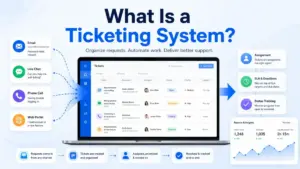
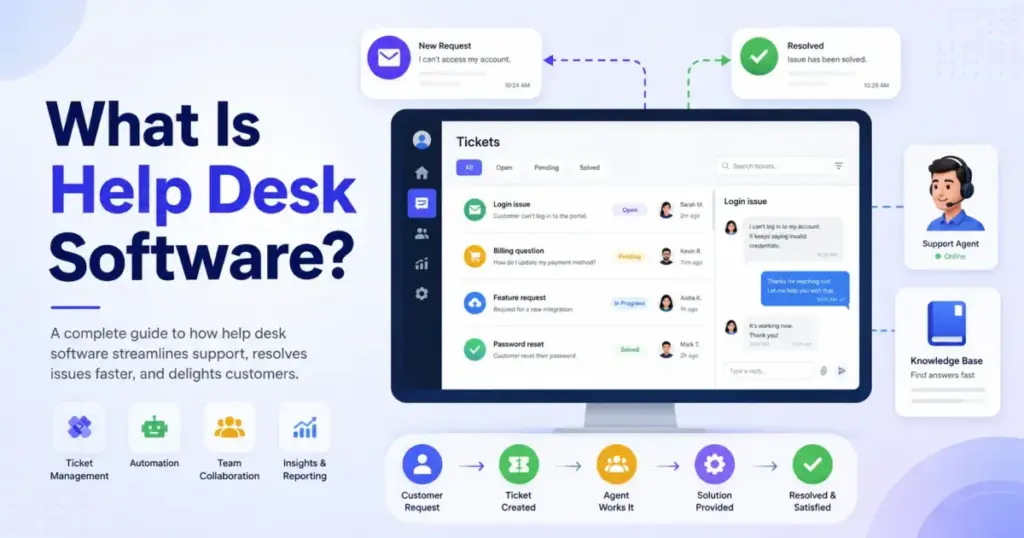
Help desk software is a centralized system that captures, organizes, assigns, tracks, and resolves support requests across channels like email, chat, phone, web forms, and social media. It replaces scattered inboxes and spreadsheets with a single workspace where every request becomes a ticket with an owner, a status, and a history.
The term “help desk” has two meanings. As a function, it refers to any team that answers support questions. As software, it refers to the platform that team uses to manage those questions. This guide focuses on the software.
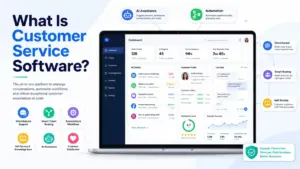
A help desk platform typically includes a ticketing system, routing rules, SLA tracking, a knowledge base, automation, and reporting. Salesforce defines it as a digital tool for managing service requests with ticketing, knowledge bases, automation tools, and reporting capabilities.
The core job is simple: make sure every support request has an owner, a deadline, and a paper trail. Without that, teams duplicate replies, miss follow-ups, and lose context when agents hand off conversations.
How Help Desk Software Works
Every help desk platform follows the same basic loop: a request arrives, becomes a ticket, gets routed to an agent, and moves through resolution stages until closed. The differences between tools show up in how they handle routing, automation, and reporting around that loop.
Here is how the workflow breaks down:
| Step | What Happens | Why It Matters |
|---|---|---|
| 1. Request arrives | Customer sends email, chat message, phone call, or form submission | Without centralization, requests scatter across tools |
| 2. Ticket is created | System generates a ticket with unique ID, timestamp, and contact info | Creates accountability and prevents lost requests |
| 3. Ticket is categorized | Tags, priority levels, and custom fields are applied | Enables routing, reporting, and SLA assignment |
| 4. Ticket is assigned | Rules route the ticket to the right agent or team | Prevents duplicate replies and unclear ownership |
| 5. Agent resolves or escalates | Agent responds, collaborates internally, or escalates to a specialist | Keeps conversation history intact for handoffs |
| 6. Knowledge base improves | Recurring issues become help articles or macros | Reduces future ticket volume through self-service |
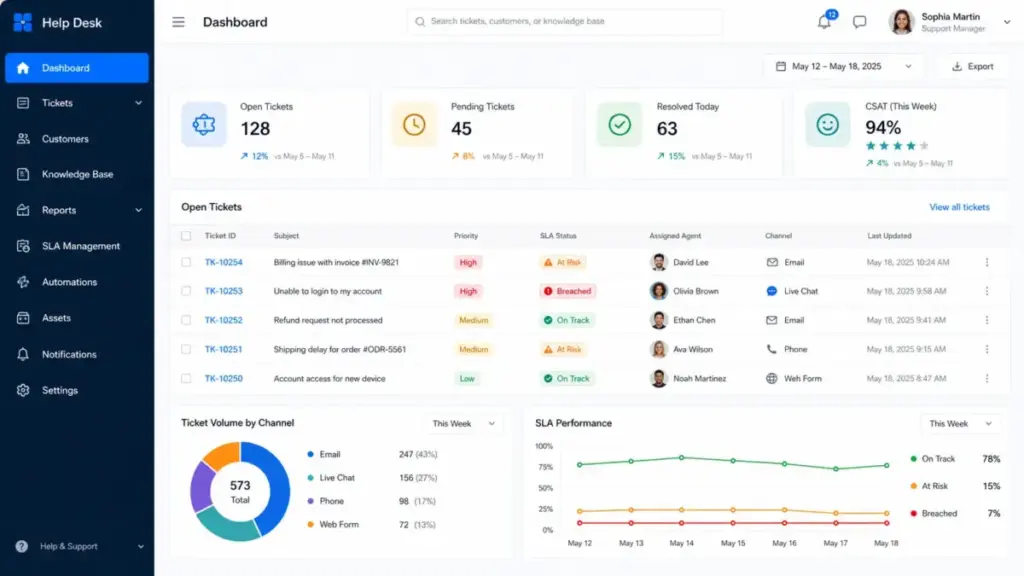
| 7. Reporting closes the loop | Dashboards track volume, resolution time, CSAT, and backlog | Informs staffing, training, and process changes |
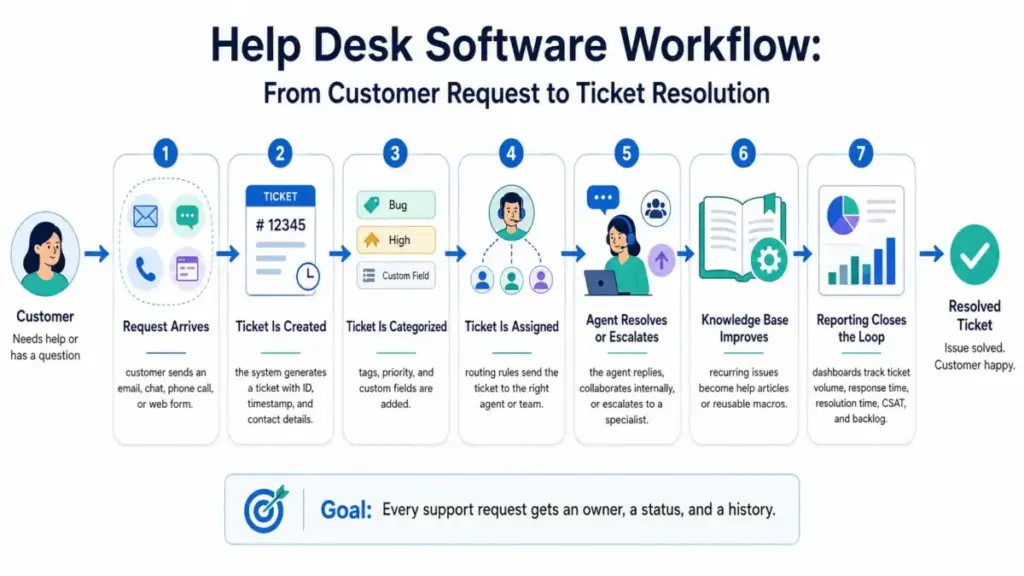
The difference between a functional help desk and a frustrating one is usually in steps 3 and 4. Poor categorization leads to bad routing. Bad routing leads to slow resolution. And slow resolution leads to the kind of customer frustration that shows up in churn data, not just CSAT surveys.
Help Desk Software vs Similar Tools
Help desk software overlaps with several related categories, and the differences matter when you are deciding what to buy. A shared inbox is not a help desk. A ticketing system is not a service desk. Choosing the wrong category wastes budget and creates workflow gaps.
| Tool Type | Primary Use | SLA Tracking | Multi-Channel | Automation | Reporting | Best For |
|---|---|---|---|---|---|---|
| Help desk software | Full support operations | Yes | Yes | Yes | Yes | Teams needing structure and accountability |
| Ticketing system | Request tracking only | Limited | Sometimes | Basic | Basic | Teams that only need ticket assignment |
| Shared inbox | Team email collaboration | No | Email only | Minimal | Minimal | Tiny teams under 20 requests/week |
| Service desk | IT service management | Yes, ITIL-aligned | Yes | Yes | Yes, with CMDB | IT departments with asset and change management |
| Knowledge base software | Self-service content | No | No | No | Page analytics | Reducing repetitive tickets |
| Contact center software | High-volume phone and chat | Yes | Yes, voice-first | Yes | Yes, with QA | Call centers and BPO operations |
The most common mistake I see is teams buying a full service desk when they need a help desk, or sticking with a shared inbox when they have outgrown it. A shared inbox works until you need SLA tracking, routing rules, or reporting. A help desk works until you need ITIL workflows, asset management, or change advisory boards. Match the tool to the process, not the other way around.
Types of Help Desk Software
Not all help desk platforms solve the same problem. The market splits into distinct types based on who the end user is, what channels matter, and how tightly the tool connects to other business systems.
Customer Support Help Desk
Built for external customer-facing teams. These platforms prioritize omnichannel inbox management, CSAT collection, and customer history. Zendesk, Freshdesk, and Help Scout fit here. The focus is speed of response and quality of interaction.
IT Help Desk
Designed for internal employee support. IT help desks handle password resets, access requests, hardware issues, and onboarding. According to the Fixify 2026 IT Help Desk Benchmark Report, which analyzed 50,000+ tickets across 30+ organizations over 14 months ending February 2026, 22% of IT help desk tickets were work stoppages where the employee could not do their job until resolution.
Ecommerce Help Desk
Purpose-built for order-related support. These tools pull in order data, shipping status, and refund history directly into the ticket. Gorgias is the clearest example, connecting to Shopify, BigCommerce, and WooCommerce so agents see the full order context without switching tabs.
SaaS Product Support Help Desk
Optimized for product-led support conversations. These platforms embed chat widgets, trigger messages based on user behavior, and connect tickets to product usage data. Intercom leads this category with its messenger-first approach and AI agent (Fin) built into the conversation flow.
Enterprise Service Desk
Extends the help desk into IT service management with ITIL alignment, configuration management databases, change management workflows, and cross-department service catalogs. ManageEngine ServiceDesk Plus and Salesforce Service Cloud serve this tier. Most teams under 100 agents do not need this level of structure.
Core Help Desk Software Features
The feature gap between basic and advanced help desk tools is wider than most buyers expect. A free plan might cover ticketing and email. An enterprise plan adds AI agents, audit logs, and workforce management. Here is what each feature layer actually does.
Ticket Management
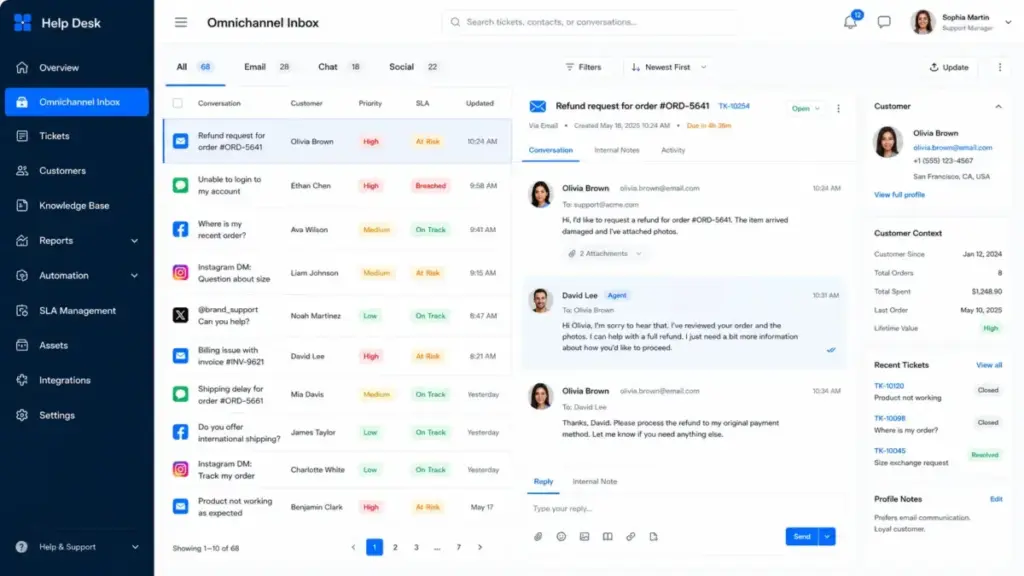
The foundation. Every request becomes a ticket with a unique ID, status, priority, tags, and assignment. Good ticket management includes collision detection (alerting agents when two people open the same ticket), merge capabilities, and custom fields for your specific workflow.
Omnichannel Inbox
Unifies email, live chat, social messaging, phone, and web forms into one agent workspace. Without this, agents toggle between Gmail, Facebook Messenger, and a phone system, losing context at every switch. As one Freshdesk user noted: “You can easily track tickets, and contacts.” – Joe R, IT Director, Capterra.
SLA Tracking
Sets response and resolution deadlines by ticket priority, channel, or customer tier. SLA management turns “we try to reply fast” into “Priority 1 tickets get a first response within 1 hour and resolution within 4 hours.” Breaches trigger escalation rules automatically.
Knowledge Base
A self-service library of help articles, FAQs, and troubleshooting guides. A well-maintained knowledge base reduces ticket volume by letting customers find answers themselves. It also powers AI automation. If your articles are outdated or missing, AI deflection fails. For teams building their first knowledge base, the knowledge base software requirements template on SaaSZap is a practical starting point.
Automation Rules
Rules that trigger actions based on ticket conditions. Examples: auto-assign billing tickets to the finance team, escalate tickets idle for 4 hours, tag tickets containing “refund” as priority high. This is workflow automation applied to support operations.
AI Agent Assist
AI features range from suggested replies and ticket summarization to fully autonomous AI agents that resolve tickets without human involvement. The Fixify benchmark found that AI automation resolved 29.5% of automated tickets within 1 hour, compared to 3.6% without automation. For identity and access management tickets specifically, median resolution time dropped from 65.7 hours to 2.9 hours with automation.
But AI works best when the knowledge base is clean, categories are consistent, and handoff rules are defined. Without those foundations, AI generates confident wrong answers.
Reporting and Analytics
Dashboards tracking ticket volume, backlog, first response time, average resolution time, CSAT scores, and agent performance. Reporting turns support from a cost center into a data source for staffing decisions, product improvements, and customer lifecycle insights.
Security and Permissions
Role-based access controls, audit logs, SSO, and field-level permissions. Essential for teams handling sensitive data, regulated industries, or multi-brand operations where agents should only see their own brand’s tickets.
Benefits of Help Desk Software
The measurable gains from help desk software come from structure, not features. Tools do not fix broken processes, but they make working processes faster, more visible, and easier to scale.
- Fewer lost requests. Every message becomes a ticket. Nothing stays buried in a personal inbox or Slack thread.
- Clear ownership. Each ticket has an assigned agent. No more “I thought you were handling that” conversations.
- Faster routing. Automation rules send tickets to the right team in seconds instead of minutes of manual triage.
- Complete support history. Every interaction is logged. When a customer contacts you again, the agent sees the full conversation history, not just today’s message.
- Lower repeat question volume. A knowledge base deflects common questions before they become tickets. Teams with strong self-service content see 20-40% fewer repetitive tickets.
- Data for staffing decisions. Reporting shows peak hours, busiest channels, and agent capacity. This turns hiring from guesswork into math.
- Smoother handoffs across teams. When support identifies a bug, the ticket moves to engineering with full context. When a prospect asks a billing question, sales sees the support history. This connects directly to managing the full customer lifecycle.
When Help Desk Software Does Not Work
Help desk software fails when teams buy tools before defining processes. The platform amplifies whatever workflow you bring to it. If your process is messy, you get organized mess.
Here are the most common failure patterns I see:
Messy categories. If your ticket categories are “General,” “Other,” and “Urgent,” routing rules cannot work. AI cannot classify. Reports mean nothing. Fix your taxonomy before you configure automation.
No support owner. Help desk software assigns tickets, but someone must own the support function. Without a person accountable for queue health, SLA compliance, and process improvement, tickets pile up regardless of the tool.
Weak knowledge base. AI deflection and self-service depend on article quality. If your help center has 5 outdated articles, automation will either fail silently or give wrong answers confidently.
AI before process. Turning on AI agents before establishing consistent categories, response templates, and escalation rules creates unpredictable outcomes. AI works best as a layer on top of clean operations, not as a replacement for them.
Too many custom fields. Over-engineering ticket forms with 15 required fields slows down agents and frustrates customers. Start with 3-5 fields. Add more only when reporting proves you need them.
Enterprise tool bought too early. A 3-person support team using Zendesk Enterprise with Copilot, QA, and Workforce Management add-ons is paying for governance they do not need. As one user observed: “Tickets can sometimes get stuck in Suspended.” – Clyde W, Systems Administrator, Capterra. Complex tools introduce complexity.
When Do You Need Help Desk Software?
Not every team needs help desk software today, but most growing teams will need it eventually. The decision depends on team size, channel count, ticket volume, and accountability requirements.
Email is enough when:
- One person handles support
- Fewer than 20 simple requests per week
- All requests arrive via one channel
- No SLA commitments exist
- You do not need reporting on response times
You need help desk software when:
- 2 or more people answer support requests
- Requests arrive from 3 or more channels (email, chat, social, phone)
- Customers report missed or duplicate replies
- You have SLA commitments to customers or internal teams
- The same 10-15 questions appear every week (knowledge base opportunity)
- You cannot answer “what is our average resolution time?”
You need enterprise-grade help desk software when:
- Audit logs and compliance documentation are required
- Multiple brands or products share a support team
- HIPAA, GDPR, or industry-specific regulations apply
- Complex routing spans departments or geographies
- Workforce management and quality assurance are operational priorities
How Much Help Desk Software Costs
Help desk pricing models vary more than most buyers expect. The sticker price per seat is often just the starting point. Add-ons, AI features, and overage charges can double the real cost.
| Pricing Model | How It Works | Example | Watch Out For |
|---|---|---|---|
| Per agent/month | Fixed cost per support agent | Zendesk Suite Team from $55/agent/month | Add-on costs stack up fast |
| Per agent/month (free tier) | Free for small teams, paid at scale | Freshdesk free for 1-2 agents (6 months) | Feature limits on free plans |
| Per agent/month (mid-range) | Balanced feature set at moderate cost | Help Scout Standard from $25/user/month | Extra inboxes $10/month, extra Docs sites $20/month |
| Per ticket/month | Cost scales with ticket volume | Gorgias Starter from $10/month for 50 tickets | Overage charges on high-volume months |
| Per seat + AI outcome | Base seat price plus per-resolution AI fee | Intercom Essential from $29/seat/month + Fin AI from $0.99/outcome | AI costs are unpredictable at scale |
| Free edition | Limited features, limited users | Zoho Desk free with 3 user licenses | Upgrade pressure as team grows |
| Enterprise add-ons | Core plan plus paid modules | Zendesk Copilot $50/agent/month, QA $35/agent/month, WFM $25/agent/month (annual) | Total cost can exceed $165/agent/month |
For detailed Zendesk pricing breakdowns including add-on math, see our pricing analysis.
The real cost question is not “how much per seat?” It is “what will this cost when we have 10 agents, 3 channels, AI enabled, and 2,000 tickets per month?” Run that math before you commit annually.
How to Implement Help Desk Software
Most help desk implementations fail not from bad software but from rushed setup. A 30-day rollout with clear milestones prevents the “we bought it but nobody uses it properly” outcome.
Week 1: Map Channels and Ticket Categories
- List every channel customers use to reach you (email, chat, social, phone, forms)
- Connect the top 2-3 channels to your help desk first
- Define 5-8 ticket categories based on your last 100 support requests
- Set up 3-4 priority levels with clear definitions
- Create agent accounts and assign roles
Week 2: Set Routing and SLA Rules
- Build assignment rules: which ticket types go to which agents or teams
- Configure SLA policies by priority level (first response time, resolution time)
- Set up escalation triggers for SLA breaches
- Test routing with 20-30 sample tickets before going live
Week 3: Build Macros and Knowledge Base Articles
- Write canned responses for your top 10 most common questions
- Publish 5-10 knowledge base articles covering frequent issues
- Link your knowledge base to your help widget for self-service
- Review the knowledge base software requirements template for content structure guidance
Week 4: Review Reports and Fix Bottlenecks
- Run your first weekly report: ticket volume, resolution time, backlog size
- Identify the top 3 bottlenecks (slow categories, overloaded agents, missing articles)
- Adjust routing rules and SLA targets based on real data
- Plan a monthly review cadence for ongoing optimization
Best Tools for Help Desk Software
No single help desk tool is best for every team. The right choice depends on your team size, channel mix, industry, and budget. Here is how the major platforms map to common use cases.
Zendesk for mature support operations. Best for teams with 10+ agents that need advanced routing, reporting, and governance. Strong marketplace with 1,500+ integrations. The trade-off is complexity and add-on costs. “Zendesk Suite offers strong value for money.” – Ifra S, Zendesk Developer, Capterra. Read the full Zendesk review for a detailed breakdown.
Freshdesk for small teams starting out. The free program for 1-2 agents includes ticketing, a knowledge base, and pre-built reports. Good first help desk for teams replacing a shared inbox. Limitations appear at scale. “Freshdesk serves its purpose as a basic helpdesk solution.” – Pedro F, Head of Marketing, Capterra. See the Freshdesk review for details.
Intercom for AI-first SaaS messaging. Messenger-first design with Fin AI Agent built in. Best for SaaS companies with product-led growth motions. Fin pricing at $0.99 per outcome makes cost unpredictable at high volumes. See the Intercom review. For a direct comparison of approaches, read Zendesk vs Intercom.
Help Scout for email-first support teams. Clean, simple interface designed around email workflows. Standard plan at $25/user/month. HIPAA-eligible for healthcare-adjacent teams. Not ideal for high-volume omnichannel operations. Read the Help Scout review.
Gorgias for ecommerce and Shopify stores. Deep Shopify integration pulls order data, shipping status, and customer history directly into tickets. Ticket-volume pricing starts at $10/month for 50 tickets. Best for DTC brands where every ticket involves an order. See the Gorgias review.
Zoho Desk for budget-conscious teams in the Zoho ecosystem. Free edition with 3 user licenses. Strong value if you already use Zoho CRM, Zoho Projects, or other Zoho apps. Less polished than Zendesk or Intercom as a standalone tool. Read the Zoho Desk review.
Help Desk Software Security Checklist
Security is not optional when your help desk stores customer conversations, personal data, and account details. Before signing a contract, verify these items.
- Role-based access control. Can you restrict agents to see only their team’s tickets? Can managers access reports without seeing ticket content?
- SSO integration. Does the platform support SAML or OAuth for single sign-on with your identity provider?
- Audit logs. Does the system log who accessed, modified, or deleted tickets? How long are logs retained?
- Field-level permissions. Can you hide sensitive fields (credit card digits, health information) from specific agent roles?
- Customer data retention. Can you set automatic deletion schedules for closed tickets? Can customers request data export or deletion?
- AI data controls. If AI features process ticket content, where is that data sent? Is it used for model training? Can you opt out?
- HIPAA and GDPR considerations. If you handle health data or serve EU customers, verify BAA availability and data processing agreements. Help Scout offers HIPAA eligibility. Zendesk publishes a trust center. Zoho Desk documents security practices.
- Vendor trust center review. Before committing, review the vendor’s security certifications (SOC 2, ISO 27001), uptime SLA, and incident response process.
Maya Patel’s Quick Take
Most small teams should not start with the most complex help desk available. I have seen 3-person support teams sign annual contracts for enterprise platforms, then spend months configuring features they never use. That is not a technology problem. It is a buying problem.
Start with the simplest tool that fixes three things: ownership (every ticket has an agent), tracking (you know what is open and what is overdue), and reporting (you can measure response time and backlog). That might be Freshdesk’s free plan. It might be Help Scout at $25/user/month. It might be Zoho Desk’s free edition.
Upgrade when your needs outgrow the tool, not when a sales rep shows you a feature demo. The triggers for upgrading are clear: you need audit logs for compliance, your ticket volume requires AI deflection, your channel count exceeds what the basic plan supports, or your SLA commitments require advanced escalation rules.
The wrong help desk turns support chaos into structured chaos. The right one turns it into an operating system for accountability.
FAQ
What is help desk software?
Help desk software is a centralized platform that captures, organizes, assigns, and tracks support requests across channels like email, chat, phone, and social media. It converts every request into a ticket with an owner, a deadline, and a history. The goal is to prevent lost requests, eliminate duplicate replies, and give managers visibility into support operations through reporting and SLA tracking.
What is help desk software used for?
Help desk software is used to manage customer and employee support requests at scale. Customer support teams use it to handle external inquiries. IT departments use it for internal employee requests like password resets and access provisioning. Ecommerce teams use it to manage order-related issues. The common thread is converting unstructured requests into trackable, assignable tickets.
How does help desk software work?
A request arrives via email, chat, phone, or web form. The system creates a ticket, categorizes it, and routes it to the right agent or team based on automation rules. The agent resolves the issue or escalates it. Throughout the process, the platform tracks SLA compliance, logs all interactions, and feeds data into reporting dashboards. Knowledge base articles reduce future ticket volume by enabling self-service.
Is help desk software the same as a ticketing system?
No. A ticketing system is one component of help desk software. Ticketing handles request tracking and assignment. Help desk software adds SLA management, omnichannel support, knowledge bases, automation rules, reporting, and security controls. Think of a ticketing system as the engine and help desk software as the full vehicle.
What is the difference between help desk software and service desk software?
Help desk software manages support requests. Service desk software extends that into IT service management with ITIL alignment, change management, asset tracking, and configuration management databases. Most customer support teams need a help desk. IT departments managing infrastructure, deployments, and compliance workflows may need a service desk.
What is the difference between help desk software and a shared inbox?
A shared inbox lets multiple people access one email account. Help desk software adds ticket assignment, SLA tracking, automation, reporting, and multi-channel support. Shared inboxes work for tiny teams with low volume. Once you have 2+ agents, 3+ channels, or SLA commitments, a shared inbox creates ownership confusion and reporting blind spots.
Who needs help desk software?
Any team answering more than 20 support requests per week across multiple channels. This includes customer support teams at SaaS companies, IT departments handling employee requests, ecommerce brands managing order issues, and any organization with SLA commitments. Solo founders handling simple email support usually do not need it yet.
How much does help desk software cost?
Prices range from free (Zoho Desk with 3 users, Freshdesk for 1-2 agents) to over $165/agent/month (Zendesk with all add-ons). Help Scout starts at $25/user/month. Intercom starts at $29/seat/month plus $0.99 per AI outcome. Gorgias uses ticket-volume pricing starting at $10/month for 50 tickets. Always calculate total cost including add-ons, not just the base seat price.
What features should help desk software include?
At minimum: ticket management, email channel support, assignment rules, SLA tracking, a knowledge base, basic automation, and reporting. Growing teams should look for omnichannel inbox, AI assist, collision detection, custom fields, role-based permissions, and integrations with your CRM and ecommerce platform.
Can AI replace help desk agents?
Not fully. AI can deflect common questions, summarize tickets, suggest replies, and handle simple resolution workflows. The Fixify benchmark found AI automation resolved 29.5% of tickets within 1 hour versus 3.6% without automation. But AI depends on clean knowledge bases, consistent categories, and clear escalation rules. Complex, emotional, or novel issues still require human agents.
What are examples of help desk software?
Major examples include Zendesk (enterprise and mid-market), Freshdesk (small teams), Intercom (SaaS messaging), Help Scout (email-first support), Gorgias (ecommerce), and Zoho Desk (budget-conscious teams). Each targets different team sizes, industries, and workflow priorities.
What is the easiest help desk software for small teams?
Freshdesk and Help Scout are the most common starting points for non-technical small teams. Freshdesk offers a free program for 1-2 agents with ticketing and a knowledge base. Help Scout’s clean interface is built around email workflows at $25/user/month. Zoho Desk’s free edition also works for teams already in the Zoho ecosystem.
Key Takeaways
- Help desk software converts scattered support messages into trackable tickets with clear ownership, deadlines, and history.
- Match the tool category to your needs: shared inbox for solo operators, help desk for growing teams, service desk for IT operations with ITIL requirements.
- AI automation speeds up resolution (29.5% within 1 hour vs 3.6% without, per Fixify’s 2026 benchmark), but only when built on clean knowledge bases and consistent categories.
- Hidden costs matter more than base pricing. Zendesk add-ons alone can exceed $110/agent/month. Intercom’s AI outcome pricing is unpredictable at scale.
- Start with the simplest tool that fixes ownership, tracking, and reporting. Upgrade when compliance, channel count, or SLA risk requires it.
- Implement in 30 days: channels and categories in Week 1, routing and SLAs in Week 2, macros and knowledge base in Week 3, reporting and optimization in Week 4.
- Security is not optional. Verify role-based access, audit logs, data retention policies, and AI data controls before signing any annual contract.